


 Скачать презентацию Cisco Nexus 1000 V Technical Overview N 1
2d3f4e5cdd612b123f392fe63df75e9e.ppt
- Количество слайдов: 88
 Cisco Nexus 1000 V Technical Overview N 1 KV_Technical_v 1 © 2009 Cisco Systems, Inc. All rights reserved. 1
 Agenda § Introduction § System Overview § Switching Overview § Policy Management § Advanced Features § Network Management § Troubleshooting & Diagnostics § Design Examples § Installation N 1 KV_Technical_v 1 © 2009 Cisco Systems, Inc. All rights reserved. 2
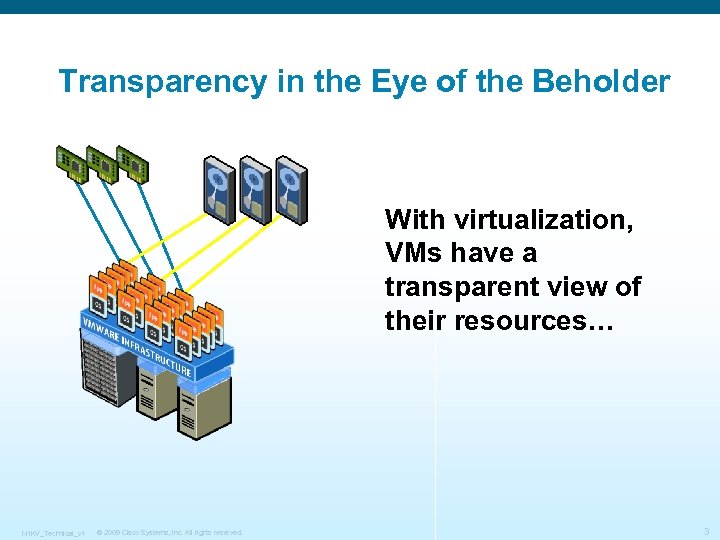 Transparency in the Eye of the Beholder With virtualization, VMs have a transparent view of their resources… N 1 KV_Technical_v 1 © 2009 Cisco Systems, Inc. All rights reserved. 3
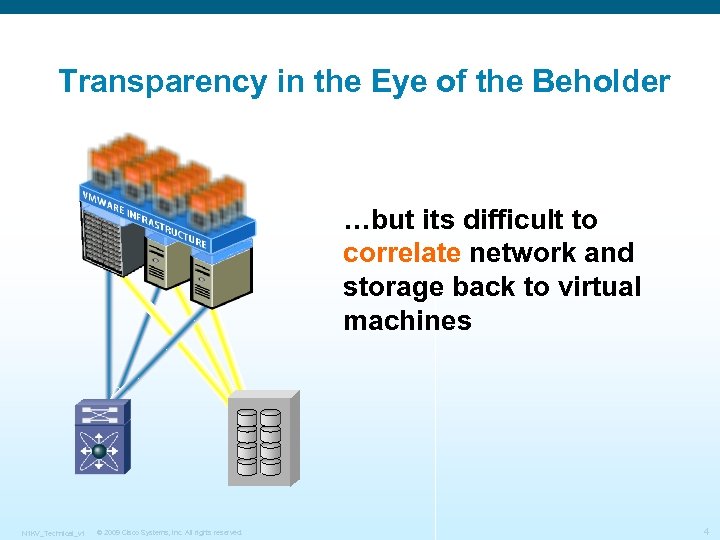 Transparency in the Eye of the Beholder …but its difficult to correlate network and storage back to virtual machines N 1 KV_Technical_v 1 © 2009 Cisco Systems, Inc. All rights reserved. 4
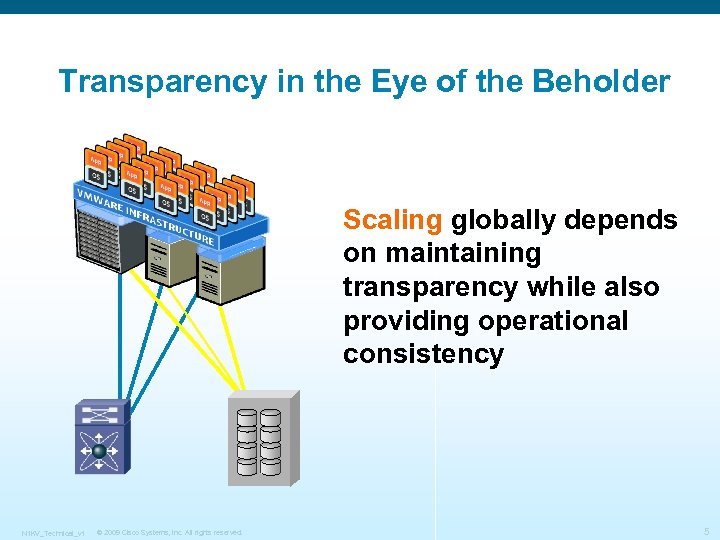 Transparency in the Eye of the Beholder Scaling globally depends on maintaining transparency while also providing operational consistency N 1 KV_Technical_v 1 © 2009 Cisco Systems, Inc. All rights reserved. 5
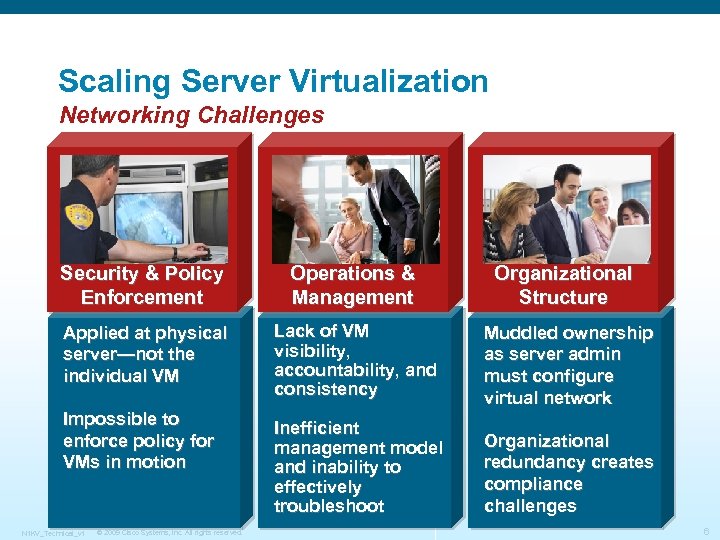 Scaling Server Virtualization Networking Challenges Security & Policy Enforcement Operations & Management Organizational Structure Applied at physical server—not the individual VM Lack of VM visibility, accountability, and consistency Muddled ownership as server admin must configure virtual network Inefficient management model and inability to effectively troubleshoot Organizational redundancy creates compliance challenges Impossible to enforce policy for VMs in motion N 1 KV_Technical_v 1 © 2009 Cisco Systems, Inc. All rights reserved. 6
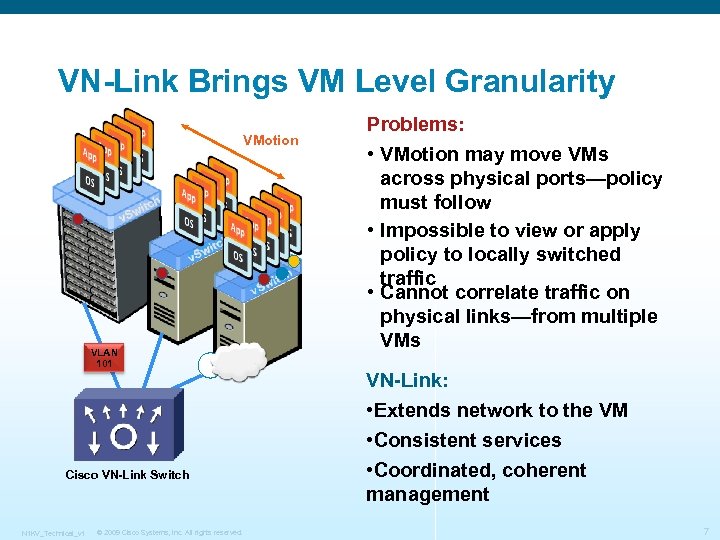 VN-Link Brings VM Level Granularity VMotion VLAN 101 Problems: • VMotion may move VMs across physical ports—policy must follow • Impossible to view or apply policy to locally switched traffic • Cannot correlate traffic on physical links—from multiple VMs VN-Link: • Extends network to the VM Cisco VN-Link Switch N 1 KV_Technical_v 1 © 2009 Cisco Systems, Inc. All rights reserved. • Consistent services • Coordinated, coherent management 7
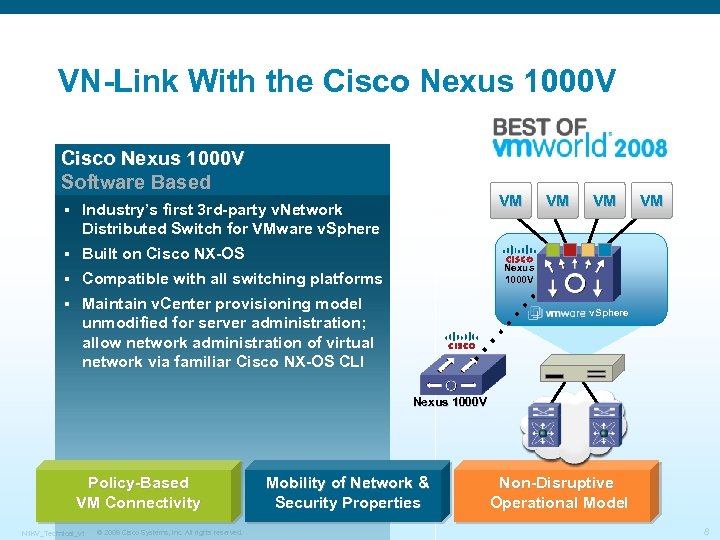 VN-Link With the Cisco Nexus 1000 V Software Based § § Built on Cisco NX-OS § Compatible with all switching platforms § VM Industry’s first 3 rd-party v. Network Distributed Switch for VMware v. Sphere Maintain v. Center provisioning model unmodified for server administration; allow network administration of virtual network via familiar Cisco NX-OS CLI VM VM VM Nexus 1000 V v. Sphere Nexus 1000 V Policy-Based VM Connectivity N 1 KV_Technical_v 1 © 2009 Cisco Systems, Inc. All rights reserved. Mobility of Network & Security Properties Non-Disruptive Operational Model 8
 Cisco Nexus 1000 V System Overview N 1 KV_Technical_v 1 © 2009 Cisco Systems, Inc. All rights reserved. 9
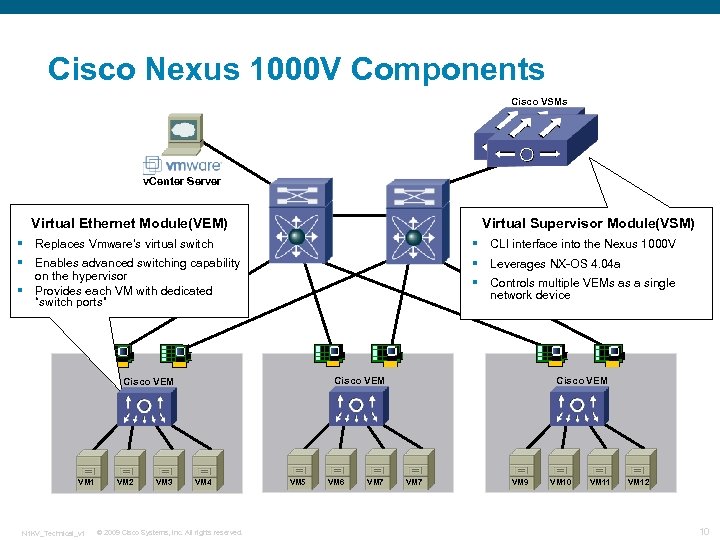 Cisco Nexus 1000 V Components Cisco VSMs v. Center Server Virtual Ethernet Module(VEM) Virtual Supervisor Module(VSM) § Replaces Vmware’s virtual switch § CLI interface into the Nexus 1000 V § Enables advanced switching capability on the hypervisor Provides each VM with dedicated “switch ports” § Leverages NX-OS 4. 04 a § Controls multiple VEMs as a single network device § Cisco VEM VM 1 N 1 KV_Technical_v 1 VM 2 VM 3 VM 4 © 2009 Cisco Systems, Inc. All rights reserved. VM 5 VM 6 VM 7 Cisco VEM VM 7 VM 9 VM 10 VM 11 VM 12 10
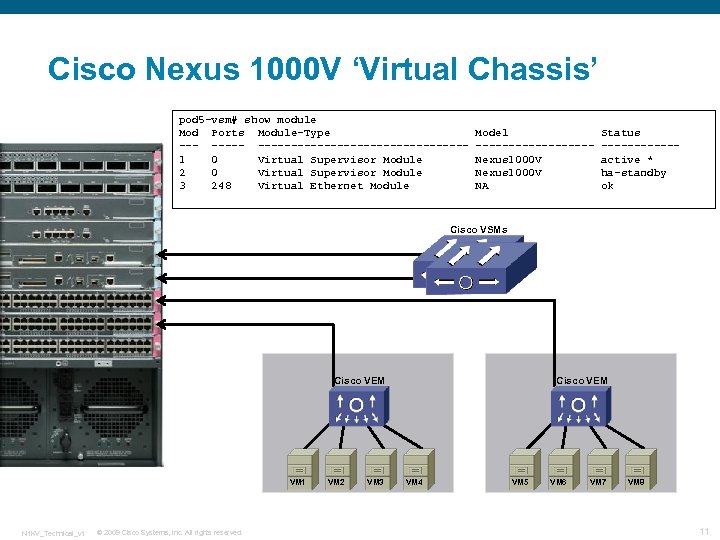 Cisco Nexus 1000 V ‘Virtual Chassis’ pod 5 -vsm# show module Mod Ports Module-Type ----------------1 0 Virtual Supervisor Module 2 0 Virtual Supervisor Module 3 248 Virtual Ethernet Module Model ---------Nexus 1000 V NA Status ------active * ha-standby ok Cisco VSMs Cisco VEM VM 1 N 1 KV_Technical_v 1 © 2009 Cisco Systems, Inc. All rights reserved. VM 2 VM 3 Cisco VEM VM 4 VM 5 VM 6 VM 7 VM 8 11
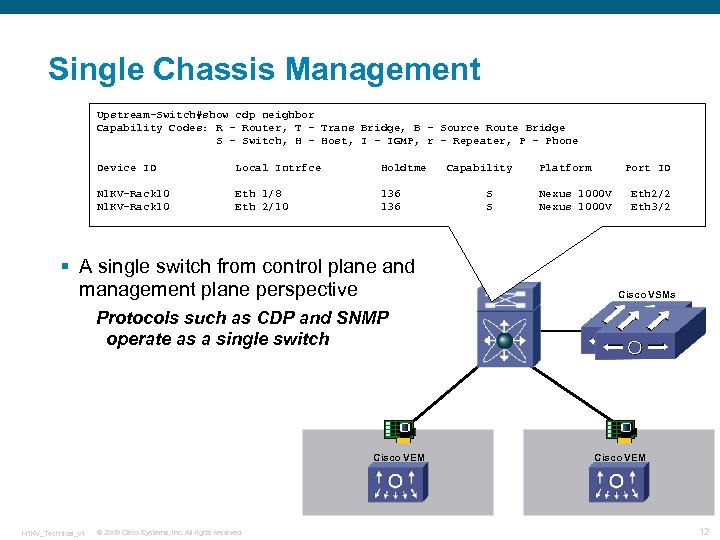 Single Chassis Management Upstream-Switch#show cdp neighbor Capability Codes: R - Router, T - Trans Bridge, B - Source Route Bridge S - Switch, H - Host, I - IGMP, r - Repeater, P - Phone Device ID Local Intrfce Holdtme N 1 KV-Rack 10 Eth 1/8 Eth 2/10 136 § A single switch from control plane and management plane perspective Capability S S Platform Port ID Nexus 1000 V Eth 2/2 Eth 3/2 Cisco VSMs Protocols such as CDP and SNMP operate as a single switch Cisco VEM N 1 KV_Technical_v 1 © 2009 Cisco Systems, Inc. All rights reserved. Cisco VEM 12
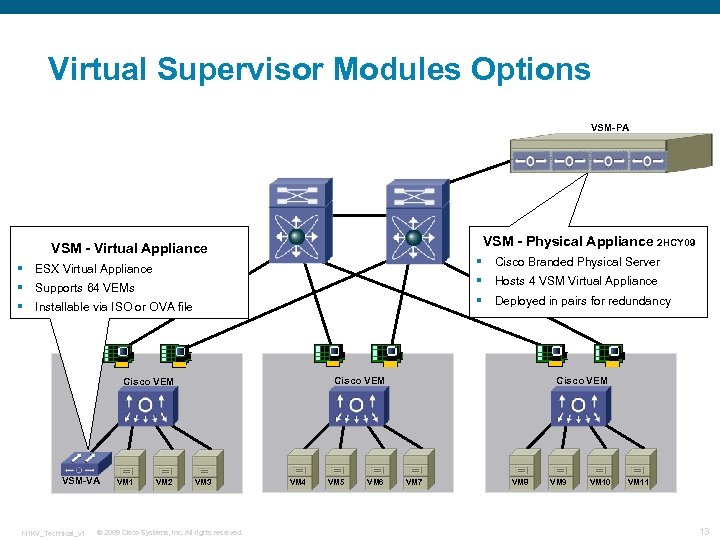 Virtual Supervisor Modules Options VSM-PA VSM - Physical Appliance 2 HCY 09 VSM - Virtual Appliance Supports 64 VEMs § Installable via ISO or OVA file N 1 KV_Technical_v 1 VM 2 Hosts 4 VSM Virtual Appliance Deployed in pairs for redundancy Cisco VEM VSM-VA Cisco Branded Physical Server § ESX Virtual Appliance § § VM 3 © 2009 Cisco Systems, Inc. All rights reserved. VM 4 VM 5 VM 6 Cisco VEM VM 7 VM 8 VM 9 VM 10 VM 11 13
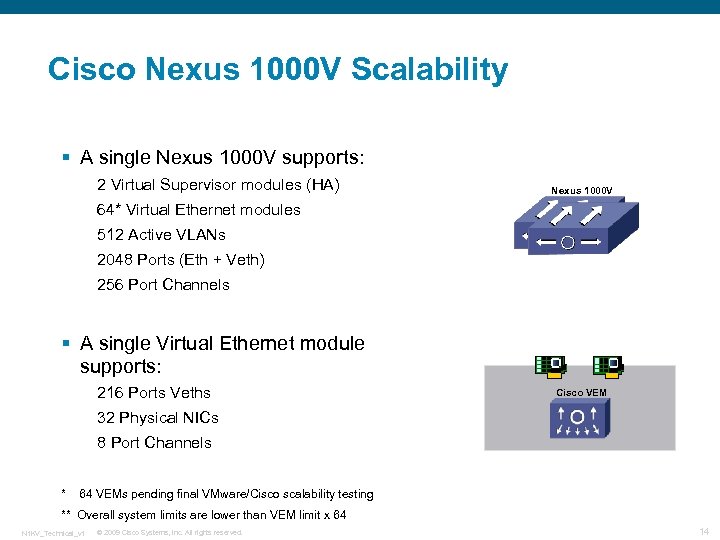 Cisco Nexus 1000 V Scalability § A single Nexus 1000 V supports: 2 Virtual Supervisor modules (HA) Nexus 1000 V 64* Virtual Ethernet modules 512 Active VLANs 2048 Ports (Eth + Veth) 256 Port Channels § A single Virtual Ethernet module supports: 216 Ports Veths Cisco VEM 32 Physical NICs 8 Port Channels * 64 VEMs pending final VMware/Cisco scalability testing ** Overall system limits are lower than VEM limit x 64 N 1 KV_Technical_v 1 © 2009 Cisco Systems, Inc. All rights reserved. 14
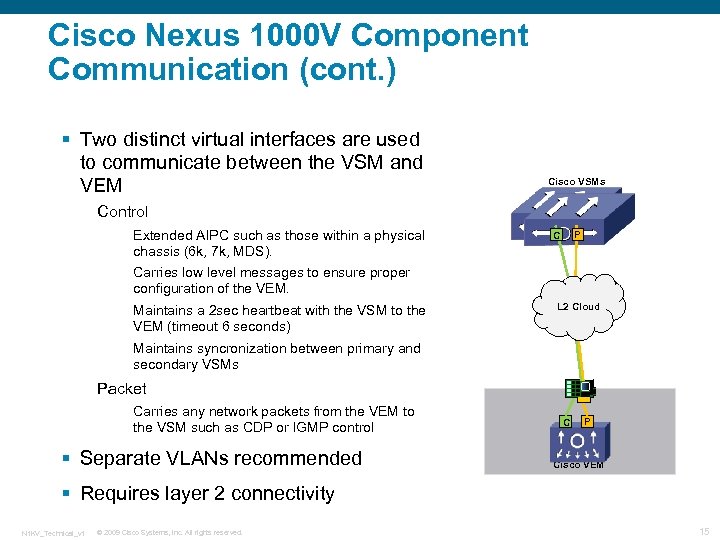 Cisco Nexus 1000 V Component Communication (cont. ) § Two distinct virtual interfaces are used to communicate between the VSM and VEM Cisco VSMs Control Extended AIPC such as those within a physical chassis (6 k, 7 k, MDS). P C Carries low level messages to ensure proper configuration of the VEM. Maintains a 2 sec heartbeat with the VSM to the VEM (timeout 6 seconds) L 2 Cloud Maintains syncronization between primary and secondary VSMs Packet Carries any network packets from the VEM to the VSM such as CDP or IGMP control § Separate VLANs recommended C P Cisco VEM § Requires layer 2 connectivity N 1 KV_Technical_v 1 © 2009 Cisco Systems, Inc. All rights reserved. 15
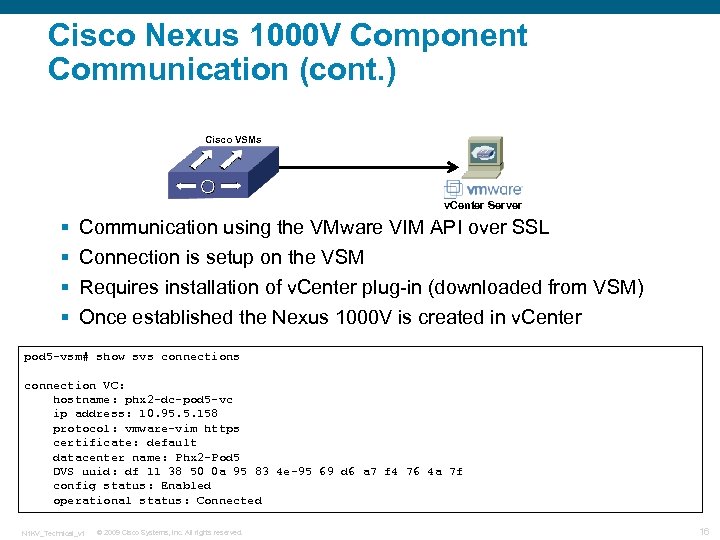 Cisco Nexus 1000 V Component Communication (cont. ) Cisco VSMs v. Center Server § § Communication using the VMware VIM API over SSL Connection is setup on the VSM Requires installation of v. Center plug-in (downloaded from VSM) Once established the Nexus 1000 V is created in v. Center pod 5 -vsm# show svs connection VC: hostname: phx 2 -dc-pod 5 -vc ip address: 10. 95. 5. 158 protocol: vmware-vim https certificate: default datacenter name: Phx 2 -Pod 5 DVS uuid: df 11 38 50 0 a 95 83 4 e-95 69 d 6 a 7 f 4 76 4 a 7 f config status: Enabled operational status: Connected N 1 KV_Technical_v 1 © 2009 Cisco Systems, Inc. All rights reserved. 16
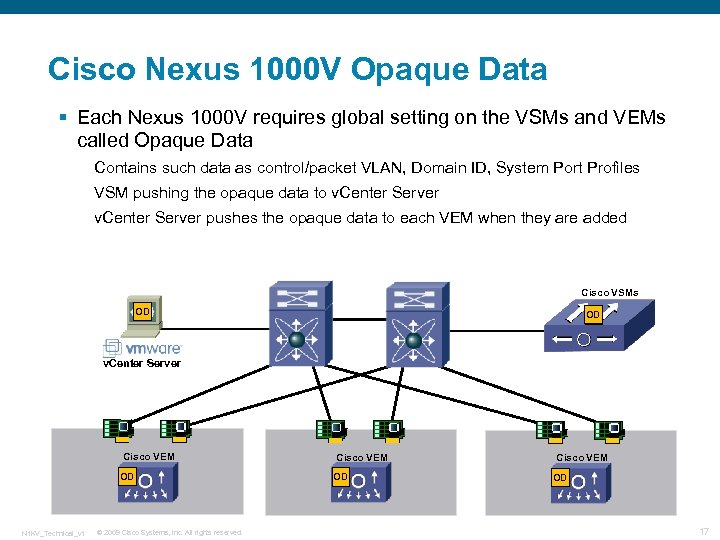 Cisco Nexus 1000 V Opaque Data § Each Nexus 1000 V requires global setting on the VSMs and VEMs called Opaque Data Contains such data as control/packet VLAN, Domain ID, System Port Profiles VSM pushing the opaque data to v. Center Server pushes the opaque data to each VEM when they are added Cisco VSMs OD OD v. Center Server Cisco VEM OD N 1 KV_Technical_v 1 © 2009 Cisco Systems, Inc. All rights reserved. Cisco VEM OD 17
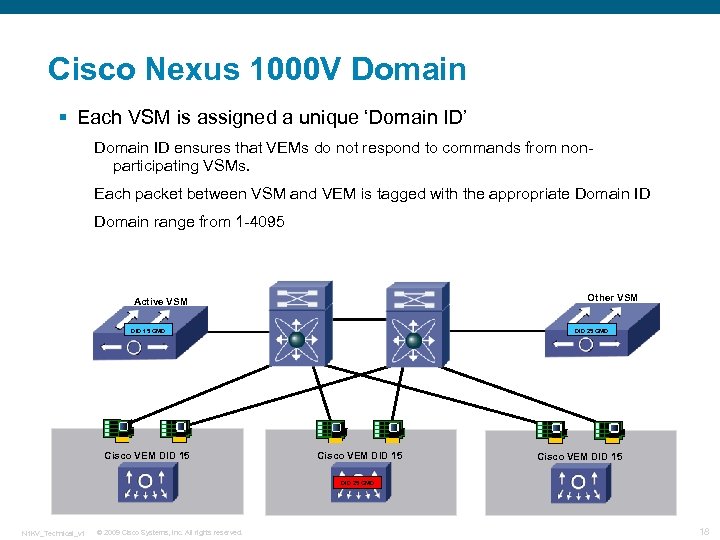 Cisco Nexus 1000 V Domain § Each VSM is assigned a unique ‘Domain ID’ Domain ID ensures that VEMs do not respond to commands from nonparticipating VSMs. Each packet between VSM and VEM is tagged with the appropriate Domain ID Domain range from 1 -4095 Other VSM Active VSM DID 15 CMD Cisco VEM DID 15 DID 25 CMD N 1 KV_Technical_v 1 © 2009 Cisco Systems, Inc. All rights reserved. 18
 Cisco Nexus 1000 V Switching N 1 KV_Technical_v 1 © 2009 Cisco Systems, Inc. All rights reserved. 19
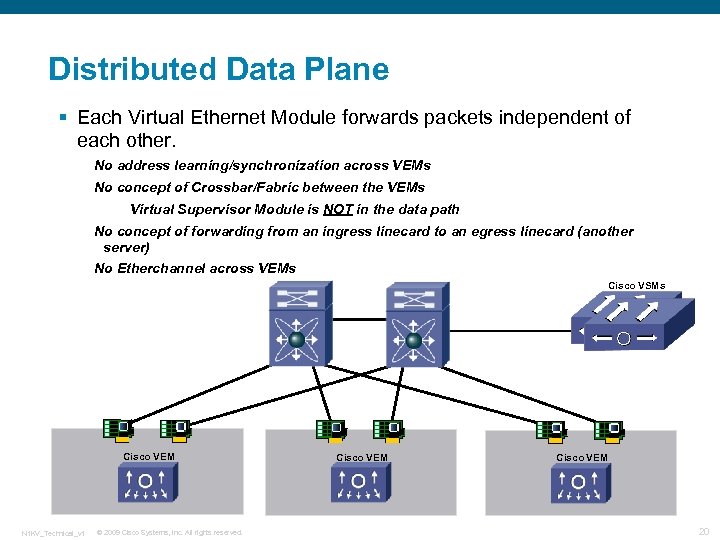 Distributed Data Plane § Each Virtual Ethernet Module forwards packets independent of each other. No address learning/synchronization across VEMs No concept of Crossbar/Fabric between the VEMs Virtual Supervisor Module is NOT in the data path No concept of forwarding from an ingress linecard to an egress linecard (another server) No Etherchannel across VEMs Cisco VSMs Cisco VEM N 1 KV_Technical_v 1 © 2009 Cisco Systems, Inc. All rights reserved. Cisco VEM 20
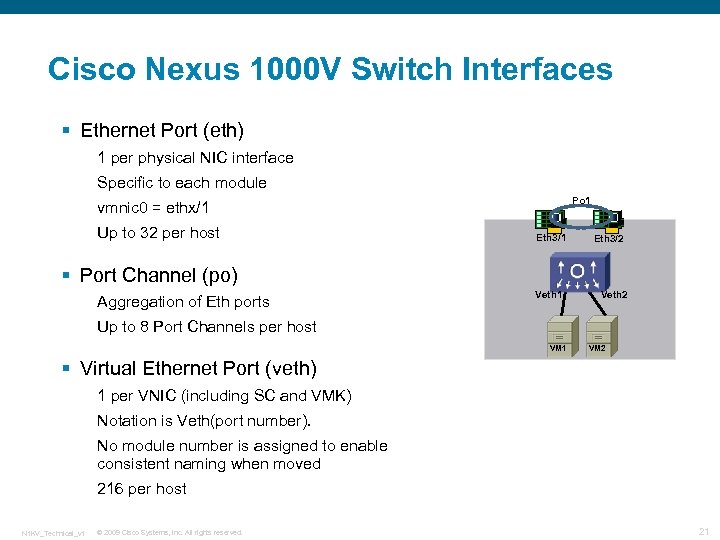 Cisco Nexus 1000 V Switch Interfaces § Ethernet Port (eth) 1 per physical NIC interface Specific to each module Po 1 vmnic 0 = ethx/1 Up to 32 per host Eth 3/1 Eth 3/2 § Port Channel (po) Aggregation of Eth ports Veth 1 Veth 2 Up to 8 Port Channels per host VM 1 VM 2 § Virtual Ethernet Port (veth) 1 per VNIC (including SC and VMK) Notation is Veth(port number). No module number is assigned to enable consistent naming when moved 216 per host N 1 KV_Technical_v 1 © 2009 Cisco Systems, Inc. All rights reserved. 21
 Cisco Nexus 1000 V v. Eth Interface § Virtual Ethernet Port § v. Eths are assigned sequentially § VM v. NICs are statically bound to a v. Eth Assignment persistent through reboots May change if the v. NIC is reassigned to another port profile v. Eths will move between modules when a VM is moved (HA, Vmotion, etc…) § Default virtual ‘speed’ is Gigabit as negotiated with the guest OS By default performance is un-gated (i. e 1 Gb v. NIC can run faster than 1 Gb) § 2048 v. Eths supported system wide N 1 KV_Technical_v 1 © 2009 Cisco Systems, Inc. All rights reserved. 22
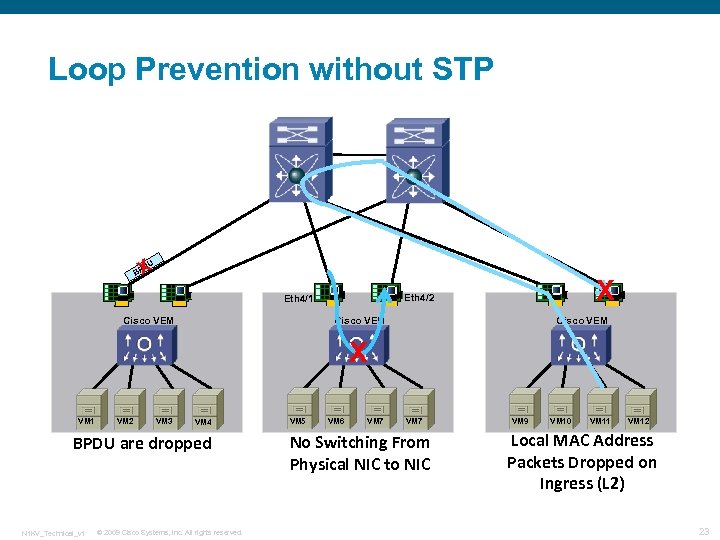 Loop Prevention without STP X DU BP X Eth 4/2 Eth 4/1 Cisco VEM X VM 1 VM 2 VM 3 VM 4 BPDU are dropped N 1 KV_Technical_v 1 © 2009 Cisco Systems, Inc. All rights reserved. VM 5 VM 6 VM 7 No Switching From Physical NIC to NIC VM 9 VM 10 VM 11 VM 12 Local MAC Address Packets Dropped on Ingress (L 2) 23
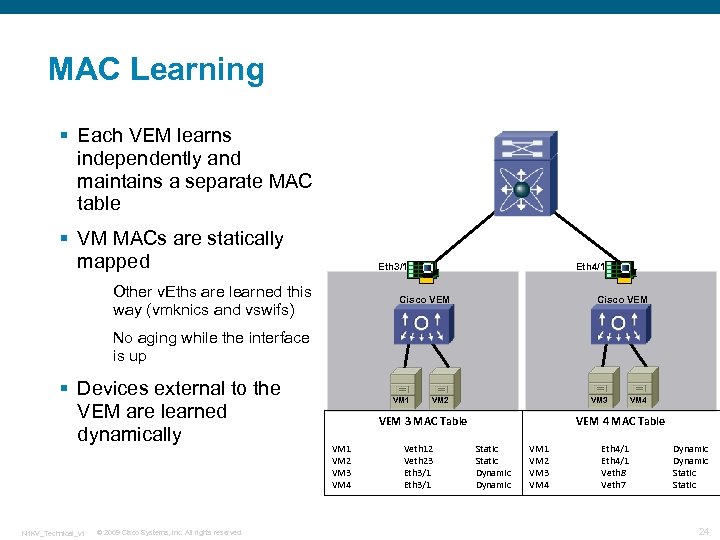 MAC Learning § Each VEM learns independently and maintains a separate MAC table § VM MACs are statically mapped Eth 4/1 Eth 3/1 Other v. Eths are learned this way (vmknics and vswifs) Cisco VEM No aging while the interface is up § Devices external to the VEM are learned dynamically N 1 KV_Technical_v 1 © 2009 Cisco Systems, Inc. All rights reserved. VM 1 VM 3 VM 2 VEM 3 MAC Table VM 1 VM 2 VM 3 VM 4 Veth 12 Veth 23 Eth 3/1 VM 4 VEM 4 MAC Table Static Dynamic VM 1 VM 2 VM 3 VM 4 Eth 4/1 Veth 8 Veth 7 Dynamic Static 24
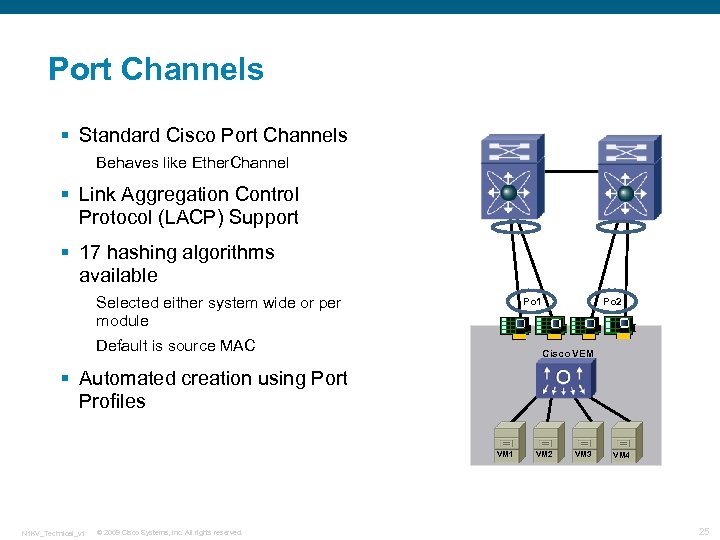 Port Channels § Standard Cisco Port Channels Behaves like Ether. Channel § Link Aggregation Control Protocol (LACP) Support § 17 hashing algorithms available Selected either system wide or per module Po 1 Default is source MAC Po 2 Cisco VEM § Automated creation using Port Profiles VM 1 N 1 KV_Technical_v 1 © 2009 Cisco Systems, Inc. All rights reserved. VM 2 VM 3 VM 4 25
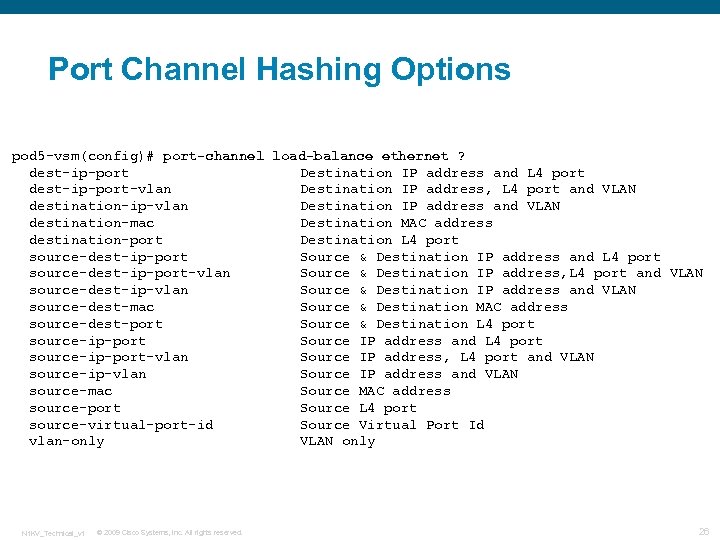 Port Channel Hashing Options pod 5 -vsm(config)# port-channel load-balance ethernet ? dest-ip-port Destination IP address and L 4 port dest-ip-port-vlan Destination IP address, L 4 port and VLAN destination-ip-vlan Destination IP address and VLAN destination-mac Destination MAC address destination-port Destination L 4 port source-dest-ip-port Source & Destination IP address and L 4 port source-dest-ip-port-vlan Source & Destination IP address, L 4 port and VLAN source-dest-ip-vlan Source & Destination IP address and VLAN source-dest-mac Source & Destination MAC address source-dest-port Source & Destination L 4 port source-ip-port Source IP address and L 4 port source-ip-port-vlan Source IP address, L 4 port and VLAN source-ip-vlan Source IP address and VLAN source-mac Source MAC address source-port Source L 4 port source-virtual-port-id Source Virtual Port Id vlan-only VLAN only N 1 KV_Technical_v 1 © 2009 Cisco Systems, Inc. All rights reserved. 26
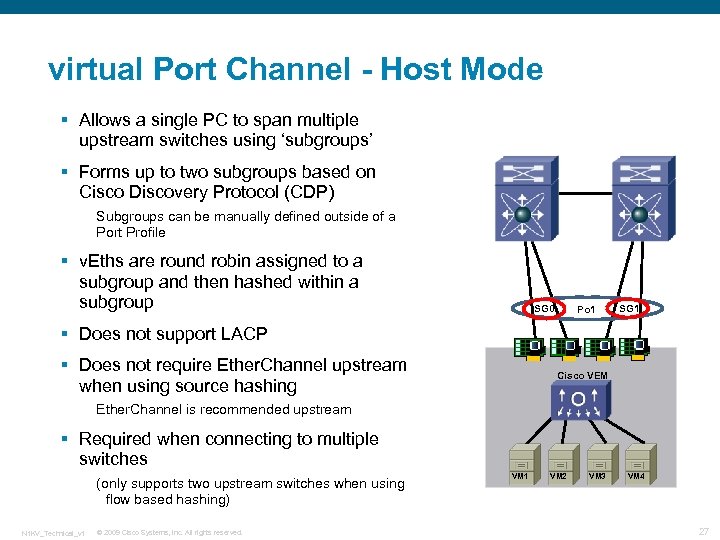 virtual Port Channel - Host Mode § Allows a single PC to span multiple upstream switches using ‘subgroups’ § Forms up to two subgroups based on Cisco Discovery Protocol (CDP) Subgroups can be manually defined outside of a Port Profile § v. Eths are round robin assigned to a subgroup and then hashed within a subgroup SG 0 Po 1 SG 1 § Does not support LACP § Does not require Ether. Channel upstream when using source hashing Cisco VEM Ether. Channel is recommended upstream § Required when connecting to multiple switches (only supports two upstream switches when using flow based hashing) N 1 KV_Technical_v 1 © 2009 Cisco Systems, Inc. All rights reserved. VM 1 VM 2 VM 3 VM 4 27
 Cisco Nexus 1000 V Policy Management N 1 KV_Technical_v 1 © 2009 Cisco Systems, Inc. All rights reserved. 28
 What is a Port-Profile? § A port-profile is a container used to define a common set of configuration commands for multiple interfaces § Define once and apply many times § Simplifies management by storing interface configuration § Key to collaborative management of virtual networking resources § Why is it not like a template or Smart. Port macro? Port-profiles are ‘live’ policies Editing an enabled profile will cause config changes to propagate to all interfaces using that profile (unlike a static one-time macro) N 1 KV_Technical_v 1 © 2009 Cisco Systems, Inc. All rights reserved. 29
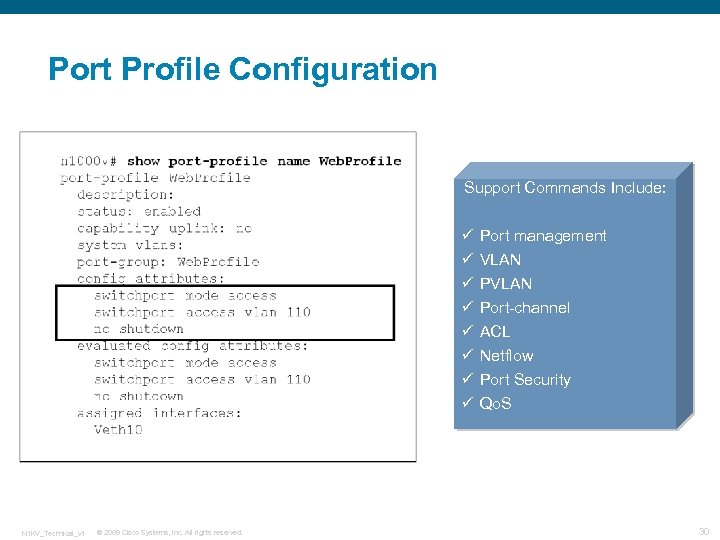 Port Profile Configuration Support Commands Include: ü ü ü ü N 1 KV_Technical_v 1 © 2009 Cisco Systems, Inc. All rights reserved. Port management VLAN Port-channel ACL Netflow Port Security Qo. S 30
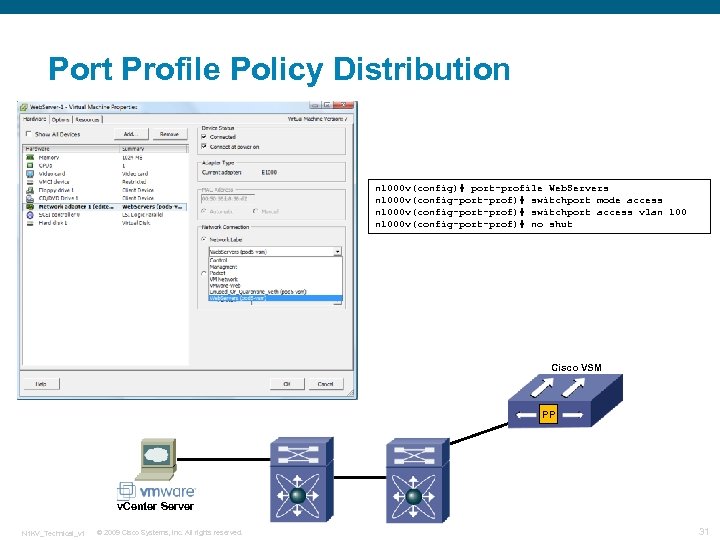 Port Profile Policy Distribution n 1000 v(config)# port-profile Web. Servers n 1000 v(config-port-prof)# switchport mode access n 1000 v(config-port-prof)# switchport access vlan 1000 v(config-port-prof)# no shut Cisco VSM PP v. Center Server N 1 KV_Technical_v 1 © 2009 Cisco Systems, Inc. All rights reserved. 31
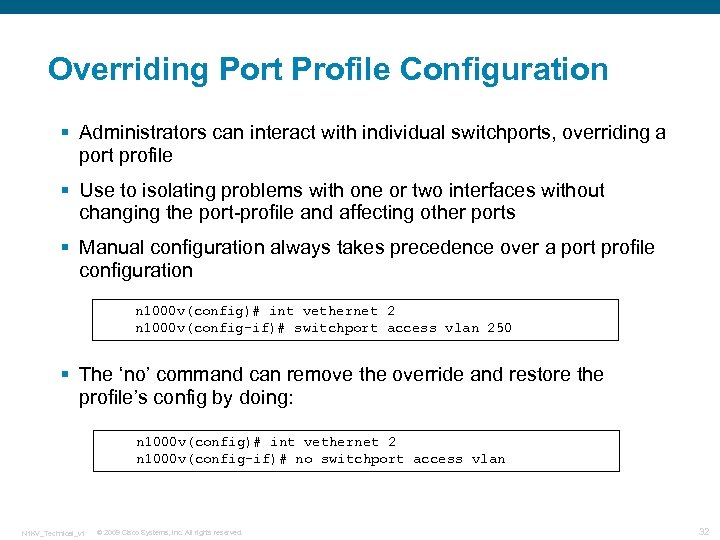 Overriding Port Profile Configuration § Administrators can interact with individual switchports, overriding a port profile § Use to isolating problems with one or two interfaces without changing the port-profile and affecting other ports § Manual configuration always takes precedence over a port profile configuration n 1000 v(config)# int vethernet 2 n 1000 v(config-if)# switchport access vlan 250 § The ‘no’ command can remove the override and restore the profile’s config by doing: n 1000 v(config)# int vethernet 2 n 1000 v(config-if)# no switchport access vlan N 1 KV_Technical_v 1 © 2009 Cisco Systems, Inc. All rights reserved. 32
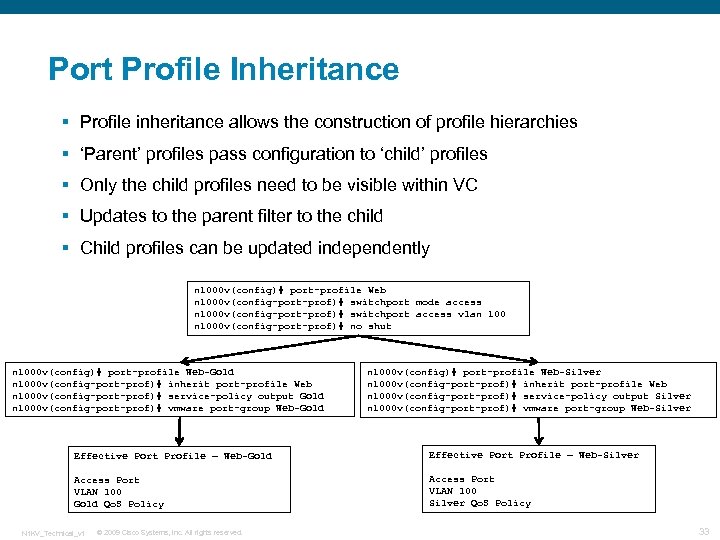 Port Profile Inheritance § Profile inheritance allows the construction of profile hierarchies § ‘Parent’ profiles pass configuration to ‘child’ profiles § Only the child profiles need to be visible within VC § Updates to the parent filter to the child § Child profiles can be updated independently n 1000 v(config)# port-profile Web n 1000 v(config-port-prof)# switchport mode access n 1000 v(config-port-prof)# switchport access vlan 1000 v(config-port-prof)# no shut n 1000 v(config)# port-profile Web-Gold n 1000 v(config-port-prof)# inherit port-profile Web n 1000 v(config-port-prof)# service-policy output Gold n 1000 v(config-port-prof)# vmware port-group Web-Gold n 1000 v(config)# port-profile Web-Silver n 1000 v(config-port-prof)# inherit port-profile Web n 1000 v(config-port-prof)# service-policy output Silver n 1000 v(config-port-prof)# vmware port-group Web-Silver Effective Port Profile – Web-Gold Effective Port Profile – Web-Silver Access Port VLAN 100 Gold Qo. S Policy Access Port VLAN 100 Silver Qo. S Policy N 1 KV_Technical_v 1 © 2009 Cisco Systems, Inc. All rights reserved. 33
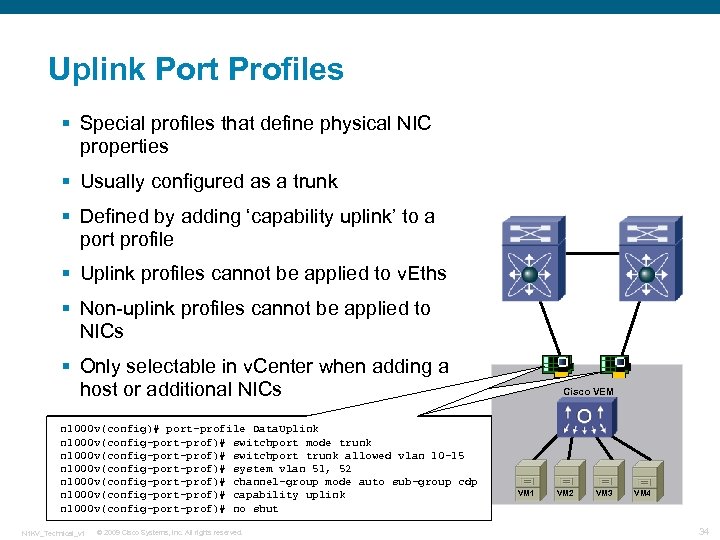 Uplink Port Profiles § Special profiles that define physical NIC properties § Usually configured as a trunk § Defined by adding ‘capability uplink’ to a port profile § Uplink profiles cannot be applied to v. Eths § Non-uplink profiles cannot be applied to NICs § Only selectable in v. Center when adding a host or additional NICs n 1000 v(config)# port-profile Data. Uplink n 1000 v(config-port-prof)# switchport mode trunk n 1000 v(config-port-prof)# switchport trunk allowed vlan 10 -15 n 1000 v(config-port-prof)# system vlan 51, 52 n 1000 v(config-port-prof)# channel-group mode auto sub-group cdp n 1000 v(config-port-prof)# capability uplink n 1000 v(config-port-prof)# no shut N 1 KV_Technical_v 1 © 2009 Cisco Systems, Inc. All rights reserved. Cisco VEM VM 1 VM 2 VM 3 VM 4 34
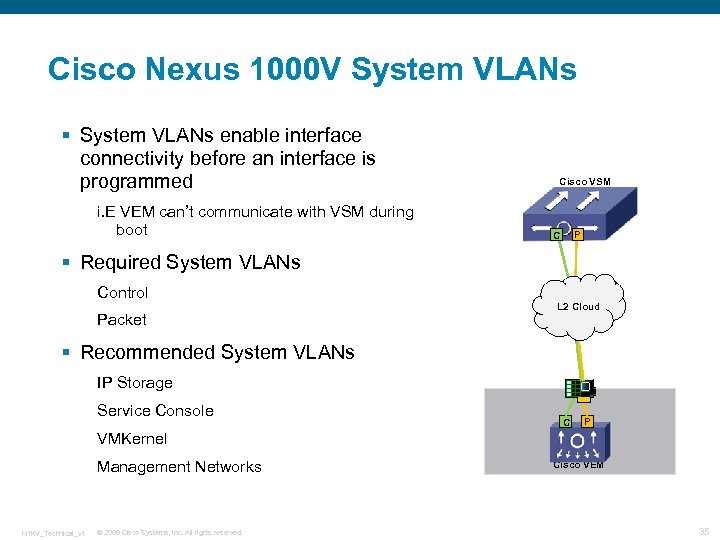 Cisco Nexus 1000 V System VLANs § System VLANs enable interface connectivity before an interface is programmed i. E VEM can’t communicate with VSM during boot Cisco VSM P C § Required System VLANs Control Packet L 2 Cloud § Recommended System VLANs IP Storage Service Console C P VMKernel Management Networks N 1 KV_Technical_v 1 © 2009 Cisco Systems, Inc. All rights reserved. Cisco VEM 35
 System VLAN Guidelines § Port profiles that contain system VLANs are ‘system port profiles’ § The system VLAN list must be a subset of the allowed VLAN list on trunk ports § There must be only one system VLAN on an access port (the access VLAN) § The ‘no system vlan’ command can be given only when no interface is using the profile. § Once a system profile is in use by at least one interface, you can only add to the list of system vlans, but not delete any vlans from the list. § For a profile with system VLANs, ‘no port-profile Sys. Profile’, ‘no vmware port-group’ and ‘no state enabled’ commands can be given only when no interface is using that profile N 1 KV_Technical_v 1 © 2009 Cisco Systems, Inc. All rights reserved. 36
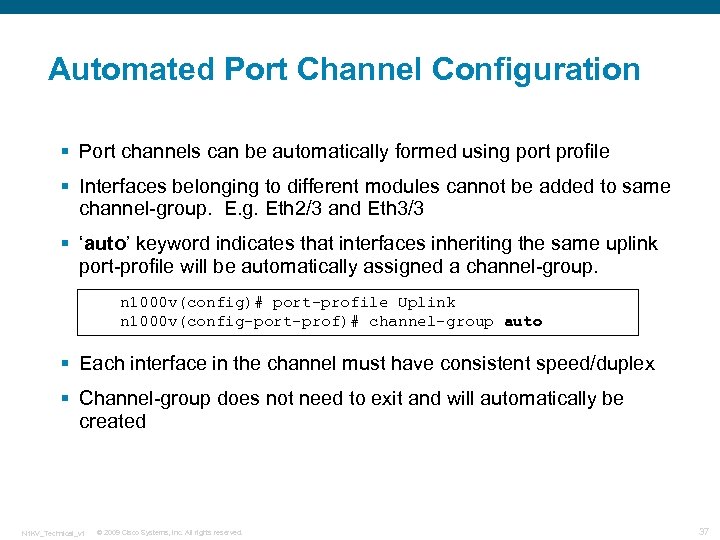 Automated Port Channel Configuration § Port channels can be automatically formed using port profile § Interfaces belonging to different modules cannot be added to same channel-group. E. g. Eth 2/3 and Eth 3/3 § ‘auto’ keyword indicates that interfaces inheriting the same uplink port-profile will be automatically assigned a channel-group. n 1000 v(config)# port-profile Uplink n 1000 v(config-port-prof)# channel-group auto § Each interface in the channel must have consistent speed/duplex § Channel-group does not need to exit and will automatically be created N 1 KV_Technical_v 1 © 2009 Cisco Systems, Inc. All rights reserved. 37
 Cisco Nexus 1000 V Security N 1 KV_Technical_v 1 © 2009 Cisco Systems, Inc. All rights reserved. 38
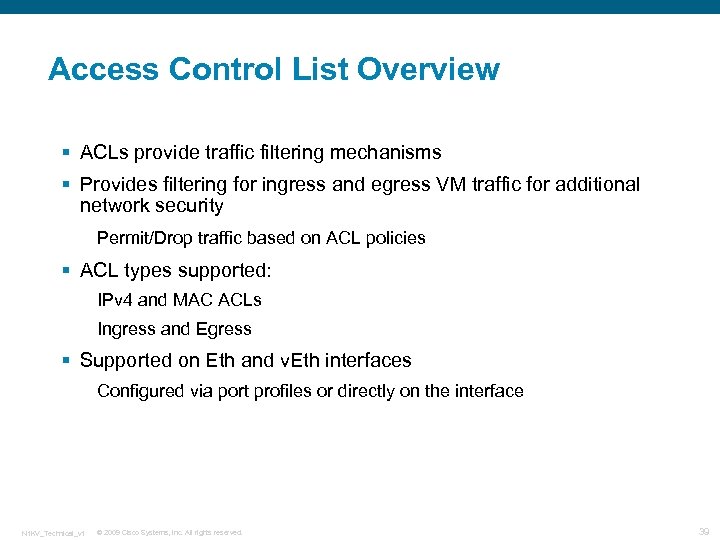 Access Control List Overview § ACLs provide traffic filtering mechanisms § Provides filtering for ingress and egress VM traffic for additional network security Permit/Drop traffic based on ACL policies § ACL types supported: IPv 4 and MAC ACLs Ingress and Egress § Supported on Eth and v. Eth interfaces Configured via port profiles or directly on the interface N 1 KV_Technical_v 1 © 2009 Cisco Systems, Inc. All rights reserved. 39
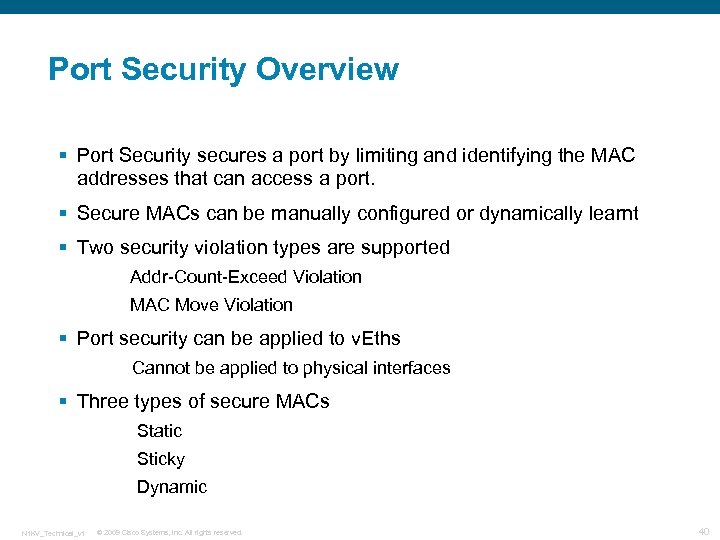 Port Security Overview § Port Security secures a port by limiting and identifying the MAC addresses that can access a port. § Secure MACs can be manually configured or dynamically learnt § Two security violation types are supported Addr-Count-Exceed Violation MAC Move Violation § Port security can be applied to v. Eths Cannot be applied to physical interfaces § Three types of secure MACs Static Sticky Dynamic N 1 KV_Technical_v 1 © 2009 Cisco Systems, Inc. All rights reserved. 40
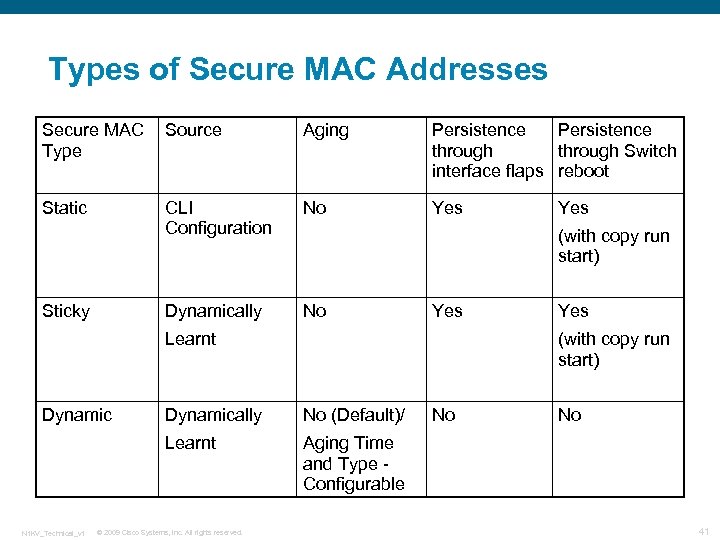 Types of Secure MAC Addresses Secure MAC Type Source Aging Persistence through Switch interface flaps reboot Static CLI Configuration No Yes Dynamically No Sticky (with copy run start) Yes Learnt Dynamic Yes (with copy run start) Dynamically No (Default)/ Learnt N 1 KV_Technical_v 1 Yes Aging Time and Type Configurable © 2009 Cisco Systems, Inc. All rights reserved. No No 41
 Cisco Nexus 1000 V Private VLANs § Private VLANs divide a normal VLAN into sub-L 2 domains § Consist of a Primary VLAN and one or more secondary VLANs § Used to segregate L 2 traffic without wasting IP address space (smaller subnets) § Secondary VLAN access is restricted by setting ‘community’ or isolated’ status N 1 KV_Technical_v 1 © 2009 Cisco Systems, Inc. All rights reserved. 42
 PVLAN Definitions § Primary VLAN: VLAN carrying downstream traffic from the router(s) to the host ports. § Secondary VLAN: Can be either an isolated VLAN or a community VLAN. A port assigned to the isolated VLAN is a isolated port. A port assigned to a community VLAN is a community port. § Isolated VLAN : Communicate only with the primary VLAN § Community VLAN: Communicate within community and with primary VLAN N 1 KV_Technical_v 1 © 2009 Cisco Systems, Inc. All rights reserved. 43
 PVLAN Promiscuous Ports § Promiscuous port: can communicate with all isolated ports and community ports and vice versa. Promiscuous ports are the boundary between the PVLAN domain and the rest of the network Secondary VLANs are remapped to the primary vlan at the promiscuous port. Nexus 1000 V supports promiscuous trunk ports and promiscuous access ports Most deployments will use promiscuous trunk port N 1 KV_Technical_v 1 © 2009 Cisco Systems, Inc. All rights reserved. 44
 PVLAN Topology Examples § Regular Trunk Port to Upstream switch Defines N 1 KV uplink as regular trunk port Defines PVLAN configuration in upstream switch PVLAN extends into upstream switch. Defines SVI promiscuous port in upstream switch § Promiscuous Trunk Port to Upstream switch Defines N 1 KV uplink as promiscuous trunk PVLAN ends at the promiscuous trunk port. No PVLAN configuration in upstream switch N 1 KV_Technical_v 1 © 2009 Cisco Systems, Inc. All rights reserved. 45
 Cisco Nexus 1000 V Quality of Service N 1 KV_Technical_v 1 © 2009 Cisco Systems, Inc. All rights reserved. 46
 Cisco Nexus 1000 V Quality of Service § Nexus 1000 V provides traffic classification, marking and policing Police traffic to/from VMs Mark traffic leaving the ESX host § Can be configured multiple ways Individual Eths or v. Eths Port-Channels Port Profiles § Policies can be applied on input or output Statistics per policy (input/output) per interface § Nexus 1000 V does not implement queuing or full traffic shaping N 1 KV_Technical_v 1 © 2009 Cisco Systems, Inc. All rights reserved. 47
 Qo. S Classification Support § Classification support based on: Access-group: ACL reference Class-map (hierarchical classes possible) Cos (L 2 header) Discard-class: internal Qo. S value Dscp: From IP TOS Ip rtp: UDP port list Packet length: IP Datagram size; inclusive ranges Precedence: 3 bit value from within Dscp field Qos-group: Internal Qo. S value N 1 KV_Technical_v 1 © 2009 Cisco Systems, Inc. All rights reserved. 48
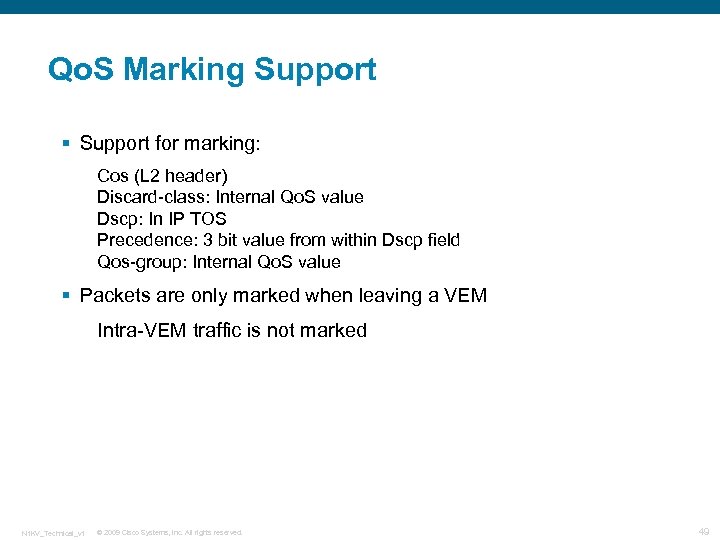 Qo. S Marking Support § Support for marking: Cos (L 2 header) Discard-class: Internal Qo. S value Dscp: In IP TOS Precedence: 3 bit value from within Dscp field Qos-group: Internal Qo. S value § Packets are only marked when leaving a VEM Intra-VEM traffic is not marked N 1 KV_Technical_v 1 © 2009 Cisco Systems, Inc. All rights reserved. 49
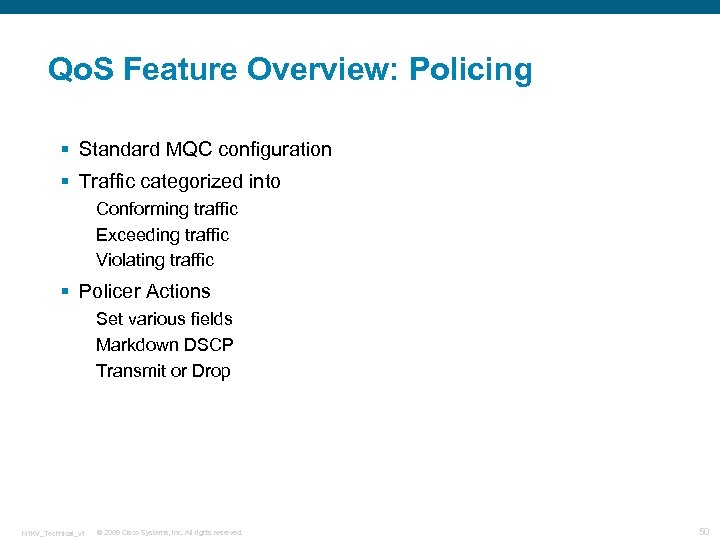 Qo. S Feature Overview: Policing § Standard MQC configuration § Traffic categorized into Conforming traffic Exceeding traffic Violating traffic § Policer Actions Set various fields Markdown DSCP Transmit or Drop N 1 KV_Technical_v 1 © 2009 Cisco Systems, Inc. All rights reserved. 50
 Cisco Nexus 1000 V Network Management N 1 KV_Technical_v 1 © 2009 Cisco Systems, Inc. All rights reserved. 51
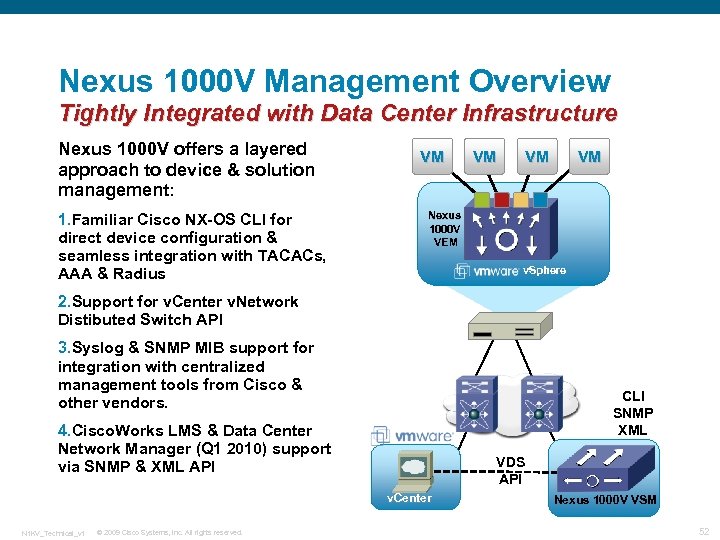 Nexus 1000 V Management Overview Tightly Integrated with Data Center Infrastructure Nexus 1000 V offers a layered approach to device & solution management: 1. Familiar Cisco NX-OS CLI for direct device configuration & seamless integration with TACACs, AAA & Radius VM VM Nexus 1000 V VEM v. Sphere 2. Support for v. Center v. Network Distibuted Switch API 3. Syslog & SNMP MIB support for integration with centralized management tools from Cisco & other vendors. CLI SNMP XML 4. Cisco. Works LMS & Data Center Network Manager (Q 1 2010) support via SNMP & XML API VDS API v. Center N 1 KV_Technical_v 1 © 2009 Cisco Systems, Inc. All rights reserved. Nexus 1000 V VSM 52
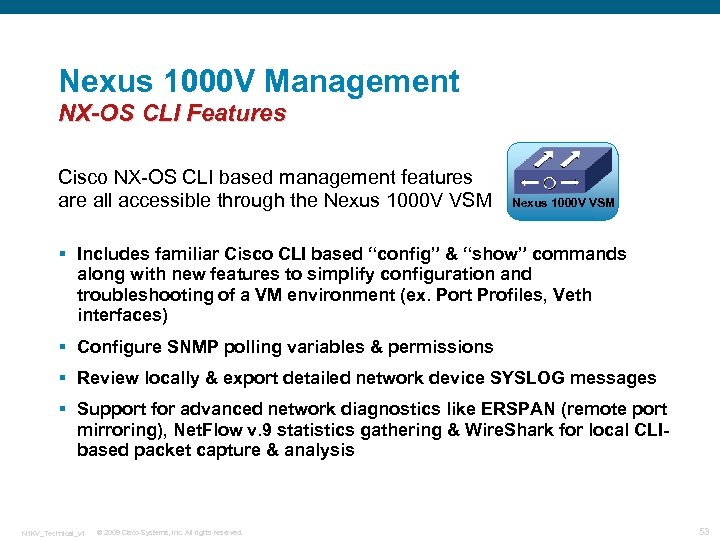 Nexus 1000 V Management NX-OS CLI Features Cisco NX-OS CLI based management features are all accessible through the Nexus 1000 V VSM § Includes familiar Cisco CLI based “config” & “show” commands along with new features to simplify configuration and troubleshooting of a VM environment (ex. Port Profiles, Veth interfaces) § Configure SNMP polling variables & permissions § Review locally & export detailed network device SYSLOG messages § Support for advanced network diagnostics like ERSPAN (remote port mirroring), Net. Flow v. 9 statistics gathering & Wire. Shark for local CLIbased packet capture & analysis N 1 KV_Technical_v 1 © 2009 Cisco Systems, Inc. All rights reserved. 53
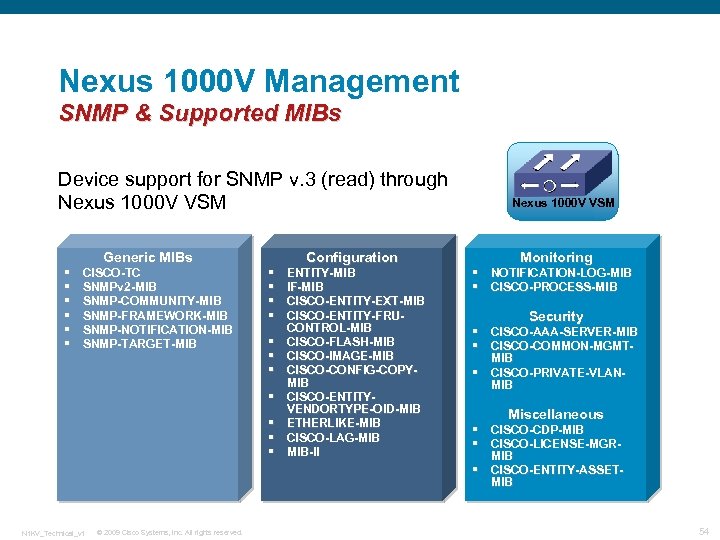 Nexus 1000 V Management SNMP & Supported MIBs Device support for SNMP v. 3 (read) through Nexus 1000 V VSM § § § Generic MIBs CISCO-TC SNMPv 2 -MIB SNMP-COMMUNITY-MIB SNMP-FRAMEWORK-MIB SNMP-NOTIFICATION-MIB SNMP-TARGET-MIB § § § N 1 KV_Technical_v 1 © 2009 Cisco Systems, Inc. All rights reserved. Configuration ENTITY-MIB IF-MIB CISCO-ENTITY-EXT-MIB CISCO-ENTITY-FRUCONTROL-MIB CISCO-FLASH-MIB CISCO-IMAGE-MIB CISCO-CONFIG-COPYMIB CISCO-ENTITYVENDORTYPE-OID-MIB ETHERLIKE-MIB CISCO-LAG-MIB MIB-II Nexus 1000 V VSM Monitoring § NOTIFICATION-LOG-MIB § CISCO-PROCESS-MIB Security § CISCO-AAA-SERVER-MIB § CISCO-COMMON-MGMTMIB § CISCO-PRIVATE-VLANMIB Miscellaneous § CISCO-CDP-MIB § CISCO-LICENSE-MGRMIB § CISCO-ENTITY-ASSETMIB 54
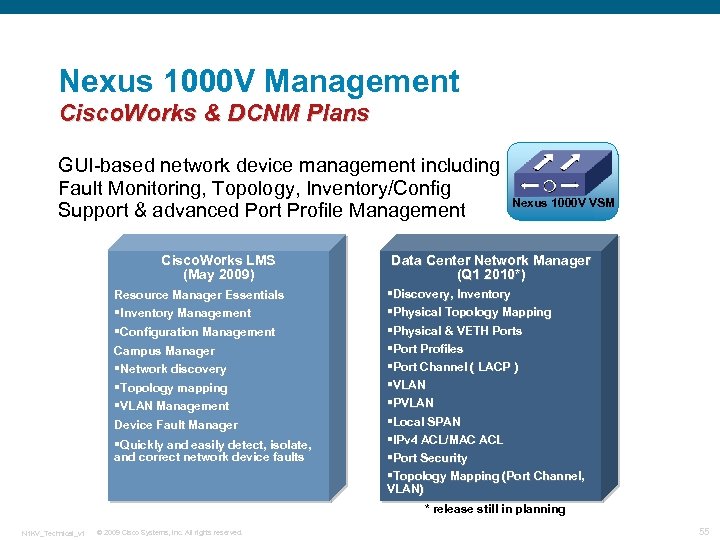 Nexus 1000 V Management Cisco. Works & DCNM Plans GUI-based network device management including Fault Monitoring, Topology, Inventory/Config Support & advanced Port Profile Management Cisco. Works LMS (May 2009) Resource Manager Essentials §Inventory Management §Configuration Management Campus Manager §Network discovery §Topology mapping §VLAN Management Device Fault Manager §Quickly and easily detect, isolate, and correct network device faults Nexus 1000 V VSM Data Center Network Manager (Q 1 2010*) §Discovery, Inventory §Physical Topology Mapping §Physical & VETH Ports §Port Profiles §Port Channel ( LACP ) §VLAN §PVLAN §Local SPAN §IPv 4 ACL/MAC ACL §Port Security §Topology Mapping (Port Channel, VLAN) * release still in planning N 1 KV_Technical_v 1 © 2009 Cisco Systems, Inc. All rights reserved. 55
 Cisco. Works & DCNM Plans GUI-based network device management including Fault Monitoring, Topology, Inventory/Config Support & advanced Port Profile Management Cisco. Works LMS (May 2009) Resource Manager Essentials §Inventory Management §Configuration Management Campus Manager §Network discovery §Topology mapping §VLAN Management Device Fault Manager §Quickly and easily detect, isolate, and correct network device faults Data Center Network Manager (Q 1 2010*) §Discovery, Inventory §Physical Topology Mapping §Physical & VETH Ports §Port Profiles §Port Channel ( LACP ) §VLAN §PVLAN §Local SPAN §IPv 4 ACL/MAC ACL §Port Security §Topology Mapping (Port Channel, VLAN) * release still in planning N 1 KV_Technical_v 1 © 2009 Cisco Systems, Inc. All rights reserved. 56
 Cisco Nexus 1000 V Troubleshooting & Diagnostics N 1 KV_Technical_v 1 © 2009 Cisco Systems, Inc. All rights reserved. 57
 Switched Port ANalyzer § Similar to SPAN in physical Cisco switches (Cat 6 k, N 7 k) § Configured as “sessions” One or more source ports and/or VLANs Ingress Egress Both One or more destinations Can define “Source VLAN Filters” § SPANing is allowed only within the same host (ESX) N 1 KV_Technical_v 1 © 2009 Cisco Systems, Inc. All rights reserved. 58
 Local SPAN Src/Dst Interfaces § Source Interface Characteristics: Can be Ethernet, virtual Ethernet, port-channel, or VLAN Cannot be a destination port Can be configured to monitor the direction of traffic —receive (ingress), transmit (egress), or both Source ports can be in the same or different VLANs For VLAN SPAN sources, all active ports in the source VLAN are included as source ports § Destination Interface Characteristics Can be Ethernet, virtual Ethernet, or port-channel Cannot be a SPAN source port Must be on the same host as the source port(s) Is not monitored if it belongs to a source VLAN of any SPAN session N 1 KV_Technical_v 1 © 2009 Cisco Systems, Inc. All rights reserved. 59
 Encapsulated Remote SPAN § ERSPAN mirrors traffic in an encapsulated envelope to a IP destination § Designed to monitor the traffic on VEMs remotely Similar to local SPAN except ERSPAN supports sends packets outside an individual VEM Sources: Ethernet, Vethernet, Port-Channel, VLAN. Supports multiple sources from multiple VEMs IP destination Can define “Source VLAN Filters” N 1 KV_Technical_v 1 © 2009 Cisco Systems, Inc. All rights reserved. 60
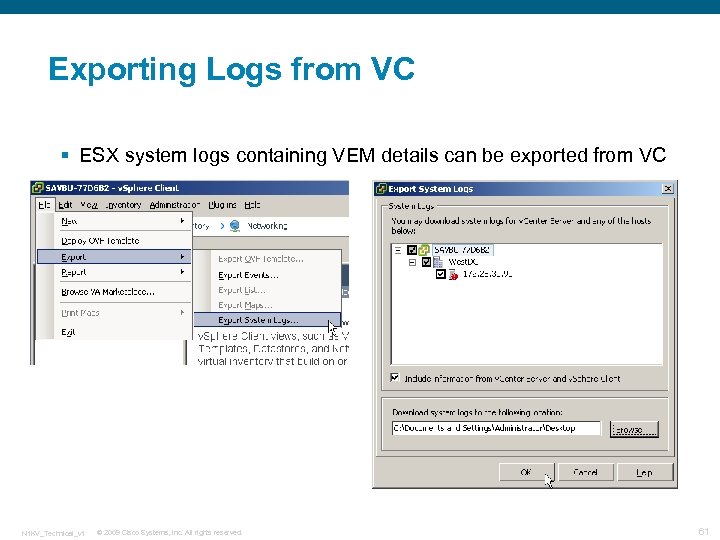 Exporting Logs from VC § ESX system logs containing VEM details can be exported from VC N 1 KV_Technical_v 1 © 2009 Cisco Systems, Inc. All rights reserved. 61
 Cisco Net. Flow § Netflow is a Cisco technology that provides traffic accounting and monitoring on packet flowing through the network on a perflow basis § Netflow provides the following benefits: Traffic analysis and planning for Network planning Usage based billing The who, what, where, when and how much IP traffic questions are answered § Typical use cases: Who are top N talkers? What % of traffic are they? How many users are on the network at any given time? When will service upgrades affect the least number of users? How does a flow stay active? Where do they come from? Alarm DOS attacks like Smurf, Fraggle and SYN floods N 1 KV_Technical_v 1 © 2009 Cisco Systems, Inc. All rights reserved. 62
 Cisco Nexus 1000 V Design Examples N 1 KV_Technical_v 1 © 2009 Cisco Systems, Inc. All rights reserved. 63
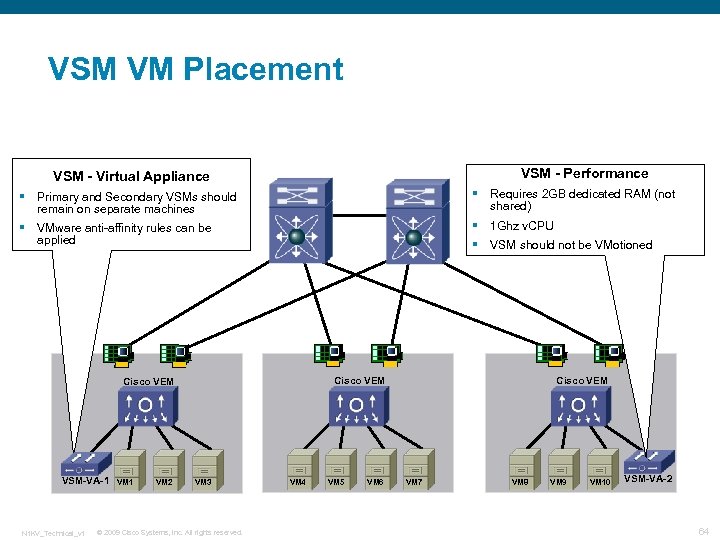 VSM VM Placement VSM - Performance VSM - Virtual Appliance § Primary and Secondary VSMs should remain on separate machines § Requires 2 GB dedicated RAM (not shared) § VMware anti-affinity rules can be applied § 1 Ghz v. CPU § VSM should not be VMotioned Cisco VEM VSM-VA-1 N 1 KV_Technical_v 1 VM 2 VM 3 © 2009 Cisco Systems, Inc. All rights reserved. VM 4 VM 5 VM 6 Cisco VEM VM 7 VM 8 VM 9 VM 10 VSM-VA-2 64
 Nexus 1 KV & VMware Traffic § VM Data – All data from VMs including the VSMs. Usually multiple VLANs § VMkernel – Primarily used for Vmotion. Also used for IP storage § Server Console – ESX management § Control – N 1 KV switch control traffic. The most important interfaces on the switch! § Packet – Carries CDP and IGMP control N 1 KV_Technical_v 1 © 2009 Cisco Systems, Inc. All rights reserved. 65
 Port Channel Hashing Classification § Source Based Hashing Hashes all traffic from a single source down the same link v. PC-HM requires no upstream special configuration (Ether. Channel) Exmaples are source MAC, VLAN, Virtual Port § Flow Based Hashing Each flow may take a different path v. PC may require Ether. Channel upstream Examples include any hash using dst, L 4 port, or combinations or src/dst/port N 1 KV_Technical_v 1 © 2009 Cisco Systems, Inc. All rights reserved. 66
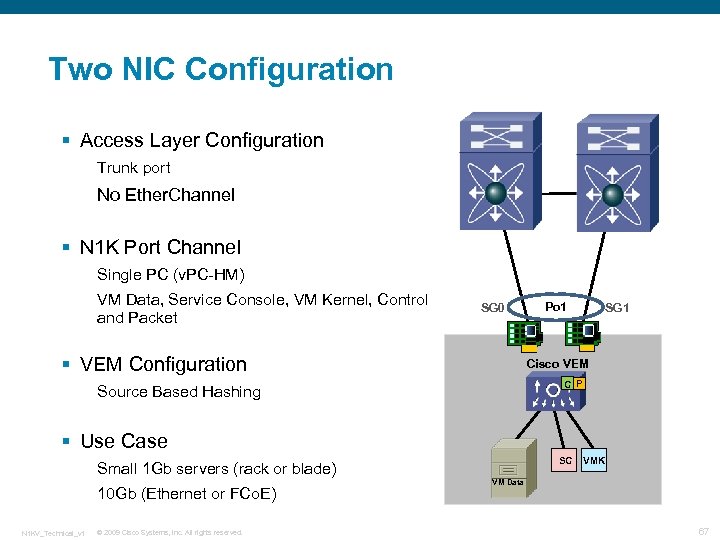 Two NIC Configuration § Access Layer Configuration Trunk port No Ether. Channel § N 1 K Port Channel Single PC (v. PC-HM) VM Data, Service Console, VM Kernel, Control and Packet SG 0 § VEM Configuration Po 1 SG 1 Cisco VEM C P Source Based Hashing § Use Case SC Small 1 Gb servers (rack or blade) 10 Gb (Ethernet or FCo. E) N 1 KV_Technical_v 1 © 2009 Cisco Systems, Inc. All rights reserved. VMK VM Data 67
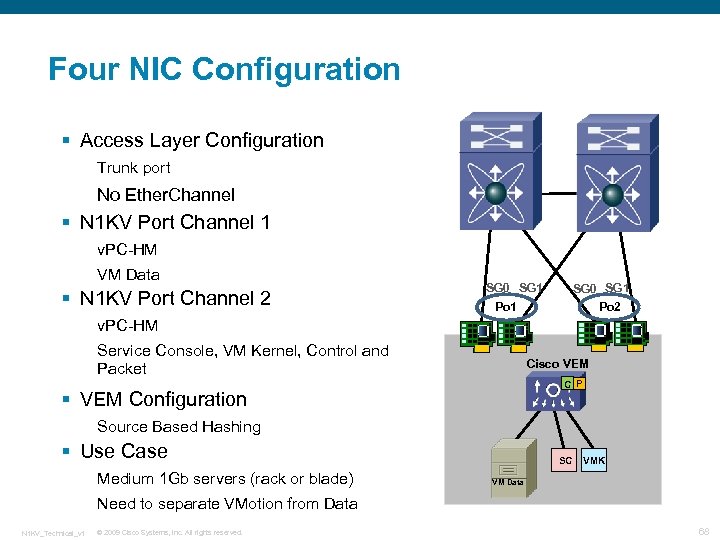 Four NIC Configuration § Access Layer Configuration Trunk port No Ether. Channel § N 1 KV Port Channel 1 v. PC-HM VM Data § N 1 KV Port Channel 2 SG 0 SG 1 Po 2 Po 1 v. PC-HM Service Console, VM Kernel, Control and Packet Cisco VEM C P § VEM Configuration Source Based Hashing § Use Case Medium 1 Gb servers (rack or blade) SC VMK VM Data Need to separate VMotion from Data N 1 KV_Technical_v 1 © 2009 Cisco Systems, Inc. All rights reserved. 68
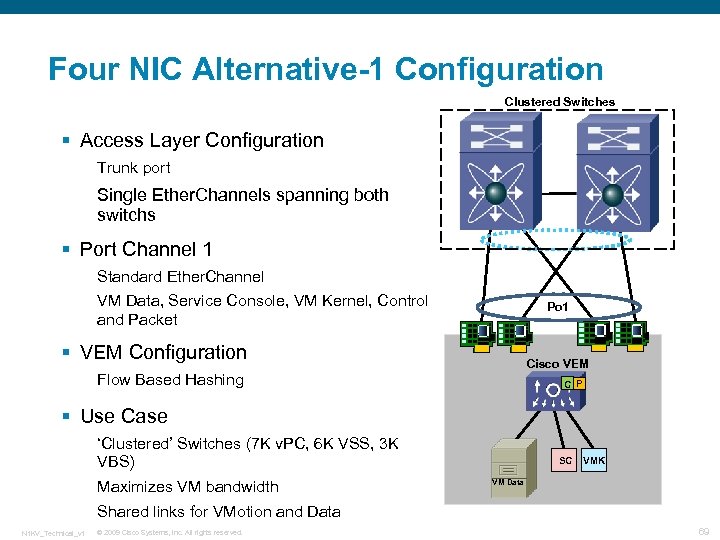 Four NIC Alternative-1 Configuration Clustered Switches § Access Layer Configuration Trunk port Single Ether. Channels spanning both switchs § Port Channel 1 Standard Ether. Channel VM Data, Service Console, VM Kernel, Control and Packet Po 1 § VEM Configuration Cisco VEM Flow Based Hashing C P § Use Case ‘Clustered’ Switches (7 K v. PC, 6 K VSS, 3 K VBS) Maximizes VM bandwidth SC VMK VM Data Shared links for VMotion and Data N 1 KV_Technical_v 1 © 2009 Cisco Systems, Inc. All rights reserved. 69
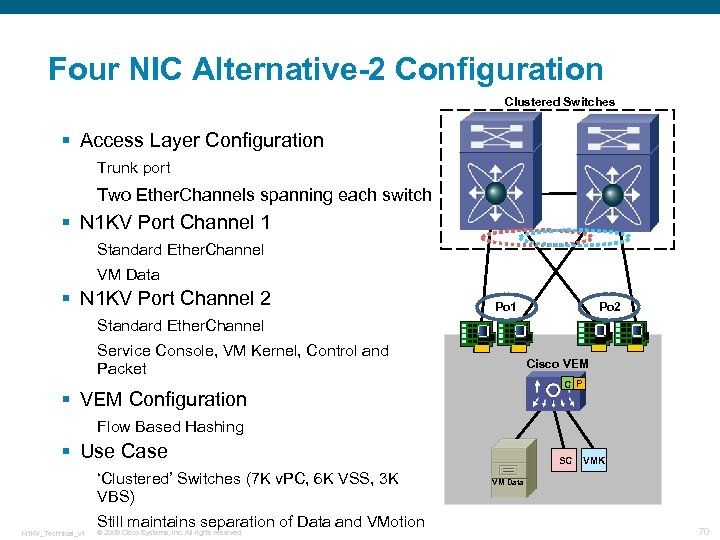 Four NIC Alternative-2 Configuration Clustered Switches § Access Layer Configuration Trunk port Two Ether. Channels spanning each switch § N 1 KV Port Channel 1 Standard Ether. Channel VM Data § N 1 KV Port Channel 2 Po 1 Standard Ether. Channel Service Console, VM Kernel, Control and Packet Cisco VEM C P § VEM Configuration Flow Based Hashing § Use Case ‘Clustered’ Switches (7 K v. PC, 6 K VSS, 3 K VBS) N 1 KV_Technical_v 1 Still maintains separation of Data and VMotion © 2009 Cisco Systems, Inc. All rights reserved. SC VMK VM Data 70
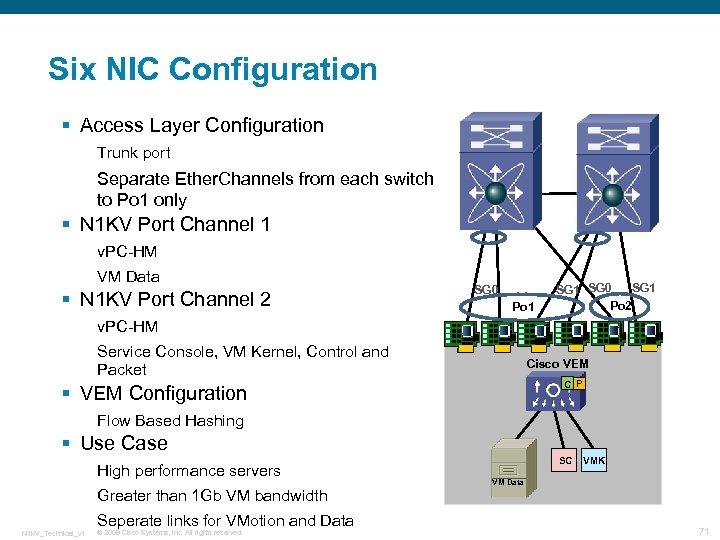 Six NIC Configuration § Access Layer Configuration Trunk port Separate Ether. Channels from each switch to Po 1 only § N 1 KV Port Channel 1 v. PC-HM VM Data § N 1 KV Port Channel 2 SG 0 Po 1 SG 0 Po 2 v. PC-HM Service Console, VM Kernel, Control and Packet Cisco VEM C P § VEM Configuration Flow Based Hashing § Use Case High performance servers Greater than 1 Gb VM bandwidth Seperate links for VMotion and Data N 1 KV_Technical_v 1 © 2009 Cisco Systems, Inc. All rights reserved. SC VMK VM Data 71
 Cisco Nexus 1000 V Installation N 1 KV_Technical_v 1 © 2009 Cisco Systems, Inc. All rights reserved. 72
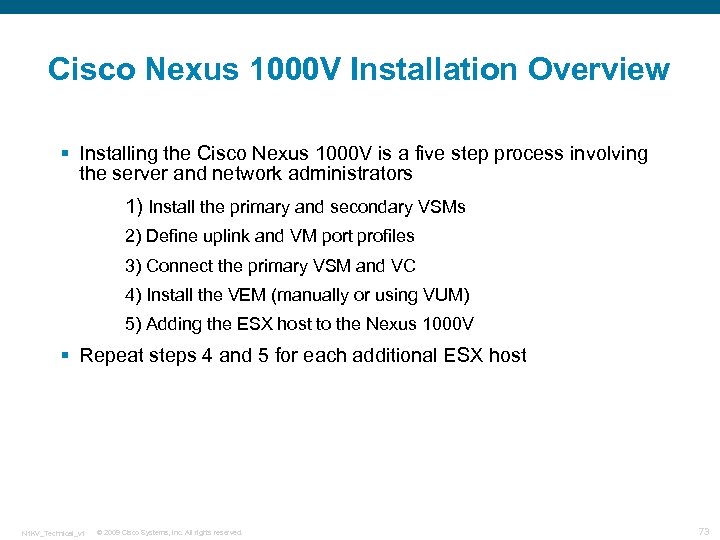 Cisco Nexus 1000 V Installation Overview § Installing the Cisco Nexus 1000 V is a five step process involving the server and network administrators 1) Install the primary and secondary VSMs 2) Define uplink and VM port profiles 3) Connect the primary VSM and VC 4) Install the VEM (manually or using VUM) 5) Adding the ESX host to the Nexus 1000 V § Repeat steps 4 and 5 for each additional ESX host N 1 KV_Technical_v 1 © 2009 Cisco Systems, Inc. All rights reserved. 73
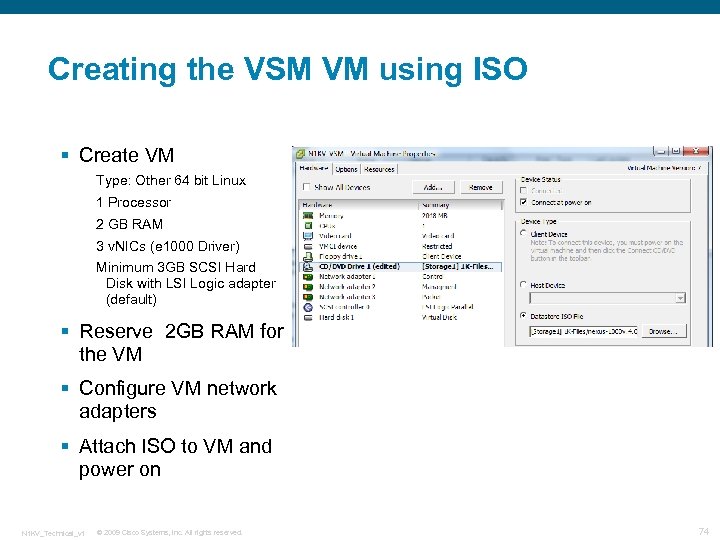 Creating the VSM VM using ISO § Create VM Type: Other 64 bit Linux 1 Processor 2 GB RAM 3 v. NICs (e 1000 Driver) Minimum 3 GB SCSI Hard Disk with LSI Logic adapter (default) § Reserve 2 GB RAM for the VM § Configure VM network adapters § Attach ISO to VM and power on N 1 KV_Technical_v 1 © 2009 Cisco Systems, Inc. All rights reserved. 74
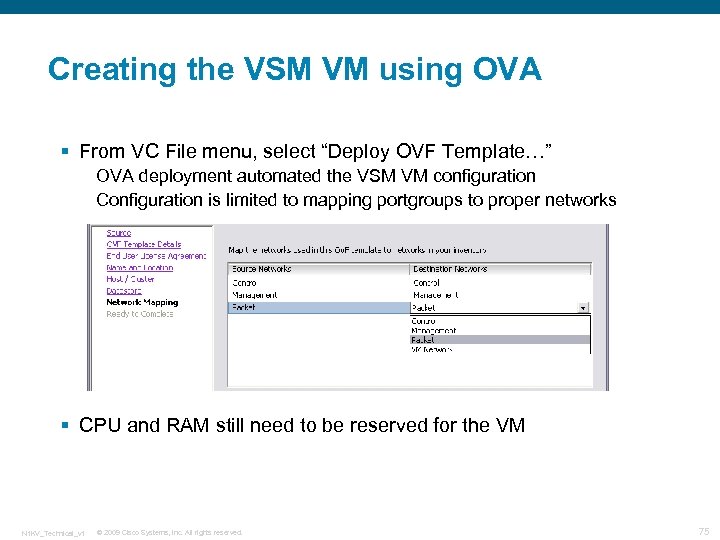 Creating the VSM VM using OVA § From VC File menu, select “Deploy OVF Template…” OVA deployment automated the VSM VM configuration Configuration is limited to mapping portgroups to proper networks § CPU and RAM still need to be reserved for the VM N 1 KV_Technical_v 1 © 2009 Cisco Systems, Inc. All rights reserved. 75
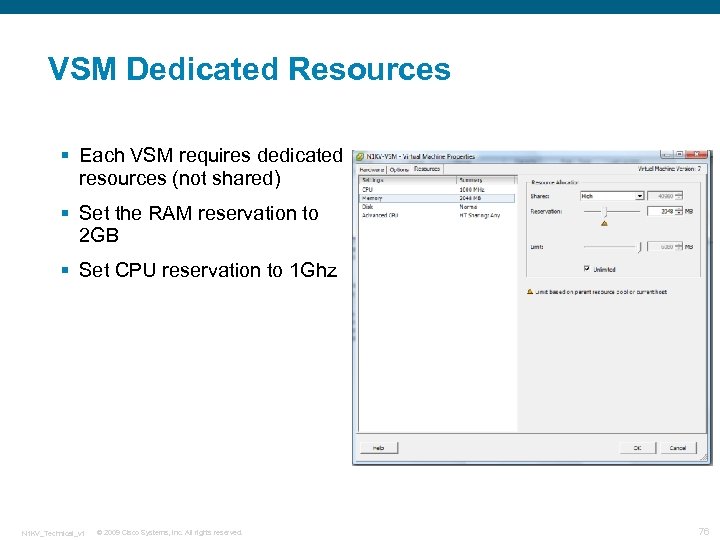 VSM Dedicated Resources § Each VSM requires dedicated resources (not shared) § Set the RAM reservation to 2 GB § Set CPU reservation to 1 Ghz N 1 KV_Technical_v 1 © 2009 Cisco Systems, Inc. All rights reserved. 76
 VSM Setup Wizard § Automatically runs when the VSM VM is started for the first time § Minimum configuration suggested: Switch name Out-of-band management configuration Default gateway Telnet/SSH service Domain parameters (domain ID, control/packet VLAN) § Secondary VSM will reboot and gather configuration from the Primary VSM N 1 KV_Technical_v 1 © 2009 Cisco Systems, Inc. All rights reserved. 77
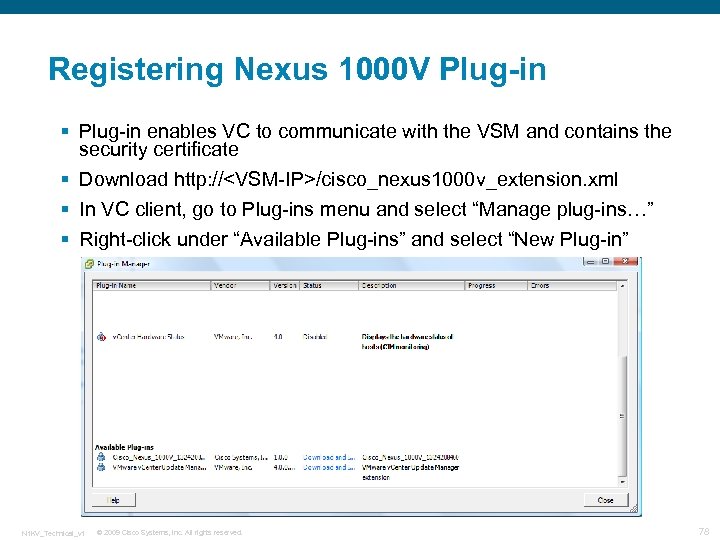 Registering Nexus 1000 V Plug-in § Plug-in enables VC to communicate with the VSM and contains the security certificate § Download http: //
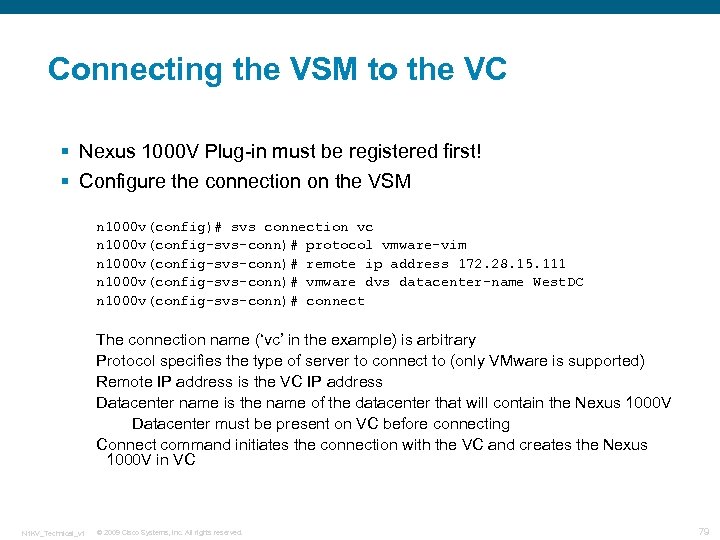 Connecting the VSM to the VC § Nexus 1000 V Plug-in must be registered first! § Configure the connection on the VSM n 1000 v(config)# svs connection vc n 1000 v(config-svs-conn)# protocol vmware-vim n 1000 v(config-svs-conn)# remote ip address 172. 28. 15. 111 n 1000 v(config-svs-conn)# vmware dvs datacenter-name West. DC n 1000 v(config-svs-conn)# connect The connection name (‘vc’ in the example) is arbitrary Protocol specifies the type of server to connect to (only VMware is supported) Remote IP address is the VC IP address Datacenter name is the name of the datacenter that will contain the Nexus 1000 V Datacenter must be present on VC before connecting Connect command initiates the connection with the VC and creates the Nexus 1000 V in VC N 1 KV_Technical_v 1 © 2009 Cisco Systems, Inc. All rights reserved. 79
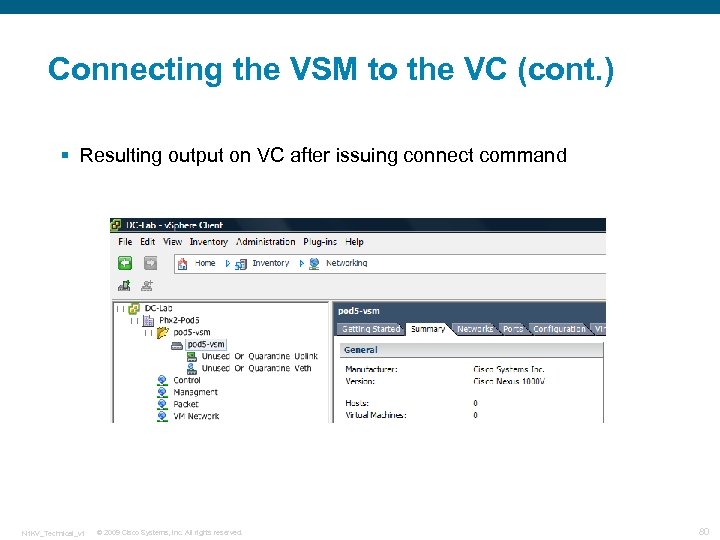 Connecting the VSM to the VC (cont. ) § Resulting output on VC after issuing connect command N 1 KV_Technical_v 1 © 2009 Cisco Systems, Inc. All rights reserved. 80
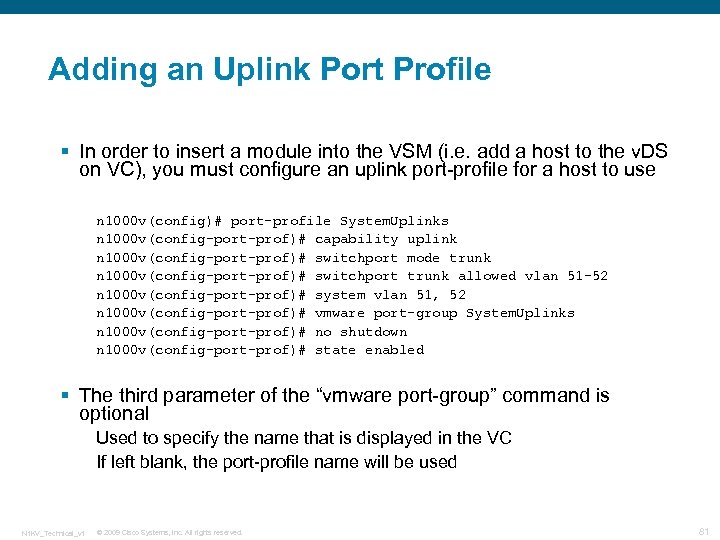 Adding an Uplink Port Profile § In order to insert a module into the VSM (i. e. add a host to the v. DS on VC), you must configure an uplink port-profile for a host to use n 1000 v(config)# port-profile System. Uplinks n 1000 v(config-port-prof)# capability uplink n 1000 v(config-port-prof)# switchport mode trunk n 1000 v(config-port-prof)# switchport trunk allowed vlan 51 -52 n 1000 v(config-port-prof)# system vlan 51, 52 n 1000 v(config-port-prof)# vmware port-group System. Uplinks n 1000 v(config-port-prof)# no shutdown n 1000 v(config-port-prof)# state enabled § The third parameter of the “vmware port-group” command is optional Used to specify the name that is displayed in the VC If left blank, the port-profile name will be used N 1 KV_Technical_v 1 © 2009 Cisco Systems, Inc. All rights reserved. 81
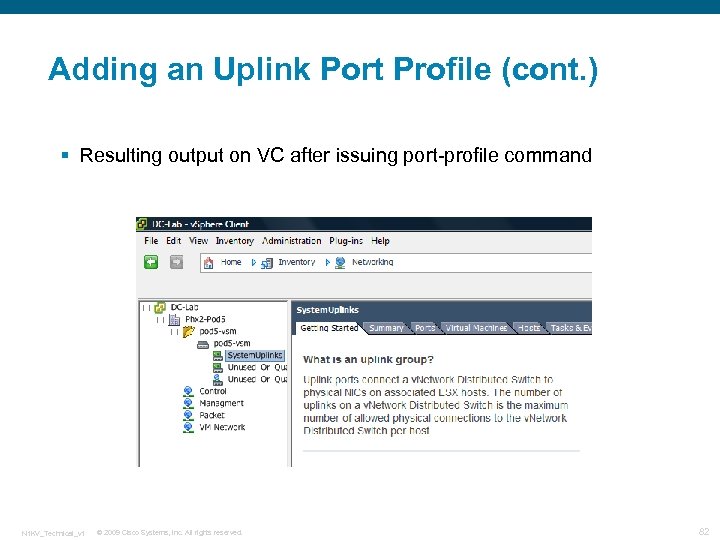 Adding an Uplink Port Profile (cont. ) § Resulting output on VC after issuing port-profile command N 1 KV_Technical_v 1 © 2009 Cisco Systems, Inc. All rights reserved. 82
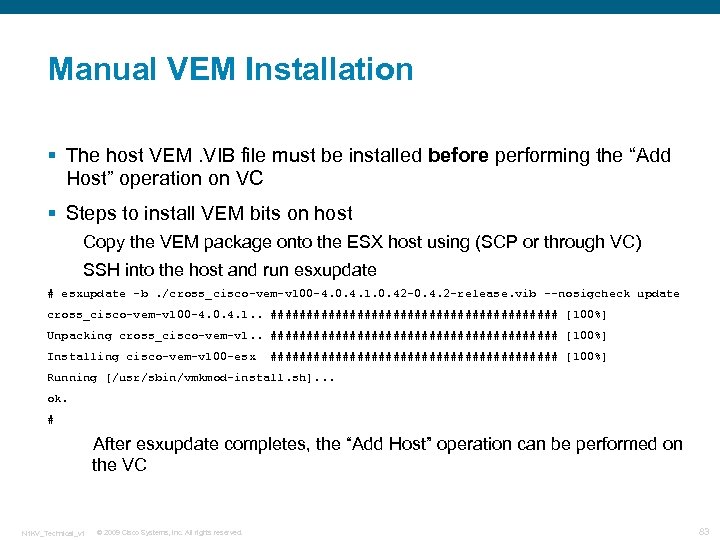 Manual VEM Installation § The host VEM. VIB file must be installed before performing the “Add Host” operation on VC § Steps to install VEM bits on host Copy the VEM package onto the ESX host using (SCP or through VC) SSH into the host and run esxupdate # esxupdate -b. /cross_cisco-vem-v 100 -4. 0. 4. 1. 0. 42 -0. 4. 2 -release. vib --nosigcheck update cross_cisco-vem-v 100 -4. 0. 4. 1. . #################### [100%] Unpacking cross_cisco-vem-v 1. . #################### [100%] Installing cisco-vem-v 100 -esx #################### [100%] Running [/usr/sbin/vmkmod-install. sh]. . . ok. # After esxupdate completes, the “Add Host” operation can be performed on the VC N 1 KV_Technical_v 1 © 2009 Cisco Systems, Inc. All rights reserved. 83
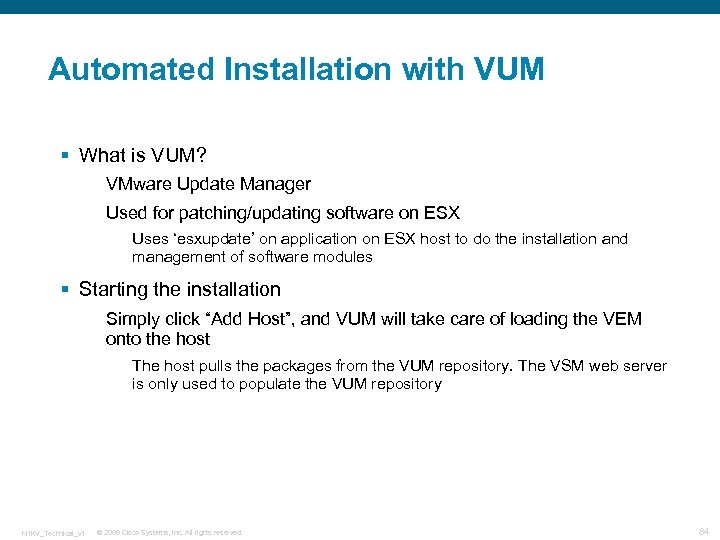 Automated Installation with VUM § What is VUM? VMware Update Manager Used for patching/updating software on ESX Uses ‘esxupdate’ on application on ESX host to do the installation and management of software modules § Starting the installation Simply click “Add Host”, and VUM will take care of loading the VEM onto the host The host pulls the packages from the VUM repository. The VSM web server is only used to populate the VUM repository N 1 KV_Technical_v 1 © 2009 Cisco Systems, Inc. All rights reserved. 84
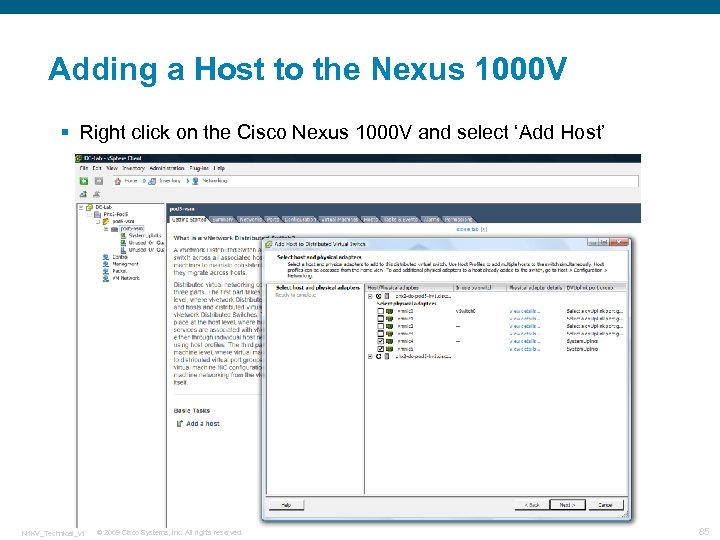 Adding a Host to the Nexus 1000 V § Right click on the Cisco Nexus 1000 V and select ‘Add Host’ N 1 KV_Technical_v 1 © 2009 Cisco Systems, Inc. All rights reserved. 85
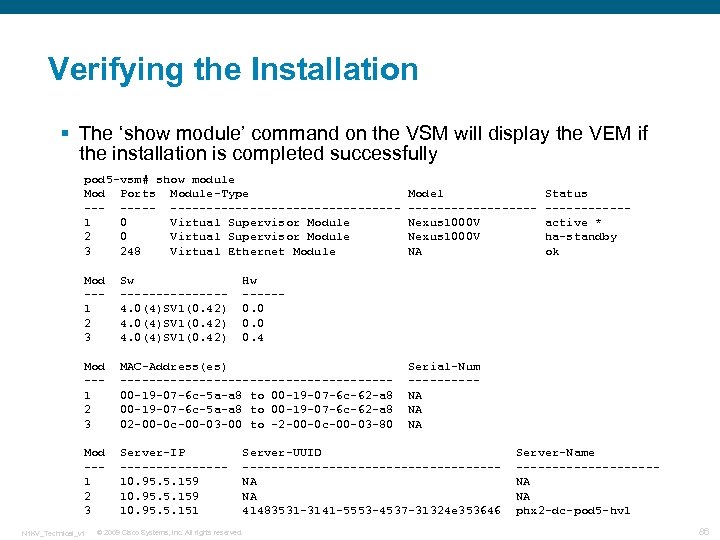 Verifying the Installation § The ‘show module’ command on the VSM will display the VEM if the installation is completed successfully pod 5 -vsm# show module Mod Ports Module-Type ----------------1 0 Virtual Supervisor Module 2 0 Virtual Supervisor Module 3 248 Virtual Ethernet Module Mod --1 2 3 Sw -------4. 0(4)SV 1(0. 42) Mod --1 2 3 MAC-Address(es) -------------------00 -19 -07 -6 c-5 a-a 8 to 00 -19 -07 -6 c-62 -a 8 02 -00 -0 c-00 -03 -00 to -2 -00 -0 c-00 -03 -80 Mod --1 2 3 Server-IP -------10. 95. 5. 159 10. 95. 5. 151 N 1 KV_Technical_v 1 Model ---------Nexus 1000 V NA Status ------active * ha-standby ok Hw -----0. 0 0. 4 Serial-Num -----NA NA NA Server-UUID ------------------NA NA 41483531 -3141 -5553 -4537 -31324 e 353646 © 2009 Cisco Systems, Inc. All rights reserved. Server-Name ----------NA NA phx 2 -dc-pod 5 -hv 1 86
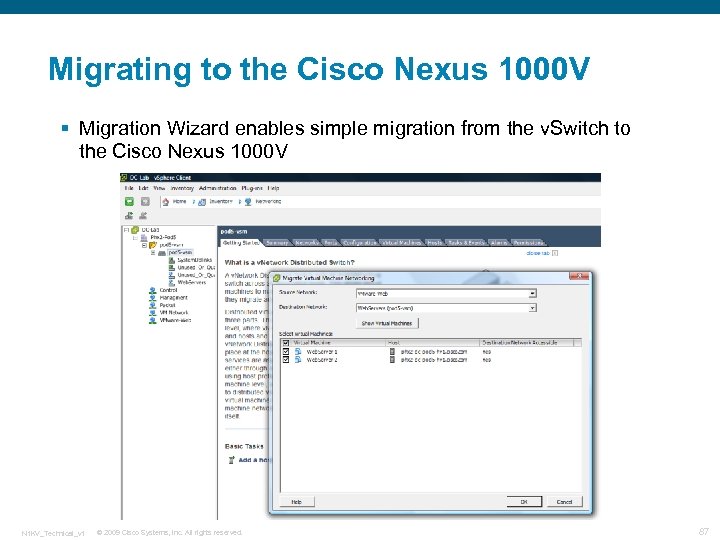 Migrating to the Cisco Nexus 1000 V § Migration Wizard enables simple migration from the v. Switch to the Cisco Nexus 1000 V N 1 KV_Technical_v 1 © 2009 Cisco Systems, Inc. All rights reserved. 87
 N 1 KV_Technical_v 1 © 2009 Cisco Systems, Inc. All rights reserved. 88