


 Скачать презентацию CIS 192 Lesson 9 Lesson Module Status
856663d23bc3a181d5dd08036a167e51.ppt
- Количество слайдов: 127
 CIS 192 – Lesson 9 Lesson Module Status • • • Slides – Properties - done Flashcards 1 st minute quiz – Web Calendar summary – Web book pages – Commands – Howtos – Skills pacing Lab – done Depot (VMs) – na 1
 CIS 192 - Lesson 9 Quiz Please take out a blank piece of paper, switch off your monitor, close your books, put away your notes and answer these questions: • ? No Quiz today since we are having a test
 CIS 192 – Lesson 9 PPP and WAN protocols Objectives Agenda • Review lessons 5 - 8 • Quiz • Implement serial connection using PPP • Questions on previous material • Housekeeping • Review for next test on Lessons 5 -8 • PPP • Wrap 3
 Questions on previous material 4
 CIS 192 - Lesson 9 Questions? • Previous lesson material • Lab assignment 5
 Housekeeping 6
 CIS 192 - Lesson 9 • No labs due today! • Spring break next week! 7
 DNS 8
DNS 8
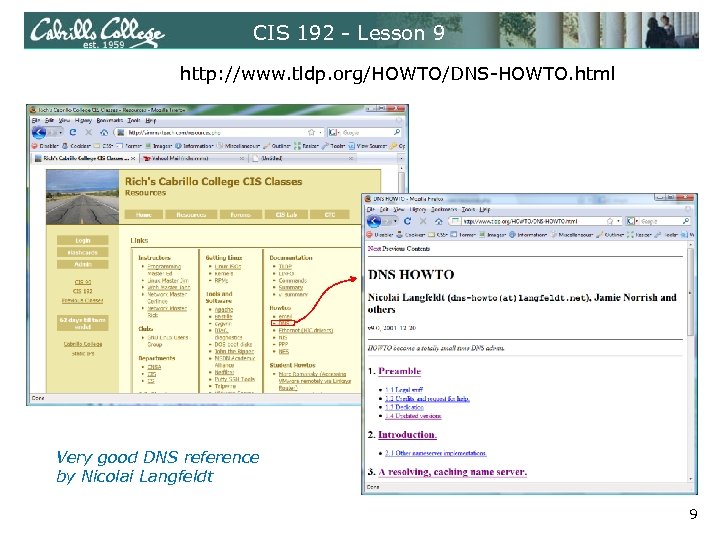 CIS 192 - Lesson 9 http: //www. tldp. org/HOWTO/DNS-HOWTO. html Very good DNS reference by Nicolai Langfeldt 9
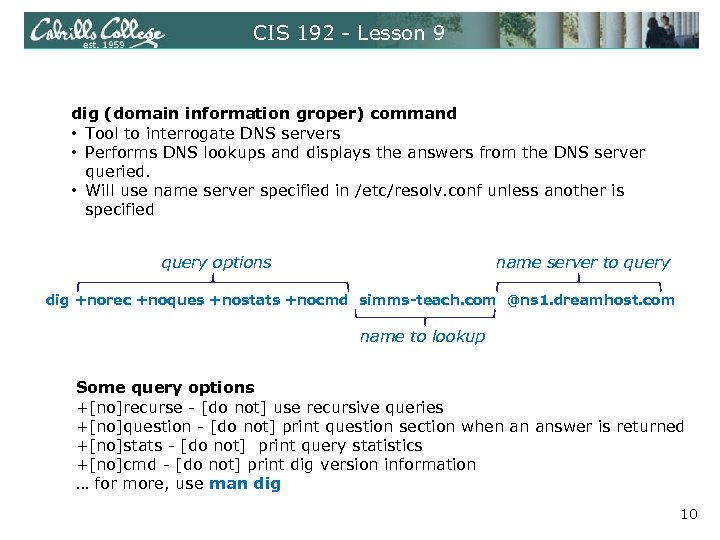 CIS 192 - Lesson 9 dig (domain information groper) command • Tool to interrogate DNS servers • Performs DNS lookups and displays the answers from the DNS server queried. • Will use name server specified in /etc/resolv. conf unless another is specified query options name server to query dig +norec +noques +nostats +nocmd simms-teach. com @ns 1. dreamhost. com name to lookup Some query options +[no]recurse - [do not] use recursive queries +[no]question - [do not] print question section when an answer is returned +[no]stats - [do not] print query statistics +[no]cmd - [do not] print dig version information … for more, use man dig 10
![CIS 192 - Lesson 9 dig simms-teach. com (com. servers) [root@elrond ~]# dig +norec](https://present5.com/presentation/856663d23bc3a181d5dd08036a167e51/image-11.jpg "CIS 192 - Lesson 9 dig simms-teach. com (com. servers) [root@elrond ~]# dig +norec") CIS 192 - Lesson 9 dig simms-teach. com (com. servers) [root@elrond ~]# dig +norec +noques +nostats +nocmd simms-teach. com ; ; Got answer: ; ; ->>HEADER<<- opcode: QUERY, status: NOERROR, id: 16548 ; ; flags: qr ra; QUERY: 1, ANSWER: 0, AUTHORITY: 13, ADDITIONAL: 0 ; ; AUTHORITY SECTION: com. 172798 IN NS G. GTLD-SERVERS. NET. com. 172798 IN NS M. GTLD-SERVERS. NET. com. 172798 IN NS K. GTLD-SERVERS. NET. com. 172798 IN NS A. GTLD-SERVERS. NET. com. 172798 IN NS C. GTLD-SERVERS. NET. com. 172798 IN NS L. GTLD-SERVERS. NET. com. 172798 IN NS J. GTLD-SERVERS. NET. com. 172798 IN NS H. GTLD-SERVERS. NET. com. 172798 IN NS B. GTLD-SERVERS. NET. com. 172798 IN NS I. GTLD-SERVERS. NET. com. 172798 IN NS E. GTLD-SERVERS. NET. com. 172798 IN NS F. GTLD-SERVERS. NET. com. 172798 IN NS D. GTLD-SERVERS. NET. NS = Authoritative Name Server record IN = Internet Domain Names 11
CIS 192 - Lesson 9 dig simms-teach. com (com. servers) [root@elrond ~]# dig +norec +noques +nostats +nocmd simms-teach. com ; ; Got answer: ; ; ->>HEADER<<- opcode: QUERY, status: NOERROR, id: 16548 ; ; flags: qr ra; QUERY: 1, ANSWER: 0, AUTHORITY: 13, ADDITIONAL: 0 ; ; AUTHORITY SECTION: com. 172798 IN NS G. GTLD-SERVERS. NET. com. 172798 IN NS M. GTLD-SERVERS. NET. com. 172798 IN NS K. GTLD-SERVERS. NET. com. 172798 IN NS A. GTLD-SERVERS. NET. com. 172798 IN NS C. GTLD-SERVERS. NET. com. 172798 IN NS L. GTLD-SERVERS. NET. com. 172798 IN NS J. GTLD-SERVERS. NET. com. 172798 IN NS H. GTLD-SERVERS. NET. com. 172798 IN NS B. GTLD-SERVERS. NET. com. 172798 IN NS I. GTLD-SERVERS. NET. com. 172798 IN NS E. GTLD-SERVERS. NET. com. 172798 IN NS F. GTLD-SERVERS. NET. com. 172798 IN NS D. GTLD-SERVERS. NET. NS = Authoritative Name Server record IN = Internet Domain Names 11
![CIS 192 - Lesson 9 dig simms-teach. com (simms-teach. com. servers) [root@elrond ~]# dig](https://present5.com/presentation/856663d23bc3a181d5dd08036a167e51/image-12.jpg "CIS 192 - Lesson 9 dig simms-teach. com (simms-teach. com. servers) [root@elrond ~]# dig") CIS 192 - Lesson 9 dig simms-teach. com (simms-teach. com. servers) [root@elrond ~]# dig +norec +noques +nostats +nocmd simms-teach. com @A. GTLD-SERVERS. NET. ; ; Got answer: ; ; ->>HEADER<<- opcode: QUERY, status: NOERROR, id: 40276 ; ; flags: qr; QUERY: 1, ANSWER: 0, AUTHORITY: 3, ADDITIONAL: 3 ; ; AUTHORITY SECTION: simms-teach. com. 172800 IN NS ns 1. dreamhost. com. simms-teach. com. 172800 IN NS ns 2. dreamhost. com. simms-teach. com. 172800 IN NS ns 3. dreamhost. com. ; ; ADDITIONAL SECTION: ns 1. dreamhost. com. 172800 IN A 66. 33. 206 ns 2. dreamhost. com. 172800 IN A 208. 96. 10. 221 ns 3. dreamhost. com. 172800 IN A 66. 33. 216 [root@elrond ~]# 12
CIS 192 - Lesson 9 dig simms-teach. com (simms-teach. com. servers) [root@elrond ~]# dig +norec +noques +nostats +nocmd simms-teach. com @A. GTLD-SERVERS. NET. ; ; Got answer: ; ; ->>HEADER<<- opcode: QUERY, status: NOERROR, id: 40276 ; ; flags: qr; QUERY: 1, ANSWER: 0, AUTHORITY: 3, ADDITIONAL: 3 ; ; AUTHORITY SECTION: simms-teach. com. 172800 IN NS ns 1. dreamhost. com. simms-teach. com. 172800 IN NS ns 2. dreamhost. com. simms-teach. com. 172800 IN NS ns 3. dreamhost. com. ; ; ADDITIONAL SECTION: ns 1. dreamhost. com. 172800 IN A 66. 33. 206 ns 2. dreamhost. com. 172800 IN A 208. 96. 10. 221 ns 3. dreamhost. com. 172800 IN A 66. 33. 216 [root@elrond ~]# 12
![CIS 192 - Lesson 9 dig simms-teach. com (ANSWER section received) [root@elrond ~]# dig](https://present5.com/presentation/856663d23bc3a181d5dd08036a167e51/image-13.jpg "CIS 192 - Lesson 9 dig simms-teach. com (ANSWER section received) [root@elrond ~]# dig") CIS 192 - Lesson 9 dig simms-teach. com (ANSWER section received) [root@elrond ~]# dig +norec +noques +nostats +nocmd simms-teach. com @ns 1. dreamhost. com ; ; Got answer: ; ; ->>HEADER<<- opcode: QUERY, status: NOERROR, id: 60986 ; ; flags: qr aa; QUERY: 1, ANSWER: 1, AUTHORITY: 0, ADDITIONAL: 0 ; ; ANSWER SECTION: simms-teach. com. 14400 IN A 208. 113. 161. 13 [root@elrond ~]# ping -c 2 simms-teach. com PING simms-teach. com (208. 113. 161. 13) 56(84) bytes of data. 64 bytes from apache 2 -zoo. nehi. dreamhost. com (208. 113. 161. 13): icmp_seq=1 ttl=56 time=26. 1 ms 64 bytes from apache 2 -zoo. nehi. dreamhost. com (208. 113. 161. 13): icmp_seq=2 ttl=56 time=25. 9 ms --- simms-teach. com ping statistics --2 packets transmitted, 2 received, 0% packet loss, time 1000 ms rtt min/avg/max/mdev = 25. 973/26. 078/26. 184/0. 192 ms [root@elrond ~]# 13
CIS 192 - Lesson 9 dig simms-teach. com (ANSWER section received) [root@elrond ~]# dig +norec +noques +nostats +nocmd simms-teach. com @ns 1. dreamhost. com ; ; Got answer: ; ; ->>HEADER<<- opcode: QUERY, status: NOERROR, id: 60986 ; ; flags: qr aa; QUERY: 1, ANSWER: 1, AUTHORITY: 0, ADDITIONAL: 0 ; ; ANSWER SECTION: simms-teach. com. 14400 IN A 208. 113. 161. 13 [root@elrond ~]# ping -c 2 simms-teach. com PING simms-teach. com (208. 113. 161. 13) 56(84) bytes of data. 64 bytes from apache 2 -zoo. nehi. dreamhost. com (208. 113. 161. 13): icmp_seq=1 ttl=56 time=26. 1 ms 64 bytes from apache 2 -zoo. nehi. dreamhost. com (208. 113. 161. 13): icmp_seq=2 ttl=56 time=25. 9 ms --- simms-teach. com ping statistics --2 packets transmitted, 2 received, 0% packet loss, time 1000 ms rtt min/avg/max/mdev = 25. 973/26. 078/26. 184/0. 192 ms [root@elrond ~]# 13
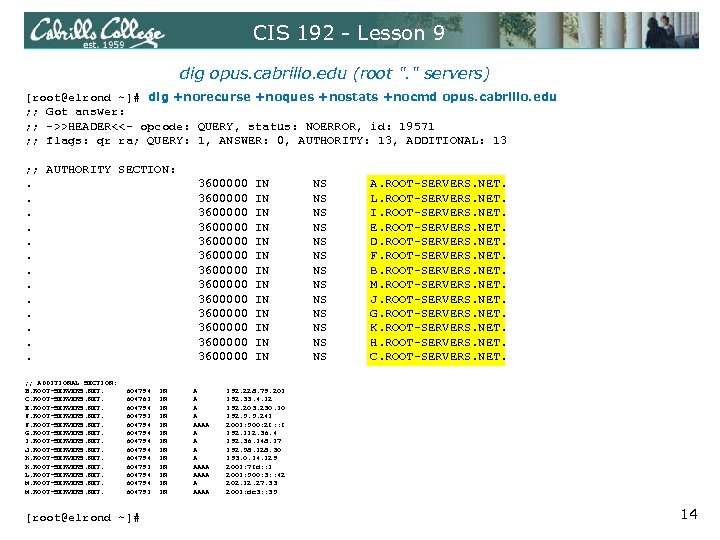 CIS 192 - Lesson 9 dig opus. cabrillo. edu (root ". " servers) [root@elrond ~]# dig +norecurse +noques +nostats +nocmd opus. cabrillo. edu ; ; Got answer: ; ; ->>HEADER<<- opcode: QUERY, status: NOERROR, id: 19571 ; ; flags: qr ra; QUERY: 1, ANSWER: 0, AUTHORITY: 13, ADDITIONAL: 13 ; ; AUTHORITY SECTION: . 3600000 IN NS A. ROOT-SERVERS. NET. . 3600000 IN NS L. ROOT-SERVERS. NET. . 3600000 IN NS I. ROOT-SERVERS. NET. . 3600000 IN NS E. ROOT-SERVERS. NET. . 3600000 IN NS D. ROOT-SERVERS. NET. . 3600000 IN NS F. ROOT-SERVERS. NET. . 3600000 IN NS B. ROOT-SERVERS. NET. . 3600000 IN NS M. ROOT-SERVERS. NET. . 3600000 IN NS J. ROOT-SERVERS. NET. . 3600000 IN NS G. ROOT-SERVERS. NET. . 3600000 IN NS K. ROOT-SERVERS. NET. . 3600000 IN NS H. ROOT-SERVERS. NET. . 3600000 IN NS C. ROOT-SERVERS. NET. ; ; ADDITIONAL SECTION: B. ROOT-SERVERS. NET. 604794 IN A 192. 228. 79. 201 C. ROOT-SERVERS. NET. 604761 IN A 192. 33. 4. 12 E. ROOT-SERVERS. NET. 604794 IN A 192. 203. 230. 10 F. ROOT-SERVERS. NET. 604791 IN A 192. 5. 5. 241 F. ROOT-SERVERS. NET. 604794 IN AAAA 2001: 500: 2 f: : f G. ROOT-SERVERS. NET. 604794 IN A 192. 112. 36. 4 I. ROOT-SERVERS. NET. 604794 IN A 192. 36. 148. 17 J. ROOT-SERVERS. NET. 604794 IN A 192. 58. 128. 30 K. ROOT-SERVERS. NET. 604794 IN A 193. 0. 14. 129 K. ROOT-SERVERS. NET. 604791 IN AAAA 2001: 7 fd: : 1 L. ROOT-SERVERS. NET. 604794 IN AAAA 2001: 500: 3: : 42 M. ROOT-SERVERS. NET. 604794 IN A 202. 12. 27. 33 M. ROOT-SERVERS. NET. 604791 IN AAAA 2001: dc 3: : 35 [root@elrond ~]# 14
![CIS 192 - Lesson 9 dig opus. cabrillo. edu (edu. servers) [root@elrond ~]# dig](https://present5.com/presentation/856663d23bc3a181d5dd08036a167e51/image-15.jpg "CIS 192 - Lesson 9 dig opus. cabrillo. edu (edu. servers) [root@elrond ~]# dig") CIS 192 - Lesson 9 dig opus. cabrillo. edu (edu. servers) [root@elrond ~]# dig +norecurse +noques +nostats +nocmd opus. cabrillo. edu @J. ROOT-SERVERS. NET. ; ; Got answer: ; ; ->>HEADER<<- opcode: QUERY, status: NOERROR, id: 53616 ; ; flags: qr; QUERY: 1, ANSWER: 0, AUTHORITY: 7, ADDITIONAL: 8 ; ; AUTHORITY SECTION: edu. 172800 IN NS E. GTLD-SERVERS. NET. edu. 172800 IN NS F. GTLD-SERVERS. NET. edu. 172800 IN NS G. GTLD-SERVERS. NET. edu. 172800 IN NS L. GTLD-SERVERS. NET. edu. 172800 IN NS A. GTLD-SERVERS. NET. edu. 172800 IN NS C. GTLD-SERVERS. NET. edu. 172800 IN NS D. GTLD-SERVERS. NET. ; ; ADDITIONAL SECTION: A. GTLD-SERVERS. NET. 172800 IN A 192. 5. 6. 30 A. GTLD-SERVERS. NET. 172800 IN AAAA 2001: 503: a 83 e: : 2: 30 C. GTLD-SERVERS. NET. 172800 IN A 192. 26. 92. 30 D. GTLD-SERVERS. NET. 172800 IN A 192. 31. 80. 30 E. GTLD-SERVERS. NET. 172800 IN A 192. 12. 94. 30 F. GTLD-SERVERS. NET. 172800 IN A 192. 35. 51. 30 G. GTLD-SERVERS. NET. 172800 IN A 192. 42. 93. 30 L. GTLD-SERVERS. NET. 172800 IN A 192. 41. 162. 30 [root@elrond ~]# 15
CIS 192 - Lesson 9 dig opus. cabrillo. edu (edu. servers) [root@elrond ~]# dig +norecurse +noques +nostats +nocmd opus. cabrillo. edu @J. ROOT-SERVERS. NET. ; ; Got answer: ; ; ->>HEADER<<- opcode: QUERY, status: NOERROR, id: 53616 ; ; flags: qr; QUERY: 1, ANSWER: 0, AUTHORITY: 7, ADDITIONAL: 8 ; ; AUTHORITY SECTION: edu. 172800 IN NS E. GTLD-SERVERS. NET. edu. 172800 IN NS F. GTLD-SERVERS. NET. edu. 172800 IN NS G. GTLD-SERVERS. NET. edu. 172800 IN NS L. GTLD-SERVERS. NET. edu. 172800 IN NS A. GTLD-SERVERS. NET. edu. 172800 IN NS C. GTLD-SERVERS. NET. edu. 172800 IN NS D. GTLD-SERVERS. NET. ; ; ADDITIONAL SECTION: A. GTLD-SERVERS. NET. 172800 IN A 192. 5. 6. 30 A. GTLD-SERVERS. NET. 172800 IN AAAA 2001: 503: a 83 e: : 2: 30 C. GTLD-SERVERS. NET. 172800 IN A 192. 26. 92. 30 D. GTLD-SERVERS. NET. 172800 IN A 192. 31. 80. 30 E. GTLD-SERVERS. NET. 172800 IN A 192. 12. 94. 30 F. GTLD-SERVERS. NET. 172800 IN A 192. 35. 51. 30 G. GTLD-SERVERS. NET. 172800 IN A 192. 42. 93. 30 L. GTLD-SERVERS. NET. 172800 IN A 192. 41. 162. 30 [root@elrond ~]# 15
![CIS 192 - Lesson 9 dig opus. cabrillo. edu (cabrillo. edu. servers) [root@elrond ~]#](https://present5.com/presentation/856663d23bc3a181d5dd08036a167e51/image-16.jpg "CIS 192 - Lesson 9 dig opus. cabrillo. edu (cabrillo. edu. servers) [root@elrond ~]#") CIS 192 - Lesson 9 dig opus. cabrillo. edu (cabrillo. edu. servers) [root@elrond ~]# dig +norecurse +noques +nostats +nocmd opus. cabrillo. edu @F. GTLD-SERVERS. NET. ; ; Got answer: ; ; ->>HEADER<<- opcode: QUERY, status: NOERROR, id: 17333 ; ; flags: qr; QUERY: 1, ANSWER: 0, AUTHORITY: 3, ADDITIONAL: 3 ; ; AUTHORITY SECTION: cabrillo. edu. 172800 IN NS buttercup. cabrillo. edu. 172800 IN NS ns 1. csu. net. cabrillo. edu. 172800 IN NS ns 2. csu. net. ; ; ADDITIONAL SECTION: buttercup. cabrillo. edu. 172800 IN A 207. 62. 187. 54 ns 1. csu. net. 172800 IN A 130. 150. 102. 100 ns 2. csu. net. 172800 IN A 130. 150. 102. 20 [root@elrond ~]# 16
CIS 192 - Lesson 9 dig opus. cabrillo. edu (cabrillo. edu. servers) [root@elrond ~]# dig +norecurse +noques +nostats +nocmd opus. cabrillo. edu @F. GTLD-SERVERS. NET. ; ; Got answer: ; ; ->>HEADER<<- opcode: QUERY, status: NOERROR, id: 17333 ; ; flags: qr; QUERY: 1, ANSWER: 0, AUTHORITY: 3, ADDITIONAL: 3 ; ; AUTHORITY SECTION: cabrillo. edu. 172800 IN NS buttercup. cabrillo. edu. 172800 IN NS ns 1. csu. net. cabrillo. edu. 172800 IN NS ns 2. csu. net. ; ; ADDITIONAL SECTION: buttercup. cabrillo. edu. 172800 IN A 207. 62. 187. 54 ns 1. csu. net. 172800 IN A 130. 150. 102. 100 ns 2. csu. net. 172800 IN A 130. 150. 102. 20 [root@elrond ~]# 16
![CIS 192 - Lesson 9 dig opus. cabrillo. edu (resolved) [root@elrond ~]# dig +norecurse](https://present5.com/presentation/856663d23bc3a181d5dd08036a167e51/image-17.jpg "CIS 192 - Lesson 9 dig opus. cabrillo. edu (resolved) [root@elrond ~]# dig +norecurse") CIS 192 - Lesson 9 dig opus. cabrillo. edu (resolved) [root@elrond ~]# dig +norecurse +noques +nostats +nocmd opus. cabrillo. edu @ns 1. csu. net. ; ; Got answer: ; ; ->>HEADER<<- opcode: QUERY, status: NOERROR, id: 6591 ; ; flags: qr aa ra; QUERY: 1, ANSWER: 1, AUTHORITY: 3, ADDITIONAL: 3 ; ; ANSWER SECTION: opus. cabrillo. edu. 300 IN A 207. 62. 186. 9 ; ; AUTHORITY SECTION: cabrillo. edu. 300 IN NS ns 1. csu. net. cabrillo. edu. 300 IN NS ns 2. csu. net. cabrillo. edu. 300 IN NS buttercup. cabrillo. edu. ; ; ADDITIONAL SECTION: ns 1. csu. net. 15219 IN A 130. 150. 102. 100 ns 2. csu. net. 15324 IN A 130. 150. 102. 20 buttercup. cabrillo. edu. 300 IN A 207. 62. 187. 54 [root@elrond ~]# 17
CIS 192 - Lesson 9 dig opus. cabrillo. edu (resolved) [root@elrond ~]# dig +norecurse +noques +nostats +nocmd opus. cabrillo. edu @ns 1. csu. net. ; ; Got answer: ; ; ->>HEADER<<- opcode: QUERY, status: NOERROR, id: 6591 ; ; flags: qr aa ra; QUERY: 1, ANSWER: 1, AUTHORITY: 3, ADDITIONAL: 3 ; ; ANSWER SECTION: opus. cabrillo. edu. 300 IN A 207. 62. 186. 9 ; ; AUTHORITY SECTION: cabrillo. edu. 300 IN NS ns 1. csu. net. cabrillo. edu. 300 IN NS ns 2. csu. net. cabrillo. edu. 300 IN NS buttercup. cabrillo. edu. ; ; ADDITIONAL SECTION: ns 1. csu. net. 15219 IN A 130. 150. 102. 100 ns 2. csu. net. 15324 IN A 130. 150. 102. 20 buttercup. cabrillo. edu. 300 IN A 207. 62. 187. 54 [root@elrond ~]# 17
![CIS 192 - Lesson 9 dig 9. 186. 62. 207. in-addr. arpa [root@elrond ~]#](https://present5.com/presentation/856663d23bc3a181d5dd08036a167e51/image-18.jpg "CIS 192 - Lesson 9 dig 9. 186. 62. 207. in-addr. arpa [root@elrond ~]#") CIS 192 - Lesson 9 dig 9. 186. 62. 207. in-addr. arpa [root@elrond ~]# dig +norecurse +noques +nostats +nocmd 9. 186. 62. 207. in-addr. arpa ; ; Got answer: ; ; ->>HEADER<<- opcode: QUERY, status: NOERROR, id: 26350 ; ; flags: qr ra; QUERY: 1, ANSWER: 0, AUTHORITY: 13, ADDITIONAL: 5 ; ; AUTHORITY SECTION: . 518387 IN NS I. ROOT-SERVERS. NET. . 518387 IN NS C. ROOT-SERVERS. NET. . 518387 IN NS E. ROOT-SERVERS. NET. . 518387 IN NS F. ROOT-SERVERS. NET. . 518387 IN NS K. ROOT-SERVERS. NET. . 518387 IN NS A. ROOT-SERVERS. NET. . 518387 IN NS L. ROOT-SERVERS. NET. . 518387 IN NS H. ROOT-SERVERS. NET. . 518387 IN NS M. ROOT-SERVERS. NET. . 518387 IN NS B. ROOT-SERVERS. NET. . 518387 IN NS G. ROOT-SERVERS. NET. . 518387 IN NS D. ROOT-SERVERS. NET. . 518387 IN NS J. ROOT-SERVERS. NET. ; ; ADDITIONAL SECTION: A. ROOT-SERVERS. NET. 604782 IN A 198. 41. 0. 4 A. ROOT-SERVERS. NET. 604787 IN AAAA 2001: 503: ba 3 e: : 2: 30 E. ROOT-SERVERS. NET. 604787 IN A 192. 203. 230. 10 M. ROOT-SERVERS. NET. 604787 IN A 202. 12. 27. 33 M. ROOT-SERVERS. NET. 604782 IN AAAA 2001: dc 3: : 35 [root@elrond ~]# 18
CIS 192 - Lesson 9 dig 9. 186. 62. 207. in-addr. arpa [root@elrond ~]# dig +norecurse +noques +nostats +nocmd 9. 186. 62. 207. in-addr. arpa ; ; Got answer: ; ; ->>HEADER<<- opcode: QUERY, status: NOERROR, id: 26350 ; ; flags: qr ra; QUERY: 1, ANSWER: 0, AUTHORITY: 13, ADDITIONAL: 5 ; ; AUTHORITY SECTION: . 518387 IN NS I. ROOT-SERVERS. NET. . 518387 IN NS C. ROOT-SERVERS. NET. . 518387 IN NS E. ROOT-SERVERS. NET. . 518387 IN NS F. ROOT-SERVERS. NET. . 518387 IN NS K. ROOT-SERVERS. NET. . 518387 IN NS A. ROOT-SERVERS. NET. . 518387 IN NS L. ROOT-SERVERS. NET. . 518387 IN NS H. ROOT-SERVERS. NET. . 518387 IN NS M. ROOT-SERVERS. NET. . 518387 IN NS B. ROOT-SERVERS. NET. . 518387 IN NS G. ROOT-SERVERS. NET. . 518387 IN NS D. ROOT-SERVERS. NET. . 518387 IN NS J. ROOT-SERVERS. NET. ; ; ADDITIONAL SECTION: A. ROOT-SERVERS. NET. 604782 IN A 198. 41. 0. 4 A. ROOT-SERVERS. NET. 604787 IN AAAA 2001: 503: ba 3 e: : 2: 30 E. ROOT-SERVERS. NET. 604787 IN A 192. 203. 230. 10 M. ROOT-SERVERS. NET. 604787 IN A 202. 12. 27. 33 M. ROOT-SERVERS. NET. 604782 IN AAAA 2001: dc 3: : 35 [root@elrond ~]# 18
![CIS 192 - Lesson 9 dig 9. 186. 62. 207. in-addr. arpa [root@elrond ~]#](https://present5.com/presentation/856663d23bc3a181d5dd08036a167e51/image-19.jpg "CIS 192 - Lesson 9 dig 9. 186. 62. 207. in-addr. arpa [root@elrond ~]#") CIS 192 - Lesson 9 dig 9. 186. 62. 207. in-addr. arpa [root@elrond ~]# dig +norecurse +noques +nostats +nocmd 9. 186. 62. 207. in-addr. arpa @A. ROOTSERVERS. NET. ; ; Got answer: ; ; ->>HEADER<<- opcode: QUERY, status: NOERROR, id: 12044 ; ; flags: qr; QUERY: 1, ANSWER: 0, AUTHORITY: 8, ADDITIONAL: 0 ; ; AUTHORITY SECTION: 207. in-addr. arpa. 86400 IN NS X. ARIN. NET. 207. in-addr. arpa. 86400 IN NS BASIL. ARIN. NET. 207. in-addr. arpa. 86400 IN NS HENNA. ARIN. NET. 207. in-addr. arpa. 86400 IN NS Y. ARIN. NET. 207. in-addr. arpa. 86400 IN NS CHIA. ARIN. NET. 207. in-addr. arpa. 86400 IN NS DILL. ARIN. NET. 207. in-addr. arpa. 86400 IN NS Z. ARIN. NET. 207. in-addr. arpa. 86400 IN NS INDIGO. ARIN. NET. [root@elrond ~]# 19
CIS 192 - Lesson 9 dig 9. 186. 62. 207. in-addr. arpa [root@elrond ~]# dig +norecurse +noques +nostats +nocmd 9. 186. 62. 207. in-addr. arpa @A. ROOTSERVERS. NET. ; ; Got answer: ; ; ->>HEADER<<- opcode: QUERY, status: NOERROR, id: 12044 ; ; flags: qr; QUERY: 1, ANSWER: 0, AUTHORITY: 8, ADDITIONAL: 0 ; ; AUTHORITY SECTION: 207. in-addr. arpa. 86400 IN NS X. ARIN. NET. 207. in-addr. arpa. 86400 IN NS BASIL. ARIN. NET. 207. in-addr. arpa. 86400 IN NS HENNA. ARIN. NET. 207. in-addr. arpa. 86400 IN NS Y. ARIN. NET. 207. in-addr. arpa. 86400 IN NS CHIA. ARIN. NET. 207. in-addr. arpa. 86400 IN NS DILL. ARIN. NET. 207. in-addr. arpa. 86400 IN NS Z. ARIN. NET. 207. in-addr. arpa. 86400 IN NS INDIGO. ARIN. NET. [root@elrond ~]# 19
![CIS 192 - Lesson 9 dig 9. 186. 62. 207. in-addr. arpa [root@elrond ~]#](https://present5.com/presentation/856663d23bc3a181d5dd08036a167e51/image-20.jpg "CIS 192 - Lesson 9 dig 9. 186. 62. 207. in-addr. arpa [root@elrond ~]#") CIS 192 - Lesson 9 dig 9. 186. 62. 207. in-addr. arpa [root@elrond ~]# dig +norecurse +noques +nostats +nocmd 9. 186. 62. 207. in-addr. arpa @BASIL. ARIN. NET. ; ; Got answer: ; ; ->>HEADER<<- opcode: QUERY, status: NOERROR, id: 56550 ; ; flags: qr; QUERY: 1, ANSWER: 0, AUTHORITY: 2, ADDITIONAL: 0 ; ; AUTHORITY SECTION: 62. 207. in-addr. arpa. 86400 IN NS ns 2. csu. net. 62. 207. in-addr. arpa. 86400 IN NS ns 1. csu. net. [root@elrond ~]# 20
CIS 192 - Lesson 9 dig 9. 186. 62. 207. in-addr. arpa [root@elrond ~]# dig +norecurse +noques +nostats +nocmd 9. 186. 62. 207. in-addr. arpa @BASIL. ARIN. NET. ; ; Got answer: ; ; ->>HEADER<<- opcode: QUERY, status: NOERROR, id: 56550 ; ; flags: qr; QUERY: 1, ANSWER: 0, AUTHORITY: 2, ADDITIONAL: 0 ; ; AUTHORITY SECTION: 62. 207. in-addr. arpa. 86400 IN NS ns 2. csu. net. 62. 207. in-addr. arpa. 86400 IN NS ns 1. csu. net. [root@elrond ~]# 20
![CIS 192 - Lesson 9 dig 9. 186. 62. 207. in-addr. arpa [root@elrond ~]#](https://present5.com/presentation/856663d23bc3a181d5dd08036a167e51/image-21.jpg "CIS 192 - Lesson 9 dig 9. 186. 62. 207. in-addr. arpa [root@elrond ~]#") CIS 192 - Lesson 9 dig 9. 186. 62. 207. in-addr. arpa [root@elrond ~]# dig +norecurse +noques +nostats +nocmd 9. 186. 62. 207. in-addr. arpa @BASIL. ARIN. NET. ; ; Got answer: ; ; ->>HEADER<<- opcode: QUERY, status: NOERROR, id: 56550 ; ; flags: qr; QUERY: 1, ANSWER: 0, AUTHORITY: 2, ADDITIONAL: 0 ; ; AUTHORITY SECTION: 62. 207. in-addr. arpa. 86400 IN NS ns 2. csu. net. 62. 207. in-addr. arpa. 86400 IN NS ns 1. csu. net. [root@elrond ~]# 21
CIS 192 - Lesson 9 dig 9. 186. 62. 207. in-addr. arpa [root@elrond ~]# dig +norecurse +noques +nostats +nocmd 9. 186. 62. 207. in-addr. arpa @BASIL. ARIN. NET. ; ; Got answer: ; ; ->>HEADER<<- opcode: QUERY, status: NOERROR, id: 56550 ; ; flags: qr; QUERY: 1, ANSWER: 0, AUTHORITY: 2, ADDITIONAL: 0 ; ; AUTHORITY SECTION: 62. 207. in-addr. arpa. 86400 IN NS ns 2. csu. net. 62. 207. in-addr. arpa. 86400 IN NS ns 1. csu. net. [root@elrond ~]# 21
![CIS 192 - Lesson 9 dig 9. 186. 62. 207. in-addr. arpa [root@elrond ~]#](https://present5.com/presentation/856663d23bc3a181d5dd08036a167e51/image-22.jpg "CIS 192 - Lesson 9 dig 9. 186. 62. 207. in-addr. arpa [root@elrond ~]#") CIS 192 - Lesson 9 dig 9. 186. 62. 207. in-addr. arpa [root@elrond ~]# dig +norecurse +noques +nostats +nocmd 9. 186. 62. 207. in-addr. arpa @ns 1. csu. net ; ; Got answer: ; ; ->>HEADER<<- opcode: QUERY, status: NOERROR, id: 58855 ; ; flags: qr aa ra; QUERY: 1, ANSWER: 0, AUTHORITY: 1, ADDITIONAL: 0 ; ; AUTHORITY SECTION: 186. 62. 207. in-addr. arpa. 28800 IN SOA buttercup. cabrillo. edu. hostmaster. cabrillo. edu. 2004062137 3600 1800 604800 28800 [root@elrond ~]# 22
CIS 192 - Lesson 9 dig 9. 186. 62. 207. in-addr. arpa [root@elrond ~]# dig +norecurse +noques +nostats +nocmd 9. 186. 62. 207. in-addr. arpa @ns 1. csu. net ; ; Got answer: ; ; ->>HEADER<<- opcode: QUERY, status: NOERROR, id: 58855 ; ; flags: qr aa ra; QUERY: 1, ANSWER: 0, AUTHORITY: 1, ADDITIONAL: 0 ; ; AUTHORITY SECTION: 186. 62. 207. in-addr. arpa. 28800 IN SOA buttercup. cabrillo. edu. hostmaster. cabrillo. edu. 2004062137 3600 1800 604800 28800 [root@elrond ~]# 22
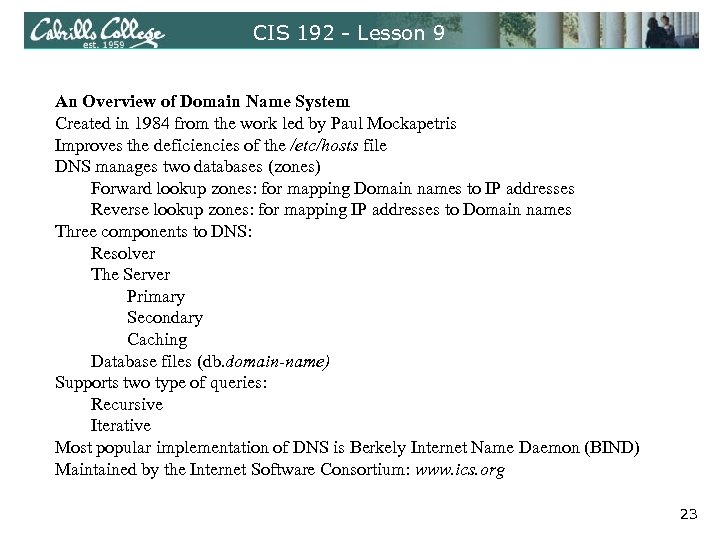 CIS 192 - Lesson 9 An Overview of Domain Name System Created in 1984 from the work led by Paul Mockapetris Improves the deficiencies of the /etc/hosts file DNS manages two databases (zones) Forward lookup zones: for mapping Domain names to IP addresses Reverse lookup zones: for mapping IP addresses to Domain names Three components to DNS: Resolver The Server Primary Secondary Caching Database files (db. domain-name) Supports two type of queries: Recursive Iterative Most popular implementation of DNS is Berkely Internet Name Daemon (BIND) Maintained by the Internet Software Consortium: www. ics. org 23
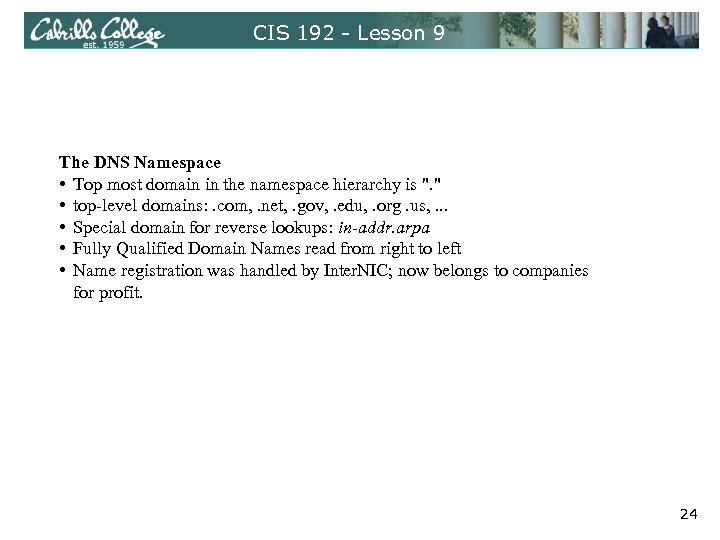 CIS 192 - Lesson 9 The DNS Namespace • Top most domain in the namespace hierarchy is ". " • top-level domains: . com, . net, . gov, . edu, . org. us, . . . • Special domain for reverse lookups: in-addr. arpa • Fully Qualified Domain Names read from right to left • Name registration was handled by Inter. NIC; now belongs to companies for profit. 24
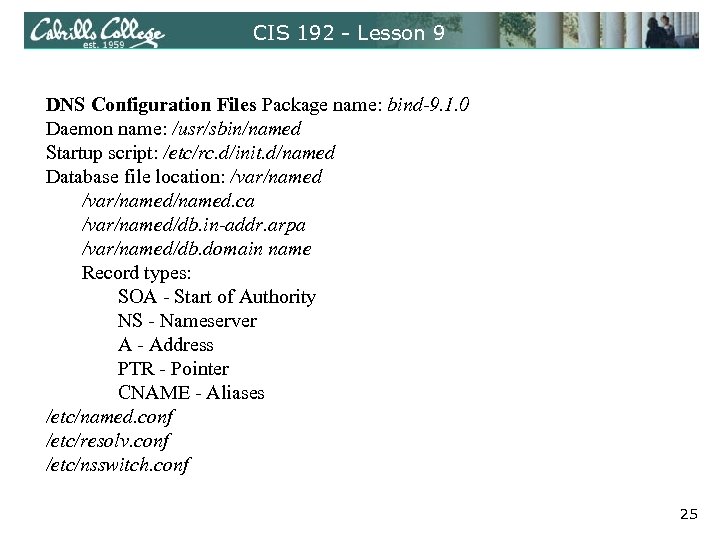 CIS 192 - Lesson 9 DNS Configuration Files Package name: bind-9. 1. 0 Daemon name: /usr/sbin/named Startup script: /etc/rc. d/init. d/named Database file location: /var/named/named. ca /var/named/db. in-addr. arpa /var/named/db. domain name Record types: SOA - Start of Authority NS - Nameserver A - Address PTR - Pointer CNAME - Aliases /etc/named. conf /etc/resolv. conf /etc/nsswitch. conf 25
 CIS 192 - Lesson 9 DNS Configuration Files Package name: bind-9. 1. 0 Daemon name: /usr/sbin/named Startup script: /etc/rc. d/init. d/named Database file location: /var/named/named. ca /var/named/db. in-addr. arpa /var/named/db. domain name Record types: SOA - Start of Authority NS - Nameserver A - Address PTR - Pointer CNAME - Aliases /etc/named. conf /etc/resolv. conf /etc/nsswitch. conf 26
 CIS 192 - Lesson 9 DNS Configuration Files Package name: bind-9. 1. 0 Daemon name: /usr/sbin/named Startup script: /etc/rc. d/init. d/named Database file location: /var/named/named. ca /var/named/db. in-addr. arpa /var/named/db. domain name Record types: SOA - Start of Authority NS - Nameserver A - Address PTR - Pointer CNAME - Aliases /etc/named. conf /etc/resolv. conf /etc/nsswitch. conf 27
![CIS 192 - Lesson 9 Zone file [root@elrond ~]# cat /var/named/db. rivendell $TTL 604800](https://present5.com/presentation/856663d23bc3a181d5dd08036a167e51/image-28.jpg "CIS 192 - Lesson 9 Zone file [root@elrond ~]# cat /var/named/db. rivendell $TTL 604800") CIS 192 - Lesson 9 Zone file [root@elrond ~]# cat /var/named/db. rivendell $TTL 604800 ; Rivendell Zone Definition ; ; Rivendell. IN SOA elrond. rivendell. root. rivendell. ( 2009040304 ; serial number 60 ; refresh rate in seconds 15 ; retry in seconds 1209600 ; expire in seconds 300) ; minimum in seconds ; ; ; TTL = Time to live. How long a DNS ; Name Server Records record from this zone should be cached. Rivendell. IN NS elrond. rivendell. The longer the TTL value the faster ; ; Address Records domain resolution time periods will be. localhost IN A 127. 0. 0. 1 legolas IN A 192. 168. 2. 105 Examples: elrond IN A 192. 168. 2. 107 galadriel IN A 192. 168. 2. 108 william IN A 192. 168. 2. 114 $TTL 86400 ; $TTL 1440 m ; CNAME records [root@elrond ~]# $TTL 24 h $TTL 1 d 28
CIS 192 - Lesson 9 Zone file [root@elrond ~]# cat /var/named/db. rivendell $TTL 604800 ; Rivendell Zone Definition ; ; Rivendell. IN SOA elrond. rivendell. root. rivendell. ( 2009040304 ; serial number 60 ; refresh rate in seconds 15 ; retry in seconds 1209600 ; expire in seconds 300) ; minimum in seconds ; ; ; TTL = Time to live. How long a DNS ; Name Server Records record from this zone should be cached. Rivendell. IN NS elrond. rivendell. The longer the TTL value the faster ; ; Address Records domain resolution time periods will be. localhost IN A 127. 0. 0. 1 legolas IN A 192. 168. 2. 105 Examples: elrond IN A 192. 168. 2. 107 galadriel IN A 192. 168. 2. 108 william IN A 192. 168. 2. 114 $TTL 86400 ; $TTL 1440 m ; CNAME records [root@elrond ~]# $TTL 24 h $TTL 1 d 28
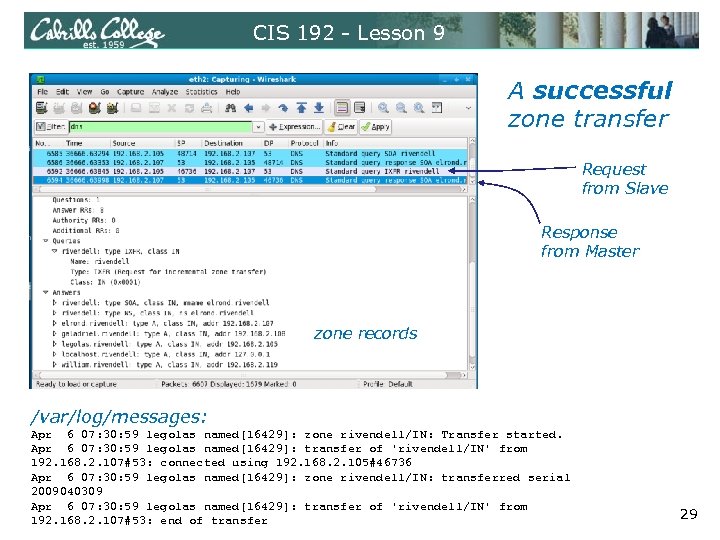 CIS 192 - Lesson 9 A successful zone transfer Request from Slave Response from Master zone records /var/log/messages: Apr 6 07: 30: 59 legolas named[16429]: zone rivendell/IN: Transfer started. Apr 6 07: 30: 59 legolas named[16429]: transfer of 'rivendell/IN' from 192. 168. 2. 107#53: connected using 192. 168. 2. 105#46736 Apr 6 07: 30: 59 legolas named[16429]: zone rivendell/IN: transferred serial 2009040309 Apr 6 07: 30: 59 legolas named[16429]: transfer of 'rivendell/IN' from 192. 168. 2. 107#53: end of transfer 29
 DNS Trobleshooting 30
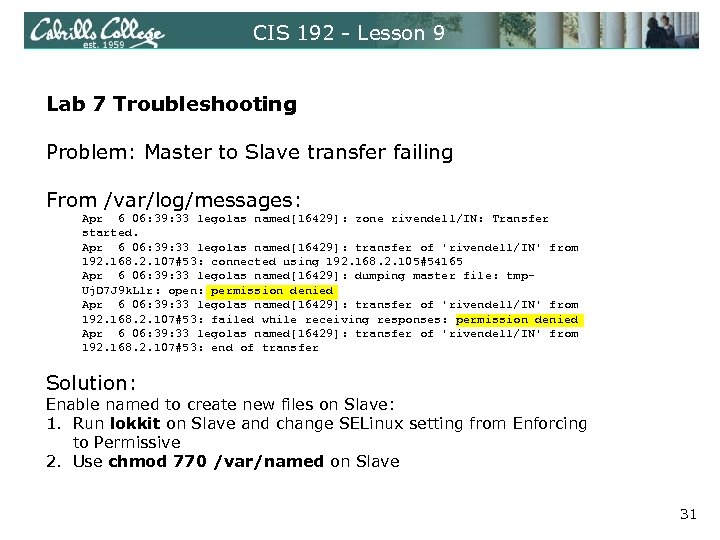 CIS 192 - Lesson 9 Lab 7 Troubleshooting Problem: Master to Slave transfer failing From /var/log/messages: Apr 6 06: 39: 33 legolas named[16429]: zone rivendell/IN: Transfer started. Apr 6 06: 39: 33 legolas named[16429]: transfer of 'rivendell/IN' from 192. 168. 2. 107#53: connected using 192. 168. 2. 105#54165 Apr 6 06: 39: 33 legolas named[16429]: dumping master file: tmp. Uj. D 7 J 9 k. Llr: open: permission denied Apr 6 06: 39: 33 legolas named[16429]: transfer of 'rivendell/IN' from 192. 168. 2. 107#53: failed while receiving responses: permission denied Apr 6 06: 39: 33 legolas named[16429]: transfer of 'rivendell/IN' from 192. 168. 2. 107#53: end of transfer Solution: Enable named to create new files on Slave: 1. Run lokkit on Slave and change SELinux setting from Enforcing to Permissive 2. Use chmod 770 /var/named on Slave 31
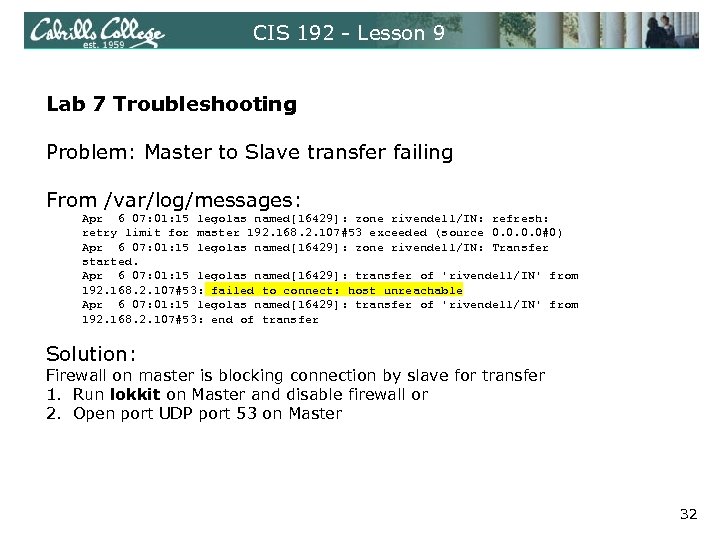 CIS 192 - Lesson 9 Lab 7 Troubleshooting Problem: Master to Slave transfer failing From /var/log/messages: Apr 6 07: 01: 15 legolas named[16429]: zone rivendell/IN: refresh: retry limit for master 192. 168. 2. 107#53 exceeded (source 0. 0#0) Apr 6 07: 01: 15 legolas named[16429]: zone rivendell/IN: Transfer started. Apr 6 07: 01: 15 legolas named[16429]: transfer of 'rivendell/IN' from 192. 168. 2. 107#53: failed to connect: host unreachable Apr 6 07: 01: 15 legolas named[16429]: transfer of 'rivendell/IN' from 192. 168. 2. 107#53: end of transfer Solution: Firewall on master is blocking connection by slave for transfer 1. Run lokkit on Master and disable firewall or 2. Open port UDP port 53 on Master 32
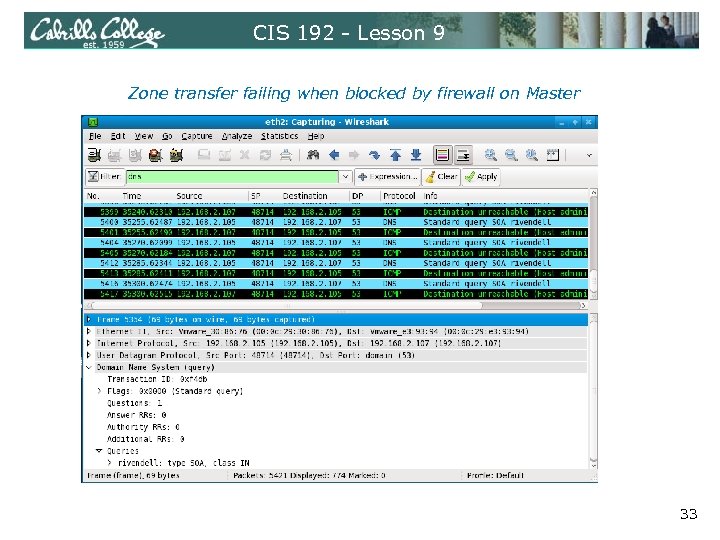 CIS 192 - Lesson 9 Zone transfer failing when blocked by firewall on Master 33
 Firewall and DNS port 34
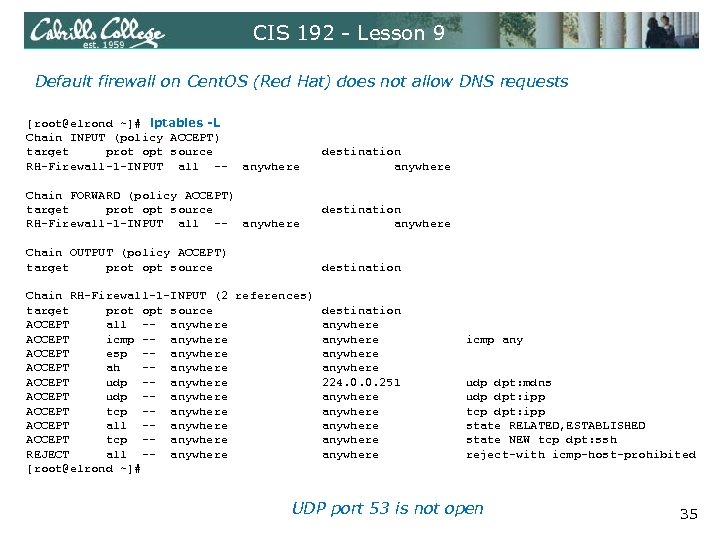 CIS 192 - Lesson 9 Default firewall on Cent. OS (Red Hat) does not allow DNS requests [root@elrond ~]# iptables -L Chain INPUT (policy ACCEPT) target prot opt source destination RH-Firewall-1 -INPUT all -- anywhere Chain FORWARD (policy ACCEPT) target prot opt source destination RH-Firewall-1 -INPUT all -- anywhere Chain OUTPUT (policy ACCEPT) target prot opt source destination Chain RH-Firewall-1 -INPUT (2 references) target prot opt source destination ACCEPT all -- anywhere ACCEPT icmp -- anywhere icmp any ACCEPT esp -- anywhere ACCEPT ah -- anywhere ACCEPT udp -- anywhere 224. 0. 0. 251 udp dpt: mdns ACCEPT udp -- anywhere udp dpt: ipp ACCEPT tcp -- anywhere tcp dpt: ipp ACCEPT all -- anywhere state RELATED, ESTABLISHED ACCEPT tcp -- anywhere state NEW tcp dpt: ssh REJECT all -- anywhere reject-with icmp-host-prohibited [root@elrond ~]# UDP port 53 is not open 35
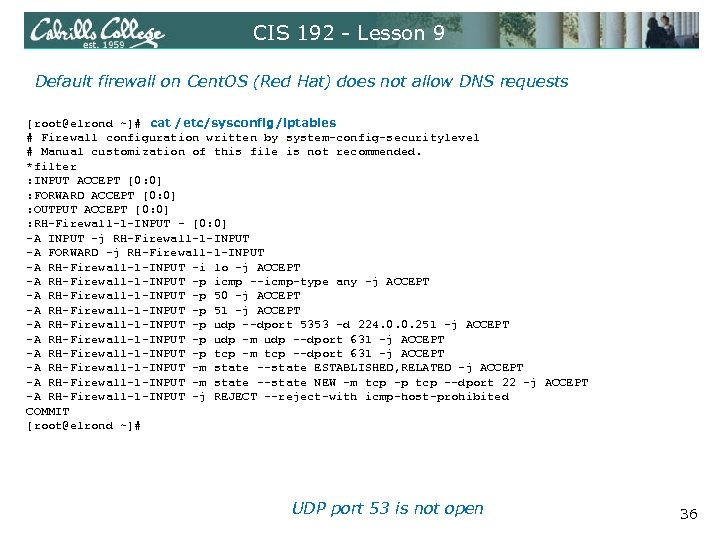 CIS 192 - Lesson 9 Default firewall on Cent. OS (Red Hat) does not allow DNS requests [root@elrond ~]# cat /etc/sysconfig/iptables # Firewall configuration written by system-config-securitylevel # Manual customization of this file is not recommended. *filter : INPUT ACCEPT [0: 0] : FORWARD ACCEPT [0: 0] : OUTPUT ACCEPT [0: 0] : RH-Firewall-1 -INPUT - [0: 0] -A INPUT -j RH-Firewall-1 -INPUT -A FORWARD -j RH-Firewall-1 -INPUT -A RH-Firewall-1 -INPUT -i lo -j ACCEPT -A RH-Firewall-1 -INPUT -p icmp --icmp-type any -j ACCEPT -A RH-Firewall-1 -INPUT -p 50 -j ACCEPT -A RH-Firewall-1 -INPUT -p 51 -j ACCEPT -A RH-Firewall-1 -INPUT -p udp --dport 5353 -d 224. 0. 0. 251 -j ACCEPT -A RH-Firewall-1 -INPUT -p udp -m udp --dport 631 -j ACCEPT -A RH-Firewall-1 -INPUT -p tcp -m tcp --dport 631 -j ACCEPT -A RH-Firewall-1 -INPUT -m state --state ESTABLISHED, RELATED -j ACCEPT -A RH-Firewall-1 -INPUT -m state --state NEW -m tcp -p tcp --dport 22 -j ACCEPT -A RH-Firewall-1 -INPUT -j REJECT --reject-with icmp-host-prohibited COMMIT [root@elrond ~]# UDP port 53 is not open 36
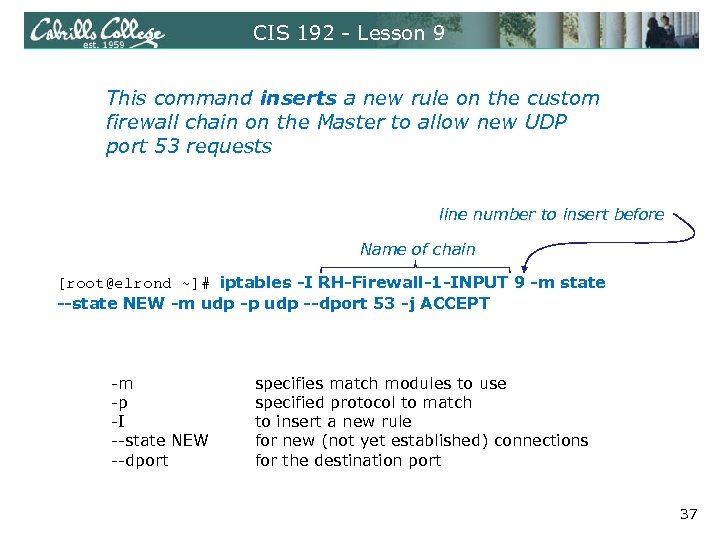 CIS 192 - Lesson 9 This command inserts a new rule on the custom firewall chain on the Master to allow new UDP port 53 requests line number to insert before Name of chain [root@elrond ~]# iptables -I RH-Firewall-1 -INPUT 9 -m state --state NEW -m udp -p udp --dport 53 -j ACCEPT -m -p -I --state NEW --dport specifies match modules to use specified protocol to match to insert a new rule for new (not yet established) connections for the destination port 37
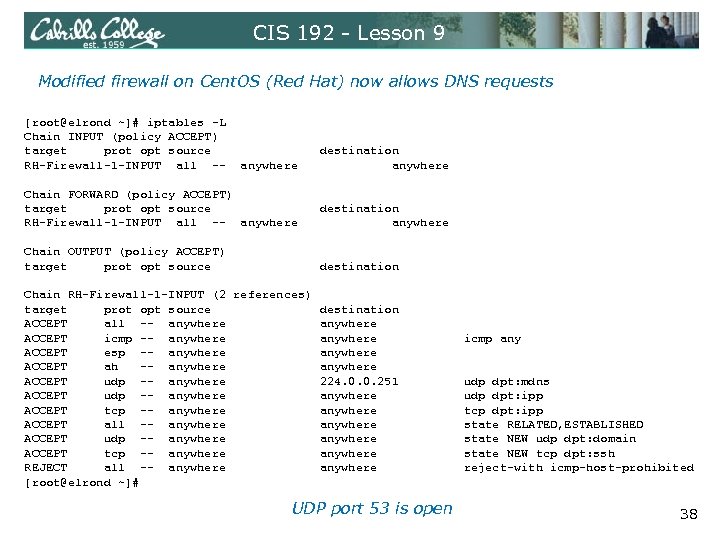 CIS 192 - Lesson 9 Modified firewall on Cent. OS (Red Hat) now allows DNS requests [root@elrond ~]# iptables -L Chain INPUT (policy ACCEPT) target prot opt source destination RH-Firewall-1 -INPUT all -- anywhere Chain FORWARD (policy ACCEPT) target prot opt source destination RH-Firewall-1 -INPUT all -- anywhere Chain OUTPUT (policy ACCEPT) target prot opt source destination Chain RH-Firewall-1 -INPUT (2 references) target prot opt source destination ACCEPT all -- anywhere ACCEPT icmp -- anywhere icmp any ACCEPT esp -- anywhere ACCEPT ah -- anywhere ACCEPT udp -- anywhere 224. 0. 0. 251 udp dpt: mdns ACCEPT udp -- anywhere udp dpt: ipp ACCEPT tcp -- anywhere tcp dpt: ipp ACCEPT all -- anywhere state RELATED, ESTABLISHED ACCEPT udp -- anywhere state NEW udp dpt: domain ACCEPT tcp -- anywhere state NEW tcp dpt: ssh REJECT all -- anywhere reject-with icmp-host-prohibited [root@elrond ~]# UDP port 53 is open 38
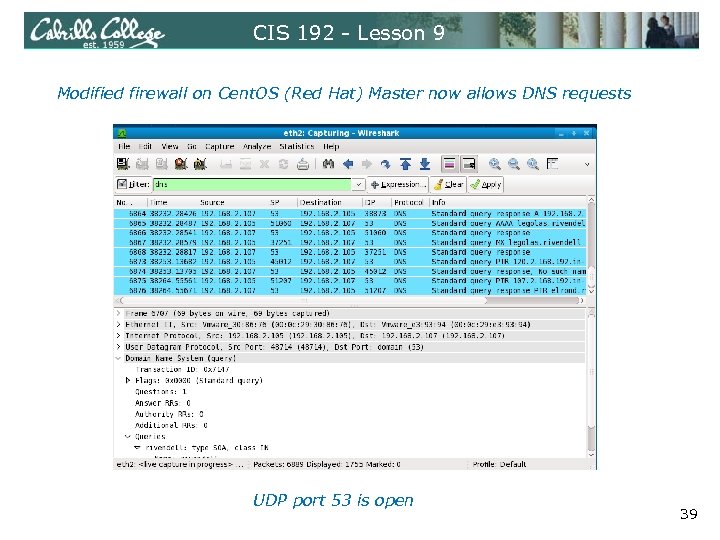 CIS 192 - Lesson 9 Modified firewall on Cent. OS (Red Hat) Master now allows DNS requests UDP port 53 is open 39
 DNS Trobleshooting 40
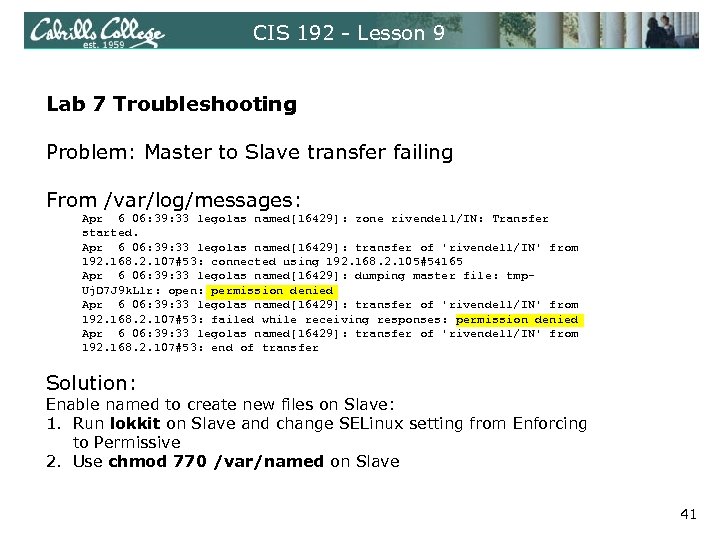 CIS 192 - Lesson 9 Lab 7 Troubleshooting Problem: Master to Slave transfer failing From /var/log/messages: Apr 6 06: 39: 33 legolas named[16429]: zone rivendell/IN: Transfer started. Apr 6 06: 39: 33 legolas named[16429]: transfer of 'rivendell/IN' from 192. 168. 2. 107#53: connected using 192. 168. 2. 105#54165 Apr 6 06: 39: 33 legolas named[16429]: dumping master file: tmp. Uj. D 7 J 9 k. Llr: open: permission denied Apr 6 06: 39: 33 legolas named[16429]: transfer of 'rivendell/IN' from 192. 168. 2. 107#53: failed while receiving responses: permission denied Apr 6 06: 39: 33 legolas named[16429]: transfer of 'rivendell/IN' from 192. 168. 2. 107#53: end of transfer Solution: Enable named to create new files on Slave: 1. Run lokkit on Slave and change SELinux setting from Enforcing to Permissive 2. Use chmod 770 /var/named on Slave 41
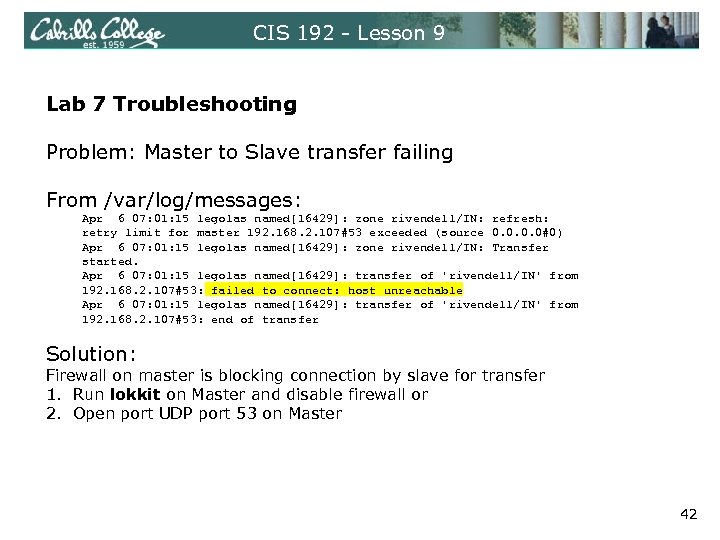 CIS 192 - Lesson 9 Lab 7 Troubleshooting Problem: Master to Slave transfer failing From /var/log/messages: Apr 6 07: 01: 15 legolas named[16429]: zone rivendell/IN: refresh: retry limit for master 192. 168. 2. 107#53 exceeded (source 0. 0#0) Apr 6 07: 01: 15 legolas named[16429]: zone rivendell/IN: Transfer started. Apr 6 07: 01: 15 legolas named[16429]: transfer of 'rivendell/IN' from 192. 168. 2. 107#53: failed to connect: host unreachable Apr 6 07: 01: 15 legolas named[16429]: transfer of 'rivendell/IN' from 192. 168. 2. 107#53: end of transfer Solution: Firewall on master is blocking connection by slave for transfer 1. Run lokkit on Master and disable firewall or 2. Open port UDP port 53 on Master 42
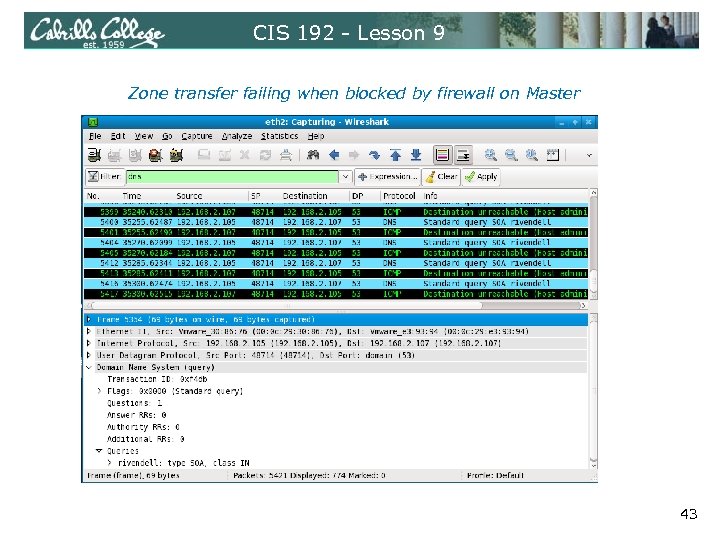 CIS 192 - Lesson 9 Zone transfer failing when blocked by firewall on Master 43
 Wrap 44
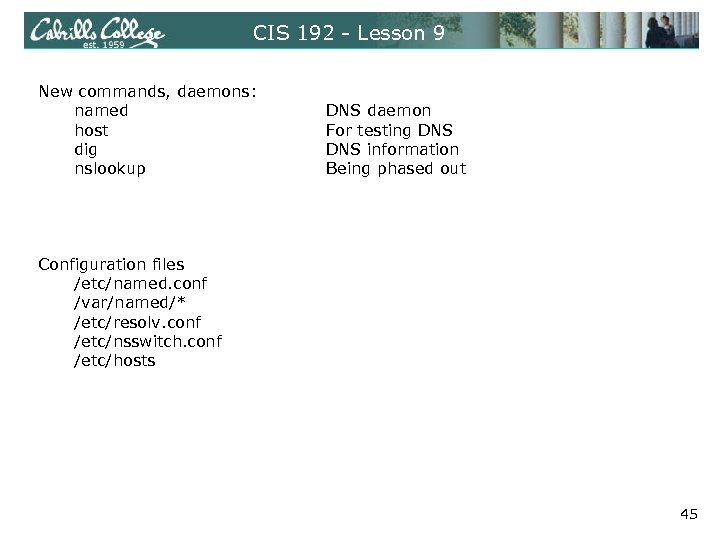 CIS 192 - Lesson 9 New commands, daemons: named host dig nslookup DNS daemon For testing DNS information Being phased out Configuration files /etc/named. conf /var/named/* /etc/resolv. conf /etc/nsswitch. conf /etc/hosts 45
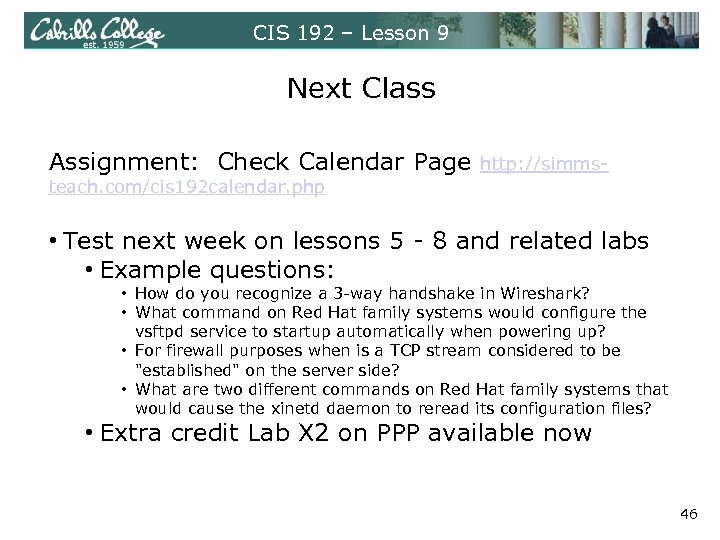 CIS 192 – Lesson 9 Next Class Assignment: Check Calendar Page http: //simms- teach. com/cis 192 calendar. php • Test next week on lessons 5 - 8 and related labs • Example questions: • How do you recognize a 3 -way handshake in Wireshark? • What command on Red Hat family systems would configure the vsftpd service to startup automatically when powering up? • For firewall purposes when is a TCP stream considered to be "established" on the server side? • What are two different commands on Red Hat family systems that would cause the xinetd daemon to reread its configuration files? • Extra credit Lab X 2 on PPP available now 46
 Backup 47
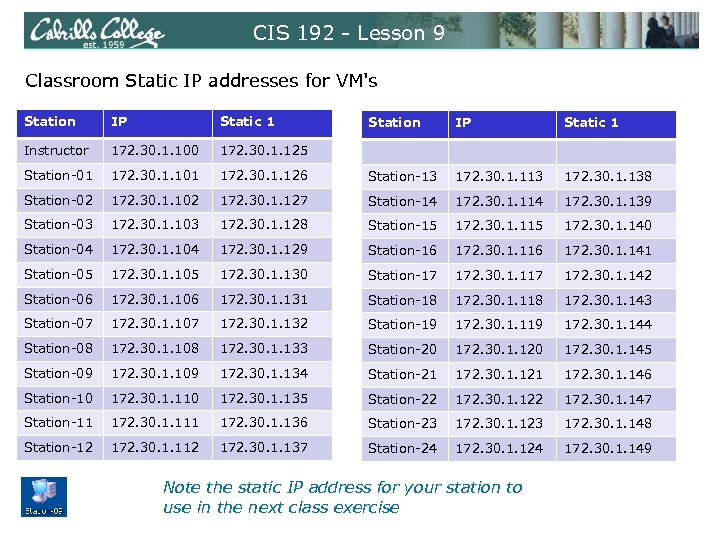 CIS 192 - Lesson 9 Classroom Static IP addresses for VM's Station IP Static 1 Instructor 172. 30. 1. 100 172. 30. 1. 125 Station-01 172. 30. 1. 101 Station-02 Station IP Static 1 172. 30. 1. 126 Station-13 172. 30. 1. 138 172. 30. 1. 102 172. 30. 1. 127 Station-14 172. 30. 1. 139 Station-03 172. 30. 1. 128 Station-15 172. 30. 1. 140 Station-04 172. 30. 1. 129 Station-16 172. 30. 1. 141 Station-05 172. 30. 1. 130 Station-17 172. 30. 1. 142 Station-06 172. 30. 1. 131 Station-18 172. 30. 1. 143 Station-07 172. 30. 1. 132 Station-19 172. 30. 1. 144 Station-08 172. 30. 1. 133 Station-20 172. 30. 1. 145 Station-09 172. 30. 1. 134 Station-21 172. 30. 1. 146 Station-10 172. 30. 1. 135 Station-22 172. 30. 1. 147 Station-11 172. 30. 1. 136 Station-23 172. 30. 1. 148 Station-12 172. 30. 1. 137 Station-24 172. 30. 1. 149 Note the static IP address for your station to use in the next class exercise
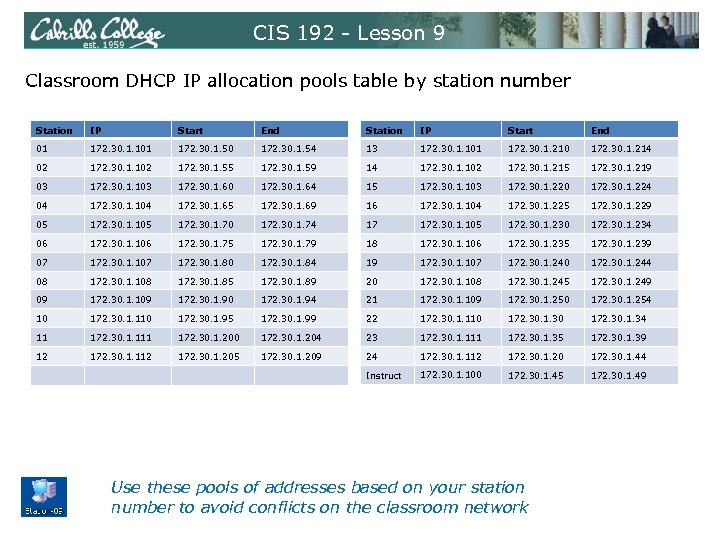 CIS 192 - Lesson 9 Classroom DHCP IP allocation pools table by station number Station IP Start End 01 172. 30. 1. 101 172. 30. 1. 50 172. 30. 1. 54 13 172. 30. 1. 101 172. 30. 1. 210 172. 30. 1. 214 02 172. 30. 1. 102 172. 30. 1. 55 172. 30. 1. 59 14 172. 30. 1. 102 172. 30. 1. 215 172. 30. 1. 219 03 172. 30. 1. 103 172. 30. 1. 60 172. 30. 1. 64 15 172. 30. 1. 103 172. 30. 1. 220 172. 30. 1. 224 04 172. 30. 1. 104 172. 30. 1. 65 172. 30. 1. 69 16 172. 30. 1. 104 172. 30. 1. 225 172. 30. 1. 229 05 172. 30. 1. 105 172. 30. 1. 70 172. 30. 1. 74 17 172. 30. 1. 105 172. 30. 1. 230 172. 30. 1. 234 06 172. 30. 1. 106 172. 30. 1. 75 172. 30. 1. 79 18 172. 30. 1. 106 172. 30. 1. 235 172. 30. 1. 239 07 172. 30. 1. 107 172. 30. 1. 80 172. 30. 1. 84 19 172. 30. 1. 107 172. 30. 1. 240 172. 30. 1. 244 08 172. 30. 1. 108 172. 30. 1. 85 172. 30. 1. 89 20 172. 30. 1. 108 172. 30. 1. 245 172. 30. 1. 249 09 172. 30. 1. 109 172. 30. 1. 90 172. 30. 1. 94 21 172. 30. 1. 109 172. 30. 1. 250 172. 30. 1. 254 10 172. 30. 1. 110 172. 30. 1. 95 172. 30. 1. 99 22 172. 30. 1. 110 172. 30. 1. 34 11 172. 30. 1. 111 172. 30. 1. 200 172. 30. 1. 204 23 172. 30. 1. 111 172. 30. 1. 35 172. 30. 1. 39 12 172. 30. 1. 112 172. 30. 1. 205 172. 30. 1. 209 24 172. 30. 1. 112 172. 30. 1. 20 172. 30. 1. 44 Instruct 172. 30. 1. 100 172. 30. 1. 45 172. 30. 1. 49 Use these pools of addresses based on your station number to avoid conflicts on the classroom network
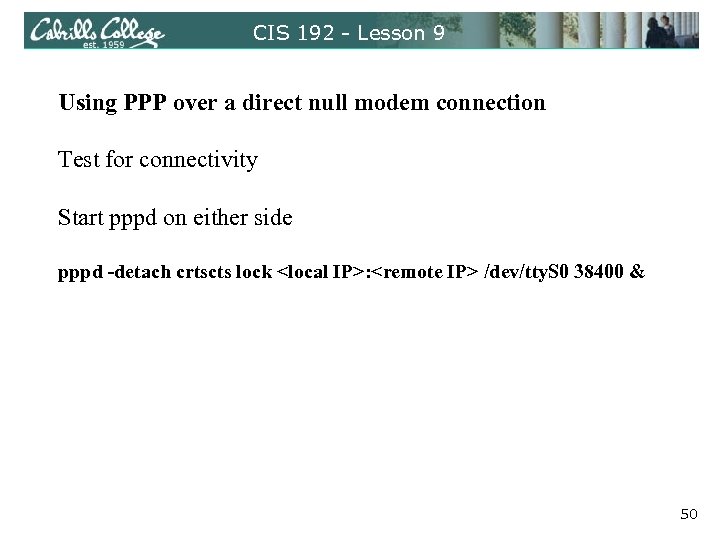 CIS 192 - Lesson 9 Using PPP over a direct null modem connection Test for connectivity Start pppd on either side pppd -detach crtscts lock
 snickers DHCP DNS buttercup 207. 62. 187. 54 nosmo . 10 Internet . 1 client william frodo client sauron DHCP Server eth 0 dhcp eth 0 elrond legolas eth 1 eth 0. 1 XX dhcp DHCP Relay Agent DHCP eth 0. 150 dhcp eth 1 . 1 XX eth 0 . 150 172. 30. N. 0 /24 192. 168. 2. 0 /24 Shire Rivendell DHCP Reservation 192. 168. 3. 0 /24 Mordor 51
![CIS 192 - Lesson 9 Exercise - Debian/Ubuntu NIC Config (permanent) [root@arwen ~]# ipcalc](https://present5.com/presentation/856663d23bc3a181d5dd08036a167e51/image-52.jpg "CIS 192 - Lesson 9 Exercise - Debian/Ubuntu NIC Config (permanent) [root@arwen ~]# ipcalc") CIS 192 - Lesson 9 Exercise - Debian/Ubuntu NIC Config (permanent) [root@arwen ~]# ipcalc -npmb 10. 10. 141/22 NETMASK=255. 252. 0 PREFIX=22 BROADCAST=10. 11. 255 NETWORK=10. 8. 0 cis 192@sawyer: ~$ cat /etc/hostname sawyer cis 192@sawyer: ~$ cat /etc/network/interfaces auto lo iface lo inet loopback auto eth 0 iface eth 0 inet static address 10. 10. 141 broadcast 10. 11. 255 netmask 255. 252. 0 network 10. 8. 0 gateway 10. 8. 1 up route add -net 192. 168. 3. 0/24 gw 10. 8. 10 cis 192@sawyer: ~$ 52
CIS 192 - Lesson 9 Exercise - Debian/Ubuntu NIC Config (permanent) [root@arwen ~]# ipcalc -npmb 10. 10. 141/22 NETMASK=255. 252. 0 PREFIX=22 BROADCAST=10. 11. 255 NETWORK=10. 8. 0 cis 192@sawyer: ~$ cat /etc/hostname sawyer cis 192@sawyer: ~$ cat /etc/network/interfaces auto lo iface lo inet loopback auto eth 0 iface eth 0 inet static address 10. 10. 141 broadcast 10. 11. 255 netmask 255. 252. 0 network 10. 8. 0 gateway 10. 8. 1 up route add -net 192. 168. 3. 0/24 gw 10. 8. 10 cis 192@sawyer: ~$ 52
![CIS 192 - Lesson 9 Exercise - Debian/Ubuntu NIC Config (permanent) [root@arwen ~]# ipcalc](https://present5.com/presentation/856663d23bc3a181d5dd08036a167e51/image-53.jpg "CIS 192 - Lesson 9 Exercise - Debian/Ubuntu NIC Config (permanent) [root@arwen ~]# ipcalc") CIS 192 - Lesson 9 Exercise - Debian/Ubuntu NIC Config (permanent) [root@arwen ~]# ipcalc -npmb 10. 10. 141/22 NETMASK=255. 252. 0 PREFIX=22 BROADCAST=10. 11. 255 NETWORK=10. 8. 0 root@sawyer: ~# cat /etc/hosts 127. 0. 0. 1 localhost 127. 0. 1. 1 sawyer # The following lines are desirable for IPv 6 capable hosts : : 1 ip 6 -localhost ip 6 -loopback fe 00: : 0 ip 6 -localnet ff 00: : 0 ip 6 -mcastprefix ff 02: : 1 ip 6 -allnodes ff 02: : 2 ip 6 -allrouters ff 02: : 3 ip 6 -allhosts root@sawyer: ~# 53
CIS 192 - Lesson 9 Exercise - Debian/Ubuntu NIC Config (permanent) [root@arwen ~]# ipcalc -npmb 10. 10. 141/22 NETMASK=255. 252. 0 PREFIX=22 BROADCAST=10. 11. 255 NETWORK=10. 8. 0 root@sawyer: ~# cat /etc/hosts 127. 0. 0. 1 localhost 127. 0. 1. 1 sawyer # The following lines are desirable for IPv 6 capable hosts : : 1 ip 6 -localhost ip 6 -loopback fe 00: : 0 ip 6 -localnet ff 00: : 0 ip 6 -mcastprefix ff 02: : 1 ip 6 -allnodes ff 02: : 2 ip 6 -allrouters ff 02: : 3 ip 6 -allhosts root@sawyer: ~# 53
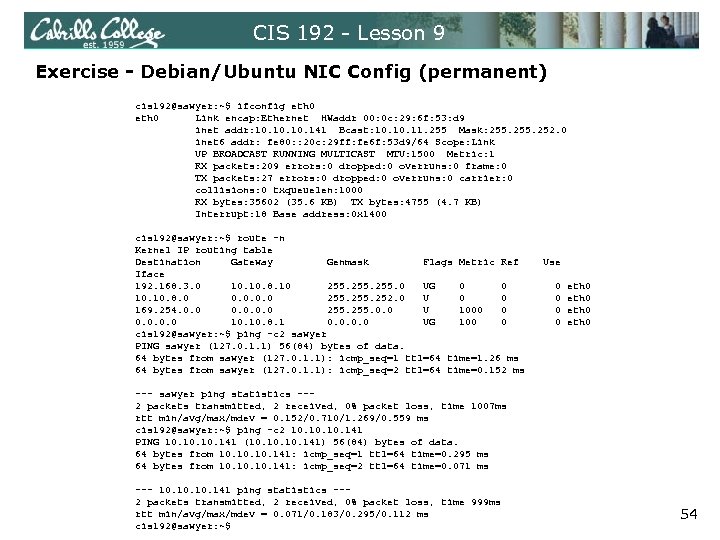 CIS 192 - Lesson 9 Exercise - Debian/Ubuntu NIC Config (permanent) cis 192@sawyer: ~$ ifconfig eth 0 Link encap: Ethernet HWaddr 00: 0 c: 29: 6 f: 53: d 9 inet addr: 10. 10. 141 Bcast: 10. 11. 255 Mask: 255. 252. 0 inet 6 addr: fe 80: : 20 c: 29 ff: fe 6 f: 53 d 9/64 Scope: Link UP BROADCAST RUNNING MULTICAST MTU: 1500 Metric: 1 RX packets: 209 errors: 0 dropped: 0 overruns: 0 frame: 0 TX packets: 27 errors: 0 dropped: 0 overruns: 0 carrier: 0 collisions: 0 txqueuelen: 1000 RX bytes: 35602 (35. 6 KB) TX bytes: 4755 (4. 7 KB) Interrupt: 18 Base address: 0 x 1400 cis 192@sawyer: ~$ route -n Kernel IP routing table Destination Gateway Genmask Flags Metric Ref Use Iface 192. 168. 3. 0 10. 8. 10 255. 0 UG 0 0 0 eth 0 10. 8. 0 0. 0 255. 252. 0 U 0 0 0 eth 0 169. 254. 0. 0 255. 0. 0 U 1000 0 0 eth 0 0. 0 10. 8. 1 0. 0 UG 100 0 0 eth 0 cis 192@sawyer: ~$ ping -c 2 sawyer PING sawyer (127. 0. 1. 1) 56(84) bytes of data. 64 bytes from sawyer (127. 0. 1. 1): icmp_seq=1 ttl=64 time=1. 26 ms 64 bytes from sawyer (127. 0. 1. 1): icmp_seq=2 ttl=64 time=0. 152 ms --- sawyer ping statistics --2 packets transmitted, 2 received, 0% packet loss, time 1007 ms rtt min/avg/max/mdev = 0. 152/0. 710/1. 269/0. 559 ms cis 192@sawyer: ~$ ping -c 2 10. 10. 141 PING 10. 10. 141 (10. 10. 141) 56(84) bytes of data. 64 bytes from 10. 10. 141: icmp_seq=1 ttl=64 time=0. 295 ms 64 bytes from 10. 10. 141: icmp_seq=2 ttl=64 time=0. 071 ms --- 10. 10. 141 ping statistics --2 packets transmitted, 2 received, 0% packet loss, time 999 ms rtt min/avg/max/mdev = 0. 071/0. 183/0. 295/0. 112 ms cis 192@sawyer: ~$ 54
![CIS 192 - Lesson 9 Exercise - Cent. OS NIC Config (permanent) [root@arwen ~]#](https://present5.com/presentation/856663d23bc3a181d5dd08036a167e51/image-55.jpg "CIS 192 - Lesson 9 Exercise - Cent. OS NIC Config (permanent) [root@arwen ~]#") CIS 192 - Lesson 9 Exercise - Cent. OS NIC Config (permanent) [root@arwen ~]# cat /etc/sysconfig/network-scripts/ifcfg-eth 0 # Advanced Micro Devices [AMD] 79 c 970 [PCnet 32 LANCE] DEVICE=eth 0 ONBOOT=yes HWADDR=00: 0 c: 29: 70: d 5: 71 BOOTPROTO=static IPADDR=10. 8. 100 NETMASK=255. 252. 0 BROADCAST=10. 11. 255 [root@arwen ~]# ifconfig eth 0 Link encap: Ethernet HWaddr 00: 0 C: 29: 70: D 5: 71 inet addr: 10. 8. 100 Bcast: 10. 11. 255 Mask: 255. 252. 0 inet 6 addr: fe 80: : 20 c: 29 ff: fe 70: d 571/64 Scope: Link UP BROADCAST RUNNING MULTICAST MTU: 1500 Metric: 1 RX packets: 1002 errors: 0 dropped: 0 overruns: 0 frame: 0 TX packets: 1088 errors: 0 dropped: 0 overruns: 0 carrier: 0 collisions: 0 txqueuelen: 1000 RX bytes: 761805 (743. 9 Ki. B) TX bytes: 107613 (105. 0 Ki. B) Interrupt: 177 Base address: 0 x 1400 [root@arwen ~]# 55
CIS 192 - Lesson 9 Exercise - Cent. OS NIC Config (permanent) [root@arwen ~]# cat /etc/sysconfig/network-scripts/ifcfg-eth 0 # Advanced Micro Devices [AMD] 79 c 970 [PCnet 32 LANCE] DEVICE=eth 0 ONBOOT=yes HWADDR=00: 0 c: 29: 70: d 5: 71 BOOTPROTO=static IPADDR=10. 8. 100 NETMASK=255. 252. 0 BROADCAST=10. 11. 255 [root@arwen ~]# ifconfig eth 0 Link encap: Ethernet HWaddr 00: 0 C: 29: 70: D 5: 71 inet addr: 10. 8. 100 Bcast: 10. 11. 255 Mask: 255. 252. 0 inet 6 addr: fe 80: : 20 c: 29 ff: fe 70: d 571/64 Scope: Link UP BROADCAST RUNNING MULTICAST MTU: 1500 Metric: 1 RX packets: 1002 errors: 0 dropped: 0 overruns: 0 frame: 0 TX packets: 1088 errors: 0 dropped: 0 overruns: 0 carrier: 0 collisions: 0 txqueuelen: 1000 RX bytes: 761805 (743. 9 Ki. B) TX bytes: 107613 (105. 0 Ki. B) Interrupt: 177 Base address: 0 x 1400 [root@arwen ~]# 55
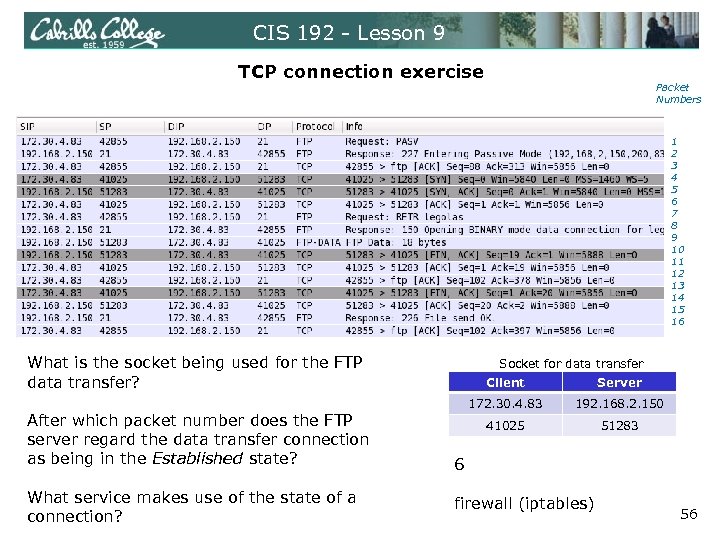 CIS 192 - Lesson 9 TCP connection exercise Packet Numbers 1 2 3 4 5 6 7 8 9 10 11 12 13 14 15 16 What is the socket being used for the FTP data transfer? After which packet number does the FTP server regard the data transfer connection as being in the Established state? What service makes use of the state of a connection? Socket for data transfer Client Server 172. 30. 4. 83 192. 168. 2. 150 41025 51283 6 firewall (iptables) 56
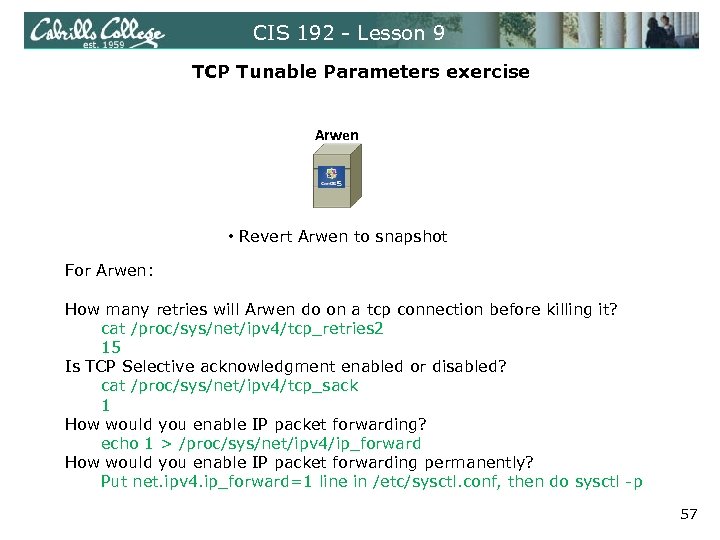 CIS 192 - Lesson 9 TCP Tunable Parameters exercise Arwen • Revert Arwen to snapshot For Arwen: How many retries will Arwen do on a tcp connection before killing it? cat /proc/sys/net/ipv 4/tcp_retries 2 15 Is TCP Selective acknowledgment enabled or disabled? cat /proc/sys/net/ipv 4/tcp_sack 1 How would you enable IP packet forwarding? echo 1 > /proc/sys/net/ipv 4/ip_forward How would you enable IP packet forwarding permanently? Put net. ipv 4. ip_forward=1 line in /etc/sysctl. conf, then do sysctl -p 57
 Selected Review 58
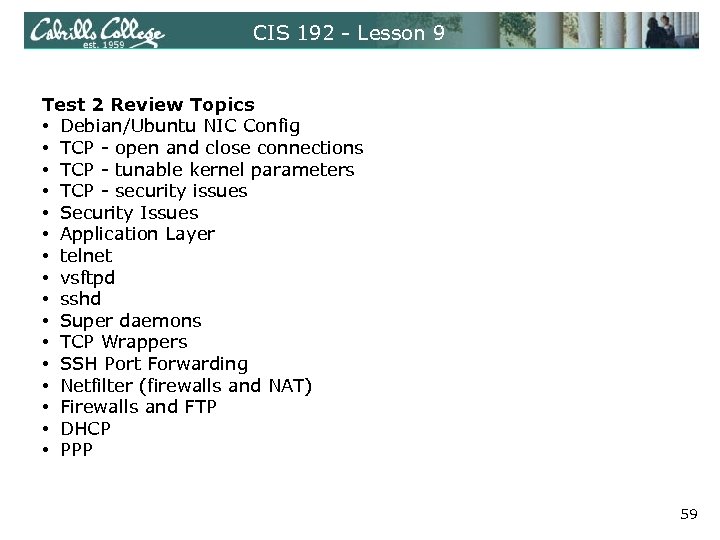 CIS 192 - Lesson 9 Test 2 Review Topics • Debian/Ubuntu NIC Config • TCP - open and close connections • TCP - tunable kernel parameters • TCP - security issues • Security Issues • Application Layer • telnet • vsftpd • sshd • Super daemons • TCP Wrappers • SSH Port Forwarding • Netfilter (firewalls and NAT) • Firewalls and FTP • DHCP • PPP 59
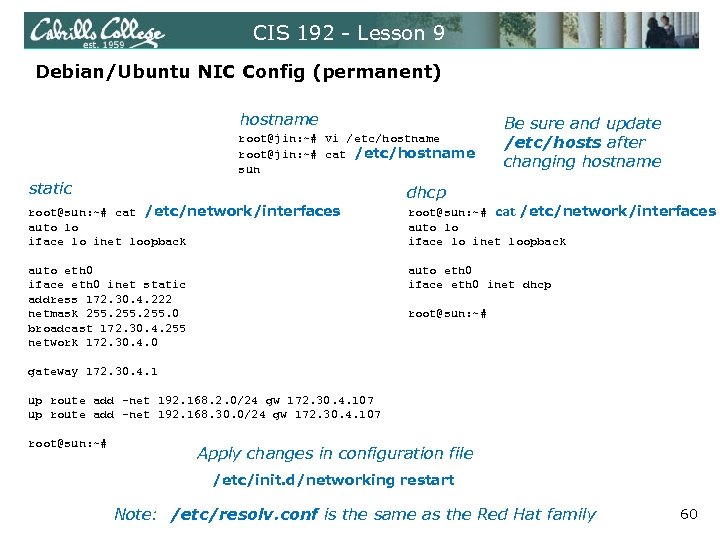 CIS 192 - Lesson 9 Debian/Ubuntu NIC Config (permanent) hostname root@jin: ~# vi /etc/hostname root@jin: ~# cat /etc/hostname sun Be sure and update /etc/hosts after changing hostname static dhcp root@sun: ~# cat /etc/network/interfaces auto lo iface lo inet loopback auto eth 0 iface eth 0 inet static address 172. 30. 4. 222 netmask 255. 0 broadcast 172. 30. 4. 255 network 172. 30. 4. 0 auto eth 0 iface eth 0 inet dhcp root@sun: ~# gateway 172. 30. 4. 1 up route add -net 192. 168. 2. 0/24 gw 172. 30. 4. 107 up route add -net 192. 168. 30. 0/24 gw 172. 30. 4. 107 root@sun: ~# Apply changes in configuration file /etc/init. d/networking restart Note: /etc/resolv. conf is the same as the Red Hat family 60
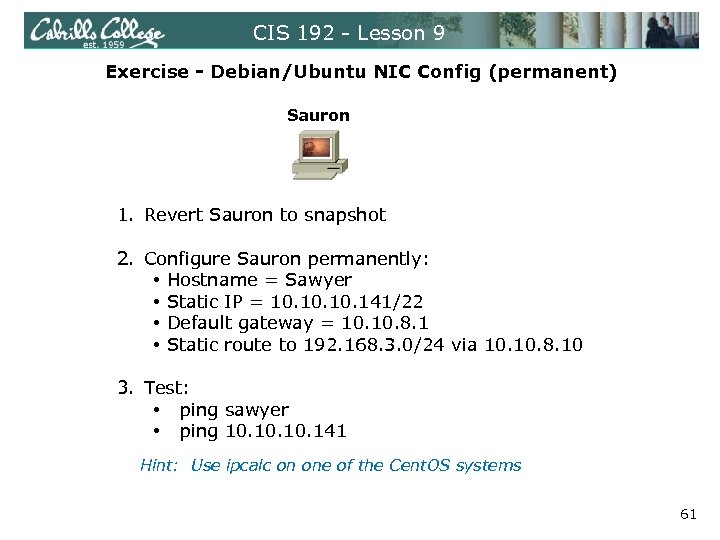 CIS 192 - Lesson 9 Exercise - Debian/Ubuntu NIC Config (permanent) Sauron 1. Revert Sauron to snapshot 2. Configure Sauron permanently: • Hostname = Sawyer • Static IP = 10. 10. 141/22 • Default gateway = 10. 8. 1 • Static route to 192. 168. 3. 0/24 via 10. 8. 10 3. Test: • ping sawyer • ping 10. 10. 141 Hint: Use ipcalc on one of the Cent. OS systems 61
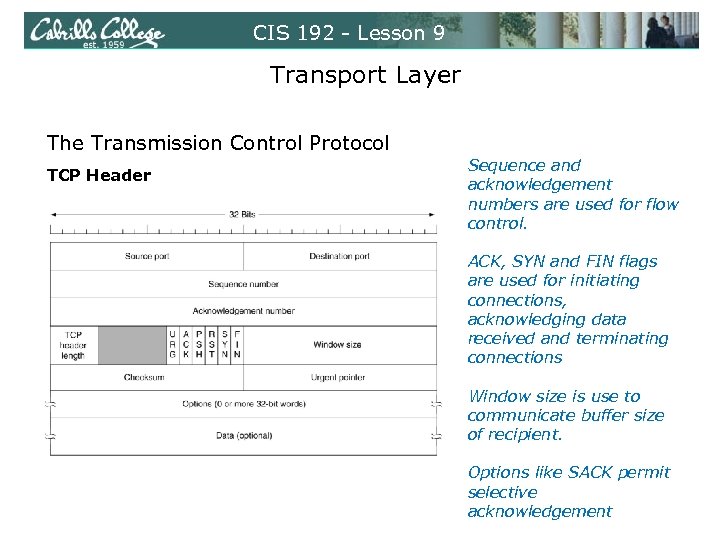 CIS 192 - Lesson 9 Transport Layer The Transmission Control Protocol TCP Header Sequence and acknowledgement numbers are used for flow control. ACK, SYN and FIN flags are used for initiating connections, acknowledging data received and terminating connections Window size is use to communicate buffer size of recipient. Options like SACK permit selective acknowledgement
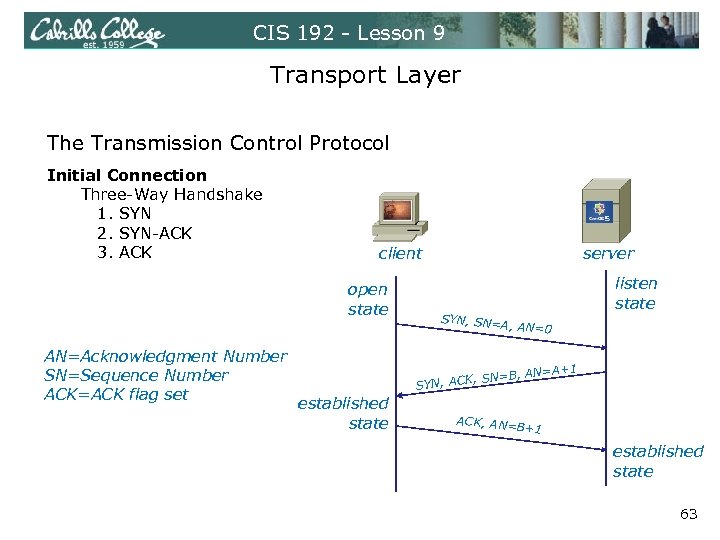 CIS 192 - Lesson 9 Transport Layer The Transmission Control Protocol Initial Connection Three-Way Handshake 1. SYN 2. SYN-ACK 3. ACK client open state AN=Acknowledgment Number SN=Sequence Number ACK=ACK flag set server SYN, SN= A, AN=0 listen state A+1 N=B, AN= N, ACK, S SY established state ACK, AN= B+1 established state 63
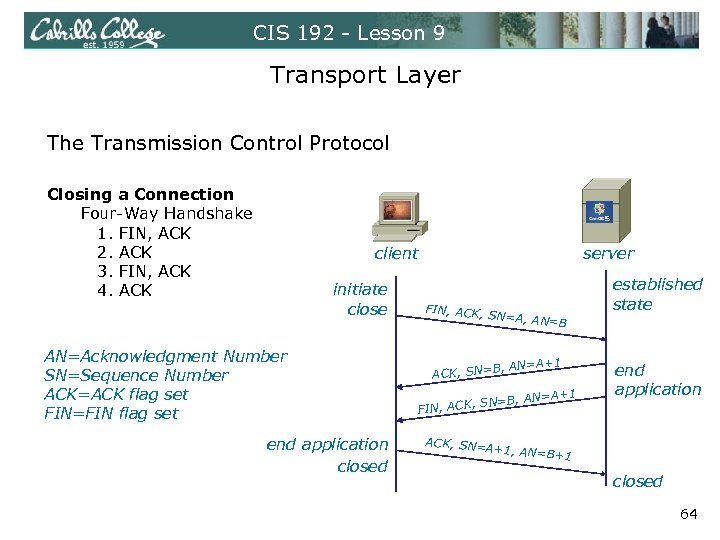 CIS 192 - Lesson 9 Transport Layer The Transmission Control Protocol Closing a Connection Four-Way Handshake 1. FIN, ACK 2. ACK 3. FIN, ACK 4. ACK client initiate close AN=Acknowledgment Number SN=Sequence Number ACK=ACK flag set FIN=FIN flag set end application closed server FIN, ACK, SN=A, AN =B 1 B, AN=A+ ACK, SN= +1 =B, AN=A , ACK, SN FIN ACK, SN= A+1, established state end application AN=B+1 closed 64
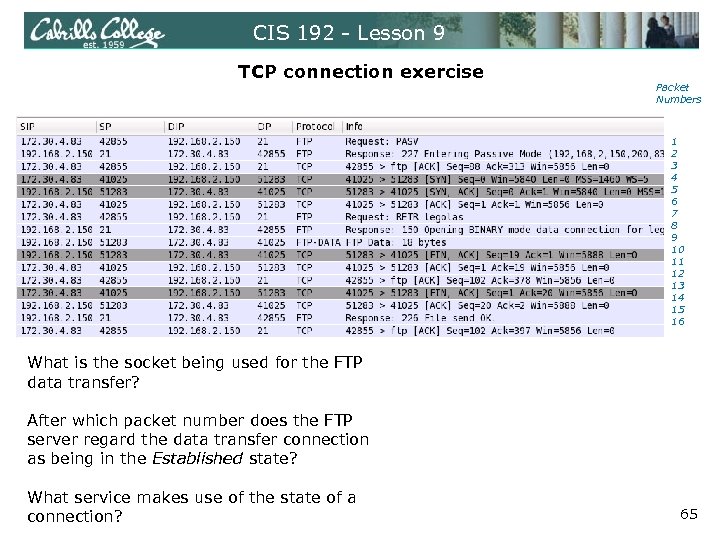 CIS 192 - Lesson 9 TCP connection exercise Packet Numbers 1 2 3 4 5 6 7 8 9 10 11 12 13 14 15 16 What is the socket being used for the FTP data transfer? After which packet number does the FTP server regard the data transfer connection as being in the Established state? What service makes use of the state of a connection? 65
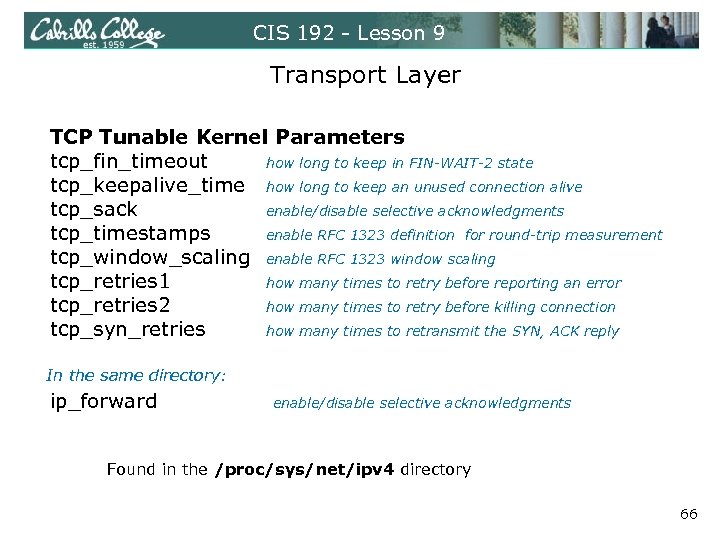 CIS 192 - Lesson 9 Transport Layer TCP Tunable Kernel Parameters tcp_fin_timeout how long to keep in FIN-WAIT-2 state tcp_keepalive_time how long to keep an unused connection alive tcp_sack enable/disable selective acknowledgments tcp_timestamps enable RFC 1323 definition for round-trip measurement tcp_window_scaling enable RFC 1323 window scaling tcp_retries 1 how many times to retry before reporting an error tcp_retries 2 how many times to retry before killing connection tcp_syn_retries how many times to retransmit the SYN, ACK reply In the same directory: ip_forward enable/disable selective acknowledgments Found in the /proc/sys/net/ipv 4 directory 66
![CIS 192 - Lesson 9 TCP Tunable Kernel Parameters [cis 192@arwen ~]$ cat /etc/sysctl.](https://present5.com/presentation/856663d23bc3a181d5dd08036a167e51/image-67.jpg "CIS 192 - Lesson 9 TCP Tunable Kernel Parameters [cis 192@arwen ~]$ cat /etc/sysctl.") CIS 192 - Lesson 9 TCP Tunable Kernel Parameters [cis 192@arwen ~]$ cat /etc/sysctl. conf # Kernel sysctl configuration file for Red Hat Linux # # For binary values, 0 is disabled, 1 is enabled. See sysctl(8) and # sysctl. conf(5) for more details. # Controls IP packet forwarding net. ipv 4. ip_forward = 0 # Controls source route verification net. ipv 4. conf. default. rp_filter = 1 # Do not accept source routing net. ipv 4. conf. default. accept_source_route = 0 < snipped > [cis 192@arwen ~]$ cat /proc/sys/net/ipv 4/conf/default/accept_source_route 0 [cis 192@arwen ~]$ cat /proc/sys/net/ipv 4/conf/default/rp_filter 1 [cis 192@arwen ~]$ cat /proc/sys/net/ipv 4/ip_forward 0 Note: Use sysctl -p to put in effect any changes made to /etc/sysctl. conf 67
CIS 192 - Lesson 9 TCP Tunable Kernel Parameters [cis 192@arwen ~]$ cat /etc/sysctl. conf # Kernel sysctl configuration file for Red Hat Linux # # For binary values, 0 is disabled, 1 is enabled. See sysctl(8) and # sysctl. conf(5) for more details. # Controls IP packet forwarding net. ipv 4. ip_forward = 0 # Controls source route verification net. ipv 4. conf. default. rp_filter = 1 # Do not accept source routing net. ipv 4. conf. default. accept_source_route = 0 < snipped > [cis 192@arwen ~]$ cat /proc/sys/net/ipv 4/conf/default/accept_source_route 0 [cis 192@arwen ~]$ cat /proc/sys/net/ipv 4/conf/default/rp_filter 1 [cis 192@arwen ~]$ cat /proc/sys/net/ipv 4/ip_forward 0 Note: Use sysctl -p to put in effect any changes made to /etc/sysctl. conf 67
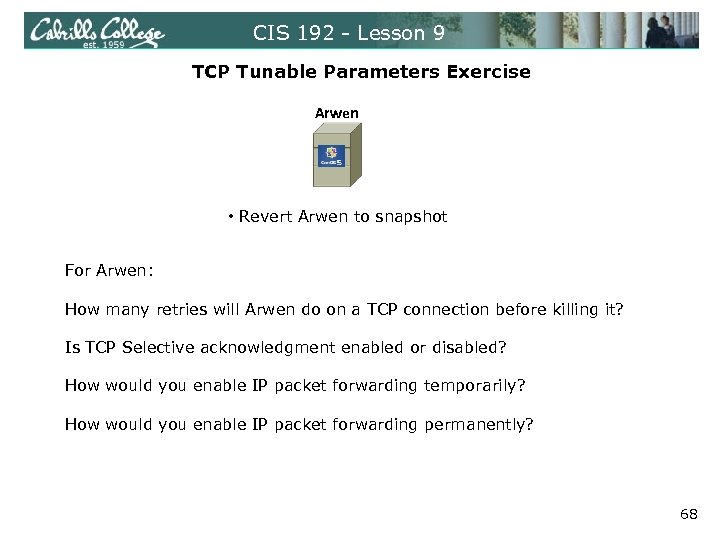 CIS 192 - Lesson 9 TCP Tunable Parameters Exercise Arwen • Revert Arwen to snapshot For Arwen: How many retries will Arwen do on a TCP connection before killing it? Is TCP Selective acknowledgment enabled or disabled? How would you enable IP packet forwarding temporarily? How would you enable IP packet forwarding permanently? 68
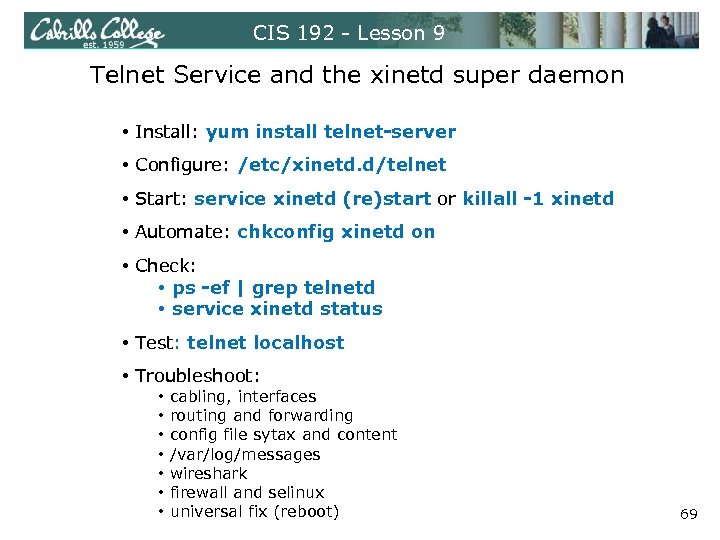 CIS 192 - Lesson 9 Telnet Service and the xinetd super daemon • Install: yum install telnet-server • Configure: /etc/xinetd. d/telnet • Start: service xinetd (re)start or killall -1 xinetd • Automate: chkconfig xinetd on • Check: • ps -ef | grep telnetd • service xinetd status • Test: telnet localhost • Troubleshoot: • • cabling, interfaces routing and forwarding config file sytax and content /var/log/messages wireshark firewall and selinux universal fix (reboot) 69
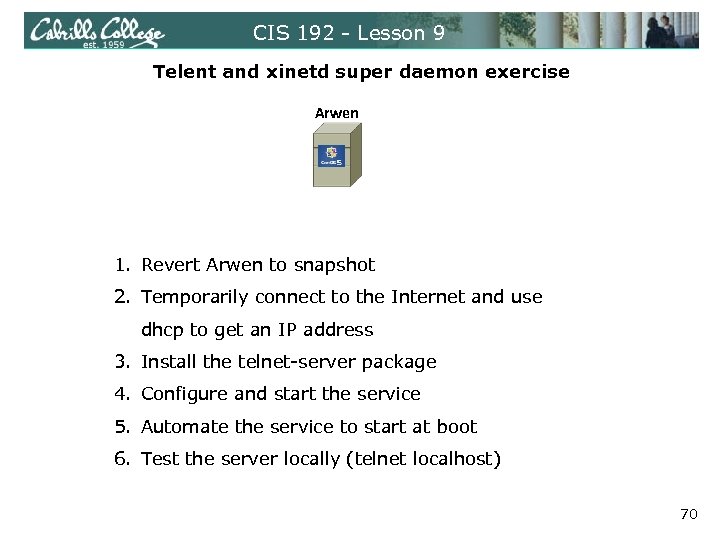 CIS 192 - Lesson 9 Telent and xinetd super daemon exercise Arwen 1. Revert Arwen to snapshot 2. Temporarily connect to the Internet and use dhcp to get an IP address 3. Install the telnet-server package 4. Configure and start the service 5. Automate the service to start at boot 6. Test the server locally (telnet localhost) 70
 CIS 192 - Lesson 9 Access controls • Configuration files • TCP Wrappers • Firewalls 71
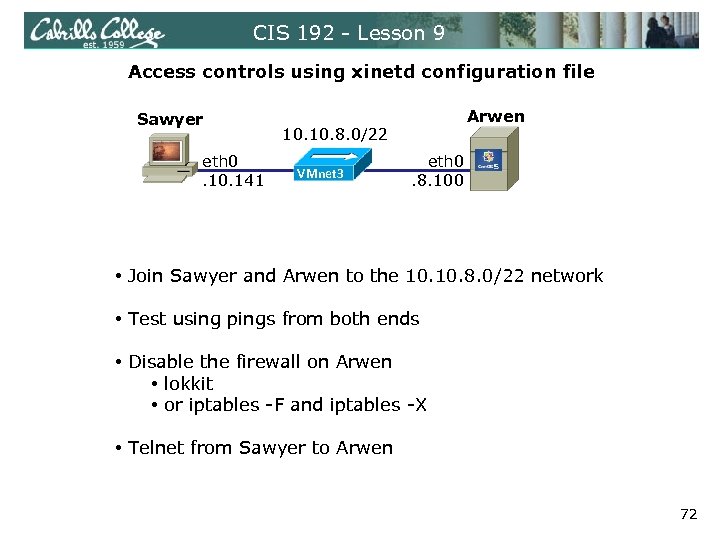 CIS 192 - Lesson 9 Access controls using xinetd configuration file Sawyer eth 0. 141 Arwen 10. 8. 0/22 VMnet 3 eth 0. 8. 100 • Join Sawyer and Arwen to the 10. 8. 0/22 network • Test using pings from both ends • Disable the firewall on Arwen • lokkit • or iptables -F and iptables -X • Telnet from Sawyer to Arwen 72
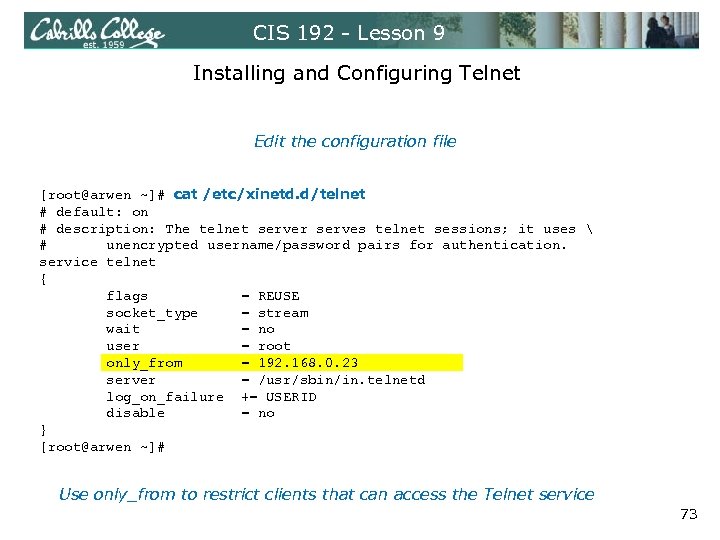 CIS 192 - Lesson 9 Installing and Configuring Telnet Edit the configuration file [root@arwen ~]# cat /etc/xinetd. d/telnet # default: on # description: The telnet server serves telnet sessions; it uses # unencrypted username/password pairs for authentication. service telnet { flags = REUSE socket_type = stream wait = no user = root only_from = 192. 168. 0. 23 server = /usr/sbin/in. telnetd log_on_failure += USERID disable = no } [root@arwen ~]# Use only_from to restrict clients that can access the Telnet service 73
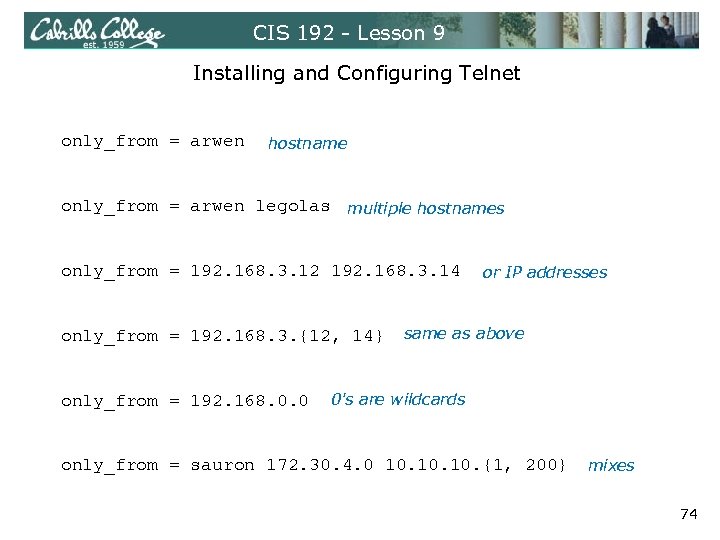 CIS 192 - Lesson 9 Installing and Configuring Telnet only_from = arwen hostname only_from = arwen legolas multiple hostnames only_from = 192. 168. 3. 12 192. 168. 3. 14 only_from = 192. 168. 3. {12, 14} or IP addresses same as above only_from = 192. 168. 0. 0 0's are wildcards only_from = sauron 172. 30. 4. 0 10. 10. {1, 200} mixes 74
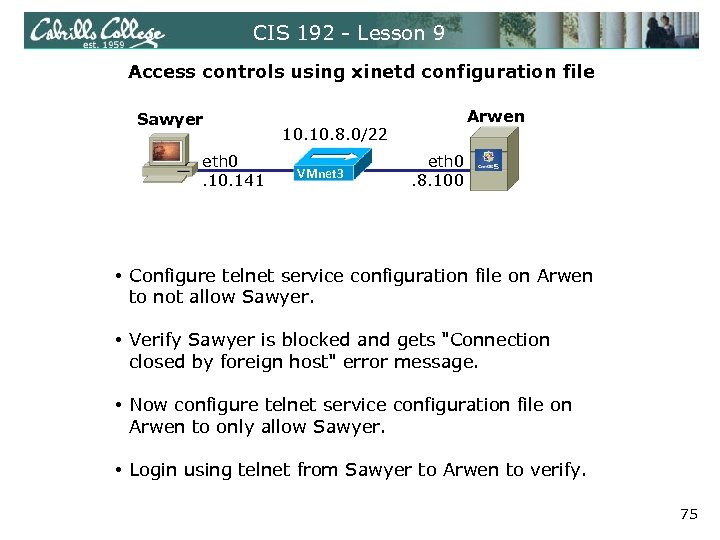 CIS 192 - Lesson 9 Access controls using xinetd configuration file Sawyer eth 0. 141 Arwen 10. 8. 0/22 VMnet 3 eth 0. 8. 100 • Configure telnet service configuration file on Arwen to not allow Sawyer. • Verify Sawyer is blocked and gets "Connection closed by foreign host" error message. • Now configure telnet service configuration file on Arwen to only allow Sawyer. • Login using telnet from Sawyer to Arwen to verify. 75
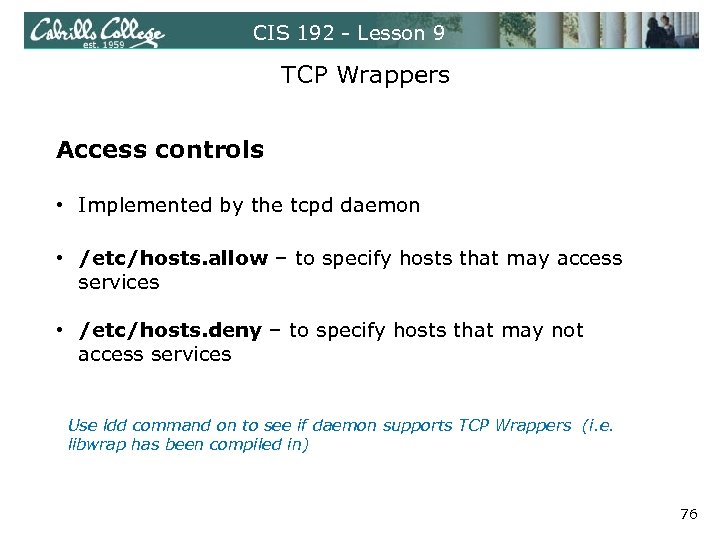 CIS 192 - Lesson 9 TCP Wrappers Access controls • Implemented by the tcpd daemon • /etc/hosts. allow – to specify hosts that may access services • /etc/hosts. deny – to specify hosts that may not access services Use ldd command on to see if daemon supports TCP Wrappers (i. e. libwrap has been compiled in) 76
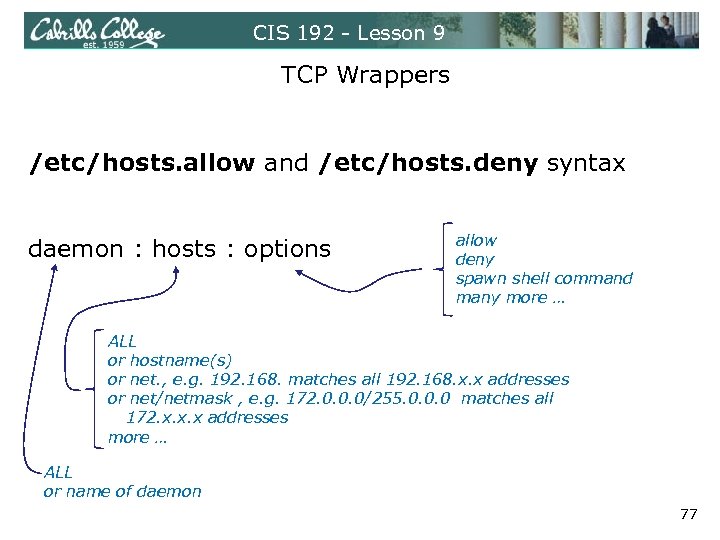 CIS 192 - Lesson 9 TCP Wrappers /etc/hosts. allow and /etc/hosts. deny syntax daemon : hosts : options allow deny spawn shell command many more … ALL or hostname(s) or net. , e. g. 192. 168. matches all 192. 168. x. x addresses or net/netmask , e. g. 172. 0. 0. 0/255. 0. 0. 0 matches all 172. x. x. x addresses more … ALL or name of daemon 77
![CIS 192 - Lesson 9 TCP Wrapper Examples [root@arwen ~]# cat /etc/hosts. allow #](https://present5.com/presentation/856663d23bc3a181d5dd08036a167e51/image-78.jpg "CIS 192 - Lesson 9 TCP Wrapper Examples [root@arwen ~]# cat /etc/hosts. allow #") CIS 192 - Lesson 9 TCP Wrapper Examples [root@arwen ~]# cat /etc/hosts. allow # # hosts. allow This file describes the names of the hosts which are # allowed to use the local INET services, as decided # by the '/usr/sbin/tcpd' server. # sshd: frodo vsftpd: 172. 30. in. telnetd: 192. 168. 2. 10 127. 0. 0. 1 daemons hosts [root@arwen ~]# cat /etc/hosts. deny # # hosts. deny This file describes the names of the hosts which are # *not* allowed to use the local INET services, as decided # by the '/usr/sbin/tcpd' server. # # The portmap line is redundant, but it is left to remind you that # the new secure portmap uses hosts. deny and hosts. allow. In particular # you should know that NFS uses portmap! #deny everything ALL: ALL All daemons and all hosts 78
CIS 192 - Lesson 9 TCP Wrapper Examples [root@arwen ~]# cat /etc/hosts. allow # # hosts. allow This file describes the names of the hosts which are # allowed to use the local INET services, as decided # by the '/usr/sbin/tcpd' server. # sshd: frodo vsftpd: 172. 30. in. telnetd: 192. 168. 2. 10 127. 0. 0. 1 daemons hosts [root@arwen ~]# cat /etc/hosts. deny # # hosts. deny This file describes the names of the hosts which are # *not* allowed to use the local INET services, as decided # by the '/usr/sbin/tcpd' server. # # The portmap line is redundant, but it is left to remind you that # the new secure portmap uses hosts. deny and hosts. allow. In particular # you should know that NFS uses portmap! #deny everything ALL: ALL All daemons and all hosts 78
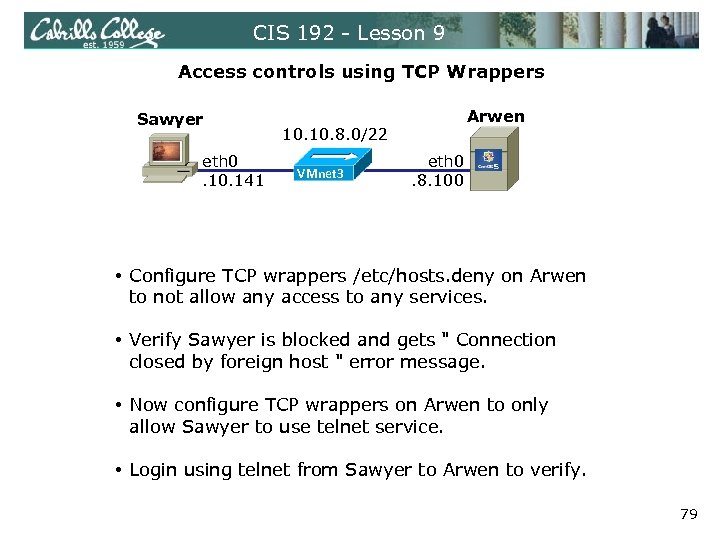 CIS 192 - Lesson 9 Access controls using TCP Wrappers Sawyer eth 0. 141 Arwen 10. 8. 0/22 VMnet 3 eth 0. 8. 100 • Configure TCP wrappers /etc/hosts. deny on Arwen to not allow any access to any services. • Verify Sawyer is blocked and gets " Connection closed by foreign host " error message. • Now configure TCP wrappers on Arwen to only allow Sawyer to use telnet service. • Login using telnet from Sawyer to Arwen to verify. 79
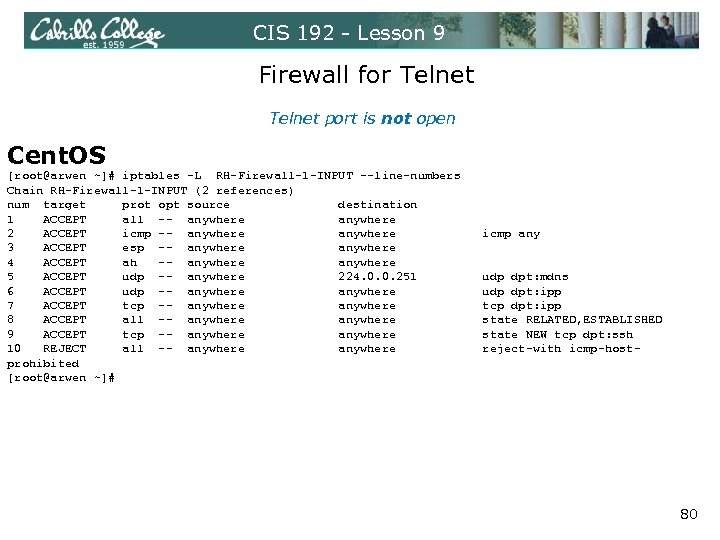 CIS 192 - Lesson 9 Firewall for Telnet port is not open Cent. OS [root@arwen ~]# iptables -L RH-Firewall-1 -INPUT --line-numbers Chain RH-Firewall-1 -INPUT (2 references) num target prot opt source destination 1 ACCEPT all -- anywhere 2 ACCEPT icmp -- anywhere icmp any 3 ACCEPT esp -- anywhere 4 ACCEPT ah -- anywhere 5 ACCEPT udp -- anywhere 224. 0. 0. 251 udp dpt: mdns 6 ACCEPT udp -- anywhere udp dpt: ipp 7 ACCEPT tcp -- anywhere tcp dpt: ipp 8 ACCEPT all -- anywhere state RELATED, ESTABLISHED 9 ACCEPT tcp -- anywhere state NEW tcp dpt: ssh 10 REJECT all -- anywhere reject-with icmp-hostprohibited [root@arwen ~]# 80
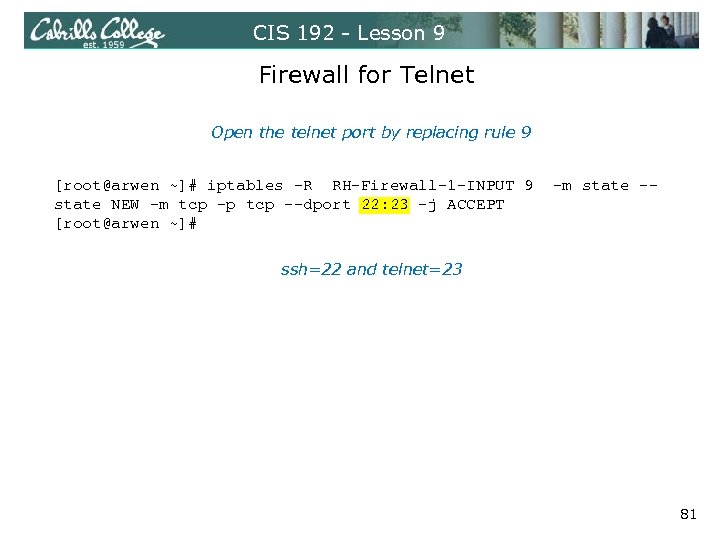 CIS 192 - Lesson 9 Firewall for Telnet Open the telnet port by replacing rule 9 [root@arwen ~]# iptables -R RH-Firewall-1 -INPUT 9 -m state -state NEW -m tcp -p tcp --dport 22: 23 -j ACCEPT [root@arwen ~]# ssh=22 and telnet=23 81
![CIS 192 - Lesson 9 Firewall for Telnet port is open [root@arwen ~]# iptables](https://present5.com/presentation/856663d23bc3a181d5dd08036a167e51/image-82.jpg "CIS 192 - Lesson 9 Firewall for Telnet port is open [root@arwen ~]# iptables") CIS 192 - Lesson 9 Firewall for Telnet port is open [root@arwen ~]# iptables -L Chain INPUT (policy ACCEPT) target prot opt source destination RH-Firewall-1 -INPUT all -- anywhere Chain FORWARD (policy ACCEPT) target prot opt source destination RH-Firewall-1 -INPUT all -- anywhere Chain OUTPUT (policy ACCEPT) target prot opt source destination Chain RH-Firewall-1 -INPUT (2 references) target prot opt source destination ACCEPT all -- anywhere ACCEPT icmp -- anywhere icmp any ACCEPT esp -- anywhere ACCEPT ah -- anywhere ACCEPT udp -- anywhere 224. 0. 0. 251 udp dpt: mdns ACCEPT udp -- anywhere udp dpt: ipp ACCEPT tcp -- anywhere tcp dpt: ipp ACCEPT all -- anywhere state RELATED, ESTABLISHED ACCEPT tcp -- anywhere state NEW tcp dpts: ssh: telnet REJECT all -- anywhere reject-with icmp-host-prohibited [root@arwen ~]# 82
CIS 192 - Lesson 9 Firewall for Telnet port is open [root@arwen ~]# iptables -L Chain INPUT (policy ACCEPT) target prot opt source destination RH-Firewall-1 -INPUT all -- anywhere Chain FORWARD (policy ACCEPT) target prot opt source destination RH-Firewall-1 -INPUT all -- anywhere Chain OUTPUT (policy ACCEPT) target prot opt source destination Chain RH-Firewall-1 -INPUT (2 references) target prot opt source destination ACCEPT all -- anywhere ACCEPT icmp -- anywhere icmp any ACCEPT esp -- anywhere ACCEPT ah -- anywhere ACCEPT udp -- anywhere 224. 0. 0. 251 udp dpt: mdns ACCEPT udp -- anywhere udp dpt: ipp ACCEPT tcp -- anywhere tcp dpt: ipp ACCEPT all -- anywhere state RELATED, ESTABLISHED ACCEPT tcp -- anywhere state NEW tcp dpts: ssh: telnet REJECT all -- anywhere reject-with icmp-host-prohibited [root@arwen ~]# 82
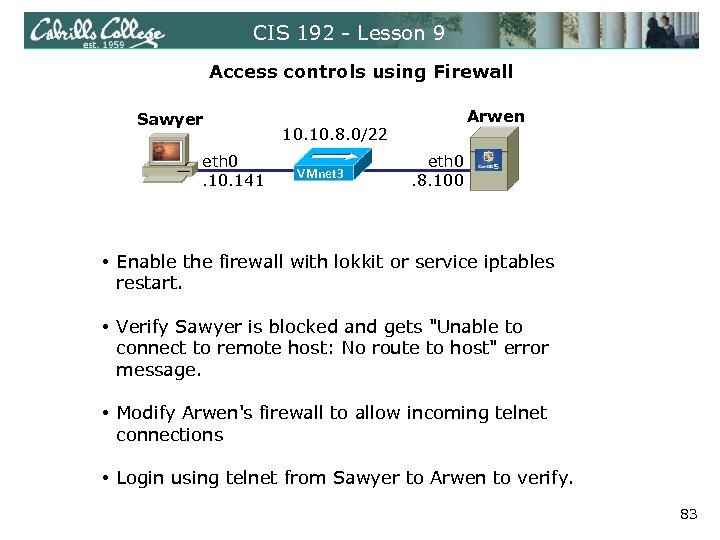 CIS 192 - Lesson 9 Access controls using Firewall Sawyer eth 0. 141 Arwen 10. 8. 0/22 VMnet 3 eth 0. 8. 100 • Enable the firewall with lokkit or service iptables restart. • Verify Sawyer is blocked and gets "Unable to connect to remote host: No route to host" error message. • Modify Arwen's firewall to allow incoming telnet connections • Login using telnet from Sawyer to Arwen to verify. 83
 CIS 192 - Lesson 9 Netfilter – all tables and chains Outbound Packet Inbound Packet Routing Algorithm Local Processes From inbound packet From local process 84
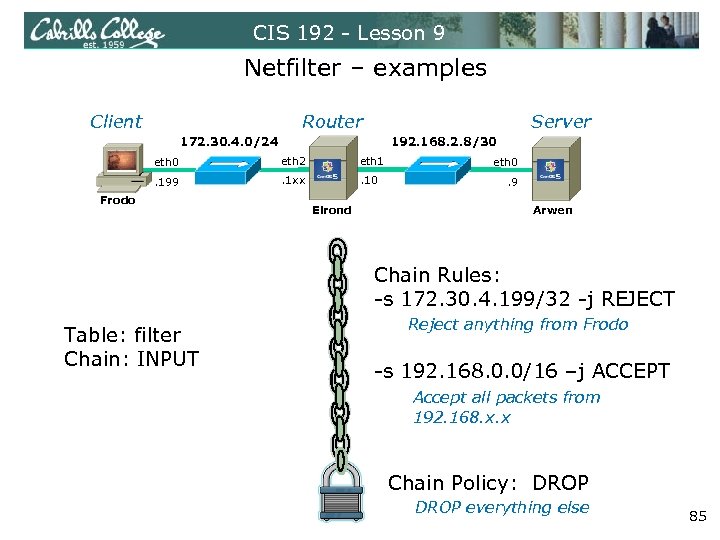 CIS 192 - Lesson 9 Netfilter – examples Client Router Server 172. 30. 4. 0/24 192. 168. 2. 8/30 eth 2 eth 1 . 199 . 1 xx . 10 Frodo Elrond eth 0. 9 Arwen Chain Rules: -s 172. 30. 4. 199/32 -j REJECT Table: filter Chain: INPUT Reject anything from Frodo -s 192. 168. 0. 0/16 –j ACCEPT Accept all packets from 192. 168. x. x Chain Policy: DROP everything else 85
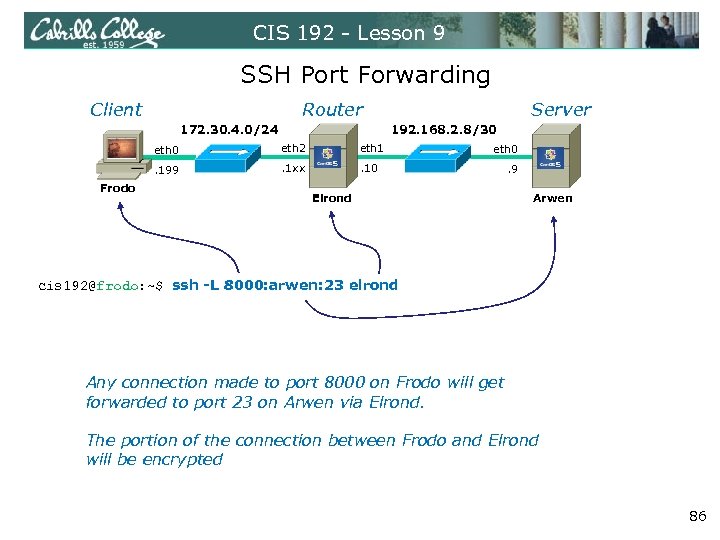 CIS 192 - Lesson 9 SSH Port Forwarding Client Router 172. 30. 4. 0/24 192. 168. 2. 8/30 eth 2 eth 1 . 199 Frodo Server . 1 xx . 10 eth 0 Elrond . 9 Arwen cis 192@frodo: ~$ ssh -L 8000: arwen: 23 elrond Any connection made to port 8000 on Frodo will get forwarded to port 23 on Arwen via Elrond. The portion of the connection between Frodo and Elrond will be encrypted 86
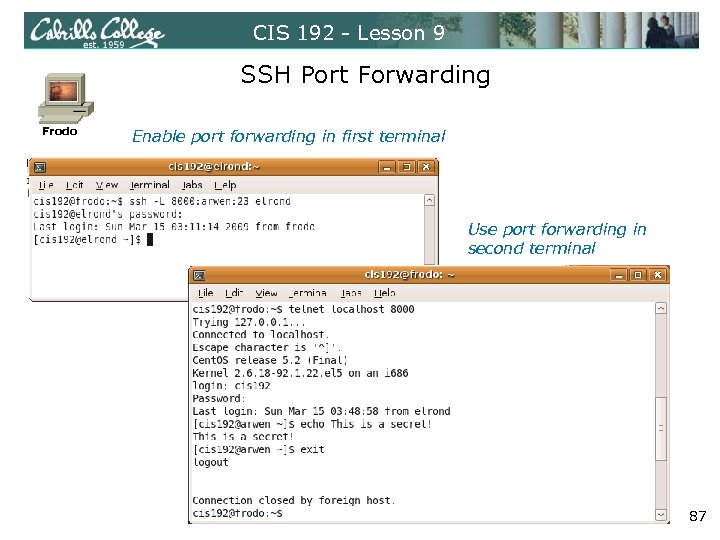 CIS 192 - Lesson 9 SSH Port Forwarding Frodo Enable port forwarding in first terminal Use port forwarding in second terminal 87
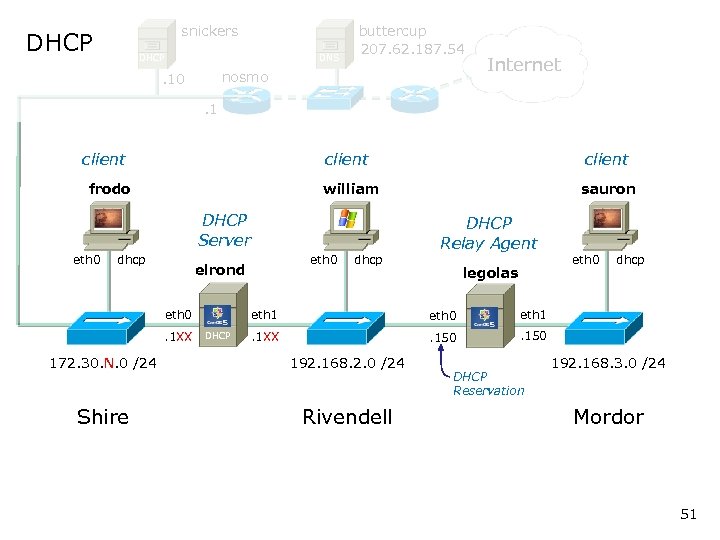
 CIS 192 – Lesson 9 DHCP Architecture DHCP Servers • Scopes and exclusions • Reservations • Leases • Options ‒ ‒ ‒ IP Address and Netmask Gateway DNS Server Domain name others DHCP Clients lease IP addresses from DHCP Servers. DHCP Relay agents lets one DHCP server service non-connected subnets DHCP Relay Agents DHCP Clients 88
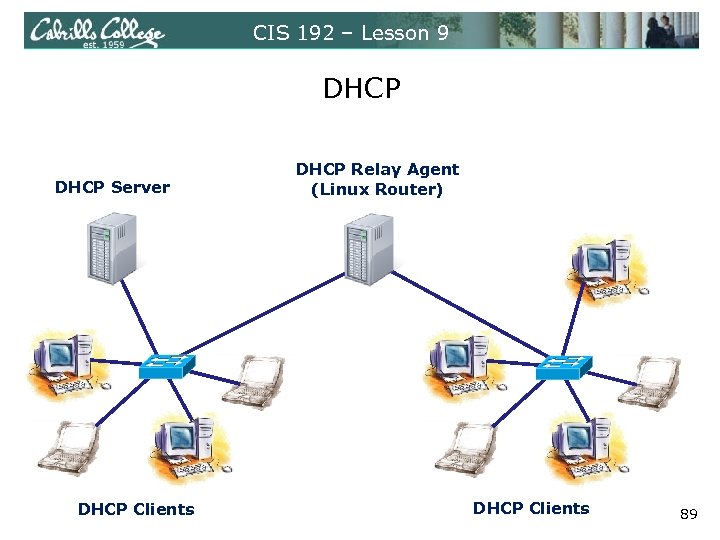 CIS 192 – Lesson 9 DHCP Server DHCP Clients DHCP Relay Agent (Linux Router) DHCP Clients 89
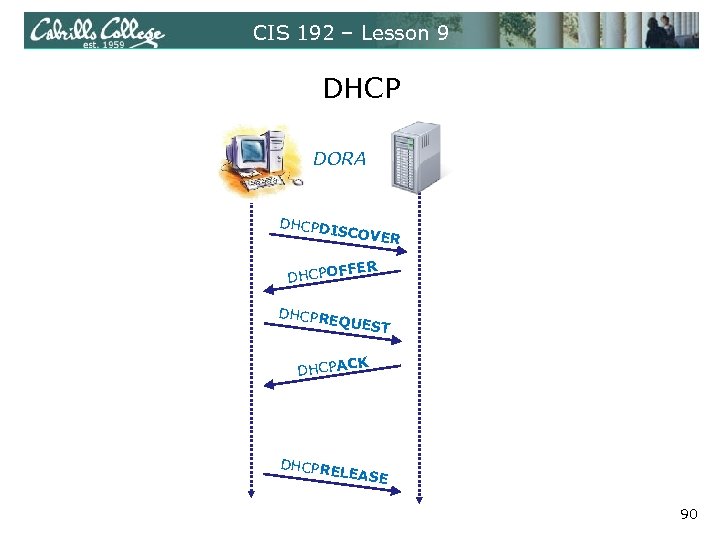 CIS 192 – Lesson 9 DHCP DORA DHCPD ISCOVE DHCPO R FFER DHCPR EQUES T CK DHCPA DHCPR ELEASE 90
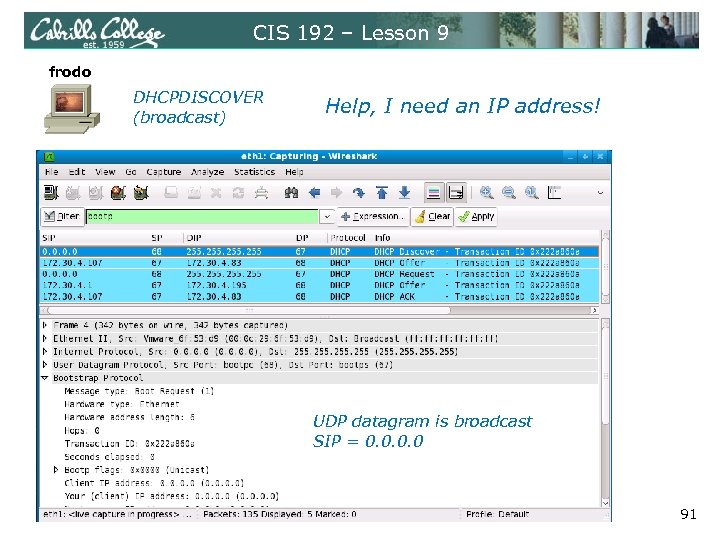 CIS 192 – Lesson 9 frodo DHCPDISCOVER (broadcast) Help, I need an IP address! UDP datagram is broadcast SIP = 0. 0 91
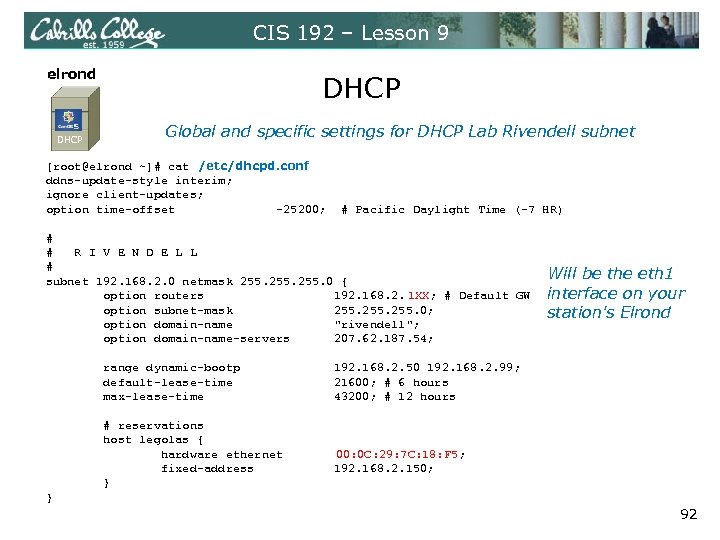 CIS 192 – Lesson 9 elrond DHCP Global and specific settings for DHCP Lab Rivendell subnet [root@elrond ~]# cat /etc/dhcpd. conf ddns-update-style interim; ignore client-updates; option time-offset -25200; # Pacific Daylight Time (-7 HR) # # R I V E N D E L L # subnet 192. 168. 2. 0 netmask 255. 0 { option routers 192. 168. 2. 1 XX; # Default GW option subnet-mask 255. 0; option domain-name "rivendell"; option domain-name-servers 207. 62. 187. 54; Will be the eth 1 interface on your station's Elrond range dynamic-bootp 192. 168. 2. 50 192. 168. 2. 99; default-lease-time 21600; # 6 hours max-lease-time 43200; # 12 hours # reservations host legolas { hardware ethernet 00: 0 C: 29: 7 C: 18: F 5; fixed-address 192. 168. 2. 150; } } 92
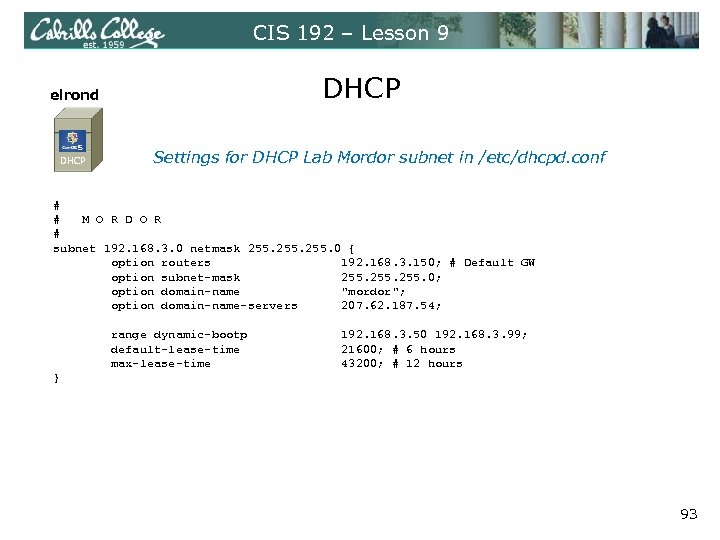 CIS 192 – Lesson 9 elrond DHCP Settings for DHCP Lab Mordor subnet in /etc/dhcpd. conf # # M O R D O R # subnet 192. 168. 3. 0 netmask 255. 0 { option routers 192. 168. 3. 150; # Default GW option subnet-mask 255. 0; option domain-name "mordor"; option domain-name-servers 207. 62. 187. 54; range dynamic-bootp 192. 168. 3. 50 192. 168. 3. 99; default-lease-time 21600; # 6 hours max-lease-time 43200; # 12 hours } 93
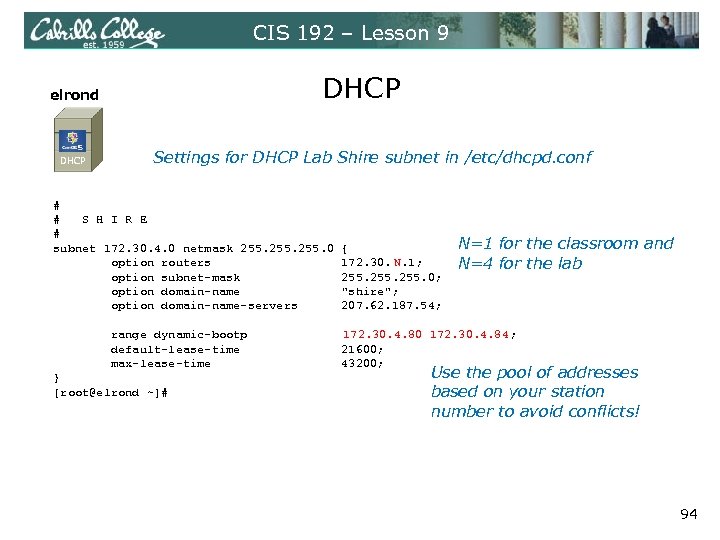 CIS 192 – Lesson 9 elrond DHCP Settings for DHCP Lab Shire subnet in /etc/dhcpd. conf # # S H I R E # subnet 172. 30. 4. 0 netmask 255. 0 { option routers 172. 30. N. 1; option subnet-mask 255. 0; option domain-name "shire"; option domain-name-servers 207. 62. 187. 54; N=1 for the classroom and N=4 for the lab range dynamic-bootp 172. 30. 4. 80 172. 30. 4. 84; default-lease-time 21600; max-lease-time 43200; Use the pool of addresses } [root@elrond ~]# based on your station number to avoid conflicts! 94
 PPP 95
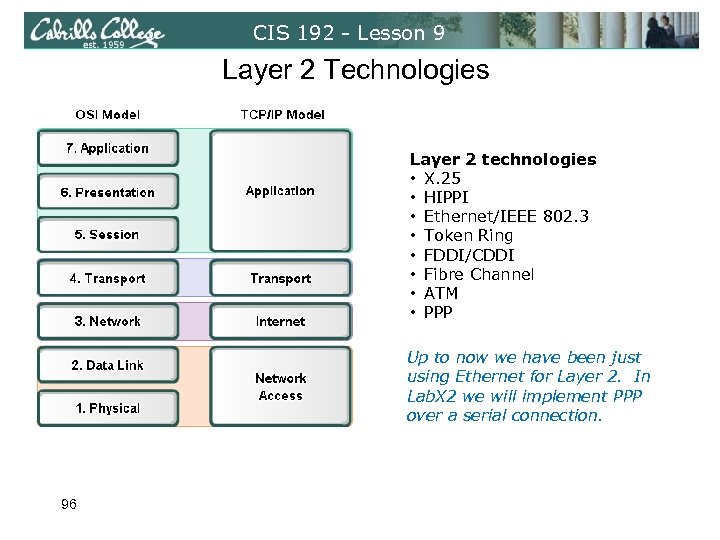 CIS 192 - Lesson 9 Layer 2 Technologies Layer 2 technologies • X. 25 • HIPPI • Ethernet/IEEE 802. 3 • Token Ring • FDDI/CDDI • Fibre Channel • ATM • PPP Up to now we have been just using Ethernet for Layer 2. In Lab. X 2 we will implement PPP over a serial connection. 96
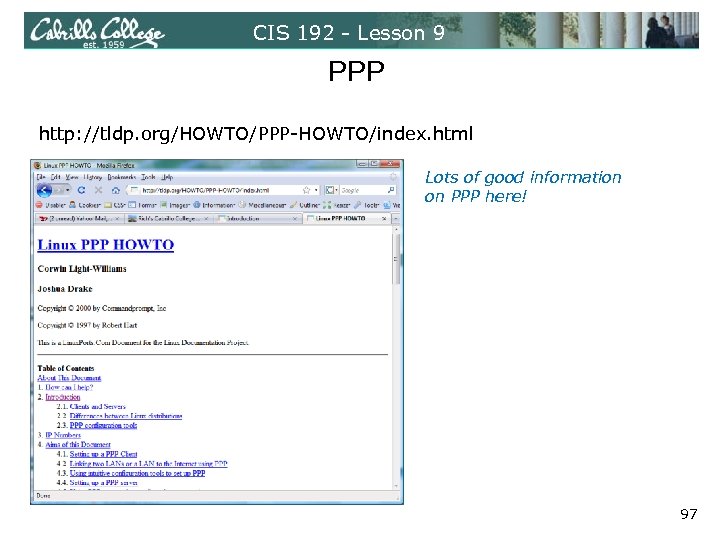 CIS 192 - Lesson 9 PPP http: //tldp. org/HOWTO/PPP-HOWTO/index. html Lots of good information on PPP here! 97
 CIS 192 - Lesson 9 PPP • PPP = Point to Point protocol • PPP allows running IP and other network protocols over a serial link • Serial links can be: • Direct connections using a null-modem cable • Using modems and telephones lines • PPP can be used as a WAN technology to connect LANs together 98
 CIS 192 - Lesson 9 Features of PPP and SLIP Both protocols offer the ability to send datagrams over a serialline connection. SLIP • Works only with TCP/IP • No error detection unless SLIP headers become corrupted • Supports header compression only • Supports only clear-text authentication PPP • Supports TCP/IP as well as UDP/IP, IPX/SPX, and Appletalk • Built-in error detection • Supports built-in data compression using the Van Jacobson compression algorithm • Supports various authentication mechanisms e. g. PAP and CHAP Password Authentication Protocol Challenge Handshake Authentication Protocol 99
 CIS 192 - Lesson 9 PPP Architecture • PPP is also called a Peer-to-Peer protocol because there is fundamentally no difference between the server and the client. • The ppp daemons must be running on both sides of the connection. • The computer that initiates the call is called the client, the one who answers the call is the server. 100
 CIS 192 - Lesson 9 PPP Architecture (continued) • Network Control Protocol (NCP) provides PPP with a means of differentiating between the different stacks it can transport, such as using IPCP for delivering TCP/IP packets. • Authorization Protocol Provides a built-in authentication mechanism for PPP connections using either: • Password Authentication Protocol (PAP) or • Challenge Handshake Authentication Protocol (CHAP) 101
 CIS 192 - Lesson 9 PPP Architecture (continued) • Link Control Protocol (LCP) negotiates important link establishment options such as the maximum datagram size. Also helps to facilitate automated link establishment setup. • High-level Data Link Control Protocol (HDLC) Provides frame boundary information and an added checksum for built-in error detection. 102
 CIS 192 - Lesson 9 PPP Architecture PPP runs as two major components: 1. Kernel portion - consists of and manages low-level protocols 2. User portion - consists of and manages the authentication protocols • pppd - runs the various protocols • chat - provides automated dialing management for modem connections Both of these programs rely on command line options and/or shell scripts to configure how they operate. 103
 CIS 192 - Lesson 9 Setting Up PPP • Install the software You may have to compile code into the kernel. Look for something similar to the following in /var/log/dmesg to see if you have kernel support for PPP: PPP Dynamic channel allocation code copyright 1995 Caldera, Inc. PPP line discipline registered. • Configure your serial port • setserial Look for modern 16550 A UART • stty Look for baud rate, parity and stop bits • Configure your modem 104
 CIS 192 - Lesson 9 Linking two LANS using PPP • Setting up the IP numbers • Setting up the routing • Network security 105
 CIS 192 - Lesson 9 Setting up a PPP Server • Getting the software together • Setting up standard (shell access) dialup. • Setting up the PPP options files • Setting pppd up to allow users to (successfully) run it • Setting up the global alias for pppd 106
 CIS 192 - Lesson 9 PPP Configuration Utilities • Wv. Dial - A command-line pppd driver • rp 3 - Red. Hat PPP dialer (Graphical) • Linuxconf - Universal (almost) Linux PPP dialer 107
 CIS 192 - Lesson 9 ISP Information • The phone number to call (don't forget 9 if behind a PABX) • Dynamic or static IP numbers • DNS server IP addresses (does not come dynamically at connect time) • If PAP or CHAP is used, you need an id and "secret" • What starting command to invoke. 108
 Lab X 2 109
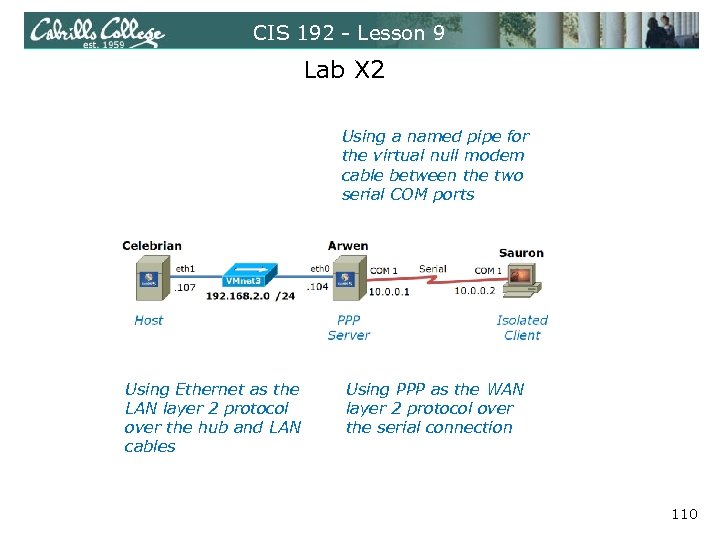 CIS 192 - Lesson 9 Lab X 2 Using a named pipe for the virtual null modem cable between the two serial COM ports Using Ethernet as the LAN layer 2 protocol over the hub and LAN cables Using PPP as the WAN layer 2 protocol over the serial connection 110
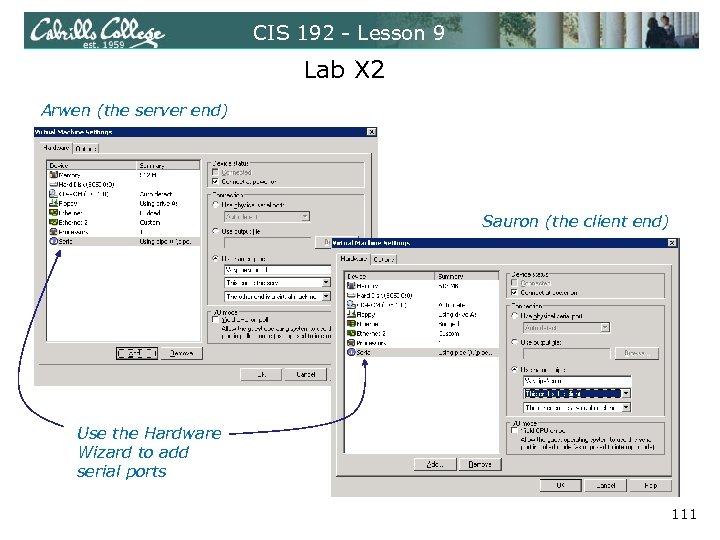 CIS 192 - Lesson 9 Lab X 2 Arwen (the server end) Sauron (the client end) Use the Hardware Wizard to add serial ports 111
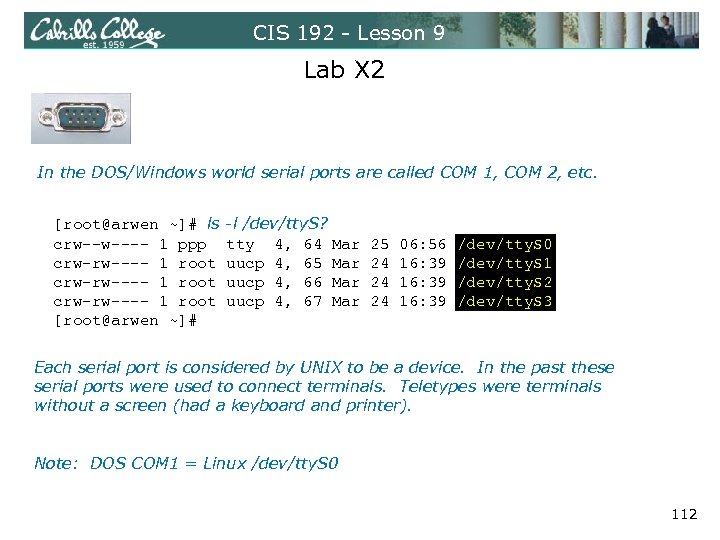 CIS 192 - Lesson 9 Lab X 2 In the DOS/Windows world serial ports are called COM 1, COM 2, etc. [root@arwen ~]# ls -l /dev/tty. S? crw--w---- 1 ppp tty 4, 64 Mar 25 06: 56 /dev/tty. S 0 crw-rw---- 1 root uucp 4, 65 Mar 24 16: 39 /dev/tty. S 1 crw-rw---- 1 root uucp 4, 66 Mar 24 16: 39 /dev/tty. S 2 crw-rw---- 1 root uucp 4, 67 Mar 24 16: 39 /dev/tty. S 3 [root@arwen ~]# Each serial port is considered by UNIX to be a device. In the past these serial ports were used to connect terminals. Teletypes were terminals without a screen (had a keyboard and printer). Note: DOS COM 1 = Linux /dev/tty. S 0 112
![CIS 192 - Lesson 9 Lab X 2 [root@arwen ~]# setserial /dev/tty. S 0,](https://present5.com/presentation/856663d23bc3a181d5dd08036a167e51/image-113.jpg "CIS 192 - Lesson 9 Lab X 2 [root@arwen ~]# setserial /dev/tty. S 0,") CIS 192 - Lesson 9 Lab X 2 [root@arwen ~]# setserial /dev/tty. S 0, UART: 16550 A, Port: 0 x 03 f 8, IRQ: 4 [root@arwen ~]# The setserial command sets or reports on serial port configuration. Use with just the device name to report the configuration. 113
CIS 192 - Lesson 9 Lab X 2 [root@arwen ~]# setserial /dev/tty. S 0, UART: 16550 A, Port: 0 x 03 f 8, IRQ: 4 [root@arwen ~]# The setserial command sets or reports on serial port configuration. Use with just the device name to report the configuration. 113
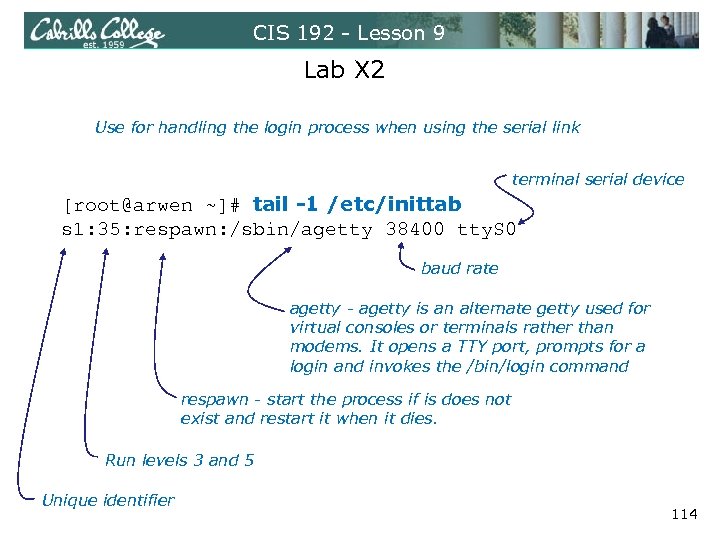 CIS 192 - Lesson 9 Lab X 2 Use for handling the login process when using the serial link terminal serial device [root@arwen ~]# tail -1 /etc/inittab s 1: 35: respawn: /sbin/agetty 38400 tty. S 0 baud rate agetty - agetty is an alternate getty used for virtual consoles or terminals rather than modems. It opens a TTY port, prompts for a login and invokes the /bin/login command respawn - start the process if is does not exist and restart it when it dies. Run levels 3 and 5 Unique identifier 114
![CIS 192 - Lesson 9 Lab X 2 [root@arwen ~]# telinit q Tells init](https://present5.com/presentation/856663d23bc3a181d5dd08036a167e51/image-115.jpg "CIS 192 - Lesson 9 Lab X 2 [root@arwen ~]# telinit q Tells init") CIS 192 - Lesson 9 Lab X 2 [root@arwen ~]# telinit q Tells init to reread the /etc/inittab file after making changes 115
CIS 192 - Lesson 9 Lab X 2 [root@arwen ~]# telinit q Tells init to reread the /etc/inittab file after making changes 115
![CIS 192 - Lesson 9 Lab X 2 [root@arwen ~]# chmod u+s /usr/sbin/pppd [root@arwen](https://present5.com/presentation/856663d23bc3a181d5dd08036a167e51/image-116.jpg "CIS 192 - Lesson 9 Lab X 2 [root@arwen ~]# chmod u+s /usr/sbin/pppd [root@arwen") CIS 192 - Lesson 9 Lab X 2 [root@arwen ~]# chmod u+s /usr/sbin/pppd [root@arwen ~]# ls -l /usr/sbin/pppd -r-sr-xr-x 1 root 312236 Mar 14 2007 /usr/sbin/pppd [root@arwen ~]# This sets a special permission called the setuid bit. This allows users to run an executable with the permissions of the executable's owner. 116
CIS 192 - Lesson 9 Lab X 2 [root@arwen ~]# chmod u+s /usr/sbin/pppd [root@arwen ~]# ls -l /usr/sbin/pppd -r-sr-xr-x 1 root 312236 Mar 14 2007 /usr/sbin/pppd [root@arwen ~]# This sets a special permission called the setuid bit. This allows users to run an executable with the permissions of the executable's owner. 116
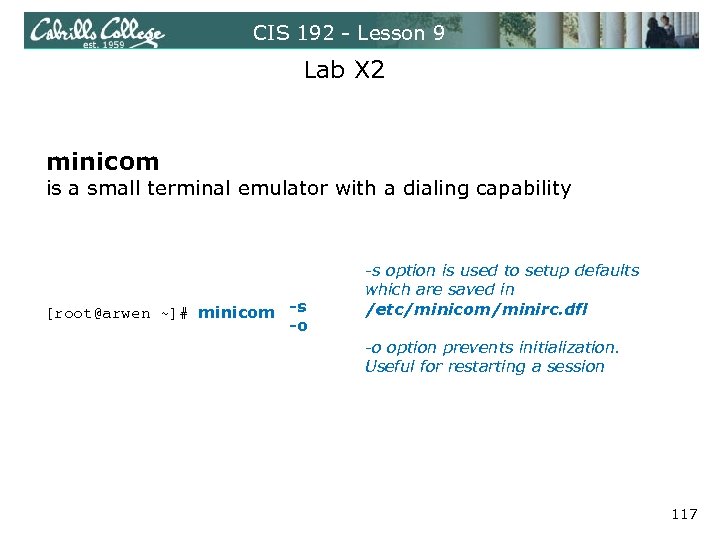 CIS 192 - Lesson 9 Lab X 2 minicom is a small terminal emulator with a dialing capability [root@arwen ~]# minicom -s -o -s option is used to setup defaults which are saved in /etc/minicom/minirc. dfl -o option prevents initialization. Useful for restarting a session 117
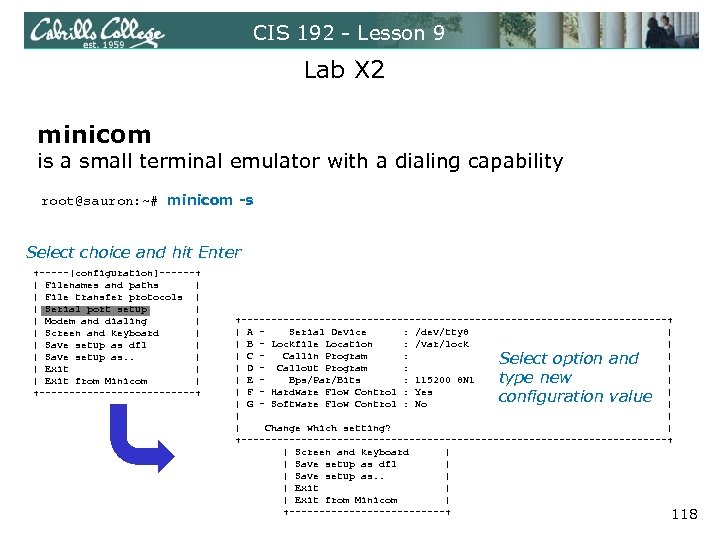 CIS 192 - Lesson 9 Lab X 2 minicom is a small terminal emulator with a dialing capability root@sauron: ~# minicom -s Select choice and hit Enter +-----[configuration]------+ | Filenames and paths | | File transfer protocols | | Serial port setup | | Modem and dialing | | Screen and keyboard | | Save setup as dfl | | Save setup as. . | | Exit | | Exit from Minicom | +-------------+ +------------------------------------+ | A - Serial Device : /dev/tty 8 | | B - Lockfile Location : /var/lock | | C - Callin Program : | | D - Callout Program : | | E - Bps/Par/Bits : 115200 8 N 1 | | F - Hardware Flow Control : Yes | | G - Software Flow Control : No | | Change which setting? | +------------------------------------+ | Screen and keyboard | | Save setup as dfl | Save setup as. . | Exit | Exit from Minicom | +-------------+ 118 Select option and type new configuration value
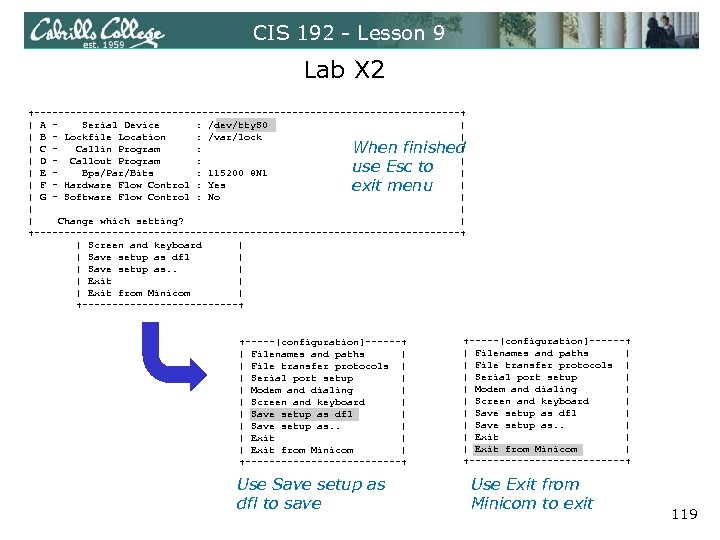 CIS 192 - Lesson 9 Lab X 2 +------------------------------------+ | A - Serial Device : /dev/tty. S 0 | | B - Lockfile Location : /var/lock | | C - Callin Program : | | D - Callout Program : | | E - Bps/Par/Bits : 115200 8 N 1 | | F - Hardware Flow Control : Yes | | G - Software Flow Control : No | | Change which setting? | +------------------------------------+ | Screen and keyboard | | Save setup as dfl | Save setup as. . | Exit | Exit from Minicom | +-------------+ When finished use Esc to exit menu +-----[configuration]------+ | Filenames and paths | | File transfer protocols | | Serial port setup | | Modem and dialing | | Screen and keyboard | | Save setup as dfl | | Save setup as. . | | Exit | | Exit from Minicom | +-------------+ Use Save setup as dfl to save Use Exit from Minicom to exit 119
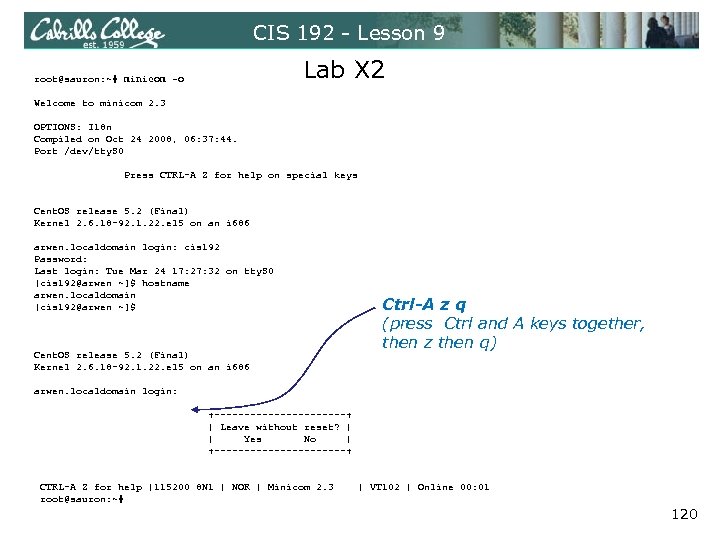 CIS 192 - Lesson 9 Lab X 2 root@sauron: ~# minicom -o Welcome to minicom 2. 3 OPTIONS: I 18 n Compiled on Oct 24 2008, 06: 37: 44. Port /dev/tty. S 0 Press CTRL-A Z for help on special keys Cent. OS release 5. 2 (Final) Kernel 2. 6. 18 -92. 1. 22. el 5 on an i 686 arwen. localdomain login: cis 192 Password: Last login: Tue Mar 24 17: 27: 32 on tty. S 0 [cis 192@arwen ~]$ hostname arwen. localdomain [cis 192@arwen ~]$ Ctrl-A z q (press Ctrl and A keys together, then z then q) Cent. OS release 5. 2 (Final) Kernel 2. 6. 18 -92. 1. 22. el 5 on an i 686 arwen. localdomain login: +-----------+ | Leave without reset? | | Yes No | +-----------+ CTRL-A Z for help |115200 8 N 1 | NOR | Minicom 2. 3 | VT 102 | Online 00: 01 root@sauron: ~# 120
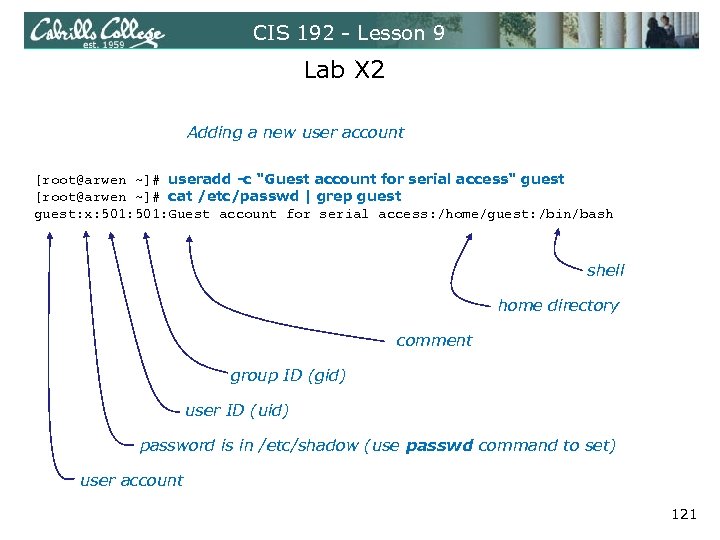 CIS 192 - Lesson 9 Lab X 2 Adding a new user account [root@arwen ~]# useradd -c "Guest account for serial access" guest [root@arwen ~]# cat /etc/passwd | grep guest: x: 501: Guest account for serial access: /home/guest: /bin/bash shell home directory comment group ID (gid) user ID (uid) password is in /etc/shadow (use passwd command to set) user account 121
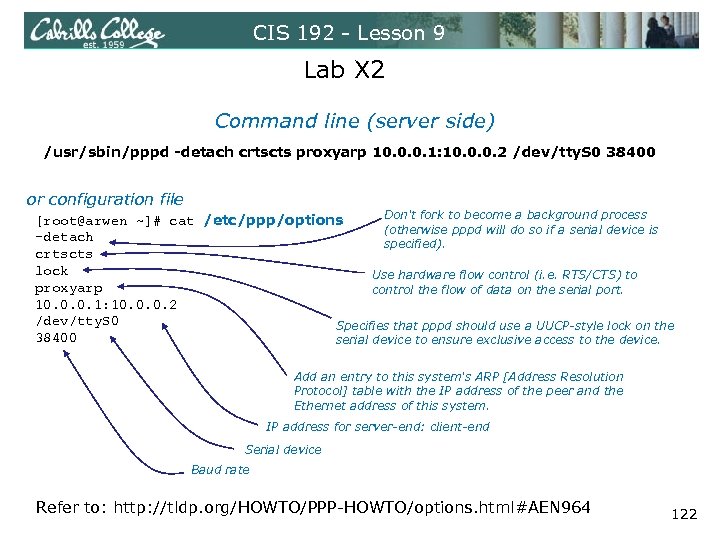 CIS 192 - Lesson 9 Lab X 2 Command line (server side) /usr/sbin/pppd -detach crtscts proxyarp 10. 0. 0. 1: 10. 0. 0. 2 /dev/tty. S 0 38400 or configuration file Don't fork to become a background process [root@arwen ~]# cat /etc/ppp/options (otherwise pppd will do so if a serial device is -detach specified). crtscts lock Use hardware flow control (i. e. RTS/CTS) to proxyarp control the flow of data on the serial port. 10. 0. 0. 1: 10. 0. 0. 2 /dev/tty. S 0 Specifies that pppd should use a UUCP-style lock on the 38400 serial device to ensure exclusive access to the device. Add an entry to this system's ARP [Address Resolution Protocol] table with the IP address of the peer and the Ethernet address of this system. IP address for server-end: client-end Serial device Baud rate Refer to: http: //tldp. org/HOWTO/PPP-HOWTO/options. html#AEN 964 122
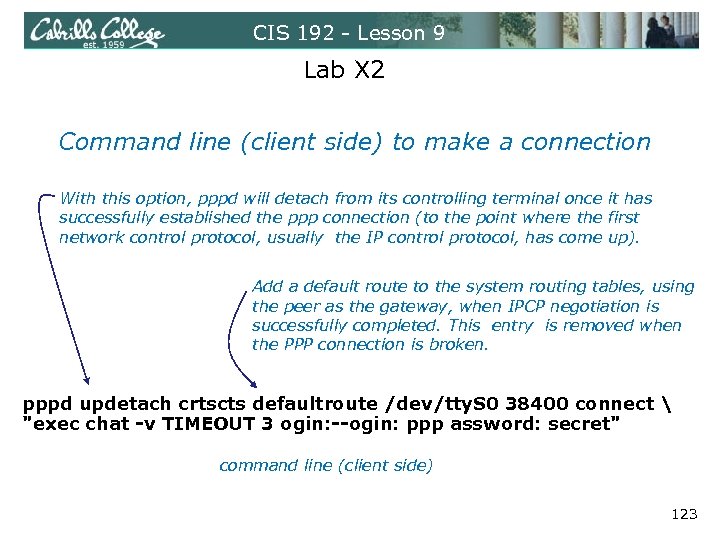 CIS 192 - Lesson 9 Lab X 2 Command line (client side) to make a connection With this option, pppd will detach from its controlling terminal once it has successfully established the ppp connection (to the point where the first network control protocol, usually the IP control protocol, has come up). Add a default route to the system routing tables, using the peer as the gateway, when IPCP negotiation is successfully completed. This entry is removed when the PPP connection is broken. pppd updetach crtscts defaultroute /dev/tty. S 0 38400 connect "exec chat -v TIMEOUT 3 ogin: --ogin: ppp assword: secret" command line (client side) 123
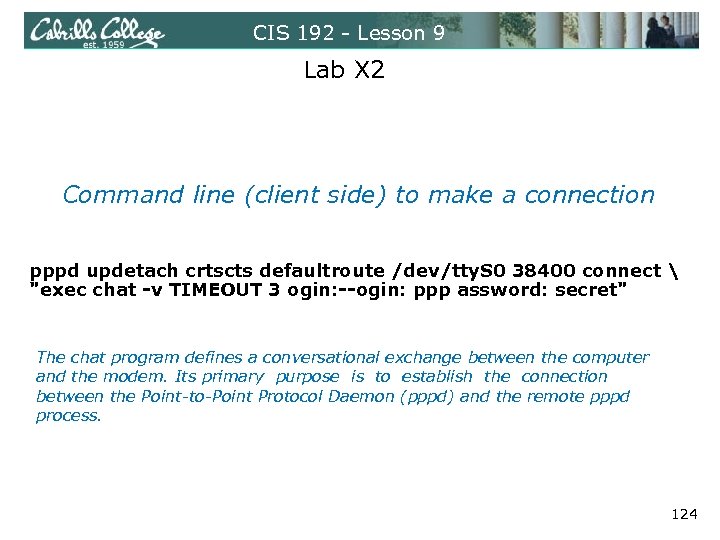 CIS 192 - Lesson 9 Lab X 2 Command line (client side) to make a connection pppd updetach crtscts defaultroute /dev/tty. S 0 38400 connect "exec chat -v TIMEOUT 3 ogin: --ogin: ppp assword: secret" The chat program defines a conversational exchange between the computer and the modem. Its primary purpose is to establish the connection between the Point-to-Point Protocol Daemon (pppd) and the remote pppd process. 124
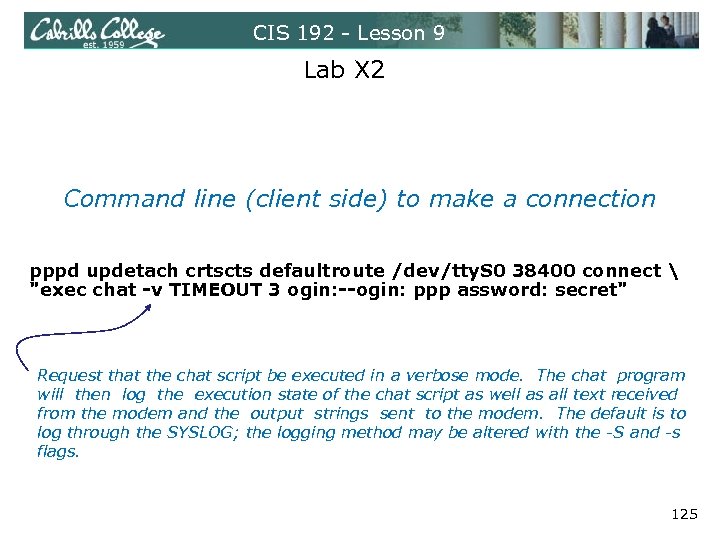 CIS 192 - Lesson 9 Lab X 2 Command line (client side) to make a connection pppd updetach crtscts defaultroute /dev/tty. S 0 38400 connect "exec chat -v TIMEOUT 3 ogin: --ogin: ppp assword: secret" Request that the chat script be executed in a verbose mode. The chat program will then log the execution state of the chat script as well as all text received from the modem and the output strings sent to the modem. The default is to log through the SYSLOG; the logging method may be altered with the -S and -s flags. 125
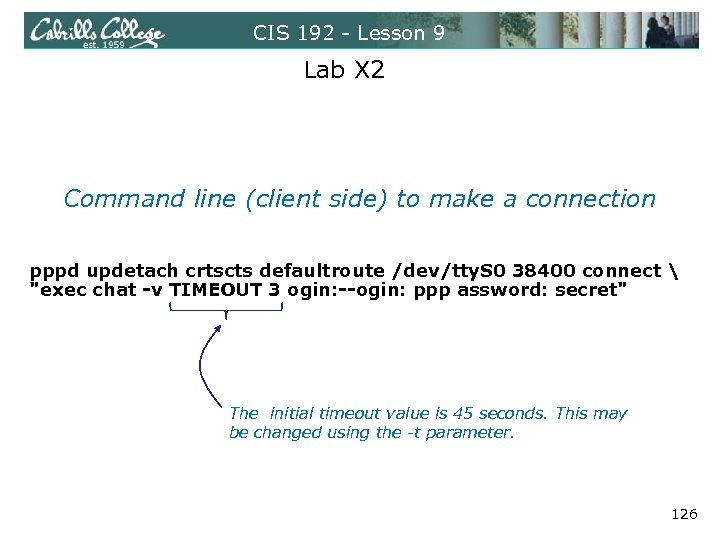 CIS 192 - Lesson 9 Lab X 2 Command line (client side) to make a connection pppd updetach crtscts defaultroute /dev/tty. S 0 38400 connect "exec chat -v TIMEOUT 3 ogin: --ogin: ppp assword: secret" The initial timeout value is 45 seconds. This may be changed using the -t parameter. 126
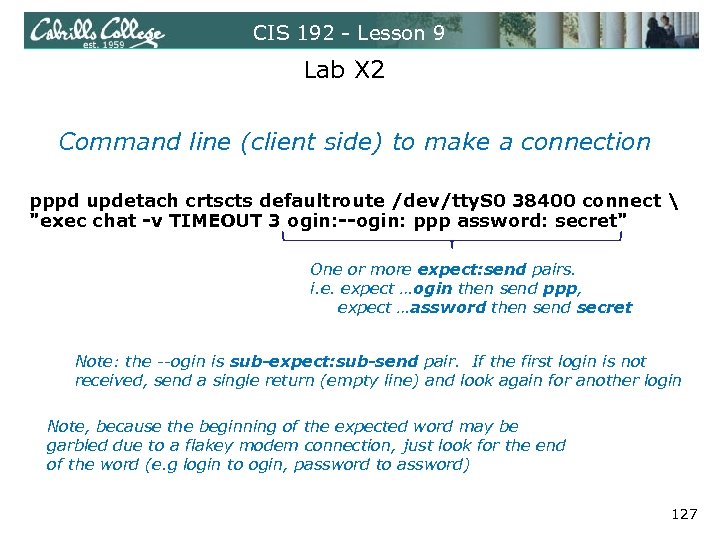 CIS 192 - Lesson 9 Lab X 2 Command line (client side) to make a connection pppd updetach crtscts defaultroute /dev/tty. S 0 38400 connect "exec chat -v TIMEOUT 3 ogin: --ogin: ppp assword: secret" One or more expect: send pairs. i. e. expect …ogin then send ppp, expect …assword then send secret Note: the --ogin is sub-expect: sub-send pair. If the first login is not received, send a single return (empty line) and look again for another login Note, because the beginning of the expected word may be garbled due to a flakey modem connection, just look for the end of the word (e. g login to ogin, password to assword) 127