


 Скачать презентацию CIS 192 Lesson 15 Lesson Module Status
55de4ef191b55668b6b699084f5ad27c.ppt
- Количество слайдов: 46
 CIS 192 – Lesson 15 Lesson Module Status • • • Slides – draft Properties - done Flashcards – I wish 1 st minute quiz – NA Web Calendar summary – done Web book pages – Commands – Howtos – Skills pacing - NA Lab – done Depot (VMs) – NA 1
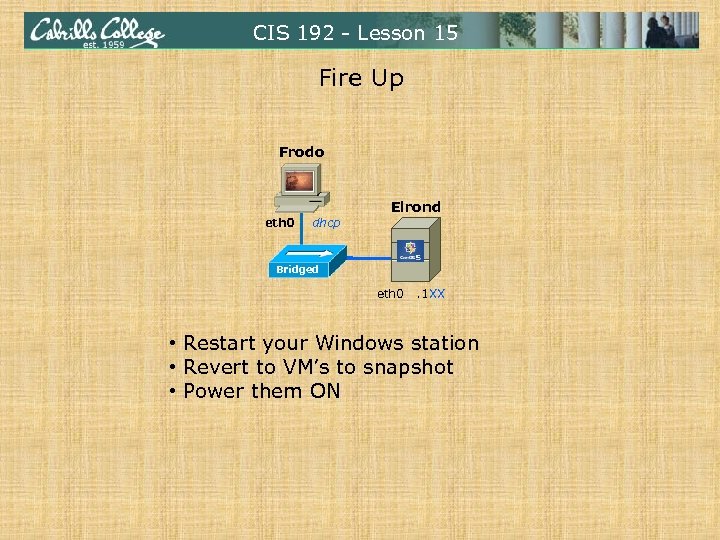 CIS 192 - Lesson 15 Fire Up Frodo eth 0 dhcp Elrond Bridged eth 0 . 1 XX • Restart your Windows station • Revert to VM’s to snapshot • Power them ON
 CIS 192 - Lesson 15 The LAST Quiz Please take out a blank piece of paper, switch off your monitor, close your books, put away your notes and answer these questions: No more quizzes! • What port is used by an IMAP server? • Is sendmail more of a (DA) Delivery Agent or a (MTA) Mail Transport Agent? • What record types are used in DNS to route email over the Internet?
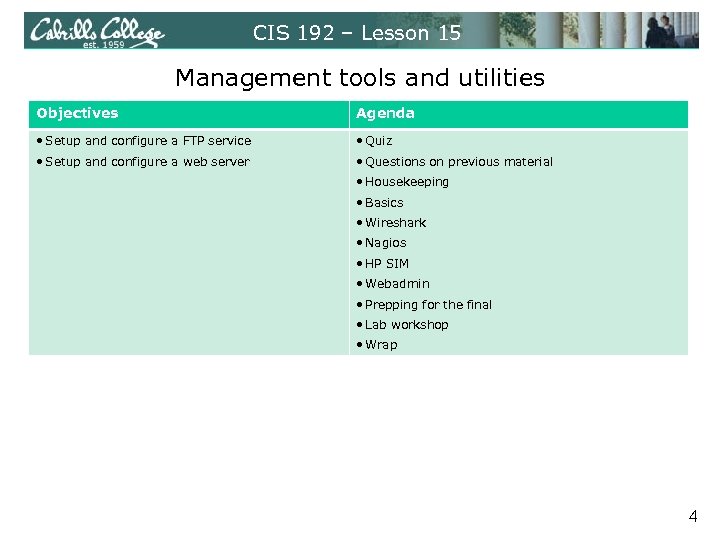 CIS 192 – Lesson 15 Management tools and utilities Objectives Agenda • Setup and configure a FTP service • Quiz • Setup and configure a web server • Questions on previous material • Housekeeping • Basics • Wireshark • Nagios • HP SIM • Webadmin • Prepping for the final • Lab workshop • Wrap 4
 Questions on previous material 5
 CIS 192 - Lesson 15 Questions? • Previous lesson material • Lab assignment 6
 Housekeeping 7
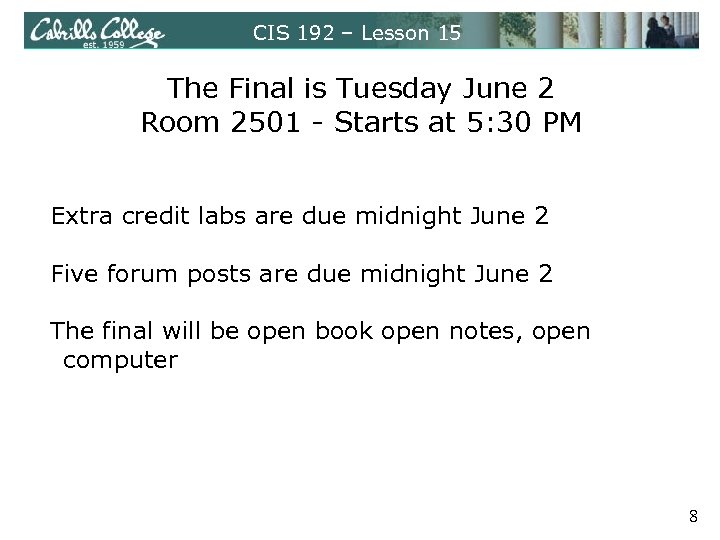 CIS 192 – Lesson 15 The Final is Tuesday June 2 Room 2501 - Starts at 5: 30 PM Extra credit labs are due midnight June 2 Five forum posts are due midnight June 2 The final will be open book open notes, open computer 8
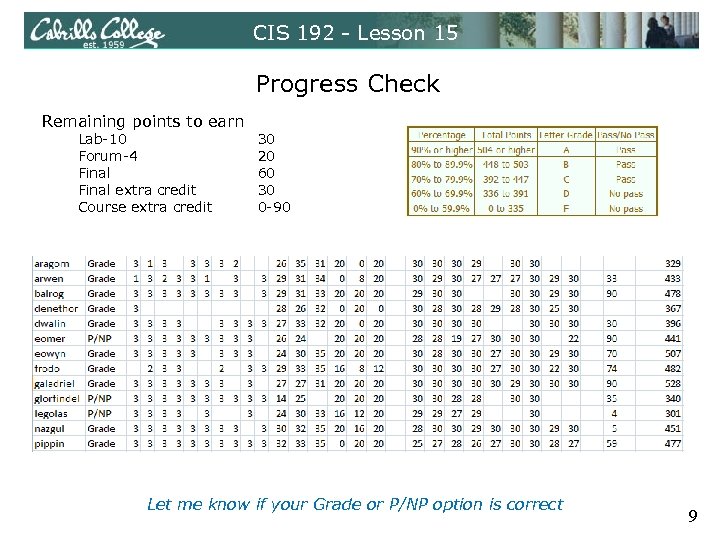 CIS 192 - Lesson 15 Progress Check Remaining points to earn Lab-10 Forum-4 Final extra credit Course extra credit 30 20 60 30 0 -90 Let me know if your Grade or P/NP option is correct 9
 Test 3 Results 10
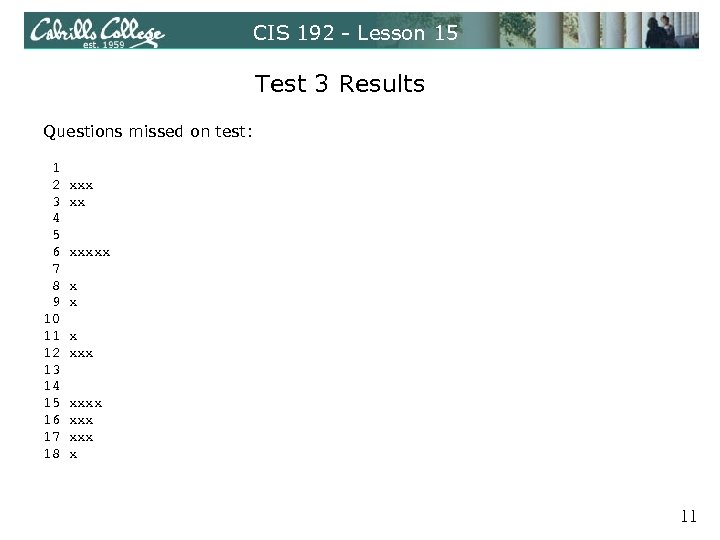 CIS 192 - Lesson 15 Test 3 Results Questions missed on test: 1 2 3 4 5 6 7 8 9 10 11 12 13 14 15 16 17 18 xxx xx xxxxx xxx x 11
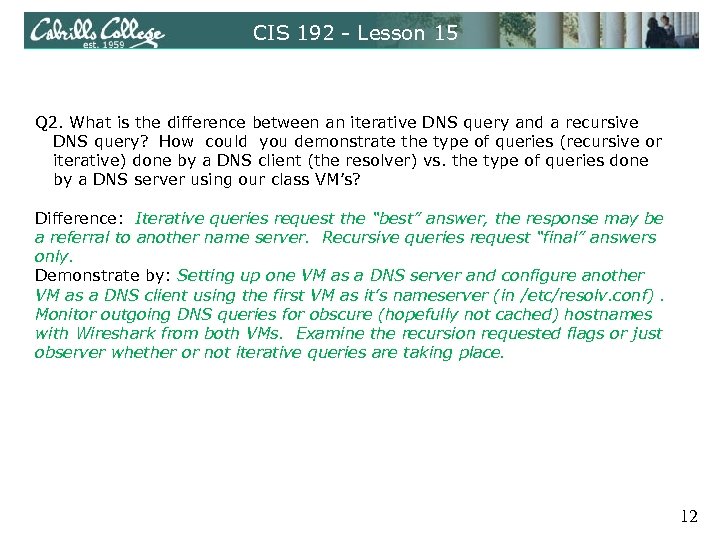 CIS 192 - Lesson 15 Q 2. What is the difference between an iterative DNS query and a recursive DNS query? How could you demonstrate the type of queries (recursive or iterative) done by a DNS client (the resolver) vs. the type of queries done by a DNS server using our class VM’s? Difference: Iterative queries request the “best” answer, the response may be a referral to another name server. Recursive queries request “final” answers only. Demonstrate by: Setting up one VM as a DNS server and configure another VM as a DNS client using the first VM as it’s nameserver (in /etc/resolv. conf). Monitor outgoing DNS queries for obscure (hopefully not cached) hostnames with Wireshark from both VMs. Examine the recursion requested flags or just observer whether or not iterative queries are taking place. 12
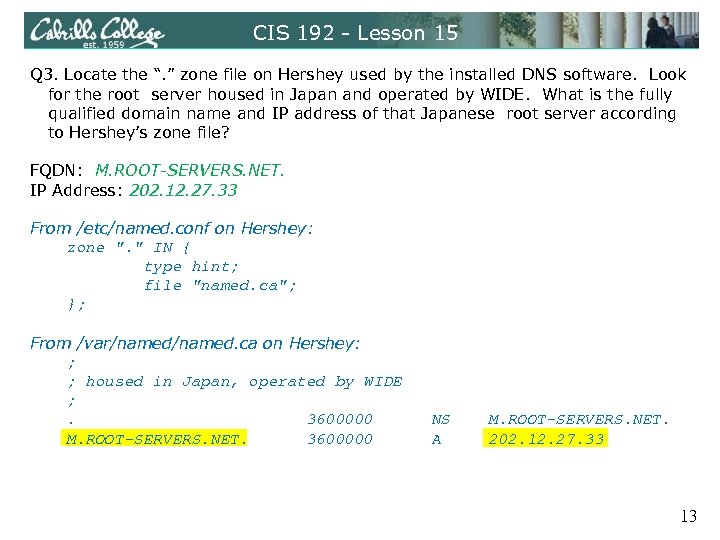 CIS 192 - Lesson 15 Q 3. Locate the “. ” zone file on Hershey used by the installed DNS software. Look for the root server housed in Japan and operated by WIDE. What is the fully qualified domain name and IP address of that Japanese root server according to Hershey’s zone file? FQDN: M. ROOT-SERVERS. NET. IP Address: 202. 12. 27. 33 From /etc/named. conf on Hershey: zone ". " IN { type hint; file "named. ca"; }; From /var/named. ca on Hershey: ; ; housed in Japan, operated by WIDE ; . 3600000 M. ROOT-SERVERS. NET. 3600000 NS A M. ROOT-SERVERS. NET. 202. 12. 27. 33 13
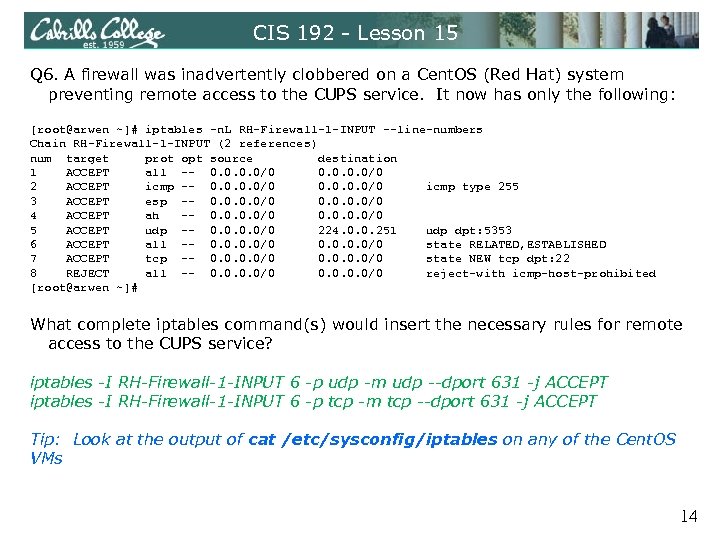 CIS 192 - Lesson 15 Q 6. A firewall was inadvertently clobbered on a Cent. OS (Red Hat) system preventing remote access to the CUPS service. It now has only the following: [root@arwen ~]# iptables -n. L RH-Firewall-1 -INPUT --line-numbers Chain RH-Firewall-1 -INPUT (2 references) num target prot opt source destination 1 ACCEPT all -- 0. 0/0 2 ACCEPT icmp -- 0. 0/0 icmp type 255 3 ACCEPT esp -- 0. 0/0 4 ACCEPT ah -- 0. 0/0 5 ACCEPT udp -- 0. 0/0 224. 0. 0. 251 udp dpt: 5353 6 ACCEPT all -- 0. 0/0 state RELATED, ESTABLISHED 7 ACCEPT tcp -- 0. 0/0 state NEW tcp dpt: 22 8 REJECT all -- 0. 0/0 reject-with icmp-host-prohibited [root@arwen ~]# What complete iptables command(s) would insert the necessary rules for remote access to the CUPS service? iptables -I RH-Firewall-1 -INPUT 6 -p udp -m udp --dport 631 -j ACCEPT iptables -I RH-Firewall-1 -INPUT 6 -p tcp -m tcp --dport 631 -j ACCEPT Tip: Look at the output of cat /etc/sysconfig/iptables on any of the Cent. OS VMs 14
![CIS 192 - Lesson 15 [root@elrond ~]# cat /etc/sysconfig/iptables # Generated by iptables-save v](https://present5.com/presentation/55de4ef191b55668b6b699084f5ad27c/image-15.jpg "CIS 192 - Lesson 15 [root@elrond ~]# cat /etc/sysconfig/iptables # Generated by iptables-save v") CIS 192 - Lesson 15 [root@elrond ~]# cat /etc/sysconfig/iptables # Generated by iptables-save v 1. 3. 5 on Sun May 17 14: 13: 55 2009 *filter : INPUT ACCEPT [0: 0] : FORWARD ACCEPT [0: 0] : OUTPUT ACCEPT [237: 32096] : RH-Firewall-1 -INPUT - [0: 0] -A INPUT -j RH-Firewall-1 -INPUT -A FORWARD -j RH-Firewall-1 -INPUT -A RH-Firewall-1 -INPUT -i lo -j ACCEPT -A RH-Firewall-1 -INPUT -p icmp -m icmp --icmp-type any -j ACCEPT -A RH-Firewall-1 -INPUT -p esp -j ACCEPT -A RH-Firewall-1 -INPUT -p ah -j ACCEPT -A RH-Firewall-1 -INPUT -d 224. 0. 0. 251 -p udp -m udp --dport 5353 -j ACCEPT -A RH-Firewall-1 -INPUT -p udp -m udp --dport 631 -j ACCEPT -A RH-Firewall-1 -INPUT -p tcp -m tcp --dport 631 -j ACCEPT -A RH-Firewall-1 -INPUT -m state --state RELATED, ESTABLISHED -j ACCEPT -A RH-Firewall-1 -INPUT -p udp -m state --state NEW -m udp --dport 53 -j ACCEPT -A RH-Firewall-1 -INPUT -p tcp -m state --state NEW -m tcp --dport 80 -j ACCEPT -A RH-Firewall-1 -INPUT -p tcp -m state --state NEW -m tcp --dport 21 -j ACCEPT -A RH-Firewall-1 -INPUT -p tcp -m state --state NEW -m tcp --dport 22 -j ACCEPT -A RH-Firewall-1 -INPUT -j REJECT --reject-with icmp-host-prohibited COMMIT # Completed on Sun May 17 14: 13: 55 2009 [root@elrond ~]# 15
CIS 192 - Lesson 15 [root@elrond ~]# cat /etc/sysconfig/iptables # Generated by iptables-save v 1. 3. 5 on Sun May 17 14: 13: 55 2009 *filter : INPUT ACCEPT [0: 0] : FORWARD ACCEPT [0: 0] : OUTPUT ACCEPT [237: 32096] : RH-Firewall-1 -INPUT - [0: 0] -A INPUT -j RH-Firewall-1 -INPUT -A FORWARD -j RH-Firewall-1 -INPUT -A RH-Firewall-1 -INPUT -i lo -j ACCEPT -A RH-Firewall-1 -INPUT -p icmp -m icmp --icmp-type any -j ACCEPT -A RH-Firewall-1 -INPUT -p esp -j ACCEPT -A RH-Firewall-1 -INPUT -p ah -j ACCEPT -A RH-Firewall-1 -INPUT -d 224. 0. 0. 251 -p udp -m udp --dport 5353 -j ACCEPT -A RH-Firewall-1 -INPUT -p udp -m udp --dport 631 -j ACCEPT -A RH-Firewall-1 -INPUT -p tcp -m tcp --dport 631 -j ACCEPT -A RH-Firewall-1 -INPUT -m state --state RELATED, ESTABLISHED -j ACCEPT -A RH-Firewall-1 -INPUT -p udp -m state --state NEW -m udp --dport 53 -j ACCEPT -A RH-Firewall-1 -INPUT -p tcp -m state --state NEW -m tcp --dport 80 -j ACCEPT -A RH-Firewall-1 -INPUT -p tcp -m state --state NEW -m tcp --dport 21 -j ACCEPT -A RH-Firewall-1 -INPUT -p tcp -m state --state NEW -m tcp --dport 22 -j ACCEPT -A RH-Firewall-1 -INPUT -j REJECT --reject-with icmp-host-prohibited COMMIT # Completed on Sun May 17 14: 13: 55 2009 [root@elrond ~]# 15
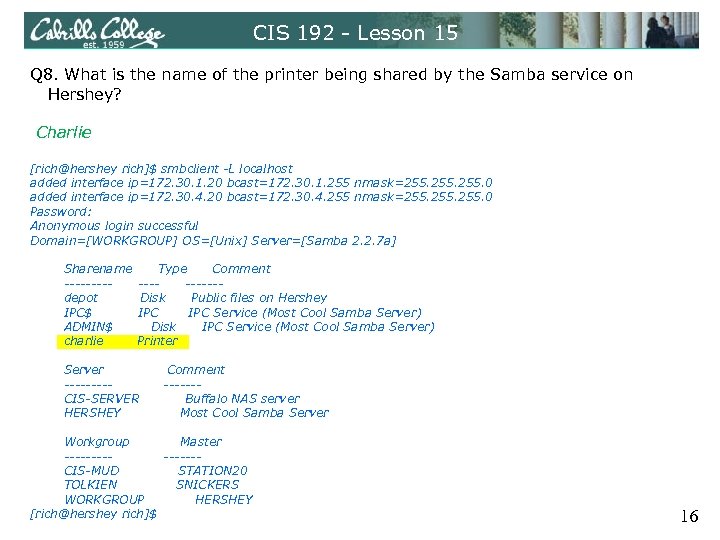 CIS 192 - Lesson 15 Q 8. What is the name of the printer being shared by the Samba service on Hershey? Charlie [rich@hershey rich]$ smbclient -L localhost added interface ip=172. 30. 1. 20 bcast=172. 30. 1. 255 nmask=255. 0 added interface ip=172. 30. 4. 20 bcast=172. 30. 4. 255 nmask=255. 0 Password: Anonymous login successful Domain=[WORKGROUP] OS=[Unix] Server=[Samba 2. 2. 7 a] Sharename ----depot IPC$ ADMIN$ charlie Type Comment -----Disk Public files on Hershey IPC Service (Most Cool Samba Server) Disk IPC Service (Most Cool Samba Server) Printer Server ----CIS-SERVER HERSHEY Comment ------Buffalo NAS server Most Cool Samba Server Workgroup Master -------CIS-MUD STATION 20 TOLKIEN SNICKERS WORKGROUP HERSHEY [rich@hershey rich]$ 16
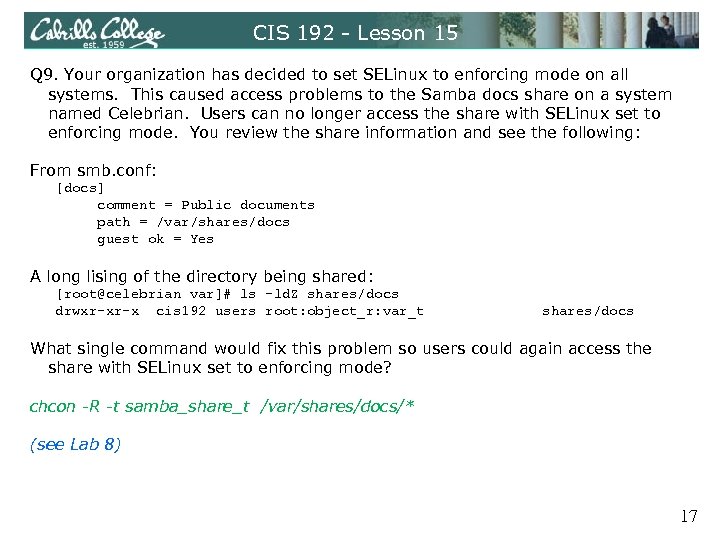 CIS 192 - Lesson 15 Q 9. Your organization has decided to set SELinux to enforcing mode on all systems. This caused access problems to the Samba docs share on a system named Celebrian. Users can no longer access the share with SELinux set to enforcing mode. You review the share information and see the following: From smb. conf: [docs] comment = Public documents path = /var/shares/docs guest ok = Yes A long lising of the directory being shared: [root@celebrian var]# ls -ld. Z shares/docs drwxr-xr-x cis 192 users root: object_r: var_t shares/docs What single command would fix this problem so users could again access the share with SELinux set to enforcing mode? chcon -R -t samba_share_t /var/shares/docs/* (see Lab 8) 17
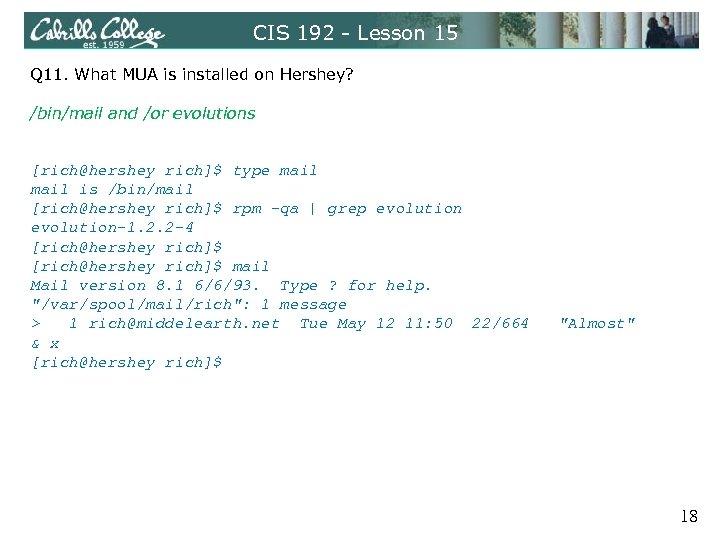 CIS 192 - Lesson 15 Q 11. What MUA is installed on Hershey? /bin/mail and /or evolutions [rich@hershey rich]$ type mail is /bin/mail [rich@hershey rich]$ rpm -qa | grep evolution-1. 2. 2 -4 [rich@hershey rich]$ mail Mail version 8. 1 6/6/93. Type ? for help. "/var/spool/mail/rich": 1 message > 1 rich@middelearth. net Tue May 12 11: 50 22/664 & x [rich@hershey rich]$ "Almost" 18
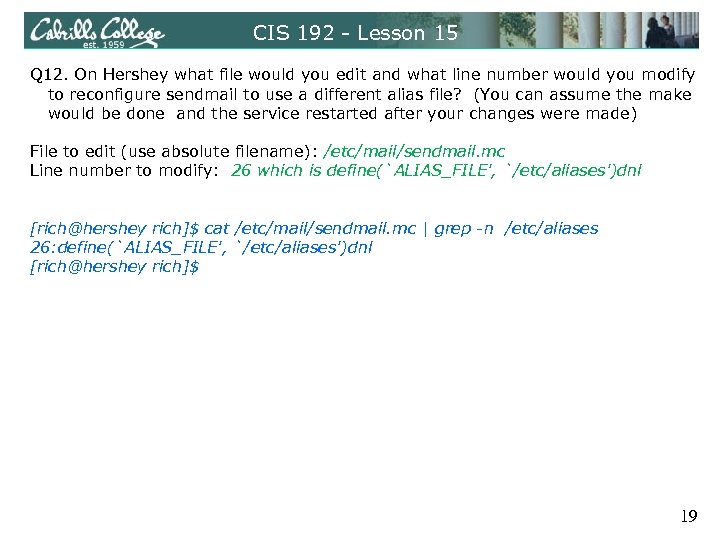 CIS 192 - Lesson 15 Q 12. On Hershey what file would you edit and what line number would you modify to reconfigure sendmail to use a different alias file? (You can assume the make would be done and the service restarted after your changes were made) File to edit (use absolute filename): /etc/mail/sendmail. mc Line number to modify: 26 which is define(`ALIAS_FILE', `/etc/aliases')dnl [rich@hershey rich]$ cat /etc/mail/sendmail. mc | grep -n /etc/aliases 26: define(`ALIAS_FILE', `/etc/aliases')dnl [rich@hershey rich]$ 19
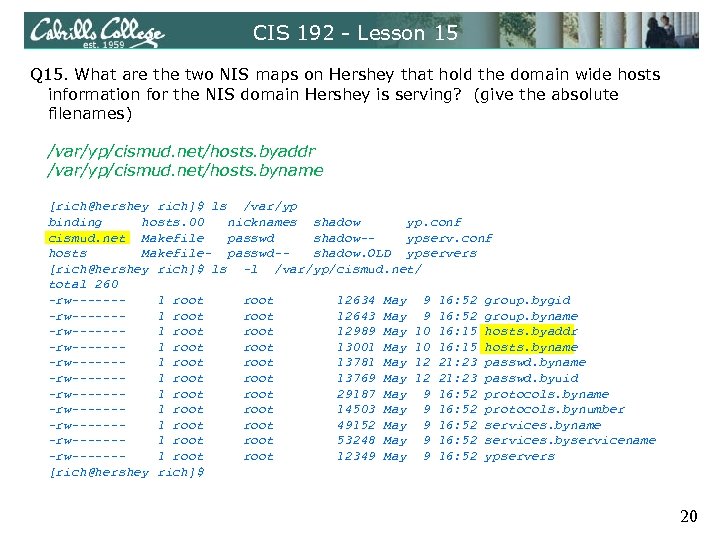 CIS 192 - Lesson 15 Q 15. What are the two NIS maps on Hershey that hold the domain wide hosts information for the NIS domain Hershey is serving? (give the absolute filenames) /var/yp/cismud. net/hosts. byaddr /var/yp/cismud. net/hosts. byname [rich@hershey rich]$ ls /var/yp binding hosts. 00 nicknames shadow yp. conf cismud. net Makefile passwd shadow-ypserv. conf hosts Makefile- passwd-shadow. OLD ypservers [rich@hershey rich]$ ls -l /var/yp/cismud. net/ total 260 -rw------1 root 12634 May 9 16: 52 group. bygid -rw------1 root 12643 May 9 16: 52 group. byname -rw------1 root 12989 May 10 16: 15 hosts. byaddr -rw------1 root 13001 May 10 16: 15 hosts. byname -rw------1 root 13781 May 12 21: 23 passwd. byname -rw------1 root 13769 May 12 21: 23 passwd. byuid -rw------1 root 29187 May 9 16: 52 protocols. byname -rw------1 root 14503 May 9 16: 52 protocols. bynumber -rw------1 root 49152 May 9 16: 52 services. byname -rw------1 root 53248 May 9 16: 52 services. byservicename -rw------1 root 12349 May 9 16: 52 ypservers [rich@hershey rich]$ 20
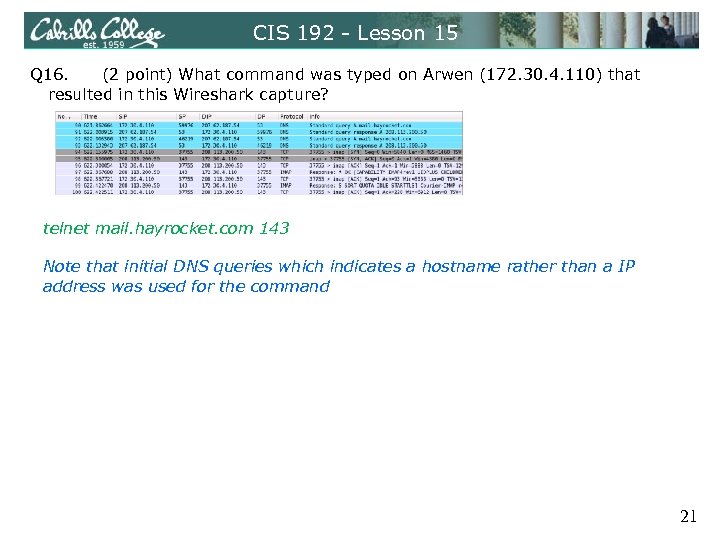 CIS 192 - Lesson 15 Q 16. (2 point) What command was typed on Arwen (172. 30. 4. 110) that resulted in this Wireshark capture? telnet mail. hayrocket. com 143 Note that initial DNS queries which indicates a hostname rather than a IP address was used for the command 21
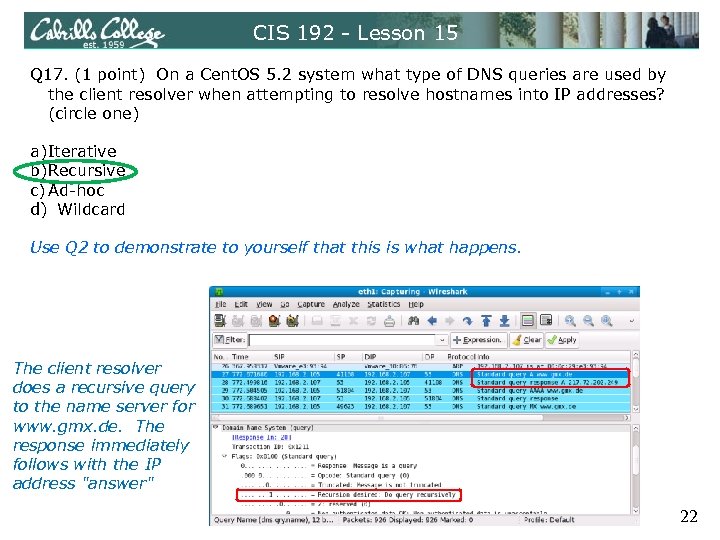 CIS 192 - Lesson 15 Q 17. (1 point) On a Cent. OS 5. 2 system what type of DNS queries are used by the client resolver when attempting to resolve hostnames into IP addresses? (circle one) a)Iterative b)Recursive c) Ad-hoc d) Wildcard Use Q 2 to demonstrate to yourself that this is what happens. The client resolver does a recursive query to the name server for www. gmx. de. The response immediately follows with the IP address "answer" 22
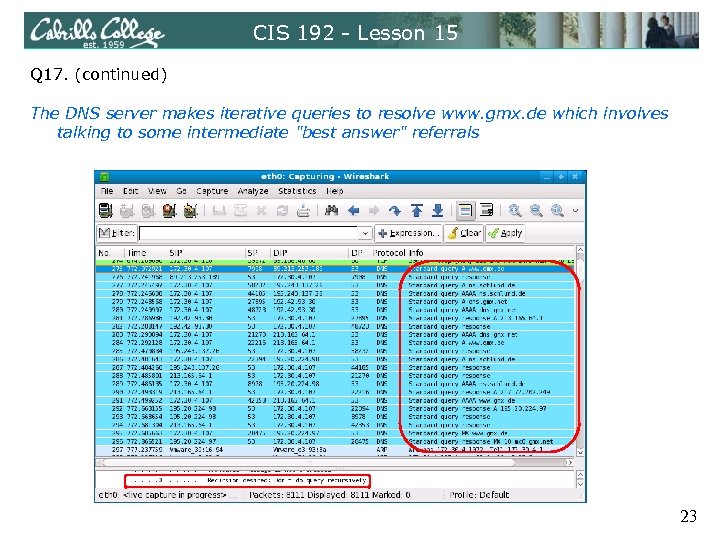 CIS 192 - Lesson 15 Q 17. (continued) The DNS server makes iterative queries to resolve www. gmx. de which involves talking to some intermediate "best answer" referrals 23
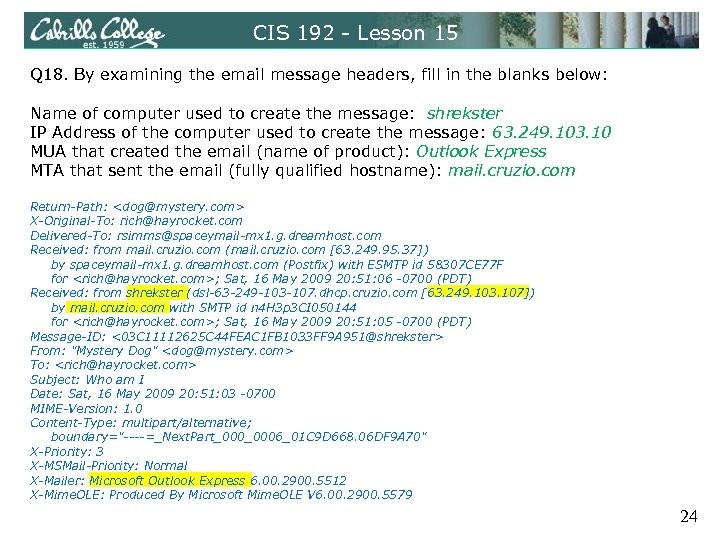 CIS 192 - Lesson 15 Q 18. By examining the email message headers, fill in the blanks below: Name of computer used to create the message: shrekster IP Address of the computer used to create the message: 63. 249. 103. 10 MUA that created the email (name of product): Outlook Express MTA that sent the email (fully qualified hostname): mail. cruzio. com Return-Path:
 NSM 25
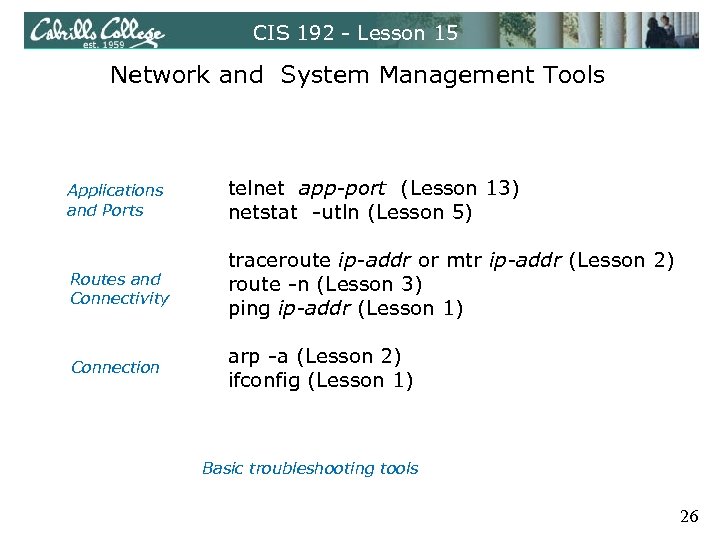 CIS 192 - Lesson 15 Network and System Management Tools Applications and Ports telnet app-port (Lesson 13) netstat -utln (Lesson 5) Routes and Connectivity traceroute ip-addr or mtr ip-addr (Lesson 2) route -n (Lesson 3) ping ip-addr (Lesson 1) Connection arp -a (Lesson 2) ifconfig (Lesson 1) Basic troubleshooting tools 26
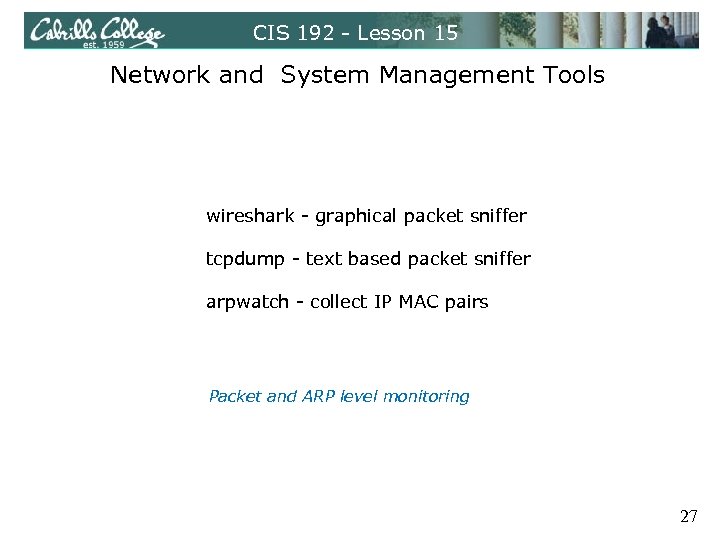 CIS 192 - Lesson 15 Network and System Management Tools wireshark - graphical packet sniffer tcpdump - text based packet sniffer arpwatch - collect IP MAC pairs Packet and ARP level monitoring 27
 CIS 192 - Lesson 15 Network and System Management Tools Nagios Cacti Webmin HP SIM many more … Free tools that run on Linux 28
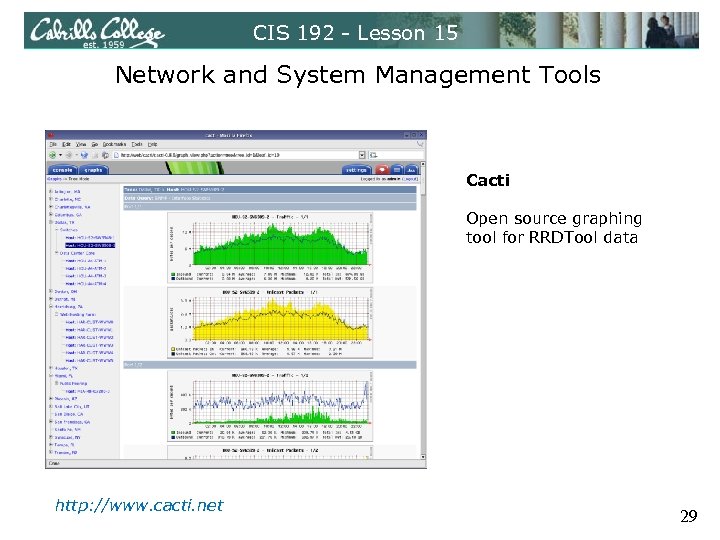 CIS 192 - Lesson 15 Network and System Management Tools Cacti Open source graphing tool for RRDTool data http: //www. cacti. net 29
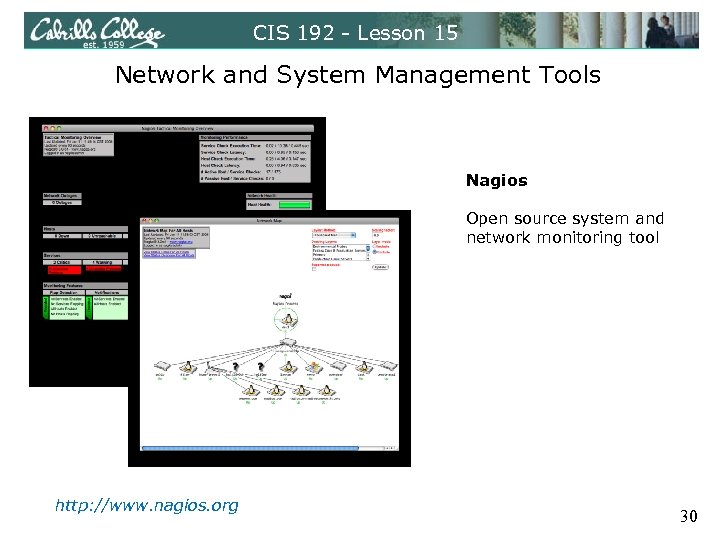 CIS 192 - Lesson 15 Network and System Management Tools Nagios Open source system and network monitoring tool http: //www. nagios. org 30
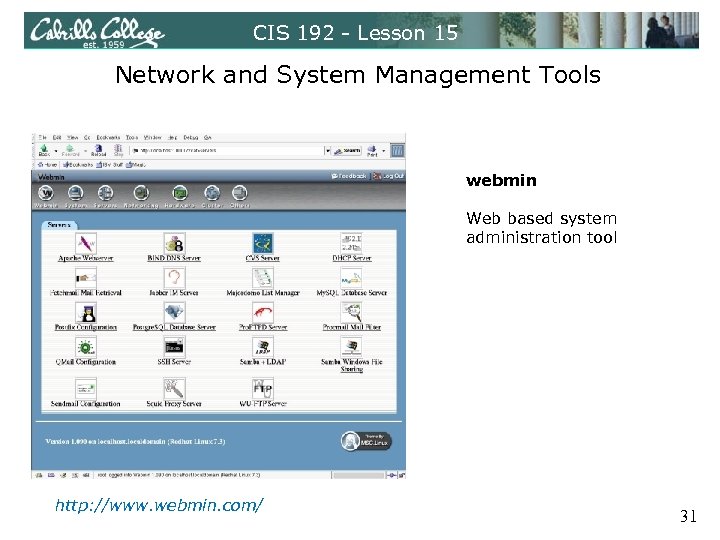 CIS 192 - Lesson 15 Network and System Management Tools webmin Web based system administration tool http: //www. webmin. com/ 31
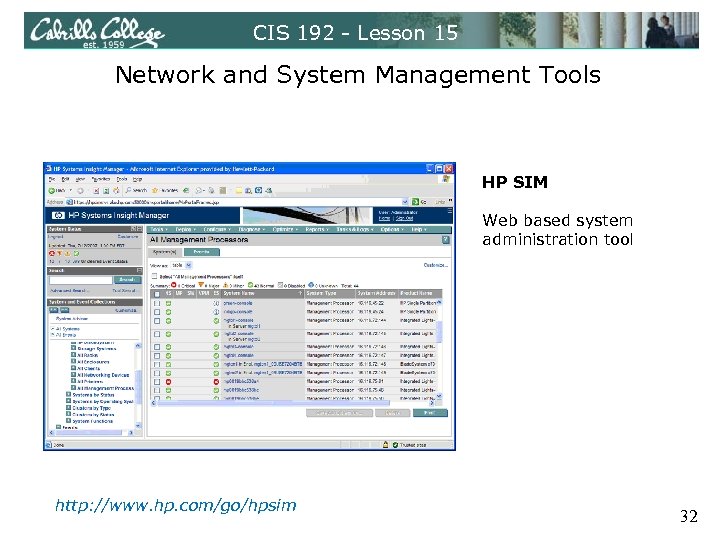 CIS 192 - Lesson 15 Network and System Management Tools HP SIM Web based system administration tool http: //www. hp. com/go/hpsim 32
 CIS 192 - Lesson 15 Network and System Management Tools Open. View Tivoli CA-Unicenter many more … 33
 Final 34
 CIS 192 - Lesson 15 Final - 60 points • Meet at the normal class time and location • There are 8 possible tasks to implement from scratch during the final exam. The description of these task requirements will be available one week prior to the exam. • One task is mandatory (20 points). Two additional tasks of your choice make up the rest of the exam (20 points each) • Any additional tasks completed during the exam will earn 6 points of extra credit each. These extra credit points are not subject to the extra credit cap for the course. • You may use the forum and work with other students to prepare in advance of the final. During the final you must work by yourself. • The exam is open, book, open notes and open computer. Your are not allowed to ask for or give assistance during the exam. 35
 CIS 192 - Lesson 15 Final - 60 points Recommended preparation • Select the tasks you want to do during the final and practice implementing them at least one time prior to the final. • Note implementation problems that arise when practicing and record any troubleshooting steps you may want to use again if necessary. • Prepare checklists with detailed implementation notes to help things go smoothly during the exam. • Know where to find backup information, configuration examples and sample commands for any tasks you select. 36
 CIS 192 - Lesson 15 37
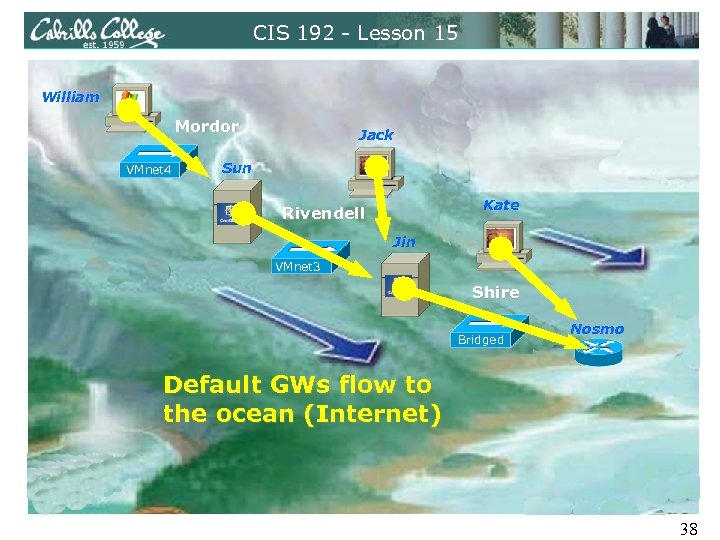 CIS 192 - Lesson 15 William Mordor VMnet 4 Jack Sun Kate Rivendell Jin VMnet 3 Shire Bridged Nosmo Default GWs flow to the ocean (Internet) 38
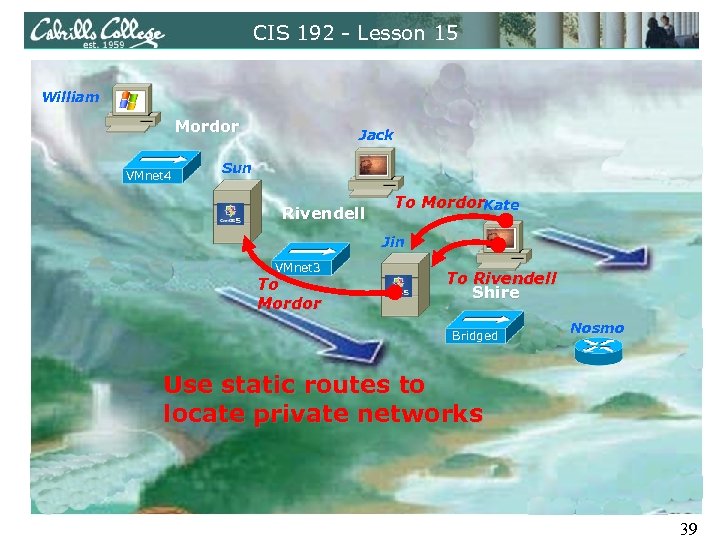 CIS 192 - Lesson 15 William Mordor VMnet 4 Jack Sun Rivendell To Mordor. Kate Jin VMnet 3 To Mordor To Rivendell Shire Bridged Nosmo Use static routes to locate private networks 39
 Lab Workshop 40
 CIS 192 - Lesson 15 Open Lab Workshop Lab 10 - Internet Services Extra Credit Labs Start preparing for the final 41
 Wrap 42
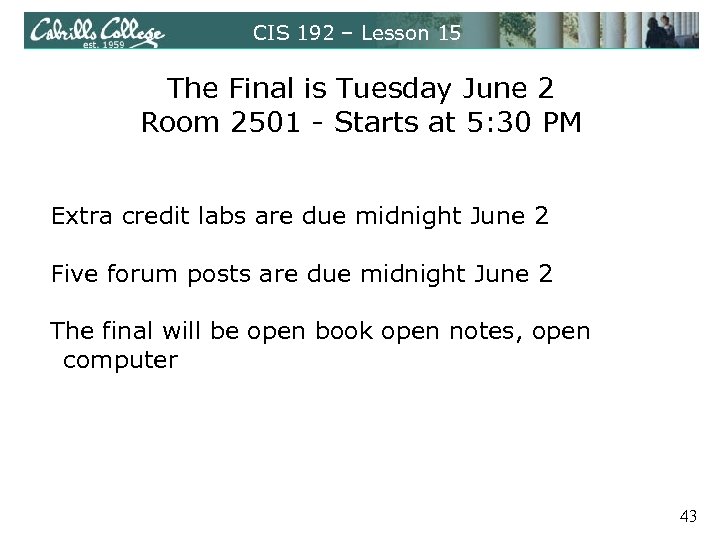 CIS 192 – Lesson 15 The Final is Tuesday June 2 Room 2501 - Starts at 5: 30 PM Extra credit labs are due midnight June 2 Five forum posts are due midnight June 2 The final will be open book open notes, open computer 43
 Backup 44
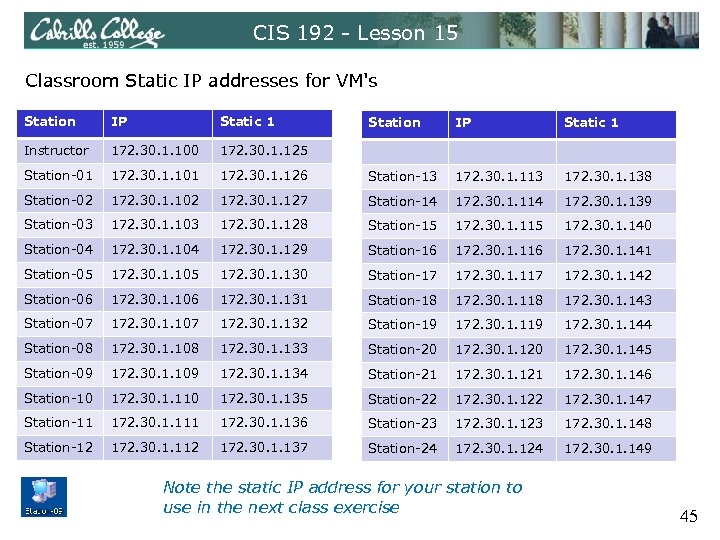 CIS 192 - Lesson 15 Classroom Static IP addresses for VM's Station IP Static 1 Instructor 172. 30. 1. 100 172. 30. 1. 125 Station-01 172. 30. 1. 101 Station-02 Station IP Static 1 172. 30. 1. 126 Station-13 172. 30. 1. 138 172. 30. 1. 102 172. 30. 1. 127 Station-14 172. 30. 1. 139 Station-03 172. 30. 1. 128 Station-15 172. 30. 1. 140 Station-04 172. 30. 1. 129 Station-16 172. 30. 1. 141 Station-05 172. 30. 1. 130 Station-17 172. 30. 1. 142 Station-06 172. 30. 1. 131 Station-18 172. 30. 1. 143 Station-07 172. 30. 1. 132 Station-19 172. 30. 1. 144 Station-08 172. 30. 1. 133 Station-20 172. 30. 1. 145 Station-09 172. 30. 1. 134 Station-21 172. 30. 1. 146 Station-10 172. 30. 1. 135 Station-22 172. 30. 1. 147 Station-11 172. 30. 1. 136 Station-23 172. 30. 1. 148 Station-12 172. 30. 1. 137 Station-24 172. 30. 1. 149 Note the static IP address for your station to use in the next class exercise 45
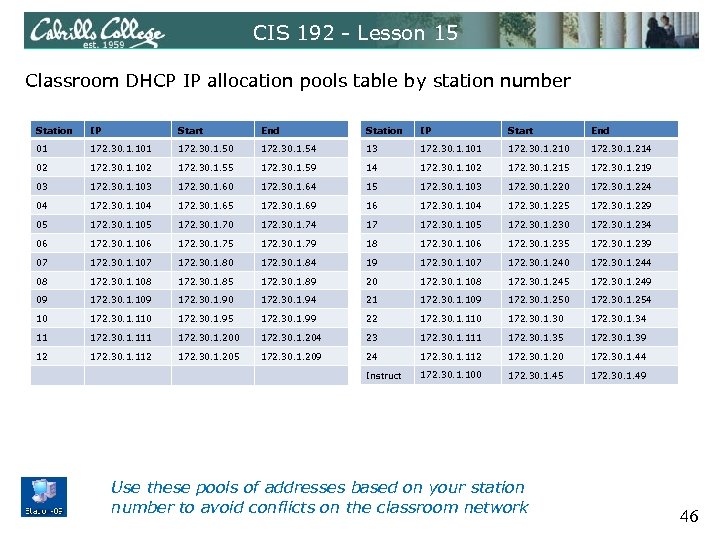 CIS 192 - Lesson 15 Classroom DHCP IP allocation pools table by station number Station IP Start End 01 172. 30. 1. 101 172. 30. 1. 50 172. 30. 1. 54 13 172. 30. 1. 101 172. 30. 1. 210 172. 30. 1. 214 02 172. 30. 1. 102 172. 30. 1. 55 172. 30. 1. 59 14 172. 30. 1. 102 172. 30. 1. 215 172. 30. 1. 219 03 172. 30. 1. 103 172. 30. 1. 60 172. 30. 1. 64 15 172. 30. 1. 103 172. 30. 1. 220 172. 30. 1. 224 04 172. 30. 1. 104 172. 30. 1. 65 172. 30. 1. 69 16 172. 30. 1. 104 172. 30. 1. 225 172. 30. 1. 229 05 172. 30. 1. 105 172. 30. 1. 70 172. 30. 1. 74 17 172. 30. 1. 105 172. 30. 1. 230 172. 30. 1. 234 06 172. 30. 1. 106 172. 30. 1. 75 172. 30. 1. 79 18 172. 30. 1. 106 172. 30. 1. 235 172. 30. 1. 239 07 172. 30. 1. 107 172. 30. 1. 80 172. 30. 1. 84 19 172. 30. 1. 107 172. 30. 1. 240 172. 30. 1. 244 08 172. 30. 1. 108 172. 30. 1. 85 172. 30. 1. 89 20 172. 30. 1. 108 172. 30. 1. 245 172. 30. 1. 249 09 172. 30. 1. 109 172. 30. 1. 90 172. 30. 1. 94 21 172. 30. 1. 109 172. 30. 1. 250 172. 30. 1. 254 10 172. 30. 1. 110 172. 30. 1. 95 172. 30. 1. 99 22 172. 30. 1. 110 172. 30. 1. 34 11 172. 30. 1. 111 172. 30. 1. 200 172. 30. 1. 204 23 172. 30. 1. 111 172. 30. 1. 35 172. 30. 1. 39 12 172. 30. 1. 112 172. 30. 1. 205 172. 30. 1. 209 24 172. 30. 1. 112 172. 30. 1. 20 172. 30. 1. 44 Instruct 172. 30. 1. 100 172. 30. 1. 45 172. 30. 1. 49 Use these pools of addresses based on your station number to avoid conflicts on the classroom network 46