


 Скачать презентацию Child Find Screen August 2010 Copyright 2010
93595460b8d1404f13cbeed2438386a0.ppt
- Количество слайдов: 78
 Child Find Screen August 2010 Copyright © 2010 Mississippi Department of Education Office of Instructional Enhancement and Internal Programs/Office of Special Education 1
 Child Find Screen • Coming Soon! • New screen and reports in MSIS to document initial rulings Copyright © 2010 Mississippi Department of Education Office of Instructional Enhancement and Internal Programs/Office of Special Education 2
 Child Find Screen • Replaces bottom portion of Intervention screen • With the reauthorization of IDEA in 2004 and the release of new/updated state IDEA regs in July 2009, the TST process is no longer required before ruling a child eligible for services (but it is still best practice) Copyright © 2010 Mississippi Department of Education Office of Instructional Enhancement and Internal Programs/Office of Special Education 3
 Child Find Screen • Will be able to query for any student owned by the school • Students will be flagged if they have: § An Intervention referral, or § A Part C to B referral, or § A special education indicator in MSIS Copyright © 2010 Mississippi Department of Education Office of Instructional Enhancement and Internal Programs/Office of Special Education 4
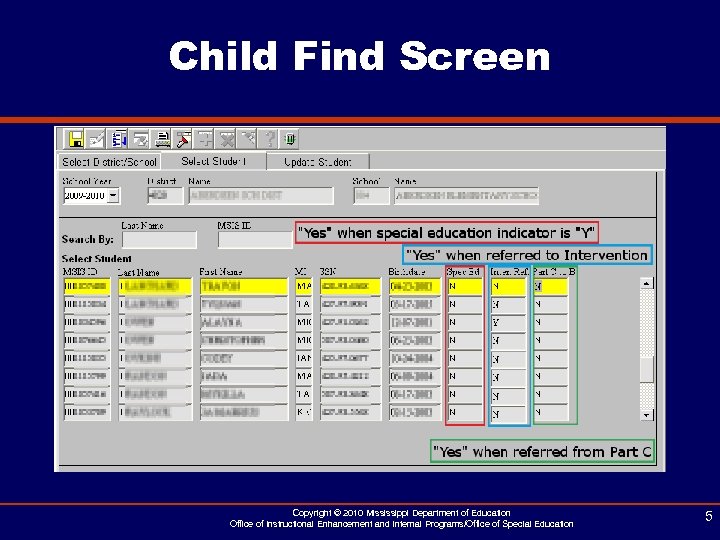 Child Find Screen Copyright © 2010 Mississippi Department of Education Office of Instructional Enhancement and Internal Programs/Office of Special Education 5
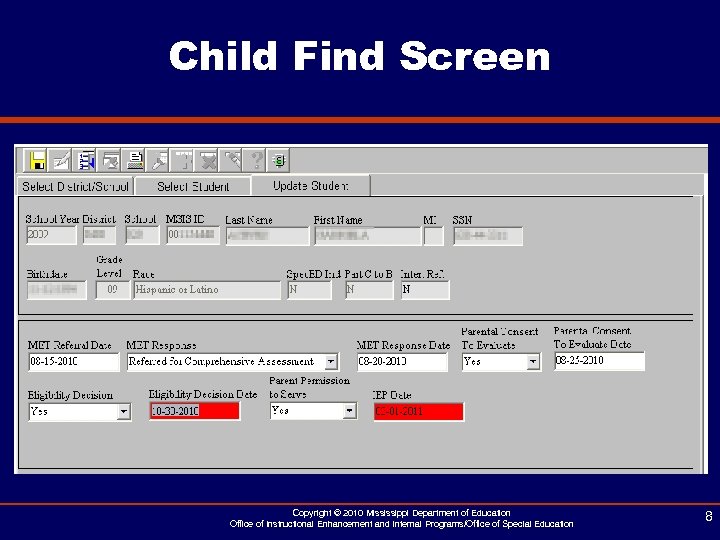
 Child Find Screen • Information to be entered: § Multidisciplinary Evaluation Team (MET) Referral Date, Response, and Response Date § Parental Consent to Evaluate and Date § Eligibility Decision and Date § Parent Permission to Serve § IEP Date Copyright © 2010 Mississippi Department of Education Office of Instructional Enhancement and Internal Programs/Office of Special Education 6
 Child Find Screen • Upon initial ruling, information will be collected on this screen. • Establishes a permanent record of initial ruling data. • Do NOT update this screen with Eligibility re-evaluation or IEP revision dates. Continue to use the Student Update screen for those updates. Copyright © 2010 Mississippi Department of Education Office of Instructional Enhancement and Internal Programs/Office of Special Education 7
 Child Find Screen Copyright © 2010 Mississippi Department of Education Office of Instructional Enhancement and Internal Programs/Office of Special Education 8
 Child Find Screen • MET Referral Date § Date a student is referred from TST for testing § Only applies to Intervention referrals Copyright © 2010 Mississippi Department of Education Office of Instructional Enhancement and Internal Programs/Office of Special Education 9
 Child Find Screen • MET Response and Response Date § 3 Options: – Referred Back to TST – Remains in Regular Education – Referred for Comprehensive Evaluation § Only applies to Intervention referrals § Response Date is required if Response is chosen Copyright © 2010 Mississippi Department of Education Office of Instructional Enhancement and Internal Programs/Office of Special Education 10
 Child Find Screen • Parental Consent to Evaluate and Date § Yes or No field § Date is either the date consent was obtained or declined § Date is required if Parental Consent to Evaluate is selected Copyright © 2010 Mississippi Department of Education Office of Instructional Enhancement and Internal Programs/Office of Special Education 11
 Child Find Screen • Eligibility Decision § Yes or No Field • Eligibility Decision Date § Date that Eligibility was determined (Even if child is NOT eligible) § If eligible, date should also be entered on Student Update screen. Copyright © 2010 Mississippi Department of Education Office of Instructional Enhancement and Internal Programs/Office of Special Education 12
 Child Find Screen • Eligibility Decision Date continued § Date is required if Eligibility Decision is selected § Field will turn red if date is more than 60 days after the Parental Consent to Evaluate Date • Parent Permission to Serve § Yes or No Field Copyright © 2010 Mississippi Department of Education Office of Instructional Enhancement and Internal Programs/Office of Special Education 13
 Child Find Screen • IEP Date § Date of initial IEP § Will also update the Student Update screen § ONLY for initial IEP. Do not update this screen with revisions or re-evals. In that case, update Student Update screen only. § Will turn red if date is more than 30 days past the Eligibility Decision Date Copyright © 2010 Mississippi Department of Education Office of Instructional Enhancement and Internal Programs/Office of Special Education 14
 Child Find Screen • Reports § Roster Report – Includes students for whom you have entered Child Find information PLUS – Part C to B referrals who have not been removed from your No Match Report PLUS – Intervention referrals PLUS – Students with a special education indicator who have not been served in the past Copyright © 2010 Mississippi Department of Education Office of Instructional Enhancement and Internal Programs/Office of Special Education 15
 Child Find Screen • Reports § Compliance Report – Same students as Roster Report – For every student on report: o Part C to B Compliance – IEP Date or if not eligible, Eligibility Decision Date, by third birthday (SPP/APR Indicator 12) o Eligibility Compliance (SPP/APR Indicator 11) o IEP Compliance Copyright © 2010 Mississippi Department of Education Office of Instructional Enhancement and Internal Programs/Office of Special Education 16
 Educational Environment School Year 2010 -2011
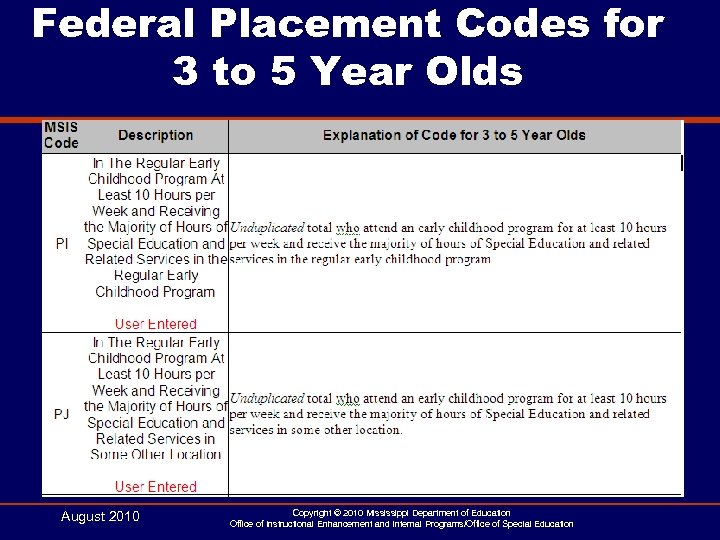 Federal Placement Codes for 3 to 5 Year Olds August 2010 Copyright © 2010 Mississippi Department of Education Office of Instructional Enhancement and Internal Programs/Office of Special Education
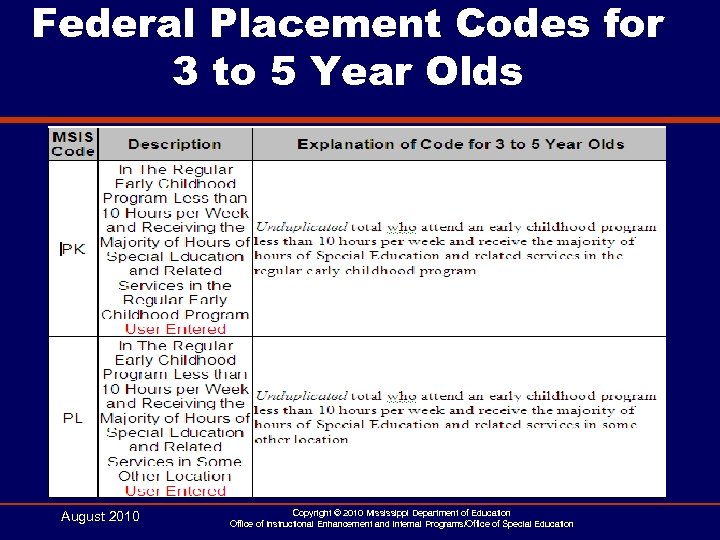 Federal Placement Codes for 3 to 5 Year Olds August 2010 Copyright © 2010 Mississippi Department of Education Office of Instructional Enhancement and Internal Programs/Office of Special Education
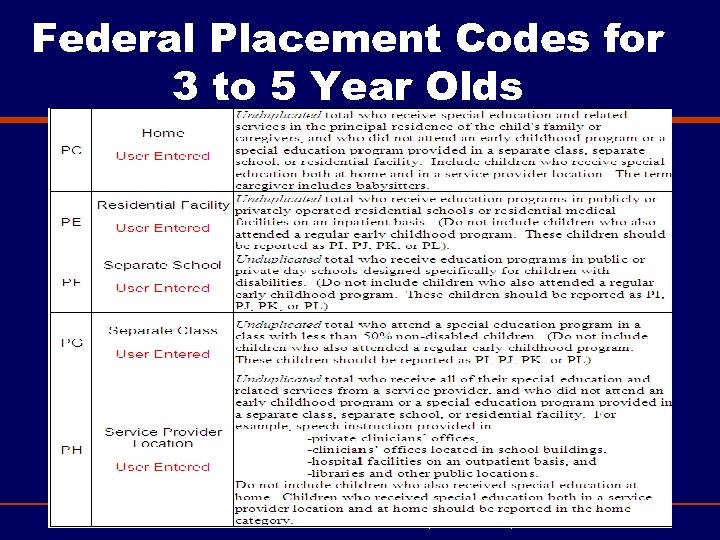 Federal Placement Codes for 3 to 5 Year Olds Summer 2010 Mississippi Department of Education Office of Instructional Enhancement and Internal Operations/Office of Special Education
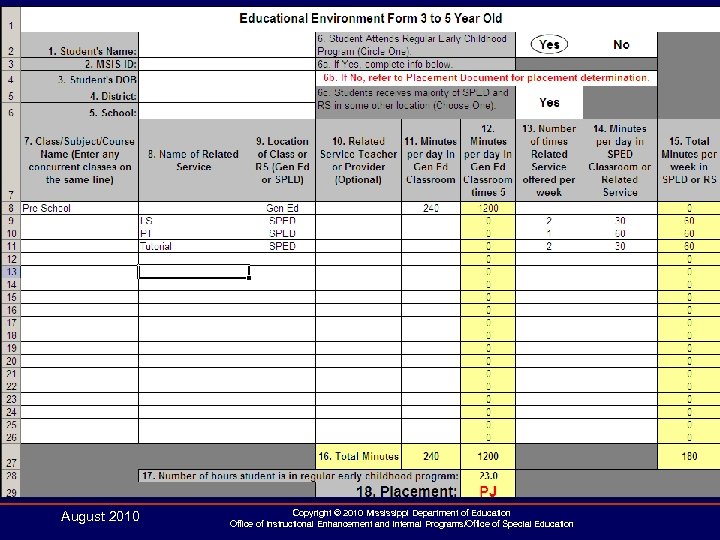
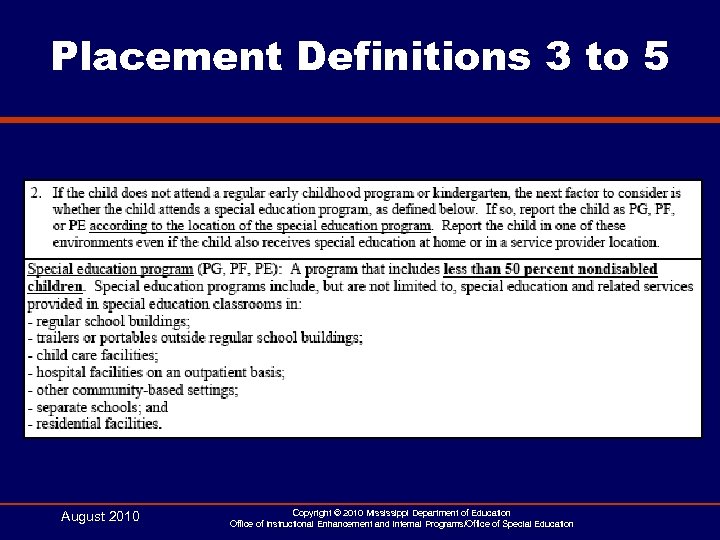
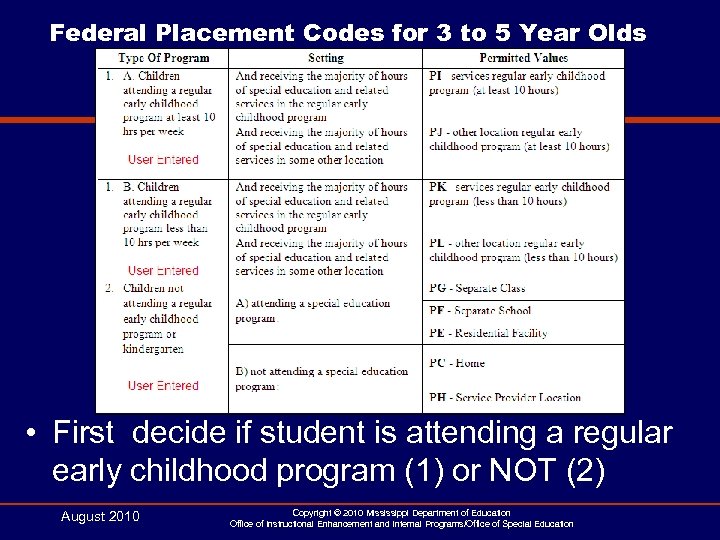 Federal Placement Codes for 3 to 5 Year Olds • First decide if student is attending a regular early childhood program (1) or NOT (2) August 2010 Copyright © 2010 Mississippi Department of Education Office of Instructional Enhancement and Internal Programs/Office of Special Education
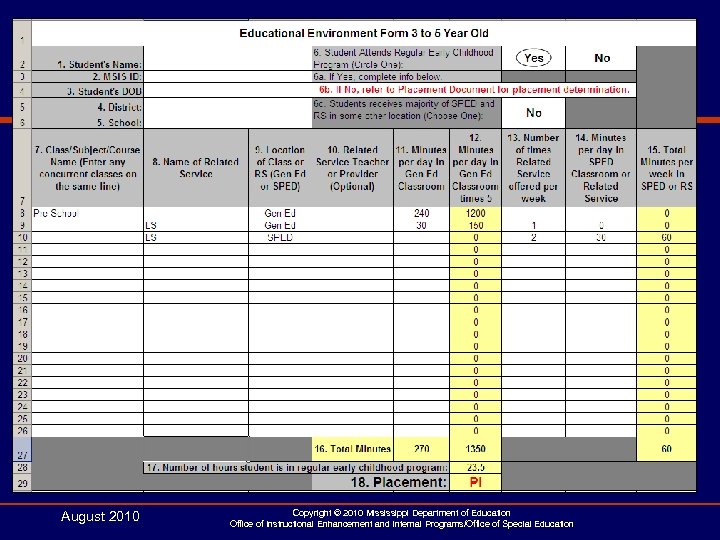
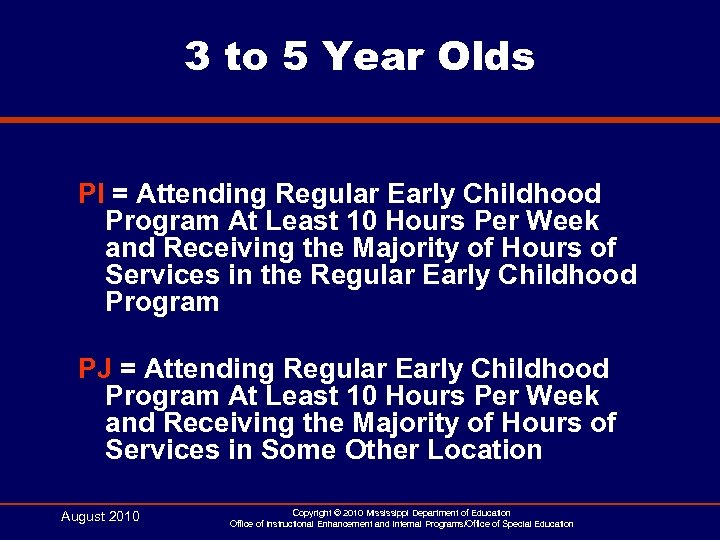 3 to 5 Year Olds PI = Attending Regular Early Childhood Program At Least 10 Hours Per Week and Receiving the Majority of Hours of Services in the Regular Early Childhood Program PJ = Attending Regular Early Childhood Program At Least 10 Hours Per Week and Receiving the Majority of Hours of Services in Some Other Location August 2010 Copyright © 2010 Mississippi Department of Education Office of Instructional Enhancement and Internal Programs/Office of Special Education
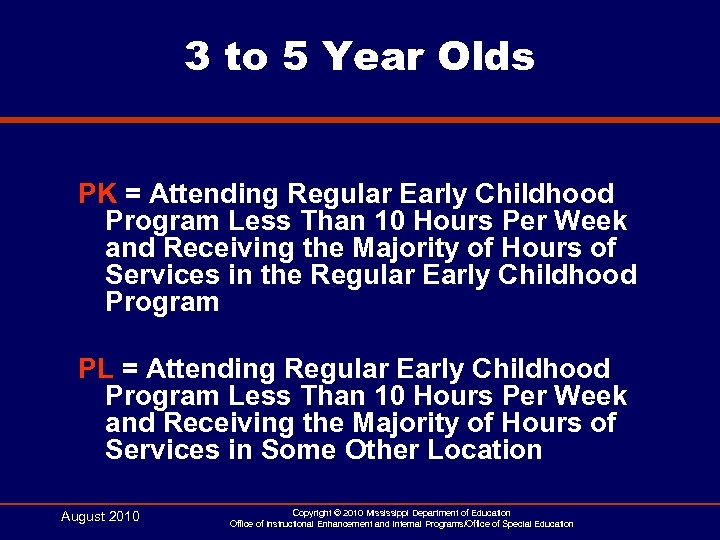 3 to 5 Year Olds PK = Attending Regular Early Childhood Program Less Than 10 Hours Per Week and Receiving the Majority of Hours of Services in the Regular Early Childhood Program PL = Attending Regular Early Childhood Program Less Than 10 Hours Per Week and Receiving the Majority of Hours of Services in Some Other Location August 2010 Copyright © 2010 Mississippi Department of Education Office of Instructional Enhancement and Internal Programs/Office of Special Education
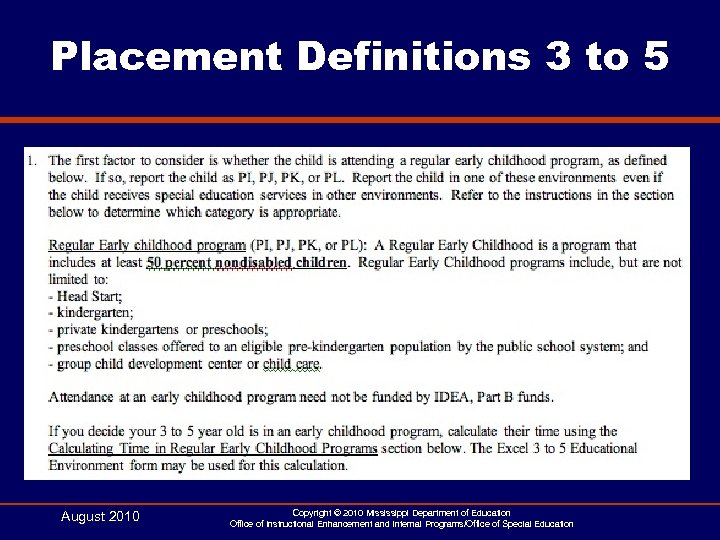 Placement Definitions 3 to 5 August 2010 Copyright © 2010 Mississippi Department of Education Office of Instructional Enhancement and Internal Programs/Office of Special Education
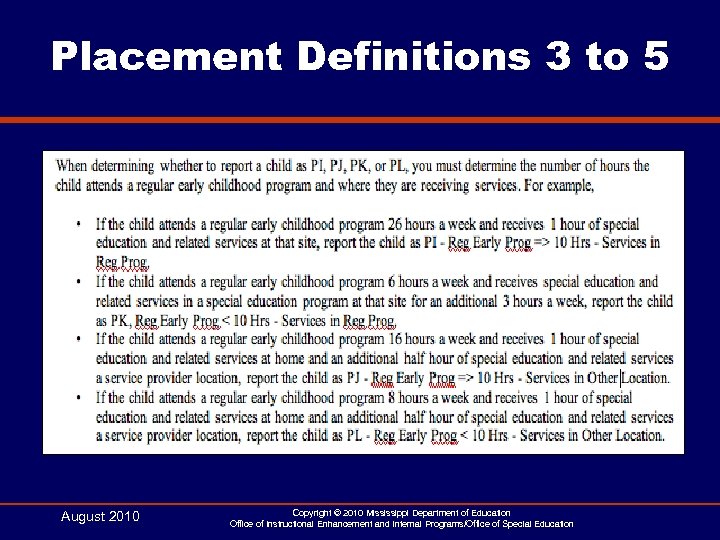 Placement Definitions 3 to 5 August 2010 Copyright © 2010 Mississippi Department of Education Office of Instructional Enhancement and Internal Programs/Office of Special Education
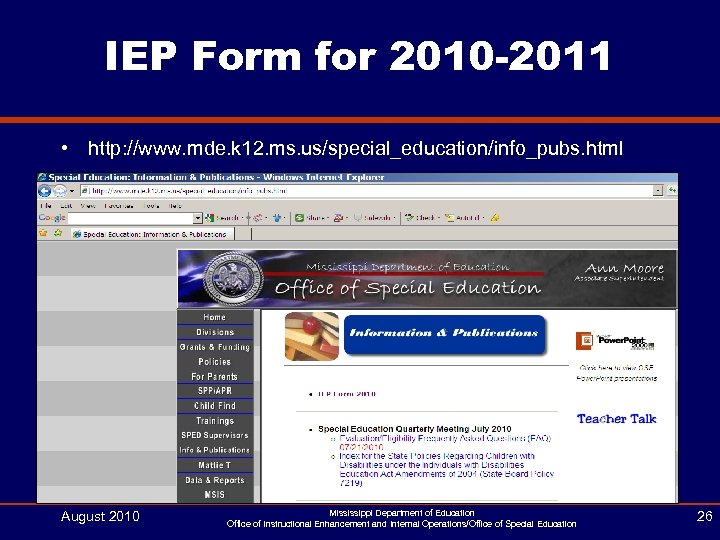 IEP Form for 2010 -2011 • http: //www. mde. k 12. ms. us/special_education/info_pubs. html August 2010 Mississippi Department of Education Office of Instructional Enhancement and Internal Operations/Office of Special Education 26
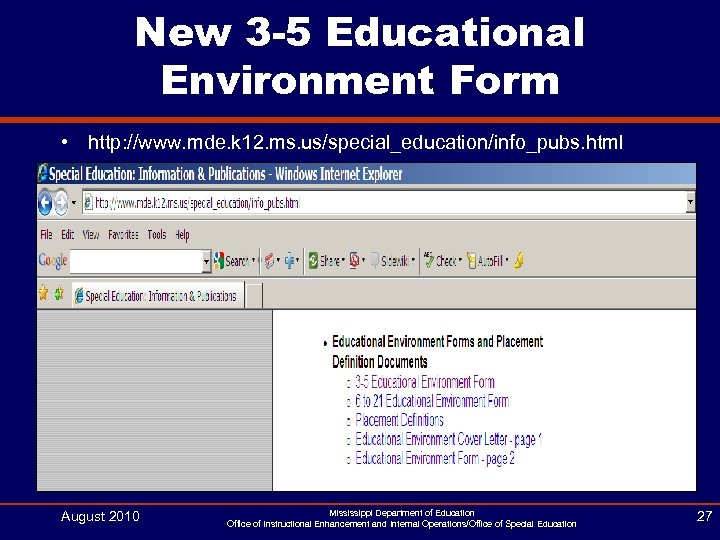 New 3 -5 Educational Environment Form • http: //www. mde. k 12. ms. us/special_education/info_pubs. html August 2010 Mississippi Department of Education Office of Instructional Enhancement and Internal Operations/Office of Special Education 27
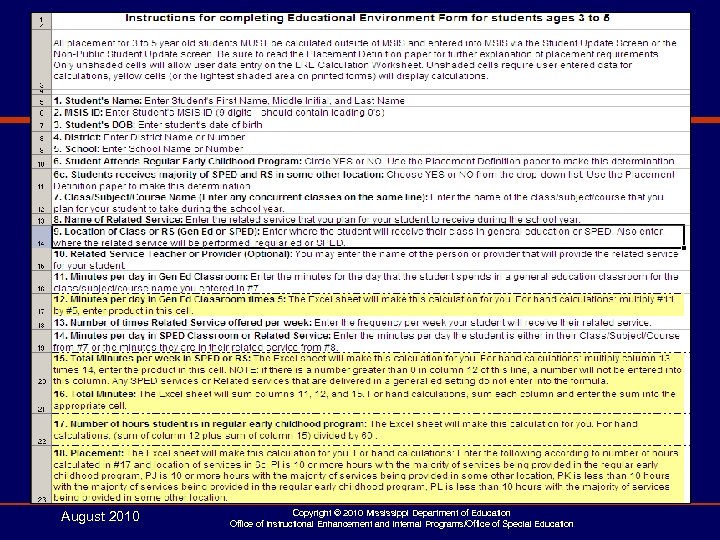 August 2010 Copyright © 2010 Mississippi Department of Education Office of Instructional Enhancement and Internal Programs/Office of Special Education
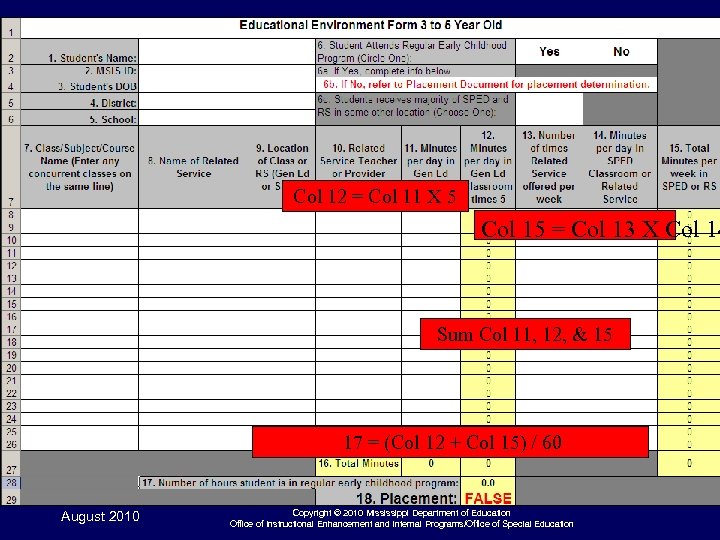 Col 12 = Col 11 X 5 Col 15 = Col 13 X Col 14 Sum Col 11, 12, & 15 17 = (Col 12 + Col 15) / 60 August 2010 Copyright © 2010 Mississippi Department of Education Office of Instructional Enhancement and Internal Programs/Office of Special Education
 August 2010 Copyright © 2010 Mississippi Department of Education Office of Instructional Enhancement and Internal Programs/Office of Special Education
 August 2010 Copyright © 2010 Mississippi Department of Education Office of Instructional Enhancement and Internal Programs/Office of Special Education
 Placement Definitions 3 to 5 August 2010 Copyright © 2010 Mississippi Department of Education Office of Instructional Enhancement and Internal Programs/Office of Special Education
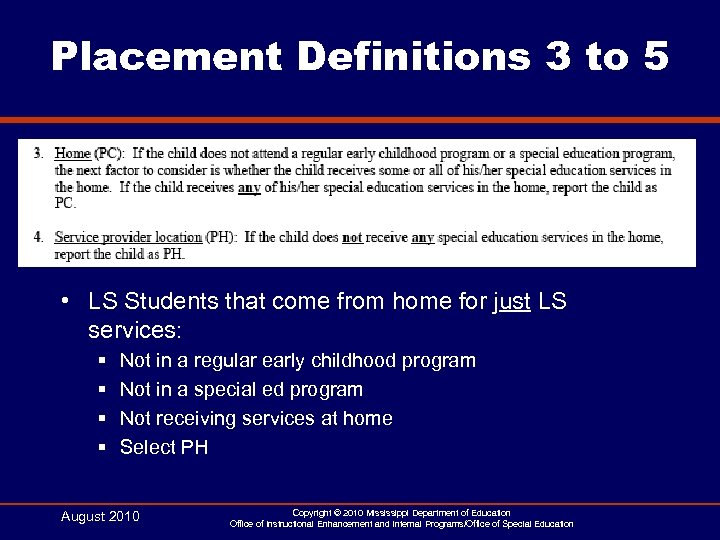 Placement Definitions 3 to 5 • LS Students that come from home for just LS services: § § Not in a regular early childhood program Not in a special ed program Not receiving services at home Select PH August 2010 Copyright © 2010 Mississippi Department of Education Office of Instructional Enhancement and Internal Programs/Office of Special Education
 Teacher Unit Procedure for Special Education Allocations, MAEP Edits, and Lump Sum August 2010
 Special Education Teacher Unit Procedure in MSIS August 2010 Copyright © 2010 Mississippi Department of Education Office of Instructional Enhancement and Internal Programs/Office of Special Education 35
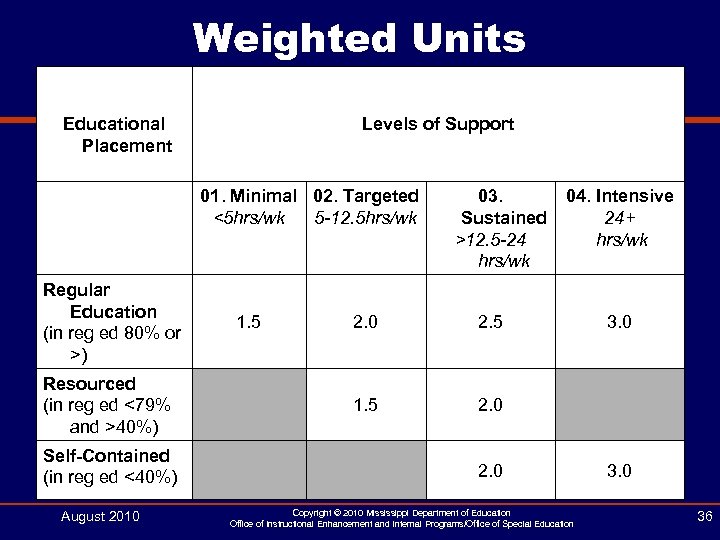 Weighted Units Educational Placement Levels of Support 01. Minimal 02. Targeted <5 hrs/wk 5 -12. 5 hrs/wk Regular Education (in reg ed 80% or >) Resourced (in reg ed <79% and >40%) Self-Contained (in reg ed <40%) August 2010 1. 5 03. Sustained >12. 5 -24 hrs/wk 2. 0 2. 5 1. 5 04. Intensive 24+ hrs/wk 2. 0 Copyright © 2010 Mississippi Department of Education Office of Instructional Enhancement and Internal Programs/Office of Special Education 3. 0 36
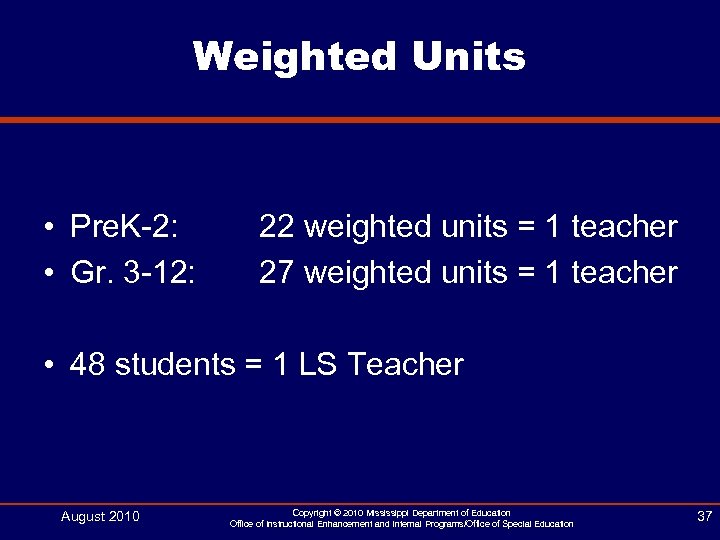 Weighted Units • Pre. K-2: • Gr. 3 -12: 22 weighted units = 1 teacher 27 weighted units = 1 teacher • 48 students = 1 LS Teacher August 2010 Copyright © 2010 Mississippi Department of Education Office of Instructional Enhancement and Internal Programs/Office of Special Education 37
 Business Rules • Calculate TUs for each school in district (includes School 500) • Check student has SPED indicator set to Y • Pull any courses beginning with 13 in student’s schedule • If the only course in the student’s schedule is 132002 (LS), do not assign a WU August 2010 Copyright © 2010 Mississippi Department of Education Office of Instructional Enhancement and Internal Programs/Office of Special Education 38
 Business Rules • Pull minutes for courses from teacher’s schedule • If teacher has 330 minutes in schedule, reduce to 60 • Add all minutes, multiply by 5, divide by 60 • Assign WU based on hours of service per student • Add all calculations, divide by 22 for Pre-K - 2, divide by 27 for Grades 3 - 12. August 2010 Copyright © 2010 Mississippi Department of Education Office of Instructional Enhancement and Internal Programs/Office of Special Education 39
 Business Rules • AB Schedules use periods 1 - 4 • MV Schedules - if minutes period are <= 60 minutes, use all periods. If minutes period are > 60 minutes, then use periods 1 - 4. • All other schedule types, use all periods • Use S 1, T 1, and T 2. Skip S 2, T 3, and T 4. August 2010 Copyright © 2010 Mississippi Department of Education Office of Instructional Enhancement and Internal Programs/Office of Special Education 40
 Business Rules • Create Sub-total of TUs for each school • If school does not have enough WUs for a TU, assign 1 TU. • Count all students with 132002 (LS) in their schedule - divide count by 48 • Add LS TU to District Sub-Total August 2010 Copyright © 2010 Mississippi Department of Education Office of Instructional Enhancement and Internal Programs/Office of Special Education 41
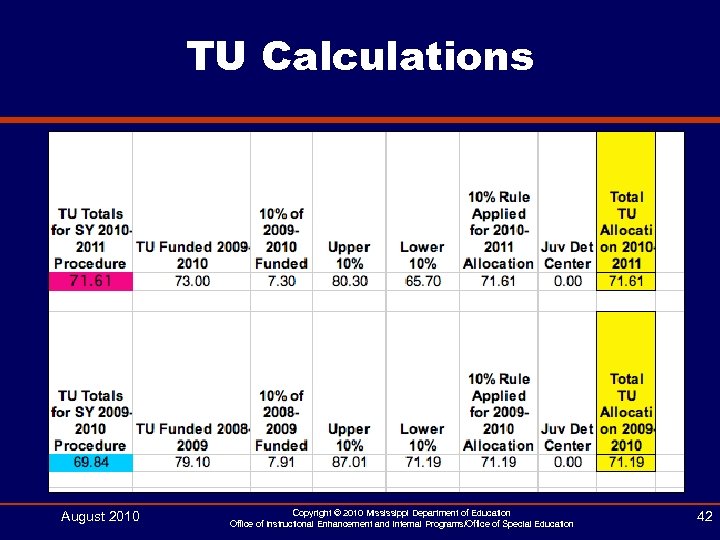 TU Calculations August 2010 Copyright © 2010 Mississippi Department of Education Office of Instructional Enhancement and Internal Programs/Office of Special Education 42
![Weighted Unit Calculation • [(50 min x 7 periods) x 5 days] / 60](https://present5.com/presentation/93595460b8d1404f13cbeed2438386a0/image-43.jpg "Weighted Unit Calculation • [(50 min x 7 periods) x 5 days] / 60") Weighted Unit Calculation • [(50 min x 7 periods) x 5 days] / 60 min = 29. 17 or 3. 0 WU August 2010 Copyright © 2010 Mississippi Department of Education Office of Instructional Enhancement and Internal Programs/Office of Special Education 43
Weighted Unit Calculation • [(50 min x 7 periods) x 5 days] / 60 min = 29. 17 or 3. 0 WU August 2010 Copyright © 2010 Mississippi Department of Education Office of Instructional Enhancement and Internal Programs/Office of Special Education 43
![Weighted Unit Calculation • [(50 min x 4 periods) x 5 days] / 60](https://present5.com/presentation/93595460b8d1404f13cbeed2438386a0/image-44.jpg "Weighted Unit Calculation • [(50 min x 4 periods) x 5 days] / 60") Weighted Unit Calculation • [(50 min x 4 periods) x 5 days] / 60 min = 16. 67 or 2. 0 WU August 2010 Copyright © 2010 Mississippi Department of Education Office of Instructional Enhancement and Internal Programs/Office of Special Education 44
Weighted Unit Calculation • [(50 min x 4 periods) x 5 days] / 60 min = 16. 67 or 2. 0 WU August 2010 Copyright © 2010 Mississippi Department of Education Office of Instructional Enhancement and Internal Programs/Office of Special Education 44
![Weighted Unit Calculation • [(50 min x 1 period) x 5 days] / 60](https://present5.com/presentation/93595460b8d1404f13cbeed2438386a0/image-45.jpg "Weighted Unit Calculation • [(50 min x 1 period) x 5 days] / 60") Weighted Unit Calculation • [(50 min x 1 period) x 5 days] / 60 min = 4. 17 or 1. 5 WU August 2010 Copyright © 2010 Mississippi Department of Education Office of Instructional Enhancement and Internal Programs/Office of Special Education 45
Weighted Unit Calculation • [(50 min x 1 period) x 5 days] / 60 min = 4. 17 or 1. 5 WU August 2010 Copyright © 2010 Mississippi Department of Education Office of Instructional Enhancement and Internal Programs/Office of Special Education 45
 MAEP Special Education Edits in MSIS August 2010 Copyright © 2010 Mississippi Department of Education Office of Instructional Enhancement and Internal Programs/Office of Special Education 46
 How is Personnel Data Used? • • Monthly Processing MAEP Funding LRE Calculation Accreditation Edit Checks Class Size Checks Federal Table 2 Report Teacher Unit Calculation Highly Qualified August 2010 Copyright © 2010 Mississippi Department of Education Office of Instructional Enhancement and Internal Programs/Office of Special Education 47
 MAEP Edit Checks • MAEP uses the endorsement codes on the Maintenance Disability Codes - NOT the endorsement codes on the Course Codes table § MSIS determines the majority of the primary disabilities per class using the student update screen to decide which endorsements should be checked • If there an equal number of two or more primary disabilities, MSIS will check all the endorsements (Ex: 1 MD Student and 1 SLD Student, MSIS checks that the teacher is endorsed in both MD and SLD) • Language Speech (132002) - MSIS checks for an endorsement of 215 or 216 - ignore SLD/EMR combinations August 2010 Copyright © 2010 Mississippi Department of Education Office of Instructional Enhancement and Internal Programs/Office of Special Education 48
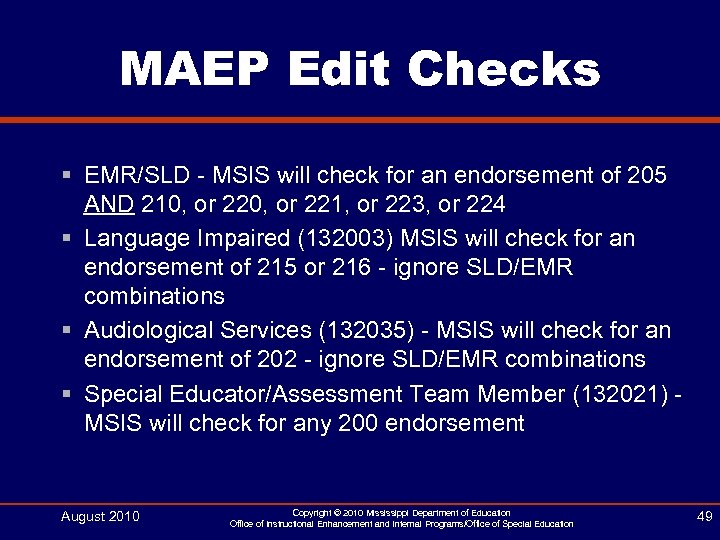 MAEP Edit Checks § EMR/SLD - MSIS will check for an endorsement of 205 AND 210, or 221, or 223, or 224 § Language Impaired (132003) MSIS will check for an endorsement of 215 or 216 - ignore SLD/EMR combinations § Audiological Services (132035) - MSIS will check for an endorsement of 202 - ignore SLD/EMR combinations § Special Educator/Assessment Team Member (132021) MSIS will check for any 200 endorsement August 2010 Copyright © 2010 Mississippi Department of Education Office of Instructional Enhancement and Internal Programs/Office of Special Education 49
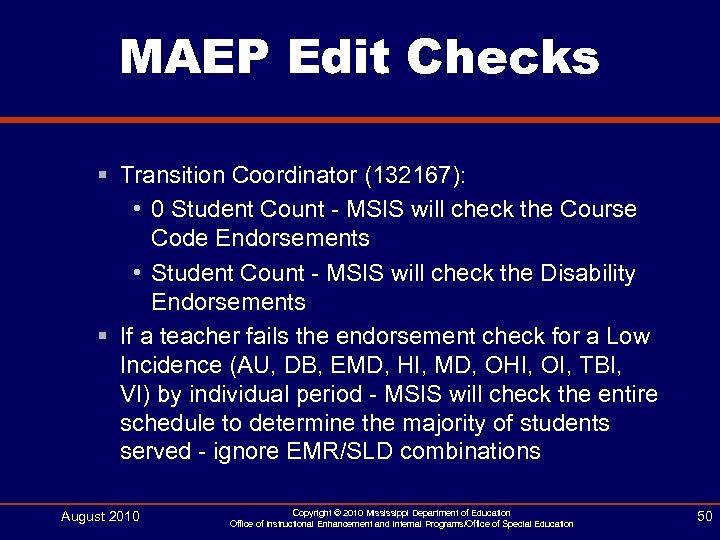 MAEP Edit Checks § Transition Coordinator (132167): • 0 Student Count - MSIS will check the Course Code Endorsements • Student Count - MSIS will check the Disability Endorsements § If a teacher fails the endorsement check for a Low Incidence (AU, DB, EMD, HI, MD, OHI, OI, TBI, VI) by individual period - MSIS will check the entire schedule to determine the majority of students served - ignore EMR/SLD combinations August 2010 Copyright © 2010 Mississippi Department of Education Office of Instructional Enhancement and Internal Programs/Office of Special Education 50
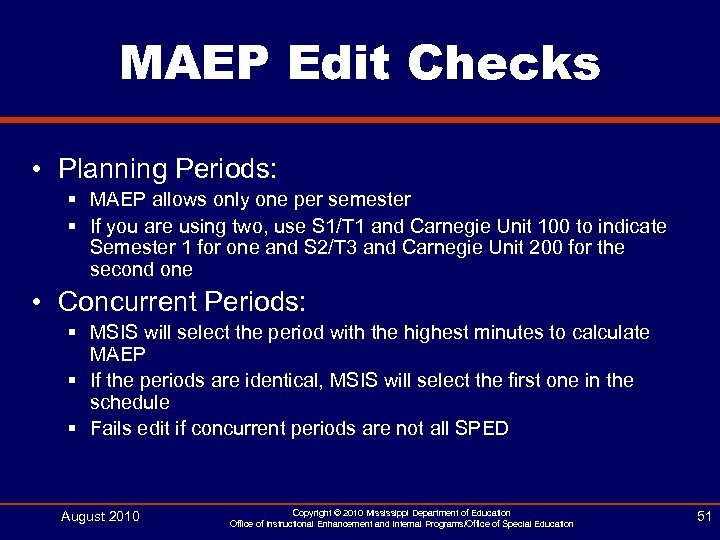 MAEP Edit Checks • Planning Periods: § MAEP allows only one per semester § If you are using two, use S 1/T 1 and Carnegie Unit 100 to indicate Semester 1 for one and S 2/T 3 and Carnegie Unit 200 for the second one • Concurrent Periods: § MSIS will select the period with the highest minutes to calculate MAEP § If the periods are identical, MSIS will select the first one in the schedule § Fails edit if concurrent periods are not all SPED August 2010 Copyright © 2010 Mississippi Department of Education Office of Instructional Enhancement and Internal Programs/Office of Special Education 51
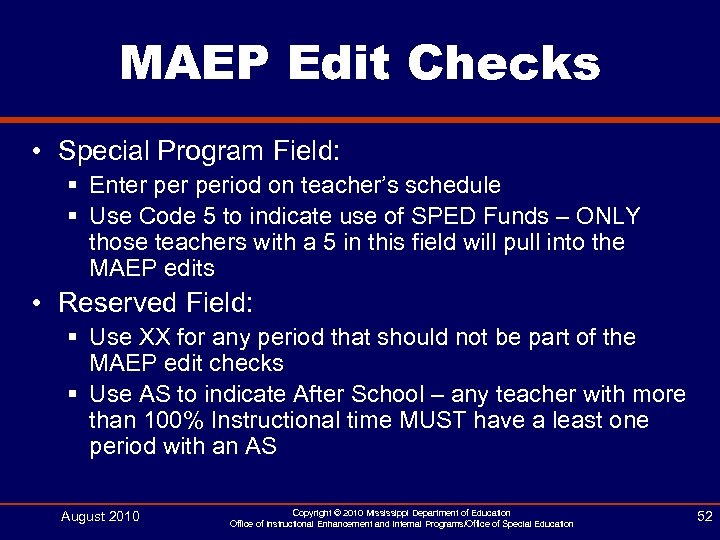 MAEP Edit Checks • Special Program Field: § Enter period on teacher’s schedule § Use Code 5 to indicate use of SPED Funds – ONLY those teachers with a 5 in this field will pull into the MAEP edits • Reserved Field: § Use XX for any period that should not be part of the MAEP edit checks § Use AS to indicate After School – any teacher with more than 100% Instructional time MUST have a least one period with an AS August 2010 Copyright © 2010 Mississippi Department of Education Office of Instructional Enhancement and Internal Programs/Office of Special Education 52
 MAEP Edit Checks • MSIS will fail any teachers with: § 0 Student Count – if your teacher has a period with a 0 student count, that means that NO student has that period in their schedule in MSIS § Students who do not have a Primary Disability – use the Student Matching report, look up each student on the Student Update screen to be sure each student has been assigned a primary disability August 2010 Copyright © 2010 Mississippi Department of Education Office of Instructional Enhancement and Internal Programs/Office of Special Education 53
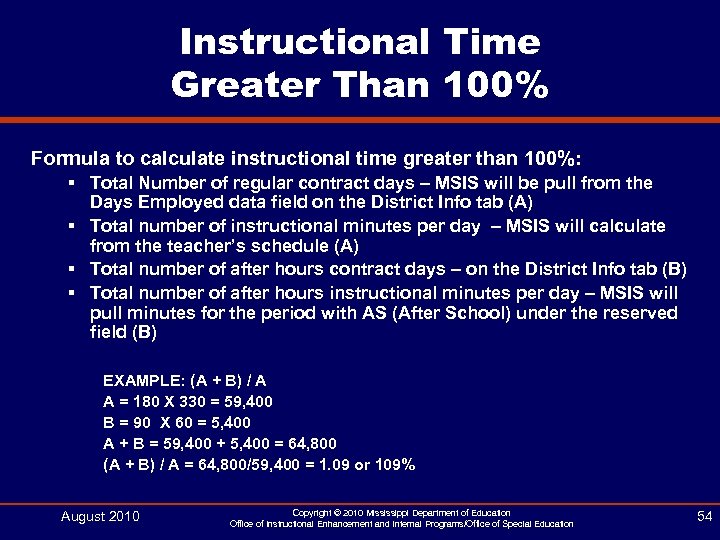 Instructional Time Greater Than 100% Formula to calculate instructional time greater than 100%: § Total Number of regular contract days – MSIS will be pull from the Days Employed data field on the District Info tab (A) § Total number of instructional minutes per day – MSIS will calculate from the teacher’s schedule (A) § Total number of after hours contract days – on the District Info tab (B) § Total number of after hours instructional minutes per day – MSIS will pull minutes for the period with AS (After School) under the reserved field (B) EXAMPLE: (A + B) / A A = 180 X 330 = 59, 400 B = 90 X 60 = 5, 400 A + B = 59, 400 + 5, 400 = 64, 800 (A + B) / A = 64, 800/59, 400 = 1. 09 or 109% August 2010 Copyright © 2010 Mississippi Department of Education Office of Instructional Enhancement and Internal Programs/Office of Special Education 54
 MAEP Edit Checks • 3 and 4 year olds in grade 52: § MSIS will calculate the number of 3 and 4 year olds (as of 09/01) after monthly processing § By state law, funded at 70% § For Course 132023 (Infant and Toddler) and Lo/Hi Grade is 52, MSIS will not check the student count § If you have a student assigned to grade 52 or 62 AND they are not 3 or 4 years old, the teacher will fail the MAEP edit. Also updated the Non-Public screen to pull into the Schedule tab the grade level from the Details tab. August 2010 Copyright © 2010 Mississippi Department of Education Office of Instructional Enhancement and Internal Programs/Office of Special Education 55
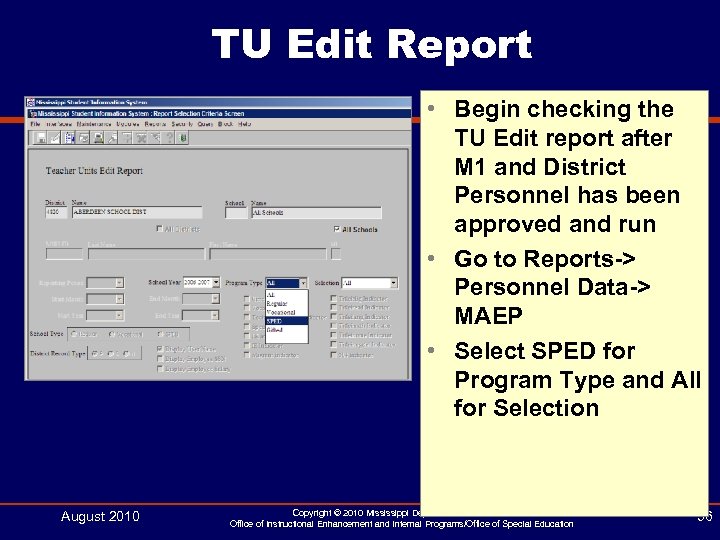 TU Edit Report • Begin checking the TU Edit report after M 1 and District Personnel has been approved and run • Go to Reports-> Personnel Data-> MAEP • Select SPED for Program Type and All for Selection August 2010 Copyright © 2010 Mississippi Department of Education Office of Instructional Enhancement and Internal Programs/Office of Special Education 56
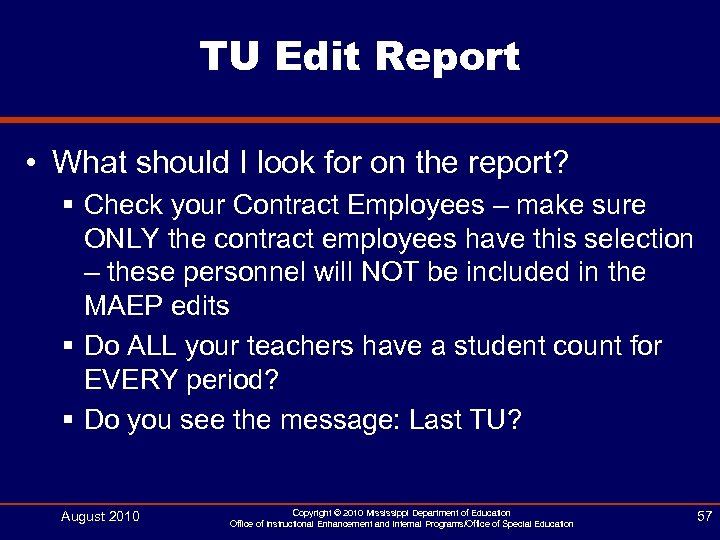 TU Edit Report • What should I look for on the report? § Check your Contract Employees – make sure ONLY the contract employees have this selection – these personnel will NOT be included in the MAEP edits § Do ALL your teachers have a student count for EVERY period? § Do you see the message: Last TU? August 2010 Copyright © 2010 Mississippi Department of Education Office of Instructional Enhancement and Internal Programs/Office of Special Education 57
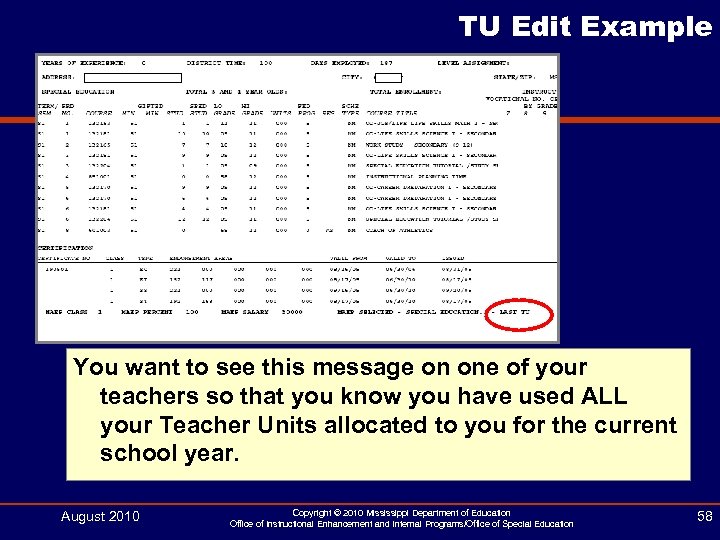 TU Edit Example You want to see this message on one of your teachers so that you know you have used ALL your Teacher Units allocated to you for the current school year. August 2010 Copyright © 2010 Mississippi Department of Education Office of Instructional Enhancement and Internal Programs/Office of Special Education 58
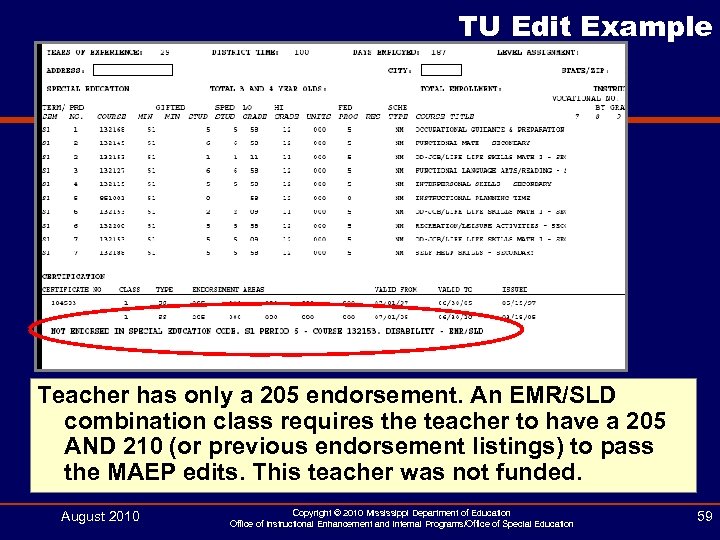 TU Edit Example Teacher has only a 205 endorsement. An EMR/SLD combination class requires the teacher to have a 205 AND 210 (or previous endorsement listings) to pass the MAEP edits. This teacher was not funded. August 2010 Copyright © 2010 Mississippi Department of Education Office of Instructional Enhancement and Internal Programs/Office of Special Education 59
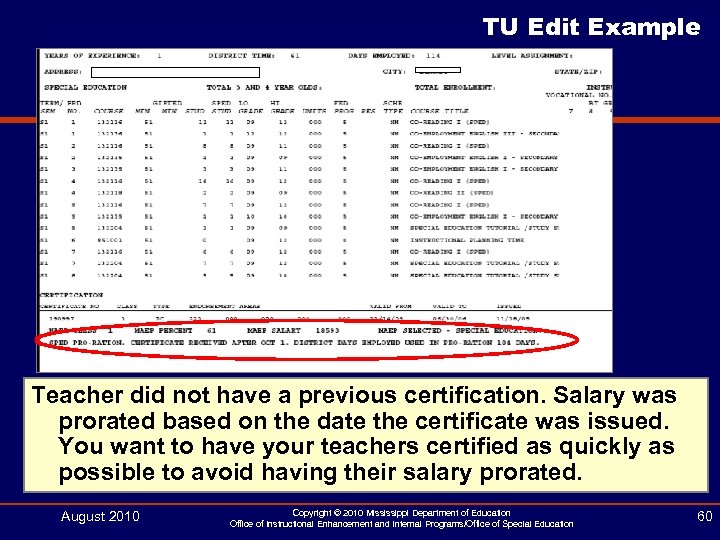 TU Edit Example Teacher did not have a previous certification. Salary was prorated based on the date the certificate was issued. You want to have your teachers certified as quickly as possible to avoid having their salary prorated. August 2010 Copyright © 2010 Mississippi Department of Education Office of Instructional Enhancement and Internal Programs/Office of Special Education 60
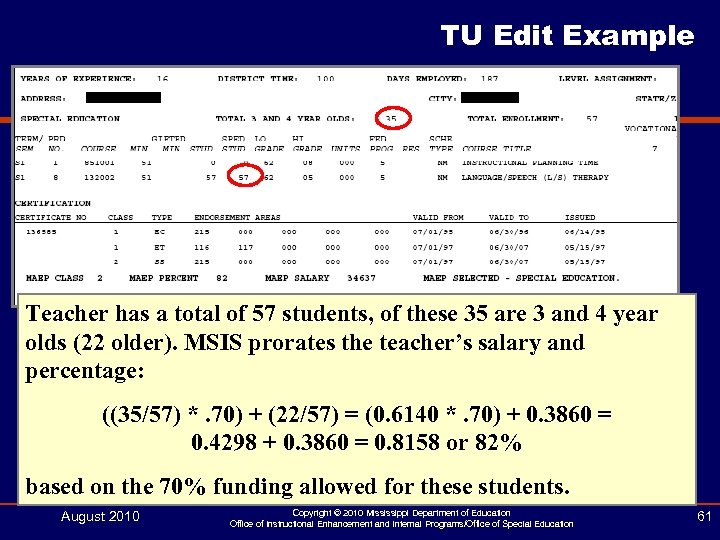 TU Edit Example Teacher has a total of 57 students, of these 35 are 3 and 4 year olds (22 older). MSIS prorates the teacher’s salary and percentage: ((35/57) *. 70) + (22/57) = (0. 6140 *. 70) + 0. 3860 = 0. 4298 + 0. 3860 = 0. 8158 or 82% based on the 70% funding allowed for these students. August 2010 Copyright © 2010 Mississippi Department of Education Office of Instructional Enhancement and Internal Programs/Office of Special Education 61
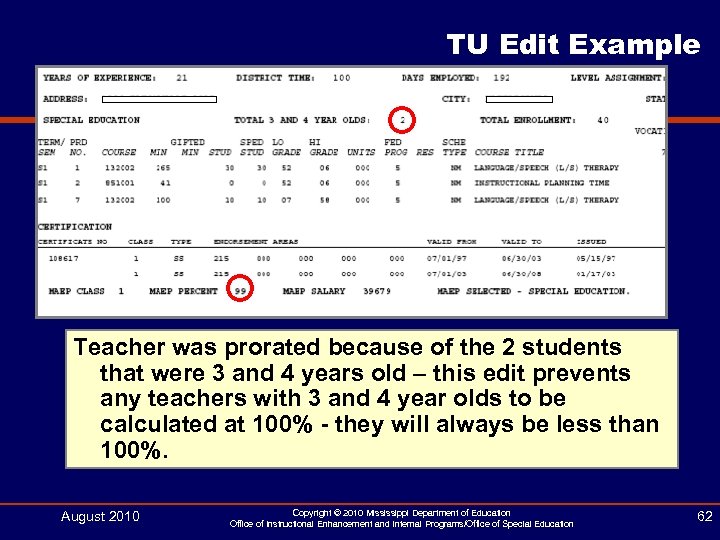 TU Edit Example Teacher was prorated because of the 2 students that were 3 and 4 years old – this edit prevents any teachers with 3 and 4 year olds to be calculated at 100% - they will always be less than 100%. August 2010 Copyright © 2010 Mississippi Department of Education Office of Instructional Enhancement and Internal Programs/Office of Special Education 62
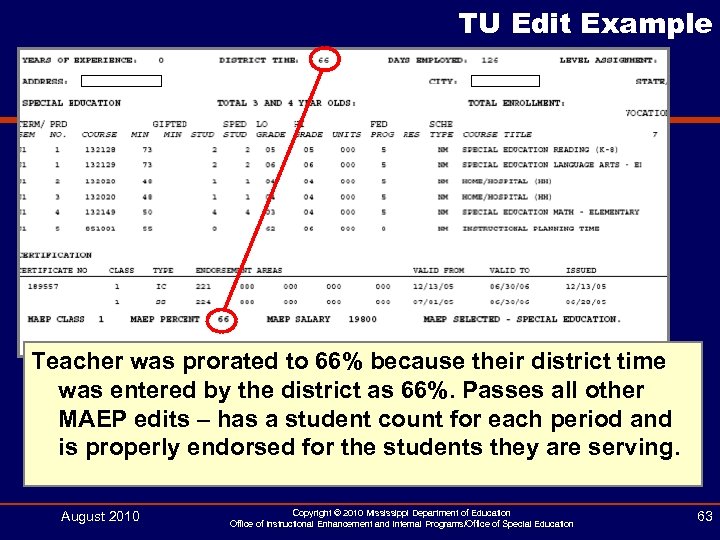 TU Edit Example Teacher was prorated to 66% because their district time was entered by the district as 66%. Passes all other MAEP edits – has a student count for each period and is properly endorsed for the students they are serving. August 2010 Copyright © 2010 Mississippi Department of Education Office of Instructional Enhancement and Internal Programs/Office of Special Education 63
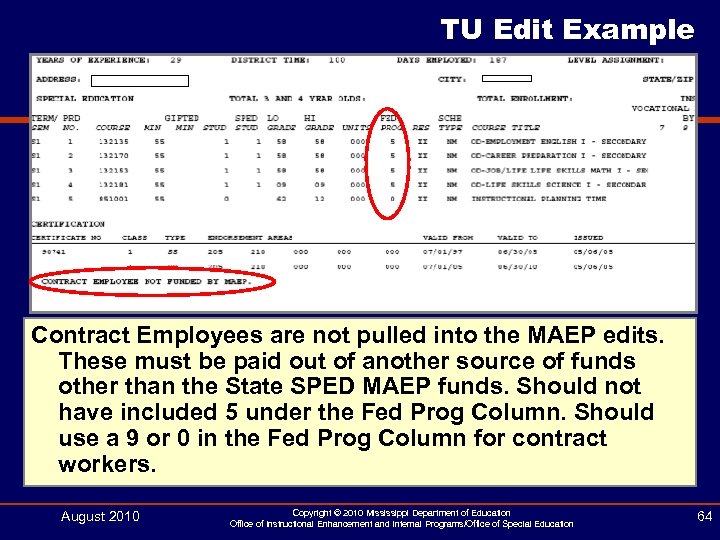 TU Edit Example Contract Employees are not pulled into the MAEP edits. These must be paid out of another source of funds other than the State SPED MAEP funds. Should not have included 5 under the Fed Prog Column. Should use a 9 or 0 in the Fed Prog Column for contract workers. August 2010 Copyright © 2010 Mississippi Department of Education Office of Instructional Enhancement and Internal Programs/Office of Special Education 64
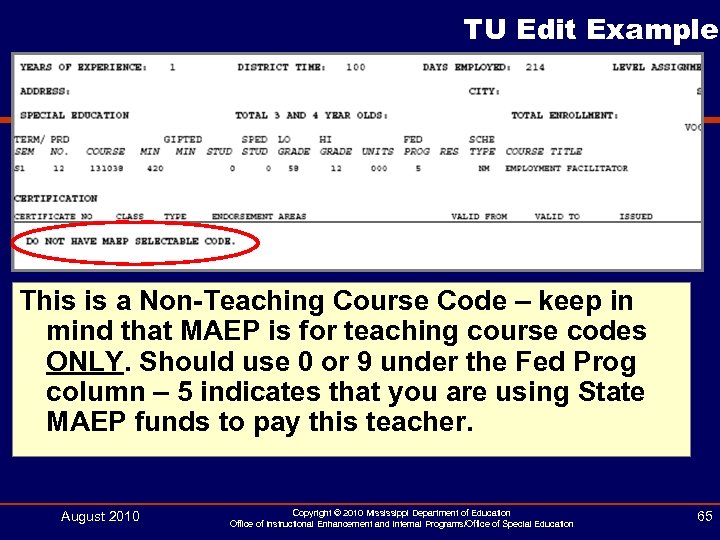 TU Edit Example This is a Non-Teaching Course Code – keep in mind that MAEP is for teaching course codes ONLY. Should use 0 or 9 under the Fed Prog column – 5 indicates that you are using State MAEP funds to pay this teacher. August 2010 Copyright © 2010 Mississippi Department of Education Office of Instructional Enhancement and Internal Programs/Office of Special Education 65
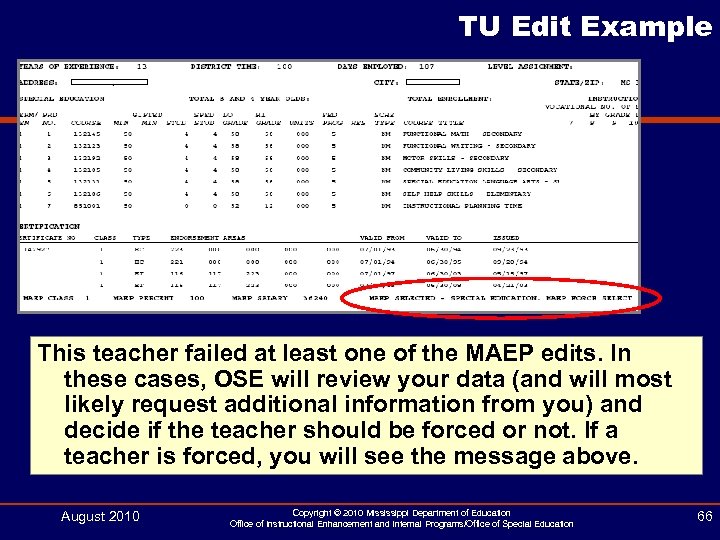 TU Edit Example This teacher failed at least one of the MAEP edits. In these cases, OSE will review your data (and will most likely request additional information from you) and decide if the teacher should be forced or not. If a teacher is forced, you will see the message above. August 2010 Copyright © 2010 Mississippi Department of Education Office of Instructional Enhancement and Internal Programs/Office of Special Education 66
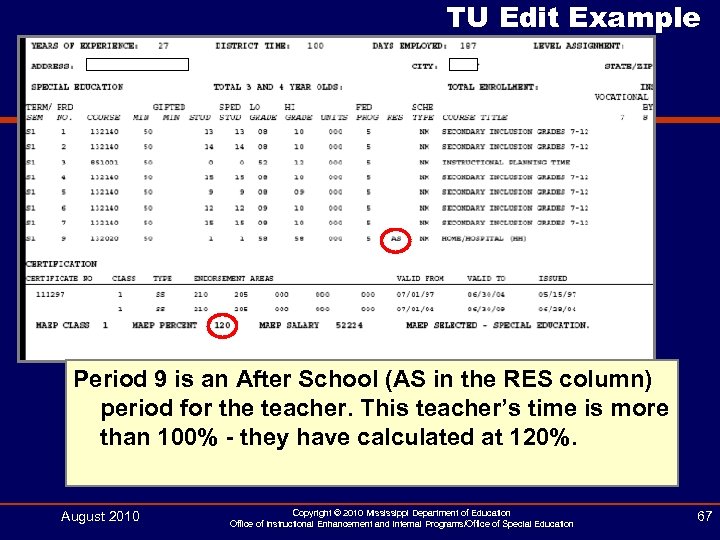 TU Edit Example Period 9 is an After School (AS in the RES column) period for the teacher. This teacher’s time is more than 100% - they have calculated at 120%. August 2010 Copyright © 2010 Mississippi Department of Education Office of Instructional Enhancement and Internal Programs/Office of Special Education 67
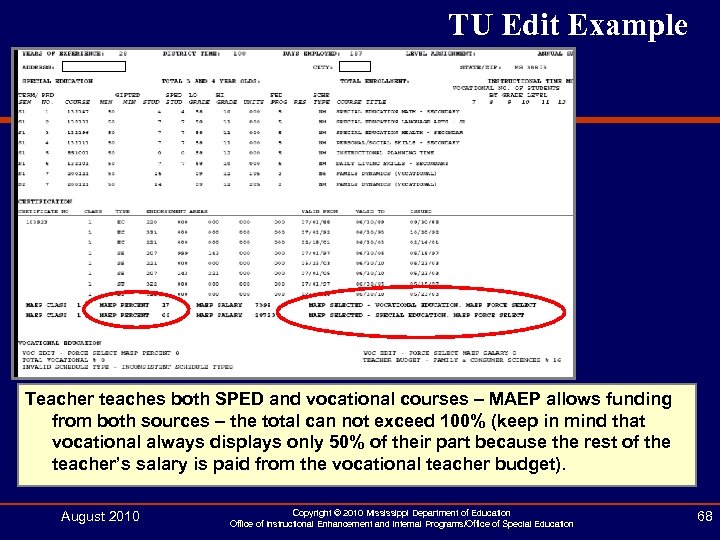 TU Edit Example Teacher teaches both SPED and vocational courses – MAEP allows funding from both sources – the total can not exceed 100% (keep in mind that vocational always displays only 50% of their part because the rest of the teacher’s salary is paid from the vocational teacher budget). August 2010 Copyright © 2010 Mississippi Department of Education Office of Instructional Enhancement and Internal Programs/Office of Special Education 68
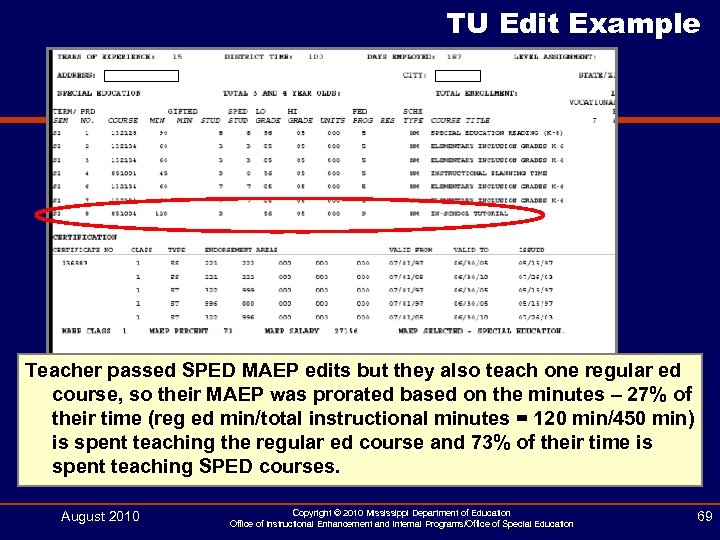 TU Edit Example Teacher passed SPED MAEP edits but they also teach one regular ed course, so their MAEP was prorated based on the minutes – 27% of their time (reg ed min/total instructional minutes = 120 min/450 min) is spent teaching the regular ed course and 73% of their time is spent teaching SPED courses. August 2010 Copyright © 2010 Mississippi Department of Education Office of Instructional Enhancement and Internal Programs/Office of Special Education 69
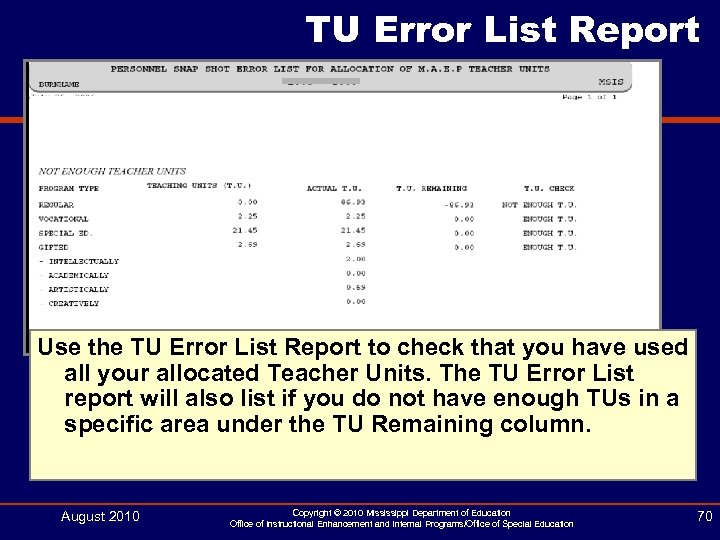 TU Error List Report Use the TU Error List Report to check that you have used all your allocated Teacher Units. The TU Error List report will also list if you do not have enough TUs in a specific area under the TU Remaining column. August 2010 Copyright © 2010 Mississippi Department of Education Office of Instructional Enhancement and Internal Programs/Office of Special Education 70
 Lump Sum MAEP Funding SY 2010 - 2011 August 2010 Copyright © 2010 Mississippi Department of Education Office of Instructional Enhancement and Internal Programs/Office of Special Education 71
 SY 2010 - 2011 MAEP • The spreadsheet does not break out MAEP funding for the formula amount and add-ons. • The determination has been made that for FY 2011 the MAEP allocation will be lump sum. • The lump sum allocation will provide greater flexibility for school districts in dealing with reduced funding levels. • The lump sum allocation means that your MAEP allocation amount will not change during FY 2011 due to revisions of MAEP add-on programs (special education, vocational education, gifted, alternative school, or transportation). • The allocation could change due to any budget reductions that may occur during the fiscal year. • This is the method of allocating MAEP funds that was used in FY 2005. August 2010 Copyright © 2010 Mississippi Department of Education Office of Instructional Enhancement and Internal Programs/Office of Special Education 72
 SY 2010 - 2011 MAEP • Even though add-on funding amounts will not be detailed, school districts will still be required to meet maintenance of effort (MOE) for special education. • Keep in mind that clean personnel edits help with your Accreditation edits. • In order to ensure that school districts comply with these requirements the following steps will be taken: § The Office of Special Education (OSE) will allocate teacher units (TU) to school districts in the normal manner utilizing the TU procedure run in MSIS. § OSE will review the personnel data as in years past to ensure that the properly endorsed teachers are serving eligible students with disabilities. § OSE will work with districts to ensure they meet their required MOE (300. 203). August 2010 Copyright © 2010 Mississippi Department of Education Office of Instructional Enhancement and Internal Programs/Office of Special Education 73
 SY 2010 - 2011 MAEP § School districts will be expected to employee special education teachers based on the number of units allocated. § Special Education TUs will be posted on the Special Education website. § Districts will be required to follow the normal process of entering special education teacher personnel information in the Mississippi Student Information System (MSIS). § OSE will reconcile personnel information to units allocated for each district beginning with MSIS Month 1 data. August 2010 Copyright © 2010 Mississippi Department of Education Office of Instructional Enhancement and Internal Programs/Office of Special Education 74
 SY 2010 - 2011 MAEP • Districts that do not employee the minimum number of special education teachers based on units allocated will be required to provide a written explanation to ensure: – that all eligible students are receiving FAPE – that the district has met MOE August 2010 Copyright © 2010 Mississippi Department of Education Office of Instructional Enhancement and Internal Programs/Office of Special Education 75
 SY 2010 - 2011 MAEP • Please remember that even though the teacher unit reconciliation process will take place: – there will be no revision of funds allocated during February as in past years – there will be no additional units granted (prayer list) – Federal Table 2 data will be pulled from the personnel snapshot – no additional funds will be allocated for December graduates or for any errors in reporting August 2010 Copyright © 2010 Mississippi Department of Education Office of Instructional Enhancement and Internal Programs/Office of Special Education 76
 Power. Point and MSIS Special Education Manual: http: //www. mde. k 12. ms. us/special_education/msis. html August 2010 Mississippi Department of Education Office of Instructional Enhancement and Internal Operations/Office of Special Education 77
 Contact Information Ellen Davis Burnham – Bureau Director Data and Fiscal Management eburnham@mde. k 12. ms. us Jolene Miesse – Data Services jmiesse@mde. k 12. ms. us Deborah Donovan – SPP/APR ddonovan@mde. k 12. ms. us 601 -359 -3498 August 2010 Copyright © 2010 Mississippi Department of Education Office of Instructional Enhancement and Internal Programs/Office of Special Education 78