 Скачать презентацию Chapter Goals Describe common concepts of text
00cd574b7114619d1eadda385d550105.ppt
- Количество слайдов: 51



Chapter Goals • Describe common concepts of text and image representation and display including digital representation of grayscale and color, bitmaps, and image compression techniques • Describe the characteristics and implementation technology of video display devices • List and describe three predominant manual input technologies Systems Architecture, Fifth Edition 2
Chapter Goals (continued) • Understand printer characteristics and technology • Describe various types of optical input devices including mark sensors, bar code readers, scanners, and digital cameras • Identify the characteristics of audio I/O devices, and explain how they operate Systems Architecture, Fifth Edition 3
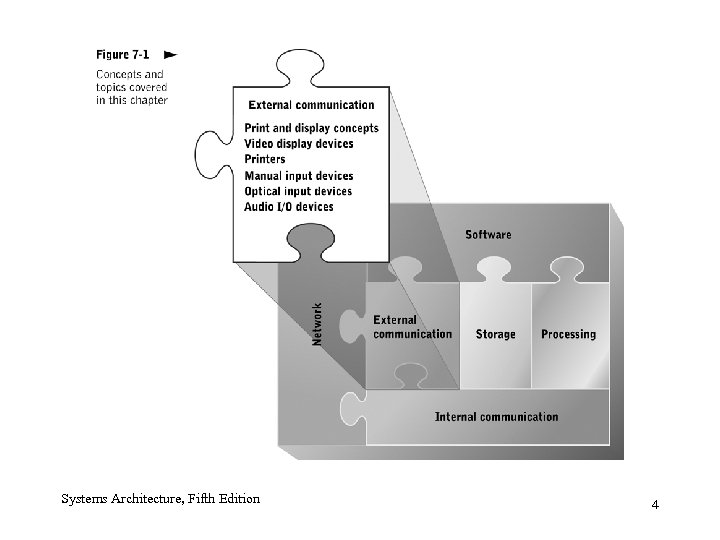
Systems Architecture, Fifth Edition 4
Basic Print and Display Concepts • Share many features – Character representation methods – Measurement systems – Methods of generating color Systems Architecture, Fifth Edition 5
Matrix-Oriented Image Composition • We’ll take a look at: – – Display surfaces Fonts Color Numeric pixel content Systems Architecture, Fifth Edition 6
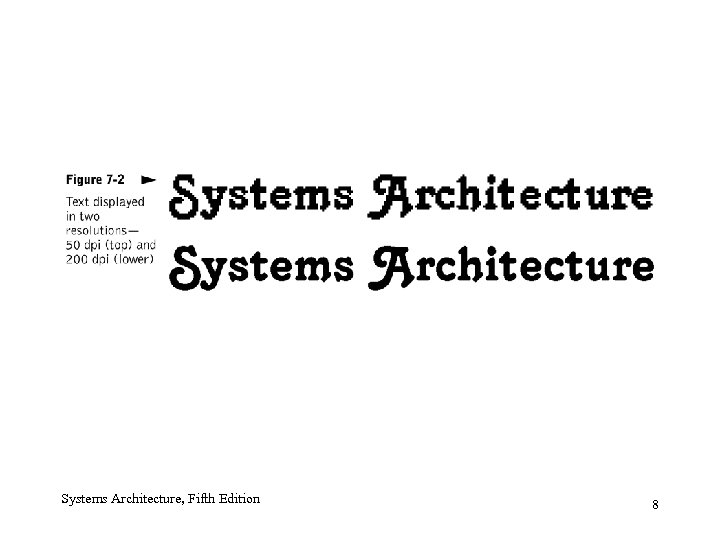
Display Surface • Commonly used: paper, cathode ray tubes, flat panel displays • Divided into rows and columns similar to a large matrix – Each cell (pixel) represents one simple component of an image • Resolution – Number of pixels displayed per linear measurement unit – Stated in dots per inch (dpi) Systems Architecture, Fifth Edition 7
Systems Architecture, Fifth Edition 8
Fonts • Collection of characters of similar style and appearance • Usually measured in points (one seventy-second of an inch), which refers to height of characters Systems Architecture, Fifth Edition 9
Color • RGB (additive colors) – Generates color by mixing red, green, and blue • CMY (subtractive colors) – Generates color using cyan (absence of red), magenta (absence of green), and yellow (absence of blue) • CMYK color – Four-dye scheme using a separate black dye (K) Systems Architecture, Fifth Edition 10
Numeric Pixel Content • Bitmap – Stored set of numeric pixel descriptions • Monochrome display – Displays one of two colors – Requires only one bit per pixel • Grayscale display – Displays black, white, and shades of gray Systems Architecture, Fifth Edition 11
Numeric Pixel Content • Palette – A table of colors – Number of bits used to represent each pixel determines table size • Dithering – Generates color approximations by placing small dots of different colors in an interlocking pattern – Half-toning (grayscale dithering) Systems Architecture, Fifth Edition 12
Image Storage Requirements • Depends on number of bits that represent each pixel and on image height and width in pixels • Can be reduced with bitmap compression – Graphics Interchange Format (GIF) – Joint Photographic Experts Group (JPEG) – Moving Pictures Experts Group (MPEG) • All above compression methods are lossy, resulting in some loss of image quality Systems Architecture, Fifth Edition 13
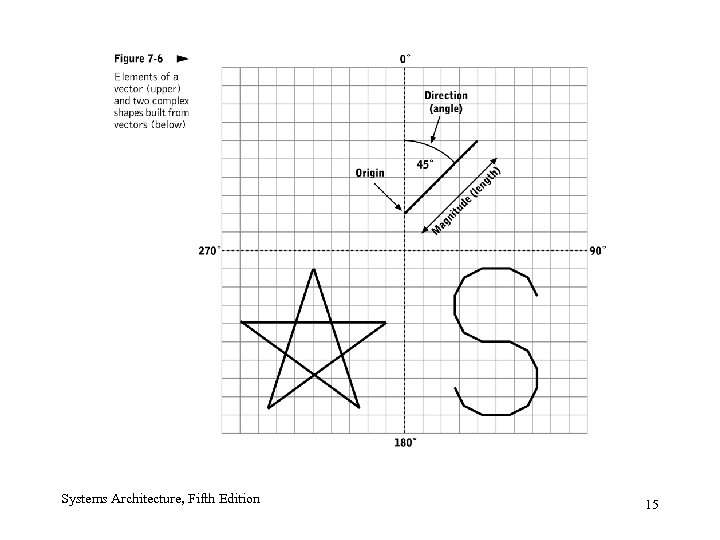
Image Description Languages (IDL) • Address drawbacks of bitmaps (large size and device dependence) by storing images compactly • Can represent image components in several ways – Embedded fonts – Vectors, curves, and shapes – Embedded bitmaps Systems Architecture, Fifth Edition 14
Systems Architecture, Fifth Edition 15
Adobe Post. Script and Portable Document Format Post. Script • Used in printing and publishing and as graphic file interchange format and embedded printer technology • Lacks features needed to generate and manage documents as an integrated whole Systems Architecture, Fifth Edition PDF • Ability to distribute compressed documents with complete authorial control over exact format of the printed and displayed document, regardless of end user’s specific computer, OS, or printer 16
Video Display • Character-oriented video display terminals (VDTs) • Video controllers • Video monitors Systems Architecture, Fifth Edition 17
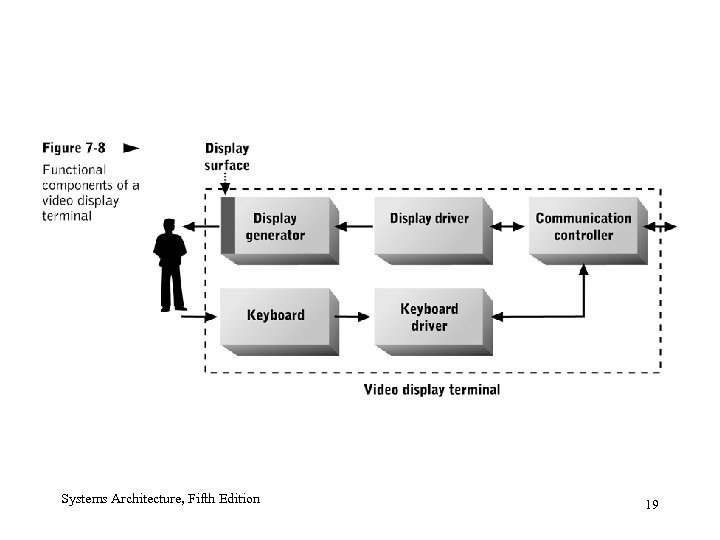
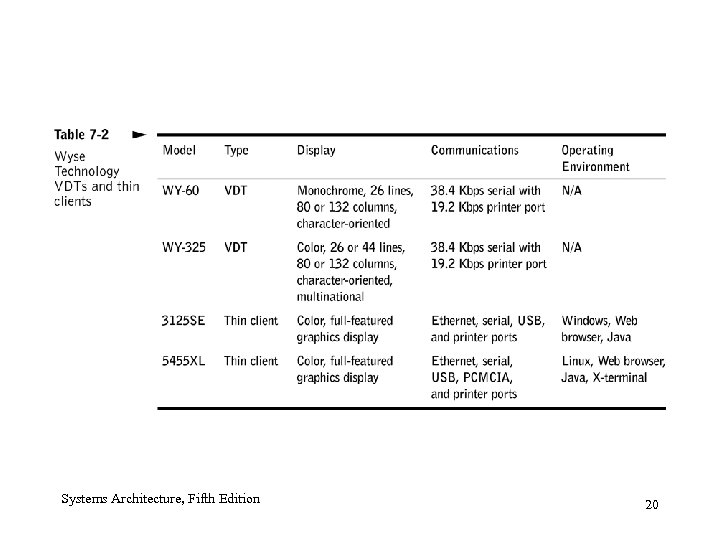
Character-Oriented VDTs • Integrated keyboard and video display surface • VDTs – Most common form of video display in 1970 s and much of 1980 s (until PCs) • Network computers or thin clients – New class of VDT in 1990 s – Limited processing capabilities Systems Architecture, Fifth Edition 18
Systems Architecture, Fifth Edition 19
Systems Architecture, Fifth Edition 20
Video Controller • Enables communication between computer system and monitor – Accepts commands and data transmitted via a bus from the CPU – Generates TV-style analog video signal, which is transmitted to the monitor • Refresh cycle and refresh rate; video RAM; dual porting; graphics accelerators Systems Architecture, Fifth Edition 21
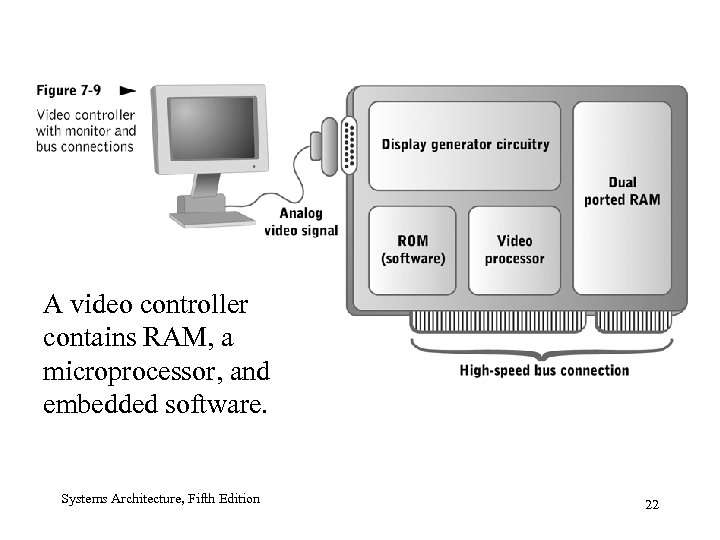
A video controller contains RAM, a microprocessor, and embedded software. Systems Architecture, Fifth Edition 22
Video Monitors • Separate from keyboards • Common types – Cathode ray tubes (CRTs) – Liquid crystal displays (LCDs) – Plasma displays Systems Architecture, Fifth Edition 23
CRT • Enclosed vacuum tube; electron beam is focused toward front surface of the tube, which is coated in phosphor • Technology relatively old; has disadvantages – Physical size and weight – Power consumption Systems Architecture, Fifth Edition 24
LCD • Contains matrix of liquid crystals sandwiched between two polarizing filter panels • Active and passive matrix displays • Manufactured with thin film transistor (TFT) technology • Compared with CRTs – Less contrast – Reduced size, weight, and power consumption – Higher cost Systems Architecture, Fifth Edition 25
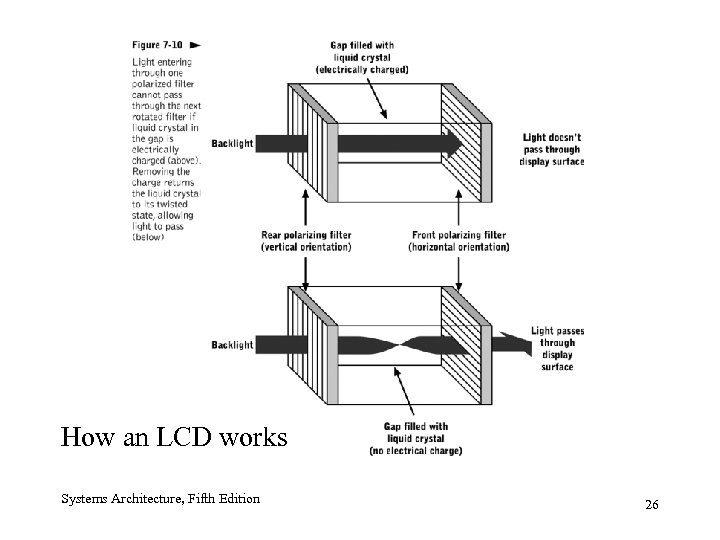
How an LCD works Systems Architecture, Fifth Edition 26
Plasma Displays • Combine elements of CRT and LCD technology • Flat panel, active matrix devices • Actively generate colored light near surface of the display; good brightness and viewing • Require more power than LCDs, less than CRTs • Shortcomings – Limited operational lifetime – Larger pixel size reduces comparative image quality when viewed from short distances Systems Architecture, Fifth Edition 27
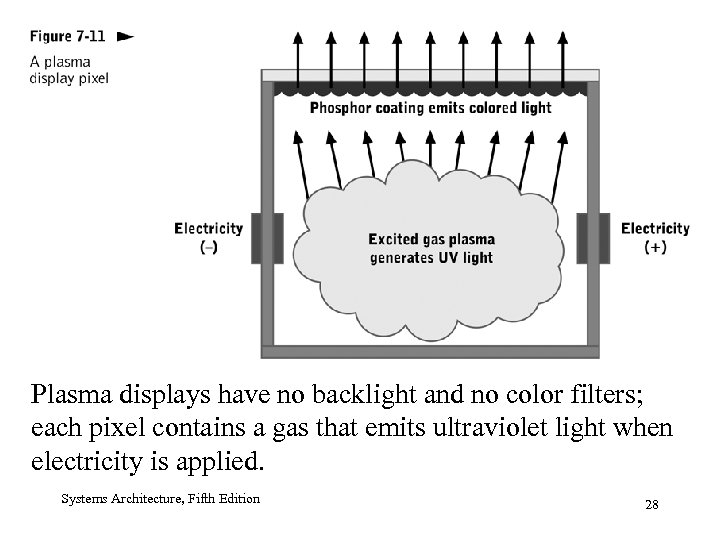
Plasma displays have no backlight and no color filters; each pixel contains a gas that emits ultraviolet light when electricity is applied. Systems Architecture, Fifth Edition 28
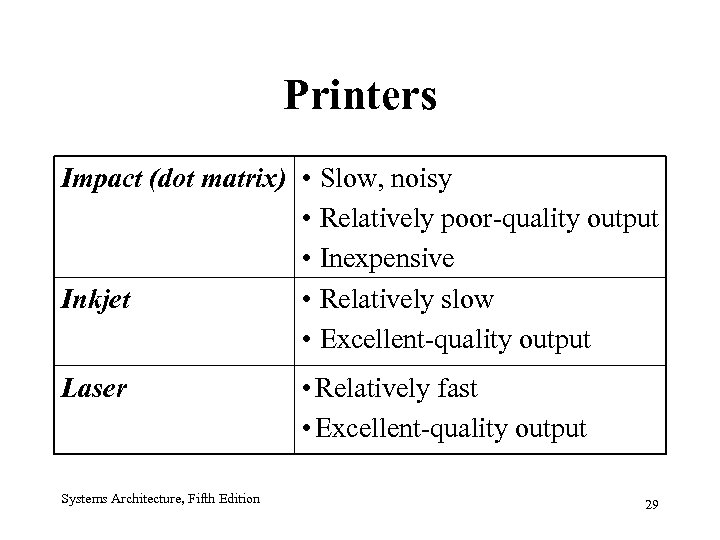
Printers Impact (dot matrix) • • • Inkjet • • Laser Systems Architecture, Fifth Edition Slow, noisy Relatively poor-quality output Inexpensive Relatively slow Excellent-quality output • Relatively fast • Excellent-quality output 29
Inkjet Printers • Most common printing technology • Prints with liquid ink placed directly onto paper • Uses mechanical movement or heat to force ink out of nozzle • Paper is drawn past moving print head • Resolution is up to 600 dpi Systems Architecture, Fifth Edition 30
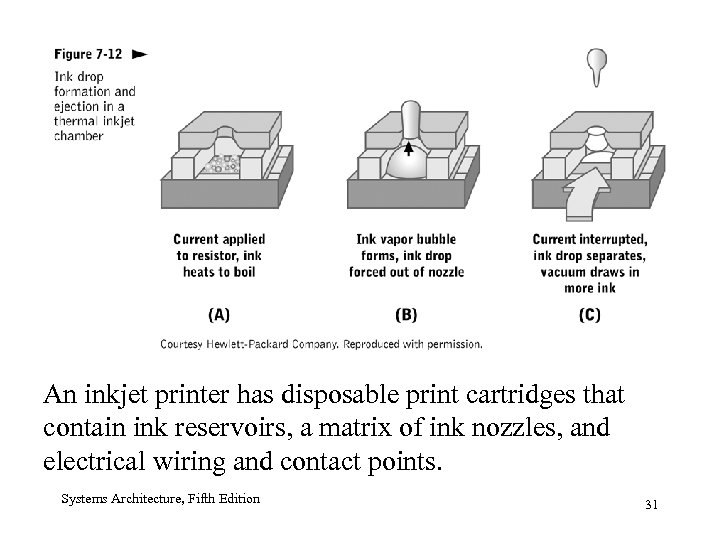
An inkjet printer has disposable print cartridges that contain ink reservoirs, a matrix of ink nozzles, and electrical wiring and contact points. Systems Architecture, Fifth Edition 31
Printer Communication • Impact printers – ASCII or Unicode characters • Inkjet and laser printers – Use pixels as fundamental output unit – Have relatively large buffers • IDLs are commonly used to improve printer performance Systems Architecture, Fifth Edition 32
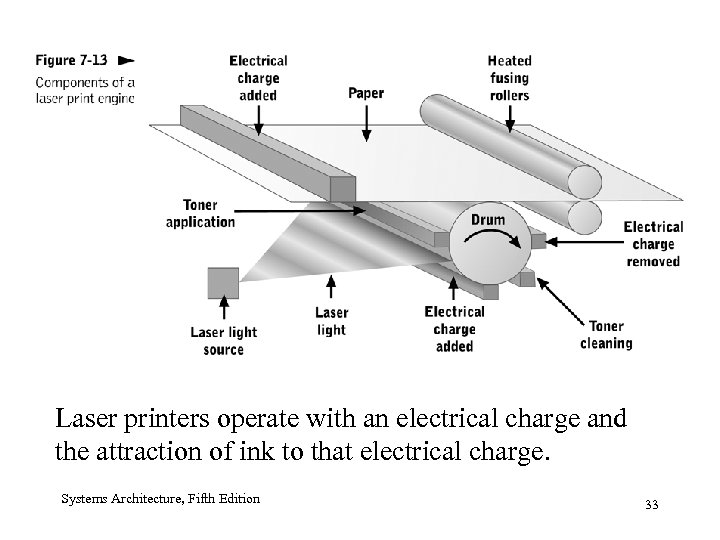
Laser printers operate with an electrical charge and the attraction of ink to that electrical charge. Systems Architecture, Fifth Edition 33
Plotters • Printers that generate line drawings on wide sheets or rolls of paper • Use inkjet technology • Ideal for blueprints and other engineering drawings • Also called large format printers Systems Architecture, Fifth Edition 34
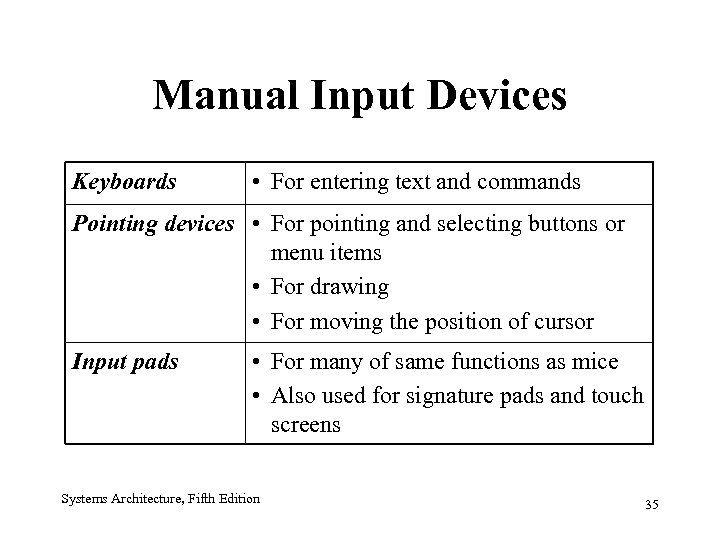
Manual Input Devices Keyboards • For entering text and commands Pointing devices • For pointing and selecting buttons or menu items • For drawing • For moving the position of cursor Input pads • For many of same functions as mice • Also used for signature pads and touch screens Systems Architecture, Fifth Edition 35
Keyboards • Translate keystrokes directly into electrical signals • Generate bit stream outputs (scan code) with a keyboard controller • Can connect to computer in various ways (e. g. , PS/2, USB, wireless) Systems Architecture, Fifth Edition 36
Pointing Devices • • Mouse Trackball Joystick Input pads (e. g. , digitizer tablet) – Infrared detector – Photosensor – Pressure-sensitive pad Systems Architecture, Fifth Edition 37
Optical Input Devices • Detect light reflected off a printed surface or object into a photosensor • Categories – Mark and pattern sensors – Image capture devices Systems Architecture, Fifth Edition 38
Mark Sensors and Bar-Code Scanners • Mark sensor – Scans for light or dark marks at specific locations on a page (e. g. , standardized multiple-choice test) • Bar code scanner – Detects specific patterns of vertical bars of varying thickness and spacing – Typically used to track large numbers of inventory items Systems Architecture, Fifth Edition 39
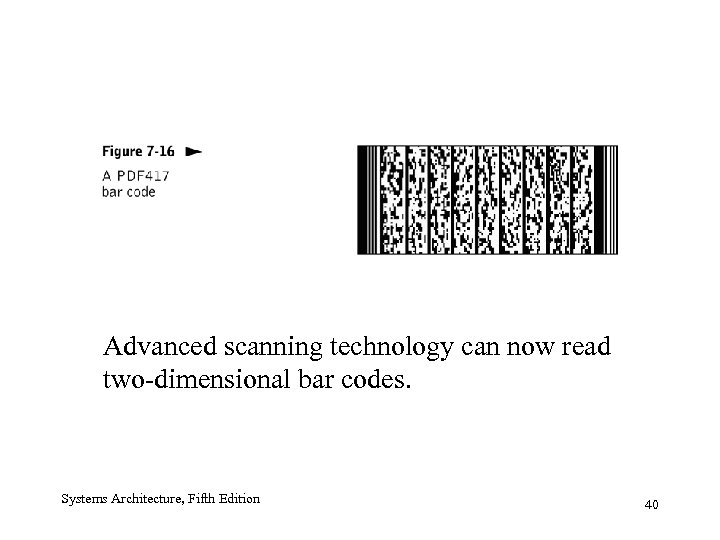
Advanced scanning technology can now read two-dimensional bar codes. Systems Architecture, Fifth Edition 40
Optical Scanners • Generate bitmap representations of printed images • Bright white light shines on the page; reflected light is detected by an array of photosensors • Optical character recognition (OCR) devices – Combine optical scanning technology with intelligent interpretation of bitmap content Systems Architecture, Fifth Edition 41
Digital Cameras • Employ optical scanning technology to capture single or still images and store them as raw compressed bitmaps Systems Architecture, Fifth Edition 42
Portable Data Capture Devices • Combine a keyboard, mark or bar-code scanner, and wireless communications to a wired base station or computer system • Provide rapid data capture (e. g. , warehouse inventory control, package routing and tracking) Systems Architecture, Fifth Edition 43
Audio I/O Devices • Sound: an analog waveform that can be sampled and stored as digital data • Various mathematical transformations convert complex sounds to a single numeric representation • Sampling and playback rely on analog-to-digital converters (ADC) and digital-to-analog converters (DAC) • Monophonic versus polyphonic Systems Architecture, Fifth Edition 44
Purposes of Sound Generation and Recognition • General-purpose sound output (e. g. , warnings) • General-purpose sound input (e. g. , digital recording for voice email messages) • Voice command input • Speech recognition • Speech generation Systems Architecture, Fifth Edition 45
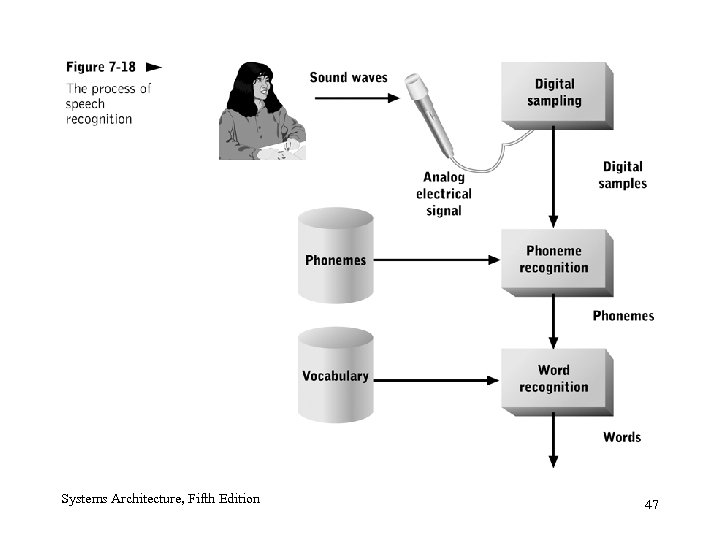
Speech Recognition • Conceptually simple, but complicated by speaker variability, phoneme transitions and combinations, and real-time processing • Most current systems are speaker dependent • Digital signal processor (DSP) – Specialized to process continuous streams of audio or graphical data – Commonly embedded in audio and video hardware Systems Architecture, Fifth Edition 46
Systems Architecture, Fifth Edition 47
Speech Generation • Audio response unit – Generates spoken messages based on textual input (e. g. , automated call routing) • Speech synthesis – Stores individual phonemes within the system • General-purpose audio hardware (sound card, multimedia controller) Systems Architecture, Fifth Edition 48
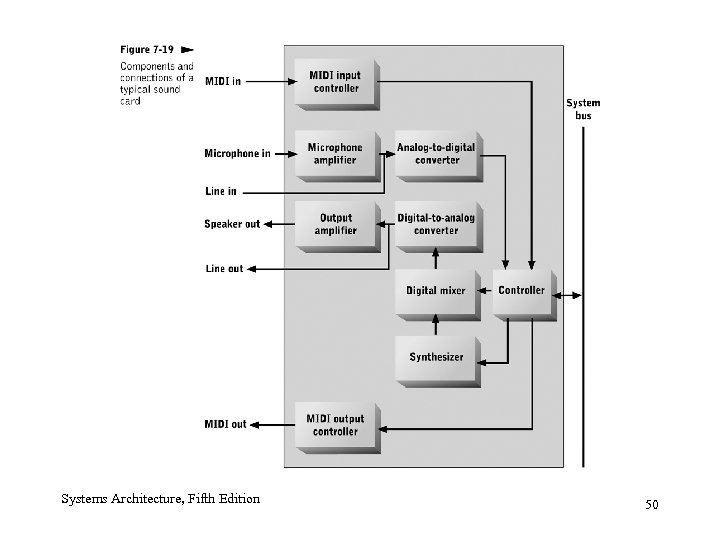
General-Purpose Audio Hardware • Typically packaged as an expansion card that connects to the system bus of a workstation • Sound cards include an ADC, DAC, low-power amplifier, and connectors (jacks) for microphone, speaker, or headphone • Musical Instrument Digital Interface (MIDI) – Compact storage format Systems Architecture, Fifth Edition 49
Systems Architecture, Fifth Edition 50
Summary • Concepts, technology, and hardware used in communication between people and computers – – – Print and display concepts Video display devices Printers Manual input devices Optical input devices Audio I/O devices Systems Architecture, Fifth Edition 51
Скачать презентацию Chapter Goals Describe common concepts of text
00cd574b7114619d1eadda385d550105.ppt