


 Скачать презентацию Chapter Four Making Connections 1 Chapter Four
eab6edcd762f3abb22e29d3e9f40bf8a.ppt
- Количество слайдов: 36
 Chapter Four Making Connections 1
 Chapter Four - Making Connections Introduction • Connecting peripheral devices to a computer has, in the past, been a fairly challenging task • Newer interfaces have made this task much easier • Let’s examine the interface between a computer and a device. This interface occurs primarily at the physical layer 2
 Chapter Four - Making Connections Interface Standards • There are essentially two types of standards – Official standards, created by standards making organizations such as ITU (International Telecommunications Union), IEEE (Institute for Electrical and Electronics Engineers), EIA (Electronics Industries Association), ISO (International Organization for Standards), and ANSI (American National Standards Institute) – De-facto standards – protocols created by other groups that are not official standards but because of their widespread 3 use, become “almost” standards
 Chapter Four - Making Connections Interface Standards • There are four possible components to an interface standard: – – Electrical component Mechanical component Functional component Procedural component 4
 Chapter Four - Making Connections The Four Components • The electrical component deals with voltages, line capacitance, and other electrical characteristics • The mechanical component deals with items such as the connector or plug description. 5
 Chapter Four - Making Connections The Four Components • The functional component describes the function of each pin or circuit that is used in a particular interface • The procedural component describes how the particular circuits are used to perform an operation 6
 Chapter Four - Making Connections Two Example Interfaces • In order to better understand the four components of an interface, let’s examine two popular interface standards – EIA-232 F – an older standard originally designed to connect a modem to a computer – USB (Universal Serial Bus) – a newer standard that is much more powerful than EIA-232 F 7
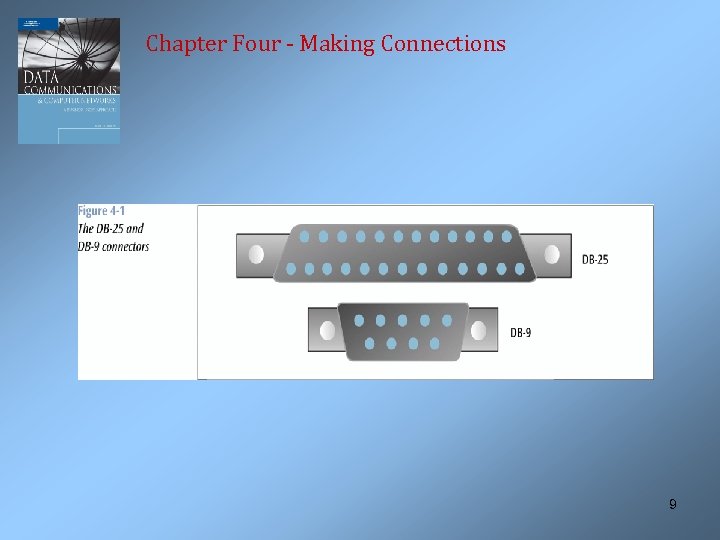
 Chapter Four - Making Connections RS-232 and EIA-232 F • Originally named RS-232 but has gone through many revisions • The electrical component is defined by another standard: V. 28 • The mechanical component is often defined by ISO 2110, the DB-25 connector. The DB-9 connector is now more common than the DB-25. 8
 Chapter Four - Making Connections 9
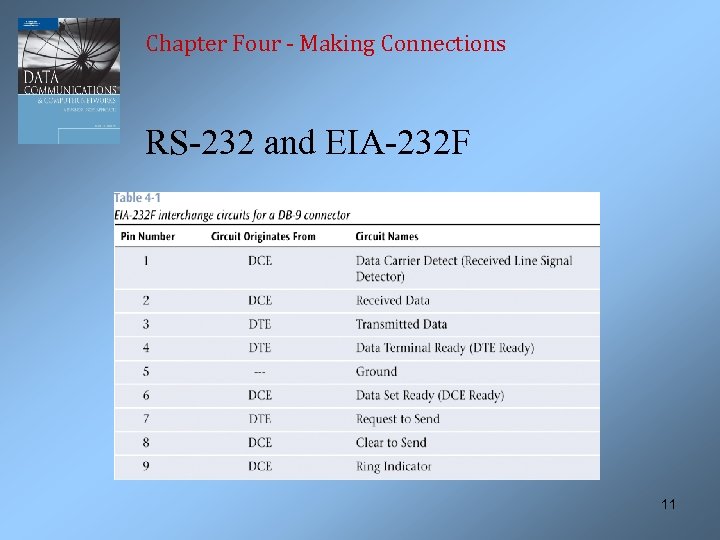
 Chapter Four - Making Connections RS-232 and EIA-232 F • The functional and procedural components are defined by the V. 24 standard • For example, V. 24 defines the function of each of the pins on the DB-9 connector, as shown on the next slide 10
 Chapter Four - Making Connections RS-232 and EIA-232 F 11
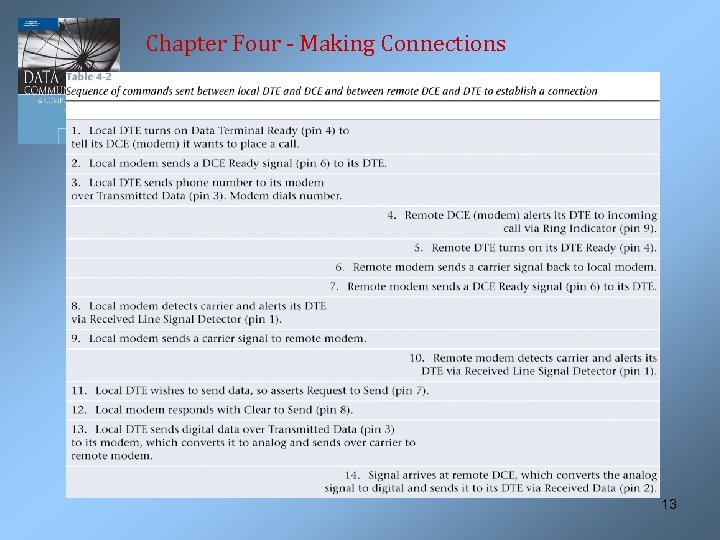
 Chapter Four - Making Connections RS-232 and EIA-232 F • The next slide shows an example of the procedural dialog that can be used to create a connection between two endpoints • Note the level of complexity needed to establish a full -duplex connection 12
 Chapter Four - Making Connections 13
 Chapter Four - Making Connections Universal Serial Bus (USB) • The USB interface is a modern standard for interconnecting a wide range of peripheral devices to computers • Supports plug and play • Can daisychain multiple devices • USB 2. 0 can support 480 Mbps (USB 1. 0 is only 12 Mbps) 14
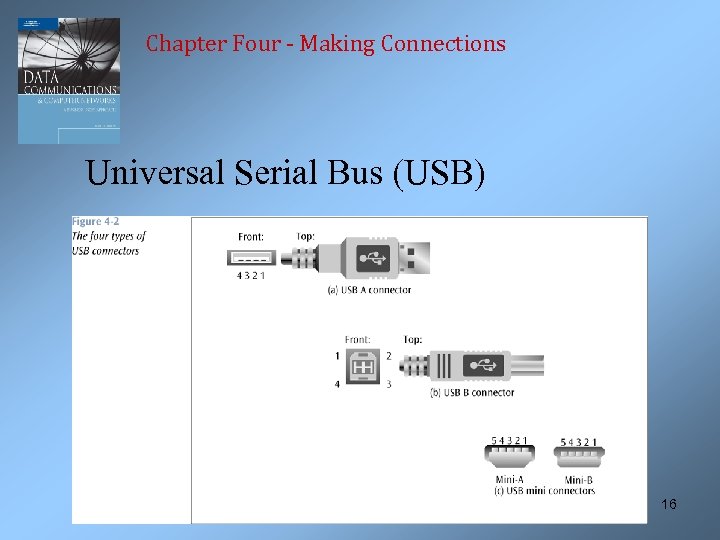
 Chapter Four - Making Connections Universal Serial Bus (USB) • The USB interface defines all four components • The electrical component defines two wires VBUS and Ground to carry a 5 volt signal, while the D+ and D- wires carry the data and signaling information • The mechanical component precisely defines the size of four different connectors and uses only four wires (the metal shell counts as one more connector) 15
 Chapter Four - Making Connections Universal Serial Bus (USB) 16
 Chapter Four - Making Connections Universal Serial Bus (USB) • The functional and procedural components are fairly complex but are based on the polled bus • The computer takes turns asking each peripheral if it has anything to send • More on polling near the end of this chapter 17
 Chapter Four - Making Connections Other Types of Connections • The physical layer is not the only layer involved in a connection • The data link layer is also involved • Let’s look at the first of these data link layer connections – the asynchronous connection 18
 Chapter Four - Making Connections Asynchronous Connections • A type of connection defined at the data link layer • To transmit data from sender to receiver, an asynchronous connection creates a one-character package called a frame • Added to the front of the frame is a Start bit, while a Stop bit is added to the end of the frame • An optional parity bit can be added which can be used to detect errors 19
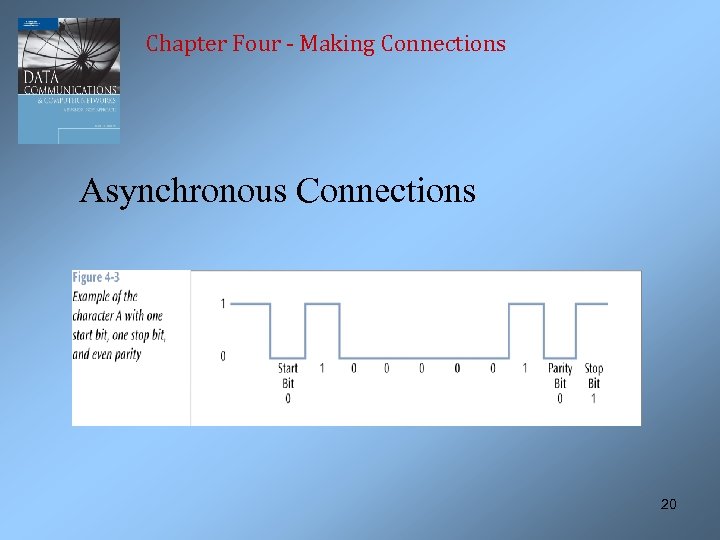 Chapter Four - Making Connections Asynchronous Connections 20
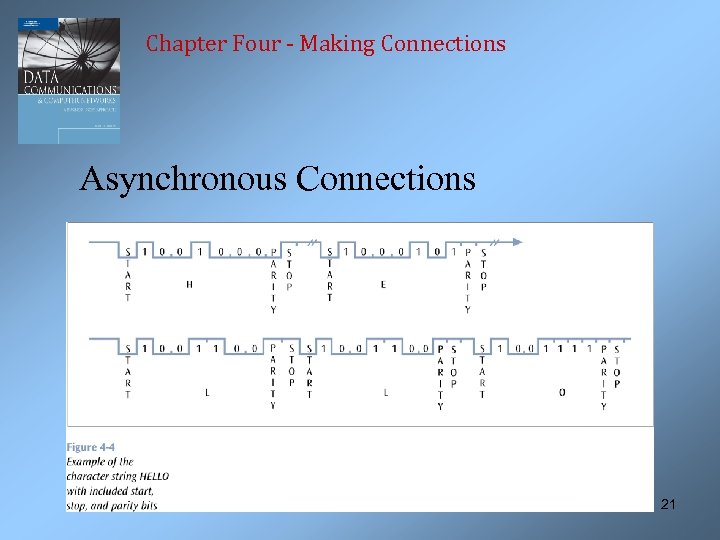 Chapter Four - Making Connections Asynchronous Connections 21
 Chapter Four - Making Connections Asynchronous Connections • The term asynchronous is misleading here because you must always maintain synchronization between the incoming data stream and the receiver • Asynchronous connections maintain synchronization by using small frames with a leading start bit 22
 Chapter Four - Making Connections Synchronous Connections • A second type of connection defined at the data link layer • A synchronous connection creates a large frame that consists of header and trailer flags, control information, optional address information, error detection code, and data • A synchronous connection is more elaborate but transfers data in a more efficient manner 23
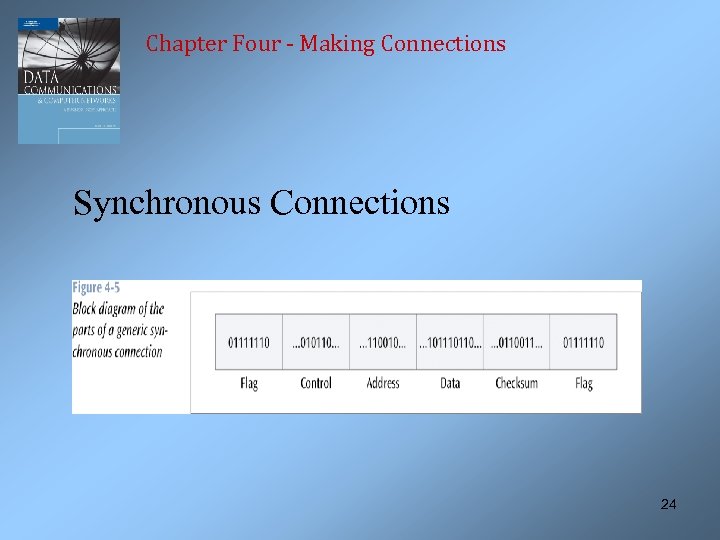 Chapter Four - Making Connections Synchronous Connections 24
 Chapter Four - Making Connections Isochronous Connections • A third type of connection defined at the data link layer used to support real-time applications • The data must be delivered at just the right speed (real -time) – not too fast and not too slow • Typically an isochronous connection must allocate resources on both ends to maintain real-time • USB (and Firewire) can both support isochronous connections 25
 Chapter Four - Making Connections Half Duplex, Full Duplex, and Simplex Connections • A half duplex connection transmits data in both directions but in only one direction at a time • A full duplex connection transmits data in both directions and at the same time • A simplex connection can transmit data in only one direction 26
 Chapter Four - Making Connections Terminal-to-Mainframe Connections • A point-to-point connection is a direct, unshared connection between a terminal and a mainframe computer • A multipoint connection is a shared connection between multiple terminals and a mainframe computer • The mainframe is the primary and the terminals are the secondaries 27
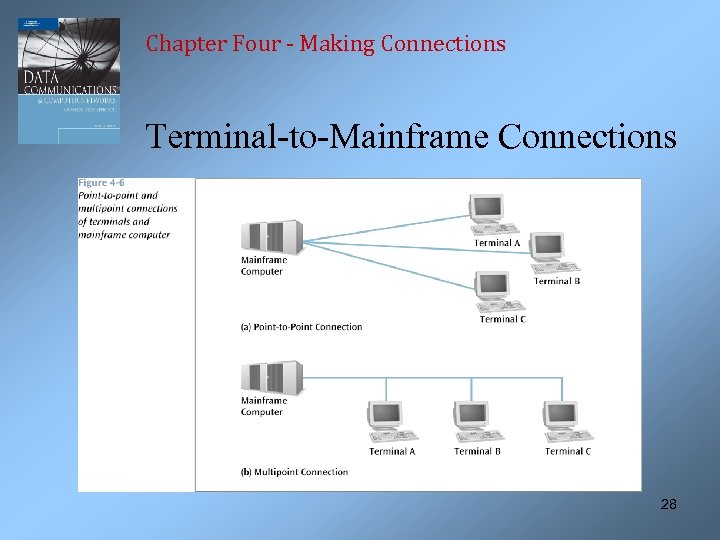 Chapter Four - Making Connections Terminal-to-Mainframe Connections 28
 Chapter Four - Making Connections Terminal-to-Mainframe Connections • To allow a terminal to transmit data to a mainframe, the mainframe must poll the terminal • Two basic forms of polling: roll-call polling and hub polling • In roll-call polling, the mainframe polls each terminal in a round-robin fashion • In hub polling, the mainframe polls the first terminal, and this terminal passes the poll onto the next 29 terminal
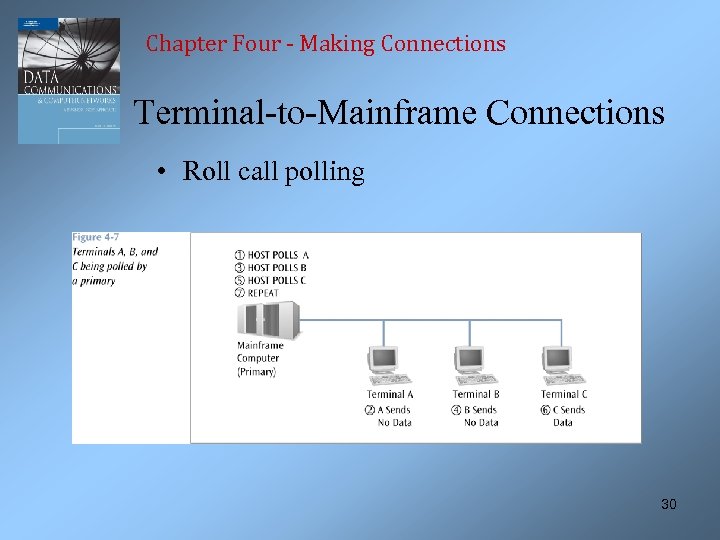 Chapter Four - Making Connections Terminal-to-Mainframe Connections • Roll call polling 30
 Chapter Four - Making Connections Making Computer Connections In Action • The back panel of a personal computer has many different types of connectors, or connections: – – RS-232 connectors USB connectors Parallel printer connectors Serial port connectors 31
 Chapter Four - Making Connections Making Computer Connections In Action 32
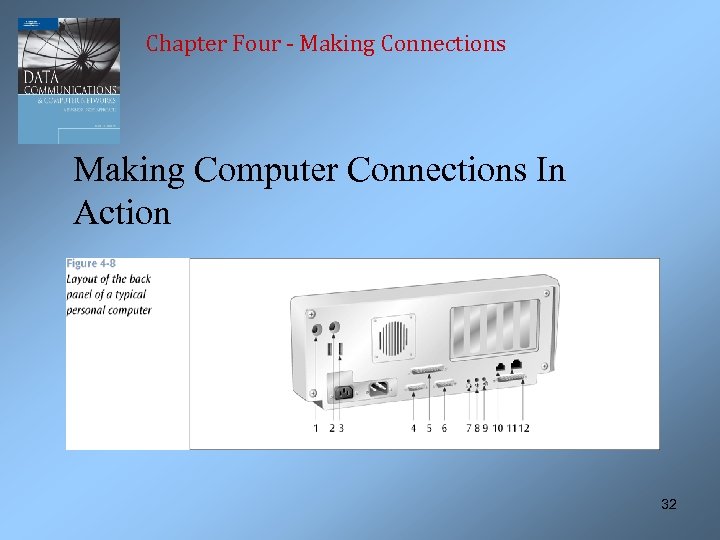
 Chapter Four - Making Connections Making Computer Connections In Action • • • 1 and 2 – DIN connectors for keyboard and mouse 3 – USB connectors 4 and 6 – DB-9 connectors 5 – Parallel port connector (Centronics) 7, 8, and 9 – audio connectors Will Bluetooth or ? ? ? replace these someday? 33
 Chapter Four - Making Connections Making Computer Connections In Action • A company wants to transfer files that are typically 700 K chars in size • If an asynchronous connection is used, each character will have a start bit, a stop bit, and maybe a parity bit • 700, 000 chars * 11 bits/char (8 bits data + start + stop + parity) = 7, 700, 000 bits 34
 Chapter Four - Making Connections Making Computer Connections In Action • If a synchronous connection is used, assume maximum payload size – 1500 bytes • To transfer a 700 K char file requires 467 1500 character (byte) frames • Each frame will also contain 1 -byte header, 1 -byte address, 1 -byte control, and 2 -byte checksum, thus 5 bytes overhead 35
 Chapter Four - Making Connections Making Computer Connections In Action • 1500 bytes payload + 5 byte overhead = 1505 byte frames • 467 frames * 1505 bytes/frame = 716, 380 bytes, or 5, 731, 040 bits • Significantly less data using synchronous connection 36