 Скачать презентацию Chapter Dr Bernard Chen Ph D University of
884dce43c14a0fe485ed63ba2f545494.ppt
- Количество слайдов: 75




Chapter Dr. Bernard Chen Ph. D. University of Central Arkansas Spring 2009
Purpose of This Chapter n In this chapter we introduce a basic computer and show its operation can be specified with register transfer statements.
Instruction Codes A process is controlled by a program n A program is a set of instructions that specify the operations, data, and the control sequence n An instruction is stored in binary code that specifies a sequence of microoperations n Instruction codes together with data are stored in memory (Stored Program Concept)
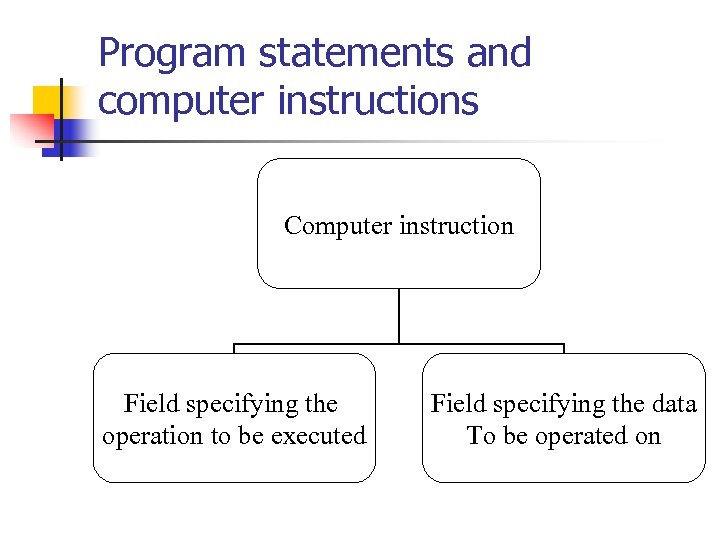
Program statements and computer instructions Computer instruction Field specifying the operation to be executed Field specifying the data To be operated on
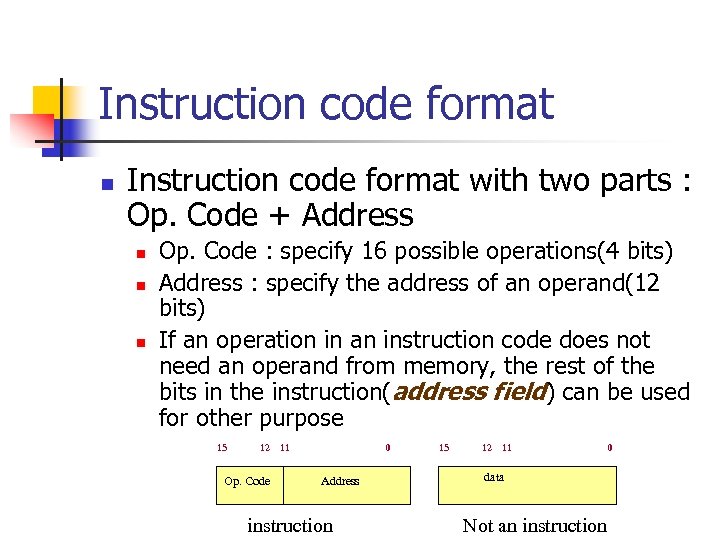
Instruction code format n Instruction code format with two parts : Op. Code + Address n n n Op. Code : specify 16 possible operations(4 bits) Address : specify the address of an operand(12 bits) If an operation in an instruction code does not need an operand from memory, the rest of the bits in the instruction(address field) can be used for other purpose 15 12 Op. Code 11 0 Address instruction 15 12 11 0 data Not an instruction
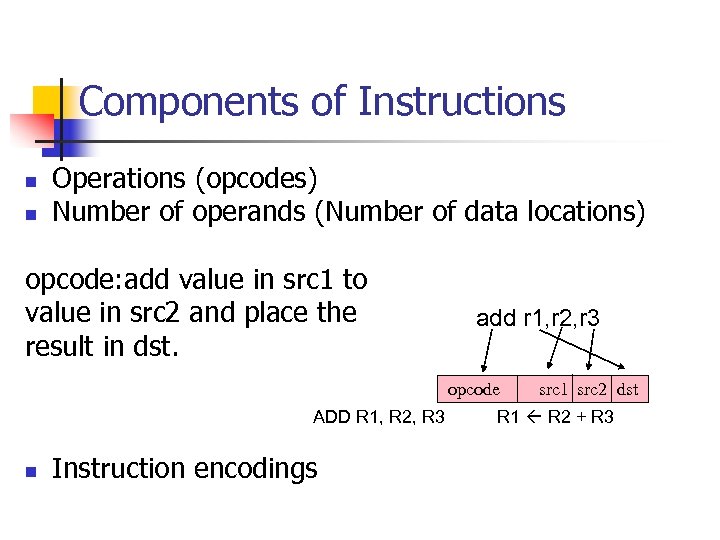
Components of Instructions n n Operations (opcodes) Number of operands (Number of data locations) opcode: add value in src 1 to value in src 2 and place the result in dst. add r 1, r 2, r 3 opcode ADD R 1, R 2, R 3 n Instruction encodings src 1 src 2 dst R 1 R 2 + R 3
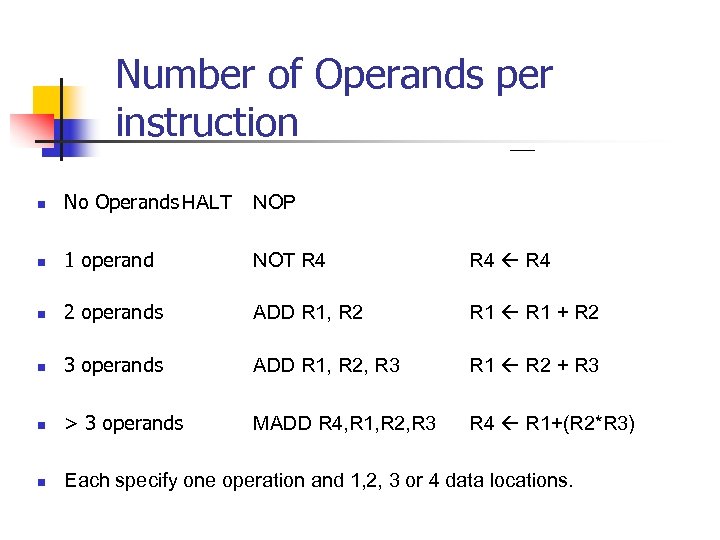
Number of Operands per instruction n No Operands HALT NOP n 1 operand NOT R 4 n 2 operands ADD R 1, R 2 R 1 + R 2 n 3 operands ADD R 1, R 2, R 3 R 1 R 2 + R 3 n > 3 operands MADD R 4, R 1, R 2, R 3 R 4 R 1+(R 2*R 3) n Each specify one operation and 1, 2, 3 or 4 data locations.
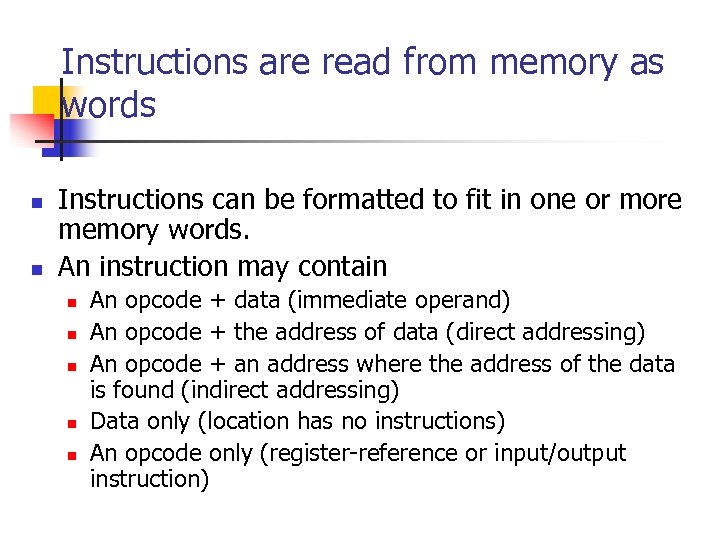
Instructions are read from memory as words n n Instructions can be formatted to fit in one or more memory words. An instruction may contain n n An opcode + data (immediate operand) An opcode + the address of data (direct addressing) An opcode + an address where the address of the data is found (indirect addressing) Data only (location has no instructions) An opcode only (register-reference or input/output instruction)
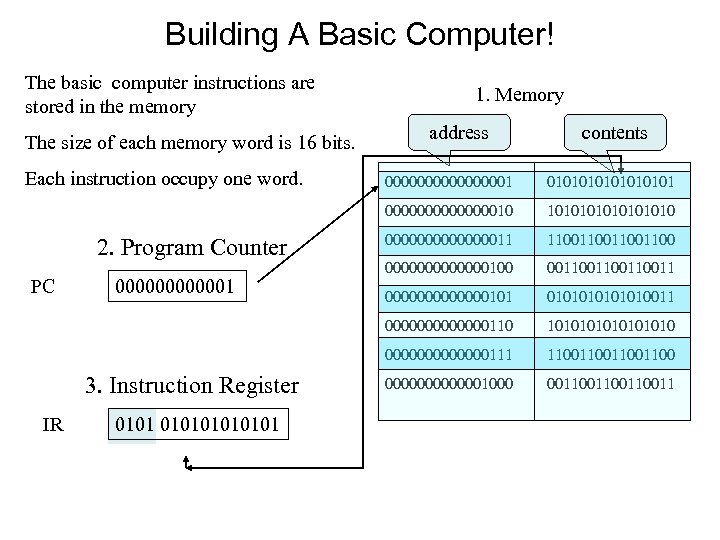
Building A Basic Computer! The basic computer instructions are stored in the memory The size of each memory word is 16 bits. Each instruction occupy one word. 1. Memory address contents 3. Instruction Register IR 01010101 000000011 11001100 0000000100 00110011 0000000101010011 10101010 0000000111 0000001 10101010 0000000110 PC 01010101 000000010 2. Program Counter 000000001 11001100 0000001000 00110011
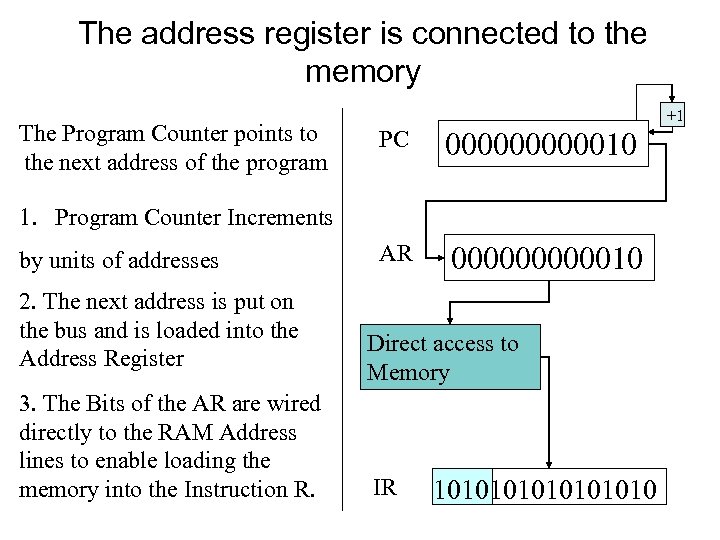
The address register is connected to the memory The Program Counter points to the next address of the program +1 PC 0000010 00000001 AR 0000010 1. Program Counter Increments by units of addresses 2. The next address is put on the bus and is loaded into the Address Register 3. The Bits of the AR are wired directly to the RAM Address lines to enable loading the memory into the Instruction R. Direct access to Memory IR 10101010
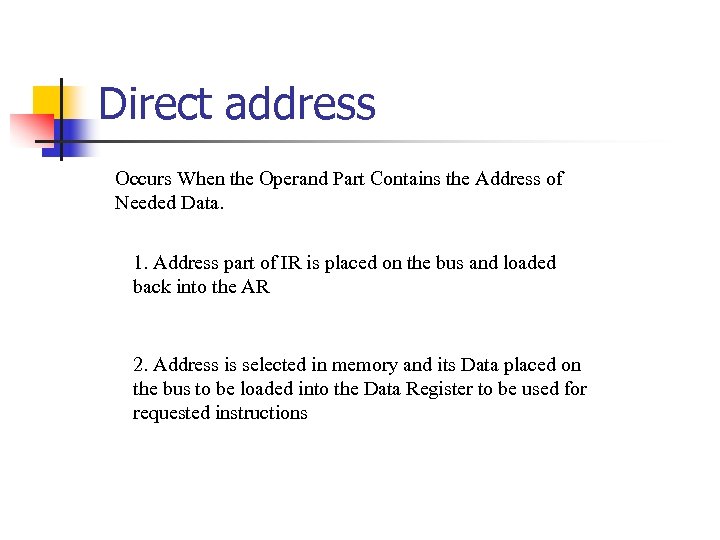
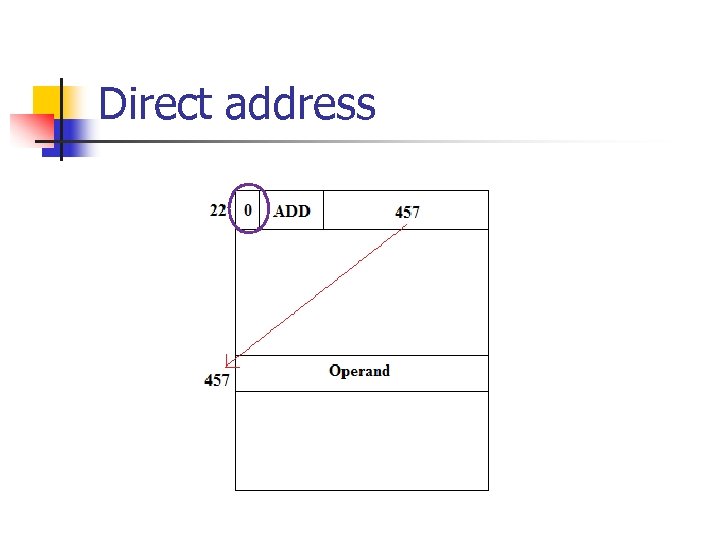
Direct address Occurs When the Operand Part Contains the Address of Needed Data. 1. Address part of IR is placed on the bus and loaded back into the AR 2. Address is selected in memory and its Data placed on the bus to be loaded into the Data Register to be used for requested instructions
Direct address
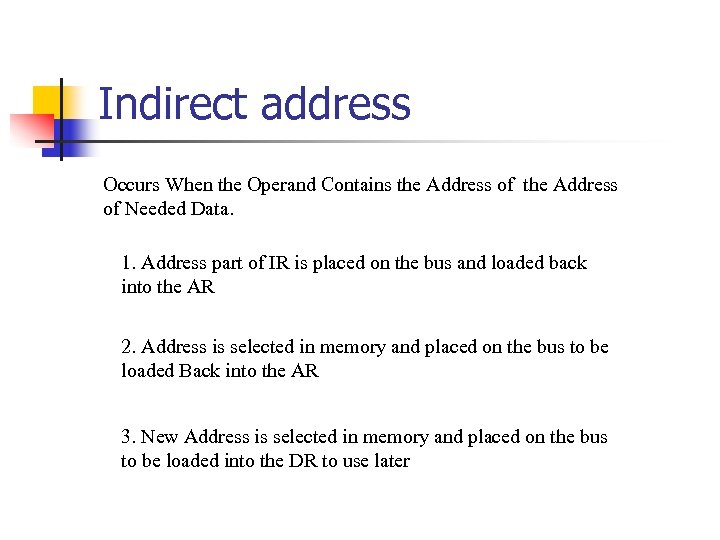
Indirect address Occurs When the Operand Contains the Address of Needed Data. 1. Address part of IR is placed on the bus and loaded back into the AR 2. Address is selected in memory and placed on the bus to be loaded Back into the AR 3. New Address is selected in memory and placed on the bus to be loaded into the DR to use later
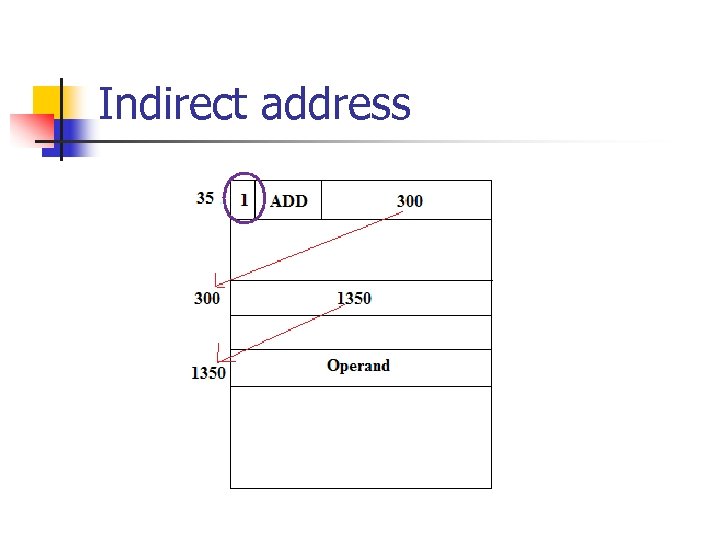
Indirect address
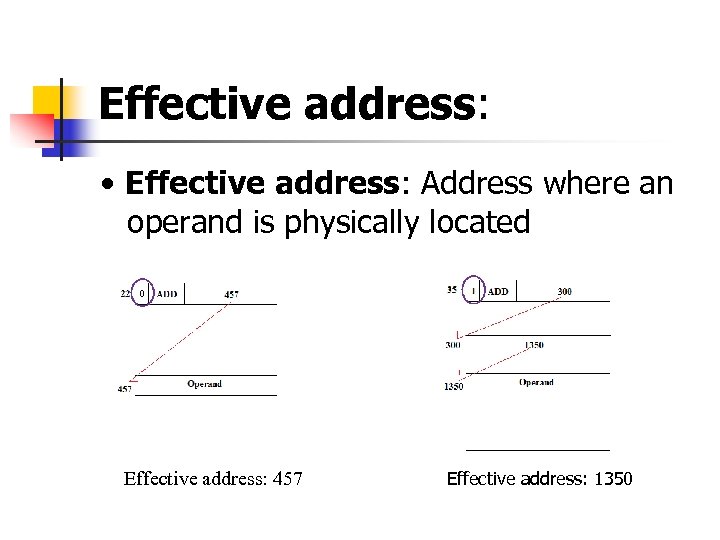
Effective address: • Effective address: Address where an operand is physically located Effective address: 457 Effective address: 1350
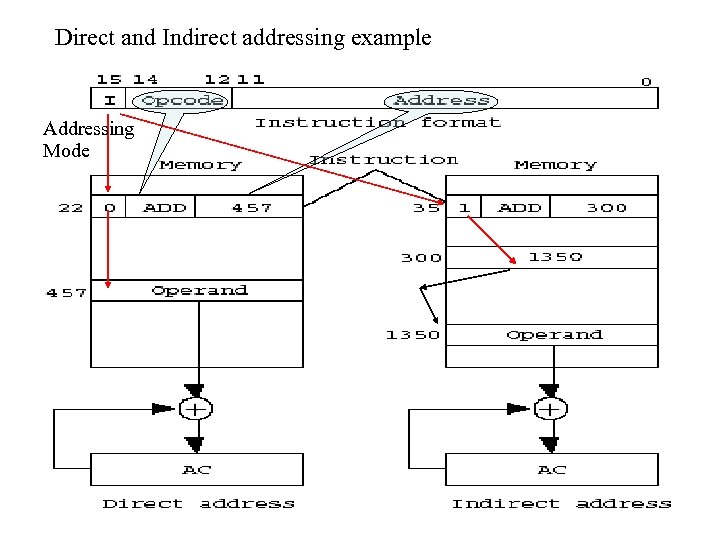
Direct and Indirect addressing example Addressing Mode
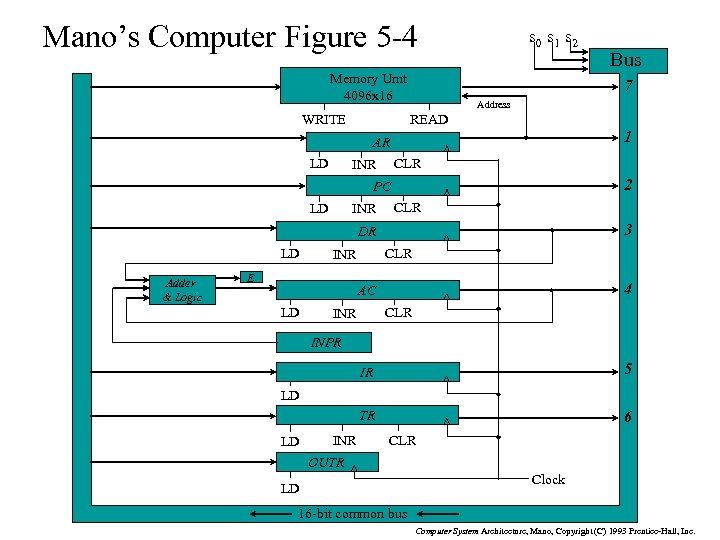
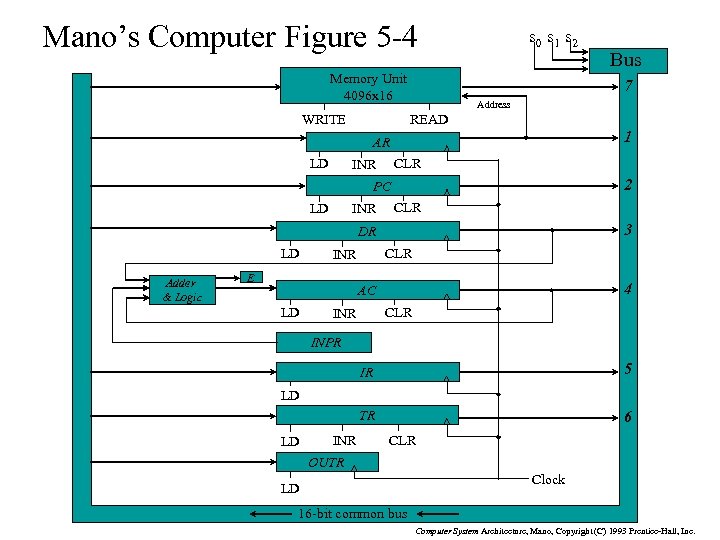
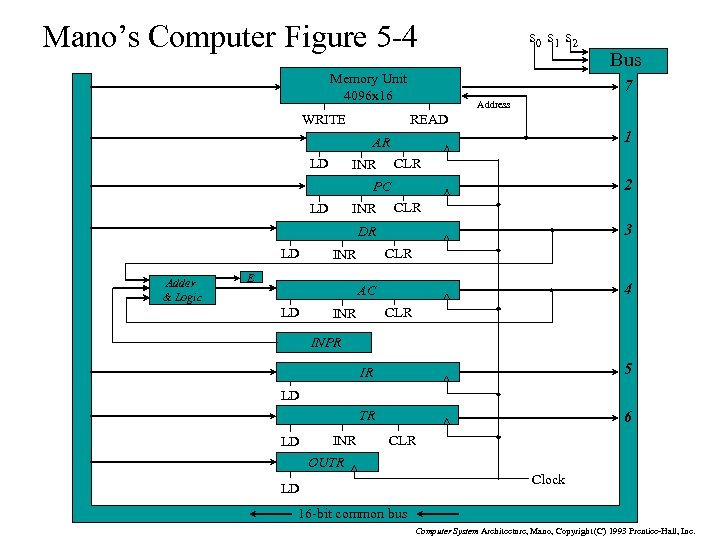
Mano’s Computer Figure 5 -4 Memory Unit 4096 x 16 WRITE s 0 s 1 s 2 7 Address READ 1 AR LD CLR INR 2 PC LD INR CLR 3 DR LD Adder & Logic CLR INR E 4 AC LD Bus CLR INPR IR 5 TR 6 LD LD INR CLR OUTR LD Clock 16 -bit common bus Computer System Architecture, Mano, Copyright (C) 1993 Prentice-Hall, Inc.
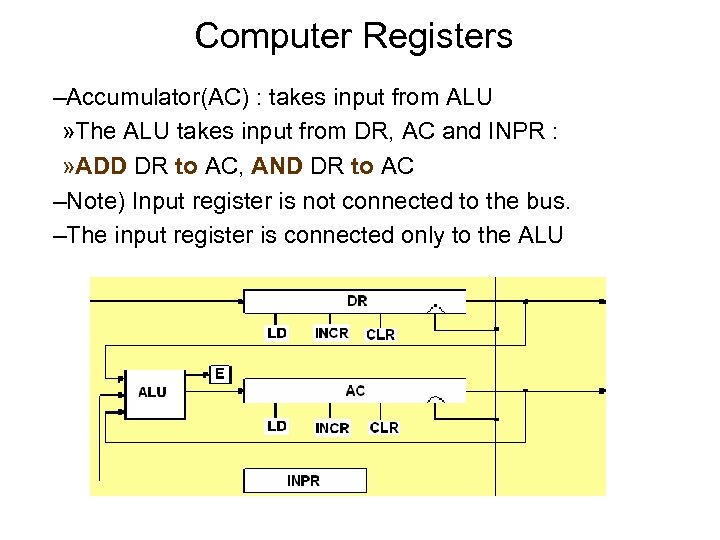
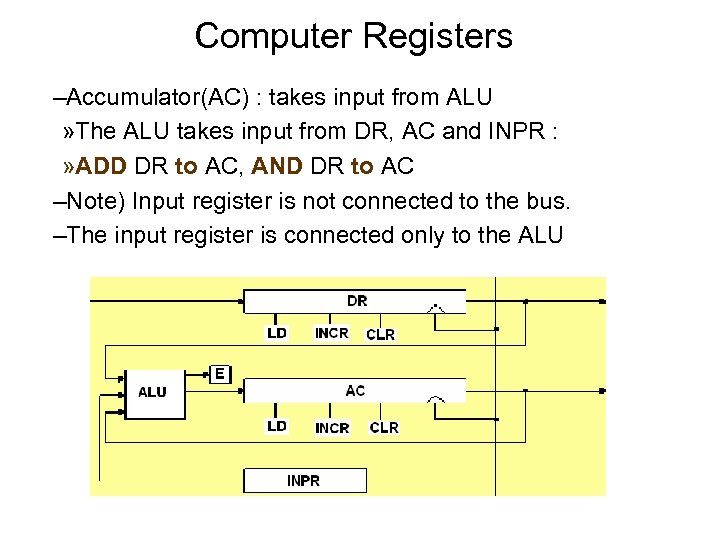
Computer Registers –Accumulator(AC) : takes input from ALU » The ALU takes input from DR, AC and INPR : » ADD DR to AC, AND DR to AC –Note) Input register is not connected to the bus. –The input register is connected only to the ALU
5 -2 Computer Registers n Data Register(DR) : hold the operand(Data) read from memory n Accumulator Register(AC) : general purpose processing register n Instruction Register(IR) : hold the instruction read from memory n Temporary Register(TR) : hold a temporary data during processing n Address Register(AR) : hold a memory address, 12 bit width
5 -2 Computer Registers n Program Counter(PC) : n n n hold the address of the next instruction to be read from memory after the current instruction is executed Instruction words are read and executed in sequence unless a branch instruction is encountered A branch instruction calls for a transfer to a nonconsecutive instruction in the program The address part of a branch instruction is transferred to PC to become the address of the next instruction To read instruction, memory read cycle is initiated, and PC is incremented by one(next instruction fetch)
5 -2 Computer Registers n n Input Register(INPR) : receive an 8 -bit character from an input device Output Register(OUTR) : hold an 8 -bit character for an output device
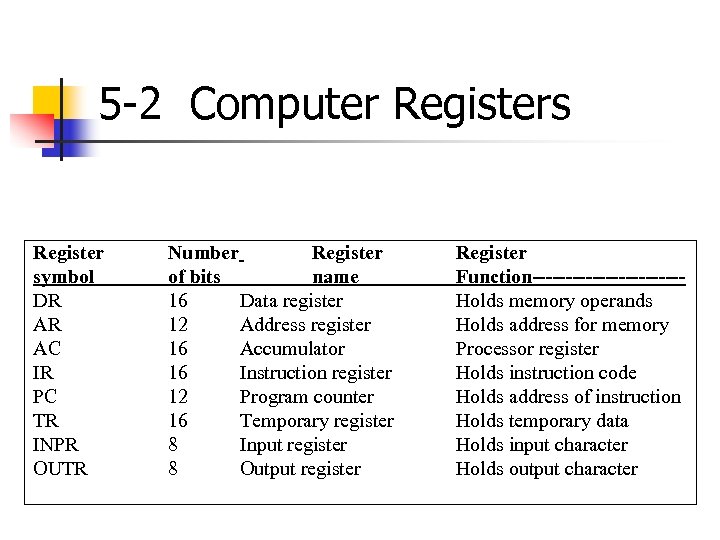
5 -2 Computer Registers Register symbol DR AR AC IR PC TR INPR OUTR Number Register of bits name 16 Data register 12 Address register 16 Accumulator 16 Instruction register 12 Program counter 16 Temporary register 8 Input register 8 Output register Register Function-----------Holds memory operands Holds address for memory Processor register Holds instruction code Holds address of instruction Holds temporary data Holds input character Holds output character
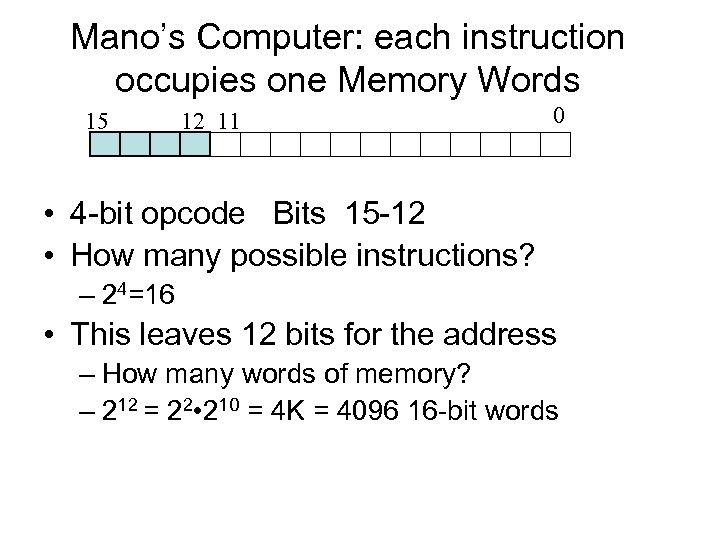
Mano’s Computer: each instruction occupies one Memory Words 15 12 11 0 • 4 -bit opcode Bits 15 -12 • How many possible instructions? – 24=16 • This leaves 12 bits for the address – How many words of memory? – 212 = 22 • 210 = 4 K = 4096 16 -bit words
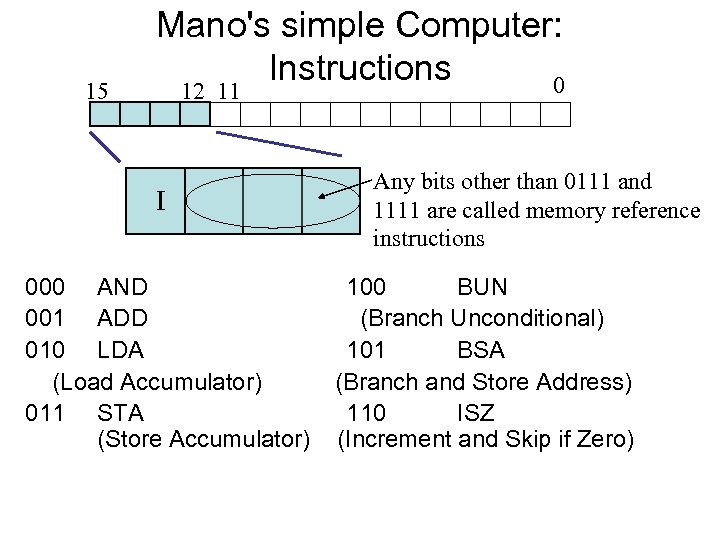
15 Mano's simple Computer: Instructions 0 12 11 I 000 AND 001 ADD 010 LDA (Load Accumulator) 011 STA (Store Accumulator) Any bits other than 0111 and 1111 are called memory reference instructions 100 BUN (Branch Unconditional) 101 BSA (Branch and Store Address) 110 ISZ (Increment and Skip if Zero)
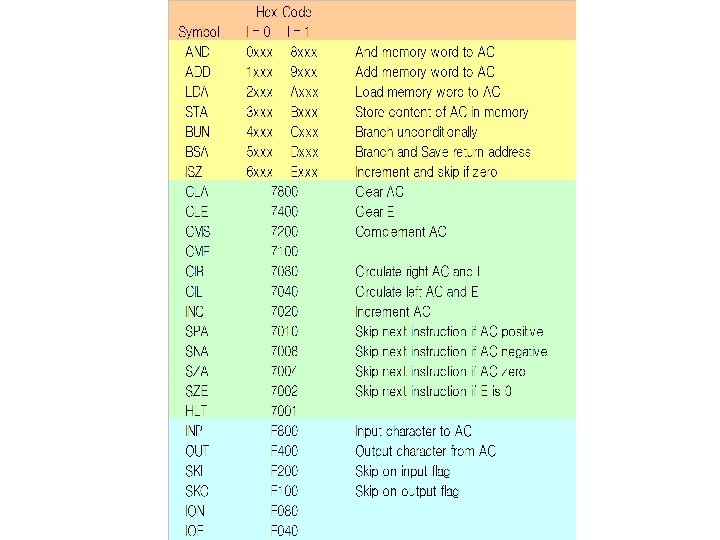
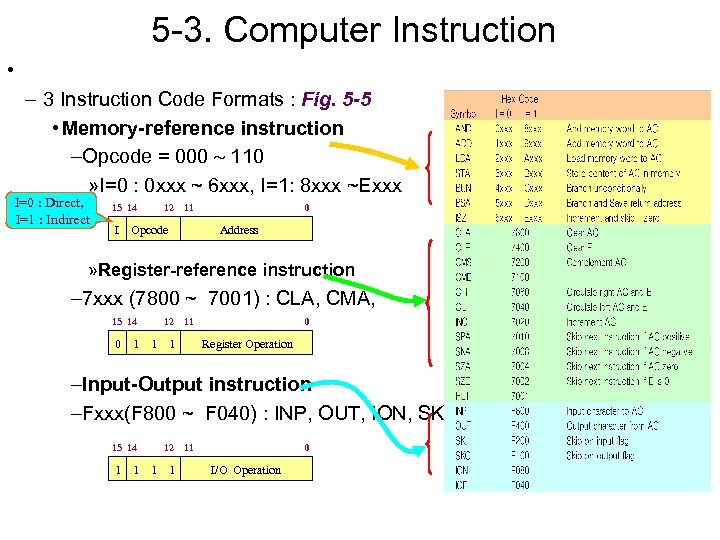
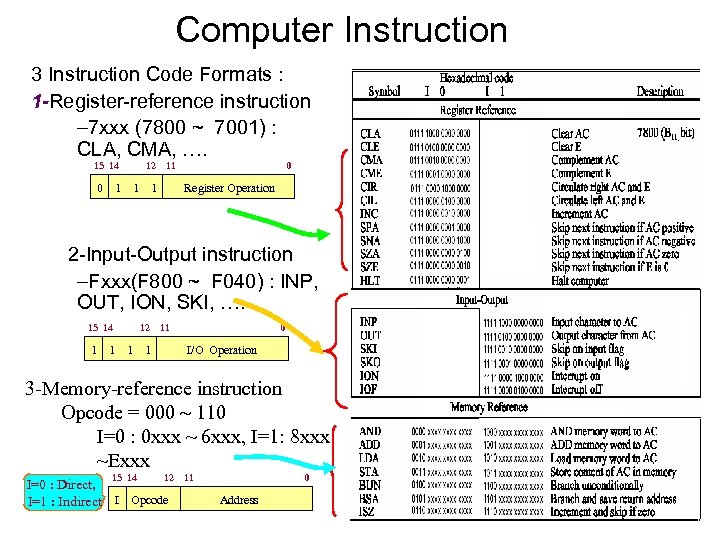
5 -3. Computer Instruction • – 3 Instruction Code Formats : Fig. 5 -5 • Memory-reference instruction –Opcode = 000 110 » I=0 : 0 xxx ~ 6 xxx, I=1: 8 xxx ~Exxx I=0 : Direct, I=1 : Indirect 15 14 I 12 11 Opcode 0 Address » Register-reference instruction – 7 xxx (7800 ~ 7001) : CLA, CMA, 15 14 0 1 12 1 11 1 0 Register Operation –Input-Output instruction –Fxxx(F 800 ~ F 040) : INP, OUT, ION, SKI, 15 14 1 1 12 1 1 11 0 I/O Operation
Common Bus System l n n The basic computer has eight registers, a memory unit, and a control unit. Paths must be provided to transfer information from one register to another and between memory and registers A more efficient scheme for transferring information in a system with many registers is to use a common bus.
Mano’s Computer Figure 5 -4 Memory Unit 4096 x 16 WRITE s 0 s 1 s 2 7 Address READ 1 AR LD CLR INR 2 PC LD INR CLR 3 DR LD Adder & Logic CLR INR E 4 AC LD Bus CLR INPR IR 5 TR 6 LD LD INR CLR OUTR LD Clock 16 -bit common bus Computer System Architecture, Mano, Copyright (C) 1993 Prentice-Hall, Inc.
Common Bus System n The connection of the registers and memory of the basic computer to a common bus system : n n n The outputs of seven registers and memory are connected to the common bus The specific output is selected by mux(S 0, S 1, S 2) : n Memory(7), AR(1), PC(2), DR(3), AC(4), IR(5), TR(6) n When LD(Load Input) is enable, the particular register receives the data from the bus Control Input : LD, INC, CLR, Write, Read
COMMON BUS SYSTEM n n n Control variables: the bus is controlled by 1 - Selection switches for selecting the source of information and 2 - Enable switches at the destination device to accept the information.
Selection variables n n n Selection variables: select a register or the memory whose output is used as an input to the common bus. To select one device out of 8, we need 3 select variables. For example, if S 2 S 1 S 0 = 011, the output of DR is selected as an output of the common bus.
Load input (LD): Enables the input of a register to download bits form the common bus. When LD = 1 for a register, the data on the common bus is read into the register during the next clock pulse transition. > Increment input (INR): Increments the content of a register. > Clear input (CLR): Clear the content of a register to zero.
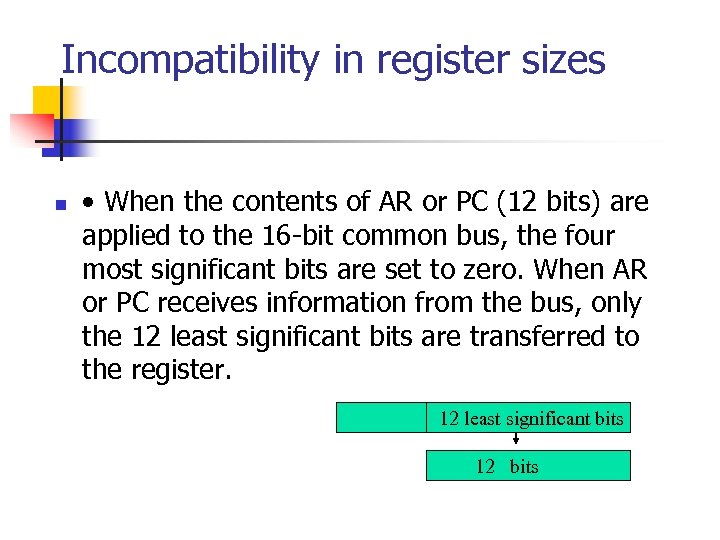
Incompatibility in register sizes n • When the contents of AR or PC (12 bits) are applied to the 16 -bit common bus, the four most significant bits are set to zero. When AR or PC receives information from the bus, only the 12 least significant bits are transferred to the register. 12 least significant bits 12 bits
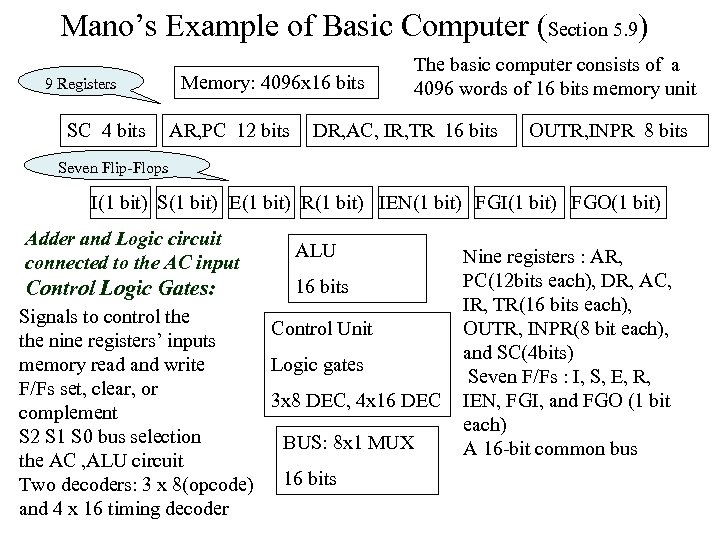
Mano’s Example of Basic Computer (Section 5. 9) 9 Registers SC 4 bits Memory: 4096 x 16 bits AR, PC 12 bits The basic computer consists of a 4096 words of 16 bits memory unit DR, AC, IR, TR 16 bits OUTR, INPR 8 bits Seven Flip-Flops I(1 bit) S(1 bit) E(1 bit) R(1 bit) IEN(1 bit) FGI(1 bit) FGO(1 bit) Adder and Logic circuit connected to the AC input ALU Control Logic Gates: 16 bits Signals to control the Control Unit the nine registers’ inputs memory read and write Logic gates F/Fs set, clear, or 3 x 8 DEC, 4 x 16 DEC complement S 2 S 1 S 0 bus selection BUS: 8 x 1 MUX the AC , ALU circuit Two decoders: 3 x 8(opcode) 16 bits and 4 x 16 timing decoder Nine registers : AR, PC(12 bits each), DR, AC, IR, TR(16 bits each), OUTR, INPR(8 bit each), and SC(4 bits) Seven F/Fs : I, S, E, R, IEN, FGI, and FGO (1 bit each) A 16 -bit common bus
IR and TR n n The instruction register, IR, can only be loaded; it cannot be incremented nor cleared. Its output is used to generate Di’s and Ti’s control signals. TR is a temporary register. The CPU uses this register to store intermediate results of operations. It is not accessible by the external programs. It is loaded, incremented and cleared like the other registers.
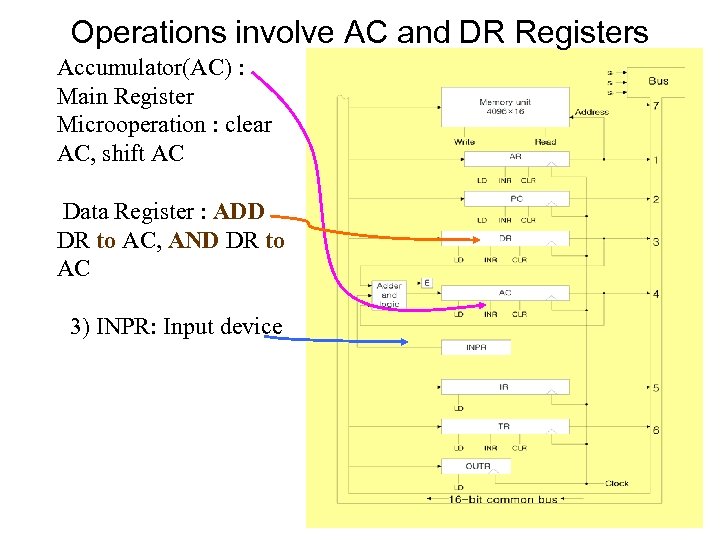
Operations involve AC and DR Registers Accumulator(AC) : Main Register Microoperation : clear AC, shift AC Data Register : ADD DR to AC, AND DR to AC 3) INPR: Input device
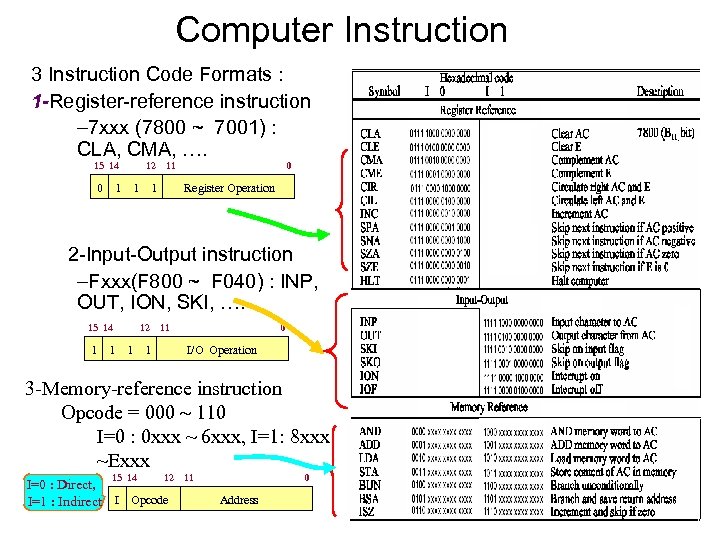
Computer Instruction 3 Instruction Code Formats : 1 -Register-reference instruction – 7 xxx (7800 ~ 7001) : CLA, CMA, …. 15 14 0 12 1 1 11 1 0 Register Operation 2 -Input-Output instruction –Fxxx(F 800 ~ F 040) : INP, OUT, ION, SKI, …. 15 14 1 1 12 1 11 1 0 I/O Operation 3 -Memory-reference instruction Opcode = 000 110 I=0 : 0 xxx ~ 6 xxx, I=1: 8 xxx ~Exxx 15 14 12 I=0 : Direct, I=1 : Indirect I Opcode 11 0 Address
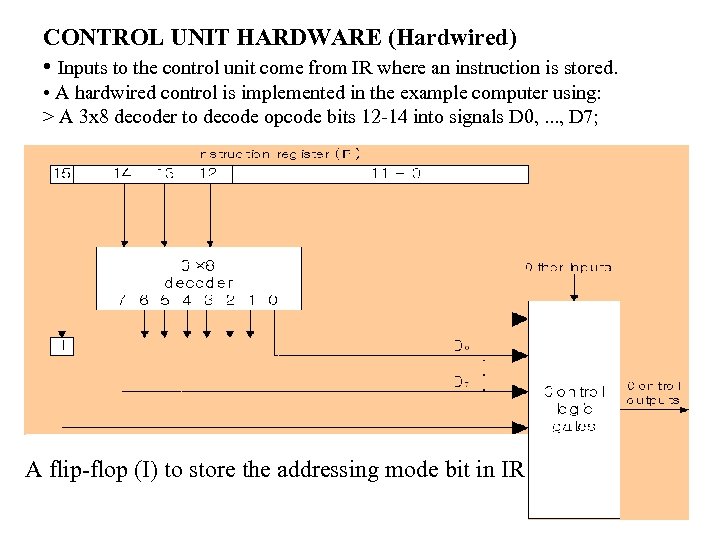
CONTROL UNIT HARDWARE (Hardwired) • Inputs to the control unit come from IR where an instruction is stored. • A hardwired control is implemented in the example computer using: > A 3 x 8 decoder to decode opcode bits 12 -14 into signals D 0, . . . , D 7; A flip-flop (I) to store the addressing mode bit in IR
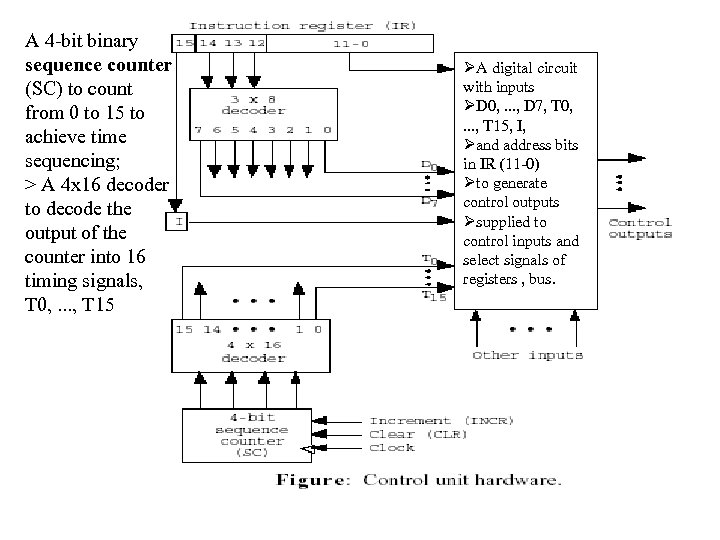
A 4 -bit binary sequence counter (SC) to count from 0 to 15 to achieve time sequencing; > A 4 x 16 decoder to decode the output of the counter into 16 timing signals, T 0, . . . , T 15 ØA digital circuit with inputs ØD 0, . . . , D 7, T 0, . . . , T 15, I, Øand address bits in IR (11 -0) Øto generate control outputs Øsupplied to control inputs and select signals of registers , bus.
5. 5 Instruction Cycle A computer goes through the following instruction cycle repeatedly: do 1. Fetch an instruction from memory 2. Decode the instruction 3. Read the effective address from memory if the instruction has an indirect address 4. Execute the instruction until a HALT instruction is encountered n
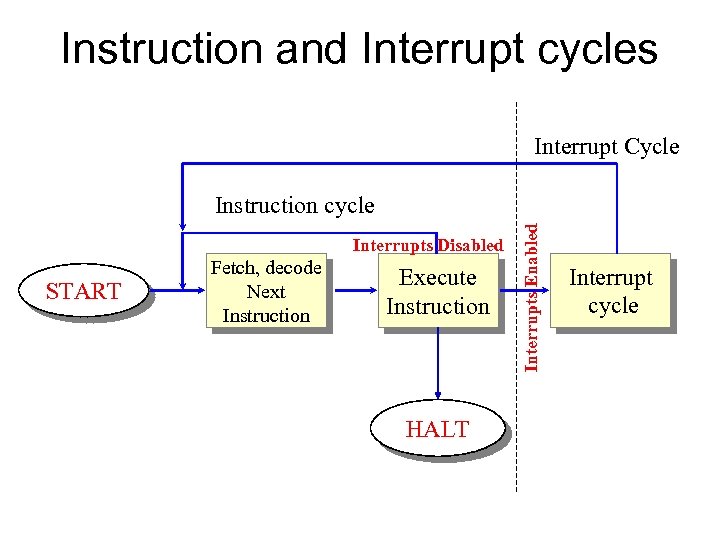
Instruction and Interrupt cycles Interrupt Cycle Interrupts Disabled START Fetch, decode Next Instruction Execute Instruction HALT Interrupts Enabled Instruction cycle Interrupt cycle
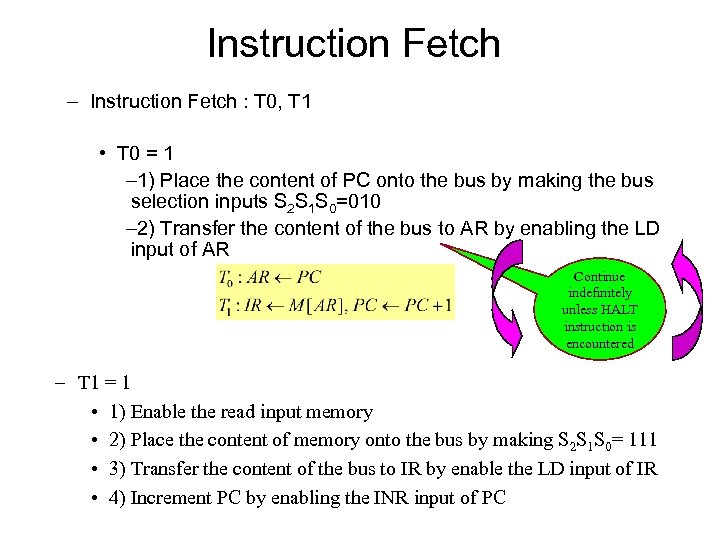
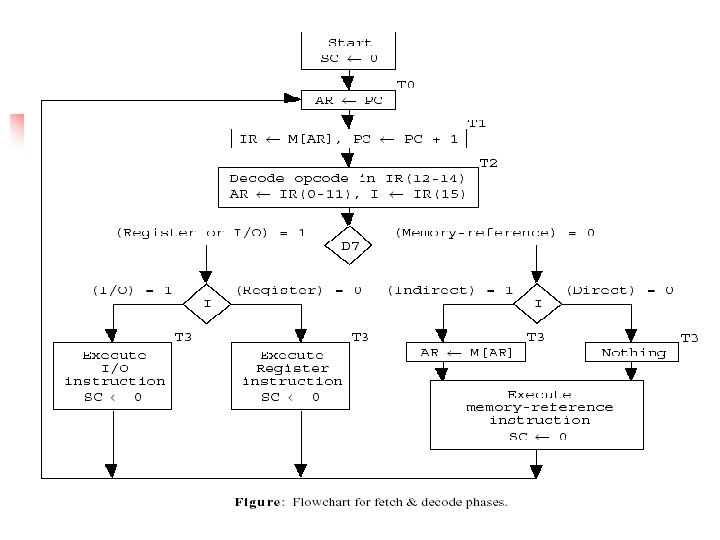
Instruction Fetch – Instruction Fetch : T 0, T 1 • T 0 = 1 – 1) Place the content of PC onto the bus by making the bus selection inputs S 2 S 1 S 0=010 – 2) Transfer the content of the bus to AR by enabling the LD input of AR Continue indefinitely unless HALT instruction is encountered – T 1 = 1 • 1) Enable the read input memory • 2) Place the content of memory onto the bus by making S 2 S 1 S 0= 111 • 3) Transfer the content of the bus to IR by enable the LD input of IR • 4) Increment PC by enabling the INR input of PC
Mano’s Computer Figure 5 -4 Memory Unit 4096 x 16 WRITE s 0 s 1 s 2 7 Address READ 1 AR LD CLR INR 2 PC LD INR CLR 3 DR LD Adder & Logic CLR INR E 4 AC LD Bus CLR INPR IR 5 TR 6 LD LD INR CLR OUTR LD Clock 16 -bit common bus Computer System Architecture, Mano, Copyright (C) 1993 Prentice-Hall, Inc.
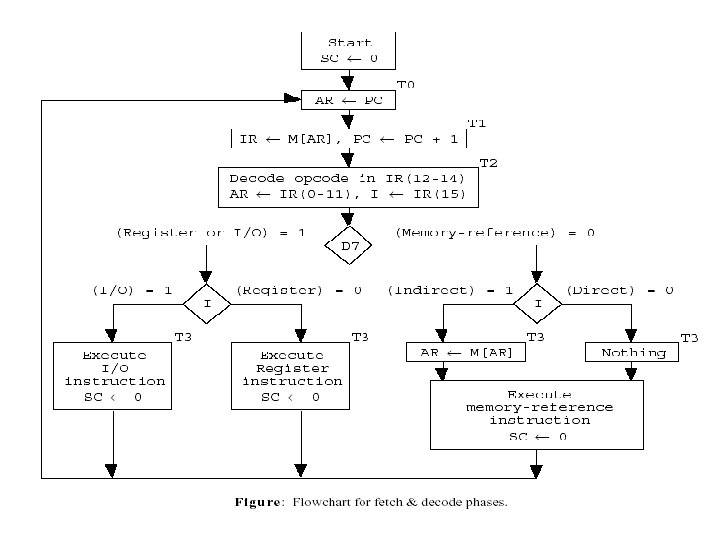
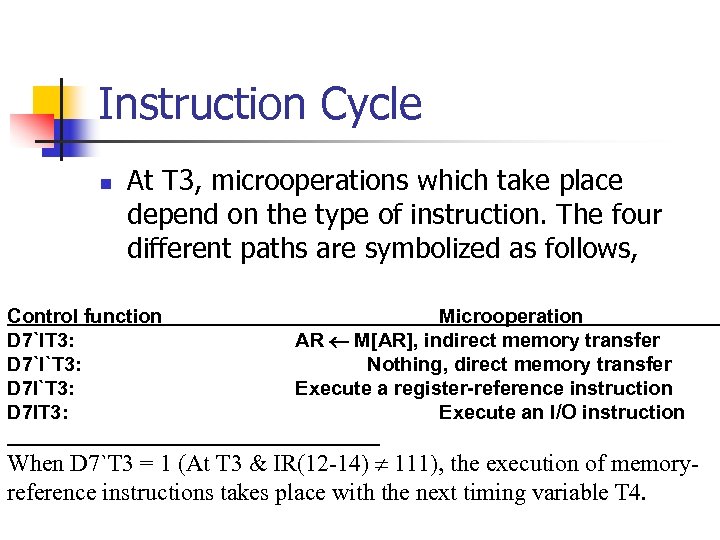
Instruction Cycle n At T 3, microoperations which take place depend on the type of instruction. The four different paths are symbolized as follows, Control function D 7`IT 3: D 7`I`T 3: D 7 IT 3: Microoperation AR ¬ M[AR], indirect memory transfer Nothing, direct memory transfer Execute a register-reference instruction Execute an I/O instruction When D 7`T 3 = 1 (At T 3 & IR(12 -14) ¹ 111), the execution of memoryreference instructions takes place with the next timing variable T 4.
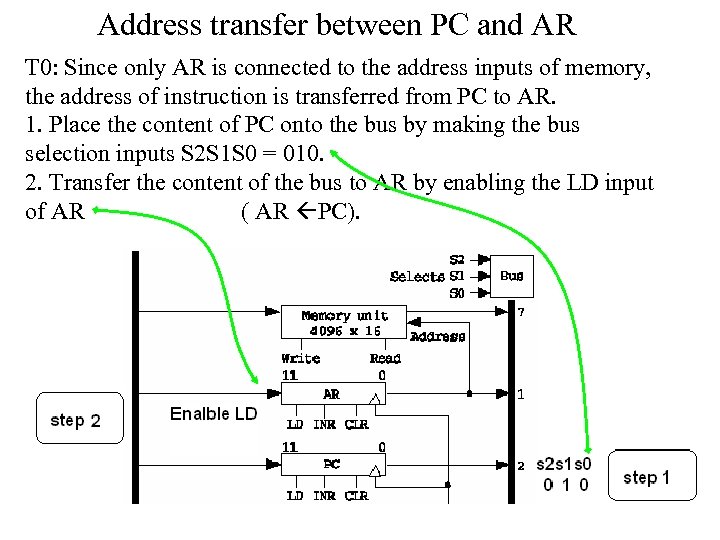
Address transfer between PC and AR T 0: Since only AR is connected to the address inputs of memory, the address of instruction is transferred from PC to AR. 1. Place the content of PC onto the bus by making the bus selection inputs S 2 S 1 S 0 = 010. 2. Transfer the content of the bus to AR by enabling the LD input of AR ( AR PC).
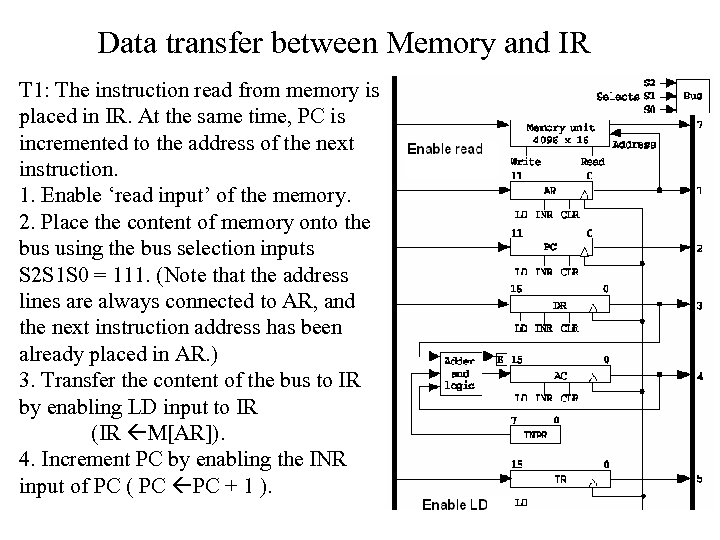
Data transfer between Memory and IR T 1: The instruction read from memory is placed in IR. At the same time, PC is incremented to the address of the next instruction. 1. Enable ‘read input’ of the memory. 2. Place the content of memory onto the bus using the bus selection inputs S 2 S 1 S 0 = 111. (Note that the address lines are always connected to AR, and the next instruction address has been already placed in AR. ) 3. Transfer the content of the bus to IR by enabling LD input to IR (IR M[AR]). 4. Increment PC by enabling the INR input of PC ( PC PC + 1 ).
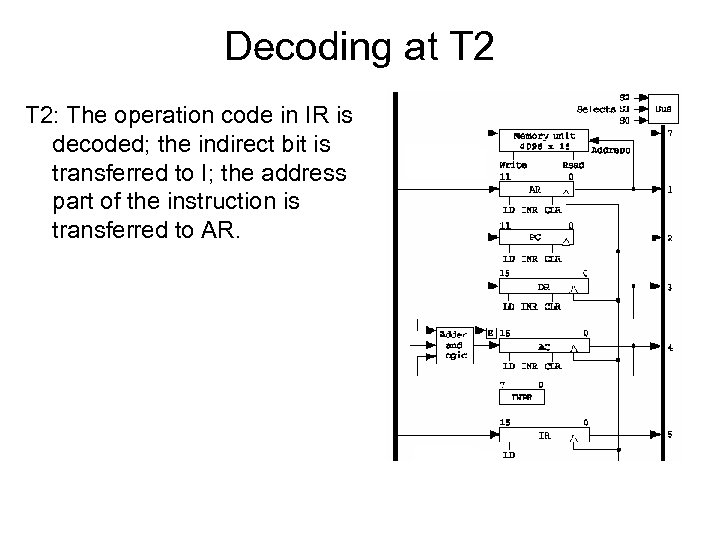
Decoding at T 2: The operation code in IR is decoded; the indirect bit is transferred to I; the address part of the instruction is transferred to AR.
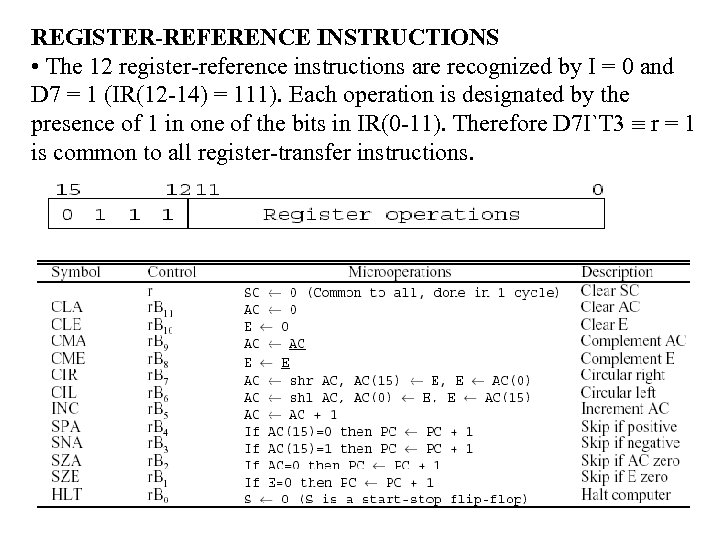
REGISTER-REFERENCE INSTRUCTIONS • The 12 register-reference instructions are recognized by I = 0 and D 7 = 1 (IR(12 -14) = 111). Each operation is designated by the presence of 1 in one of the bits in IR(0 -11). Therefore D 7 I`T 3 º r = 1 is common to all register-transfer instructions.
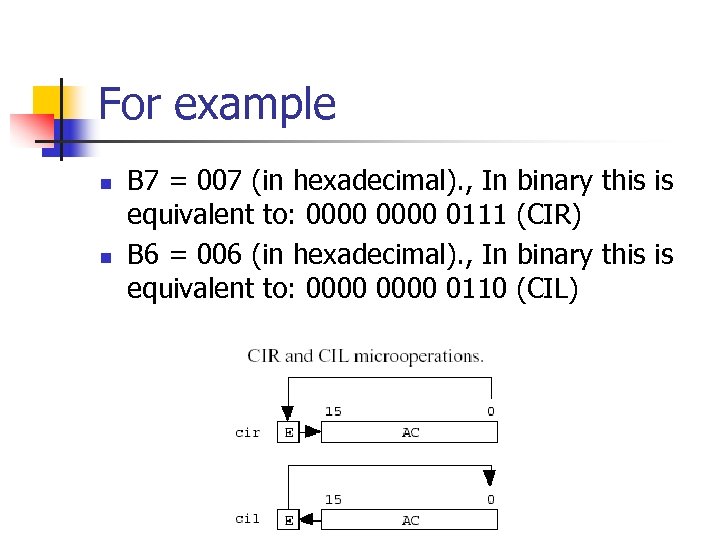
For example n n B 7 = 007 (in hexadecimal). , In binary this is equivalent to: 0000 0111 (CIR) B 6 = 006 (in hexadecimal). , In binary this is equivalent to: 0000 0110 (CIL)
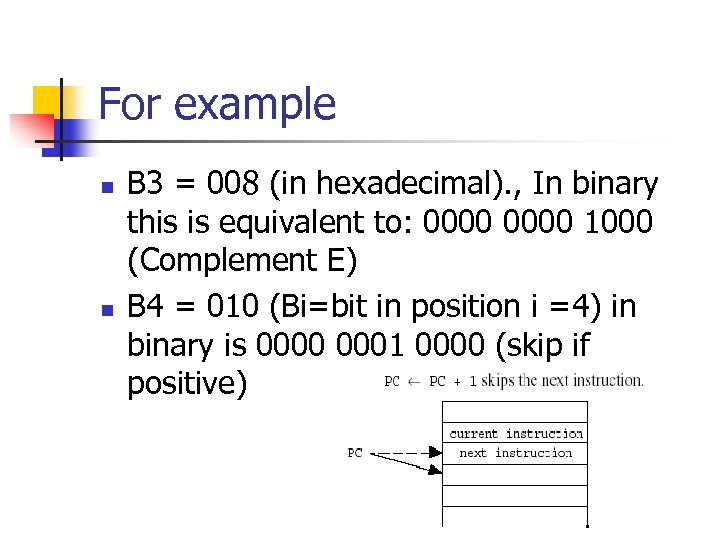
For example n n B 3 = 008 (in hexadecimal). , In binary this is equivalent to: 0000 1000 (Complement E) B 4 = 010 (Bi=bit in position i =4) in binary is 0000 0001 0000 (skip if positive)
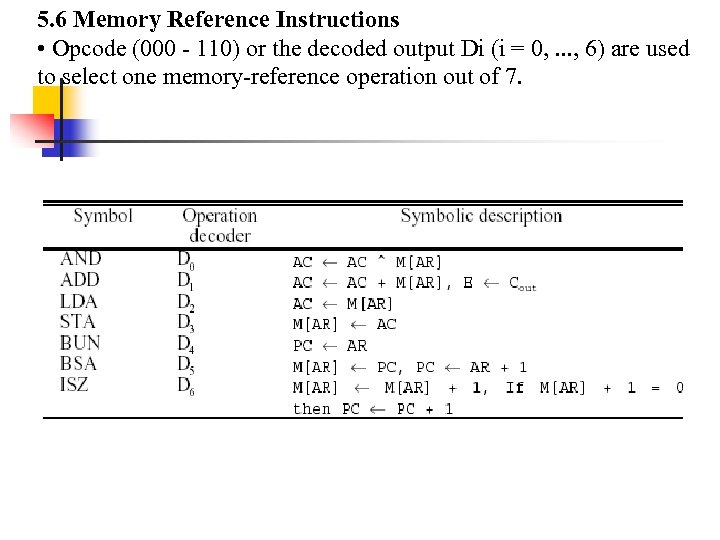
5. 6 Memory Reference Instructions • Opcode (000 - 110) or the decoded output Di (i = 0, . . . , 6) are used to select one memory-reference operation out of 7.
Memory Reference Instructions n n Since the data stored in memory cannot be processed directly (the memory unit is not connected to the ALU), the actual execution in the bus system require a sequence of microoperations. (Note that T 0 -T 2 for fetch an instruction; T 3 for AR M[AR] if indirect memory addressing.
Computer Registers –Accumulator(AC) : takes input from ALU » The ALU takes input from DR, AC and INPR : » ADD DR to AC, AND DR to AC –Note) Input register is not connected to the bus. –The input register is connected only to the ALU
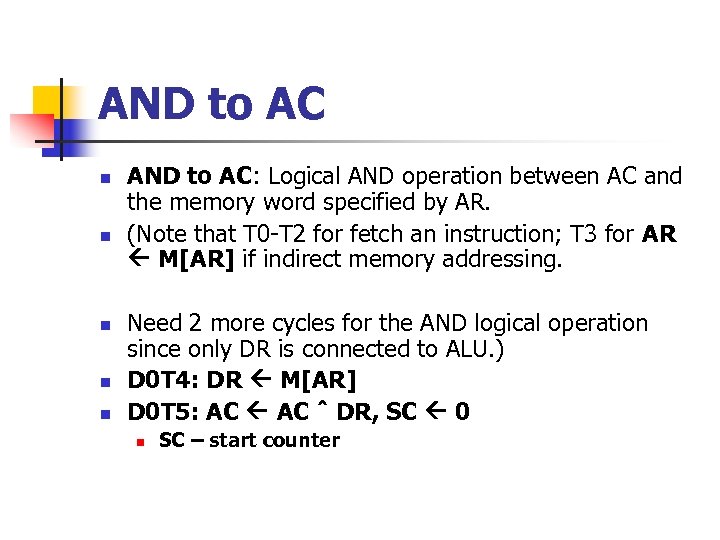
AND to AC n n n AND to AC: Logical AND operation between AC and the memory word specified by AR. (Note that T 0 -T 2 for fetch an instruction; T 3 for AR M[AR] if indirect memory addressing. Need 2 more cycles for the AND logical operation since only DR is connected to ALU. ) D 0 T 4: DR M[AR] D 0 T 5: AC ˆ DR, SC 0 n SC – start counter
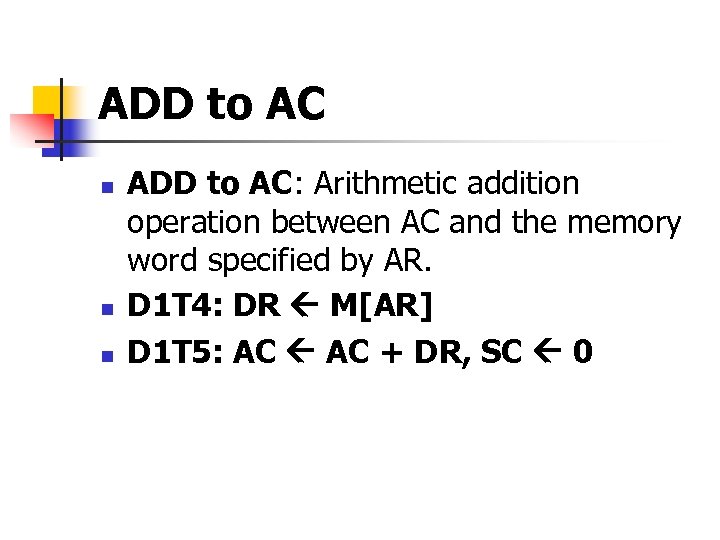
ADD to AC n n n ADD to AC: Arithmetic addition operation between AC and the memory word specified by AR. D 1 T 4: DR M[AR] D 1 T 5: AC + DR, SC 0
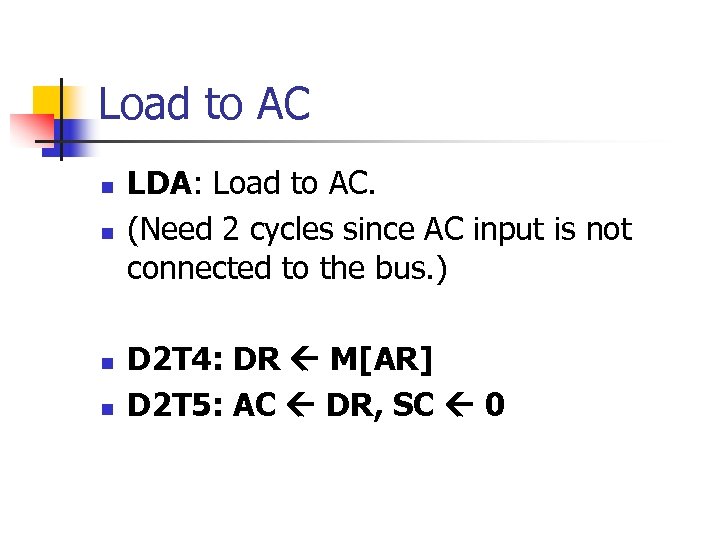
Load to AC n n LDA: Load to AC. (Need 2 cycles since AC input is not connected to the bus. ) D 2 T 4: DR M[AR] D 2 T 5: AC DR, SC 0
![Store AC n n STA: Store AC. D 3 T 4: M[AR] AC, SC](https://present5.com/presentation/884dce43c14a0fe485ed63ba2f545494/image-59.jpg "Store AC n n STA: Store AC. D 3 T 4: M[AR] AC, SC")
Store AC n n STA: Store AC. D 3 T 4: M[AR] AC, SC 0 BUN: Branch unconditionally. Transfers the program to the instruction specified by AR. (Note that the branch target must be in AR beforehand. ) D 4 T 4: PC AR, SC 0
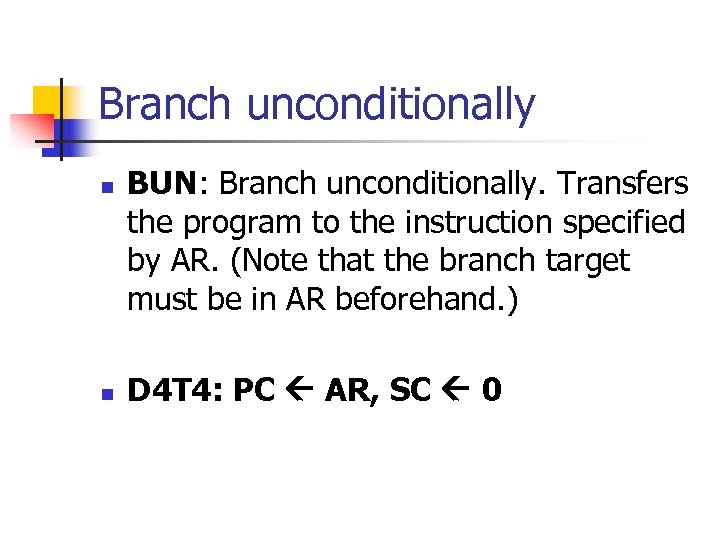
Branch unconditionally n n BUN: Branch unconditionally. Transfers the program to the instruction specified by AR. (Note that the branch target must be in AR beforehand. ) D 4 T 4: PC AR, SC 0
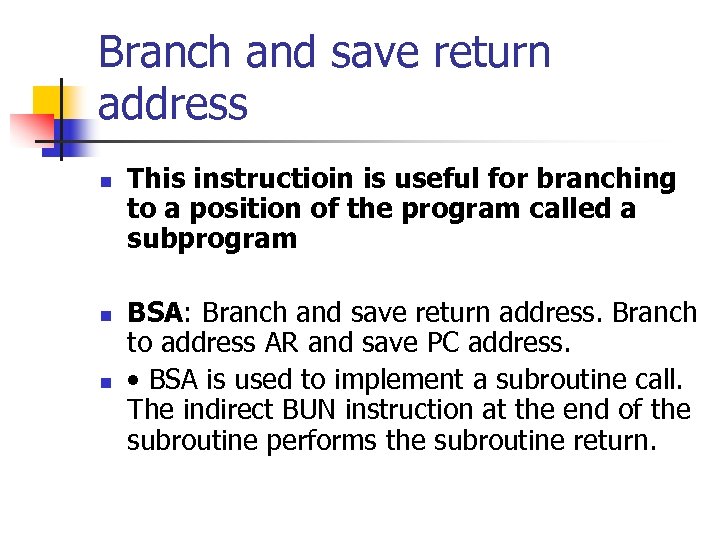
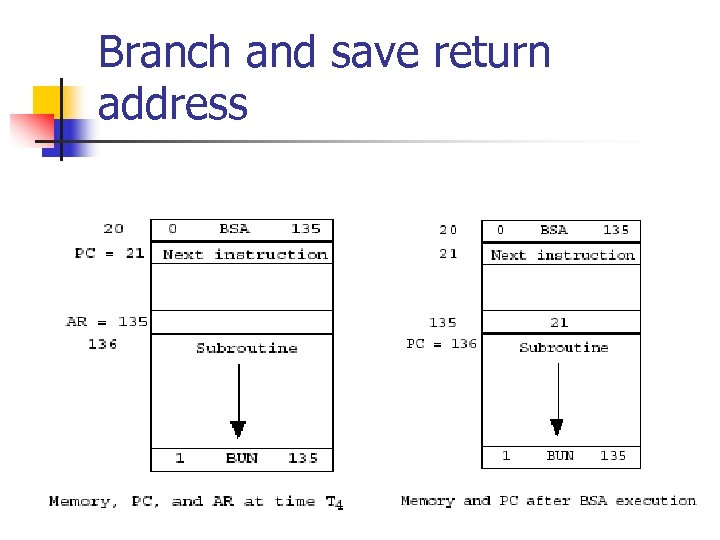
Branch and save return address n n n This instructioin is useful for branching to a position of the program called a subprogram BSA: Branch and save return address. Branch to address AR and save PC address. • BSA is used to implement a subroutine call. The indirect BUN instruction at the end of the subroutine performs the subroutine return.
Branch and save return address
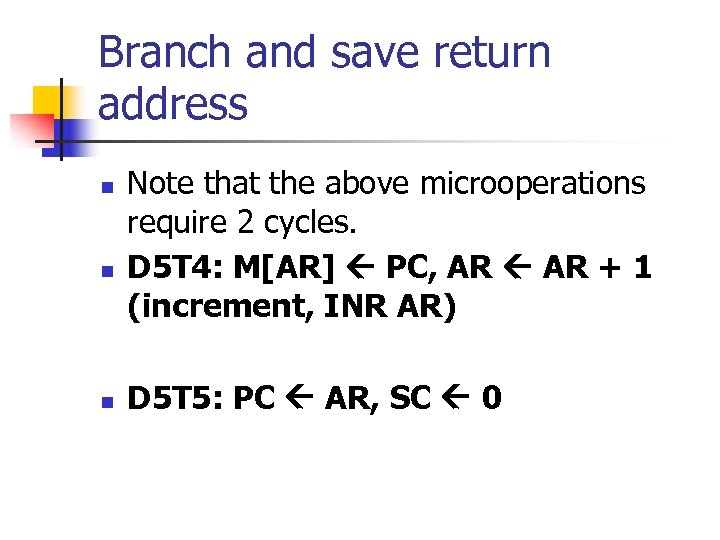
Branch and save return address n n n Note that the above microoperations require 2 cycles. D 5 T 4: M[AR] PC, AR + 1 (increment, INR AR) D 5 T 5: PC AR, SC 0
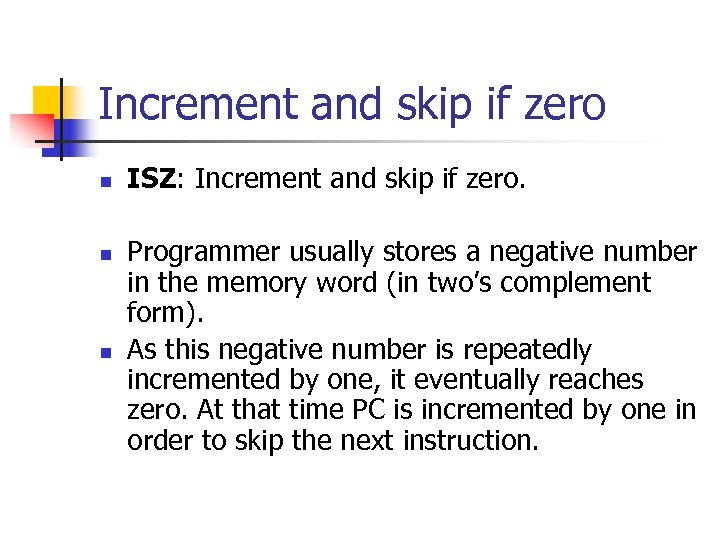
Increment and skip if zero n n n ISZ: Increment and skip if zero. Programmer usually stores a negative number in the memory word (in two’s complement form). As this negative number is repeatedly incremented by one, it eventually reaches zero. At that time PC is incremented by one in order to skip the next instruction.
![Increment and skip if zero n increment: M[AR] + 1, if (M[AR] + 1](https://present5.com/presentation/884dce43c14a0fe485ed63ba2f545494/image-65.jpg "Increment and skip if zero n increment: M[AR] + 1, if (M[AR] + 1")
Increment and skip if zero n increment: M[AR] + 1, if (M[AR] + 1 = 0) then PC + 1 n increment and skip if zero requires 3 cycles. n n D 6 T 4: DR M[AR] D 6 T 5: DR + 1 D 6 T 6: M[AR] DR, if DR=0 then PC + 1, SC 0 • The ISZ instructions is used to implement a loop.
Computer Instruction 3 Instruction Code Formats : 1 -Register-reference instruction – 7 xxx (7800 ~ 7001) : CLA, CMA, …. 15 14 0 12 1 1 11 1 0 Register Operation 2 -Input-Output instruction –Fxxx(F 800 ~ F 040) : INP, OUT, ION, SKI, …. 15 14 1 1 12 1 11 1 0 I/O Operation 3 -Memory-reference instruction Opcode = 000 110 I=0 : 0 xxx ~ 6 xxx, I=1: 8 xxx ~Exxx 15 14 12 I=0 : Direct, I=1 : Indirect I Opcode 11 0 Address
Figure 5 -11 n Summary of memory-reference instructions
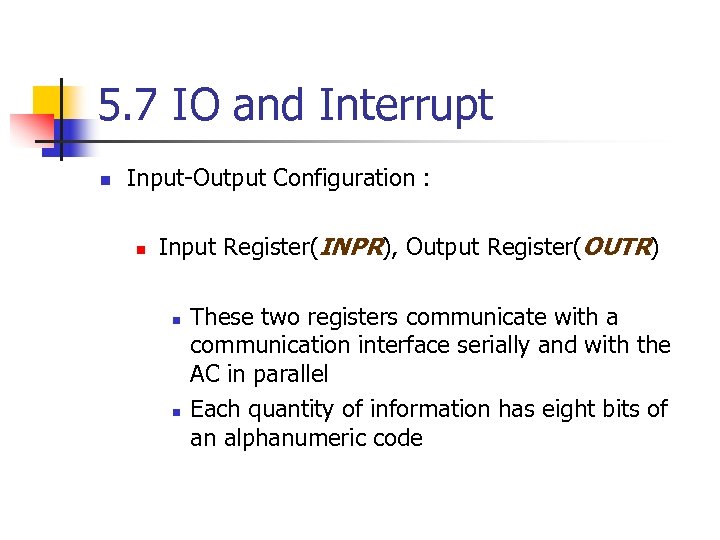
5. 7 IO and Interrupt n Input-Output Configuration : n Input Register(INPR), Output Register(OUTR) n n These two registers communicate with a communication interface serially and with the AC in parallel Each quantity of information has eight bits of an alphanumeric code
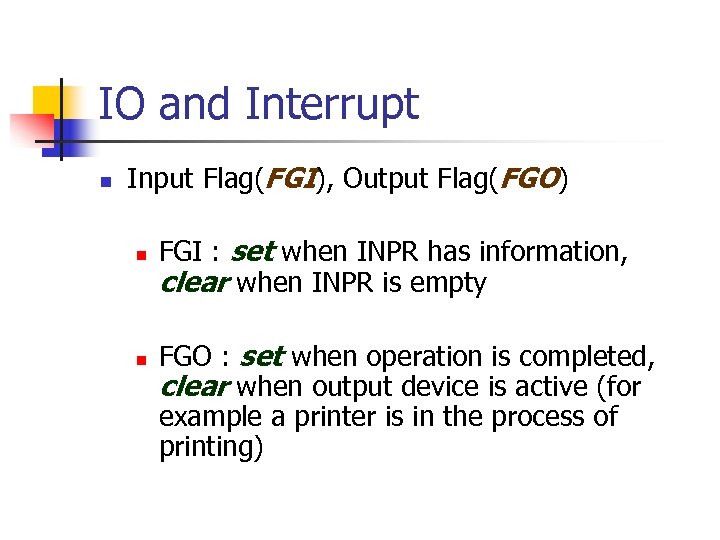
IO and Interrupt n Input Flag(FGI), Output Flag(FGO) n n FGI : set when INPR has information, clear when INPR is empty FGO : set when operation is completed, clear when output device is active (for example a printer is in the process of printing)
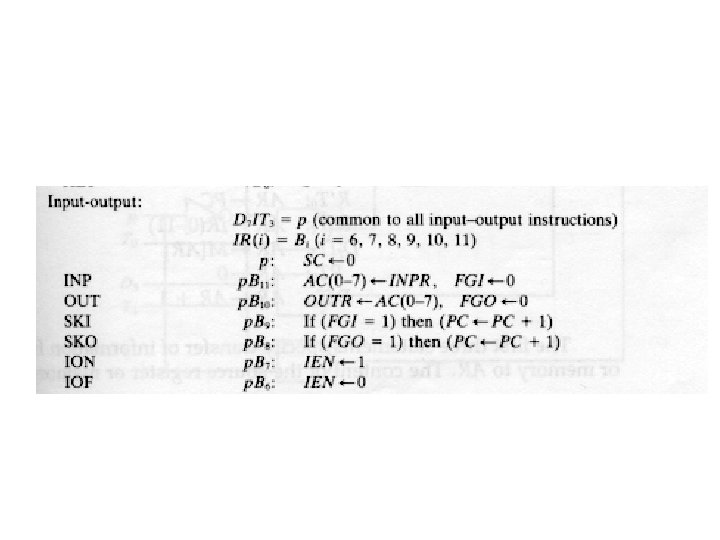
IO instructions n n n These instructions are executed with the clock transition associated with timing signal T 3 For these instructions, D 7=1 and I=1 The control function is distinguished by one of the bits in IR(6 -11)
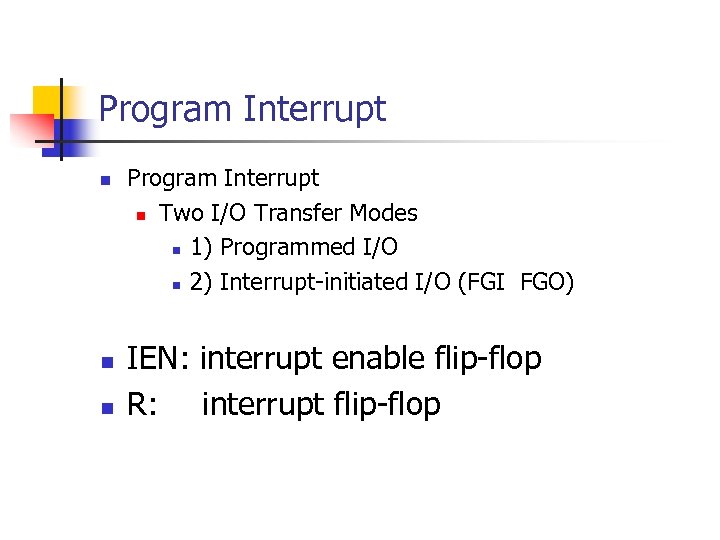
Program Interrupt n n n Program Interrupt n Two I/O Transfer Modes n 1) Programmed I/O n 2) Interrupt-initiated I/O (FGI FGO) IEN: interrupt enable flip-flop R: interrupt flip-flop
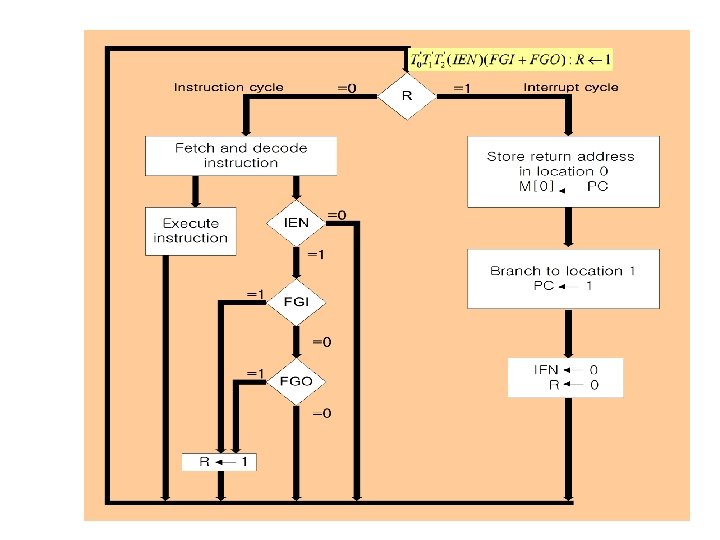
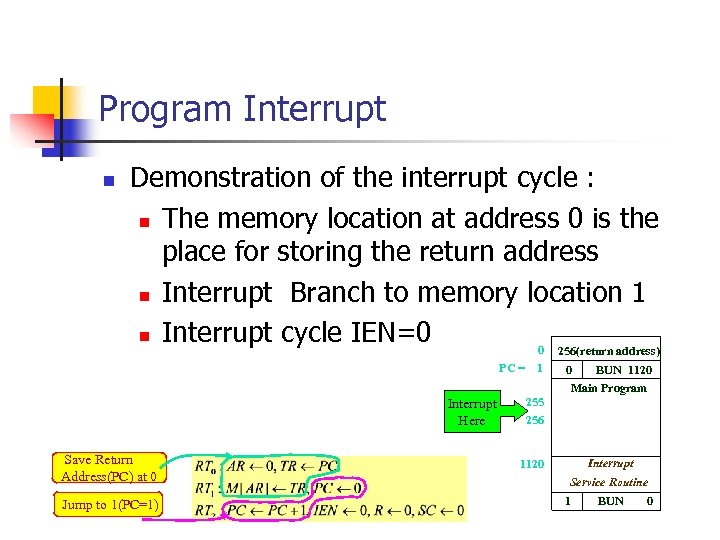
Program Interrupt n Demonstration of the interrupt cycle : n The memory location at address 0 is the place for storing the return address n Interrupt Branch to memory location 1 n Interrupt cycle IEN=0 0 256(return address) PC = 1 0 BUN 1120 Main Program Interrupt Here Save Return Address(PC) at 0 Jump to 1(PC=1) 255 256 Interrupt 1120 Service Routine 1 BUN 0
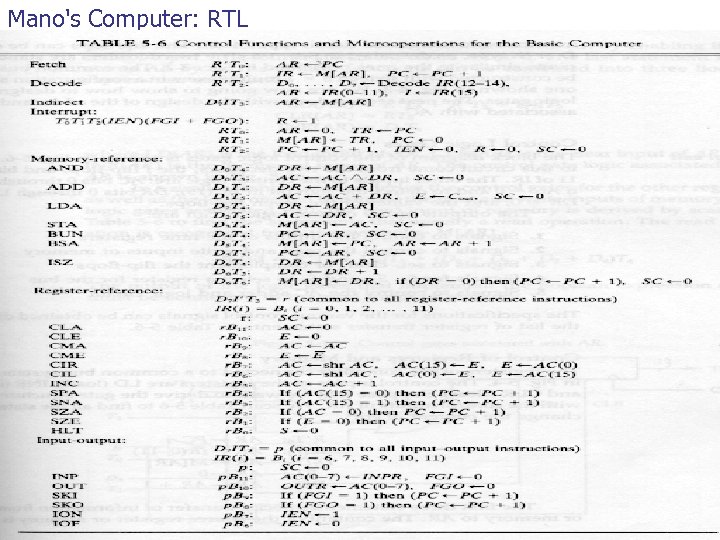
Mano's Computer: RTL
Скачать презентацию Chapter Dr Bernard Chen Ph D University of
884dce43c14a0fe485ed63ba2f545494.ppt