


 Скачать презентацию Chapter 8 Constructing a Decision Support System and
2ed8cff588ddb33bea401835454cdf21.ppt
- Количество слайдов: 51
 Chapter 8 Constructing a Decision Support System and DSS Research n n What must be done to acquire a DSS? DSS must be custom tailored Decision Support Systems and Intelligent Systems, Efraim Turban and Jay E. Aronson Copyright 1998, Prentice Hall, Upper Saddle River, NJ
 8. 1 Opening Vignette: Hospital Healthcare Services Uses DSS n Jewish Hospital Healthcare Services (JHHS) – Regional healthcare provider in Louisville, KY – 7 facilities, 1, 000 patient beds, 3, 500 employees – Total information management and computer services costs = 3 % of the operating budget – SAS development tool 1991 – JHHS managers can take clinical and Decision Support Systems and Intelligent Systems, Efraim Turban and Jay E. Aronson financial Hall, Upper Saddle River, NJ Copyright 1998, Prenticefiles from the mainframe to perform
 n 1992 various DSS applications in – – – n Productivity Cost accounting Patient mix Nurse staff scheduling Several different mainframe and PC software packages Early 1992, integrated mainframe-based DSS development tool MAPS • • • Modeling Forecasting Planning Communications Database management systems Graphics – Productivity DSS in MAPS – Faster and easy to interpret Decision Support Systems and Intelligent Systems, Efraim Turban and Jay E. Aronson Copyright 1998, Prentice Hall, Upper Saddle River, NJ
 8. 2 Introduction n System Development Issues – Various commercial development software packages on different platforms – Different software packages for different DSS applications – Development packages for the mainframe applications PCs – Diverse applications in different functional areas – Vendors assisted in DSS construction Decision Support Systems and Intelligent Systems, Efraim Turban and Jay E. Aronson Copyright 1998, Prentice Hall, Upper Saddle River, NJ
 DSS Construction is Complicated n n n Technical Issues Behavioral Issues Many Different Approaches Decision Support Systems and Intelligent Systems, Efraim Turban and Jay E. Aronson Copyright 1998, Prentice Hall, Upper Saddle River, NJ
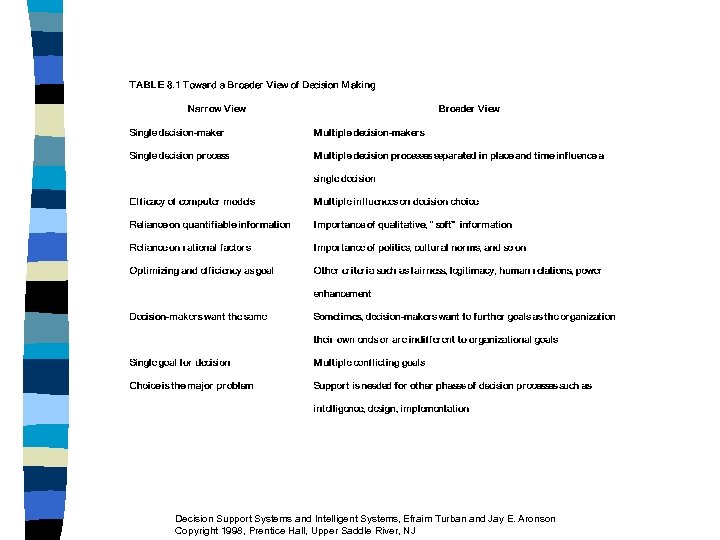 Decision Support Systems and Intelligent Systems, Efraim Turban and Jay E. Aronson Copyright 1998, Prentice Hall, Upper Saddle River, NJ
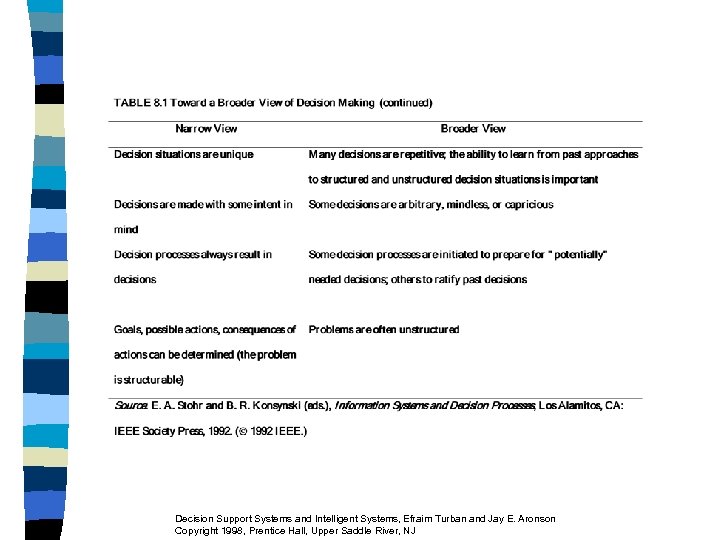 Decision Support Systems and Intelligent Systems, Efraim Turban and Jay E. Aronson Copyright 1998, Prentice Hall, Upper Saddle River, NJ
 8. 3 Development Strategies 1. Customized DSS in general-purpose programming language 2. Fourth-generation language 3. DSS integrated development tool (generator or engine) 4. Domain-specific DSS generator 5. CASE methodology 6. Integrate several of the above approaches Decision Support Systems and Intelligent Systems, Efraim Turban and Jay E. Aronson Copyright 1998, Prentice Hall, Upper Saddle River, NJ
 8. 4 The DSS Development Process n n n Prototyping Not all activities are performed for every DSS Process summary (Figure 8. 1) Decision Support Systems and Intelligent Systems, Efraim Turban and Jay E. Aronson Copyright 1998, Prentice Hall, Upper Saddle River, NJ
 n Phase A: Planning – Need assessment and problem diagnosis – Define objectives and goals of the DSS – What are the key decisions? n Phase B: Research – Identification of a relevant approach for addressing user needs and available resources Decision Support Systems and Intelligent Systems, Efraim Turban and Jay E. Aronson Copyright 1998, Prentice Hall, Upper Saddle River, NJ
 n Phase C: System Analysis and Conceptual Design – Determination of the best construction approach and specific resources required to implement – Includes • • Technical resources Staff resources Financial resources Organizational resources – Conceptual design followed by a feasibility study Decision Support Systems and Intelligent Systems, Efraim Turban and Jay E. Aronson Copyright 1998, Prentice Hall, Upper Saddle River, NJ
 n Phase D: Design – Determine detailed specifications of system • Components • Structure • Features – Select appropriate software or write them n Phase E: Construction – Technical implementation of the design – Tested and improve continuously – Interface DSS with other systems Decision Support Systems and Intelligent Systems, Efraim Turban and Jay E. Aronson Copyright 1998, Prentice Hall, Upper Saddle River, NJ
 n Phase F: Implementation – – – n Testing Evaluating Demonstration Orientation Training Deployment Phase G: Maintenance and Documentation – Planning for ongoing system and user support – Develop proper documentation n Phase H: Adaptation Decision Support Systems and Intelligent – Recycle through. Systems, Efraim Turban and Jay E. Aronson the earlier steps Copyright 1998, Prentice Hall, Upper Saddle River, NJ
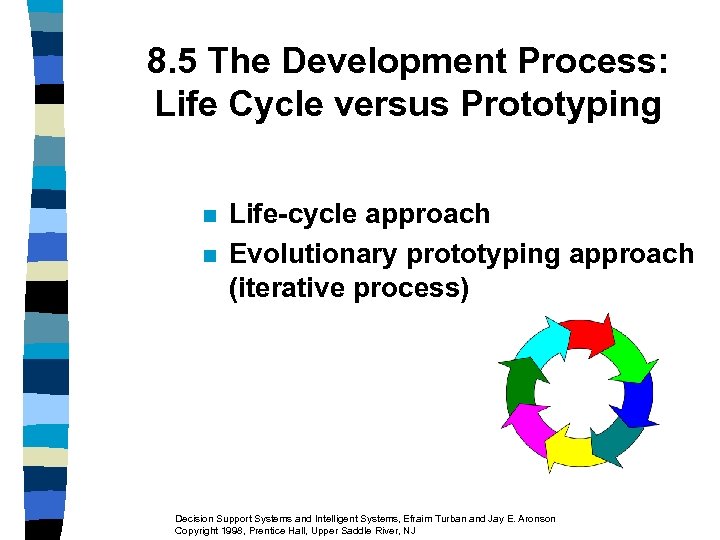 8. 5 The Development Process: Life Cycle versus Prototyping n n Life-cycle approach Evolutionary prototyping approach (iterative process) Decision Support Systems and Intelligent Systems, Efraim Turban and Jay E. Aronson Copyright 1998, Prentice Hall, Upper Saddle River, NJ
 The System Development Life Cycle (SDLC) Approach and DSS n n Inappropriate for Most DSS Users and Managers may not understand their information and modeling needs Decision Support Systems and Intelligent Systems, Efraim Turban and Jay E. Aronson Copyright 1998, Prentice Hall, Upper Saddle River, NJ
 The Evolutionary Prototyping Approach n Build a DSS in a series of short steps with immediate feedback from users – 1. Select an important subproblem to be built first – 2. Develop a small but usable system to assist the decision maker – 3. Evaluate the system constantly – 4. Refine, expand, and modify the system in cycles n Repeat – Stable and Intelligent Systems, Efraim Turban and Jay E. Aronson evolves Decision Support Systems comprehensive system Copyright 1998, Prentice Hall, Upper Saddle River, NJ
 Advantages of Prototyping n Short development time Short user reaction time (feedback from user) Improved users' understanding of the system, its information needs, and its capabilities. Low cost. n Disadvantages and Limitations n n n – Gains might be lost through cycles n Combining prototyping with the critical success method (Figure 8. 3) Decision Support Systems and Intelligent Systems, Efraim Turban and Jay E. Aronson Copyright 1998, Prentice Hall, Upper Saddle River, NJ
 8. 6 Team-Developed Versus User-developed DSS n DSS 1970 s and early 1980 s n Large-scale, complex systems Primarily provided organizational support Team efforts n n Decision Support Systems and Intelligent Systems, Efraim Turban and Jay E. Aronson Copyright 1998, Prentice Hall, Upper Saddle River, NJ
 User-Developed System Due to the Development of n n n n n Personal computers Computer communication networks PC-mainframe communication Friendly development software Reduced cost of software and hardware Increased capabilities of personal computers Enterprise-wide computing Easy accessibility to data and models Client/server architecture Balance Decision Support Systems and Intelligent Systems, Efraim Turban and Jay E. Aronson Copyright 1998, Prentice Hall, Upper Saddle River, NJ
 8. 7 Team-Developed DSS n n Substantial effort Extensive planning and organization Some generic activities Group of people to build and to manage it. Size depends on – effort – tools Decision Support Systems and Intelligent Systems, Efraim Turban and Jay E. Aronson Copyright 1998, Prentice Hall, Upper Saddle River, NJ
 Organizational Placement of the DSS Development Group 1. In the information services (IS) department 2. Highly placed executive staff group 3. Finance or other functional area 4. Industrial engineering department 5. Management Science group 6. Information center group Decision Support Systems and Intelligent Systems, Efraim Turban and Jay E. Aronson Copyright 1998, Prentice Hall, Upper Saddle River, NJ
 8. 8 End-user Computing and User-Developed DSS n n End-user Computing (end-user development) the development and use of computer-based information systems by people outside the formal information systems areas End-users – – At any level of the organization In any functional area Levels of computer skill vary Growing Decision Support Systems and Intelligent Systems, Efraim Turban and Jay E. Aronson Copyright 1998, Prentice Hall, Upper Saddle River, NJ
 User-Developed DSS Advantages 1. Short delivery time 2. Eliminate extensive and formal user requirements specifications 3. Reduce some DSS implementation problems 4. Low cost Decision Support Systems and Intelligent Systems, Efraim Turban and Jay E. Aronson Copyright 1998, Prentice Hall, Upper Saddle River, NJ
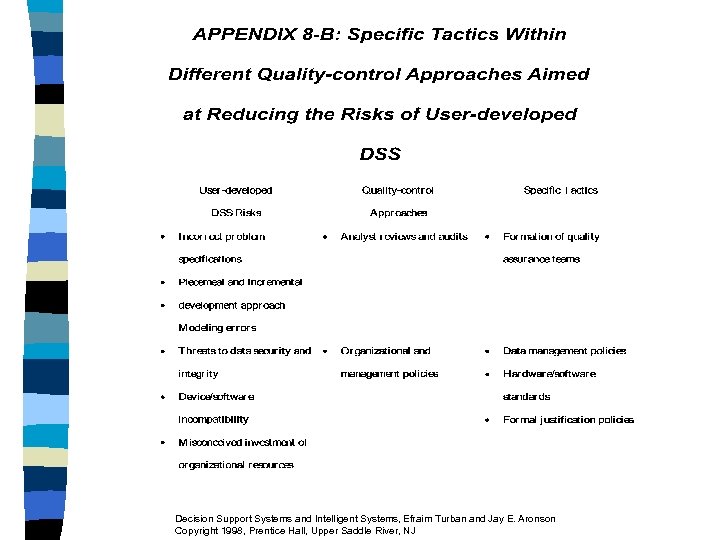
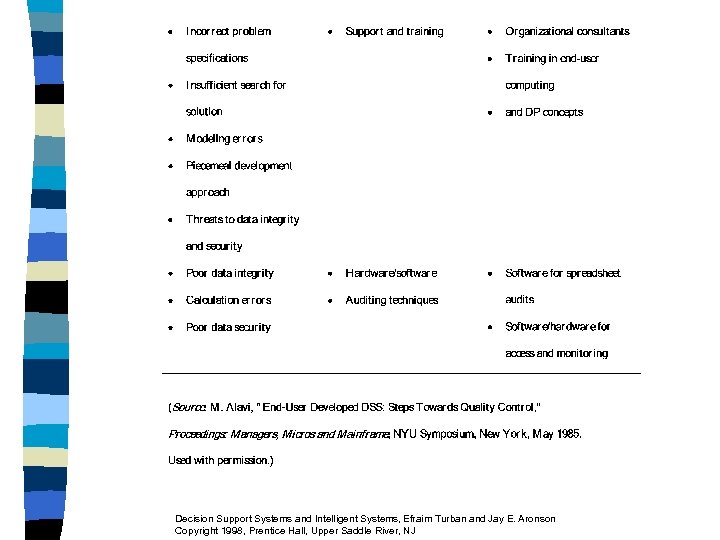
 User-Developed DSS Risks 1. Poor Quality 2. Quality Risks – Substandard or inappropriate tools and facilities – Development process risks – Data management risks 3. Increased Security Risks 4. Problems from Lack of Documentation and Maintenance Procedures Decision Support Systems and Intelligent Systems, Efraim Turban and Jay E. Aronson Copyright 1998, Prentice Hall, Upper Saddle River, NJ
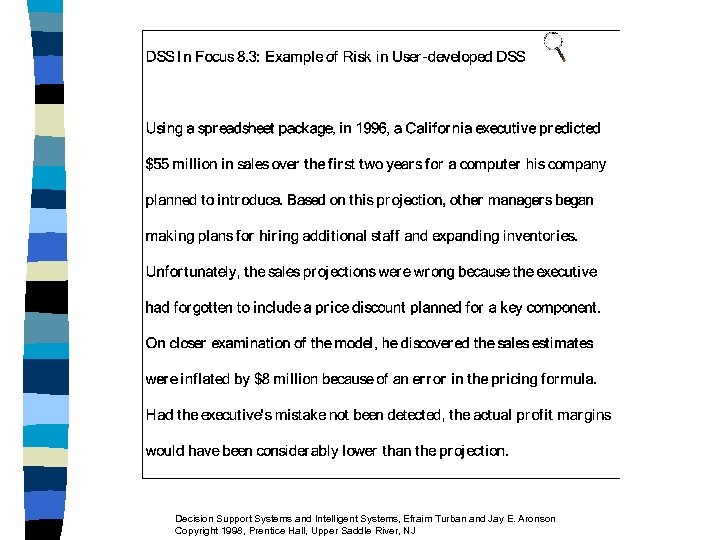 Decision Support Systems and Intelligent Systems, Efraim Turban and Jay E. Aronson Copyright 1998, Prentice Hall, Upper Saddle River, NJ
 Issues in Reducing End. User Computing Risks n n n Error detection Use of auditing techniques Determine the proper amount of controls Investigate the reasons for the errors Solutions Decision Support Systems and Intelligent Systems, Efraim Turban and Jay E. Aronson Copyright 1998, Prentice Hall, Upper Saddle River, NJ
 8. 9 DSS Technology Levels and Tools n Three Levels of DSS Technology – Specific DSS [the application] – DSS Integrated Tools (generators) [Excel] – DSS Primary Tools [programming languages] n Plus – DSS Integrated Tools n n Now all with Web Hooks and easy GUI interfaces Relationships Among the Three Levels (Figure 8. 6) Decision Support Systems and Intelligent Systems, Efraim Turban and Jay E. Aronson Copyright 1998, Prentice Hall, Upper Saddle River, NJ
 8. 10 Selection of DSS Development Tools n Questions a) b) c) d) n Which tool(s) to use? Which hardware? Which operating system? Which network(s) to run it on? Options – Mainframe DSS Software – PC DSS Software – (Unix) Workstation Software Decision Support Systems and Intelligent Systems, Efraim Turban and Jay E. Aronson Copyright 1998, Prentice Hall, Upper Saddle River, NJ
 Complexity of the Software Selection Process 1. DSS information requirement and outputs are not completely known 2. Hundreds of software packages 3. Software packages evolve very rapidly 4. Frequent price changes 5. Several people involved Decision Support Systems and Intelligent Systems, Efraim Turban and Jay E. Aronson Copyright 1998, Prentice Hall, Upper Saddle River, NJ
 6. One language for several DSS? Tool requirements may change 7. Dozens of criteria, some intangible, some conflict 8. Technical, functional, end-user, and managerial issues 9. Published evaluations are subjective and superficial 10. Trade off between open and closed environments Decision Support Systems and Intelligent Systems, Efraim Turban and Jay E. Aronson Copyright 1998, Prentice Hall, Upper Saddle River, NJ
 DSS Generator Selection n Some DSS generators are better for certain types of applications than others Decision Support Systems and Intelligent Systems, Efraim Turban and Jay E. Aronson Copyright 1998, Prentice Hall, Upper Saddle River, NJ
 8. 11 Developing DSS n n n Putting the System Together Development tools and generators Use of highly automated tools Use of prefabricated pieces Both increase the builder’s productivity Decision Support Systems and Intelligent Systems, Efraim Turban and Jay E. Aronson Copyright 1998, Prentice Hall, Upper Saddle River, NJ
 DSS Development System Includes n n n Request (query) handler System analysis and design facility Dialog management system Report generator Graphics generator Source code manager Decision Support Systems and Intelligent Systems, Efraim Turban and Jay E. Aronson Copyright 1998, Prentice Hall, Upper Saddle River, NJ
 n n n n Model base management system Knowledge management system Object-oriented tools Standard statistical and management science tools Special modeling tools Programming languages Document imaging tools Decision Support Systems and Intelligent Systems, Efraim Turban and Jay E. Aronson Copyright 1998, Prentice Hall, Upper Saddle River, NJ
 DSS Development System Components n n n Some may be integrated into a DSS generator Others may be added as needed Components used to build a new DSS Core of the system includes a development language or a DSS generator Construction is done by combining programming modules Windows environment handles the Decision Support Systems and Intelligent Systems, Efraim Turban and Jay E. Aronson Copyright 1998, Prentice Hall, Upper Saddle River, NJ
 8. 12 DSS Research Directions* The DSS of the Future 1. Intelligent DSS can be proactive 2. Future DSS should be creative 3. DSS will become decision-paced 4. Larger role for management science, cognitive psychology, behavioral theory, information economics, computer science, and political science 5. Latest advances in computer technology improving DSS * Source: Based on J. J. Elam, J. C. Henderson, P. G. W. Keen and B. Konsynski, A Vision for Decision Support Systems, Special Report, University of Texas, Austin, TX, 1986. Decision Support Systems and Intelligent Systems, Efraim Turban and Jay E. Aronson Copyright 1998, Prentice Hall, Upper Saddle River, NJ
 6. Improved DSS apply to more unstructured problems 7. Must be able to create alternatives independently 8. Much longer-range perspective of DSS research 9. Research on interactions between individuals and groups 10. More examination of the human component of DSS: learning and empowerment. 11. The integration of DSS with other systems (ES, CBIS) 12. Expansion of the model management concept Decision Support Systems and Intelligent Systems, Efraim Turban and Jay E. Aronson Copyright 1998, Prentice Hall, Upper Saddle River, NJ
 13. Enhancement of DSS theory (decision quality measurement, learning, and effectiveness) 14. New theories for of organizational decision making and group decision making 15. Enhancement of DSS applications with values, ethics, and aesthetics 16. Major research thrust in human-machine interfaces and their impacts on creativity and learning 17. Exploration to find the appropriate architectures for decision makers to use ES 18. Organizational impacts of DSS Decision Support Systems and Intelligent Systems, Efraim Turban and Jay E. Aronson Copyright 1998, Prentice Hall, Upper Saddle River, NJ
 Extensive DSS Research 1. Broader view of decision making 2. Behavioral research 3. Research based on team theory 4. Stimulus-based DSS 5. Qualitative DSS 6. Usefulness of DSS 7. DSS and the Internet 8. Profile of DSS Research Decision Support Systems and Intelligent Systems, Efraim Turban and Jay E. Aronson Copyright 1998, Prentice Hall, Upper Saddle River, NJ
 8. 13 The DSS of the Future DSS Trends 1. PC-based DSS continues to grow 2. For institutionalized DSS: trend is toward distributed DSS 3. For pooled interdependent decision support, group DSS 4. Decision support system products are incorporating artificial intelligence: intelligent DSS 5. Focused versions of DSS toward specific sets of users or applications (EIS, GSS) 6. DSS groups moving into mainstream support 7. Continued development of user-friendly capabilities 8. The DSS software market continues to develop and mature – Sprague and Watson [1996] Decision Support Systems and Intelligent Systems, Efraim Turban and Jay E. Aronson Copyright 1998, Prentice Hall, Upper Saddle River, NJ
 Challenges of DSS n n Integrated Architecture Connectivity Document Data Management More Intelligence – Sprague and Watson [1996] Decision Support Systems and Intelligent Systems, Efraim Turban and Jay E. Aronson Copyright 1998, Prentice Hall, Upper Saddle River, NJ
 Highlights / Summary n n n n n DSS are complex and their construction can be DSS Technologies Iterative (prototyping) approach DSS teams or individuals. End user computing allows decision makers to build their own DSS Most DSS are constructed with DSS development generators or with nonintegrated 4 GL development tools Many DSS are also constructed in integrated software suites on personal computers. Tool and generator selection can be tricky. DSS research continues Decision Support Systems and Intelligent Systems, Efraim Turban and Jay E. Aronson Copyright 1998, Prentice Hall, Upper Saddle River, NJ
 Debate the issues (advantages and risks) in end-user DSS development. Use examples from the literature to back up your arguments. Decision Support Systems and Intelligent Systems, Efraim Turban and Jay E. Aronson Copyright 1998, Prentice Hall, Upper Saddle River, NJ
 Internet Assignments 1. Explore software vendors. Find vendors, download demos, identify user groups, and prepare a report. Group 1 --Spreadsheet and modeling tools Group 2 --Database related tools Group 3 --Graphics and user interface tools. Decision Support Systems and Intelligent Systems, Efraim Turban and Jay E. Aronson Copyright 1998, Prentice Hall, Upper Saddle River, NJ
 Questions for the Opening Vignette 1. Describe the steps in Figure 8. 1 that you can identify for the JHHS Vignette. 2. Why was a quantitative cost/benefit analysis not done? 3. Comment on the various DSS tools and generators. Can you classify them? 4. Why was the high level of trust and credibility in the integrity of the provided information important? 5. Discuss the benefits of the DSS. Decision Support Systems and Intelligent Systems, Efraim Turban and Jay E. Aronson Copyright 1998, Prentice Hall, Upper Saddle River, NJ
 CASE APPLICATION 8. 1: Wesleyan University--DSS for Student Financial Aid Questions 1. Why was there a need for a DSS? 2. What kind of generators and tools were used during construction? 3. Identify some DSS capabilities that were used. Decision Support Systems and Intelligent Systems, Efraim Turban and Jay E. Aronson Copyright 1998, Prentice Hall, Upper Saddle River, NJ
 APPENDIX 8 -A: Prototyping n Process of building a "quick and dirty" version of an information system – Throwaway – Evolutionary Decision Support Systems and Intelligent Systems, Efraim Turban and Jay E. Aronson Copyright 1998, Prentice Hall, Upper Saddle River, NJ
 Evolutionary Steps 1. Identify user's information and operating requirements in a "quick and dirty" manner. 2. Develop a working prototype that performs only the most important function (e. g. , using a sample database). 3. Test and evaluate (done by user and builder). 4. Redefine information needs and improve the system. n Repeat the last two steps several times Decision Support Systems and Intelligent Systems, Efraim Turban and Jay E. Aronson Copyright 1998, Prentice Hall, Upper Saddle River, NJ
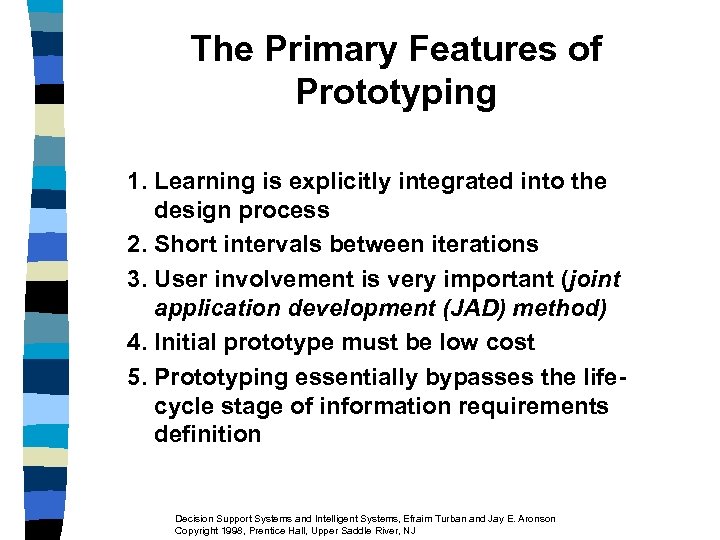 The Primary Features of Prototyping 1. Learning is explicitly integrated into the design process 2. Short intervals between iterations 3. User involvement is very important (joint application development (JAD) method) 4. Initial prototype must be low cost 5. Prototyping essentially bypasses the lifecycle stage of information requirements definition Decision Support Systems and Intelligent Systems, Efraim Turban and Jay E. Aronson Copyright 1998, Prentice Hall, Upper Saddle River, NJ
 Decision Support Systems and Intelligent Systems, Efraim Turban and Jay E. Aronson Copyright 1998, Prentice Hall, Upper Saddle River, NJ
 Decision Support Systems and Intelligent Systems, Efraim Turban and Jay E. Aronson Copyright 1998, Prentice Hall, Upper Saddle River, NJ