


 Скачать презентацию Chapter 6 Systems Development Mc Graw-Hill Companies
a1f7e3ac1a4406aa995b7c3d67b03b8d.ppt
- Количество слайдов: 59
 Chapter 6 Systems Development © Mc. Graw-Hill Companies, Inc. , Mc. Graw-Hill/Irwin
 STUDENT LEARNING OUTCOMES 1. 2. 3. Define the traditional systems development life cycle (SDLC) and describe the 7 major phases within it. Compare and contrast the various component-based development methodologies. Describe the selfsourcing process as an alternative to the traditional SDLC. © Mc. Graw-Hill Companies, Inc. , Mc. Graw-Hill/Irwin
 STUDENT LEARNING OUTCOMES 4. 5. Discuss the importance of prototyping and prototyping within any systems development methodology Describe the outsourcing environment and how outsourcing works. © Mc. Graw-Hill Companies, Inc. , Mc. Graw-Hill/Irwin
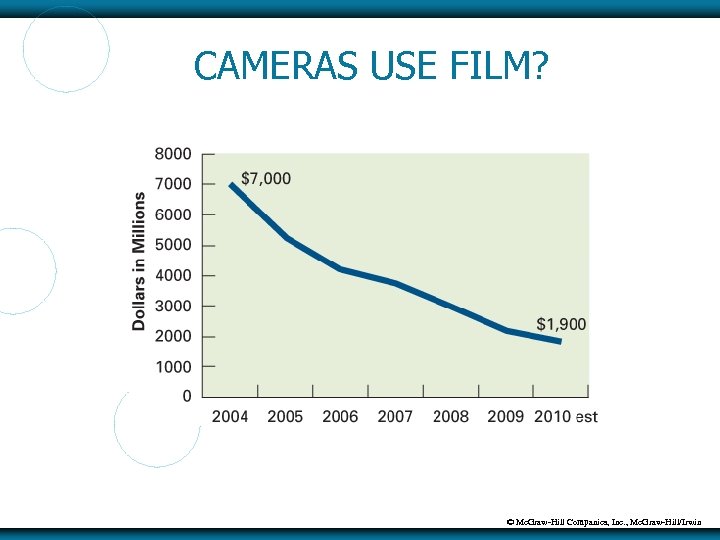 CAMERAS USE FILM? © Mc. Graw-Hill Companies, Inc. , Mc. Graw-Hill/Irwin
 CAMERAS USE FILM? The preceding slide – Kodak 35 mm film sales dropped from $7 billion in 2004 to an estimated $1. 9 billion in 2010 Many retailers no longer process 35 mm film Web sites like Snap. Fish, Photo Bucket, and Flickr are now the norm © Mc. Graw-Hill Companies, Inc. , Mc. Graw-Hill/Irwin
 CAMERAS USE FILM? 1. 2. 3. Do you own a 35 mm camera? Last time you had 35 mm film processed? Will smartphones spell the end of digital cameras? Do you know someone who owns a 35 mm camera? What do they use it for? © Mc. Graw-Hill Companies, Inc. , Mc. Graw-Hill/Irwin
 INTRODUCTION Information systems are the support structure for meeting the company’s strategies and goals New systems are created because employees request them New systems are created to obtain a competitive advantage © Mc. Graw-Hill Companies, Inc. , Mc. Graw-Hill/Irwin
 INTRODUCTION When developing a new system, you have 3 “who” choices… 1. Insourcing – IT specialists inside your organization 2. 3. Selfsourcing – do-it-yourself approach many end users take with little or no help from IT specialists Outsourcing – a third-party organization (i. e. , let someone do the work and pay them for it) © Mc. Graw-Hill Companies, Inc. , Mc. Graw-Hill/Irwin
 CHAPTER ORGANIZATION 1. Insourcing and the SDLC 2. Component-Based Development 3. Learning outcome #3 Prototyping 5. Learning outcome #2 Selfsourcing 4. Learning outcome #1 Learning outcome #4 Outsourcing Learning outcome #5 © Mc. Graw-Hill Companies, Inc. , Mc. Graw-Hill/Irwin
 INSOURCING AND THE SDLC Systems development life cycle (SDLC) - a structured step-by-step approach for developing information systems 7 distinct phases Also called a waterfall methodology, an approach in which each phase of the SDLC is followed by another, from planning through implementation © Mc. Graw-Hill Companies, Inc. , Mc. Graw-Hill/Irwin
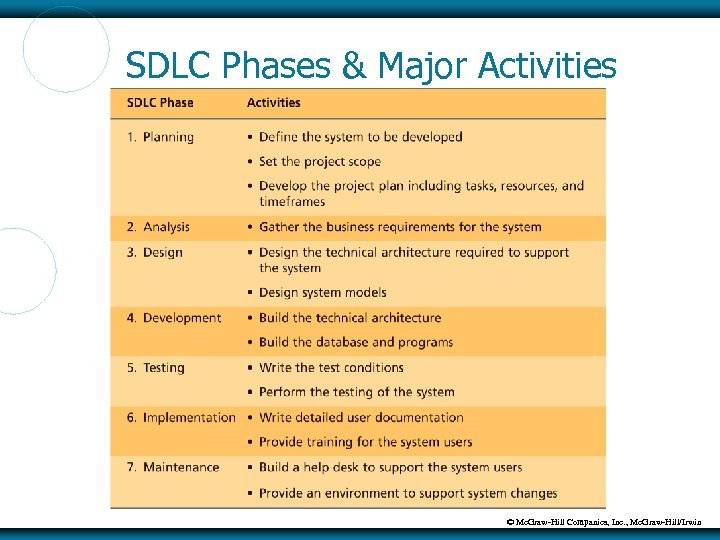 SDLC Phases & Major Activities © Mc. Graw-Hill Companies, Inc. , Mc. Graw-Hill/Irwin
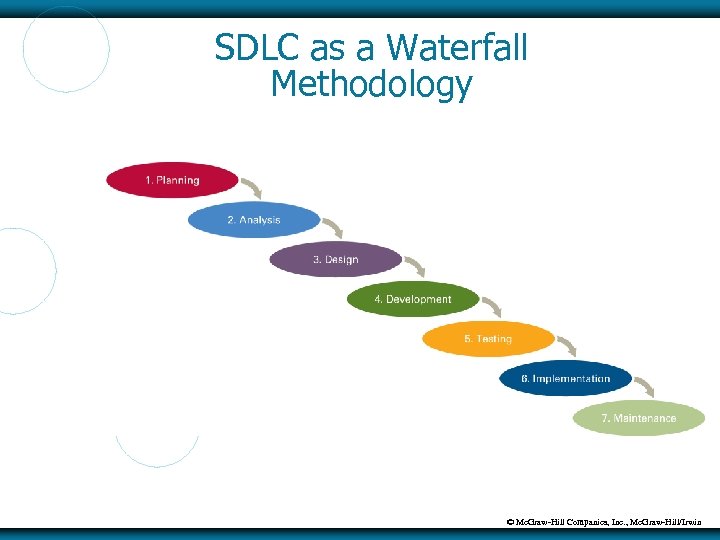 SDLC as a Waterfall Methodology © Mc. Graw-Hill Companies, Inc. , Mc. Graw-Hill/Irwin
 Phase 1: Planning phase - create a solid plan for developing your information system Three primary planning activities: 1. Define the system to be developed You can’t build every system, so you make choices based on your organization’s priorities, which may be expressed as critical success factors Critical success factor (CSF) - a factor simply critical to your organization’s success © Mc. Graw-Hill Companies, Inc. , Mc. Graw-Hill/Irwin
 Phase 1: Planning 2. Set the project scope Project scope - clearly defines the high- level system requirements Scope creep - occurs when the scope of the project increases Feature creep - occurs when developers add extra features that were not part of the initial requirements Project scope document - a written definition of the project scope and is usually no longer than a paragraph © Mc. Graw-Hill Companies, Inc. , Mc. Graw-Hill/Irwin
 Phase 1: Planning 3. Develop the project plan including tasks, resources, and timeframes Project plan - defines the what, when, and who questions of system development Project manager - an individual who is an expert in project planning and management, defines and develops the project plan and tracks the plan to ensure all key project milestones are completed on time Project milestones - represent key dates for which you need a certain group of activities performed © Mc. Graw-Hill Companies, Inc. , Mc. Graw-Hill/Irwin
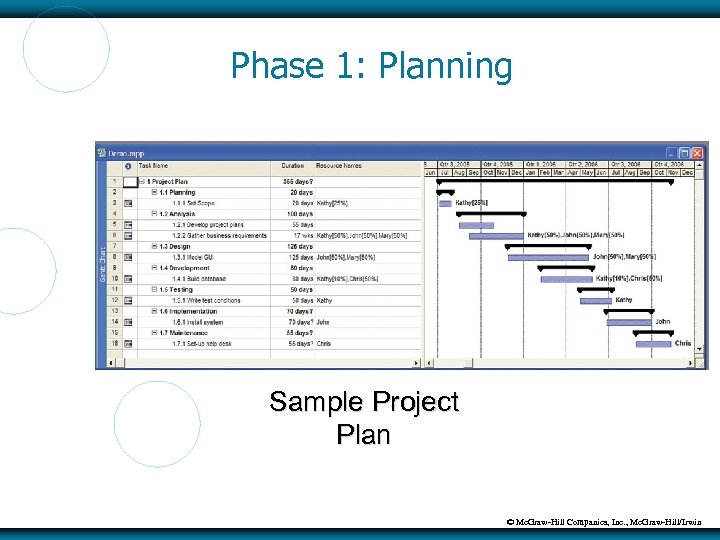 Phase 1: Planning Sample Project Plan © Mc. Graw-Hill Companies, Inc. , Mc. Graw-Hill/Irwin
 Phase 2: Analysis phase - involves end users and IT specialists working together to gather, understand, and document the business requirements for the proposed system © Mc. Graw-Hill Companies, Inc. , Mc. Graw-Hill/Irwin
 Phase 2: Analysis Two primary analysis activities: 1. Gather the business requirements Business requirements - the detailed set of knowledge worker requests that the system must meet in order to be successful Business requirements address the “why” and “what” of your development activities Joint application development (JAD) - knowledge workers and IT specialists meet, sometimes for several days, to define or review the business requirements for the system © Mc. Graw-Hill Companies, Inc. , Mc. Graw-Hill/Irwin
 Phase 2: Analysis 2. Prioritize the requirements Requirements definition document – prioritizes the business requirements and places them in a formal comprehensive document Again, you probably can’t do everything, so prioritizing is important Users sign off on this document which clearly sets the scope for the project © Mc. Graw-Hill Companies, Inc. , Mc. Graw-Hill/Irwin
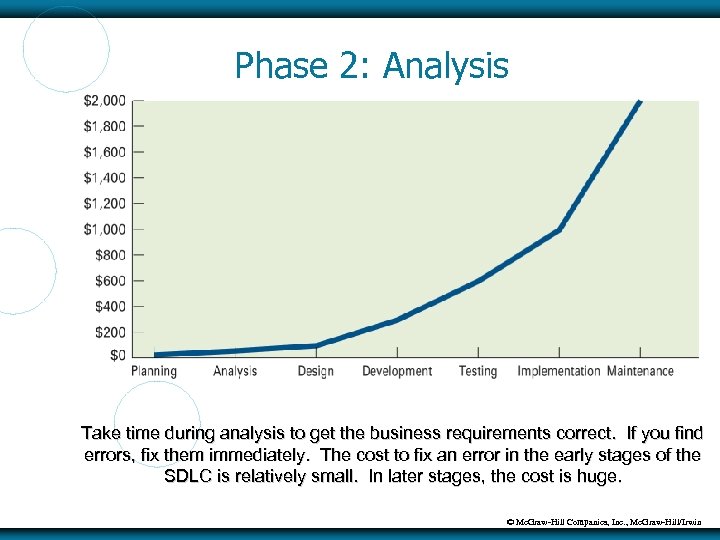 Phase 2: Analysis Take time during analysis to get the business requirements correct. If you find errors, fix them immediately. The cost to fix an error in the early stages of the SDLC is relatively small. In later stages, the cost is huge. © Mc. Graw-Hill Companies, Inc. , Mc. Graw-Hill/Irwin
 Phase 3: Design phase - build a technical blueprint of how the proposed system will work Two primary design activities: 1. Design the technical architecture Technical architecture - defines the hardware, software, and telecommunications equipment required to run the system © Mc. Graw-Hill Companies, Inc. , Mc. Graw-Hill/Irwin
 Phase 3: Design 2. Design system models This includes GUI screens that users will interface with, database designs (see XLM/C), report formats, software steps, etc Starting with design, you take on less of an active participation role and act more as a “quality control” function, ensuring that the IT people are designing a system to meet your needs © Mc. Graw-Hill Companies, Inc. , Mc. Graw-Hill/Irwin
 Phase 4: Development phase - take all of your detailed design documents from the design phase and transform them into an actual system Two primary development activities: 1. 2. Build the technical architecture Build the database and programs Both of these activities are mostly performed by IT specialists © Mc. Graw-Hill Companies, Inc. , Mc. Graw-Hill/Irwin
 Phase 5: Testing phase - verifies that the system works and meets all of the business requirements defined in the analysis phase Two primary testing activities: 1. Write the test conditions Test conditions - the detailed steps the system must perform along with the expected results of each step © Mc. Graw-Hill Companies, Inc. , Mc. Graw-Hill/Irwin
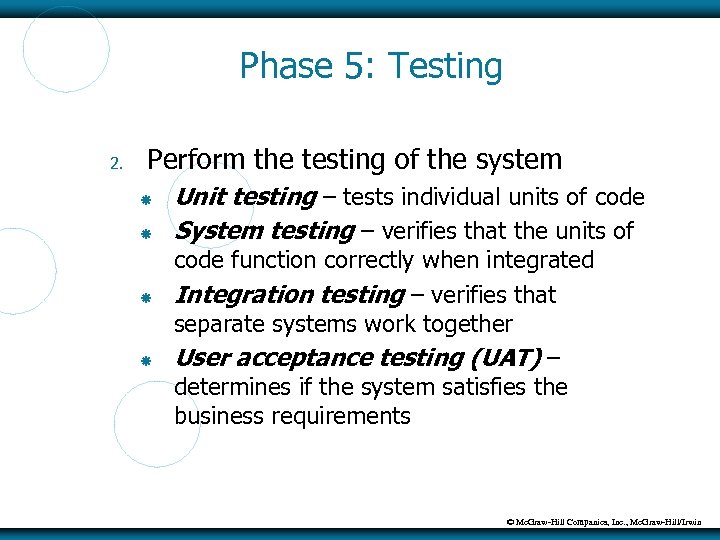 Phase 5: Testing 2. Perform the testing of the system Unit testing – tests individual units of code System testing – verifies that the units of code function correctly when integrated Integration testing – verifies that separate systems work together User acceptance testing (UAT) – determines if the system satisfies the business requirements © Mc. Graw-Hill Companies, Inc. , Mc. Graw-Hill/Irwin
 Phase 6: Implementation phase - distribute the system to all of the knowledge workers and they begin using the system to perform their everyday jobs Two primary implementation activities 1. Write detailed user documentation User documentation - highlights how to use the system © Mc. Graw-Hill Companies, Inc. , Mc. Graw-Hill/Irwin
 Phase 6: Implementation 2. Provide training for the system users Online training - runs over the Internet or off a CD-ROM Workshop training - is held in a classroom environment and lead by an instructor © Mc. Graw-Hill Companies, Inc. , Mc. Graw-Hill/Irwin
 Phase 6: Implementation Choose the right implementation method Parallel implementation – use both the old and new system simultaneously Plunge implementation – discard the old system completely and use the new Pilot implementation – start with small groups of people on the new system and gradually add more users Phased implementation – implement the new system in phases © Mc. Graw-Hill Companies, Inc. , Mc. Graw-Hill/Irwin
 Phase 7: Maintenance phase - monitor and support the new system to ensure it continues to meet the business goals Two primary maintenance activities: 1. Build a help desk to support the system users Help desk - a group of people who responds to knowledge workers’ questions 2. Provide an environment to support system changes © Mc. Graw-Hill Companies, Inc. , Mc. Graw-Hill/Irwin
 COMPONENT-BASED DEVELOPMENT The SDLC focuses only on the project at hand Component-based development (CBD) – focuses on building small self-contained blocks of code (components) that can be reused across a variety of applications 1. 2. Using already-developed components Building new components as needed © Mc. Graw-Hill Companies, Inc. , Mc. Graw-Hill/Irwin
 Component-Based Development Methodologies Rapid application development (RAD) Extreme programming (XP) Agile methodology © Mc. Graw-Hill Companies, Inc. , Mc. Graw-Hill/Irwin
 Rapid Application Development (RAD) Rapid application development (RAD) (also called rapid prototyping) - emphasizes extensive user involvement in the rapid and evolutionary construction of working prototypes of a system to accelerate systems development Prototypes are models of software The development team continually designs, develops, and tests the component prototypes until they are finished © Mc. Graw-Hill Companies, Inc. , Mc. Graw-Hill/Irwin
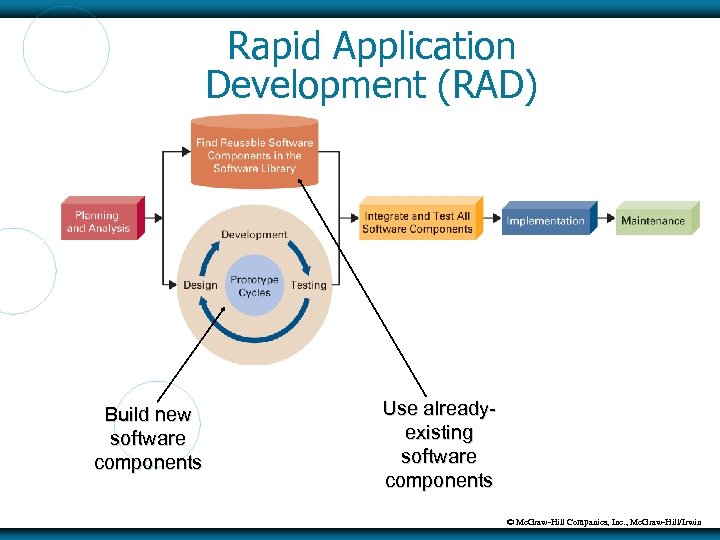 Rapid Application Development (RAD) Build new software components Use alreadyexisting software components © Mc. Graw-Hill Companies, Inc. , Mc. Graw-Hill/Irwin
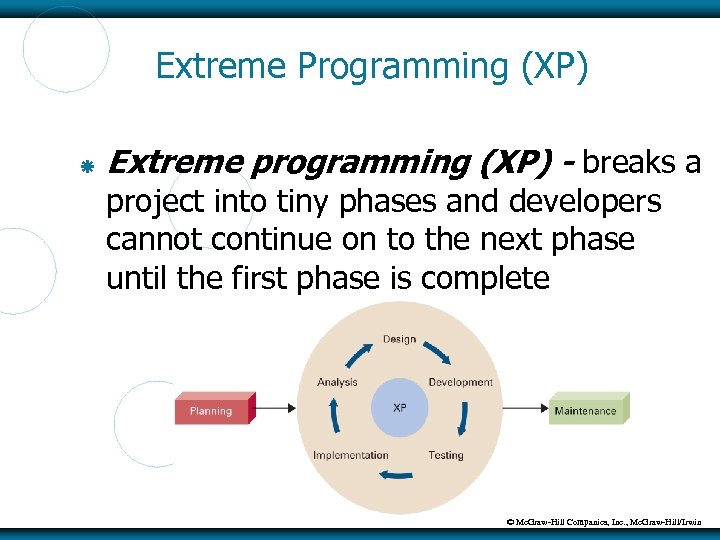 Extreme Programming (XP) Extreme programming (XP) - breaks a project into tiny phases and developers cannot continue on to the next phase until the first phase is complete © Mc. Graw-Hill Companies, Inc. , Mc. Graw-Hill/Irwin
 Agile Methodology Agile methodology - a form of XP, aims for customer satisfaction through early and continuous delivery of useful software components © Mc. Graw-Hill Companies, Inc. , Mc. Graw-Hill/Irwin
 So. A – An Architecture Perspective Service-oriented architecture (So. A) – perspective that focuses on the development, use, and reuse of small self-contained blocks of code (called services) to meet all application software needs All CBD methodologies adhere to an So. A Services are the same as components, which are the same as small selfcontained blocks of code © Mc. Graw-Hill Companies, Inc. , Mc. Graw-Hill/Irwin
 SELFSOURCING Selfsourcing (end-user development) – the development and support of IT systems by end users with little or no help from IT specialists Do-it-yourself systems development approach Can relieve IT specialists of the burden of developing many smaller systems © Mc. Graw-Hill Companies, Inc. , Mc. Graw-Hill/Irwin
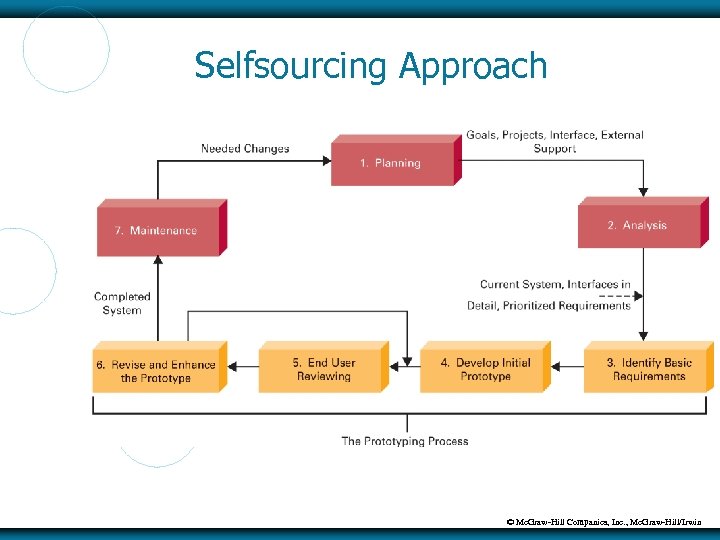
 Selfsourcing Approach Is similar to traditional SDLC Big exception is that design, development, testing, and implementation are replaced by the process of prototyping Prototyping is the process of building models, and – in this case – continually refining those models until they become the final system © Mc. Graw-Hill Companies, Inc. , Mc. Graw-Hill/Irwin
 Selfsourcing Approach © Mc. Graw-Hill Companies, Inc. , Mc. Graw-Hill/Irwin
 Selfsourcing Advantages Improves requirements determination Increases end user participation and sense of ownership Increases speed of development Reduces invisible backlog Invisible backlog – list of all systems that an organization needs to develop but never get funded because of the lack of organizational resources © Mc. Graw-Hill Companies, Inc. , Mc. Graw-Hill/Irwin
 Selfsourcing Disadvantages Inadequate end user expertise leads to inadequately developed systems Lack of organizational focus creates “privatized” IT systems Insufficient analysis of design alternatives leads to subpar IT systems Lack of documentation and external support leads to short-lived systems © Mc. Graw-Hill Companies, Inc. , Mc. Graw-Hill/Irwin
 The Right Tool for the Job End users must have development tools that: Are easy to use Support multiple platforms Offer low cost of ownership Support a wide range of data types © Mc. Graw-Hill Companies, Inc. , Mc. Graw-Hill/Irwin
 PROTOTYPING Prototype – a model of a proposed product, service, or system Prototyping - the process of building a model that demonstrates the features of a proposed product, service, or system Proof-of-concept prototype - prove the technical feasibility of a proposed system Selling prototype - used to convince people of the worth of a proposed system © Mc. Graw-Hill Companies, Inc. , Mc. Graw-Hill/Irwin
 The Prototyping Process The prototyping process involves four steps: 1. 2. 3. 4. Identify basic requirements Develop initial prototype User review Revise and enhance the prototype © Mc. Graw-Hill Companies, Inc. , Mc. Graw-Hill/Irwin
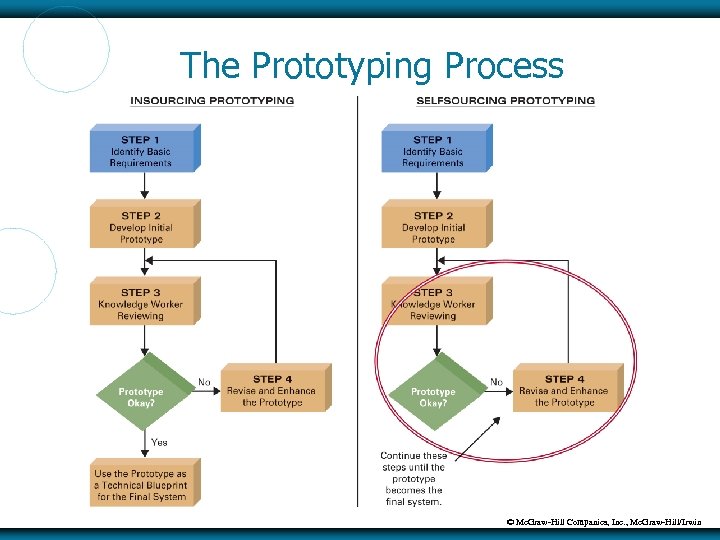 The Prototyping Process © Mc. Graw-Hill Companies, Inc. , Mc. Graw-Hill/Irwin
 Advantages of Prototyping Encourages active user participation Helps resolve discrepancies among users Gives users a feel for the final system Helps determine technical feasibility Helps sell the idea of a proposed system © Mc. Graw-Hill Companies, Inc. , Mc. Graw-Hill/Irwin
 Disadvantages of Prototyping Leads people to believe the final system will follow Gives no indication of performance under operational conditions Leads the project team to forgo proper testing and documentation © Mc. Graw-Hill Companies, Inc. , Mc. Graw-Hill/Irwin
 OUTSOURCING Outsourcing – the delegation of specified work to a third party for a specified length of time, at a specified cost, and at a specified level of service The third “who” option of systems development, after insourcing and selfsourcing © Mc. Graw-Hill Companies, Inc. , Mc. Graw-Hill/Irwin
 OUTSOURCING The main reasons behind the rapid growth of the outsourcing industry include the following: Globalization The Internet Growing economy and low unemployment rate Technology Deregulation © Mc. Graw-Hill Companies, Inc. , Mc. Graw-Hill/Irwin
 Outsourcing Options IT outsourcing for software development can take one of four forms: 1. 2. 3. 4. Purchase existing software and pay the publisher to make certain modifications Purchase existing software and pay the publisher for the right to make modifications yourself Outsource the development of an entirely new and unique system for which no software exists © Mc. Graw-Hill Companies, Inc. , Mc. Graw-Hill/Irwin
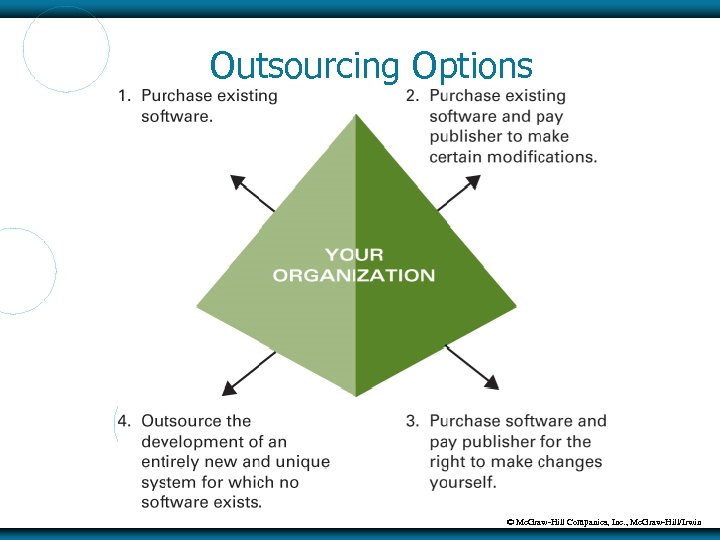 Outsourcing Options © Mc. Graw-Hill Companies, Inc. , Mc. Graw-Hill/Irwin
 Outsourcing Process Like selfsourcing, the selfsourcing process looks similar to the traditional SDLC Big exception here is that you “outsource” most of the work to another company © Mc. Graw-Hill Companies, Inc. , Mc. Graw-Hill/Irwin
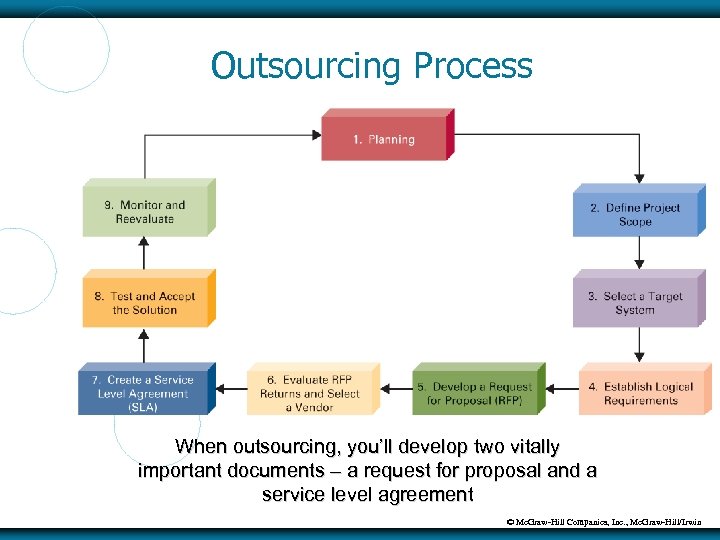 Outsourcing Process When outsourcing, you’ll develop two vitally important documents – a request for proposal and a service level agreement © Mc. Graw-Hill Companies, Inc. , Mc. Graw-Hill/Irwin
 Outsourcing – RFP Request for proposal (RFP) – formal document that describes in excruciating detail your logical requirements for a proposed system and invites outsourcing organizations to submit bids for its development In outsourcing, you must tell another organization what you want developed; you do that with an RFP Therefore, the RFP must be very detailed Some RFPs can take years to develop © Mc. Graw-Hill Companies, Inc. , Mc. Graw-Hill/Irwin
 Outsourcing – SLA Service level agreement (SLA) - formal contractually obligated agreement between two parties In outsourcing, it is the legal agreement between you and the vendor and specifically identifies what the vendor is going to do (and by when) and how much you’re going to pay Supporting SLA documents – service level specifications and service level objectives – contain very detailed numbers and metrics © Mc. Graw-Hill Companies, Inc. , Mc. Graw-Hill/Irwin
 Outsourcing Options There are three different forms of outsourcing: 1. 2. 3. Onshore outsourcing - the process of engaging another company within the same country for services Nearshore outsourcing - contracting an outsourcing arrangement with a company in a nearby country Offshore outsourcing - contracting with a company that is geographically far away © Mc. Graw-Hill Companies, Inc. , Mc. Graw-Hill/Irwin
 Offshore Outsourcing Primary outsourcing countries are: India China Eastern Europe (including Russia) Ireland Israel Philippines © Mc. Graw-Hill Companies, Inc. , Mc. Graw-Hill/Irwin
 The Advantages and Disadvantages of Outsourcing Advantages: Focus on unique core competencies Exploit the intellect of another organization Better predict future costs Acquire leading-edge technology Reduce costs Improve performance accountability © Mc. Graw-Hill Companies, Inc. , Mc. Graw-Hill/Irwin
 The Advantages and Disadvantages of Outsourcing Disadvantages: Reduces technical know-how for future innovation Reduces degree of control Increases vulnerability of your strategic information Increases dependency on other organizations © Mc. Graw-Hill Companies, Inc. , Mc. Graw-Hill/Irwin