


 Скачать презентацию Chapter 6 Networks IT Essentials 5 0 Presentation_ID
4925941fe6c069214a6d63eb0a90f45a.ppt
- Количество слайдов: 76
 Chapter 6: Networks IT Essentials 5. 0 Presentation_ID © 2008 Cisco Systems, Inc. All rights reserved. Cisco Confidential 1
 Chapter 6 Objectives § 6. 1 Explain the principles of networking § 6. 2 Describe types of networks § 6. 3 Describe basic networking concepts and technologies § 6. 4 Describe the physical components of a network § 6. 5 Describe LAN topologies § 6. 6 Identify Ethernet standards § 6. 7 Explain OSI and TCP/IP data models § 6. 8 Describe how to configure a NIC and connect to a network § 6. 9 Identify names, purposes, and characteristics of other technologies used to establish connectivity to the Internet § 6. 10 Identify and apply common preventive maintenance techniques used for networks § 6. 11 Troubleshoot a network Presentation_ID © 2008 Cisco Systems, Inc. All rights reserved. Cisco Confidential 2
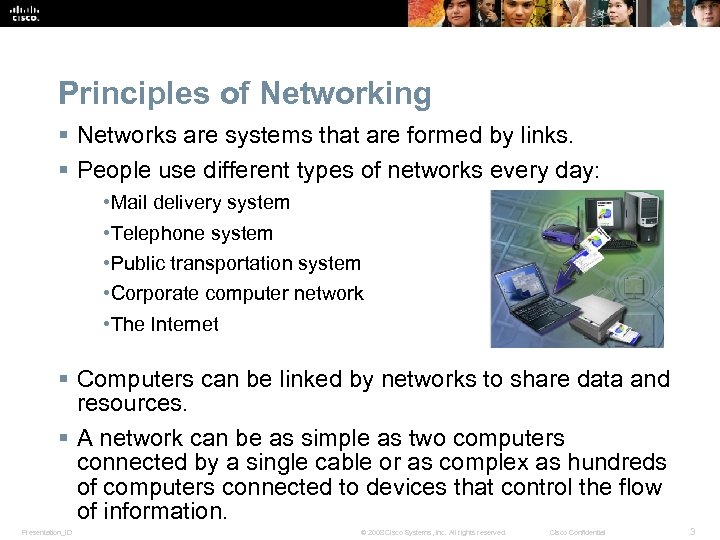 Principles of Networking § Networks are systems that are formed by links. § People use different types of networks every day: • Mail delivery system • Telephone system • Public transportation system • Corporate computer network • The Internet § Computers can be linked by networks to share data and resources. § A network can be as simple as two computers connected by a single cable or as complex as hundreds of computers connected to devices that control the flow of information. Presentation_ID © 2008 Cisco Systems, Inc. All rights reserved. Cisco Confidential 3
 Computer Networks § A computer data network is a collection of hosts connected by networking devices such as computers, printers, scanners, smartphones, and file and print servers. § Resources shared across networks include different types of services, storage devices, and applications. § Network devices link together using a variety of connections: • Copper cabling • Fiber-optic cabling • Wireless connection § Benefits from networking include: • Fewer peripherals needed • Increased communication capabilities • Avoid file duplication and corruption • Lower cost licensing • Centralized administration • Conservation of resources Presentation_ID © 2008 Cisco Systems, Inc. All rights reserved. Cisco Confidential 4
 Types of Networks § LAN (Local Area Network): A group of interconnected computers under one administrative control group that governs the security and access control policies that are in force on the network. § WLAN (Wireless Local Area Network): A group of wireless devices that connect to access points within a specified area. Access points are typically connected to the network using copper cabling. § PAN (Personal Area Network): Network that connects devices, such as mice, keyboards, printers, smartphones, and tablets within the range of an individual person. PANs are most often connected with Bluetooth technology. Presentation_ID © 2008 Cisco Systems, Inc. All rights reserved. Cisco Confidential 5
 Types of Networks § MAN (Metropolitan Area Network): Network that spans across a large campus or a city. Consisting of various buildings interconnected through wireless or fiber optic backbones. § WAN (Wide Area Network): Connections of multiple smaller networks such as LANs that are in geographically separated locations. The most common example of a WAN is the Internet. Presentation_ID © 2008 Cisco Systems, Inc. All rights reserved. Cisco Confidential 6
 Types of Networks (Continued) § Peer-to-peer networks: Devices which are connected directly to each other without any additional networking devices between them. Each device has equivalent capabilities and responsibilities. § Client/server networks: In a client/server model, the client requests information or services from the server. The server provides the requested information or service to the client. Presentation_ID © 2008 Cisco Systems, Inc. All rights reserved. Cisco Confidential 7
 Bandwidth and Latency § Bandwidth is the amount of data that can be transmitted within a fixed time period. § Bandwidth is measured in bits per second and is usually denoted by the following: • bps - bits per second • Kbps - kilobits per second • Mbps - megabits per second • Gbps - gigabits per second § Latency is the amount of time it takes data to travel from source to destination. § Data is transmitted in one of three modes: • Simplex (Unidirectional transmission) is a single, one-way transmission. • Half-duplex allows data to flow in one direction at a time. • Full-duplex allows data to flow in both directions at the same time. Presentation_ID © 2008 Cisco Systems, Inc. All rights reserved. Cisco Confidential 8
 IP Addressing - IPV 4 § An IP address is a unique number that is used to identify a network device and is represented as a 32 -bit binary number, divided into four octets (groups of eight bits): • Example: 10111110. 01100100. 00000101. 00110110 § An IP address is also represented in a dotted decimal format. • Example: 190. 100. 5. 54 § When a host is configured with an IP address, it is entered as a dotted decimal number, such as 192. 168. 1. 5. This IP address must be unique on a network to ensure data can be sent/received. § IP Classes • Class A: Large networks, implemented by large companies and some countries • Class B: Medium-sized networks, implemented by universities • Class C: Small networks, implemented by ISP for customer subscriptions • Class D: Special use for multicasting • Class E: Used for experimental testing Presentation_ID © 2008 Cisco Systems, Inc. All rights reserved. Cisco Confidential 9
 IP Addressing – IPV 4 § Private Addresses - IETF reserved some Internet address space for private networks. § Private networks have no connection to public networks. § Private network addresses are not routed across the Internet. § Class A - 10. 0 to 10. 255 § Class B - 172. 16. 0. 0 to 172. 31. 255 § Class C - 192. 168. 0. 0 to 192. 168. 255 Presentation_ID © 2008 Cisco Systems, Inc. All rights reserved. Cisco Confidential 10
 Subnet Masks § The subnet mask is used to indicate the network and the host portion of an IP address. § The default subnet masks for three classes of IP addresses. • 255. 0. 0. 0 - Class A, which indicates that the first octet of the IPv 4 address is the network portion. • 255. 0. 0 - Class B, which indicates that the first two octets of the IPv 4 address is the network portion. • 255. 0 - Class C, which indicates that the first three octets of the IPv 4 address is the network portion. Presentation_ID © 2008 Cisco Systems, Inc. All rights reserved. Cisco Confidential 11
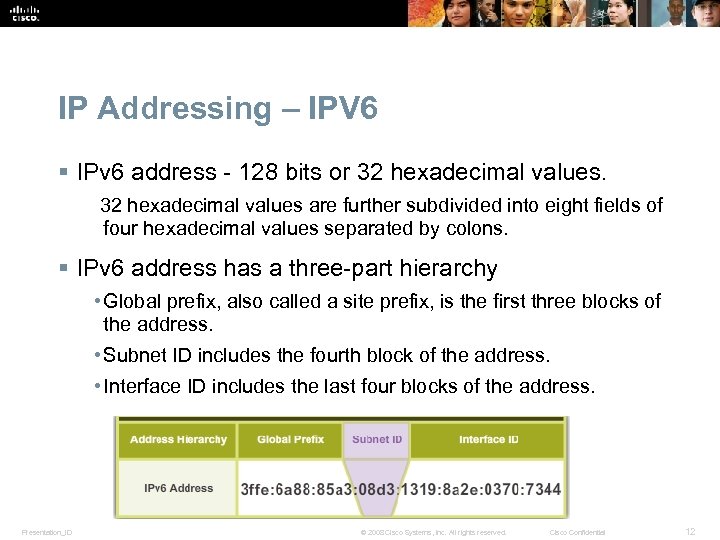 IP Addressing – IPV 6 § IPv 6 address - 128 bits or 32 hexadecimal values are further subdivided into eight fields of four hexadecimal values separated by colons. § IPv 6 address has a three-part hierarchy • Global prefix, also called a site prefix, is the first three blocks of the address. • Subnet ID includes the fourth block of the address. • Interface ID includes the last four blocks of the address. Presentation_ID © 2008 Cisco Systems, Inc. All rights reserved. Cisco Confidential 12
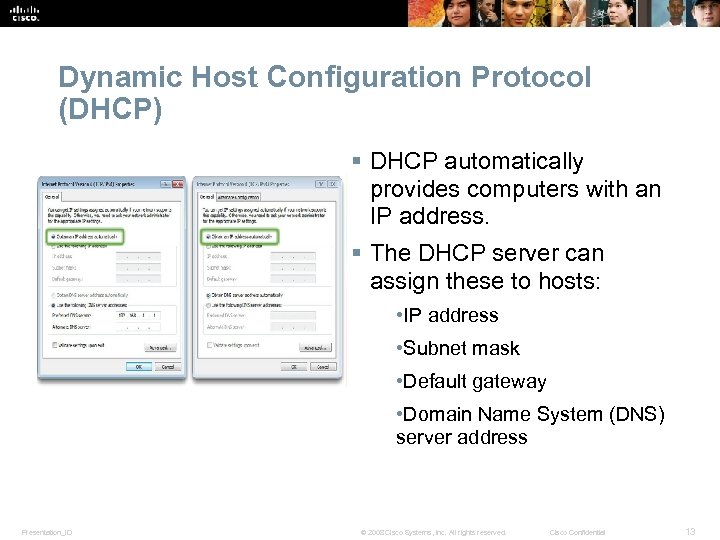 Dynamic Host Configuration Protocol (DHCP) § DHCP automatically provides computers with an IP address. § The DHCP server can assign these to hosts: • IP address • Subnet mask • Default gateway • Domain Name System (DNS) server address Presentation_ID © 2008 Cisco Systems, Inc. All rights reserved. Cisco Confidential 13
 Internet Control Message Protocol (ICMP) § Internet Control Message Protocol (ICMP) is used by devices on a network to send control and error messages to computers and servers. § PING (Packet Internet Groper) is a simple command line utility used to test connections between computers. • Used to determine whether a specific IP address is accessible. • Used with either the hostname or the IP address. • Works by sending an ICMP echo request to a destination computer. • Receiving device sends back an ICMP echo reply message. § Four ICMP echo requests (pings) are sent to the destination computer to determine the reliability and reachability of the destination computer. Presentation_ID © 2008 Cisco Systems, Inc. All rights reserved. Cisco Confidential 14
 Internet Protocols § A protocol is a set of rules. Internet protocols govern communication within and between computers on a network. § Many protocols consist of a suite (or group) of protocols stacked in layers. • Devices and computers connected to the Internet use a protocol suite called TCP/IP to communicate with each other. § The main functions of protocols: • Identifying errors • Compressing data • Deciding how data is to be sent • Addressing data • Deciding how to announce sent and received data • The information is transmitted most often via two protocols, TCP and UDP. Presentation_ID © 2008 Cisco Systems, Inc. All rights reserved. Cisco Confidential 15
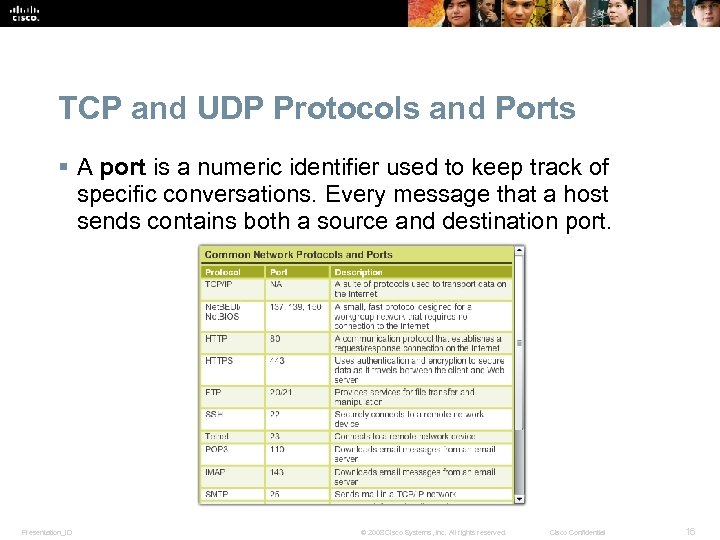 TCP and UDP Protocols and Ports § A port is a numeric identifier used to keep track of specific conversations. Every message that a host sends contains both a source and destination port. Presentation_ID © 2008 Cisco Systems, Inc. All rights reserved. Cisco Confidential 16
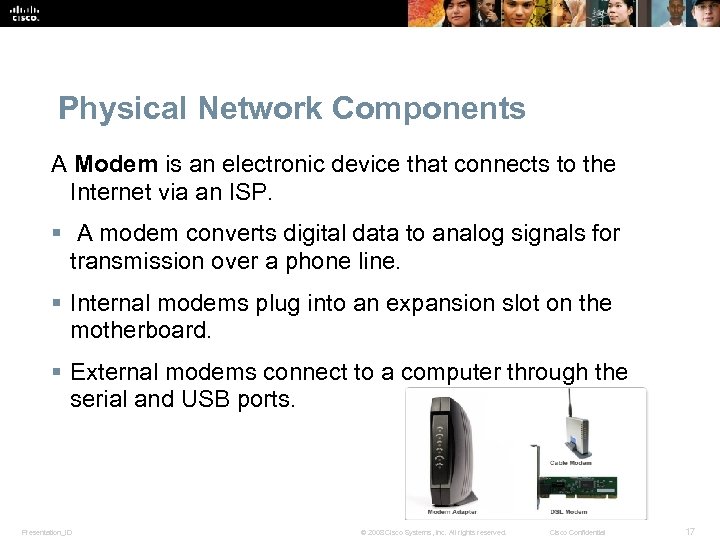 Physical Network Components A Modem is an electronic device that connects to the Internet via an ISP. § A modem converts digital data to analog signals for transmission over a phone line. § Internal modems plug into an expansion slot on the motherboard. § External modems connect to a computer through the serial and USB ports. Presentation_ID © 2008 Cisco Systems, Inc. All rights reserved. Cisco Confidential 17
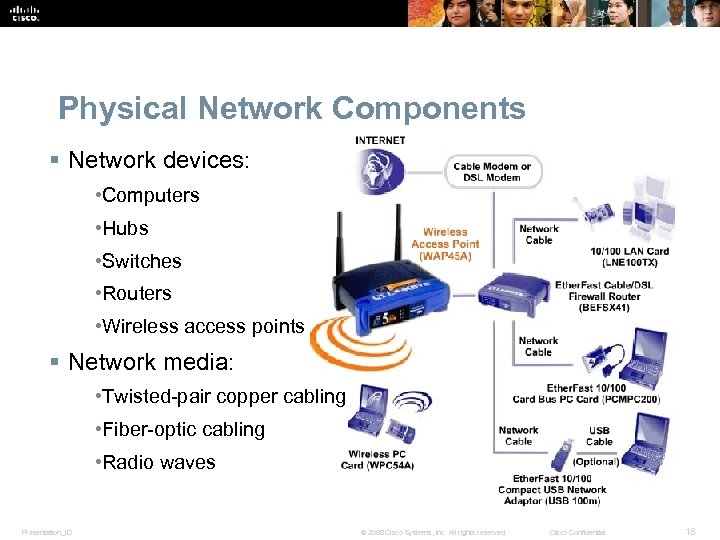 Physical Network Components § Network devices: • Computers • Hubs • Switches • Routers • Wireless access points § Network media: • Twisted-pair copper cabling • Fiber-optic cabling • Radio waves Presentation_ID © 2008 Cisco Systems, Inc. All rights reserved. Cisco Confidential 18
 Network Devices § Hub • Extend the range of a signal by receiving then regenerating it and sending it out all other ports. • Allow for collisions on the network segment and are often not a good solution. • Also called concentrators because they serve as a central connection point for a LAN. § Bridges and Switches • A bridge has the intelligence to determine if an incoming frame is to be sent to a different segment, or dropped. A bridge has two ports. • A switch (multiport bridge) has several ports and refers to a table of MAC addresses to determine which port to use to forward the frame. • Power over Ethernet (Po. E) • Po. E switch transfers small amounts of DC current over Ethernet cable, along with data, to power Po. E devices such as Wi-Fi access points. Presentation_ID © 2008 Cisco Systems, Inc. All rights reserved. Cisco Confidential 19
 Network Devices (Continued) § Routers • Devices that connect entire networks to each other. They use IP addresses to forward packets to other networks. • A router can be a computer with special network software installed or can be a device built by network equipment manufacturers. • Routers contain tables of IP addresses along with optimal routes to other networks. § Wireless Access Points (WAP) • Provide network access to wireless devices such as laptops and PDAs. • Use radio waves to communicate with radios in computers, PDAs, and other wireless access points. • Have limited range of coverage. Presentation_ID © 2008 Cisco Systems, Inc. All rights reserved. Cisco Confidential 20
 Network Devices (Continued) § Multipurpose Devices • Perform more than one function. • More convenient to purchase and configure just one device. • Combines the functions of a switch, a router and a wireless access point into one device. • The Linksys E 2500 is an example of a multipurpose device. Presentation_ID © 2008 Cisco Systems, Inc. All rights reserved. Cisco Confidential 21
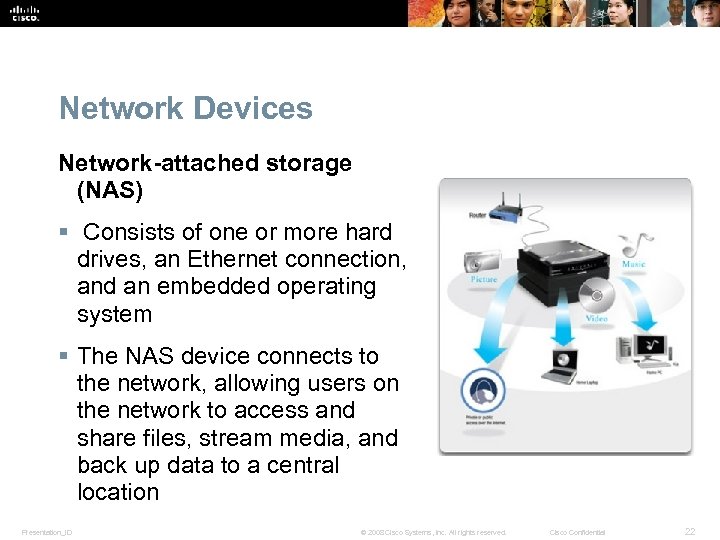 Network Devices Network-attached storage (NAS) § Consists of one or more hard drives, an Ethernet connection, and an embedded operating system § The NAS device connects to the network, allowing users on the network to access and share files, stream media, and back up data to a central location Presentation_ID © 2008 Cisco Systems, Inc. All rights reserved. Cisco Confidential 22
 Network Devices § Vo. IP phones - carry telephone calls over the data networks and Internet. § Hardware firewalls - use various techniques for determining what is permitted or denied access to a network segment. § Internet appliance – web TV, game consoles, Blu-ray players etc. § Purchasing Authentic Networking Devices - Computer and network problems can be related to counterfeit components. Presentation_ID © 2008 Cisco Systems, Inc. All rights reserved. Cisco Confidential 23
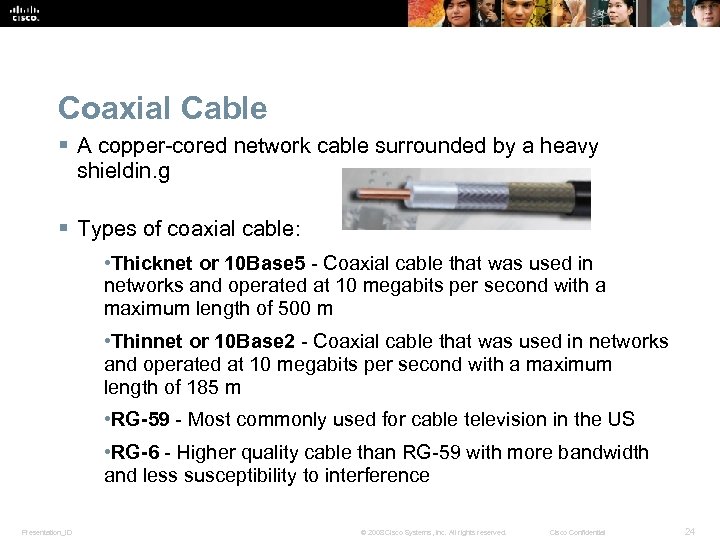 Coaxial Cable § A copper-cored network cable surrounded by a heavy shieldin. g § Types of coaxial cable: • Thicknet or 10 Base 5 - Coaxial cable that was used in networks and operated at 10 megabits per second with a maximum length of 500 m • Thinnet or 10 Base 2 - Coaxial cable that was used in networks and operated at 10 megabits per second with a maximum length of 185 m • RG-59 - Most commonly used for cable television in the US • RG-6 - Higher quality cable than RG-59 with more bandwidth and less susceptibility to interference Presentation_ID © 2008 Cisco Systems, Inc. All rights reserved. Cisco Confidential 24
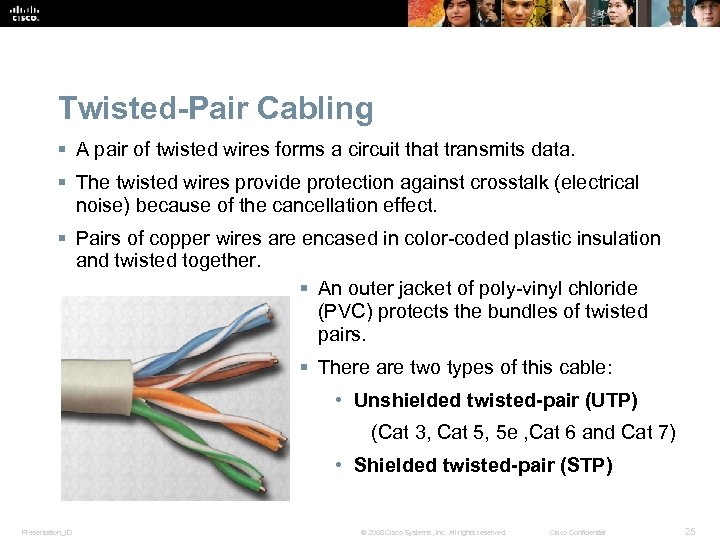 Twisted-Pair Cabling § A pair of twisted wires forms a circuit that transmits data. § The twisted wires provide protection against crosstalk (electrical noise) because of the cancellation effect. § Pairs of copper wires are encased in color-coded plastic insulation and twisted together. § An outer jacket of poly-vinyl chloride (PVC) protects the bundles of twisted pairs. § There are two types of this cable: • Unshielded twisted-pair (UTP) (Cat 3, Cat 5, 5 e , Cat 6 and Cat 7) • Shielded twisted-pair (STP) Presentation_ID © 2008 Cisco Systems, Inc. All rights reserved. Cisco Confidential 25
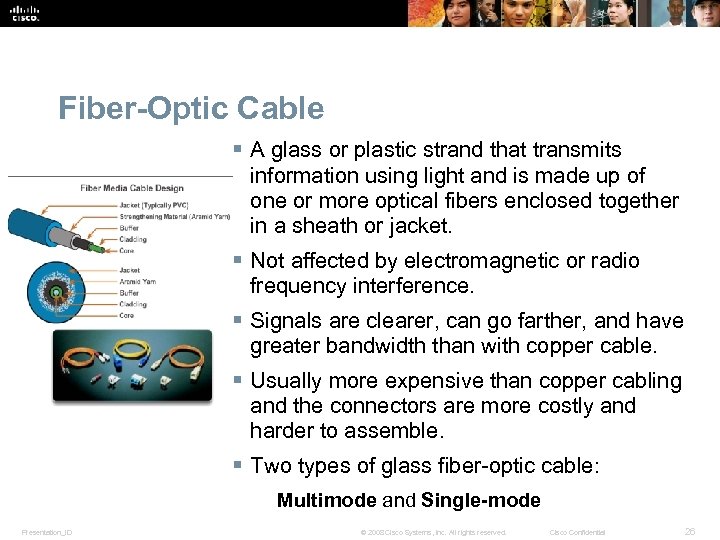 Fiber-Optic Cable § A glass or plastic strand that transmits information using light and is made up of one or more optical fibers enclosed together in a sheath or jacket. § Not affected by electromagnetic or radio frequency interference. § Signals are clearer, can go farther, and have greater bandwidth than with copper cable. § Usually more expensive than copper cabling and the connectors are more costly and harder to assemble. § Two types of glass fiber-optic cable: Multimode and Single-mode Presentation_ID © 2008 Cisco Systems, Inc. All rights reserved. Cisco Confidential 26
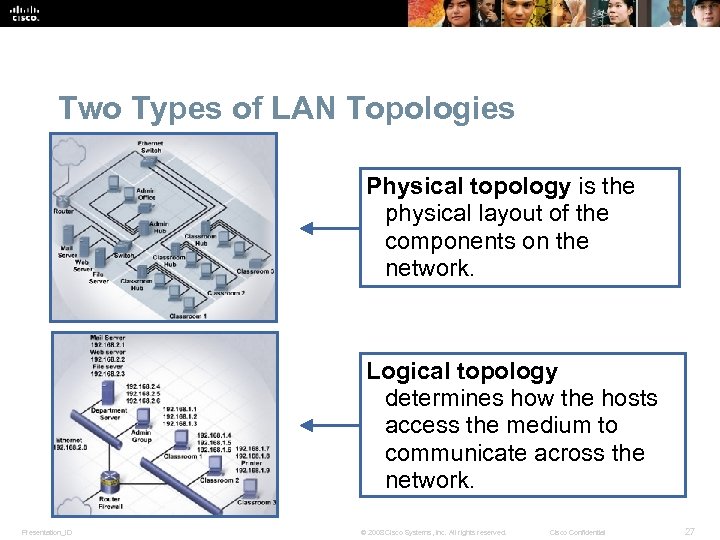 Two Types of LAN Topologies Physical topology is the physical layout of the components on the network. Logical topology determines how the hosts access the medium to communicate across the network. Presentation_ID © 2008 Cisco Systems, Inc. All rights reserved. Cisco Confidential 27
 Logical Topologies § The two most common types of logical topologies are broadcast and token passing. • Broadcast topology- A host broadcasts a message to all hosts on the same network segment. There is no order that hosts must follow to transmit data. Messages are sent on a First In, First Out (FIFO). Ethernet is based on this topology. • Token passing controls network access by passing an electronic token sequentially to each host. When a host receives the token, it can send data on the network. If the host has no data to send, it passes the token to the next host and the process repeats itself. Presentation_ID © 2008 Cisco Systems, Inc. All rights reserved. Cisco Confidential 28
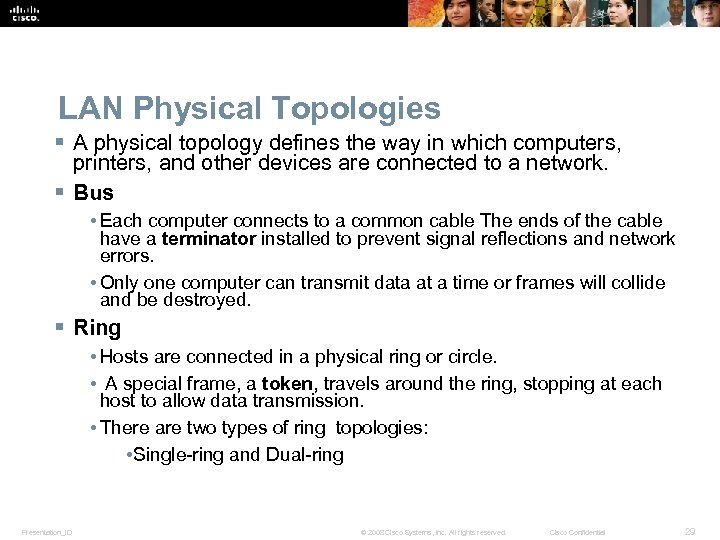 LAN Physical Topologies § A physical topology defines the way in which computers, printers, and other devices are connected to a network. § Bus • Each computer connects to a common cable The ends of the cable have a terminator installed to prevent signal reflections and network errors. • Only one computer can transmit data at a time or frames will collide and be destroyed. § Ring • Hosts are connected in a physical ring or circle. • A special frame, a token, travels around the ring, stopping at each host to allow data transmission. • There are two types of ring topologies: • Single-ring and Dual-ring Presentation_ID © 2008 Cisco Systems, Inc. All rights reserved. Cisco Confidential 29
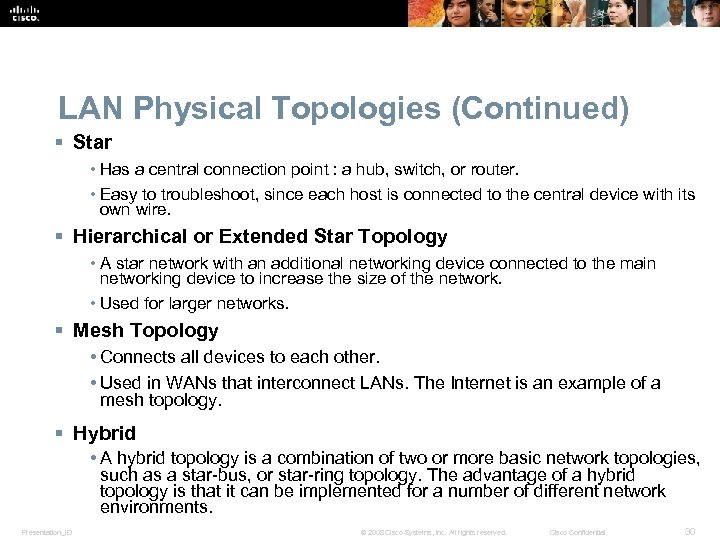 LAN Physical Topologies (Continued) § Star • Has a central connection point : a hub, switch, or router. • Easy to troubleshoot, since each host is connected to the central device with its own wire. § Hierarchical or Extended Star Topology • A star network with an additional networking device connected to the main networking device to increase the size of the network. • Used for larger networks. § Mesh Topology • Connects all devices to each other. • Used in WANs that interconnect LANs. The Internet is an example of a mesh topology. § Hybrid • A hybrid topology is a combination of two or more basic network topologies, such as a star-bus, or star-ring topology. The advantage of a hybrid topology is that it can be implemented for a number of different network environments. Presentation_ID © 2008 Cisco Systems, Inc. All rights reserved. Cisco Confidential 30
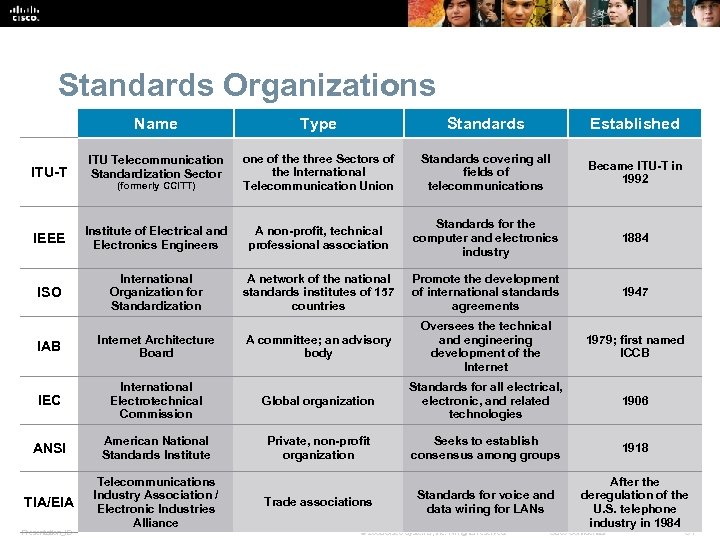 Standards Organizations Name Type Standards Established ITU Telecommunication Standardization Sector (formerly CCITT) one of the three Sectors of the International Telecommunication Union Standards covering all fields of telecommunications Became ITU-T in 1992 IEEE Institute of Electrical and Electronics Engineers A non-profit, technical professional association Standards for the computer and electronics industry 1884 ISO International Organization for Standardization A network of the national standards institutes of 157 countries Promote the development of international standards agreements 1947 IAB Internet Architecture Board A committee; an advisory body Oversees the technical and engineering development of the Internet 1979; first named ICCB IEC International Electrotechnical Commission Global organization Standards for all electrical, electronic, and related technologies 1906 ANSI American National Standards Institute Private, non-profit organization Seeks to establish consensus among groups 1918 TIA/EIA Telecommunications Industry Association / Electronic Industries Alliance Trade associations Standards for voice and data wiring for LANs After the deregulation of the U. S. telephone industry in 1984 ITU-T Presentation_ID © 2008 Cisco Systems, Inc. All rights reserved. Cisco Confidential 31
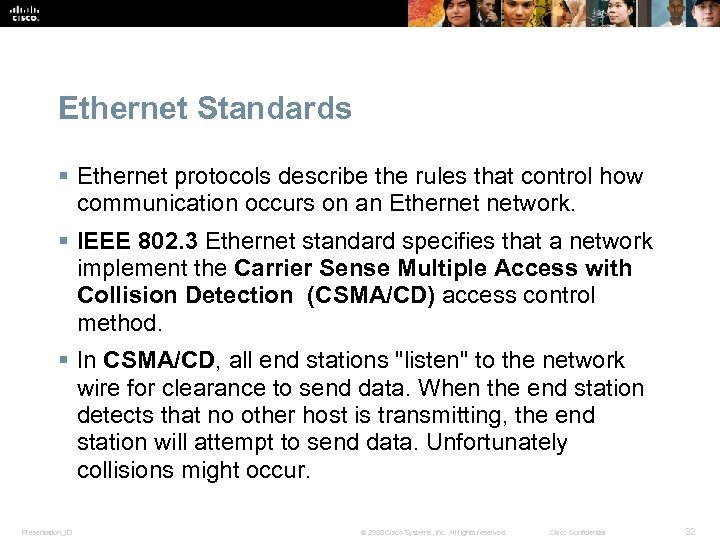 Ethernet Standards § Ethernet protocols describe the rules that control how communication occurs on an Ethernet network. § IEEE 802. 3 Ethernet standard specifies that a network implement the Carrier Sense Multiple Access with Collision Detection (CSMA/CD) access control method. § In CSMA/CD, all end stations "listen" to the network wire for clearance to send data. When the end station detects that no other host is transmitting, the end station will attempt to send data. Unfortunately collisions might occur. Presentation_ID © 2008 Cisco Systems, Inc. All rights reserved. Cisco Confidential 32
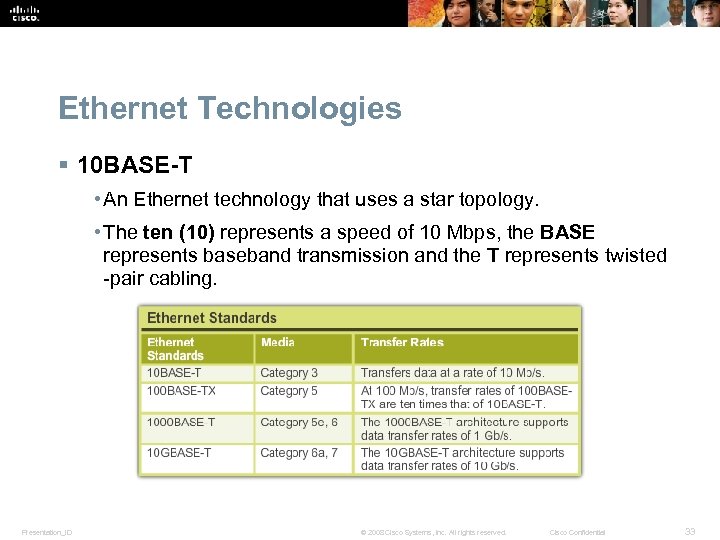 Ethernet Technologies § 10 BASE-T • An Ethernet technology that uses a star topology. • The ten (10) represents a speed of 10 Mbps, the BASE represents baseband transmission and the T represents twisted -pair cabling. Presentation_ID © 2008 Cisco Systems, Inc. All rights reserved. Cisco Confidential 33
 Wireless Ethernet Standards § IEEE 802. 11 is the standard that specifies connectivity for wireless networks. § Wi-Fi (wireless fidelity), refers to the 802. 11 family • 802. 11 (the original specification) • 802. 11 a • 802. 11 b • 802. 11 g • 802. 11 n § These protocols specify the frequencies, speeds, and other capabilities of the different Wi-Fi standards. Presentation_ID © 2008 Cisco Systems, Inc. All rights reserved. Cisco Confidential 34
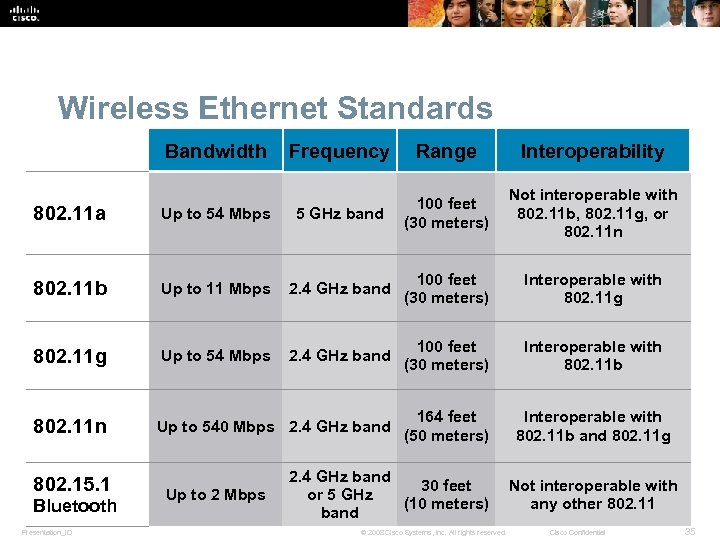 Wireless Ethernet Standards Bandwidth Frequency Range Interoperability Not interoperable with 802. 11 b, 802. 11 g, or 802. 11 n 802. 11 a Up to 54 Mbps 5 GHz band 100 feet (30 meters) 802. 11 b Up to 11 Mbps 2. 4 GHz band 100 feet (30 meters) Interoperable with 802. 11 g Up to 54 Mbps 2. 4 GHz band 100 feet (30 meters) Interoperable with 802. 11 b 802. 11 n Up to 540 Mbps 2. 4 GHz band 164 feet (50 meters) Interoperable with 802. 11 b and 802. 11 g 802. 15. 1 Bluetooth Presentation_ID Up to 2 Mbps 2. 4 GHz band 30 feet Not interoperable with or 5 GHz (10 meters) any other 802. 11 band © 2008 Cisco Systems, Inc. All rights reserved. Cisco Confidential 35
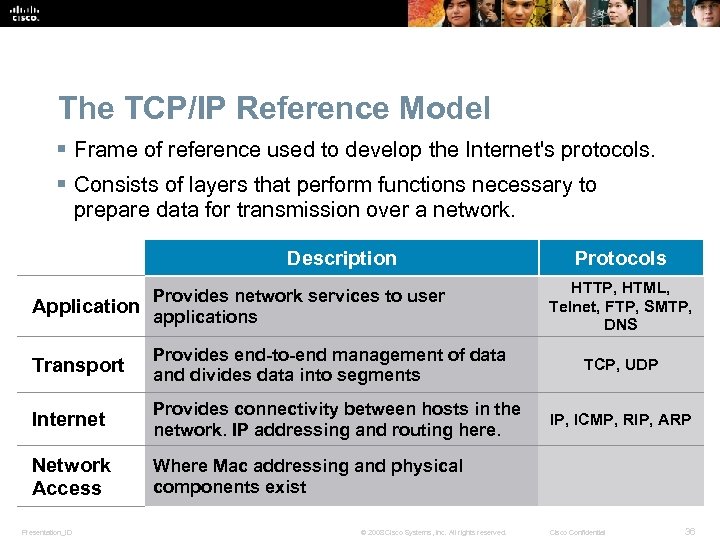 The TCP/IP Reference Model § Frame of reference used to develop the Internet's protocols. § Consists of layers that perform functions necessary to prepare data for transmission over a network. Description Provides network services to user Application applications Transport Provides end-to-end management of data and divides data into segments Internet Provides connectivity between hosts in the network. IP addressing and routing here. Network Access Protocols HTTP, HTML, Telnet, FTP, SMTP, DNS Where Mac addressing and physical components exist Presentation_ID © 2008 Cisco Systems, Inc. All rights reserved. TCP, UDP IP, ICMP, RIP, ARP Cisco Confidential 36
 The OSI Model § The OSI model is an industry standard framework that is used to divide network communications into seven layers. § Although other models exist, most network vendors today build their products using this framework. § A protocol stack is a system that implements protocol behavior using a series of layers. • Protocol stacks can be implemented either in hardware or software, or in a combination of both. • Typically, only the lower layers are implemented in hardware, and the higher layers are implemented in software. Presentation_ID © 2008 Cisco Systems, Inc. All rights reserved. Cisco Confidential 37
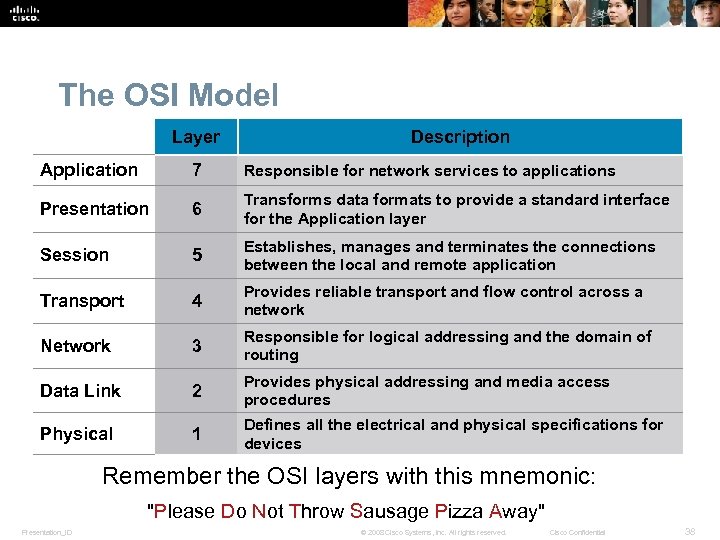 The OSI Model Layer Description Application 7 Responsible for network services to applications Presentation 6 Transforms data formats to provide a standard interface for the Application layer Session 5 Establishes, manages and terminates the connections between the local and remote application Transport 4 Provides reliable transport and flow control across a network Network 3 Responsible for logical addressing and the domain of routing Data Link 2 Provides physical addressing and media access procedures Physical 1 Defines all the electrical and physical specifications for devices Remember the OSI layers with this mnemonic: "Please Do Not Throw Sausage Pizza Away" Presentation_ID © 2008 Cisco Systems, Inc. All rights reserved. Cisco Confidential 38
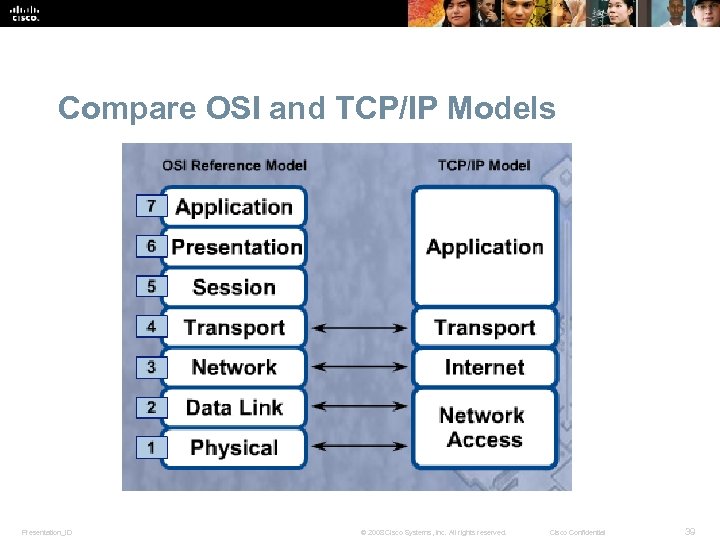 Compare OSI and TCP/IP Models Presentation_ID © 2008 Cisco Systems, Inc. All rights reserved. Cisco Confidential 39
 Selecting a NIC § Most network interfaces for desktop computers are either integrated into the motherboard or are an expansion card that fits into an expansion slot. § Most laptop network interfaces are either integrated into the motherboard or fit into a PC Card or Express. Bus expansion slot. § USB network adapters plug into a USB port and can be used with both desktops and laptops. Presentation_ID © 2008 Cisco Systems, Inc. All rights reserved. Cisco Confidential 40
 Install or Update a NIC Driver § Manufacturers publish new driver software for NICs. • May enhance the functionality of the NIC. • May be needed for operating system compatibility. § When installing a new driver manually, disable the virus protection and close all applications. § Select Start > Control Panel > Device Manager § If a new NIC driver does not perform as expected after it has been installed, the driver can be uninstalled, or rolled back, to the previous driver. Presentation_ID © 2008 Cisco Systems, Inc. All rights reserved. Cisco Confidential 41
 Configure the NIC § Every NIC must be configured with the following information: • Protocols • IP address • MAC address § Alternate IP configuration in Windows simplifies moving between a network that requires using DHCP and a network that uses static IP settings. Windows uses the alternate IP configuration assigned to the NIC if no access to DHCP Presentation_ID © 2008 Cisco Systems, Inc. All rights reserved. Cisco Confidential 42
 Advanced NIC Settings Duplex and Speed § Duplex and speed settings for a NIC can slow down data transfer rates on a computer if they are not matched with the device to which they are connected. Wake on LAN § Wo. L settings are used to wake up a networked computer from a very low power mode state. Quality of Service § Qo. S, also called 802. 1 q Qo. S, is a variety of techniques that control the flow of network traffic, improve transmission speeds, and improve real-time communications traffic. Presentation_ID © 2008 Cisco Systems, Inc. All rights reserved. Cisco Confidential 43
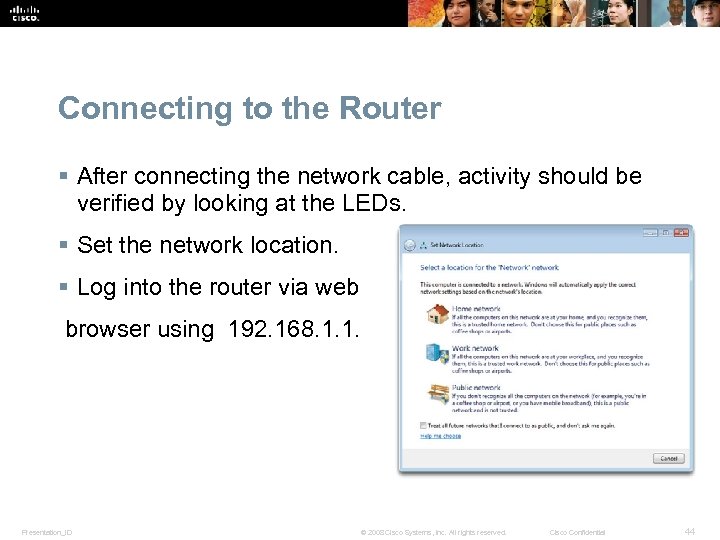 Connecting to the Router § After connecting the network cable, activity should be verified by looking at the LEDs. § Set the network location. § Log into the router via web browser using 192. 168. 1. 1. Presentation_ID © 2008 Cisco Systems, Inc. All rights reserved. Cisco Confidential 44
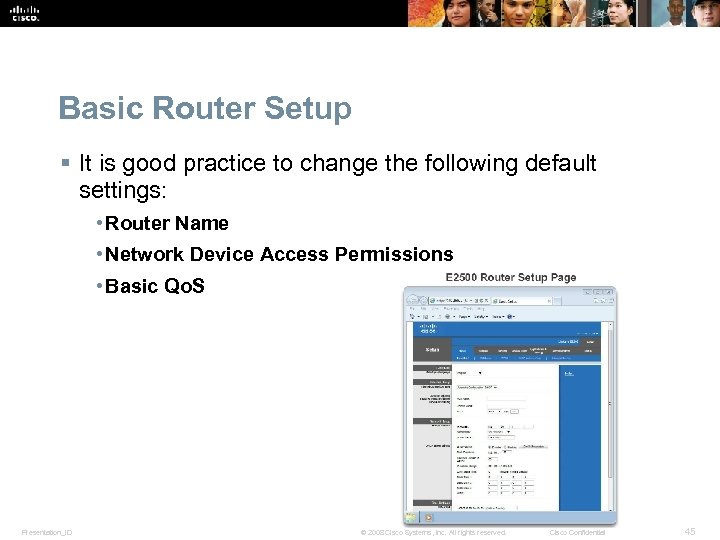 Basic Router Setup § It is good practice to change the following default settings: • Router Name • Network Device Access Permissions • Basic Qo. S Presentation_ID © 2008 Cisco Systems, Inc. All rights reserved. Cisco Confidential 45
 Basic Wireless Settings § Configure basic settings to secure and increase the speed of the wireless network: • Network mode - A mixed-mode allows 802. 11 b, 802. 11 g, and 802. 11 n devices. • Service Set Identifier (SSID) - The name of the wireless network. • Channel - 1 and 11 do not overlap with the default channel 6. Use one of these three channels for best results. • Wireless security modes • Wired Equivalent Privacy (WEP) • Temporal Key Integrity Protocol (TKIP) • Advanced Encryption Standard (AES) • Wi-Fi Protected Access (WPA) Presentation_ID • Wi-Fi Protected Access 2 (WPA 2) © 2008 Cisco Systems, Inc. All rights reserved. Cisco Confidential 46
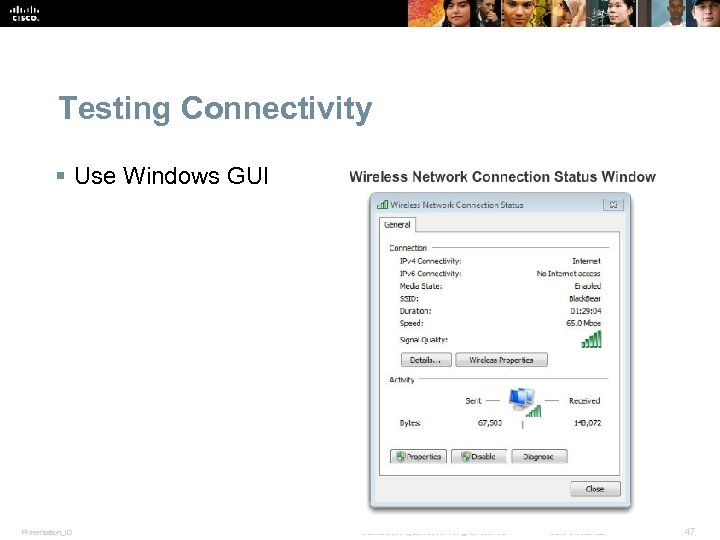 Testing Connectivity § Use Windows GUI Presentation_ID © 2008 Cisco Systems, Inc. All rights reserved. Cisco Confidential 47
 Testing Connectivity § Using Windows CLI • Ipconfig – displays basic configuration for all network adapters. • Ping – tests basic connectivity between devices. • Net commands – manage network computers, servers, and resources. • Tracert – trace the routes that packets take from your computer to a destination host. • Nslookup – tests and troubleshoots DNS servers. Presentation_ID © 2008 Cisco Systems, Inc. All rights reserved. Cisco Confidential 48
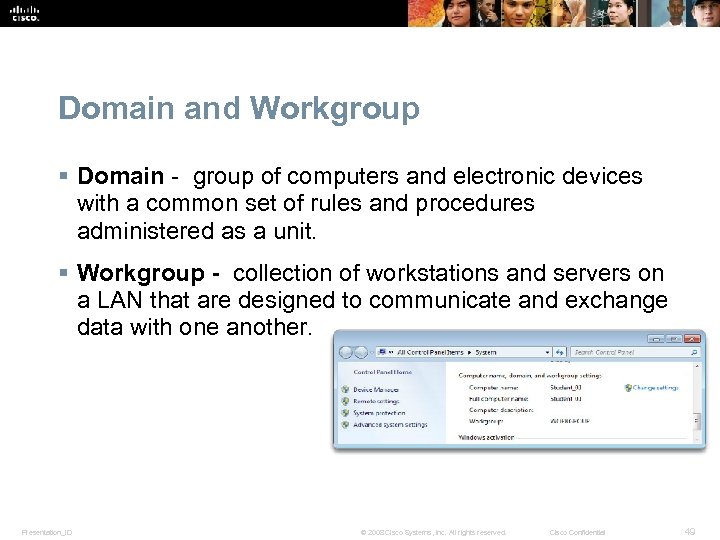 Domain and Workgroup § Domain - group of computers and electronic devices with a common set of rules and procedures administered as a unit. § Workgroup - collection of workstations and servers on a LAN that are designed to communicate and exchange data with one another. Presentation_ID © 2008 Cisco Systems, Inc. All rights reserved. Cisco Confidential 49
 Windows 7 Homegroup § Windows 7 computers that belong to the same workgroup can also belong to a homegroup. § There can only be one homegroup per workgroup on a network. § Computers can only be a member of one homegroup at a time. § Homegroups allow for easy sharing of resources between members. § The homegroup option is not available in Windows Vista or Windows XP. Presentation_ID © 2008 Cisco Systems, Inc. All rights reserved. Cisco Confidential 50
 Sharing Resources in Windows Vista § Sharing and Discovery, located in the Network and Sharing Center, manages the settings for a home network. • Network discovery • File sharing • Public folder sharing • Printer sharing • Password protected sharing • Media sharing § Access by using the following path: Start > Control Panel > Network and Sharing Center Presentation_ID © 2008 Cisco Systems, Inc. All rights reserved. Cisco Confidential 51
 Sharing Resources in Windows XP § Network Setup Wizardsets up the following items: § A connection to the Internet for the computer through a direct dial-up or broadband connection or through another computer on the home network § Internet Connection Sharing on a Windows XP-based computer for sharing a connection to the Internet with other computers on the home network § Computer name, computer description, and workgroup name § File and printer sharing § To access the Network Setup Wizard, use the following path: § Start > Control Panel > Network Setup Wizard Presentation_ID © 2008 Cisco Systems, Inc. All rights reserved. Cisco Confidential 52
 Network Shares and Drive Mapping § Mapping a drive, which is done by assigning a letter (A to Z) to the resource on a remote drive, allows you to use the remote drive as if it was a local drive. § The following are the permissions that can be assigned to the file or folder • Read – user can view and run program files • Change – In addition to Read permissions, the user can add files and subfolders, change the data in files, and delete subfolders and files • Full Control - In addition to Change and Read permissions, the user can change the permission of files and folders in an NTFS partition and take ownership of files and folders. Presentation_ID © 2008 Cisco Systems, Inc. All rights reserved. Cisco Confidential 53
 Virtual Private Network (VPN) § Virtual Private Network (VPN) - a private network that connects remote sites or users together over a public network, like the internet. § When connected via the VPN, users have access to all services and resources as if they were physically connected to their corporate LAN. § Remote-access users must install the VPN client software which encrypts data before sending it over the Internet. § VPN gateways establish, manage, and control VPN connections (also known as VPN tunnels). Presentation_ID © 2008 Cisco Systems, Inc. All rights reserved. Cisco Confidential 54
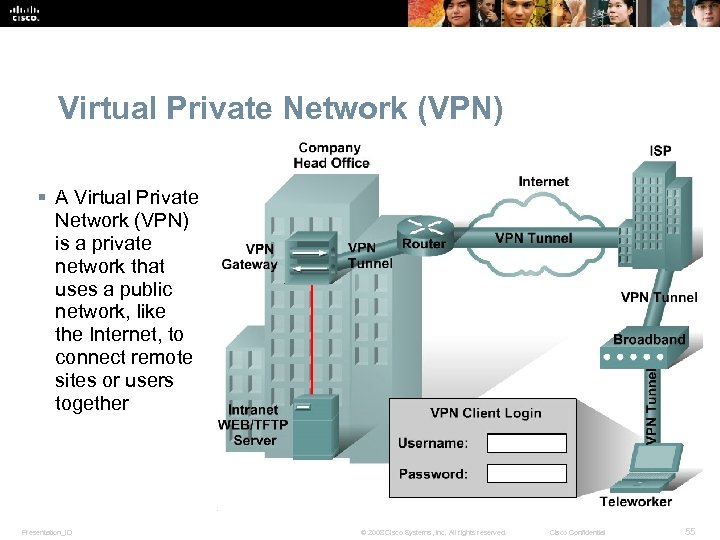 Virtual Private Network (VPN) § A Virtual Private Network (VPN) is a private network that uses a public network, like the Internet, to connect remote sites or users together Presentation_ID © 2008 Cisco Systems, Inc. All rights reserved. Cisco Confidential 55
 Digital Subscriber Line (DSL) § An "always-on" technology; there is no need to dial up each time to connect to the Internet. § Uses the existing copper telephone lines to provide high-speed data communication between end users and telephone companies. § Asymmetric DSL (ADSL) is currently the most commonly used DSL technology. • Has a fast downstream speed, typically 1. 5 Mbps. • Upload rate of ADSL is slower. • Not the best solution for hosting a web server of FTP server. Presentation_ID . © 2008 Cisco Systems, Inc. All rights reserved. Cisco Confidential 56
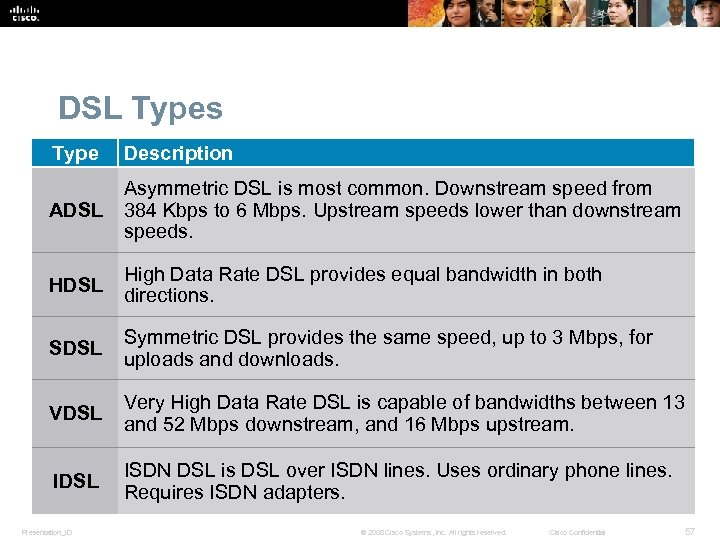 DSL Types Type Description ADSL Asymmetric DSL is most common. Downstream speed from 384 Kbps to 6 Mbps. Upstream speeds lower than downstream speeds. HDSL High Data Rate DSL provides equal bandwidth in both directions. SDSL Symmetric DSL provides the same speed, up to 3 Mbps, for uploads and downloads. VDSL Very High Data Rate DSL is capable of bandwidths between 13 and 52 Mbps downstream, and 16 Mbps upstream. IDSL ISDN DSL is DSL over ISDN lines. Uses ordinary phone lines. Requires ISDN adapters. Presentation_ID © 2008 Cisco Systems, Inc. All rights reserved. Cisco Confidential 57
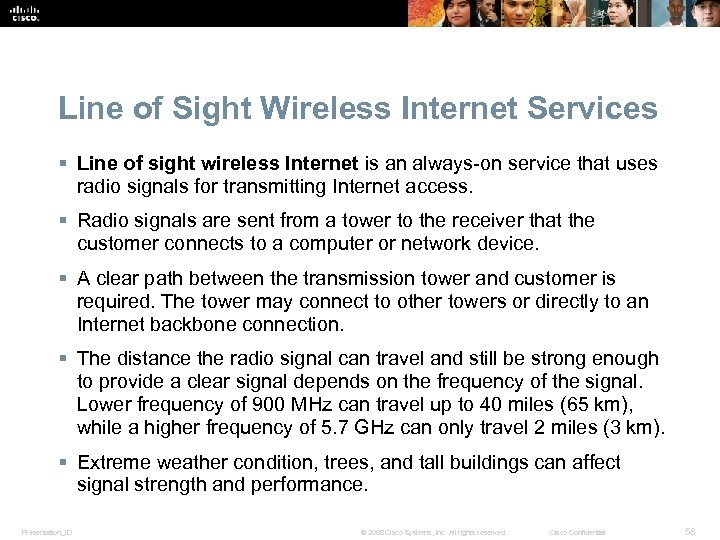 Line of Sight Wireless Internet Services § Line of sight wireless Internet is an always-on service that uses radio signals for transmitting Internet access. § Radio signals are sent from a tower to the receiver that the customer connects to a computer or network device. § A clear path between the transmission tower and customer is required. The tower may connect to other towers or directly to an Internet backbone connection. § The distance the radio signal can travel and still be strong enough to provide a clear signal depends on the frequency of the signal. Lower frequency of 900 MHz can travel up to 40 miles (65 km), while a higher frequency of 5. 7 GHz can only travel 2 miles (3 km). § Extreme weather condition, trees, and tall buildings can affect signal strength and performance. Presentation_ID © 2008 Cisco Systems, Inc. All rights reserved. Cisco Confidential 58
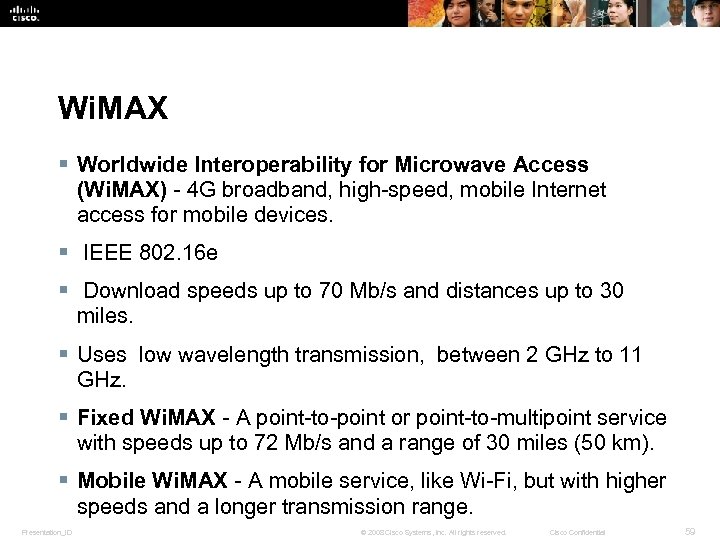 Wi. MAX § Worldwide Interoperability for Microwave Access (Wi. MAX) - 4 G broadband, high-speed, mobile Internet access for mobile devices. § IEEE 802. 16 e § Download speeds up to 70 Mb/s and distances up to 30 miles. § Uses low wavelength transmission, between 2 GHz to 11 GHz. § Fixed Wi. MAX - A point-to-point or point-to-multipoint service with speeds up to 72 Mb/s and a range of 30 miles (50 km). § Mobile Wi. MAX - A mobile service, like Wi-Fi, but with higher speeds and a longer transmission range. Presentation_ID © 2008 Cisco Systems, Inc. All rights reserved. Cisco Confidential 59
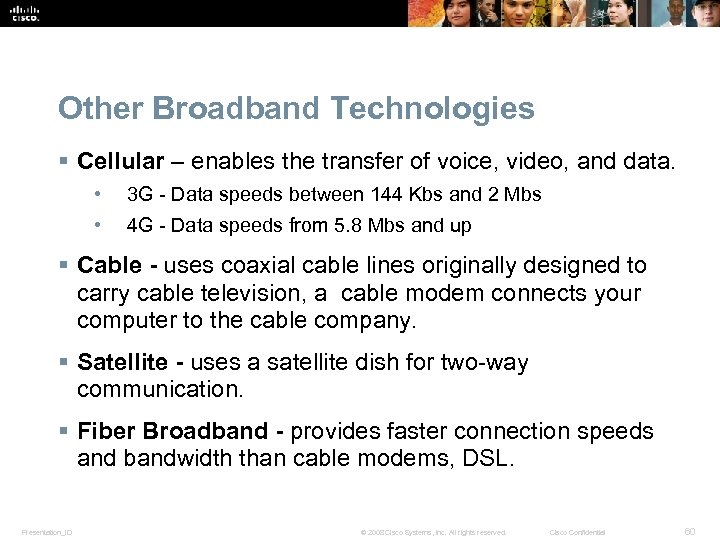 Other Broadband Technologies § Cellular – enables the transfer of voice, video, and data. • 3 G - Data speeds between 144 Kbs and 2 Mbs • 4 G - Data speeds from 5. 8 Mbs and up § Cable - uses coaxial cable lines originally designed to carry cable television, a cable modem connects your computer to the cable company. § Satellite - uses a satellite dish for two-way communication. § Fiber Broadband - provides faster connection speeds and bandwidth than cable modems, DSL. Presentation_ID © 2008 Cisco Systems, Inc. All rights reserved. Cisco Confidential 60
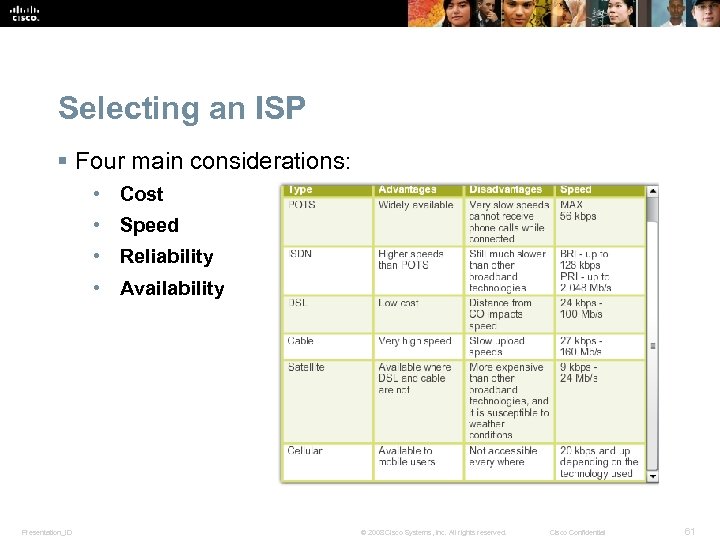 Selecting an ISP § Four main considerations: • Cost • Speed • Reliability • Availability Presentation_ID © 2008 Cisco Systems, Inc. All rights reserved. Cisco Confidential 61
 Preventive Maintenance for Networks § Common preventive maintenance techniques should continually be performed for a network to operate properly. • Keep network rooms clean and change air filters often. • Checking the various components of a network for wear. • Check the condition of network cables because they are often moved, unplugged, and kicked. • Label the cables to save troubleshooting time later. Refer to wiring diagrams and always follow your company's cable labeling guidelines. • The uninterruptible power supply (UPS) should be tested to ensure that you have power in the case of an outage. Presentation_ID © 2008 Cisco Systems, Inc. All rights reserved. Cisco Confidential 62
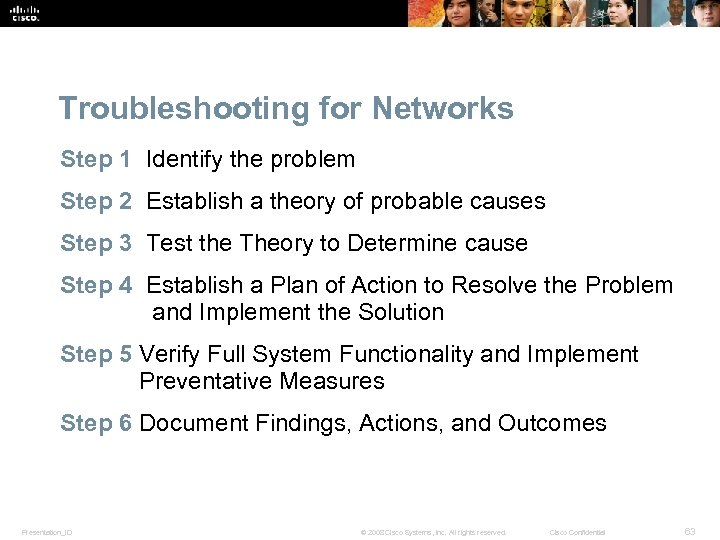 Troubleshooting for Networks Step 1 Identify the problem Step 2 Establish a theory of probable causes Step 3 Test the Theory to Determine cause Step 4 Establish a Plan of Action to Resolve the Problem and Implement the Solution Step 5 Verify Full System Functionality and Implement Preventative Measures Step 6 Document Findings, Actions, and Outcomes Presentation_ID © 2008 Cisco Systems, Inc. All rights reserved. Cisco Confidential 63
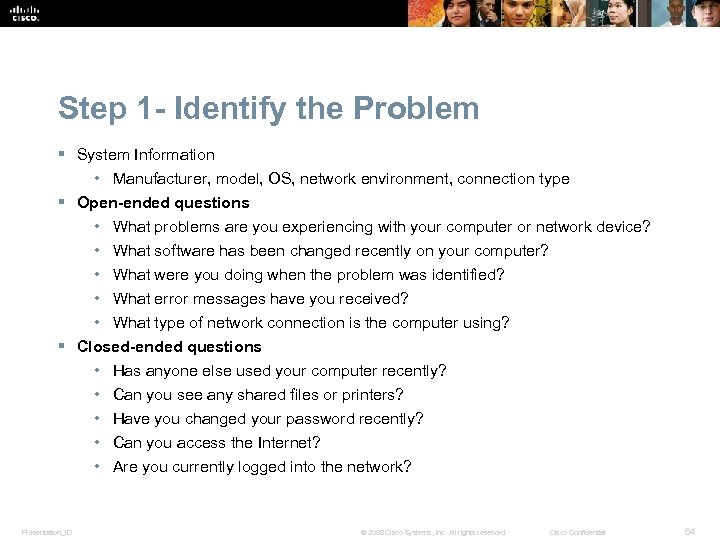 Step 1 - Identify the Problem § System Information • Manufacturer, model, OS, network environment, connection type § Open-ended questions • What problems are you experiencing with your computer or network device? • What software has been changed recently on your computer? • What were you doing when the problem was identified? • What error messages have you received? • What type of network connection is the computer using? § Closed-ended questions • Has anyone else used your computer recently? • Can you see any shared files or printers? • Have you changed your password recently? • Can you access the Internet? • Are you currently logged into the network? Presentation_ID © 2008 Cisco Systems, Inc. All rights reserved. Cisco Confidential 64
 Step 2 - Establish a Theory of Probable Causes § Create a list of the most common reasons why the error would occur and list the easiest or most obvious causes at the top with the more complex causes at the bottom. • Loose cable connections • Improperly installed NIC • ISP is down • Low wireless signal strength • Invalid IP address Presentation_ID © 2008 Cisco Systems, Inc. All rights reserved. Cisco Confidential 65
 Step 3 - Test the Theory to Determine cause § Testing your theories of probable causes one at a time, starting with the quickest and easiest. • Check that all cables are connected to the proper locations. • Disconnect and then reconnect cables and connectors. • Reboot the computer or network device. • Login as a different user. • Repair or re-enable the network connection. • Contact the network administrator. • Ping your default gateway. • Access remote web pages. § If exact cause of the problem has not been determined after you have tested all your theories, establish a new theory of probable causes and test it. Presentation_ID © 2008 Cisco Systems, Inc. All rights reserved. Cisco Confidential 66
 Step 4 - Establish a Plan of Action to Resolve the Problem and Implement the Solution § Sometimes quick procedures can determine the exact cause of the problem or even correct the problem. § If a quick procedure does not correct the problem, you might need to research the problem further to establish the exact cause. § Divide larger problems into smaller problems that can be analyzed and solved individually. Presentation_ID © 2008 Cisco Systems, Inc. All rights reserved. Cisco Confidential 67
 Step 5 - Verify Full System Functionality and Implement Preventative Measures § Verifying full system functionality and implement any preventive measures if needed. § Ipconfig /all is used to display IP Address information. § Ping is used to check network connectivity. § Nslookup is used to query Internet domain name server. § Tracert is used to determine the route taken by packets when they travel across the network. § Net View is used to display a list of computers in a workgroup. § Have the customer verify the solution and system functionality. Presentation_ID © 2008 Cisco Systems, Inc. All rights reserved. Cisco Confidential 68
 Step 6 - Document Findings, Actions, and Outcomes § Discuss the solution with the customer. § Have the customer confirm that the problem has been solved. § Document the process. • Problem description • Solution • Components used • Amount of time spent in solving the problem Presentation_ID © 2008 Cisco Systems, Inc. All rights reserved. Cisco Confidential 69
 Common Problems and Solutions § See common problems chart in Curriculum 6. 11. 2. 1 Presentation_ID © 2008 Cisco Systems, Inc. All rights reserved. Cisco Confidential 70
 Chapter 6 Summary § A computer network is composed of two or more computers that share data and resources. § A Local Area Network (LAN) refers to a group of interconnected computers that are under the same administrative control. § A Wide Area Network (WAN) is a network that connects LANs in geographically separated locations. § In a peer-to-peer network, devices are connected directly to each other. A peer-to-peer network is easy to install, and no additional equipment or dedicated administrator is required. Users control their own resources, and a networks best with a small number of computers. A client/server network uses a dedicated system that functions as the server. The server responds to requests made by users or clients connected to the network. Presentation_ID © 2008 Cisco Systems, Inc. All rights reserved. Cisco Confidential 71
 Chapter 6 Summary (Continued) § A LAN uses a direct connection from one computer to another. It is suitable for a small area, such as in a home, building, or school. A WAN uses point-to-point or point-to-multipoint, serial communications lines to communicate over greater distances. A WLAN uses wireless technology to connect devices together. § The network topology defines the way in which computers, printers, and other devices are connected. Logical topology describes how the hosts access the medium and communicate on the network. Physical topology describes the layout of the wire and devices, as well as the paths used by data transmissions. . Topologies include bus, star, ring, and mesh. § Networking devices are used to connect computers and peripheral devices so that they can communicate. These include hubs, bridges, switches, routers, and multipurpose devices. The type of device implemented depends on the type of network. Presentation_ID © 2008 Cisco Systems, Inc. All rights reserved. Cisco Confidential 72
 Chapter 6 Summary (Continued) § Networking media can be defined as the means by which signals, or data, are sent from one computer to another. Signals can be transmitted either by cable or wireless means. The media types discussed were coaxial, twisted-pair, fiber-optic cabling, and radio frequencies. § Ethernet is now the most popular type of LAN technology. The Ethernet architecture is based on the IEEE 802. 3 standard. The IEEE 802. 3 standard specifies that a network implement the CSMA/CD access control method. § The OSI reference model is an industry standard framework that is used to divide the functions of networking into seven distinct layers. These layers include Application, Presentation, Session, Transport, Network, Data Link, and Physical. It is important to understand the purpose of each layer. Presentation_ID © 2008 Cisco Systems, Inc. All rights reserved. Cisco Confidential 73
 Chapter 6 Summary (Continued) § The TCP/IP suite of protocols has become the dominant standard for the Internet. TCP/IP represents a set of public standards that specify how packets of information are exchanged between computers over one or more networks. § A NIC is a device that plugs into a motherboard and provides ports for the network cable connections. It is the computer interface with the LAN. § A modem is an electronic device that is used for computer communications through telephone lines. It allows data transfer between one computer and another. The modem converts byteoriented data to serial bit streams. Presentation_ID © 2008 Cisco Systems, Inc. All rights reserved. Cisco Confidential 74
 Chapter 6 Summary (Continued) § The three transmission methods to sending signals over data channels are simplex, half-duplex, and full-duplex. Full-duplex networking technology increases performance because data can be sent and received at the same time. DSL, two-way cable modem, and other broadband technologies operate in full-duplex mode. § Network devices and media, such as computer components, must be maintained. It is important to clean equipment regularly and use a proactive approach to prevent problems. Repair or replace broken equipment to prevent downtime. § When troubleshooting network problems, listen to what your customer tells you so that you can formulate open-ended and closed-ended questions that will help you determine where to begin fixing the problem. Verify obvious issues and try quick solutions before escalating the troubleshooting process. Presentation_ID © 2008 Cisco Systems, Inc. All rights reserved. Cisco Confidential 75
 Presentation_ID © 2008 Cisco Systems, Inc. All rights reserved. Cisco Confidential 76