


 Скачать презентацию Chapter 6 1 Introduction to Wireless Applications 2
762c6b3e7b23d935d832a4f55979881e.ppt
- Количество слайдов: 88
 Chapter 6 1. Introduction to Wireless Applications 2. Bluetooth 3. Ir. DA EC 5103 PA_Apr 2008 ITECC/TP/ECE/Sim. BN
 Introduction to Wireless Aplications • wide range of wireless technologies: - 802. 11 Wireless LAN (WLAN), – – – Bluetooth®, Infra. Red (IR), Wireless USB, Ultra Wideband (UWB), Zee. Bee and Wi. MAX;
 Introduction to Wireless Aplications Applications : – Voice and messaging, – Hand-held and other Internet-enabled devices, and – Data Networking.
 Introduction to Bluetooth Technology • • • Why Bluetooth? Bluetooth Applications Baseband Technology Network Topologies Modes of Operation Steps of Link Establishment 4
 2. 1 Bluetooth Overview • Bluetooth is a : – de facto standard and specification for small-form factor, – low-cost, – short range radio links between mobile PCs, mobile phones and other portable devices. • allows users to form wireless connections between various communication devices, in order to transmit real-time voice and data communications. • operates in 2. 4 GHz ISM band
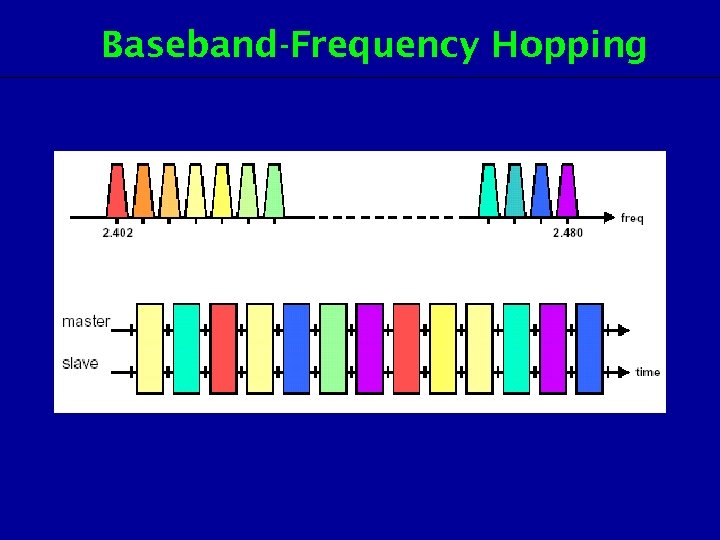
 2. 1 Bluetooth Overview • frequency hopping spread spectrum (FHSS), to hop at up to 1600 hops/sec, amongst 79 channels, spaced at 1 MHz separation. – which helps to avoid interception by unauthorized parties. • software controls and identity coding built into each microchip ensure that only those units preset by their owners can communicate.
 2. 1 Bluetooth Overview Three power classes : • Class 1: – long range (~100 m) devices, with a max output power of 20 d. Bm, • Class 2: – ordinary range devices (~10 m) devices, with a max output power of 4 d. Bm, • Class 3: – short range devices (~10 cm) devices, with a max output power of 0 d. Bm.
 Why Bluetooth? • The technology uses omnidirectional radio waves that can transmit through walls and other non-metal barriers. If there is interference from other devices, the transmission speed decreases but does not stop. • With the current specification, up to seven slave devices can be set to communicate with a master radio in one device. This connection of devices (slaves and master) is called a piconet. Several piconets can be linked together to form scatternets which allow communication between other device configurations.
 2. 2 Bluetooth Standards Documents • Bluetooth standard documents: – – Bluetooth Specification Bluetooth Profiles. • The Bluetooth. Specificationdescribes how the technology works – (i. e the Bluetooth protocol architecture), • The Bluetooth Profiles describe how the technology is used – (i. e how different parts of the specification can be used to fulfil a desired function for a Bluetooth device)
 Bluetooth Specifications • The Bluetooth wireless specification includes radio frequency, link layer and application layer definitions for product developers for data, voice and contentcentric applications. • The specification documentation contains the information necessary to ensure that diverse devices supporting the Bluetooth wireless technology can communicate with each other worldwide.
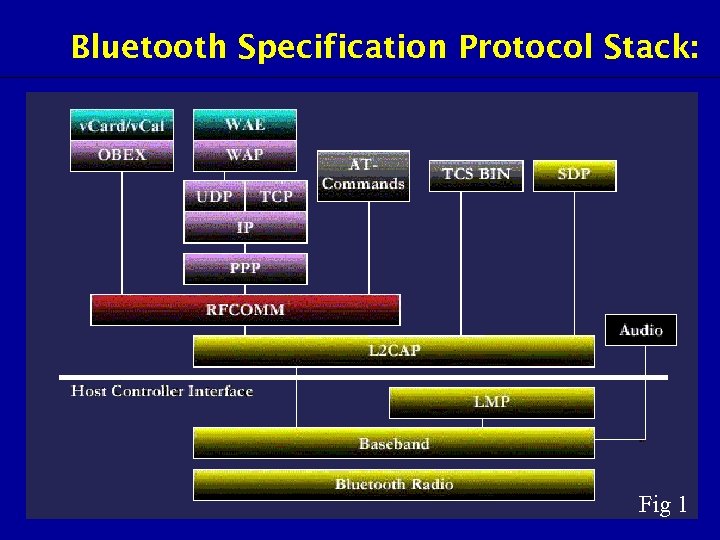 Bluetooth Specification Protocol Stack: Fig 1
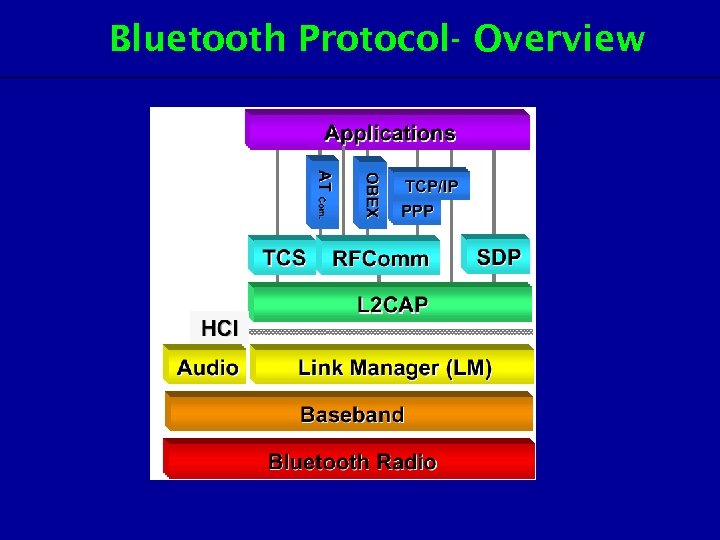 Bluetooth Protocol- Overview
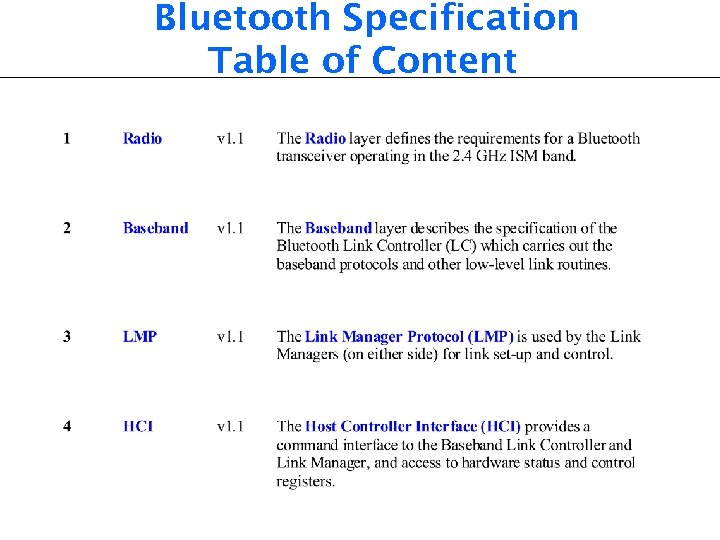 Bluetooth Specification Table of Content
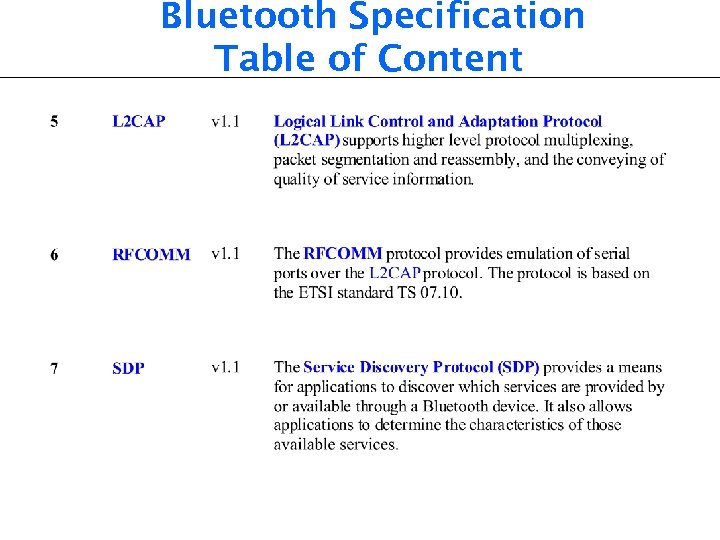 Bluetooth Specification Table of Content
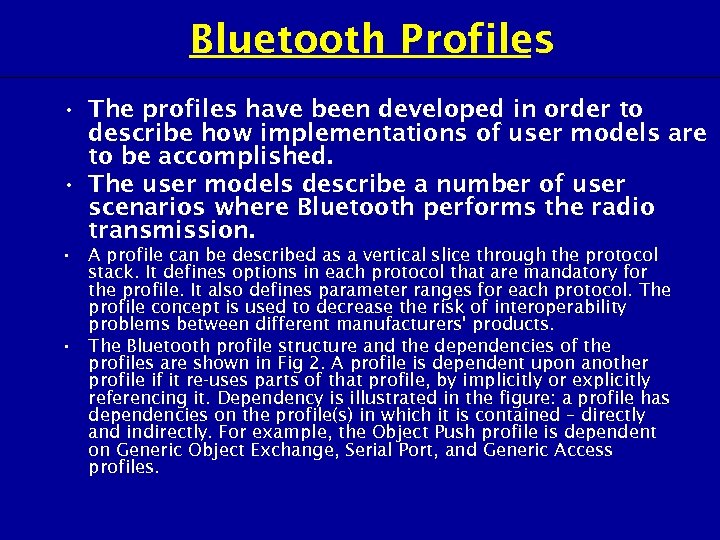 Bluetooth Profiles • The profiles have been developed in order to describe how implementations of user models are to be accomplished. • The user models describe a number of user scenarios where Bluetooth performs the radio transmission. • A profile can be described as a vertical slice through the protocol stack. It defines options in each protocol that are mandatory for the profile. It also defines parameter ranges for each protocol. The profile concept is used to decrease the risk of interoperability problems between different manufacturers' products. • The Bluetooth profile structure and the dependencies of the profiles are shown in Fig 2. A profile is dependent upon another profile if it re-uses parts of that profile, by implicitly or explicitly referencing it. Dependency is illustrated in the figure: a profile has dependencies on the profile(s) in which it is contained – directly and indirectly. For example, the Object Push profile is dependent on Generic Object Exchange, Serial Port, and Generic Access profiles.
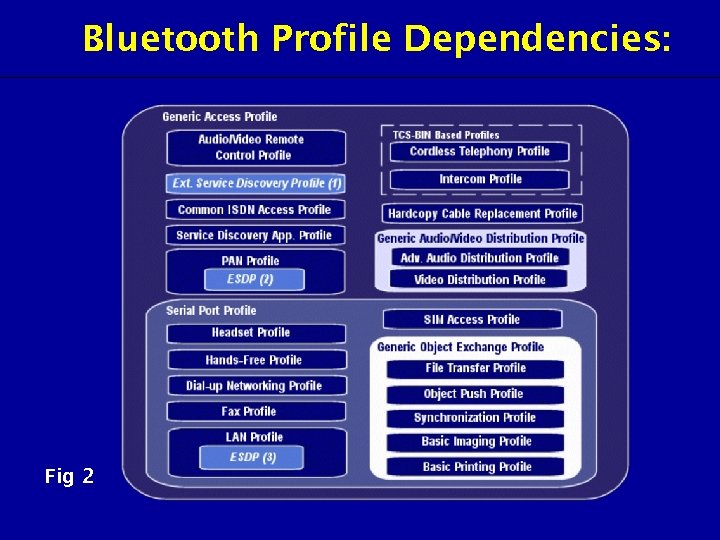 Bluetooth Profile Dependencies: Fig 2
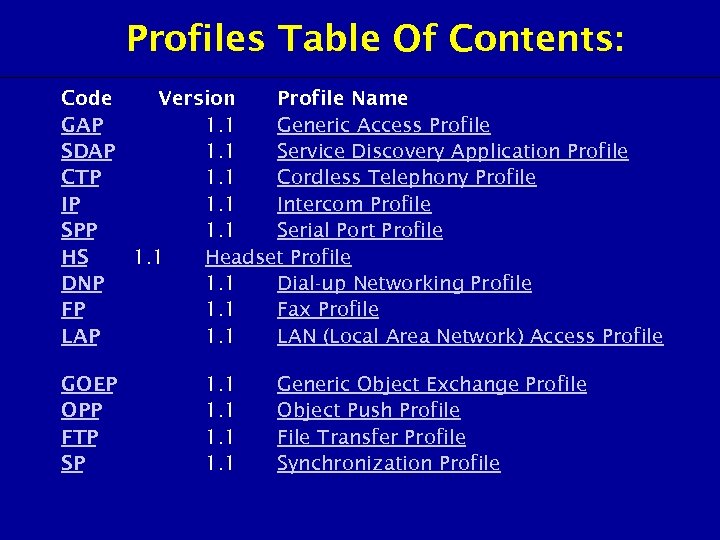 Profiles Table Of Contents: Code Version Profile Name GAP 1. 1 Generic Access Profile SDAP 1. 1 Service Discovery Application Profile CTP 1. 1 Cordless Telephony Profile IP 1. 1 Intercom Profile SPP 1. 1 Serial Port Profile HS 1. 1 Headset Profile DNP 1. 1 Dial-up Networking Profile FP 1. 1 Fax Profile LAP 1. 1 LAN (Local Area Network) Access Profile GOEP OPP FTP SP 1. 1 Generic Object Exchange Profile Object Push Profile File Transfer Profile Synchronization Profile
 2. 3 Piconetsand Scatternets Three main types of Bluetooth connection : – Single-slave enabling communication between two devices. – Multi-slave allows for 7 slaves to be connected to one master - the multi-slave connection is the basis for piconets. – Scatternet, connecting multiple piconets the scatternet allows for the creation of large adhoc networks.
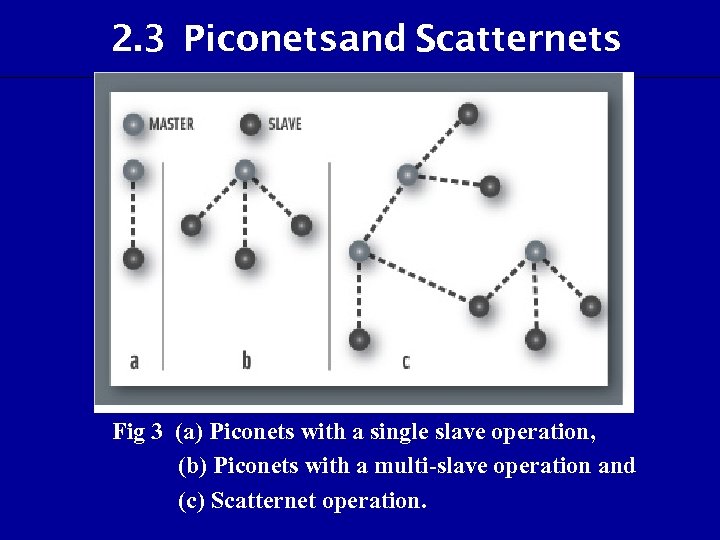 2. 3 Piconetsand Scatternets Fig 3 (a) Piconets with a single slave operation, (b) Piconets with a multi-slave operation and (c) Scatternet operation.
 Piconet • The basic unit of networking in Bluetooth is a piconet consisting of a master and from one to , seven active slave devices. • The radio designated as the master makes the determination of the channel (frequencyhopping sequence) and phase (timing offset— that is, when to transmit) that will be used by all devices on this piconet. • The radio designated as master makes this determination using its own device address as a parameter, while the slave devices must tune to the same channel and phase. • A slave may only communicate with the master and may only communicate when granted permission by the master.
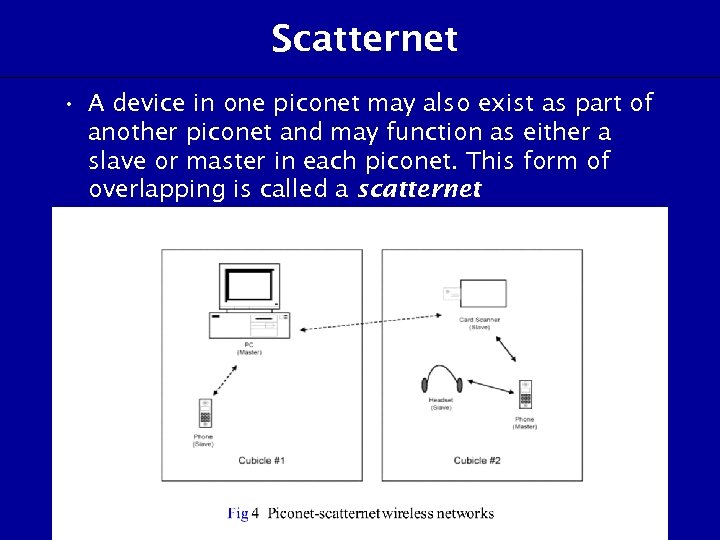 Scatternet • A device in one piconet may also exist as part of another piconet and may function as either a slave or master in each piconet. This form of overlapping is called a scatternet.
 Advantageof the piconet/scatternet • It allows many devices to share the same physical area and make efficient use of the bandwidth.
 Frequency Hopping Spread Spectrum (FHSS) • A Bluetooth system uses a frequency-hopping scheme with a carrier spacing of 1 MHz. Typically, up to 80 different frequencies are used, for a total bandwidth of 80 MHz. If frequency hopping isn't used, a single channel would correspond to a single 1 MHz band. • With frequency hopping, a logical channel is defined by the frequency-hopping sequence. At any given time, the bandwidth available is 1 MHz, with a maximum of eight devices sharing the bandwidth. Different logical channels (different hopping sequences) can simultaneously share the same 80 MHz bandwidth. • Collisions will occur when devices in different piconets, on different logical channels, happen to use the same hop frequency at the same time. As the number of piconets in an area increases, the number of collisions increases, and performance degrades. In summary, the physical area and total bandwidth are shared by the scatternet. The logical channel and data transfer are shared by a piconet.
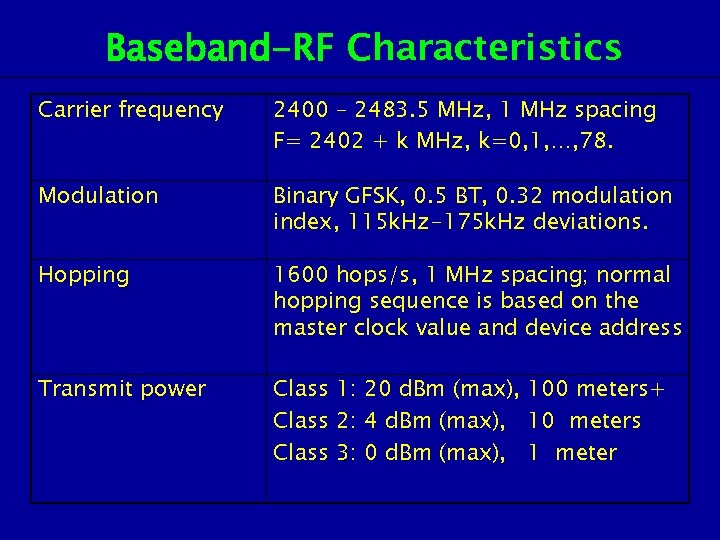 Baseband-RF Characteristics Carrier frequency 2400 – 2483. 5 MHz, 1 MHz spacing F= 2402 + k MHz, k=0, 1, …, 78. Modulation Binary GFSK, 0. 5 BT, 0. 32 modulation index, 115 k. Hz-175 k. Hz deviations. Hopping 1600 hops/s, 1 MHz spacing; normal hopping sequence is based on the master clock value and device address Transmit power Class 1: 20 d. Bm (max), 100 meters+ Class 2: 4 d. Bm (max), 10 meters Class 3: 0 d. Bm (max), 1 meter
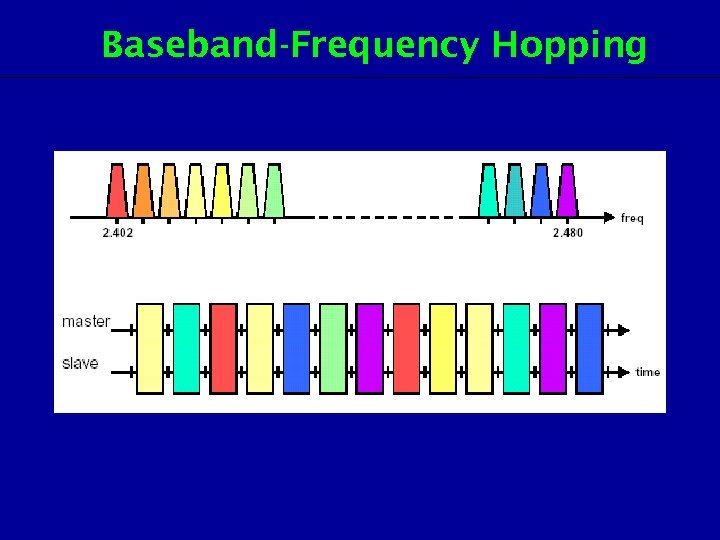 Baseband-Frequency Hopping
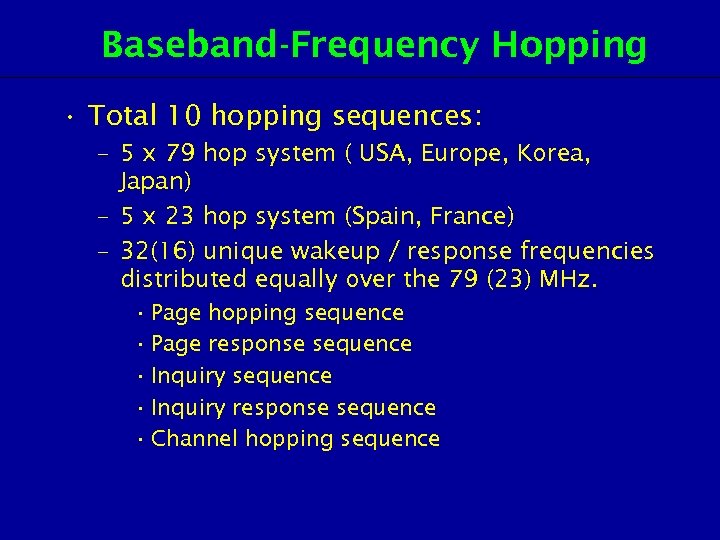 Baseband-Frequency Hopping • Total 10 hopping sequences: – 5 x 79 hop system ( USA, Europe, Korea, Japan) – 5 x 23 hop system (Spain, France) – 32(16) unique wakeup / response frequencies distributed equally over the 79 (23) MHz. • Page hopping sequence • Page response sequence • Inquiry response sequence • Channel hopping sequence
 2. 4 Bluetooth Applications • Bluetooth is designed to operate in an environment of many users. Up to eight devices can communicate in a small network called a piconet. Ten of these piconets can coexist in the same coverage range of the Bluetooth radio. To provide security, each link is encoded and protected against eavesdropping and interference.
 2. 4 Bluetooth Applications Three general application areas using short-range wireless connectivity: • Data and voice access points. – Bluetooth facilitates real-time voice and data transmissions by providing effortless wireless connection of portable and stationary communications devices. • Cable replacement. – Bluetooth eliminates the need for numerous, often proprietary cable attachments for connection of practically any kind of communications device. Connections are instant and are maintained even when devices are not within line of sight. The range of each radio is approximately 10 m, but can be extended to 100 m with an optional amplifier. • Ad hoc networking. – A device equipped with a Bluetooth radio can establish instant connection to another Bluetooth radio as soon as it comes into range.
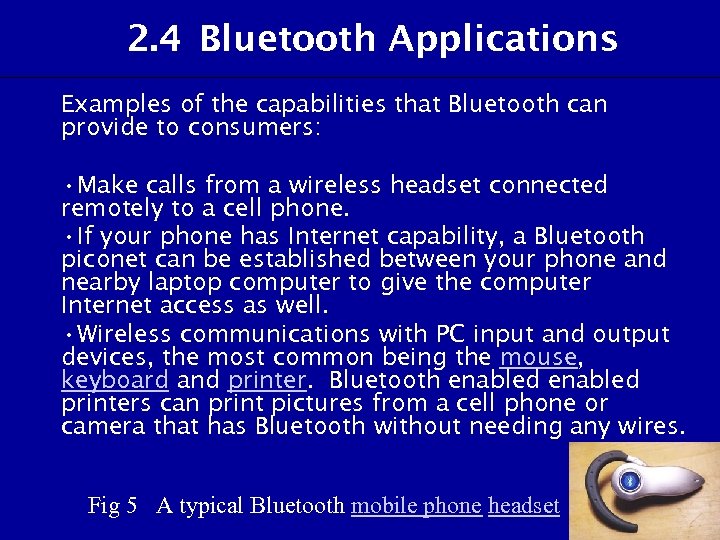 2. 4 Bluetooth Applications Examples of the capabilities that Bluetooth can provide to consumers: • Make calls from a wireless headset connected remotely to a cell phone. • If your phone has Internet capability, a Bluetooth piconet can be established between your phone and nearby laptop computer to give the computer Internet access as well. • Wireless communications with PC input and output devices, the most common being the mouse, keyboard and printer. Bluetooth enabled printers can print pictures from a cell phone or camera that has Bluetooth without needing any wires. Fig 5 A typical Bluetooth mobile phone headset
 2. 4 Bluetooth Applications • Hook up MP 3 players wirelessly to other machines to download music. • Bluetooth enabled PDA can synchronize with a Bluetooth-enabled cell phone, laptop or desktop computer. • Call home from a remote location to turn appliances on and off, set the alarm, and monitor activity. • Wireless networking between PCs in a confined space and where little bandwidth is required. • Replacement of traditional wired serial communications in test equipment, GPS receivers, medical equipment, bar code scanners, and traffic control devices.
 2. 4 Bluetooth Applications • For controls where infrared was traditionally used. • Sending small advertisements from Bluetooth enabled advertising hoardings to other, discoverable, Bluetooth devices. • Two seventh-generation game consoles, Nintendo's Wii and Sony's Play. Station 3 use Bluetooth for their respective wireless controllers. • Dial-up internet access on personal computer or PDA using a data-capable mobile phone as a modem.
 2. 5 Bluetooth Security • Bluetooth technology is wireless and therefore susceptible to spying and remote access. • In almost all cases, Bluetooth users can establish "trusted devices" that can exchange data without asking permission.
 Bluetooth Security • Service-level security and device-level security work together to protect Bluetooth devices from unauthorized data transmission. • Security methods include authorization and identification procedures that limit the use of Bluetooth services to the registered user and require that users make a conscious decision to open a file or accept a data transfer. • A user can also simply switch his Bluetooth mode to "non-discoverable and avoid " connecting with other Bluetooth devices entirely.
 Bluetooth Security • cell-phone virus • Bluejacking – • Bluebugging – • Bluetooth users sending a business card (just a text message) to other Bluetooth users within a 10 -meter radius. If the user doesn't realize what the message is, he might allow the contact to be added to his address book, and the contact can send him messages that might be automatically opened because they're coming from a known contact. is more of a problem, because it allows hackers to remotely access a user's phone and use its features, including placing calls and sending text messages, and the user doesn't realize it's happening. Car Whisperer – software that allows hackers to send audio to and receive audio from a Bluetooth-enabled car stereo.
 Ir. DA 3. 1 Introduction • Ir. DA is a standard defined by the Ir. DA consortium (Infrared Data Association). • It specifies a way to wirelessly transfer data via infrared radiation. • Ir. DA Data is recommended for high speed short range, line of sight, point-to-point cordless data transfer - suitable for HPCs, digital cameras, handheld data collection devices, etc. • If Ir. DA is supported, it must be targeted at the 4 Mb/s components. • Ir. DA Control is recommended in-room cordless peripherals to host. PC.
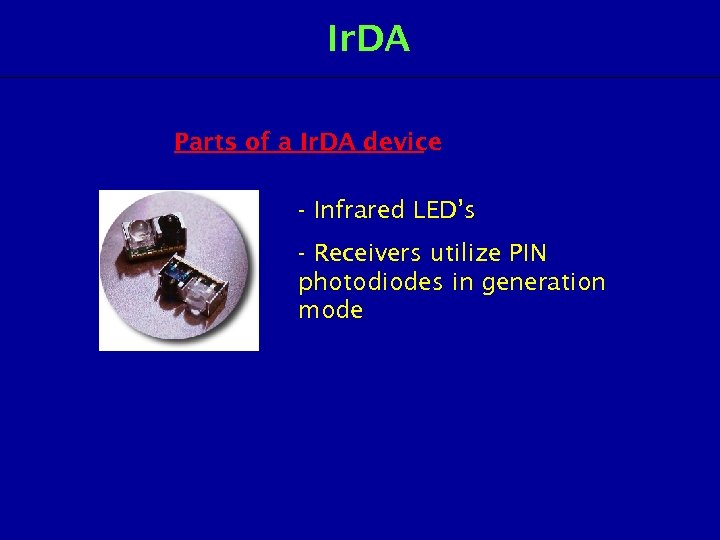 Ir. DA Parts of a Ir. DA device - Infrared LED’s - Receivers utilize PIN photodiodes in generation mode
 Range And Speed • Ir. DA devices conforming to standards Ir. DA 1. 0 and 1. 1 • Distances up to 1. 0 m • Maximum level of surrounding illumination 10 klux (daylight) • 15 degree deflection (off-alignment) of the receiver and the transmitter • Ir. DA v. 1. 0 range from 2400 to 115200 kbps • Ir. DA v. 1. 1 defines speeds 0. 576 and 1. 152 Mbps
 Low-Power Ir. DA Device • Range up to 20 cm and maximum speed 115 kbps (a. k. a. Ir. DA 1. 0). • Limiting factor for the range is the radiation intensity at the receiver in m. W/cm 2. • This value is higher for faster bit speeds, for slower bit speeds (long pulses) the possible range increases
 Types of Protocols The mandatory protocols: • PHY (Physical signaling layer) • Ir. LAP (Link Access Protocol) • Ir. LMP (Link Management Protocol and Information Access Service (IAS))
 Types of Protocols (1) Characteristics of Physical Ir. DA Data Signaling • Range: Continuous operation from contact to at least 1 meter (typically 2 meters can be reached). A low power version relaxes the range objective for operation from contact through at least 20 cm between low power devices and 30 cm between low power and standard power devices. This implementation affords 10 times less power consumption. These parameters are termed the required maximum ranges by certain classes of Ir. DA featured devices and sets the end user expectation for discovery, recognition and performance. • Bi-directional communication is the basis of all specifications. • Data transmission from 9600 b/s with primary speed/cost steps of 115 kb/s and maximum speed up to 4 Mb/s. • Data packets are protected using a CRC (CRC-16 for speeds up to 1. 152 Mb/s and CRC-32 at 4 Mb/s).
 Types of Protocols (2) Characteristics of Ir. DA Link Access Protocol ( r. LAP I ) • Provides a device-to-device connection for the reliable, ordered transfer of data. • Device discover procedures. • Handles hidden nodes.
 Types of Protocols (3) Characteristics of Ir. DA Link Management Protocol Ir. LMP ( ) • Provides multiplexing of the Ir. LAP layer. Multiple channels above an Ir. LAP connection. • Provides protocol and service discovery via the Information Access Service (IAS).
 Optional Ir. DA Data Protocols • • Tiny TP Ir. COMM OBEX™ Ir. DA Lite Ir. Tran -P Ir. MC Ir. LAN
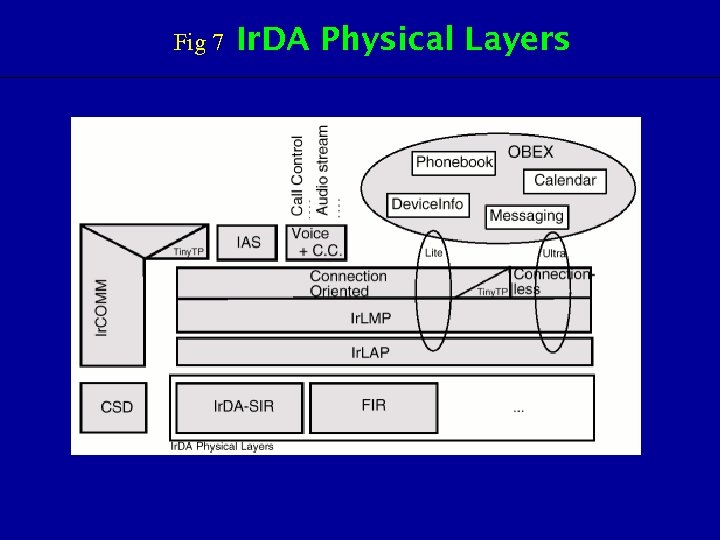 Fig 7 Ir. DA Physical Layers
 Ir. DA Advantages • Low power requirements: therefore ideal for laptops, telephones, personal digital assistants • Low circuitry costs: $2 -$5 for the entire coding/decoding circuitry • Simple circuitry: no special or proprietary hardware is required, can be incorporated into the integrated circuit of a product
 Ir. DA Advantages • Higher security: directionality of the beam helps ensure that data isn't leaked or spilled to nearby devices as it's transmitted • Portable • Few international regulatory constraints: Ir. DA (Infrared Data Association) functional devices will ideally be usable by international travelers, no matter where they may be • High noise immunity: not as likely to have interference from signals from other devices
 Ir. DA Disadvantages • Line of sight: transmitters and receivers must be almost directly aligned (i. e. able to see each other) to communicate • Blocked by common materials: people, walls, plants, etc. can block transmission • Short range: performance drops off with longer distances • Light, weather sensitive: direct sunlight, rain, fog, dust, pollution can affect transmission • Speed: data rate transmission is lower than typical wired transmission
 Ir. DA Applications • Ir. DA is a wireless technology that facilitates the communication of devices that only need to transmit or receive small amounts of information. Because this technology is cheap, it is integrated into all sorts of personal devices, such as : – watches, PDAs, phones, laptops, and even wireless mice and keyboards.
 Review Questions 1. Name three types of wireless technology. 2. Bluetooth is an always-on, low cost and short range radio links between various communication devices. (True / False) 3. Bluetooth uses frequency hopping spread spectrum (FHSS), which changes its signal 1600 times per second to avoid interception by unauthorized parties. (True / False) 4. What is the frequency band of Bluetooth? 5. What is the difference between a piconet and a scatternet?
 Review Questions 6. Give three important features for Bluetooth. 7. What is the difference between Bluetooth specification and Bluetooth profiles? 8. List down the three general application areas provided by Bluetooth. 9. What is Ir. DA? 10. Write down two types of Ir. DA advantages.
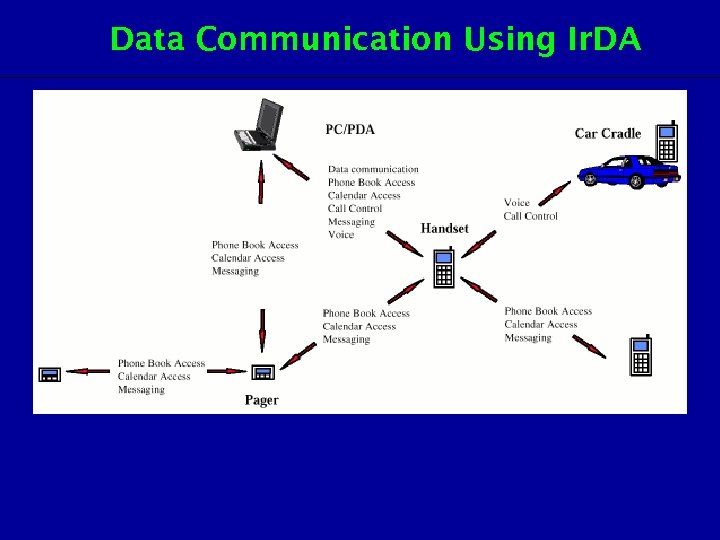 Data Communication Using Ir. DA
 Benefitsof Ir. DA • Offers a universal wireless standard for connecting all portable infrared-enabled devices. • Easy, effortless implementation. • Economical alternative to other connectivity solutions. • Low power requirement. • Reliable, Efficient, high speed connection • Safe to use in any environment; can even be used during air travel. • Eliminates the hassle of cables. • Directed, point-to-point connectivity • Allows PC’s and non-PC’s devices to communicate with each other. • Enhances mobility by allowing users to simply “plop and connect”.
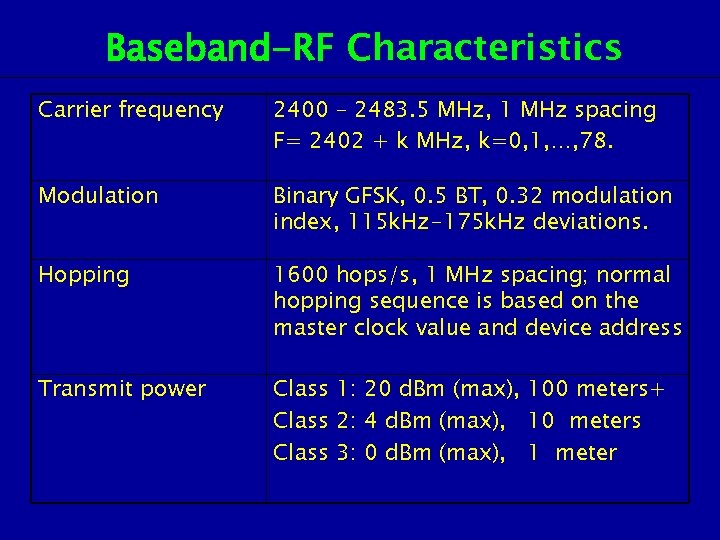 Baseband-RF Characteristics Carrier frequency 2400 – 2483. 5 MHz, 1 MHz spacing F= 2402 + k MHz, k=0, 1, …, 78. Modulation Binary GFSK, 0. 5 BT, 0. 32 modulation index, 115 k. Hz-175 k. Hz deviations. Hopping 1600 hops/s, 1 MHz spacing; normal hopping sequence is based on the master clock value and device address Transmit power Class 1: 20 d. Bm (max), 100 meters+ Class 2: 4 d. Bm (max), 10 meters Class 3: 0 d. Bm (max), 1 meter
 Baseband-Frequency Hopping
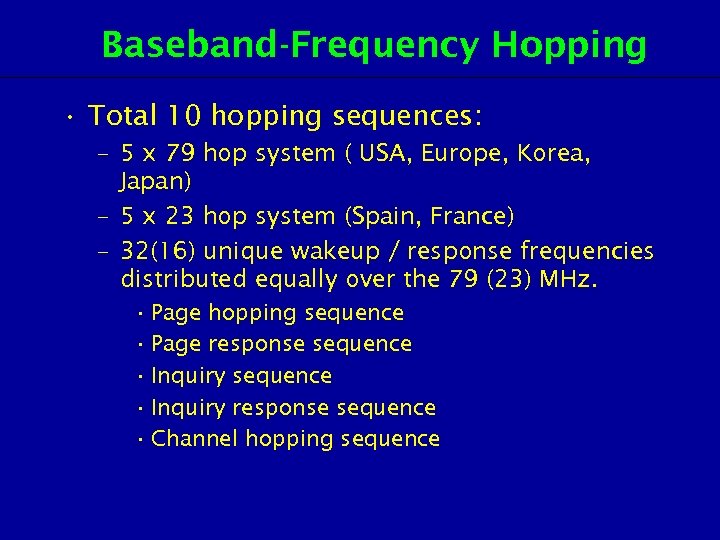 Baseband-Frequency Hopping • Total 10 hopping sequences: – 5 x 79 hop system ( USA, Europe, Korea, Japan) – 5 x 23 hop system (Spain, France) – 32(16) unique wakeup / response frequencies distributed equally over the 79 (23) MHz. • Page hopping sequence • Page response sequence • Inquiry response sequence • Channel hopping sequence
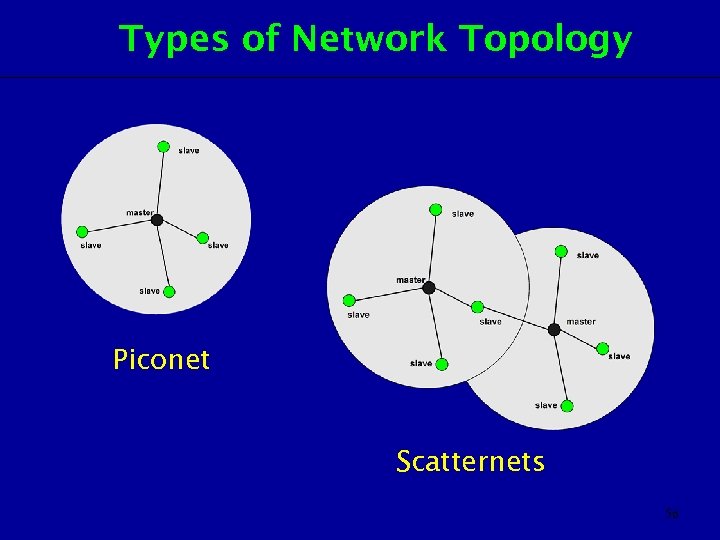 Types of Network Topology Piconet Scatternets 56
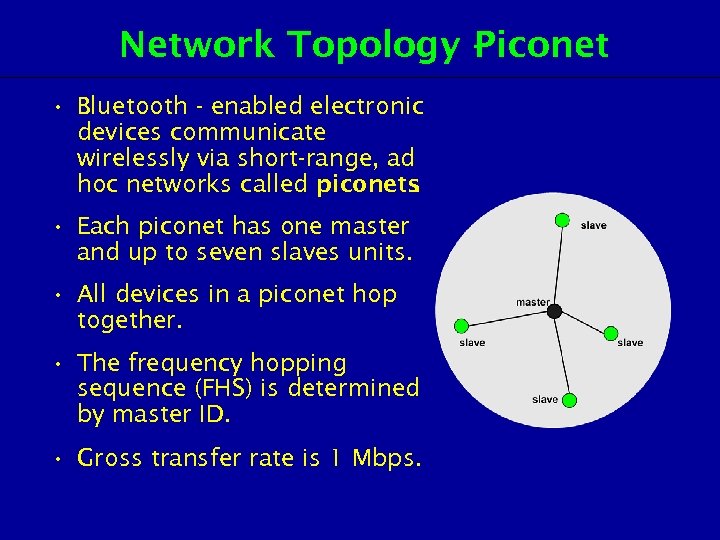 Network Topology Piconet • Bluetooth - enabled electronic devices communicate wirelessly via short-range, ad hoc networks called piconets. • Each piconet has one master and up to seven slaves units. • All devices in a piconet hop together. • The frequency hopping sequence (FHS) is determined by master ID. • Gross transfer rate is 1 Mbps.
 Network Topology Piconet • At any given time, data can be transferred between the master and one slave; but the master switches rapidly from slave to slave in a round-robin fashion. (Simultaneous transmission from the master to multiple slaves is possible, but not used much in practice). • Either device may switch the master/slave role at any time. • Connections can be point-to-point or point-tomultipoint. • The slaves have links to the master and no direct links to the other slaves. • A piconet is established dynamically as Bluetooth devices are brought into the neighbourhood of one another. – Make-and-break connections.
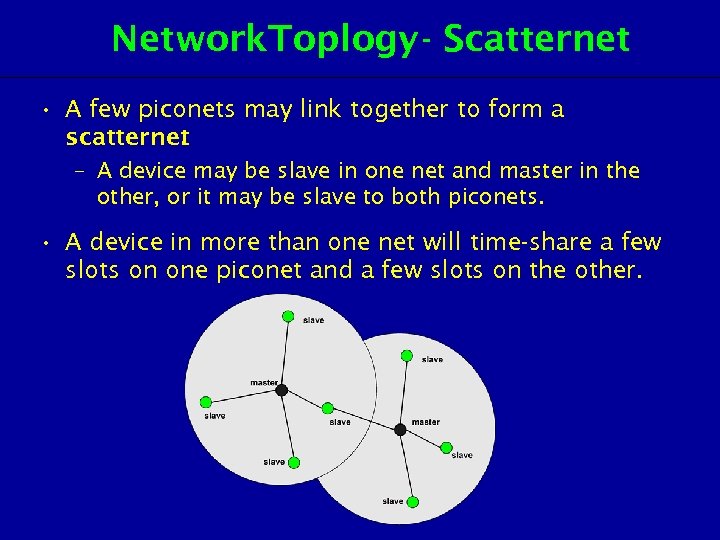 Network. Toplogy - Scatternet • A few piconets may link together to form a scatternet. – A device may be slave in one net and master in the other, or it may be slave to both piconets. • A device in more than one net will time-share a few slots on one piconet and a few slots on the other.
 Setting Up Connections • Any Bluetooth device will transmit the following sets of information on demand – Device Name – Device Class – List of services – Technical information eg: device features, manufacturer, Bluetooth specification, clock offset • Any device may perform an "inquiry" to find other devices to which to connect, and any device can be configured to respond to such inquiries.
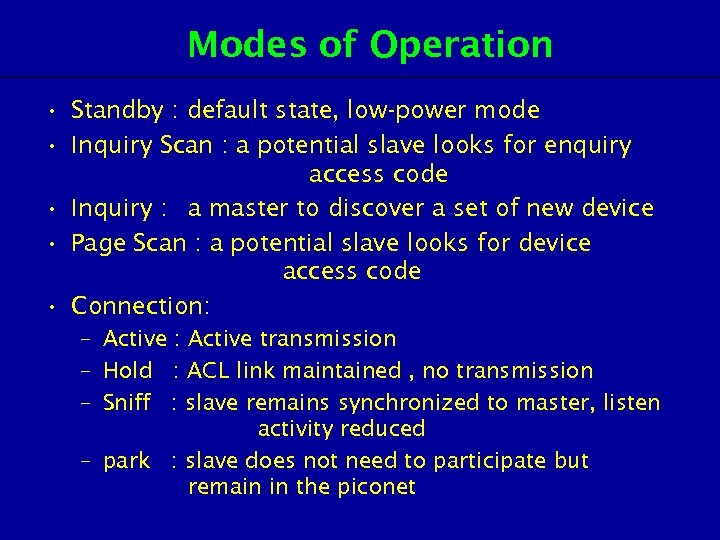 Modes of Operation • Standby : default state, low-power mode • Inquiry Scan : a potential slave looks for enquiry access code • Inquiry : a master to discover a set of new device • Page Scan : a potential slave looks for device access code • Connection: – Active : Active transmission – Hold : ACL link maintained , no transmission – Sniff : slave remains synchronized to master, listen activity reduced – park : slave does not need to participate but remain in the piconet
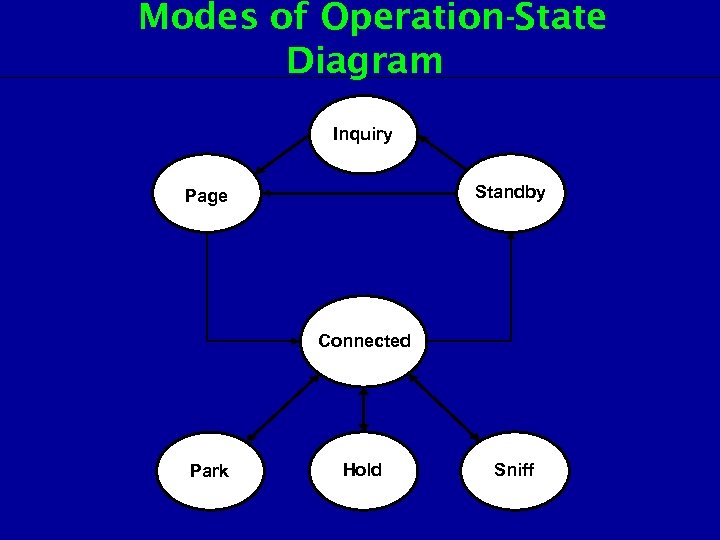 Modes of Operation-State Diagram Inquiry Standby Page Connected Park Hold Sniff
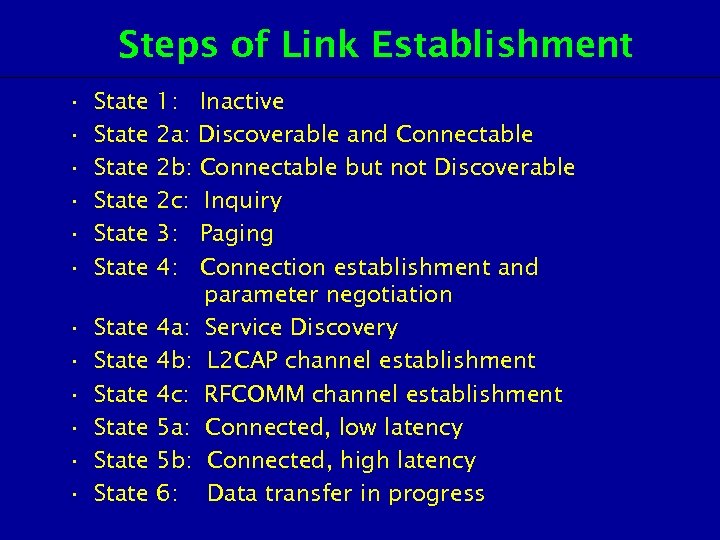 Steps of Link Establishment • • • State State State 1: Inactive 2 a: Discoverable and Connectable 2 b: Connectable but not Discoverable 2 c: Inquiry 3: Paging 4: Connection establishment and parameter negotiation 4 a: Service Discovery 4 b: L 2 CAP channel establishment 4 c: RFCOMM channel establishment 5 a: Connected, low latency 5 b: Connected, high latency 6: Data transfer in progress
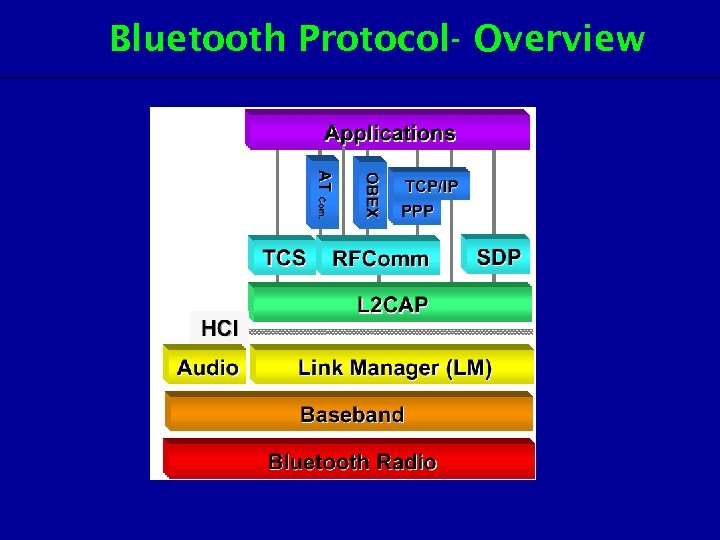 Bluetooth Protocol- Overview
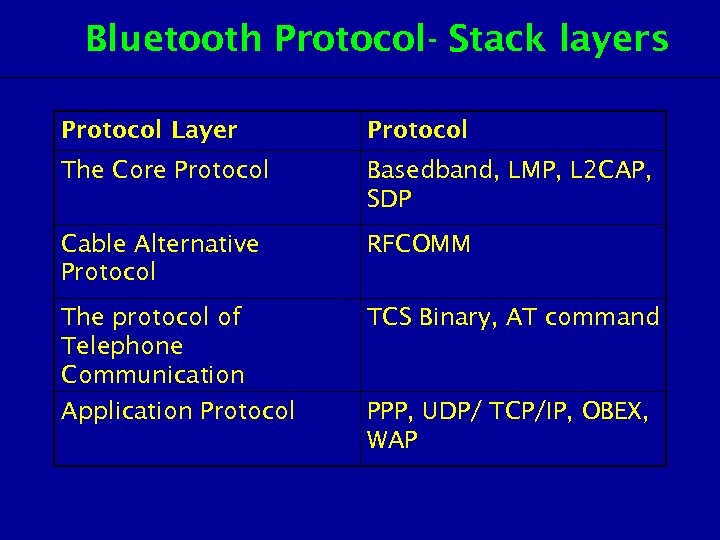 Bluetooth Protocol- Stack layers Protocol Layer Protocol The Core Protocol Basedband, LMP, L 2 CAP, SDP Cable Alternative Protocol RFCOMM The protocol of Telephone Communication TCS Binary, AT command Application Protocol PPP, UDP/ TCP/IP, OBEX, WAP
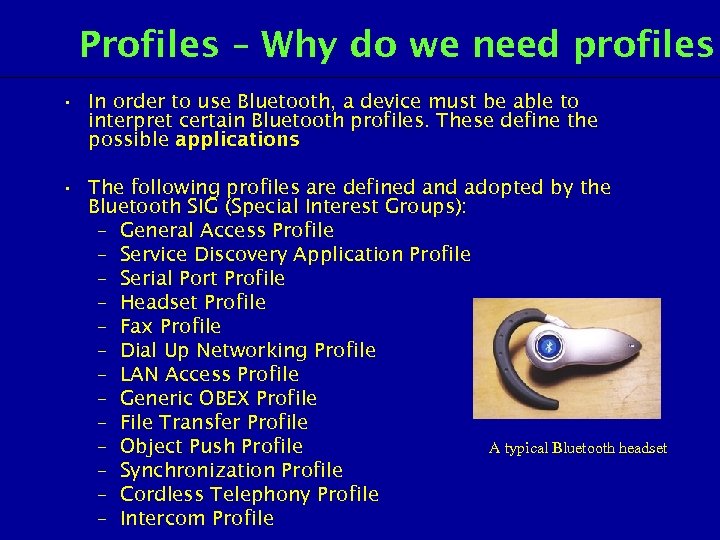 Profiles – Why do we need profiles • In order to use Bluetooth, a device must be able to interpret certain Bluetooth profiles. These define the possible applications. • The following profiles are defined and adopted by the Bluetooth SIG (Special Interest Groups): – General Access Profile – Service Discovery Application Profile – Serial Port Profile – Headset Profile – Fax Profile – Dial Up Networking Profile – LAN Access Profile – Generic OBEX Profile – File Transfer Profile A typical Bluetooth headset – Object Push Profile – Synchronization Profile – Cordless Telephony Profile – Intercom Profile
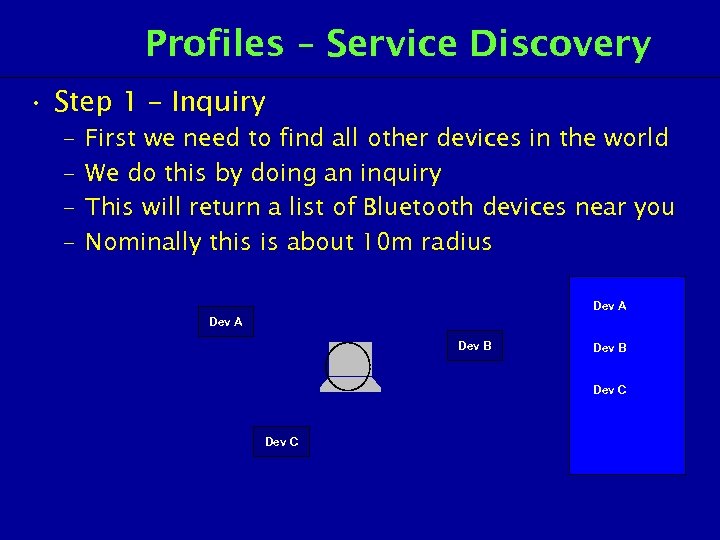 Profiles – Service Discovery • Step 1 – Inquiry – – First we need to find all other devices in the world We do this by doing an inquiry This will return a list of Bluetooth devices near you Nominally this is about 10 m radius Dev A Dev B Dev C
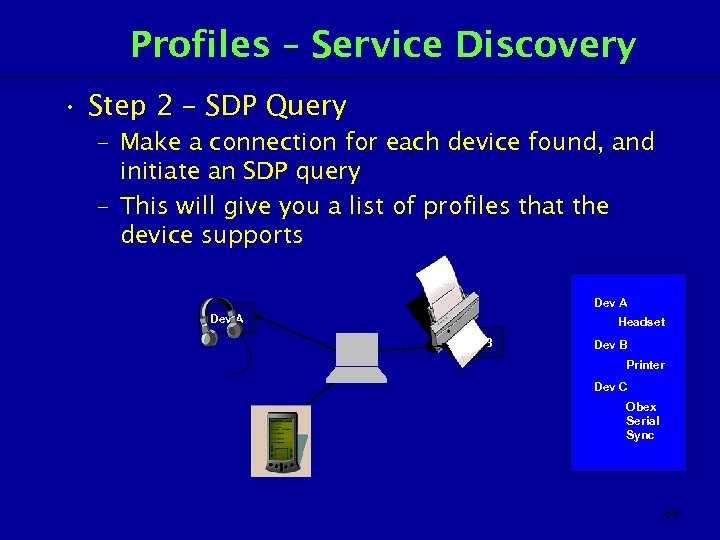 Profiles – Service Discovery • Step 2 – SDP Query – Make a connection for each device found, and initiate an SDP query – This will give you a list of profiles that the device supports Dev A Headset Dev B Printer Dev C Obex Serial Sync 68
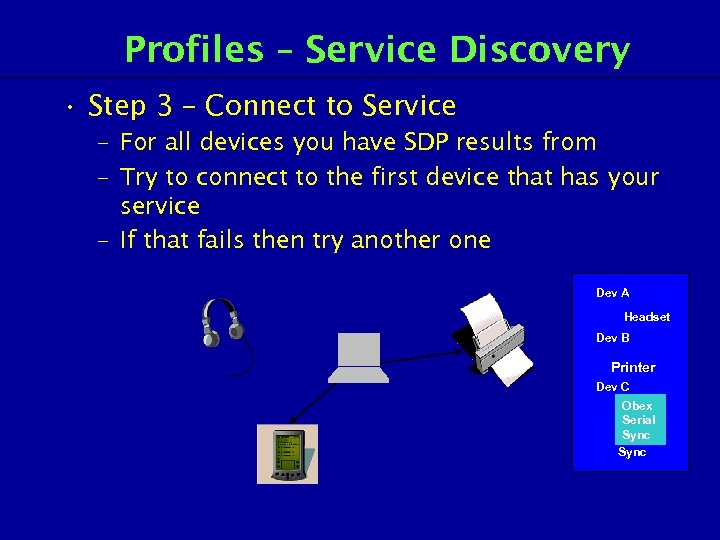 Profiles – Service Discovery • Step 3 – Connect to Service – For all devices you have SDP results from – Try to connect to the first device that has your service – If that fails then try another one Dev A Headset Dev B Printer Dev C Obex Serial Seria l Sync
 Types of Profiles – GAP • General Access Profile (GAP) – Base of inheritance tree • Defines – – – User interface Modes Security Idle Mode Link Establishment • Provides – Guarantees that links and channels can always be established between Bluetooth devices
 Types of Profiles – SDAP • Service Discovery Application Profile (SDAP) – Does for applications what SDP does for services • Defines – Standardized procedures to locate and identify services • Doesn’t – Define access or use to services – Selection of services – Automatic Service Discovery
 Types of Profiles – SPP • Serial Port Profile (SPP) – Requires GAP – Defines a virtual RS 232 connection • Defines – A single connection between two devices – Multiple connections are possible • Supports – Legacy applications – Rates of 128 kbs and higher
 Types of Profiles – Headset Profile • Headset Profile – Requires GAP and Serial Port Profile – Uses serial port for control • Defines – The ultimate headset – Can use a subset • Doesn’t – Define master/slave roles – Define security
 Types of Profiles – FAX Profile • Fax profile – Requires GAP and Serial Port Profile – Uses serial port for transfer of data • Security – Requires data encryption – Requires a secure connection
 Types of Profiles – DUNP • Dial Up Networking Profile (DUNP) – Requires GAP and Serial Port Profile – Used to connect to Internet • Security – Requires data encryption – Requires a secure connection
 Profile – LAN Access Profile • LAN Access Profile – Requires GAP and Serial Port Profile – Enables LAN access using PPP over RFCOMM • Provides – No required protocol (IP, IPX, X. 25 – whatever) – Can allow multiple devices to be connected • Doesn’t Provide – No LAN Emulation – No Ad-Hoc networks – No Conferencing
 Profile – Generic OBEX Profile • Generic Obex – Requires GAP and Serial Port Profile – Used to exchange data • Connection – Bonding or Pairing is used – Uses Obex initialization – Security is dependant on application
 Profile – Object Push Profile • Object Push Profile – – Requires GAP, Serial, General Obex Simple push for objects Business Cards Calendar Appointments • Connection – Bonding required / use is optional – Security is required / use is optional
 Profile – File Transfer Profile • File Transfer Profile – – Requires GAP, Serial, General Obex Browse Files Transfer Files Manipulate Remote Files • Connection – Bonding required / use is optional – Security is required / use is optional
 Profile – Synchronization Profile • Synchronization Profile – Requires GAP, Serial and General Obex – Synchronizes devices – Derived from Ir. MC • Connection – Bonding required / use is optional – Security is required / use is optional
 Profile – Cordless Telephony Profile • Cordless Telephony Profile – Requires only GAP – Profiles land line access for Bluetooth phone – Enables 3 in 1 phone • Terminology – Base station is called “Gateway” – Handset is called “Terminal” – Gateway is always master, Terminal is always slave • Security – Authentication and Encryption is required
 Profile – Intercom Profile • Intercom Profile – Requires only GAP – Provides “walkie-talkie” function – Enables 3 in 1 phone
 New Profiles • Future – Some profiles are only just being defined – Computer industry is starting to define profiles • Profiles – – – Car Human Interface Device (HID) Audio/Visual Printer Still Image
 New Profiles • Car Profile – – – Call handling between Car and Portable Phones Personalizing the Car and its Devices Portable Device Exports its User Interface to the Car Remote access to Car Position Diagnostics and Programming • Human Interface Device profile (HID) – – Mice Keyboard Conference Controllers Living Room Remote Controls
 New Profiles • Audio / Visual Profile – CD Quality audio headphones loudspeakers and microphones – Dictation Quality voice – Wireless short-range video display – Wireless video cameras – Video conference capability • Still Image Profile – – Exchange of digital images Extra image information (date/time/weather/sound clip) Could be Displayed / Stored / Forwarded Could be used for Printing
 New Profiles - Printer Profile • Printer profile – Printing from PC – Printing from mobile phone / PDA / Camera – Control of printer – Simple Text – Document Quality Printing – Image Quality Printing – Negotiate protocols using SDP (Basic Text / PCL / Postscript)
 Future Bluetooth uses • One of the ways Bluetooth technology may become useful is in Voice over IP (also called Vo. IP, IP Telephony, Internet telephony, and Digital Phone). • In May 2005, the Bluetooth Special Interest Group (SIG) announced its intent to work with UWB manufacturers to develop a next-generation Bluetooth technology using UWB technology and delivering UWB speeds. This will enable Bluetooth technology to be used to deliver high speed network data exchange rates required for wireless VOIP, music and video applications. • Bluetooth may also be used for remote sales technology, allowing wireless access to vending machines and other commercial enterprises
 Review Questions 1. Name the four specifications for WLAN technology which are defined by the IEEE 802. 11 family. 2. Bluetooth products are available in which three types of power classes? 3. Bluetooth uses which three techniques to cope with the hostile environment? 4. What are the two types of Bluetooth network topology. 5. List three benefits of using Ir. DA.