


 Скачать презентацию Chapter 5 Link Layer A note on the
d2f60f34e63c07f767510a1042f9cd7a.ppt
- Количество слайдов: 59
 Chapter 5 Link Layer A note on the use of these ppt slides: We’re making these slides freely available to all (faculty, students, readers). They’re in Power. Point form so you see the animations; and can add, modify, and delete slides (including this one) and slide content to suit your needs. They obviously represent a lot of work on our part. In return for use, we only ask the following: v If you use these slides (e. g. , in a class) that you mention their source (after all, we’d like people to use our book!) v If you post any slides on a www site, that you note that they are adapted from (or perhaps identical to) our slides, and note our copyright of this material. Computer Networking: A Top Down Approach 6 th edition Jim Kurose, Keith Ross Addison-Wesley March 2012 Thanks and enjoy! JFK/KWR All material copyright 1996 -2012 J. F Kurose and K. W. Ross, All Rights Reserved Link Layer 5 -1
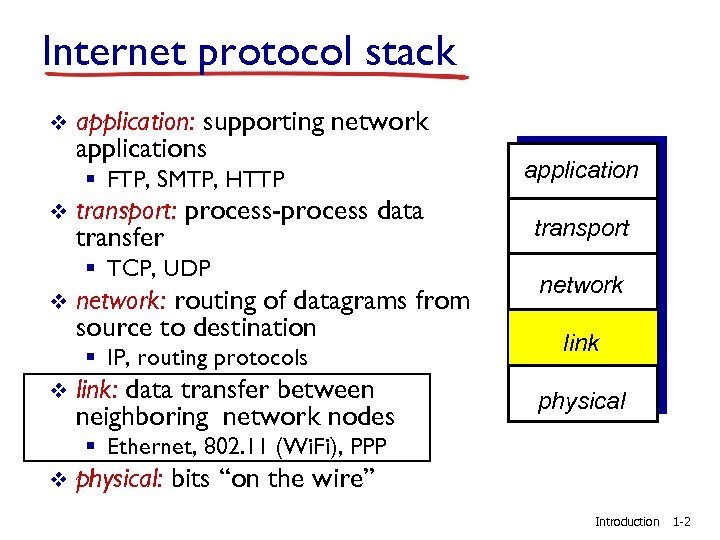 Internet protocol stack v application: supporting network applications § FTP, SMTP, HTTP v transport: process-process data transfer § TCP, UDP v network: routing of datagrams from source to destination § IP, routing protocols v link: data transfer between neighboring network nodes application transport network link physical § Ethernet, 802. 11 (Wi. Fi), PPP v physical: bits “on the wire” Introduction 1 -2
 Chapter 5: Link layer our goals: v understand the principles behind the services provided by the Internet’s link layer: § § v error detection, correction sharing a broadcast channel: multiple access link layer addressing local area networks: Ethernet, VLANs instantiation, implementation of various link layer technologies § access networks, LANs, inter-network links Link Layer 5 -3
 Link layer, LANs: outline 5. 1 introduction, services 5. 5 link virtualization: MPLS 5. 2 error detection, correction 5. 6 data center networking 5. 3 multiple access protocols 5. 7 a day in the life of a web request 5. 4 LANs § § addressing, ARP Ethernet switches VLANS Link Layer 5 -4
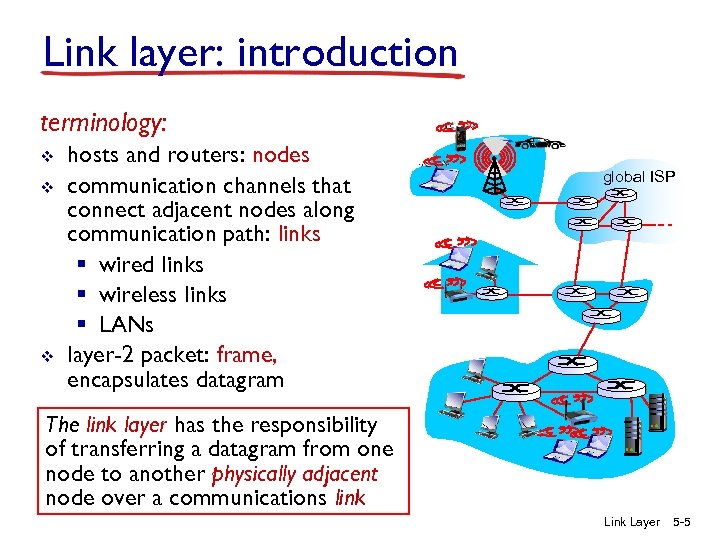 Link layer: introduction terminology: v v v hosts and routers: nodes communication channels that connect adjacent nodes along communication path: links § wired links § wireless links § LANs layer-2 packet: frame, encapsulates datagram global ISP The link layer has the responsibility of transferring a datagram from one node to another physically adjacent node over a communications link Layer 5 -5
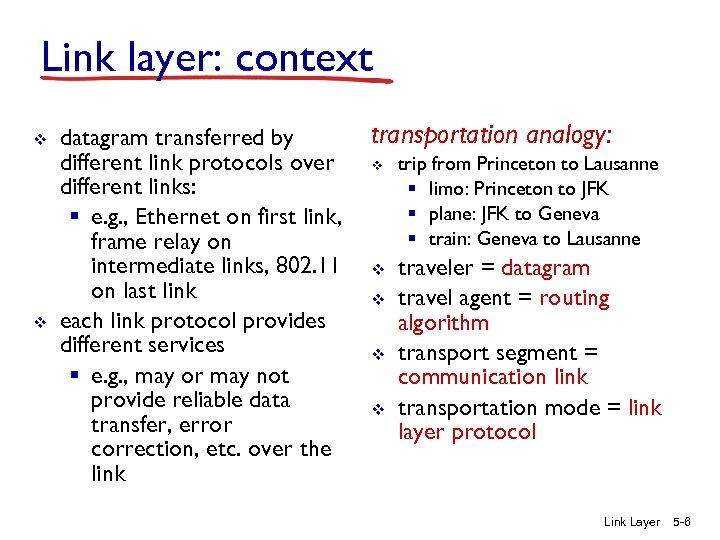 Link layer: context v v datagram transferred by different link protocols over different links: § e. g. , Ethernet on first link, frame relay on intermediate links, 802. 11 on last link each link protocol provides different services § e. g. , may or may not provide reliable data transfer, error correction, etc. over the link transportation analogy: v v v trip from Princeton to Lausanne § limo: Princeton to JFK § plane: JFK to Geneva § train: Geneva to Lausanne traveler = datagram travel agent = routing algorithm transport segment = communication link transportation mode = link layer protocol Link Layer 5 -6
 Link layer services v framing, link access: § encapsulate datagram into the appropriate frame, adding header, trailer appropriate for the link protocol § provide channel access if using a shared medium § “MAC” (media access control) addresses are used in frame headers to identify source and destination hosts • different from IP address! v reliable delivery between adjacent nodes § we learned how to do this already (chapter 3)! § seldom used on low bit-error links (fiber, some twisted pair) § wireless links: high error rates • Q: why do you suppose we need to provide link-level RDT if end-to-end reliability is provided (by TCP)? Link Layer 5 -7
 Link layer services (more) v flow control: § pacing between adjacent sending and receiving nodes v error detection: § errors caused by signal attenuation, noise. § receiver detects presence of errors: • signals sender for retransmission or drops frame v error correction: § receiver identifies and corrects bit error(s) without resorting to retransmission v half-duplex and full-duplex § with half duplex, nodes at both ends of link can transmit, but not at same time § with full-duplex, connected nodes can transmit simultaneously Link Layer 5 -8
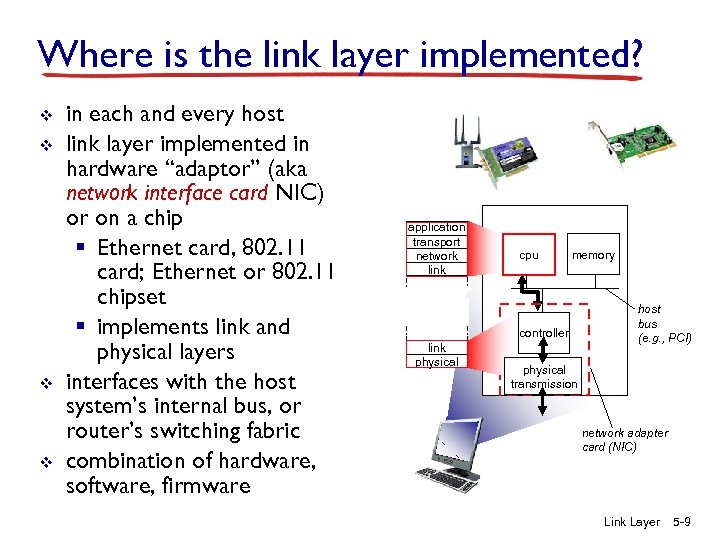 Where is the link layer implemented? v v in each and every host link layer implemented in hardware “adaptor” (aka network interface card NIC) or on a chip § Ethernet card, 802. 11 card; Ethernet or 802. 11 chipset § implements link and physical layers interfaces with the host system’s internal bus, or router’s switching fabric combination of hardware, software, firmware application transport network link cpu memory controller link physical host bus (e. g. , PCI) physical transmission network adapter card (NIC) Link Layer 5 -9
 Host Adaptors Communicating datagram controller receiving host sending host datagram frame v sending side: § encapsulates datagram in frame § adds error checking bits, rdt, flow control, etc. v receiving side § looks for errors, rdt, flow control, etc. § extracts datagram, passes to upper layer at receiving side Link Layer 5 -10
 Link layer, LANs: outline 5. 1 introduction, services 5. 5 link virtualization: MPLS 5. 2 error detection, correction 5. 6 data center networking 5. 3 multiple access protocols 5. 7 a day in the life of a web request 5. 4 LANs § § addressing, ARP Ethernet switches VLANS Link Layer 5 -11
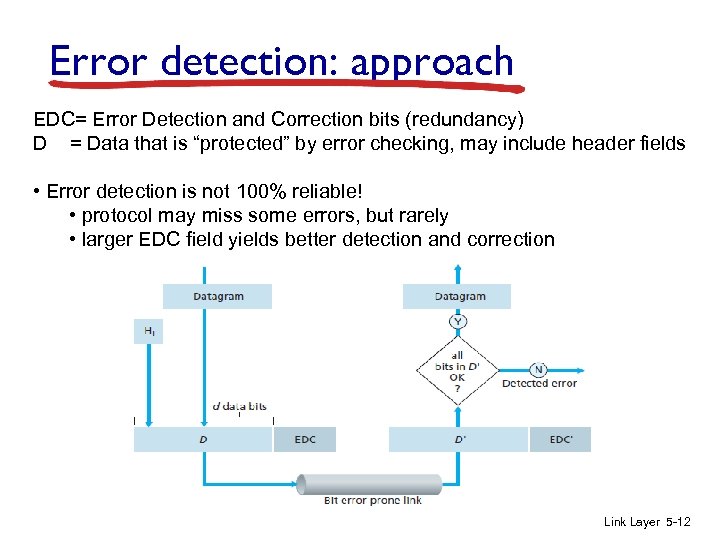 Error detection: approach EDC= Error Detection and Correction bits (redundancy) D = Data that is “protected” by error checking, may include header fields • Error detection is not 100% reliable! • protocol may miss some errors, but rarely • larger EDC field yields better detection and correction Link Layer 5 -12
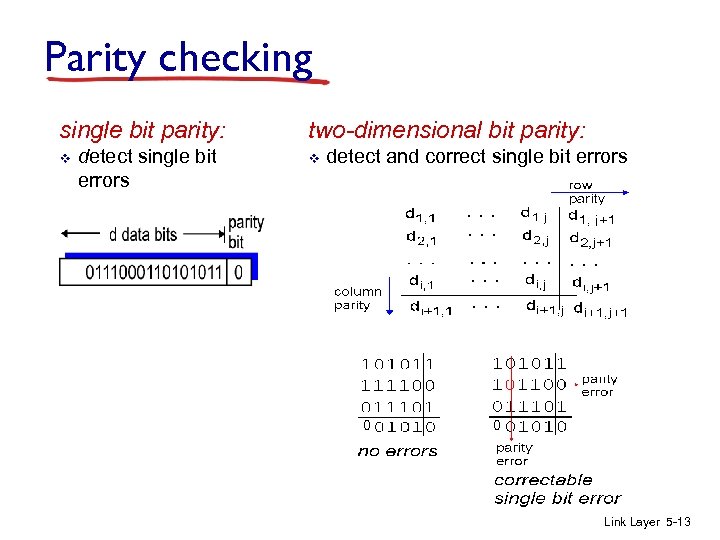 Parity checking single bit parity: v detect single bit errors two-dimensional bit parity: v detect and correct single bit errors 0 0 Link Layer 5 -13
 Internet checksum (review) goal: detect “errors” (e. g. , flipped bits) in transmitted packet sender: v v v treat segment contents as sequence of 16 -bit integers checksum: addition (1’s complement sum) of segment contents sender puts checksum value into UDP checksum field receiver: v compute checksum of received segment v check if computed checksum equals checksum field value: § NO - error detected § YES - no error detected. But maybe errors nonetheless? Note: checksum only used at transport and network layer. Why? Link Layer 5 -14
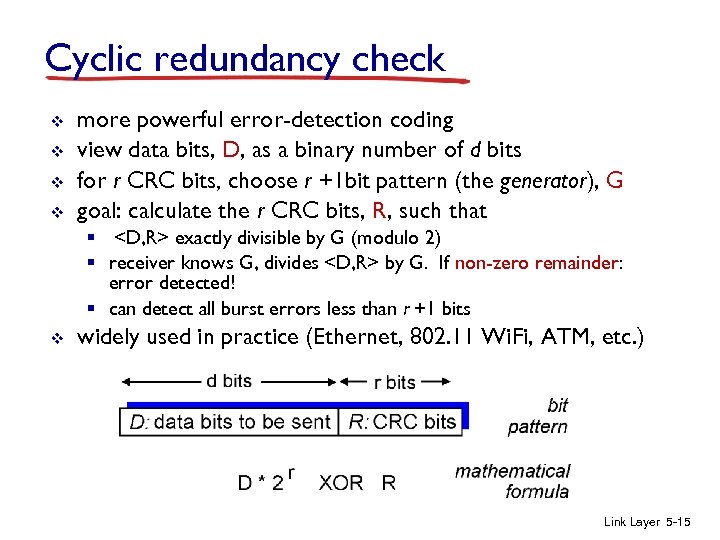 Cyclic redundancy check v v more powerful error-detection coding view data bits, D, as a binary number of d bits for r CRC bits, choose r +1 bit pattern (the generator), G goal: calculate the r CRC bits, R, such that §
 Cyclic redundancy check v v All CRC calculations are done in modulo-2 arithmetic No carries for addition or borrows for subtraction § i. e. , addition and subtraction are identical operations § addition and subtraction are the same as bitwise XOR Link Layer 5 -16
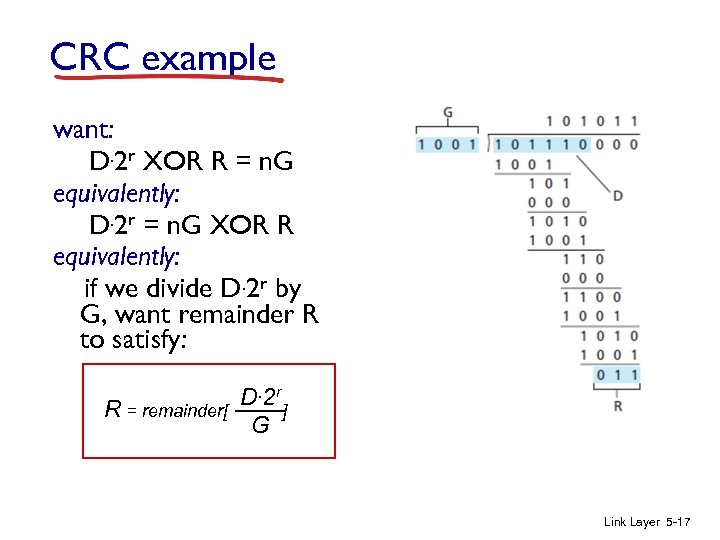 CRC example want: D. 2 r XOR R = n. G equivalently: D. 2 r = n. G XOR R equivalently: if we divide D. 2 r by G, want remainder R to satisfy: R = remainder[ D. 2 r ] G Link Layer 5 -17
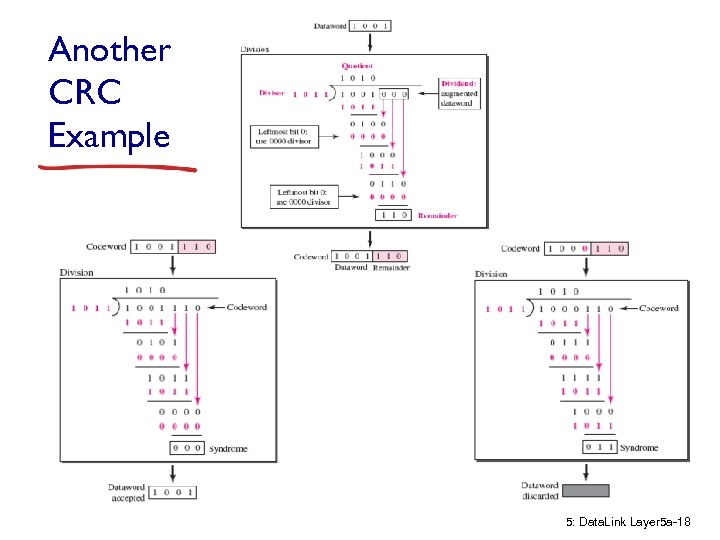 Another CRC Example 5: Data. Link Layer 5 a-18
 CRC in Practice v v Science of CRC is polynomial math CRC generators are formed using 0 and 1 coefficients for the terms of a polynomial, with the power of the terms representing the position of the bits in the generator: § e. g. , 10011 -> x 4 + x + 1 v A “good” polynomial (generator) is one that: § Has at least two terms § Has a coefficient of 1 for the x 0 term § Is irreducible – can only be divided by itself and 1 • Should not divide by xt + 1 for t between 2 and r -1 • Should be a factor of x + 1 5: Data. Link Layer 5 a-19
 CRC in Practice v International standards (CCITT) are defined for CRC-8, CRC-12, CRC-16, and CRC-32 § § § CRC-8: ATM header error control CRC-10: ATM AAL error detection (recommended) CRC-12: IBM Bisync error control CCITT-16: HDLC, XMODEM, V. 41 CCITT-32: IEEE 802, V. 42, ATM AAL 5 • GCRC-32 = 10000010011000001110110110111 v Each standard CRC can detect: § ALL burst errors of < r+1 bits, and ALL odd number of bit errors § Bursts of > r+1 bits detected with Prob. = 1 – 0. 5 r 5: Data. Link Layer 5 a-20
 Link layer, LANs: outline 5. 1 introduction, services 5. 5 link virtualization: MPLS 5. 2 error detection, correction 5. 6 data center networking 5. 3 multiple access protocols 5. 7 a day in the life of a web request 5. 4 LANs § § addressing, ARP Ethernet switches VLANS Link Layer 5 -21
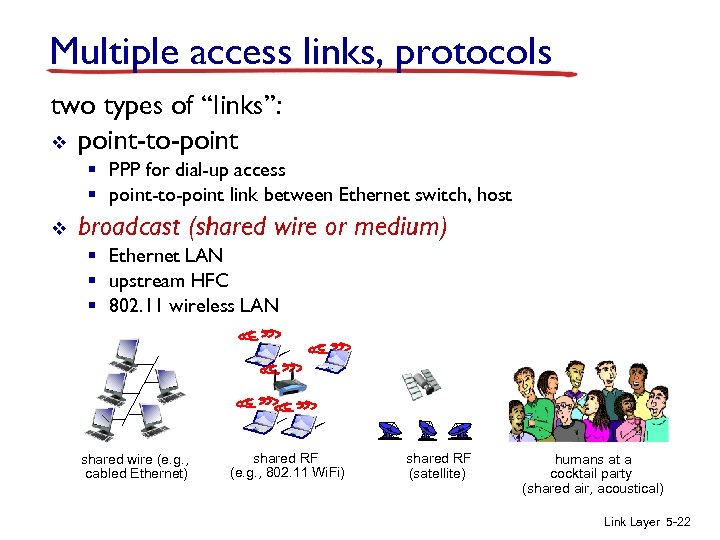 Multiple access links, protocols two types of “links”: v point-to-point § PPP for dial-up access § point-to-point link between Ethernet switch, host v broadcast (shared wire or medium) § Ethernet LAN § upstream HFC § 802. 11 wireless LAN shared wire (e. g. , cabled Ethernet) shared RF (e. g. , 802. 11 Wi. Fi) shared RF (satellite) humans at a cocktail party (shared air, acoustical) Link Layer 5 -22
 Multiple access protocols v v single shared broadcast channel two or more simultaneous transmissions by nodes: interference § collision if a receiving node receives two or more signals at the same time (overlapped/interfering signals) multiple access protocol v v distributed algorithm that determines how nodes share channel, i. e. , determine when node can transmit communication about channel sharing must use channel itself! § no out-of-band channel for coordination Link Layer 5 -23
 An ideal multiple access protocol objective: share a broadcast channel of rate R bps desirable characteristics: 1. when one node wants to transmit, it can send at rate R. 2. when M nodes want to transmit, each can send at average rate R/M 3. coordination is fully decentralized: • no special node to coordinate transmissions • no synchronization of clocks or transmission “slots” 4. simple Link Layer 5 -24
 MAC protocols: taxonomy three broad classes: v channel partitioning § divide channel into smaller “pieces” (time slots, frequency, code) § allocate piece to node for exclusive use v random access § channel not divided, allow collisions § “recover” from collisions v “taking turns” § nodes take turns, but nodes with more to send can take longer turns Link Layer 5 -25
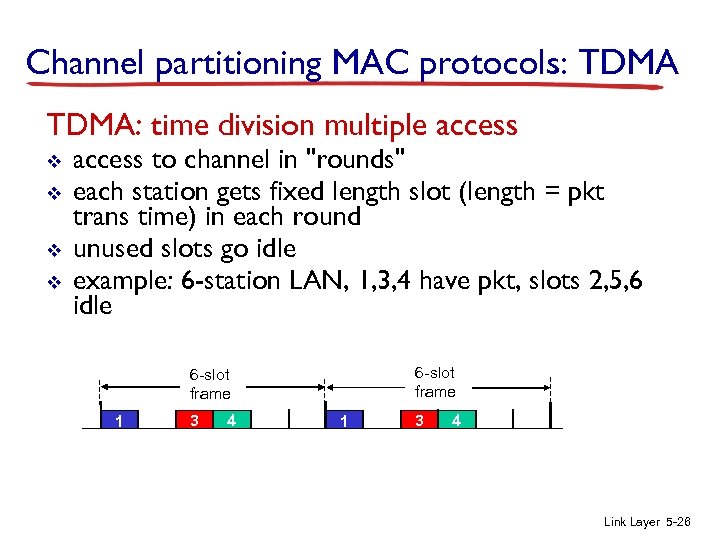 Channel partitioning MAC protocols: TDMA: time division multiple access v v access to channel in "rounds" each station gets fixed length slot (length = pkt trans time) in each round unused slots go idle example: 6 -station LAN, 1, 3, 4 have pkt, slots 2, 5, 6 idle 6 -slot frame 1 3 4 Link Layer 5 -26
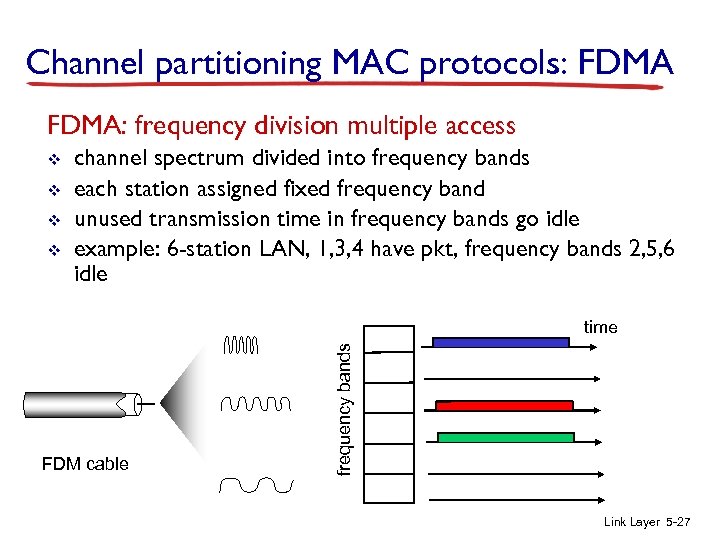 Channel partitioning MAC protocols: FDMA: frequency division multiple access v v channel spectrum divided into frequency bands each station assigned fixed frequency band unused transmission time in frequency bands go idle example: 6 -station LAN, 1, 3, 4 have pkt, frequency bands 2, 5, 6 idle FDM cable frequency bands time Link Layer 5 -27
 Random access protocols v when node has packet to send § transmit at full channel data rate R. § no a priori coordination among nodes v v two or more transmitting nodes ➜ “collision”, random access MAC protocol specifies: § how to detect collisions § how to recover from collisions (e. g. , via delayed retransmissions) v examples of random access MAC protocols: § slotted ALOHA § CSMA, CSMA/CD, CSMA/CA Link Layer 5 -28
 Slotted ALOHA assumptions: v v v all frames same size time divided into equal size slots (time to transmit 1 frame) nodes start to transmit only slot beginning nodes are synchronized if 2 or more nodes transmit in slot, all nodes detect collision operation: v node obtains a fresh frame, then it transmits in the next slot § if no collision: node can send new frame in next slot § if collision: node retransmits frame in each subsequent slot with probability p until success Link Layer 5 -29
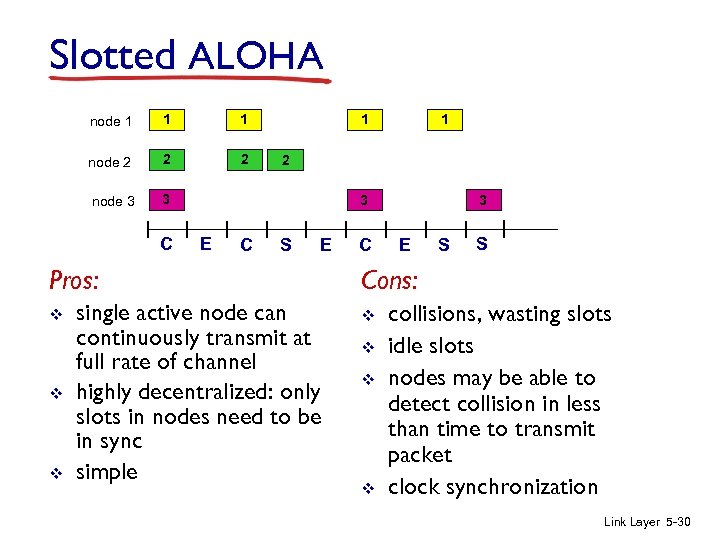 Slotted ALOHA node 1 1 1 node 2 2 2 node 3 3 C 2 3 E C S E Pros: v v v 1 1 single active node can continuously transmit at full rate of channel highly decentralized: only slots in nodes need to be in sync simple C 3 E S S Cons: v v collisions, wasting slots idle slots nodes may be able to detect collision in less than time to transmit packet clock synchronization Link Layer 5 -30
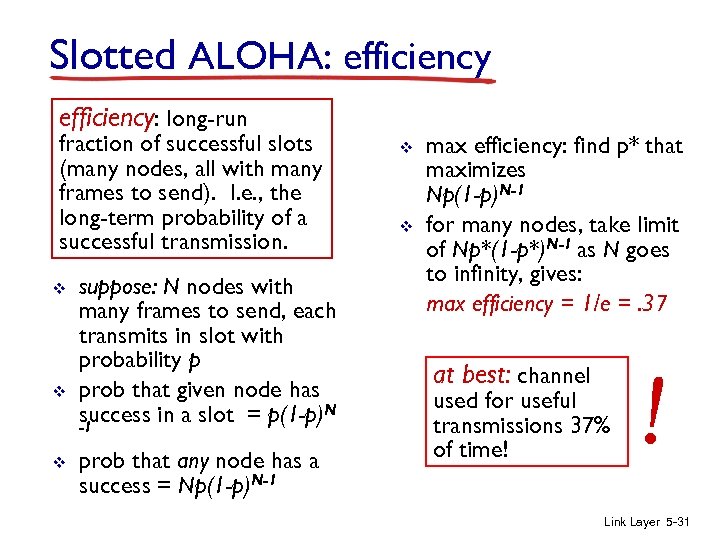 Slotted ALOHA: efficiency: long-run fraction of successful slots (many nodes, all with many frames to send). I. e. , the long-term probability of a successful transmission. v v v suppose: N nodes with many frames to send, each transmits in slot with probability p prob that given node has success in a slot = p(1 -p)N -1 prob that any node has a success = Np(1 -p)N-1 v v max efficiency: find p* that maximizes Np(1 -p)N-1 for many nodes, take limit of Np*(1 -p*)N-1 as N goes to infinity, gives: max efficiency = 1/e =. 37 at best: channel used for useful transmissions 37% of time! ! Link Layer 5 -31
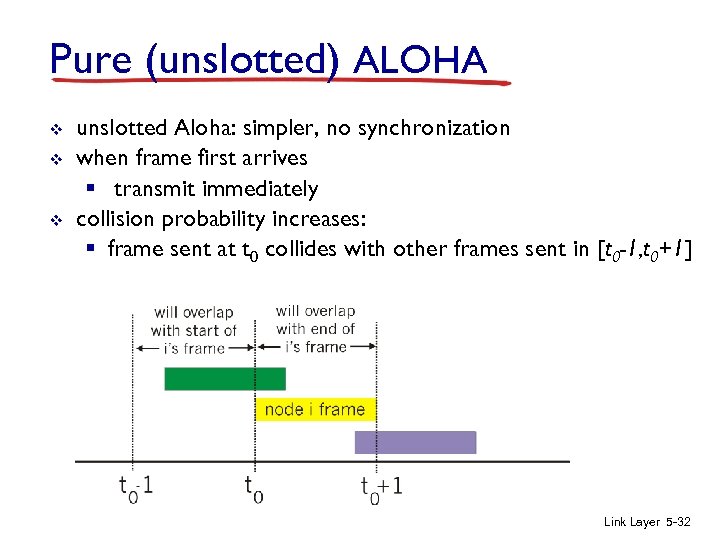 Pure (unslotted) ALOHA v v v unslotted Aloha: simpler, no synchronization when frame first arrives § transmit immediately collision probability increases: § frame sent at t 0 collides with other frames sent in [t 0 -1, t 0+1] Link Layer 5 -32
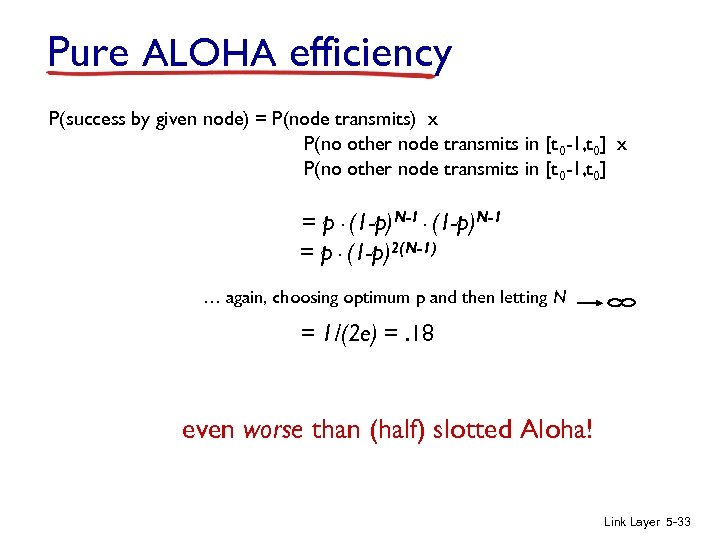 Pure ALOHA efficiency P(success by given node) = P(node transmits) x P(no other node transmits in [t 0 -1, t 0] = p. (1 -p)N-1 = p. (1 -p)2(N-1) … again, choosing optimum p and then letting N = 1/(2 e) =. 18 even worse than (half) slotted Aloha! Link Layer 5 -33
 CSMA (carrier sense multiple access) CSMA: listen before transmit: if channel sensed idle: transmit entire frame v if channel sensed busy, defer transmission v human analogy: don’t interrupt others! Link Layer 5 -34
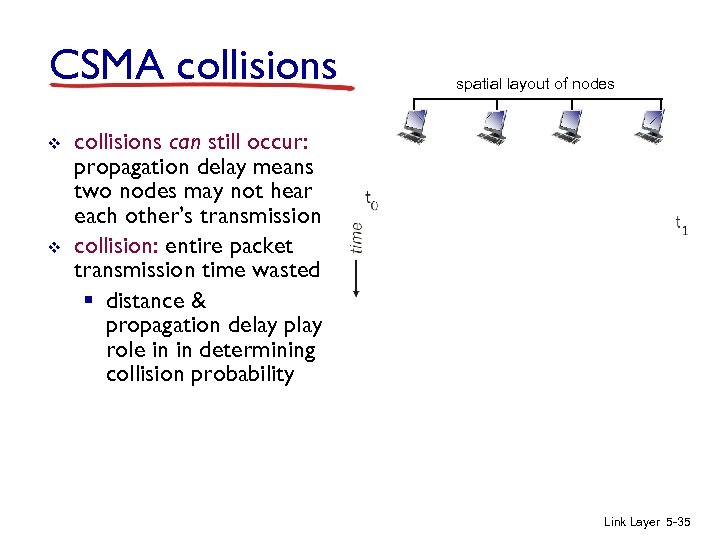 CSMA collisions v v spatial layout of nodes collisions can still occur: propagation delay means two nodes may not hear each other’s transmission collision: entire packet transmission time wasted § distance & propagation delay play role in in determining collision probability Link Layer 5 -35
 CSMA/CD (collision detection) CSMA/CD: carrier sensing, deferral as in CSMA § collisions detected within short time § colliding transmissions aborted, reducing channel wastage v collision detection: § easy in wired LANs: measure signal strengths, compare transmitted, received signals § difficult in wireless LANs: received signal strength overwhelmed by local transmission strength v human analogy: the polite conversationalist Link Layer 5 -36
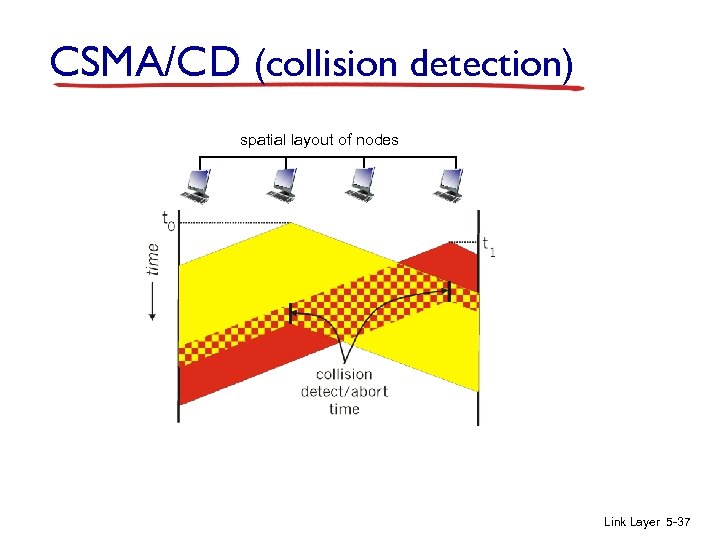 CSMA/CD (collision detection) spatial layout of nodes Link Layer 5 -37
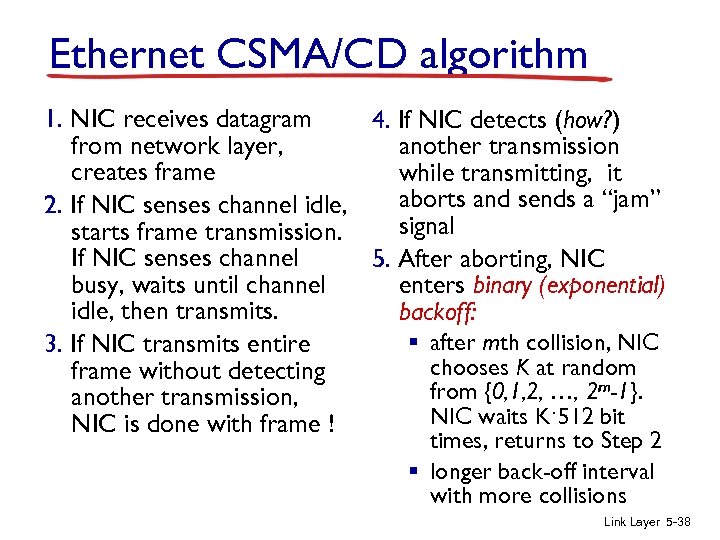 Ethernet CSMA/CD algorithm 1. NIC receives datagram 4. If NIC detects (how? ) from network layer, another transmission creates frame while transmitting, it aborts and sends a “jam” 2. If NIC senses channel idle, signal starts frame transmission. If NIC senses channel 5. After aborting, NIC busy, waits until channel enters binary (exponential) idle, then transmits. backoff: § after mth collision, NIC 3. If NIC transmits entire chooses K at random frame without detecting from {0, 1, 2, …, 2 m-1}. another transmission, NIC waits K·512 bit NIC is done with frame ! times, returns to Step 2 § longer back-off interval with more collisions Link Layer 5 -38
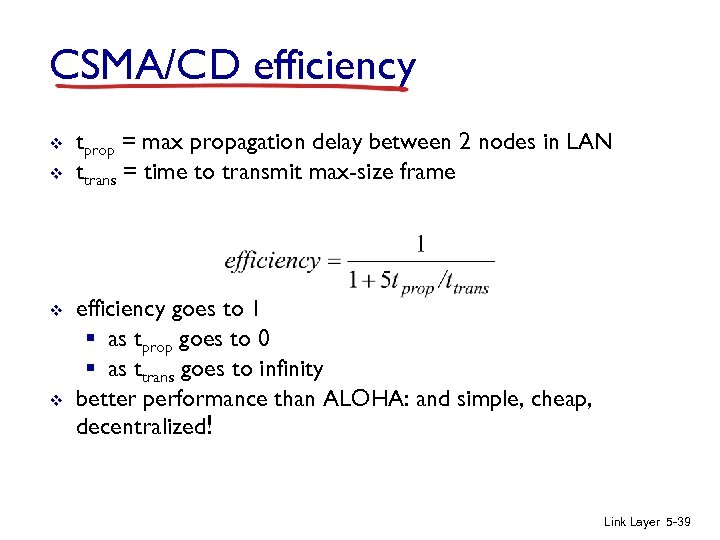 CSMA/CD efficiency v v tprop = max propagation delay between 2 nodes in LAN ttrans = time to transmit max-size frame efficiency goes to 1 § as tprop goes to 0 § as ttrans goes to infinity better performance than ALOHA: and simple, cheap, decentralized! Link Layer 5 -39
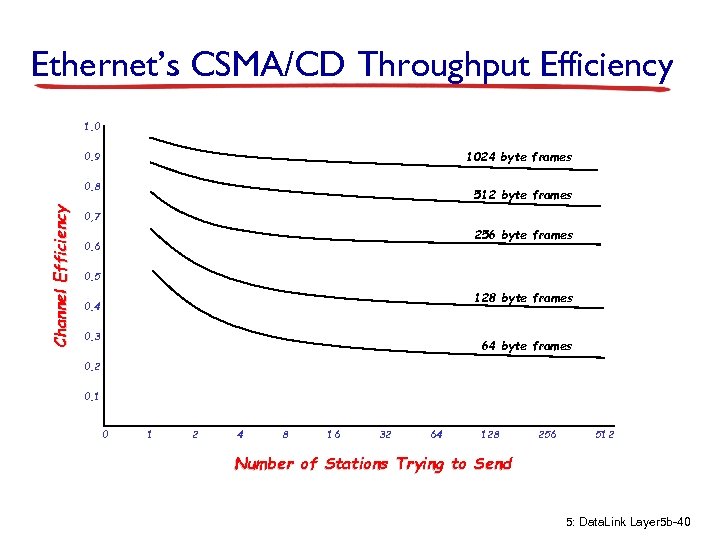 Ethernet’s CSMA/CD Throughput Efficiency 1. 0 1024 byte frames 0. 9 Channel Efficiency 0. 8 512 byte frames 0, 7 256 byte frames 0. 6 0. 5 128 byte frames 0. 4 0. 3 64 byte frames 0. 2 0. 1 0 1 2 4 8 16 32 64 128 256 512 Number of Stations Trying to Send 5: Data. Link Layer 5 b-40
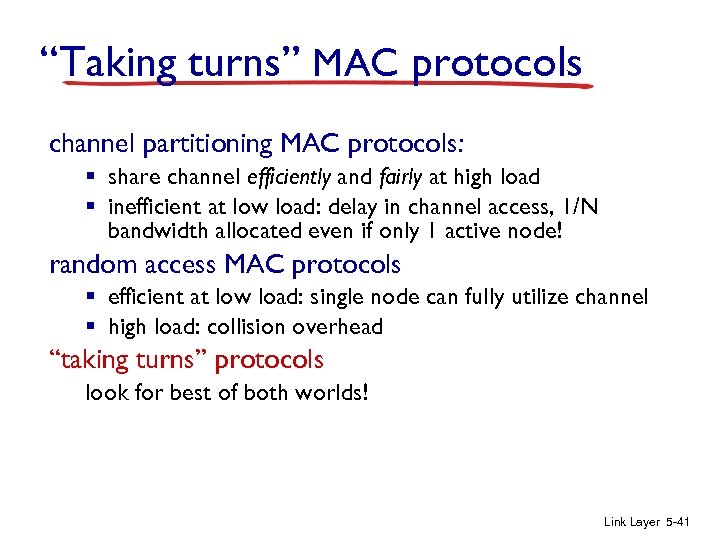 “Taking turns” MAC protocols channel partitioning MAC protocols: § share channel efficiently and fairly at high load § inefficient at low load: delay in channel access, 1/N bandwidth allocated even if only 1 active node! random access MAC protocols § efficient at low load: single node can fully utilize channel § high load: collision overhead “taking turns” protocols look for best of both worlds! Link Layer 5 -41
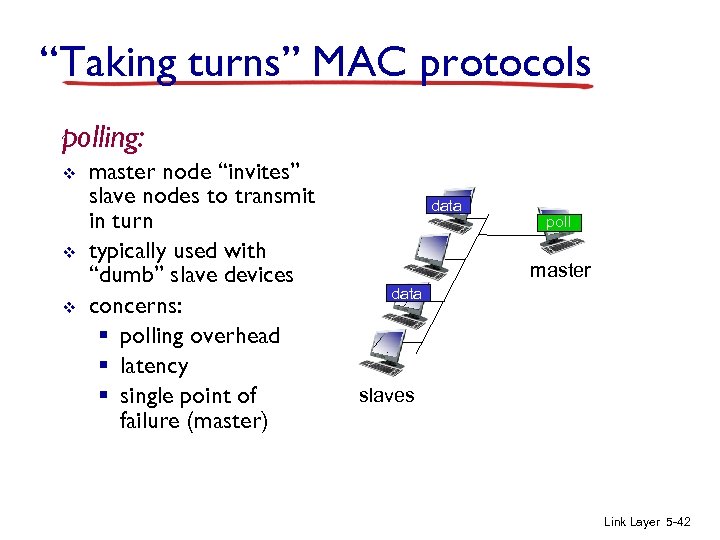 “Taking turns” MAC protocols polling: v v v master node “invites” slave nodes to transmit in turn typically used with “dumb” slave devices concerns: § polling overhead § latency § single point of failure (master) data poll master data slaves Link Layer 5 -42
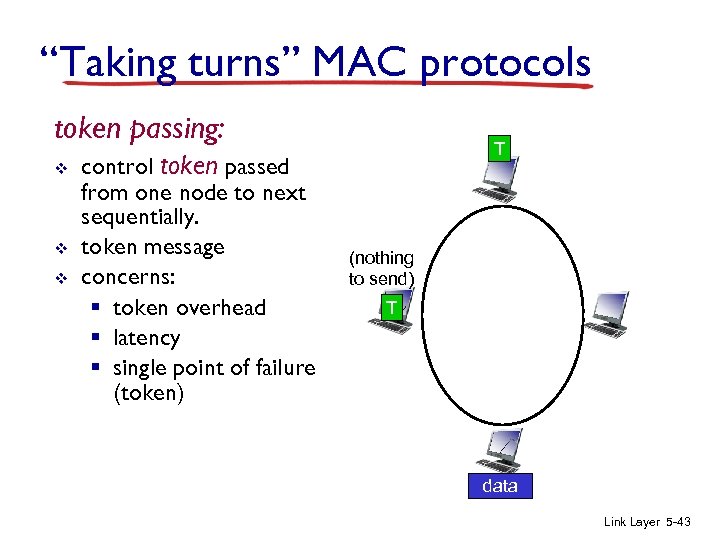 “Taking turns” MAC protocols token passing: v v v control token passed from one node to next sequentially. token message concerns: § token overhead § latency § single point of failure (token) T (nothing to send) T data Link Layer 5 -43
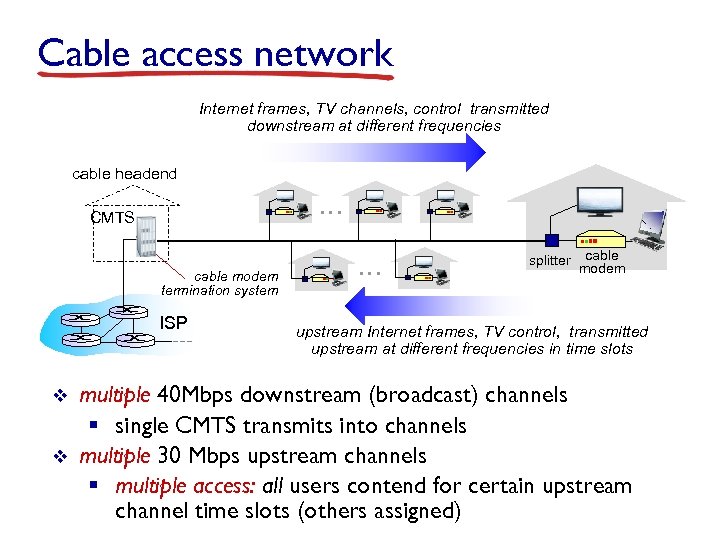 Cable access network Internet frames, TV channels, control transmitted downstream at different frequencies cable headend … CMTS cable modem termination system ISP v v … splitter cable modem upstream Internet frames, TV control, transmitted upstream at different frequencies in time slots multiple 40 Mbps downstream (broadcast) channels § single CMTS transmits into channels multiple 30 Mbps upstream channels § multiple access: all users contend for certain upstream channel time slots (others assigned)
![Cable access network cable headend MAP frame for Interval [t 1, t 2] Downstream](https://present5.com/presentation/d2f60f34e63c07f767510a1042f9cd7a/image-45.jpg "Cable access network cable headend MAP frame for Interval [t 1, t 2] Downstream") Cable access network cable headend MAP frame for Interval [t 1, t 2] Downstream channel i CMTS Upstream channel j t 1 Per-channel minislots contain minislot request frames t 2 Residences with cable modems Assigned per-channel minislots containing cable modem upstream data frames DOCSIS: data over cable service interface spec v v FDM over upstream, downstream frequency channels TDM upstream: some slots assigned, some have contention § downstream MAP frame: assigns upstream slots § request for upstream slots (and data) transmitted random access (binary back-off) in selected slots Layer 5 -45 Link
Cable access network cable headend MAP frame for Interval [t 1, t 2] Downstream channel i CMTS Upstream channel j t 1 Per-channel minislots contain minislot request frames t 2 Residences with cable modems Assigned per-channel minislots containing cable modem upstream data frames DOCSIS: data over cable service interface spec v v FDM over upstream, downstream frequency channels TDM upstream: some slots assigned, some have contention § downstream MAP frame: assigns upstream slots § request for upstream slots (and data) transmitted random access (binary back-off) in selected slots Layer 5 -45 Link
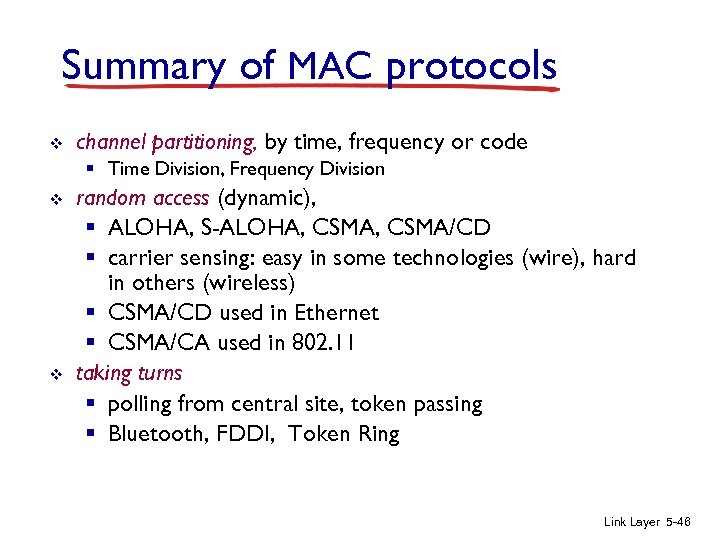 Summary of MAC protocols v channel partitioning, by time, frequency or code § Time Division, Frequency Division v v random access (dynamic), § ALOHA, S-ALOHA, CSMA/CD § carrier sensing: easy in some technologies (wire), hard in others (wireless) § CSMA/CD used in Ethernet § CSMA/CA used in 802. 11 taking turns § polling from central site, token passing § Bluetooth, FDDI, Token Ring Link Layer 5 -46
 Link layer, LANs: outline 5. 1 introduction, services 5. 5 link virtualization: MPLS 5. 2 error detection, correction 5. 6 data center networking 5. 3 multiple access protocols 5. 7 a day in the life of a web request 5. 4 LANs § § addressing, ARP Ethernet switches VLANS Link Layer 5 -47
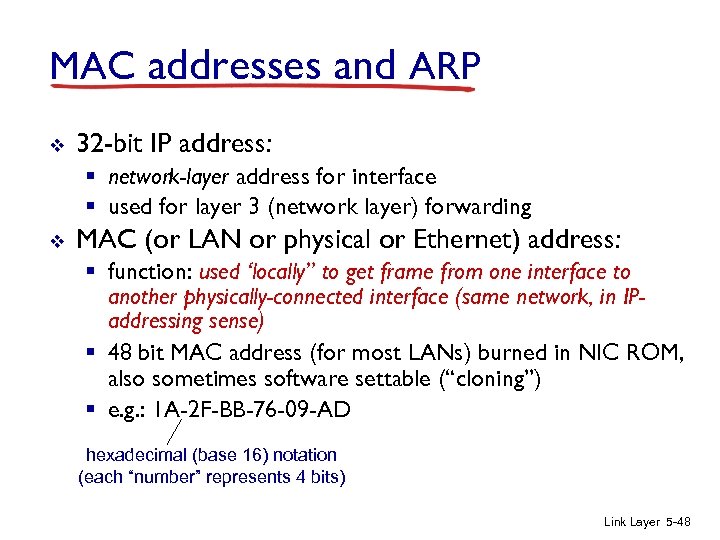 MAC addresses and ARP v 32 -bit IP address: § network-layer address for interface § used for layer 3 (network layer) forwarding v MAC (or LAN or physical or Ethernet) address: § function: used ‘locally” to get frame from one interface to another physically-connected interface (same network, in IPaddressing sense) § 48 bit MAC address (for most LANs) burned in NIC ROM, also sometimes software settable (“cloning”) § e. g. : 1 A-2 F-BB-76 -09 -AD hexadecimal (base 16) notation (each “number” represents 4 bits) Link Layer 5 -48
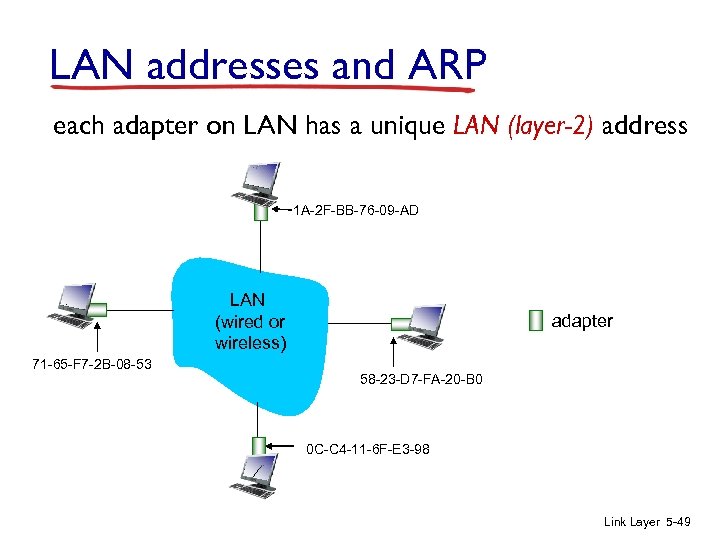 LAN addresses and ARP each adapter on LAN has a unique LAN (layer-2) address 1 A-2 F-BB-76 -09 -AD LAN (wired or wireless) 71 -65 -F 7 -2 B-08 -53 adapter 58 -23 -D 7 -FA-20 -B 0 0 C-C 4 -11 -6 F-E 3 -98 Link Layer 5 -49
 LAN addresses (more) v v v MAC address allocation administered by IEEE manufacturer buys portion of MAC address space (to assure uniqueness) analogy: § MAC address: like Social Security Number (moves with you) § IP address: like postal address (stays in one place) v MAC flat address ➜ portability § can move LAN card/device from one LAN to another v IP hierarchical address not portable § address depends on IP subnet to which node is attached Link Layer 5 -50
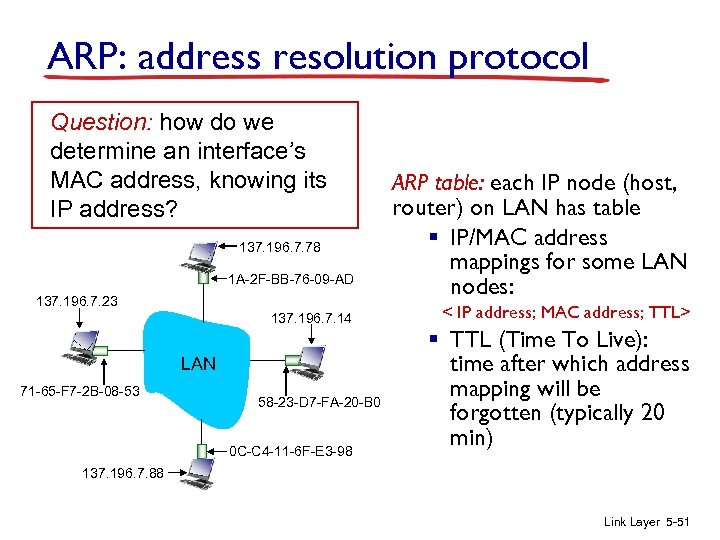 ARP: address resolution protocol Question: how do we determine an interface’s MAC address, knowing its IP address? 137. 196. 7. 78 1 A-2 F-BB-76 -09 -AD 137. 196. 7. 23 137. 196. 7. 14 LAN 71 -65 -F 7 -2 B-08 -53 58 -23 -D 7 -FA-20 -B 0 0 C-C 4 -11 -6 F-E 3 -98 ARP table: each IP node (host, router) on LAN has table § IP/MAC address mappings for some LAN nodes: < IP address; MAC address; TTL> § TTL (Time To Live): time after which address mapping will be forgotten (typically 20 min) 137. 196. 7. 88 Link Layer 5 -51
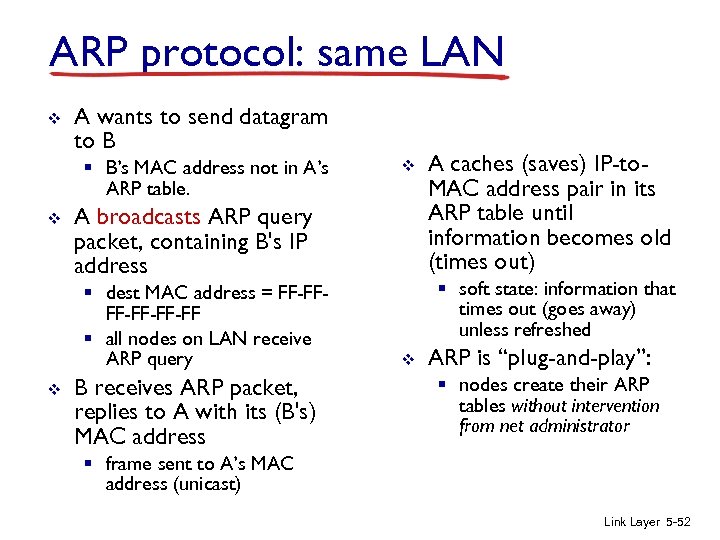 ARP protocol: same LAN v A wants to send datagram to B § B’s MAC address not in A’s ARP table. v A broadcasts ARP query packet, containing B's IP address § dest MAC address = FF-FF-FF-FF § all nodes on LAN receive ARP query v v B receives ARP packet, replies to A with its (B's) MAC address A caches (saves) IP-to. MAC address pair in its ARP table until information becomes old (times out) § soft state: information that times out (goes away) unless refreshed v ARP is “plug-and-play”: § nodes create their ARP tables without intervention from net administrator § frame sent to A’s MAC address (unicast) Link Layer 5 -52
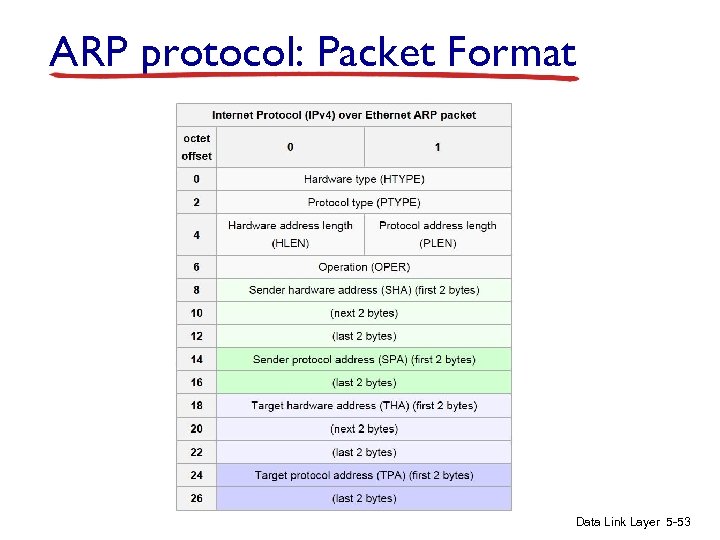 ARP protocol: Packet Format Data Link Layer 5 -53
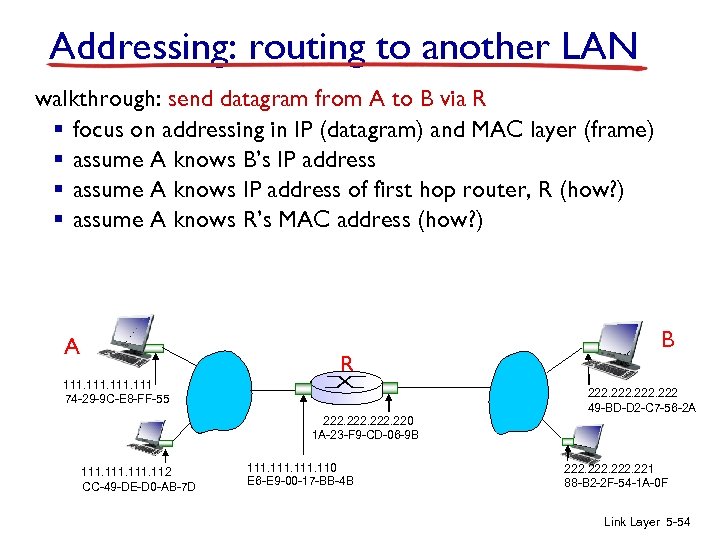 Addressing: routing to another LAN walkthrough: send datagram from A to B via R § focus on addressing in IP (datagram) and MAC layer (frame) § assume A knows B’s IP address § assume A knows IP address of first hop router, R (how? ) § assume A knows R’s MAC address (how? ) A R 111 74 -29 -9 C-E 8 -FF-55 B 222 49 -BD-D 2 -C 7 -56 -2 A 222. 220 1 A-23 -F 9 -CD-06 -9 B 111. 112 CC-49 -DE-D 0 -AB-7 D 111. 110 E 6 -E 9 -00 -17 -BB-4 B 222. 221 88 -B 2 -2 F-54 -1 A-0 F Link Layer 5 -54
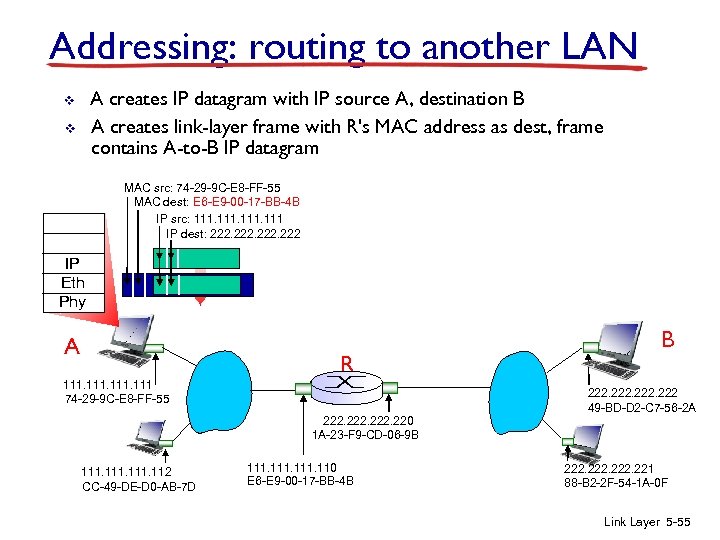 Addressing: routing to another LAN A creates IP datagram with IP source A, destination B A creates link-layer frame with R's MAC address as dest, frame contains A-to-B IP datagram v v MAC src: 74 -29 -9 C-E 8 -FF-55 MAC dest: E 6 -E 9 -00 -17 -BB-4 B IP src: 111 IP dest: 222 IP Eth Phy A R 111 74 -29 -9 C-E 8 -FF-55 B 222 49 -BD-D 2 -C 7 -56 -2 A 222. 220 1 A-23 -F 9 -CD-06 -9 B 111. 112 CC-49 -DE-D 0 -AB-7 D 111. 110 E 6 -E 9 -00 -17 -BB-4 B 222. 221 88 -B 2 -2 F-54 -1 A-0 F Link Layer 5 -55
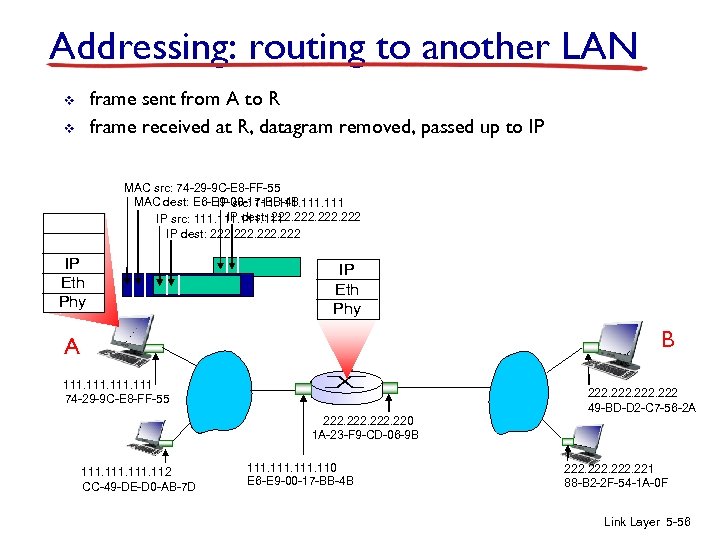 Addressing: routing to another LAN frame sent from A to R frame received at R, datagram removed, passed up to IP v v MAC src: 74 -29 -9 C-E 8 -FF-55 MAC dest: E 6 -E 9 -00 -17 -BB-4 B IP src: 111 IP dest: 222 IP Eth Phy A IP Eth Phy R 111 74 -29 -9 C-E 8 -FF-55 B 222 49 -BD-D 2 -C 7 -56 -2 A 222. 220 1 A-23 -F 9 -CD-06 -9 B 111. 112 CC-49 -DE-D 0 -AB-7 D 111. 110 E 6 -E 9 -00 -17 -BB-4 B 222. 221 88 -B 2 -2 F-54 -1 A-0 F Link Layer 5 -56
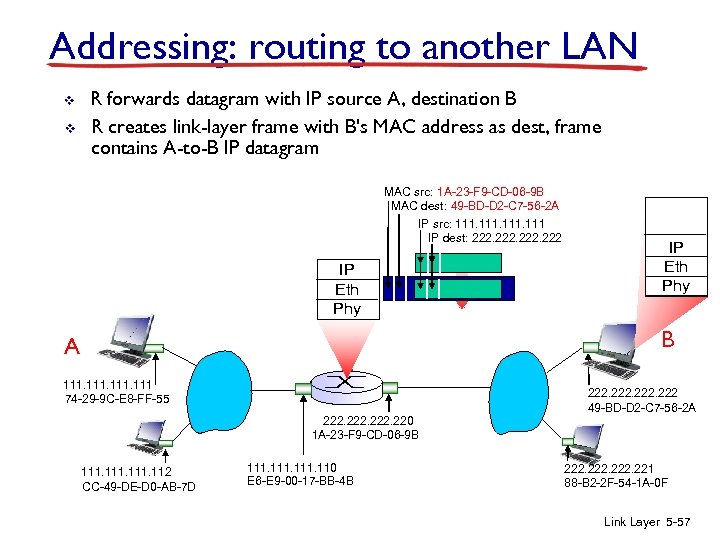 Addressing: routing to another LAN v v R forwards datagram with IP source A, destination B R creates link-layer frame with B's MAC address as dest, frame contains A-to-B IP datagram MAC src: 1 A-23 -F 9 -CD-06 -9 B MAC dest: 49 -BD-D 2 -C 7 -56 -2 A IP src: 111 IP dest: 222 IP Eth Phy A R 111 74 -29 -9 C-E 8 -FF-55 IP Eth Phy B 222 49 -BD-D 2 -C 7 -56 -2 A 222. 220 1 A-23 -F 9 -CD-06 -9 B 111. 112 CC-49 -DE-D 0 -AB-7 D 111. 110 E 6 -E 9 -00 -17 -BB-4 B 222. 221 88 -B 2 -2 F-54 -1 A-0 F Link Layer 5 -57
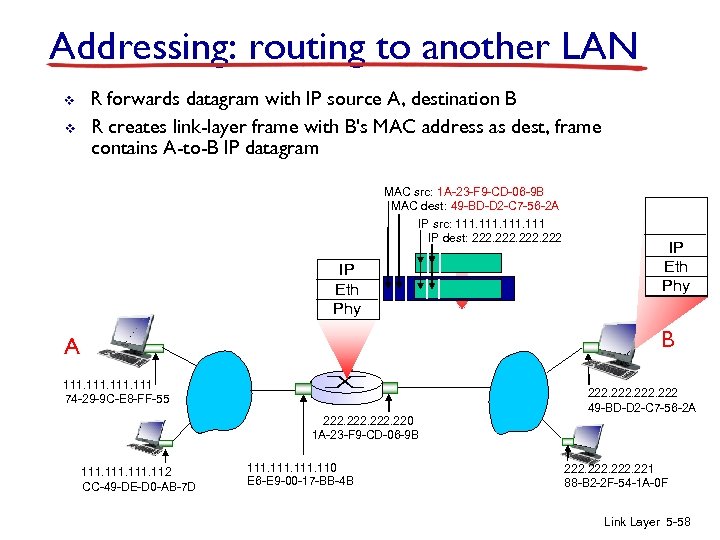 Addressing: routing to another LAN v v R forwards datagram with IP source A, destination B R creates link-layer frame with B's MAC address as dest, frame contains A-to-B IP datagram MAC src: 1 A-23 -F 9 -CD-06 -9 B MAC dest: 49 -BD-D 2 -C 7 -56 -2 A IP src: 111 IP dest: 222 IP Eth Phy A R 111 74 -29 -9 C-E 8 -FF-55 IP Eth Phy B 222 49 -BD-D 2 -C 7 -56 -2 A 222. 220 1 A-23 -F 9 -CD-06 -9 B 111. 112 CC-49 -DE-D 0 -AB-7 D 111. 110 E 6 -E 9 -00 -17 -BB-4 B 222. 221 88 -B 2 -2 F-54 -1 A-0 F Link Layer 5 -58
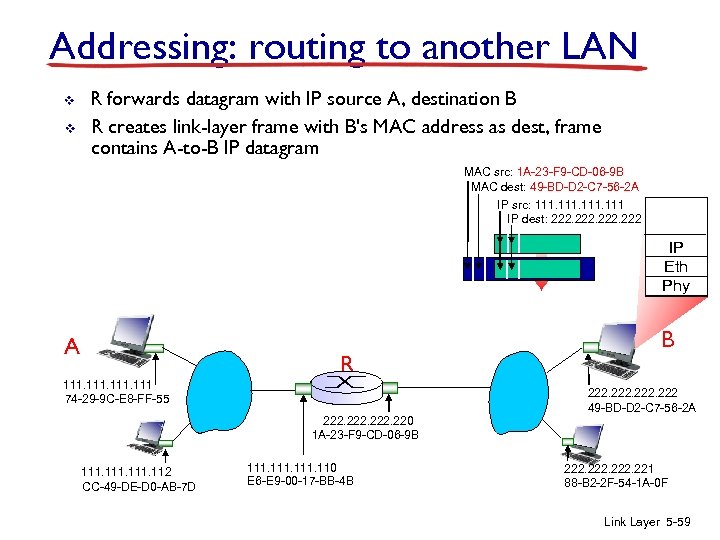 Addressing: routing to another LAN v v R forwards datagram with IP source A, destination B R creates link-layer frame with B's MAC address as dest, frame contains A-to-B IP datagram MAC src: 1 A-23 -F 9 -CD-06 -9 B MAC dest: 49 -BD-D 2 -C 7 -56 -2 A IP src: 111 IP dest: 222 IP Eth Phy A R 111 74 -29 -9 C-E 8 -FF-55 B 222 49 -BD-D 2 -C 7 -56 -2 A 222. 220 1 A-23 -F 9 -CD-06 -9 B 111. 112 CC-49 -DE-D 0 -AB-7 D 111. 110 E 6 -E 9 -00 -17 -BB-4 B 222. 221 88 -B 2 -2 F-54 -1 A-0 F Link Layer 5 -59