


 Скачать презентацию Chapter 5 Data Link Layer A note on
20fdec37c54f99d06997536f155b5f3e.ppt
- Количество слайдов: 113
 Chapter 5 Data Link Layer A note on the use of these ppt slides: We’re making these slides freely available to all (faculty, students, readers). They’re in Power. Point form so you can add, modify, and delete slides (including this one) and slide content to suit your needs. They obviously represent a lot of work on our part. In return for use, we only ask the following: q If you use these slides (e. g. , in a class) in substantially unaltered form, that you mention their source (after all, we’d like people to use our book!) q If you post any slides in substantially unaltered form on a www site, that you note that they are adapted from (or perhaps identical to) our slides, and note our copyright of this material. Computer Networking: A Top Down Approach Featuring the Internet, 3 rd edition. Jim Kurose, Keith Ross Addison-Wesley, July 2004. Thanks and enjoy! JFK/KWR All material copyright 1996 -2004 J. F Kurose and K. W. Ross, All Rights Reserved 5: Data. Link Layer 1
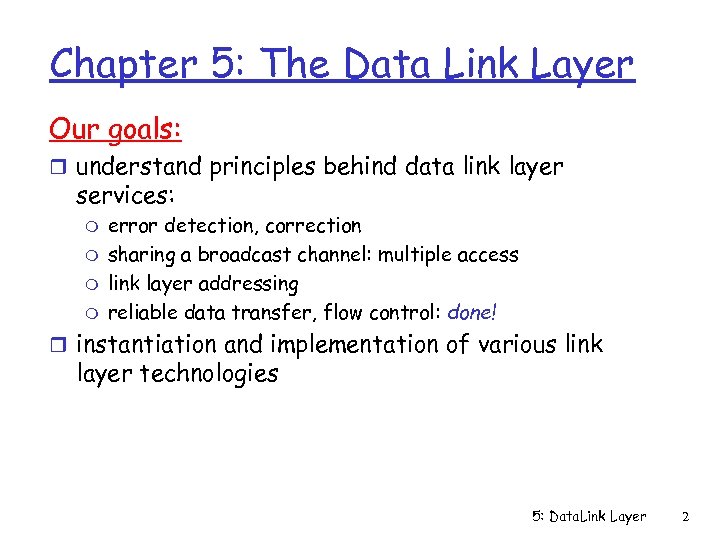 Chapter 5: The Data Link Layer Our goals: r understand principles behind data link layer services: m m error detection, correction sharing a broadcast channel: multiple access link layer addressing reliable data transfer, flow control: done! r instantiation and implementation of various link layer technologies 5: Data. Link Layer 2
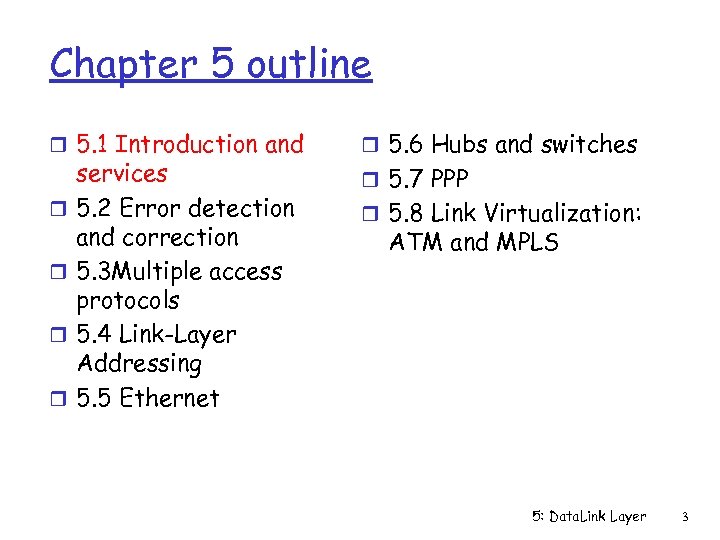 Chapter 5 outline r 5. 1 Introduction and r r services 5. 2 Error detection and correction 5. 3 Multiple access protocols 5. 4 Link-Layer Addressing 5. 5 Ethernet r 5. 6 Hubs and switches r 5. 7 PPP r 5. 8 Link Virtualization: ATM and MPLS 5: Data. Link Layer 3
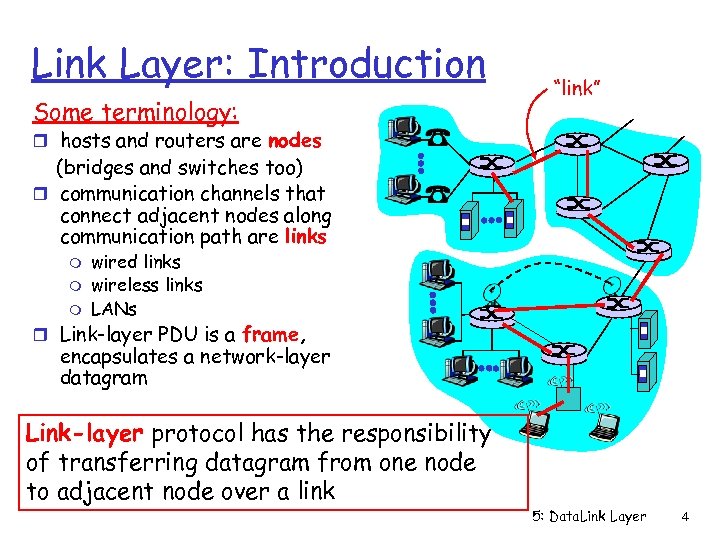 Link Layer: Introduction Some terminology: “link” r hosts and routers are nodes (bridges and switches too) r communication channels that connect adjacent nodes along communication path are links m m m wired links wireless links LANs r Link-layer PDU is a frame, encapsulates a network-layer datagram Link-layer protocol has the responsibility of transferring datagram from one node to adjacent node over a link 5: Data. Link Layer 4
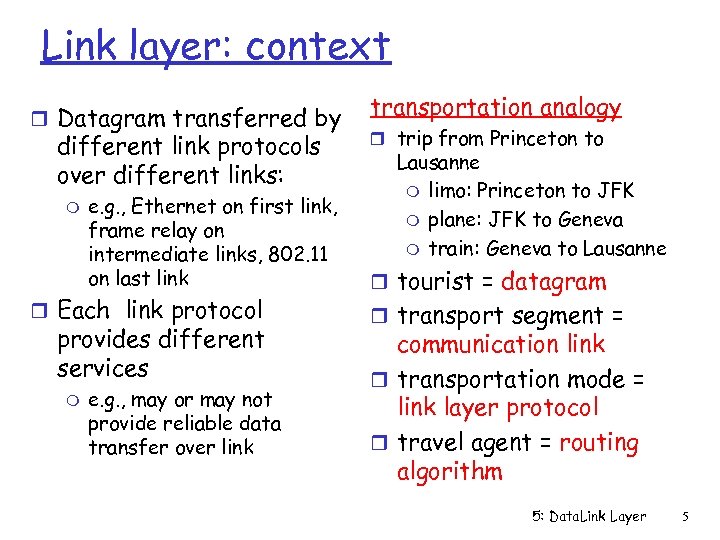 Link layer: context r Datagram transferred by different link protocols over different links: m e. g. , Ethernet on first link, frame relay on intermediate links, 802. 11 on last link r Each link protocol provides different services m e. g. , may or may not provide reliable data transfer over link transportation analogy r trip from Princeton to Lausanne m limo: Princeton to JFK m plane: JFK to Geneva m train: Geneva to Lausanne r tourist = datagram r transport segment = communication link r transportation mode = link layer protocol r travel agent = routing algorithm 5: Data. Link Layer 5
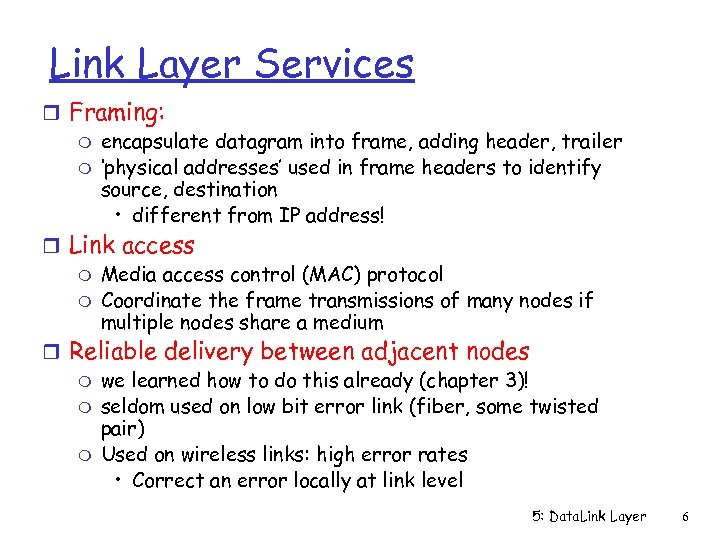 Link Layer Services r Framing: m encapsulate datagram into frame, adding header, trailer m ‘physical addresses’ used in frame headers to identify source, destination • different from IP address! r Link access m Media access control (MAC) protocol m Coordinate the frame transmissions of many nodes if multiple nodes share a medium r Reliable delivery between adjacent nodes m we learned how to do this already (chapter 3)! m seldom used on low bit error link (fiber, some twisted pair) m Used on wireless links: high error rates • Correct an error locally at link level 5: Data. Link Layer 6
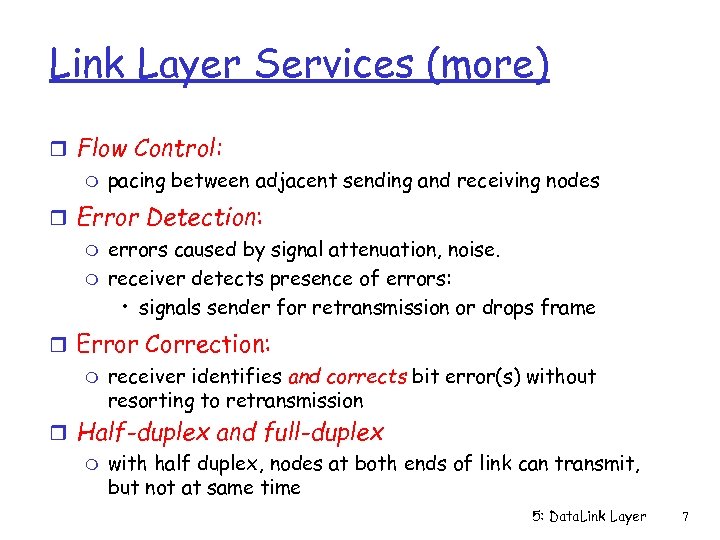 Link Layer Services (more) r Flow Control: m pacing between adjacent sending and receiving nodes r Error Detection: m errors caused by signal attenuation, noise. m receiver detects presence of errors: • signals sender for retransmission or drops frame r Error Correction: m receiver identifies and corrects bit error(s) without resorting to retransmission r Half-duplex and full-duplex m with half duplex, nodes at both ends of link can transmit, but not at same time 5: Data. Link Layer 7
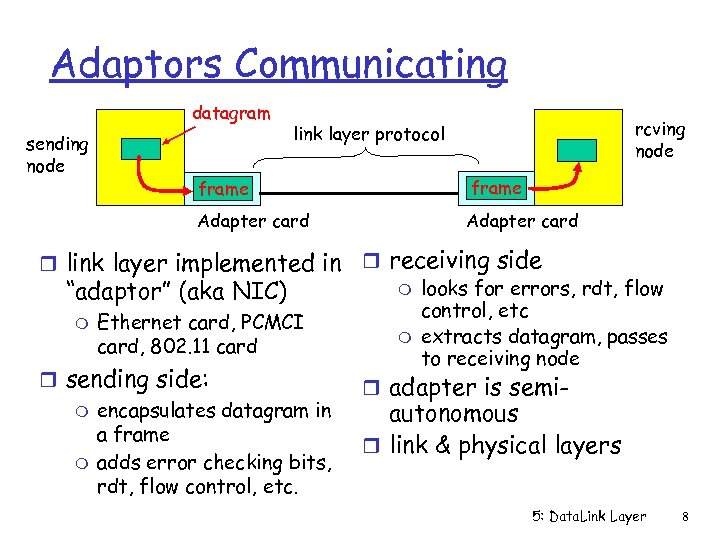 Adaptors Communicating datagram sending node rcving node link layer protocol frame Adapter card r link layer implemented in r receiving side m looks for errors, rdt, flow “adaptor” (aka NIC) control, etc m Ethernet card, PCMCI m extracts datagram, passes card, 802. 11 card to receiving node r sending side: r adapter is semim encapsulates datagram in autonomous a frame r link & physical layers m adds error checking bits, rdt, flow control, etc. 5: Data. Link Layer 8
 Chapter 5 outline r 5. 1 Introduction and r r services 5. 2 Error detection and correction 5. 3 Multiple access protocols 5. 4 Link-Layer Addressing 5. 5 Ethernet r 5. 6 Hubs and switches r 5. 7 PPP r 5. 8 Link Virtualization: ATM 5: Data. Link Layer 9
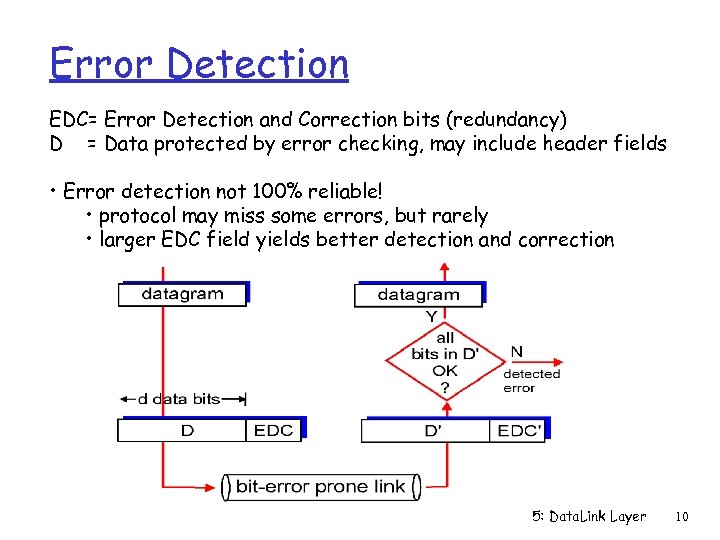 Error Detection EDC= Error Detection and Correction bits (redundancy) D = Data protected by error checking, may include header fields • Error detection not 100% reliable! • protocol may miss some errors, but rarely • larger EDC field yields better detection and correction 5: Data. Link Layer 10
 Techniques for Error Detection r Parity checks r Checksumming methods r Cyclic redundancy checks 5: Data. Link Layer 11
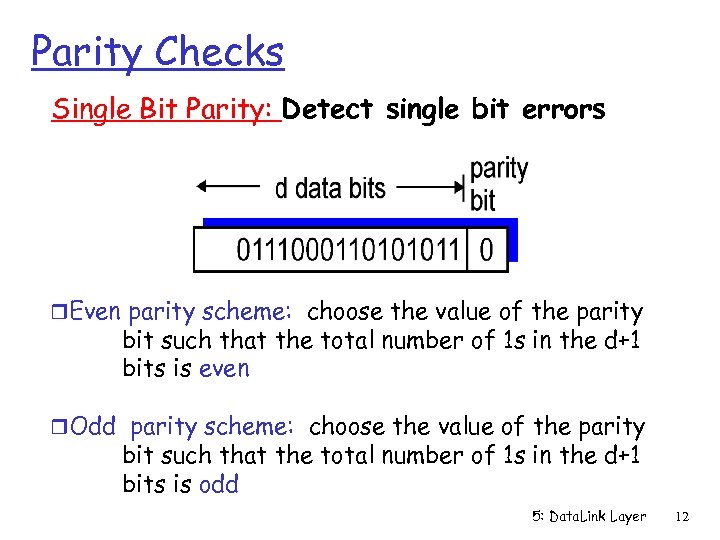 Parity Checks Single Bit Parity: Detect single bit errors r. Even parity scheme: choose the value of the parity bit such that the total number of 1 s in the d+1 bits is even r. Odd parity scheme: choose the value of the parity bit such that the total number of 1 s in the d+1 bits is odd 5: Data. Link Layer 12
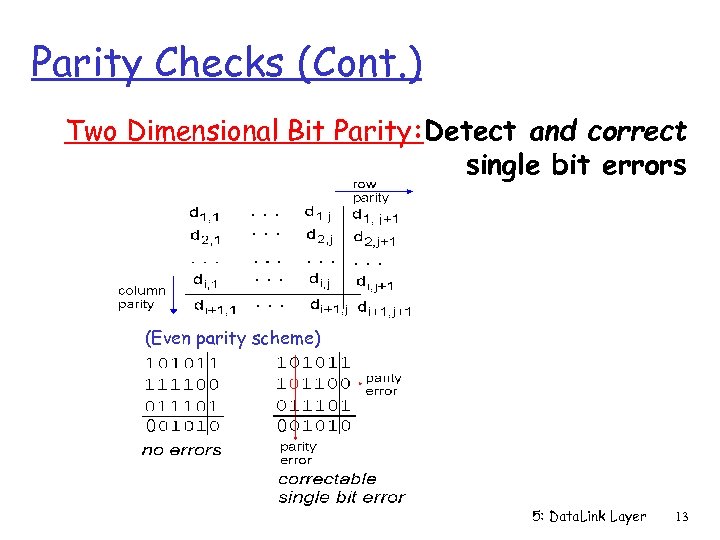 Parity Checks (Cont. ) Two Dimensional Bit Parity: Detect and correct single bit errors (Even parity scheme) 0 0 5: Data. Link Layer 13
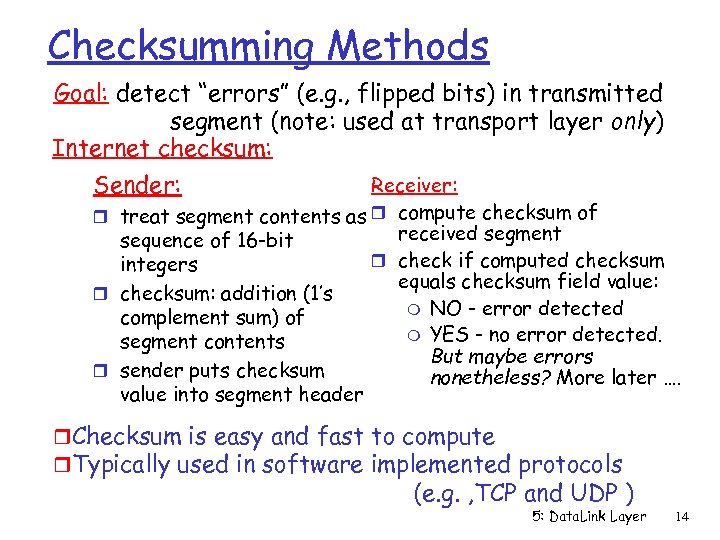 Checksumming Methods Goal: detect “errors” (e. g. , flipped bits) in transmitted segment (note: used at transport layer only) Internet checksum: Sender: Receiver: r treat segment contents as r compute checksum of received segment sequence of 16 -bit r check if computed checksum integers equals checksum field value: r checksum: addition (1’s m NO - error detected complement sum) of m YES - no error detected. segment contents But maybe errors r sender puts checksum nonetheless? More later …. value into segment header r. Checksum is easy and fast to compute r. Typically used in software implemented protocols (e. g. , TCP and UDP ) 5: Data. Link Layer 14
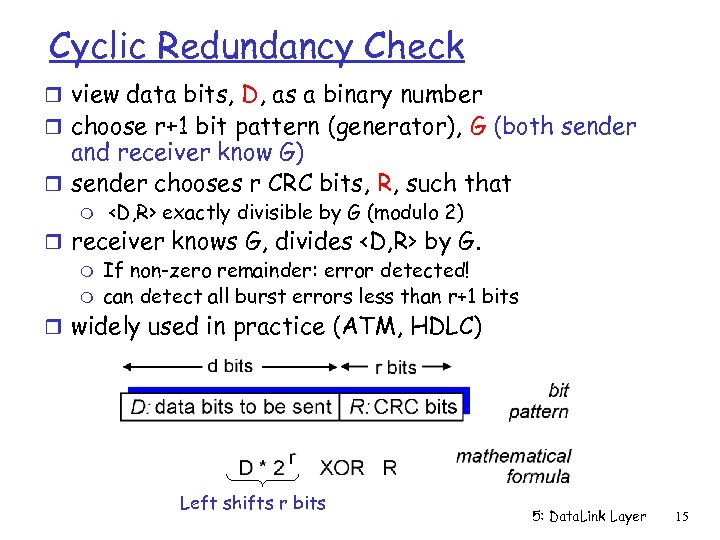 Cyclic Redundancy Check r view data bits, D, as a binary number r choose r+1 bit pattern (generator), G (both sender and receiver know G) r sender chooses r CRC bits, R, such that m
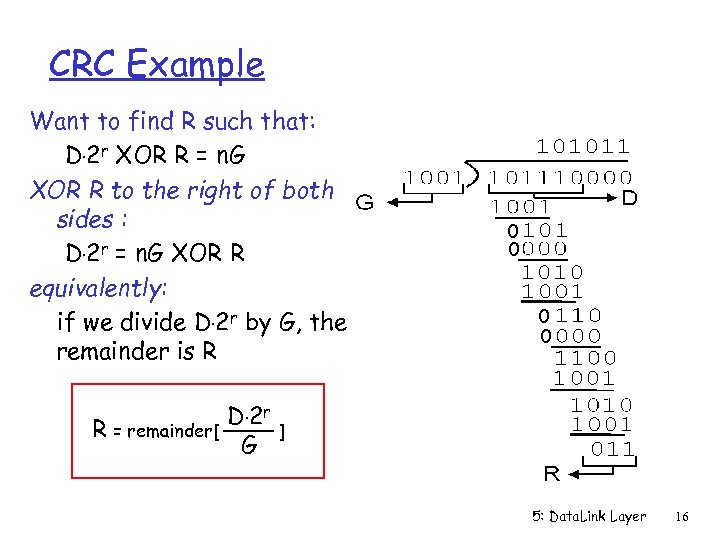 CRC Example Want to find R such that: D. 2 r XOR R = n. G XOR R to the right of both sides : D. 2 r = n. G XOR R equivalently: if we divide D. 2 r by G, the remainder is R R = remainder[ D. 2 r G 0 0 ] 5: Data. Link Layer 16
 Chapter 5 outline r 5. 1 Introduction and r 5. 6 Hubs, bridges, and r r r services 5. 2 Error detection and correction 5. 3 Multiple access protocols 5. 4 LAN addresses and ARP 5. 5 Ethernet r r r switches 5. 7 Wireless links and LANs 5. 8 PPP 5. 9 ATM 5. 10 Frame Relay 5: Data. Link Layer 17
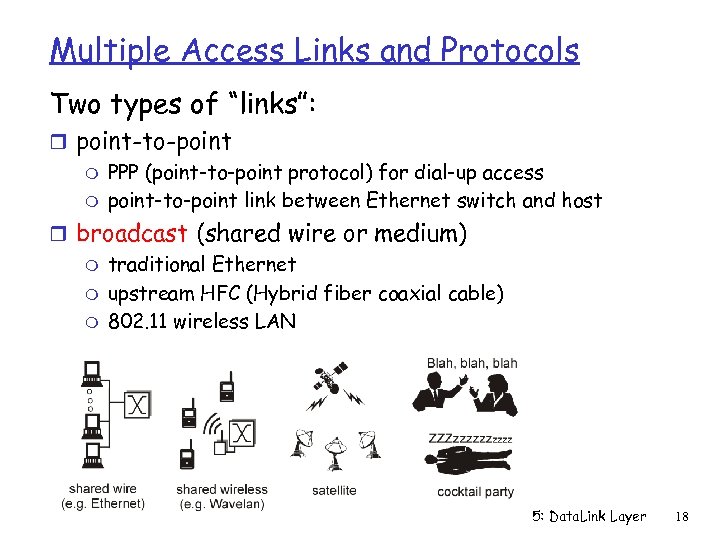 Multiple Access Links and Protocols Two types of “links”: r point-to-point m PPP (point-to-point protocol) for dial-up access m point-to-point link between Ethernet switch and host r broadcast (shared wire or medium) m traditional Ethernet m upstream HFC (Hybrid fiber coaxial cable) m 802. 11 wireless LAN 5: Data. Link Layer 18
 Multiple Access protocols r single shared broadcast channel r two or more simultaneous transmissions by nodes: interference m only one node can send successfully at a time multiple access protocol r distributed algorithm that determines how nodes share channel, i. e. , determine when node can transmit r communication about channel sharing must use channel itself! m no out-of-band channel for coordination 5: Data. Link Layer 19
 Ideal Mulitple Access Protocol What to look for in multiple access protocols? Broadcast channel of rate R bps 1. When one node wants to transmit, it can send at rate R. 2. When M nodes want to transmit, each can send at average rate R/M 3. Fully decentralized: m m no special node to coordinate transmissions no synchronization of clocks, slots 4. Simple 5: Data. Link Layer 20
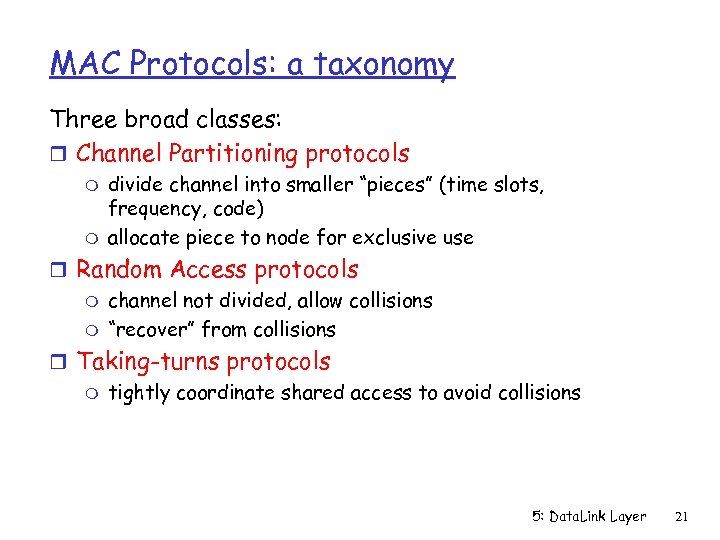 MAC Protocols: a taxonomy Three broad classes: r Channel Partitioning protocols m m divide channel into smaller “pieces” (time slots, frequency, code) allocate piece to node for exclusive use r Random Access protocols m channel not divided, allow collisions m “recover” from collisions r Taking-turns protocols m tightly coordinate shared access to avoid collisions 5: Data. Link Layer 21
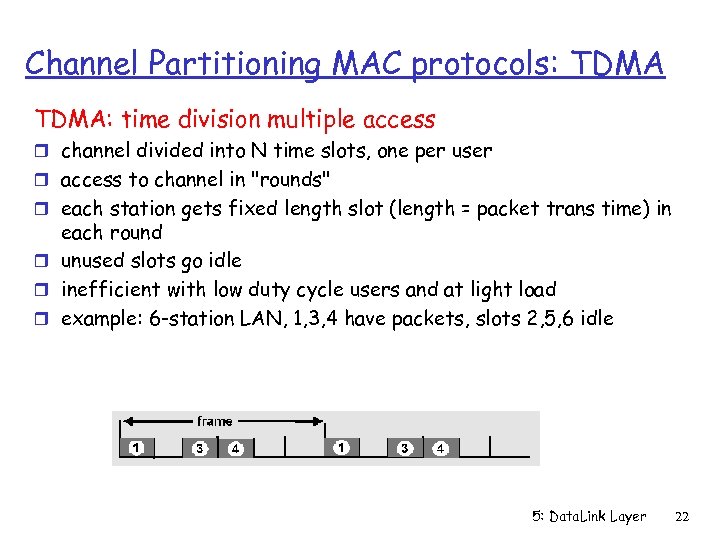 Channel Partitioning MAC protocols: TDMA: time division multiple access r channel divided into N time slots, one per user r access to channel in "rounds" r each station gets fixed length slot (length = packet trans time) in each round r unused slots go idle r inefficient with low duty cycle users and at light load r example: 6 -station LAN, 1, 3, 4 have packets, slots 2, 5, 6 idle 5: Data. Link Layer 22
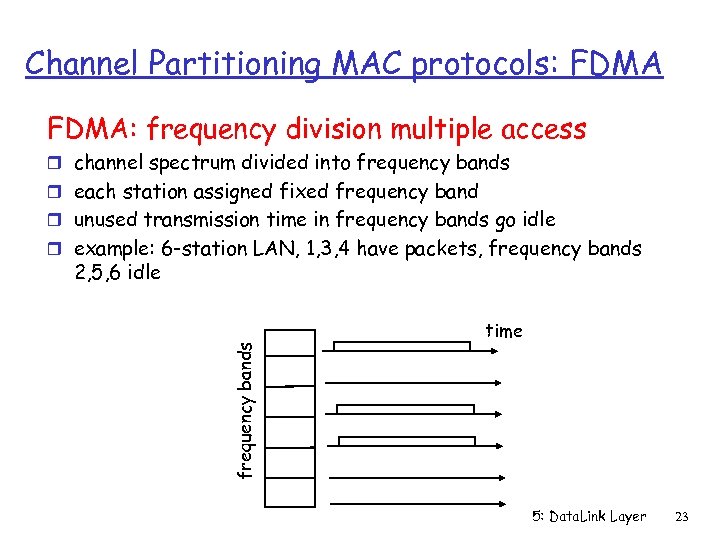 Channel Partitioning MAC protocols: FDMA: frequency division multiple access r channel spectrum divided into frequency bands r each station assigned fixed frequency band r unused transmission time in frequency bands go idle r example: 6 -station LAN, 1, 3, 4 have packets, frequency bands 2, 5, 6 idle frequency bands time 5: Data. Link Layer 23
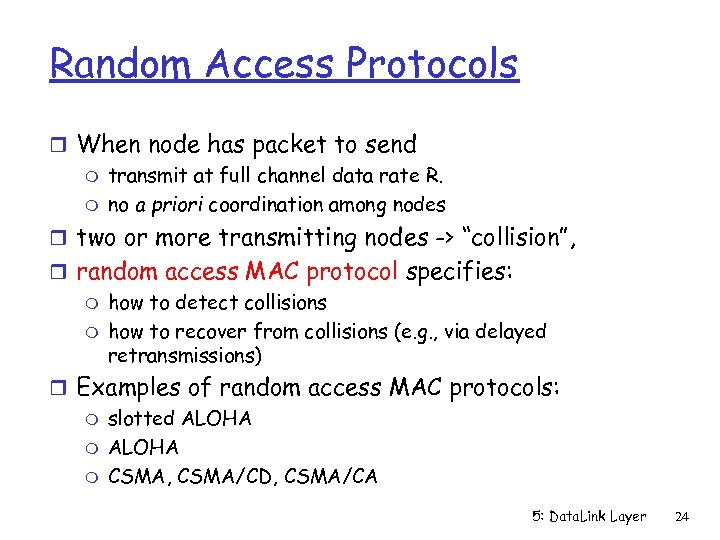 Random Access Protocols r When node has packet to send m transmit at full channel data rate R. m no a priori coordination among nodes r two or more transmitting nodes -> “collision”, r random access MAC protocol specifies: m how to detect collisions m how to recover from collisions (e. g. , via delayed retransmissions) r Examples of random access MAC protocols: m slotted ALOHA m CSMA, CSMA/CD, CSMA/CA 5: Data. Link Layer 24
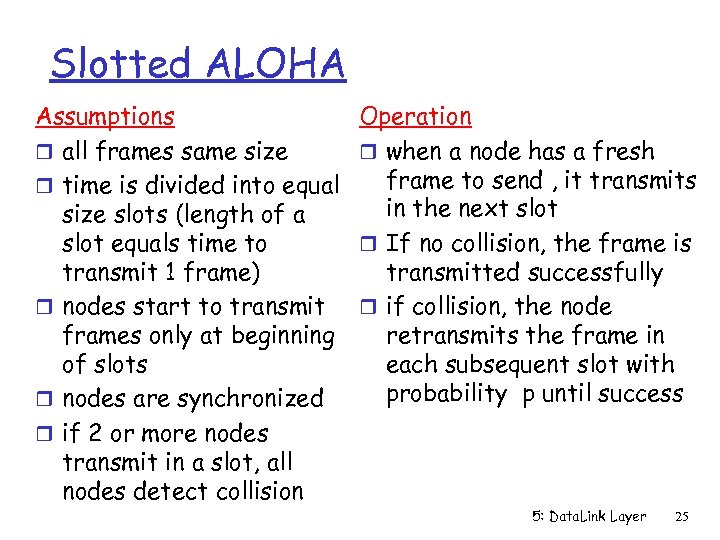 Slotted ALOHA Assumptions r all frames same size r time is divided into equal size slots (length of a slot equals time to transmit 1 frame) r nodes start to transmit frames only at beginning of slots r nodes are synchronized r if 2 or more nodes transmit in a slot, all nodes detect collision Operation r when a node has a fresh frame to send , it transmits in the next slot r If no collision, the frame is transmitted successfully r if collision, the node retransmits the frame in each subsequent slot with probability p until success 5: Data. Link Layer 25
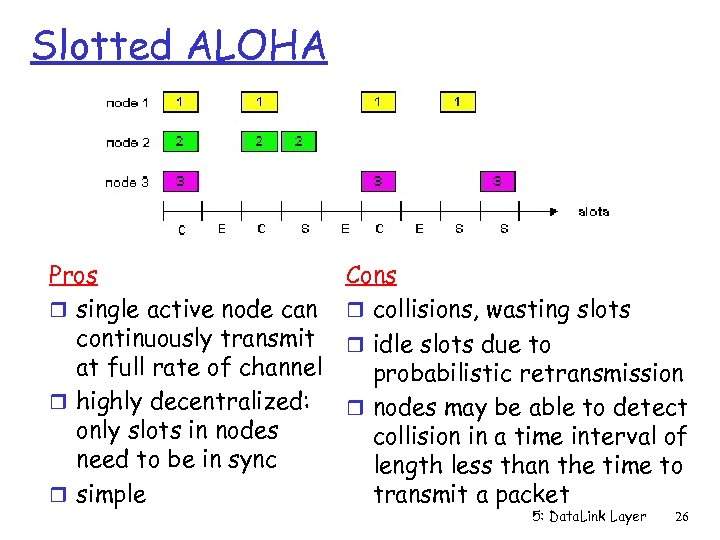 Slotted ALOHA Pros r single active node can continuously transmit at full rate of channel r highly decentralized: only slots in nodes need to be in sync r simple Cons r collisions, wasting slots r idle slots due to probabilistic retransmission r nodes may be able to detect collision in a time interval of length less than the time to transmit a packet 5: Data. Link Layer 26
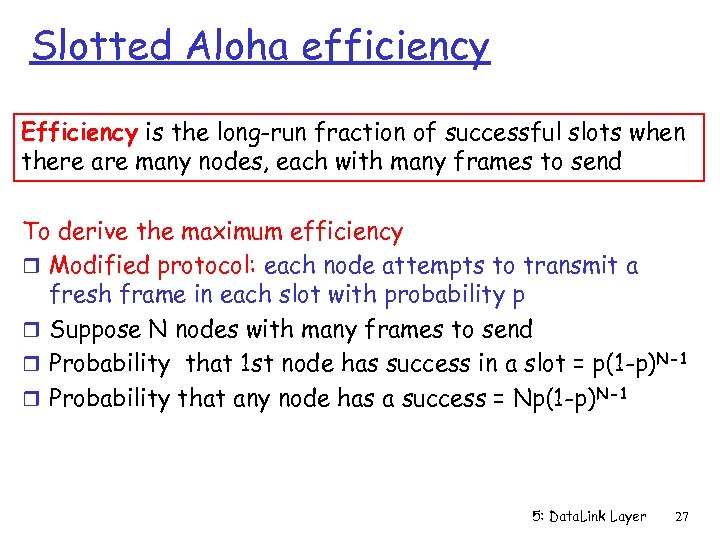 Slotted Aloha efficiency Efficiency is the long-run fraction of successful slots when there are many nodes, each with many frames to send To derive the maximum efficiency r Modified protocol: each node attempts to transmit a fresh frame in each slot with probability p r Suppose N nodes with many frames to send r Probability that 1 st node has success in a slot = p(1 -p)N-1 r Probability that any node has a success = Np(1 -p)N-1 5: Data. Link Layer 27
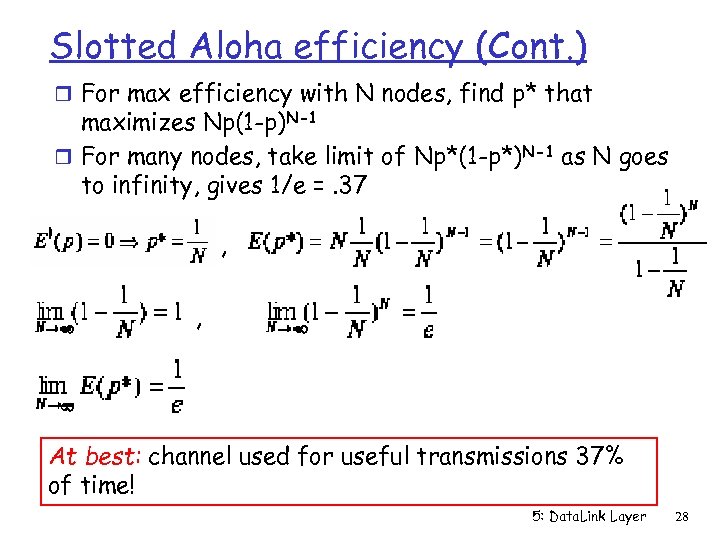 Slotted Aloha efficiency (Cont. ) r For max efficiency with N nodes, find p* that maximizes Np(1 -p)N-1 r For many nodes, take limit of Np*(1 -p*)N-1 as N goes to infinity, gives 1/e =. 37 ‘ , , At best: channel used for useful transmissions 37% of time! 5: Data. Link Layer 28
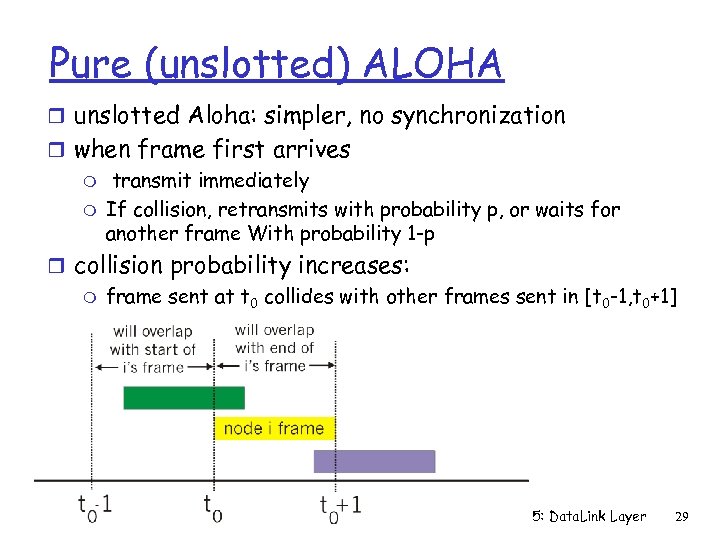 Pure (unslotted) ALOHA r unslotted Aloha: simpler, no synchronization r when frame first arrives m transmit immediately m If collision, retransmits with probability p, or waits for another frame With probability 1 -p r collision probability increases: m frame sent at t 0 collides with other frames sent in [t 0 -1, t 0+1] 5: Data. Link Layer 29
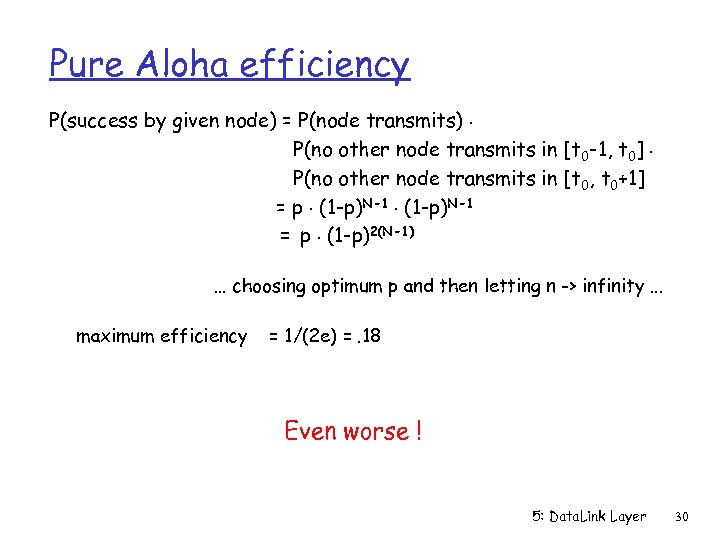 Pure Aloha efficiency P(success by given node) = P(node transmits). P(no other node transmits in [t 0 -1, t 0]. P(no other node transmits in [t 0, t 0+1] = p. (1 -p)N-1 = p. (1 -p)2(N-1) … choosing optimum p and then letting n -> infinity. . . maximum efficiency = 1/(2 e) =. 18 Even worse ! 5: Data. Link Layer 30
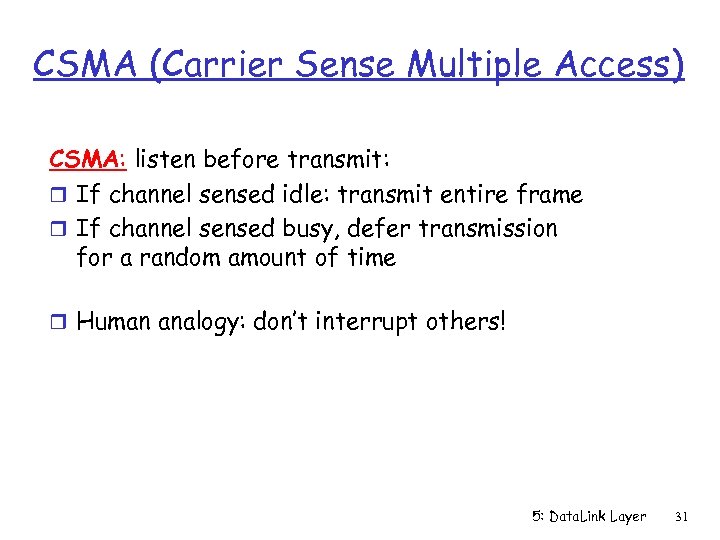 CSMA (Carrier Sense Multiple Access) CSMA: listen before transmit: r If channel sensed idle: transmit entire frame r If channel sensed busy, defer transmission for a random amount of time r Human analogy: don’t interrupt others! 5: Data. Link Layer 31
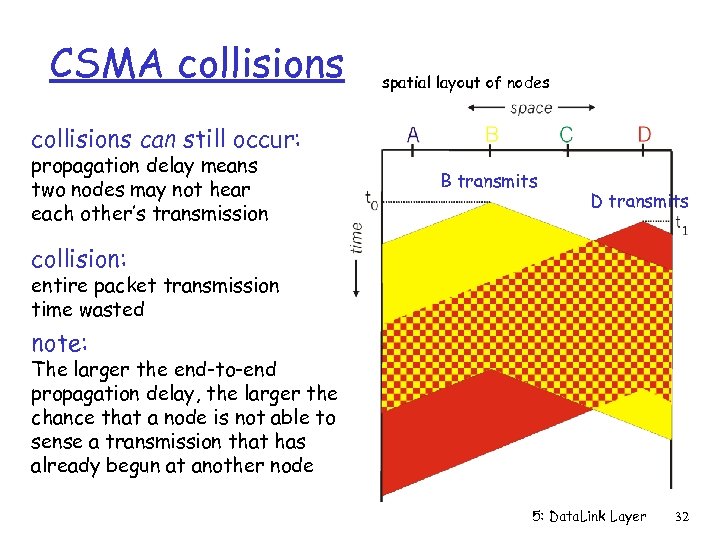 CSMA collisions spatial layout of nodes collisions can still occur: propagation delay means two nodes may not hear each other’s transmission B transmits D transmits collision: entire packet transmission time wasted note: The larger the end-to-end propagation delay, the larger the chance that a node is not able to sense a transmission that has already begun at another node 5: Data. Link Layer 32
 CSMA/CD (Collision Detection) CSMA/CD: carrier sensing, deferral as in CSMA m collisions detected within short time m colliding transmissions aborted, reducing channel wastage r collision detection: m easy in wired LANs: measure signal strengths, compare transmitted and received signals m difficult in wireless LANs: receiver shut off while transmitting; i. e. , cannot transmit and receive at the same time r human analogy: the polite conversationalist 5: Data. Link Layer 33
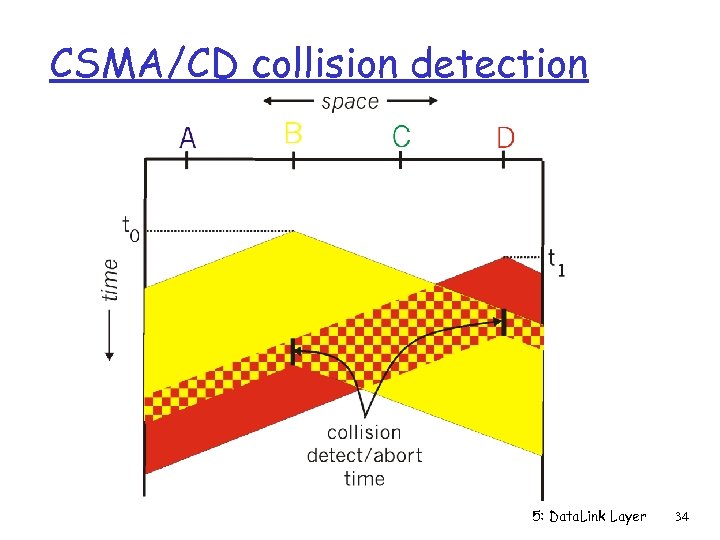 CSMA/CD collision detection 5: Data. Link Layer 34
 Taking-Turns MAC protocols channel partitioning MAC protocols: m share channel efficiently and fairly at high load m inefficient at low load: 1/N bandwidth allocated even if only 1 active node! Random access MAC protocols m efficient at low load: single node can fully utilize channel m high load: collision overhead Taking-turns protocols look for best of both worlds! 5: Data. Link Layer 35
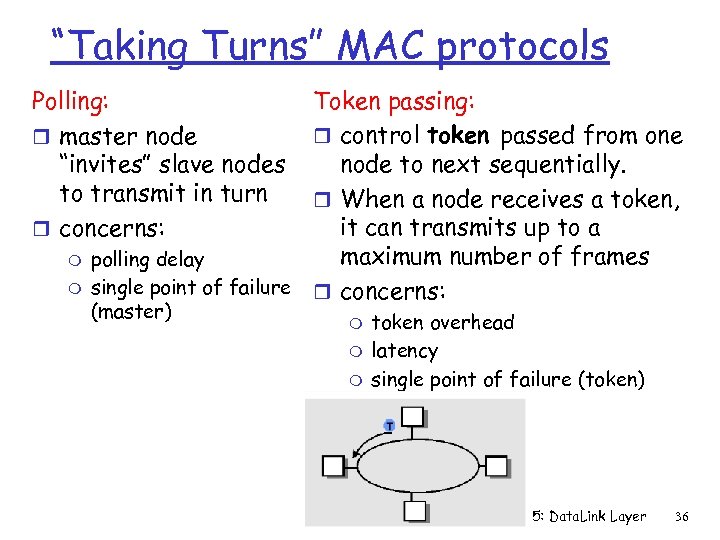 “Taking Turns” MAC protocols Token passing: r control token passed from one node to next sequentially. r When a node receives a token, it can transmits up to a maximum number of frames polling delay single point of failure r concerns: Polling: r master node “invites” slave nodes to transmit in turn r concerns: m m (master) m m m token overhead latency single point of failure (token) 5: Data. Link Layer 36
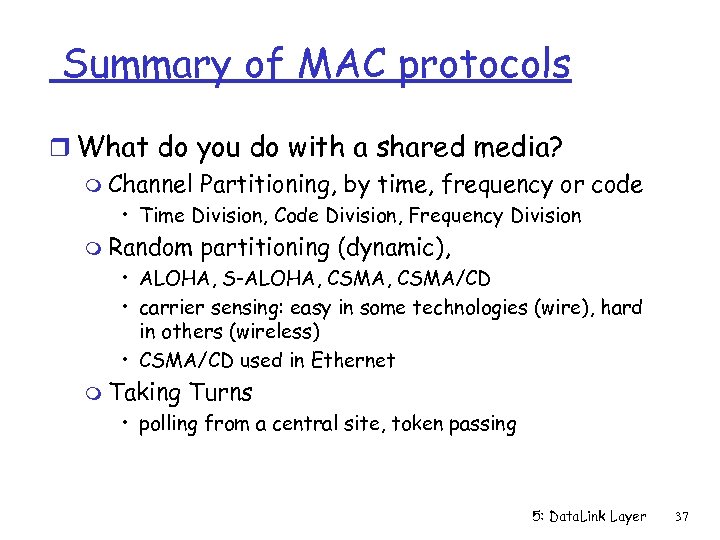 Summary of MAC protocols r What do you do with a shared media? m Channel Partitioning, by time, frequency or code • Time Division, Code Division, Frequency Division m Random partitioning (dynamic), • ALOHA, S-ALOHA, CSMA/CD • carrier sensing: easy in some technologies (wire), hard in others (wireless) • CSMA/CD used in Ethernet m Taking Turns • polling from a central site, token passing 5: Data. Link Layer 37
 LAN technologies Data link layer so far: m services, access error detection/correction, multiple Next: LAN technologies m addressing m Ethernet m hubs, switches m PPP 5: Data. Link Layer 38
 Link Layer r 5. 1 Introduction and r r r 5. 6 Hubs and switches services r 5. 7 PPP 5. 2 Error detection and r 5. 8 Link Virtualization: correction ATM 5. 3 Multiple access protocols 5. 4 Link-Layer Addressing 5. 5 Ethernet 5: Data. Link Layer 39
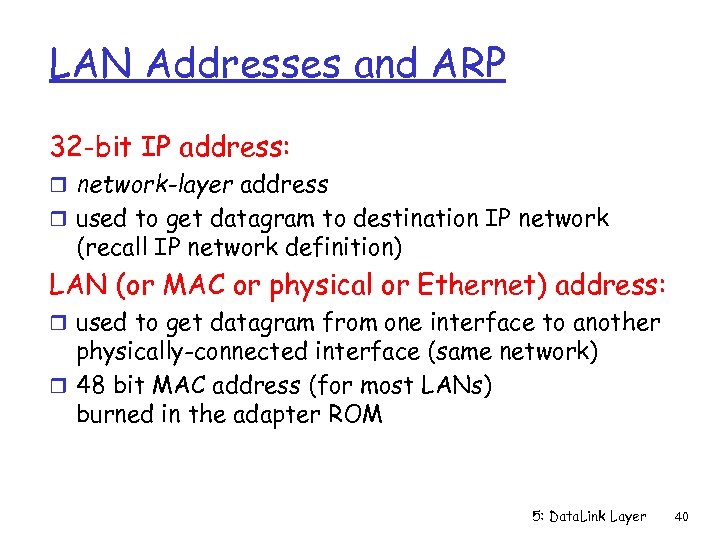 LAN Addresses and ARP 32 -bit IP address: r network-layer address r used to get datagram to destination IP network (recall IP network definition) LAN (or MAC or physical or Ethernet) address: r used to get datagram from one interface to another physically-connected interface (same network) r 48 bit MAC address (for most LANs) burned in the adapter ROM 5: Data. Link Layer 40
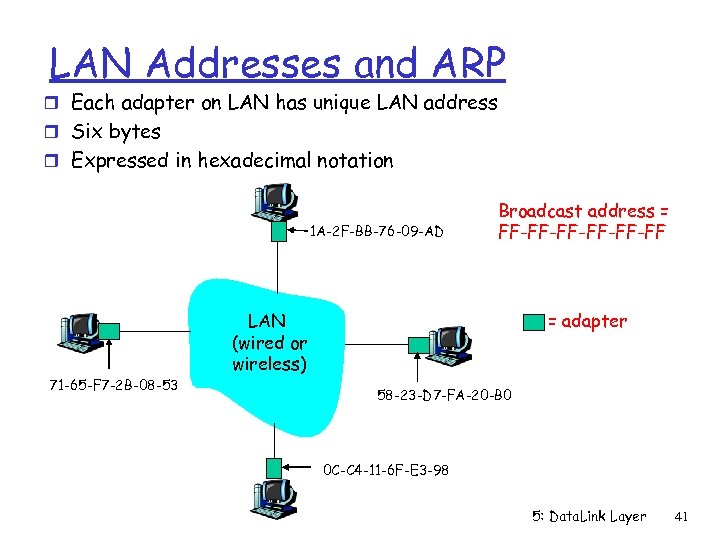 LAN Addresses and ARP r Each adapter on LAN has unique LAN address r Six bytes r Expressed in hexadecimal notation 1 A-2 F-BB-76 -09 -AD 71 -65 -F 7 -2 B-08 -53 Broadcast address = FF-FF-FF-FF LAN (wired or wireless) = adapter 58 -23 -D 7 -FA-20 -B 0 0 C-C 4 -11 -6 F-E 3 -98 5: Data. Link Layer 41
 LAN Address (more) r MAC address allocation administered by IEEE r manufacturer buys portion of MAC address space (to assure uniqueness) r Analogy: (a) MAC address: like Social Security Number (b) IP address: like postal address r MAC flat address => portability m MAC address of an adapter card does not change when it is moved from one LAN to another r IP hierarchical address NOT portable m depends on IP network to which node is attached 5: Data. Link Layer 42
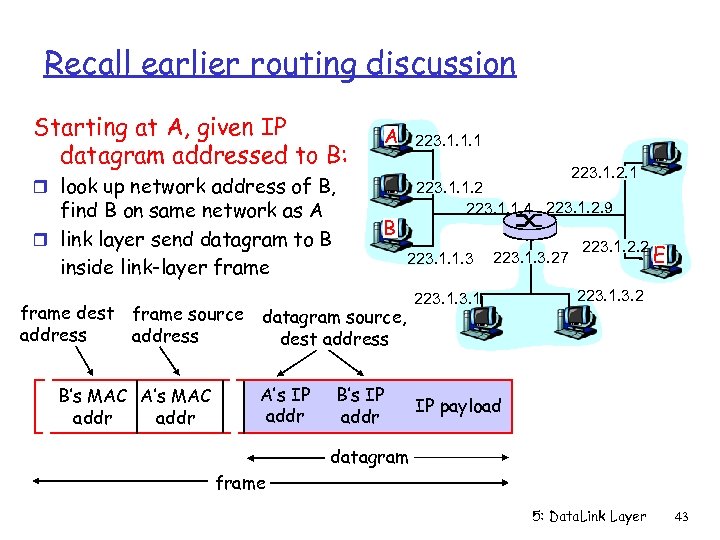 Recall earlier routing discussion Starting at A, given IP datagram addressed to B: A 223. 1. 1. 1 223. 1. 2. 1 r look up network address of B, find B on same network as A r link layer send datagram to B inside link-layer frame dest address frame source address B’s MAC A’s MAC addr 223. 1. 1. 2 223. 1. 1. 4 223. 1. 2. 9 B 223. 1. 1. 3 datagram source, dest address A’s IP addr B’s IP addr 223. 1. 3. 27 223. 1. 2. 2 E 223. 1. 3. 2 IP payload datagram frame 5: Data. Link Layer 43
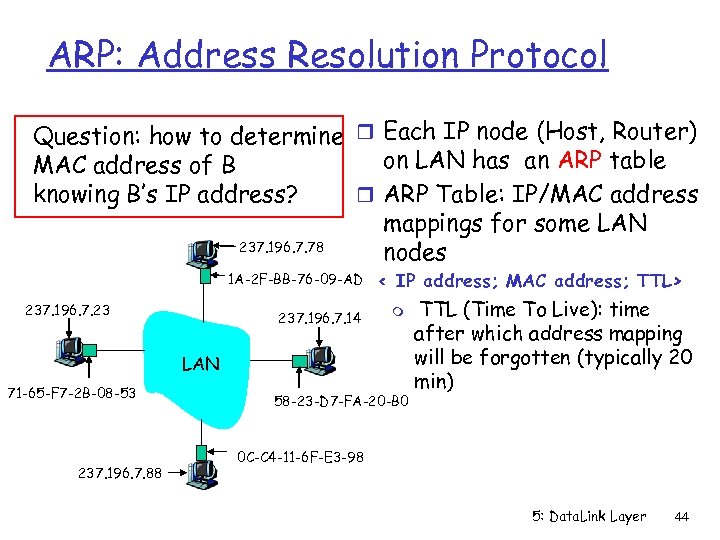 ARP: Address Resolution Protocol Question: how to determine r Each IP node (Host, Router) on LAN has an ARP table MAC address of B knowing B’s IP address? r ARP Table: IP/MAC address mappings for some LAN 237. 196. 7. 78 nodes 1 A-2 F-BB-76 -09 -AD 237. 196. 7. 23 237. 196. 7. 14 < IP address; MAC address; TTL> m LAN 71 -65 -F 7 -2 B-08 -53 237. 196. 7. 88 58 -23 -D 7 -FA-20 -B 0 TTL (Time To Live): time after which address mapping will be forgotten (typically 20 min) 0 C-C 4 -11 -6 F-E 3 -98 5: Data. Link Layer 44
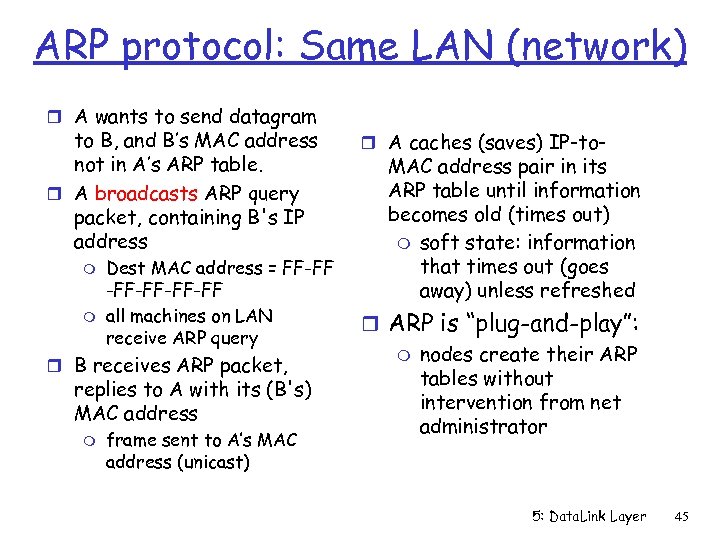 ARP protocol: Same LAN (network) r A wants to send datagram to B, and B’s MAC address not in A’s ARP table. r A broadcasts ARP query packet, containing B's IP address m m Dest MAC address = FF-FF -FF-FF all machines on LAN receive ARP query r B receives ARP packet, replies to A with its (B's) MAC address m frame sent to A’s MAC address (unicast) r A caches (saves) IP-to- MAC address pair in its ARP table until information becomes old (times out) m soft state: information that times out (goes away) unless refreshed r ARP is “plug-and-play”: m nodes create their ARP tables without intervention from net administrator 5: Data. Link Layer 45
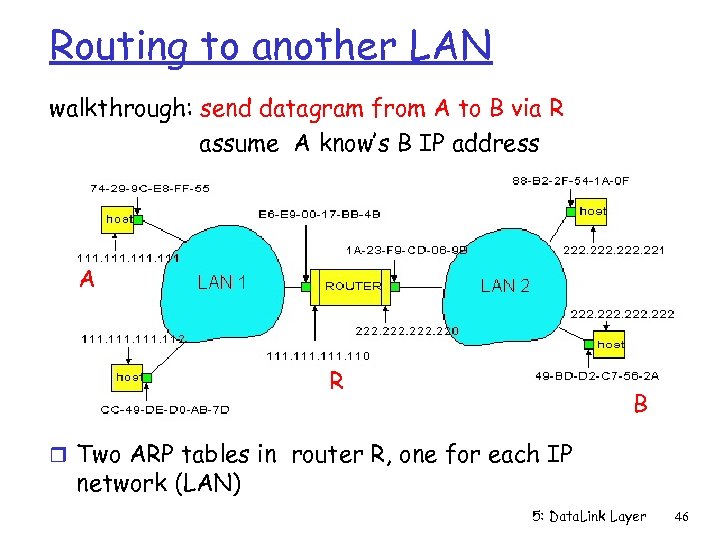 Routing to another LAN walkthrough: send datagram from A to B via R assume A know’s B IP address A R B r Two ARP tables in router R, one for each IP network (LAN) 5: Data. Link Layer 46
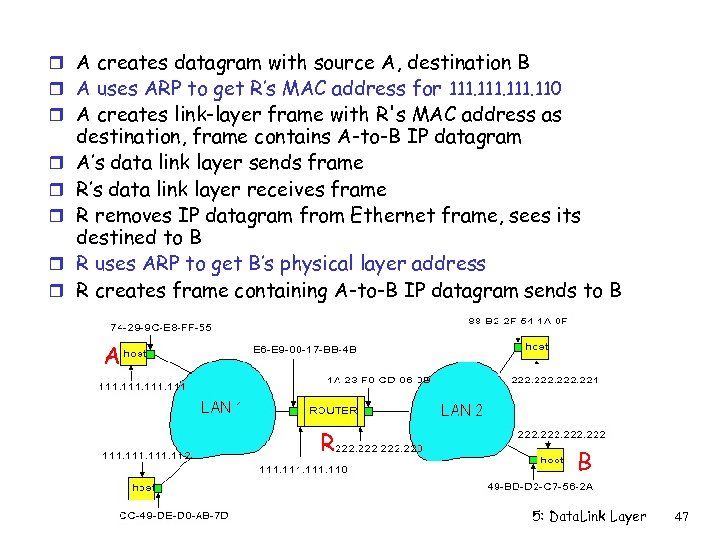 r A creates datagram with source A, destination B r A uses ARP to get R’s MAC address for 111. 110 r A creates link-layer frame with R's MAC address as r r r destination, frame contains A-to-B IP datagram A’s data link layer sends frame R’s data link layer receives frame R removes IP datagram from Ethernet frame, sees its destined to B R uses ARP to get B’s physical layer address R creates frame containing A-to-B IP datagram sends to B A R B 5: Data. Link Layer 47
 Link Layer r 5. 1 Introduction and r r services 5. 2 Error detection and correction 5. 3 Multiple access protocols 5. 4 Link-Layer Addressing 5. 5 Ethernet r 5. 6 Hubs and switches r 5. 7 PPP r 5. 8 Link Virtualization: ATM 5: Data. Link Layer 48
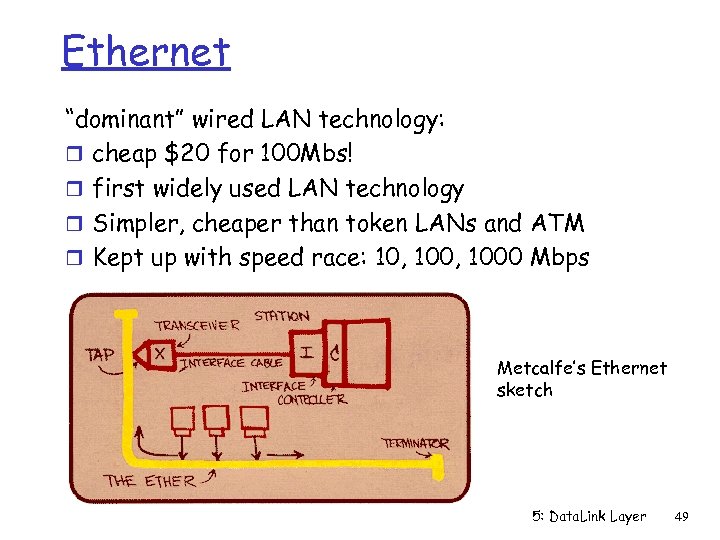 Ethernet “dominant” wired LAN technology: r cheap $20 for 100 Mbs! r first widely used LAN technology r Simpler, cheaper than token LANs and ATM r Kept up with speed race: 10, 1000 Mbps Metcalfe’s Ethernet sketch 5: Data. Link Layer 49
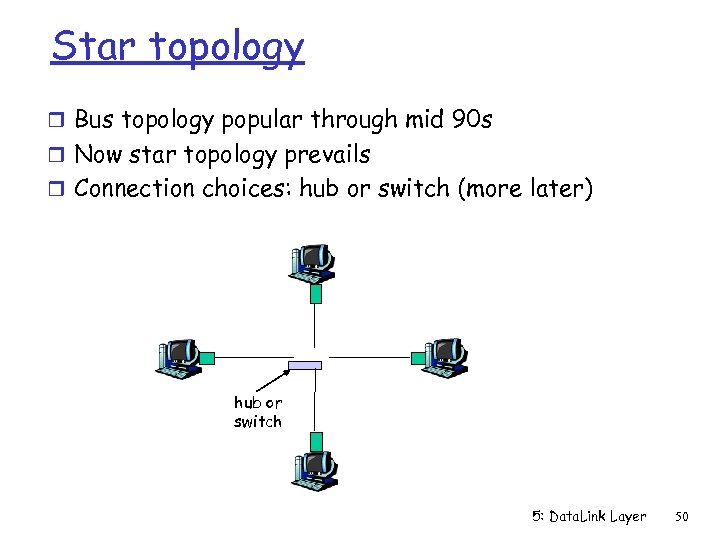 Star topology r Bus topology popular through mid 90 s r Now star topology prevails r Connection choices: hub or switch (more later) hub or switch 5: Data. Link Layer 50
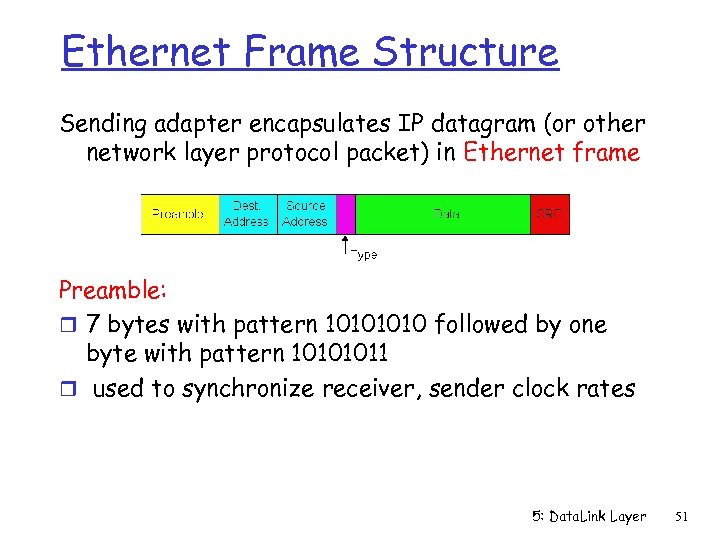 Ethernet Frame Structure Sending adapter encapsulates IP datagram (or other network layer protocol packet) in Ethernet frame Preamble: r 7 bytes with pattern 1010 followed by one byte with pattern 10101011 r used to synchronize receiver, sender clock rates 5: Data. Link Layer 51
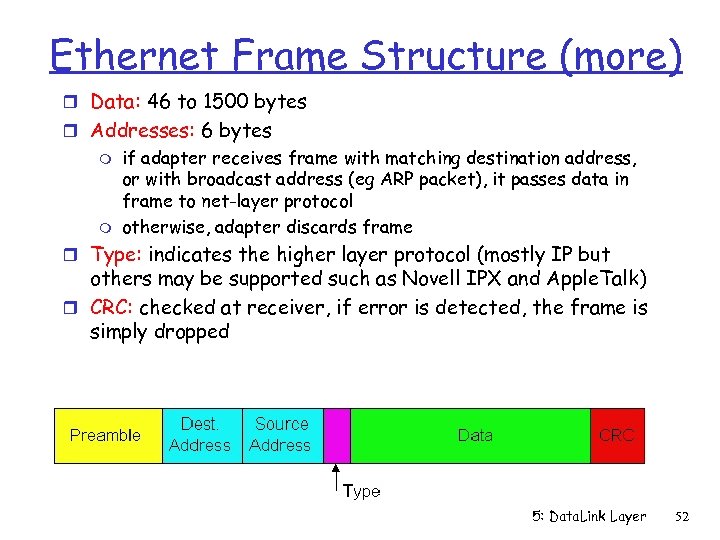 Ethernet Frame Structure (more) r Data: 46 to 1500 bytes r Addresses: 6 bytes m m if adapter receives frame with matching destination address, or with broadcast address (eg ARP packet), it passes data in frame to net-layer protocol otherwise, adapter discards frame r Type: indicates the higher layer protocol (mostly IP but others may be supported such as Novell IPX and Apple. Talk) r CRC: checked at receiver, if error is detected, the frame is simply dropped 5: Data. Link Layer 52
 Unreliable, connectionless service r Connectionless: No handshaking between sending and receiving adapter. r Unreliable: receiving adapter doesn’t send acks or nacks to sending adapter m m m stream of datagrams passed to network layer can have data gaps due to discarded fames if the application is using UDP data gaps will be filled by retransmissions if application is using TCP otherwise, application will see the gaps 5: Data. Link Layer 53
 Ethernet uses CSMA/CD r adapter may begin to transmit at anytime, i. e. , no slots are used r adapter doesn’t transmit if it senses that some other adapter is transmitting, that is, carrier sense r transmitting adapter aborts when it senses that another adapter is also transmitting, that is, collision detection r Before attempting a retransmission, adapter waits a random time, that is, random access 5: Data. Link Layer 54
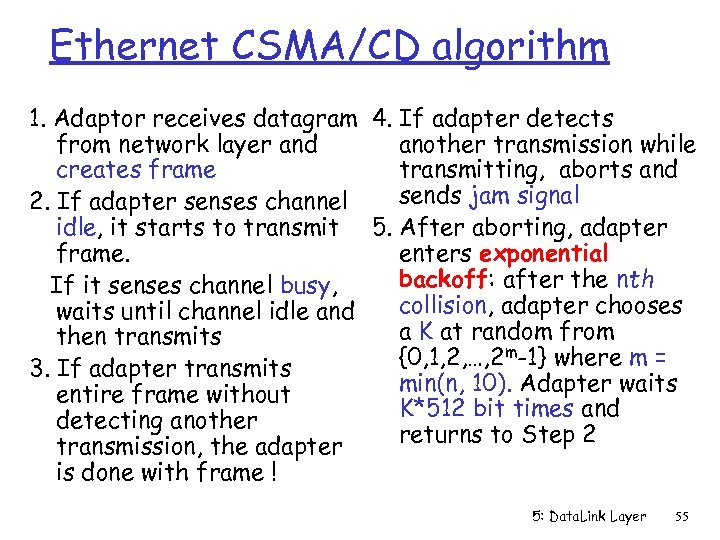 Ethernet CSMA/CD algorithm 1. Adaptor receives datagram 4. If adapter detects from network layer and another transmission while creates frame transmitting, aborts and sends jam signal 2. If adapter senses channel idle, it starts to transmit 5. After aborting, adapter frame. enters exponential backoff: after the nth If it senses channel busy, collision, adapter chooses waits until channel idle and a K at random from then transmits {0, 1, 2, …, 2 m-1} where m = 3. If adapter transmits min(n, 10). Adapter waits entire frame without K*512 bit times and detecting another returns to Step 2 transmission, the adapter is done with frame ! 5: Data. Link Layer 55
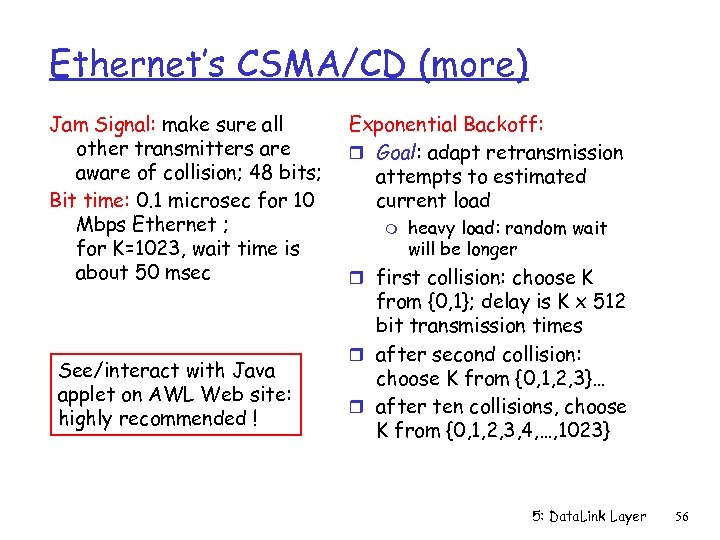 Ethernet’s CSMA/CD (more) Jam Signal: make sure all other transmitters are aware of collision; 48 bits; Bit time: 0. 1 microsec for 10 Mbps Ethernet ; for K=1023, wait time is about 50 msec See/interact with Java applet on AWL Web site: highly recommended ! Exponential Backoff: r Goal: adapt retransmission attempts to estimated current load m heavy load: random wait will be longer r first collision: choose K from {0, 1}; delay is K x 512 bit transmission times r after second collision: choose K from {0, 1, 2, 3}… r after ten collisions, choose K from {0, 1, 2, 3, 4, …, 1023} 5: Data. Link Layer 56
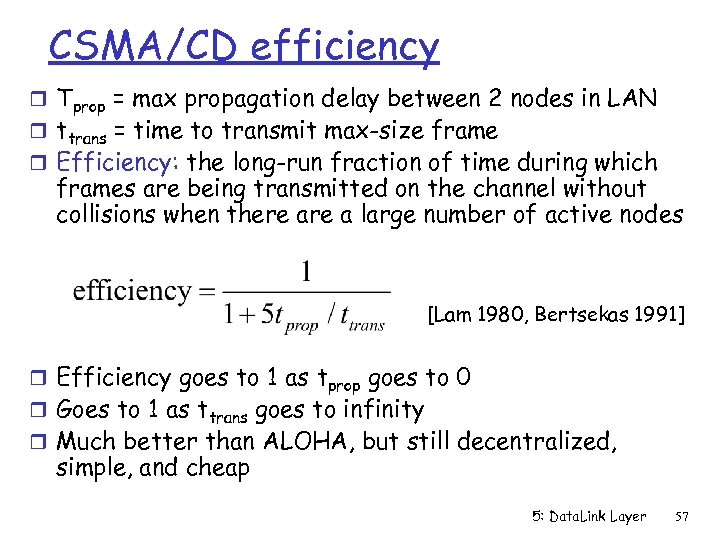 CSMA/CD efficiency r Tprop = max propagation delay between 2 nodes in LAN r ttrans = time to transmit max-size frame r Efficiency: the long-run fraction of time during which frames are being transmitted on the channel without collisions when there a large number of active nodes [Lam 1980, Bertsekas 1991] r Efficiency goes to 1 as tprop goes to 0 r Goes to 1 as ttrans goes to infinity r Much better than ALOHA, but still decentralized, simple, and cheap 5: Data. Link Layer 57
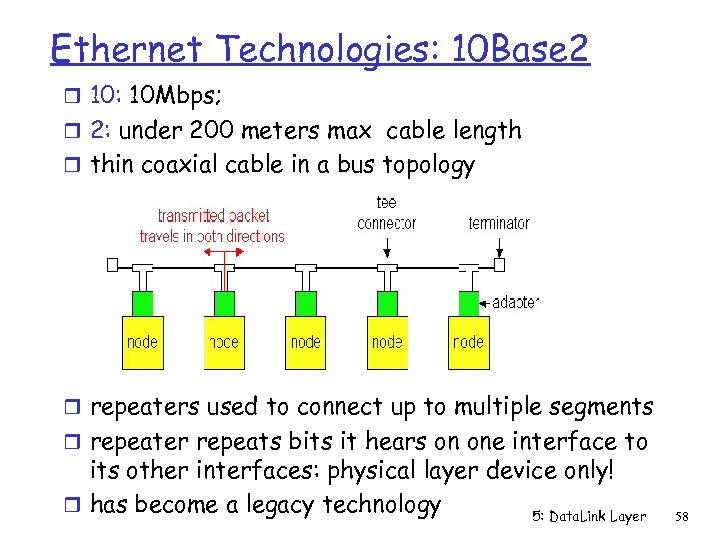 Ethernet Technologies: 10 Base 2 r 10: 10 Mbps; r 2: under 200 meters max cable length r thin coaxial cable in a bus topology r repeaters used to connect up to multiple segments r repeater repeats bits it hears on one interface to its other interfaces: physical layer device only! r has become a legacy technology 5: Data. Link Layer 58
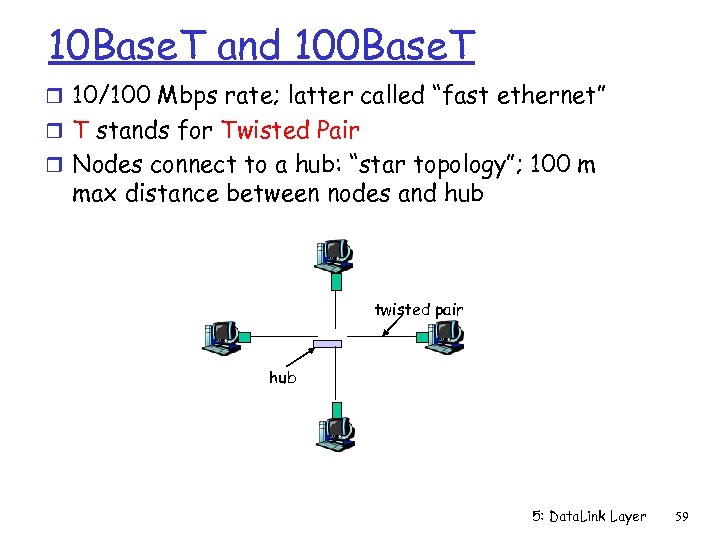 10 Base. T and 100 Base. T r 10/100 Mbps rate; latter called “fast ethernet” r T stands for Twisted Pair r Nodes connect to a hub: “star topology”; 100 m max distance between nodes and hub twisted pair hub 5: Data. Link Layer 59
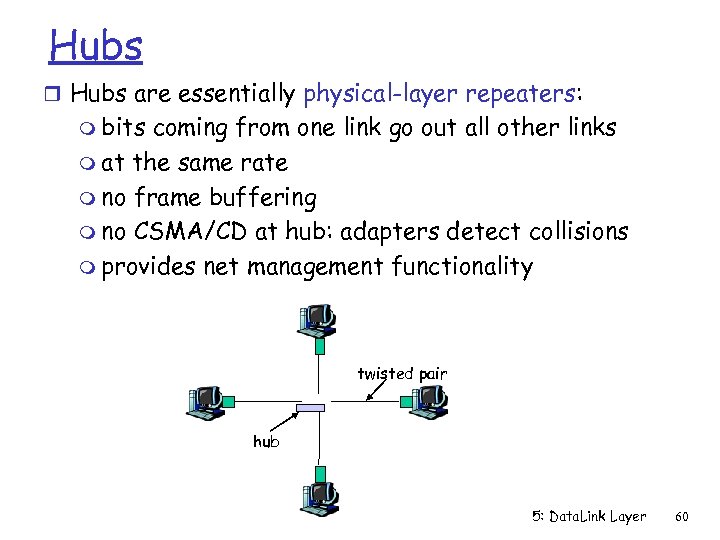 Hubs r Hubs are essentially physical-layer repeaters: m bits coming from one link go out all other links m at the same rate m no frame buffering m no CSMA/CD at hub: adapters detect collisions m provides net management functionality twisted pair hub 5: Data. Link Layer 60
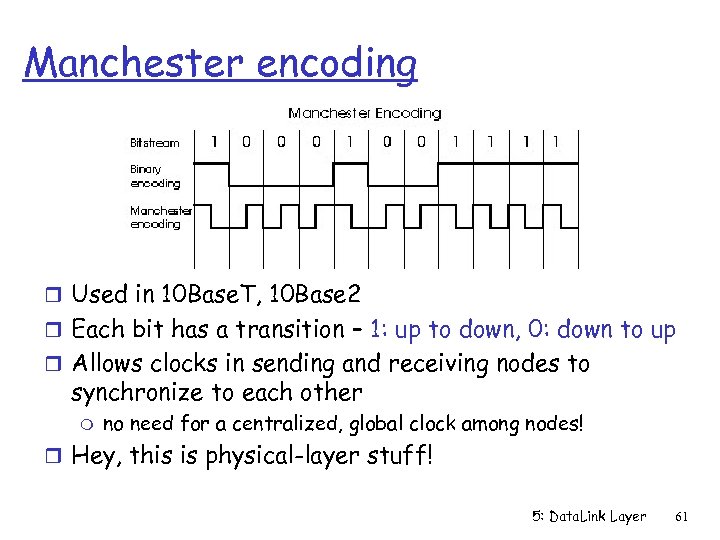 Manchester encoding r Used in 10 Base. T, 10 Base 2 r Each bit has a transition – 1: up to down, 0: down to up r Allows clocks in sending and receiving nodes to synchronize to each other m no need for a centralized, global clock among nodes! r Hey, this is physical-layer stuff! 5: Data. Link Layer 61
 Gbit Ethernet r use standard Ethernet frame format r allows for point-to-point links as well as shared broadcast channels r Point-to-point links use switches r Shared broadcast channels use hubs called “Buffered Distributors” r in shared broadcast channels, CSMA/CD is used; short distances between nodes to be efficient r 10 Gbps now ! 5: Data. Link Layer 62
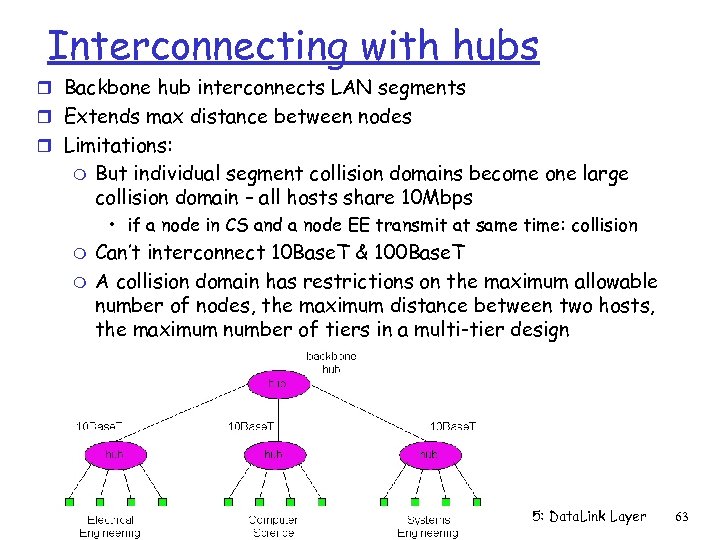 Interconnecting with hubs r Backbone hub interconnects LAN segments r Extends max distance between nodes r Limitations: m But individual segment collision domains become one large collision domain – all hosts share 10 Mbps • if a node in CS and a node EE transmit at same time: collision m m Can’t interconnect 10 Base. T & 100 Base. T A collision domain has restrictions on the maximum allowable number of nodes, the maximum distance between two hosts, the maximum number of tiers in a multi-tier design 5: Data. Link Layer 63
 Switch r Link layer device m stores and forwards Ethernet frames m examines frame header and selectively forwards frame based on MAC dest address m when frame is to be forwarded on segment, uses CSMA/CD to access segment r transparent m hosts are unaware of presence of switches r plug-and-play, self-learning m switches do not need to be configured 5: Data. Link Layer 64
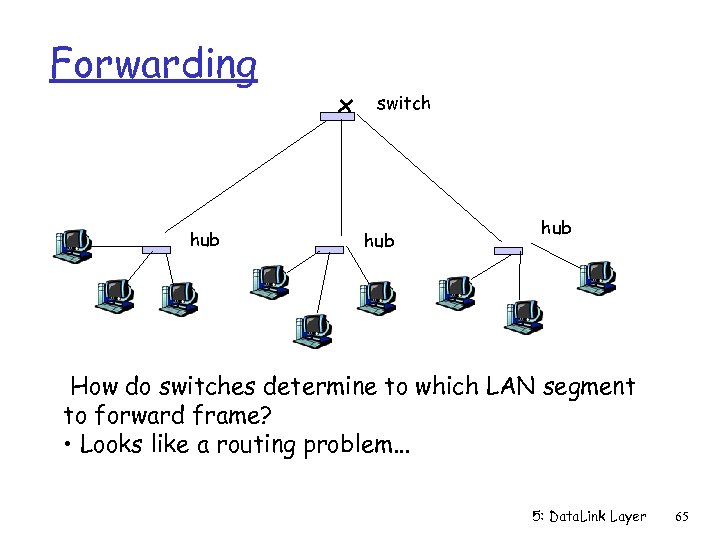 Forwarding switch hub hub How do switches determine to which LAN segment to forward frame? • Looks like a routing problem. . . 5: Data. Link Layer 65
 Self learning r A switch has a switch table r entry in switch table: m (MAC Address of a node, Switch Interface, Time Stamp) m stale entries in table dropped (TTL can be 60 min) r Switch learns which hosts can be reached through which interfaces m when frame received, switch “learns” location of sender: incoming interface m records sender/interface pair in switch table 5: Data. Link Layer 66
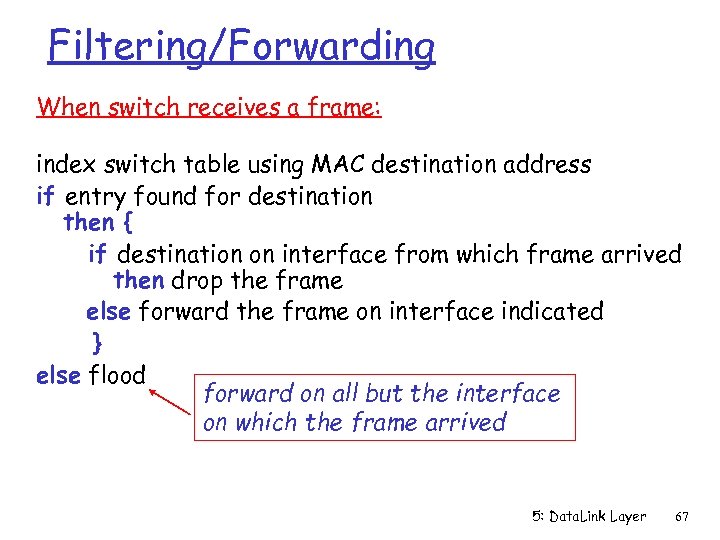 Filtering/Forwarding When switch receives a frame: index switch table using MAC destination address if entry found for destination then { if destination on interface from which frame arrived then drop the frame else forward the frame on interface indicated } else flood forward on all but the interface on which the frame arrived 5: Data. Link Layer 67
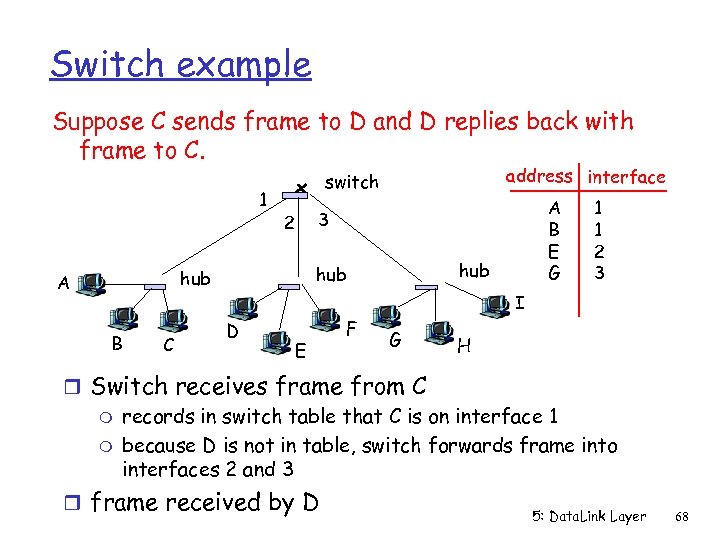 Switch example Suppose C sends frame to D and D replies back with frame to C. 1 B C A B E G 3 2 hub hub A address interface switch 1 1 2 3 I D E F G H r Switch receives frame from C m records in switch table that C is on interface 1 m because D is not in table, switch forwards frame into interfaces 2 and 3 r frame received by D 5: Data. Link Layer 68
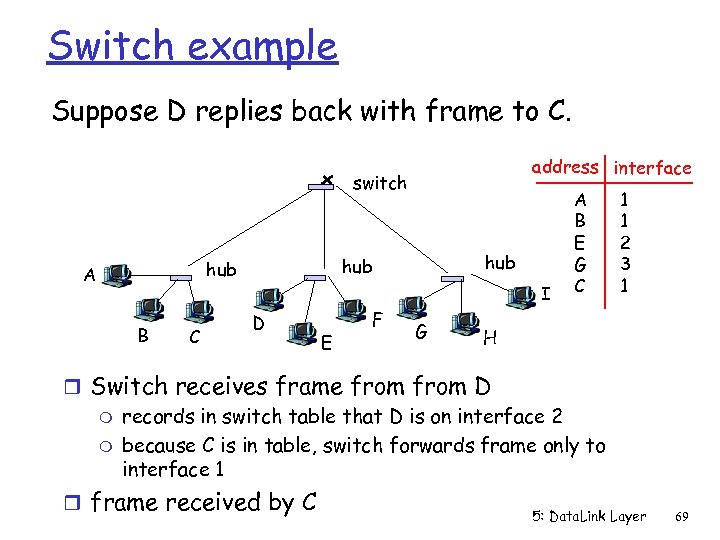 Switch example Suppose D replies back with frame to C. address interface switch B C hub hub A I D E F G A B E G C 1 1 2 3 1 H r Switch receives frame from D m records in switch table that D is on interface 2 m because C is in table, switch forwards frame only to interface 1 r frame received by C 5: Data. Link Layer 69
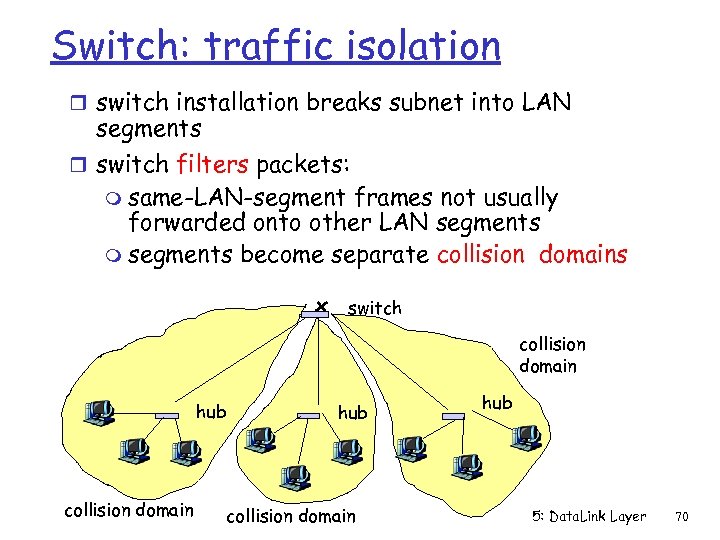 Switch: traffic isolation r switch installation breaks subnet into LAN segments r switch filters packets: m same-LAN-segment frames not usually forwarded onto other LAN segments m segments become separate collision domains switch collision domain hub 5: Data. Link Layer 70
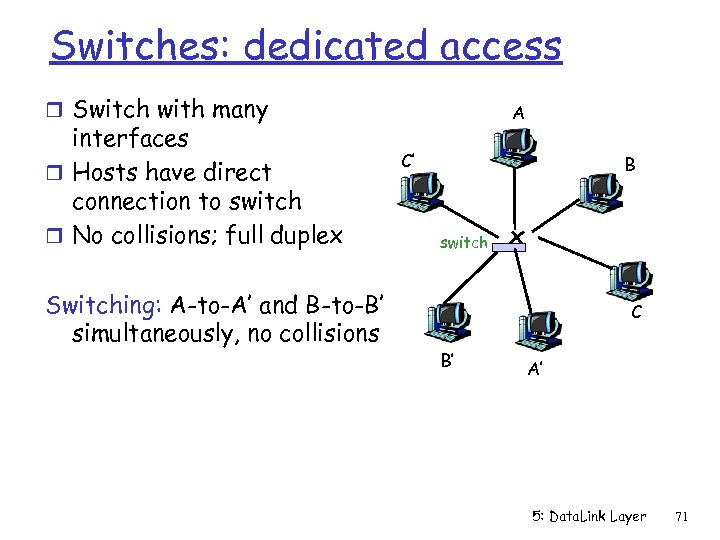 Switches: dedicated access r Switch with many interfaces r Hosts have direct connection to switch r No collisions; full duplex Switching: A-to-A’ and B-to-B’ simultaneously, no collisions A C’ B switch C B’ A’ 5: Data. Link Layer 71
 More on Switches r cut-through switching: when the output buffer is empty, a frame forwarded from input to output port without first collecting entire frame m slight reduction in latency r combinations of shared/dedicated, 10/1000 Mbps interfaces 5: Data. Link Layer 72
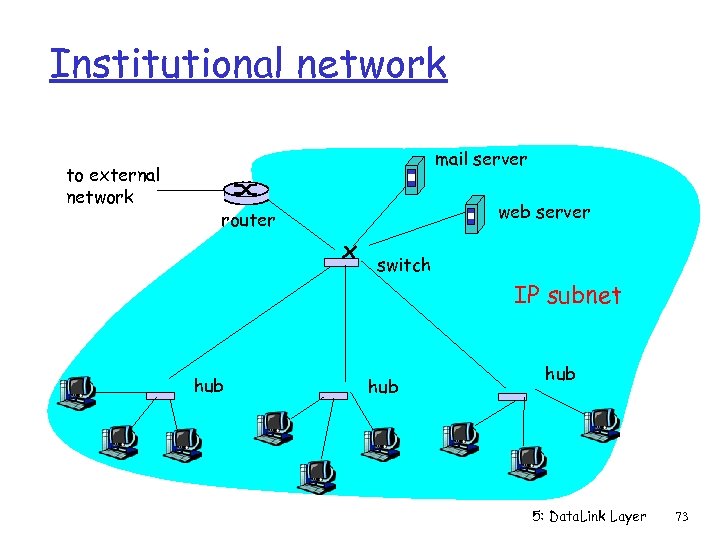 Institutional network to external network mail server web server router switch IP subnet hub hub 5: Data. Link Layer 73
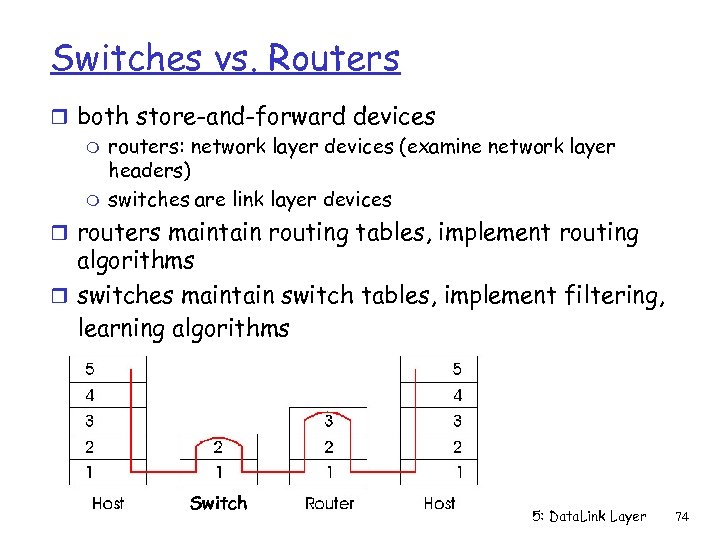 Switches vs. Routers r both store-and-forward devices m routers: network layer devices (examine network layer headers) m switches are link layer devices r routers maintain routing tables, implement routing algorithms r switches maintain switch tables, implement filtering, learning algorithms Switch 5: Data. Link Layer 74
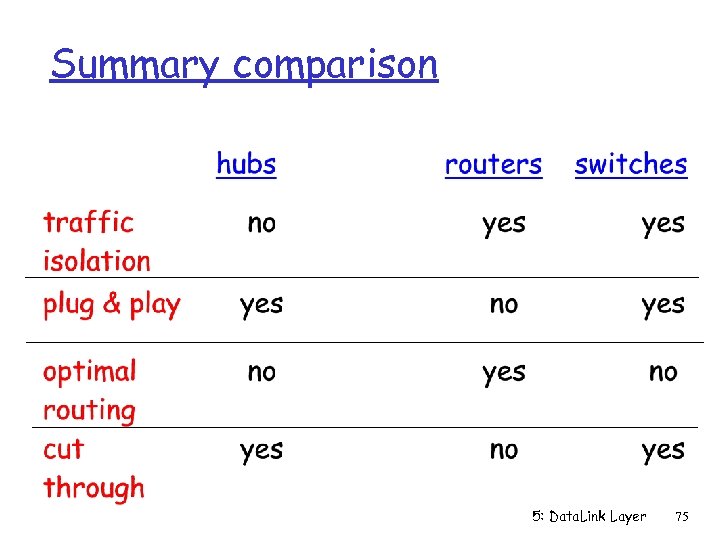 Summary comparison 5: Data. Link Layer 75
 Link Layer r 5. 1 Introduction and r r services 5. 2 Error detection and correction 5. 3 Multiple access protocols 5. 4 Link-Layer Addressing 5. 5 Ethernet r 5. 6 Hubs and switches r 5. 7 PPP r 5. 8 Link Virtualization: ATM 5: Data. Link Layer 76
 Point to Point Data Link Control r one sender, one receiver, one link: easier than broadcast link: m no Media Access Control m no need for explicit MAC addressing m e. g. , dialup link, ISDN line r popular point-to-point Data Link Control (DLC) protocols: m PPP (point-to-point protocol) m HDLC: High level data link control (Data link used to be considered “high layer” in protocol stack!) 5: Data. Link Layer 77
![PPP Design Requirements [RFC 1557] r packet framing: encapsulation of network-layer r r datagram](https://present5.com/presentation/20fdec37c54f99d06997536f155b5f3e/image-78.jpg "PPP Design Requirements [RFC 1557] r packet framing: encapsulation of network-layer r r datagram") PPP Design Requirements [RFC 1557] r packet framing: encapsulation of network-layer r r datagram in data link frame m carry network layer data of any network layer protocol (not just IP) at same time m ability to demultiplex upwards bit transparency: must carry any bit pattern in the data field error detection (no correction) connection liveness: detect a link failure, signal link failure to network layer address negotiation: endpoint can learn/configure each other’s network address 5: Data. Link Layer 78
PPP Design Requirements [RFC 1557] r packet framing: encapsulation of network-layer r r datagram in data link frame m carry network layer data of any network layer protocol (not just IP) at same time m ability to demultiplex upwards bit transparency: must carry any bit pattern in the data field error detection (no correction) connection liveness: detect a link failure, signal link failure to network layer address negotiation: endpoint can learn/configure each other’s network address 5: Data. Link Layer 78
 PPP non-requirements r no error correction/recovery r no flow control r out of order delivery OK r no need to support multipoint links (e. g. , polling) Error recovery, flow control, data re-ordering all relegated to higher layers! 5: Data. Link Layer 79
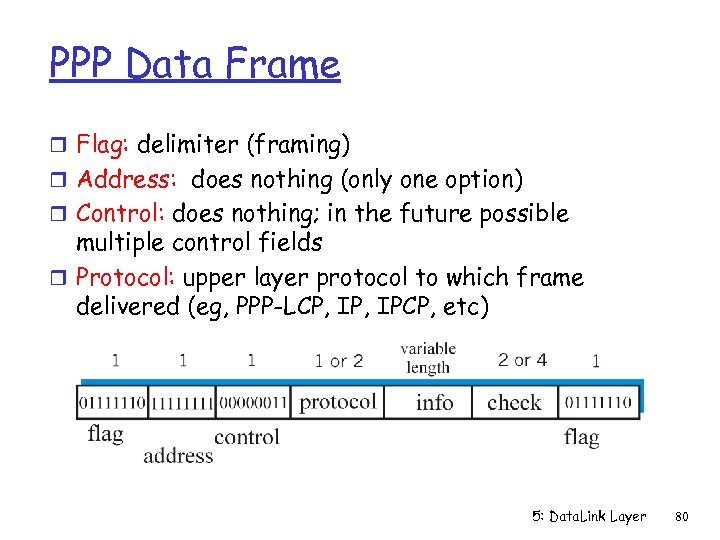 PPP Data Frame r Flag: delimiter (framing) r Address: does nothing (only one option) r Control: does nothing; in the future possible multiple control fields r Protocol: upper layer protocol to which frame delivered (eg, PPP-LCP, IPCP, etc) 5: Data. Link Layer 80
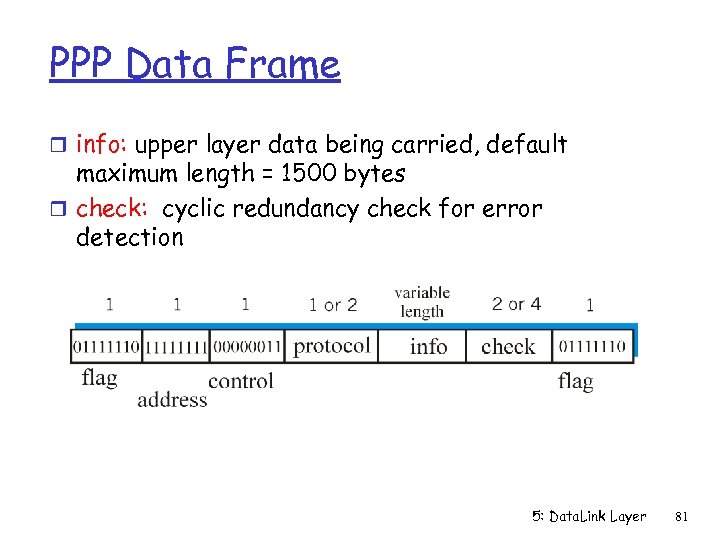 PPP Data Frame r info: upper layer data being carried, default maximum length = 1500 bytes r check: cyclic redundancy check for error detection 5: Data. Link Layer 81
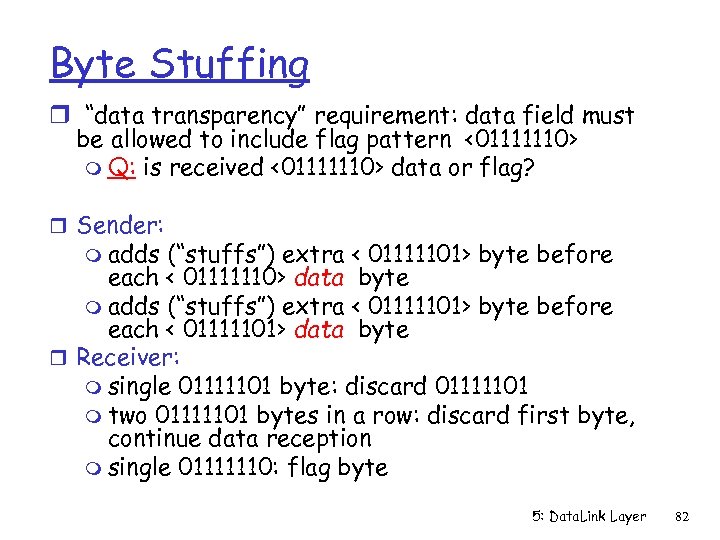 Byte Stuffing r “data transparency” requirement: data field must be allowed to include flag pattern <01111110> m Q: is received <01111110> data or flag? r Sender: m adds (“stuffs”) extra < 01111101> byte before each < 01111110> data byte m adds (“stuffs”) extra < 01111101> byte before each < 01111101> data byte r Receiver: m single 01111101 byte: discard 01111101 m two 01111101 bytes in a row: discard first byte, continue data reception m single 01111110: flag byte 5: Data. Link Layer 82
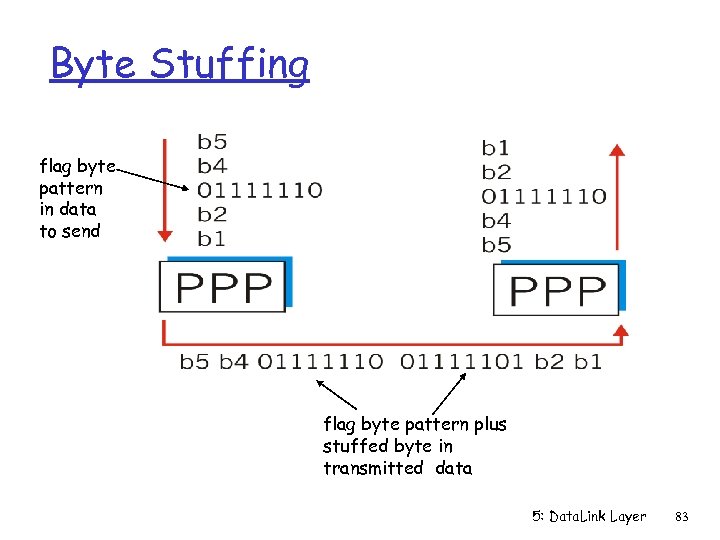 Byte Stuffing flag byte pattern in data to send flag byte pattern plus stuffed byte in transmitted data 5: Data. Link Layer 83
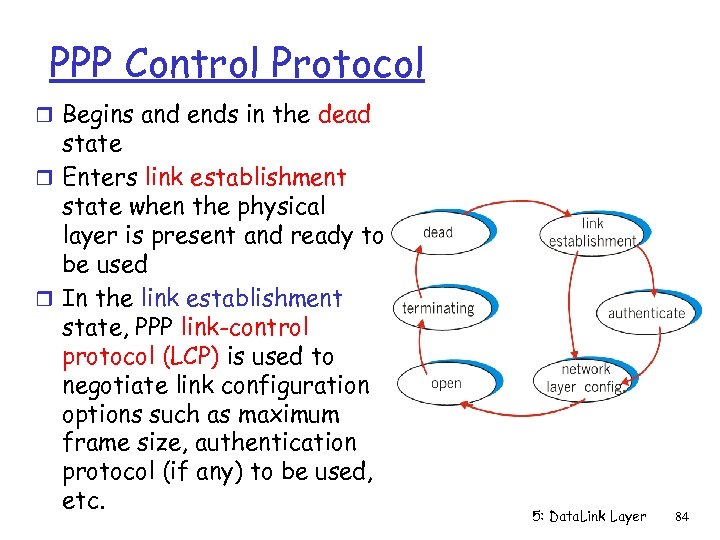 PPP Control Protocol r Begins and ends in the dead state r Enters link establishment state when the physical layer is present and ready to be used r In the link establishment state, PPP link-control protocol (LCP) is used to negotiate link configuration options such as maximum frame size, authentication protocol (if any) to be used, etc. 5: Data. Link Layer 84
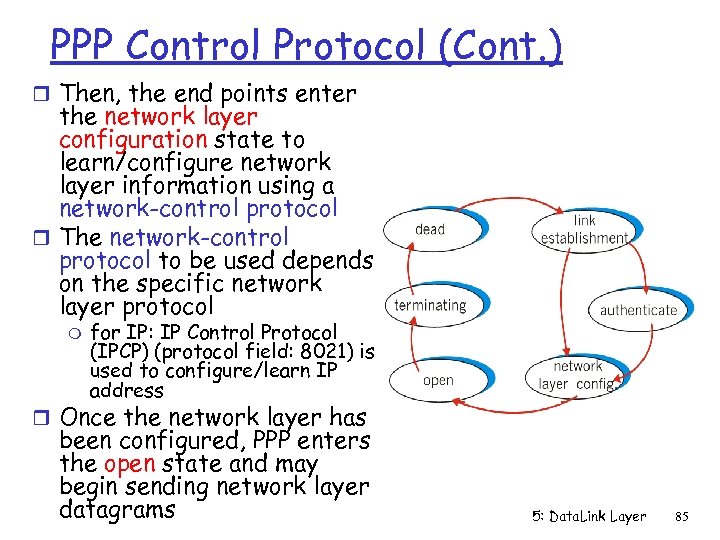 PPP Control Protocol (Cont. ) r Then, the end points enter the network layer configuration state to learn/configure network layer information using a network-control protocol r The network-control protocol to be used depends on the specific network layer protocol m for IP: IP Control Protocol (IPCP) (protocol field: 8021) is used to configure/learn IP address r Once the network layer has been configured, PPP enters the open state and may begin sending network layer datagrams 5: Data. Link Layer 85
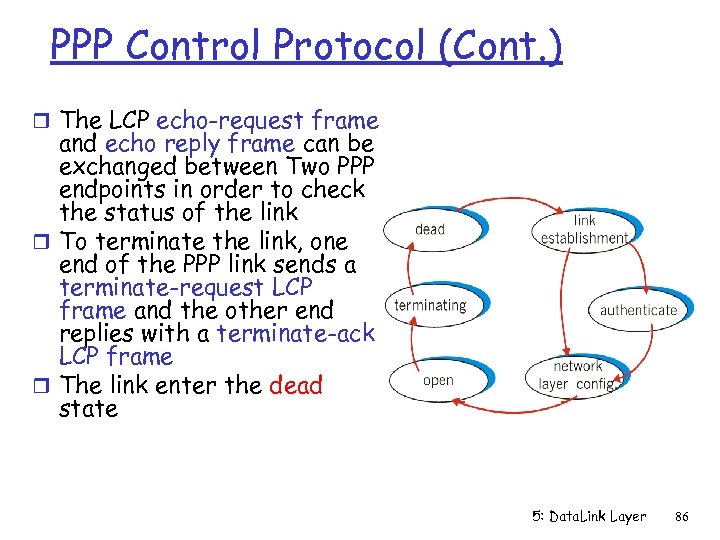 PPP Control Protocol (Cont. ) r The LCP echo-request frame and echo reply frame can be exchanged between Two PPP endpoints in order to check the status of the link r To terminate the link, one end of the PPP link sends a terminate-request LCP frame and the other end replies with a terminate-ack LCP frame r The link enter the dead state 5: Data. Link Layer 86
 Link Layer r 5. 1 Introduction and r r services 5. 2 Error detection and correction 5. 3 Multiple access protocols 5. 4 Link-Layer Addressing 5. 5 Ethernet r 5. 6 Hubs and switches r 5. 7 PPP r 5. 8 Link Virtualization: ATM and MPLS 5: Data. Link Layer 87
 Virtualization of networks Virtualization of resources: a powerful abstraction in systems engineering: r computing examples: virtual memory, virtual devices m Virtual machines: e. g. , java m IBM VM os from 1960’s/70’s r layering of abstractions: don’t sweat the details of the lower layer, only deal with lower layers abstractly 5: Data. Link Layer 88
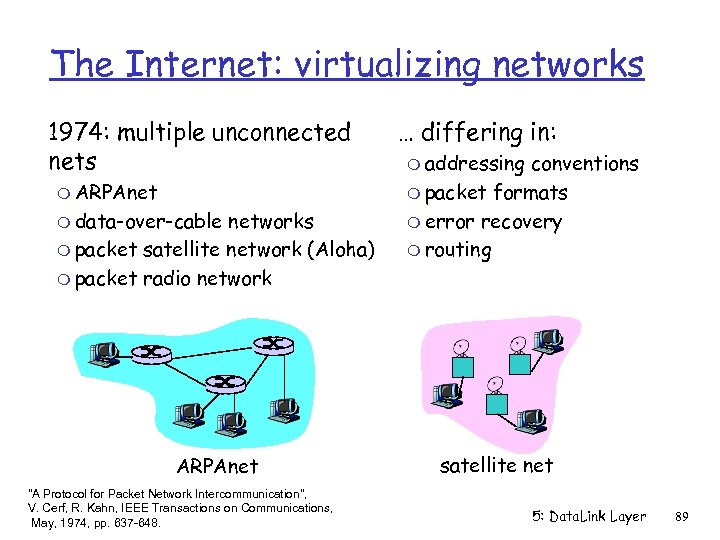 The Internet: virtualizing networks 1974: multiple unconnected nets m ARPAnet m data-over-cable networks m packet satellite network (Aloha) m packet radio network ARPAnet "A Protocol for Packet Network Intercommunication", V. Cerf, R. Kahn, IEEE Transactions on Communications, May, 1974, pp. 637 -648. … differing in: m addressing conventions m packet formats m error recovery m routing satellite net 5: Data. Link Layer 89
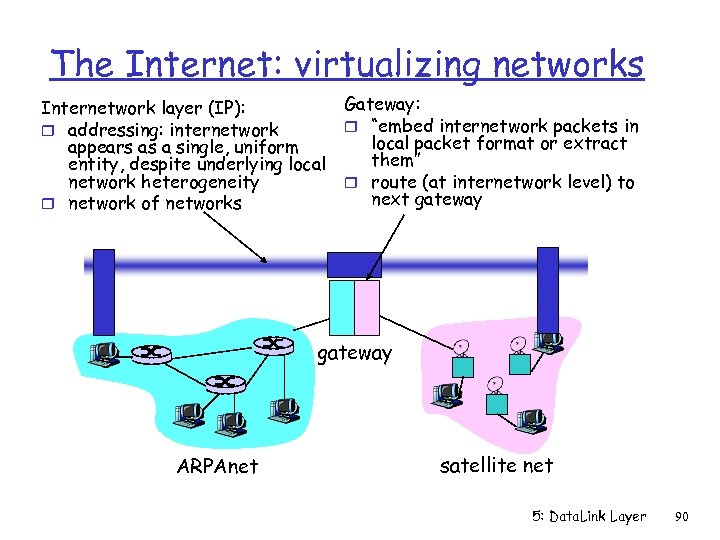 The Internet: virtualizing networks Internetwork layer (IP): r addressing: internetwork appears as a single, uniform entity, despite underlying local network heterogeneity r network of networks Gateway: r “embed internetwork packets in local packet format or extract them” r route (at internetwork level) to next gateway ARPAnet satellite net 5: Data. Link Layer 90
 Cerf & Kahn’s Internetwork Architecture What is virtualized? r two layers of addressing: internetwork and local network r new layer (IP) makes everything homogeneous at internetwork layer r underlying local network technology m cable m satellite m 56 K telephone modem m today: ATM, MPLS … “invisible” at internetwork layer. Looks like a link layer technology to IP! 5: Data. Link Layer 91
 ATM and MPLS r ATM, MPLS separate networks in their own right m different service models, addressing, routing from Internet r viewed by Internet as logical link connecting IP routers m just like dialup link is really part of separate network (telephone network) r ATM, MPSL: of technical interest in their own right 5: Data. Link Layer 92
 Asynchronous Transfer Mode: ATM r 1990’s/00 standard for high-speed (155 Mbps to 622 Mbps and higher) Broadband Integrated Service Digital Network architecture r Goal: integrated, end-to-end transport for carrying voice, video, data m meeting timing/Qo. S requirements of voice, video (versus Internet best-effort model) m “next generation” telephony: technical roots in telephone world m packet-switching (fixed length packets, called “cells”) using virtual circuits 5: Data. Link Layer 93
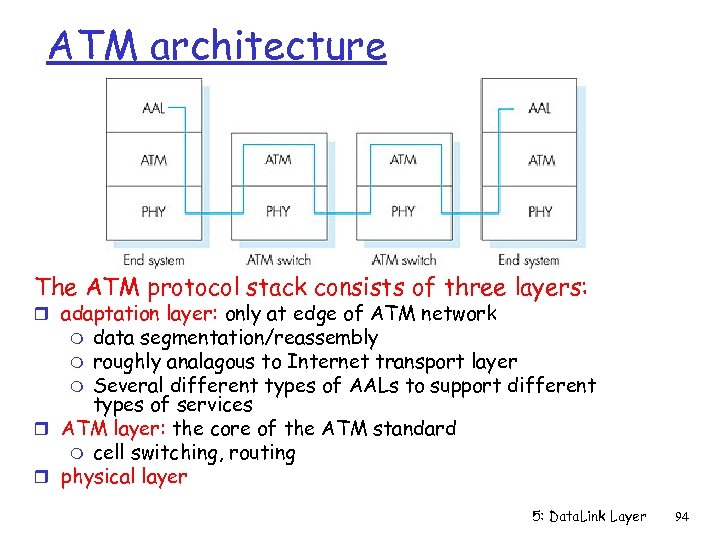 ATM architecture The ATM protocol stack consists of three layers: r adaptation layer: only at edge of ATM network data segmentation/reassembly m roughly analagous to Internet transport layer m Several different types of AALs to support different types of services r ATM layer: the core of the ATM standard m cell switching, routing r physical layer m 5: Data. Link Layer 94
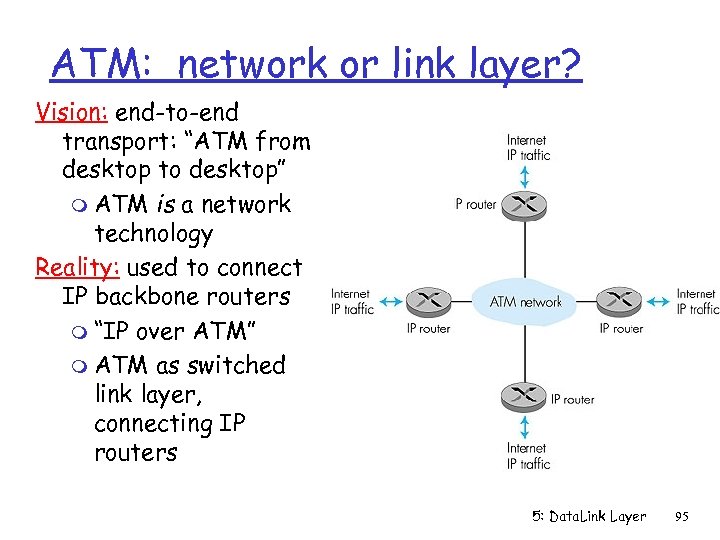 ATM: network or link layer? Vision: end-to-end transport: “ATM from desktop to desktop” m ATM is a network technology Reality: used to connect IP backbone routers m “IP over ATM” m ATM as switched link layer, connecting IP routers 5: Data. Link Layer 95
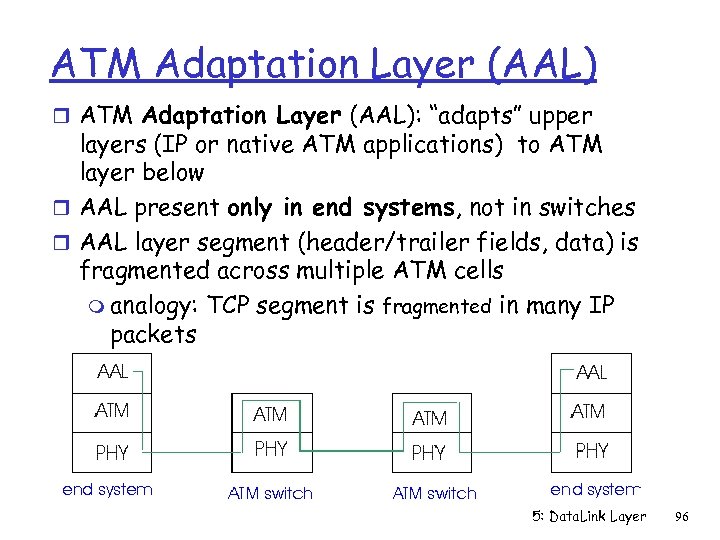 ATM Adaptation Layer (AAL) r ATM Adaptation Layer (AAL): “adapts” upper layers (IP or native ATM applications) to ATM layer below r AAL present only in end systems, not in switches r AAL layer segment (header/trailer fields, data) is fragmented across multiple ATM cells m analogy: TCP segment is fragmented in many IP packets 5: Data. Link Layer 96
![ATM Adaptation Layer (AAL) [more] Different versions of AAL layers, depending on ATM service](https://present5.com/presentation/20fdec37c54f99d06997536f155b5f3e/image-97.jpg "ATM Adaptation Layer (AAL) [more] Different versions of AAL layers, depending on ATM service") ATM Adaptation Layer (AAL) [more] Different versions of AAL layers, depending on ATM service class: r AAL 1: for CBR (Constant Bit Rate) services, e. g. circuit emulation r AAL 2: for VBR (Variable Bit Rate) services, e. g. , MPEG video r AAL 5: for data (eg, IP datagrams) 5: Data. Link Layer 97
ATM Adaptation Layer (AAL) [more] Different versions of AAL layers, depending on ATM service class: r AAL 1: for CBR (Constant Bit Rate) services, e. g. circuit emulation r AAL 2: for VBR (Variable Bit Rate) services, e. g. , MPEG video r AAL 5: for data (eg, IP datagrams) 5: Data. Link Layer 97
![ATM Adaptation Layer (AAL) [more] AAL has two sublayers: r Convergence sublayer: higher-layer data](https://present5.com/presentation/20fdec37c54f99d06997536f155b5f3e/image-98.jpg "ATM Adaptation Layer (AAL) [more] AAL has two sublayers: r Convergence sublayer: higher-layer data") ATM Adaptation Layer (AAL) [more] AAL has two sublayers: r Convergence sublayer: higher-layer data are encapsulated in a common part convergence sublayer (CPCS) r Segmentation and reassembly (SAR) sublayer: segments the CPCSPDU and adds AAL header and trailer bits to form the payloads of the ATM User data AAL PDU ATM cell 5: Data. Link Layer 98
ATM Adaptation Layer (AAL) [more] AAL has two sublayers: r Convergence sublayer: higher-layer data are encapsulated in a common part convergence sublayer (CPCS) r Segmentation and reassembly (SAR) sublayer: segments the CPCSPDU and adds AAL header and trailer bits to form the payloads of the ATM User data AAL PDU ATM cell 5: Data. Link Layer 98
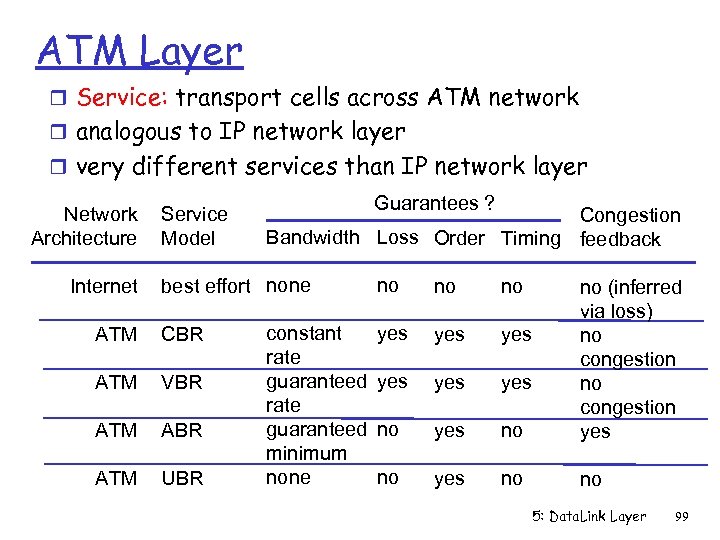 ATM Layer r Service: transport cells across ATM network r analogous to IP network layer r very different services than IP network layer Network Architecture Internet Service Model Guarantees ? Congestion Bandwidth Loss Order Timing feedback best effort none ATM CBR ATM VBR ATM ABR ATM UBR constant rate guaranteed minimum none no no no yes yes yes no no (inferred via loss) no congestion yes no no 5: Data. Link Layer 99
 ATM Layer: Virtual Channels r VC transport: cells carried on VC from source to dest m call setup for each call before data can flow m each packet carries a virtual channel identifier (VCI) m every switch on source-dest path maintain “state” for each passing connection m link, switch resources (bandwidth, buffers) may be allocated to VC: to get circuit-like performance r Two types of VCs m Permanent VCs (PVCs) • long lasting connections • typically: “permanent” route between IP routers m Switched VCs (SVC): • dynamically set up on per-call basis 5: Data. Link Layer 100
 ATM VCs r Advantages of ATM VC approach: m Qo. S performance guarantee for connection mapped to VC (bandwidth, delay jitter) r Drawbacks of ATM VC approach: m Inefficient support of datagram traffic m one PVC between each source/destination pair does not scale (N*2 connections needed) m SVC introduces call setup latency, processing overhead for short lived connections 5: Data. Link Layer 101
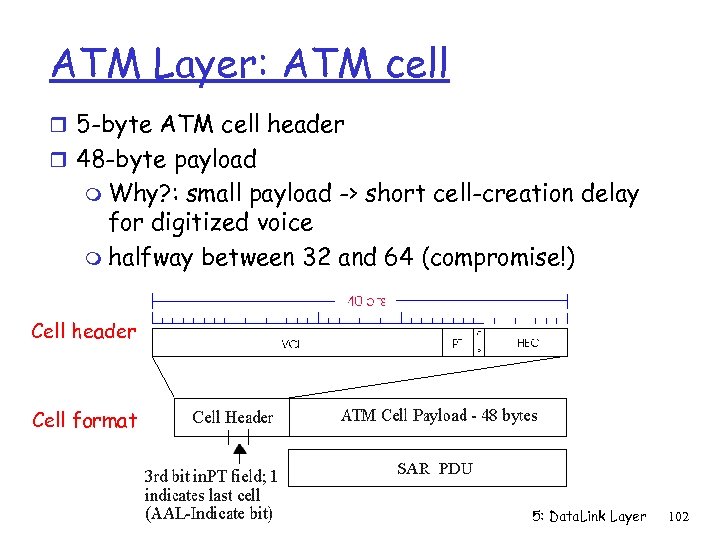 ATM Layer: ATM cell r 5 -byte ATM cell header r 48 -byte payload m Why? : small payload -> short cell-creation delay for digitized voice m halfway between 32 and 64 (compromise!) Cell header Cell format 5: Data. Link Layer 102
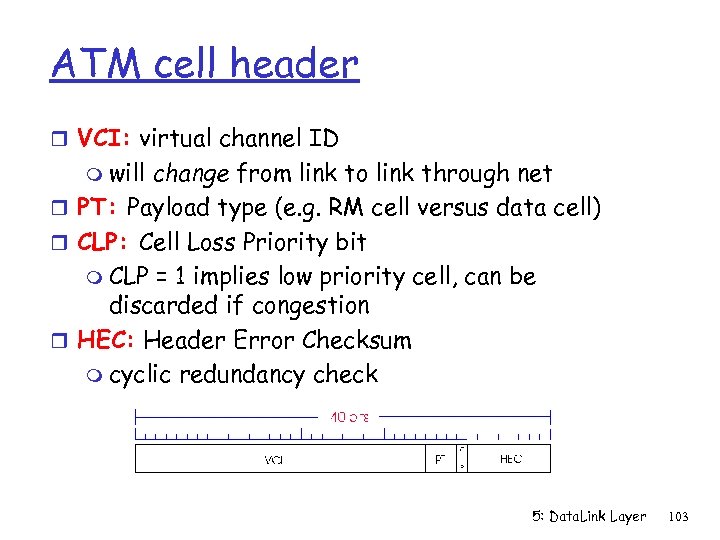 ATM cell header r VCI: virtual channel ID m will change from link to link through net r PT: Payload type (e. g. RM cell versus data cell) r CLP: Cell Loss Priority bit m CLP = 1 implies low priority cell, can be discarded if congestion r HEC: Header Error Checksum m cyclic redundancy check 5: Data. Link Layer 103
 ATM Physical Layer Two classes of physical layer: r Structured: have a transmission frame structure (TDM like frame) r Unstructured: do not have frame structure Two sublayers of physical layer: r Transmission Convergence Sublayer (TCS): m m Accept ATM cells from the ATM layer and prepare them for transmission Group bits arriving from the physical medium into cells and pass the cells to the ATM layer r Physical Medium Dependent (PMD) Sublayer: m depends on physical medium being used m Generates and delineating bits 5: Data. Link Layer 104
 ATM Physical Layer (more) Transmission Convergence Sublayer (TCS) r At the transmit side: generates header checksum (HEC) byte -- 8 bits CRC r If the Physical Medium Dependent (PMD) sublayer is cell-based with no frames, TCS sends idle cells when ATM layer has not provided data cells to send r At the receive side, uses the HEC byte to correct all one-bit errors and some multiple-bit errors in the header r At the receive side, delineates cells by running the HEC on all contiguous sets of 40 bits (When a match occurs, a cell is delineated) 5: Data. Link Layer 105
 ATM Physical Layer (more) Physical Medium Dependent (PMD) sublayer Some possible PMD sublayers: r SONET/SDH (synchronous optical network/synchronous digital hierarchy) : have transmission frame structure (like a container carrying bits); m bit synchronization; m Generates and delineates frames m bandwidth partitions (TDM); m several speeds: OC 3 = 155. 52 Mbps; OC 12 = 622. 08 Mbps; OC 48 = 2. 45 Gbps, OC 192 = 9. 6 Gbps r T 1/T 3: have transmission frame structure (old telephone hierarchy): T 1 = 1. 5 Mbps/ T 3 = 45 Mbps r Cell-based with no frames: just cells (busy/idle cells) 5: Data. Link Layer 106
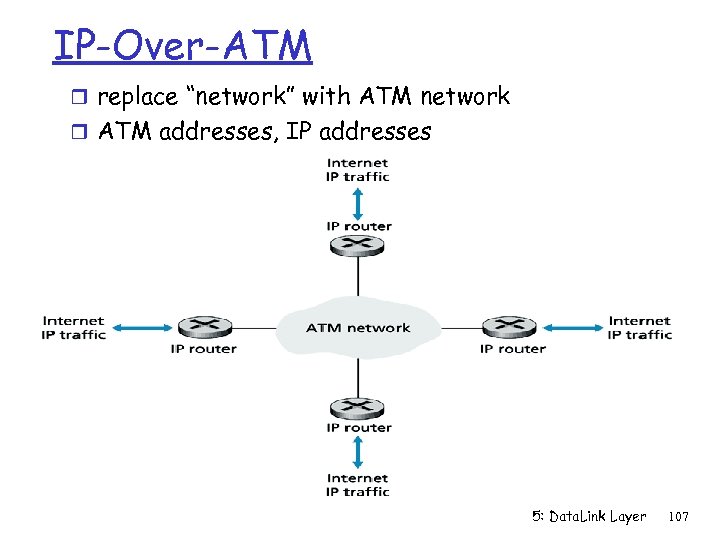 IP-Over-ATM r replace “network” with ATM network r ATM addresses, IP addresses 5: Data. Link Layer 107
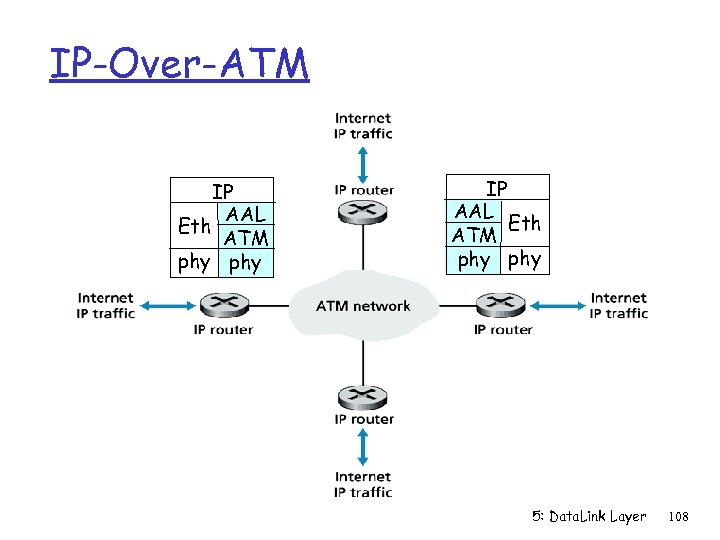 IP-Over-ATM IP AAL Eth ATM phy phy 5: Data. Link Layer 108
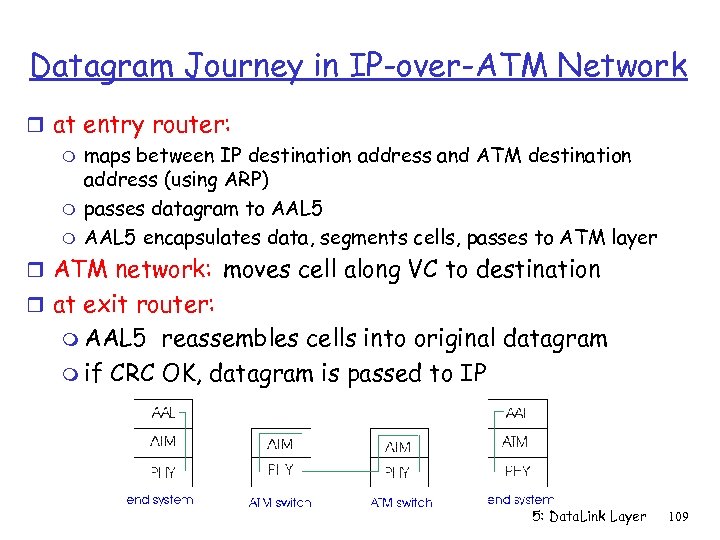 Datagram Journey in IP-over-ATM Network r at entry router: m maps between IP destination address and ATM destination address (using ARP) m passes datagram to AAL 5 m AAL 5 encapsulates data, segments cells, passes to ATM layer r ATM network: moves cell along VC to destination r at exit router: m AAL 5 reassembles cells into original datagram m if CRC OK, datagram is passed to IP 5: Data. Link Layer 109
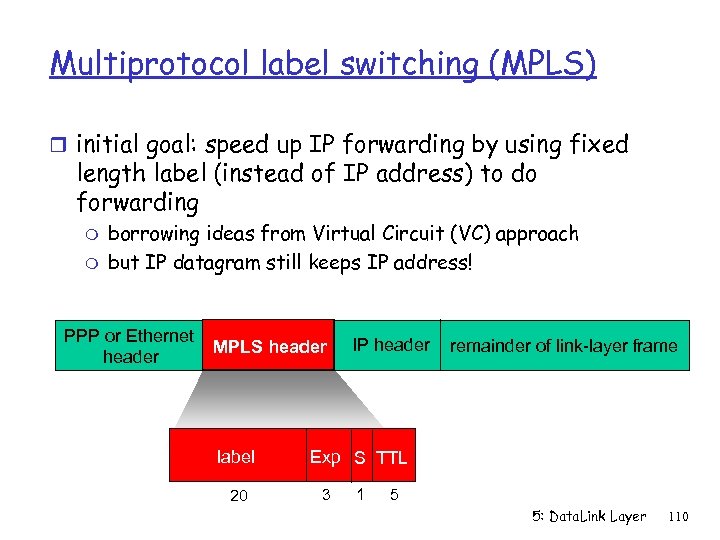 Multiprotocol label switching (MPLS) r initial goal: speed up IP forwarding by using fixed length label (instead of IP address) to do forwarding m m borrowing ideas from Virtual Circuit (VC) approach but IP datagram still keeps IP address! PPP or Ethernet header MPLS header label 20 IP header remainder of link-layer frame Exp S TTL 3 1 5 5: Data. Link Layer 110
 MPLS capable routers r a. k. a. label-switched router r forwards packets to outgoing interface based only on label value (don’t inspect IP address) m MPLS tables forwarding table distinct from IP forwarding r signaling protocol needed to set up forwarding table m RSVP-TE (RFC 3209) m forwarding possible along paths that IP alone would not allow (e. g. , source-specific routing) !! m use MPLS for traffic engineering r must co-exist with IP-only routers 5: Data. Link Layer 111
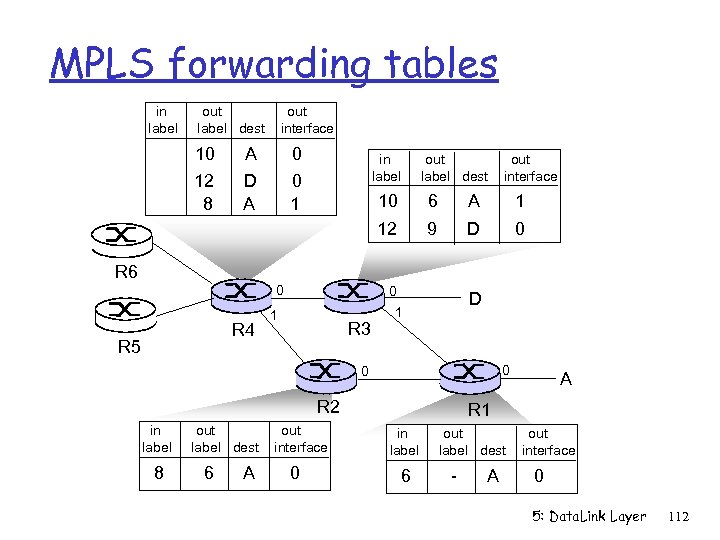 MPLS forwarding tables in label out label dest 10 12 8 out interface A D A 0 0 1 in label out label dest out interface 0 R 4 R 5 6 A 1 12 R 6 10 9 D 0 0 1 R 3 D 1 0 A out. R 1 label dest out interface 0 R 2 in label 8 out label dest 6 A out interface 0 R 1 in label 6 - A 0 5: Data. Link Layer 112
 Chapter 5: Summary r principles behind data link layer services: m error detection, correction m sharing a broadcast channel: multiple access m link layer addressing r instantiation and implementation of various link layer technologies m Ethernet m switched LANS m PPP m virtualized networks as a link layer: ATM, MPLS 5: Data. Link Layer 113