


 Скачать презентацию Chapter 4 Networking and the Internet Chapter
cd6851427bbb457f2b4e050277bed4ec.ppt
- Количество слайдов: 40
 Chapter 4 Networking and the Internet
 Chapter 4: Networking and the Internet • • • 4. 1 Network Fundamentals 4. 2 The Internet 4. 3 The World Wide Web 4. 4 Network Protocols 4. 5 Security 2 © 2005 Pearson Addison-Wesley. All rights reserved
 Network classifications • • Local area network (LAN) Wide area network (WAN) Closed, or proprietary Open 3 © 2005 Pearson Addison-Wesley. All rights reserved
 Network topologies • • Ring Bus Star Irregular 4 © 2005 Pearson Addison-Wesley. All rights reserved
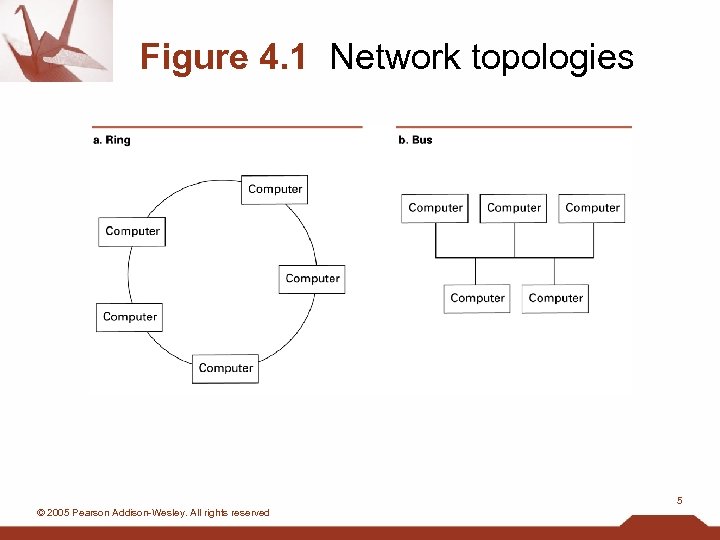 Figure 4. 1 Network topologies 5 © 2005 Pearson Addison-Wesley. All rights reserved
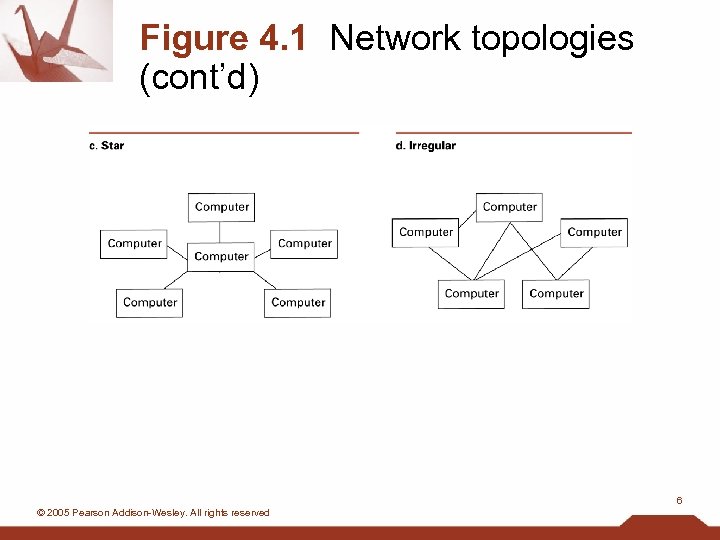 Figure 4. 1 Network topologies (cont’d) 6 © 2005 Pearson Addison-Wesley. All rights reserved
 Connecting networks • Bridge: connects two compatible networks • Router: connects two incompatible networks – Resulting “network” is called an internet 7 © 2005 Pearson Addison-Wesley. All rights reserved
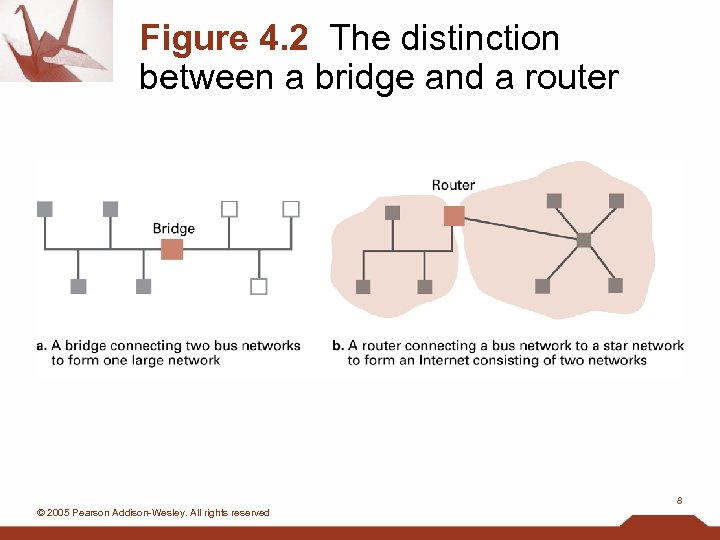 Figure 4. 2 The distinction between a bridge and a router 8 © 2005 Pearson Addison-Wesley. All rights reserved
 Inter-process communication • Client-server – One server, many clients – Server must execute continuously – Client initiates communication • Peer-to-peer – Two processes communicating as equals – Peer processes can be short-lived 9 © 2005 Pearson Addison-Wesley. All rights reserved
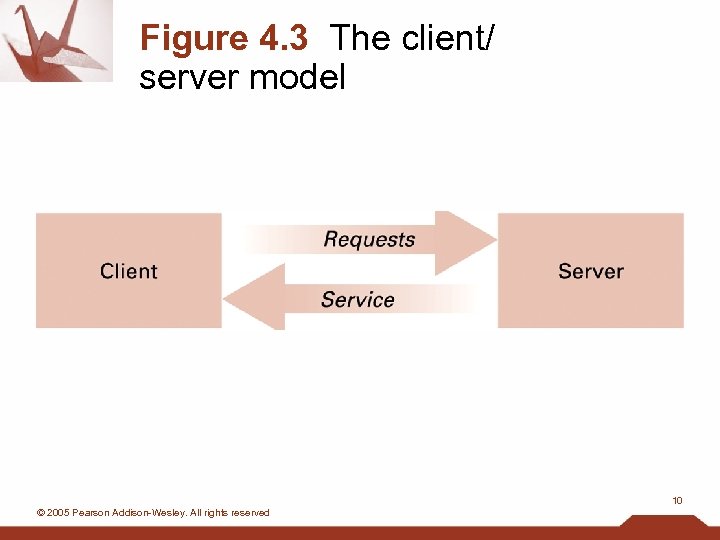 Figure 4. 3 The client/ server model 10 © 2005 Pearson Addison-Wesley. All rights reserved
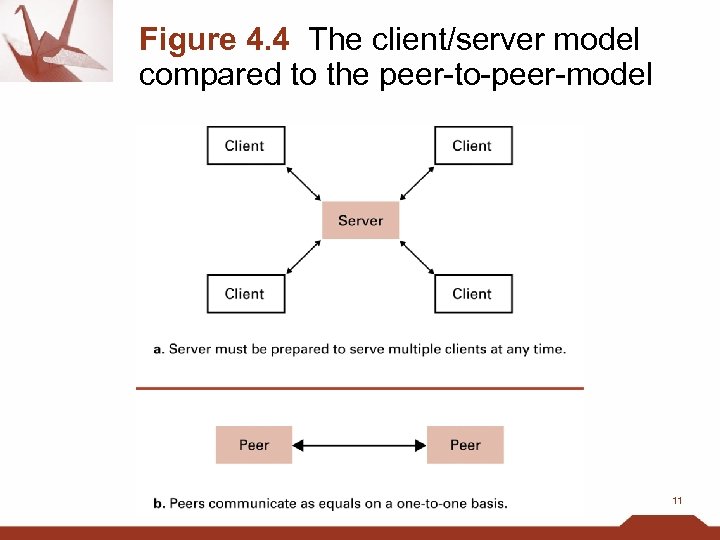 Figure 4. 4 The client/server model compared to the peer-to-peer-model 11
 Distributed systems • Systems with parts that run on different computers – Infrastructure usually provided by standardized toolkits • Example: Enterprise Java Beans from Sun Microsystems • Example: . NET framework from Microsoft 12 © 2005 Pearson Addison-Wesley. All rights reserved
 The Internet • The Internet: one internet spanning the world – Started by DARPA in 1973 – Today involves millions of machines 13 © 2005 Pearson Addison-Wesley. All rights reserved
 Internet Architecture • Domain = network or internet controlled by one organization • Gateway = router connecting a domain to the cloud – cloud = the rest of the internet • Domains must be registered by their owners – Internet Corporation for Assigned Names & Numbers (ICANN) serves as registrar 14 © 2005 Pearson Addison-Wesley. All rights reserved
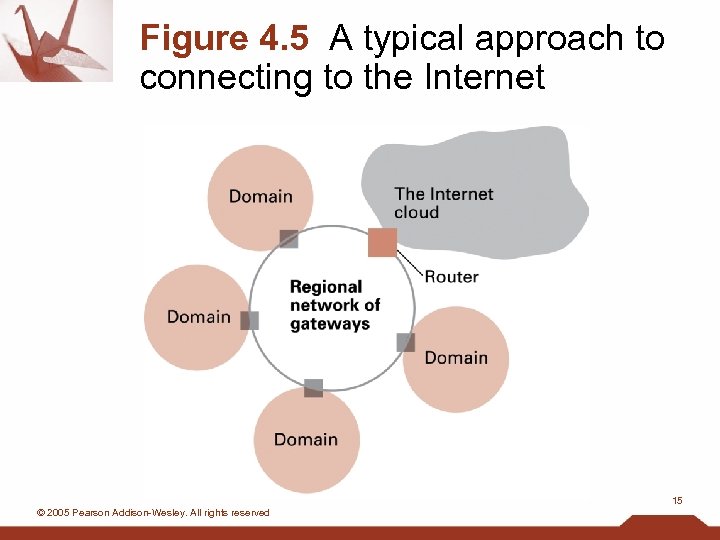 Figure 4. 5 A typical approach to connecting to the Internet 15 © 2005 Pearson Addison-Wesley. All rights reserved
 Strategies for connecting to the Internet • Large organization: buy a direct connection • Small organization or individual: link domain to the domain of an ISP – ISP = Internet Service Provider • Individual: temporarily link computer into ISP’s domain 16 © 2005 Pearson Addison-Wesley. All rights reserved
 Internet Addressing: IP Addresses • IP address = 32 bit identifier for a machine – Network identifier = part assigned by ICANN – Host address = part assigned by domain owner • Dotted decimal notation = standard for displaying IP addresses – Example: 192. 207. 177. 133 17 © 2005 Pearson Addison-Wesley. All rights reserved
 Internet addressing: host names • Host name = mnemonic name – Example: mymachine. aw. com – Domain name = part assigned by a registrar • Example: aw. com • Top level domain = classification of domain owner – By usage – Example: . com = commercial – By country – Example: . au = Australia – Subdomains and individual machine names • Assigned by domain owner • Domain owner must run a name server. 18 © 2005 Pearson Addison-Wesley. All rights reserved
 Internet applications • • Electronic main (e-mail) File Transfer Protocol (FTP) Remote login: telnet, etc. World Wide Web 19 © 2005 Pearson Addison-Wesley. All rights reserved
 Electronic mail • Mail server: set up by domain owner – Mail sent from domain members goes through mail server – Mail sent to domain members is collected by mail server – Mail delivered to clients on demand • POP 3 • IMAP 20 © 2005 Pearson Addison-Wesley. All rights reserved
 World Wide Web • Server disseminates hypertext (or hypermedia) documents – Web site = all hypertext documents controlled by one organization or individual • Usually all at same internet address – HTML = language of hypertext documents – Other content can also be disseminated • Example: images 21 © 2005 Pearson Addison-Wesley. All rights reserved
 World Wide Web implementation • Web server: provides access to documents on its machine as requested • Browser: allows user to access web pages • Hypertext Transfer Protocol (HTTP): communication protocol used by browsers and web servers • Uniform Resource Locator (URL): unique address of a document on the web 22 © 2005 Pearson Addison-Wesley. All rights reserved
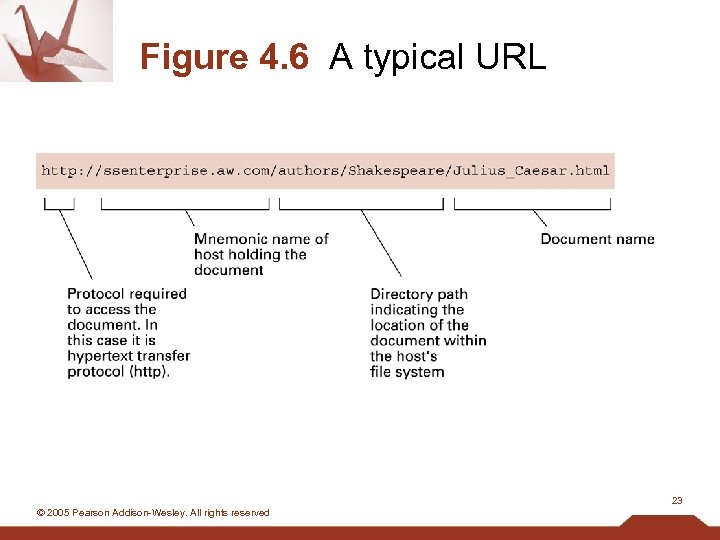 Figure 4. 6 A typical URL 23 © 2005 Pearson Addison-Wesley. All rights reserved
 Hypertext document format • Entire document is printable characters • Contains tags to control display – Display appearance – Links to other documents and content – Dynamic functions 24 © 2005 Pearson Addison-Wesley. All rights reserved
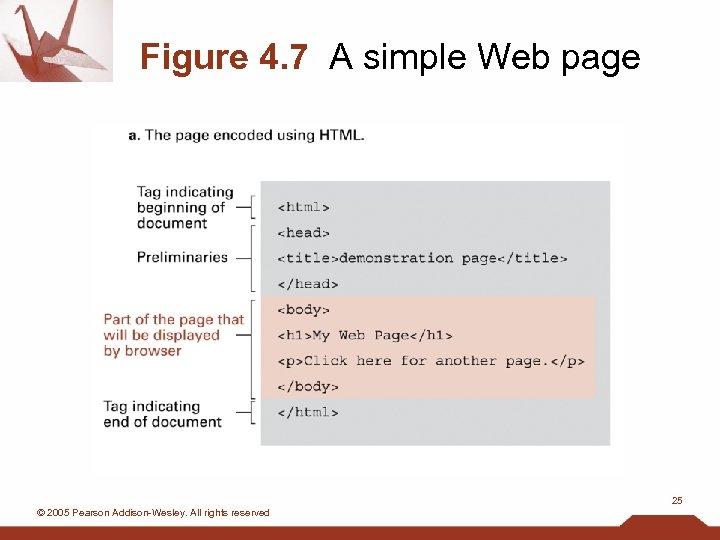 Figure 4. 7 A simple Web page 25 © 2005 Pearson Addison-Wesley. All rights reserved
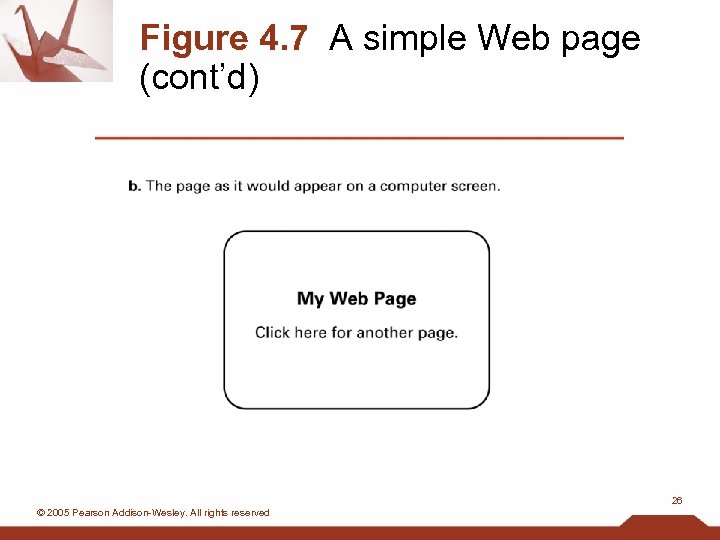 Figure 4. 7 A simple Web page (cont’d) 26 © 2005 Pearson Addison-Wesley. All rights reserved
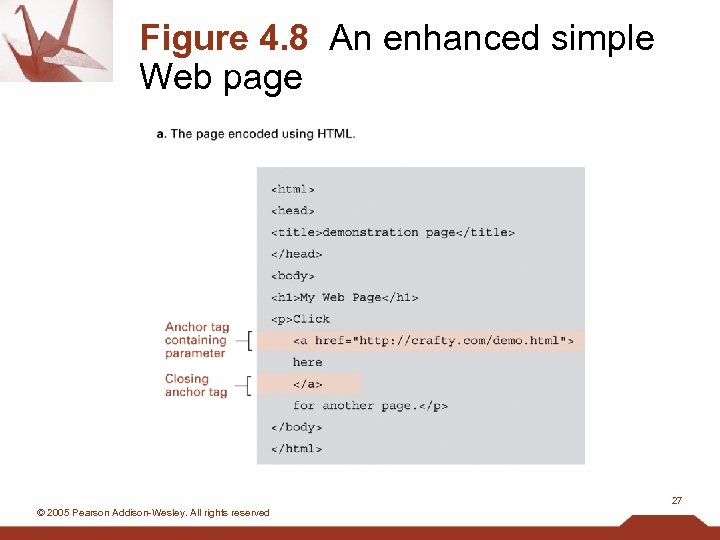 Figure 4. 8 An enhanced simple Web page 27 © 2005 Pearson Addison-Wesley. All rights reserved
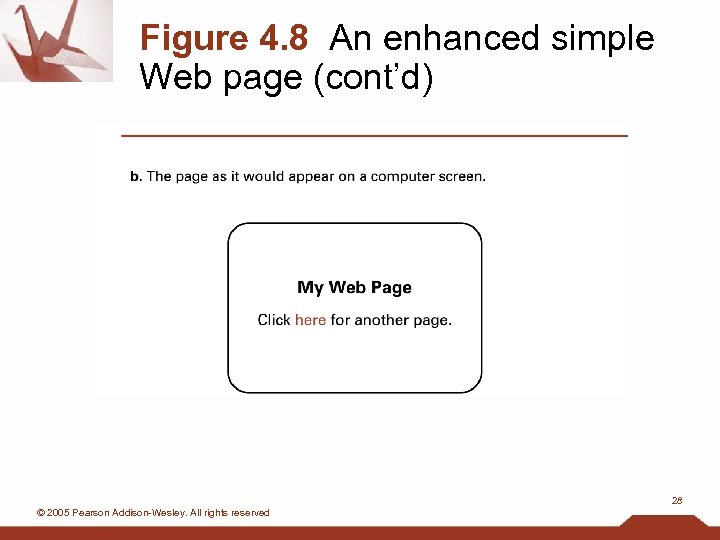 Figure 4. 8 An enhanced simple Web page (cont’d) 28 © 2005 Pearson Addison-Wesley. All rights reserved
 Extensible Markup Language (XML) • XML: a language for constructing markup languages similar to HTML – A descendant of SGML 29 © 2005 Pearson Addison-Wesley. All rights reserved
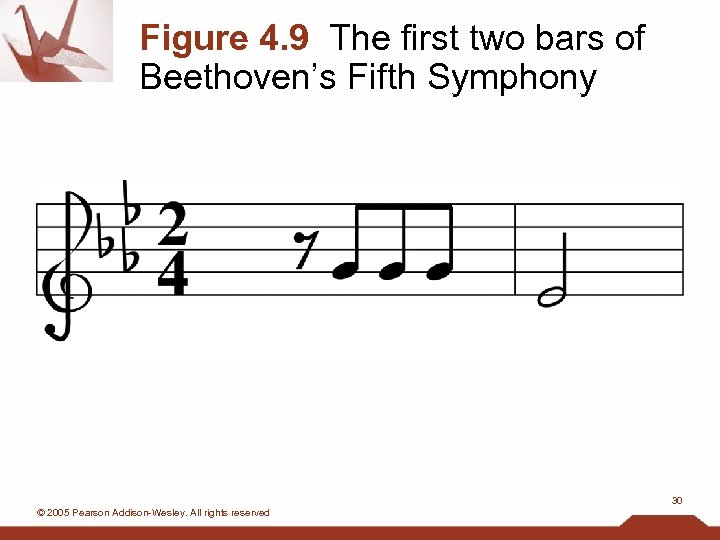 Figure 4. 9 The first two bars of Beethoven’s Fifth Symphony 30 © 2005 Pearson Addison-Wesley. All rights reserved
 Dynamic web pages • Client-side – Examples: java applets, javascript, Macromedia Flash • Server-side – Common Gateway Interface (CGI) – Servlets – PHP 31 © 2005 Pearson Addison-Wesley. All rights reserved
 Network protocols: transmission control • Token ring: one-way communication around ring network • Ethernet: – Uses carrier sense, multiple access with collision detection (CSMA/CD) – Popular for bus networks – Like a conversation in small group 32 © 2005 Pearson Addison-Wesley. All rights reserved
 Internet software layers • Application layer: – Example: browser • Transport layer: TCP/IP, UDP • Network layer: handles routing through the internet • Link layer: handles actual transmission of packets – Token ring or Ethernet 33 © 2005 Pearson Addison-Wesley. All rights reserved
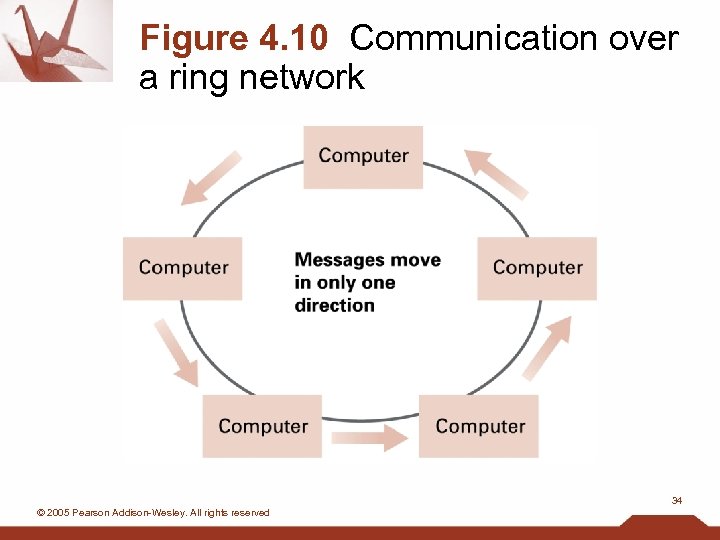 Figure 4. 10 Communication over a ring network 34 © 2005 Pearson Addison-Wesley. All rights reserved
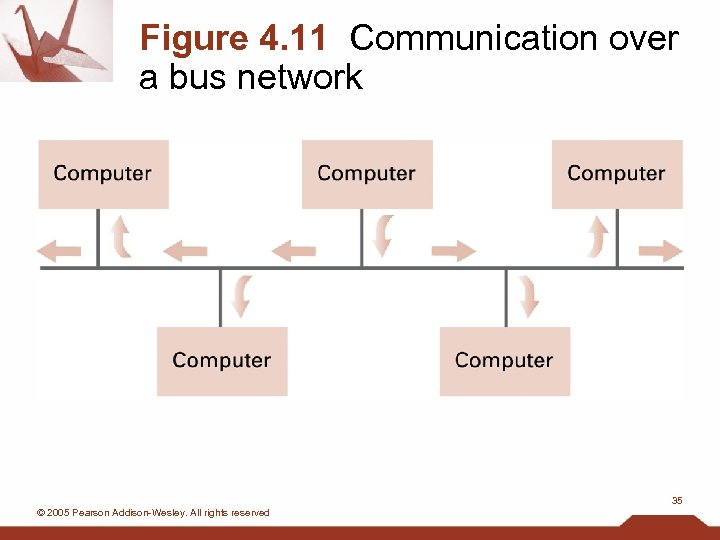 Figure 4. 11 Communication over a bus network 35 © 2005 Pearson Addison-Wesley. All rights reserved
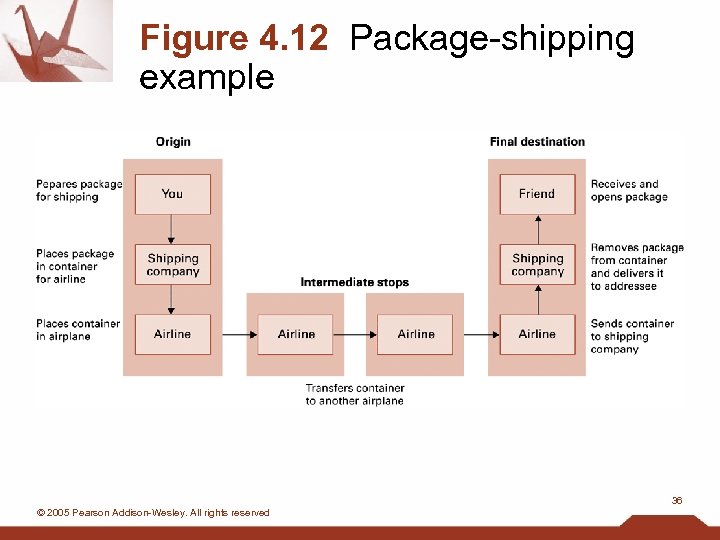 Figure 4. 12 Package-shipping example 36 © 2005 Pearson Addison-Wesley. All rights reserved
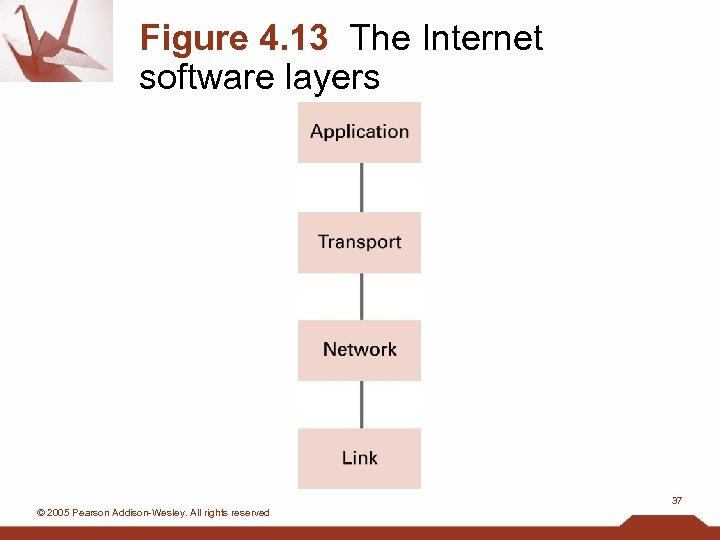 Figure 4. 13 The Internet software layers 37 © 2005 Pearson Addison-Wesley. All rights reserved
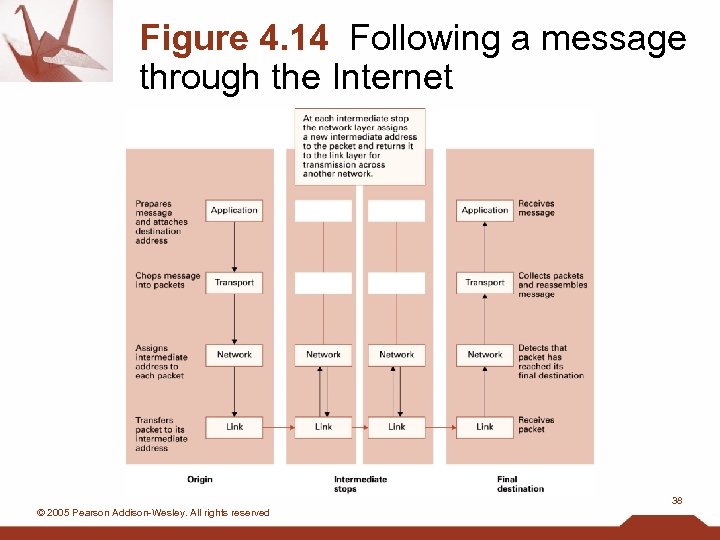 Figure 4. 14 Following a message through the Internet 38 © 2005 Pearson Addison-Wesley. All rights reserved
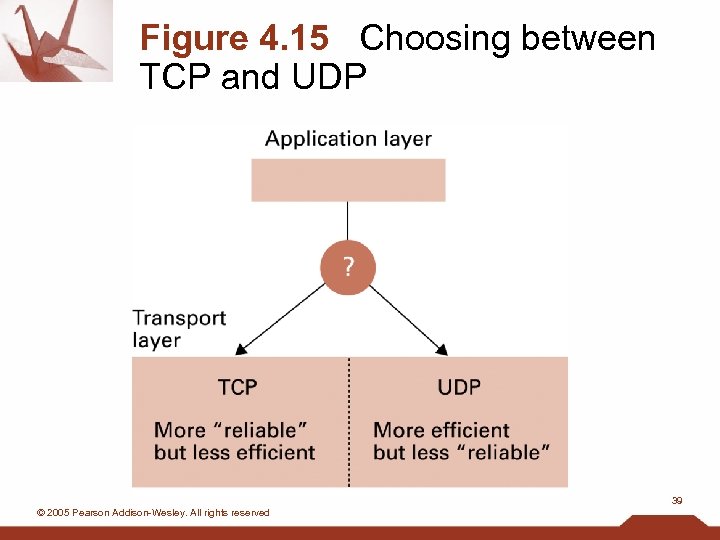 Figure 4. 15 Choosing between TCP and UDP 39 © 2005 Pearson Addison-Wesley. All rights reserved
 Network security • Privacy of communication – Public-key encryption • Integrity of machine exposed to internet – Attacks: viruses and worms – Defense: firewall 40 © 2005 Pearson Addison-Wesley. All rights reserved