


 Скачать презентацию Chapter 4 Computer Software Mc Graw-Hill Irwin Copyright
2222aaa7c5b81d57d7334d36ed20dfbb.ppt
- Количество слайдов: 15
 Chapter 4 Computer Software Mc. Graw-Hill/Irwin Copyright © 2013 by The Mc. Graw-Hill Companies, Inc. All rights reserved.
 Learning Objectives v. Describe several important trends occurring in computer software. v. Give examples of several major types of application and system software. v. Explain the purpose of several popular software packages for end-user productivity and collaborative computing. Mc. Graw-Hill/Irwin Copyright © 2013 by The Mc. Graw-Hill Companies, Inc. All rights reserved.
 Learning Objectives v. Define and describe the functions of an operating system. v. Describe the main uses of computer programming software, tools, and languages. v. Describe the issues associated with open -source software. Mc. Graw-Hill/Irwin Copyright © 2013 by The Mc. Graw-Hill Companies, Inc. All rights reserved.
 Section 1 Application Software: End-user Applications Mc. Graw-Hill/Irwin Copyright © 2013 by The Mc. Graw-Hill Companies, Inc. All rights reserved.
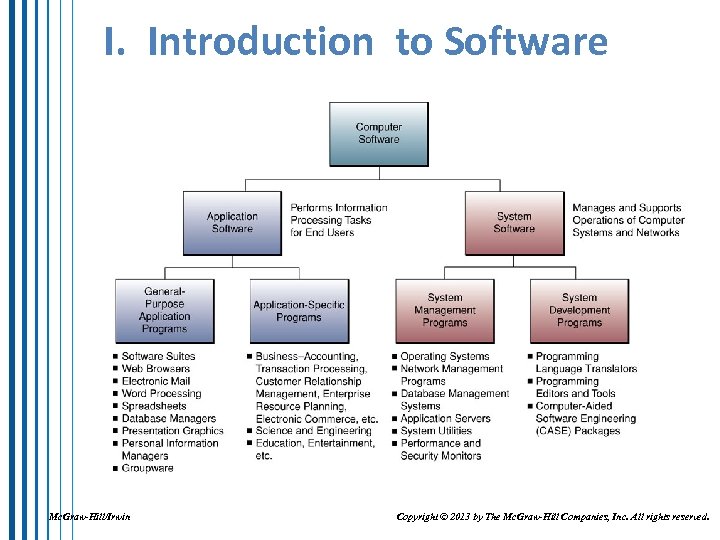 I. Introduction to Software Mc. Graw-Hill/Irwin Copyright © 2013 by The Mc. Graw-Hill Companies, Inc. All rights reserved.
 XI. Software Alternatives v Application Service Providers – provide necessary applications for a fee (rather than a firm developing or purchasing the s/w) v Cloud Computing – a recent advance in computing and software delivery; software and virtualized hardware provided as a service over the Internet; “cloud” is a metaphor for the Internet v Software Licensing – a complex topic involving copyrights, trademarks, and intellectual property rights; in most cases software is not purchased but “licensed” for use under very specific circumstances Mc. Graw-Hill/Irwin Copyright © 2013 by The Mc. Graw-Hill Companies, Inc. All rights reserved.
 Section 2 System Software: Computer System Management Mc. Graw-Hill/Irwin Copyright © 2013 by The Mc. Graw-Hill Companies, Inc. All rights reserved.
 II. Operating Systems – programs that run the computer operations v. Operating Systems Functions – v User Interface – how the user communicates with the computer v. Graphical User Interface (GUI) v. Command-driven v. Menu Driven Mc. Graw-Hill/Irwin v Resource Management – manages the hardware and network resources v File Management – controls the creation, deletion, and access of files of the data and programs Copyright © 2013 by The Mc. Graw-Hill Companies, Inc. All rights reserved.
 II. Operating Systems – programs that run the computer operations v. Operating Systems Functions – v. Task Management – manages which tasks are performed and when v Multitasking (Multiprogramming or Timesharing) – programs take turns using the processor v. Preemptive – each program gets a slice of time v. Cooperative – programs use the processor when it is not being used by another program v Virtual Machines- applications run independently at the same time Mc. Graw-Hill/Irwin Copyright © 2013 by The Mc. Graw-Hill Companies, Inc. All rights reserved.
 IV. Programming Languages v Machine Languages – first generation language – instructions written in binary (0’s and 1’s); runs directly on the computer v Assembler Languages – second generation language – uses symbols/mnemonics to represent operational codes; converted into binary by an Assembler v High-Level Languages – third generation language – BASIC, COBOL, FORTRAN; converted into binary by Compliers and Interpreters; users tell the computer What results they want and How to get there Mc. Graw-Hill/Irwin Copyright © 2013 by The Mc. Graw-Hill Companies, Inc. All rights reserved.
 IV. Programming Languages v Fourth-Generation Languages (4 GL) – nonprocedural languages; users tell the computer What results they want, but the computer decides How to get there v Fifth Generation Languages (5 GL) – natural languages, very close to English, conversational v Object-Oriented Languages (5 GL) – combine the data elements and the programs that act on them into Objects; Reusability Mc. Graw-Hill/Irwin Copyright © 2013 by The Mc. Graw-Hill Companies, Inc. All rights reserved.
 V. Web and Internet Languages and Services v HTML (Hypertext Markup Language) – a page description language (markup languages are NOT programming languages) v XML (e. Xtensible Markup Language) – describes the Content of Web pages by applying contextual labels to the data Mc. Graw-Hill/Irwin Copyright © 2013 by The Mc. Graw-Hill Companies, Inc. All rights reserved.
 V. Web and Internet Languages and Services v Java and. NET v. Java – a platform independent, object-oriented programming language; very powerful v. Applets – small Java programs that can be executed by any computer running any OS anywhere on the network v. NET – Microsoft’s collection of programming support for Web services v Web Services – software that electronically links applications of different users and different platforms Mc. Graw-Hill/Irwin Copyright © 2013 by The Mc. Graw-Hill Companies, Inc. All rights reserved.
 VI. Programming Software v. Language Translator Programs – instructions must be translated into binary to be executed by the computer v. Assembler – translates symbolic instructions written in assembly language v. Compiler – translates high level language statements; translates the entire program (Source code) into binary (Object code) then executes the entire binary program Mc. Graw-Hill/Irwin Copyright © 2013 by The Mc. Graw-Hill Companies, Inc. All rights reserved.
 VI. Programming Software v. Interpreter – translates and executes one line of the program at a time v. Programming Tools – help programmers identify and minimize errors as they write the code v. CASE Tools (Computer-Aided Software Engineering) – automated software support tools for developing systems Mc. Graw-Hill/Irwin Copyright © 2013 by The Mc. Graw-Hill Companies, Inc. All rights reserved.