


 Скачать презентацию CHAPTER 3 SOFTWARE LIFE-CYCLE MODELS Slide 3 1
b9c64152adcad85f7eb8538c81ff869d.ppt
- Количество слайдов: 23
 CHAPTER 3 SOFTWARE LIFE-CYCLE MODELS Slide 3. 1
 Overview l l l l l Build-and-fix model Waterfall model Rapid prototyping model Incremental model Extreme programming Synchronize-and-stabilize model Spiral model Object-oriented life-cycle models Comparison of life-cycle models Slide 3. 2
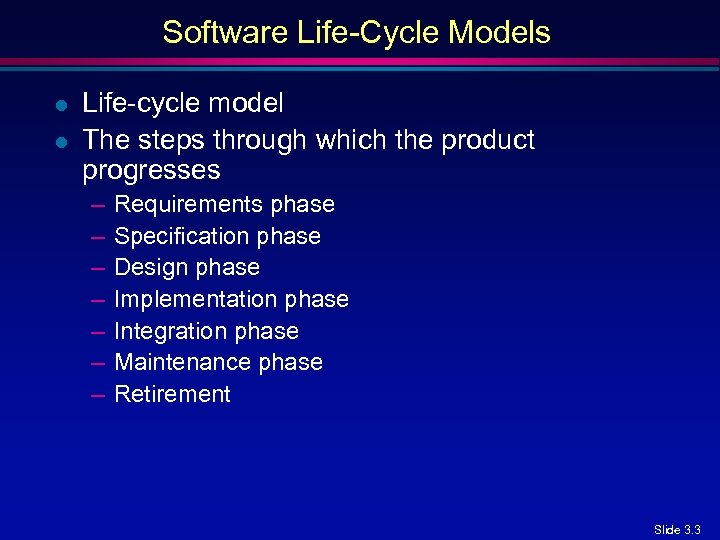 Software Life-Cycle Models l l Life-cycle model The steps through which the product progresses – – – – Requirements phase Specification phase Design phase Implementation phase Integration phase Maintenance phase Retirement Slide 3. 3
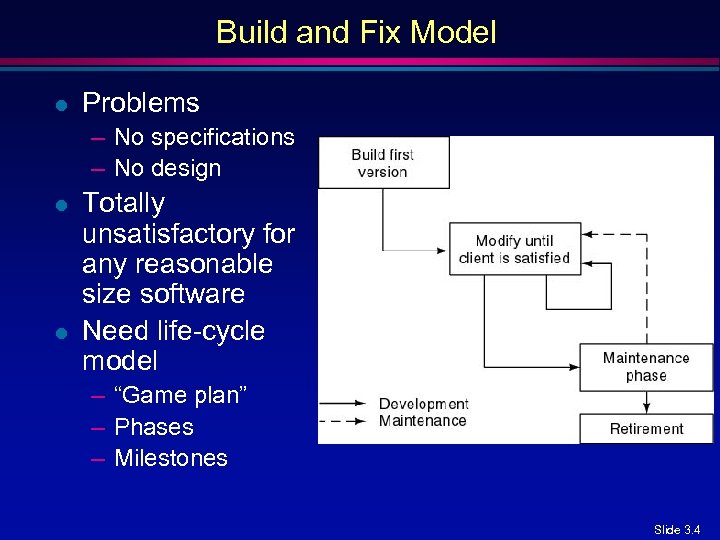 Build and Fix Model l Problems – No specifications – No design l l Totally unsatisfactory for any reasonable size software Need life-cycle model – “Game plan” – Phases – Milestones Slide 3. 4
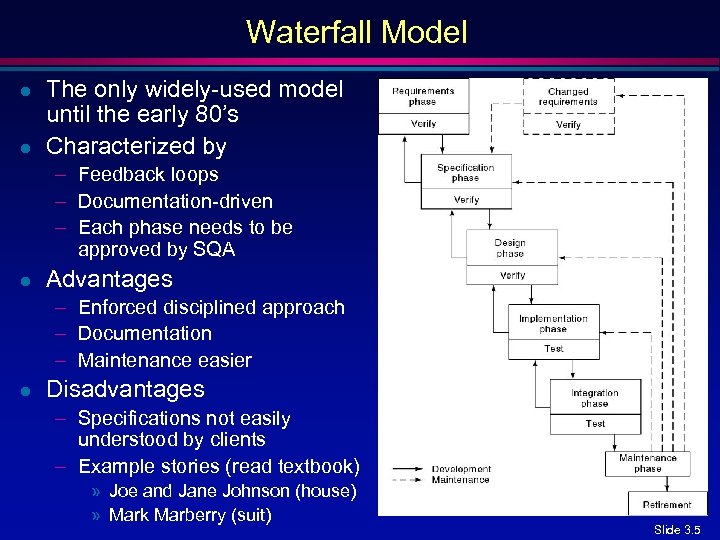 Waterfall Model l l The only widely-used model until the early 80’s Characterized by – Feedback loops – Documentation-driven – Each phase needs to be approved by SQA l Advantages – Enforced disciplined approach – Documentation – Maintenance easier l Disadvantages – Specifications not easily understood by clients – Example stories (read textbook) » Joe and Jane Johnson (house) » Mark Marberry (suit) Slide 3. 5
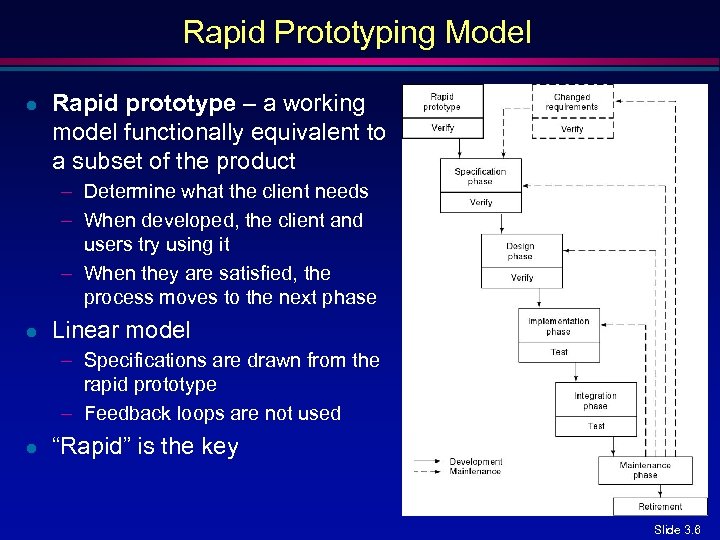 Rapid Prototyping Model l Rapid prototype – a working model functionally equivalent to a subset of the product – Determine what the client needs – When developed, the client and users try using it – When they are satisfied, the process moves to the next phase l Linear model – Specifications are drawn from the rapid prototype – Feedback loops are not used l “Rapid” is the key Slide 3. 6
 Three Key Points l l l Do not turn a rapid prototype into product Rapid prototyping may replace specification phase—never the design phase Comparison: – Waterfall model—try to get it right first time – Rapid prototyping—frequent changes until the client is satisfied, then discard Slide 3. 7
 Integrating Waterfall and Rapid Prototyping Models l Waterfall model – Many successes – Client needs may not be met l Rapid prototyping model – Some success but not really proven – Has own problems l Solution – Rapid prototyping for requirements phase – Waterfall for rest of life cycle Slide 3. 8
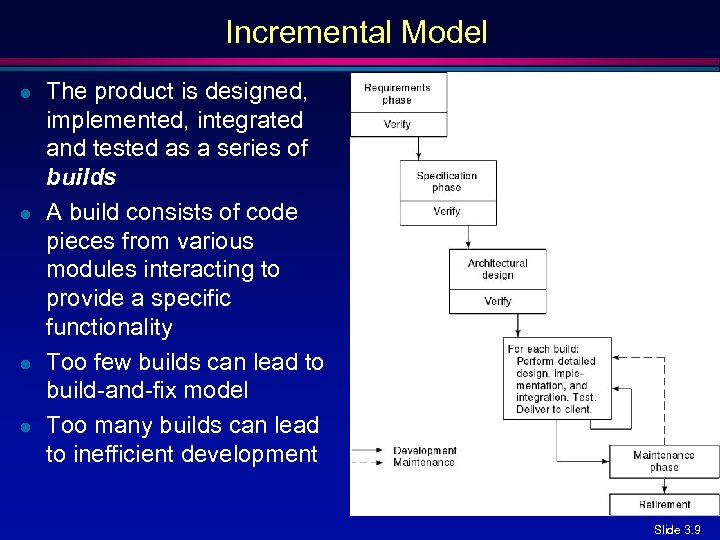 Incremental Model l l The product is designed, implemented, integrated and tested as a series of builds A build consists of code pieces from various modules interacting to provide a specific functionality Too few builds can lead to build-and-fix model Too many builds can lead to inefficient development Slide 3. 9
 Incremental Model (contd) l Waterfall, rapid prototyping models – Operational quality complete product at end l Incremental model – Operational quality portion of product within weeks l l l Less traumatic Smaller capital outlay, rapid return on investment Needs open architecture—maintenance implications Slide 3. 10
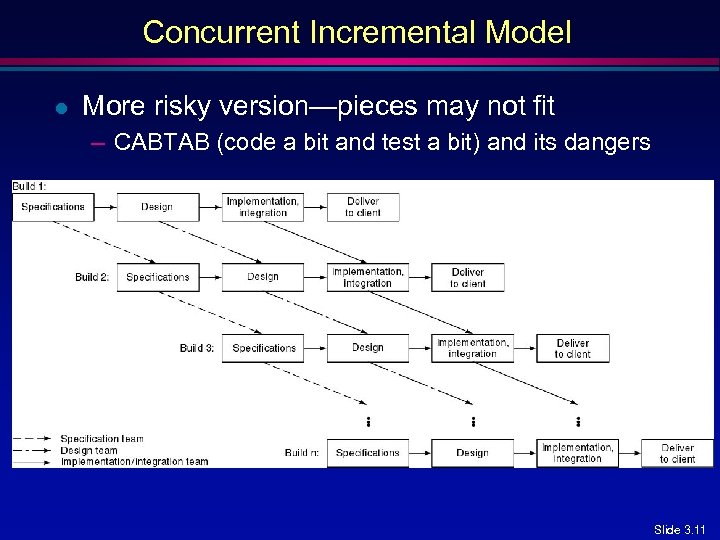 Concurrent Incremental Model l More risky version—pieces may not fit – CABTAB (code a bit and test a bit) and its dangers Slide 3. 11
 Extreme Programming l l l l Somewhat controversial new approach based on the incremental model Development team determines stories (features client wants) Estimate duration and cost of each story Select stories for next build Each build is divided into tasks Test cases for task are drawn up first Pair programming Continuous integration of tasks Slide 3. 12
 Unusual Features of XP l l Computers are put in center of a large room lined with cubicles Client representative is always present Cannot work overtime for 2 successive weeks No specialization – All members of the team work on specification, design, coding and testing l Refactoring – No overall design – The design is modified while the product is being developed Slide 3. 13
 Evaluating XP l l l XP has had some successes Good when requirements are vague or changing Too soon to evaluate XP Slide 3. 14
 Synchronize and Stabilize Model l l l Microsoft’s life-cycle model Also based on the incremental model Requirements analysis—interview potential customers Draw up specifications Divide project into 3 or 4 builds Each build is carried out by small teams working in parallel Slide 3. 15
 Synchronize and Stabilize Model (contd) l l l At the end of the day—synchronize (test and debug) At the end of each build—stabilize (freeze build) Components always work together – Get early insights into operation of product Slide 3. 16
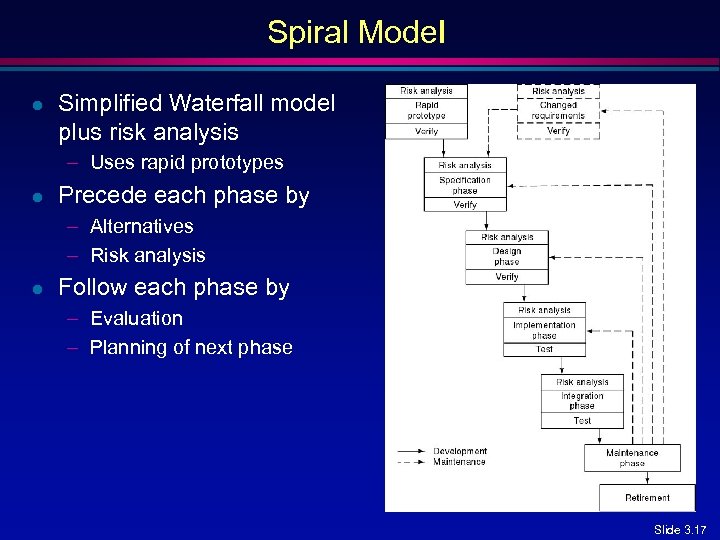 Spiral Model l Simplified Waterfall model plus risk analysis – Uses rapid prototypes l Precede each phase by – Alternatives – Risk analysis l Follow each phase by – Evaluation – Planning of next phase Slide 3. 17
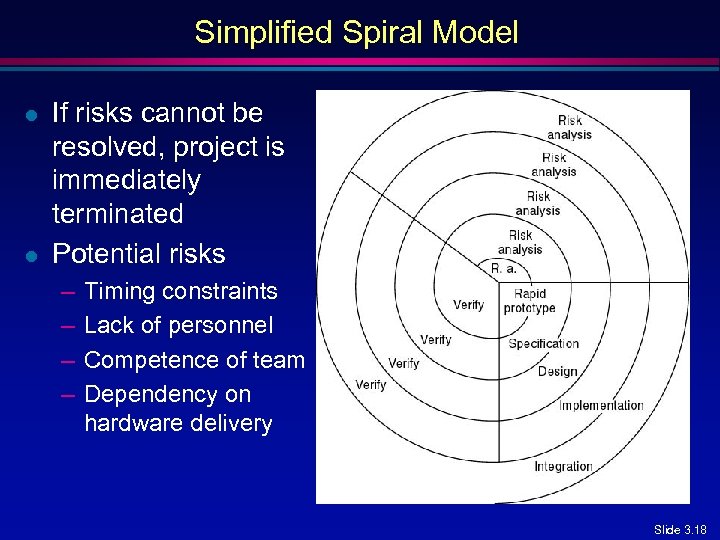 Simplified Spiral Model l l If risks cannot be resolved, project is immediately terminated Potential risks – – Timing constraints Lack of personnel Competence of team Dependency on hardware delivery Slide 3. 18
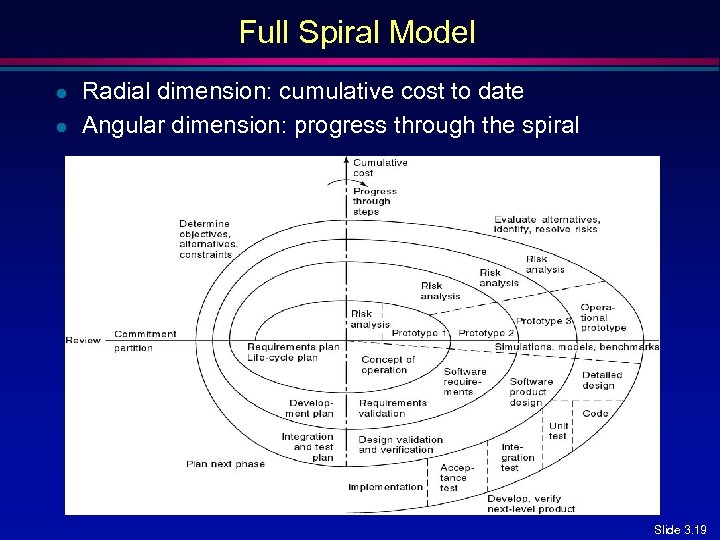 Full Spiral Model l l Radial dimension: cumulative cost to date Angular dimension: progress through the spiral Slide 3. 19
 Analysis of Spiral Model l Strengths – Easy to judge how much to test – No distinction between development, maintenance l Weaknesses – For large-scale software only – For internal (in-house) software only Slide 3. 20
 Object-Oriented Life-Cycle Models l Need for iteration within and between phases – Fountain model [Henderson-Sellers and Edwards, 1990] – Recursive/parallel life cycle [Berard, 1993] – Unified software development process [Jacobson, Booch, and Rumbaugh, 1999] l All incorporate some form of – Iteration – Parallelism – Incremental development l Danger – CABTAB (undisciplined approach of s/w development, pg. 84) Slide 3. 21
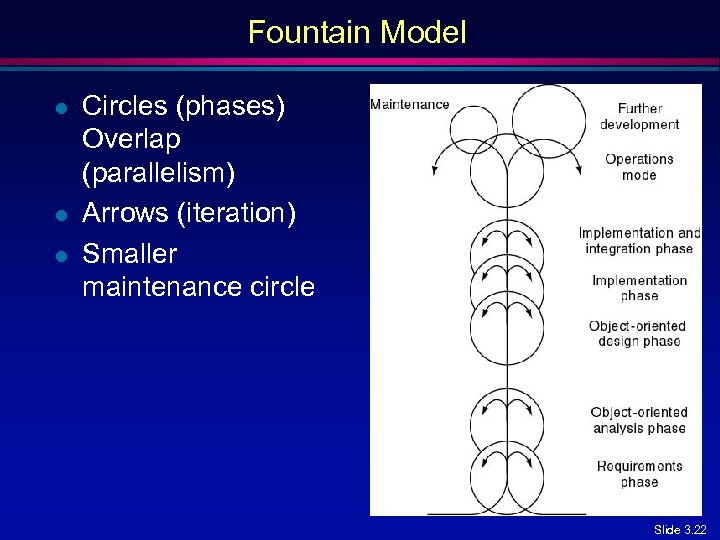 Fountain Model l Circles (phases) Overlap (parallelism) Arrows (iteration) Smaller maintenance circle Slide 3. 22
 Conclusions l l Different life-cycle models Each with own strengths Each with own weaknesses Criteria for deciding on a model include – – l The organization Its management Skills of the employees The nature of the product Best suggestion – “Mix-and-match” life-cycle model Slide 3. 23