


 Скачать презентацию Chapter 3 Networking Media Instructor Nhan Nguyen Phuong
f61929753a850529e5dd7dcb02deba18.ppt
- Количество слайдов: 64
 Chapter 3 Networking Media Instructor: Nhan Nguyen Phuong
 Contents • Identify general cabling characteristics applied to physical media • Describe the primary cable types used in networking • Identify the components in a structured cabling installation • Describe wireless transmission techniques used in LANs and WANs Guide to Networking Essentials, Fifth Edition 2
 1. Network Cabling: Tangible Physical Media 1. 1. General Cable Characteristics 1. 2. Baseband Broadband Transmission 1. 3. The Importance of Bandwidth Guide to Networking Essentials, Fifth Edition 3
 • The interface between a computer and the medium to which it attaches defines the translation from a computer’s native digital information into the form needed to send outgoing messages – Because all media must support the basic tasks of sending and receiving signals, you can view all networking media as doing the same thing; only the methods vary – You need to know the physical characteristics and limitations of each kind of network media so that you can make the best use of each type • Each has a unique design and usage, with associated cost, performance, and installation criteria Guide to Networking Essentials, Fifth Edition 4
 1. 1. General Cable Characteristics • The following characteristics apply network cabling: – – – – – Bandwidth rating Maximum segment length Maximum number of segments per internetwork Maximum number of devices per segment Interference susceptibility Connection hardware Cable grade Bend radius Material costs Installation costs Guide to Networking Essentials, Fifth Edition 5
 1. 2. Baseband Broadband Transmission • Baseband transmission uses a digital encoding scheme at a single fixed frequency, where signals take the form of discrete pulses of electricity or light – Repeaters can be used to deal with “attenuation” • Broadband transmission systems use analog techniques to encode binary 1 s and 0 s across a continuous range of values – Multiple analog transmission channels can operate on a single broadband cable – Amplifiers can be used to deal with attenuation – Two primary approaches: mid-split and dual-cable Guide to Networking Essentials, Fifth Edition 6
 1. 3. The Importance of Bandwidth • The trend in networking is to offer more complex, comprehensive, and powerful services – These require much higher bandwidth • Users demand access to these applications and have increased their use of existing networked applications, consuming still more bandwidth • Technologists find ways to stretch bandwidth limits of existing technologies so that older, difficult-toreplace networking components can remain, yet support higher bandwidth than originally rated Guide to Networking Essentials, Fifth Edition 7
 2. Primary Cable Types 2. 1. Coaxial Cable 2. 2. Twisted-Pair Cable 2. 3. Fiber-Optic Cable 2. 4. Cable Selection Criteria Guide to Networking Essentials, Fifth Edition 8
 • All forms of cabling are similar, in that they provide a medium across which network information can travel in the form of a physical signal, whether electrical or light pulses • The primary cable types are: – Coaxial cable – Twisted-pair – Fiber-optic cable Guide to Networking Essentials, Fifth Edition 9
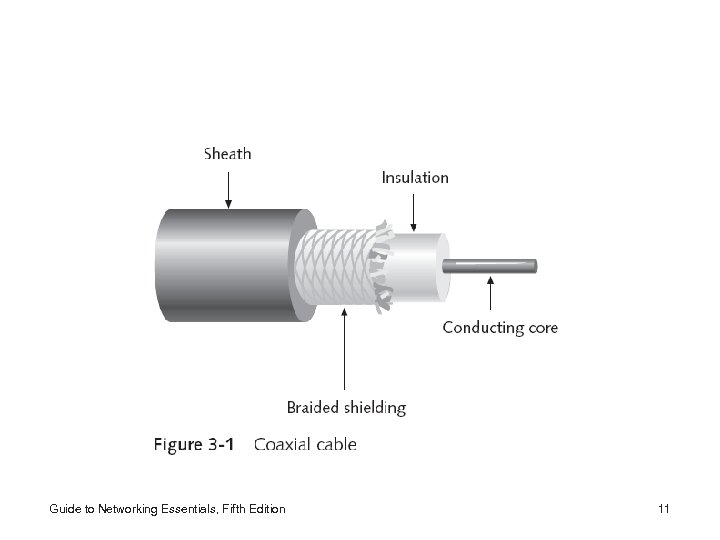
 2. 1. Coaxial Cable • Was the predominant form of network cabling • Shielding: protective layer(s) wrapped around cable to protect it from external interference • Less susceptible to interference and attenuation than twisted-pair, but more susceptible than fiber-optic Guide to Networking Essentials, Fifth Edition 10
 Guide to Networking Essentials, Fifth Edition 11
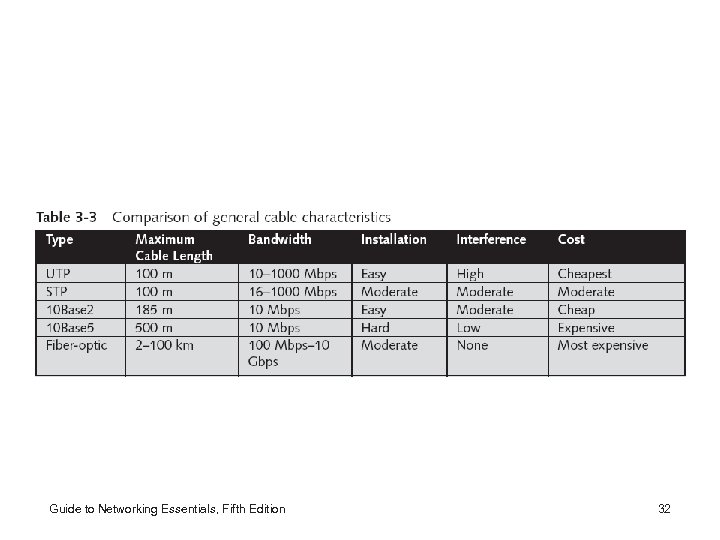
 2. 1. 1. The Use of Coaxial Cable for Ethernet • Ethernet’s beginnings are in coaxial cable – First, it was run on a very thick, rigid cable, usually yellow, referred to as thicknet (10 Base 5) – Later, a more manageable coaxial cable called thinnet (10 Base 2) was used • 10 Base 5 is an IEEE designation – 10 Mbps – Baseband – Maximum segment length is 500 meters Guide to Networking Essentials, Fifth Edition 12
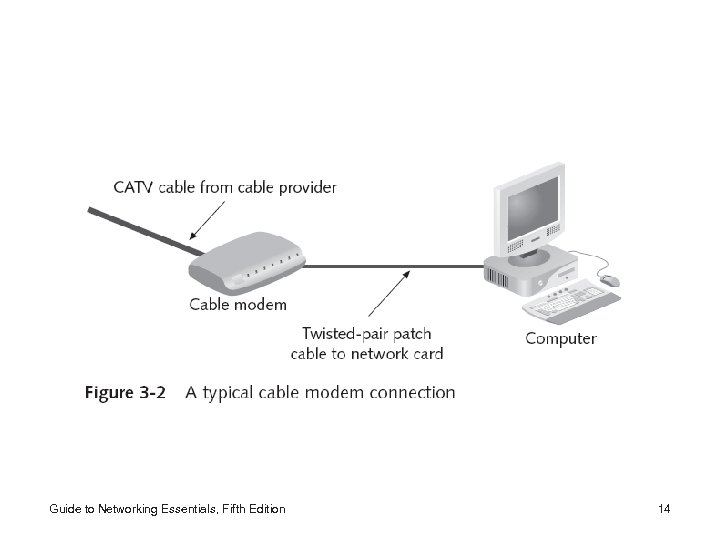
 2. 1. 2. Coaxial Cable in Cable Modem Applications • Coaxial cable in LANs has become obsolete • The standard cable (75 ohm, RG-6; RG stands for “radio grade”) that delivers cable television (CATV) to millions of homes nationwide is also being used for Internet access Guide to Networking Essentials, Fifth Edition 13
 Guide to Networking Essentials, Fifth Edition 14
 2. 1. 3. Other Coaxial Cable Types • Other applications for coax include ARCnet and computer terminal attachments to mainframes and minicomputers – Attached resource computing network (ARCnet) is an older networking technology developed at Data. Point Corporation in the late 1970 s • Supports a bandwidth of only 2. 5 Mbps • Implementations that use fiber-optic and twisted-pair cable are available but usually limited to specialized applications that require properties unique to ARCnet (e. g. , deterministic communication and low overhead) Guide to Networking Essentials, Fifth Edition 15
 2. 2. Twisted-Pair Cable Guide to Networking Essentials, Fifth Edition 16
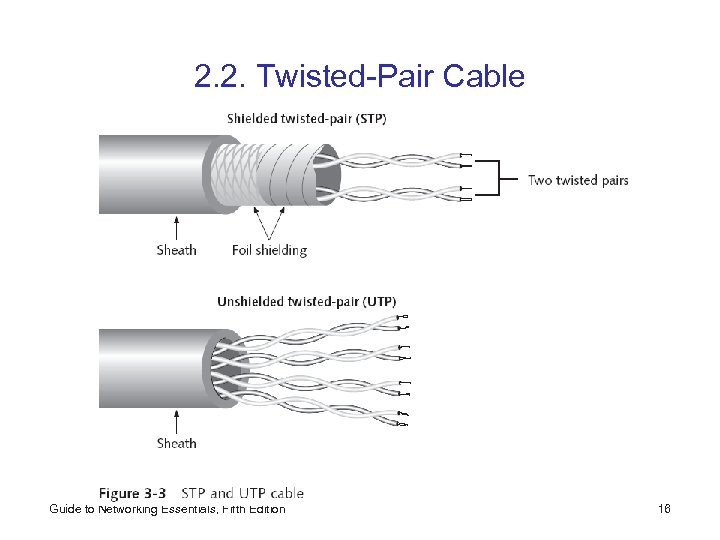
 2. 2. 1. Unshielded Twisted Pair (UTP) • 10 Base. T – Maximum length is 100 meters • UTP is now the most popular form of LAN cabling • The UTP cable used for networking usually includes one or more pairs of insulated wires • UTP specifications govern the number of twists per foot (or per meter), depending on the cable’s intended use • UTP is used for telephony, but requirements for networking uses differ from the telephony ones Guide to Networking Essentials, Fifth Edition 17
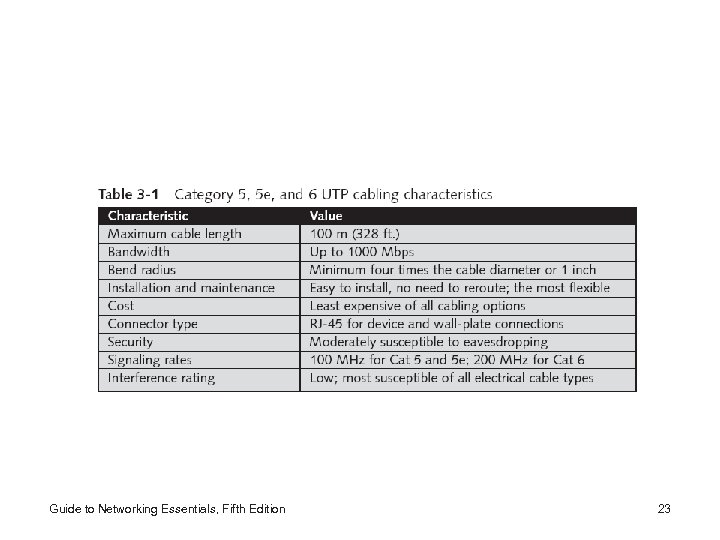
 2. 2. 2. UTP Cabling Categories • UTP cabling is rated according to a number of categories devised by the TIA and EIA; since 1991, ANSI has also endorsed these standards – ANSI/TIA/EIA 568 Commercial Building Wiring Standard for commercial environments includes: • • Category 1 (voicegrade) Category 2: up to 4 Mbps Category 3: up to 10 Mbps (16 MHz) Category 4 (datagrade): up to 16 Mbps (20 MHz) Category 5: up to 100 Mbps (100 MHz) Category 5 e: up to 1000 Mbps (100 MHz) Category 6: up to 1000 Mbps (200 MHz) Guide to Networking Essentials, Fifth Edition 18
 2. 2. 3. Shielded Twisted Pair (STP) • Shielding reduces crosstalk and limits external interference – Usually, wiring includes a wire braid inside cladding or sheath, and a foil wrap around each wire pair • Enables support of higher bandwidth over longer distances than UTP – No set of standards for STP corresponds to the ANSI/TIA/EIA 568 Standard, yet it’s not unusual to find STP cables rated according to those standards – Uses two pairs of 150 ohm wire (defined by the IBM cabling system), and was not designed to be used in Ethernet applications, but it can be adapted to Guide to Networking Essentials, Fifth Edition 19
 Guide to Networking Essentials, Fifth Edition 20
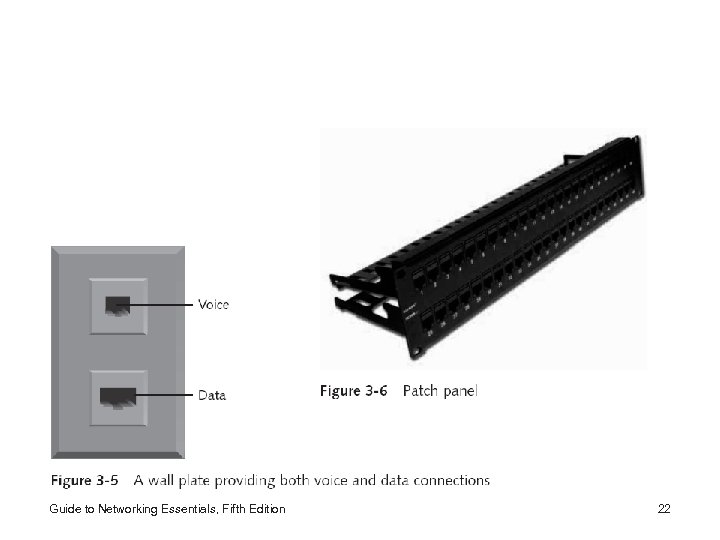
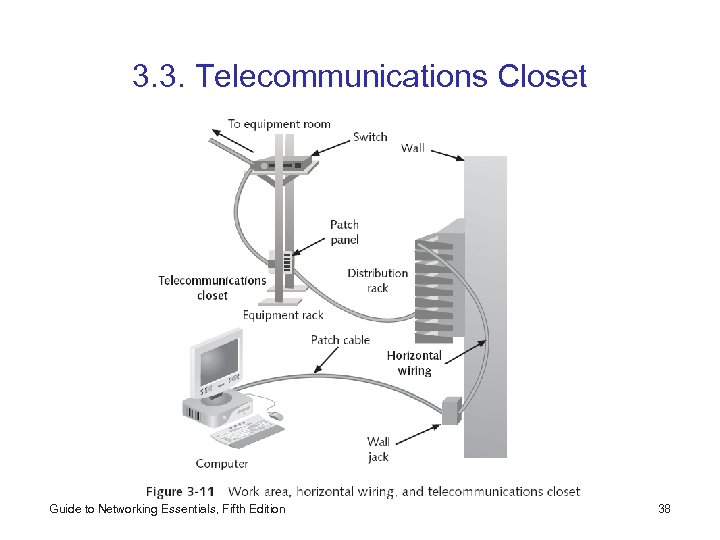
 • Typically, twisted-pair systems include the following elements, often in a wiring center: – – Distribution racks and modular shelving Modular patch panels Wall plates Jack couplers Guide to Networking Essentials, Fifth Edition 21
 Guide to Networking Essentials, Fifth Edition 22
 Guide to Networking Essentials, Fifth Edition 23
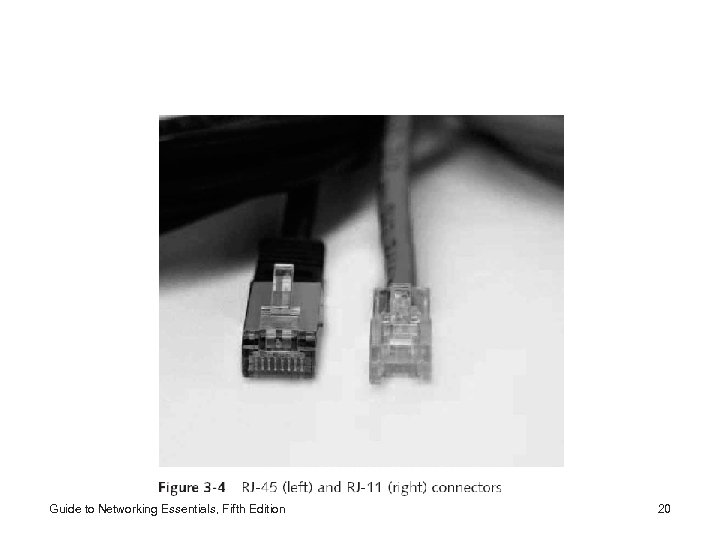
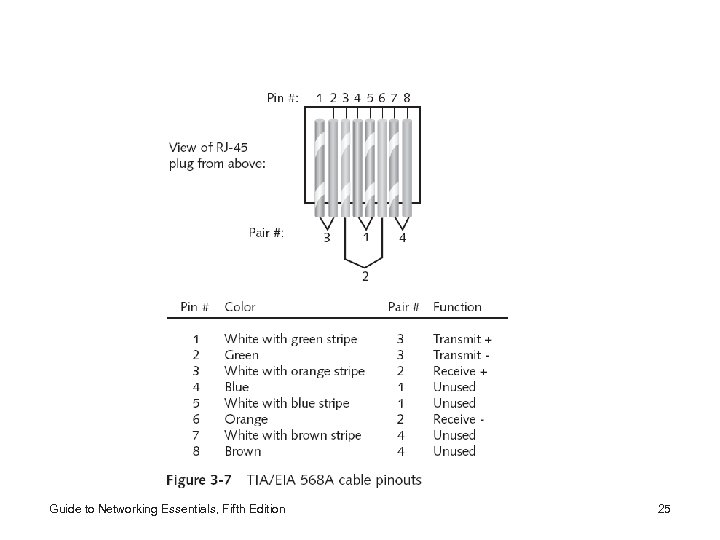
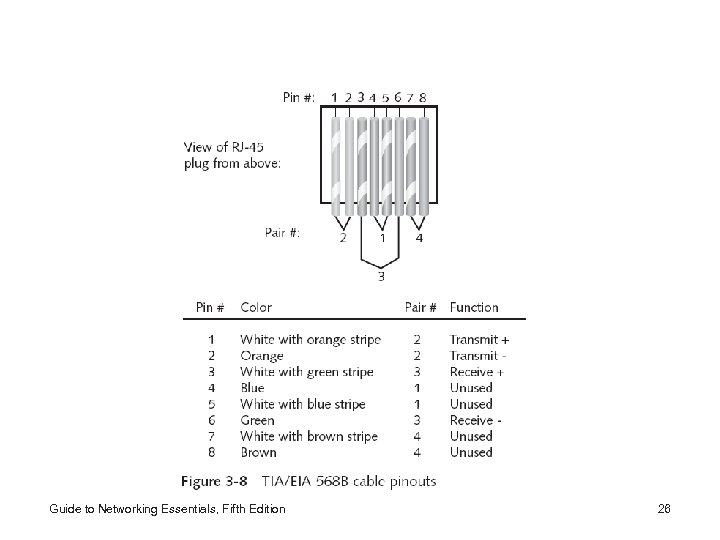
 2. 2. 4. Making Twisted-Pair Cable Connections • One of the skills required of a network technician is making a twisted-pair patch cable • To do this, you need: – – Wire cutters or electrician’s scissors Wire stripper Crimp tool RJ-45 plugs • There are two standards for the arrangement of wires: TIA/EIA 568 A and TIA/EIA 568 B – You must stick to one throughout your network Guide to Networking Essentials, Fifth Edition 24
 Guide to Networking Essentials, Fifth Edition 25
 Guide to Networking Essentials, Fifth Edition 26
 2. 3. Fiber-Optic Cable Guide to Networking Essentials, Fifth Edition 27
 Guide to Networking Essentials, Fifth Edition 28
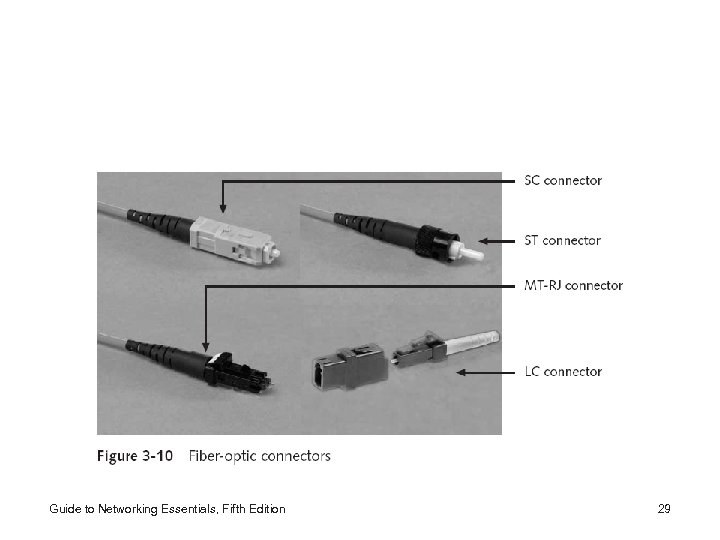 Guide to Networking Essentials, Fifth Edition 29
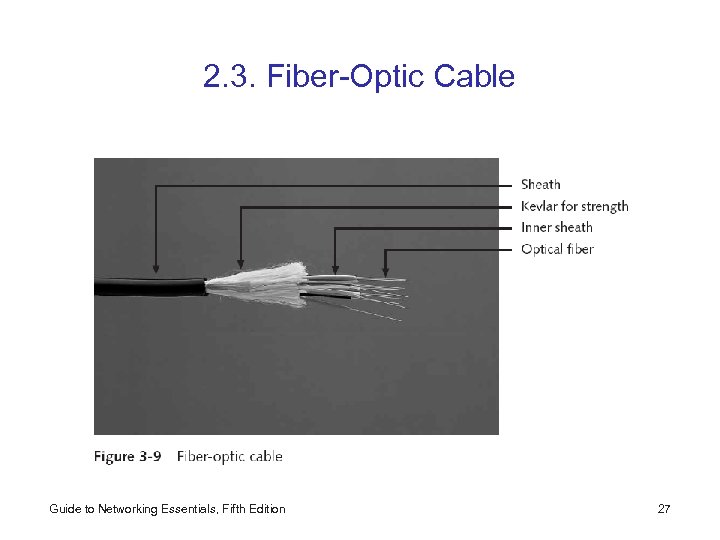
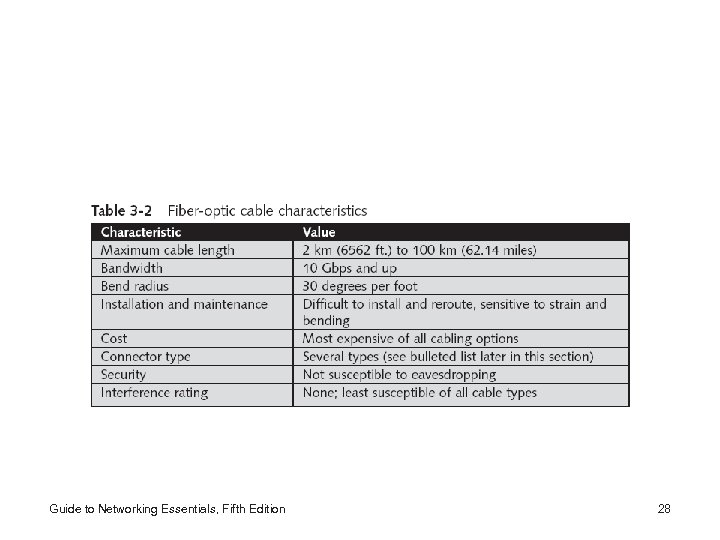
 • Installation of fiber-optic networks is more difficult and time-consuming than copper media installation • Connectors and test equipment are considerably more expensive than their copper counterparts • Two types – Single-mode: costs more and generally works with laser-based emitters, but spans the longest distances – Multimode: costs less and works with light emitting diodes (LEDs), but spans shorter distances Guide to Networking Essentials, Fifth Edition 30
 2. 4. Cable Selection Criteria • Criteria to be considered for a network installation – – – – Bandwidth Budget Capacity Environmental considerations Placement Span Local requirement Existing cable plant Guide to Networking Essentials, Fifth Edition 31
 Guide to Networking Essentials, Fifth Edition 32
 3. Managing and Installing the Cable Plant 3. 1. Work Area 3. 2. Horizontal Wiring 3. 3. Telecommunications Closet 3. 4. Equipment Rooms 3. 5. Backbone Cabling 3. 6. Entrance Facilities Guide to Networking Essentials, Fifth Edition 33
 • Important to understand basic methods and terminology of cable management • The TIA/EIA developed the document “ 568 Commercial Building Wiring Standard, ” which specifies how network media should be installed to maximize performance and efficiency – Standard defines “structured cabling” Guide to Networking Essentials, Fifth Edition 34
 Structured Cabling • Specifies how cabling should be organized – Relies on an extended star physical topology – Can be applied to any size network – Details of a cable plant have six components • Work area • Horizontal wiring • Telecommunications closets • Equipment rooms • Backbone or vertical wiring • Entrance facilities Guide to Networking Essentials, Fifth Edition 35
 3. 1. Work Area • The work area is where computer workstations and other user devices are located – Faceplates and wall jacks are installed in the work area, and patch cables connect computers and printers to wall jacks, which are in turn connected to a nearby telecommunications closet – Patch cables should be less than 6 meters long – TIA/EIA 568 standard calls for at least one voice and one data outlet on each faceplate in each work area – Connection between wall jack and telecommunications closet is made with horizontal wiring Guide to Networking Essentials, Fifth Edition 36
 3. 2. Horizontal Wiring • Horizontal wiring runs from the work area’s wall jack to the telecommunications closet and is usually terminated at a patch panel – Acceptable horizontal wiring types include four-pair UTP (Category 5 e or 6) or two fiber-optic cables – Horizontal wiring from the wall jack to the patch panel should be no longer than 90 meters • Patch cables in the work area and in the telecommunications closet can total up to 10 meters Guide to Networking Essentials, Fifth Edition 37
 3. 3. Telecommunications Closet Guide to Networking Essentials, Fifth Edition 38
 3. 4. Equipment Rooms • The equipment room houses servers, routers, switches, and other major network equipment, and serves as a connection point for backbone cabling running between TCs – Can be the main cross-connect of backbone cabling for the network, or it might serve as the connecting point for backbone cabling between buildings – In multibuilding installations, each building often has its own equipment room Guide to Networking Essentials, Fifth Edition 39
 3. 5. Backbone Cabling • Backbone cabling (or vertical cabling) interconnects TCs and equipment rooms – Runs between floors or wings of a building and between buildings – Frequently fiber-optic cable but can also be UTP – When it connects buildings, it is usually fiber-optic • Multimode fiber can extend up to 2000 meters • Single-mode fiber can reach distances up to 3000 – Between equipment rooms and TCs, the distance is limited to 500 meters for both fiber-optic cable types – From the main cross-connect to equipment rooms, fiber-optic cable can run up to 1500 meters Guide to Networking Essentials, Fifth Edition 40
 3. 6. Entrance Facilities • An entrance facility is the location of the cabling and equipment that connects a corporate network to a third-party telecommunications provider – Can serve as an equipment room and the main cross -connect for all backbone cabling – It is also where a connection to a WAN is made and the point where corporate LAN equipment ends and a third-party provider’s equipment and cabling begins —also known as the “demarcation point” Guide to Networking Essentials, Fifth Edition 41
 4. Wireless Networking: Intangible Media 4. 1. The Wireless World 4. 2. Types of Wireless Networks 4. 3. Wireless LAN Components 4. 4. Wireless LAN Transmission 4. 5. 802. 11 Wireless Networking 4. 6. Wireless Extended LAN Technologies 4. 7. Wireless MAN: The 802. 16 Standard 4. 8. Microwave Networking Technologies Guide to Networking Essentials, Fifth Edition 42
 • Wireless technologies continue to play an increasing role in all kinds of networks • Since 1990, the number of wireless options has increased, and the cost continues to decrease • Wireless networks can now be found in most towns and cities in the form of hot spots, and more home users have turned to wireless networks • Wireless networks are often used with wired networks to interconnect geographically dispersed LANs or groups of mobile users with stationary servers and resources on a wired LAN – Microsoft calls networks that include both wired and wireless components hybrid networks Guide to Networking Essentials, Fifth Edition 43
 4. 1. The Wireless World • Wireless networking can offer the following: – Create temporary connections to existing wired networks – Establish backup or contingency connectivity for existing wired networks – Extend a network’s span beyond the reach of wirebased or fiber-optic cabling, especially in older buildings where rewiring might be too expensive – Enable users to roam with their machines within certain limits (called “mobile networking”) Guide to Networking Essentials, Fifth Edition 44
 • Common wireless applications include: – Ready access to data for mobile professionals – Delivery of network access into isolated facilities or disaster-stricken areas – Access in environments where layout and settings change constantly – Improved customer services in busy areas, such as check-in or reception centers – Network connectivity in structures where in-wall wiring would be impossible to install or too expensive – Home networks where the installation of cables is inconvenient Guide to Networking Essentials, Fifth Edition 45
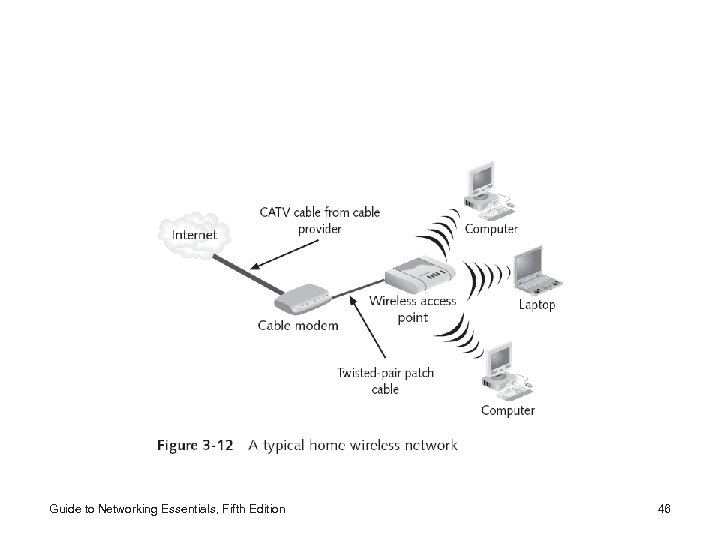 Guide to Networking Essentials, Fifth Edition 46
 4. 2. Types of Wireless Networks • Three main categories – Local Area Networks (LANs) – Extended LANs – Mobile computing • An easy way to differentiate among these uses is to distinguish in-house from carrier-based facilities – Mobile computing typically involves a third party that supplies transmission and reception devices to link the mobile part of a network with the wired part • Most often, the company providing these services is a communications carrier (such as MCI or AT&T) Guide to Networking Essentials, Fifth Edition 47
 4. 3. Wireless LAN Components • NIC attaches to an antenna and an emitter • At some point on a cabled network, a transmitter/receiver device, called a transceiver or an access point, must be installed to translate between the wired and wireless networks • An access point device includes an antenna and a transmitter to send and receive wireless traffic, but also connects to the wired side of the network • Some wireless LANs use small transceivers, which can be wall mounted or freestanding, to attach computers or devices to a wired network Guide to Networking Essentials, Fifth Edition 48
 4. 4. Wireless LAN Transmission • Wireless LANs send/receive signals broadcast through the atmosphere – Waves in the electromagnetic spectrum – Frequency of the wave forms is measured in Hz • Affects the amount and speed of data transmission – Lower-frequency transmissions can carry less data more slowly over longer distances • Commonly used frequencies for wireless data communications – Radio— 10 KHz (kilohertz) to 1 GHz (gigahertz) – Microwave— 1 GHz to 500 GHz – Infrared— 500 GHz to 1 THz (terahertz) Guide to Networking Essentials, Fifth Edition 49
 • Higher-frequency technologies often use tight-beam broadcasts and require a clear line of sight between sender and receiver • Wireless LANs make use of four primary technologies for transmitting and receiving data – – Infrared Laser Narrowband (single-frequency) radio Spread-spectrum radio Guide to Networking Essentials, Fifth Edition 50
 4. 4. 1. Infrared LAN Technologies • Infrared light beams send signals between pairs of devices • High bandwidth (10 to 100 Mbps) • Four main kinds of infrared LANs – – Line of sight networks Reflective wireless networks Scatter infrared networks Broadband optical telepoint networks • Infrared transmissions are being used increasingly for virtual docking • Ir. DA: Infrared Device Association Guide to Networking Essentials, Fifth Edition 51
 4. 4. 2. Laser-Based LAN Technologies • Laser-based transmissions also require a clear line of sight between sender and receiver • Any solid object or person blocking a beam blocks data transmissions • To protect people from injury and avoid excess radiation, laser-based LAN devices are subject to many of the same limitations as infrared, but aren’t as susceptible to interference from visible light sources Guide to Networking Essentials, Fifth Edition 52
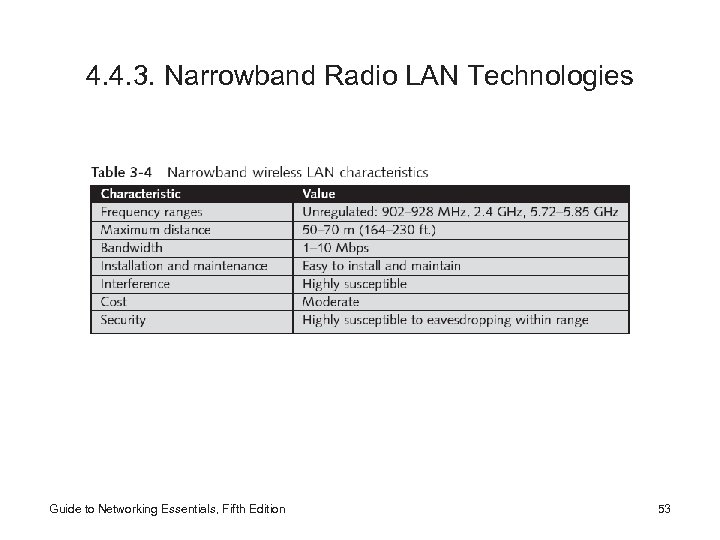 4. 4. 3. Narrowband Radio LAN Technologies Guide to Networking Essentials, Fifth Edition 53
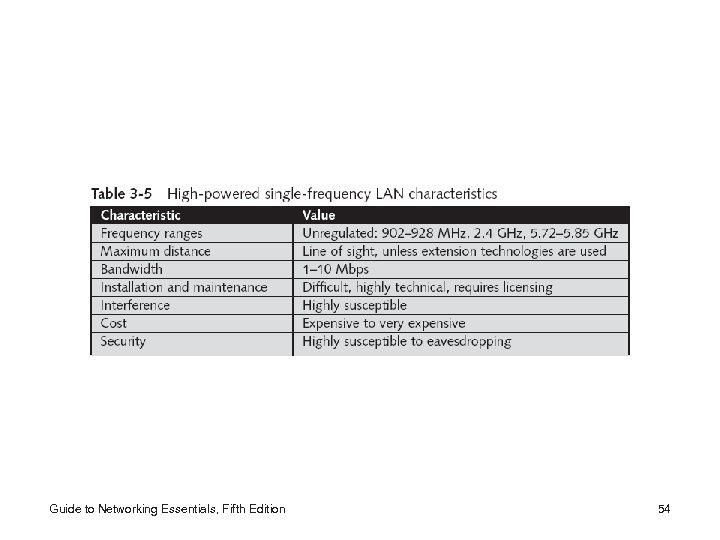 Guide to Networking Essentials, Fifth Edition 54
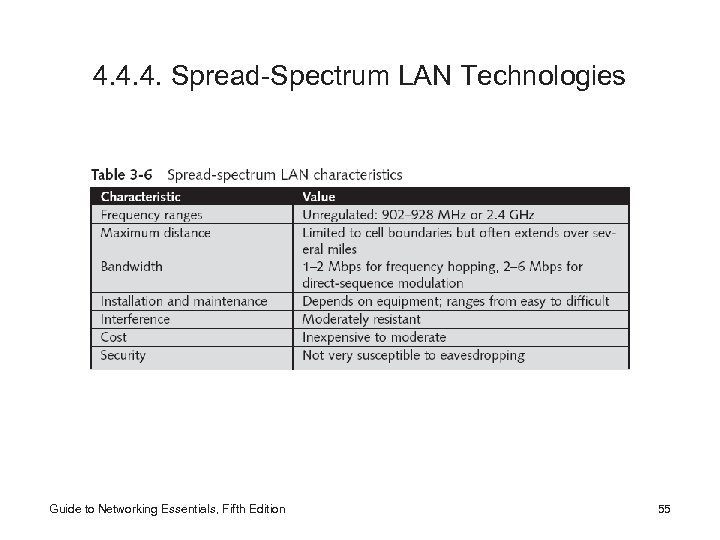 4. 4. 4. Spread-Spectrum LAN Technologies Guide to Networking Essentials, Fifth Edition 55
 4. 5. EEE 802. 11 Wireless Networking • The 1997 802. 11 standard is also referred to as Wireless Fidelity (Wi-Fi) – Current standards include 802. 11 b and 802. 11 g running at a 2. 4 GHz frequency (11 Mbps and 54 Mbps, respectively), and 802. 11 a, which specifies a bandwidth of 54 Mbps at a 5 GHz frequency – 802. 11 wireless is an extension to Ethernet using airwaves as the medium; most 802. 11 networks incorporate wired Ethernet segments – Networks can extend to several hundred feet – Many businesses are setting up Wi-Fi hot spots, which are localized wireless access areas Guide to Networking Essentials, Fifth Edition 56
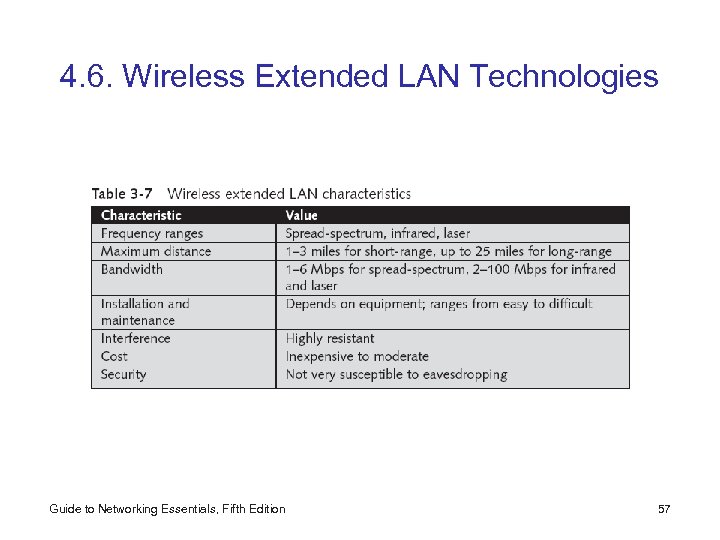 4. 6. Wireless Extended LAN Technologies Guide to Networking Essentials, Fifth Edition 57
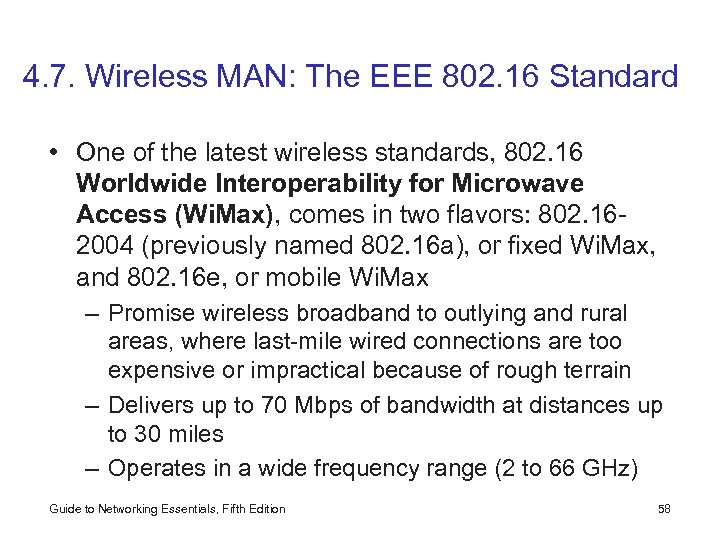 4. 7. Wireless MAN: The EEE 802. 16 Standard • One of the latest wireless standards, 802. 16 Worldwide Interoperability for Microwave Access (Wi. Max), comes in two flavors: 802. 162004 (previously named 802. 16 a), or fixed Wi. Max, and 802. 16 e, or mobile Wi. Max – Promise wireless broadband to outlying and rural areas, where last-mile wired connections are too expensive or impractical because of rough terrain – Delivers up to 70 Mbps of bandwidth at distances up to 30 miles – Operates in a wide frequency range (2 to 66 GHz) Guide to Networking Essentials, Fifth Edition 58
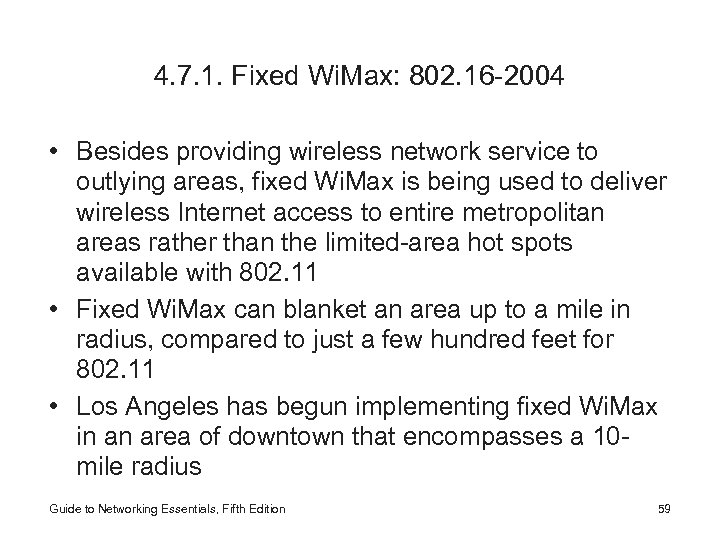 4. 7. 1. Fixed Wi. Max: 802. 16 -2004 • Besides providing wireless network service to outlying areas, fixed Wi. Max is being used to deliver wireless Internet access to entire metropolitan areas rather than the limited-area hot spots available with 802. 11 • Fixed Wi. Max can blanket an area up to a mile in radius, compared to just a few hundred feet for 802. 11 • Los Angeles has begun implementing fixed Wi. Max in an area of downtown that encompasses a 10 mile radius Guide to Networking Essentials, Fifth Edition 59
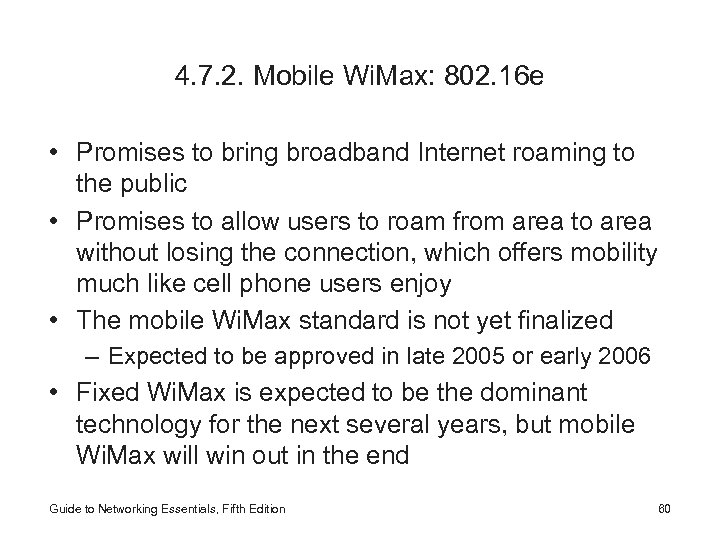 4. 7. 2. Mobile Wi. Max: 802. 16 e • Promises to bring broadband Internet roaming to the public • Promises to allow users to roam from area to area without losing the connection, which offers mobility much like cell phone users enjoy • The mobile Wi. Max standard is not yet finalized – Expected to be approved in late 2005 or early 2006 • Fixed Wi. Max is expected to be the dominant technology for the next several years, but mobile Wi. Max will win out in the end Guide to Networking Essentials, Fifth Edition 60
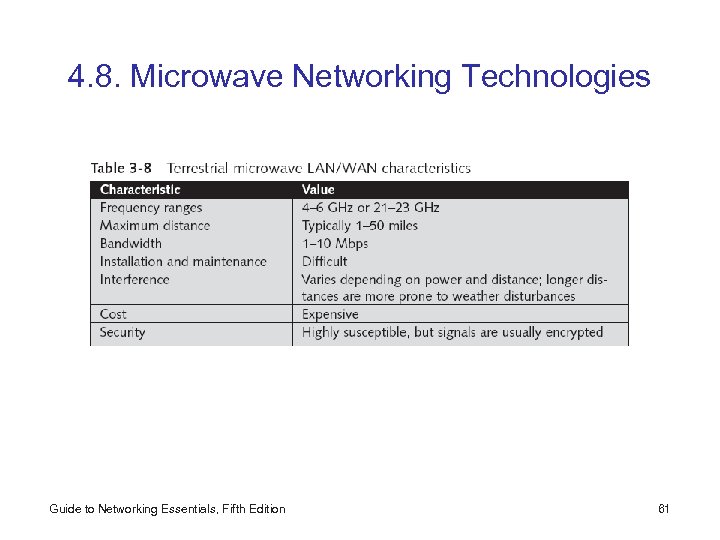 4. 8. Microwave Networking Technologies Guide to Networking Essentials, Fifth Edition 61
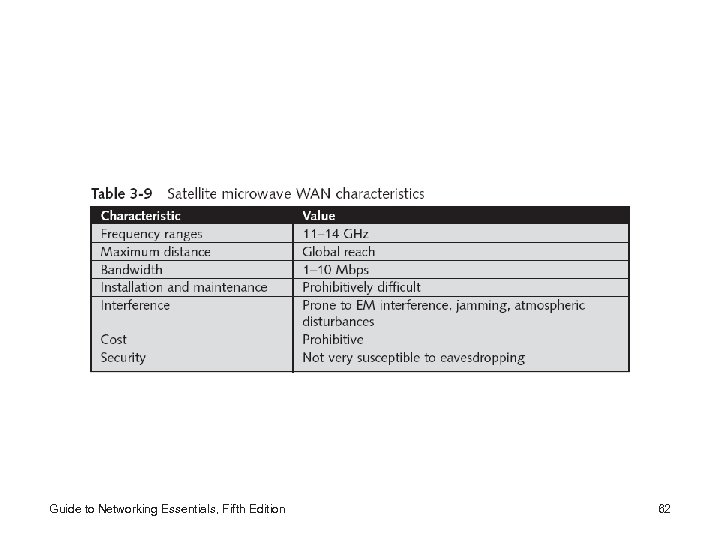 Guide to Networking Essentials, Fifth Edition 62
 Summary • Working with network media requires attention to requirements, budget, distance, bandwidth, and environmental factors • Cabled networks typically use one of two transmission schemes: broadband or baseband • For wired networks, the primary choices are twistedpair and fiber-optic cables – Twisted-pair cable can be unshielded or shielded – Fiber-optic cable: highest bandwidth, best security and resistance to interference, but the most expensive • Structured cabling facilitates troubleshooting, modifying, and expanding a network cable plant Guide to Networking Essentials, Fifth Edition 63
 • Wireless networking is gaining popularity – A typical wireless network acts like a wired network, except that wires aren’t needed to carry the signals – Wireless networks use a variety of electromagnetic frequency ranges (narrowband, spread-spectrum radio, microwave, infrared, and laser transmission) – 802. 11 family promises to make wireless networking commonplace in homes and corporate environments – 802. 16 provides up to 70 Mbps of bandwidth over long distances (30 miles) and can be used to create MANs – Mobile computing involves using broadcast frequencies and communications carriers to transmit and receive signals with cellular or satellite communications techniques Guide to Networking Essentials, Fifth Edition 64