 Скачать презентацию Chapter 22 World Wide Web and HTTP TCP IP
606572635133b904d292d7ca5d8d644a.ppt
- Количество слайдов: 46



Chapter 22 World Wide Web and HTTP TCP/IP Protocol Suite Copyright © The Mc. Graw-Hill Companies, Inc. Permission required for reproduction or display. 1
OBJECTIVES: q To discuss the architecture of WWW and describe the concepts of hypertext and hypermedia. q To describe Web clients and Web servers and their components. q To define URL as a tool to identify a Web server. q To introduce three different Web documents: static document, dynamic document, and active document. q To discuss HTTP and its transactions. q To define and list the fields in a request message. TCP/IP Protocol Suite 2
OBJECTIVES (continued): q To define non-persistent and persistent connections in HTTP. q To introduce cookies and their applications in HTTP. q To discuss Web caching, its application, and the method used to update the cache. TCP/IP Protocol Suite 3
Chapter Outline Architecture 22. 2 Web Document 22. 3 TCP/IP Protocol Suite 22. 1 HTTP 4
22 -1 ARCHITECTURE The WWW today is a distributed client-server service, in which a client using a browser can access a service using a server. However, the service provided is distributed over many locations called sites. Each site holds one or more documents, referred to as Web pages. Each Web page, however, can contain some links to other Web pages in the same or other sites. In other words, a Web page can be simple or composite. TCP/IP Protocol Suite 5
Topics Discussed in the Section ü Hypertext and Hypermedia ü Web Client (Browser) ü Web Server ü Uniform Resource Locator (URL) TCP/IP Protocol Suite 6
Example 22. 1 Assume we need to retrieve a Web page that contains the biography of a famous character with some pictures, which are embedded in the page itself. Since the pictures are not stored as separate files, the whole document is a simple Web page. It can be retrieved using one single request/ response transaction, as shown in Figure 22. 1. TCP/IP Protocol Suite 7
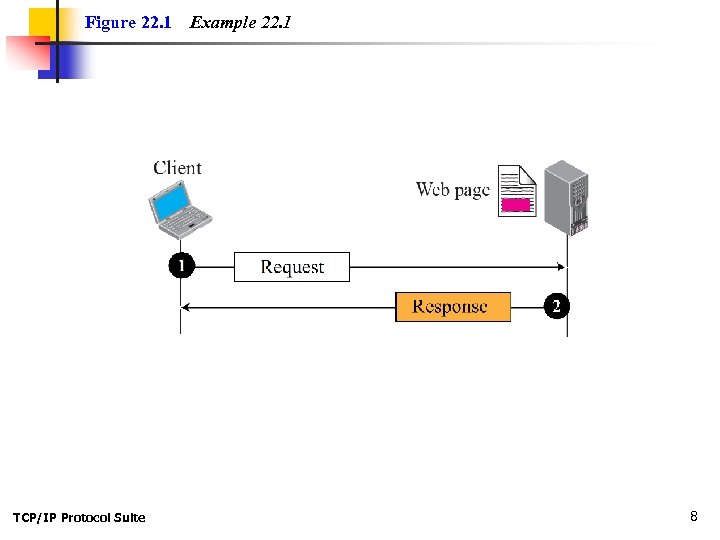
Figure 22. 1 TCP/IP Protocol Suite Example 22. 1 8
Example 22. 2 Now assume we need to retrieve a scientific document that contains one reference to another text file and one reference to a large image. Figure 22. 2 shows the situation. The main document and the image are stored in two separate files in the same site (file A and file B); the referenced text file is stored in another site (file C). Since we are dealing with three different files, we need three transactions if we want to see the whole document. The first transaction (request/response) retrieves a copy of the main document (file A), which has a reference (pointer) to the second and the third files. TCP/IP Protocol Suite 9
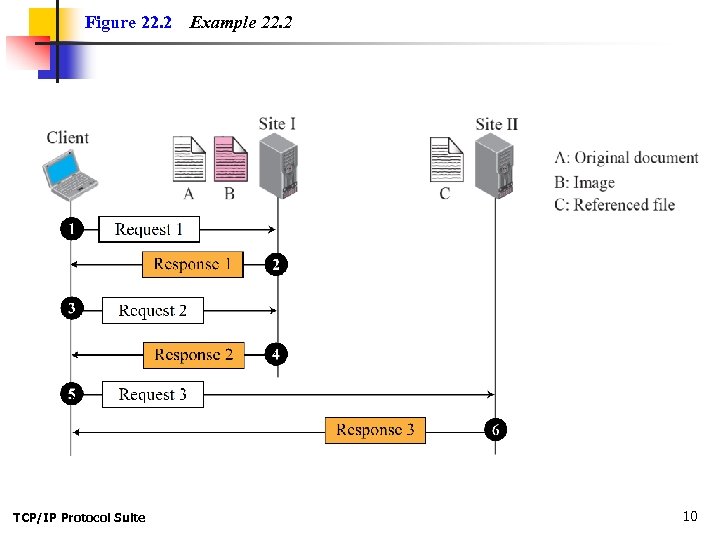
Figure 22. 2 TCP/IP Protocol Suite Example 22. 2 10
Example 22. 3 A very important point we need to remember is that file A, file B, and file C in Example 22. 2 are independent Web pages, each with independent names and addresses. Although references to file B or C are included in file A, it does not mean that each of these files cannot be retrieved independently. A second user can retrieve file B with one transaction. A third user can retrieve file C with one transaction. TCP/IP Protocol Suite 11
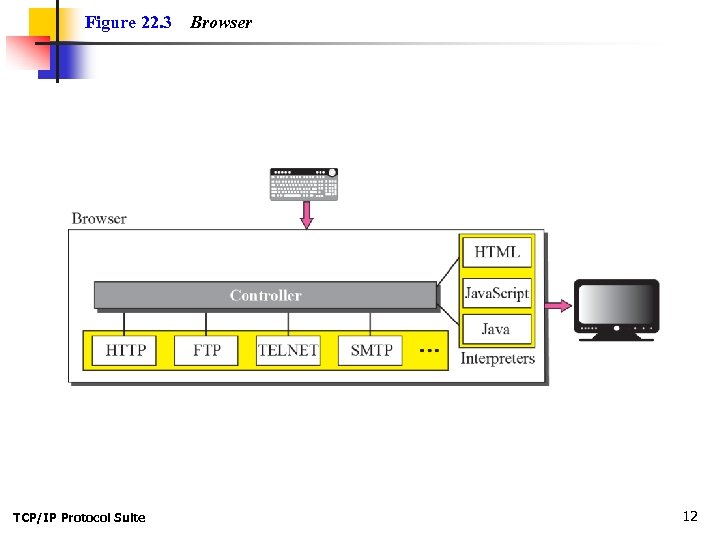
Figure 22. 3 TCP/IP Protocol Suite Browser 12
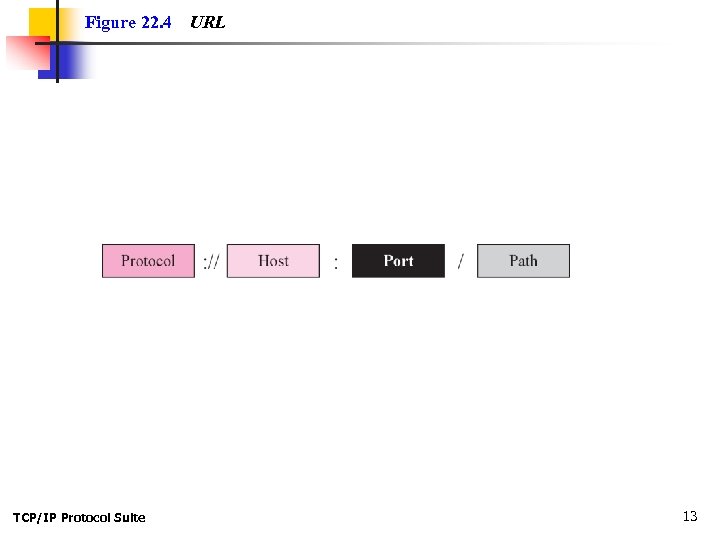
Figure 22. 4 TCP/IP Protocol Suite URL 13
22 -2 WEB DOCUMENTS The documents in the WWW can be grouped into three broad categories: static, dynamic, and active. The category is based on the time the contents of the document are determined. TCP/IP Protocol Suite 14
Topics Discussed in the Section ü Static Documents ü Dynamic Documents ü Active Documents TCP/IP Protocol Suite 15
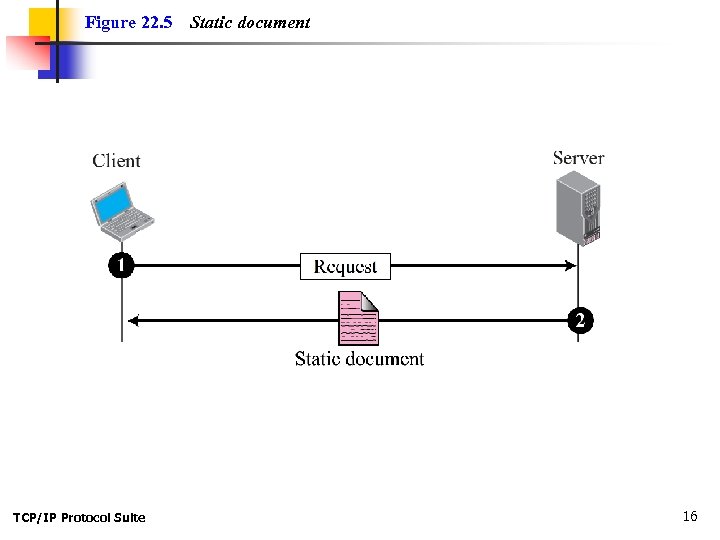
Figure 22. 5 TCP/IP Protocol Suite Static document 16
Note HTML, XSL, and XHTML are discussed in Appendix E. TCP/IP Protocol Suite 17
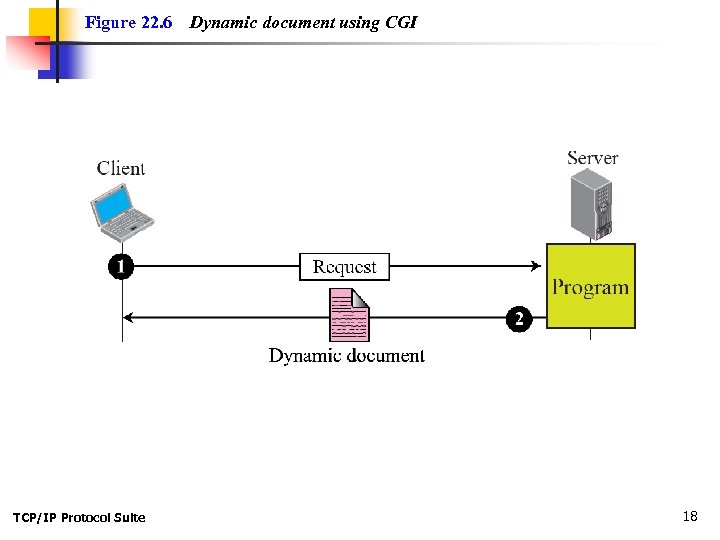
Figure 22. 6 TCP/IP Protocol Suite Dynamic document using CGI 18
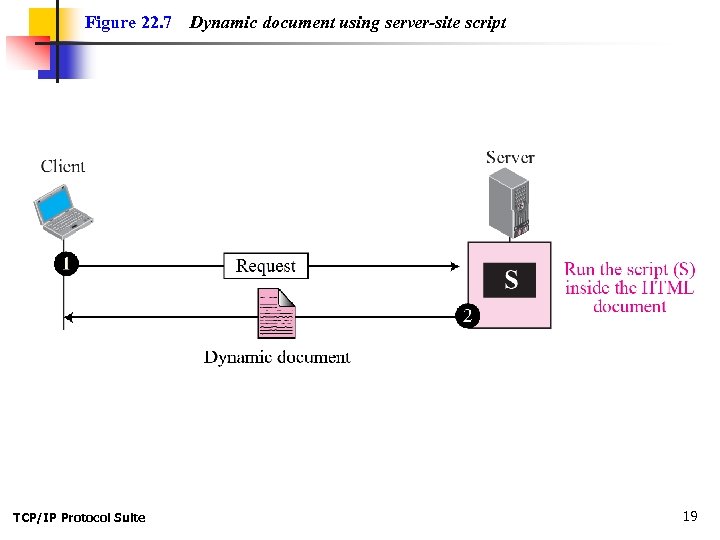
Figure 22. 7 TCP/IP Protocol Suite Dynamic document using server-site script 19
Note Dynamic documents are sometimes referred to as server-site dynamic documents. TCP/IP Protocol Suite 20
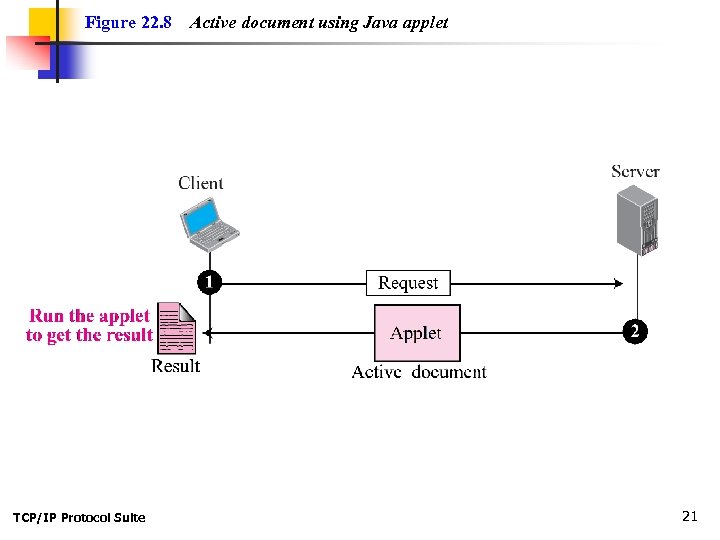
Figure 22. 8 TCP/IP Protocol Suite Active document using Java applet 21
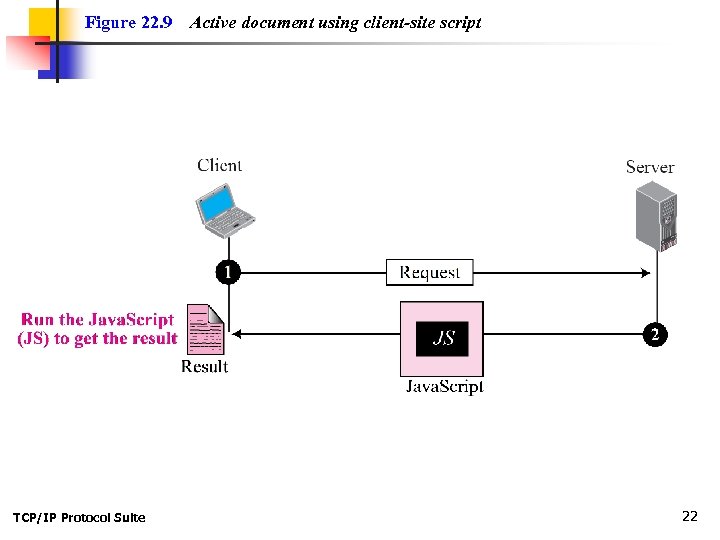
Figure 22. 9 TCP/IP Protocol Suite Active document using client-site script 22
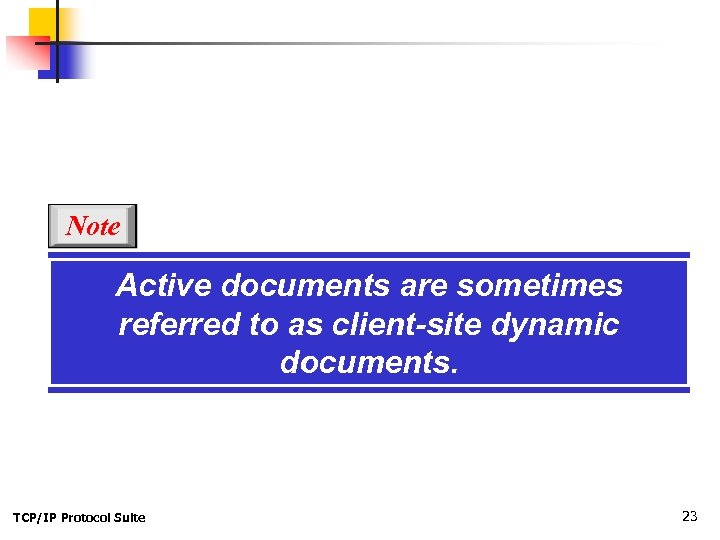
Note Active documents are sometimes referred to as client-site dynamic documents. TCP/IP Protocol Suite 23
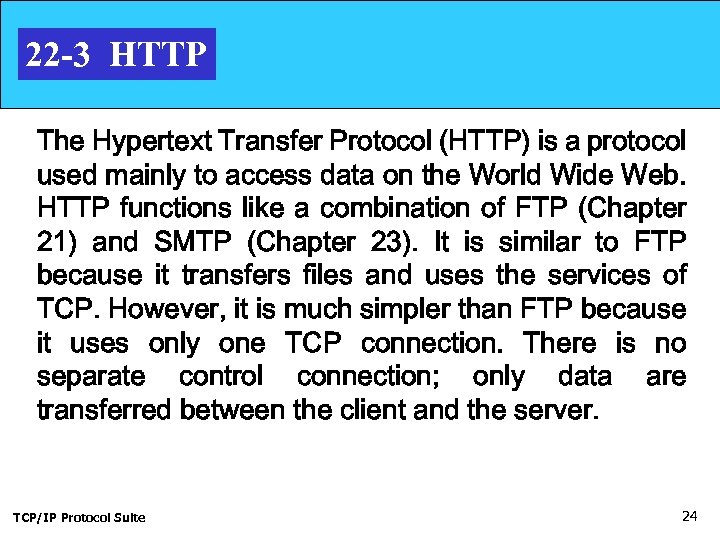
22 -3 HTTP The Hypertext Transfer Protocol (HTTP) is a protocol used mainly to access data on the World Wide Web. HTTP functions like a combination of FTP (Chapter 21) and SMTP (Chapter 23). It is similar to FTP because it transfers files and uses the services of TCP. However, it is much simpler than FTP because it uses only one TCP connection. There is no separate control connection; only data are transferred between the client and the server. TCP/IP Protocol Suite 24
Topics Discussed in the Section ü HTTP Transaction ü Conditional Request ü Persistence ü Cookies ü Web Caching: Proxy Server ü HTTP Security TCP/IP Protocol Suite 25
Note HTTP uses the services of TCP on wellknown port 80. TCP/IP Protocol Suite 26
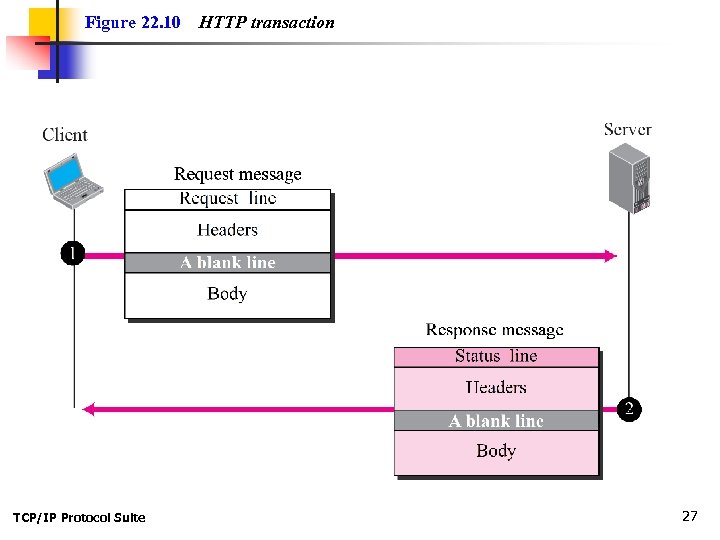
Figure 22. 10 TCP/IP Protocol Suite HTTP transaction 27
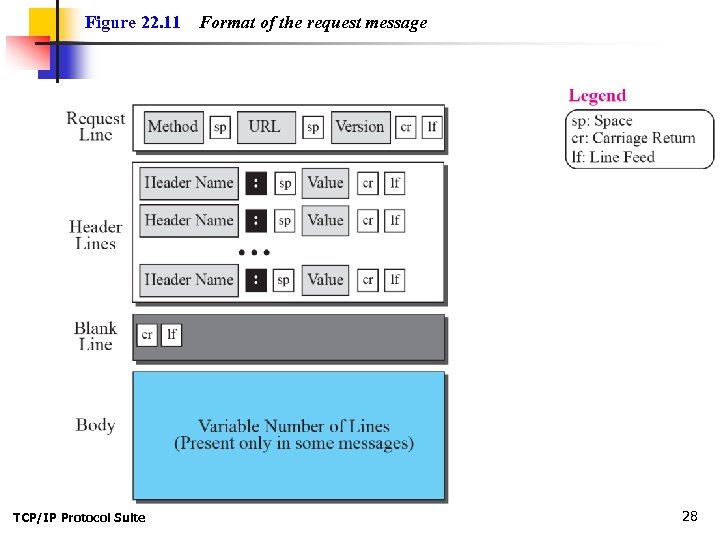
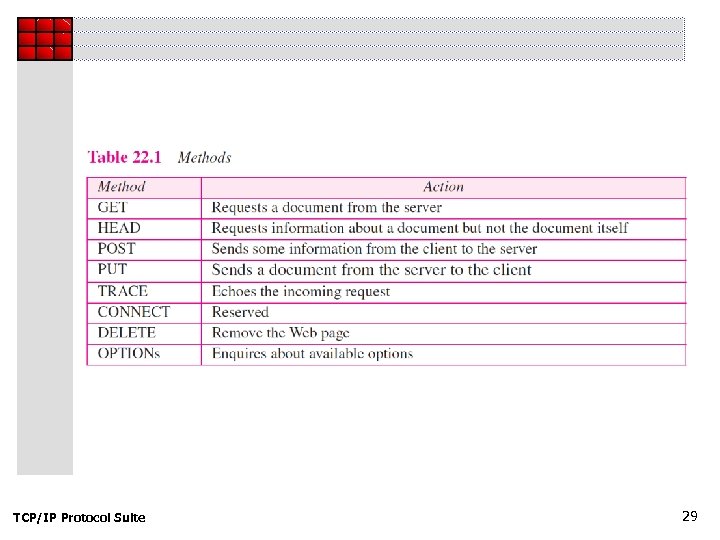
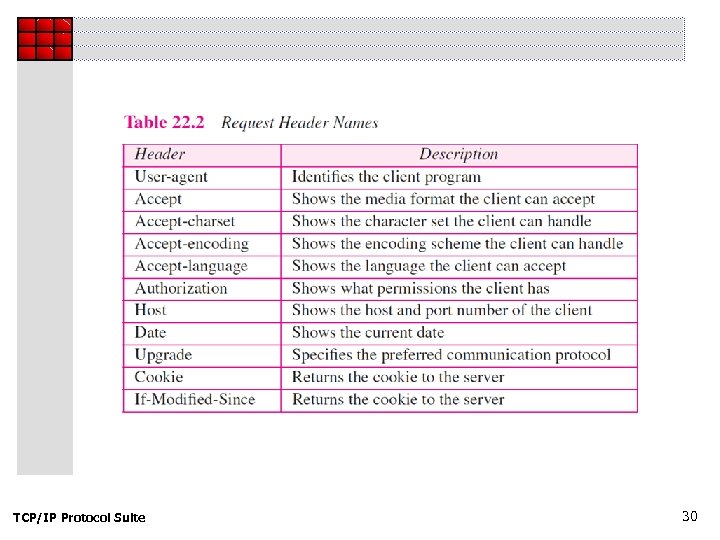
Figure 22. 11 TCP/IP Protocol Suite Format of the request message 28
TCP/IP Protocol Suite 29
TCP/IP Protocol Suite 30
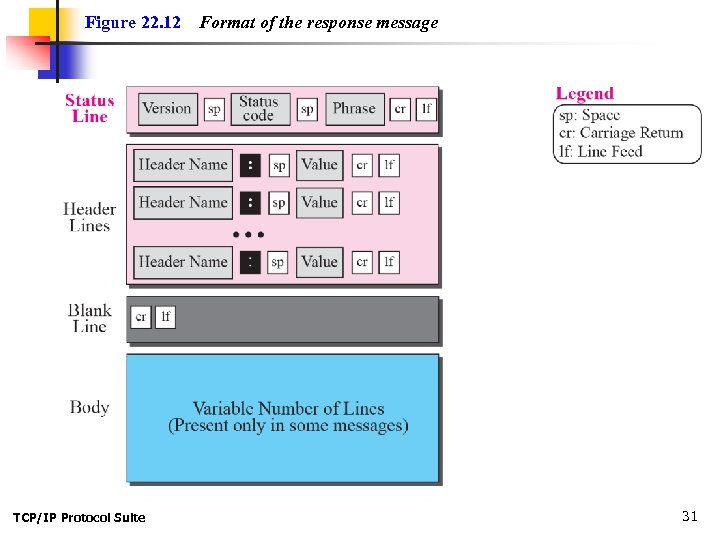
Figure 22. 12 TCP/IP Protocol Suite Format of the response message 31
TCP/IP Protocol Suite 32
TCP/IP Protocol Suite 33
Example 22. 4 This example retrieves a document (see Figure 22. 13). We use the GET method to retrieve an image with the path /usr/bin/image 1. The request line shows the method (GET), the URL, and the HTTP version (1. 1). The header has two lines that show that the client can accept images in the GIF or JPEG format. The request does not have a body. The response message contains the status line and four lines of header. The header lines define the date, server, MIME version, and length of the document. The body of the document follows the header. TCP/IP Protocol Suite 34
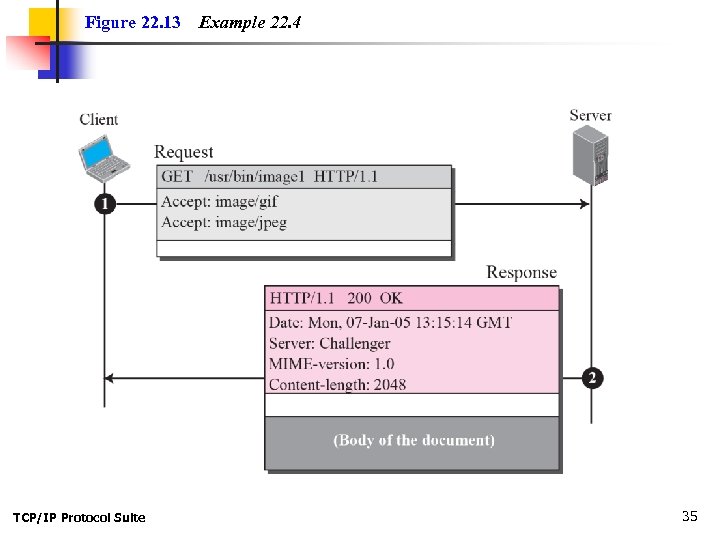
Figure 22. 13 TCP/IP Protocol Suite Example 22. 4 35
Example 22. 5 In this example, the client wants to send data to the server. We use the POST method. The request line shows the method (POST), URL, and HTTP version (1. 1). There are four lines of headers. The request body contains the input information. The response message contains the status line and four lines of headers. The created document, which is a CGI document, is included as the body (see Figure 22. 14). TCP/IP Protocol Suite 36
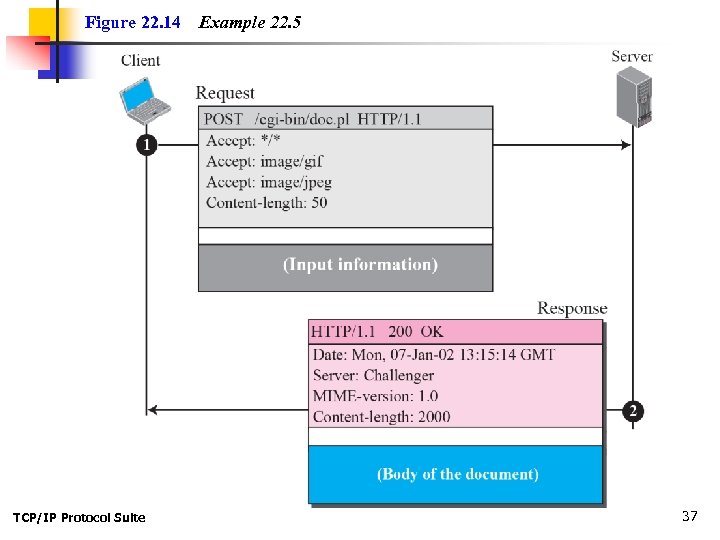
Figure 22. 14 TCP/IP Protocol Suite Example 22. 5 37
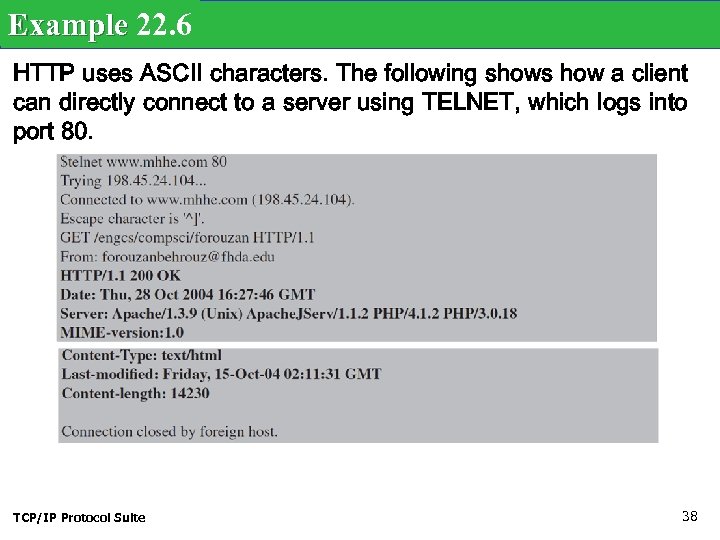
Example 22. 6 HTTP uses ASCII characters. The following shows how a client can directly connect to a server using TELNET, which logs into port 80. TCP/IP Protocol Suite 38
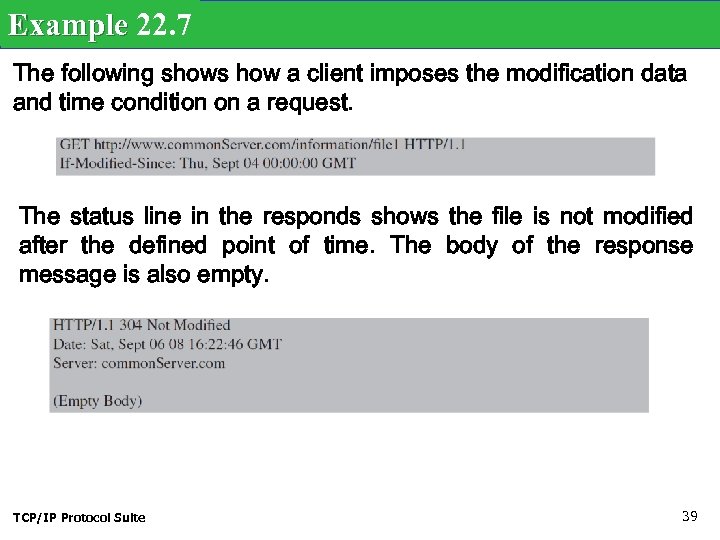
Example 22. 7 The following shows how a client imposes the modification data and time condition on a request. The status line in the responds shows the file is not modified after the defined point of time. The body of the response message is also empty. TCP/IP Protocol Suite 39
Example 22. 8 Figure 22. 15 shows an example of a nonpersistent connection. The client needs to access a file that contains two links to images. The text file and images are located on the same server. TCP/IP Protocol Suite 40
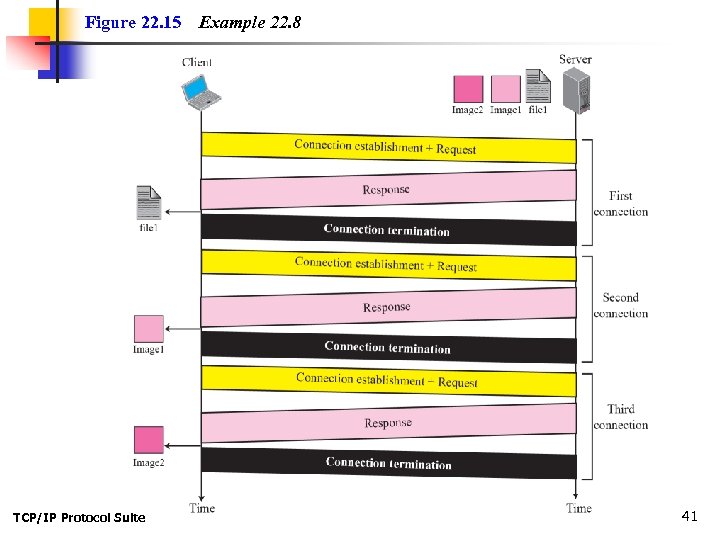
Figure 22. 15 TCP/IP Protocol Suite Example 22. 8 41
Note HTTP version 1. 1 specifies a persistent connection by default. TCP/IP Protocol Suite 42
Example 22. 9 Figure 22. 16 shows the same scenario as Example 22. 8, but using persistent connection. TCP/IP Protocol Suite 43
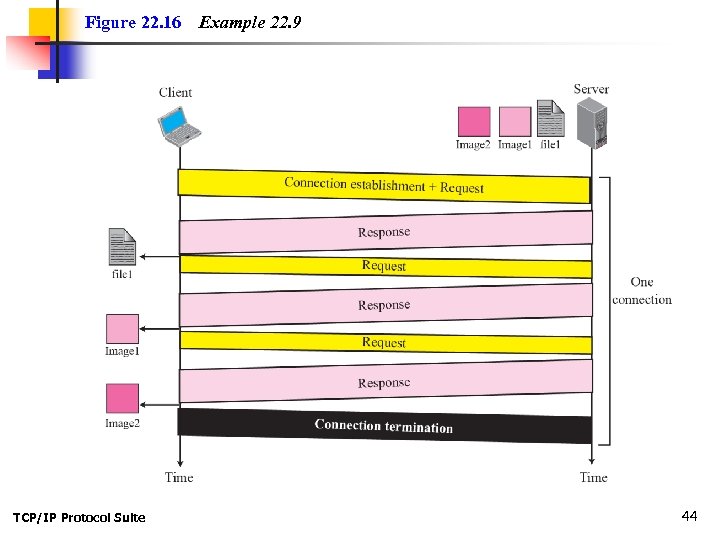
Figure 22. 16 TCP/IP Protocol Suite Example 22. 9 44
Example 22. 10 Figure 22. 17 shows a scenario in which an electronic store can benefit from the use of cookies. Assume a shopper wants to buy a toy from an electronic store named Best. Toys. The shopper browser (client) sends a request to the Best. Toys server. TCP/IP Protocol Suite 45
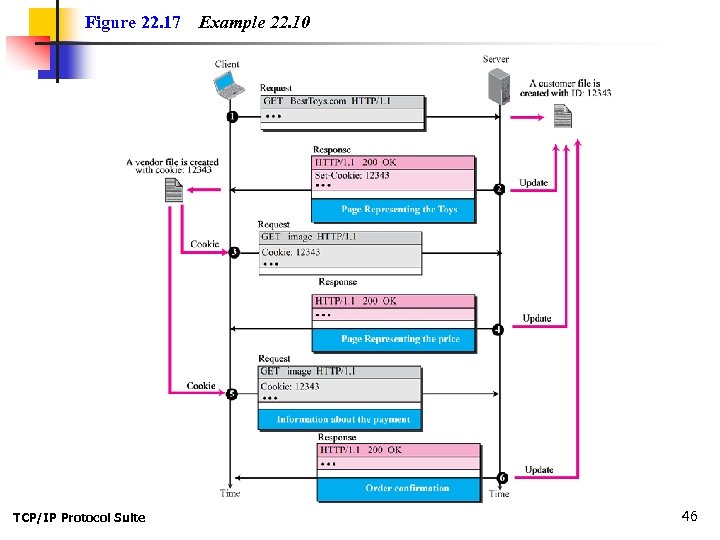
Figure 22. 17 TCP/IP Protocol Suite Example 22. 10 46
Скачать презентацию Chapter 22 World Wide Web and HTTP TCP IP
606572635133b904d292d7ca5d8d644a.ppt