


 Скачать презентацию Chapter 2 Wireless LANs and PANs Introduction
72f3ec3bd0737407037ef07e5246a93c.ppt
- Количество слайдов: 110
 Chapter 2: Wireless LANs and PANs § Introduction § Fundamentals of WLANs § IEEE 802. 11 Standard § HIPERLAN Standard § Bluetooth § Home. RF 1
 Characteristics of wireless LANs § Advantages • • Flexibility: very flexible within the reception area Planning: Ad-hoc networks without previous planning possible Design: (almost) no wiring difficulties (e. g. historic buildings, firewalls) Robustness: more robust against disasters like, e. g. , earthquakes, fire or users pulling a plug • Cost: Adding additional users to a wireless network will not increase the cost. § Disadvantages • Quality of service: typically very low bandwidth compared to wired networks (1 -10 Mbit/s) • Proprietary solutions: many proprietary solutions, especially for higher bitrates, standards take time (e. g. IEEE 802. 11). Now, 802. 11 g is a popular solution. • Restrictions: products have to follow many national restrictions if working wireless, it takes long time to establish global solutions like, e. g. , IMT-2000 • Safety and security: Precautions have to be taken to prevent safety hazards. Secrecy and integrity must be assured. 2
 Fundamentals of WLANs § Differences between wireless and wired transmission • • Address is not equivalent to physical location Dynamic topology and restricted connectivity Medium boundaries are not well-defined Error-prone medium § Use of WLANs • Users can access the Internet on the move. • WLANs are handy in areas affected by earthquakes or other disasters. • WLANs are good solutions in places where wiring may not be permitted. 3
 Design goals for wireless LANs § Operational simplicity § Power-efficient operations § License-free operation: no special permissions or licenses needed to use the LAN § Tolerance to interference § Global usability § Security: security (no one should be able to read my data), privacy (no one should be able to collect user profiles), § Safety requirement (low radiation) § Quality of service requirements § Compatibility with other technologies and applications 4
 Comparison: Infrastructure vs. Ad-hoc networks § WLANs can be classified into two types: • Infrastructure networks contains access points (APs) and mobile station (STAs). • Ad hoc LANs do not need any fixed infrastructure. § Infrastructure networks • Provide access to other networks • Include forwarding functions • Medium access control § Ad-hoc networks is a group of computers each with wireless adapters, connected as an independent wireless LAN. • Each node can communicate with other nodes 5
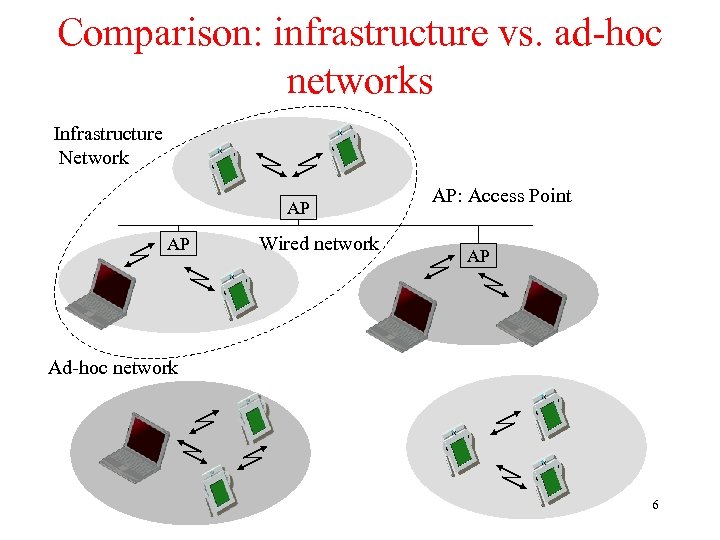 Comparison: infrastructure vs. ad-hoc networks Infrastructure Network AP AP Wired network AP: Access Point AP Ad-hoc network 6
 802. 11 Services § Distribution Services (for APs) • Association – mobile stations connect themselves to base stations • Reassociation – a station may change its preferred base station • Disassociation – the station or base station breaks the association Distribution – determines how to route frames sent to the base station • Integration – handles the translation from the 802. 11 format to the format of the destination network § Intracell Services (for STAs and APs) • Authentication – a station must authenticate itself before permitted to send data. • Deauthentication – a authenticated station wanting to leave the network is deauthenticated. • Privacy – manages the encryption and decryption. The algorithm specified is RC 4 by Ronald Rivest of MIT. • Data Delivery – not reliable. 7
 IEEE 802. 11 Standard § IEEE 802. 11 b is known as Wi-Fi (wireless Fidelity). § Mobile Stations (MTs) can operate two modes: • Infrastructure mode, in which MTs can communicate with one or more APs which are connected to a WLAN. • Ad hoc mode, in which MTs can communicate directly with each other without using an AP. § IEEE 802. 11 supports two medium in the physical layer: • Infrared • Radio wave § The physical layer is subdivided into physical medium dependent (PMD) sublayer and physical layer convergence protocol (PLCP). • IEEE 802. 11 used CSMA/CD for MAC. 8
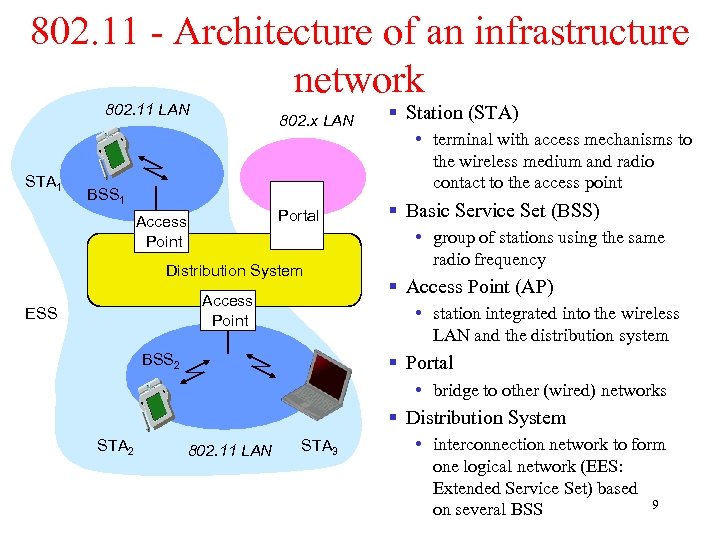 802. 11 - Architecture of an infrastructure network 802. x LAN STA 1 BSS 1 Access Point § Station (STA) Portal 802. 11 LAN § Basic Service Set (BSS) Distribution System Access Point ESS • terminal with access mechanisms to the wireless medium and radio contact to the access point • group of stations using the same radio frequency § Access Point (AP) • station integrated into the wireless LAN and the distribution system BSS 2 § Portal • bridge to other (wired) networks § Distribution System STA 2 802. 11 LAN STA 3 • interconnection network to form one logical network (EES: Extended Service Set) based 9 on several BSS
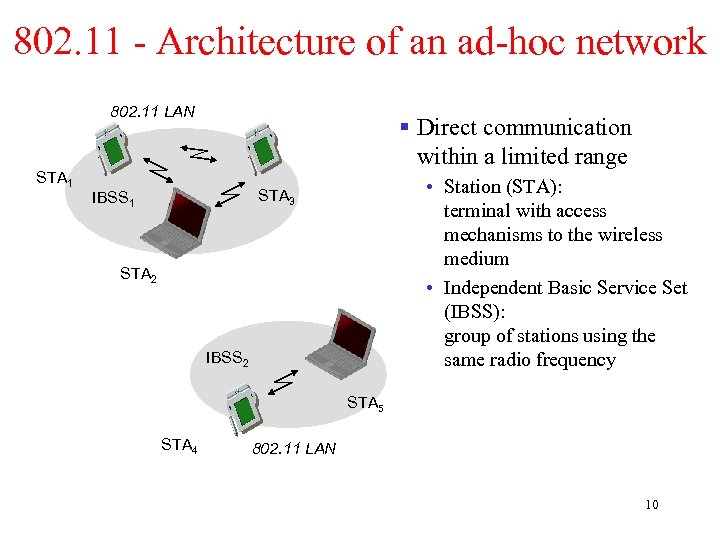 802. 11 - Architecture of an ad-hoc network 802. 11 LAN STA 1 § Direct communication within a limited range • Station (STA): terminal with access mechanisms to the wireless medium • Independent Basic Service Set (IBSS): group of stations using the same radio frequency STA 3 IBSS 1 STA 2 IBSS 2 STA 5 STA 4 802. 11 LAN 10
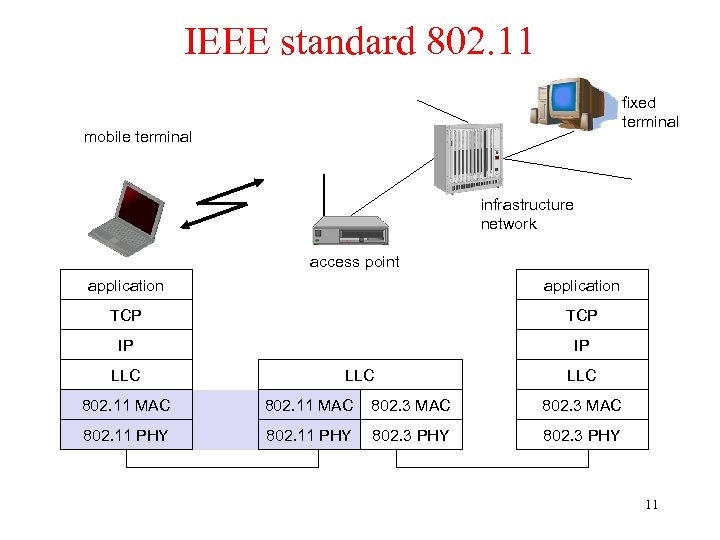 IEEE standard 802. 11 fixed terminal mobile terminal infrastructure network access point application TCP IP IP LLC LLC 802. 11 MAC 802. 3 MAC 802. 11 PHY 802. 3 PHY 11
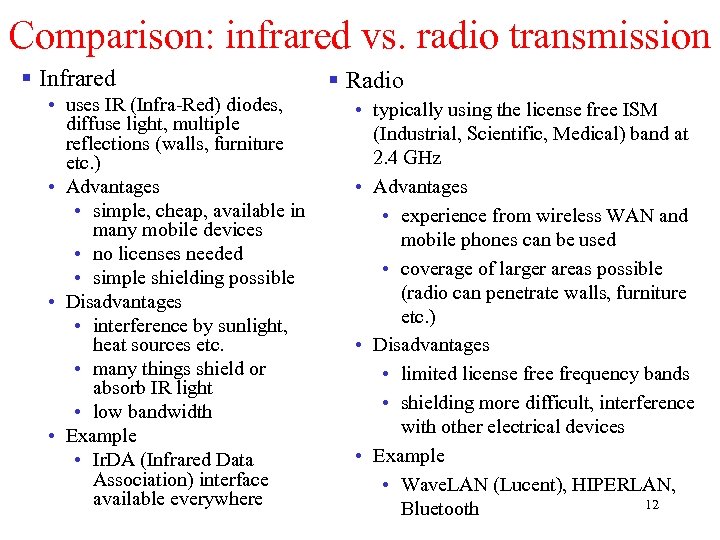 Comparison: infrared vs. radio transmission § Infrared • uses IR (Infra-Red) diodes, diffuse light, multiple reflections (walls, furniture etc. ) • Advantages • simple, cheap, available in many mobile devices • no licenses needed • simple shielding possible • Disadvantages • interference by sunlight, heat sources etc. • many things shield or absorb IR light • low bandwidth • Example • Ir. DA (Infrared Data Association) interface available everywhere § Radio • typically using the license free ISM (Industrial, Scientific, Medical) band at 2. 4 GHz • Advantages • experience from wireless WAN and mobile phones can be used • coverage of larger areas possible (radio can penetrate walls, furniture etc. ) • Disadvantages • limited license frequency bands • shielding more difficult, interference with other electrical devices • Example • Wave. LAN (Lucent), HIPERLAN, 12 Bluetooth
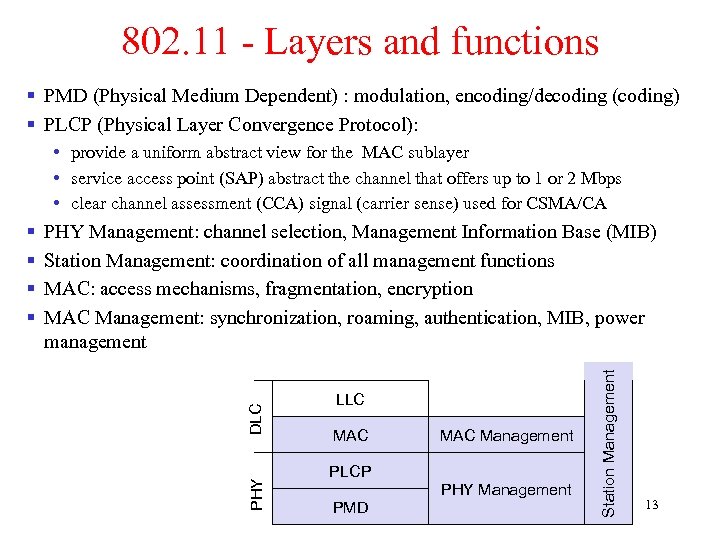 802. 11 - Layers and functions § PMD (Physical Medium Dependent) : modulation, encoding/decoding (coding) § PLCP (Physical Layer Convergence Protocol): • provide a uniform abstract view for the MAC sublayer • service access point (SAP) abstract the channel that offers up to 1 or 2 Mbps • clear channel assessment (CCA) signal (carrier sense) used for CSMA/CA LLC MAC Management PLCP PHY Management PMD Station Management DLC PHY Management: channel selection, Management Information Base (MIB) Station Management: coordination of all management functions MAC: access mechanisms, fragmentation, encryption MAC Management: synchronization, roaming, authentication, MIB, power management PHY § § 13
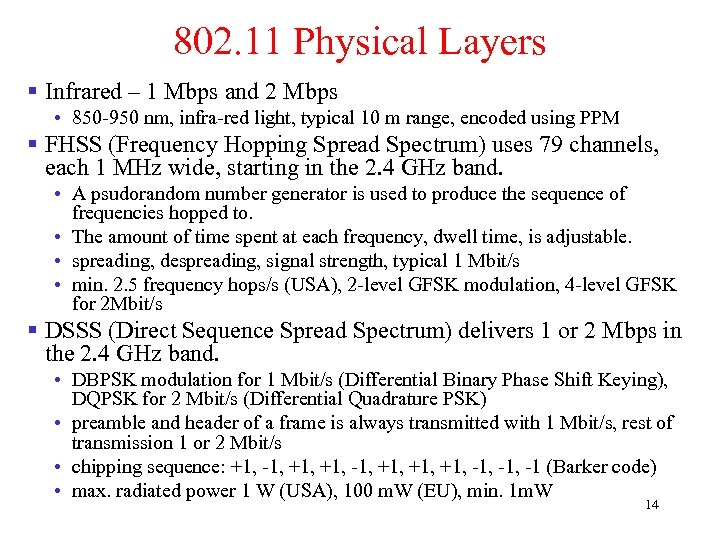 802. 11 Physical Layers § Infrared – 1 Mbps and 2 Mbps • 850 -950 nm, infra-red light, typical 10 m range, encoded using PPM § FHSS (Frequency Hopping Spread Spectrum) uses 79 channels, each 1 MHz wide, starting in the 2. 4 GHz band. • A psudorandom number generator is used to produce the sequence of frequencies hopped to. • The amount of time spent at each frequency, dwell time, is adjustable. • spreading, despreading, signal strength, typical 1 Mbit/s • min. 2. 5 frequency hops/s (USA), 2 -level GFSK modulation, 4 -level GFSK for 2 Mbit/s § DSSS (Direct Sequence Spread Spectrum) delivers 1 or 2 Mbps in the 2. 4 GHz band. • DBPSK modulation for 1 Mbit/s (Differential Binary Phase Shift Keying), DQPSK for 2 Mbit/s (Differential Quadrature PSK) • preamble and header of a frame is always transmitted with 1 Mbit/s, rest of transmission 1 or 2 Mbit/s • chipping sequence: +1, -1, +1, +1, -1, -1 (Barker code) • max. radiated power 1 W (USA), 100 m. W (EU), min. 1 m. W 14
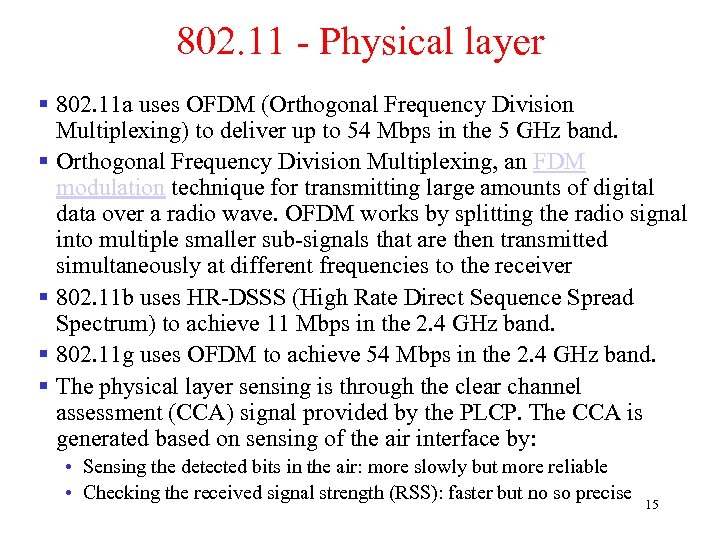 802. 11 - Physical layer § 802. 11 a uses OFDM (Orthogonal Frequency Division Multiplexing) to deliver up to 54 Mbps in the 5 GHz band. § Orthogonal Frequency Division Multiplexing, an FDM modulation technique for transmitting large amounts of digital data over a radio wave. OFDM works by splitting the radio signal into multiple smaller sub-signals that are then transmitted simultaneously at different frequencies to the receiver § 802. 11 b uses HR-DSSS (High Rate Direct Sequence Spread Spectrum) to achieve 11 Mbps in the 2. 4 GHz band. § 802. 11 g uses OFDM to achieve 54 Mbps in the 2. 4 GHz band. § The physical layer sensing is through the clear channel assessment (CCA) signal provided by the PLCP. The CCA is generated based on sensing of the air interface by: • Sensing the detected bits in the air: more slowly but more reliable • Checking the received signal strength (RSS): faster but no so precise 15
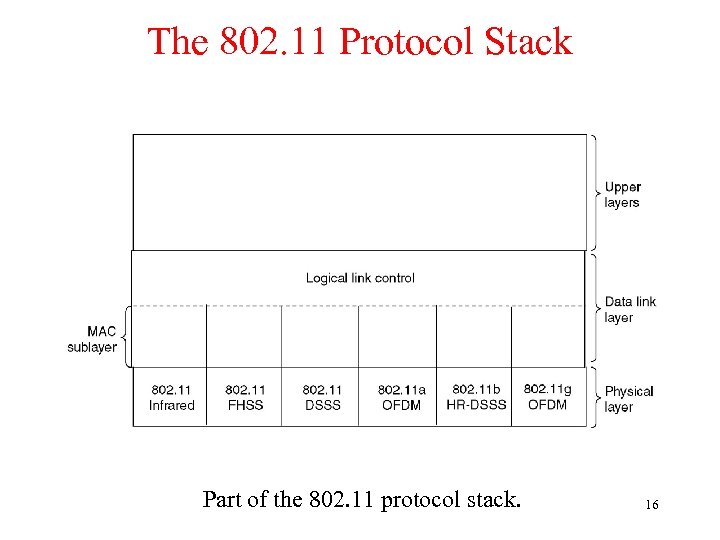 The 802. 11 Protocol Stack Part of the 802. 11 protocol stack. 16
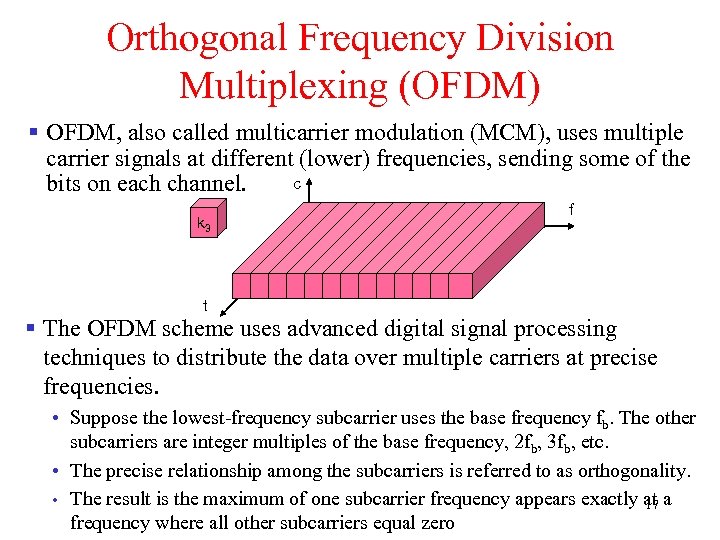 Orthogonal Frequency Division Multiplexing (OFDM) § OFDM, also called multicarrier modulation (MCM), uses multiple carrier signals at different (lower) frequencies, sending some of the c bits on each channel. k 3 f t § The OFDM scheme uses advanced digital signal processing techniques to distribute the data over multiple carriers at precise frequencies. • Suppose the lowest-frequency subcarrier uses the base frequency fb. The other subcarriers are integer multiples of the base frequency, 2 fb, 3 fb, etc. • The precise relationship among the subcarriers is referred to as orthogonality. • The result is the maximum of one subcarrier frequency appears exactly at a 17 frequency where all other subcarriers equal zero
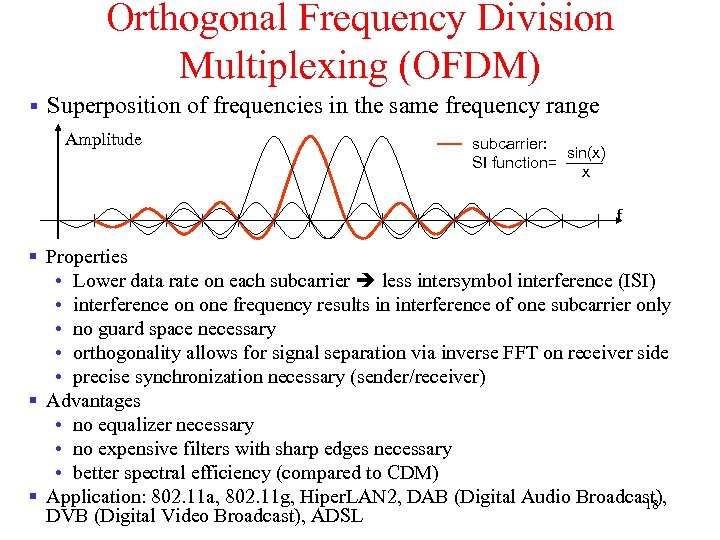 Orthogonal Frequency Division Multiplexing (OFDM) § Superposition of frequencies in the same frequency range Amplitude subcarrier: sin(x) SI function= x f § Properties • Lower data rate on each subcarrier less intersymbol interference (ISI) • interference on one frequency results in interference of one subcarrier only • no guard space necessary • orthogonality allows for signal separation via inverse FFT on receiver side • precise synchronization necessary (sender/receiver) § Advantages • no equalizer necessary • no expensive filters with sharp edges necessary • better spectral efficiency (compared to CDM) § Application: 802. 11 a, 802. 11 g, Hiper. LAN 2, DAB (Digital Audio Broadcast), 18 DVB (Digital Video Broadcast), ADSL
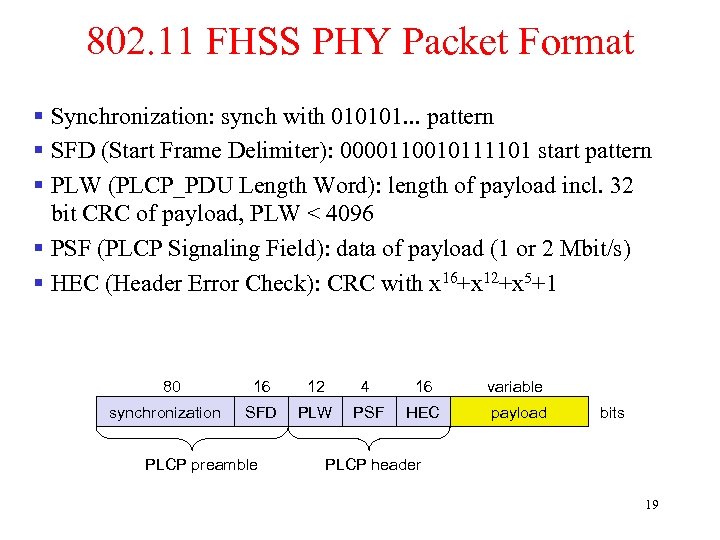 802. 11 FHSS PHY Packet Format § Synchronization: synch with 010101. . . pattern § SFD (Start Frame Delimiter): 0000110010111101 start pattern § PLW (PLCP_PDU Length Word): length of payload incl. 32 bit CRC of payload, PLW < 4096 § PSF (PLCP Signaling Field): data of payload (1 or 2 Mbit/s) § HEC (Header Error Check): CRC with x 16+x 12+x 5+1 80 synchronization 16 12 4 16 variable SFD PLW PSF HEC payload PLCP preamble bits PLCP header 19
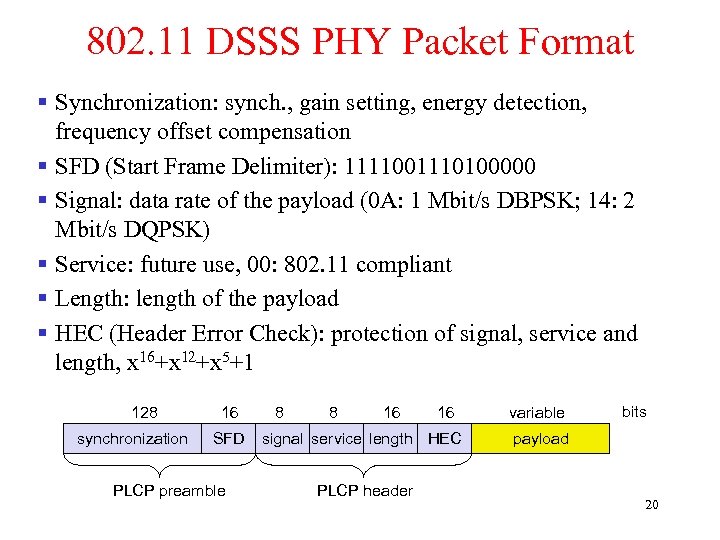 802. 11 DSSS PHY Packet Format § Synchronization: synch. , gain setting, energy detection, frequency offset compensation § SFD (Start Frame Delimiter): 1111001110100000 § Signal: data rate of the payload (0 A: 1 Mbit/s DBPSK; 14: 2 Mbit/s DQPSK) § Service: future use, 00: 802. 11 compliant § Length: length of the payload § HEC (Header Error Check): protection of signal, service and length, x 16+x 12+x 5+1 128 synchronization 16 SFD PLCP preamble 8 8 16 16 signal service length HEC PLCP header variable bits payload 20
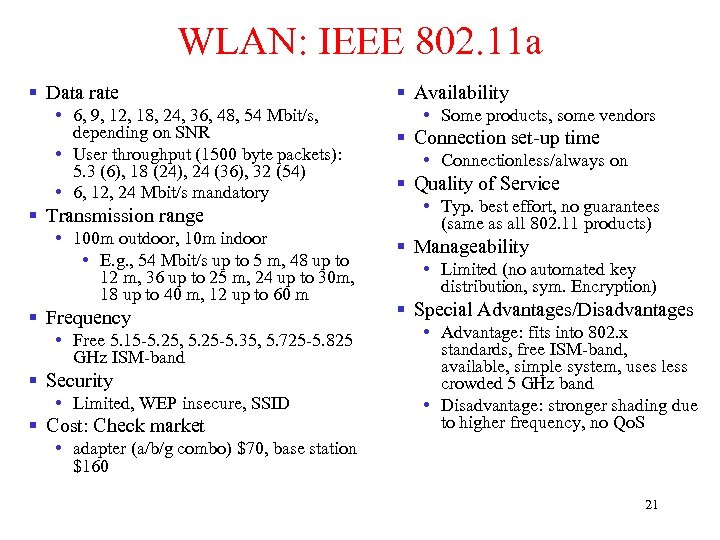 WLAN: IEEE 802. 11 a § Data rate • 6, 9, 12, 18, 24, 36, 48, 54 Mbit/s, depending on SNR • User throughput (1500 byte packets): 5. 3 (6), 18 (24), 24 (36), 32 (54) • 6, 12, 24 Mbit/s mandatory § Transmission range • 100 m outdoor, 10 m indoor • E. g. , 54 Mbit/s up to 5 m, 48 up to 12 m, 36 up to 25 m, 24 up to 30 m, 18 up to 40 m, 12 up to 60 m § Frequency • Free 5. 15 -5. 25, 5. 25 -5. 35, 5. 725 -5. 825 GHz ISM-band § Security • Limited, WEP insecure, SSID § Cost: Check market § Availability • Some products, some vendors § Connection set-up time • Connectionless/always on § Quality of Service • Typ. best effort, no guarantees (same as all 802. 11 products) § Manageability • Limited (no automated key distribution, sym. Encryption) § Special Advantages/Disadvantages • Advantage: fits into 802. x standards, free ISM-band, available, simple system, uses less crowded 5 GHz band • Disadvantage: stronger shading due to higher frequency, no Qo. S • adapter (a/b/g combo) $70, base station $160 21
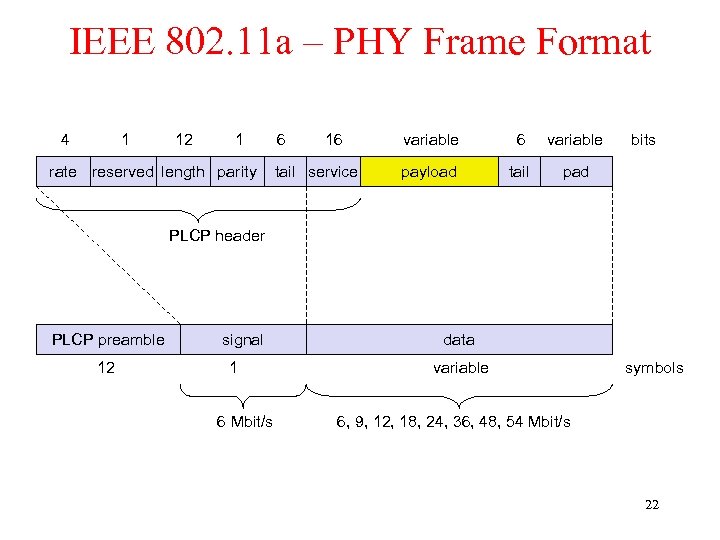 IEEE 802. 11 a – PHY Frame Format 4 1 12 1 rate reserved length parity 6 16 tail service variable 6 variable payload tail bits pad PLCP header PLCP preamble 12 signal 1 6 Mbit/s data variable symbols 6, 9, 12, 18, 24, 36, 48, 54 Mbit/s 22
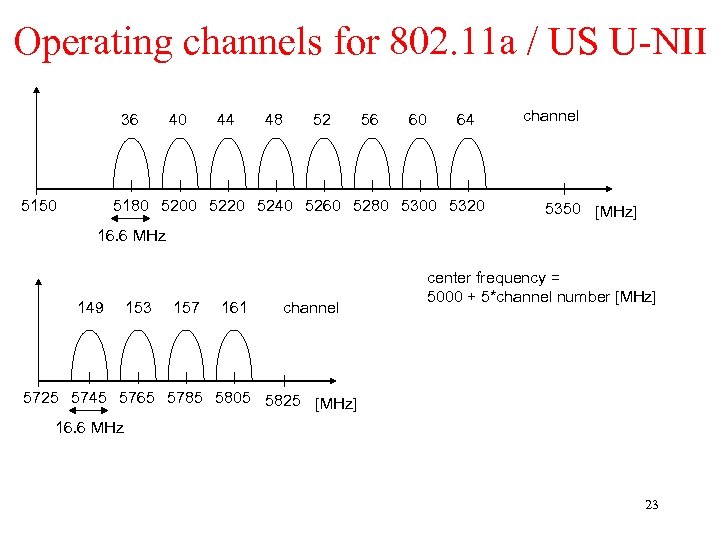 Operating channels for 802. 11 a / US U-NII 36 5150 40 44 48 52 56 60 64 5180 5200 5220 5240 5260 5280 5300 5320 channel 5350 [MHz] 16. 6 MHz 149 153 157 161 channel center frequency = 5000 + 5*channel number [MHz] 5725 5745 5765 5785 5805 5825 [MHz] 16. 6 MHz 23
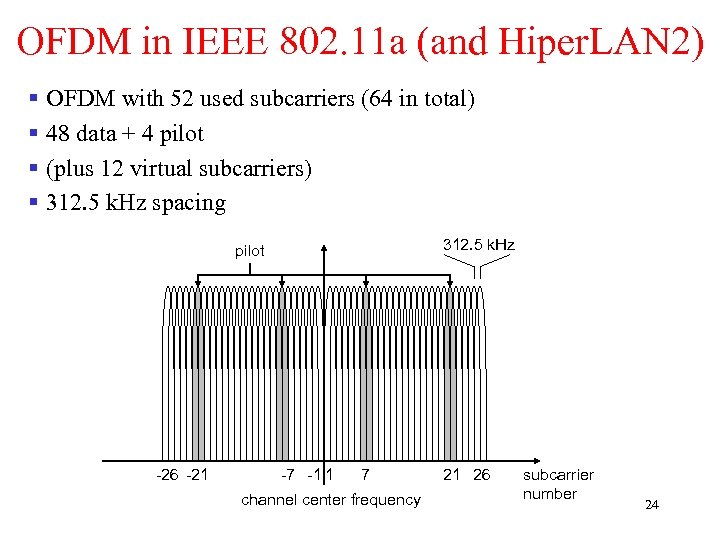 OFDM in IEEE 802. 11 a (and Hiper. LAN 2) § OFDM with 52 used subcarriers (64 in total) § 48 data + 4 pilot § (plus 12 virtual subcarriers) § 312. 5 k. Hz spacing 312. 5 k. Hz pilot -26 -21 -7 -1 1 7 channel center frequency 21 26 subcarrier number 24
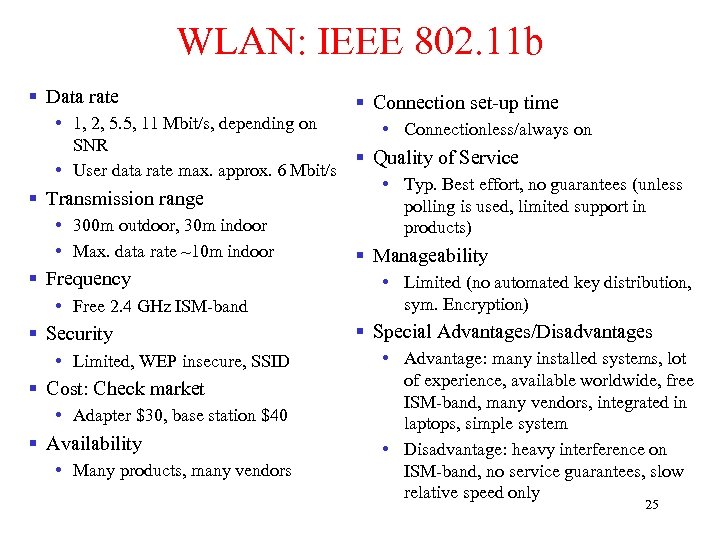 WLAN: IEEE 802. 11 b § Data rate § Connection set-up time • 1, 2, 5. 5, 11 Mbit/s, depending on • Connectionless/always on SNR § Quality of Service • User data rate max. approx. 6 Mbit/s • Typ. Best effort, no guarantees (unless § Transmission range polling is used, limited support in • 300 m outdoor, 30 m indoor products) • Max. data rate ~10 m indoor § Manageability § Frequency • Free 2. 4 GHz ISM-band § Security • Limited, WEP insecure, SSID § Cost: Check market • Adapter $30, base station $40 § Availability • Many products, many vendors • Limited (no automated key distribution, sym. Encryption) § Special Advantages/Disadvantages • Advantage: many installed systems, lot of experience, available worldwide, free ISM-band, many vendors, integrated in laptops, simple system • Disadvantage: heavy interference on ISM-band, no service guarantees, slow relative speed only 25
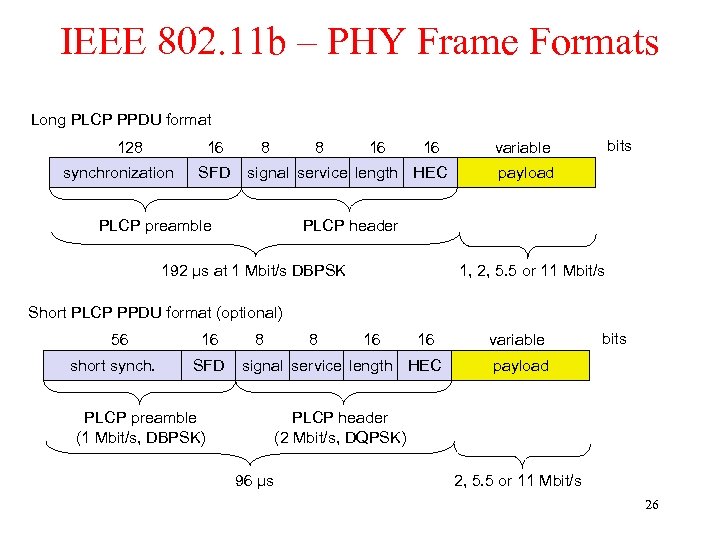 IEEE 802. 11 b – PHY Frame Formats Long PLCP PPDU format 128 16 synchronization SFD 8 8 16 16 signal service length HEC PLCP preamble bits variable payload PLCP header 192 µs at 1 Mbit/s DBPSK 1, 2, 5. 5 or 11 Mbit/s Short PLCP PPDU format (optional) 56 short synch. 16 SFD 8 8 16 16 signal service length HEC PLCP preamble (1 Mbit/s, DBPSK) variable bits payload PLCP header (2 Mbit/s, DQPSK) 96 µs 2, 5. 5 or 11 Mbit/s 26
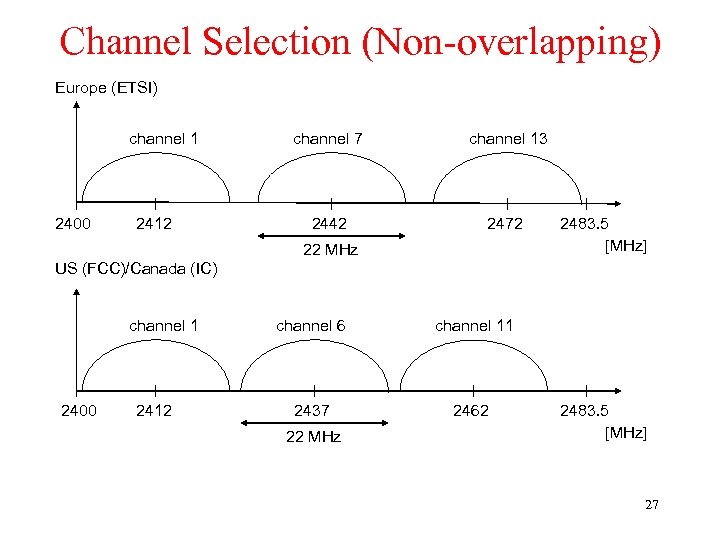 Channel Selection (Non-overlapping) Europe (ETSI) channel 1 2400 2412 channel 7 channel 13 2442 2472 22 MHz 2483. 5 [MHz] US (FCC)/Canada (IC) channel 1 2400 2412 channel 6 channel 11 2437 2462 22 MHz 2483. 5 [MHz] 27
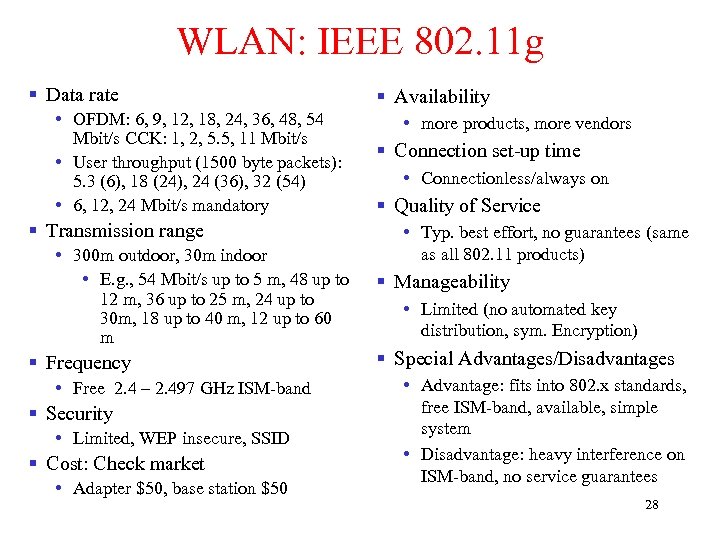 WLAN: IEEE 802. 11 g § Data rate • OFDM: 6, 9, 12, 18, 24, 36, 48, 54 Mbit/s CCK: 1, 2, 5. 5, 11 Mbit/s • User throughput (1500 byte packets): 5. 3 (6), 18 (24), 24 (36), 32 (54) • 6, 12, 24 Mbit/s mandatory § Transmission range • 300 m outdoor, 30 m indoor • E. g. , 54 Mbit/s up to 5 m, 48 up to 12 m, 36 up to 25 m, 24 up to 30 m, 18 up to 40 m, 12 up to 60 m § Frequency • Free 2. 4 – 2. 497 GHz ISM-band § Security • Limited, WEP insecure, SSID § Cost: Check market • Adapter $50, base station $50 § Availability • more products, more vendors § Connection set-up time • Connectionless/always on § Quality of Service • Typ. best effort, no guarantees (same as all 802. 11 products) § Manageability • Limited (no automated key distribution, sym. Encryption) § Special Advantages/Disadvantages • Advantage: fits into 802. x standards, free ISM-band, available, simple system • Disadvantage: heavy interference on ISM-band, no service guarantees 28
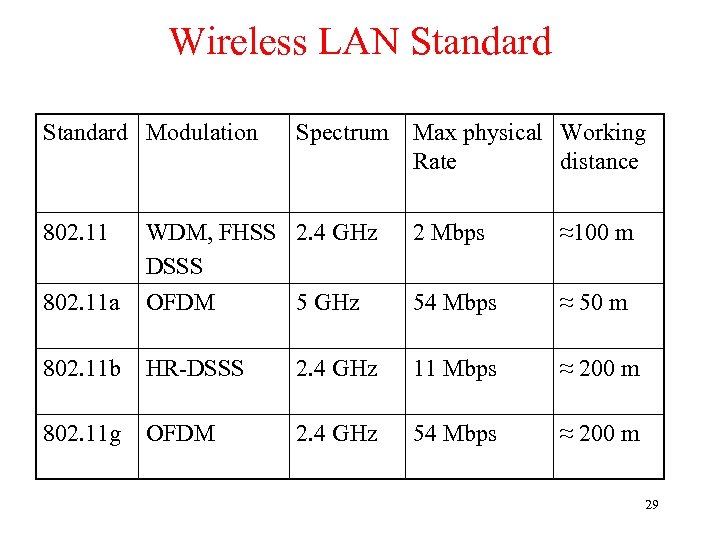 Wireless LAN Standard Modulation Spectrum Max physical Working Rate distance 802. 11 WDM, FHSS 2. 4 GHz DSSS 2 Mbps ≈100 m 802. 11 a OFDM 5 GHz 54 Mbps ≈ 50 m 802. 11 b HR-DSSS 2. 4 GHz 11 Mbps ≈ 200 m 802. 11 g OFDM 2. 4 GHz 54 Mbps ≈ 200 m 29
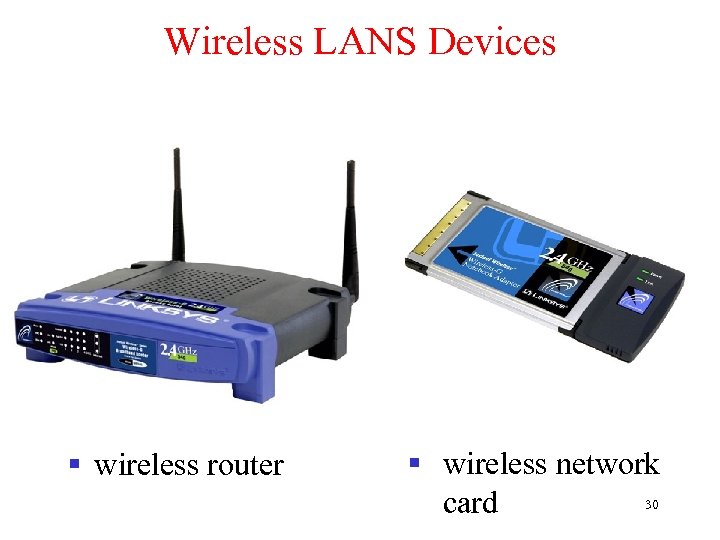 Wireless LANS Devices § wireless router § wireless network 30 card
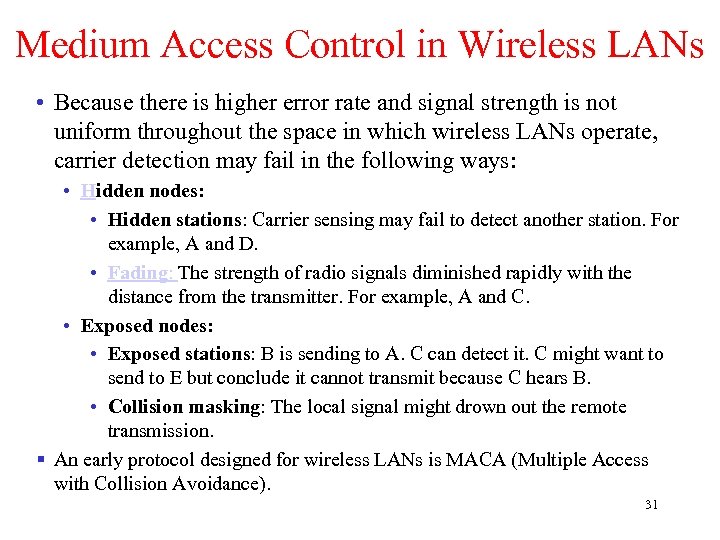 Medium Access Control in Wireless LANs • Because there is higher error rate and signal strength is not uniform throughout the space in which wireless LANs operate, carrier detection may fail in the following ways: • Hidden nodes: • Hidden stations: Carrier sensing may fail to detect another station. For example, A and D. • Fading: The strength of radio signals diminished rapidly with the distance from the transmitter. For example, A and C. • Exposed nodes: • Exposed stations: B is sending to A. C can detect it. C might want to send to E but conclude it cannot transmit because C hears B. • Collision masking: The local signal might drown out the remote transmission. § An early protocol designed for wireless LANs is MACA (Multiple Access with Collision Avoidance). 31
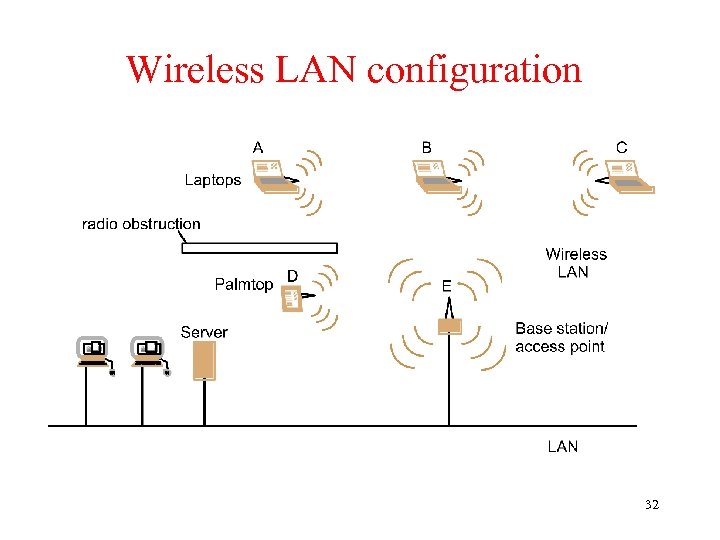 Wireless LAN configuration 32
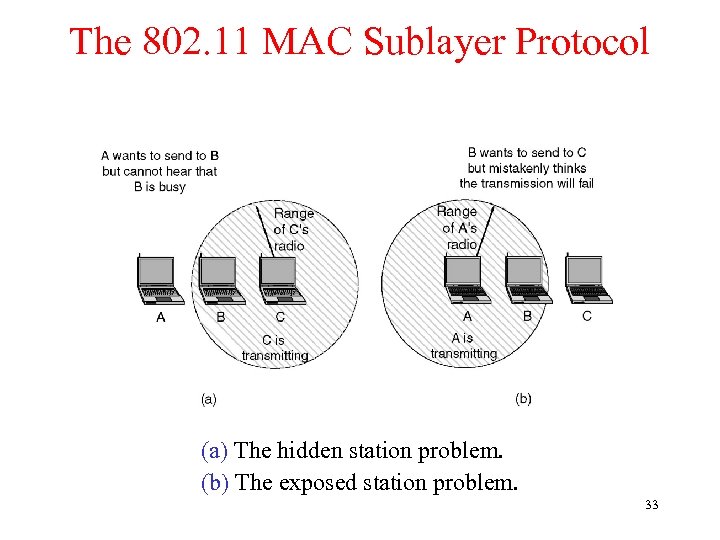 The 802. 11 MAC Sublayer Protocol (a) The hidden station problem. (b) The exposed station problem. 33
 MACA and MACAW § MACAW (MACA for Wireless) is a revision of MACA. • The sender senses the carrier to see and transmits a RTS (Request To Send) frame if no nearby station transmits a RTS. • The receiver replies with a CTS (Clear To Send) frame. • Neighbors • see CTS, then keep quiet. • see RTS but not CTS, then keep quiet until the CTS is back to the sender. • The receiver sends an ACK when receiving an frame. • Neighbors keep silent until see ACK. • Collisions • There is no collision detection. • The senders know collision when they don’t receive CTS. • They each wait for the exponential backoff time. 34
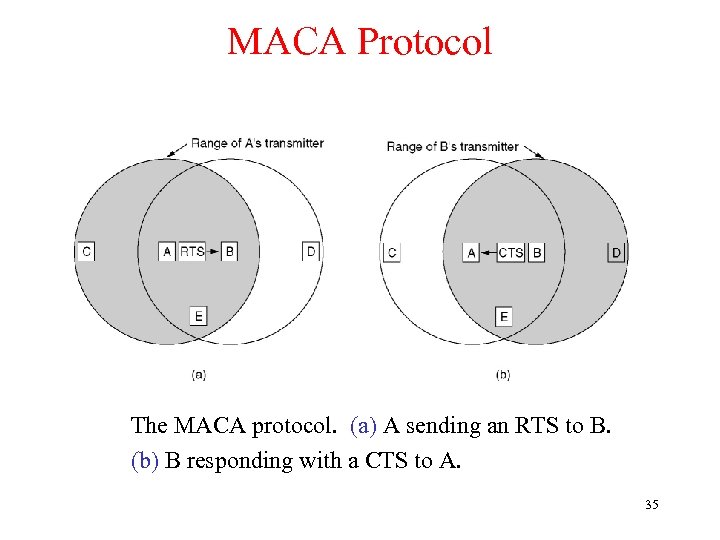 MACA Protocol The MACA protocol. (a) A sending an RTS to B. (b) B responding with a CTS to A. 35
 802. 11 MAC Sublayer § MAC layer tasks: • Control medium access • Roaming, authentication, power conservation § Traffic services • DCF (Distributed Coordination Function) (mandatory): Asynchronous Data Service • Only service available in ad-hoc network mode • does not use any kind of central control • exchange of data packets based on “best-effort” • support of broadcast and multicast • PCF (Point Coordination Function) (optional): Time-Bounded Service • uses the base station to control all activity in its cell 36
 802. 11 MAC Sublayer § PCF and DCF can coexist within one cell by carefully defining the interframe time interval. The four intervals are depicted: • SIFS (Short Inter. Frame Spacing) is used to allow the parties in a single dialog the chance to go first including letting the receiver send a CTS and an ACK and the sender to transmit the next fragment. • PIFS (PCF Inter. Frame Spacing) is used to allow the base station to send a beacon frame or poll frame. • DIFS (DCF Inter. Frame Spacing) is used to allow any station to grab the channel and to send a new frame. • EIFS (Extended Inter. Frame Spacing) is used only by a station that has just received a bad or unknown frame to report the bad frame. § The result MAC scheme used in 802. 11 is carrier sensing multiple access with collision avoidance (CSMA/CA) that is based on MACAW. • Use NAV (Network Allocation Vector) to indicate the channel is busy. 37
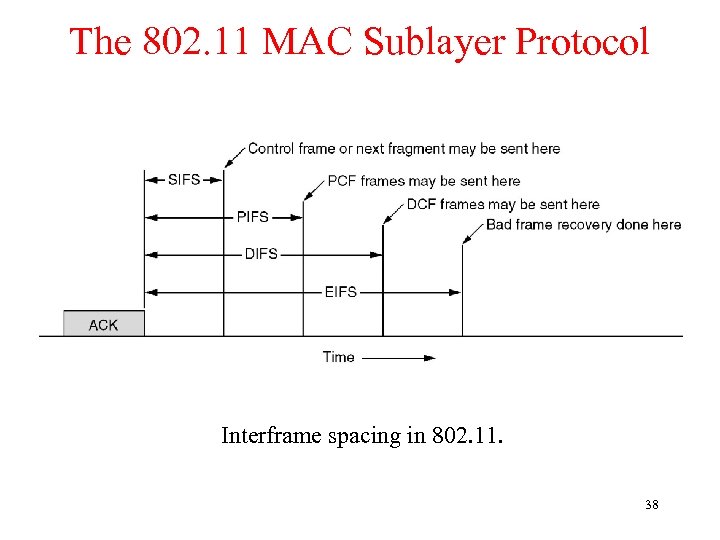 The 802. 11 MAC Sublayer Protocol Interframe spacing in 802. 11. 38
 802. 11 MAC Sublayer § Access methods • DFWMAC-DCF (distributed foundation wireless medium access control. Distributed Coordination Function) CSMA/CA (mandatory) • collision avoidance via randomized „back-off“ mechanism • minimum distance between consecutive packets • ACK packet for acknowledgements (not for broadcasts) • DFWMAC-DCF w/ RTS/CTS (optional) • avoids hidden terminal problem • DFWMAC- PCF (Point Coordination Function) (optional) • access point polls terminals according to a list • Completely controlled by the base station. No collisions occur. • A beacon frame which contains system parameters is periodically (10 to 100 times per second) broadcasted to invite new stations to sign up for polling service. 39
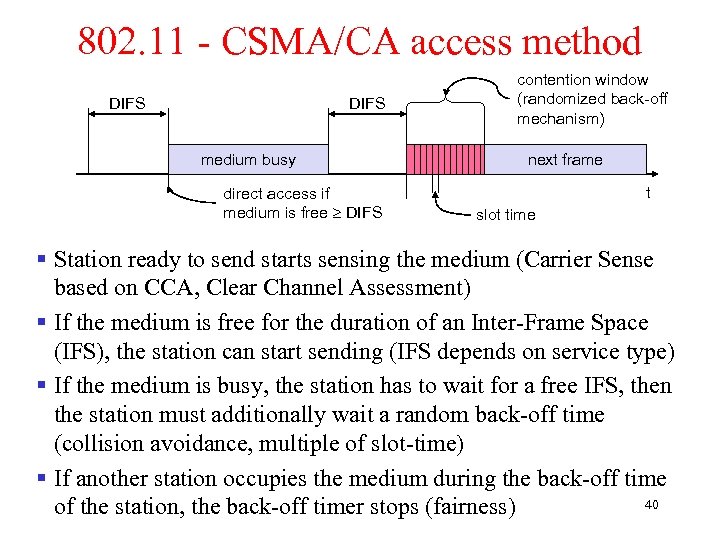 802. 11 - CSMA/CA access method DIFS medium busy direct access if medium is free DIFS contention window (randomized back-off mechanism) next frame t slot time § Station ready to send starts sensing the medium (Carrier Sense based on CCA, Clear Channel Assessment) § If the medium is free for the duration of an Inter-Frame Space (IFS), the station can start sending (IFS depends on service type) § If the medium is busy, the station has to wait for a free IFS, then the station must additionally wait a random back-off time (collision avoidance, multiple of slot-time) § If another station occupies the medium during the back-off time 40 of the station, the back-off timer stops (fairness)
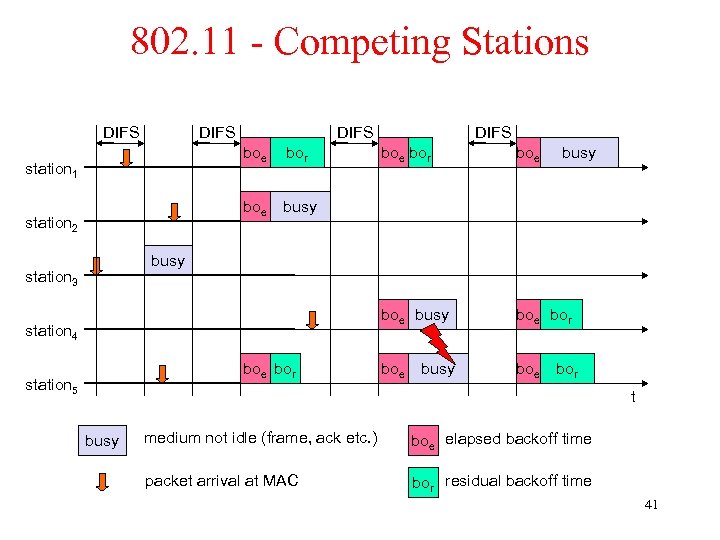 802. 11 - Competing Stations DIFS boe station 2 boe bor boe busy station 1 bor DIFS busy boe bor boe busy station 3 station 4 boe bor station 5 busy bor t busy medium not idle (frame, ack etc. ) boe elapsed backoff time packet arrival at MAC bor residual backoff time 41
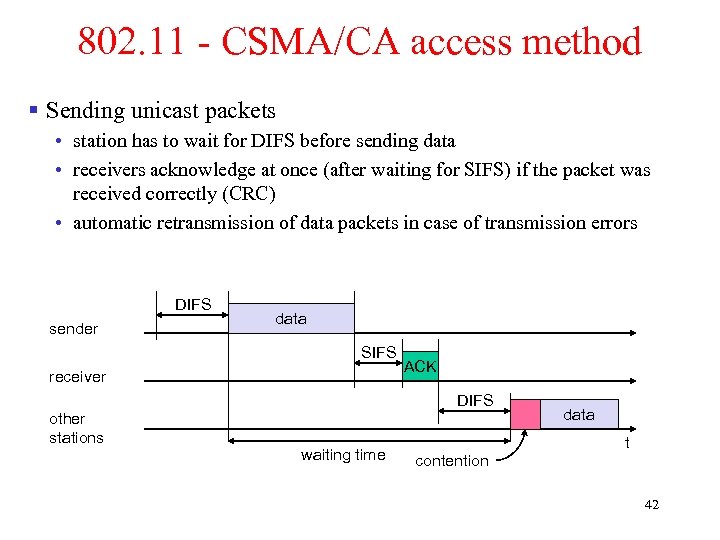 802. 11 - CSMA/CA access method § Sending unicast packets • station has to wait for DIFS before sending data • receivers acknowledge at once (after waiting for SIFS) if the packet was received correctly (CRC) • automatic retransmission of data packets in case of transmission errors DIFS sender data SIFS receiver ACK DIFS other stations waiting time data t contention 42
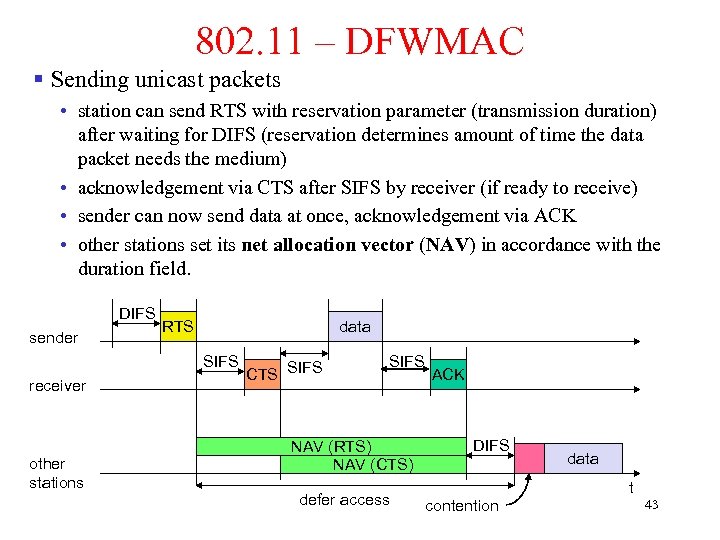 802. 11 – DFWMAC § Sending unicast packets • station can send RTS with reservation parameter (transmission duration) after waiting for DIFS (reservation determines amount of time the data packet needs the medium) • acknowledgement via CTS after SIFS by receiver (if ready to receive) • sender can now send data at once, acknowledgement via ACK • other stations set its net allocation vector (NAV) in accordance with the duration field. DIFS sender RTS data SIFS receiver other stations CTS SIFS NAV (RTS) NAV (CTS) defer access ACK DIFS data t contention 43
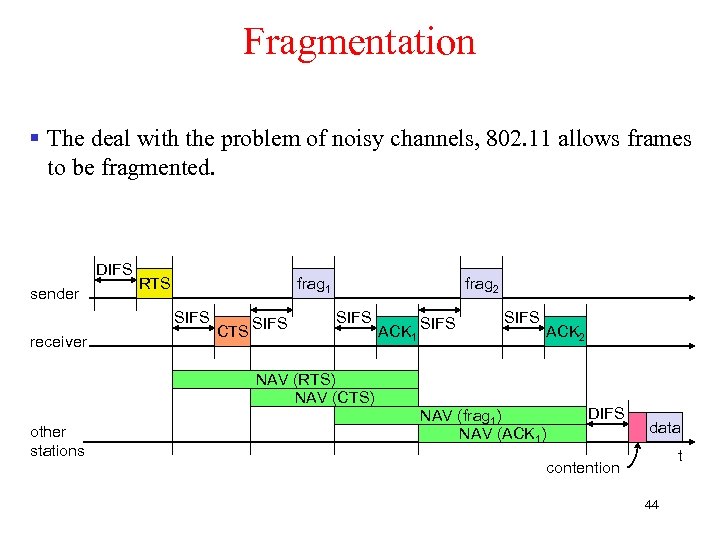 Fragmentation § The deal with the problem of noisy channels, 802. 11 allows frames to be fragmented. DIFS sender RTS frag 1 SIFS receiver CTS SIFS frag 2 SIFS ACK 1 SIFS ACK 2 NAV (RTS) NAV (CTS) other stations NAV (frag 1) NAV (ACK 1) DIFS data t contention 44
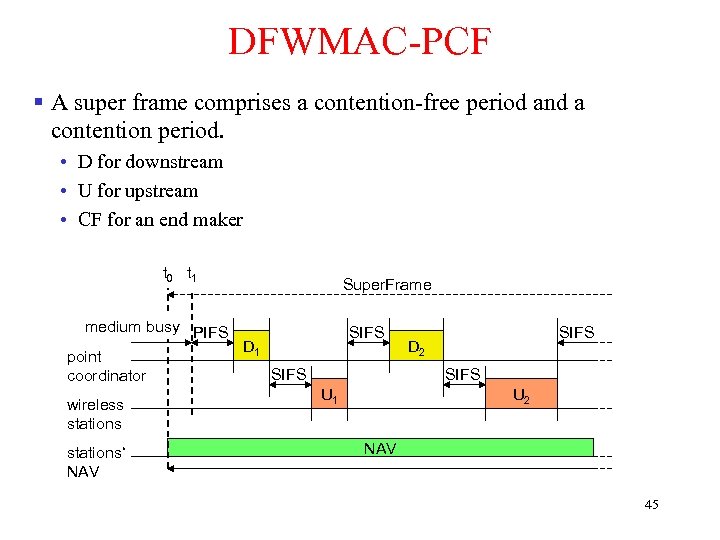 DFWMAC-PCF § A super frame comprises a contention-free period and a contention period. • D for downstream • U for upstream • CF for an end maker t 0 t 1 Super. Frame medium busy PIFS D 1 point SIFS coordinator wireless stations‘ NAV SIFS D 2 SIFS U 1 U 2 NAV 45
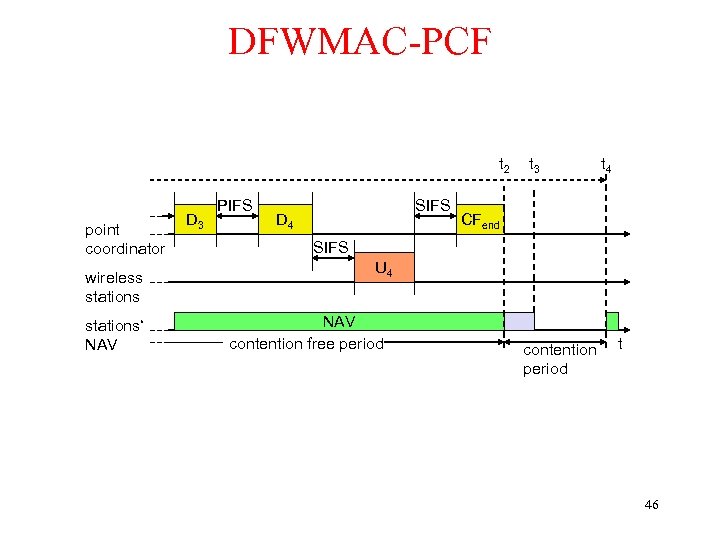 DFWMAC-PCF t 2 point coordinator wireless stations‘ NAV D 3 PIFS SIFS D 4 t 3 t 4 CFend SIFS U 4 NAV contention free period contention period t 46
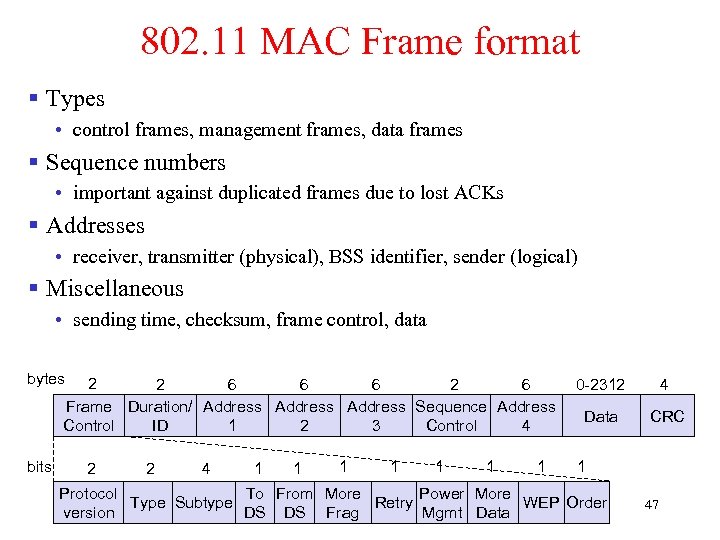 802. 11 MAC Frame format § Types • control frames, management frames, data frames § Sequence numbers • important against duplicated frames due to lost ACKs § Addresses • receiver, transmitter (physical), BSS identifier, sender (logical) § Miscellaneous • sending time, checksum, frame control, data bytes 2 2 6 6 6 2 6 Frame Duration/ Address Sequence Address Control ID 1 2 3 Control 4 bits 2 2 4 1 1 1 1 0 -2312 4 Data CRC 1 Protocol To From More Power More Type Subtype Retry WEP Order version DS DS Frag Mgmt Data 47
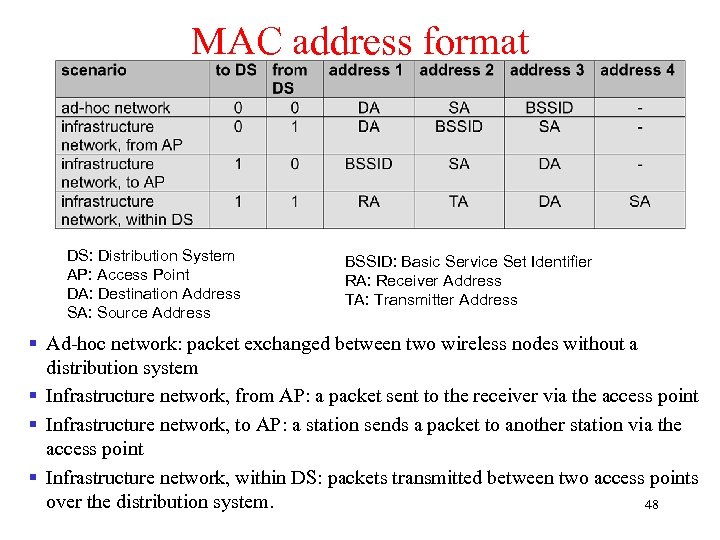 MAC address format DS: Distribution System AP: Access Point DA: Destination Address SA: Source Address BSSID: Basic Service Set Identifier RA: Receiver Address TA: Transmitter Address § Ad-hoc network: packet exchanged between two wireless nodes without a distribution system § Infrastructure network, from AP: a packet sent to the receiver via the access point § Infrastructure network, to AP: a station sends a packet to another station via the access point § Infrastructure network, within DS: packets transmitted between two access points over the distribution system. 48
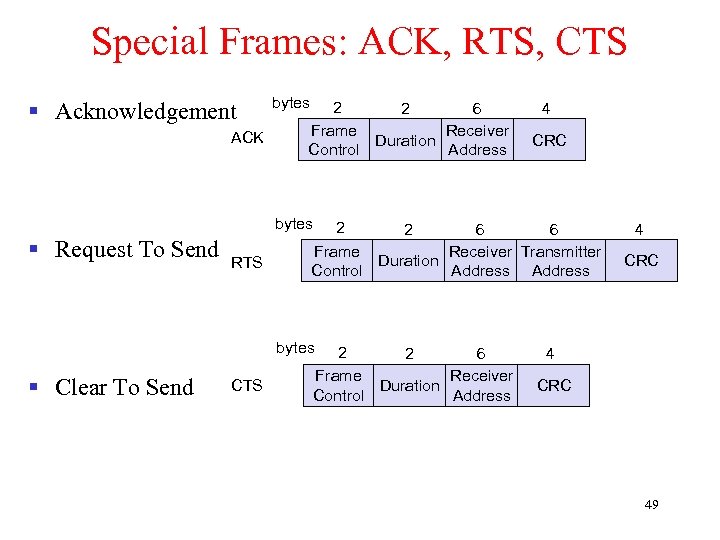 Special Frames: ACK, RTS, CTS § Acknowledgement ACK bytes 2 2 6 Frame Receiver Duration Control Address 4 CRC bytes § Request To Send RTS 2 2 6 6 Frame Receiver Transmitter Duration Control Address bytes § Clear To Send CTS 2 2 6 Frame Receiver Duration Control Address 4 CRC 49
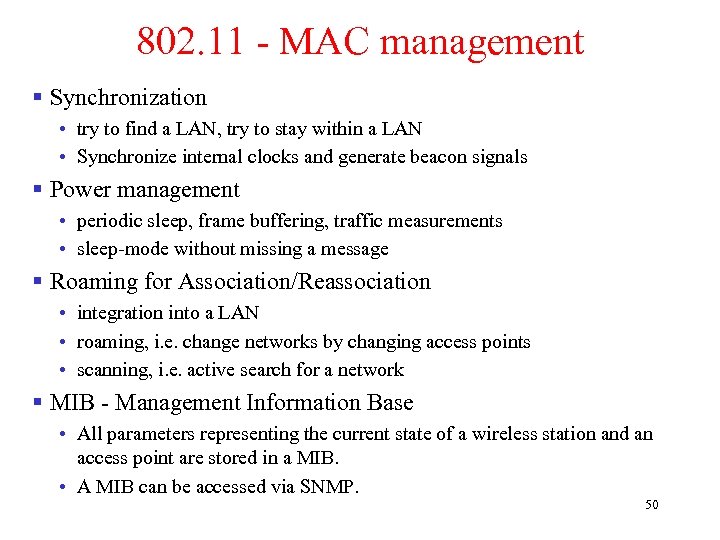 802. 11 - MAC management § Synchronization • try to find a LAN, try to stay within a LAN • Synchronize internal clocks and generate beacon signals § Power management • periodic sleep, frame buffering, traffic measurements • sleep-mode without missing a message § Roaming for Association/Reassociation • integration into a LAN • roaming, i. e. change networks by changing access points • scanning, i. e. active search for a network § MIB - Management Information Base • All parameters representing the current state of a wireless station and an access point are stored in a MIB. • A MIB can be accessed via SNMP. 50
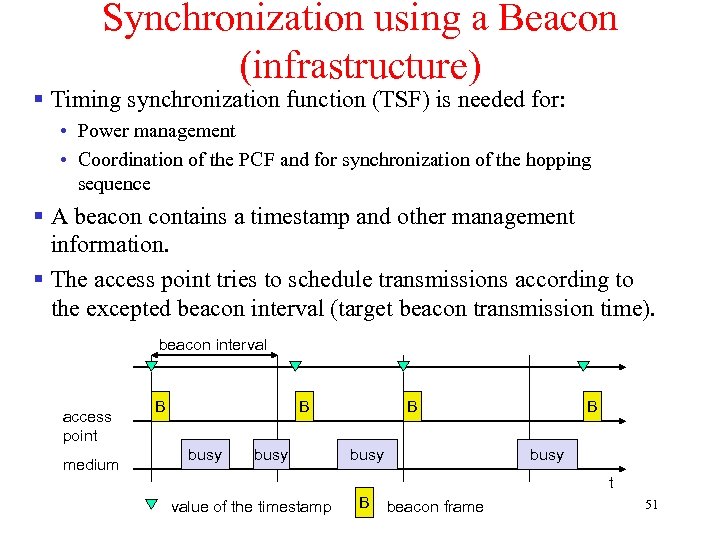 Synchronization using a Beacon (infrastructure) § Timing synchronization function (TSF) is needed for: • Power management • Coordination of the PCF and for synchronization of the hopping sequence § A beacon contains a timestamp and other management information. § The access point tries to schedule transmissions according to the excepted beacon interval (target beacon transmission time). beacon interval access point medium B B busy t value of the timestamp B beacon frame 51
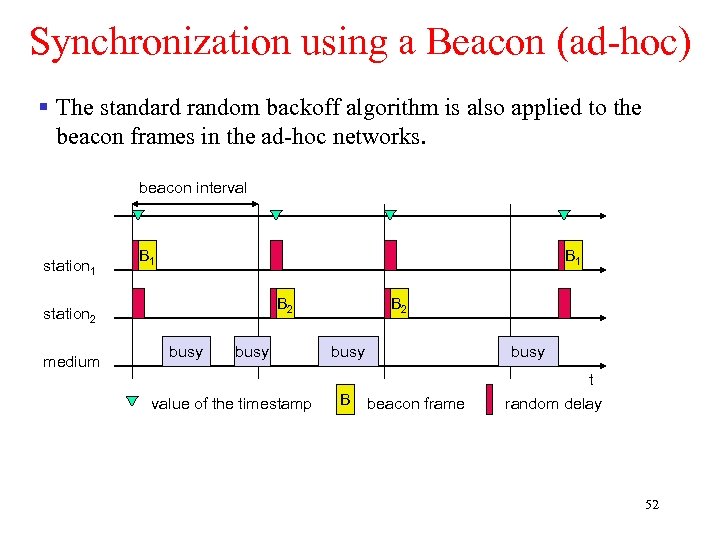 Synchronization using a Beacon (ad-hoc) § The standard random backoff algorithm is also applied to the beacon frames in the ad-hoc networks. beacon interval station 1 B 1 B 2 station 2 medium busy value of the timestamp B 2 busy B busy beacon frame t random delay 52
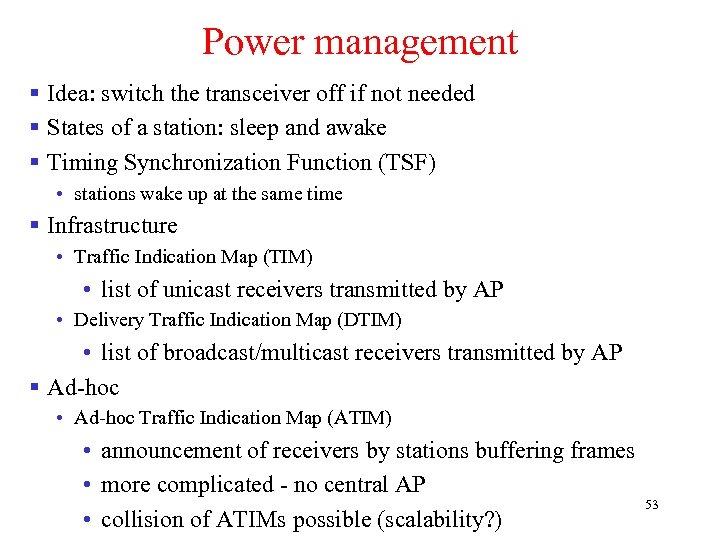 Power management § Idea: switch the transceiver off if not needed § States of a station: sleep and awake § Timing Synchronization Function (TSF) • stations wake up at the same time § Infrastructure • Traffic Indication Map (TIM) • list of unicast receivers transmitted by AP • Delivery Traffic Indication Map (DTIM) • list of broadcast/multicast receivers transmitted by AP § Ad-hoc • Ad-hoc Traffic Indication Map (ATIM) • announcement of receivers by stations buffering frames • more complicated - no central AP • collision of ATIMs possible (scalability? ) 53
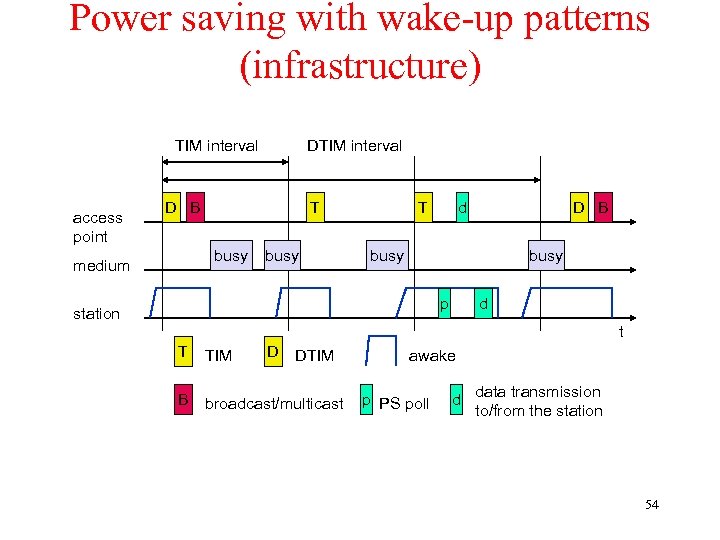 Power saving with wake-up patterns (infrastructure) TIM interval access point DTIM interval D B T busy medium busy T d D B busy p station d t T TIM D B broadcast/multicast DTIM awake p PS poll d data transmission to/from the station 54
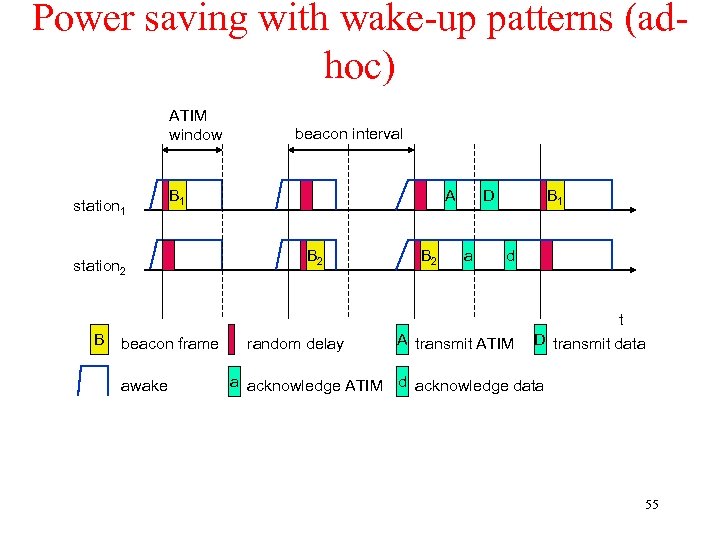 Power saving with wake-up patterns (adhoc) ATIM window station 1 B 1 station 2 B beacon frame awake beacon interval A B 2 random delay B 2 D a B 1 d A transmit ATIM t D transmit data a acknowledge ATIM d acknowledge data 55
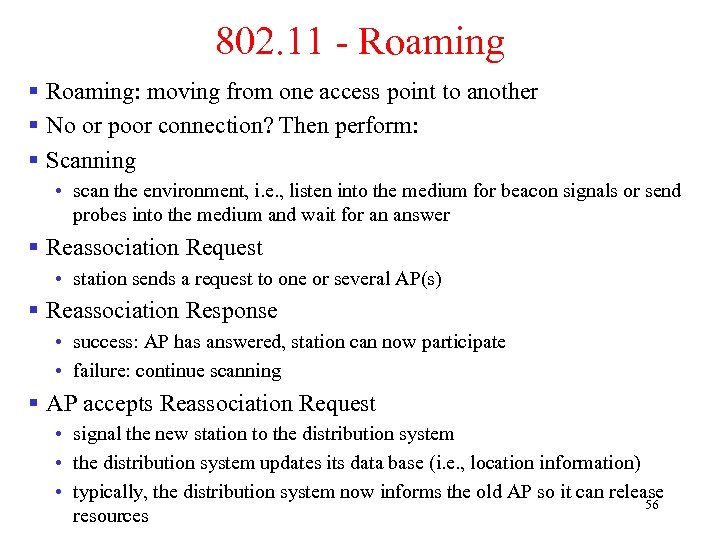 802. 11 - Roaming § Roaming: moving from one access point to another § No or poor connection? Then perform: § Scanning • scan the environment, i. e. , listen into the medium for beacon signals or send probes into the medium and wait for an answer § Reassociation Request • station sends a request to one or several AP(s) § Reassociation Response • success: AP has answered, station can now participate • failure: continue scanning § AP accepts Reassociation Request • signal the new station to the distribution system • the distribution system updates its data base (i. e. , location information) • typically, the distribution system now informs the old AP so it can release 56 resources
 WLAN: IEEE 802. 11 – Current and Future Developments § 802. 11 c provides required information to ensure proper bridge operations. § 802. 11 d: Regulatory Domain Update – completed in 2001, amended in 2003 § 802. 11 e: MAC Enhancements – Qo. S – ongoing • Enhance the current 802. 11 MAC to expand support for applications with Quality of Service requirements, and in the capabilities and efficiency of the protocol. § 802. 11 f: Inter-Access Point Protocol – completed in 2003 • Establish an Inter-Access Point Protocol for data exchange via the distribution system. § 802. 11 h: Spectrum Managed 802. 11 a (DCS, TPC) – completed in 2003 § 802. 11 i: Enhanced Security Mechanisms – completed in 2004 • Enhance the current 802. 11 MAC to provide improvements in security and replace 57 Wired Equivalent Privacy (WEP).
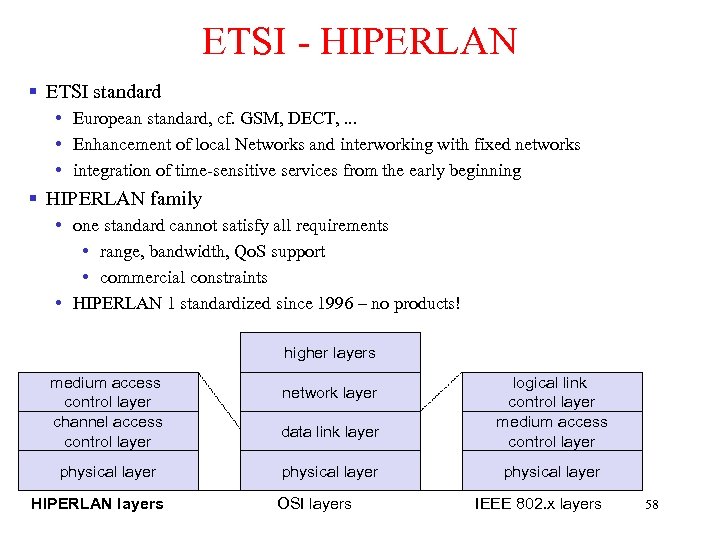 ETSI - HIPERLAN § ETSI standard • European standard, cf. GSM, DECT, . . . • Enhancement of local Networks and interworking with fixed networks • integration of time-sensitive services from the early beginning § HIPERLAN family • one standard cannot satisfy all requirements • range, bandwidth, Qo. S support • commercial constraints • HIPERLAN 1 standardized since 1996 – no products! higher layers medium access control layer channel access control layer physical layer HIPERLAN layers network layer data link layer physical layer OSI layers logical link control layer medium access control layer physical layer IEEE 802. x layers 58
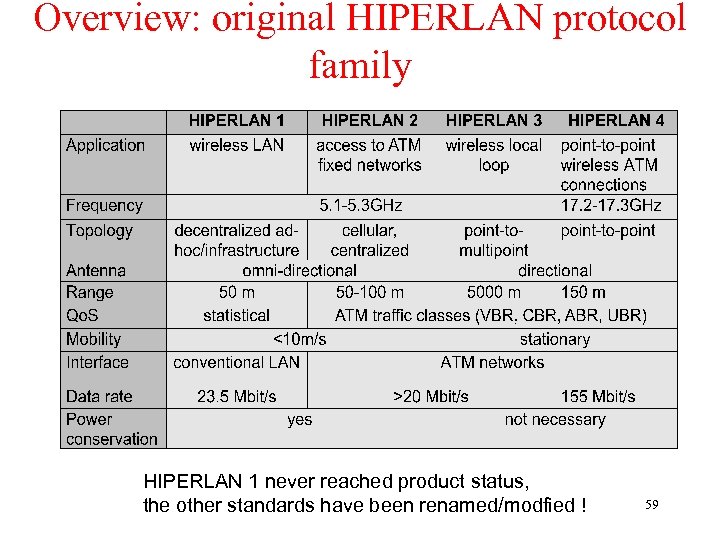 Overview: original HIPERLAN protocol family HIPERLAN 1 never reached product status, the other standards have been renamed/modfied ! 59
 HIPERLAN - Characteristics § Data transmission • point-to-point, point-to-multipoint, connectionless • 23. 5 Mbit/s, 1 W power, 2383 byte max. packet size § Services • asynchronous and time-bounded services with hierarchical priorities • compatible with ISO MAC § Topology • infrastructure or ad-hoc networks • transmission range can be larger then coverage of a single node („forwarding“ integrated in mobile terminals) § Further mechanisms • power saving, encryption, checksums 60
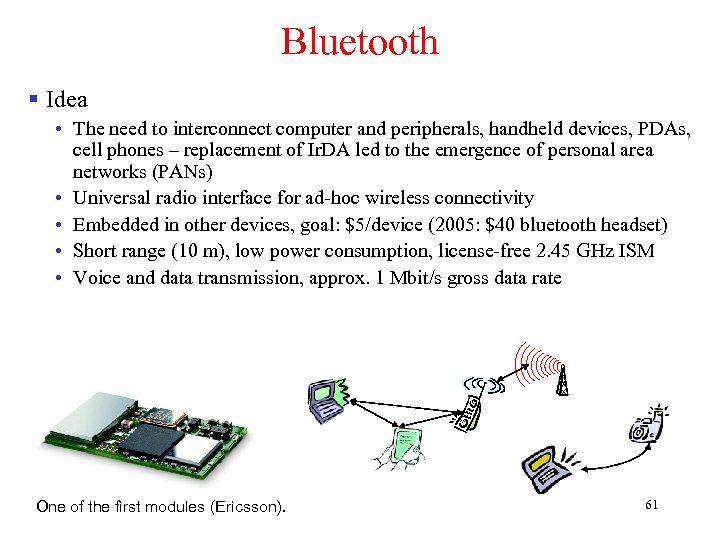 Bluetooth § Idea • The need to interconnect computer and peripherals, handheld devices, PDAs, cell phones – replacement of Ir. DA led to the emergence of personal area networks (PANs) • Universal radio interface for ad-hoc wireless connectivity • Embedded in other devices, goal: $5/device (2005: $40 bluetooth headset) • Short range (10 m), low power consumption, license-free 2. 45 GHz ISM • Voice and data transmission, approx. 1 Mbit/s gross data rate One of the first modules (Ericsson). 61
 Bluetooth § History • 1994: Ericsson (Mattison/Haartsen), “MC-link” project • Renaming of the project: Bluetooth according to Harald “Blåtand” Gormsen [son of Gorm], King of Denmark in the 10 th century ) • 1998: foundation of Bluetooth SIG, www. bluetooth. org (was: • 1999: erection of a rune stone at Ercisson/Lund ; -) • 2001: first consumer products for mass market, spec. version 1. 1 released • Nov. 8, 2004 (Overland Park, KS): Version 2. 0 + EDR (Enhanced Data Rate) is announced. Up to 3 Mbps. § Bluetooth Special Interest Group (SIG) • • Original founding members: Ericsson, Intel, IBM, Nokia, Toshiba Added promoters: 3 Com, Agere (was: Lucent), Microsoft, Motorola > 2500 members Common specification and certification of products § IEEE founded IEEE 802. 15 for Wireless Personal Area Networks (WPAN) and approved a Bluetooth-based standard. 62
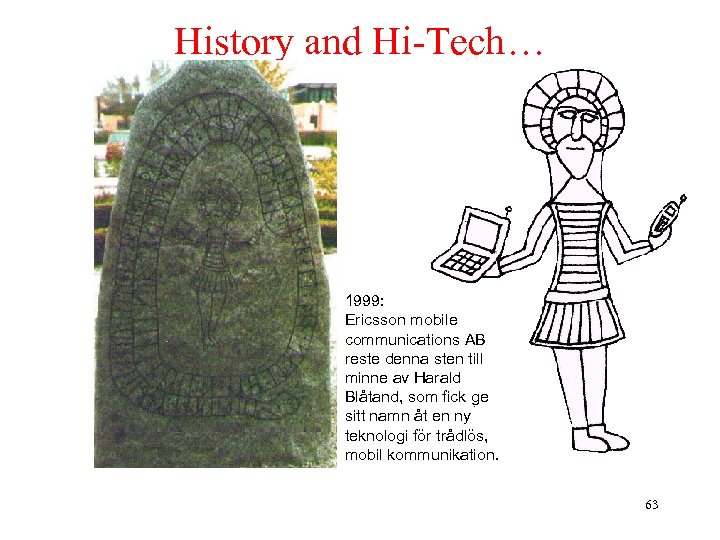 History and Hi-Tech… 1999: Ericsson mobile communications AB reste denna sten till minne av Harald Blåtand, som fick ge sitt namn åt en ny teknologi för trådlös, mobil kommunikation. 63
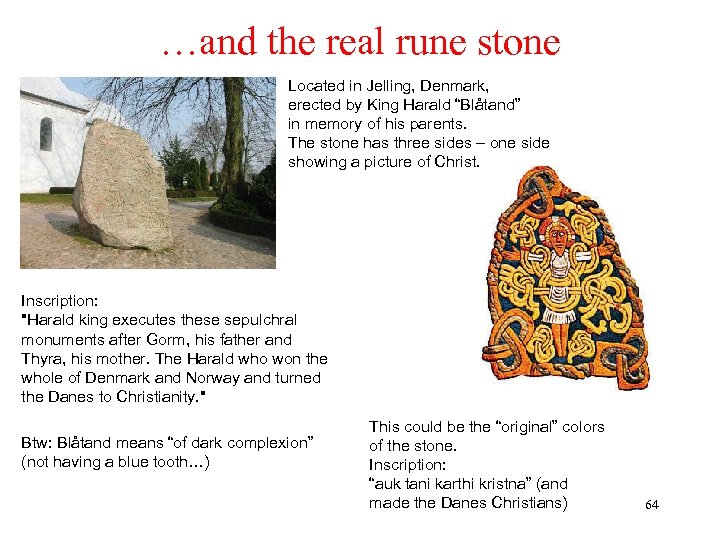 …and the real rune stone Located in Jelling, Denmark, erected by King Harald “Blåtand” in memory of his parents. The stone has three sides – one side showing a picture of Christ. Inscription: "Harald king executes these sepulchral monuments after Gorm, his father and Thyra, his mother. The Harald who won the whole of Denmark and Norway and turned the Danes to Christianity. " Btw: Blåtand means “of dark complexion” (not having a blue tooth…) This could be the “original” colors of the stone. Inscription: “auk tani karthi kristna” (and made the Danes Christians) 64
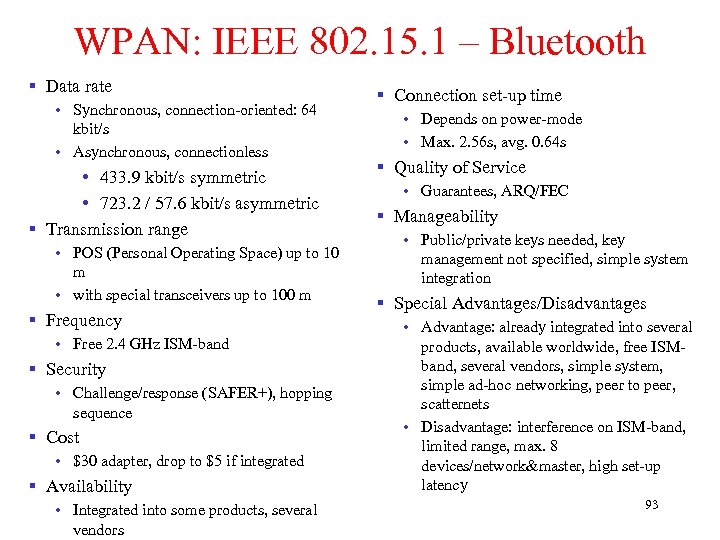
 Characteristics § 2. 4 GHz ISM band, 79 RF channels, 1 MHz carrier spacing • Channel 0: 2402 MHz … channel 78: 2480 MHz • GFSK modulation, 1 -100 m. W transmit power § FHSS and TDD • Frequency hopping with 1600 hops/s • Hopping sequence in a pseudo random fashion, determined by a master • Time division duplex for send/receive separation § Two type of links: • Voice link – SCO (Synchronous Connection Oriented) • FEC (forward error correction), no retransmission, 64 kbit/s duplex, pointto-point, circuit switched • Data link – ACL (Asynchronous Connectionless) • Asynchronous, fast acknowledge, point-to-multipoint, up to 433. 9 kbit/s symmetric or 723. 2/57. 6 kbit/s asymmetric, packet switched § Topology: Overlapping piconets (stars) forming a scatternet 65
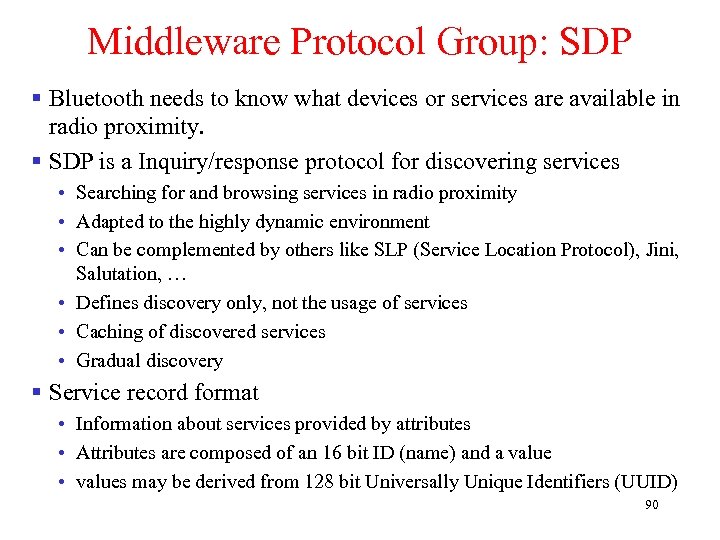
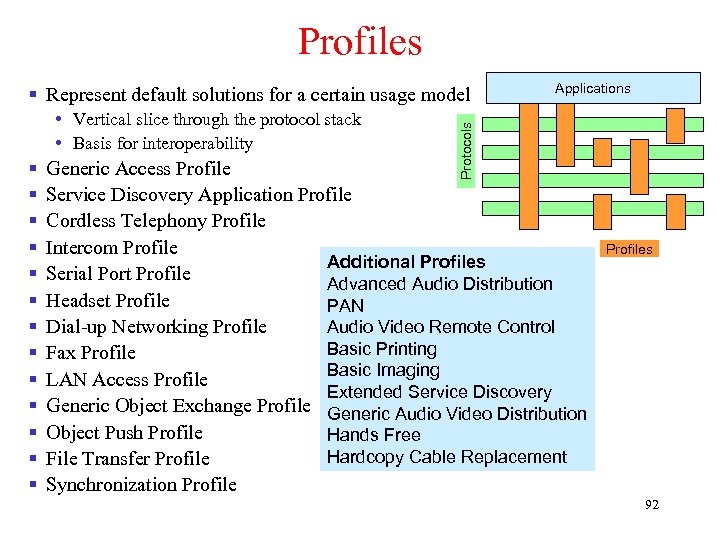
 Protocol Specification § The Bluetooth specification can be divided into: • A core specification which describes the protocols from physical layer to the data link control • Profile specifications describe many protocols and functions need to adapt the wireless Bluetooth technology to legacy and new applications. § The protocol stack of Bluetooth is logically partitioned into three layers: the core protocol group, the middleware group, and the application group. § The transport protocol group comprise the following elements: • Radio: specification of the air interface – frequencies, modulation, power • Baseband: connection establishment, packet formats, timing, Qo. S • Link management protocol: link set-up and management between devices including security functions and parameter negotiation • Logical link control and adaptation protocol (L 2 CAP): adaptation of higher layers to the baseband • Service discovery protocol: Device discovery plus querying of service characteristics 66
 Bluetooth Specification § The Bluetooth specification can be divided into: • A core specification which describes the protocols from physical layer to the data link control • Profile specifications describe many protocols and functions need to adapt the wireless Bluetooth technology to legacy and new applications. § The core protocols comprise the following elements: • Radio: specification of the air interface – frequencies, modulation, power • Baseband: connection establishment, packet formats, timing, Qo. S • Link management protocol: link set-up and management between devices including security functions and parameter negotiation • Logical link control and adaptation protocol (L 2 CAP): adaptation of higher layers to the baseband 67
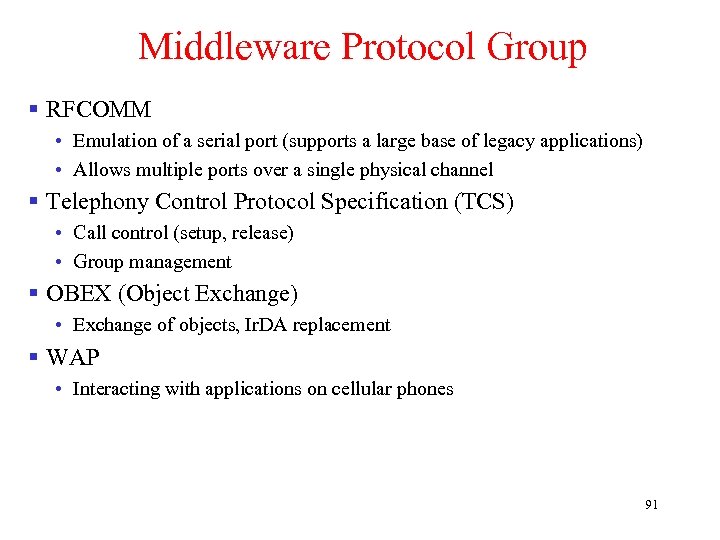
 Bluetooth Specification § The middleware protocol group comprises of: • Radio Frequency Communications (RFCOMM) emulates a serial line interface such as EIA-232 or RS-232 • Service discovery protocol (SDP): Device discovery plus querying of service characteristics • Infrared Data Association (Ir. DA) • The telephony control protocol specification – binary (TCS BIN) describes a bit-oriented protocol that defines voice and data calls between Bluetooth devices. • The host controller interface (HCI) provides a command interface to the baseband controller and link manager, and access to the hardware status and control registers. • TCP/IP can run on PPP or Bluetooth network encapsulation protocol (BNEP). § The application group consists of applications: • Modem dialer • Web-browsing client • Calendar and business card objects (v. Calendar/v. Card) can be exchanged using 68 the object exchange protocol (OBEX).
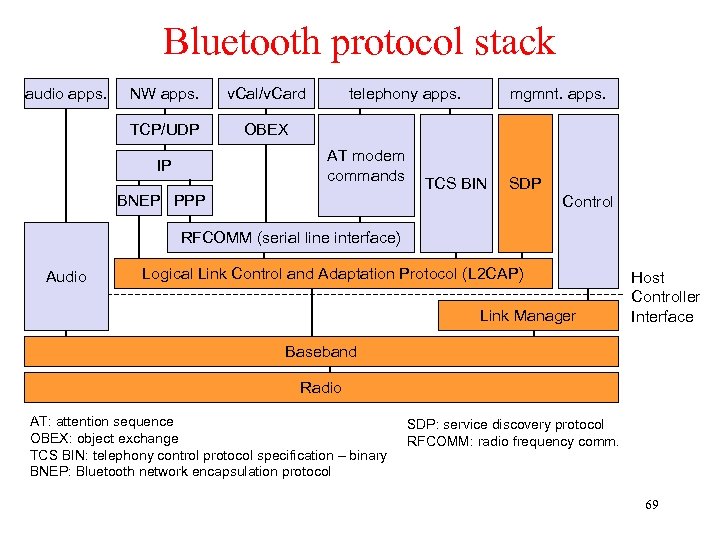 Bluetooth protocol stack audio apps. NW apps. v. Cal/v. Card TCP/UDP telephony apps. OBEX AT modem commands IP BNEP PPP mgmnt. apps. TCS BIN SDP Control RFCOMM (serial line interface) Audio Logical Link Control and Adaptation Protocol (L 2 CAP) Link Manager Host Controller Interface Baseband Radio AT: attention sequence OBEX: object exchange TCS BIN: telephony control protocol specification – binary BNEP: Bluetooth network encapsulation protocol SDP: service discovery protocol RFCOMM: radio frequency comm. 69
 Forming a Bluetooth Network: Piconet § Collection of devices connected in an ad hoc fashion § One unit acts as master and the others as slaves for the lifetime of the piconet § Master determines hopping pattern, slaves have to synchronize § Each piconet has a unique hopping pattern § Participation in a piconet = synchronization to hopping sequence § Each piconet has one master and up to 7 simultaneous slaves (> 200 could be parked) P S S M P SB S P M=Master S=Slave SB P=Parked SB=Standby 70
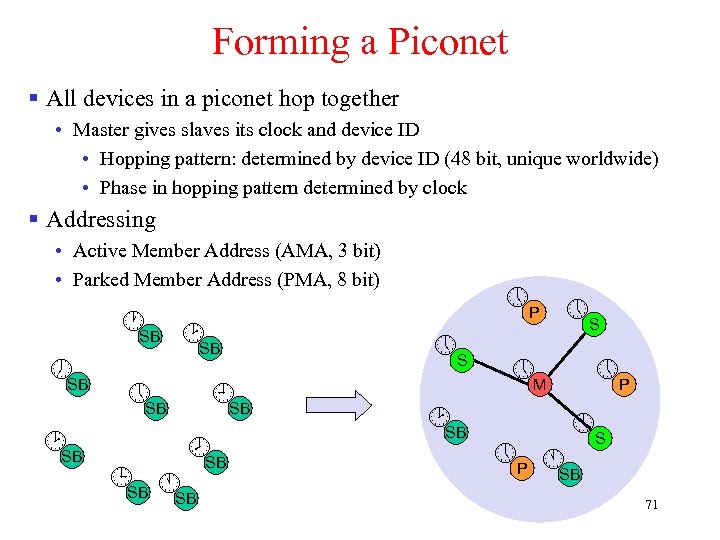 Forming a Piconet § All devices in a piconet hop together • Master gives slaves its clock and device ID • Hopping pattern: determined by device ID (48 bit, unique worldwide) • Phase in hopping pattern determined by clock § Addressing • Active Member Address (AMA, 3 bit) • Parked Member Address (PMA, 8 bit) SB SB SB S SB P S M P S P SB 71
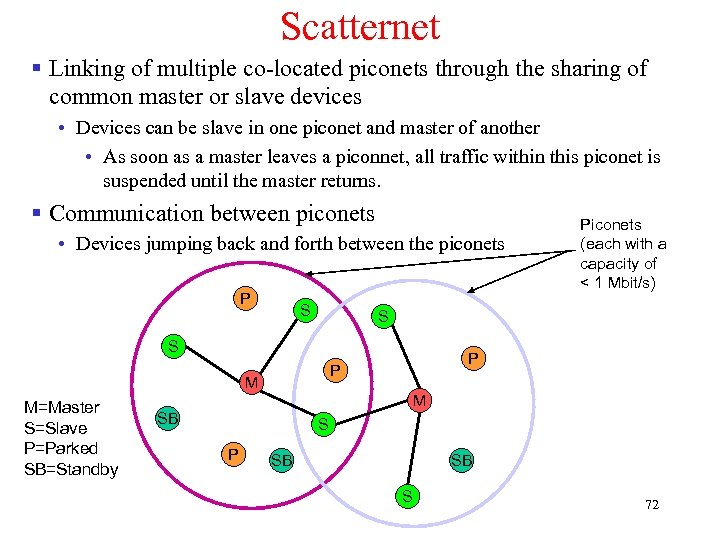 Scatternet § Linking of multiple co-located piconets through the sharing of common master or slave devices • Devices can be slave in one piconet and master of another • As soon as a master leaves a piconnet, all traffic within this piconet is suspended until the master returns. § Communication between piconets • Devices jumping back and forth between the piconets P S S S P P M M=Master S=Slave P=Parked SB=Standby Piconets (each with a capacity of < 1 Mbit/s) M SB S P SB SB S 72
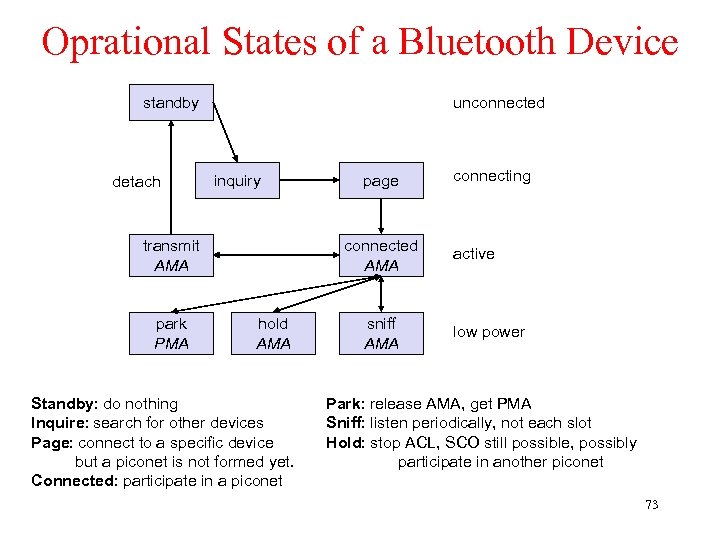 Oprational States of a Bluetooth Device unconnected standby detach inquiry transmit AMA park PMA page connected AMA hold AMA Standby: do nothing Inquire: search for other devices Page: connect to a specific device but a piconet is not formed yet. Connected: participate in a piconet sniff AMA connecting active low power Park: release AMA, get PMA Sniff: listen periodically, not each slot Hold: stop ACL, SCO still possible, possibly participate in another piconet 73
 Radio and Baseband Layer § The time between two hops is called a slot, which is an interval of 625 µs. § Bluetooth transceivers use Gaussian FSK for modulation in three classes: • Power class 1: 1 – 100 m. W, 100 m • Power class 2: 0. 25 m. W – 2. 5 m. W, 10 m • Power class 3: maximum 1 m. W § TDD is used for separation of the transmission directions. 1 -slot, 3 -slot, and 5 -slot packets are available. § The packet consists of three fields: • Access code • Packet header • Payload 74
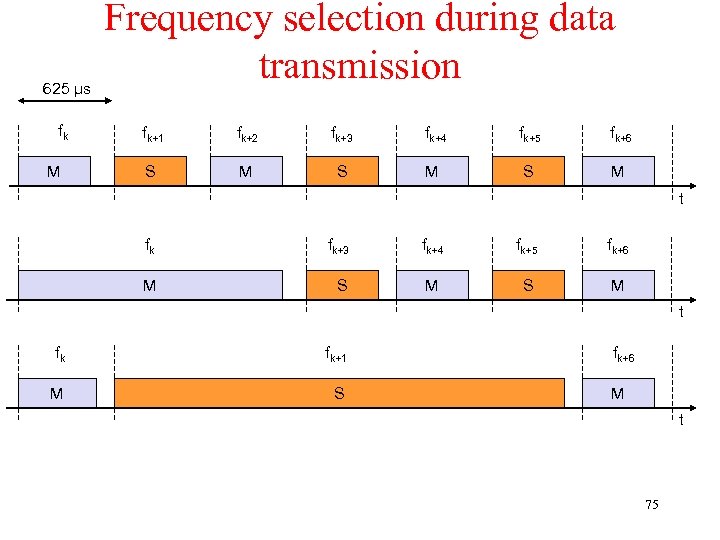 625 µs fk M Frequency selection during data transmission fk+1 fk+2 fk+3 fk+4 fk+5 fk+6 S M S M t fk fk+3 fk+4 fk+5 fk+6 M S M t fk fk+1 M S fk+6 M t 75
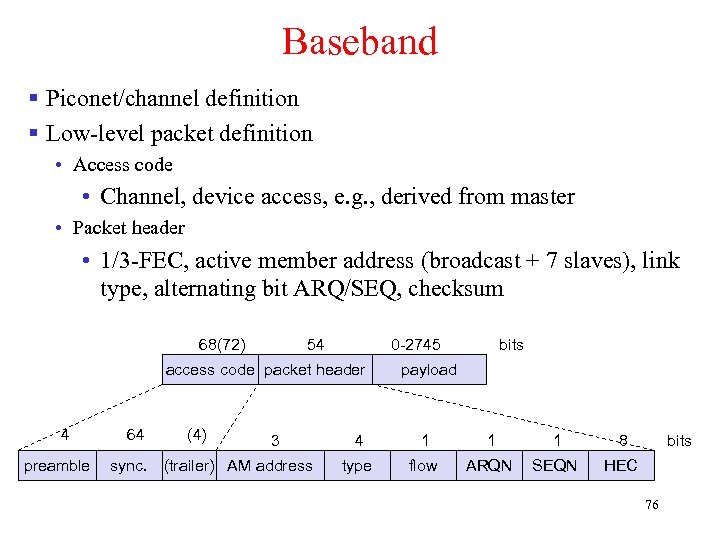 Baseband § Piconet/channel definition § Low-level packet definition • Access code • Channel, device access, e. g. , derived from master • Packet header • 1/3 -FEC, active member address (broadcast + 7 slaves), link type, alternating bit ARQ/SEQ, checksum 68(72) 54 0 -2745 access code packet header 4 preamble 64 sync. (4) 3 (trailer) AM address bits payload 4 1 1 1 8 type flow ARQN SEQN bits HEC 76
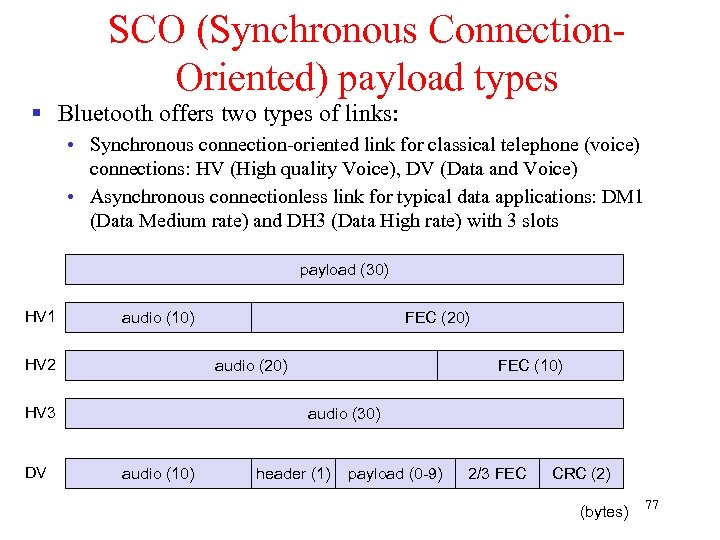 SCO (Synchronous Connection. Oriented) payload types § Bluetooth offers two types of links: • Synchronous connection-oriented link for classical telephone (voice) connections: HV (High quality Voice), DV (Data and Voice) • Asynchronous connectionless link for typical data applications: DM 1 (Data Medium rate) and DH 3 (Data High rate) with 3 slots payload (30) HV 1 audio (10) HV 2 audio (20) HV 3 DV FEC (20) FEC (10) audio (30) audio (10) header (1) payload (0 -9) 2/3 FEC CRC (2) (bytes) 77
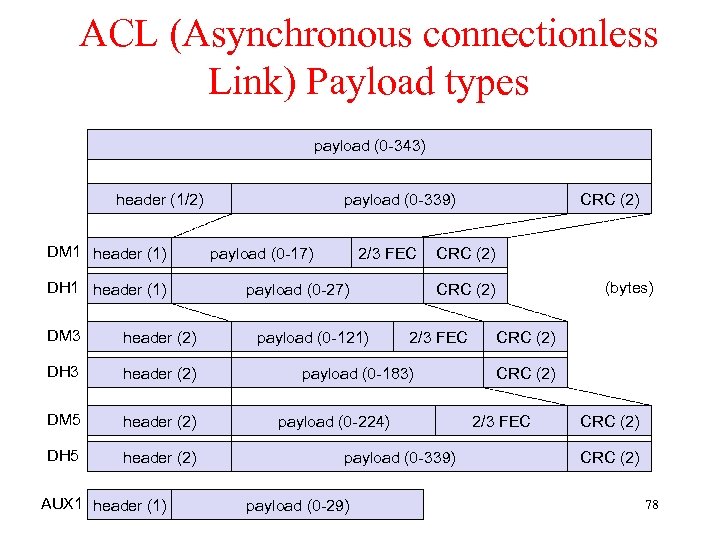 ACL (Asynchronous connectionless Link) Payload types payload (0 -343) header (1/2) DM 1 header (1) DH 1 header (1) DM 3 header (2) DH 3 header (2) DM 5 header (2) DH 5 header (2) AUX 1 header (1) payload (0 -339) payload (0 -17) 2/3 FEC payload (0 -27) payload (0 -121) CRC (2) (bytes) CRC (2) 2/3 FEC payload (0 -183) payload (0 -224) payload (0 -339) payload (0 -29) CRC (2) 2/3 FEC CRC (2) 78
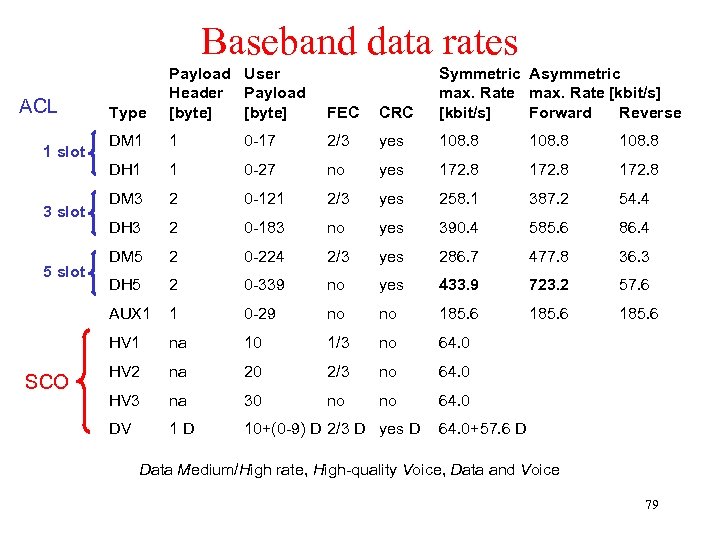 Baseband data rates 5 slot SCO CRC DM 1 1 0 -17 2/3 yes 108. 8 1 0 -27 no yes 172. 8 DM 3 2 0 -121 2/3 yes 258. 1 387. 2 54. 4 DH 3 2 0 -183 no yes 390. 4 585. 6 86. 4 DM 5 2 0 -224 2/3 yes 286. 7 477. 8 36. 3 DH 5 2 0 -339 no yes 433. 9 723. 2 57. 6 1 0 -29 no no 185. 6 HV 1 3 slot FEC AUX 1 1 slot Type Symmetric Asymmetric max. Rate [kbit/s] Forward Reverse DH 1 ACL Payload User Header Payload [byte] na 10 1/3 no 64. 0 HV 2 na 20 2/3 no 64. 0 HV 3 na 30 no no 64. 0 DV 1 D 10+(0 -9) D 2/3 D yes D 64. 0+57. 6 D Data Medium/High rate, High-quality Voice, Data and Voice 79
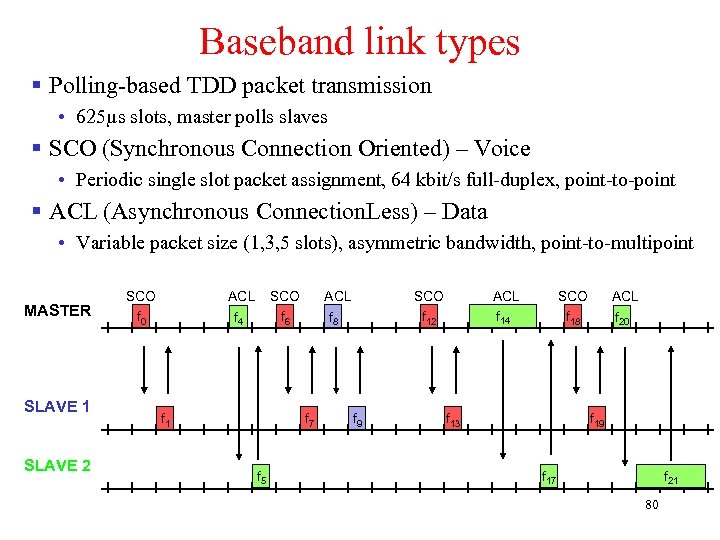 Baseband link types § Polling-based TDD packet transmission • 625µs slots, master polls slaves § SCO (Synchronous Connection Oriented) – Voice • Periodic single slot packet assignment, 64 kbit/s full-duplex, point-to-point § ACL (Asynchronous Connection. Less) – Data • Variable packet size (1, 3, 5 slots), asymmetric bandwidth, point-to-multipoint MASTER SLAVE 1 SLAVE 2 SCO f 0 ACL f 4 SCO f 6 f 1 ACL f 8 f 7 f 5 SCO f 12 f 9 ACL f 14 SCO f 18 f 13 ACL f 20 f 19 f 17 f 21 80
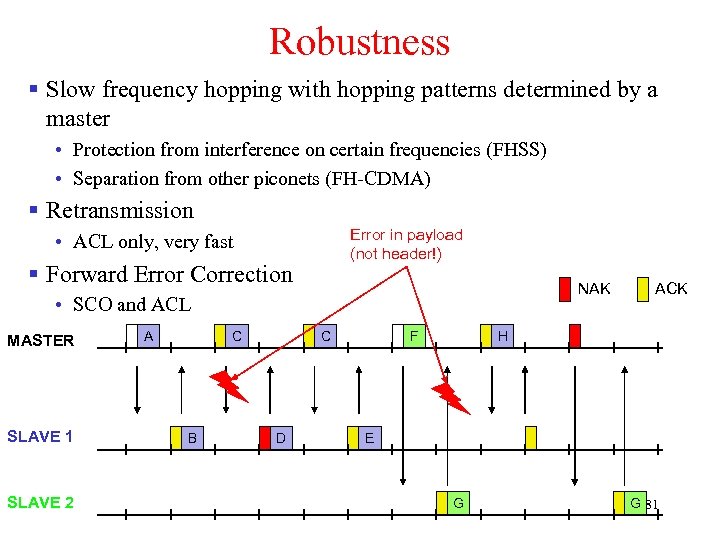 Robustness § Slow frequency hopping with hopping patterns determined by a master • Protection from interference on certain frequencies (FHSS) • Separation from other piconets (FH-CDMA) § Retransmission Error in payload (not header!) • ACL only, very fast § Forward Error Correction NAK • SCO and ACL MASTER SLAVE 1 SLAVE 2 A C B C D F ACK H E G G 81
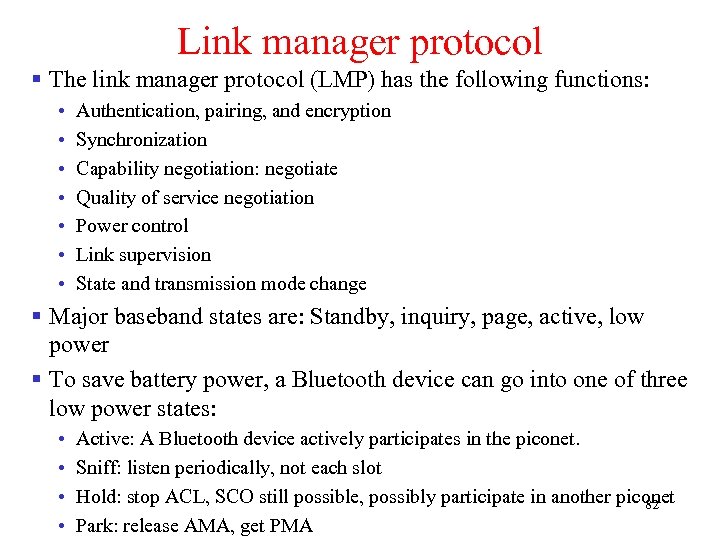 Link manager protocol § The link manager protocol (LMP) has the following functions: • • Authentication, pairing, and encryption Synchronization Capability negotiation: negotiate Quality of service negotiation Power control Link supervision State and transmission mode change § Major baseband states are: Standby, inquiry, page, active, low power § To save battery power, a Bluetooth device can go into one of three low power states: • • Active: A Bluetooth device actively participates in the piconet. Sniff: listen periodically, not each slot Hold: stop ACL, SCO still possible, possibly participate in another piconet 82 Park: release AMA, get PMA
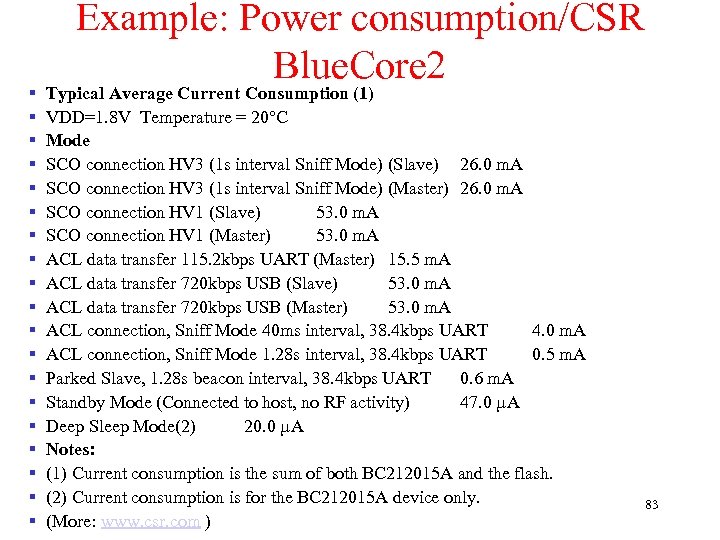 § § § § § Example: Power consumption/CSR Blue. Core 2 Typical Average Current Consumption (1) VDD=1. 8 V Temperature = 20°C Mode SCO connection HV 3 (1 s interval Sniff Mode) (Slave) 26. 0 m. A SCO connection HV 3 (1 s interval Sniff Mode) (Master) 26. 0 m. A SCO connection HV 1 (Slave) 53. 0 m. A SCO connection HV 1 (Master) 53. 0 m. A ACL data transfer 115. 2 kbps UART (Master) 15. 5 m. A ACL data transfer 720 kbps USB (Slave) 53. 0 m. A ACL data transfer 720 kbps USB (Master) 53. 0 m. A ACL connection, Sniff Mode 40 ms interval, 38. 4 kbps UART 4. 0 m. A ACL connection, Sniff Mode 1. 28 s interval, 38. 4 kbps UART 0. 5 m. A Parked Slave, 1. 28 s beacon interval, 38. 4 kbps UART 0. 6 m. A Standby Mode (Connected to host, no RF activity) 47. 0 µA Deep Sleep Mode(2) 20. 0 µA Notes: (1) Current consumption is the sum of both BC 212015 A and the flash. (2) Current consumption is for the BC 212015 A device only. (More: www. csr. com ) 83
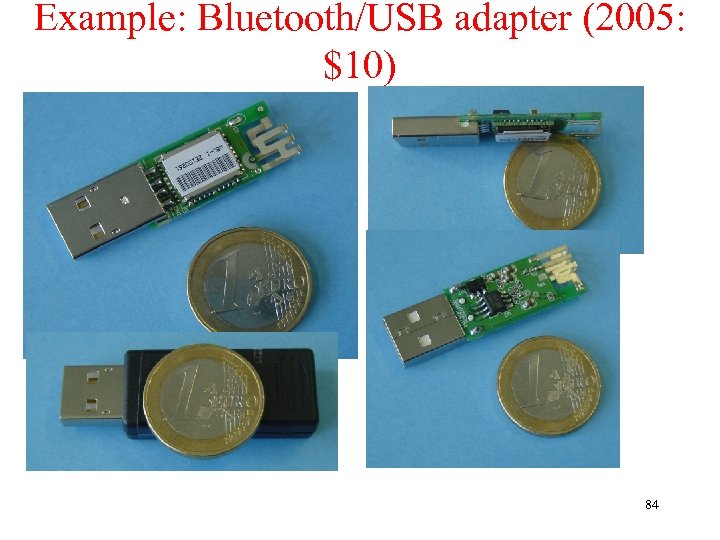 Example: Bluetooth/USB adapter (2005: $10) 84
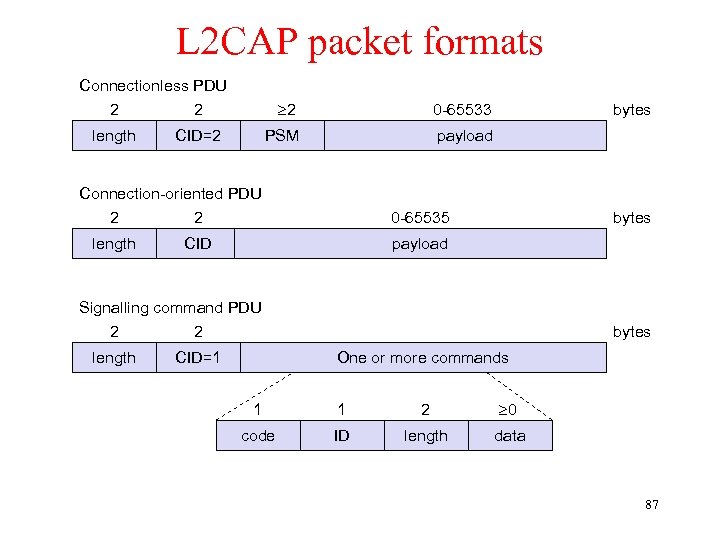
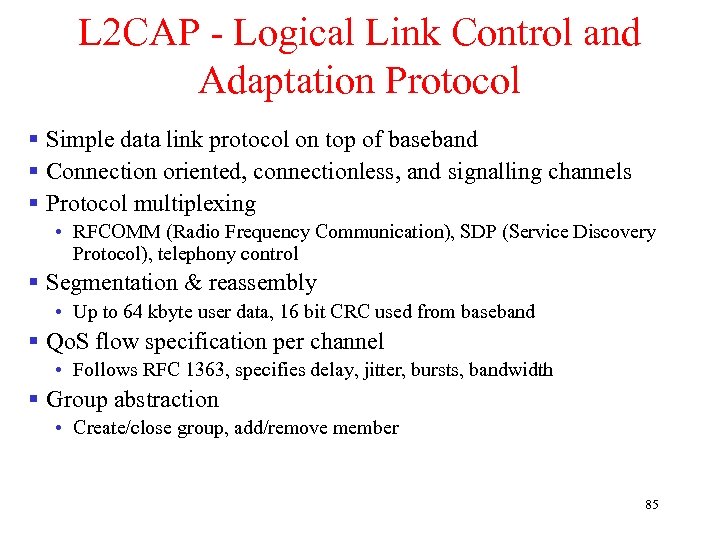 L 2 CAP - Logical Link Control and Adaptation Protocol § Simple data link protocol on top of baseband § Connection oriented, connectionless, and signalling channels § Protocol multiplexing • RFCOMM (Radio Frequency Communication), SDP (Service Discovery Protocol), telephony control § Segmentation & reassembly • Up to 64 kbyte user data, 16 bit CRC used from baseband § Qo. S flow specification per channel • Follows RFC 1363, specifies delay, jitter, bursts, bandwidth § Group abstraction • Create/close group, add/remove member 85
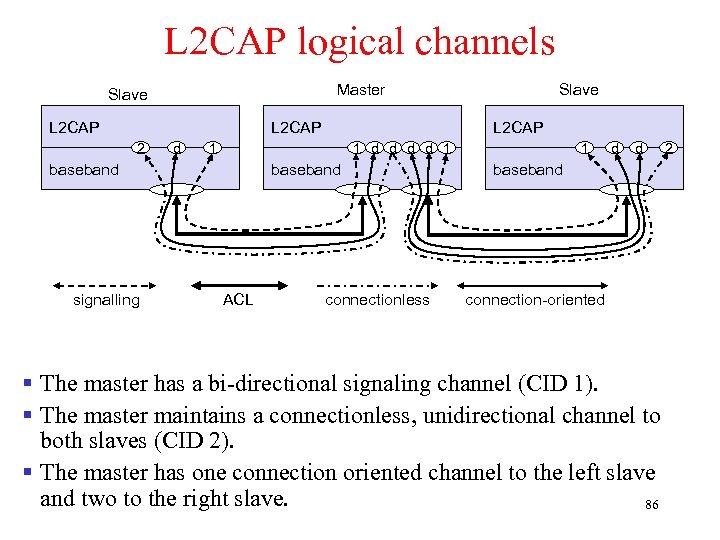 L 2 CAP logical channels Master Slave L 2 CAP 2 d L 2 CAP 1 1 d d 1 baseband signalling Slave baseband ACL connectionless 1 d d baseband connection-oriented § The master has a bi-directional signaling channel (CID 1). § The master maintains a connectionless, unidirectional channel to both slaves (CID 2). § The master has one connection oriented channel to the left slave and two to the right slave. 86 2
 L 2 CAP packet formats Connectionless PDU 2 2 length 2 PSM CID=2 0 -65533 payload Connection-oriented PDU 2 2 length bytes 0 -65535 CID bytes payload Signalling command PDU 2 2 length CID=1 bytes One or more commands 1 1 2 0 code ID length data 87
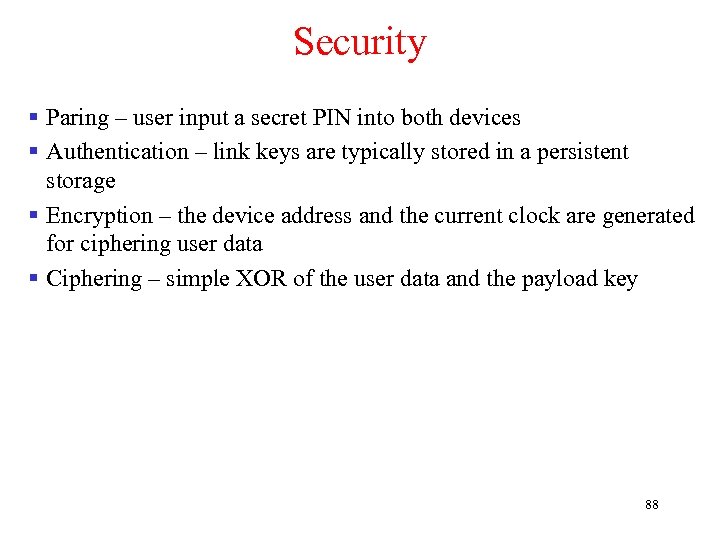 Security § Paring – user input a secret PIN into both devices § Authentication – link keys are typically stored in a persistent storage § Encryption – the device address and the current clock are generated for ciphering user data § Ciphering – simple XOR of the user data and the payload key 88
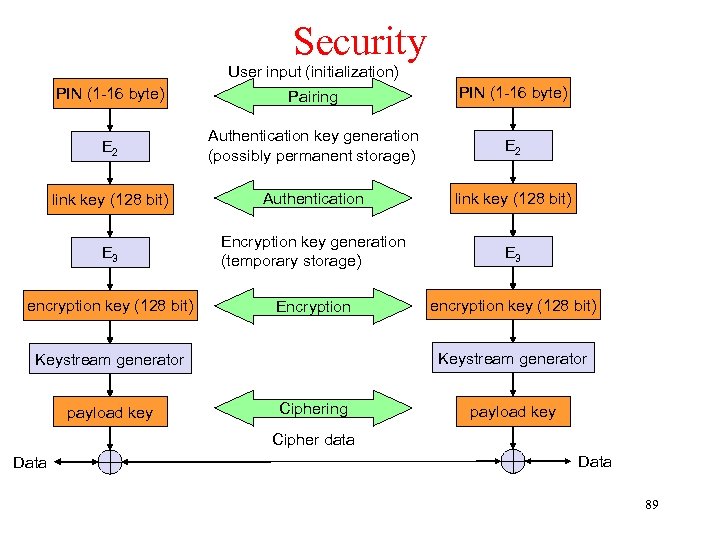 Security User input (initialization) PIN (1 -16 byte) Pairing PIN (1 -16 byte) E 2 Authentication key generation (possibly permanent storage) E 2 link key (128 bit) Authentication link key (128 bit) E 3 Encryption key generation (temporary storage) E 3 encryption key (128 bit) Encryption encryption key (128 bit) Keystream generator payload key Ciphering payload key Cipher data Data 89
 Middleware Protocol Group: SDP § Bluetooth needs to know what devices or services are available in radio proximity. § SDP is a Inquiry/response protocol for discovering services • Searching for and browsing services in radio proximity • Adapted to the highly dynamic environment • Can be complemented by others like SLP (Service Location Protocol), Jini, Salutation, … • Defines discovery only, not the usage of services • Caching of discovered services • Gradual discovery § Service record format • Information about services provided by attributes • Attributes are composed of an 16 bit ID (name) and a value • values may be derived from 128 bit Universally Unique Identifiers (UUID) 90
 Middleware Protocol Group § RFCOMM • Emulation of a serial port (supports a large base of legacy applications) • Allows multiple ports over a single physical channel § Telephony Control Protocol Specification (TCS) • Call control (setup, release) • Group management § OBEX (Object Exchange) • Exchange of objects, Ir. DA replacement § WAP • Interacting with applications on cellular phones 91
 Profiles • Vertical slice through the protocol stack • Basis for interoperability § § § § Applications Protocols § Represent default solutions for a certain usage model Generic Access Profile Service Discovery Application Profile Cordless Telephony Profile Intercom Profile Additional Profiles Serial Port Profile Advanced Audio Distribution Headset Profile PAN Dial-up Networking Profile Audio Video Remote Control Basic Printing Fax Profile Basic Imaging LAN Access Profile Extended Service Discovery Generic Object Exchange Profile Generic Audio Video Distribution Object Push Profile Hands Free Hardcopy Cable Replacement File Transfer Profile Synchronization Profiles 92
 WPAN: IEEE 802. 15. 1 – Bluetooth § Data rate • Synchronous, connection-oriented: 64 kbit/s • Asynchronous, connectionless • 433. 9 kbit/s symmetric • 723. 2 / 57. 6 kbit/s asymmetric § Transmission range • POS (Personal Operating Space) up to 10 m • with special transceivers up to 100 m § Frequency • Free 2. 4 GHz ISM-band § Security • Challenge/response (SAFER+), hopping sequence § Cost • $30 adapter, drop to $5 if integrated § Availability • Integrated into some products, several vendors § Connection set-up time • Depends on power-mode • Max. 2. 56 s, avg. 0. 64 s § Quality of Service • Guarantees, ARQ/FEC § Manageability • Public/private keys needed, key management not specified, simple system integration § Special Advantages/Disadvantages • Advantage: already integrated into several products, available worldwide, free ISMband, several vendors, simple system, simple ad-hoc networking, peer to peer, scatternets • Disadvantage: interference on ISM-band, limited range, max. 8 devices/network&master, high set-up latency 93
 WPAN: IEEE 802. 15 – Current Developments § 802. 15. 2: Coexistance • Coexistence of Wireless Personal Area Networks (802. 15) and Wireless Local Area Networks (802. 11), quantify the mutual interference § 802. 15. 3: High-Rate • Standard for high-rate (20 Mbit/s or greater) WPANs, while still lowpower/low-cost • Data Rates: 11, 22, 33, 44, 55 Mbit/s • Quality of Service isochronous protocol • Ad hoc peer-to-peer networking • Security • Low power consumption • Low cost • Designed to meet the demanding requirements of portable consumer imaging and multimedia applications 94
 WPAN: IEEE 802. 15 – Current Development § 802. 15 -4: Low-Rate, Very Low-Power, approved in May 2003 • Low data rate solution with multi-month to multi-year battery life and very low complexity • Potential applications are sensors, interactive toys, smart badges, remote controls, and home automation • Data rates of 20 -250 kbit/s, latency down to 15 ms • Master-Slave or Peer-to-Peer operation • Support for critical latency devices, such as joysticks • CSMA/CA channel access (data centric), slotted (beacon) or unslotted • Automatic network establishment by the PAN coordinator • Dynamic device addressing, flexible addressing format • Fully handshaked protocol for transfer reliability • Power management to ensure low power consumption • 16 channels in the 2. 4 GHz ISM band, 10 channels in the 915 MHz US ISM 95 band one channel in the European 868 MHz band
 History of Home. RF § Home. RF is the technique that aimed at offering voice, data and video image at home or small scale office with a low cost by radio frequency instead of wiring. § The Home. RF standard was developed by Home. RF Working Group that is composed of major companies such as Compaq, Intel, Motorola, National Semiconductor, Proxim and Siemens. § The Home. RF standard diverged from the original 802. 11 FHSS standard and incorporated the Digital Enhanced Cordless Telephone (DECT) technology used for cordless telephones in Europe. § Home. RF follows shared wireless access protocol (SWAP). § SWAP is used to set up a network that provides access to a public network telephone, the Internet (data), entertainment networks (cable television, digital audio, and video), transfer and sharing of data resources (disks, printer), home control, and automation. 96
 History of Home. RF and Infrared § The SWAP can support up to 127 devices, each identified by a 48 bit network identifier. • Connection point is a gateway to the public switched telephone network (PSTN). • Asynchronous data node is used to communicate with other nodes. § The demise of Home. RF • In 2001, Intel has started the process of abandoning the Home. RF standard for in-home networking and is switching to IEEE 802. 11 b. • Eventually, Home. RF lost its supporters and market and Home. RF Working Group disbanded in 2003. § The infrared technology (Ir. DA) has the following characteristics: • • • The infrared rays can be blocked by obstacles. The effective range of infrared communications is about one meter. The power consumed by infrared devices is extremely low. Data rates of 4 Mbps are easily achievable. The cost of infrared devices is low. § Despite the restriction of line of sight (Lo. S), infrared devices are very popular because they cost less and consume less power. 97
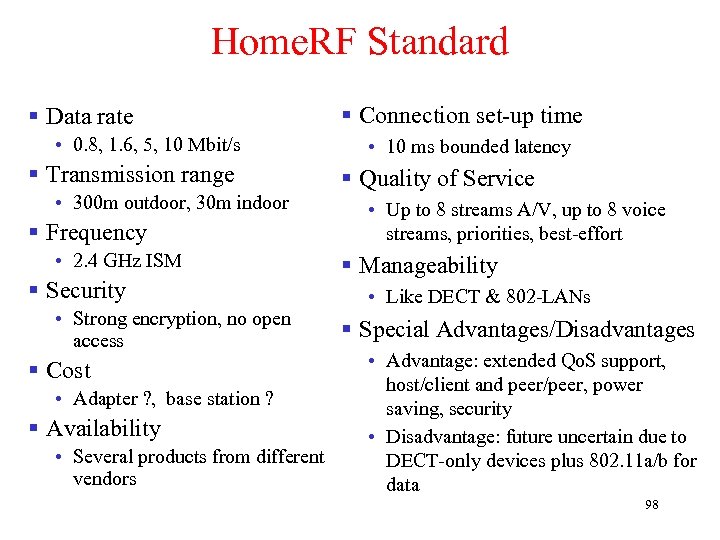 Home. RF Standard § Data rate • 0. 8, 1. 6, 5, 10 Mbit/s § Transmission range • 300 m outdoor, 30 m indoor § Frequency • 2. 4 GHz ISM § Security • Strong encryption, no open access § Cost • Adapter ? , base station ? § Availability • Several products from different vendors § Connection set-up time • 10 ms bounded latency § Quality of Service • Up to 8 streams A/V, up to 8 voice streams, priorities, best-effort § Manageability • Like DECT & 802 -LANs § Special Advantages/Disadvantages • Advantage: extended Qo. S support, host/client and peer/peer, power saving, security • Disadvantage: future uncertain due to DECT-only devices plus 802. 11 a/b for data 98
 RFID – Radio Frequency Identification § RFID (radio frequency identification) is a technology that incorporates the use of electromagnetic or electrostatic coupling in the radio frequency (RF) portion of the electromagnetic spectrum to uniquely identify an object, animal, or person. § RFID is coming into increasing use in industry as an alternative to the bar code. § The advantage of RFID is that it does not require direct contact or line-of-sight scanning. § An RFID system consists of three components: an antenna and transceiver (often combined into one reader) and a transponder (the tag). § The antenna uses radio frequency waves to transmit a signal that activates the transponder. When activated, the tag transmits data back to the antenna. 99
 RFID – Radio Frequency Identification § The data is used to notify a programmable logic controller that an action should occur. The action could be as simple as raising an access gate or as complicated as interfacing with a database to carry out a monetary transaction. § Low-frequency RFID systems (30 KHz to 500 KHz) have short transmission ranges (generally less than six feet). High-frequency RFID systems (850 MHz to 950 MHz and 2. 4 GHz to 2. 5 GHz) offer longer transmission ranges (more than 90 feet). In general, the higher the frequency, the more expensive the system. § RFID is sometimes called dedicated short range communication (DSRC). 100
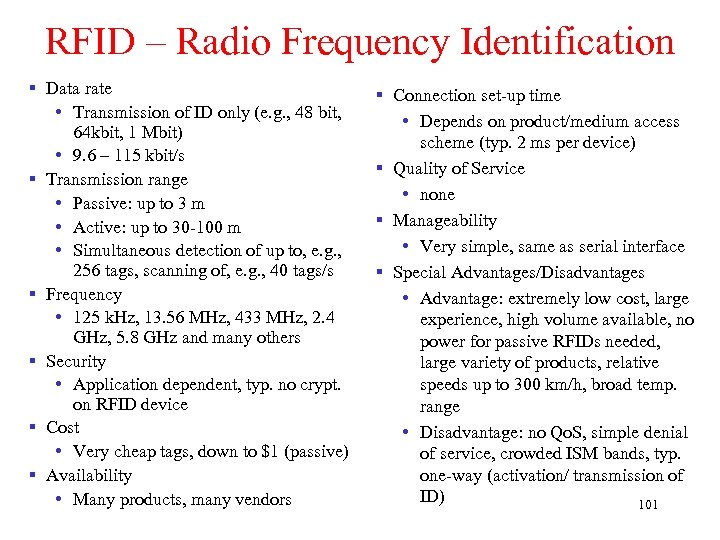 RFID – Radio Frequency Identification § Data rate • Transmission of ID only (e. g. , 48 bit, 64 kbit, 1 Mbit) • 9. 6 – 115 kbit/s § Transmission range • Passive: up to 3 m • Active: up to 30 -100 m • Simultaneous detection of up to, e. g. , 256 tags, scanning of, e. g. , 40 tags/s § Frequency • 125 k. Hz, 13. 56 MHz, 433 MHz, 2. 4 GHz, 5. 8 GHz and many others § Security • Application dependent, typ. no crypt. on RFID device § Cost • Very cheap tags, down to $1 (passive) § Availability • Many products, many vendors § Connection set-up time • Depends on product/medium access scheme (typ. 2 ms per device) § Quality of Service • none § Manageability • Very simple, same as serial interface § Special Advantages/Disadvantages • Advantage: extremely low cost, large experience, high volume available, no power for passive RFIDs needed, large variety of products, relative speeds up to 300 km/h, broad temp. range • Disadvantage: no Qo. S, simple denial of service, crowded ISM bands, typ. one-way (activation/ transmission of ID) 101
 RFID – Radio Frequency Identification § Function • Standard: In response to a radio interrogation signal from a reader (base station) the RFID tags transmit their ID • Enhanced: additionally data can be sent to the tags, different media access schemes (collision avoidance) § Features • No line-of sight required (compared to, e. g. , laser scanners) • RFID tags withstand difficult environmental conditions (sunlight, cold, frost, dirt etc. ) • Products available with read/write memory, smart-card capabilities § Categories • Passive RFID: operating power comes from the reader over the air which is feasible up to distances of 3 m, low price (1€) • Active RFID: battery powered, distances up to 100 m 102
 RFID – Radio Frequency Identification § Applications • Total asset visibility: tracking of goods during manufacturing, localization of pallets, goods etc. • Loyalty cards: customers use RFID tags for payment at, e. g. , gas stations, collection of buying patterns • Automated toll collection: RFIDs mounted in windshields allow commuters to drive through toll plazas without stopping • Others: access control, animal identification, tracking of hazardous material, inventory control, warehouse management, . . . § Local Positioning Systems • GPS useless indoors or underground, problematic in cities with high buildings • RFID tags transmit signals, receivers estimate the tag location by measuring the signal‘s time of flight 103
 RFID – Radio Frequency Identification § Security • Denial-of-Service attacks are always possible • Interference of the wireless transmission, shielding of transceivers • IDs via manufacturing or one time programming • Key exchange via, e. g. , RSA possible, encryption via, e. g. , AES § Future Trends • RTLS: Real-Time Locating System – big efforts to make total asset visibility come true • Integration of RFID technology into the manufacturing, distribution and logistics chain • Creation of „electronic manifests“ at item or package level (embedded inexpensive passive RFID tags) • 3 D tracking of children, patients 104
 RFID – Radio Frequency Identification § Devices and Companies • • • AXCESS Inc. , www. axcessinc. com Checkpoint Systems Group, www. checkpointsystems. com GEMPLUS, www. gemplus. com/app/smart_tracking Intermec/Intellitag, www. intermec. com I-Ray Technologies, www. i-ray. com RF Code, www. rfcode. com Texas Instruments, www. ti-rfid. com/id Where. Net, www. wherenet. com Wireless Mountain, www. wirelessmountain. com XCI, www. xci-inc. com § Only a very small selection… 105
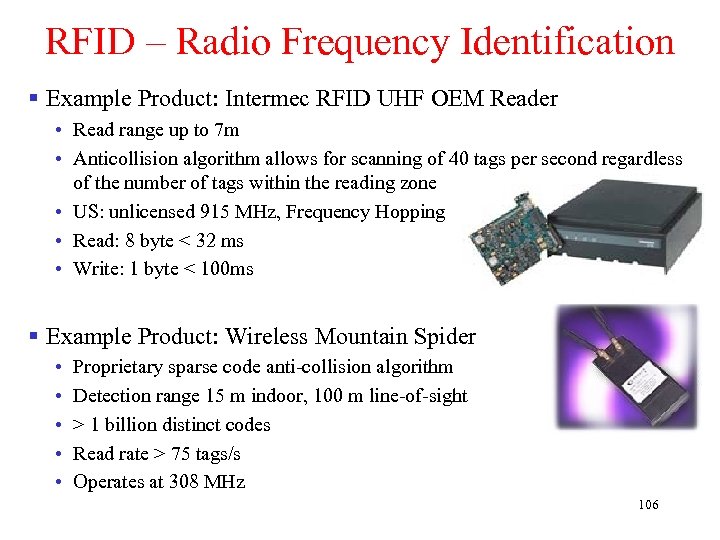 RFID – Radio Frequency Identification § Example Product: Intermec RFID UHF OEM Reader • Read range up to 7 m • Anticollision algorithm allows for scanning of 40 tags per second regardless of the number of tags within the reading zone • US: unlicensed 915 MHz, Frequency Hopping • Read: 8 byte < 32 ms • Write: 1 byte < 100 ms § Example Product: Wireless Mountain Spider • • • Proprietary sparse code anti-collision algorithm Detection range 15 m indoor, 100 m line-of-sight > 1 billion distinct codes Read rate > 75 tags/s Operates at 308 MHz 106
 RFID – Radio Frequency Identification § ISO Standards • ISO 15418 • MH 10. 8. 2 Data Identifiers • EAN. UCC Application Identifiers • ISO 15434 - Syntax for High Capacity ADC Media • ISO 15962 - Transfer Syntax • ISO 18000 • • • Part 2, 125 -135 k. Hz Part 3, 13. 56 MHz Part 4, 2. 45 GHz Part 5, 5. 8 GHz Part 6, UHF (860 -930 MHz, 433 MHz) • ISO 18047 - RFID Device Conformance Test Methods • ISO 18046 - RF Tag and Interrogator Performance Test Methods 107
 RFID – Radio Frequency Identification § Relevant Standards • American National Standards Institute ANSI, www. ansi. org, www. aimglobal. org/standards/rfidstds/ANSIT 6. html • Automatic Identification and Data Capture Techniques • JTC 1/SC 31, www. uc-council. com/sc 31/home. htm, www. aimglobal. org/standards/rfidstds/sc 31. htm • European Radiocommunications Office • ERO, www. ero. dk, www. aimglobal. org/standards/rfidstds/ERO. htm • European Telecommunications Standards Institute • ETSI, www. etsi. org, www. aimglobal. org/standards/rfidstds/ETSI. htm • Identification Cards and related devices • JTC 1/SC 17, www. sc 17. com, www. aimglobal. org/standards/rfidstds/sc 17. htm, • Identification and communication • ISO TC 104 / SC 4, www. autoid. org/tc 104_sc 4_wg 2. htm, www. aimglobal. org/standards/rfidstds/TC 104. htm • Road Transport and Traffic Telematics • CEN TC 278, www. nni. nl, www. aimglobal. org/standards/rfidstds/CENTC 278. htm • Transport Information and Control Systems • ISO/TC 204, www. sae. org/technicalcommittees/gits. htm, www. aimglobal. org/standards/rfidstds/ISOTC 204. htm 108
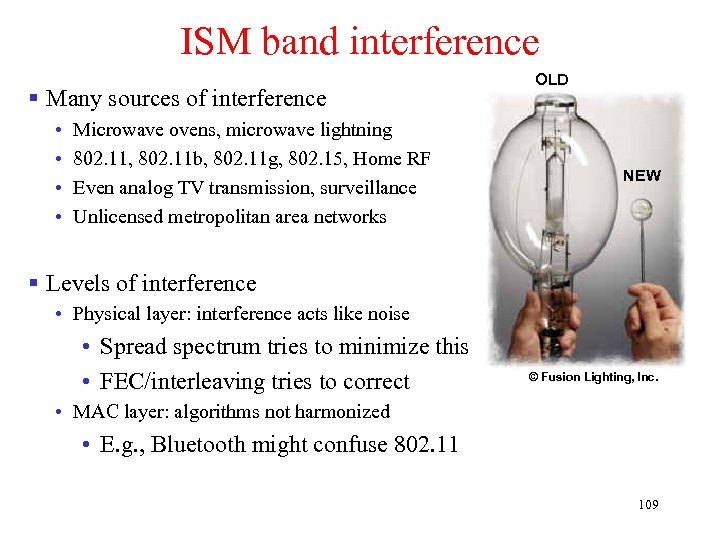 ISM band interference § Many sources of interference • • Microwave ovens, microwave lightning 802. 11, 802. 11 b, 802. 11 g, 802. 15, Home RF Even analog TV transmission, surveillance Unlicensed metropolitan area networks OLD NEW § Levels of interference • Physical layer: interference acts like noise • Spread spectrum tries to minimize this • FEC/interleaving tries to correct © Fusion Lighting, Inc. • MAC layer: algorithms not harmonized • E. g. , Bluetooth might confuse 802. 11 109
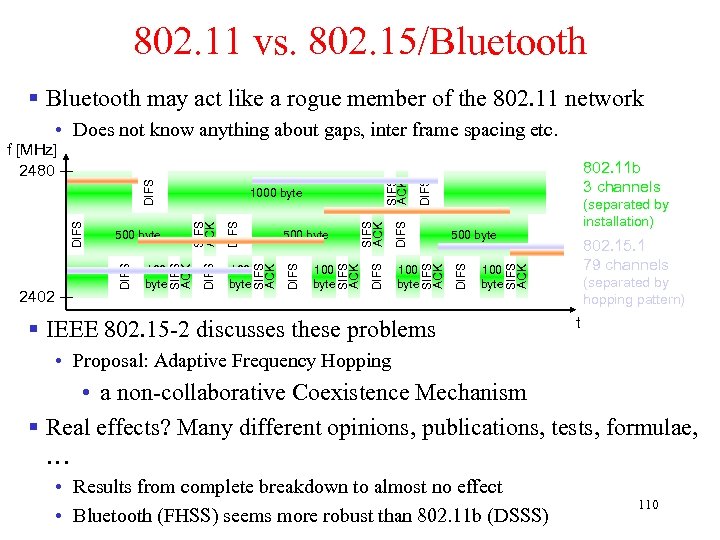 802. 11 vs. 802. 15/Bluetooth § Bluetooth may act like a rogue member of the 802. 11 network 100 byte 802. 15. 1 79 channels SIFS ACK 100 byte (separated by installation) 500 byte DIFS 802. 11 b 3 channels DIFS SIFS ACK DIFS 100 byte SIFS ACK 500 byte SIFS ACK DIFS 100 byte 1000 byte SIFS ACK 2402 500 byte DIFS f [MHz] 2480 SIFS ACK • Does not know anything about gaps, inter frame spacing etc. § IEEE 802. 15 -2 discusses these problems (separated by hopping pattern) t • Proposal: Adaptive Frequency Hopping • a non-collaborative Coexistence Mechanism § Real effects? Many different opinions, publications, tests, formulae, … • Results from complete breakdown to almost no effect • Bluetooth (FHSS) seems more robust than 802. 11 b (DSSS) 110