 Скачать презентацию Chapter 18 Object-Oriented Design and Modeling Using the
52bfe46317bea74dd1a75581813eed1d.ppt
- Количество слайдов: 47



Chapter 18 Object-Oriented Design and Modeling Using the UML Mc. Graw-Hill/Irwin Copyright © 2007 by The Mc. Graw-Hill Companies, Inc. All rights reserved.
Objectives • • • • 2 Understand entity, interface, control, persistence, and system classes. Understand the concepts of dependency and navigability. Define visibility and explain its three levels. Understand the concept object responsibility and how it is related to message sending between object types. Describe the activities involved in object-oriented design. Differentiate between a design use-case narrative and an analysis usecase narrative. Describe CRC card modeling. Model class interactions with sequence diagrams. Construct a class diagram that reflects design specifics. Model object states with state machine diagrams. Understand the role of coupling and cohesion in object reuse. Describe the use of design patterns and two common design patterns. Differentiate between design patterns, object frameworks, and components. Understand the use of communication diagrams, component diagrams, and deployment diagrams.
3
Object-Oriented Design Object-oriented design (OOD) – an approach used to specify the software solution in terms of collaborating objects, their attributes, and their methods. • Continuation of object-oriented analysis 4
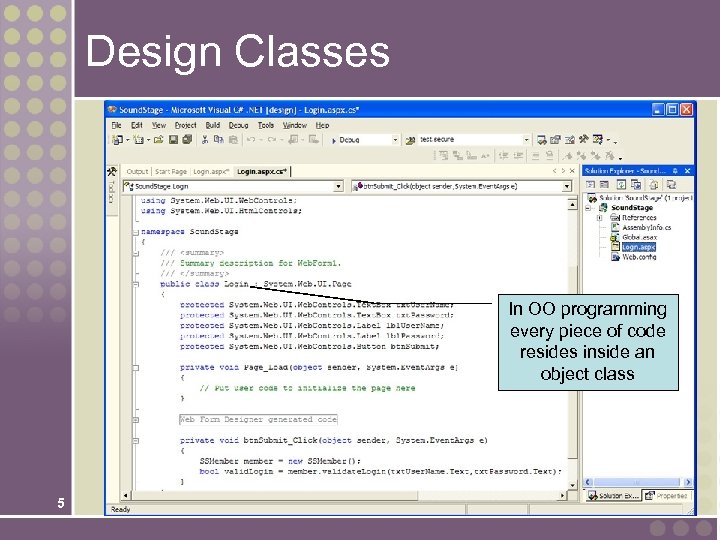
Design Classes In OO programming every piece of code resides inside an object class 5
Types of Design Classes Entity Class - contains business related information and implements analysis classes. Interface Class - provides the means by which an actor interacts with the system. • A window, dialogue box, or screen. • For nonhuman actors, an application program interface (API). Control Class - contains application logic. Persistence Class - provides functionality to read and write to a database. 6 System Class - handles operating systemspecific functionality.
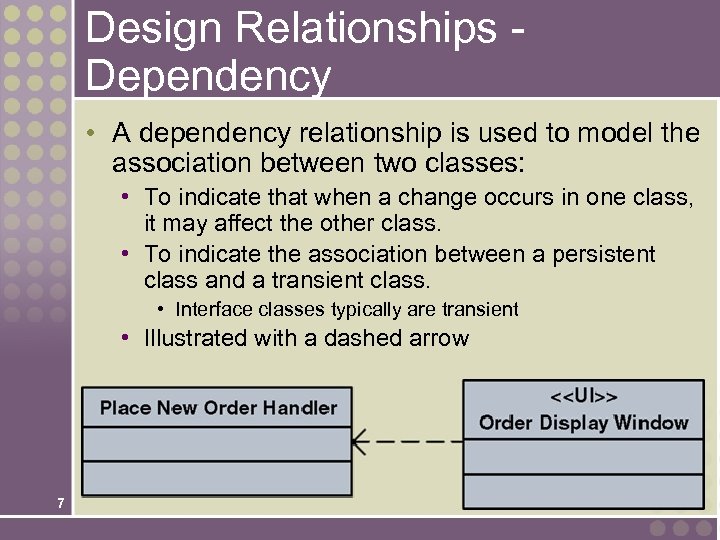
Design Relationships Dependency • A dependency relationship is used to model the association between two classes: • To indicate that when a change occurs in one class, it may affect the other class. • To indicate the association between a persistent class and a transient class. • Interface classes typically are transient • Illustrated with a dashed arrow 7
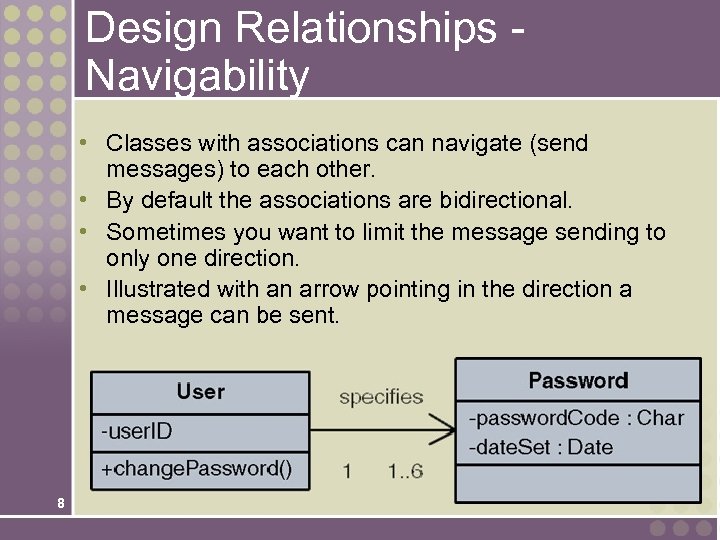
Design Relationships Navigability • Classes with associations can navigate (send messages) to each other. • By default the associations are bidirectional. • Sometimes you want to limit the message sending to only one direction. • Illustrated with an arrow pointing in the direction a message can be sent. 8
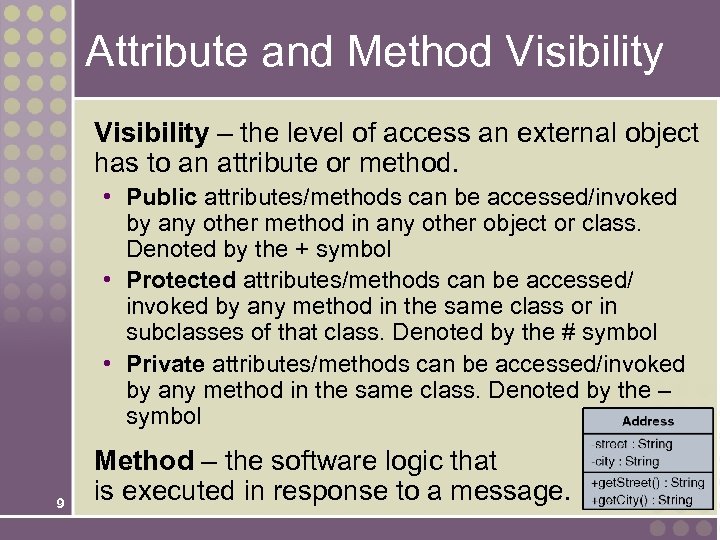
Attribute and Method Visibility – the level of access an external object has to an attribute or method. • Public attributes/methods can be accessed/invoked by any other method in any other object or class. Denoted by the + symbol • Protected attributes/methods can be accessed/ invoked by any method in the same class or in subclasses of that class. Denoted by the # symbol • Private attributes/methods can be accessed/invoked by any method in the same class. Denoted by the – symbol 9 Method – the software logic that is executed in response to a message.
Object Responsibilities Object responsibility – the obligation that an object has to provide a service when requested and thus collaborate with other objects to satisfy the request if required. • An object responsibility is implemented by the creation of methods that may have to collaborate with other objects and methods. 10
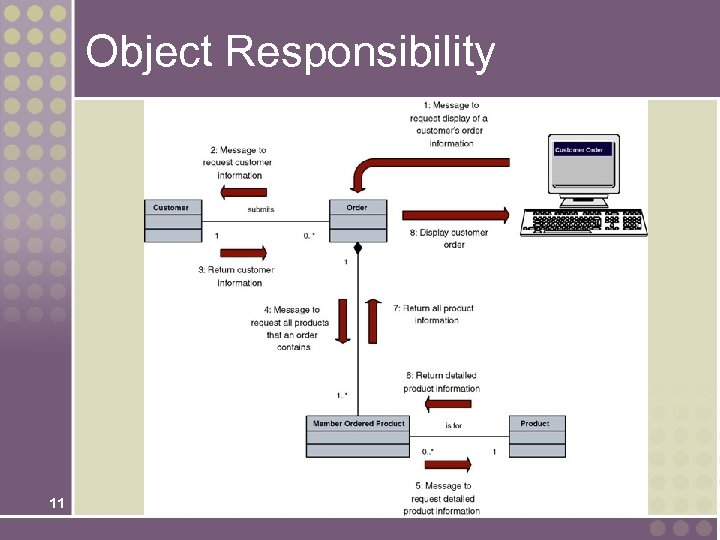
Object Responsibility 11
The Process of Object-Oriented Design • Refining the use case model to reflect the implementation environment. • Modeling class interactions, behaviors, and states that support the use case scenario. • Updating the class diagram to reflect the implementation environment. 12
Refining The Use Case Model • Step 1: Transform the “Analysis” Use Cases to “Design” Use Cases • • Implementation details Controls Window/web page names Navigation instructions • Step 2: Update the Use Case Model Diagram and Other Documentation to Reflect any New Use Cases 13
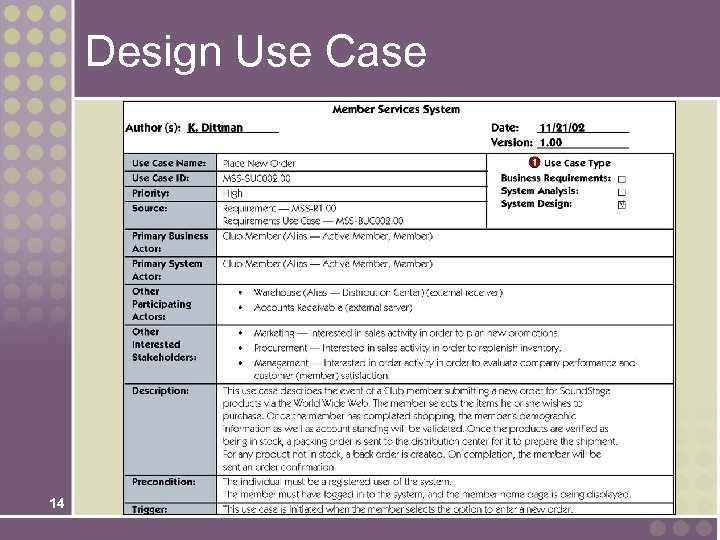
Design Use Case 14
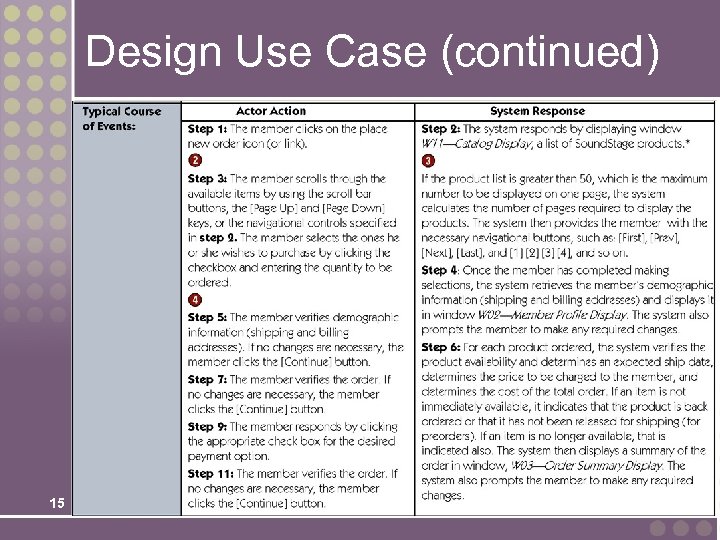
Design Use Case (continued) 15
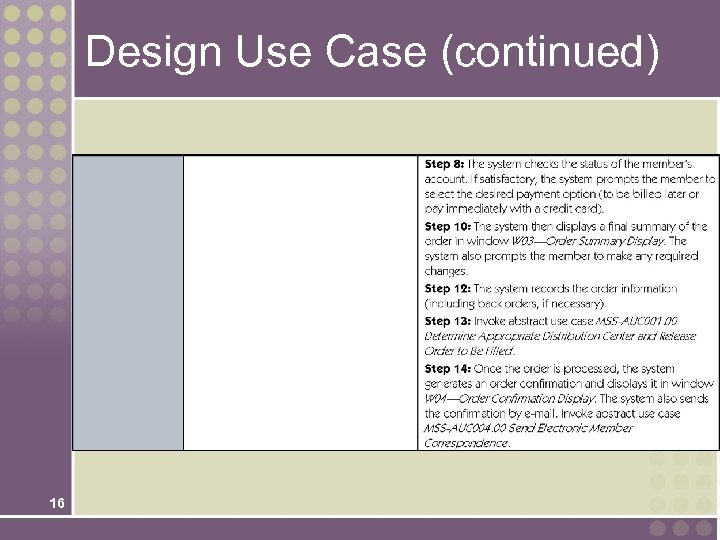
Design Use Case (continued) 16
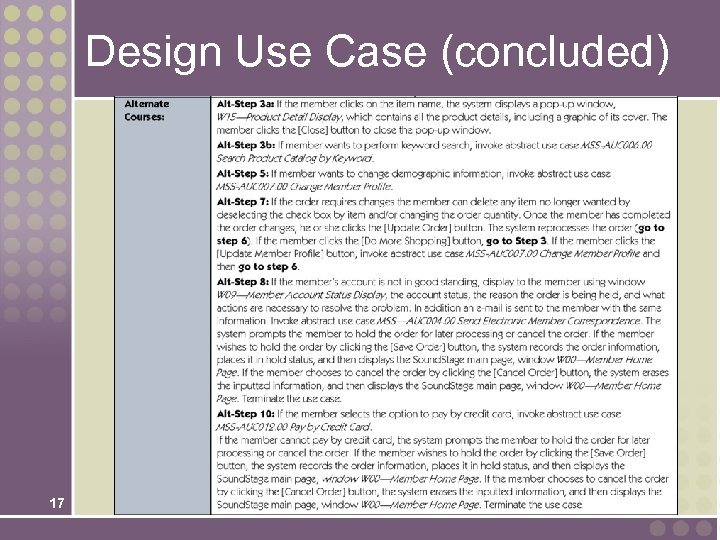
Design Use Case (concluded) 17
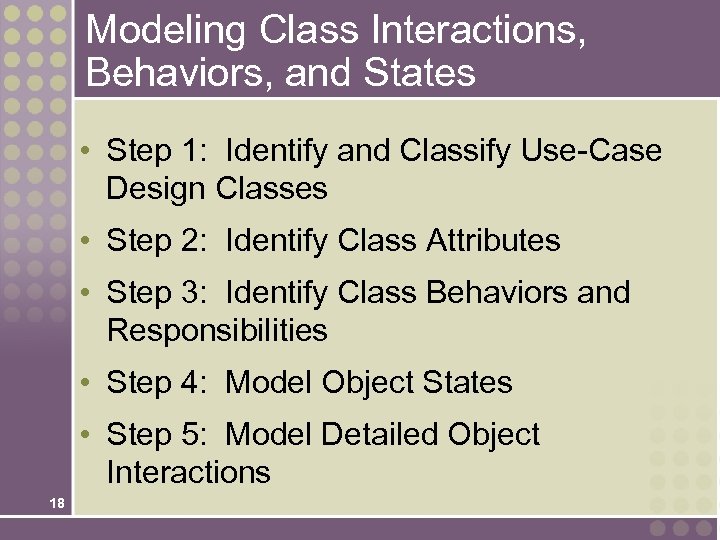
Modeling Class Interactions, Behaviors, and States • Step 1: Identify and Classify Use-Case Design Classes • Step 2: Identify Class Attributes • Step 3: Identify Class Behaviors and Responsibilities • Step 4: Model Object States • Step 5: Model Detailed Object Interactions 18
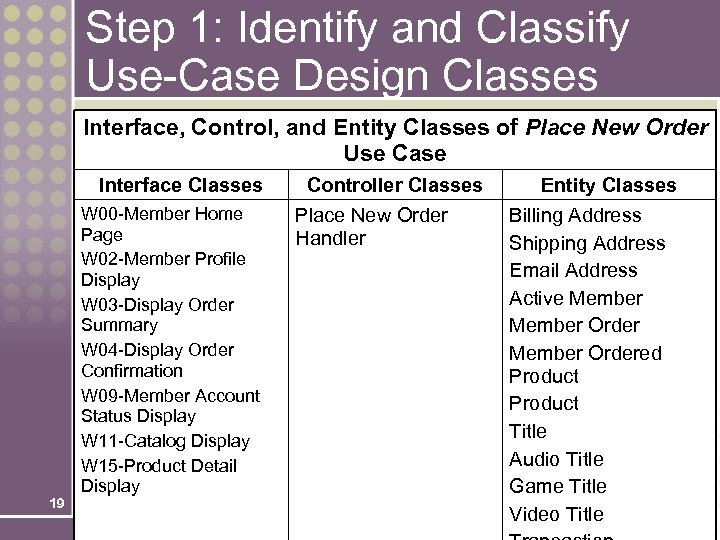
Step 1: Identify and Classify Use-Case Design Classes Interface, Control, and Entity Classes of Place New Order Use Case Interface Classes 19 W 00 -Member Home Page W 02 -Member Profile Display W 03 -Display Order Summary W 04 -Display Order Confirmation W 09 -Member Account Status Display W 11 -Catalog Display W 15 -Product Detail Display Controller Classes Place New Order Handler Entity Classes Billing Address Shipping Address Email Address Active Member Ordered Product Title Audio Title Game Title Video Title
Step 2: Identify Class Attributes • Many attributes already identified during object-oriented analysis. • Revised use cases may mention additional attributes. • Must update class diagram to include new attributes. 20
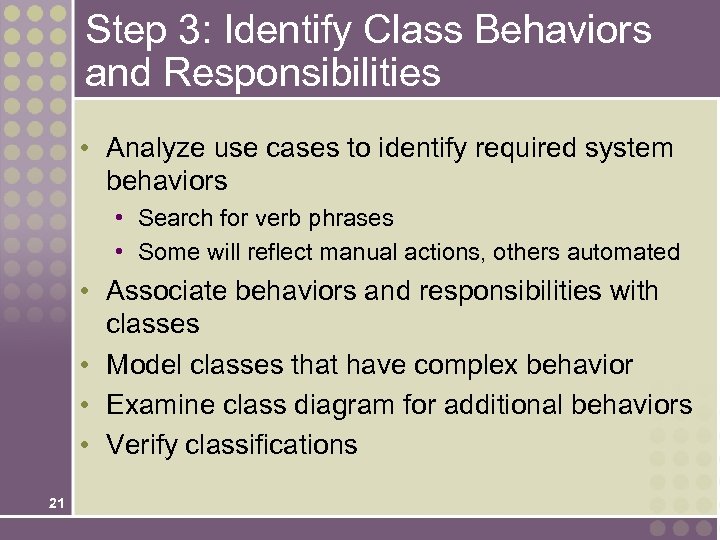
Step 3: Identify Class Behaviors and Responsibilities • Analyze use cases to identify required system behaviors • Search for verb phrases • Some will reflect manual actions, others automated • Associate behaviors and responsibilities with classes • Model classes that have complex behavior • Examine class diagram for additional behaviors • Verify classifications 21
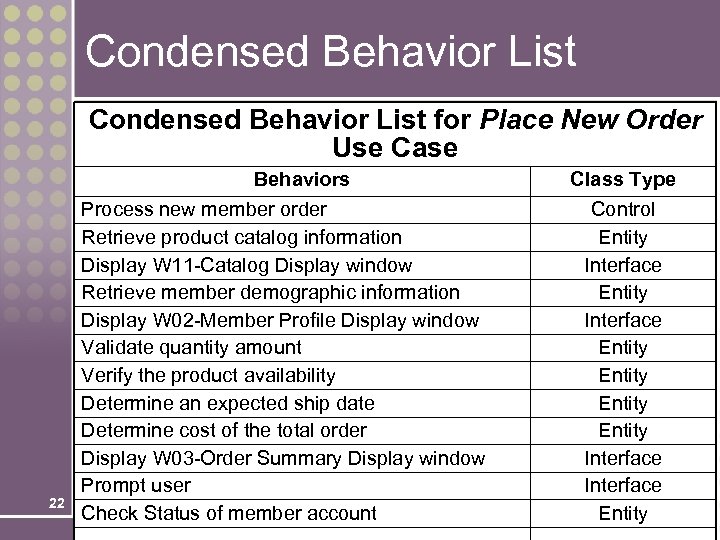
Condensed Behavior List for Place New Order Use Case 22 Behaviors Process new member order Retrieve product catalog information Display W 11 -Catalog Display window Retrieve member demographic information Display W 02 -Member Profile Display window Validate quantity amount Verify the product availability Determine an expected ship date Determine cost of the total order Display W 03 -Order Summary Display window Prompt user Check Status of member account Class Type Control Entity Interface Entity
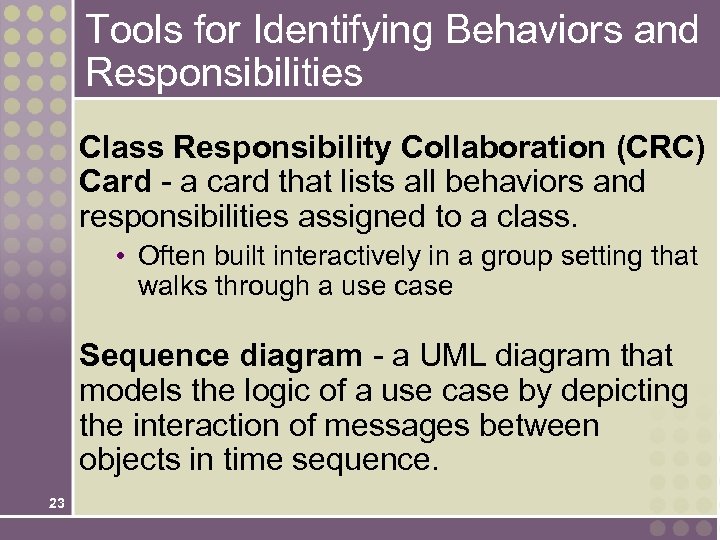
Tools for Identifying Behaviors and Responsibilities Class Responsibility Collaboration (CRC) Card - a card that lists all behaviors and responsibilities assigned to a class. • Often built interactively in a group setting that walks through a use case Sequence diagram - a UML diagram that models the logic of a use case by depicting the interaction of messages between objects in time sequence. 23
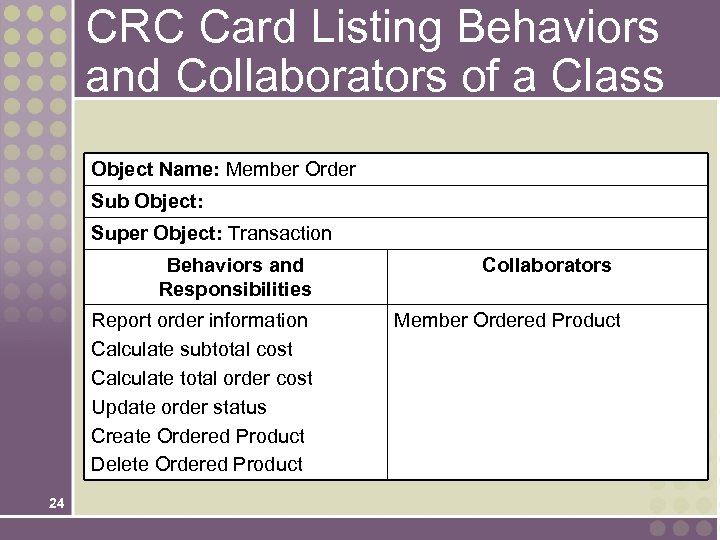
CRC Card Listing Behaviors and Collaborators of a Class Object Name: Member Order Sub Object: Super Object: Transaction Behaviors and Responsibilities Report order information Calculate subtotal cost Calculate total order cost Update order status Create Ordered Product Delete Ordered Product 24 Collaborators Member Ordered Product
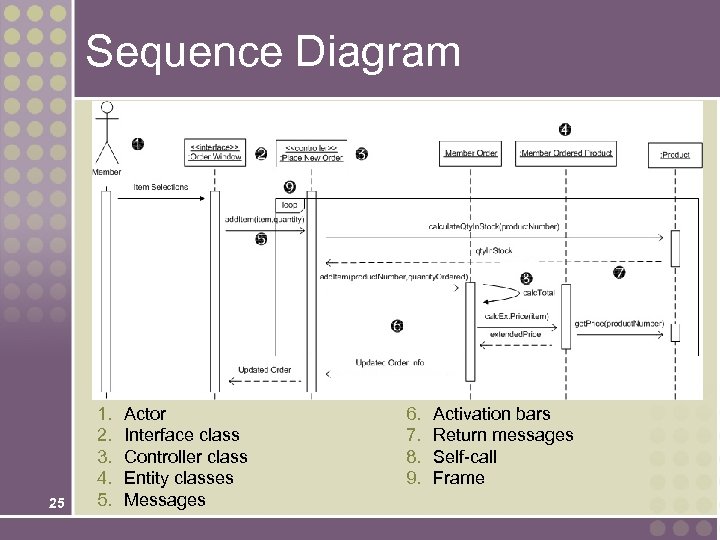
Sequence Diagram 25 1. 2. 3. 4. 5. Actor Interface class Controller class Entity classes Messages 6. 7. 8. 9. Activation bars Return messages Self-call Frame
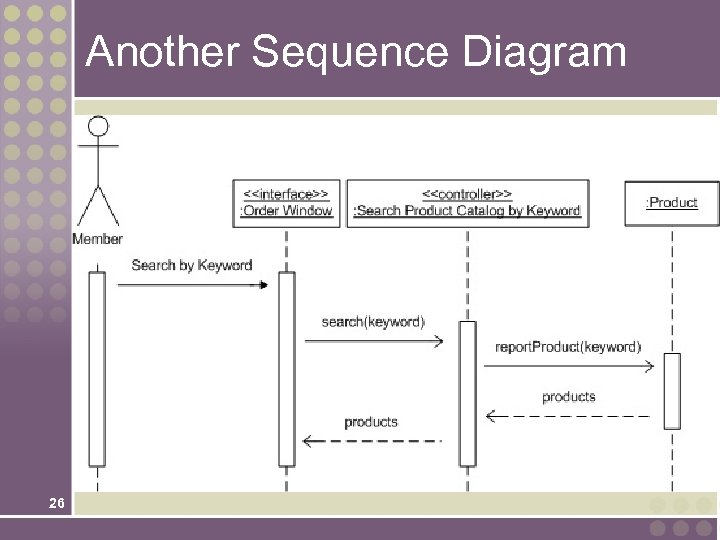
Another Sequence Diagram 26
Guidelines for Constructing Sequence Diagrams 27 • Identify the scope of the sequence diagram, whether entire use-case scenario or one step. • Draw actor and interface class if scope includes that. • List use-case steps down the left-hand side. • Draw boxes for controller class and each entity class that must collaborate in the sequence (based on attributes or behaviors previously assigned). • Add persistence and system classes if scope includes that. • Draw messages and point each to class that will fulfill the responsibility. • Add activation bars to indicate object instance lifetimes. • Add return messages as needed for clarity. • Add frames for loops, optional steps, alternate steps, etc.
Step 4: Model Object States • Object state – a condition of the object at one point in its lifetime. • State transition event –occurrence that triggers a change in an object’s state through updating of one or more of its attribute values. • State machine diagram – a UML diagram that depicts: 28 • the combination of states that an object can assume during its lifetime, • the events that trigger transitions between states, • the rules governing the objects in transition.
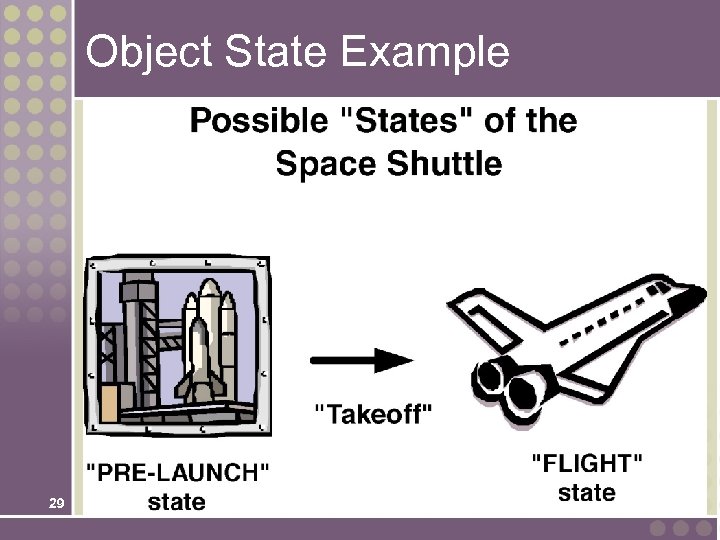
Object State Example 29
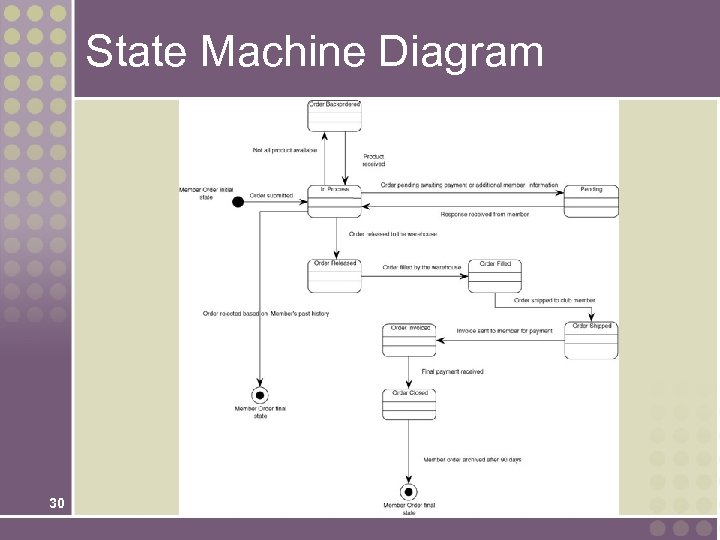
State Machine Diagram 30
Verifying Object Behavior and Collaboration Role playing – the act of simulating object behavior and collaboration by acting out an object’s behaviors and responsibilities. 31 • Participants may assume the role of an actor on an object type • Message sending is simulated by using an item such as a ball that is passed between the participants. • Useful for discovering missing objects and behaviors.
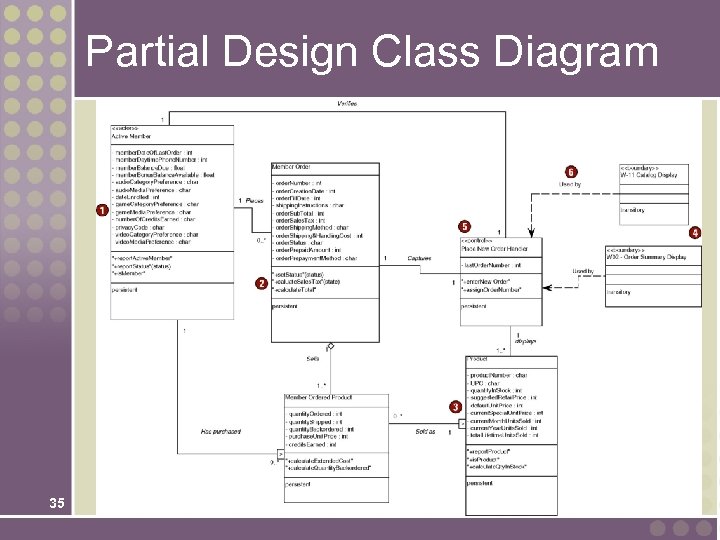
Updating Object Model to Reflect Implementation Environment Design class diagram – a diagram that depicts classes that correspond to software components that are used to build the software application. Includes: 32 • Classes • Associations and gen/spec and aggregation relationships • Attributes and attribute-type information • Methods with parameters • Navigability • Dependencies
Transforming Analysis Class Diagram to Design Class Diagram • Add design objects to diagram • Add attributes and attribute-type information to design objects • Add attribute visibility • Add methods to design objects • Add method visibility • Add association navigability • Add dependency relationships 33
Four Implicit Object Behaviors • • 34 Create new instances Update data or attributes Delete instances Display information
Partial Design Class Diagram 35
Object Reusability Coupling - the degree to which one class is connected to or relies upon other classes. Cohesion - the degree to which the attributes and behaviors of a single class are related to each other. 36 • The two overarching goals of object-oriented design are low coupling and high cohesion. • Allows for object reuse.
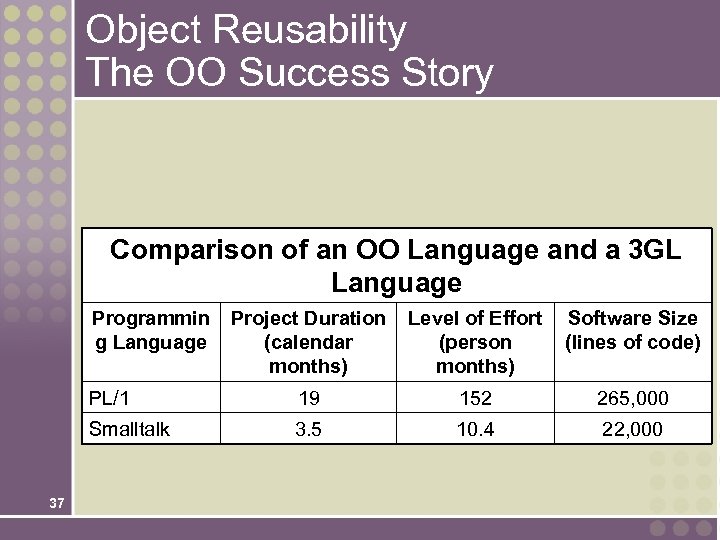
Object Reusability The OO Success Story Comparison of an OO Language and a 3 GL Language Programmin g Language Level of Effort (person months) Software Size (lines of code) PL/1 19 152 265, 000 Smalltalk 37 Project Duration (calendar months) 3. 5 10. 4 22, 000
Design Patterns Design pattern - a common solution to a give problem in a given context, which supports reuse of proven approaches and techniques. • Advantages 38 • Allow us to design with the experiences of those who came before rather than having to "reinvent the wheel. " • Provide designers a short-hand notation for discussing design issues.
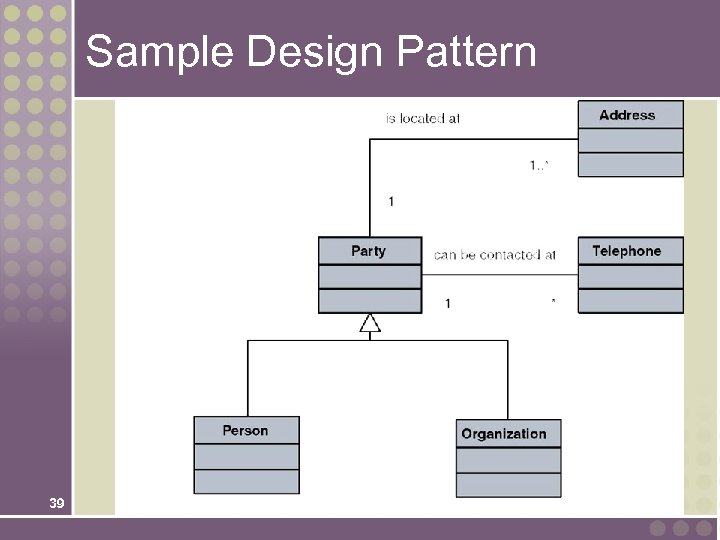
Sample Design Pattern 39
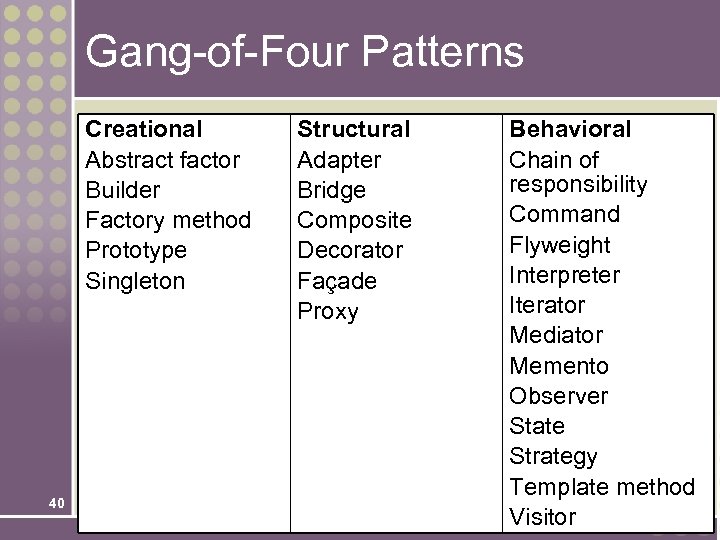
Gang-of-Four Patterns Creational Abstract factor Builder Factory method Prototype Singleton 40 Structural Adapter Bridge Composite Decorator Façade Proxy Behavioral Chain of responsibility Command Flyweight Interpreter Iterator Mediator Memento Observer State Strategy Template method Visitor
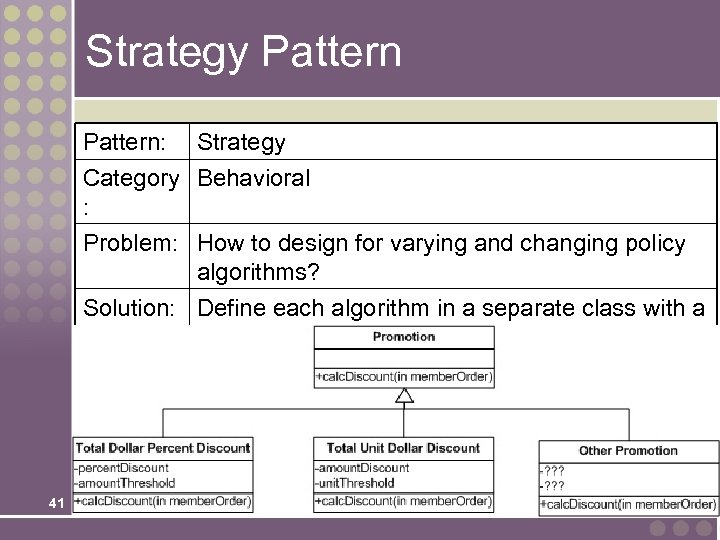
Strategy Pattern: Strategy Category Behavioral : Problem: How to design for varying and changing policy algorithms? Solution: Define each algorithm in a separate class with a common interface. 41
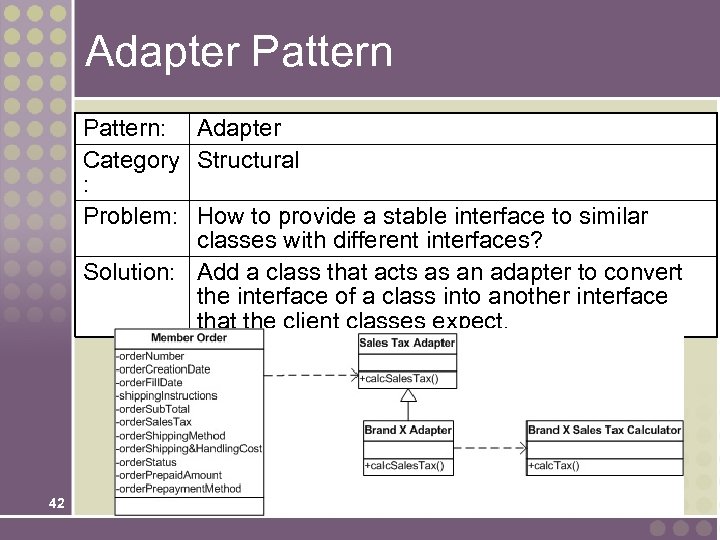
Adapter Pattern: Adapter Category Structural : Problem: How to provide a stable interface to similar classes with different interfaces? Solution: Add a class that acts as an adapter to convert the interface of a class into another interface that the client classes expect. 42
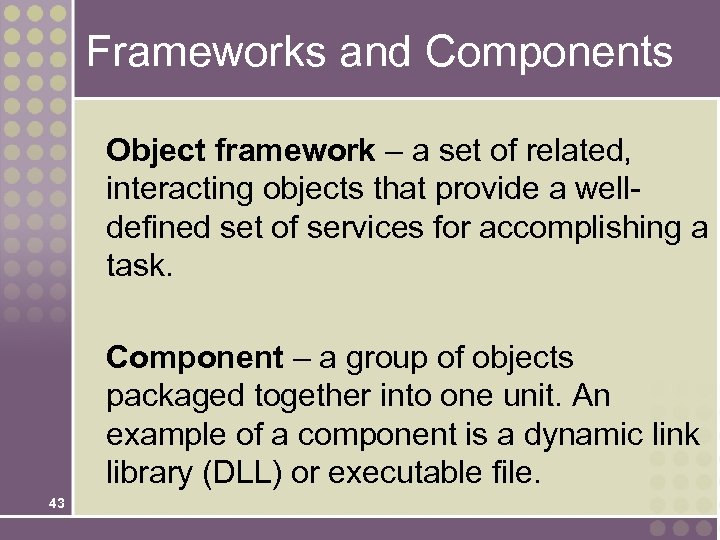
Frameworks and Components Object framework – a set of related, interacting objects that provide a welldefined set of services for accomplishing a task. Component – a group of objects packaged together into one unit. An example of a component is a dynamic link library (DLL) or executable file. 43
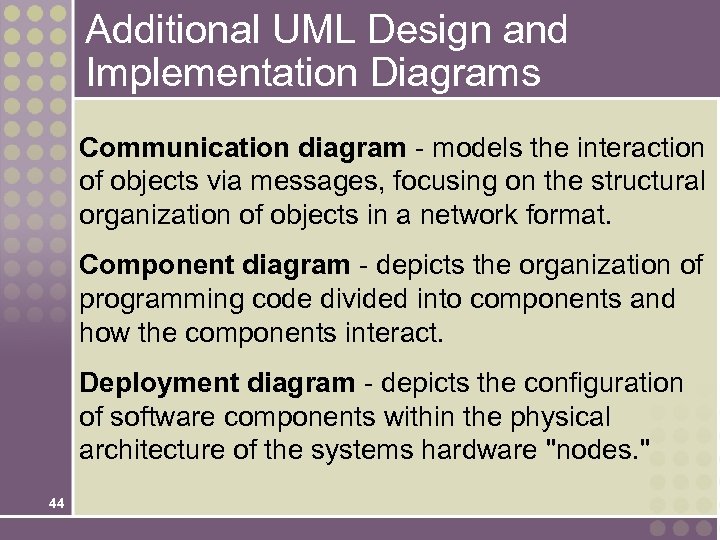
Additional UML Design and Implementation Diagrams Communication diagram - models the interaction of objects via messages, focusing on the structural organization of objects in a network format. Component diagram - depicts the organization of programming code divided into components and how the components interact. Deployment diagram - depicts the configuration of software components within the physical architecture of the systems hardware "nodes. " 44
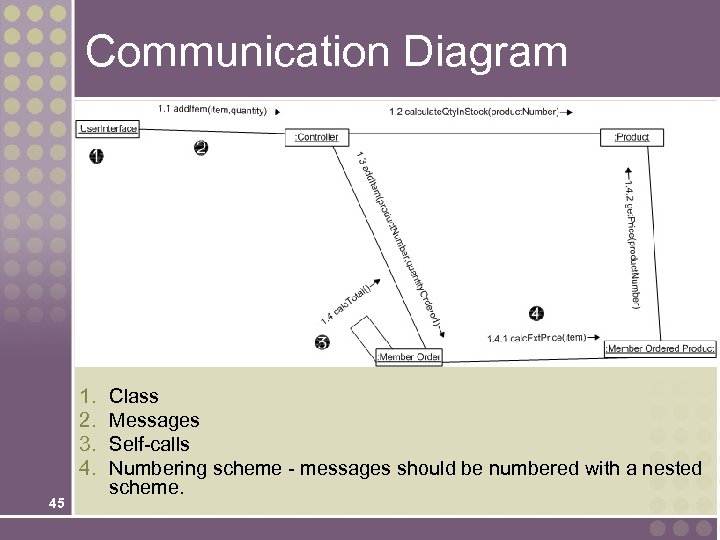
Communication Diagram 1. 2. 3. 4. 45 Class Messages Self-calls Numbering scheme - messages should be numbered with a nested scheme.
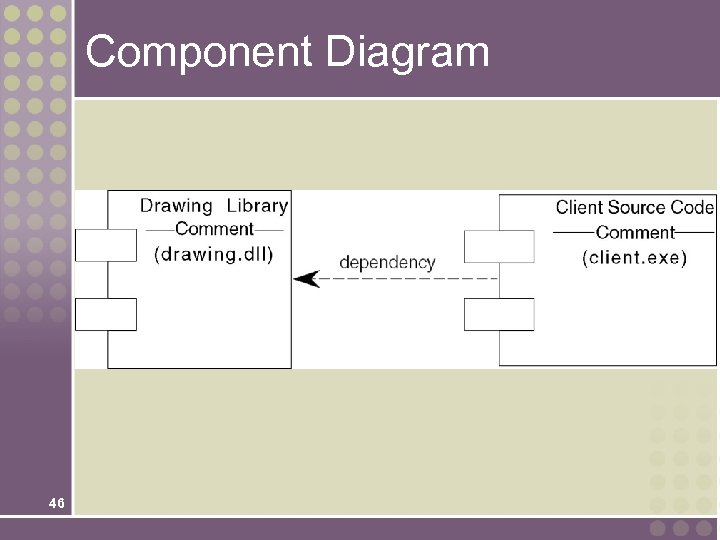
Component Diagram 46
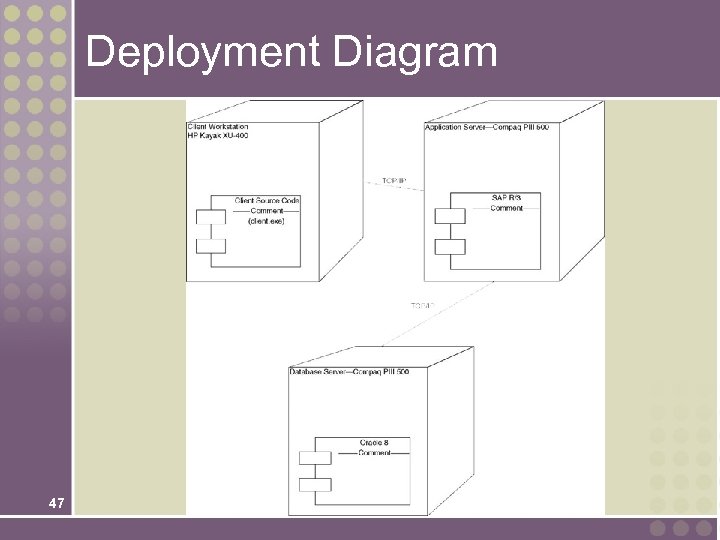
Deployment Diagram 47
Скачать презентацию Chapter 18 Object-Oriented Design and Modeling Using the
52bfe46317bea74dd1a75581813eed1d.ppt