 Скачать презентацию Chapter 18 Buying a PC Practical Office 2007
5144c4aba74615d2a149423554f87e9b.ppt
- Количество слайдов: 14



Chapter 18 Buying a PC Practical Office 2007 Chapter 1 1
Getting Started • In this Chapter, you will learn: − Where to begin − Where to find prices and specifications − How much computing power you need − Where to find the best deal − Whether it is OK to “mail order” a PC − About Hardware: Accessories and add-ons Practical PC 5 th Edition Chapter 18 2
So many options – where do I begin? • A good deal on a computer means you pay a reasonable price to a reliable merchant for a dependable computer • Successful buyers follow these strategies: – Choose a platform – Decide whether you want a notebook or desktop computer – Browse magazines, catalogs, and Web sites to get an idea of current pricing and features – Make your final selection by comparing prices, features, technical support and warranty – Buy It Practical PC 5 th Edition Chapter 18 3
So many options – where do I begin? • A computer platform is a category of computers – PC platform includes computers that run Microsoft Windows – Mac platform are Macintosh computers • Decide between a desktop or notebook model – Notebooks are portable – Notebooks can be more expensive for the same specifications – Desktop computers are more expandable because you can swap out components inside the case Practical PC 5 th Edition Chapter 18 4
Where can I find prices and specifications? • Research prices and specifications to get a handle on the current market in three ranges: under $1, 000, $1000 -$2000, and over $2000 • Make sure to look at – – – Microprocessor manufacturer and model Microprocessor speed RAM capacity Hard disk capacity Display screen size Price • Create a comparison table • Find info in ads, computer magazines, and online Practical PC 5 th Edition Chapter 18 5
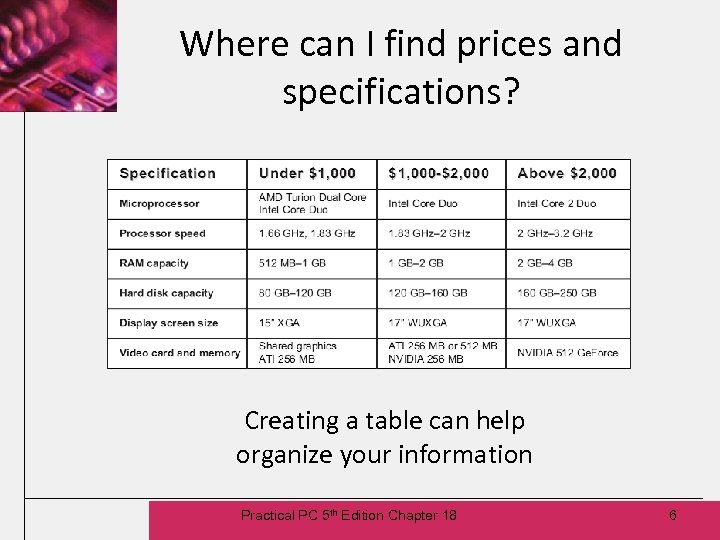
Where can I find prices and specifications? Creating a table can help organize your information Practical PC 5 th Edition Chapter 18 6
How much computing power do I need? • PC priced higher than $2, 000 is the equivalent of a luxury automobile – State-of-the-art components – Generous amount of RAM and disk storage space • PC $1000 -$2000 is the equivalent of a “four-door sedan” – Most popular and provides ample computing power • PC under $1, 000 is like a compact car – Technology is a few years old – Reduced processor speed and memory capacity • Used computer is also an option Practical PC 5 th Edition Chapter 18 7
Where can I find the best deal? • Conventional stores – Computer superstores allow you to see the PCs first hand also have trained sales people – Office and mass-market stores may provide a smaller selection at a higher price and the sales staff may have little computer background • Independent computer resellers – Likely to pay a premium price and may have to wait for the PC to be in stock – Many also assemble generic PCs • Manufacturer direct sales – You can place your order over the phone with manufacturer and customize features • Computer catalogs are an option with competitive pricing and many brands and models Practical PC 5 th Edition Chapter 18 8
Is it OK to “mail order” a PC? • “Mail Order” is one of the most popular ways of buying a computer • On the phone, a salesperson can answer your questions • On the Web, you typically follow prompts on the screen, provide a credit card payment, and receive an e-mail confirmation • Make arrangements for someone to be home to receive shipment, or you can pick up the computer at the courier’s office • Keep your purchase receipt handy for warranty coverage. You may also purchase extended warranties Practical PC 5 th Edition Chapter 18 9
Hardware: Accessories and add-ons? • Notebook accessories and add-ons include: – Extra batteries, an A/C adaptor, a D/C adaptor, an external battery charger, and a docking station – Buy these accessories why you buy your notebook to ensure that you get the correct model and to avoid discontinued models later on – Add-ons include extra RAM or a larger hard disk • Desktop computers tend not to offer accessories, but do offer add-ons – Faster processor, extra memory, larger display screen – Usually economical to get these add-ons at the time of purchase since it includes skilled installation Practical PC 5 th Edition Chapter 18 10
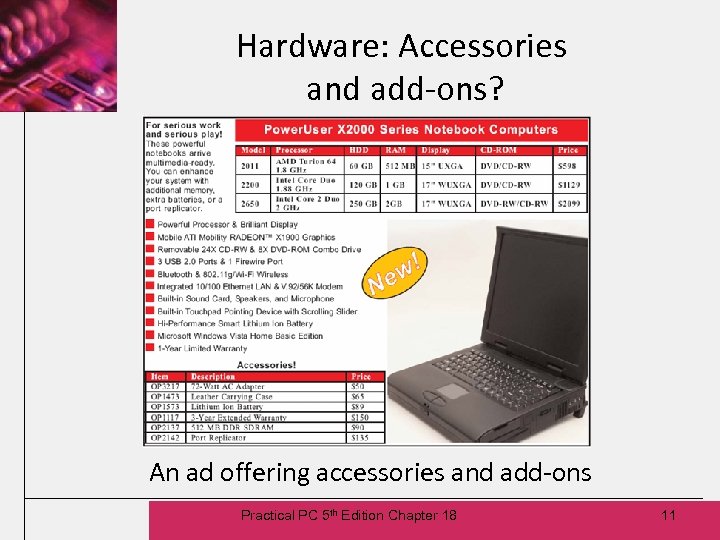
Hardware: Accessories and add-ons? An ad offering accessories and add-ons Practical PC 5 th Edition Chapter 18 11
Hardware: Accessories and add-ons? • An add-on trend is task-related packages – Digital photo package would include camera, software, printer, and CD/RW drive – Add-on packages can be great deals • Bundled software is included with PC – Computers with bundled software priced higher than those without software, but at a discount over list prices – May be able to get similar software free of charge by using freeware and open source applications – Some preinstalled software trial versions that you will have to buy to continue to use Practical PC 5 th Edition Chapter 18 12
Ethics and computer users • What do you think? – Would you follow your boss’s orders to install unlicensed software? – If you went ahead and installed the software, but it was later discovered by the software publisher, do you think you should be held responsible? – Have you read a code of ethics published by some professional organization? Practical PC 5 th Edition Chapter 18 13
Chapter Summary • You should now: − Understand computer options − Know where to find prices and specifications − Know how much computing power you need − Know where to find the best deal − Know whether it is OK to “mail order” a PC − Know about Hardware: Accessories and addons Practical PC 5 th Edition Chapter 18 14
Скачать презентацию Chapter 18 Buying a PC Practical Office 2007
5144c4aba74615d2a149423554f87e9b.ppt