 Скачать презентацию Chapter 17 Domain Name System DNS Objectives Upon
a65c752c7a59f8a6ac123997e563601c.ppt
- Количество слайдов: 46



Chapter 17 Domain Name System: DNS Objectives Upon completion you will be able to: • Understand how the DNS is organized • Know the domains in the DNS • Know how a name or address is resolved • Be familiar with the query and response formats • Understand the need for DDNS TCP/IP Protocol Suite 1
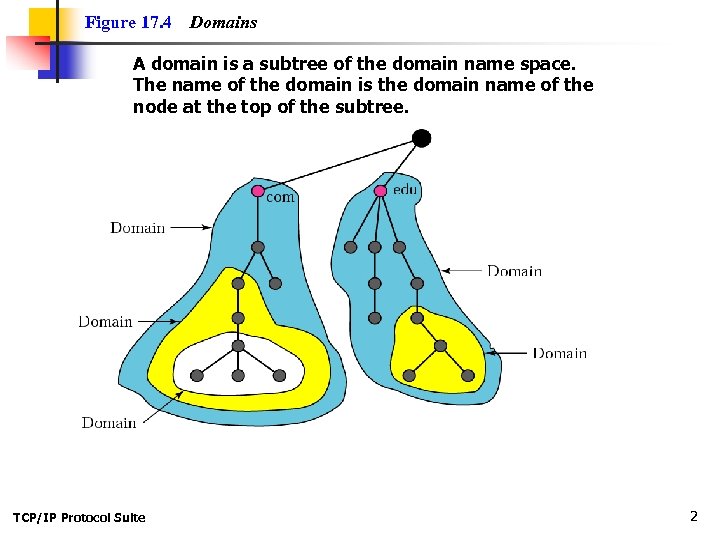
Figure 17. 4 Domains A domain is a subtree of the domain name space. The name of the domain is the domain name of the node at the top of the subtree. TCP/IP Protocol Suite 2
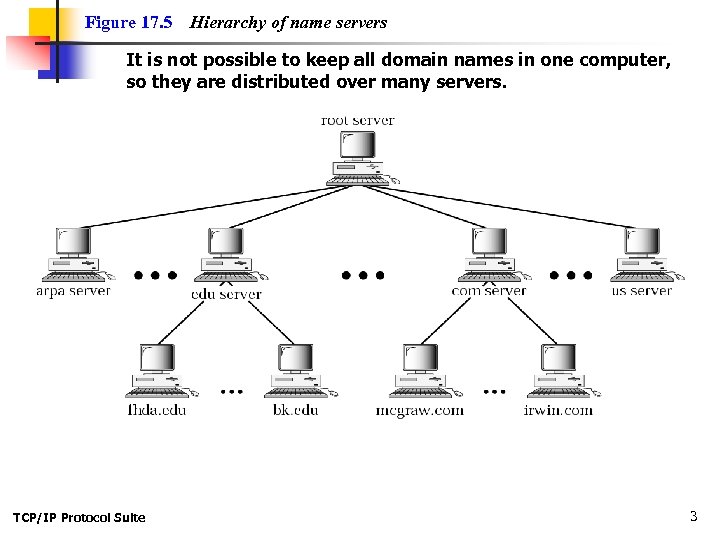
Figure 17. 5 Hierarchy of name servers It is not possible to keep all domain names in one computer, so they are distributed over many servers. TCP/IP Protocol Suite 3
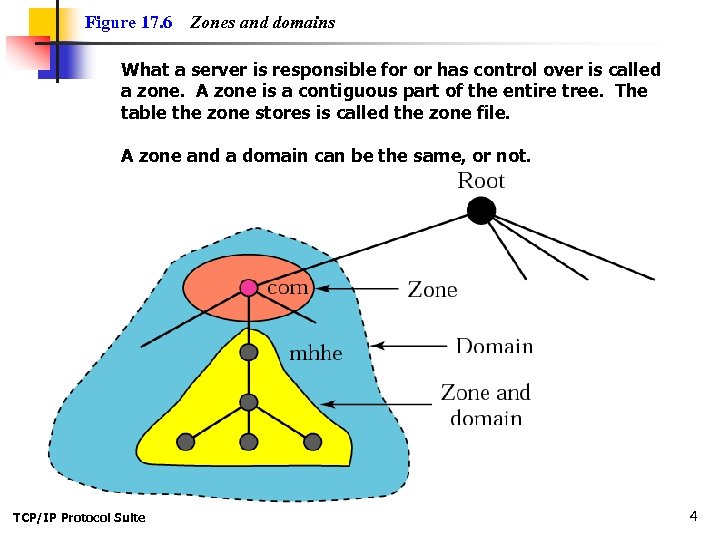
Figure 17. 6 Zones and domains What a server is responsible for or has control over is called a zone. A zone is a contiguous part of the entire tree. The table the zone stores is called the zone file. A zone and a domain can be the same, or not. TCP/IP Protocol Suite 4
Servers Root Server The root server is for the entire tree and does not contain any data. Primary Server Stores a file about the zone for which it is an authority. It also creates, maintains, and updates the zone file. Secondary Server Transfers the complete information about a zone from another server (primary or secondary). Does not create, maintain, or update the zone file. Thus, secondary server is a redundant copy of another server (more than likely a primary). When the secondary downloads info from the primary, it is called a zone transfer. TCP/IP Protocol Suite 5
Resolver Along with the servers, you need a resolver. The DNS resolver - a DNS client program which runs on a user’s computer and generates DNS request on behalf of software programs This request goes from the resolver to the lowest level DNS server TCP/IP Protocol Suite 6
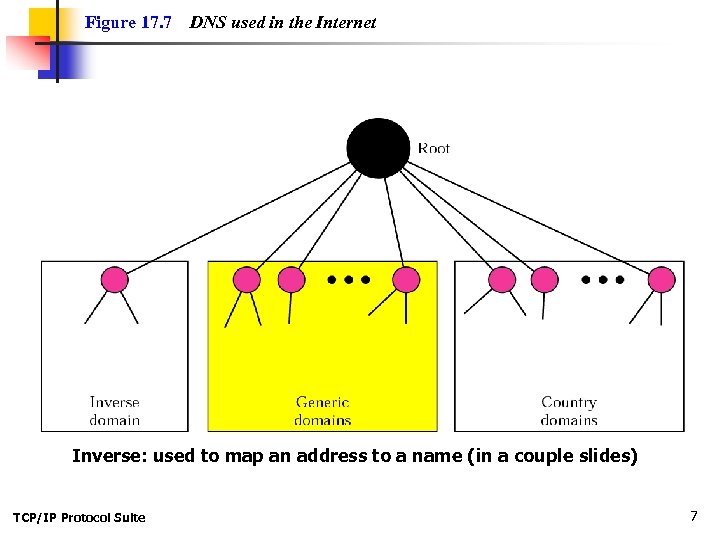
Figure 17. 7 DNS used in the Internet Inverse: used to map an address to a name (in a couple slides) TCP/IP Protocol Suite 7
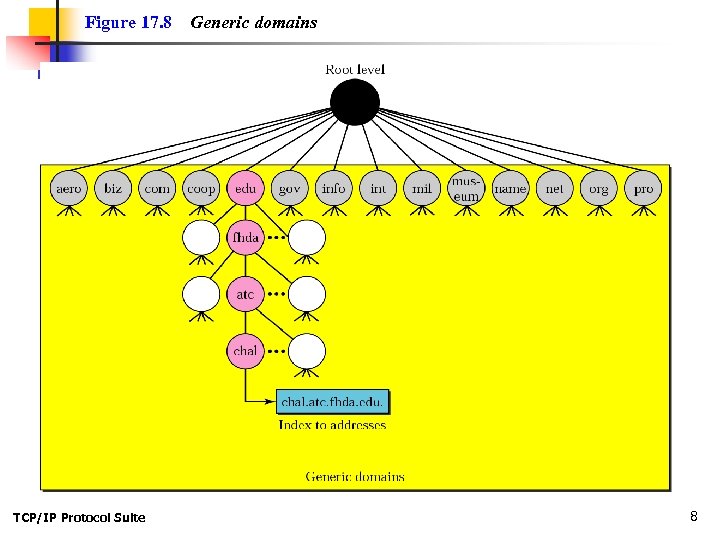
Figure 17. 8 TCP/IP Protocol Suite Generic domains 8
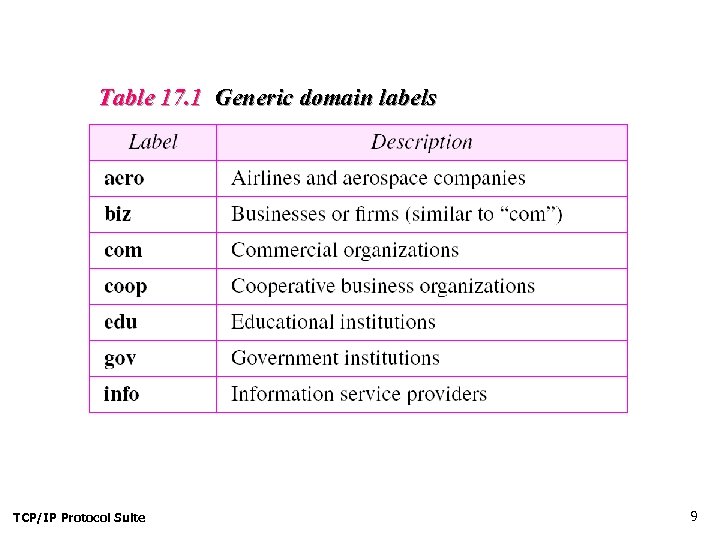
Table 17. 1 Generic domain labels TCP/IP Protocol Suite 9
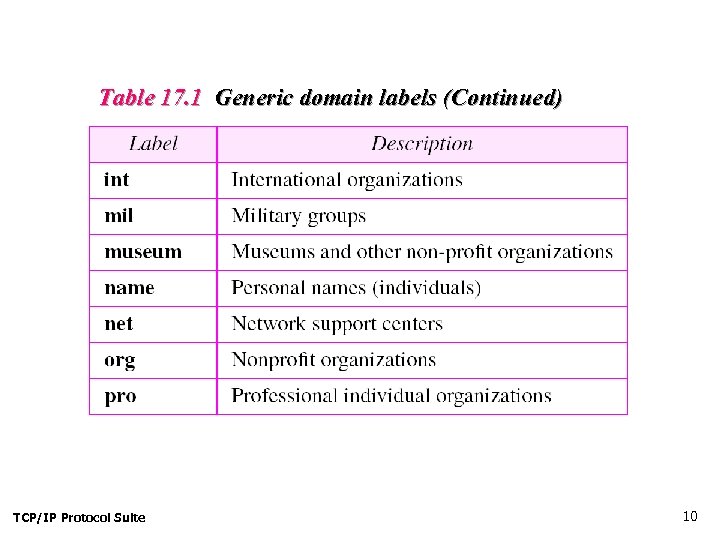
Table 17. 1 Generic domain labels (Continued) TCP/IP Protocol Suite 10
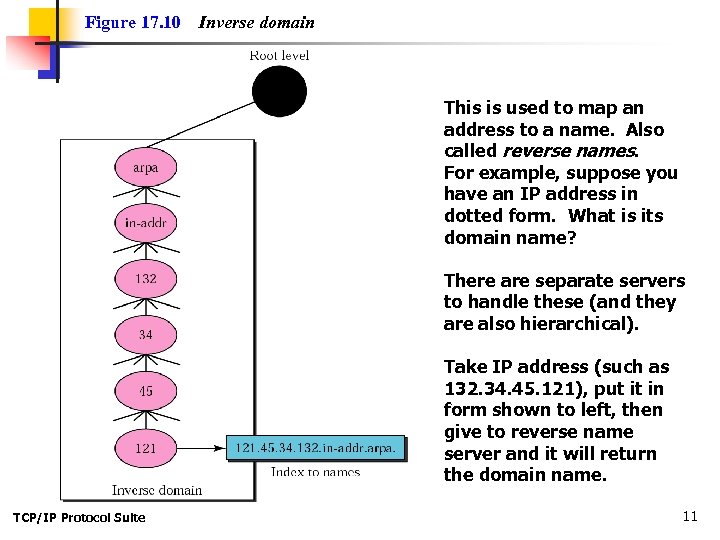
Figure 17. 10 Inverse domain This is used to map an address to a name. Also called reverse names. For example, suppose you have an IP address in dotted form. What is its domain name? There are separate servers to handle these (and they are also hierarchical). Take IP address (such as 132. 34. 45. 121), put it in form shown to left, then give to reverse name server and it will return the domain name. TCP/IP Protocol Suite 11
Figure 17. 10 Inverse domain For example, when a user runs an FTP client to contact a server, the server can obtain the client's IP address from the incoming TCP connection and then perform an inverse lookup to map the address into a name. Some servers do so to restrict access (i. e. the server compares the client's name to a list of computers allowed/denied to access the service). TCP/IP Protocol Suite 12
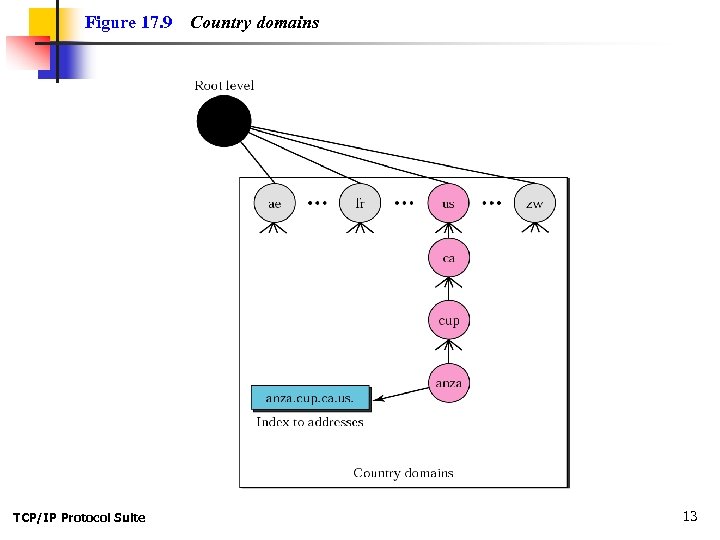
Figure 17. 9 TCP/IP Protocol Suite Country domains 13
17. 5 RESOLUTION Mapping a name to an address or an address to a name is called nameaddress resolution. The topics discussed in this section include: Resolver Mapping Names to Addresses Mapping Addresses to Names Recursive Resolution Iterative Resolution Caching TCP/IP Protocol Suite 14
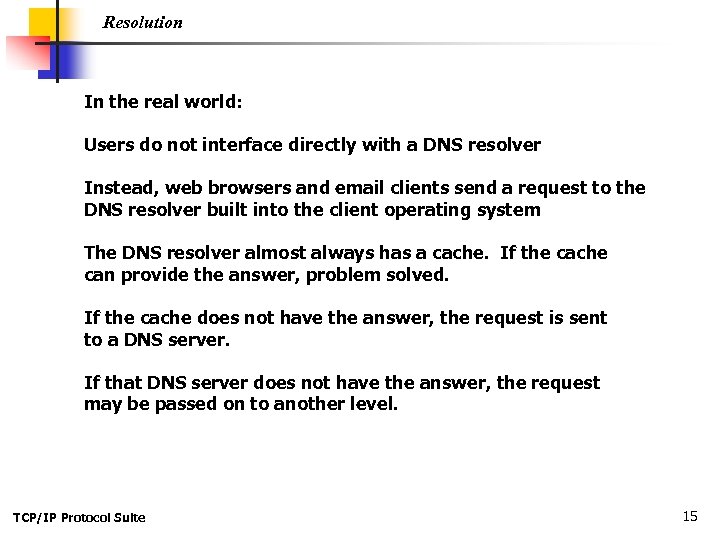
Resolution In the real world: Users do not interface directly with a DNS resolver Instead, web browsers and email clients send a request to the DNS resolver built into the client operating system The DNS resolver almost always has a cache. If the cache can provide the answer, problem solved. If the cache does not have the answer, the request is sent to a DNS server. If that DNS server does not have the answer, the request may be passed on to another level. TCP/IP Protocol Suite 15
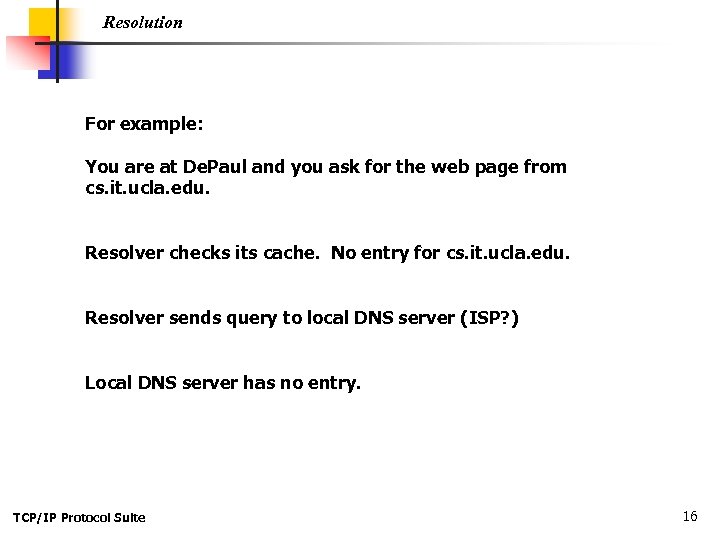
Resolution For example: You are at De. Paul and you ask for the web page from cs. it. ucla. edu. Resolver checks its cache. No entry for cs. it. ucla. edu. Resolver sends query to local DNS server (ISP? ) Local DNS server has no entry. TCP/IP Protocol Suite 16
Resolution Query is sent to. edu server recognizes ucla. edu, but not cs. it. ucla. edu. So. edu server sends query to ucla. edu server says it recognizes cs. it. ucla. edu and here is the IP address: xx. yy. zz. ww IP address is recursively sent to. edu server’s cache and all other caches on the way back to De. Paul. TCP/IP Protocol Suite 17
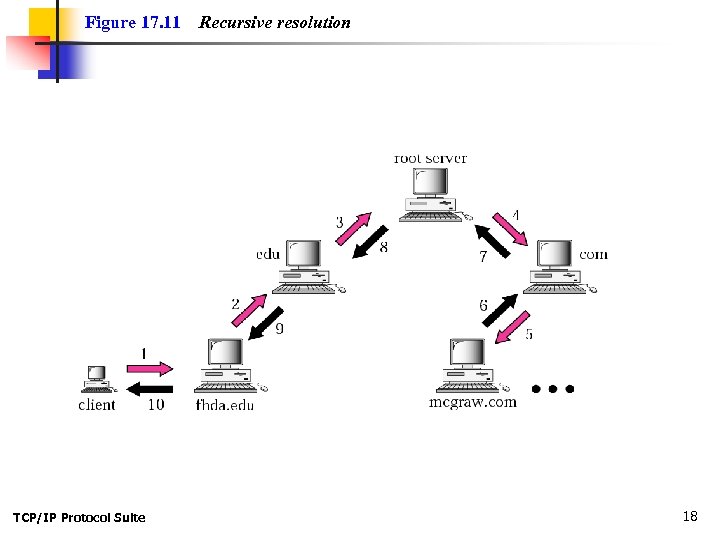
Figure 17. 11 TCP/IP Protocol Suite Recursive resolution 18
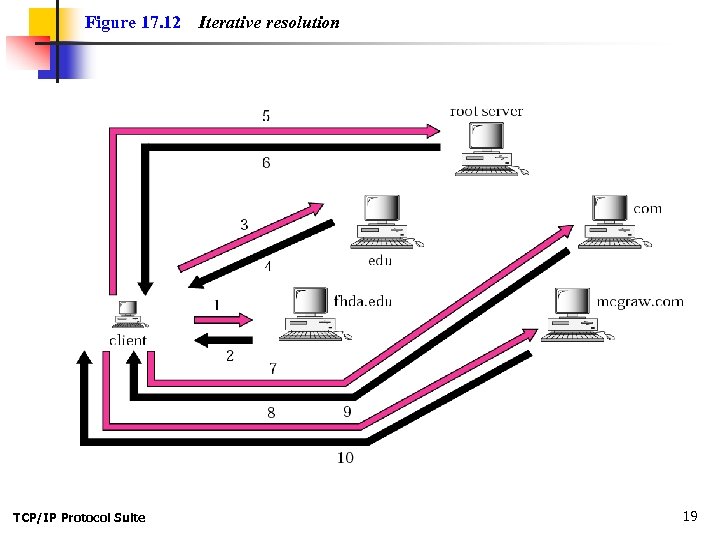
Figure 17. 12 TCP/IP Protocol Suite Iterative resolution 19
17. 6 DNS MESSAGES The DNS query message consists of a header and question records; the DNS response message consists of a header, question records, answer records, authoritative records, and additional records. TCP/IP Protocol Suite 20
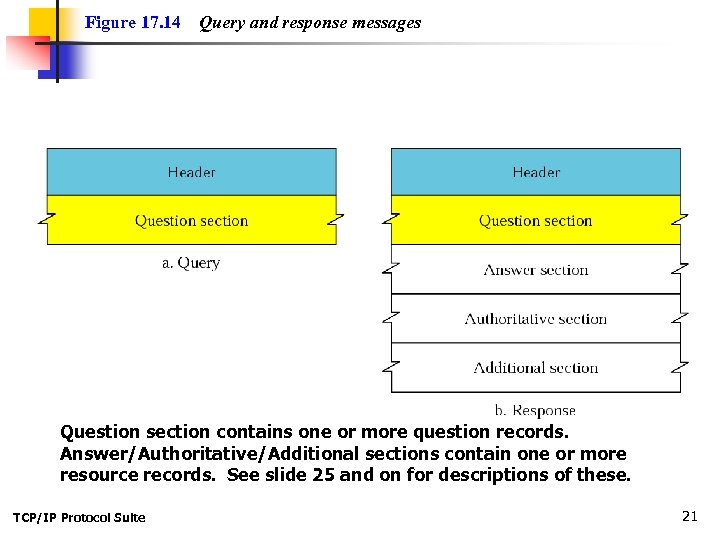
Figure 17. 14 Query and response messages Question section contains one or more question records. Answer/Authoritative/Additional sections contain one or more resource records. See slide 25 and on for descriptions of these. TCP/IP Protocol Suite 21
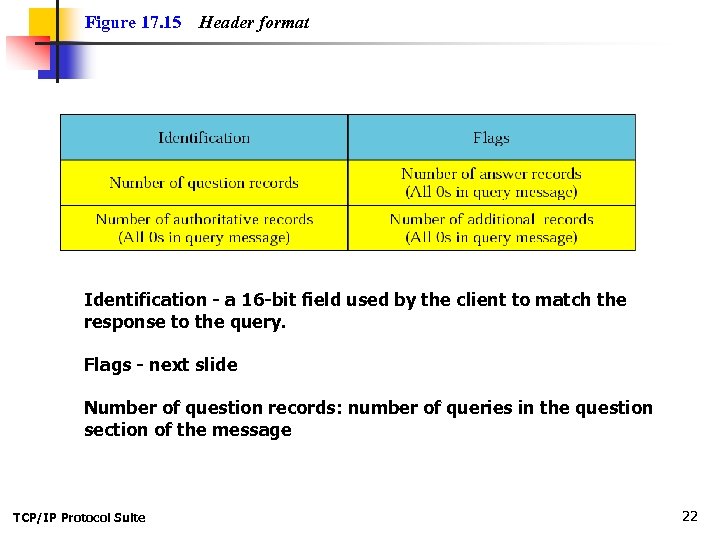
Figure 17. 15 Header format Identification - a 16 -bit field used by the client to match the response to the query. Flags - next slide Number of question records: number of queries in the question section of the message TCP/IP Protocol Suite 22
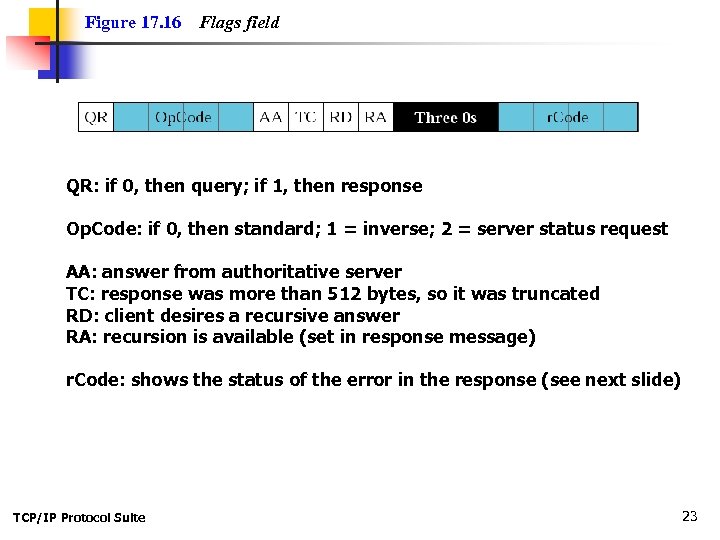
Figure 17. 16 Flags field QR: if 0, then query; if 1, then response Op. Code: if 0, then standard; 1 = inverse; 2 = server status request AA: answer from authoritative server TC: response was more than 512 bytes, so it was truncated RD: client desires a recursive answer RA: recursion is available (set in response message) r. Code: shows the status of the error in the response (see next slide) TCP/IP Protocol Suite 23
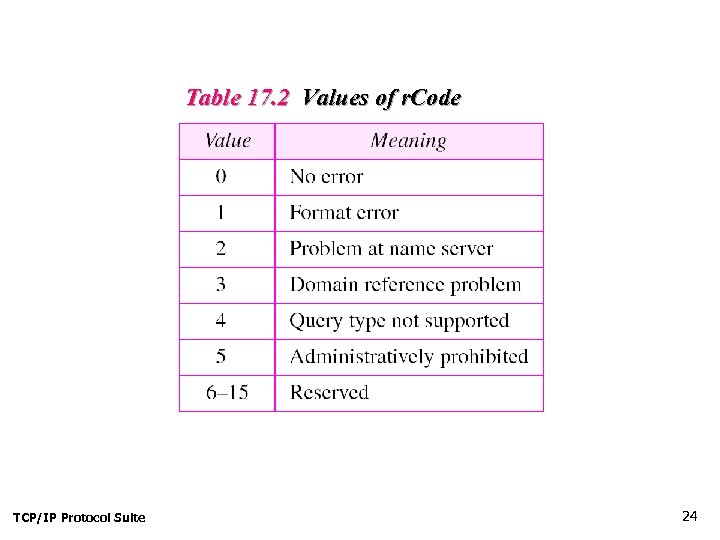
Table 17. 2 Values of r. Code TCP/IP Protocol Suite 24
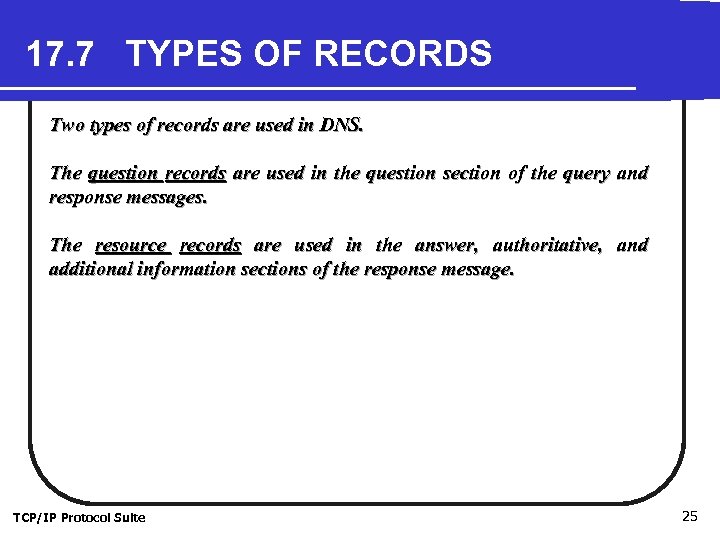
17. 7 TYPES OF RECORDS Two types of records are used in DNS. The question records are used in the question section of the query and response messages. The resource records are used in the answer, authoritative, and additional information sections of the response message. TCP/IP Protocol Suite 25
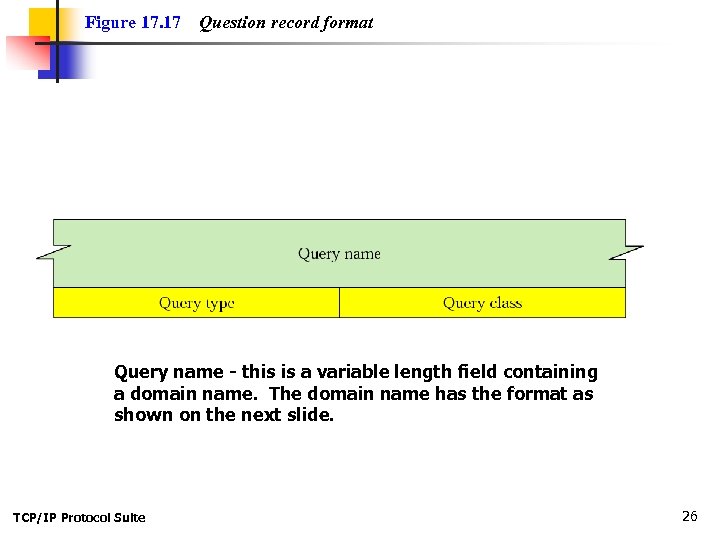
Figure 17. 17 Question record format Query name - this is a variable length field containing a domain name. The domain name has the format as shown on the next slide. TCP/IP Protocol Suite 26
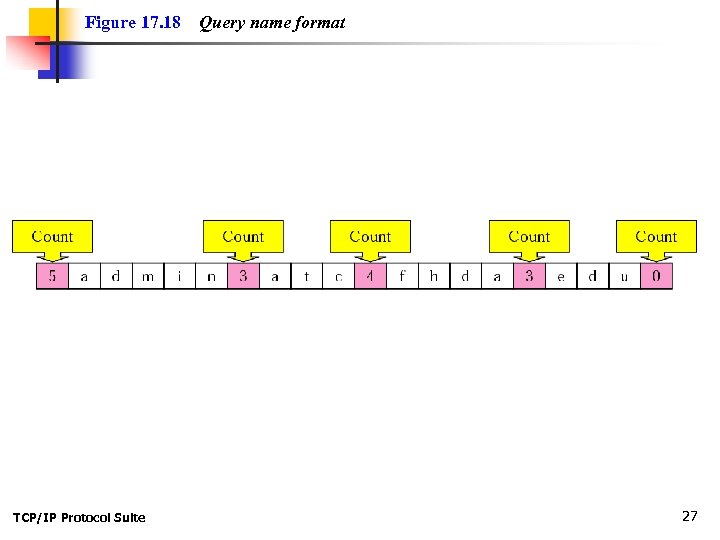
Figure 17. 18 TCP/IP Protocol Suite Query name format 27
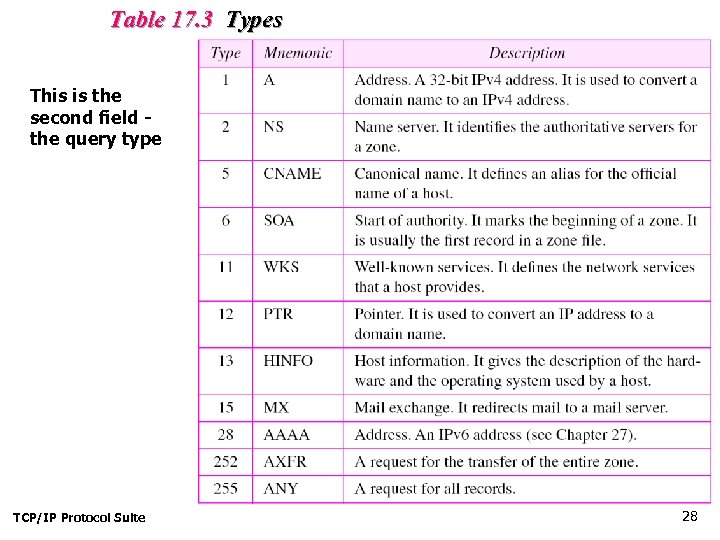
Table 17. 3 Types This is the second field the query type TCP/IP Protocol Suite 28
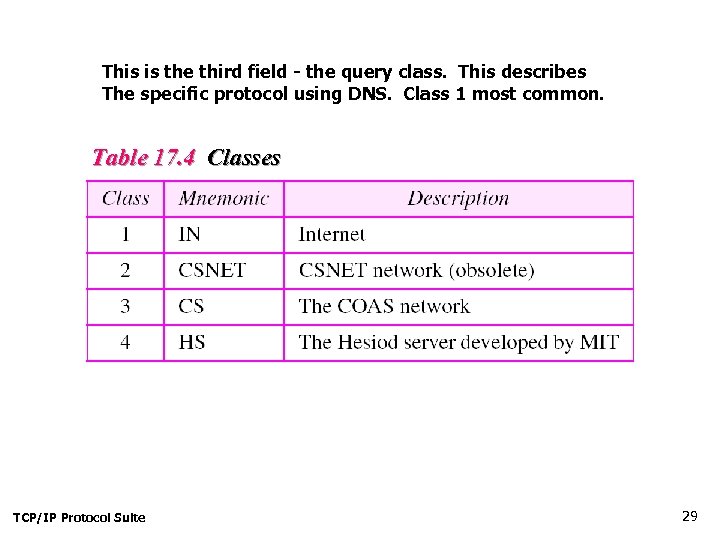
This is the third field - the query class. This describes The specific protocol using DNS. Class 1 most common. Table 17. 4 Classes TCP/IP Protocol Suite 29
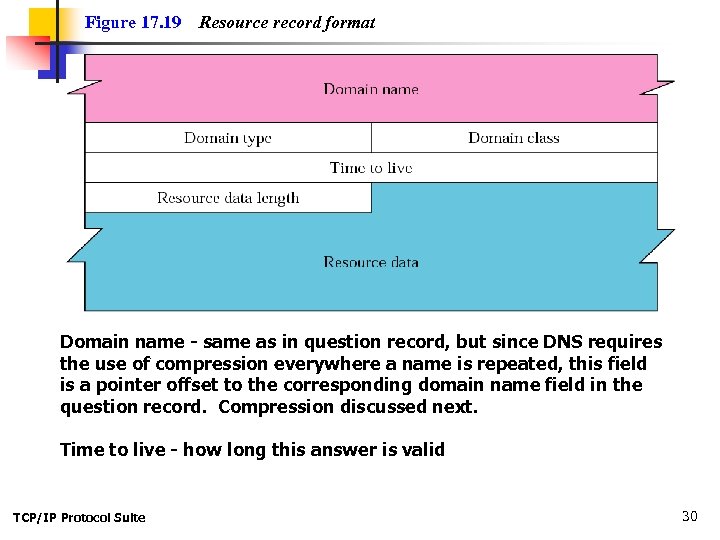
Figure 17. 19 Resource record format Domain name - same as in question record, but since DNS requires the use of compression everywhere a name is repeated, this field is a pointer offset to the corresponding domain name field in the question record. Compression discussed next. Time to live - how long this answer is valid TCP/IP Protocol Suite 30
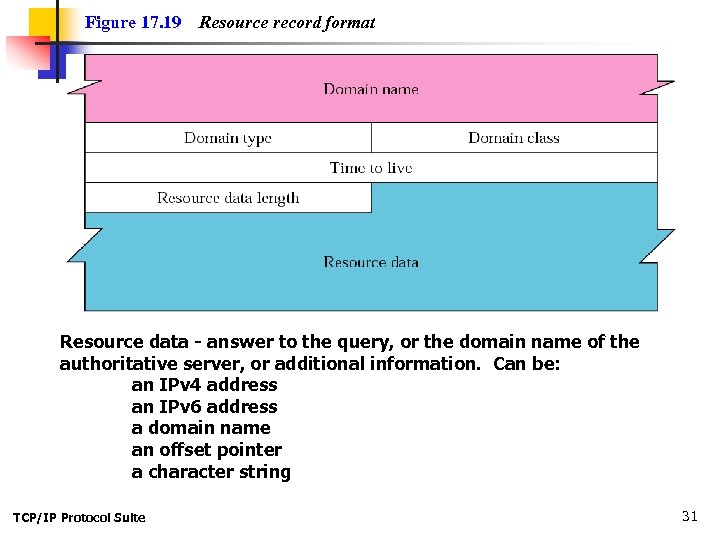
Figure 17. 19 Resource record format Resource data - answer to the query, or the domain name of the authoritative server, or additional information. Can be: an IPv 4 address an IPv 6 address a domain name an offset pointer a character string TCP/IP Protocol Suite 31
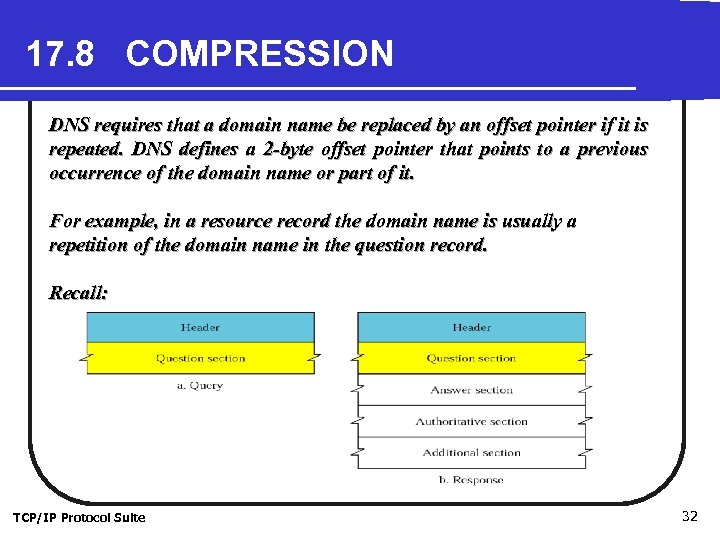
17. 8 COMPRESSION DNS requires that a domain name be replaced by an offset pointer if it is repeated. DNS defines a 2 -byte offset pointer that points to a previous occurrence of the domain name or part of it. For example, in a resource record the domain name is usually a repetition of the domain name in the question record. Recall: TCP/IP Protocol Suite 32
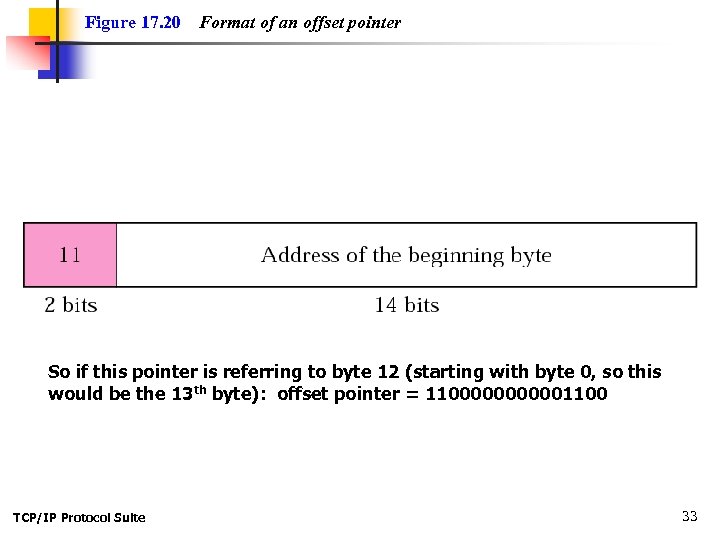
Figure 17. 20 Format of an offset pointer So if this pointer is referring to byte 12 (starting with byte 0, so this would be the 13 th byte): offset pointer = 11000001100 TCP/IP Protocol Suite 33
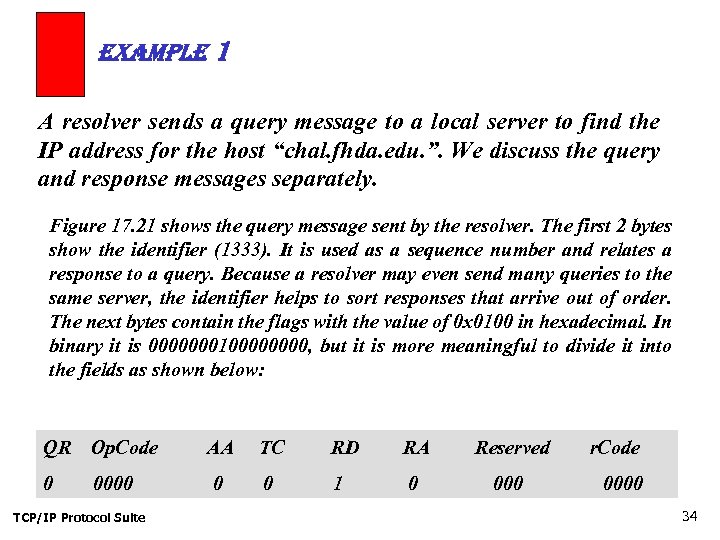
example 1 A resolver sends a query message to a local server to find the IP address for the host “chal. fhda. edu. ”. We discuss the query and response messages separately. Figure 17. 21 shows the query message sent by the resolver. The first 2 bytes show the identifier (1333). It is used as a sequence number and relates a response to a query. Because a resolver may even send many queries to the same server, the identifier helps to sort responses that arrive out of order. The next bytes contain the flags with the value of 0 x 0100 in hexadecimal. In binary it is 000000010000, but it is more meaningful to divide it into the fields as shown below: QR Op. Code AA TC RD RA Reserved 0 0000 0 0 1 0 000 TCP/IP Protocol Suite r. Code 0000 34
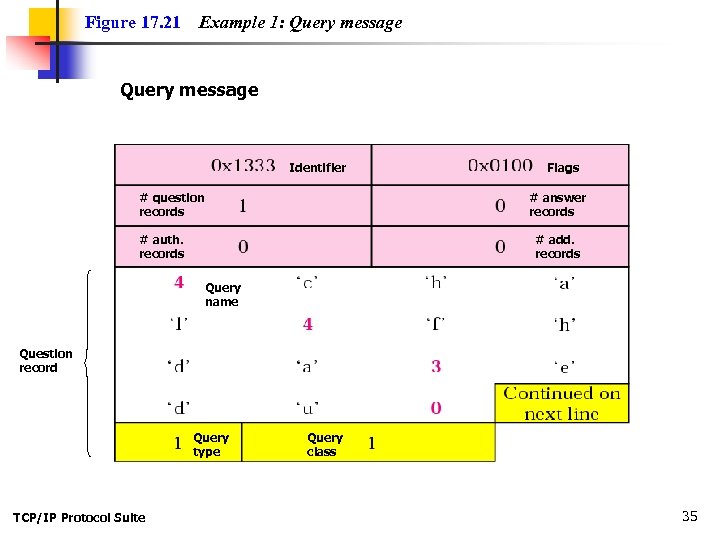
Figure 17. 21 Example 1: Query message Identifier # question records Flags # answer records # auth. records # add. records Query name Question record Query type TCP/IP Protocol Suite Query class 35
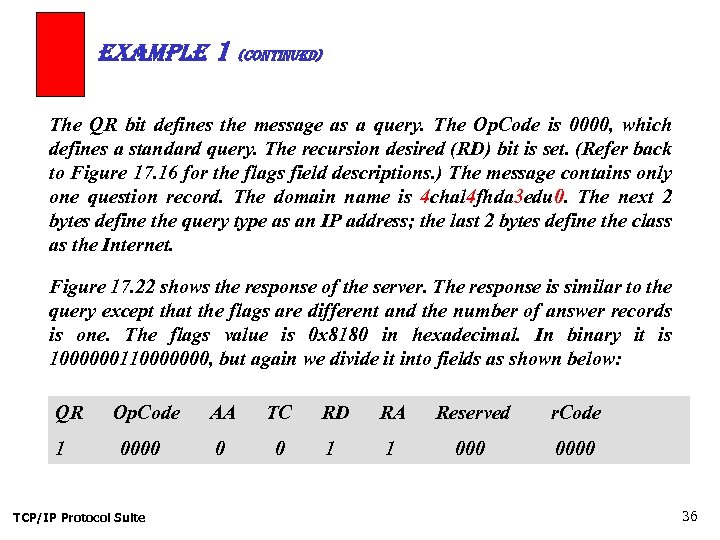
example 1 (Continued) The QR bit defines the message as a query. The Op. Code is 0000, which defines a standard query. The recursion desired (RD) bit is set. (Refer back to Figure 17. 16 for the flags field descriptions. ) The message contains only one question record. The domain name is 4 chal 4 fhda 3 edu 0. The next 2 bytes define the query type as an IP address; the last 2 bytes define the class as the Internet. Figure 17. 22 shows the response of the server. The response is similar to the query except that the flags are different and the number of answer records is one. The flags value is 0 x 8180 in hexadecimal. In binary it is 1000000110000000, but again we divide it into fields as shown below: QR 1 Op. Code 0000 TCP/IP Protocol Suite AA TC RD RA Reserved r. Code 0 0 1 1 0000 36
example 1 (Continued) The QR bit defines the message as a response. The Op. Code is 0000, which defines a standard response. The recursion available (RA) and RD bits are set. The message contains one question record and one answer record. The question record is repeated from the query message. The answer record has a value of 0 x. C 00 C (split in two lines), which points to the question record instead of repeating the domain name. The next field defines the domain type (address). The field after that defines the class (Internet). The field with the value 12, 000 is the TTL (12, 000 s). The next field is the length of the resource data, which is 4, since the resource data itself is an IP address (153. 18. 8. 105). TCP/IP Protocol Suite 37
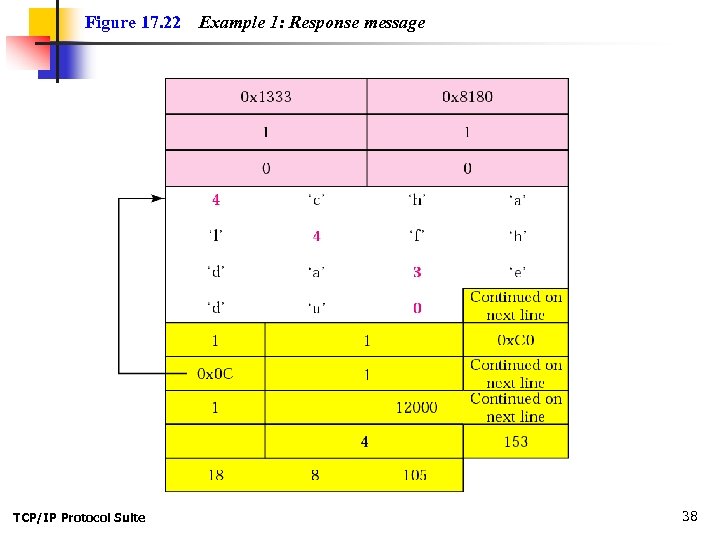
Figure 17. 22 TCP/IP Protocol Suite Example 1: Response message 38
example 2 An FTP server has received a packet from an FTP client with IP address 153. 2. 7. 9. The FTP server wants to verify that the FTP client is an authorized client. The FTP server can consult a file containing the list of authorized clients. However, the file consists only of domain names. The FTP server has only the IP address of the requesting client, which was the source IP address in the received IP datagram. The FTP server asks the resolver (DNS client) to send an inverse query to a DNS server to ask for the name of the FTP client. We discuss the query and response messages separately. TCP/IP Protocol Suite 39
example 2 (Continued) Figure 17. 23 shows the query message sent from the resolver to the server. The first 2 bytes show the identifier (0 x 1200). The flags value is 0 x 0900 in hexadecimal. In binary it is 000010010000, and we divide it into fields as shown below: QR 0 Op. Code 0001 AA TC RD RA Reserved r. Code 0 0 1 0 0000 The Op. Code is 0001, which defines an inverse query. The message contains only one question record. The domain name is 19171231537 in-addr 4 arpa. The next 2 bytes define the query type as PTR, and the last 2 bytes define the class as the Internet. TCP/IP Protocol Suite 40
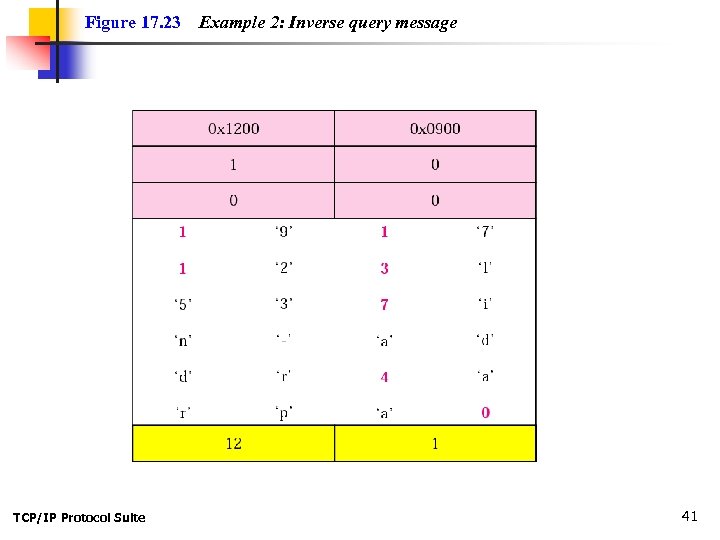
Figure 17. 23 TCP/IP Protocol Suite Example 2: Inverse query message 41
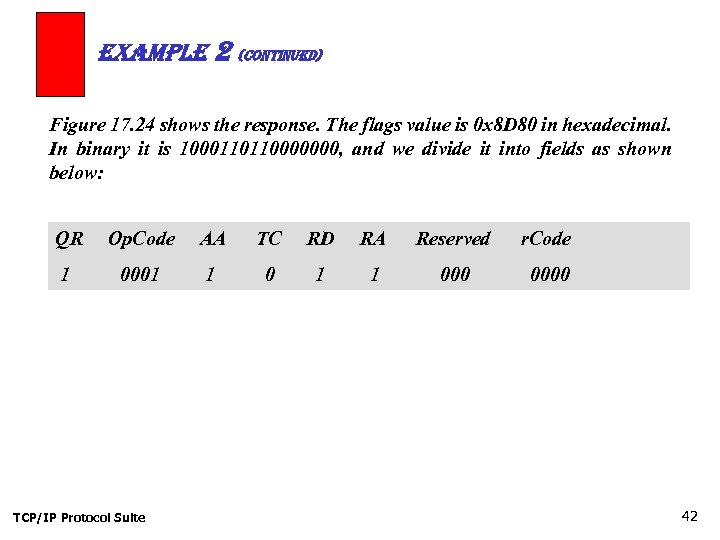
example 2 (Continued) Figure 17. 24 shows the response. The flags value is 0 x 8 D 80 in hexadecimal. In binary it is 1000110110000000, and we divide it into fields as shown below: QR Op. Code AA TC RD RA Reserved r. Code 1 0001 1 0000 TCP/IP Protocol Suite 42
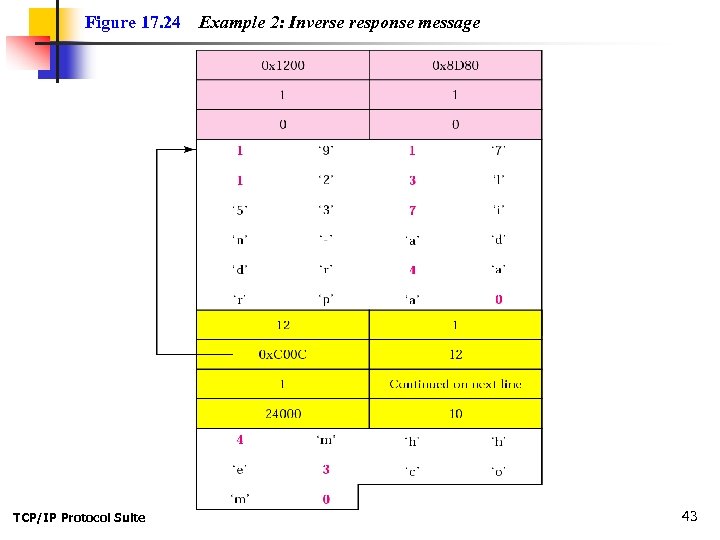
Figure 17. 24 TCP/IP Protocol Suite Example 2: Inverse response message 43
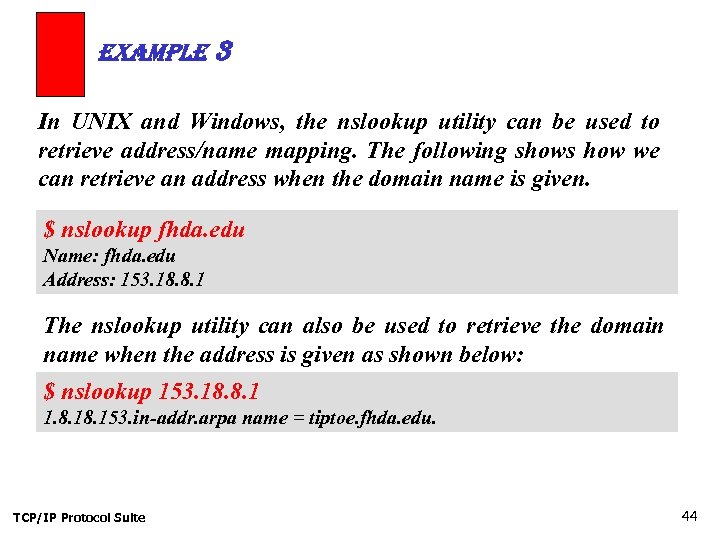
example 3 In UNIX and Windows, the nslookup utility can be used to retrieve address/name mapping. The following shows how we can retrieve an address when the domain name is given. $ nslookup fhda. edu Name: fhda. edu Address: 153. 18. 8. 1 The nslookup utility can also be used to retrieve the domain name when the address is given as shown below: $ nslookup 153. 18. 8. 1 1. 8. 153. in-addr. arpa name = tiptoe. fhda. edu. TCP/IP Protocol Suite 44
17. 9 DDNS The Dynamic Domain Name System (DDNS) updates the DNS master file dynamically. For example, say TTL is set to 6 hours, then you change your URL/IP address combo. TCP/IP Protocol Suite 45
17. 10 ENCAPSULATION DNS uses UDP as the transport protocol when the size of the response message is less than 512 bytes. If the size of the response message is more than 512 bytes, a TCP connection is used. Port 53 is used in both cases. TCP/IP Protocol Suite 46
Скачать презентацию Chapter 17 Domain Name System DNS Objectives Upon
a65c752c7a59f8a6ac123997e563601c.ppt