


 Скачать презентацию Chapter 14 Project Management 1 Lecture outline
37e888841f8831de09e3b6c698d37957.ppt
- Количество слайдов: 41
 Chapter 14 Project Management 1
 Lecture outline • • • Project planning Project scheduling Project control CPM/PERT Project crashing and time-cost trade-off 2
 What is a project? • Project – unique, one-time operational activity or effort • Examples – constructing houses, factories, shopping malls, athletic stadiums or arenas – developing military weapons systems, aircrafts, new ships – launching satellite systems – constructing oil pipelines – developing and implementing new computer systems – planning concert, football games, or basketball tournaments – introducing new products into market 3
 Project elements • • Objective Scope Contract requirements Schedules Resources Personnel Control Risk and problem analysis 4
 Project management process • • Project planning Project scheduling Project control Project team – made up of individuals from various areas and departments within a company • Matrix organization – a team structure with members from functional areas, depending on skills required • Project Manager – most important member of project team 5
 Project scope • Scope statement – a document that provides an understanding, justification, and expected result of a project • Statement of work – written description of objectives of a project • Work breakdown structure – breaks down a project into components, subcomponents, activities, and tasks 6
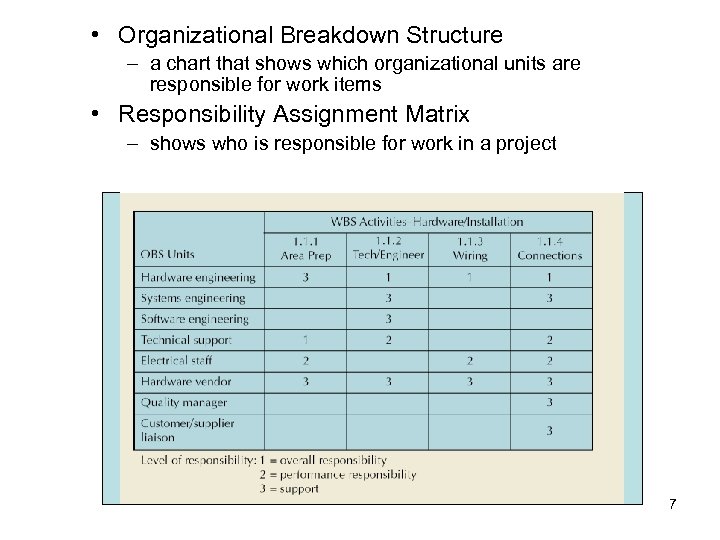 • Organizational Breakdown Structure – a chart that shows which organizational units are responsible for work items • Responsibility Assignment Matrix – shows who is responsible for work in a project 7
 Project scheduling • Steps – – Define activities Sequence activities Estimate time Develop schedule • Techniques – – Gantt chart CPM PERT Microsoft Project 8
 Gantt chart • Graph or bar chart with a bar for each project activity that shows passage of time • Provides visual display of project schedule • Slack – amount of time an activity can be delayed without delaying the project 9
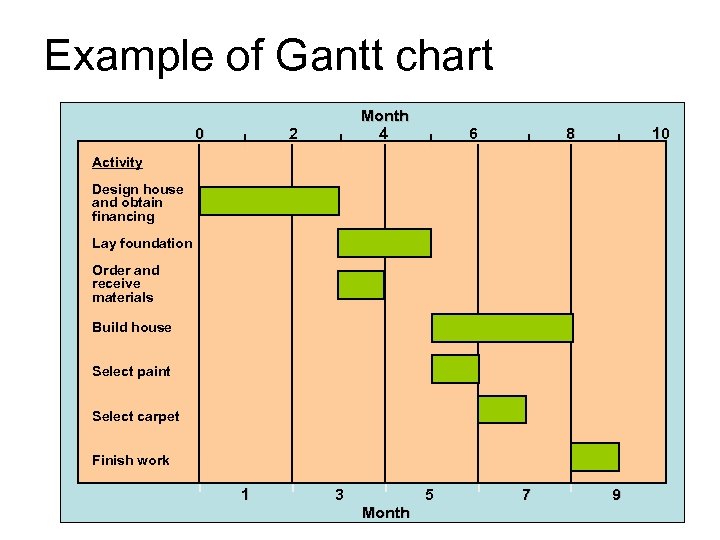 Example of Gantt chart 0 | 2 | Month 4 | 6 | 8 | 10 Activity Design house and obtain financing Lay foundation Order and receive materials Build house Select paint Select carpet Finish work 1 3 Month 5 7 9 10
 Project control • • Time management Cost management Quality management Performance management – Earned Value Analysis • a standard procedure for numerically measuring a project’s progress, forecasting its completion date and cost and measuring schedule and budget variation • Communication • Enterprise project management 11
 CPM/PERT • Critical Path Method (CPM) – Du. Pont & Remington-Rand (1956) – Deterministic task times – Activity-on-node network construction • Project Evaluation and Review Technique (PERT) – US Navy, Booz, Allen & Hamilton – Multiple task time estimates – Activity-on-arrow network construction 12
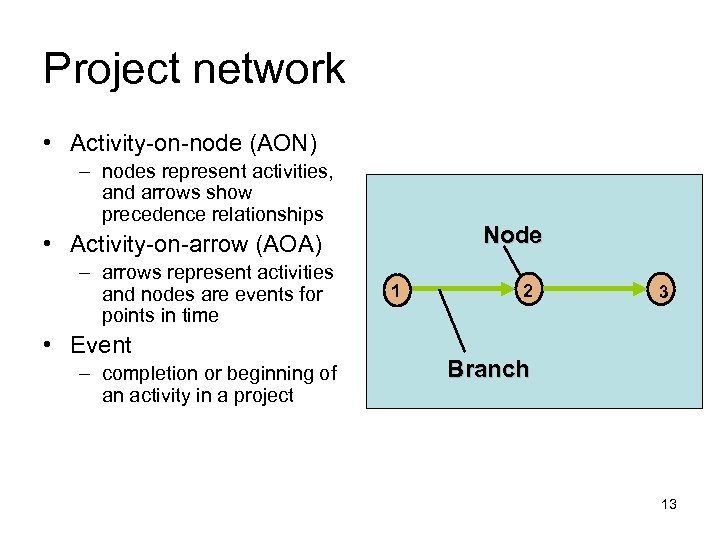 Project network • Activity-on-node (AON) – nodes represent activities, and arrows show precedence relationships Node • Activity-on-arrow (AOA) – arrows represent activities and nodes are events for points in time • Event – completion or beginning of an activity in a project 1 2 3 Branch 13
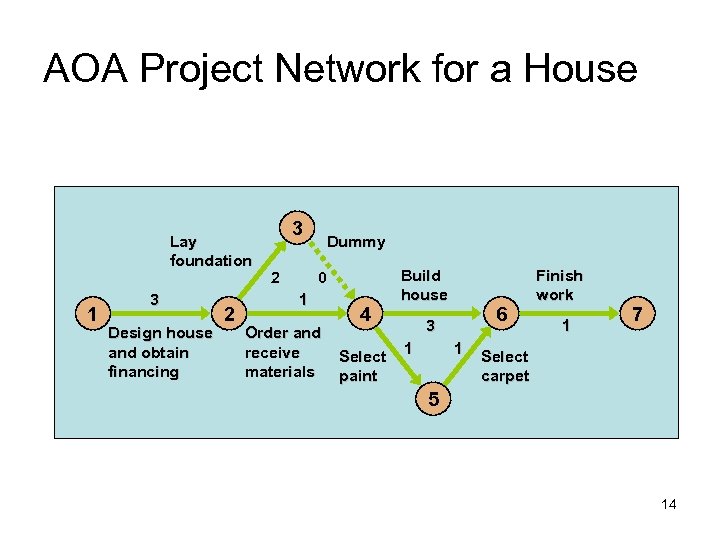 AOA Project Network for a House Lay foundation 1 3 Design house and obtain financing 2 3 2 Dummy 0 1 Order and receive materials 4 Select paint Build house 6 3 1 1 Finish work 1 7 Select carpet 5 14
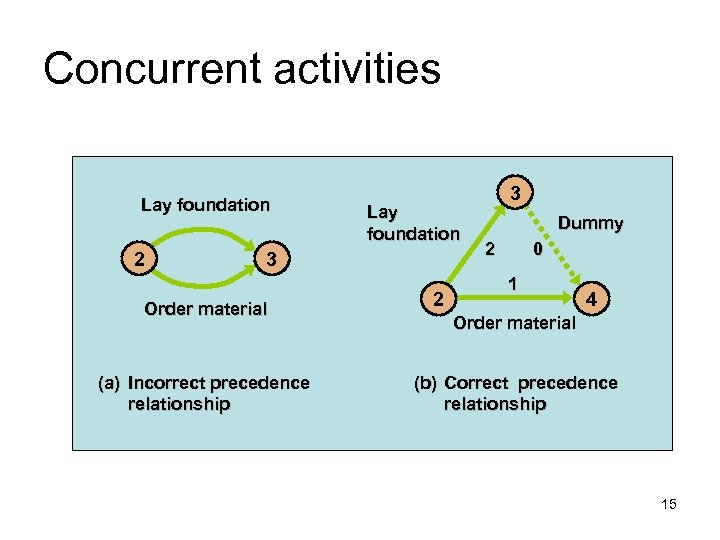 Concurrent activities Lay foundation 2 Lay foundation 3 Order material (a) Incorrect precedence relationship 2 3 Dummy 2 0 1 4 Order material (b) Correct precedence relationship 15
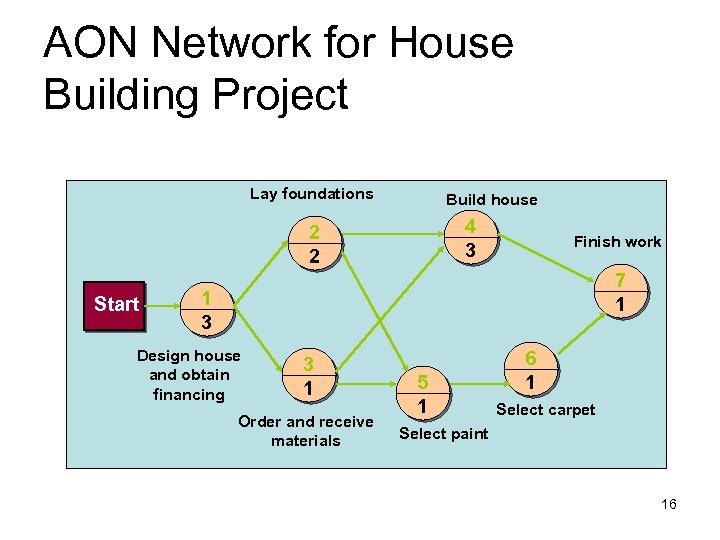 AON Network for House Building Project Lay foundations Build house 4 3 2 2 Start Finish work 7 1 1 3 Design house and obtain financing 3 1 Order and receive materials 5 1 6 1 Select carpet Select paint 16
 Critical Path Method (CPM) • CPM is a project network analysis technique used to predict total project duration • A critical path for a project is the series of activities that determines the earliest time by which the project can be completed • The critical path is the longest path through the network diagram and has the least amount of slack or float
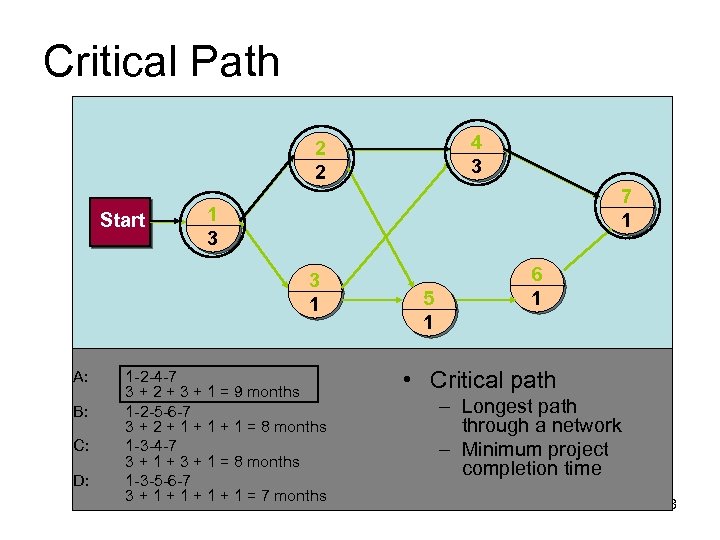 Critical Path 4 3 2 2 Start 7 1 1 3 3 1 A: B: C: D: 1 -2 -4 -7 3 + 2 + 3 + 1 = 9 months 1 -2 -5 -6 -7 3 + 2 + 1 + 1 = 8 months 1 -3 -4 -7 3 + 1 + 3 + 1 = 8 months 1 -3 -5 -6 -7 3 + 1 + 1 = 7 months 5 1 6 1 • Critical path – Longest path through a network – Minimum project completion time 18
 More on the Critical Path • If one or more activities on the critical path takes longer than planned, the whole project schedule will slip unless corrective action is taken • Misconceptions: – The critical path is not the one with all the critical activities; it only accounts for time. – There can be more than one critical path if the lengths of two or more paths are the same – The critical path can change as the project progresses
 Using Critical Path Analysis to Make Schedule Trade-offs • Knowing the critical path helps you make schedule trade-offs • Free slack or free float is the amount of time an activity can be delayed without delaying the early start of any immediately following activities • Total slack or total float is the amount of time an activity may be delayed from its early start without delaying the planned project finish date • A forward pass through the network diagram determines the early start and finish dates • A backward pass determines the late start and finish dates
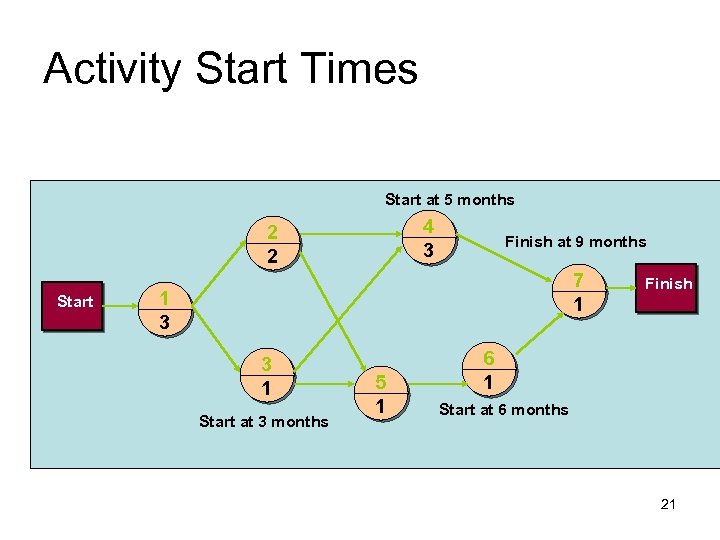 Activity Start Times Start at 5 months 4 3 2 2 Start Finish at 9 months 7 1 1 3 3 1 Start at 3 months 5 1 Finish 6 1 Start at 6 months 21
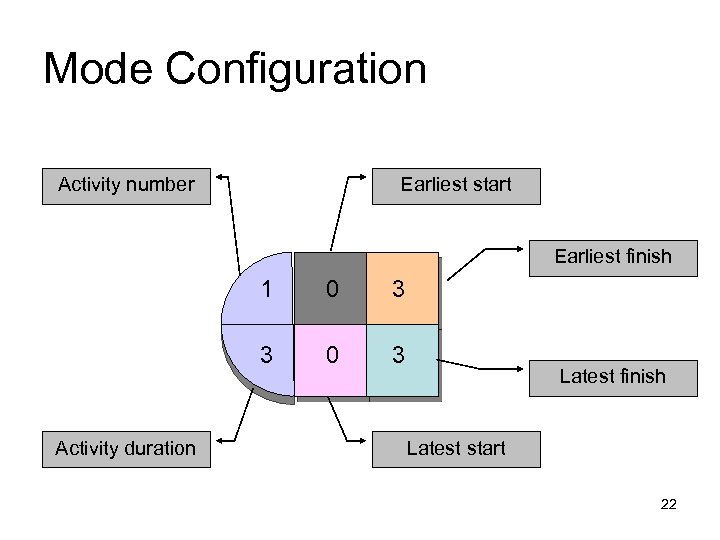 Mode Configuration Activity number Earliest start Earliest finish 1 3 3 Activity duration 0 0 3 Latest finish Latest start 22
 Forward Pass • Start at the beginning of CPM/PERT network to determine the earliest activity times • Earliest Start Time (ES) – earliest time an activity can start – ES = maximum EF of immediate predecessors • Earliest finish time (EF) – earliest time an activity can finish – earliest start time plus activity time • EF= ES + t 23
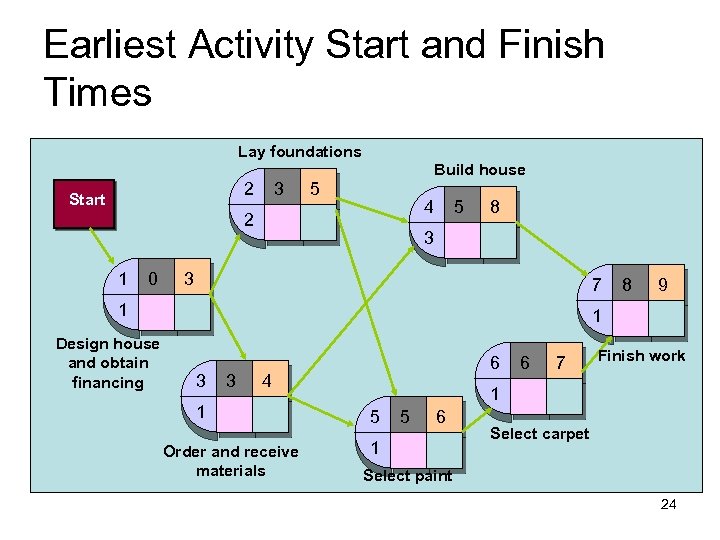 Earliest Activity Start and Finish Times Lay foundations Build house 2 Start 3 5 4 2 1 0 5 8 3 3 7 1 Design house and obtain financing 8 9 1 3 3 6 4 1 Order and receive materials 6 7 Finish work 1 5 5 6 1 Select carpet Select paint 24
 Backward Pass • Determines latest activity times by starting at the end of CPM/PERT network and working forward • Latest Start Time (LS) – Latest time an activity can start without delaying critical path time LS= LF - t • Latest finish time (LF) – latest time an activity can be completed without delaying critical path time – LS = minimum LS of immediate predecessors 25
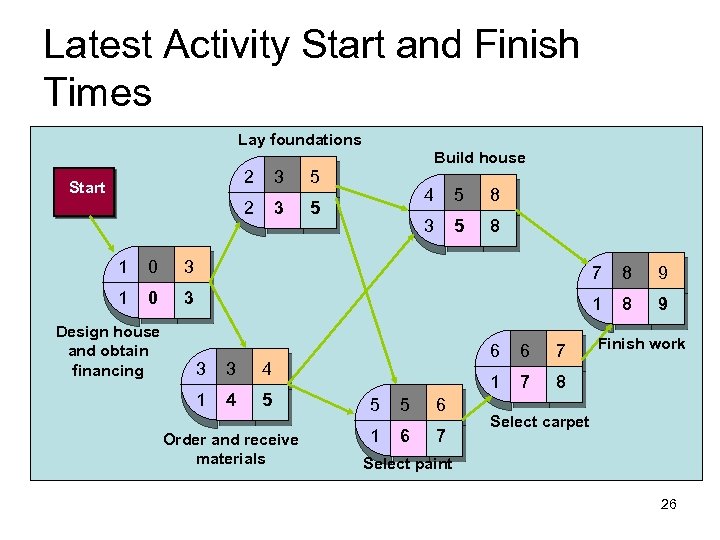 Latest Activity Start and Finish Times Lay foundations Build house 2 3 5 2 Start 3 5 4 5 8 3 5 8 1 0 3 7 8 9 1 0 3 1 8 9 Design house and obtain financing 3 3 4 5 Order and receive materials 5 5 6 1 6 7 1 4 1 6 7 Finish work 8 Select carpet Select paint 26
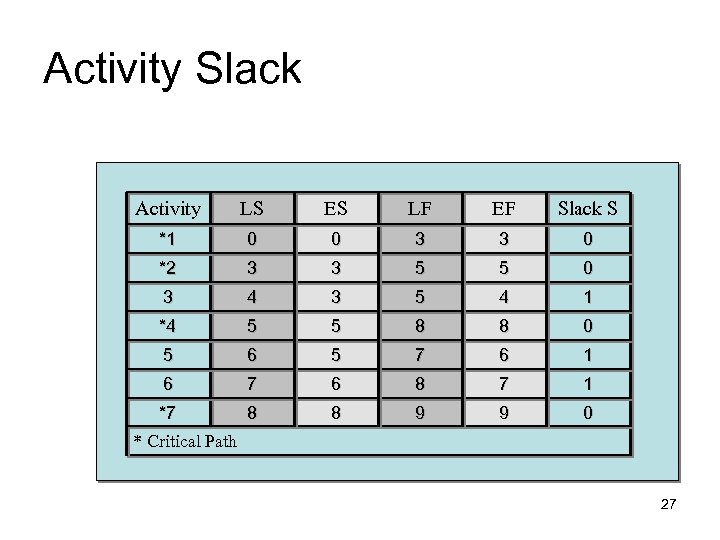 Activity Slack Activity LS ES LF EF Slack S *1 0 0 3 3 0 *2 3 3 5 5 0 3 4 3 5 4 1 *4 5 5 8 8 0 5 6 5 7 6 1 6 7 6 8 7 1 *7 8 8 9 9 0 * Critical Path 27
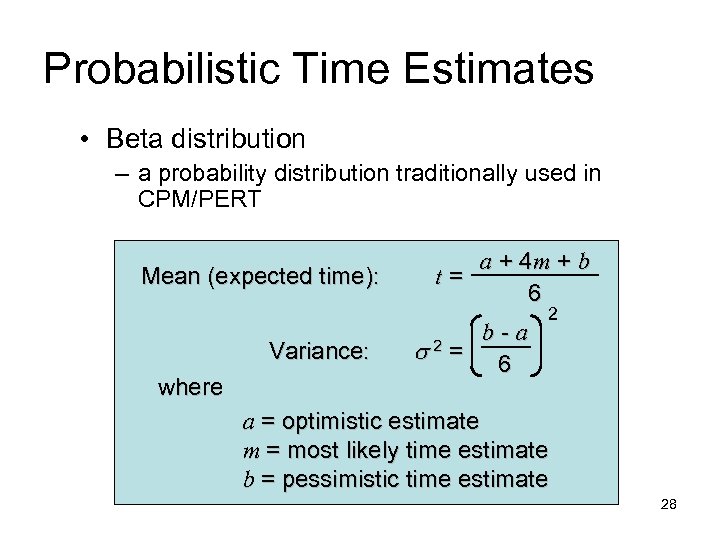 Probabilistic Time Estimates • Beta distribution – a probability distribution traditionally used in CPM/PERT Mean (expected time): Variance: where a + 4 m + b t= 6 b-a = 6 2 2 a = optimistic estimate m = most likely time estimate b = pessimistic time estimate 28
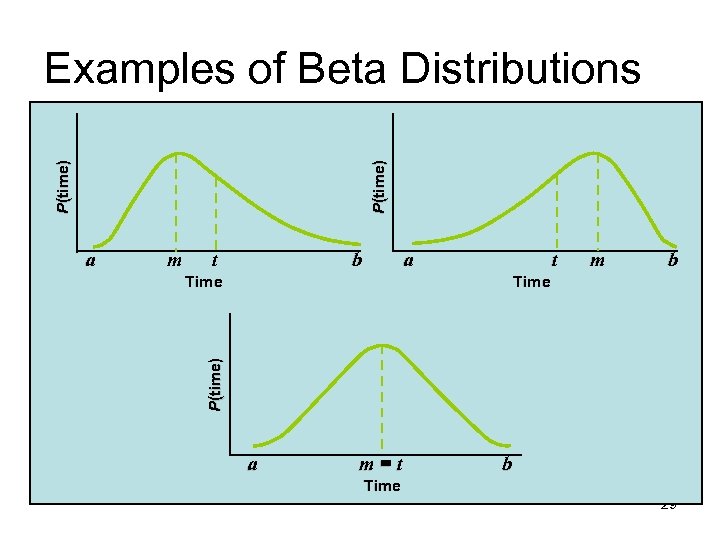 P(time) Examples of Beta Distributions m t b a t Time m b Time P(time) a a m=t b Time 29
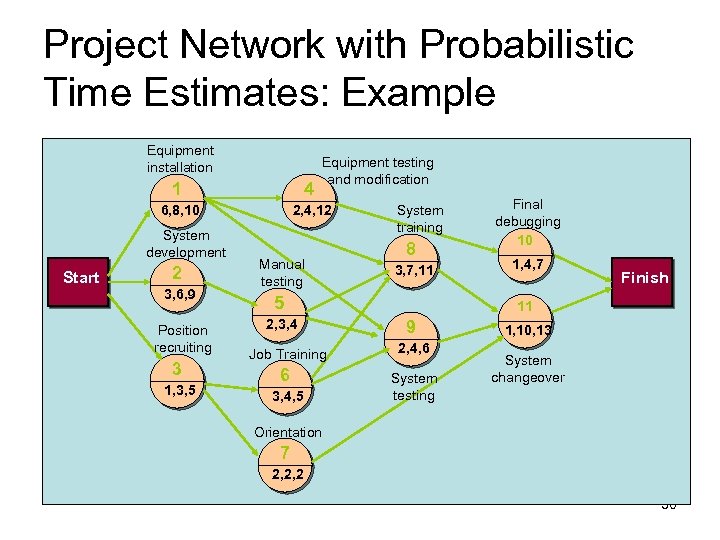 Project Network with Probabilistic Time Estimates: Example Equipment installation Equipment testing and modification 1 4 6, 8, 10 2, 4, 12 System development Start 2 3, 6, 9 Position recruiting 3 1, 3, 5 Manual testing System training 8 3, 7, 11 5 2, 3, 4 1, 4, 7 Finish 11 9 Job Training 2, 4, 6 6 System testing 3, 4, 5 Final debugging 10 1, 10, 13 System changeover Orientation 7 2, 2, 2 30
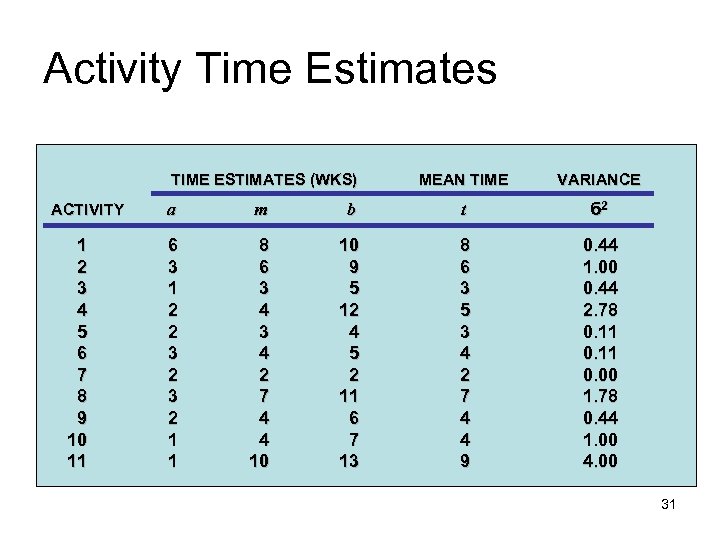 Activity Time Estimates TIME ESTIMATES (WKS) ACTIVITY 1 2 3 4 5 6 7 8 9 10 11 MEAN TIME VARIANCE a m b t б 2 6 3 1 2 2 3 2 1 1 8 6 3 4 2 7 4 4 10 10 9 5 12 4 5 2 11 6 7 13 8 6 3 5 3 4 2 7 4 4 9 0. 44 1. 00 0. 44 2. 78 0. 11 0. 00 1. 78 0. 44 1. 00 4. 00 31
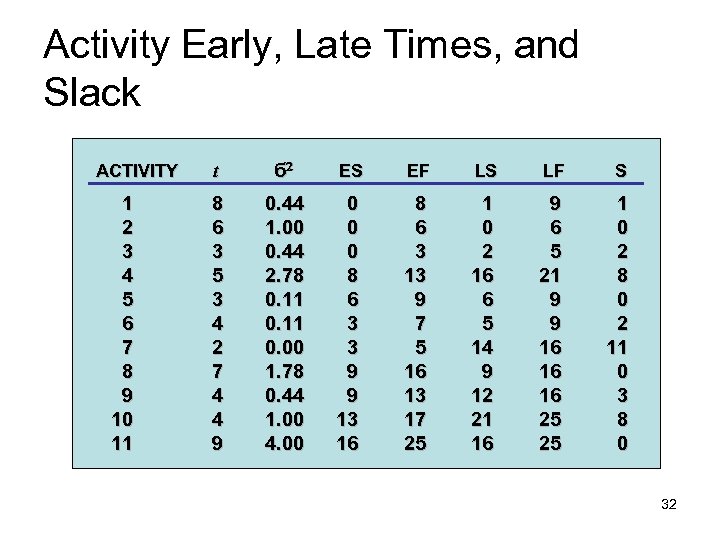 Activity Early, Late Times, and Slack ACTIVITY 1 2 3 4 5 6 7 8 9 10 11 t б ES EF LS LF S 8 6 3 5 3 4 2 7 4 4 9 0. 44 1. 00 0. 44 2. 78 0. 11 0. 00 1. 78 0. 44 1. 00 4. 00 0 8 6 3 3 9 9 13 16 8 6 3 13 9 7 5 16 13 17 25 1 0 2 16 6 5 14 9 12 21 16 9 6 5 21 9 9 16 16 16 25 25 1 0 2 8 0 2 11 0 3 8 0 32
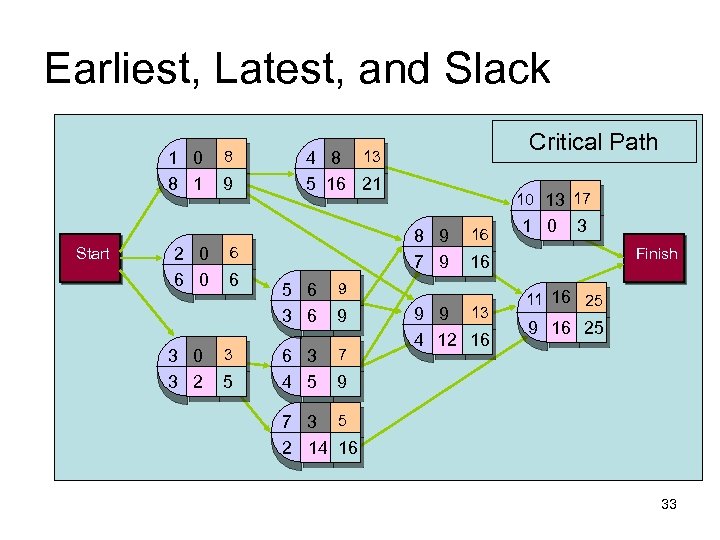 Earliest, Latest, and Slack 1 0 8 1 Start 2 0 6 0 3 2 8 9 4 8 5 16 21 3 5 10 13 17 8 9 7 9 6 6 Critical Path 13 5 6 3 6 6 3 4 5 16 7 3 Finish 16 9 9 1 0 9 9 13 4 12 16 11 16 25 9 7 3 5 2 14 16 33
 Project “crashing” • Crashing – reducing project time by expending additional resources • Crash time – an amount of time an activity is reduced • Crash cost – cost of reducing activity time • Goal – reduce project duration at minimum cost 34
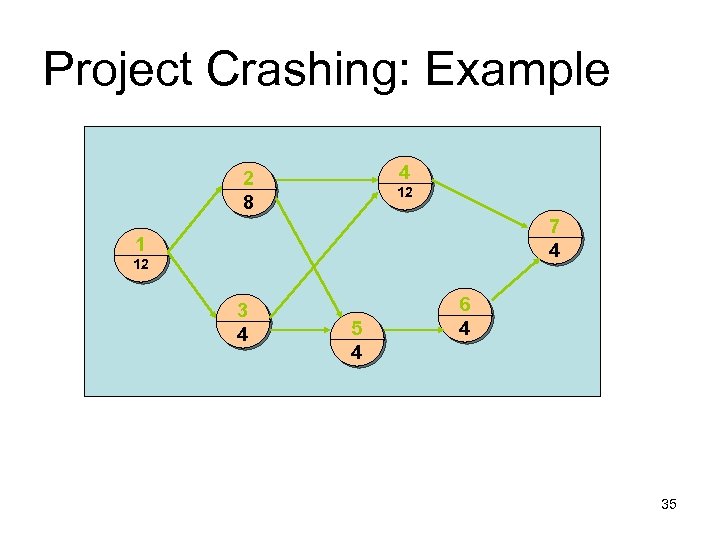 Project Crashing: Example 4 2 8 12 7 4 1 12 3 4 5 4 6 4 35
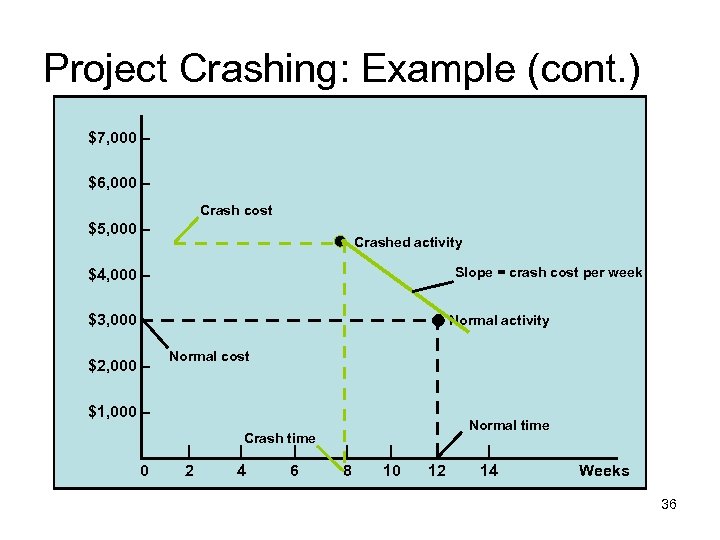 Project Crashing: Example (cont. ) $7, 000 – $6, 000 – Crash cost $5, 000 – Crashed activity Slope = crash cost per week $4, 000 – $3, 000 – $2, 000 – Normal activity Normal cost $1, 000 – – 0 | 2 Crash time | 4 | 6 Normal time | 8 | 10 | 12 | 14 Weeks 36
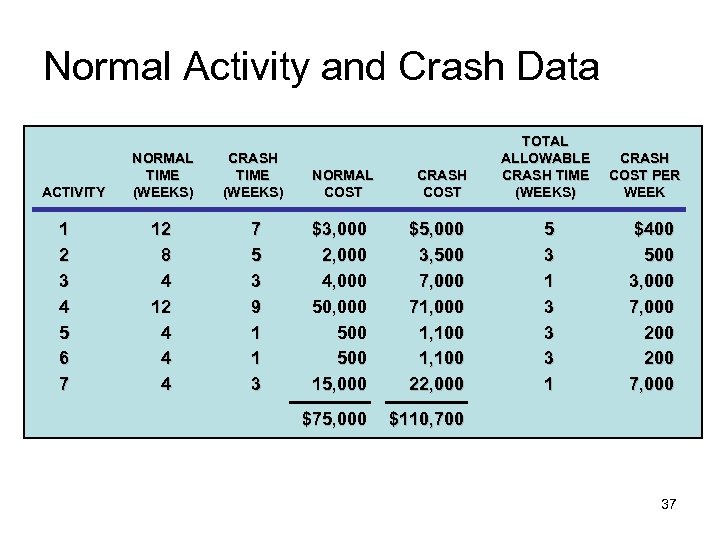 Normal Activity and Crash Data ACTIVITY 1 2 3 4 5 6 7 NORMAL TIME (WEEKS) CRASH TIME (WEEKS) NORMAL COST 12 8 4 12 4 4 4 7 5 3 9 1 1 3 $3, 000 2, 000 4, 000 500 500 15, 000 $5, 000 3, 500 7, 000 71, 000 1, 100 22, 000 $75, 000 TOTAL ALLOWABLE CRASH TIME (WEEKS) $110, 700 CRASH COST 5 3 1 3 3 3 1 CRASH COST PER WEEK $400 500 3, 000 7, 000 200 7, 000 37
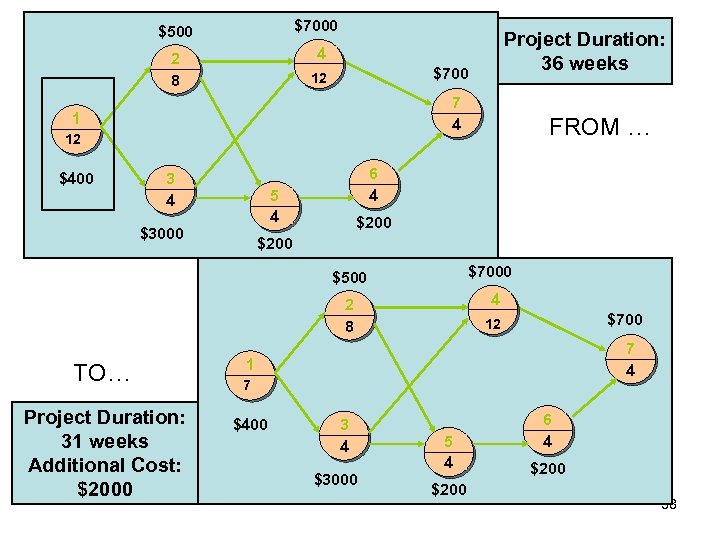 $7000 $500 2 8 $700 12 7 4 1 12 $400 Project Duration: 36 weeks 4 3 4 6 4 5 4 $3000 $200 $7000 $500 4 2 8 TO… Project Duration: 31 weeks Additional Cost: $2000 FROM … $700 12 7 4 1 7 $400 3 4 $3000 5 4 $200 6 4 $200 38
 Time-Cost Relationship • Crashing costs increase as project duration decreases • Indirect costs increase as project duration increases • Reduce project length as long as crashing costs are less than indirect costs 39
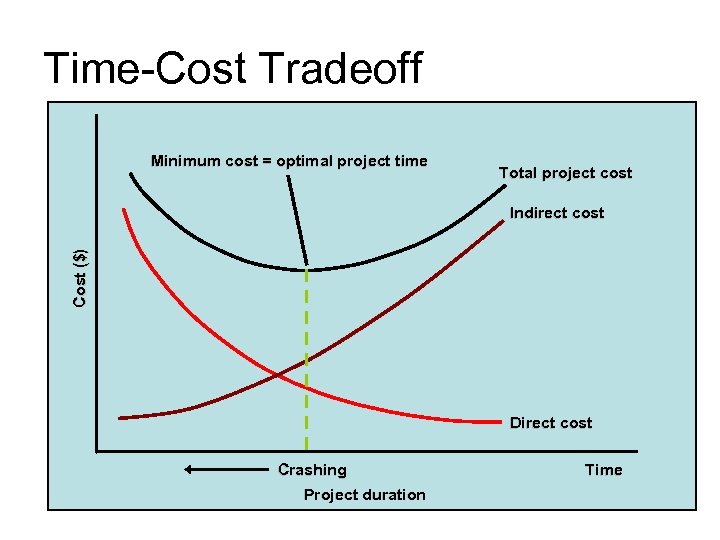 Time-Cost Tradeoff Minimum cost = optimal project time Total project cost Cost ($) Indirect cost Direct cost Crashing Project duration Time 40
 Words of Caution on Using Project Management Software • Many people misuse project management software because they don’t understand important concepts and have not had good training • You must enter dependencies to have dates adjust automatically and to determine the critical path • You must enter actual schedule information to compare planned and actual progress