


 Скачать презентацию Chapter 13 Merchandise Inventory Merchandise Inventory Merchandise
de0411e5ed926a84d0a62aa84e4c9b6c.ppt
- Количество слайдов: 26
 Chapter 13: Merchandise Inventory
 Merchandise Inventory Merchandise inventory includes all goods owned by the business and held for sale. The account used for Jessica's Sales & Service’s merchandise inventory is Account No. 12000, Merchandise Inventory. Peachtree uses a perpetual inventory system. Inventory calculations include FIFO (first in, first out), LIFO (last in, first out), and average cost methods. Peachtree tracks the inventory items you buy and sell. After you post, Peachtree automatically updates the cost and quantity of each inventory item. ©The Mc. Graw-Hill Companies, Inc. , 2004 2
 Software Objectives, p. 479 1. Enter inventory maintenance and default 2. 3. 4. 5. information. Enter inventory item information, including Sales account, Merchandise Inventory account, and Cost of Sales account. Enter item codes when recording purchases and sales. Enter inventory adjustments. . Make three backups: 2 for Jessica's Sales & Service; 1 for the end-of-chapter exercise. ©The Mc. Graw-Hill Companies, Inc. , 2004 3
 Web Objectives, p. 479 1. Use your Internet browser to go to the book’s website at www. mhhe. com/yacht 2003 2. Go to the Internet Activity link on the book’s website. Then, select WEB EXERCISES PART 3. Complete the fourth web exercise in Part 3, “Accountant’s World. ” 3. Use a word processing program to write summaries of the websites that you visited. ©The Mc. Graw-Hill Companies, Inc. , 2004 4
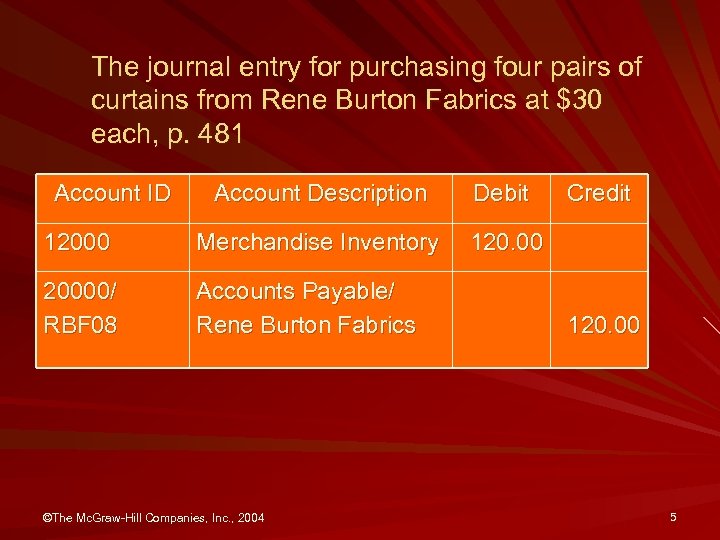 The journal entry for purchasing four pairs of curtains from Rene Burton Fabrics at $30 each, p. 481 Account ID Account Description Debit 12000 Merchandise Inventory 120. 00 20000/ RBF 08 Accounts Payable/ Rene Burton Fabrics ©The Mc. Graw-Hill Companies, Inc. , 2004 Credit 120. 00 5
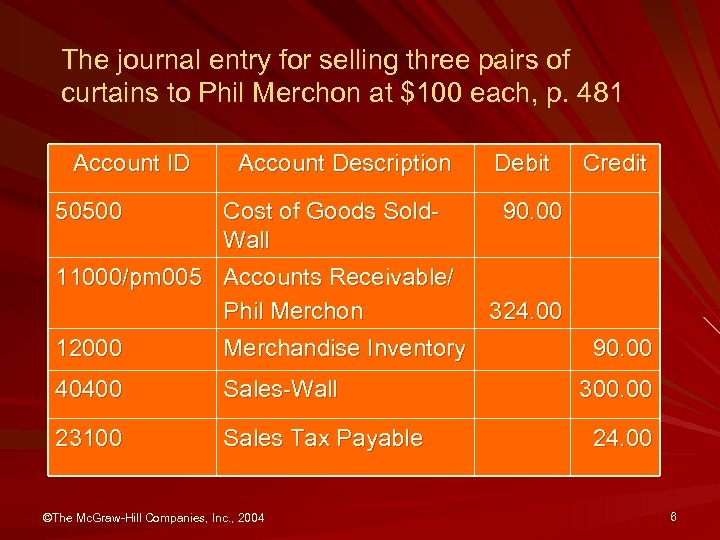 The journal entry for selling three pairs of curtains to Phil Merchon at $100 each, p. 481 Account ID Account Description Debit Cost of Goods Sold 90. 00 Wall 11000/pm 005 Accounts Receivable/ Phil Merchon 324. 00 12000 Merchandise Inventory Credit 50500 40400 Sales-Wall 23100 Sales Tax Payable ©The Mc. Graw-Hill Companies, Inc. , 2004 90. 00 300. 00 24. 00 6
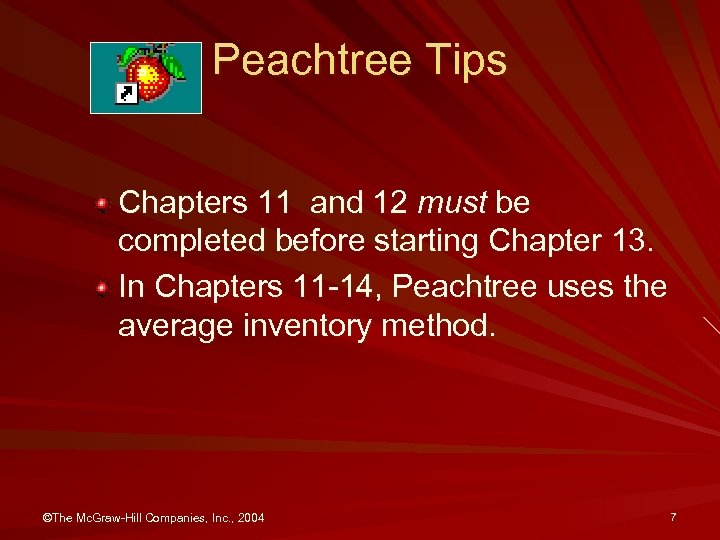 Peachtree Tips Chapters 11 and 12 must be completed before starting Chapter 13. In Chapters 11 -14, Peachtree uses the average inventory method. ©The Mc. Graw-Hill Companies, Inc. , 2004 7
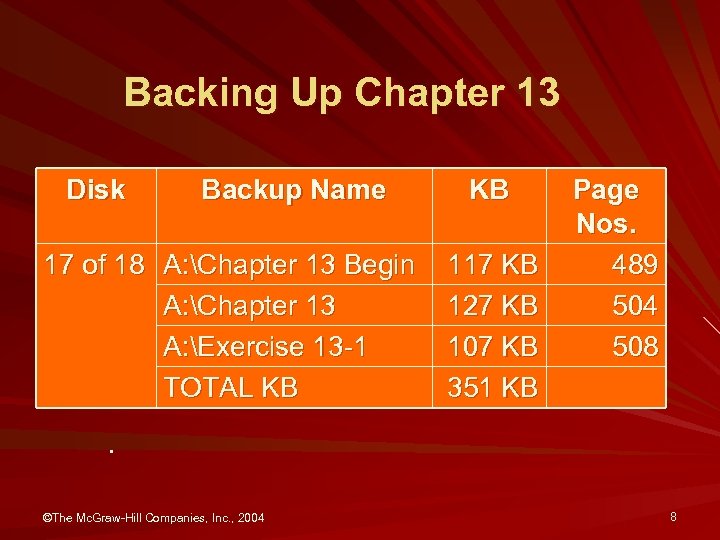 Backing Up Chapter 13 Disk Backup Name 17 of 18 A: Chapter 13 Begin A: Chapter 13 A: Exercise 13 -1 TOTAL KB KB 117 KB 127 KB 107 KB 351 KB Page Nos. 489 504 508 . ©The Mc. Graw-Hill Companies, Inc. , 2004 8
 Chapter 13 Topics 1. Software & web objectives, p. 479 2. Cost methods, p. 480 3. 4. 5. 6. 7. a. Average cost, pp. 480 -481 b. LIFO (Last in, First Out), pp. 481 -482 c. FIFO (First in, First Out), p. 482 Types of Inventory Items, pp. 482 -483 Getting Started, pp. 483 -485 Entering inventory item maintenance information, pp. 485 -487 Inventory adjustments, pp. 487 -489 Backing up your data, p. 489 ©The Mc. Graw-Hill Companies, Inc. , 2004 9
 Chapter 13 Topics, concluded 8. 9. 10. 11. 12. Additional Transactions, pp. 490 -496 Printing Reports, pp. 496 -503 Backing up Chapter 13 data, p. 504 Internet activity, p. 505 Summary and review, pp. 505 -506 a. Going to the net, p. 506 b. Short-answer questions, pp. 506 -508 b. Exercise 13 -1, p. 508 c. Exercise 13 -2, p. 509 d. Chapter 13 index, p. 510 ©The Mc. Graw-Hill Companies, Inc. , 2004 10
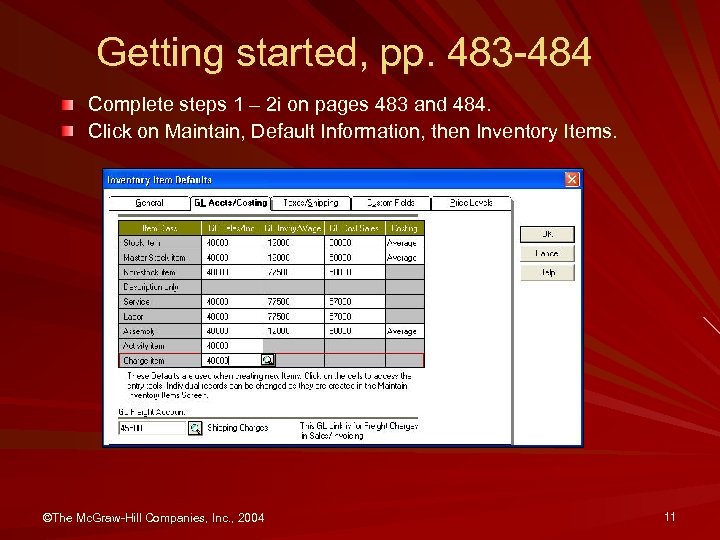 Getting started, pp. 483 -484 Complete steps 1 – 2 i on pages 483 and 484. Click on Maintain, Default Information, then Inventory Items. ©The Mc. Graw-Hill Companies, Inc. , 2004 11
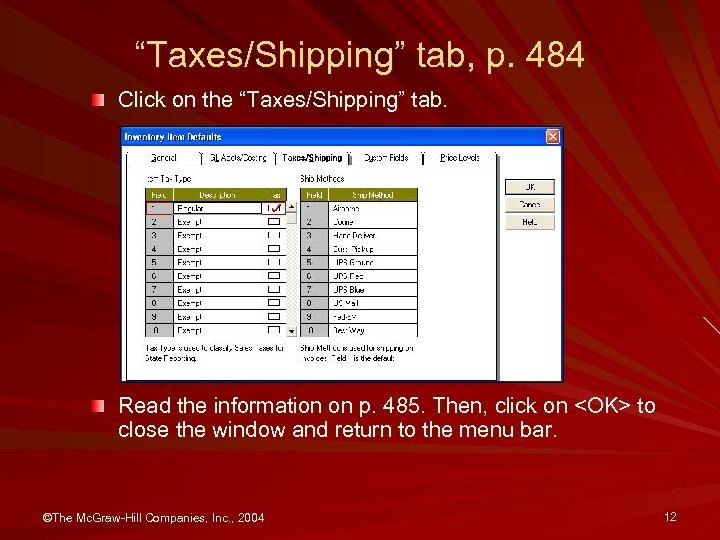 “Taxes/Shipping” tab, p. 484 Click on the “Taxes/Shipping” tab. Read the information on p. 485. Then, click on
 Entering inventory item maintenance information, pp. 485 -487 Read the information on page 485. Then, complete steps 1 – 4 on pp. 485 -487. ©The Mc. Graw-Hill Companies, Inc. , 2004 13
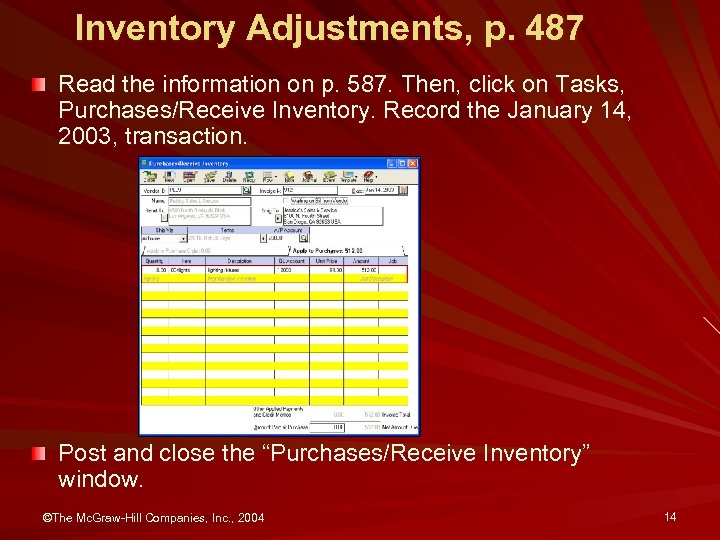 Inventory Adjustments, p. 487 Read the information on p. 587. Then, click on Tasks, Purchases/Receive Inventory. Record the January 14, 2003, transaction. Post and close the “Purchases/Receive Inventory” window. ©The Mc. Graw-Hill Companies, Inc. , 2004 14
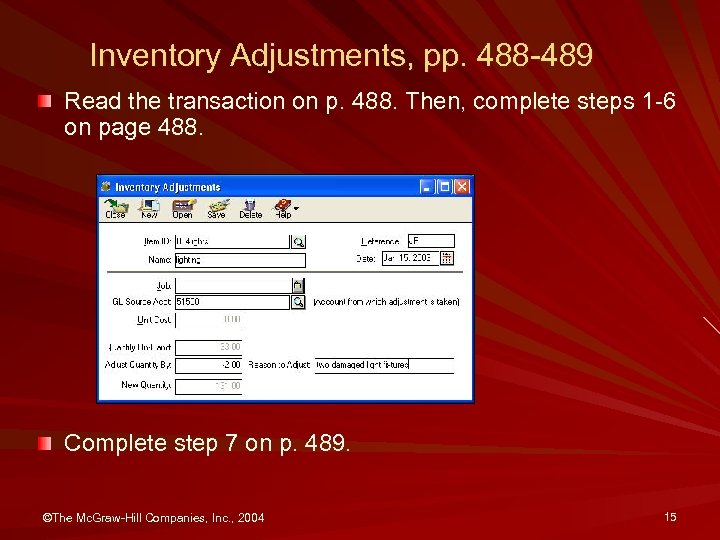 Inventory Adjustments, pp. 488 -489 Read the transaction on p. 488. Then, complete steps 1 -6 on page 488. Complete step 7 on p. 489. ©The Mc. Graw-Hill Companies, Inc. , 2004 15
 Backing up your data, p. 489 Complete steps 1 – 9 on page 489 to back up your data. Use Chapter 13 Begin as the back up name. ©The Mc. Graw-Hill Companies, Inc. , 2004 16
 Additional Transactions, pp. 490 -496 Complete the transactions on pages 490– 496. Compare your printouts with the ones shown on pages 490 -495. Complete the January 31, 2003 transaction on p. 496. ©The Mc. Graw-Hill Companies, Inc. , 2004 17
 Printing reports, pp. 496 -503 Complete steps 1– 8 on pages 496– 503. Compare your reports with the ones shown on pages 496 -503. ©The Mc. Graw-Hill Companies, Inc. , 2004 18
 Backing Up Chapter 13 Data, p. 504 Complete steps 1 - 9 on page 504. The back up name is Chapter 13. ©The Mc. Graw-Hill Companies, Inc. , 2004 19
 Glossary of Terms Chapter 13 ©The Mc. Graw-Hill Companies, Inc. , 2004 20
 Merchandise inventory, p. 479 Merchandise inventory includes all goods owned by the business and held for sale. The account used for Jessica's Sales & Service’s merchandise inventory is Account No. 12000, Merchandise Inventory. ©The Mc. Graw-Hill Companies, Inc. , 2004 21
 Merchandising business, p. 479 Retail stores that resell goods and/or perform services. ©The Mc. Graw-Hill Companies, Inc. , 2004 22
 FIFO, p. 479 The FIFO (first in, first out) inventory method assumes that the items in the beginning inventory are sold first. ©The Mc. Graw-Hill Companies, Inc. , 2004 23
 LIFO, p. 479 The LIFO (last in, first out) inventory method assumes that the goods received last are sold first. ©The Mc. Graw-Hill Companies, Inc. , 2004 24
 Internet Activity, p. 505 1 Go to the book’s website at www. mhhe. com/yacht 2003 2 In the “Student Center” list, link to Internet Activities. 3 Link to WEB EXERCISES PART 3. 4 Complete the “ACCOUNTANT’S WORLD” exercise. Read steps 1 and 2. 5 Follow the steps shown on the book’s website to complete this Internet activity. 6 Using a word processing program, write a brief summary of what you find. Include all appropriate website addresses. ©The Mc. Graw-Hill Companies, Inc. , 2004 25
 Going to the Net, p. 506 Access the Small Business Knowledge Base website at www. bizmove. com/finance/m 3 d 3. htm Scroll down the screen to “Merchandise Inventories: Perpetual Inventory. ” 1. What is a perpetual inventory at retail? 2. When is a physical count of inventory necessary? ©The Mc. Graw-Hill Companies, Inc. , 2004 26