


 Скачать презентацию Chapter 13 Direct Memory Access and DMA-Controlled I O
17e0188b8011ac8816dc748a01077b59.ppt
- Количество слайдов: 143
 Chapter 13: Direct Memory Access and DMA-Controlled I/O
 Introduction • The DMA I/O technique provides direct access to the memory while the microprocessor is temporarily disabled. • This chapter also explains the operation of disk memory systems and video systems that are often DMA-processed. • Disk memory includes floppy, fixed, and optical disk storage. Video systems include digital and analog monitors. The Intel Microprocessors: 8086/8088, 80186/80188, 80286, 80386, 80486 Pentium, Pentium Processor, Pentium II, Pentium, 4, and Core 2 with 64 -bit Extensions Architecture, Programming, and Interfacing, Eighth Edition Barry B. Brey Copyright © 2009 by Pearson Education, Inc. Upper Saddle River, New Jersey 07458 • All rights reserved.
 Chapter Objectives Upon completion of this chapter, you will be able to: • Describe a DMA transfer. • Explain the operation of the HOLD and HLDA direct memory access control signals. • Explain the function of the 8237 DMA controller when used for DMA transfers. • Program the 8237 to accomplish DMA transfers. The Intel Microprocessors: 8086/8088, 80186/80188, 80286, 80386, 80486 Pentium, Pentium Processor, Pentium II, Pentium, 4, and Core 2 with 64 -bit Extensions Architecture, Programming, and Interfacing, Eighth Edition Barry B. Brey Copyright © 2009 by Pearson Education, Inc. Upper Saddle River, New Jersey 07458 • All rights reserved.
 Chapter Objectives (cont. ) Upon completion of this chapter, you will be able to: • Describe the disk standards found in personal computer systems. • Describe the various video interface standards found in the personal computer. The Intel Microprocessors: 8086/8088, 80186/80188, 80286, 80386, 80486 Pentium, Pentium Processor, Pentium II, Pentium, 4, and Core 2 with 64 -bit Extensions Architecture, Programming, and Interfacing, Eighth Edition Barry B. Brey Copyright © 2009 by Pearson Education, Inc. Upper Saddle River, New Jersey 07458 • All rights reserved.
 13– 1 BASIC DMA OPERATION • Two control signals are used to request and acknowledge a direct memory access (DMA) transfer in the microprocessor-based system. – the HOLD pin is an input used to request a DMA action – the HLDA pin is an output that acknowledges the DMA action • Figure 13– 1 shows the timing that is typically found on these two DMA control pins. The Intel Microprocessors: 8086/8088, 80186/80188, 80286, 80386, 80486 Pentium, Pentium Processor, Pentium II, Pentium, 4, and Core 2 with 64 -bit Extensions Architecture, Programming, and Interfacing, Eighth Edition Barry B. Brey Copyright © 2009 by Pearson Education, Inc. Upper Saddle River, New Jersey 07458 • All rights reserved.
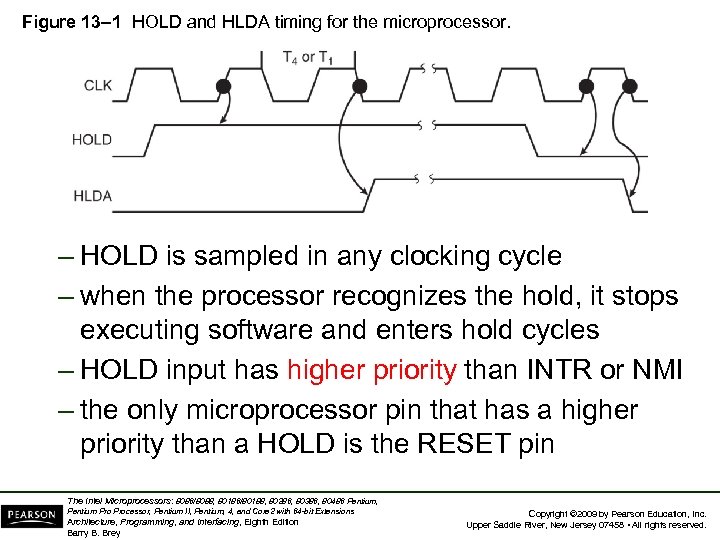 Figure 13– 1 HOLD and HLDA timing for the microprocessor. – HOLD is sampled in any clocking cycle – when the processor recognizes the hold, it stops executing software and enters hold cycles – HOLD input has higher priority than INTR or NMI – the only microprocessor pin that has a higher priority than a HOLD is the RESET pin The Intel Microprocessors: 8086/8088, 80186/80188, 80286, 80386, 80486 Pentium, Pentium Processor, Pentium II, Pentium, 4, and Core 2 with 64 -bit Extensions Architecture, Programming, and Interfacing, Eighth Edition Barry B. Brey Copyright © 2009 by Pearson Education, Inc. Upper Saddle River, New Jersey 07458 • All rights reserved.
 • HLDA becomes active to indicate the processor has placed its buses at highimpedance state. – as can be seen in the timing diagram, there a few clock cycles between the time that HOLD changes and until HLDA changes • HLDA output is a signal to the requesting device that the processor has relinquished (放 棄) control of its memory and I/O space. – one could call HOLD input a DMA request input and HLDA output a DMA grant (答應請求) signal The Intel Microprocessors: 8086/8088, 80186/80188, 80286, 80386, 80486 Pentium, Pentium Processor, Pentium II, Pentium, 4, and Core 2 with 64 -bit Extensions Architecture, Programming, and Interfacing, Eighth Edition Barry B. Brey Copyright © 2009 by Pearson Education, Inc. Upper Saddle River, New Jersey 07458 • All rights reserved.
 Basic DMA Definitions • Direct memory accesses normally occur between an I/O device and memory without the use of the microprocessor. – a DMA read transfers data from the memory to the I/O device – A DMA write transfers data from an I/O device to memory • Memory & I/O are controlled simultaneously. – which is why the system contains separate memory and I/O control signals The Intel Microprocessors: 8086/8088, 80186/80188, 80286, 80386, 80486 Pentium, Pentium Processor, Pentium II, Pentium, 4, and Core 2 with 64 -bit Extensions Architecture, Programming, and Interfacing, Eighth Edition Barry B. Brey Copyright © 2009 by Pearson Education, Inc. Upper Saddle River, New Jersey 07458 • All rights reserved.
 • A DMA read causes the MRDC and IOWC signals to activate simultaneously. – transferring data from memory to the I/O device • A DMA write causes the MWTC and IORC signals to both activate. • 8086/8088 require a controller or circuit such as shown in Fig 13– 2 for control bus signal generation. • The DMA controller provides memory with its address, and controller signal (DACK) selects the I/O device during the transfer. The Intel Microprocessors: 8086/8088, 80186/80188, 80286, 80386, 80486 Pentium, Pentium Processor, Pentium II, Pentium, 4, and Core 2 with 64 -bit Extensions Architecture, Programming, and Interfacing, Eighth Edition Barry B. Brey Copyright © 2009 by Pearson Education, Inc. Upper Saddle River, New Jersey 07458 • All rights reserved.
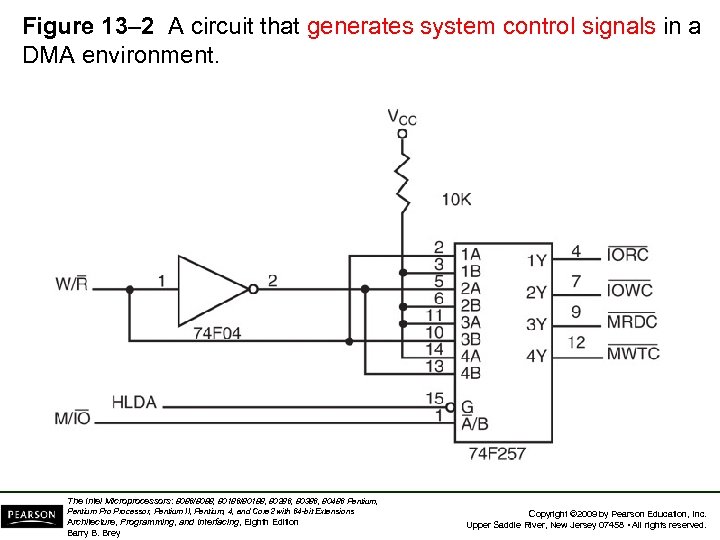 Figure 13– 2 A circuit that generates system control signals in a DMA environment. The Intel Microprocessors: 8086/8088, 80186/80188, 80286, 80386, 80486 Pentium, Pentium Processor, Pentium II, Pentium, 4, and Core 2 with 64 -bit Extensions Architecture, Programming, and Interfacing, Eighth Edition Barry B. Brey Copyright © 2009 by Pearson Education, Inc. Upper Saddle River, New Jersey 07458 • All rights reserved.
 • Data transfer speed is determined by speed of the memory device or a DMA controller. – if memory speed is 50 ns, DMA transfers occur at rates up to 1/50 ns or 20 M bytes per second – if the DMA controller functions at a maximum rate of 15 MHz with 50 ns memory, maximum transfer rate is 15 MHz because the DMA controller is slower than the memory • In many cases, the DMA controller slows the speed of the system when transfers occur. The Intel Microprocessors: 8086/8088, 80186/80188, 80286, 80386, 80486 Pentium, Pentium Processor, Pentium II, Pentium, 4, and Core 2 with 64 -bit Extensions Architecture, Programming, and Interfacing, Eighth Edition Barry B. Brey Copyright © 2009 by Pearson Education, Inc. Upper Saddle River, New Jersey 07458 • All rights reserved.
 • The switch to serial data transfers in modern systems has made DMA is less important. • The serial PCI Express bus transfers data at rates exceeding DMA transfers. • The SATA (serial ATA) interface for disk drives uses serial transfers at the rate of 300 Mbps – and has replaced DMA transfers for hard disks • Serial transfers on main-boards between components using can approach 20 Gbps for the PCI Express connection. The Intel Microprocessors: 8086/8088, 80186/80188, 80286, 80386, 80486 Pentium, Pentium Processor, Pentium II, Pentium, 4, and Core 2 with 64 -bit Extensions Architecture, Programming, and Interfacing, Eighth Edition Barry B. Brey Copyright © 2009 by Pearson Education, Inc. Upper Saddle River, New Jersey 07458 • All rights reserved.
 13– 2 THE 8237 DMA CONTROLLER • The 8237 supplies memory & I/O with control signals and memory address information during the DMA transfer. – actually a special-purpose microprocessor whose job is high-speed data transfer between memory and I/O • Figure 13– 3 shows the pin-out and block diagram of the 8237 programmable DMA controller. The Intel Microprocessors: 8086/8088, 80186/80188, 80286, 80386, 80486 Pentium, Pentium Processor, Pentium II, Pentium, 4, and Core 2 with 64 -bit Extensions Architecture, Programming, and Interfacing, Eighth Edition Barry B. Brey Copyright © 2009 by Pearson Education, Inc. Upper Saddle River, New Jersey 07458 • All rights reserved.
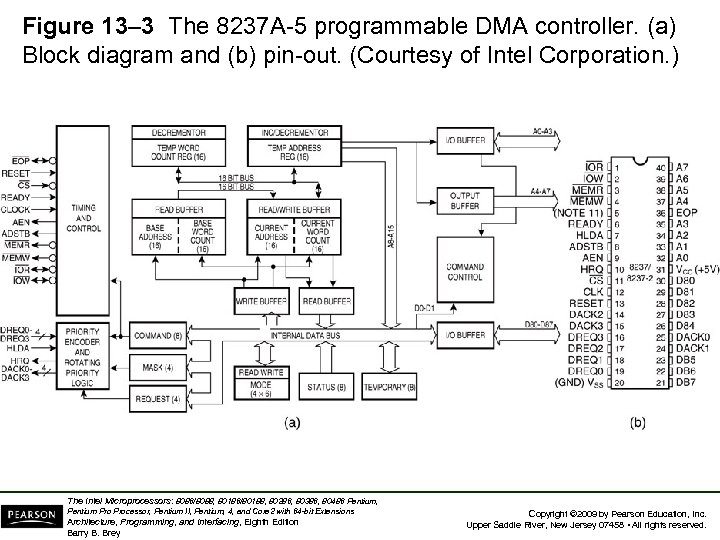 Figure 13– 3 The 8237 A-5 programmable DMA controller. (a) Block diagram and (b) pin-out. (Courtesy of Intel Corporation. ) The Intel Microprocessors: 8086/8088, 80186/80188, 80286, 80386, 80486 Pentium, Pentium Processor, Pentium II, Pentium, 4, and Core 2 with 64 -bit Extensions Architecture, Programming, and Interfacing, Eighth Edition Barry B. Brey Copyright © 2009 by Pearson Education, Inc. Upper Saddle River, New Jersey 07458 • All rights reserved.
 • 8237 is not a discrete component in modern microprocessor-based systems. – it appears within many system controller chip sets • 8237 is a four-channel device compatible with 8086/8088, adequate for small systems. – expandable to any number of DMA channel inputs • 8237 is capable of DMA transfers at rates up to 1. 6 M bytes per second. – each channel is capable of addressing a full 64 K-byte section of memory and transfer up to 64 K bytes with a single programming The Intel Microprocessors: 8086/8088, 80186/80188, 80286, 80386, 80486 Pentium, Pentium Processor, Pentium II, Pentium, 4, and Core 2 with 64 -bit Extensions Architecture, Programming, and Interfacing, Eighth Edition Barry B. Brey Copyright © 2009 by Pearson Education, Inc. Upper Saddle River, New Jersey 07458 • All rights reserved.
 8237 Pin Definitions CLK • Clock input is connected to the system clock signal as long as that signal is 5 MHz or less. – in the 8086/8088 system, the clock must be inverted for the properation of the 8237 The Intel Microprocessors: 8086/8088, 80186/80188, 80286, 80386, 80486 Pentium, Pentium Processor, Pentium II, Pentium, 4, and Core 2 with 64 -bit Extensions Architecture, Programming, and Interfacing, Eighth Edition Barry B. Brey Copyright © 2009 by Pearson Education, Inc. Upper Saddle River, New Jersey 07458 • All rights reserved.
 8237 Pin Definitions CS • Chip select enables 8237 for programming. • The CS pin is normally connected to the output of a decoder. • The decoder does not use the 8086/8088 control signal IO/M(M/IO) because it contains the new memory and I/O control signals (MEMR, MEMW, IOR and IOW). The Intel Microprocessors: 8086/8088, 80186/80188, 80286, 80386, 80486 Pentium, Pentium Processor, Pentium II, Pentium, 4, and Core 2 with 64 -bit Extensions Architecture, Programming, and Interfacing, Eighth Edition Barry B. Brey Copyright © 2009 by Pearson Education, Inc. Upper Saddle River, New Jersey 07458 • All rights reserved.
 8237 Pin Definitions RESET • The reset pin clears the command, status, request, and temporary registers. • It also clears the first/last flip-flop and sets the mask register. – this input primes the 8237 so it is disabled until programmed otherwise The Intel Microprocessors: 8086/8088, 80186/80188, 80286, 80386, 80486 Pentium, Pentium Processor, Pentium II, Pentium, 4, and Core 2 with 64 -bit Extensions Architecture, Programming, and Interfacing, Eighth Edition Barry B. Brey Copyright © 2009 by Pearson Education, Inc. Upper Saddle River, New Jersey 07458 • All rights reserved.
 8237 Pin Definitions READY • A logic 0 on the ready input causes the 8237 to enter wait states for slower memory components. HLDA • A hold acknowledge signals 8237 that the microprocessor has relinquished control of the address, data, and control buses. The Intel Microprocessors: 8086/8088, 80186/80188, 80286, 80386, 80486 Pentium, Pentium Processor, Pentium II, Pentium, 4, and Core 2 with 64 -bit Extensions Architecture, Programming, and Interfacing, Eighth Edition Barry B. Brey Copyright © 2009 by Pearson Education, Inc. Upper Saddle River, New Jersey 07458 • All rights reserved.
 8237 Pin Definitions DREQ 0–DREQ 3 • DMA request inputs are used to request a transfer for each of the four DMA channels. – the polarity of these inputs is programmable, so they are either active-high or active-low inputs DB 0–DB 7 • Data bus pins are connected to the processor data bus connections and used during the programming of the DMA controller. The Intel Microprocessors: 8086/8088, 80186/80188, 80286, 80386, 80486 Pentium, Pentium Processor, Pentium II, Pentium, 4, and Core 2 with 64 -bit Extensions Architecture, Programming, and Interfacing, Eighth Edition Barry B. Brey Copyright © 2009 by Pearson Education, Inc. Upper Saddle River, New Jersey 07458 • All rights reserved.
 8237 Pin Definitions IOR • I/O read is a bidirectional pin used during programming and during a DMA write cycle. IOW • I/O write is a bidirectional pin used during programming and during a DMA read cycle. The Intel Microprocessors: 8086/8088, 80186/80188, 80286, 80386, 80486 Pentium, Pentium Processor, Pentium II, Pentium, 4, and Core 2 with 64 -bit Extensions Architecture, Programming, and Interfacing, Eighth Edition Barry B. Brey Copyright © 2009 by Pearson Education, Inc. Upper Saddle River, New Jersey 07458 • All rights reserved.
 8237 Pin Definitions EOP • End-of-process is a bidirectional signal used as an input to terminate a DMA process or as an output to signal the end of the DMA transfer. – often used to interrupt a DMA transfer at the end of a DMA cycle The Intel Microprocessors: 8086/8088, 80186/80188, 80286, 80386, 80486 Pentium, Pentium Processor, Pentium II, Pentium, 4, and Core 2 with 64 -bit Extensions Architecture, Programming, and Interfacing, Eighth Edition Barry B. Brey Copyright © 2009 by Pearson Education, Inc. Upper Saddle River, New Jersey 07458 • All rights reserved.
 8237 Pin Definitions A 0–A 3 • These address pins select an internal register during programming and provide part of the DMA transfer address during a DMA action. – address pins are outputs that provide part of the DMA transfer address during a DMA action The Intel Microprocessors: 8086/8088, 80186/80188, 80286, 80386, 80486 Pentium, Pentium Processor, Pentium II, Pentium, 4, and Core 2 with 64 -bit Extensions Architecture, Programming, and Interfacing, Eighth Edition Barry B. Brey Copyright © 2009 by Pearson Education, Inc. Upper Saddle River, New Jersey 07458 • All rights reserved.
 8237 Pin Definitions HRQ • Hold request is an output that connects to the HOLD input of the microprocessor in order to request a DMA transfer. The Intel Microprocessors: 8086/8088, 80186/80188, 80286, 80386, 80486 Pentium, Pentium Processor, Pentium II, Pentium, 4, and Core 2 with 64 -bit Extensions Architecture, Programming, and Interfacing, Eighth Edition Barry B. Brey Copyright © 2009 by Pearson Education, Inc. Upper Saddle River, New Jersey 07458 • All rights reserved.
 8237 Pin Definitions DACK 0–DACK 3 • DMA channel acknowledge outputs acknowledge a channel DMA request. • These outputs are programmable as either active-high or active-low signals. – DACK outputs are often used to select the DMA- controlled I/O device during the DMA transfer. The Intel Microprocessors: 8086/8088, 80186/80188, 80286, 80386, 80486 Pentium, Pentium Processor, Pentium II, Pentium, 4, and Core 2 with 64 -bit Extensions Architecture, Programming, and Interfacing, Eighth Edition Barry B. Brey Copyright © 2009 by Pearson Education, Inc. Upper Saddle River, New Jersey 07458 • All rights reserved.
 8237 Pin Definitions AEN • Address enable signal enables the DMA address latch connected to the DB 7–DB 0 pins on the 8237. – also used to disable any buffers in the system connected to the microprocessor The Intel Microprocessors: 8086/8088, 80186/80188, 80286, 80386, 80486 Pentium, Pentium Processor, Pentium II, Pentium, 4, and Core 2 with 64 -bit Extensions Architecture, Programming, and Interfacing, Eighth Edition Barry B. Brey Copyright © 2009 by Pearson Education, Inc. Upper Saddle River, New Jersey 07458 • All rights reserved.
 8237 Pin Definitions ADSTB • Address strobe functions as ALE, except it is used by the DMA controller to latch address bits A 15–A 8 during the DMA transfer. MEMR • Memory read is an output that causes memory to read data during a DMA read cycle. The Intel Microprocessors: 8086/8088, 80186/80188, 80286, 80386, 80486 Pentium, Pentium Processor, Pentium II, Pentium, 4, and Core 2 with 64 -bit Extensions Architecture, Programming, and Interfacing, Eighth Edition Barry B. Brey Copyright © 2009 by Pearson Education, Inc. Upper Saddle River, New Jersey 07458 • All rights reserved.
 8237 Pin Definitions MEMW • Memory write is an output that causes memory to write data during a DMA write cycle. The Intel Microprocessors: 8086/8088, 80186/80188, 80286, 80386, 80486 Pentium, Pentium Processor, Pentium II, Pentium, 4, and Core 2 with 64 -bit Extensions Architecture, Programming, and Interfacing, Eighth Edition Barry B. Brey Copyright © 2009 by Pearson Education, Inc. Upper Saddle River, New Jersey 07458 • All rights reserved.
 8237 Internal Registers CAR • The current address register holds a 16 -bit memory address used for the DMA transfer. – each channel has its own current address register for this purpose • When a byte of data is transferred during a DMA operation, CAR is either incremented or decremented. – depending on how it is programmed The Intel Microprocessors: 8086/8088, 80186/80188, 80286, 80386, 80486 Pentium, Pentium Processor, Pentium II, Pentium, 4, and Core 2 with 64 -bit Extensions Architecture, Programming, and Interfacing, Eighth Edition Barry B. Brey Copyright © 2009 by Pearson Education, Inc. Upper Saddle River, New Jersey 07458 • All rights reserved.
 8237 Internal Registers CWCR • The current word count register programs a channel for the number of bytes (up to 64 K) transferred during a DMA action. • The number loaded into this register is one less than the number of bytes transferred. – for example, if a 10 is loaded to CWCR, then 11 bytes are transferred during the DMA action The Intel Microprocessors: 8086/8088, 80186/80188, 80286, 80386, 80486 Pentium, Pentium Processor, Pentium II, Pentium, 4, and Core 2 with 64 -bit Extensions Architecture, Programming, and Interfacing, Eighth Edition Barry B. Brey Copyright © 2009 by Pearson Education, Inc. Upper Saddle River, New Jersey 07458 • All rights reserved.
 8237 Internal Registers BA and BWC • The base address (BA) and base word count (BWC) registers are used when auto-initialization is selected for a channel. • In auto-initialization mode, these registers are used to reload the CAR and CWCR after the DMA action is completed. – allows the same count and address to be used to transfer data from the same memory area The Intel Microprocessors: 8086/8088, 80186/80188, 80286, 80386, 80486 Pentium, Pentium Processor, Pentium II, Pentium, 4, and Core 2 with 64 -bit Extensions Architecture, Programming, and Interfacing, Eighth Edition Barry B. Brey Copyright © 2009 by Pearson Education, Inc. Upper Saddle River, New Jersey 07458 • All rights reserved.
 8237 Internal Registers CR • The command register programs the operation of the 8237 DMA controller. • The register uses bit position 0 to select the memory-to-memory DMA transfer mode. – memory-to-memory DMA transfers use DMA channel 0 to hold the source address – DMA channel 1 holds the destination address • Similar to operation of a MOVSB instruction. The Intel Microprocessors: 8086/8088, 80186/80188, 80286, 80386, 80486 Pentium, Pentium Processor, Pentium II, Pentium, 4, and Core 2 with 64 -bit Extensions Architecture, Programming, and Interfacing, Eighth Edition Barry B. Brey Copyright © 2009 by Pearson Education, Inc. Upper Saddle River, New Jersey 07458 • All rights reserved.
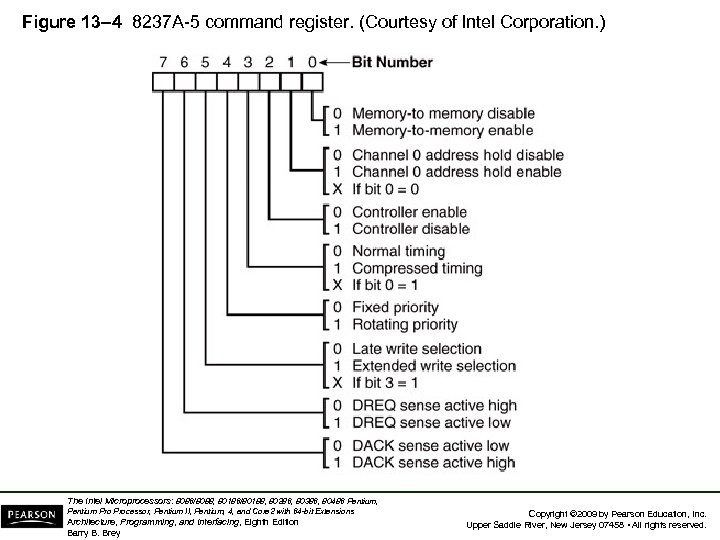 Figure 13– 4 8237 A-5 command register. (Courtesy of Intel Corporation. ) The Intel Microprocessors: 8086/8088, 80186/80188, 80286, 80386, 80486 Pentium, Pentium Processor, Pentium II, Pentium, 4, and Core 2 with 64 -bit Extensions Architecture, Programming, and Interfacing, Eighth Edition Barry B. Brey Copyright © 2009 by Pearson Education, Inc. Upper Saddle River, New Jersey 07458 • All rights reserved.
 8237 Internal Registers MR • The mode register programs the mode of operation for a channel. • Each channel has its own mode register as selected by bit positions 1 and 0. – remaining bits of the mode register select operation, auto-initialization, increment/decrement, and mode for the channel The Intel Microprocessors: 8086/8088, 80186/80188, 80286, 80386, 80486 Pentium, Pentium Processor, Pentium II, Pentium, 4, and Core 2 with 64 -bit Extensions Architecture, Programming, and Interfacing, Eighth Edition Barry B. Brey Copyright © 2009 by Pearson Education, Inc. Upper Saddle River, New Jersey 07458 • All rights reserved.
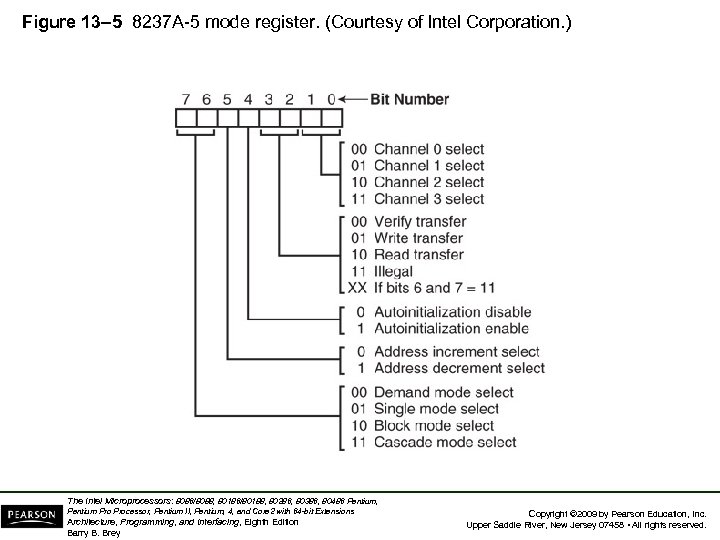 Figure 13– 5 8237 A-5 mode register. (Courtesy of Intel Corporation. ) The Intel Microprocessors: 8086/8088, 80186/80188, 80286, 80386, 80486 Pentium, Pentium Processor, Pentium II, Pentium, 4, and Core 2 with 64 -bit Extensions Architecture, Programming, and Interfacing, Eighth Edition Barry B. Brey Copyright © 2009 by Pearson Education, Inc. Upper Saddle River, New Jersey 07458 • All rights reserved.
 8237 Internal Registers BR • The bus request register is used to request a DMA transfer via software. – very useful in memory-to-memory transfers, where an external signal is not available to begin the DMA transfer The Intel Microprocessors: 8086/8088, 80186/80188, 80286, 80386, 80486 Pentium, Pentium Processor, Pentium II, Pentium, 4, and Core 2 with 64 -bit Extensions Architecture, Programming, and Interfacing, Eighth Edition Barry B. Brey Copyright © 2009 by Pearson Education, Inc. Upper Saddle River, New Jersey 07458 • All rights reserved.
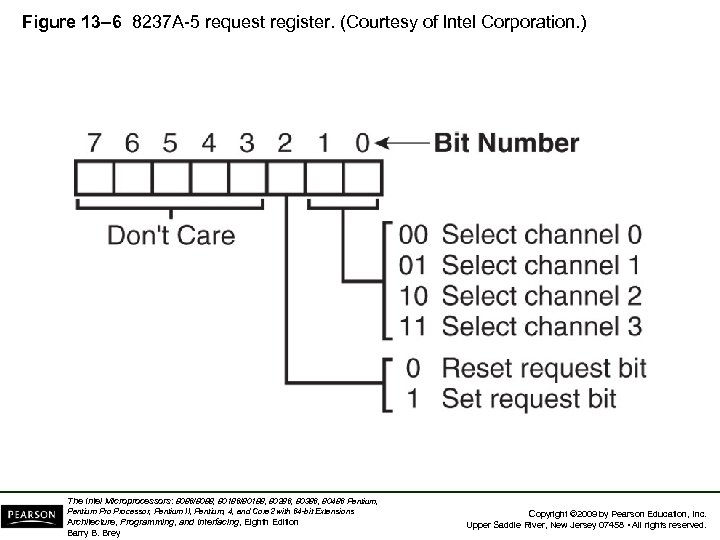 Figure 13– 6 8237 A-5 request register. (Courtesy of Intel Corporation. ) The Intel Microprocessors: 8086/8088, 80186/80188, 80286, 80386, 80486 Pentium, Pentium Processor, Pentium II, Pentium, 4, and Core 2 with 64 -bit Extensions Architecture, Programming, and Interfacing, Eighth Edition Barry B. Brey Copyright © 2009 by Pearson Education, Inc. Upper Saddle River, New Jersey 07458 • All rights reserved.
 8237 Internal Registers MRSR • The mask register set/reset sets or clears the channel mask. – if the mask is set, the channel is disabled – the RESET signal sets all channel masks to disable them The Intel Microprocessors: 8086/8088, 80186/80188, 80286, 80386, 80486 Pentium, Pentium Processor, Pentium II, Pentium, 4, and Core 2 with 64 -bit Extensions Architecture, Programming, and Interfacing, Eighth Edition Barry B. Brey Copyright © 2009 by Pearson Education, Inc. Upper Saddle River, New Jersey 07458 • All rights reserved.
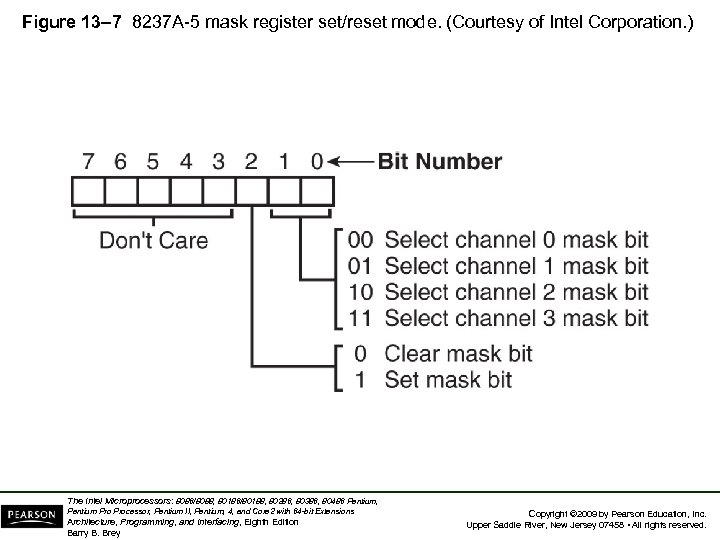 Figure 13– 7 8237 A-5 mask register set/reset mode. (Courtesy of Intel Corporation. ) The Intel Microprocessors: 8086/8088, 80186/80188, 80286, 80386, 80486 Pentium, Pentium Processor, Pentium II, Pentium, 4, and Core 2 with 64 -bit Extensions Architecture, Programming, and Interfacing, Eighth Edition Barry B. Brey Copyright © 2009 by Pearson Education, Inc. Upper Saddle River, New Jersey 07458 • All rights reserved.
 8237 Internal Registers MSR • The mask register clears or sets all of the masks with one command instead of individual channels, as with the MRSR. The Intel Microprocessors: 8086/8088, 80186/80188, 80286, 80386, 80486 Pentium, Pentium Processor, Pentium II, Pentium, 4, and Core 2 with 64 -bit Extensions Architecture, Programming, and Interfacing, Eighth Edition Barry B. Brey Copyright © 2009 by Pearson Education, Inc. Upper Saddle River, New Jersey 07458 • All rights reserved.
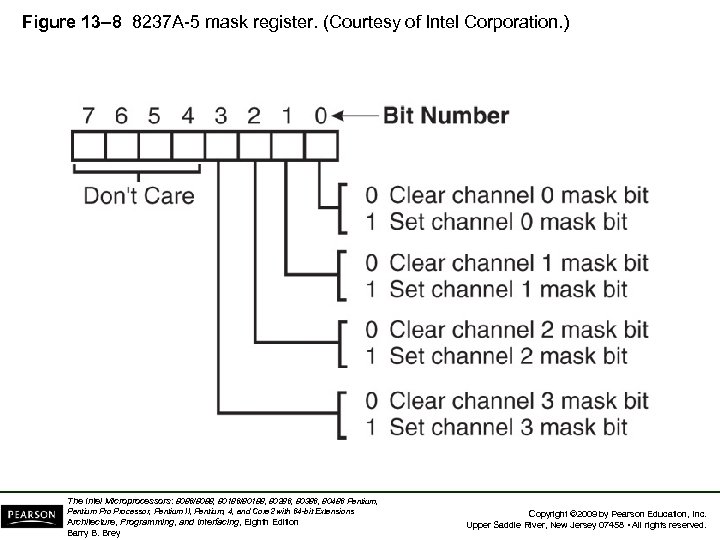 Figure 13– 8 8237 A-5 mask register. (Courtesy of Intel Corporation. ) The Intel Microprocessors: 8086/8088, 80186/80188, 80286, 80386, 80486 Pentium, Pentium Processor, Pentium II, Pentium, 4, and Core 2 with 64 -bit Extensions Architecture, Programming, and Interfacing, Eighth Edition Barry B. Brey Copyright © 2009 by Pearson Education, Inc. Upper Saddle River, New Jersey 07458 • All rights reserved.
 8237 Internal Registers SR • The status register shows status of each DMA channel. The TC bits indicate if the channel has reached its terminal count (transferred all its bytes). • When the terminal count is reached, the DMA transfer is terminated for most modes of operation. – the request bits indicate whether the DREQ input for a given channel is active The Intel Microprocessors: 8086/8088, 80186/80188, 80286, 80386, 80486 Pentium, Pentium Processor, Pentium II, Pentium, 4, and Core 2 with 64 -bit Extensions Architecture, Programming, and Interfacing, Eighth Edition Barry B. Brey Copyright © 2009 by Pearson Education, Inc. Upper Saddle River, New Jersey 07458 • All rights reserved.
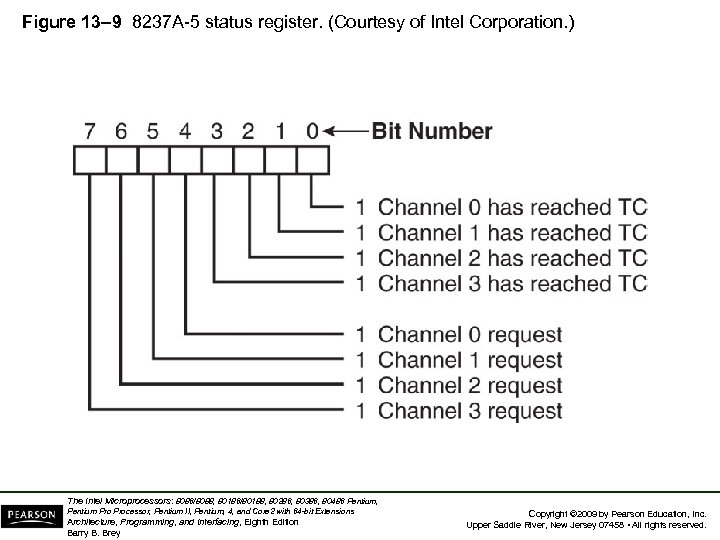 Figure 13– 9 8237 A-5 status register. (Courtesy of Intel Corporation. ) The Intel Microprocessors: 8086/8088, 80186/80188, 80286, 80386, 80486 Pentium, Pentium Processor, Pentium II, Pentium, 4, and Core 2 with 64 -bit Extensions Architecture, Programming, and Interfacing, Eighth Edition Barry B. Brey Copyright © 2009 by Pearson Education, Inc. Upper Saddle River, New Jersey 07458 • All rights reserved.
 Software Commands • Three software commands are used to control the operation of the 8237. • These commands do not have a binary bit pattern, as do various control registers within the 8237. – a simple output to the correct port number enables the software command • Fig 13– 10 shows I/O port assignments that access all registers and the software commands. The Intel Microprocessors: 8086/8088, 80186/80188, 80286, 80386, 80486 Pentium, Pentium Processor, Pentium II, Pentium, 4, and Core 2 with 64 -bit Extensions Architecture, Programming, and Interfacing, Eighth Edition Barry B. Brey Copyright © 2009 by Pearson Education, Inc. Upper Saddle River, New Jersey 07458 • All rights reserved.
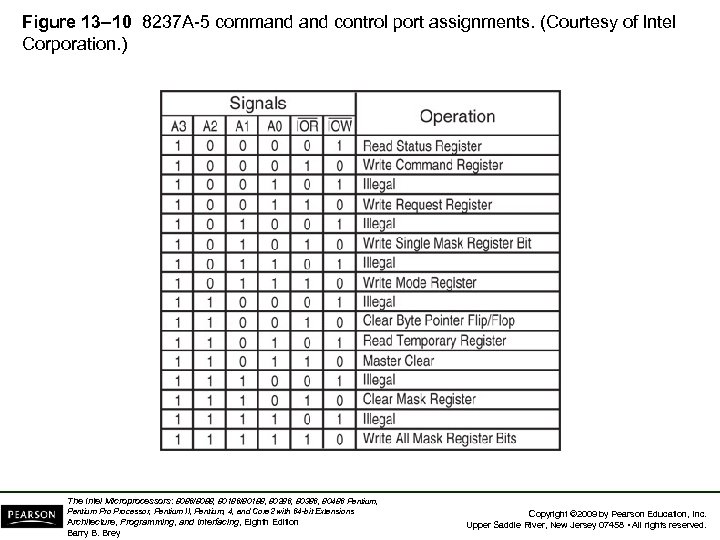 Figure 13– 10 8237 A-5 command control port assignments. (Courtesy of Intel Corporation. ) The Intel Microprocessors: 8086/8088, 80186/80188, 80286, 80386, 80486 Pentium, Pentium Processor, Pentium II, Pentium, 4, and Core 2 with 64 -bit Extensions Architecture, Programming, and Interfacing, Eighth Edition Barry B. Brey Copyright © 2009 by Pearson Education, Inc. Upper Saddle River, New Jersey 07458 • All rights reserved.
 8237 Software Commands Master clear • Acts exactly the same as the RESET signal to the 8237. – as with the RESET signal, this command disables all channels Clear mask register • Enables all four DMA channels. The Intel Microprocessors: 8086/8088, 80186/80188, 80286, 80386, 80486 Pentium, Pentium Processor, Pentium II, Pentium, 4, and Core 2 with 64 -bit Extensions Architecture, Programming, and Interfacing, Eighth Edition Barry B. Brey Copyright © 2009 by Pearson Education, Inc. Upper Saddle River, New Jersey 07458 • All rights reserved.
 8237 Software Commands Clear the first/last flip-flop • Clears the first/last (F/L) flip-flop within 8237. • The F/L flip-flop selects which byte (low or high order) is read/written in the current address and current count registers. – if F/L = 0, the low-order byte is selected – if F/L = 1, the high-order byte is selected • Any read or write to the address or count register automatically toggles the F/L flip-flop. The Intel Microprocessors: 8086/8088, 80186/80188, 80286, 80386, 80486 Pentium, Pentium Processor, Pentium II, Pentium, 4, and Core 2 with 64 -bit Extensions Architecture, Programming, and Interfacing, Eighth Edition Barry B. Brey Copyright © 2009 by Pearson Education, Inc. Upper Saddle River, New Jersey 07458 • All rights reserved.
 Programming the Address and Count Registers • Figure 13– 11 shows I/O port locations for programming the count and address registers for each channel. • The state of the F/L flip-flop determines whether the LSB or MSB is programmed. – if the state is unknown, count and address could be programmed incorrectly • It is important to disable the DMA channel before address and count are programmed. The Intel Microprocessors: 8086/8088, 80186/80188, 80286, 80386, 80486 Pentium, Pentium Processor, Pentium II, Pentium, 4, and Core 2 with 64 -bit Extensions Architecture, Programming, and Interfacing, Eighth Edition Barry B. Brey Copyright © 2009 by Pearson Education, Inc. Upper Saddle River, New Jersey 07458 • All rights reserved.
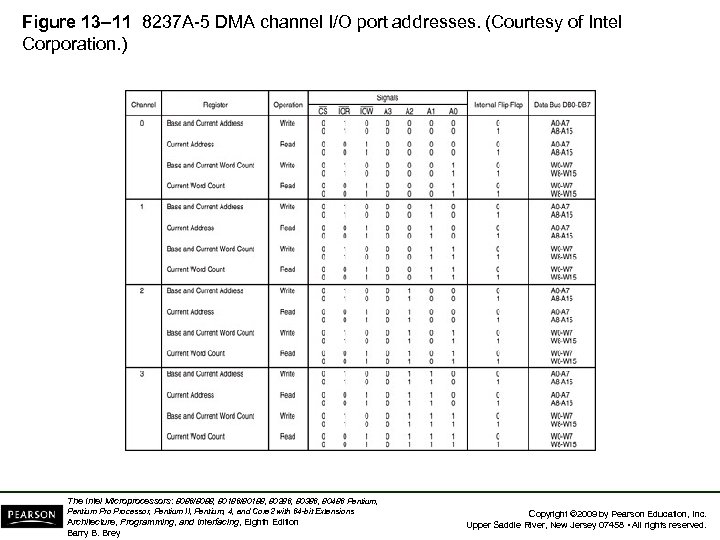 Figure 13– 11 8237 A-5 DMA channel I/O port addresses. (Courtesy of Intel Corporation. ) The Intel Microprocessors: 8086/8088, 80186/80188, 80286, 80386, 80486 Pentium, Pentium Processor, Pentium II, Pentium, 4, and Core 2 with 64 -bit Extensions Architecture, Programming, and Interfacing, Eighth Edition Barry B. Brey Copyright © 2009 by Pearson Education, Inc. Upper Saddle River, New Jersey 07458 • All rights reserved.
 • Four steps are required to program the 8237: – (1) The F/L flip-flop is cleared using a clear F/L command – (2) the channel is disabled – (3) LSB & MSB of the address are programmed – (4) LSB & MSB of the count are programmed • Once these four operations are performed, the channel is programmed and ready to use. – additional programming is required to select the mode of operation before the channel is enabled and started The Intel Microprocessors: 8086/8088, 80186/80188, 80286, 80386, 80486 Pentium, Pentium Processor, Pentium II, Pentium, 4, and Core 2 with 64 -bit Extensions Architecture, Programming, and Interfacing, Eighth Edition Barry B. Brey Copyright © 2009 by Pearson Education, Inc. Upper Saddle River, New Jersey 07458 • All rights reserved.
 The 8237 Connected to the 80 X 86 • The address enable (AEN) output of 8237 controls the output pins of the latches and outputs of the 74 LS 257 (E). – during normal operation (AEN=0), latches A & C and the multiplexer (E) provide address bus bits A 19–A 16 and A 7–A 0 • See Figure 13 -12. The Intel Microprocessors: 8086/8088, 80186/80188, 80286, 80386, 80486 Pentium, Pentium Processor, Pentium II, Pentium, 4, and Core 2 with 64 -bit Extensions Architecture, Programming, and Interfacing, Eighth Edition Barry B. Brey Copyright © 2009 by Pearson Education, Inc. Upper Saddle River, New Jersey 07458 • All rights reserved.
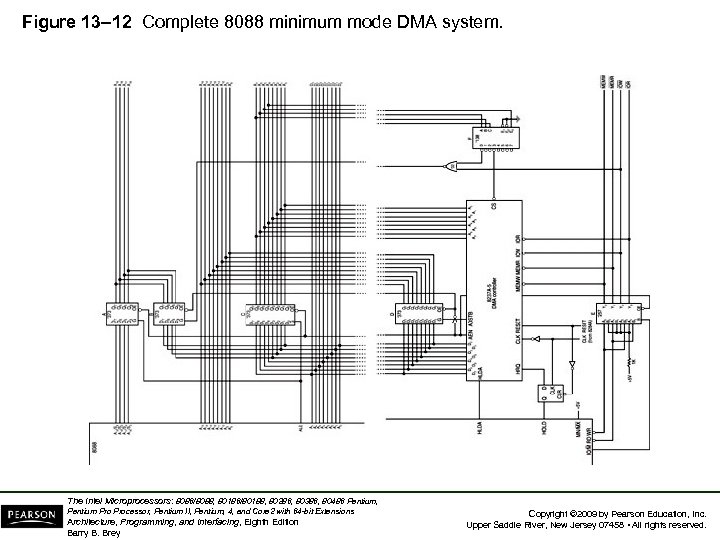 Figure 13– 12 Complete 8088 minimum mode DMA system. The Intel Microprocessors: 8086/8088, 80186/80188, 80286, 80386, 80486 Pentium, Pentium Processor, Pentium II, Pentium, 4, and Core 2 with 64 -bit Extensions Architecture, Programming, and Interfacing, Eighth Edition Barry B. Brey Copyright © 2009 by Pearson Education, Inc. Upper Saddle River, New Jersey 07458 • All rights reserved.
 • The multiplexer provides the system control signals as long as the 80 X 86 is in control of the system. – during a DMA action (AEN=1), latches A & C are disabled along with the multiplexer (E) – latches D and B now provide address bits A 19–A 16 and A 15–A 8 • Address bus bits A 7–A 0 are provided directly by the 8237 and contain part of the DMA transfer address. • The DMA controller provides conntrol signals. The Intel Microprocessors: 8086/8088, 80186/80188, 80286, 80386, 80486 Pentium, Pentium Processor, Pentium II, Pentium, 4, and Core 2 with 64 -bit Extensions Architecture, Programming, and Interfacing, Eighth Edition Barry B. Brey Copyright © 2009 by Pearson Education, Inc. Upper Saddle River, New Jersey 07458 • All rights reserved.
 Memory-to-Memory Transfer with the 8237 • Memory-to-memory transfer is much more powerful than the automatically repeated MOVSB instruction. – most modern chip sets do not support the memory -to-memory feature • 8237 requires only 2. 0 µs per byte, which is over twice as fast as a software data transfer. • This is not true if an 80386, 80846, or Pentium is in use in the system. The Intel Microprocessors: 8086/8088, 80186/80188, 80286, 80386, 80486 Pentium, Pentium Processor, Pentium II, Pentium, 4, and Core 2 with 64 -bit Extensions Architecture, Programming, and Interfacing, Eighth Edition Barry B. Brey Copyright © 2009 by Pearson Education, Inc. Upper Saddle River, New Jersey 07458 • All rights reserved.
 Sample Memory-to-Memory DMA Transfer • Suppose contents of memory locations 10000 H– 13 FFFH are to be transferred to locations 14000 H– 17 FFFH. – accomplished with a repeated string move instruction or with the DMA controller • Example 13– 1 shows the software required to initialize the 8237 and program latch B in Figure 13– 12 for this DMA transfer. The Intel Microprocessors: 8086/8088, 80186/80188, 80286, 80386, 80486 Pentium, Pentium Processor, Pentium II, Pentium, 4, and Core 2 with 64 -bit Extensions Architecture, Programming, and Interfacing, Eighth Edition Barry B. Brey Copyright © 2009 by Pearson Education, Inc. Upper Saddle River, New Jersey 07458 • All rights reserved.
 Sample Memory Fill Using the 8237 • To fill an area of memory with the same data, the channel 0 source register is programmed to point to the same address throughout the transfer. – accomplished with the channel 0 hold mode • The controller copies the contents of this single memory location to an entire block of memory addressed by channel 1. • This has many useful applications. The Intel Microprocessors: 8086/8088, 80186/80188, 80286, 80386, 80486 Pentium, Pentium Processor, Pentium II, Pentium, 4, and Core 2 with 64 -bit Extensions Architecture, Programming, and Interfacing, Eighth Edition Barry B. Brey Copyright © 2009 by Pearson Education, Inc. Upper Saddle River, New Jersey 07458 • All rights reserved.
 DMA-Processed Printer Interface • Fig 13– 13 illustrates the hardware added to Fig 13– 12 for a DMA-controlled printerface. – software to control this interface is simple as only the address of the data and number of characters to be printed are programmed • Once programmed, the channel is enabled, and the DMA action transfers a byte at a time to the printerface. – each time a printer ACK signal is received The Intel Microprocessors: 8086/8088, 80186/80188, 80286, 80386, 80486 Pentium, Pentium Processor, Pentium II, Pentium, 4, and Core 2 with 64 -bit Extensions Architecture, Programming, and Interfacing, Eighth Edition Barry B. Brey Copyright © 2009 by Pearson Education, Inc. Upper Saddle River, New Jersey 07458 • All rights reserved.
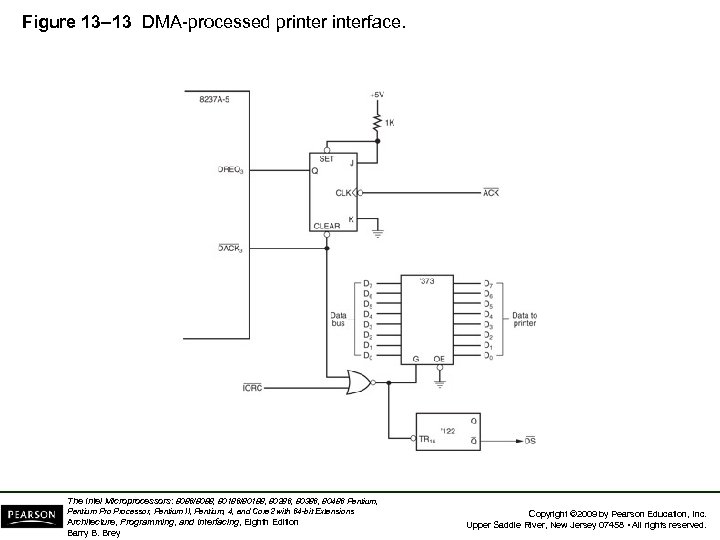 Figure 13– 13 DMA-processed printerface. The Intel Microprocessors: 8086/8088, 80186/80188, 80286, 80386, 80486 Pentium, Pentium Processor, Pentium II, Pentium, 4, and Core 2 with 64 -bit Extensions Architecture, Programming, and Interfacing, Eighth Edition Barry B. Brey Copyright © 2009 by Pearson Education, Inc. Upper Saddle River, New Jersey 07458 • All rights reserved.
 13– 3 SHARED BUS OPERATION • Current computer systems have so many tasks to perform that some systems use more than one processor to accomplish the work. – called a multiprocessing or a distributed system – a system that performs more than one task is called a multitasking system • In systems that contain more than one processor, some method of control must be developed and employed. The Intel Microprocessors: 8086/8088, 80186/80188, 80286, 80386, 80486 Pentium, Pentium Processor, Pentium II, Pentium, 4, and Core 2 with 64 -bit Extensions Architecture, Programming, and Interfacing, Eighth Edition Barry B. Brey Copyright © 2009 by Pearson Education, Inc. Upper Saddle River, New Jersey 07458 • All rights reserved.
 • In a distributed, multiprocessing, multitasking environment, each microprocessor accesses two buses. – (1) the local bus – (2) the remote or shared bus • 80286 uses the 82289 bus arbiter for shared bus operation. – 80386/80486 uses the 82389 • The Pentium–Pentium 4 directly support a multiuser environment. The Intel Microprocessors: 8086/8088, 80186/80188, 80286, 80386, 80486 Pentium, Pentium Processor, Pentium II, Pentium, 4, and Core 2 with 64 -bit Extensions Architecture, Programming, and Interfacing, Eighth Edition Barry B. Brey Copyright © 2009 by Pearson Education, Inc. Upper Saddle River, New Jersey 07458 • All rights reserved.
 • The local bus is connected to memory and I/O directly accessed by a single processor with no special protocol or access rules. • The remote (shared) bus contains memory and I/O that are accessed by any processor in the system. The Intel Microprocessors: 8086/8088, 80186/80188, 80286, 80386, 80486 Pentium, Pentium Processor, Pentium II, Pentium, 4, and Core 2 with 64 -bit Extensions Architecture, Programming, and Interfacing, Eighth Edition Barry B. Brey Copyright © 2009 by Pearson Education, Inc. Upper Saddle River, New Jersey 07458 • All rights reserved.
 • The bus master is the main microprocessor in the PC. – what we call the local bus in the PC is the shared bus in this illustration • The ISA bus is operated as a slave to the PC’s microprocessor. – as well as any other devices attached to the shared bus • The PCI bus can operate as a slave or a master. The Intel Microprocessors: 8086/8088, 80186/80188, 80286, 80386, 80486 Pentium, Pentium Processor, Pentium II, Pentium, 4, and Core 2 with 64 -bit Extensions Architecture, Programming, and Interfacing, Eighth Edition Barry B. Brey Copyright © 2009 by Pearson Education, Inc. Upper Saddle River, New Jersey 07458 • All rights reserved.
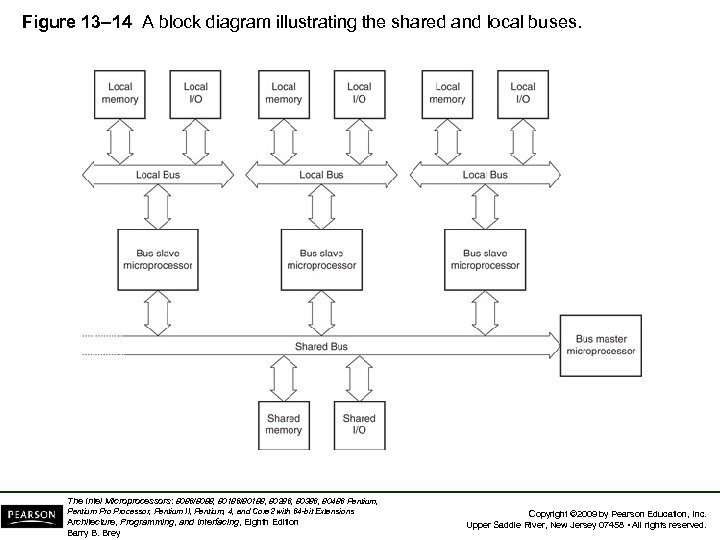 Figure 13– 14 A block diagram illustrating the shared and local buses. The Intel Microprocessors: 8086/8088, 80186/80188, 80286, 80386, 80486 Pentium, Pentium Processor, Pentium II, Pentium, 4, and Core 2 with 64 -bit Extensions Architecture, Programming, and Interfacing, Eighth Edition Barry B. Brey Copyright © 2009 by Pearson Education, Inc. Upper Saddle River, New Jersey 07458 • All rights reserved.
 Types of Buses Defined • The local bus is resident to the processor. – contains the resident or local memory and I/O • All microprocessors studied thus far in this text are considered to be local bus systems. – local memory and I/O are accessed by the microprocessor directly connected to them • A shared bus is one that is connected to all microprocessors in the system. • The shared bus is used to exchange data between microprocessors in the system. The Intel Microprocessors: 8086/8088, 80186/80188, 80286, 80386, 80486 Pentium, Pentium Processor, Pentium II, Pentium, 4, and Core 2 with 64 -bit Extensions Architecture, Programming, and Interfacing, Eighth Edition Barry B. Brey Copyright © 2009 by Pearson Education, Inc. Upper Saddle River, New Jersey 07458 • All rights reserved.
 • Fig 13– 15 shows an 8088 is connected as a remote bus master. – bus master applies to any device that can control a bus containing memory and I/O – the 8237 DMA controller is an example of a remote bus master • The 8088 has an interface to both a local, resident bus and the shared bus. • This allows 8088 to access memory & I/O. – or, via the bus arbiter and buffers, the shared bus The Intel Microprocessors: 8086/8088, 80186/80188, 80286, 80386, 80486 Pentium, Pentium Processor, Pentium II, Pentium, 4, and Core 2 with 64 -bit Extensions Architecture, Programming, and Interfacing, Eighth Edition Barry B. Brey Copyright © 2009 by Pearson Education, Inc. Upper Saddle River, New Jersey 07458 • All rights reserved.
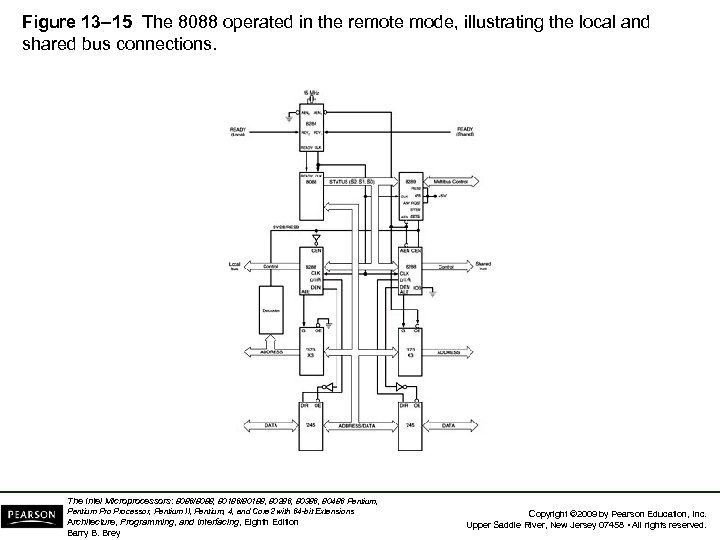 Figure 13– 15 The 8088 operated in the remote mode, illustrating the local and shared bus connections. The Intel Microprocessors: 8086/8088, 80186/80188, 80286, 80386, 80486 Pentium, Pentium Processor, Pentium II, Pentium, 4, and Core 2 with 64 -bit Extensions Architecture, Programming, and Interfacing, Eighth Edition Barry B. Brey Copyright © 2009 by Pearson Education, Inc. Upper Saddle River, New Jersey 07458 • All rights reserved.
 The Bus Arbiter • The 8289 bus arbiter controls interface of a bus master to a shared bus. • Each bus master or microprocessor requires an arbiter for the interface to the shared bus. – which Intel calls the Multibus – and IBM calls the Micro Channel • Processors connected in this kind of system are often called parallel or distributed processors because they can execute software and perform tasks in parallel. The Intel Microprocessors: 8086/8088, 80186/80188, 80286, 80386, 80486 Pentium, Pentium Processor, Pentium II, Pentium, 4, and Core 2 with 64 -bit Extensions Architecture, Programming, and Interfacing, Eighth Edition Barry B. Brey Copyright © 2009 by Pearson Education, Inc. Upper Saddle River, New Jersey 07458 • All rights reserved.
 8289 Architecture • Fig 13– 16 shows pin-outs and block diagram of the 8289 bus arbiter. – the left side of the block diagram depicts the connections to the microprocessor – the right side denotes the 8289 connection to the shared (remote) bus or Multibus • 8289 controls the shared bus by causing the READY input to the microprocessor to become logic 0 (not ready) if access to the shared bus is denied. The Intel Microprocessors: 8086/8088, 80186/80188, 80286, 80386, 80486 Pentium, Pentium Processor, Pentium II, Pentium, 4, and Core 2 with 64 -bit Extensions Architecture, Programming, and Interfacing, Eighth Edition Barry B. Brey Copyright © 2009 by Pearson Education, Inc. Upper Saddle River, New Jersey 07458 • All rights reserved.
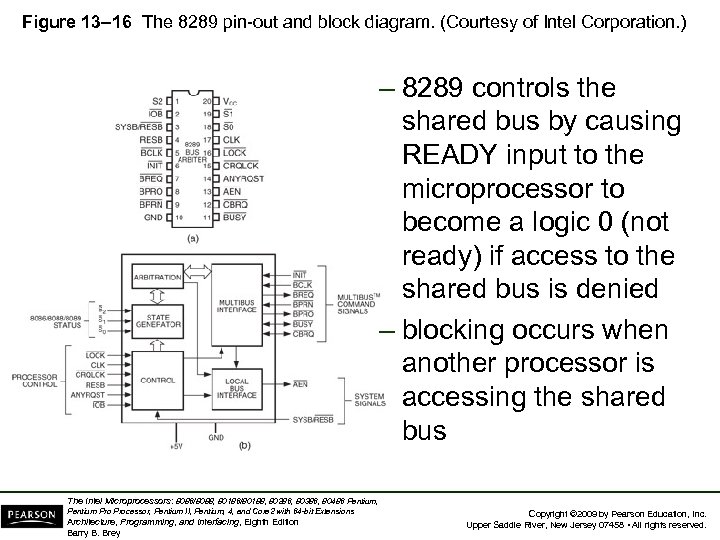 Figure 13– 16 The 8289 pin-out and block diagram. (Courtesy of Intel Corporation. ) – 8289 controls the shared bus by causing READY input to the microprocessor to become a logic 0 (not ready) if access to the shared bus is denied – blocking occurs when another processor is accessing the shared bus The Intel Microprocessors: 8086/8088, 80186/80188, 80286, 80386, 80486 Pentium, Pentium Processor, Pentium II, Pentium, 4, and Core 2 with 64 -bit Extensions Architecture, Programming, and Interfacing, Eighth Edition Barry B. Brey Copyright © 2009 by Pearson Education, Inc. Upper Saddle River, New Jersey 07458 • All rights reserved.
 8289 Pin Definitions AEN • The address enable output causes the bus drivers in a system to switch to their threestate, high-impedance state. The Intel Microprocessors: 8086/8088, 80186/80188, 80286, 80386, 80486 Pentium, Pentium Processor, Pentium II, Pentium, 4, and Core 2 with 64 -bit Extensions Architecture, Programming, and Interfacing, Eighth Edition Barry B. Brey Copyright © 2009 by Pearson Education, Inc. Upper Saddle River, New Jersey 07458 • All rights reserved.
 8289 Pin Definitions ANYRQST • The any request input is a strapping option that prevents a lower- priority microprocessor from gaining access to the shared bus. • If tied to a logic 0, normal arbitration occurs and a lower priority microprocessor can gain access to the shared bus if CBRQ is also a logic 0. The Intel Microprocessors: 8086/8088, 80186/80188, 80286, 80386, 80486 Pentium, Pentium Processor, Pentium II, Pentium, 4, and Core 2 with 64 -bit Extensions Architecture, Programming, and Interfacing, Eighth Edition Barry B. Brey Copyright © 2009 by Pearson Education, Inc. Upper Saddle River, New Jersey 07458 • All rights reserved.
 8289 Pin Definitions BCLK • The bus clock input synchronizes all sharedbus masters. BPRN • The bus priority input allows the 8289 to acquire the shared bus on the next falling edge of the BCLK signal. The Intel Microprocessors: 8086/8088, 80186/80188, 80286, 80386, 80486 Pentium, Pentium Processor, Pentium II, Pentium, 4, and Core 2 with 64 -bit Extensions Architecture, Programming, and Interfacing, Eighth Edition Barry B. Brey Copyright © 2009 by Pearson Education, Inc. Upper Saddle River, New Jersey 07458 • All rights reserved.
 8289 Pin Definitions BPRO • The bus priority output is a signal that is used to resolve priority in a system that contains multiple bus masters. BREQ • The bus request output is used to request access to the shared bus. The Intel Microprocessors: 8086/8088, 80186/80188, 80286, 80386, 80486 Pentium, Pentium Processor, Pentium II, Pentium, 4, and Core 2 with 64 -bit Extensions Architecture, Programming, and Interfacing, Eighth Edition Barry B. Brey Copyright © 2009 by Pearson Education, Inc. Upper Saddle River, New Jersey 07458 • All rights reserved.
 8289 Pin Definitions BUSY • The busy input/output indicates, as an output, that an 8289 has acquired the shared bus. • As an input, BUSY is used to detect that another 8289 has acquired the shared bus. The Intel Microprocessors: 8086/8088, 80186/80188, 80286, 80386, 80486 Pentium, Pentium Processor, Pentium II, Pentium, 4, and Core 2 with 64 -bit Extensions Architecture, Programming, and Interfacing, Eighth Edition Barry B. Brey Copyright © 2009 by Pearson Education, Inc. Upper Saddle River, New Jersey 07458 • All rights reserved.
 8289 Pin Definitions CBRQ • The common bus request input/output is used when a lower priority microprocessor is asking for the use of the shared bus. • As an output, CBRQ becomes logic 0 when the 8289 requests the shared bus and remains low until the 8289 obtains access to the shared bus. The Intel Microprocessors: 8086/8088, 80186/80188, 80286, 80386, 80486 Pentium, Pentium Processor, Pentium II, Pentium, 4, and Core 2 with 64 -bit Extensions Architecture, Programming, and Interfacing, Eighth Edition Barry B. Brey Copyright © 2009 by Pearson Education, Inc. Upper Saddle River, New Jersey 07458 • All rights reserved.
 8289 Pin Definitions CLK • The clock input is generated by the 8284 A clock generator and provides the internal timing source to the 8289. CRQLCK • The common request lock input prevents 8289 from surrendering the shared bus to any 8289 in the system. This signal functions in conjunction with the CBRQ pin. The Intel Microprocessors: 8086/8088, 80186/80188, 80286, 80386, 80486 Pentium, Pentium Processor, Pentium II, Pentium, 4, and Core 2 with 64 -bit Extensions Architecture, Programming, and Interfacing, Eighth Edition Barry B. Brey Copyright © 2009 by Pearson Education, Inc. Upper Saddle River, New Jersey 07458 • All rights reserved.
 8289 Pin Definitions CLK • The initialization input resets 8289 – normally connected to the system RESET signal IOB • The I/O bus input selects whether 8289 operates in a shared-bus system (if selected by RESB) with I/O (IOB=0) or with memory and I/O (IOB=1). The Intel Microprocessors: 8086/8088, 80186/80188, 80286, 80386, 80486 Pentium, Pentium Processor, Pentium II, Pentium, 4, and Core 2 with 64 -bit Extensions Architecture, Programming, and Interfacing, Eighth Edition Barry B. Brey Copyright © 2009 by Pearson Education, Inc. Upper Saddle River, New Jersey 07458 • All rights reserved.
 8289 Pin Definitions RESB • The resident-bus input is a strapping connection allowing 8289 to operate in systems that have either a shared-bus or resident-bus system. – if RESB is a logic 1, 8289 is configured as a shared-bus master – if RESB is a logic 0, as a local-bus master • As a shared-bus master, access is requested through the SYSB/RESB input pin. The Intel Microprocessors: 8086/8088, 80186/80188, 80286, 80386, 80486 Pentium, Pentium Processor, Pentium II, Pentium, 4, and Core 2 with 64 -bit Extensions Architecture, Programming, and Interfacing, Eighth Edition Barry B. Brey Copyright © 2009 by Pearson Education, Inc. Upper Saddle River, New Jersey 07458 • All rights reserved.
 8289 Pin Definitions LOCK • The lock input prevents the 8289 from allowing any other microprocessor from gaining access to the shared bus. • An 8086/8088 instruction that contains a LOCK prefix will prevent other processors from accessing the shared bus. The Intel Microprocessors: 8086/8088, 80186/80188, 80286, 80386, 80486 Pentium, Pentium Processor, Pentium II, Pentium, 4, and Core 2 with 64 -bit Extensions Architecture, Programming, and Interfacing, Eighth Edition Barry B. Brey Copyright © 2009 by Pearson Education, Inc. Upper Saddle River, New Jersey 07458 • All rights reserved.
 8289 Pin Definitions S 0, S 1, and S 2 • The status inputs initiate shared-bus requests and surrenders. These pins connect to the 8288 system bus controller status pins. SYSB/RESB • The system bus/resident bus input selects the shared-bus system when placed at logic 1 or resident local bus when placed at logic 0. The Intel Microprocessors: 8086/8088, 80186/80188, 80286, 80386, 80486 Pentium, Pentium Processor, Pentium II, Pentium, 4, and Core 2 with 64 -bit Extensions Architecture, Programming, and Interfacing, Eighth Edition Barry B. Brey Copyright © 2009 by Pearson Education, Inc. Upper Saddle River, New Jersey 07458 • All rights reserved.
 General 8289 Operation • 8289 can operate in three basic modes: – (1) I/O peripheral-bus mode – (2) resident-bus mode – (3) single-bus mode • In the I/O peripheral bus mode, all local bus devices are treated as I/O, including memory. – and are accessed by all instructions • All memory references access the shared bus and all I/O access the resident-local bus. The Intel Microprocessors: 8086/8088, 80186/80188, 80286, 80386, 80486 Pentium, Pentium Processor, Pentium II, Pentium, 4, and Core 2 with 64 -bit Extensions Architecture, Programming, and Interfacing, Eighth Edition Barry B. Brey Copyright © 2009 by Pearson Education, Inc. Upper Saddle River, New Jersey 07458 • All rights reserved.
 System Illustrating Single-Bus and Resident-Bus Connections • Single-bus operation interfaces a processor to a shared bus with both I/O and memory resources shared by other processors. • Fig 13– 17 illustrates three 8088 processors, each connected to a shared bus. • Two of the three microprocessors operate in the resident-bus mode, while third operates in the single-bus mode. The Intel Microprocessors: 8086/8088, 80186/80188, 80286, 80386, 80486 Pentium, Pentium Processor, Pentium II, Pentium, 4, and Core 2 with 64 -bit Extensions Architecture, Programming, and Interfacing, Eighth Edition Barry B. Brey Copyright © 2009 by Pearson Education, Inc. Upper Saddle River, New Jersey 07458 • All rights reserved.
 • Microprocessor A, in Figure 13– 17, operates in the single-bus mode and has no local bus. – this processor accesses only shared memory & I/O space and is often referred to as the systembus master because it is responsible for coordinating the main memory and I/O tasks • The remaining two (B and C) are connected in resident-bus mode – which allows them access to both the shared bus and their own local buses The Intel Microprocessors: 8086/8088, 80186/80188, 80286, 80386, 80486 Pentium, Pentium Processor, Pentium II, Pentium, 4, and Core 2 with 64 -bit Extensions Architecture, Programming, and Interfacing, Eighth Edition Barry B. Brey Copyright © 2009 by Pearson Education, Inc. Upper Saddle River, New Jersey 07458 • All rights reserved.
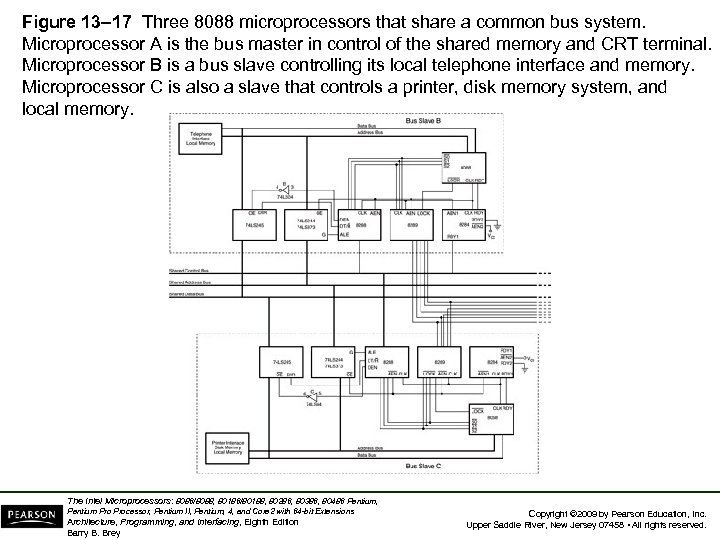 Figure 13– 17 Three 8088 microprocessors that share a common bus system. Microprocessor A is the bus master in control of the shared memory and CRT terminal. Microprocessor B is a bus slave controlling its local telephone interface and memory. Microprocessor C is also a slave that controls a printer, disk memory system, and local memory. The Intel Microprocessors: 8086/8088, 80186/80188, 80286, 80386, 80486 Pentium, Pentium Processor, Pentium II, Pentium, 4, and Core 2 with 64 -bit Extensions Architecture, Programming, and Interfacing, Eighth Edition Barry B. Brey Copyright © 2009 by Pearson Education, Inc. Upper Saddle River, New Jersey 07458 • All rights reserved.
 • Bus master (A) allows the user to operate with a video terminal that allows execution of programs and generally controls the system. • Microprocessor B handles all telephone communications and passes this information to the shared memory in blocks. • Processor C is used as a print spooler. Its only task is to print data on the printer. – when the bus master requires printed output, it transfers the task to microprocessor C • These tasks all execute simultaneously. The Intel Microprocessors: 8086/8088, 80186/80188, 80286, 80386, 80486 Pentium, Pentium Processor, Pentium II, Pentium, 4, and Core 2 with 64 -bit Extensions Architecture, Programming, and Interfacing, Eighth Edition Barry B. Brey Copyright © 2009 by Pearson Education, Inc. Upper Saddle River, New Jersey 07458 • All rights reserved.
 • There is no limit to the number of processors connected to a system or the number of tasks performed simultaneously using this technique. – the only limit is that introduced by the system design and the designer’s ingenuity • Lawrence Livermore Labs in California has a system that contains 4096 Pentium microprocessors. The Intel Microprocessors: 8086/8088, 80186/80188, 80286, 80386, 80486 Pentium, Pentium Processor, Pentium II, Pentium, 4, and Core 2 with 64 -bit Extensions Architecture, Programming, and Interfacing, Eighth Edition Barry B. Brey Copyright © 2009 by Pearson Education, Inc. Upper Saddle River, New Jersey 07458 • All rights reserved.
 13– 4 DISK MEMORY SYSTEMS • Disk memory is used to store long-term data. • Many types of disk storage systems are available and they use magnetic media. – except optical disk memory that stores data on a plastic disk • Optical disk memory is either: – CD-ROM (compact disk/read only memory) which read, but never written – WORM (write once/read mostly), read most of the time, but can be written once by a laser The Intel Microprocessors: 8086/8088, 80186/80188, 80286, 80386, 80486 Pentium, Pentium Processor, Pentium II, Pentium, 4, and Core 2 with 64 -bit Extensions Architecture, Programming, and Interfacing, Eighth Edition Barry B. Brey Copyright © 2009 by Pearson Education, Inc. Upper Saddle River, New Jersey 07458 • All rights reserved.
 • Optical disk memory that can be read and written many times is becoming available. – there is still a limitation on the number of write operations allowed • The latest optical disk technology is called DVD (digital-versatile disk). – also available in high-resolution versions for video and data storage as Blu-ray (50 G) or HD-DVD (30 G) The Intel Microprocessors: 8086/8088, 80186/80188, 80286, 80386, 80486 Pentium, Pentium Processor, Pentium II, Pentium, 4, and Core 2 with 64 -bit Extensions Architecture, Programming, and Interfacing, Eighth Edition Barry B. Brey Copyright © 2009 by Pearson Education, Inc. Upper Saddle River, New Jersey 07458 • All rights reserved.
 Floppy Disk Memory • The floppy, or flexible disk was once the most common and basic form of disk memory. – the floppy is beginning to vanish and may disappear shortly in favor of the USB pen drive • Floppy disk magnetic recording media have been made available in three sizes: – 8 standard – 51/4 mini-floppy – 31/2 micro-floppy. The Intel Microprocessors: 8086/8088, 80186/80188, 80286, 80386, 80486 Pentium, Pentium Processor, Pentium II, Pentium, 4, and Core 2 with 64 -bit Extensions Architecture, Programming, and Interfacing, Eighth Edition Barry B. Brey Copyright © 2009 by Pearson Education, Inc. Upper Saddle River, New Jersey 07458 • All rights reserved.
 • All disks have several things in common. • They are all organized so that data are stored in tracks and sectors. – a track is a concentric ring of data stored on the surface of a disk – a sector is a common subdivision of a track designed to hold a reasonable amount of data • In many systems, a sector holds either 512 or 1024 bytes of data. – size of a sector can vary from 128 bytes to the length of one entire track The Intel Microprocessors: 8086/8088, 80186/80188, 80286, 80386, 80486 Pentium, Pentium Processor, Pentium II, Pentium, 4, and Core 2 with 64 -bit Extensions Architecture, Programming, and Interfacing, Eighth Edition Barry B. Brey Copyright © 2009 by Pearson Education, Inc. Upper Saddle River, New Jersey 07458 • All rights reserved.
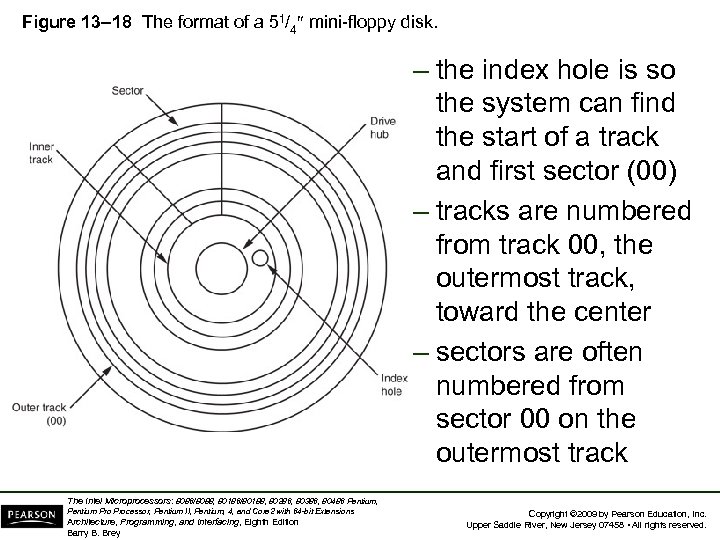 Figure 13– 18 The format of a 51/4 mini-floppy disk. – the index hole is so the system can find the start of a track and first sector (00) – tracks are numbered from track 00, the outermost track, toward the center – sectors are often numbered from sector 00 on the outermost track The Intel Microprocessors: 8086/8088, 80186/80188, 80286, 80386, 80486 Pentium, Pentium Processor, Pentium II, Pentium, 4, and Core 2 with 64 -bit Extensions Architecture, Programming, and Interfacing, Eighth Edition Barry B. Brey Copyright © 2009 by Pearson Education, Inc. Upper Saddle River, New Jersey 07458 • All rights reserved.
 The 5 1/4 Mini-floppy Disk • The 51/4 floppy is very difficult to find and is used only with older microcomputer systems. • The floppy disk is rotated at 300 RPM inside its semi-rigid plastic jacket. – the head mechanism in a floppy drive makes physical contact with the surface of the disk, which causes wear and damage to the disk • Most mini-floppy disks are double-sided. – data are written on the top & bottom surfaces The Intel Microprocessors: 8086/8088, 80186/80188, 80286, 80386, 80486 Pentium, Pentium Processor, Pentium II, Pentium, 4, and Core 2 with 64 -bit Extensions Architecture, Programming, and Interfacing, Eighth Edition Barry B. Brey Copyright © 2009 by Pearson Education, Inc. Upper Saddle River, New Jersey 07458 • All rights reserved.
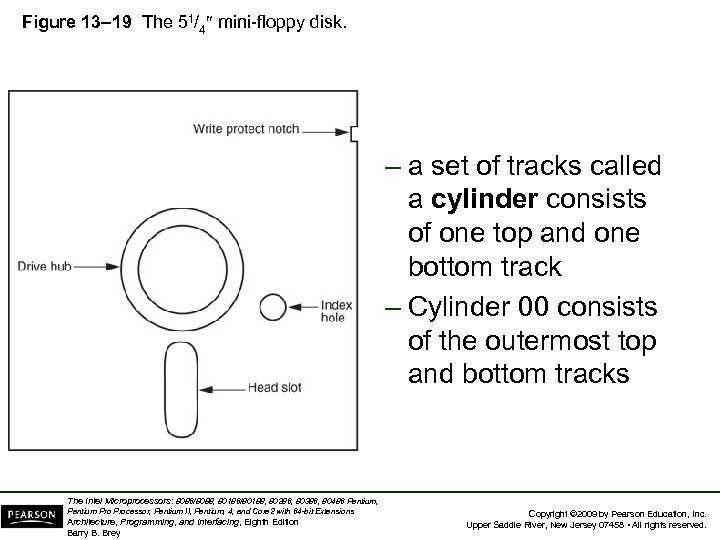 Figure 13– 19 The 51/4 mini-floppy disk. – a set of tracks called a cylinder consists of one top and one bottom track – Cylinder 00 consists of the outermost top and bottom tracks The Intel Microprocessors: 8086/8088, 80186/80188, 80286, 80386, 80486 Pentium, Pentium Processor, Pentium II, Pentium, 4, and Core 2 with 64 -bit Extensions Architecture, Programming, and Interfacing, Eighth Edition Barry B. Brey Copyright © 2009 by Pearson Education, Inc. Upper Saddle River, New Jersey 07458 • All rights reserved.
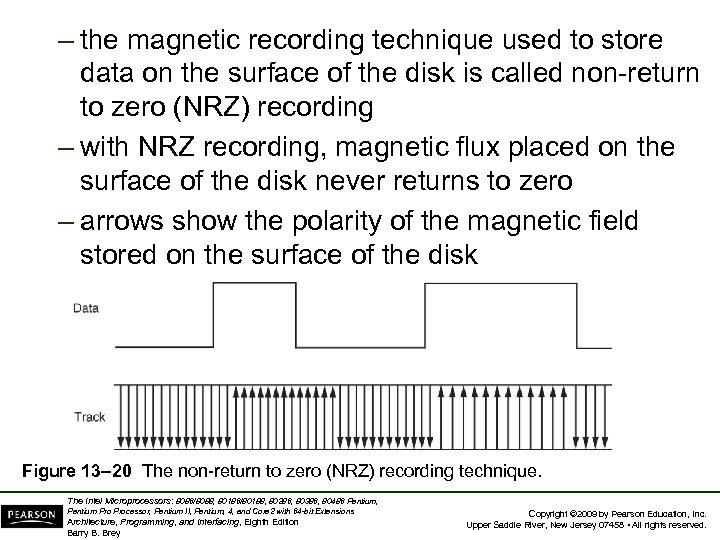 – the magnetic recording technique used to store data on the surface of the disk is called non-return to zero (NRZ) recording – with NRZ recording, magnetic flux placed on the surface of the disk never returns to zero – arrows show the polarity of the magnetic field stored on the surface of the disk Figure 13– 20 The non-return to zero (NRZ) recording technique. The Intel Microprocessors: 8086/8088, 80186/80188, 80286, 80386, 80486 Pentium, Pentium Processor, Pentium II, Pentium, 4, and Core 2 with 64 -bit Extensions Architecture, Programming, and Interfacing, Eighth Edition Barry B. Brey Copyright © 2009 by Pearson Education, Inc. Upper Saddle River, New Jersey 07458 • All rights reserved.
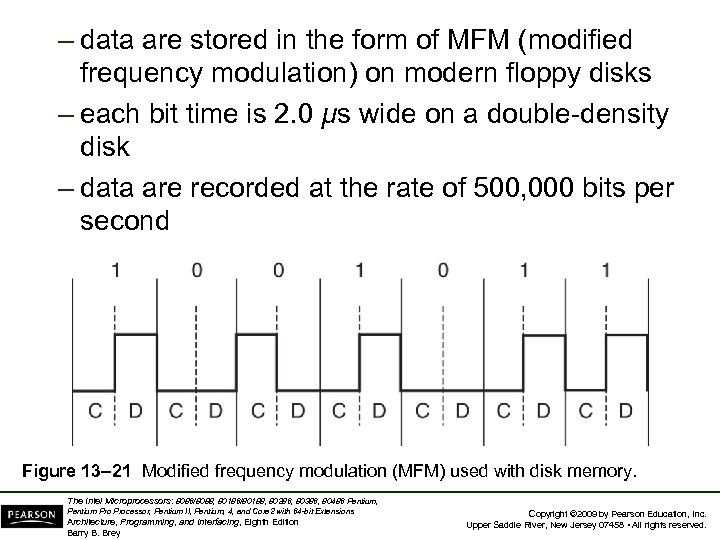 – data are stored in the form of MFM (modified frequency modulation) on modern floppy disks – each bit time is 2. 0 µs wide on a double-density disk – data are recorded at the rate of 500, 000 bits per second Figure 13– 21 Modified frequency modulation (MFM) used with disk memory. The Intel Microprocessors: 8086/8088, 80186/80188, 80286, 80386, 80486 Pentium, Pentium Processor, Pentium II, Pentium, 4, and Core 2 with 64 -bit Extensions Architecture, Programming, and Interfacing, Eighth Edition Barry B. Brey Copyright © 2009 by Pearson Education, Inc. Upper Saddle River, New Jersey 07458 • All rights reserved.
 The 3 1/2 Micro-Floppy Disk • A much improved version of the mini-floppy disk described earlier. • The micro-floppy is packaged in a rigid plastic jacket that will not bend easily. – a much greater degree of protection to the disk • The head door remains closed until the disk is inserted into the drive. – once in the drive, the mechanism slides open the door, exposing the surface of the disk to the read/write heads The Intel Microprocessors: 8086/8088, 80186/80188, 80286, 80386, 80486 Pentium, Pentium Processor, Pentium II, Pentium, 4, and Core 2 with 64 -bit Extensions Architecture, Programming, and Interfacing, Eighth Edition Barry B. Brey Copyright © 2009 by Pearson Education, Inc. Upper Saddle River, New Jersey 07458 • All rights reserved.
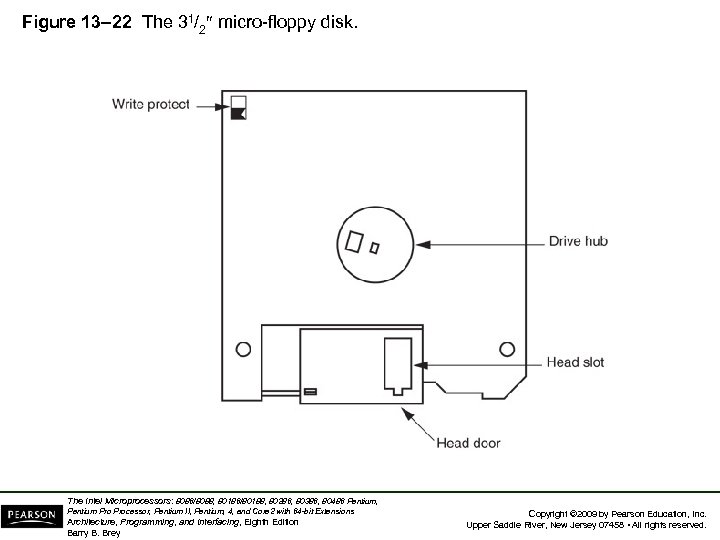 Figure 13– 22 The 31/2 micro-floppy disk. The Intel Microprocessors: 8086/8088, 80186/80188, 80286, 80386, 80486 Pentium, Pentium Processor, Pentium II, Pentium, 4, and Core 2 with 64 -bit Extensions Architecture, Programming, and Interfacing, Eighth Edition Barry B. Brey Copyright © 2009 by Pearson Education, Inc. Upper Saddle River, New Jersey 07458 • All rights reserved.
 • On the mini-floppy, a piece of tape was placed over a notch on the side of the jacket to prevent writing. – this plastic tape easily became dislodged inside disk drives, causing problems • The micro-floppy has an integrated plastic slide replacing the tape write-protection. • To write-protect (prevent writing) the microfloppy disk, the plastic slide is moved to open the hole through the disk jacket. – allows light to strike a sensor that inhibits writing The Intel Microprocessors: 8086/8088, 80186/80188, 80286, 80386, 80486 Pentium, Pentium Processor, Pentium II, Pentium, 4, and Core 2 with 64 -bit Extensions Architecture, Programming, and Interfacing, Eighth Edition Barry B. Brey Copyright © 2009 by Pearson Education, Inc. Upper Saddle River, New Jersey 07458 • All rights reserved.
 Pen Drives • Pen drives, or flash drives use flash memory to store data. – a driver treats the pen drive as a floppy with tracks and sectors, though it really does not • The FAT system is used for the file structure. – memory in this type of drive is serial memory • When connected to the USB bus, the OS recognizes it and allows data to be transferred between it and the computer. The Intel Microprocessors: 8086/8088, 80186/80188, 80286, 80386, 80486 Pentium, Pentium Processor, Pentium II, Pentium, 4, and Core 2 with 64 -bit Extensions Architecture, Programming, and Interfacing, Eighth Edition Barry B. Brey Copyright © 2009 by Pearson Education, Inc. Upper Saddle River, New Jersey 07458 • All rights reserved.
 Hard Disk Memory • Hard disk memory has a much larger capacity than the floppy disk memory. – often called a fixed disk because it is not removable like the floppy disk • A hard disk is also often called a rigid disk. – the term Winchester drive is also used, but less commonly today • Common, low-cost (less than $1 per gigabyte) sizes are presently 20 G bytes to 500 G bytes. – sizes approaching 1 T (tera) bytes are available The Intel Microprocessors: 8086/8088, 80186/80188, 80286, 80386, 80486 Pentium, Pentium Processor, Pentium II, Pentium, 4, and Core 2 with 64 -bit Extensions Architecture, Programming, and Interfacing, Eighth Edition Barry B. Brey Copyright © 2009 by Pearson Education, Inc. Upper Saddle River, New Jersey 07458 • All rights reserved.
 • The hard disk memory uses a flying head to store and read data. • A flying head, which is very small and light, does not touch the surface of the disk. – it flies above the surface on a film of air that is carried with the surface of the disk as it spins • The hard disk typically spins at 3000 to 15, 000 RPM, many times faster than a floppy. – higher rotational speed allows the head to fly just over the top of the surface of the disk • There is no wear on the hard disk’s surface. The Intel Microprocessors: 8086/8088, 80186/80188, 80286, 80386, 80486 Pentium, Pentium Processor, Pentium II, Pentium, 4, and Core 2 with 64 -bit Extensions Architecture, Programming, and Interfacing, Eighth Edition Barry B. Brey Copyright © 2009 by Pearson Education, Inc. Upper Saddle River, New Jersey 07458 • All rights reserved.
 • Problems can arise because of flying heads. – if power is interrupted or the drive is jarred, the head can crash onto the disk surface, which can damage the disk surface or the head • Some drive manufacturers have included a system to automatically park the head when power is interrupted. – when the heads are parked, they are moved to a safe landing zone (unused track) when power is disconnected The Intel Microprocessors: 8086/8088, 80186/80188, 80286, 80386, 80486 Pentium, Pentium Processor, Pentium II, Pentium, 4, and Core 2 with 64 -bit Extensions Architecture, Programming, and Interfacing, Eighth Edition Barry B. Brey Copyright © 2009 by Pearson Education, Inc. Upper Saddle River, New Jersey 07458 • All rights reserved.
 • Another difference between a floppy and a hard drive is the number of heads and disk surfaces. – a floppy has two heads, one for the upper surface and one for the lower surface – the hard drive has up to eight disk surfaces (four platters), with up to two heads per surface • Each time a new cylinder is obtained by moving the head assembly, 16 new tracks are available under the heads. • See Figure 13– 23. The Intel Microprocessors: 8086/8088, 80186/80188, 80286, 80386, 80486 Pentium, Pentium Processor, Pentium II, Pentium, 4, and Core 2 with 64 -bit Extensions Architecture, Programming, and Interfacing, Eighth Edition Barry B. Brey Copyright © 2009 by Pearson Education, Inc. Upper Saddle River, New Jersey 07458 • All rights reserved.
 • Heads are moved from track to track by using either a stepper motor or a voice coil. – the stepper motor is slow and noisy; moving the head assembly requires one step per cylinder – the voice coil mechanism is quiet and quick; the heads can be moved many cylinders with one sweeping motion • Stepper-motor-type head positioning mechanisms can become misaligned – while the voice coil mechanism corrects for any misalignment The Intel Microprocessors: 8086/8088, 80186/80188, 80286, 80386, 80486 Pentium, Pentium Processor, Pentium II, Pentium, 4, and Core 2 with 64 -bit Extensions Architecture, Programming, and Interfacing, Eighth Edition Barry B. Brey Copyright © 2009 by Pearson Education, Inc. Upper Saddle River, New Jersey 07458 • All rights reserved.
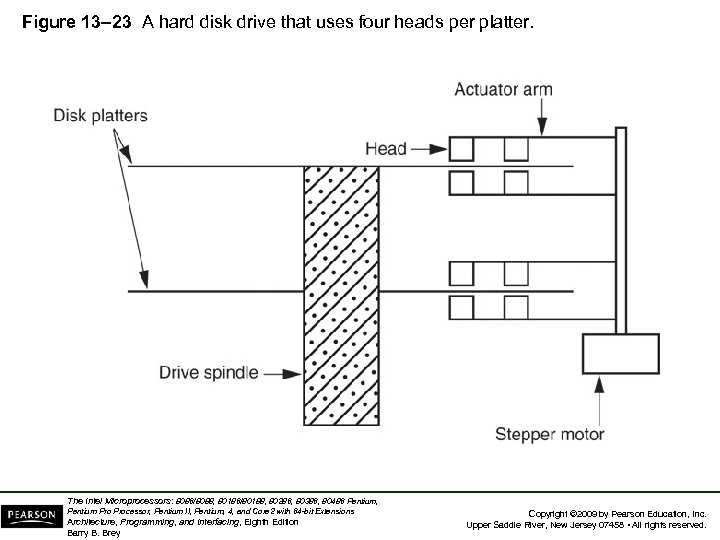 Figure 13– 23 A hard disk drive that uses four heads per platter. The Intel Microprocessors: 8086/8088, 80186/80188, 80286, 80386, 80486 Pentium, Pentium Processor, Pentium II, Pentium, 4, and Core 2 with 64 -bit Extensions Architecture, Programming, and Interfacing, Eighth Edition Barry B. Brey Copyright © 2009 by Pearson Education, Inc. Upper Saddle River, New Jersey 07458 • All rights reserved.
 • Hard drives often store information in sectors that are 512 bytes long. • Data are addressed in clusters of eight or more sectors, which contain 4096 bytes (or more) on most hard disk drives. • All hard drives use today RLL encoding. The Intel Microprocessors: 8086/8088, 80186/80188, 80286, 80386, 80486 Pentium, Pentium Processor, Pentium II, Pentium, 4, and Core 2 with 64 -bit Extensions Architecture, Programming, and Interfacing, Eighth Edition Barry B. Brey Copyright © 2009 by Pearson Education, Inc. Upper Saddle River, New Jersey 07458 • All rights reserved.
 RLL Storage • The term run-length limited (RLL) means the run of zeros (zeros in a row) is limited. – a common RLL encoding scheme is RLL 2, 7, which means the run of zeros is always between two and seven • An RLL drive often contains 27 tracks instead of the 18 found on the MFM drive. • Fig 13– 24 is a comparison of MFM & RLL. – besides holding more information, the RLL drive can be written and read at a higher rate The Intel Microprocessors: 8086/8088, 80186/80188, 80286, 80386, 80486 Pentium, Pentium Processor, Pentium II, Pentium, 4, and Core 2 with 64 -bit Extensions Architecture, Programming, and Interfacing, Eighth Edition Barry B. Brey Copyright © 2009 by Pearson Education, Inc. Upper Saddle River, New Jersey 07458 • All rights reserved.
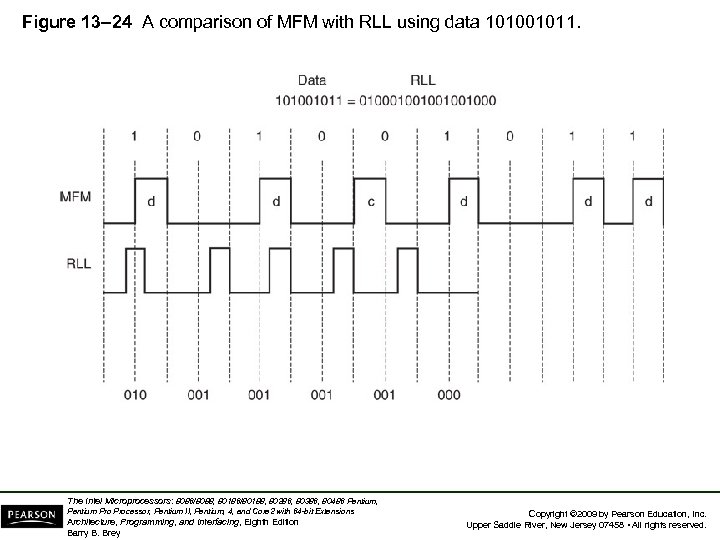 Figure 13– 24 A comparison of MFM with RLL using data 101001011. The Intel Microprocessors: 8086/8088, 80186/80188, 80286, 80386, 80486 Pentium, Pentium Processor, Pentium II, Pentium, 4, and Core 2 with 64 -bit Extensions Architecture, Programming, and Interfacing, Eighth Edition Barry B. Brey Copyright © 2009 by Pearson Education, Inc. Upper Saddle River, New Jersey 07458 • All rights reserved.
 • There a number of disk drive interfaces in use today. – the oldest is the ST-506 interface, which uses either MFM or RLL data • Newer standards are in use today. – which include ESDI, SCSI, and IDE • The IDE system is becoming the standard hard disk memory interface. • The enhanced small disk interface (ESDI) system is capable of transferring data at rates approaching 10 M bytes per second. The Intel Microprocessors: 8086/8088, 80186/80188, 80286, 80386, 80486 Pentium, Pentium Processor, Pentium II, Pentium, 4, and Core 2 with 64 -bit Extensions Architecture, Programming, and Interfacing, Eighth Edition Barry B. Brey Copyright © 2009 by Pearson Education, Inc. Upper Saddle River, New Jersey 07458 • All rights reserved.
 • ST-506 interface approaches 860 K bytes/sec. • The small computer system interface (SCSI) allows up to seven different disk or other interfaces to be connected to the computer through same interface controller. – SCSI is found in some PC-type computers and also in the Apple Macintosh system • An improved version, SCSI-II, has started to appear in some systems. – in the future, this interface may be replaced with IDE in most applications The Intel Microprocessors: 8086/8088, 80186/80188, 80286, 80386, 80486 Pentium, Pentium Processor, Pentium II, Pentium, 4, and Core 2 with 64 -bit Extensions Architecture, Programming, and Interfacing, Eighth Edition Barry B. Brey Copyright © 2009 by Pearson Education, Inc. Upper Saddle River, New Jersey 07458 • All rights reserved.
 • One of the most common systems is the integrated drive electronics (IDE) system. – incorporates the disk controller in the drive and attaches to the host system through a small interface cable • IDE drives are found in newer IBM PS-2 systems and many clones. – even Apple computer systems are starting to be found with IDE drives • The IDE interface is also capable of driving other I/O devices besides the hard disk. The Intel Microprocessors: 8086/8088, 80186/80188, 80286, 80386, 80486 Pentium, Pentium Processor, Pentium II, Pentium, 4, and Core 2 with 64 -bit Extensions Architecture, Programming, and Interfacing, Eighth Edition Barry B. Brey Copyright © 2009 by Pearson Education, Inc. Upper Saddle River, New Jersey 07458 • All rights reserved.
 • IDE usually contains at least a 256 K- to 8 Mbyte cache memory for disk data. – the cache speeds disk transfers • Access times for an IDE drive are often less than 8 ms. – access time for a floppy-disk is about 200 ms • IDE is also called ATA, an acronym for AT attachment where “AT” means the Advanced Technology computer. The Intel Microprocessors: 8086/8088, 80186/80188, 80286, 80386, 80486 Pentium, Pentium Processor, Pentium II, Pentium, 4, and Core 2 with 64 -bit Extensions Architecture, Programming, and Interfacing, Eighth Edition Barry B. Brey Copyright © 2009 by Pearson Education, Inc. Upper Saddle River, New Jersey 07458 • All rights reserved.
 • The latest is the serial ATA interface or SATA. – this interface transfers serial data at 150 MBps (or 300 MBps for SATA 2), faster than IDE • Not yet released is SATA 3, which transfers data at a rate of 600 MBps. • The transfer rate is higher because the logic 1 level is no longer 5. 0 V. It is now 0. 5 V. – which allows higher data transfer rates because it takes less time for the signal to rise to 0. 5 V than to 5. 0 V The Intel Microprocessors: 8086/8088, 80186/80188, 80286, 80386, 80486 Pentium, Pentium Processor, Pentium II, Pentium, 4, and Core 2 with 64 -bit Extensions Architecture, Programming, and Interfacing, Eighth Edition Barry B. Brey Copyright © 2009 by Pearson Education, Inc. Upper Saddle River, New Jersey 07458 • All rights reserved.
 Optical Disk Memory • Optical disk memory is commonly available in two forms: – CD-ROM (compact disk/read only memory) – WORM (write once/read mostly) • CD-ROM is the lowest cost, but suffers from lack of speed. – access times are typically 300 ms or longer • As systems develop and become more visually active, use of the CD-ROM drive will become even more common. The Intel Microprocessors: 8086/8088, 80186/80188, 80286, 80386, 80486 Pentium, Pentium Processor, Pentium II, Pentium, 4, and Core 2 with 64 -bit Extensions Architecture, Programming, and Interfacing, Eighth Edition Barry B. Brey Copyright © 2009 by Pearson Education, Inc. Upper Saddle River, New Jersey 07458 • All rights reserved.
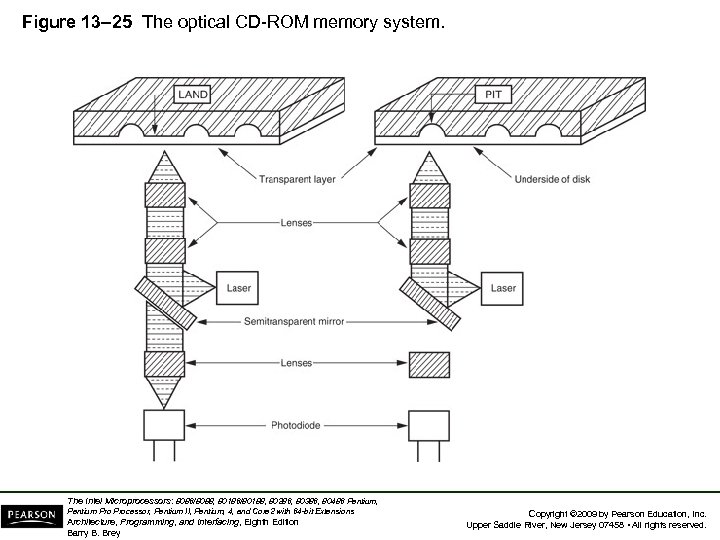 Figure 13– 25 The optical CD-ROM memory system. The Intel Microprocessors: 8086/8088, 80186/80188, 80286, 80386, 80486 Pentium, Pentium Processor, Pentium II, Pentium, 4, and Core 2 with 64 -bit Extensions Architecture, Programming, and Interfacing, Eighth Edition Barry B. Brey Copyright © 2009 by Pearson Education, Inc. Upper Saddle River, New Jersey 07458 • All rights reserved.
 • The WORM drive sees far more commercial application than the CD-ROM. – application is very specialized due to its nature • WORM is normally used to form an audit trail of transactions spooled onto the WORM and retrieved only during an audit. – one might call the WORM an archiving device • The advantage of the optical disk is durability. • About the only way to destroy data on an optical disk is to break it or deeply scar it. The Intel Microprocessors: 8086/8088, 80186/80188, 80286, 80386, 80486 Pentium, Pentium Processor, Pentium II, Pentium, 4, and Core 2 with 64 -bit Extensions Architecture, Programming, and Interfacing, Eighth Edition Barry B. Brey Copyright © 2009 by Pearson Education, Inc. Upper Saddle River, New Jersey 07458 • All rights reserved.
 • The new versatile read/write CD-ROM, called a DVD, became available in the mid 1990’s. • New to this technology are the Blu-ray DVD from Sony Corporation and the HD-DVD from Toshiba Corporation. – Blu-ray DVD capacity is 50 GB; HD-DVD, 30 GB • The big change from older DVDs is a switch from a red laser to a blue laser. – a blue laser has a higher frequency, which means it can read more information per second from the DVD, hence a high storage density The Intel Microprocessors: 8086/8088, 80186/80188, 80286, 80386, 80486 Pentium, Pentium Processor, Pentium II, Pentium, 4, and Core 2 with 64 -bit Extensions Architecture, Programming, and Interfacing, Eighth Edition Barry B. Brey Copyright © 2009 by Pearson Education, Inc. Upper Saddle River, New Jersey 07458 • All rights reserved.
 13– 5 VIDEO DISPLAYS • Color display systems are available that accept information as a composite video signal as TIL voltage level signals (0 or 5 V), and as analog signals (0– 0. 7 V). – composite video displays are disappearing because the available resolution is too low • Early composite video displays were found with Commodore 64, Apple 2, and similar computer systems. The Intel Microprocessors: 8086/8088, 80186/80188, 80286, 80386, 80486 Pentium, Pentium Processor, Pentium II, Pentium, 4, and Core 2 with 64 -bit Extensions Architecture, Programming, and Interfacing, Eighth Edition Barry B. Brey Copyright © 2009 by Pearson Education, Inc. Upper Saddle River, New Jersey 07458 • All rights reserved.
 Video Signals • Fig 13– 26 illustrates the signal sent to a composite video display. • These signals include video, sync pulses, sync pedestals, and a color burst. – no audio signal is shown; one often doesn’t exist • Major disadvantages of the composite video display are the resolution and color limitations. – composite video was designed to emulate television video so a home television could function as a video monitor The Intel Microprocessors: 8086/8088, 80186/80188, 80286, 80386, 80486 Pentium, Pentium Processor, Pentium II, Pentium, 4, and Core 2 with 64 -bit Extensions Architecture, Programming, and Interfacing, Eighth Edition Barry B. Brey Copyright © 2009 by Pearson Education, Inc. Upper Saddle River, New Jersey 07458 • All rights reserved.
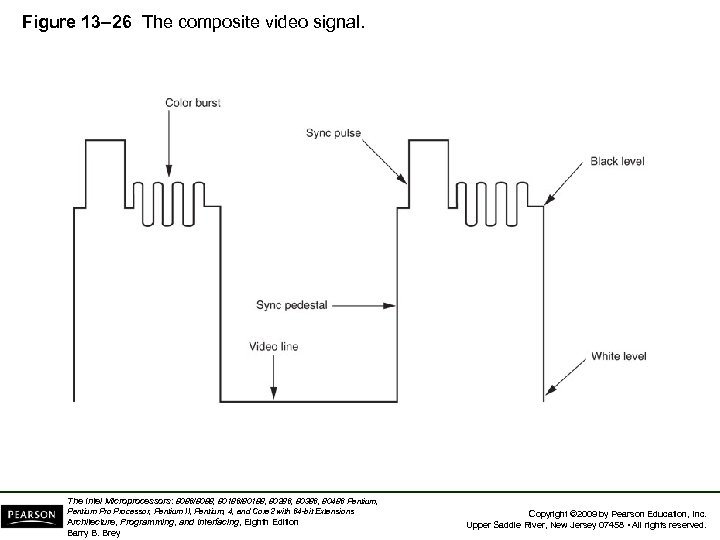 Figure 13– 26 The composite video signal. The Intel Microprocessors: 8086/8088, 80186/80188, 80286, 80386, 80486 Pentium, Pentium Processor, Pentium II, Pentium, 4, and Core 2 with 64 -bit Extensions Architecture, Programming, and Interfacing, Eighth Edition Barry B. Brey Copyright © 2009 by Pearson Education, Inc. Upper Saddle River, New Jersey 07458 • All rights reserved.
 The TTL RGB Monitor • Available as either an analog or TTL monitor. • The RGB video TTL display can display a total of 16 different colors. • TTL RGB is used in CGA (color graphics adapter) system found in older systems. • Figure 13– 27 shows the connector found on a TTL RGB or monochrome monitor. – monochrome TTL monitors use the same 9 -pin connector as RGB TTL monitors The Intel Microprocessors: 8086/8088, 80186/80188, 80286, 80386, 80486 Pentium, Pentium Processor, Pentium II, Pentium, 4, and Core 2 with 64 -bit Extensions Architecture, Programming, and Interfacing, Eighth Edition Barry B. Brey Copyright © 2009 by Pearson Education, Inc. Upper Saddle River, New Jersey 07458 • All rights reserved.
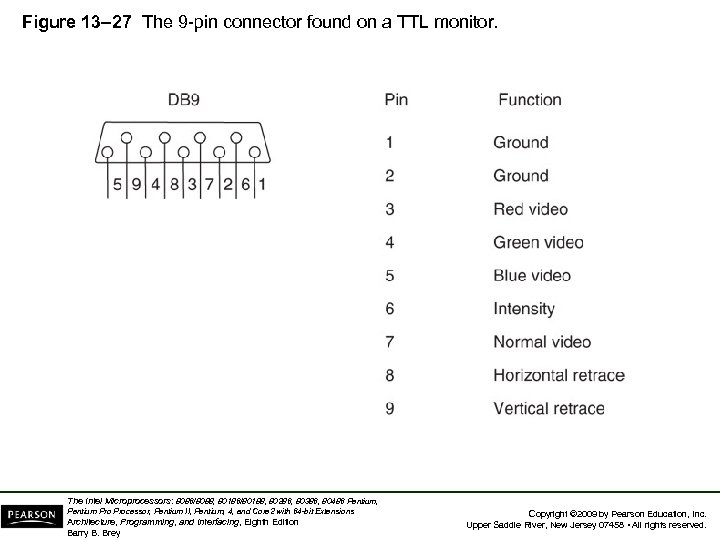 Figure 13– 27 The 9 -pin connector found on a TTL monitor. The Intel Microprocessors: 8086/8088, 80186/80188, 80286, 80386, 80486 Pentium, Pentium Processor, Pentium II, Pentium, 4, and Core 2 with 64 -bit Extensions Architecture, Programming, and Interfacing, Eighth Edition Barry B. Brey Copyright © 2009 by Pearson Education, Inc. Upper Saddle River, New Jersey 07458 • All rights reserved.
 • To display more than 16 colors, an analog video display is required. • Because the video signals are analog signals instead of two-level TTL signals, they are at any voltage level between 0. 0 V and 0. 7 V, which allows an infinite number of colors. – this is because an infinite number of voltage levels could be generated • Fig 13– 28 shows the connector used for an analog RGB or analog monochrome monitor. The Intel Microprocessors: 8086/8088, 80186/80188, 80286, 80386, 80486 Pentium, Pentium Processor, Pentium II, Pentium, 4, and Core 2 with 64 -bit Extensions Architecture, Programming, and Interfacing, Eighth Edition Barry B. Brey Copyright © 2009 by Pearson Education, Inc. Upper Saddle River, New Jersey 07458 • All rights reserved.
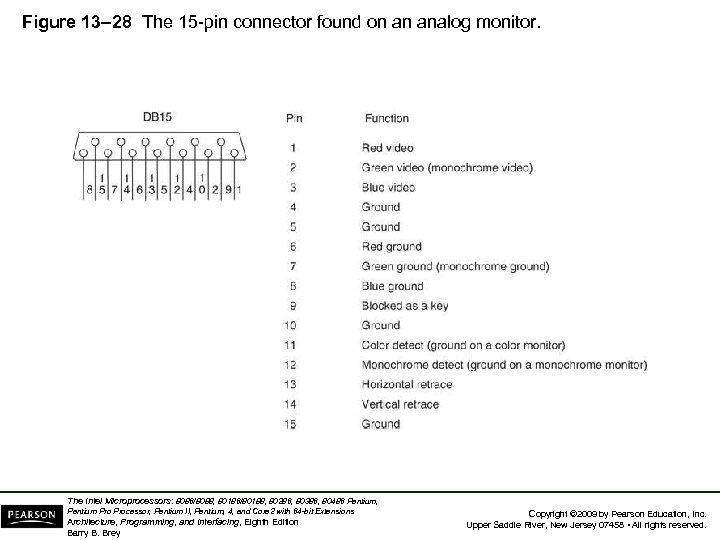 Figure 13– 28 The 15 -pin connector found on an analog monitor. The Intel Microprocessors: 8086/8088, 80186/80188, 80286, 80386, 80486 Pentium, Pentium Processor, Pentium II, Pentium, 4, and Core 2 with 64 -bit Extensions Architecture, Programming, and Interfacing, Eighth Edition Barry B. Brey Copyright © 2009 by Pearson Education, Inc. Upper Saddle River, New Jersey 07458 • All rights reserved.
 • Another type of connector for analog RGB is called the DVI-D (digital visual interface). – the -D is for digital, the most common of this type • Figure 13– 29 illustrates the female connector found on newer monitors and video cards. • Also found on television and video equipment is the HDMI (high-definition multimedia interface) connector. – eventually all video equipment will use the HDMI connector for its connection The Intel Microprocessors: 8086/8088, 80186/80188, 80286, 80386, 80486 Pentium, Pentium Processor, Pentium II, Pentium, 4, and Core 2 with 64 -bit Extensions Architecture, Programming, and Interfacing, Eighth Edition Barry B. Brey Copyright © 2009 by Pearson Education, Inc. Upper Saddle River, New Jersey 07458 • All rights reserved.
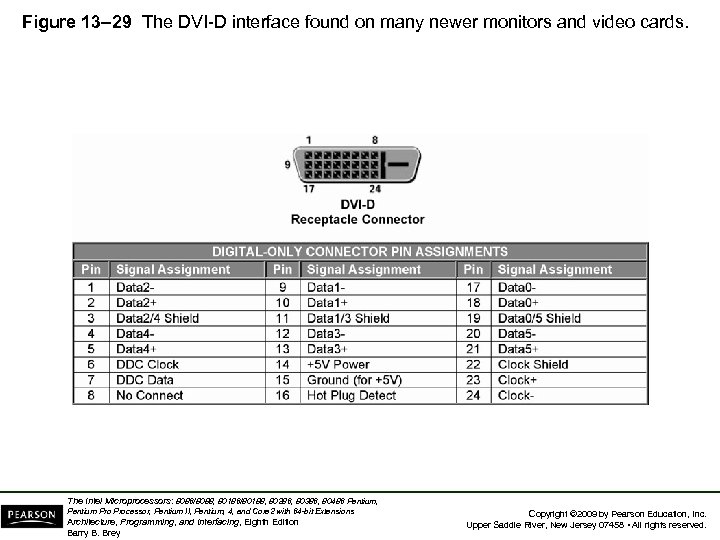 Figure 13– 29 The DVI-D interface found on many newer monitors and video cards. The Intel Microprocessors: 8086/8088, 80186/80188, 80286, 80386, 80486 Pentium, Pentium Processor, Pentium II, Pentium, 4, and Core 2 with 64 -bit Extensions Architecture, Programming, and Interfacing, Eighth Edition Barry B. Brey Copyright © 2009 by Pearson Education, Inc. Upper Saddle River, New Jersey 07458 • All rights reserved.
 • Most analog displays use digital-to-analog converter to generate color video voltage. • There are 256 different red video levels, 256 different green video levels, and 256 different blue video levels. – this allows 256, or 16, 777, 216 (16 M) colors to be displayed • Figure 13– 30 illustrates the video generation circuit employed in many common video standards as used with an IBM PC. The Intel Microprocessors: 8086/8088, 80186/80188, 80286, 80386, 80486 Pentium, Pentium Processor, Pentium II, Pentium, 4, and Core 2 with 64 -bit Extensions Architecture, Programming, and Interfacing, Eighth Edition Barry B. Brey Copyright © 2009 by Pearson Education, Inc. Upper Saddle River, New Jersey 07458 • All rights reserved.
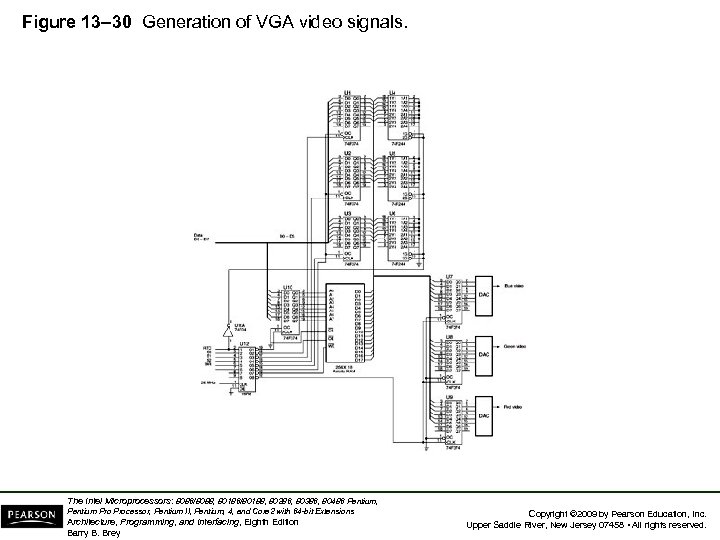 Figure 13– 30 Generation of VGA video signals. The Intel Microprocessors: 8086/8088, 80186/80188, 80286, 80386, 80486 Pentium, Pentium Processor, Pentium II, Pentium, 4, and Core 2 with 64 -bit Extensions Architecture, Programming, and Interfacing, Eighth Edition Barry B. Brey Copyright © 2009 by Pearson Education, Inc. Upper Saddle River, New Jersey 07458 • All rights reserved.
 • A high-speed palette SRAM is used to store 256 different 18 -bit codes representing hues. • To select any of 256 colors, an 8 -bit code stored in the computer’s video display RAM is used to specify color of a picture element. – if more colors are used, the code must be wider – newer systems use larger palette SRAM to store up to 64 K of different color codes • If color codes must be changed, it is done during retrace when RTC is a logic 1. – preventing video noise from disrupting the image The Intel Microprocessors: 8086/8088, 80186/80188, 80286, 80386, 80486 Pentium, Pentium Processor, Pentium II, Pentium, 4, and Core 2 with 64 -bit Extensions Architecture, Programming, and Interfacing, Eighth Edition Barry B. Brey Copyright © 2009 by Pearson Education, Inc. Upper Saddle River, New Jersey 07458 • All rights reserved.
 • Retrace occurs 70. 1 times per second vertical and 31, 500 times per second horizontal direction for a 640 480 display. – used to move the electron beam to the upper left corner for vertical retrace and the left margin of the screen for horizontal retrace • The resolution of the display determines the memory required for the video interface card. – 640 480 bytes of memory (307, 200) are required to store all of the pixels for the display The Intel Microprocessors: 8086/8088, 80186/80188, 80286, 80386, 80486 Pentium, Pentium Processor, Pentium II, Pentium, 4, and Core 2 with 64 -bit Extensions Architecture, Programming, and Interfacing, Eighth Edition Barry B. Brey Copyright © 2009 by Pearson Education, Inc. Upper Saddle River, New Jersey 07458 • All rights reserved.
 • A 640 480 display has 480 video raster lines and 640 pixels per line. – a raster line is the horizontal line of video information that is displayed on the monitor – a pixel (picture element) is the smallest subdivision of this horizontal line • In order to generate 640 pixels across one line, it takes 40 ns 640, or 25. 6 µs. • A horizontal time of 31, 500 Hz allows a horizontal line time of 1/31, 500, or 31. 746 µs. – the difference between these two times is the retrace time allowed to the monitor The Intel Microprocessors: 8086/8088, 80186/80188, 80286, 80386, 80486 Pentium, Pentium Processor, Pentium II, Pentium, 4, and Core 2 with 64 -bit Extensions Architecture, Programming, and Interfacing, Eighth Edition Barry B. Brey Copyright © 2009 by Pearson Education, Inc. Upper Saddle River, New Jersey 07458 • All rights reserved.
 • In the case of a VGA display (a 640 400 display), this is 449. 358 lines. – 400 lines are used to display information – the rest are lost during the retrace • Because 49. 358 lines are lost, retrace time is 49. 358 31. 766 µs, or 1568 µs. • During this time color palette SRAM is changed or the display memory is updated. • Fig 13– 31 illustrates the video display, showing the video lines and retrace. The Intel Microprocessors: 8086/8088, 80186/80188, 80286, 80386, 80486 Pentium, Pentium Processor, Pentium II, Pentium, 4, and Core 2 with 64 -bit Extensions Architecture, Programming, and Interfacing, Eighth Edition Barry B. Brey Copyright © 2009 by Pearson Education, Inc. Upper Saddle River, New Jersey 07458 • All rights reserved.
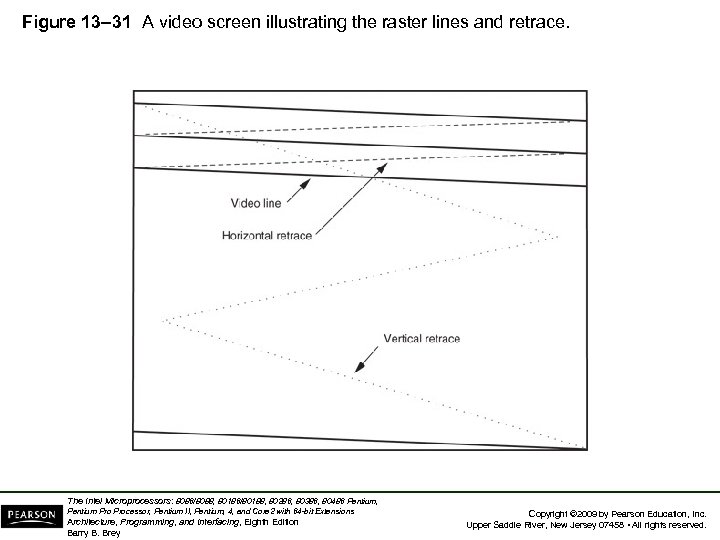 Figure 13– 31 A video screen illustrating the raster lines and retrace. The Intel Microprocessors: 8086/8088, 80186/80188, 80286, 80386, 80486 Pentium, Pentium Processor, Pentium II, Pentium, 4, and Core 2 with 64 -bit Extensions Architecture, Programming, and Interfacing, Eighth Edition Barry B. Brey Copyright © 2009 by Pearson Education, Inc. Upper Saddle River, New Jersey 07458 • All rights reserved.
 • 800 600 SVGA (super VGA) display is ideal for a 14 color monitor • 1024 768 EVGA or XVGA (extended VGA) is ideal for a 21 or 25 monitor, – an average home television receiver has a resolution of approximately 400 300 • Disadvantage of the video display on is the number of colors displayed at a time. • Additional colors allow the image to appear more realistically because subtle shadings are required for a true high-quality, lifelike image. The Intel Microprocessors: 8086/8088, 80186/80188, 80286, 80386, 80486 Pentium, Pentium Processor, Pentium II, Pentium, 4, and Core 2 with 64 -bit Extensions Architecture, Programming, and Interfacing, Eighth Edition Barry B. Brey Copyright © 2009 by Pearson Education, Inc. Upper Saddle River, New Jersey 07458 • All rights reserved.
 • High-resolution displays use interlaced or non -interlaced scanning. – non-interlaced is used in all except the highest standards • In the interlaced system, the displayed draws half the image first with all the odd scan lines. – the other half is then drawn using even scan lines • This system is more complex – and only more efficient because scanning frequencies are reduced by 50% The Intel Microprocessors: 8086/8088, 80186/80188, 80286, 80386, 80486 Pentium, Pentium Processor, Pentium II, Pentium, 4, and Core 2 with 64 -bit Extensions Architecture, Programming, and Interfacing, Eighth Edition Barry B. Brey Copyright © 2009 by Pearson Education, Inc. Upper Saddle River, New Jersey 07458 • All rights reserved.
 SUMMARY • The HOLD input is used to request a DMA action, and the HLDA output signals that the hold is in effect. • When a logic 1 is placed on the HOLD input, the micro-processor (1) stops executing the program; (2) places its address, data, and control bus at their highimpedance state; and (3) signals that the hold is in effect by placing a logic 1 on the HLDA pin. The Intel Microprocessors: 8086/8088, 80186/80188, 80286, 80386, 80486 Pentium, Pentium Processor, Pentium II, Pentium, 4, and Core 2 with 64 -bit Extensions Architecture, Programming, and Interfacing, Eighth Edition Barry B. Brey Copyright © 2009 by Pearson Education, Inc. Upper Saddle River, New Jersey 07458 • All rights reserved.
 SUMMARY (cont. ) • A DMA read operation transfers data from a memory location to an external I/O device. • A DMA write operation transfers data from an I/O device into the memory. • Also available is a memory-to-memory transfer that allows data to be transferred between two memory locations by using DMA techniques. The Intel Microprocessors: 8086/8088, 80186/80188, 80286, 80386, 80486 Pentium, Pentium Processor, Pentium II, Pentium, 4, and Core 2 with 64 -bit Extensions Architecture, Programming, and Interfacing, Eighth Edition Barry B. Brey Copyright © 2009 by Pearson Education, Inc. Upper Saddle River, New Jersey 07458 • All rights reserved.
 SUMMARY (cont. ) • The 8237 direct memory access (DMA) controller is a four-channel device that can be expanded to include an additional channel of DMA. • Disk memory comes in the form of floppy disk storage that is found as 3 -1/2" microfloppy disks. The Intel Microprocessors: 8086/8088, 80186/80188, 80286, 80386, 80486 Pentium, Pentium Processor, Pentium II, Pentium, 4, and Core 2 with 64 -bit Extensions Architecture, Programming, and Interfacing, Eighth Edition Barry B. Brey Copyright © 2009 by Pearson Education, Inc. Upper Saddle River, New Jersey 07458 • All rights reserved.
 SUMMARY (cont. ) • Floppy disk memory data are stored using NRZ (non-return to zero) recording. • This method saturates the disk with one polarity of magnetic energy for a logic 1 and the opposite polarity for a logic 0. • In either case, the magnetic field never returns to 0. • This technique eliminates the need for a separate erase head. The Intel Microprocessors: 8086/8088, 80186/80188, 80286, 80386, 80486 Pentium, Pentium Processor, Pentium II, Pentium, 4, and Core 2 with 64 -bit Extensions Architecture, Programming, and Interfacing, Eighth Edition Barry B. Brey Copyright © 2009 by Pearson Education, Inc. Upper Saddle River, New Jersey 07458 • All rights reserved.
 SUMMARY (cont. ) • The MFM scheme records a data pulse for a logic 1, no data or clock for the first logic 0 of a string of zeros, and a clock pulse for the second and subsequent logic 0 in a string of zeros. • The RLL scheme encodes data so that 50% more information can be packed onto the same disk area. Most modern disk memory systems use the RLL encoding scheme. The Intel Microprocessors: 8086/8088, 80186/80188, 80286, 80386, 80486 Pentium, Pentium Processor, Pentium II, Pentium, 4, and Core 2 with 64 -bit Extensions Architecture, Programming, and Interfacing, Eighth Edition Barry B. Brey Copyright © 2009 by Pearson Education, Inc. Upper Saddle River, New Jersey 07458 • All rights reserved.
 SUMMARY (cont. ) • Video monitors are either TTL or analog. • The TTL monitor uses two discrete voltage levels of 0 V and 5. 0 V. • The analog monitor uses an infinite number of voltage levels between 0. 0 V and 0. 7 V. • The analog monitor can display an infinite number of video levels, while the TTL monitor is limited to two video levels. The Intel Microprocessors: 8086/8088, 80186/80188, 80286, 80386, 80486 Pentium, Pentium Processor, Pentium II, Pentium, 4, and Core 2 with 64 -bit Extensions Architecture, Programming, and Interfacing, Eighth Edition Barry B. Brey Copyright © 2009 by Pearson Education, Inc. Upper Saddle River, New Jersey 07458 • All rights reserved.
 SUMMARY (cont. ) • The color TTL monitor displays 16 different colors. • This is accomplished through three video signals (red, green, and blue) and an intensity input. • The analog color monitor can display an infinite number of colors through its three video inputs. The Intel Microprocessors: 8086/8088, 80186/80188, 80286, 80386, 80486 Pentium, Pentium Processor, Pentium II, Pentium, 4, and Core 2 with 64 -bit Extensions Architecture, Programming, and Interfacing, Eighth Edition Barry B. Brey Copyright © 2009 by Pearson Education, Inc. Upper Saddle River, New Jersey 07458 • All rights reserved.
 SUMMARY • In practice, the most common form of color analog display system (VGA) can display 16 M different colors. • The video standards found today include VGA (640 ´ 480), SVGA (800 ´ 600), and EVGA or XVGA (1024 ´ 768). • In all three cases, the video information can be 16 M colors. The Intel Microprocessors: 8086/8088, 80186/80188, 80286, 80386, 80486 Pentium, Pentium Processor, Pentium II, Pentium, 4, and Core 2 with 64 -bit Extensions Architecture, Programming, and Interfacing, Eighth Edition Barry B. Brey Copyright © 2009 by Pearson Education, Inc. Upper Saddle River, New Jersey 07458 • All rights reserved.