


 Скачать презентацию Chapter 12 Printing in Linux Guide to Linux
3ba10e36446b83df9d4066f0fc9099dd.ppt
- Количество слайдов: 51
 Chapter 12 Printing in Linux Guide to Linux Installation and Administration, 2 e 1
 Objectives In this chapter, you will: • Configure and use the traditional Linux printing architecture • Understand the Common UNIX Printing System (CUPS) • Print files from different applications • Locate and relieve system bottlenecks • Manage networked printing resources Guide to Linux Installation and Administration, 2 e 2
 Using Traditional Linux Printing • The traditional Linux printing architecture is called LPRng and is based on the system developed for BSD UNIX • LPRng printing allows multiple users to print files at the same time to either local or networked printers Guide to Linux Installation and Administration, 2 e 3
 The Printing Process • Printer definitions, or print queues describe the type of printer and the features to be used when something is printed on it • The file submitted for printing is called a print job • The print job is processed by a print filter • After sending the print job through a print filter, the printing utility stores the print job in a print spool directory • The print server program, lpd, keeps track of all the print jobs in all the print queues on the system Guide to Linux Installation and Administration, 2 e 4
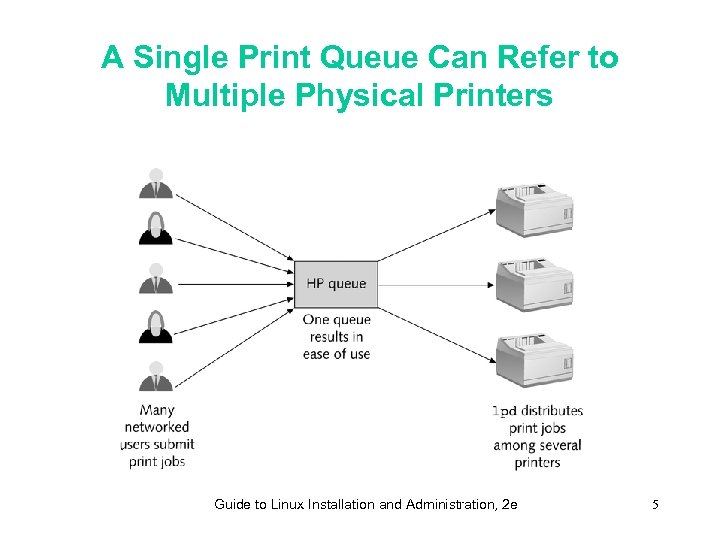 A Single Print Queue Can Refer to Multiple Physical Printers Guide to Linux Installation and Administration, 2 e 5
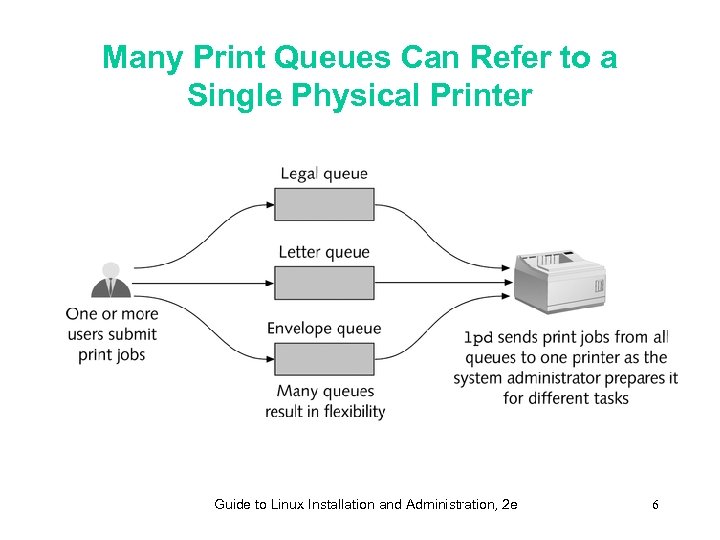 Many Print Queues Can Refer to a Single Physical Printer Guide to Linux Installation and Administration, 2 e 6
 Understanding Print Filters and Drivers • Linux uses special programs called print filters • A Linux print filter converts documents or images into a format the printer can use Guide to Linux Installation and Administration, 2 e 7
 Printer Languages • A page description language is a special set of codes that determine the graphics elements, text font, and everything else about what appears on a printed page • The most widely used page description languages are Post. Script and Printer Control Language (PCL) Guide to Linux Installation and Administration, 2 e 8
 The Magic Filter • Most Linux distributions use a “magic filter” that can convert documents into formats for many different printers • The “magic filter” doesn’t generally allow Linux to use the specialized features of each printer Guide to Linux Installation and Administration, 2 e 9
 Configuring Local Printer Definitions • A local printer is a printer directly attached to your computer • Define or more printers before you can print documents Guide to Linux Installation and Administration, 2 e 10
 Reviewing printcap • Each LPRng printer definition is created as a print queue entry in the /etc/printcap configuration file • To use a local printer, you must provide the appropriate Linux device name when you configure the printer • The format of a printcap entry consists of a print queue name, followed by a series of twocharacter option codes that apply to that printer Guide to Linux Installation and Administration, 2 e 11
 Configuring printcap Graphically • Several graphical tools can create basic printcap entries: – Printer Configuration Tool printconf-gui in Red Hat Linux – YAST utility in Su. SE Linux – Webmin in Caldera Open. Linux Guide to Linux Installation and Administration, 2 e 12
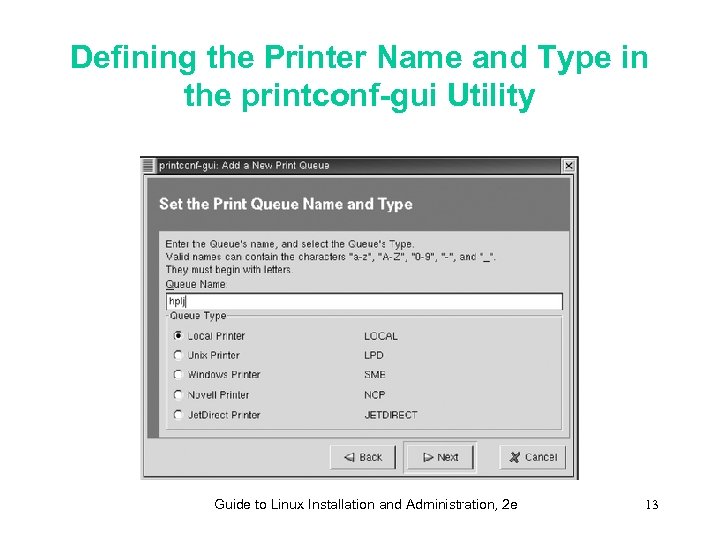 Defining the Printer Name and Type in the printconf-gui Utility Guide to Linux Installation and Administration, 2 e 13
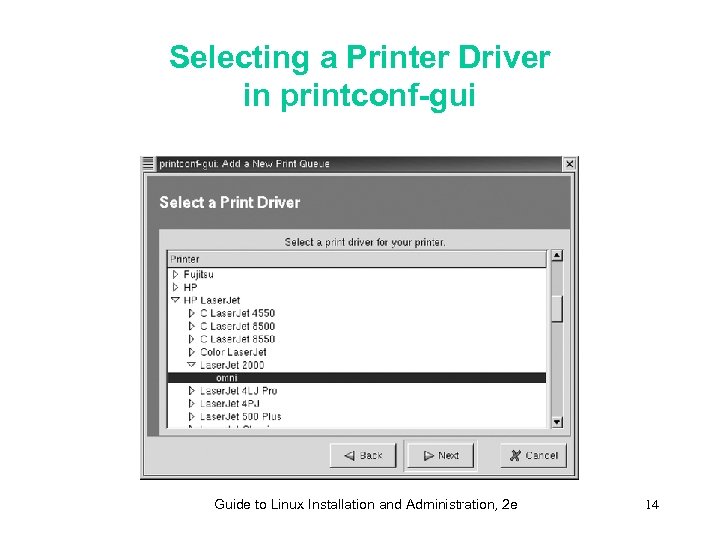 Selecting a Printer Driver in printconf-gui Guide to Linux Installation and Administration, 2 e 14
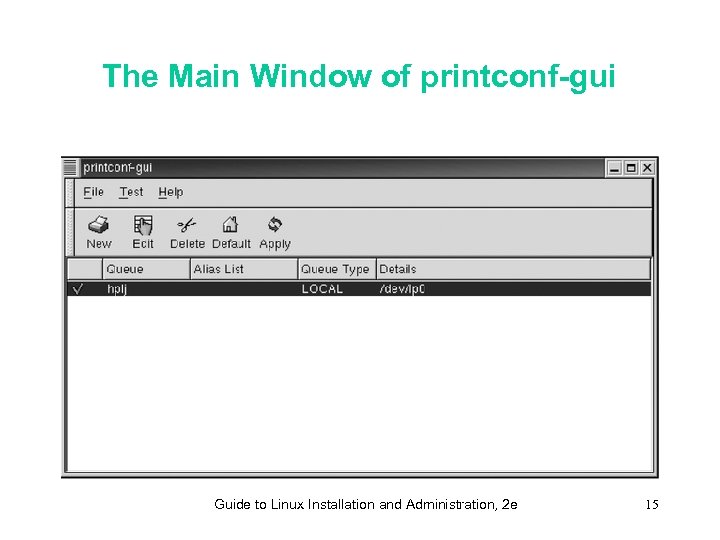 The Main Window of printconf-gui Guide to Linux Installation and Administration, 2 e 15
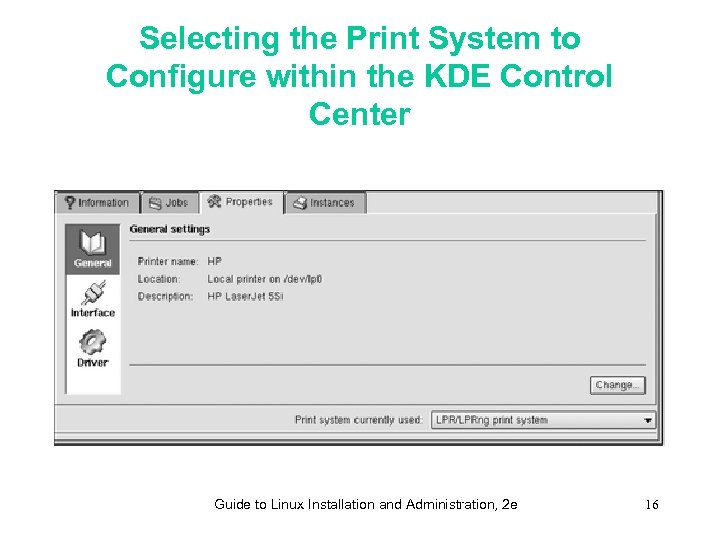 Selecting the Print System to Configure within the KDE Control Center Guide to Linux Installation and Administration, 2 e 16
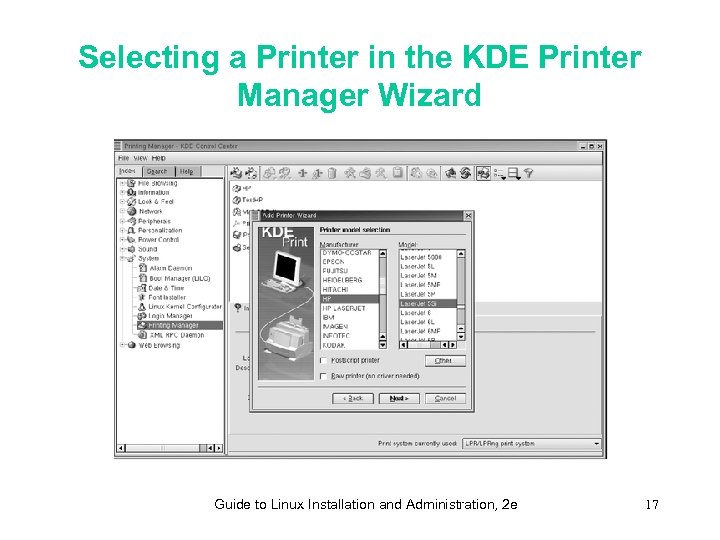 Selecting a Printer in the KDE Printer Manager Wizard Guide to Linux Installation and Administration, 2 e 17
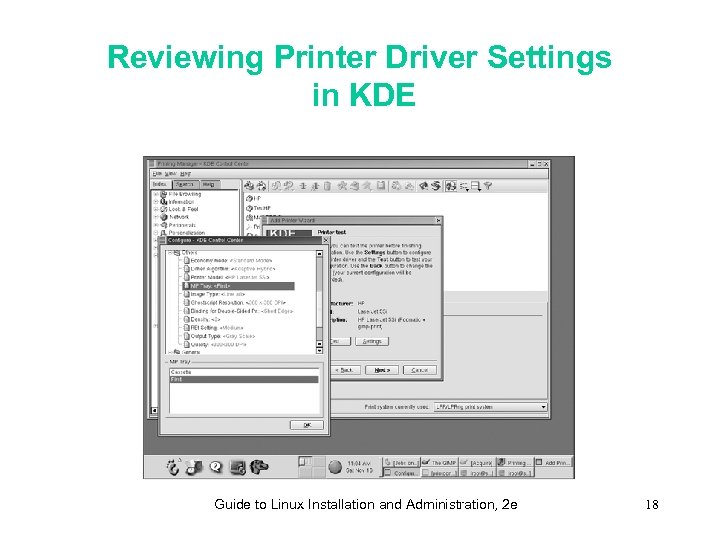 Reviewing Printer Driver Settings in KDE Guide to Linux Installation and Administration, 2 e 18
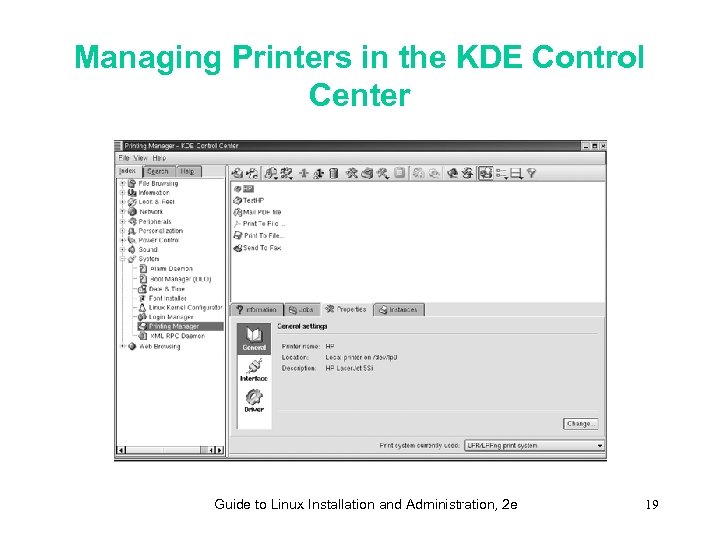 Managing Printers in the KDE Control Center Guide to Linux Installation and Administration, 2 e 19
 Printing Remotely Using lpd • Define a printer on your system that refers to the remote computer and a print queue on the remote system • The lpd daemon on your computer communicates with the lpd program on the remote computer, transferring the print job Guide to Linux Installation and Administration, 2 e 20
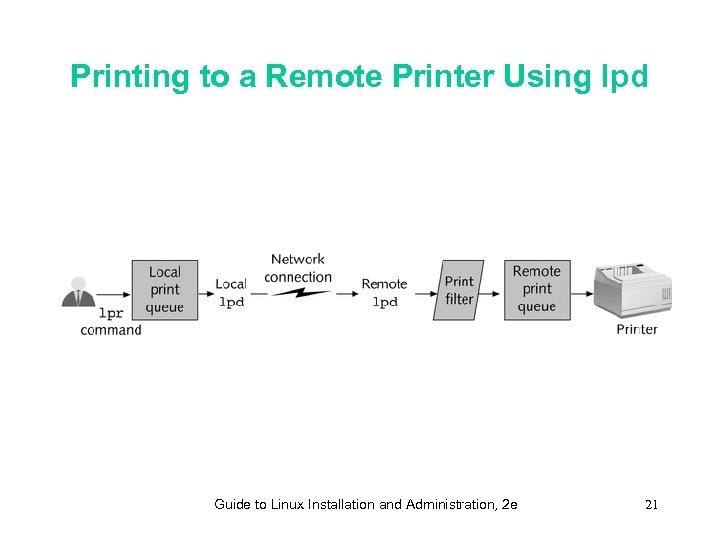 Printing to a Remote Printer Using lpd Guide to Linux Installation and Administration, 2 e 21
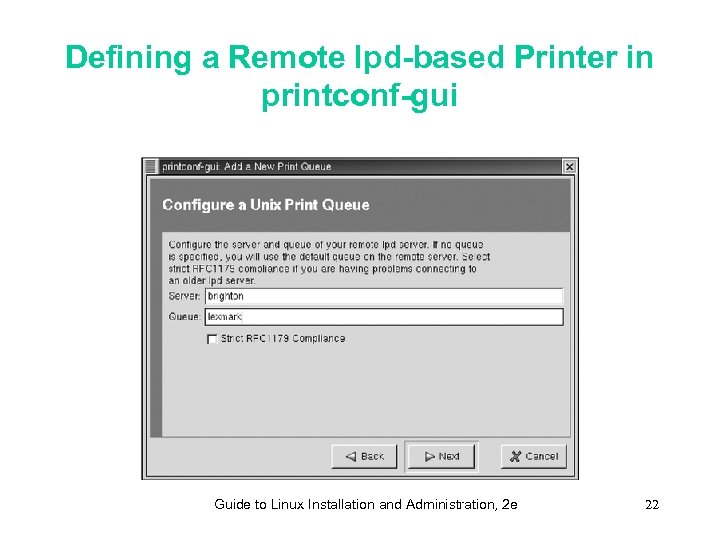 Defining a Remote lpd-based Printer in printconf-gui Guide to Linux Installation and Administration, 2 e 22
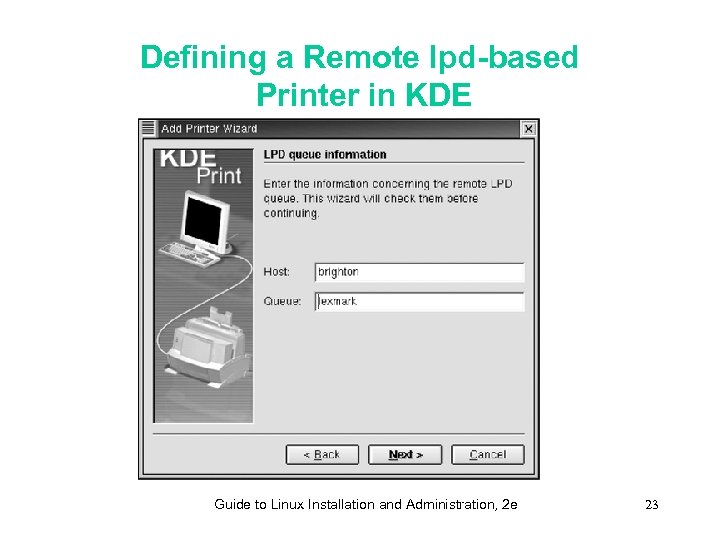 Defining a Remote lpd-based Printer in KDE Guide to Linux Installation and Administration, 2 e 23
 Understanding the Common Unix Printing System • The Common UNIX Printing System (CUPS) provides a new architecture for Linux and UNIX printing • CUPS lets users and system administrators browse the network to find and print to networked printers and other devices • CUPS lets system administrators manage printer definitions and print jobs across the network Guide to Linux Installation and Administration, 2 e 24
 Configuring Printers within CUPS • The cupsd print server daemon uses HTTP protocol and accepts requests and processes print jobs sent over the network • The cupsd print server daemon manages printers using a Web browser interface • The CUPS architecture uses network port 631 to communicate between CUPS-enabled print servers Guide to Linux Installation and Administration, 2 e 25
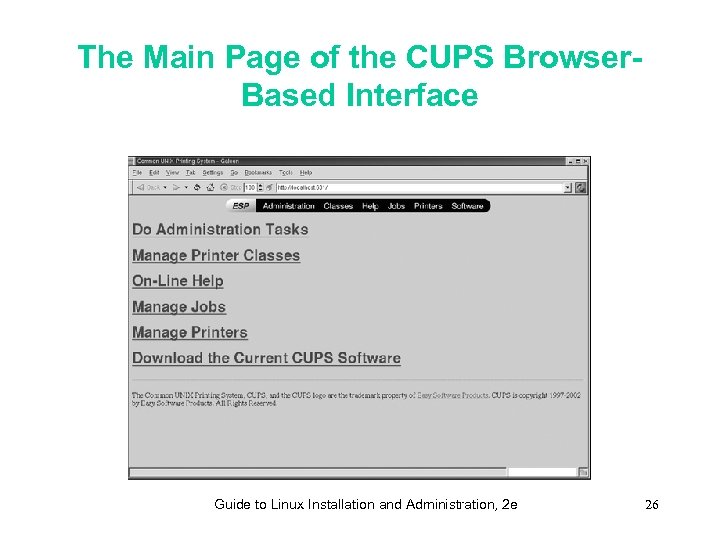 The Main Page of the CUPS Browser. Based Interface Guide to Linux Installation and Administration, 2 e 26
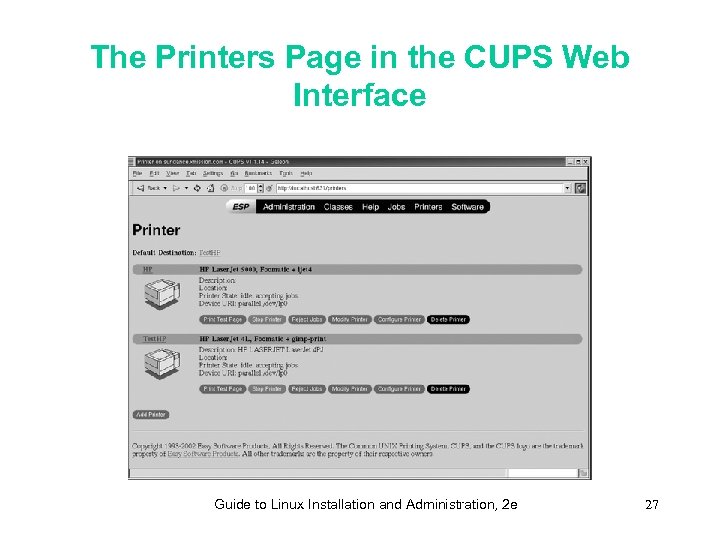 The Printers Page in the CUPS Web Interface Guide to Linux Installation and Administration, 2 e 27
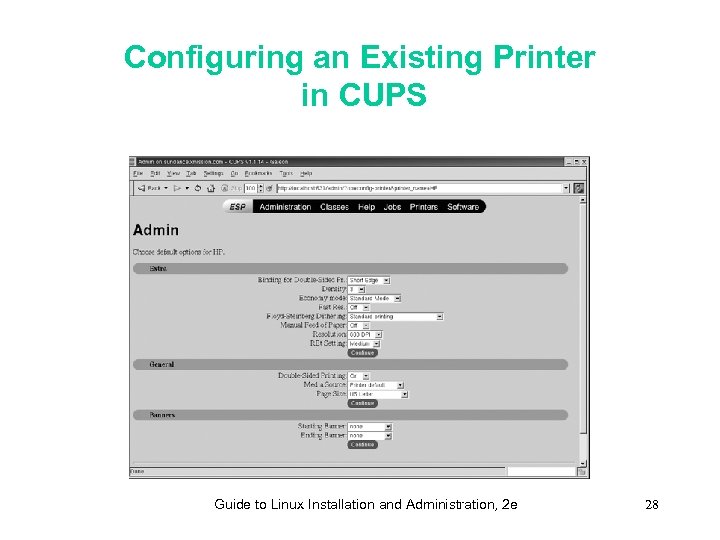 Configuring an Existing Printer in CUPS Guide to Linux Installation and Administration, 2 e 28
 Setting up CUPS Classes • CUPS class is a group of printers to which a user can submit a print job • Whichever printer within the class is first available will be used to print the job Guide to Linux Installation and Administration, 2 e 29
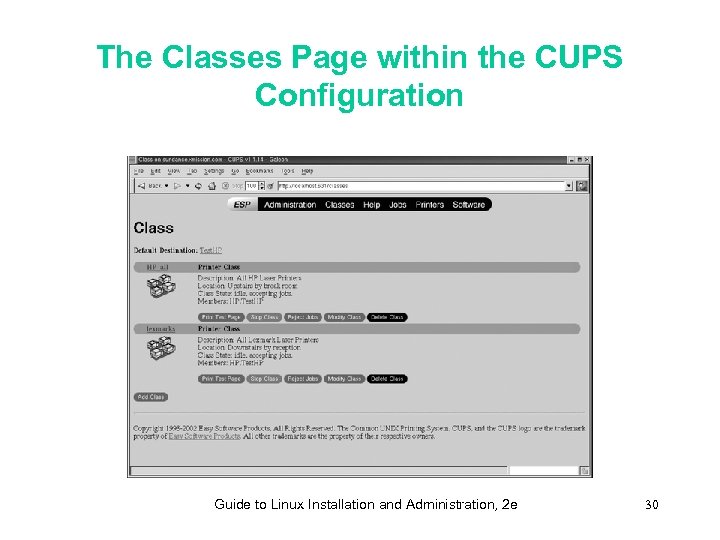 The Classes Page within the CUPS Configuration Guide to Linux Installation and Administration, 2 e 30
 Printing Files • You can print files – from a command line – from a specialized graphical tool – from any graphical application Guide to Linux Installation and Administration, 2 e 31
 Printing from a Command Line • The basic printing command is lpr • The lpr command is used for printing to both LPRng and CUPS-based printers • Command options for lpr apply to a specific print job, not to all print jobs sent to the printer Guide to Linux Installation and Administration, 2 e 32
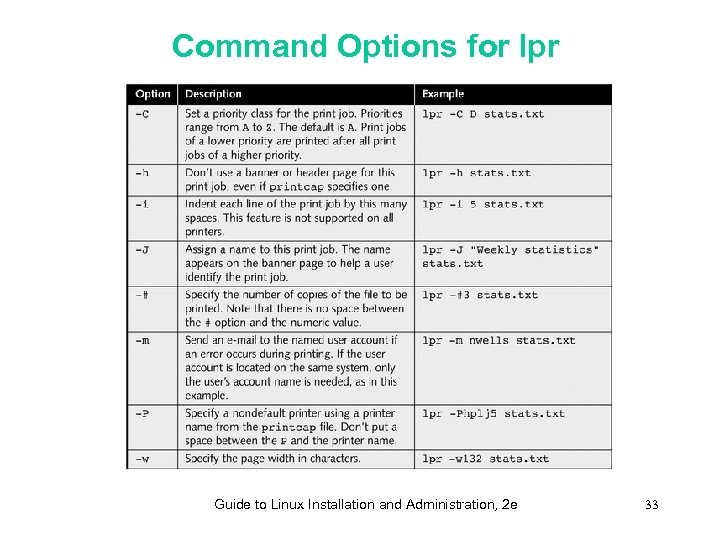 Command Options for lpr Guide to Linux Installation and Administration, 2 e 33
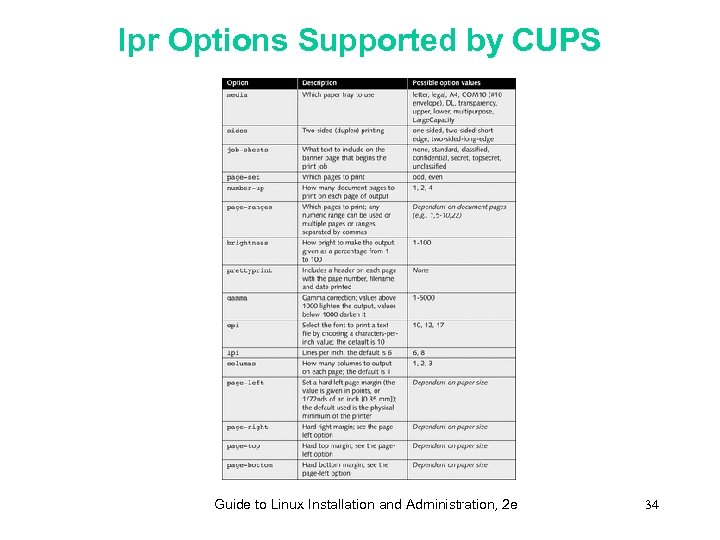 lpr Options Supported by CUPS Guide to Linux Installation and Administration, 2 e 34
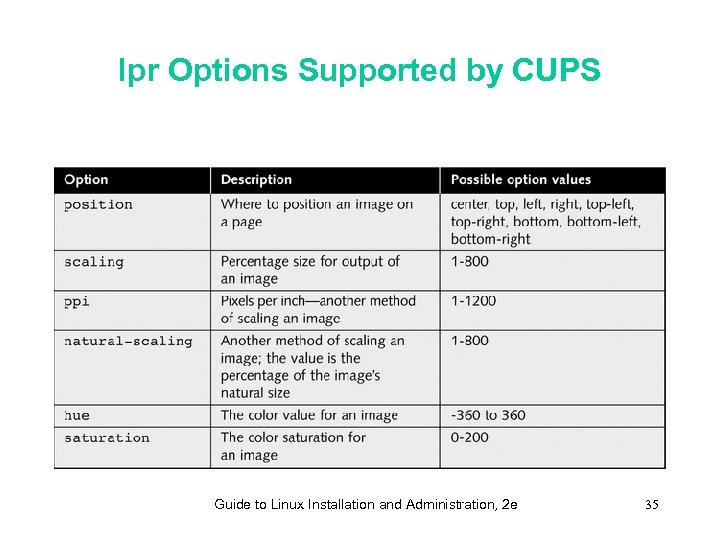 lpr Options Supported by CUPS Guide to Linux Installation and Administration, 2 e 35
 Printing from Graphical Applications • You typically print from a graphical application by choosing Print from the File menu • Graphical applications rely on the lpr utility • You can print to a file • Gnome and KDE applications build upon a standard dialog box Guide to Linux Installation and Administration, 2 e 36
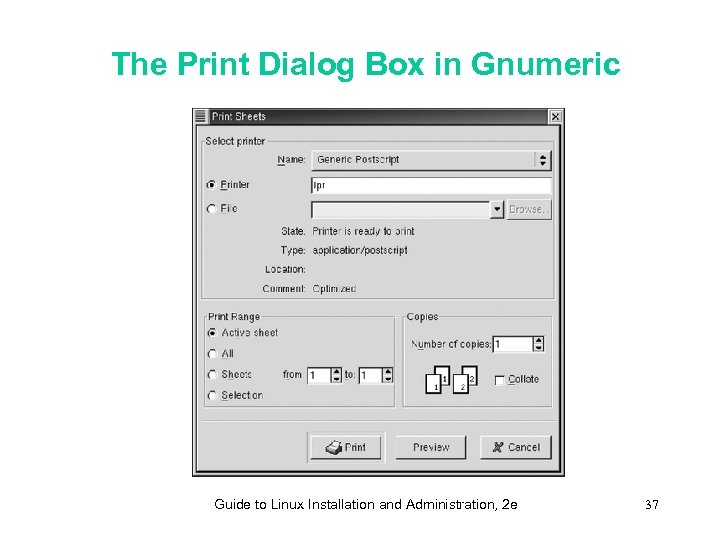 The Print Dialog Box in Gnumeric Guide to Linux Installation and Administration, 2 e 37
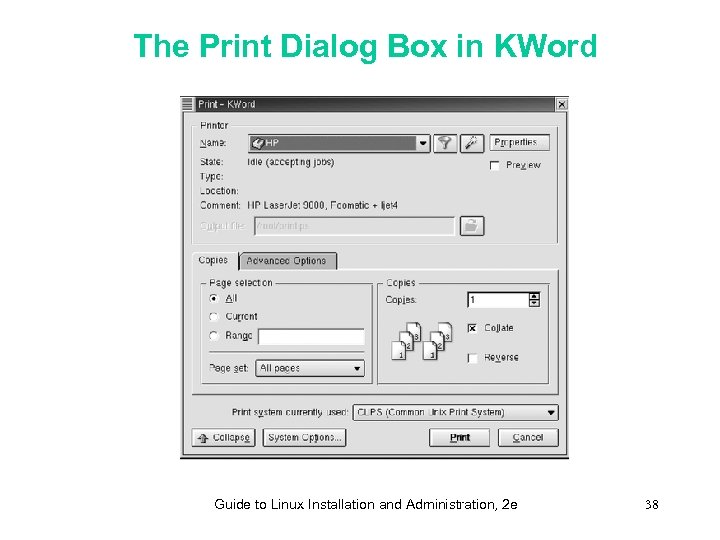 The Print Dialog Box in KWord Guide to Linux Installation and Administration, 2 e 38
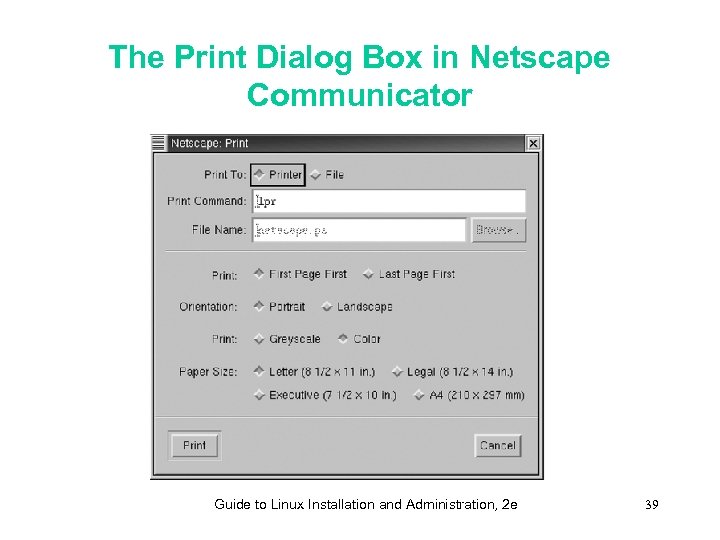 The Print Dialog Box in Netscape Communicator Guide to Linux Installation and Administration, 2 e 39
 Managing the Printing Environment • A system administrator manages printing • The system administrator takes care about printer supplies and solves printer-related problems Guide to Linux Installation and Administration, 2 e 40
 Deciding on Printing Policies • A printing policy is a brief statement of rules describing how printing resources can be used and how printers will be managed • A printing policy is a helpful document for any organization with more than two or three users who rely on the same printer Guide to Linux Installation and Administration, 2 e 41
 Using the lpc Utility • The lpc utility is the printer control utility • The lpc command-line utility lets you control LPRng or CUPS printing, specifying how print jobs are accepted and processed • You must be root to use lpc • You can include an lpc command as a parameter on the command line Guide to Linux Installation and Administration, 2 e 42
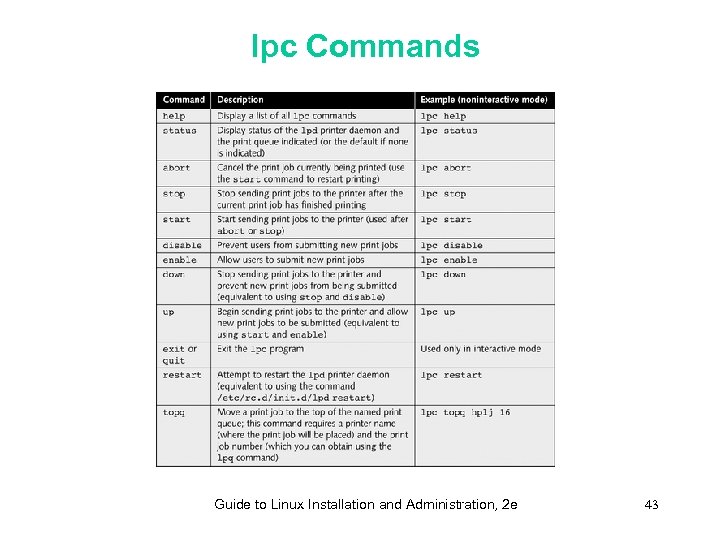 lpc Commands Guide to Linux Installation and Administration, 2 e 43
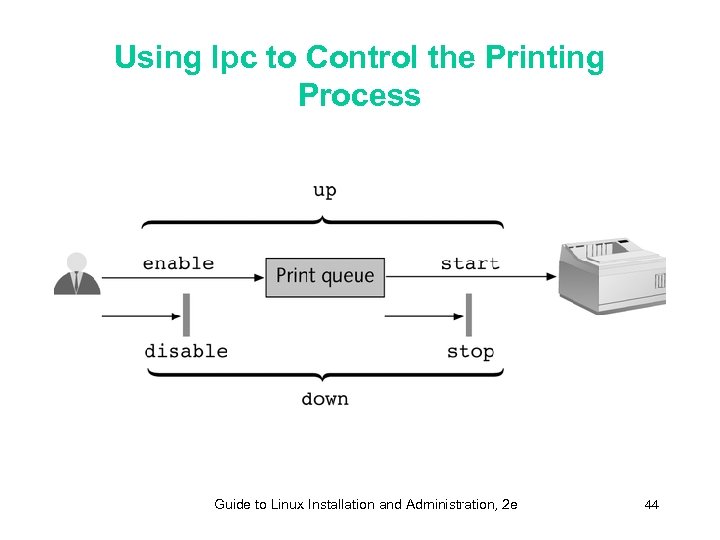 Using lpc to Control the Printing Process Guide to Linux Installation and Administration, 2 e 44
 Tracking Print Jobs • To view the print jobs in the default print queue, the lpq command is used • The lprm command deletes a print job from a queue Guide to Linux Installation and Administration, 2 e 45
 Using Graphical Print Management Utilities • You can use two KDE graphical utilities to manage printing: – KDE Print Job Viewer – KLpq program Guide to Linux Installation and Administration, 2 e 46
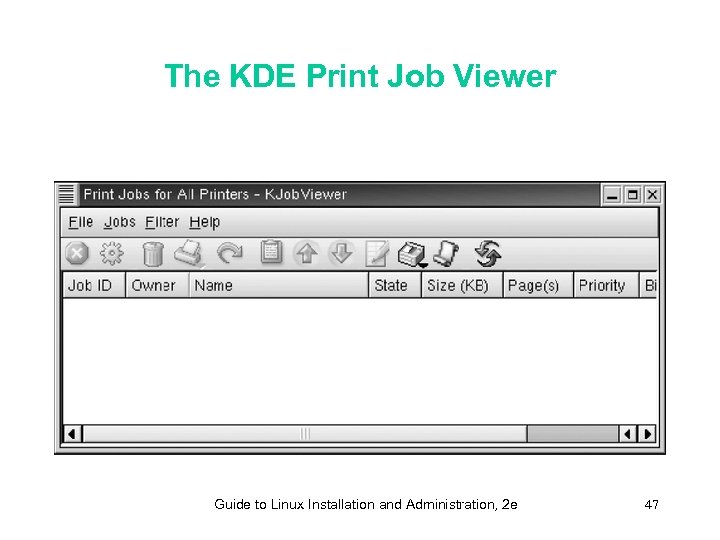 The KDE Print Job Viewer Guide to Linux Installation and Administration, 2 e 47
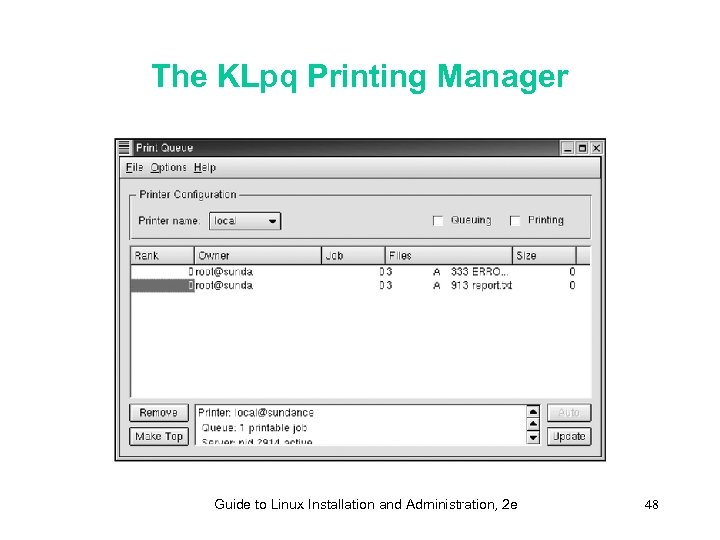 The KLpq Printing Manager Guide to Linux Installation and Administration, 2 e 48
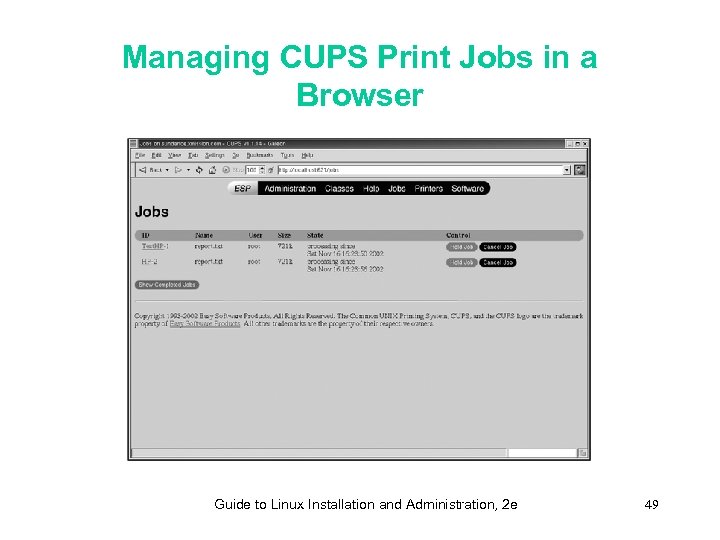 Managing CUPS Print Jobs in a Browser Guide to Linux Installation and Administration, 2 e 49
 Summary • The traditional Linux printing architecture is called LPRng and is based on the system developed for BSD UNIX • Printers are typically connected locally to either a parallel or serial port • A system administrator creates printer definitions, which act as print queues • Printer definitions are stored in /etc/printcap and can be created using printconf-gui or other textmode or graphical tools • Users submit print jobs to a named print queue using either the lpr command or a graphical dialog box Guide to Linux Installation and Administration, 2 e 50
 Summary • The data that a user submits as a print job is processed using a print filter, which converts raw document data into a format a printer can understand, such as PCL or Post. Script • A printing policy informs users of how they can use printing resources and what they can expect from the system administrator who manages the printers • The Common UNIX Printing System (CUPS) provides a new architecture for Linux and UNIX printing • Print jobs waiting to be printed on a system using CUPS can be managed using the CUPS browserbased interface Guide to Linux Installation and Administration, 2 e 51