


 Скачать презентацию Chapter 12 Computers In Polite Society Social Implications
4256fcfe5e0101a5bb1551a392cf72f4.ppt
- Количество слайдов: 31
 Chapter 12 Computers In Polite Society: Social Implications of IT
 Improving the Effectiveness of Email • Problems with email: – Conveying emotion – Emphasis – Conversational pace – Ambiguity – Flame-a-thons Copyright © 2006 Pearson Addison-Wesley. All rights reserved. 2
 Conveying Emotion • Difficult to convey subtle emotions using email – Medium is too informal, impersonal, and casually written – Conversational cues are missing • Emoticons are popular – Tags a sentence indicating the emotion we mean to communicate Copyright © 2006 Pearson Addison-Wesley. All rights reserved. 3
 Emphasis • Typing for emphasis can convey the wrong meaning – Text in all caps can be interpreted as yelling • Email is still largely ASCII based and may not allow italics or underlining – Asterisks for underscores can replace underlining Copyright © 2006 Pearson Addison-Wesley. All rights reserved. 4
 Conversational Pace • Asynchronous medium makes dialog difficult – For interactive purposes (like negotiation) synchronous medium like telephone may be best Copyright © 2006 Pearson Addison-Wesley. All rights reserved. 5
 Ambiguity • Text can be interpreted in ways we don't intend – People often don't proofread what they write in email to avoid ambiguity Copyright © 2006 Pearson Addison-Wesley. All rights reserved. 6
 Flames • Flame is slang for inflammatory email • Flame-a-thon is ongoing exchange of angry emails • When angered by email, it's best to delay answering until you cool down Copyright © 2006 Pearson Addison-Wesley. All rights reserved. 7
 Netiquette • Rules to promote civilized email usage – Ask about one topic at a time – Include context (include the question with your answer) – Use an automated reply if unable to answer mail for a period of time – Answer a backlog of emails in reverse order – Get the sender's permission before forwarding email – Use targeted distribution lists (don't send the latest joke to every person you've ever exchanged mail with) Copyright © 2006 Pearson Addison-Wesley. All rights reserved. 8
 Expect the Unexpected • Suppose a Mailing List Handler Has a Bug – Unsubscribe messages start getting sent to everyone on the list, for some reason • Someone on the list complains about getting the unsubscribe message • Someone else mails back that the list is obviously broken, stop complaining • People should notice there's a problem and stop traffic on the list until it's fixed – Be alert to unusual event and then think about them Copyright © 2006 Pearson Addison-Wesley. All rights reserved. 9
 Creating Good Passwords • The Role of Passwords – To limit computer or system access to only those who know a sequence of keyboard characters • Breaking into a Computer without a Password – Trying all possible passwords algorithmically would eventually find correct password, but software usually limits the number of tries • Forgetting a Password – Passwords are scrambled or encrypted and stored, so system administrator usually can't tell your password if you forget it Copyright © 2006 Pearson Addison-Wesley. All rights reserved. 10
 Guidelines for Selecting a Password • It's not a good idea to choose something easily guessed • Should have at least 6 characters • Mix of uppercase and lowercase letters, numbers, punctuation characters • Sequence not found in dictionaries • No personal association (like your name) Copyright © 2006 Pearson Addison-Wesley. All rights reserved. 11
 Heuristics for picking a password • Select a personally interesting topic – Always select passwords related to topic • Develop a password from a phrase rather than a single word • Encode the password phrase – Make it short by abbreviating, replace letters and syllables with alternate characters or spellings Copyright © 2006 Pearson Addison-Wesley. All rights reserved. 12
 Changing Passwords • Should be changed periodically • Managing Passwords – Using a single password for everything is risky; using a different password for everything is hard to remember – Passwords can be recycled • Make slight changes to good passwords or • Rotate passwords Copyright © 2006 Pearson Addison-Wesley. All rights reserved. 13
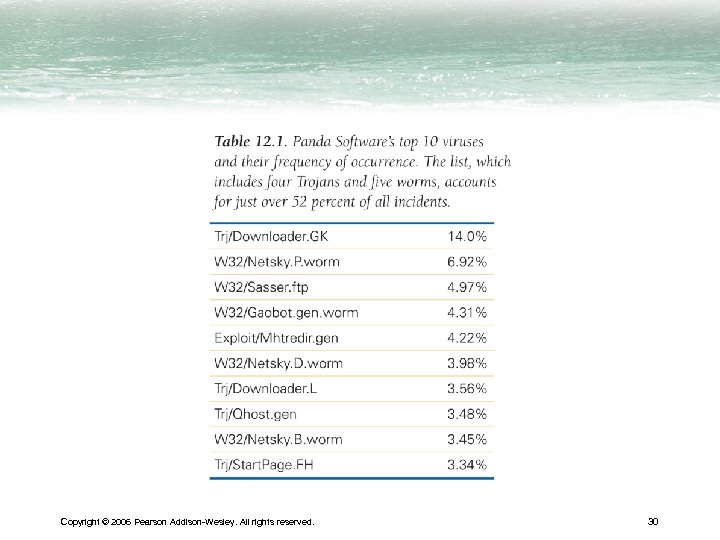
 Viruses and Worms • It's a Zoo Out There – Virus is a program that "infects" another program by embedding a copy of itself. When the infected program runs, the virus copies itself and infects other programs – Worm is an independent program that copies itself across network connections – Trojan is a program that hides inside another useful program, and performs secret operations • May record keystrokes or other sensitive data, or load malicious software – Exploit is a program that takes advantage of security hole • Backdoor access enters computer and reconfigures it for remote control Copyright © 2006 Pearson Addison-Wesley. All rights reserved. 14
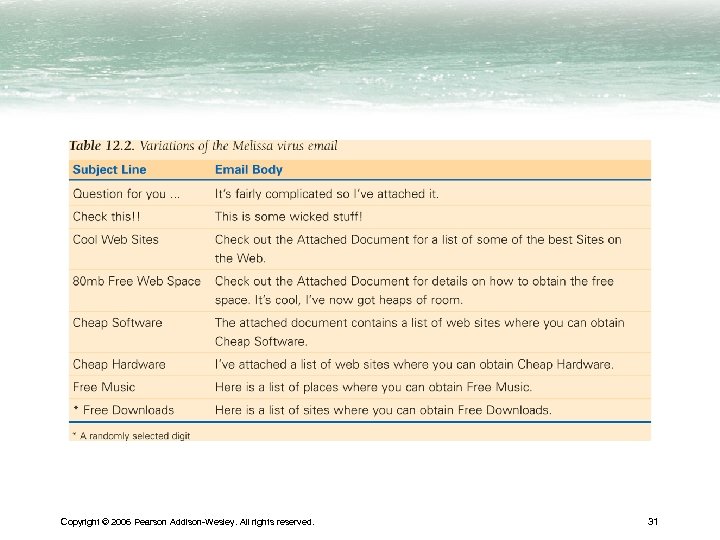
 How to "Catch" a Virus • Email attachments. Do not open attachments before checking – Is this email from someone I know? – Is the message a sensible follow-up to the last message from the sender? – Is the content of the message something the sender would say to me? – Is there a reason for the sender to include an attachment? • When in doubt, be cautious Copyright © 2006 Pearson Addison-Wesley. All rights reserved. 15
 How to "Catch" a Virus (cont'd) • Copying software from infected computer • Peer-to-Peer Exchange – Downloading files from unreliable sources • New Software – Any software is a potential source of infected code – Most software distributors are careful to avoid infection Copyright © 2006 Pearson Addison-Wesley. All rights reserved. 16
 Virus-Checking Software • Three companies are Mc. Afee, Norton, and Sophos, Inc. • Programs check for known viruses, worms, etc. • New viruses are created all the time, so update often Copyright © 2006 Pearson Addison-Wesley. All rights reserved. 17
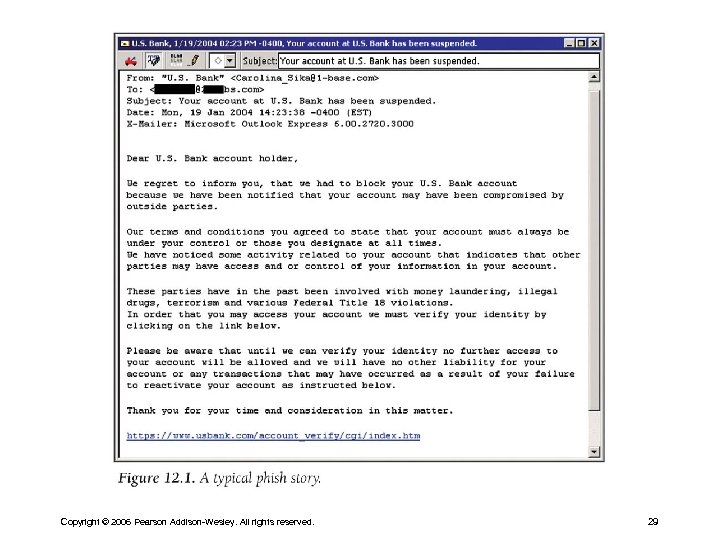
 Phishing • Password harvesting fishing • Users are sent SPAM emails asking for credit card or banking information • Message is disguised to appear to be from a bank – Often reports a security problem the user needs to address – When the user clicks legitimate looking link, they are linked to bogus sites set up to steal the information entered Copyright © 2006 Pearson Addison-Wesley. All rights reserved. 18
 What Can Be Done About Phishing? • Never respond to requests for personal information like passwords via email; legitimate businesses do not request information this way • Do not click on links or pre-typed addresses bc. they can be spoofed; type the URL yourself • Check to make sure the website is using encryption • Routinely review credit card and bank statements for unusual activity • Report suspected abuses to proper authorities Copyright © 2006 Pearson Addison-Wesley. All rights reserved. 19
 Protecting Intellectual Property • Intellectual property is any human creation like photograph, music, textbooks, cartoons, etc. • Licensing of software – You don't buy software; you lease it – License gives you the right to use personally, but not sell or give away • Try before you buy – Shareware allows you to download and try software for free, then pay the person who built it if you like it (honor system) Copyright © 2006 Pearson Addison-Wesley. All rights reserved. 20
 Copyright on the Web • A person automatically owns copyright of what he creates in the U. S. and most nations • Copyright protects owner's right to – Make a copy of the work – Use a work as the basis for a new work (derivative work) – Distribute or publish the work, including electronically – Publicly perform the work – Publicly display the work Copyright © 2006 Pearson Addison-Wesley. All rights reserved. 21
 Copyright on the Web (cont'd) • Free Personal Use – You are free to read, view or listen to protected work • When is permission needed? – Information placed in public domain is free for anyone to use – Otherwise you must get permission from owner Copyright © 2006 Pearson Addison-Wesley. All rights reserved. 22
 Copyright on the Web (cont'd) • The Concept of Fair Use – Allows use of copyrighted material for educational or scholarly purposes, to allow limited quotation for review or criticism, to permit parody • When Is It Fair Use? – What is the planned use? – What is the nature of the work in which the material is to be used? – How much of the work will be used? – What effect would this use have on the market for the work, if the use were widespread? Copyright © 2006 Pearson Addison-Wesley. All rights reserved. 23
 Copyright on the Web (cont'd) • Violating the Copyright Law – You break the law whether you give away copyrighted material or sell it – Commercial use usually results in higher fines Copyright © 2006 Pearson Addison-Wesley. All rights reserved. 24
 Ensuring the Reliability of Software • Safety-Critical Applications (systems that support life or control hazardous devices or materials) – Hardware failures can be avoided or resolved using redundancy • Have three computers perform all computations of safetycritical system – Burn-in • Most errors show up after a few hours of operation Copyright © 2006 Pearson Addison-Wesley. All rights reserved. 25
 Software Failures • How can programmers be sure their programs work correctly? – All reachable configurations (states the software can get into), cannot be examined for correctness—there are too many – A program is said to be correct if its behavior exactly matches its specification – What can we do about the fact that we can't prove correctness? Copyright © 2006 Pearson Addison-Wesley. All rights reserved. 26
 Software Failures (cont'd) • The Challenge – Accept that software may contain bugs. Monitor usage, be alert to unusual behavior and be prepared to limit the harm they can do – Demand high-quality software, refuse buggy software, and be prepared to change to better software Copyright © 2006 Pearson Addison-Wesley. All rights reserved. 27
 Software Failures (cont'd) • Fail-Soft and Fail-Safe Software – Fail-soft means the program continues to operate under stress, providing a possibly degraded level of functionality – Fail-safe means the system stops functioning to avoid causing harm • Perfectly safe software is just as impossible as perfectly correct software; there is always a risk Copyright © 2006 Pearson Addison-Wesley. All rights reserved. 28
 Copyright © 2006 Pearson Addison-Wesley. All rights reserved. 29
 Copyright © 2006 Pearson Addison-Wesley. All rights reserved. 30
 Copyright © 2006 Pearson Addison-Wesley. All rights reserved. 31