


 Скачать презентацию Chapter 10 Supporting Decision Making I Introduction
242898d6af7fbce3cb4665cc2cda6f6a.ppt
- Количество слайдов: 22
 Chapter 10 Supporting Decision Making
 I. Introduction v Information Quality – characteristics of information products v Timeliness – was information present when needed? v Accuracy – was the information correct & error free? v Completeness – was all the needed information there? v Relevance – was the information related to the situation? v Decision Structure v Structured – operational level, occur frequently, much information available v Semistructured – managerial level (most business decisions are here), not as frequent, less information available v Unstructured – executive level, infrequent, little information available 2
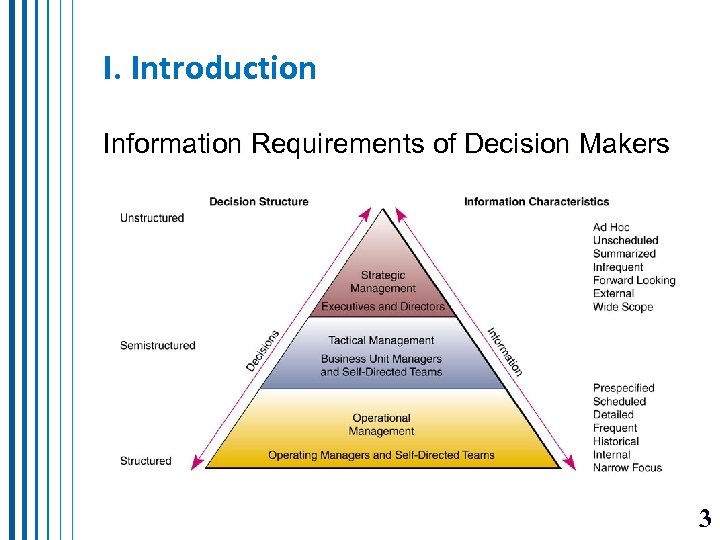 I. Introduction Information Requirements of Decision Makers 3
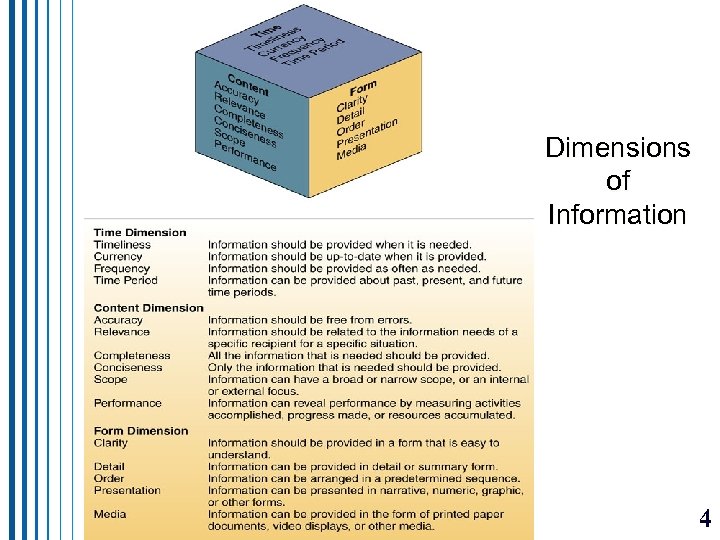 I. Introduction Dimensions of Information 4
 II. Decision Support Trends v. Using IS to support business decision making is increasing v. Business Intelligence (BI) – improving business decision making using factbased support systems v. Business Analytics (BA) – iterative exploration of a firm’s historical performance to improve the strategic planning process 5
 IV. Management Information Systems v Supports day-to-day managerial decision making v Management Reporting Alternatives – MIS reports: v. Periodic Scheduled Reports – supplied on a regular basis v. Exception Reports – created only when something out of the ordinary happens v. Demand Reports and Responses- available when requested v. Push Reporting – reports sent without being requested 6
 V. Online Analytical Processing v Enables examination/manipulation of large amounts of detailed and consolidated data from many perspectives v Consolidation aggregation of data v Drill-Down – displaying details that comprise the consolidated data v Slicing and Dicing – looking at a database from different viewpoints v OLAP Examples – the real power of OLAP is the combining of data and models on a large scale, allowing solution of complex problems v Geographic Information (GIS) and Data Visualization (DVS) Systems v GIS – facilitate use of data associated with a geophysical location v DVS – represent complex data using interactive 3 -dimensional models, assist in discovery of patterns, links and anomalies 7
 VI. Using Decision Support Systems • Involves interactive analytical modeling for exploring possible alternatives • What-If Analysis – change variables and relationships among variables to see changing outcomes • Sensitivity Analysis – special case of what-if; change one variable at a time to see the effect on a prespecified value • Goal-Seeking Analysis – reverse of what-if; changing variables to reach a target goal of a variable • Optimization Analysis – complex goal-seeking; finding the optimal value for a target variable 8
 VI. Using Decision Support Systems v Data Mining for Decision Support – providing decision support through knowledge discovery (analyze data for patterns and trends) v. Market Basket Analysis (MBA) – one of the most common and useful types of data mining; MBA applications: v Cross-Selling – offer associated items to that being purchased v Product Placement – related items physically near each other v Affinity Promotion – promotions based on related products v Survey Analysis – useful to analyze questionnaire data v Fraud Detection – detect behavior associated with fraud v Customer Behavior – associate purchases with demographic and socioeconomic data 9
 VIII. Enterprise Portals and Decision Support v. Enterprise Information Portals (EIP) – Web-based interface with integration of MIS, DSS, EIS, etc. , to give intranet/extranet users access to a variety of applications and services 10
 IX. Knowledge Management Systems v. Use of IT to gather, organize, and share knowledge within an organization v. Enterprise Knowledge Portal – entry to knowledge management systems 11
 Two kinds of knowledge • Explicit knowledge – Data, documents and things written down or stored on computers • Tacit knowledge – The “how-to” knowledge which reside in workers’ minds • A knowledge-creating company makes such tacit knowledge available to others 12
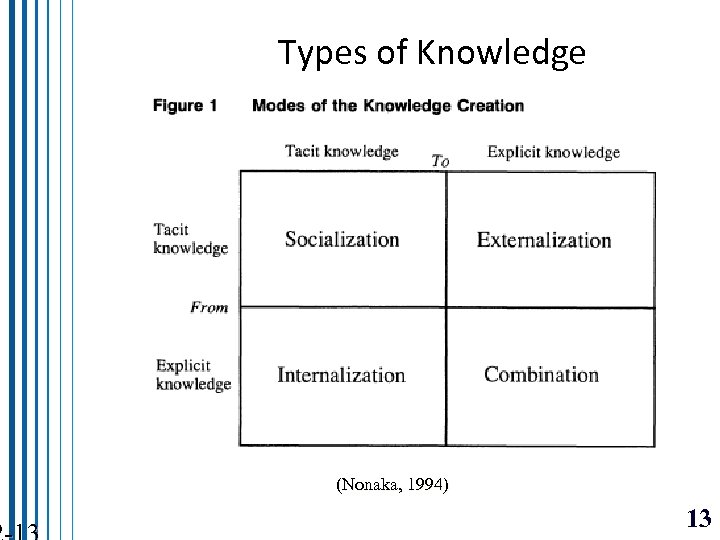 Types of Knowledge (Nonaka, 1994) 13
 II. An Overview of Artificial Intelligence (AI) v Goal of AI is to simulate the ability to think – reasoning, learning, problem solving v Turing Test – if a human communicates with a computer and does not know it is a computer, the computer is exhibiting artificial intelligence v CAPTCHA (Completely Automated Public Turing Test) – a test to tell people from computers – a distorted graphic with letters/numbers; a human can see the letters/numbers a computer cannot 14
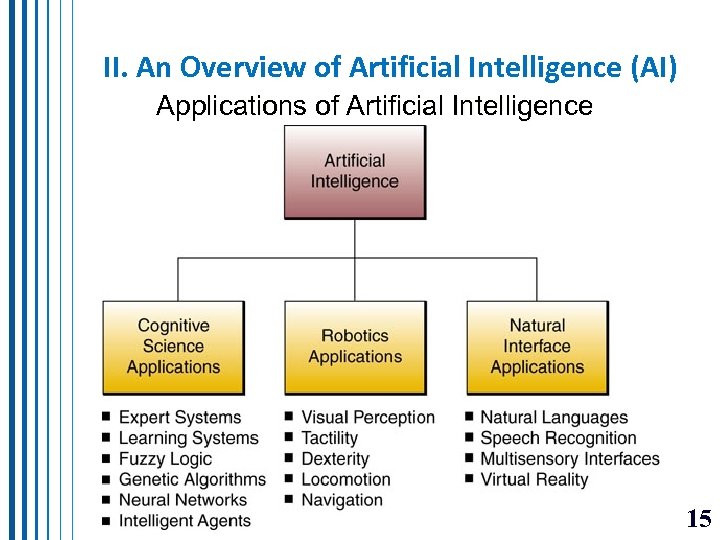 II. An Overview of Artificial Intelligence (AI) Applications of Artificial Intelligence 15
 Look at www. 20 q. net http: //www-ai. ijs. si/eliza. html http: //www. zabaware. com/webhal/ for examples of artificial intelligence - or lack thereof : ) 16
 III. Expert Systems v Components of an Expert System v. Knowledge Base – contains facts and the heuristics (rules) to express the reasoning procedures the expert uses v. Software Resources – v. Inference Engine – the program that processes the knowledge (rules and facts) v. Interface – the way the user communicates with the system 17
 III. Expert Systems v. Expert System Applications v. Decision Management – consider alternatives, recommendations v. Diagnostics/Troubleshooting – infer causes from symptoms v. Design/Configuration – help configure equipment components v. Selection/Classification – help users choose products/processes v. Process Monitoring/Control – monitor/control procedures/processes v. Benefits of Expert Systems – captures expertise of a specialist in a limited problem domain v. Limitations of Expert Systems – limited focus, inability to learn, cost 18
 IV. Developing Expert Systems v. Easiest is an expert system shell – an experts systems without the knowledge base v. Knowledge Engineering – a knowledge engineer (similar to a systems analyst) is the specialist who works with the expert to build the system V. Neural Networks v. Computing systems modeled after the brain 19
 VI. Fuzzy Logic Systems v. Reasoning with incomplete or ambiguous data v. Fuzzy Logic in Business – rare in the U. S. (preferring expert systems), but popular in Japan VII. Genetic Algorithms v. Simulates evolutionary processes that yield increasingly better solutions 20
 VIII. Virtual Reality (VR) v. Computer-simulated reality v. VR Applications – CAD, medical diagnostics, flight simulation, entertainment IX. Intelligent Agents v. Use built-in and learned knowledge to make decisions and accomplish tasks that fulfill the intentions of the user 21
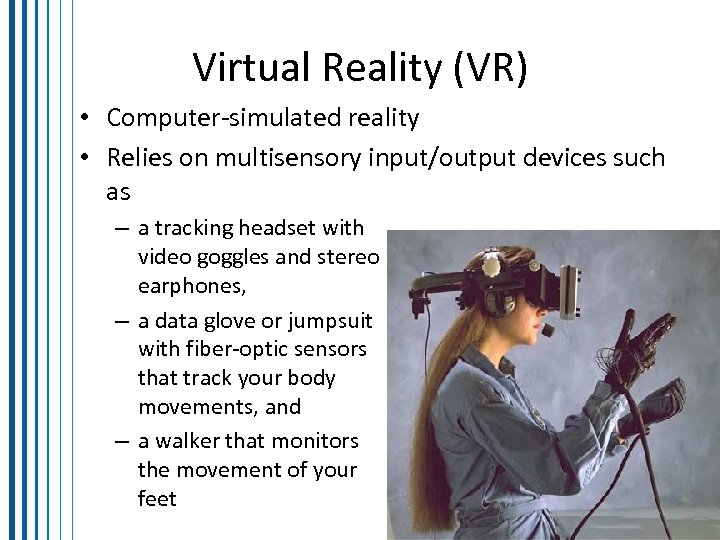 Virtual Reality (VR) • Computer-simulated reality • Relies on multisensory input/output devices such as – a tracking headset with video goggles and stereo earphones, – a data glove or jumpsuit with fiber-optic sensors that track your body movements, and – a walker that monitors the movement of your feet 22