


 Скачать презентацию Chapter 10 Implementing Electronic Commerce Security Gary Schneider
dd2e47bfd3baba6f43aa0b590c1286b3.ppt
- Количество слайдов: 36
 Chapter 10 Implementing Electronic Commerce Security Gary Schneider, 2003
 Security in Computer Information Systems • Security is a serious issue – Complexity of our networks creates new security problems never conceived of 50 years ago – Customers engaging in electronic commerce need to feel confident that their transactions are secure from prying eyes and safe from alteration • It must start with a security policy – The security policy must be regularly revised as threat conditions change – A security policy must protect a system’s privacy, integrity, and availability and authenticate users
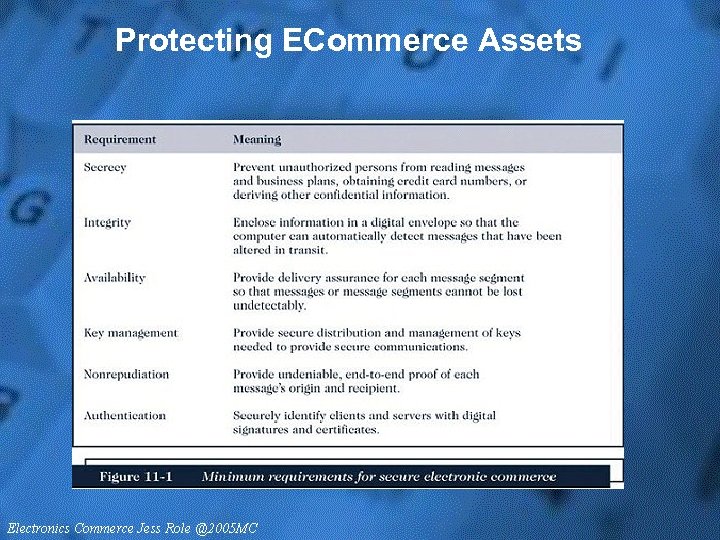 Protecting ECommerce Assets
 Protecting Intellectual Property • Digital intellectual property, including art, logos, and music posted on Web sites is protected by law • The U. S. Department of Justice maintains a Cybercrime site to provide information and updates on hacking, software piracy, and the latest security information, as well as the latest information on cyber crime prosecutions • The Information Technology Association of America (ITAA) has proposed some solutions to the current problems in digital copyright protection, including the following options for ISPs: • Host name blocking • Packet filtering • Proxy servers
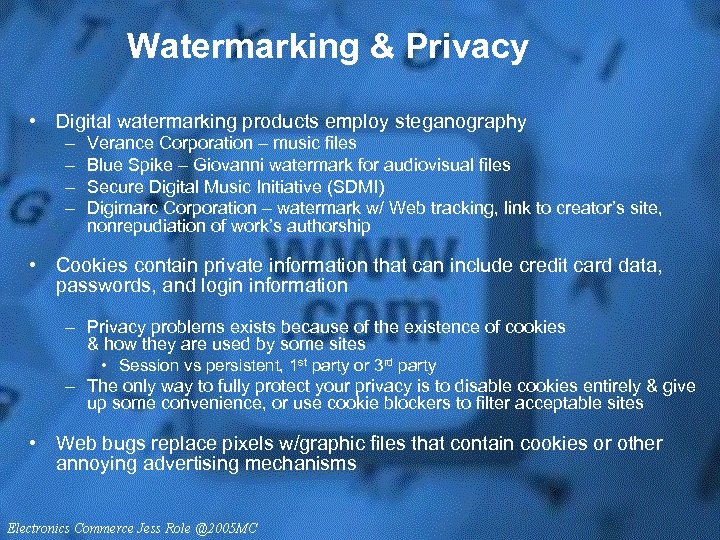 Watermarking & Privacy • Digital watermarking products employ steganography – – Verance Corporation – music files Blue Spike – Giovanni watermark for audiovisual files Secure Digital Music Initiative (SDMI) Digimarc Corporation – watermark w/ Web tracking, link to creator’s site, nonrepudiation of work’s authorship • Cookies contain private information that can include credit card data, passwords, and login information – Privacy problems exists because of the existence of cookies & how they are used by some sites • Session vs persistent, 1 st party or 3 rd party – The only way to fully protect your privacy is to disable cookies entirely & give up some convenience, or use cookie blockers to filter acceptable sites • Web bugs replace pixels w/graphic files that contain cookies or other annoying advertising mechanisms
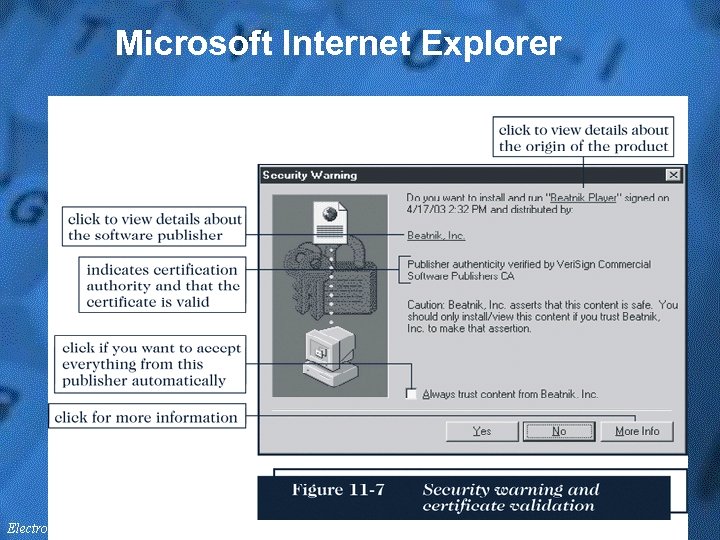
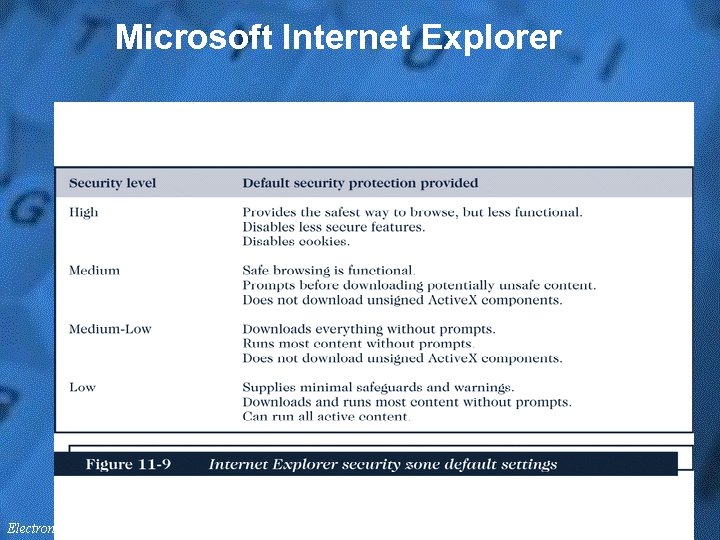
 Protecting Client Computers • Client computers must be protected from threats such as a malevolent server site masquerading as a legitimate Web site • Active content can be one of the most serious threats to client computers – Active X & others – Netscape Navigator and Microsoft Internet Explorer browsers are equipped to recognize when they are about to download Web page containing active content – When a user downloads Web pages and runs programs that are embedded in them, it gives the user a chance to confirm that the programs are from a known and trusted source
 Digital Certificates • A digital certificate (digital ID) is signed code attached to another message • It verifies that a user or Web site is who it claims to be just as a photo ID might in person • The digital certificate contains a means for sending an encrypted message to the entity that sent the original Web page or e-mail message • A Web site’s digital certificate is a shopper’s assurance that the Web site is the real store
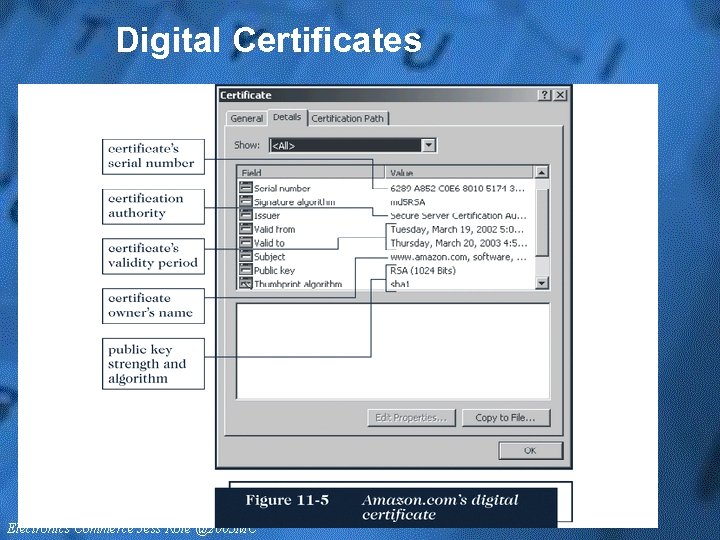 Digital Certificates
 Certificates & Browser Options • A certification authority (CA) issues a digital certificate to an organization or individual – A key is usually a long binary number to be used with the encryption algorithm – Longer keys provide significantly better protection than shorter keys • Microsoft IE provides client-side protection inside the browser – IE uses Microsoft Authenticode technology – Authenticode technology verifies that the program has a valid certificate, plus who signed it & if it has been modified – IE includes a list of valid CAs & their public keys for matching by Authenticode with the listed CA & key in the message – The public key unlocks the certificate to check the signed digest
 Microsoft Internet Explorer
 Microsoft Internet Explorer
 Netscape Navigator • Netscape Navigator allows you to control whether active content is downloaded to your computer • If you allow Java or Java. Script active content, you will always receive an alert from Netscape Navigator – It will allow you to view the attached signature – Active. X controls do not execute in Navigator
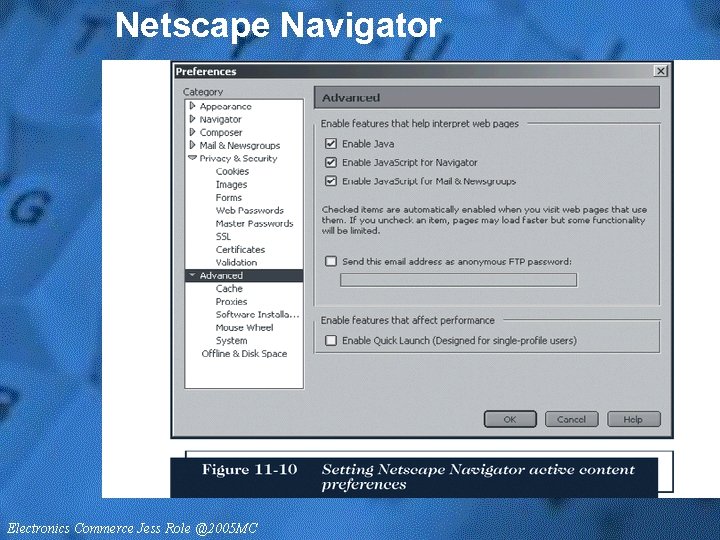 Netscape Navigator
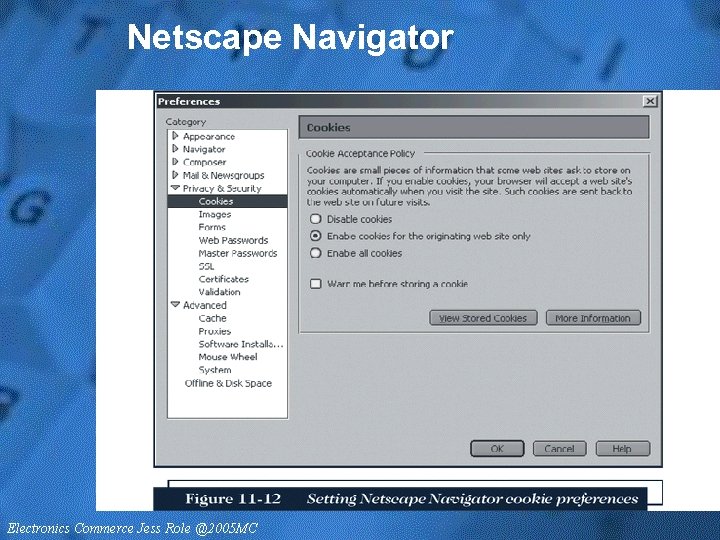 Netscape Navigator
 Using Antivirus Software • Antivirus software is a defense strategy, but only effective if signature files are kept current • One of the most likely places to find a virus is in an electronic mail attachment • Some Web e-mail systems let users scan attachments using antivirus software before downloading e-mail
 Protecting Electronic Commerce Channels • Providing commerce channel security means: • • Providing channel secrecy Guaranteeing message integrity Ensuring channel availability A complete security plan includes authentication • Businesses must prevent eavesdroppers from reading the Internet messages that they intercept • Encryption is one method to preserve message privacy and integrity
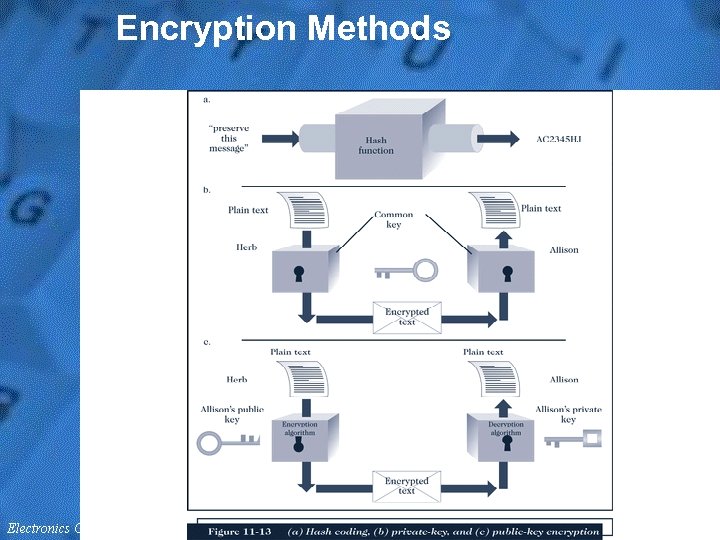
 Encryption • Encryption is the coding of information by a mathematically based program and a secret key to produce a string of characters that is unintelligible – The program that transforms text into cipher text is called an encryption program • Upon arrival, each message is decrypted using a decryption program • “Hash coding” is a process that uses a hash algorithm to calculate a hash value from a message, for comparing to the hash after receipt – “Asymmetric encryption, ” or public-key encryption, encodes messages by using two mathematically related numeric keys: a public key and a private key (RSA developers) – “Symmetric encryption, ” or private-key encryption, encodes a message using a single numeric key to encode and decode data
 Encryption Standards • The Data Encryption Standard (DES) is an encryption standard adopted by the U. S. government – DES is the most widely used private-key encryption system – Triple Data Encryption Standard (3 DES) is a more robust version of DES • The U. S. government’s National Institute of Standards and Technology (NIST) has developed a new encryption standard, AES – Based upon the Rijndael (“rain doll”) algorithm
 Public-Key Encryption • Public-key systems (2 keys) provide several advantages over private-key (1 key) systems: • The combination of keys required to provide private messages between enormous numbers of people is small • Key distribution is not a problem (well, it all depends) • The public key can be posted, but currently there is not a consistent process for this • Public-key systems make implementation of digital signatures possible • Disadvantages include higher resource requirements, & therefore, slower processing
 Encryption Methods
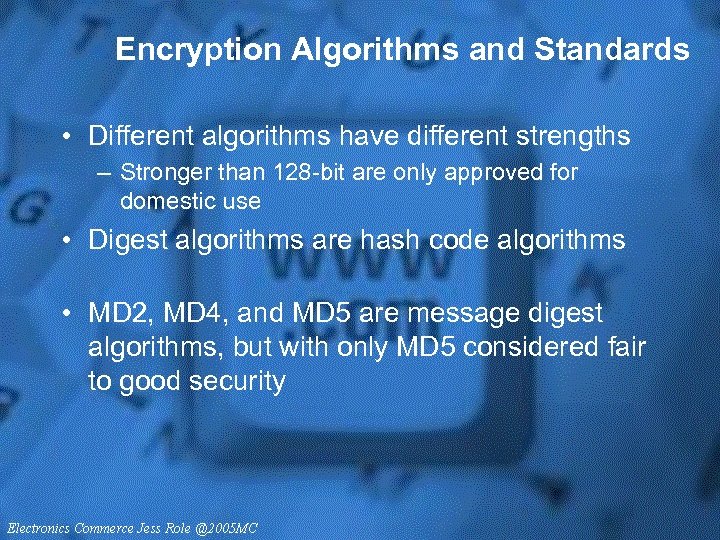 Encryption Algorithms and Standards • Different algorithms have different strengths – Stronger than 128 -bit are only approved for domestic use • Digest algorithms are hash code algorithms • MD 2, MD 4, and MD 5 are message digest algorithms, but with only MD 5 considered fair to good security
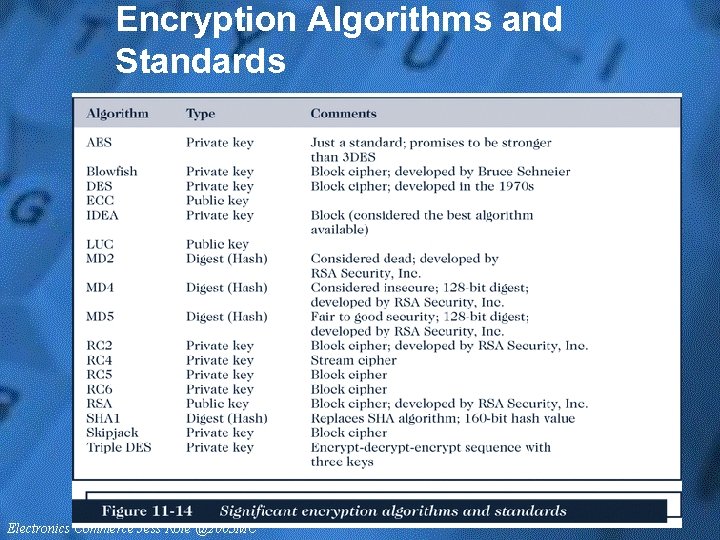 Encryption Algorithms and Standards
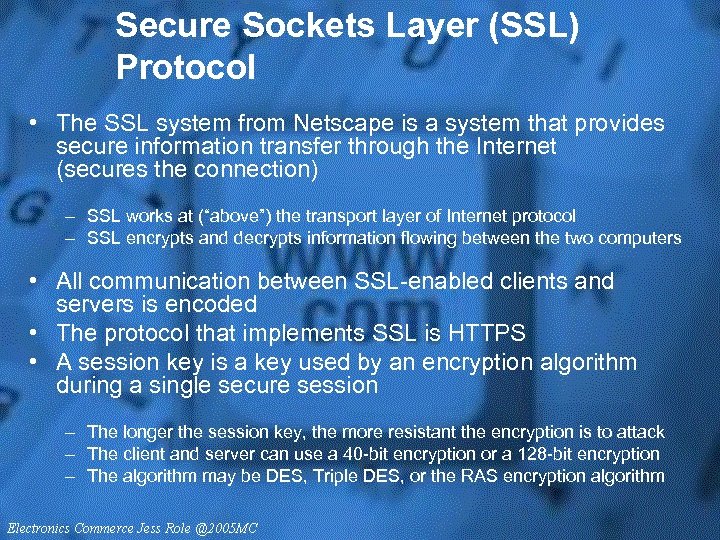 Secure Sockets Layer (SSL) Protocol • The SSL system from Netscape is a system that provides secure information transfer through the Internet (secures the connection) – SSL works at (“above”) the transport layer of Internet protocol – SSL encrypts and decrypts information flowing between the two computers • All communication between SSL-enabled clients and servers is encoded • The protocol that implements SSL is HTTPS • A session key is a key used by an encryption algorithm during a single secure session – The longer the session key, the more resistant the encryption is to attack – The client and server can use a 40 -bit encryption or a 128 -bit encryption – The algorithm may be DES, Triple DES, or the RAS encryption algorithm
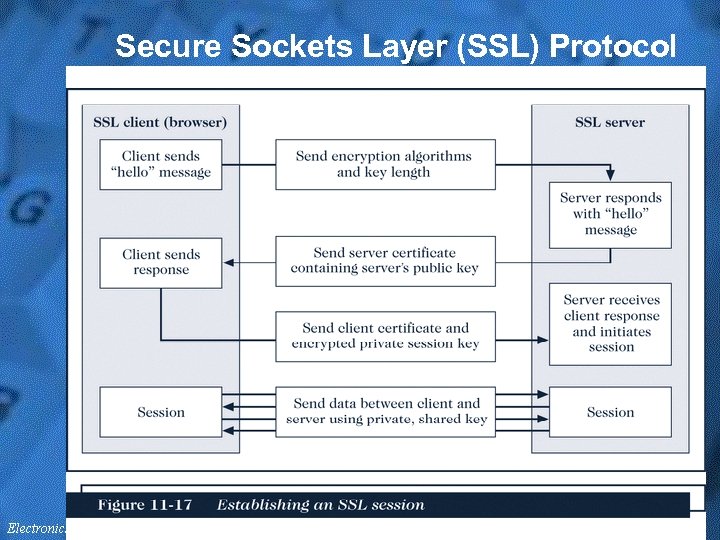 Secure Sockets Layer (SSL) Protocol
 Secure HTTP (S-HTTP) Protocol • S-HTTP (secures the message) provides a number of security features, including: • Client and server authentication • Spontaneous encryption • Request/response non-repudiation • This protocol operates at the application layer • S-HTTP provides: • Symmetric encryption for maintaining secret communications • Public-key encryption to establish client/server authentication • Message digests for data integrity • S-HTTP sets up security details with special packet headers that are exchanged in S-HTTP
 Secure HTTP (S-HTTP) Protocol • The headers define the type of security techniques, including: • • The use of private-key encryption Server authentication Client authentication Message integrity • A secure envelope encapsulates a message and provides secrecy, integrity, and client/server authentication
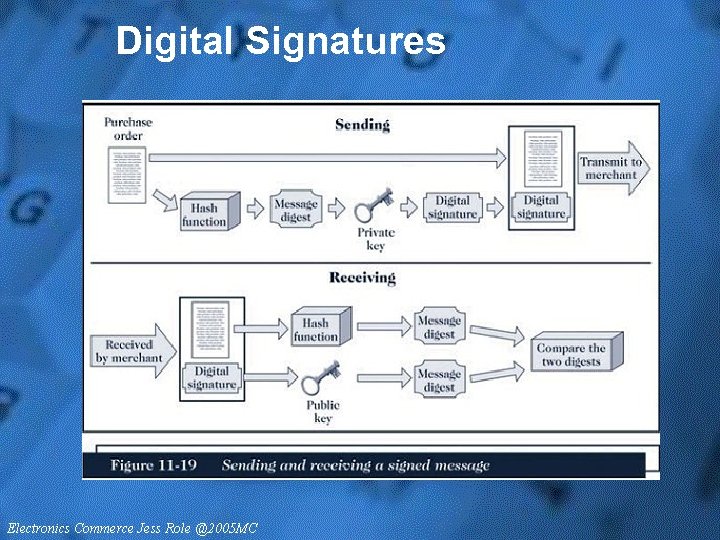
 Ensuring Transaction Integrity • Integrity violations can occur whenever a message is altered while in transit between the sender and receiver • Ensuring transaction integrity, two separate algorithms are applied to a message: • Hash function • Digital signature (encrypted message digest) • A hash algorithm has these characteristics: • It uses no secret key • The message digest it produces cannot be inverted to produce the original information (one-way) • The algorithm and information about how it works are publicly available • Hash collisions are nearly impossible • MD 5 is an example of a hash algorithm
 Digital Signature • An encrypted message digest is called a digital signature • A purchase order accompanied by the digital signature provides the merchant positive identification of the sender and assures the merchant that the message was not altered • Used together, public-key encryption, message digests, and digital signatures provide quality security for Internet transactions • Should only be used where required because of resource & performance considerations
 Digital Signatures
 Guaranteeing Transaction Delivery • A denial or delay of service attack removes or absorbs resources – One way to deny service is to flood the Internet with a large number of packets – Neither encryption or digital signatures can defend against these attacks • The transport protocol of TCP/IP attempts to maintain accountability for packets & controls resend requests • A full attack on an IP address will prevent TCP from doing its job
 Protecting the Web Server • The commerce server, along with the Web server, responds to requests from Web browsers through the HTTP protocol and CGI scripts • Security solutions for commerce servers: • Access control and authentication • Operating system controls • Firewalls
 Access Control and Authentication • Access control and authentication refers to controlling who and what has access to the commerce server – Authentication is performed using digital certificates – Web servers often provide access control list security to restrict file access to selected users • The server can authenticate a user in several ways: • First, the certificate represents the user’s admittance voucher. • Second, the sever checks the timestamp on the certificate to ensure that the certificate has not expired. • Third, a server can use a callback system to check the user’s client computer address and name. • An access control list (ACL) is a list or database of people who can access the files and resources
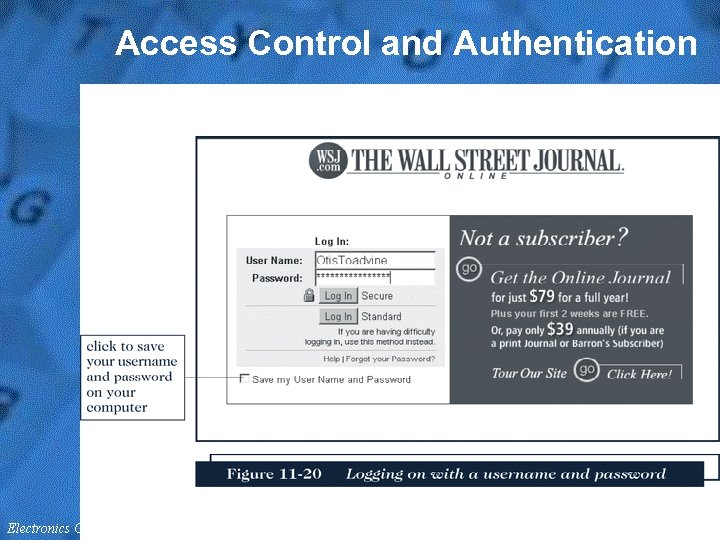 Access Control and Authentication
 Operating System Controls • Most operating systems have a username and password as well as a user authentication system in place – Win 2 k vs Win 2 k 3 significantly changes Microsoft’s approach to security: from all open resources to primarily closed • Access control lists and username/password protections are probably the best known of the UNIX security features
 Firewalls • A firewall is a computer and software combination that is installed at the entry point of a networked system – The firewall provides the first line of defense between a network and the Internet or other network that could pose a threat – Acting as a filter, firewalls permit selected messages to flow into and out of the protected network • Packet-filter firewalls examine all the data flowing back and forth between the trusted network • Gateway servers are firewalls that filter traffic based on the application they request • Proxy severs are firewalls that communicate with the Internet on the private network’s behalf
 Computer Forensics and Ethical Hacking • A new class of firms is hired to break into client computers – Some are former “hackers” – Computer forensics experts are hired to probe PCs – The field of computer forensics is for the collection, preservation, and analysis of computer-related evidence • Increasingly important for legal prosecution • Experts can retrieve almost anything that was ever written to a hard drive • New issues of drive cleansing before disposal