


 Скачать презентацию Chapter 10 Developing and Acquiring Information Systems 10
9a7b2bfcd6dc77c965f6a7f4d95e4b91.ppt
- Количество слайдов: 78
 Chapter 10 Developing and Acquiring Information Systems 10 -1 “Pay attention to what works, and do that. ” Tom Anderson, Cofounder of My. Space IS Today (Valacich & Schneider) 3/15/2018 Copyright © 2010 Pearson Education, Inc. Published as Prentice Hall
 Learning Objectives 10 -2 1. Understand the process used by organizations to manage the development of information systems. 2. Describe each major phase of the systems development life cycle: systems planning and selection; systems analysis; systems design; systems implementation and operation. 3. Describe prototyping, rapid application development, and object-oriented analysis and design, along with each approach’s strengths and weaknesses. 4. Understand the factors involved in building a system in-house, along with situations in which it is not feasible. 5. Explain three alternative systems development options: external acquisition, outsourcing, and enduser development. IS Today (Valacich & Schneider) 3/15/2018 Copyright © 2010 Pearson Education, Inc. Published as Prentice Hall
 Learning Objectives 10 -3 1. Understand the process used by organizations to manage the development of information systems. 2. Describe each major phase of the systems development life cycle: systems planning and selection; systems analysis; systems design; systems implementation and operation. 3. Describe prototyping, rapid application development, and object-oriented analysis and design, along with each approach’s strengths and weaknesses. 4. Understand the factors involved in building a system in-house, along with situations in which it is not feasible. 5. Explain three alternative systems development options: external acquisition, outsourcing, and end-user development. IS Today (Valacich & Schneider) 3/15/2018 Copyright © 2010 Pearson Education, Inc. Published as Prentice Hall
 Customized Vs. Off-the-Shelf Software 10 -4 General purpose systems typically purchased off- the-shelf Specific needs often cannot be met by off-the shelf software Companies capitalizing on a first-mover advantage often cannot purchase existing systems E. g. , online retailing (Amazon. com) Budget air travel (Southwest Airlines) IS Today (Valacich & Schneider) 3/15/2018 Copyright © 2010 Pearson Education, Inc. Published as Prentice Hall
 Customized Vs. Off-the-Shelf Software 10 -5 Customized software Developed in-house or contracted to a specialized vendor Customizability Fit with business operations, culture, etc. Problem specificity Company IS Today (Valacich & Schneider) 3/15/2018 only pays for features actually needed Copyright © 2010 Pearson Education, Inc. Published as Prentice Hall
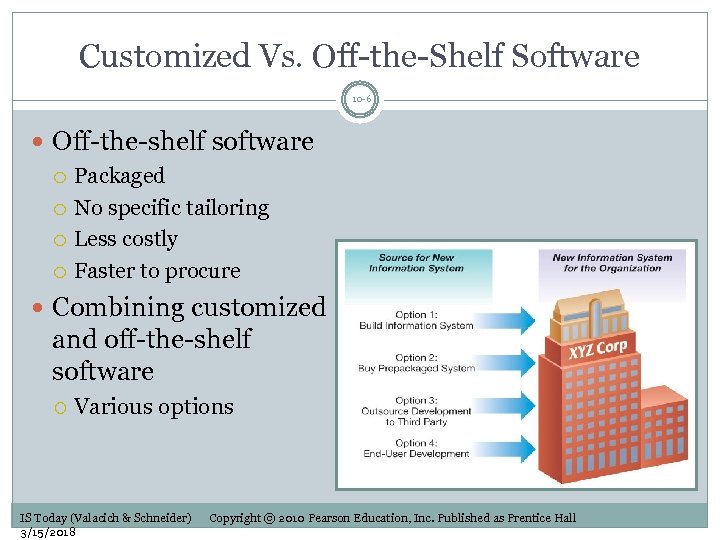 Customized Vs. Off-the-Shelf Software 10 -6 Off-the-shelf software Packaged No specific tailoring Less costly Faster to procure Combining customized and off-the-shelf software Various options IS Today (Valacich & Schneider) 3/15/2018 Copyright © 2010 Pearson Education, Inc. Published as Prentice Hall
 The Need for Structured Systems Development 10 -7 Systems analysis and design Process of designing, building, and maintaining information systems Systems analyst One of the best jobs (US News and World Report) High growth rates (>29%) Early IS development Very unstructured Programmer skills varied IS Today (Valacich & Schneider) 3/15/2018 Copyright © 2010 Pearson Education, Inc. Published as Prentice Hall
 Information Systems Development (cont’d) 10 -8 1990 s Evolution from IS development as “art” to IS development as “discipline” Software engineering Benefits Easier to train systems analysts Systems would be easier to maintain IS Today (Valacich & Schneider) 3/15/2018 Copyright © 2010 Pearson Education, Inc. Published as Prentice Hall
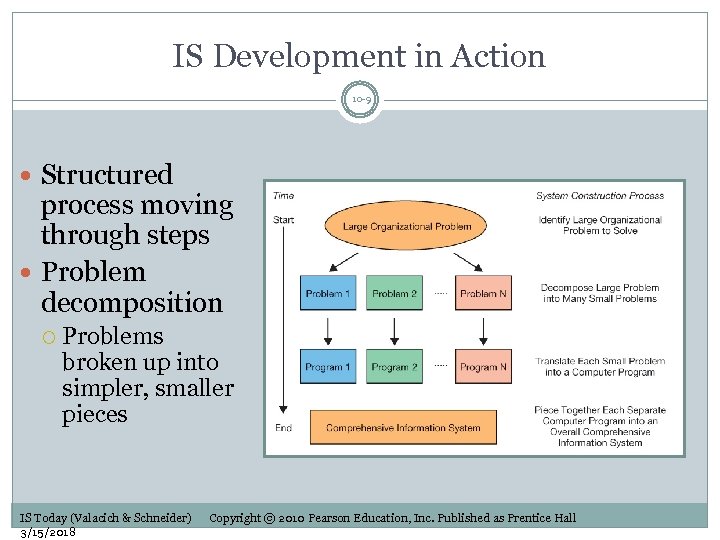 IS Development in Action 10 -9 Structured process moving through steps Problem decomposition Problems broken up into simpler, smaller pieces IS Today (Valacich & Schneider) 3/15/2018 Copyright © 2010 Pearson Education, Inc. Published as Prentice Hall
 The Role of Users in Systems Development Process 10 -10 Systems users are involved in all phases of system’s development process Mutually respectful relationship necessary Organizational members need to understand the development activities well IS Today (Valacich & Schneider) 3/15/2018 Copyright © 2010 Pearson Education, Inc. Published as Prentice Hall
 Learning Objectives 10 -11 1. Understand the process used by organizations to manage the development of information systems. 2. Describe each major phase of the systems development life cycle: systems planning and selection; systems analysis; systems design; systems implementation and operation. 3. Describe prototyping, rapid application development, and object-oriented analysis and design, along with each approach’s strengths and weaknesses. 4. Understand the factors involved in building a system in-house, along with situations in which it is not feasible. 5. Explain three alternative systems development options: external acquisition, outsourcing, and end-user development. IS Today (Valacich & Schneider) 3/15/2018 Copyright © 2010 Pearson Education, Inc. Published as Prentice Hall
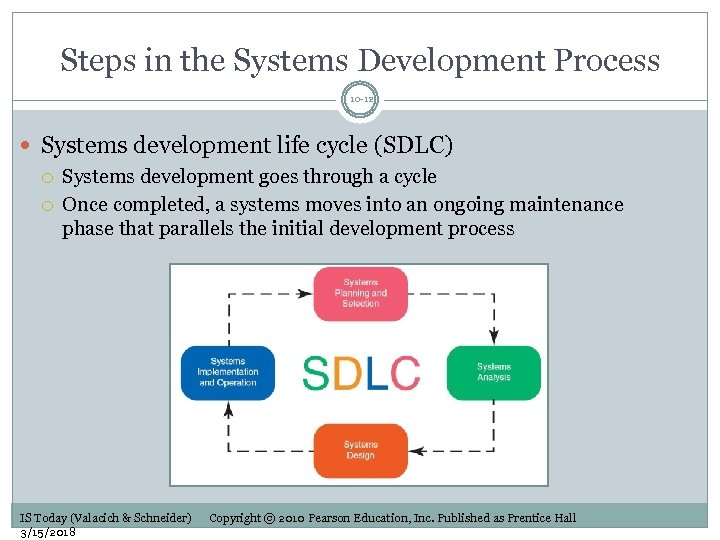 Steps in the Systems Development Process 10 -12 Systems development life cycle (SDLC) Systems development goes through a cycle Once completed, a systems moves into an ongoing maintenance phase that parallels the initial development process IS Today (Valacich & Schneider) 3/15/2018 Copyright © 2010 Pearson Education, Inc. Published as Prentice Hall
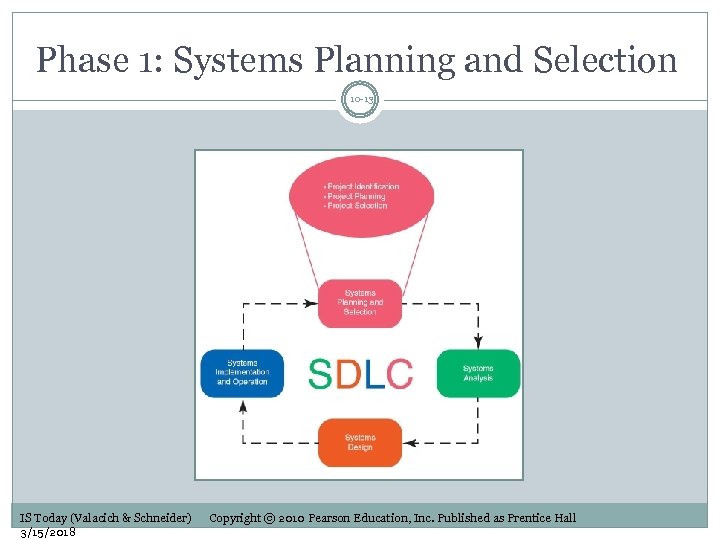 Phase 1: Systems Planning and Selection 10 -13 IS Today (Valacich & Schneider) 3/15/2018 Copyright © 2010 Pearson Education, Inc. Published as Prentice Hall
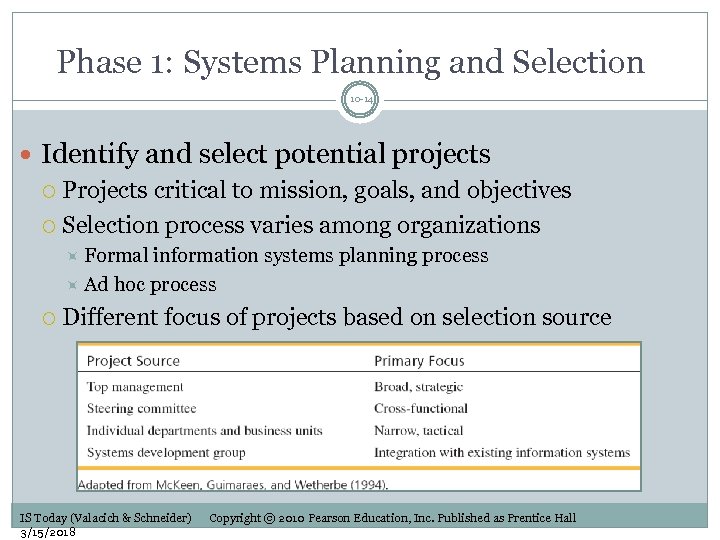 Phase 1: Systems Planning and Selection 10 -14 Identify and select potential projects Projects critical to mission, goals, and objectives Selection process varies among organizations Formal information systems planning process Ad hoc process Different focus of projects based on selection source IS Today (Valacich & Schneider) 3/15/2018 Copyright © 2010 Pearson Education, Inc. Published as Prentice Hall
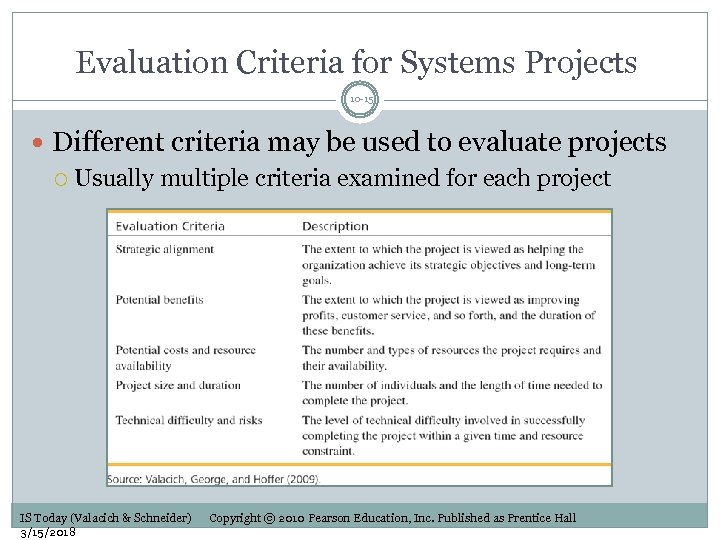 Evaluation Criteria for Systems Projects 10 -15 Different criteria may be used to evaluate projects Usually multiple criteria examined for each project IS Today (Valacich & Schneider) 3/15/2018 Copyright © 2010 Pearson Education, Inc. Published as Prentice Hall
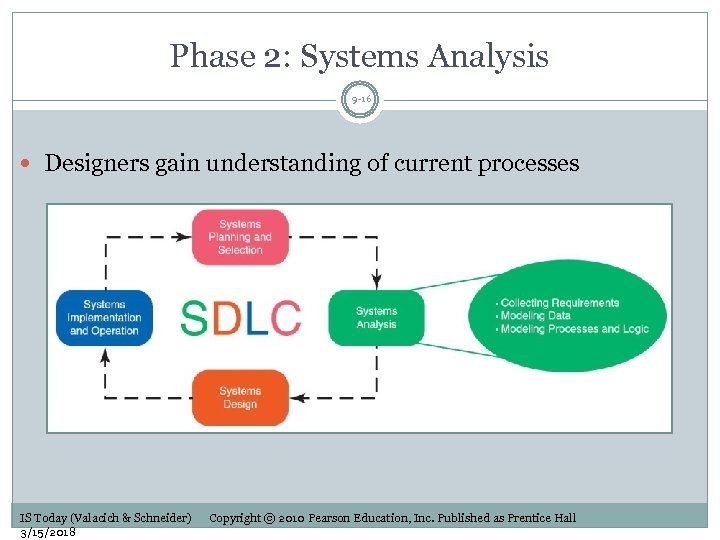 Phase 2: Systems Analysis 9 -16 Designers gain understanding of current processes IS Today (Valacich & Schneider) 3/15/2018 Copyright © 2010 Pearson Education, Inc. Published as Prentice Hall
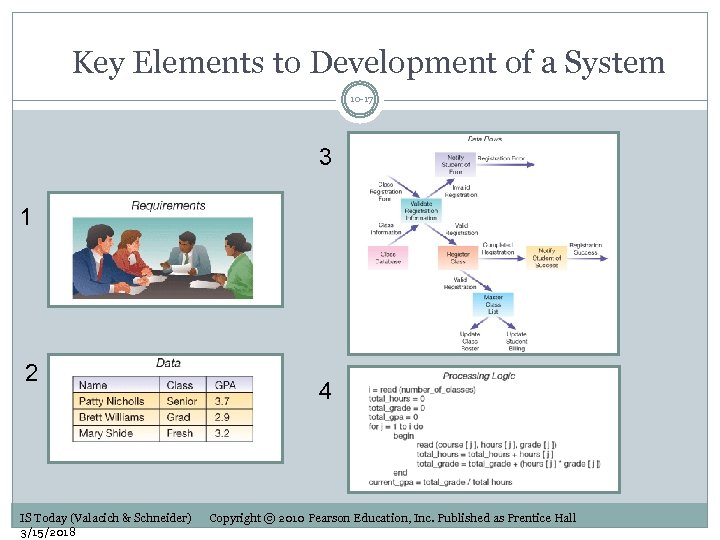 Key Elements to Development of a System 10 -17 3 1 2 IS Today (Valacich & Schneider) 3/15/2018 4 Copyright © 2010 Pearson Education, Inc. Published as Prentice Hall
 Collecting System Requirements 10 -18 Arguably the most important activity Requirements collected from: Users Managers Business processes Documents System requirements collection techniques: Interviews Questionnaires Observations Document analysis IS Today (Valacich & Schneider) 3/15/2018 Copyright © 2010 Pearson Education, Inc. Published as Prentice Hall
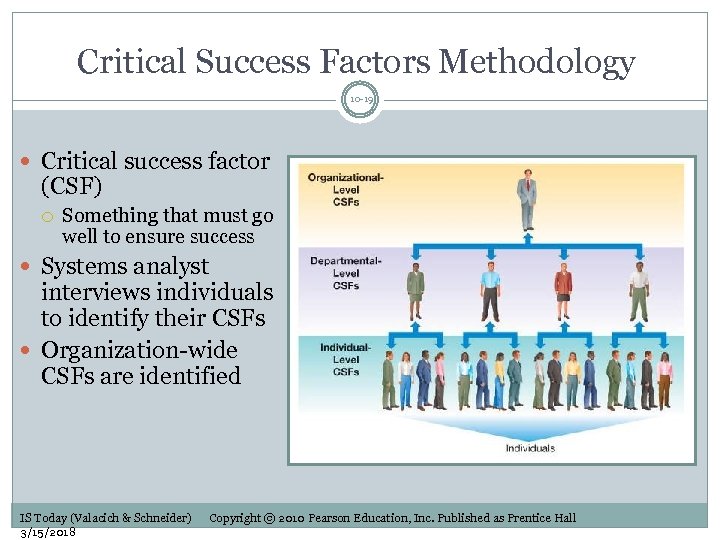 Critical Success Factors Methodology 10 -19 Critical success factor (CSF) Something that must go well to ensure success Systems analyst interviews individuals to identify their CSFs Organization-wide CSFs are identified IS Today (Valacich & Schneider) 3/15/2018 Copyright © 2010 Pearson Education, Inc. Published as Prentice Hall
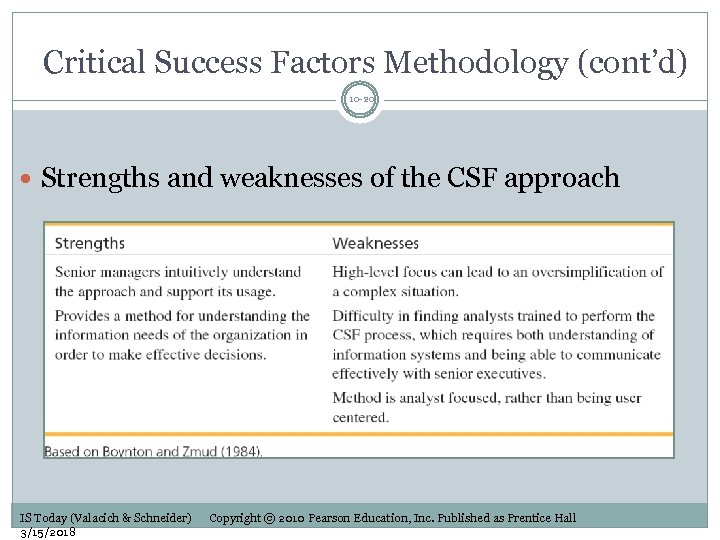 Critical Success Factors Methodology (cont’d) 10 -20 Strengths and weaknesses of the CSF approach IS Today (Valacich & Schneider) 3/15/2018 Copyright © 2010 Pearson Education, Inc. Published as Prentice Hall
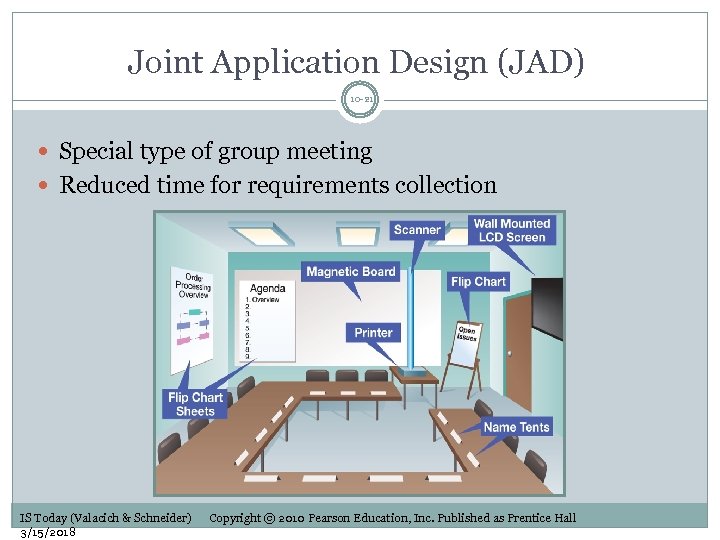 Joint Application Design (JAD) 10 -21 Special type of group meeting Reduced time for requirements collection IS Today (Valacich & Schneider) 3/15/2018 Copyright © 2010 Pearson Education, Inc. Published as Prentice Hall
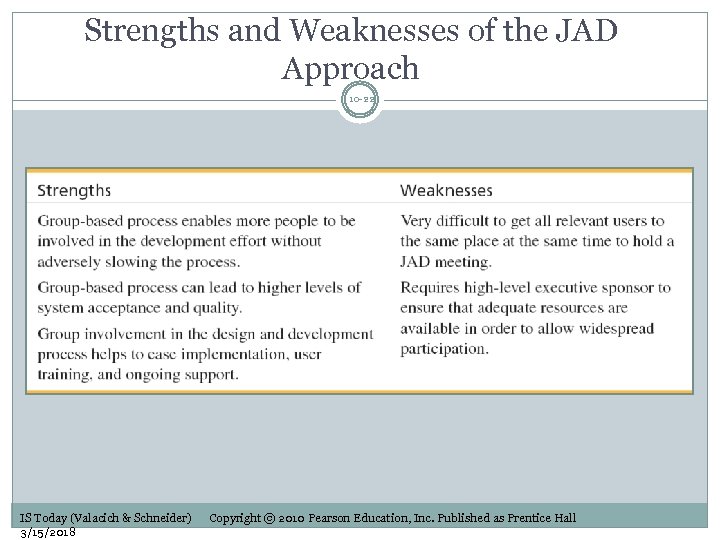 Strengths and Weaknesses of the JAD Approach 10 -22 IS Today (Valacich & Schneider) 3/15/2018 Copyright © 2010 Pearson Education, Inc. Published as Prentice Hall
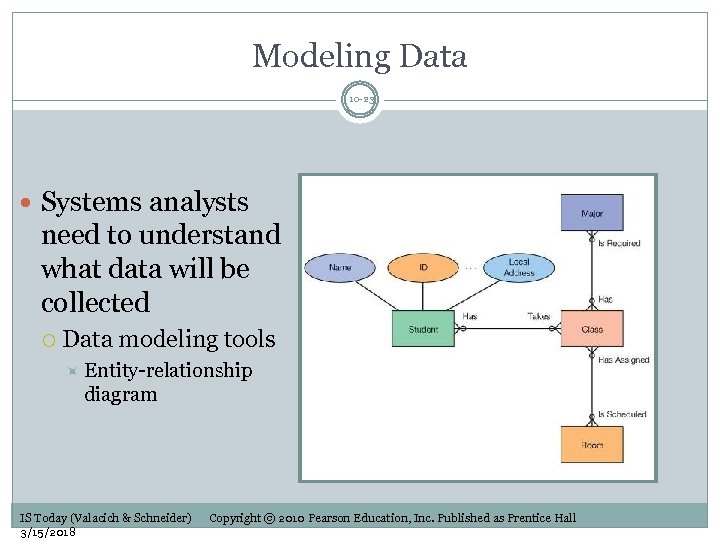 Modeling Data 10 -23 Systems analysts need to understand what data will be collected Data modeling tools Entity-relationship diagram IS Today (Valacich & Schneider) 3/15/2018 Copyright © 2010 Pearson Education, Inc. Published as Prentice Hall
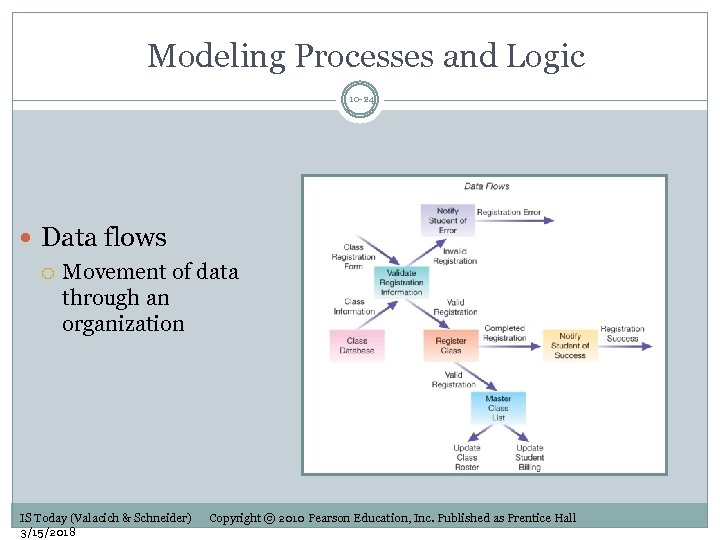 Modeling Processes and Logic 10 -24 Data flows Movement of data through an organization IS Today (Valacich & Schneider) 3/15/2018 Copyright © 2010 Pearson Education, Inc. Published as Prentice Hall
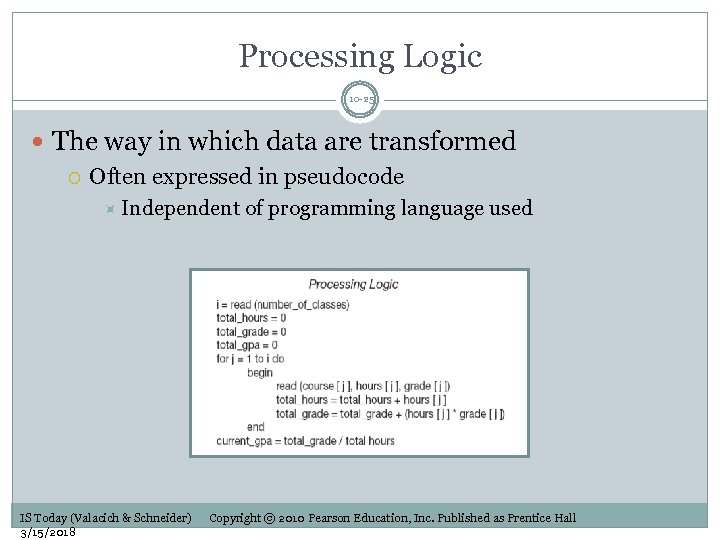 Processing Logic 10 -25 The way in which data are transformed Often expressed in pseudocode Independent IS Today (Valacich & Schneider) 3/15/2018 of programming language used Copyright © 2010 Pearson Education, Inc. Published as Prentice Hall
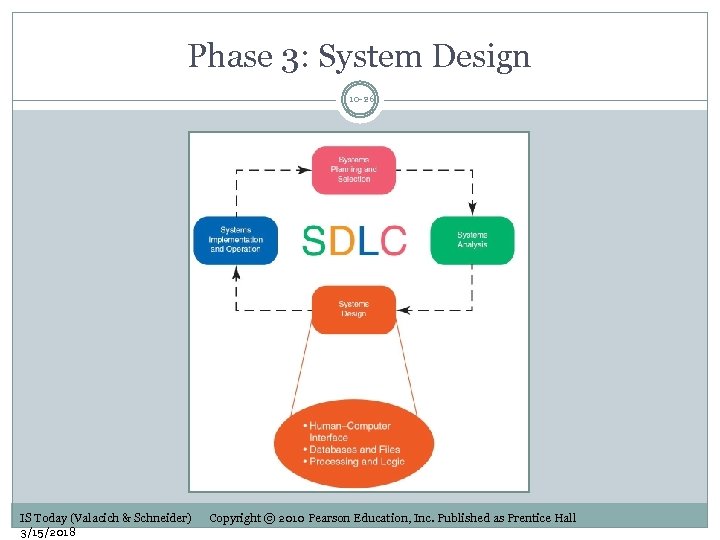 Phase 3: System Design 10 -26 IS Today (Valacich & Schneider) 3/15/2018 Copyright © 2010 Pearson Education, Inc. Published as Prentice Hall
 Designing the Human-Computer Interface 10 -27 Human-computer interface The point of contact between a system and its users Text-based or graphical Graphical user interface (GUI) Data entry forms Management reports IS Today (Valacich & Schneider) 3/15/2018 Copyright © 2010 Pearson Education, Inc. Published as Prentice Hall
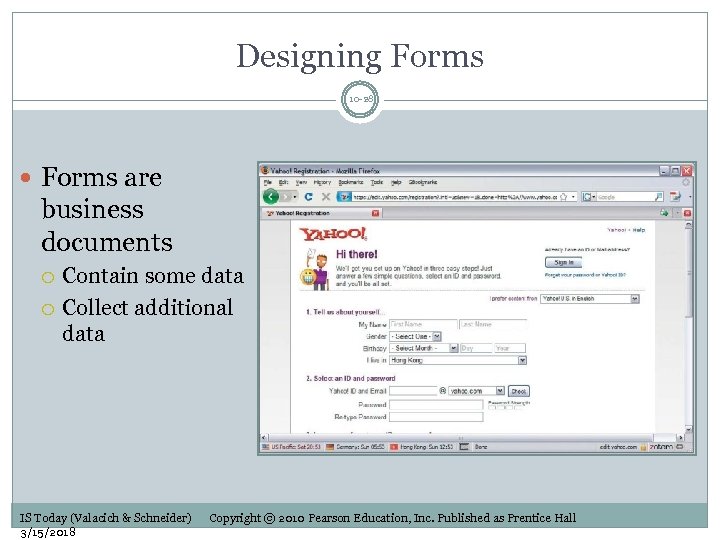 Designing Forms 10 -28 Forms are business documents Contain some data Collect additional data IS Today (Valacich & Schneider) 3/15/2018 Copyright © 2010 Pearson Education, Inc. Published as Prentice Hall
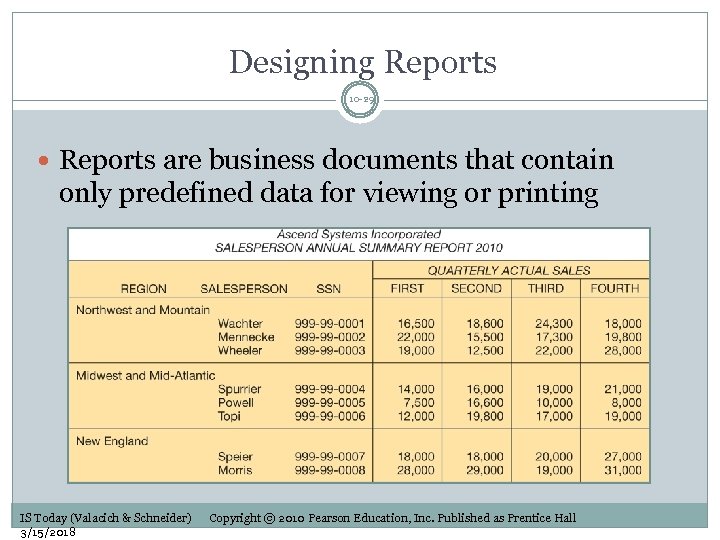 Designing Reports 10 -29 Reports are business documents that contain only predefined data for viewing or printing IS Today (Valacich & Schneider) 3/15/2018 Copyright © 2010 Pearson Education, Inc. Published as Prentice Hall
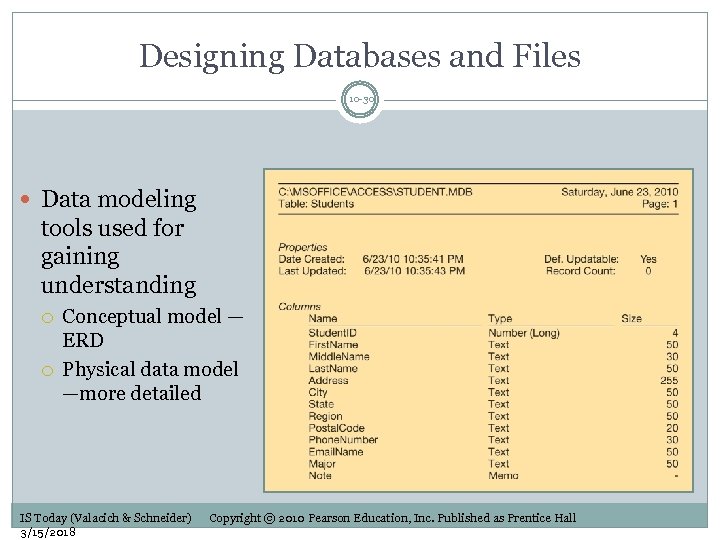 Designing Databases and Files 10 -30 Data modeling tools used for gaining understanding Conceptual model — ERD Physical data model —more detailed IS Today (Valacich & Schneider) 3/15/2018 Copyright © 2010 Pearson Education, Inc. Published as Prentice Hall
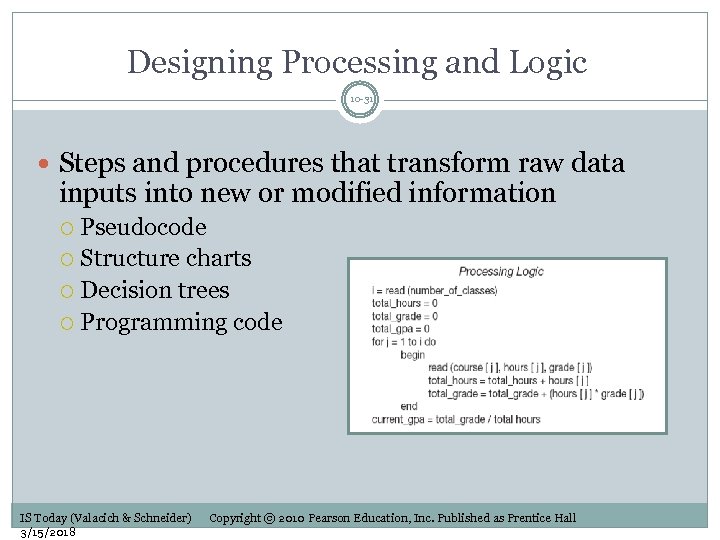 Designing Processing and Logic 10 -31 Steps and procedures that transform raw data inputs into new or modified information Pseudocode Structure charts Decision trees Programming code IS Today (Valacich & Schneider) 3/15/2018 Copyright © 2010 Pearson Education, Inc. Published as Prentice Hall
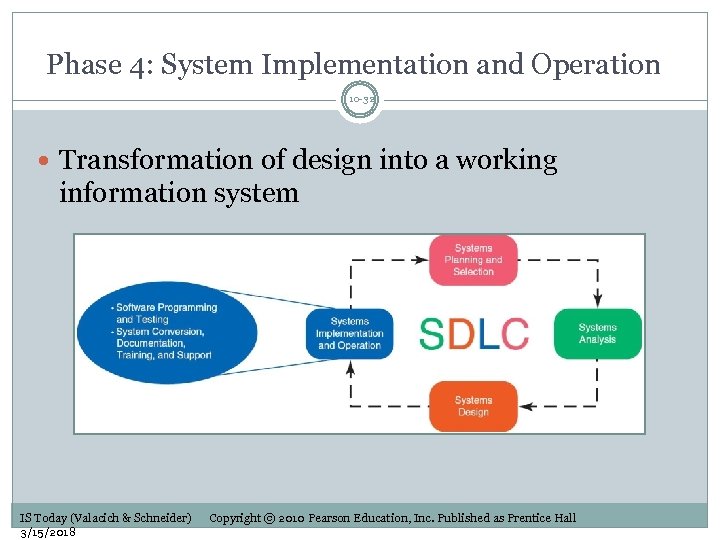 Phase 4: System Implementation and Operation 10 -32 Transformation of design into a working information system IS Today (Valacich & Schneider) 3/15/2018 Copyright © 2010 Pearson Education, Inc. Published as Prentice Hall
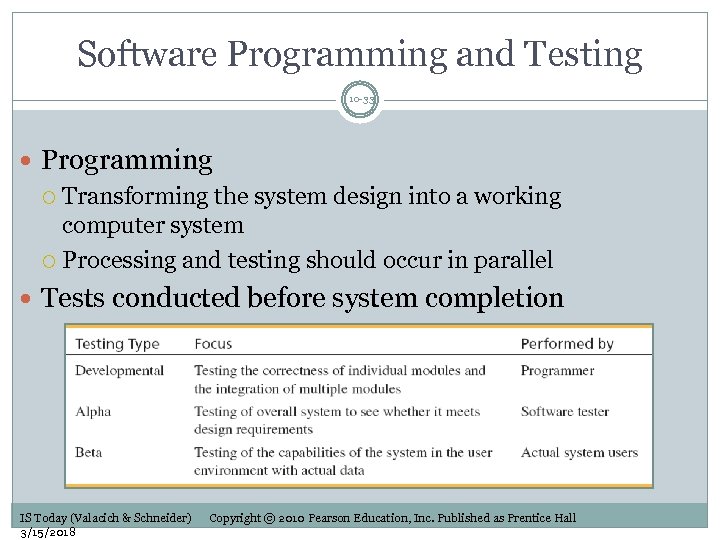 Software Programming and Testing 10 -33 Programming Transforming the system design into a working computer system Processing and testing should occur in parallel Tests conducted before system completion IS Today (Valacich & Schneider) 3/15/2018 Copyright © 2010 Pearson Education, Inc. Published as Prentice Hall
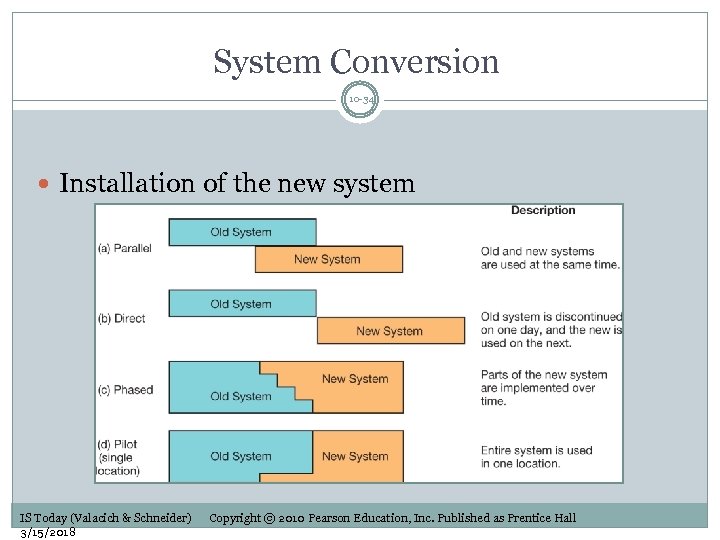 System Conversion 10 -34 Installation of the new system IS Today (Valacich & Schneider) 3/15/2018 Copyright © 2010 Pearson Education, Inc. Published as Prentice Hall
 Documentation 10 -35 Information system documentation Details of the inner workings of the system Written by programmers User-related documentation Written by professional technical writers User and reference guides User training and tutorials Installation procedures and troubleshooting suggestions IS Today (Valacich & Schneider) 3/15/2018 Copyright © 2010 Pearson Education, Inc. Published as Prentice Hall
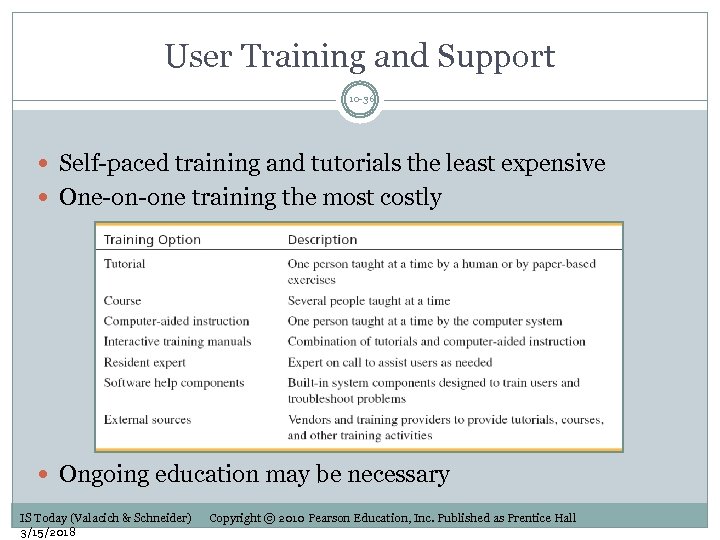 User Training and Support 10 -36 Self-paced training and tutorials the least expensive One-on-one training the most costly Ongoing education may be necessary IS Today (Valacich & Schneider) 3/15/2018 Copyright © 2010 Pearson Education, Inc. Published as Prentice Hall
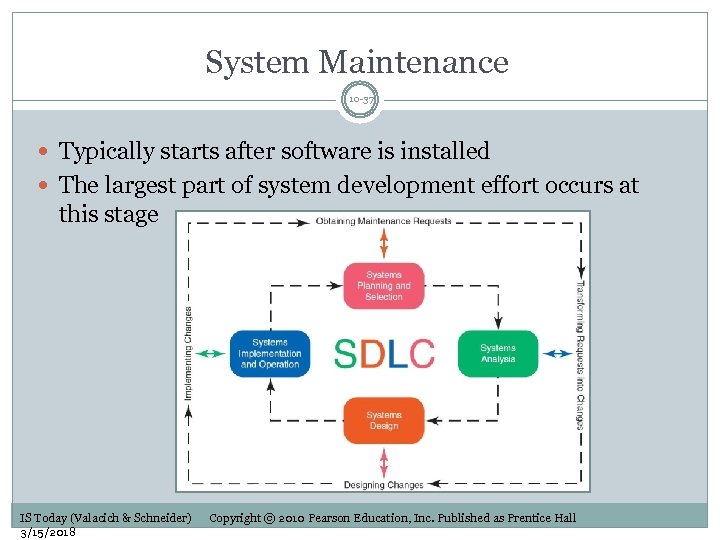 System Maintenance 10 -37 Typically starts after software is installed The largest part of system development effort occurs at this stage IS Today (Valacich & Schneider) 3/15/2018 Copyright © 2010 Pearson Education, Inc. Published as Prentice Hall
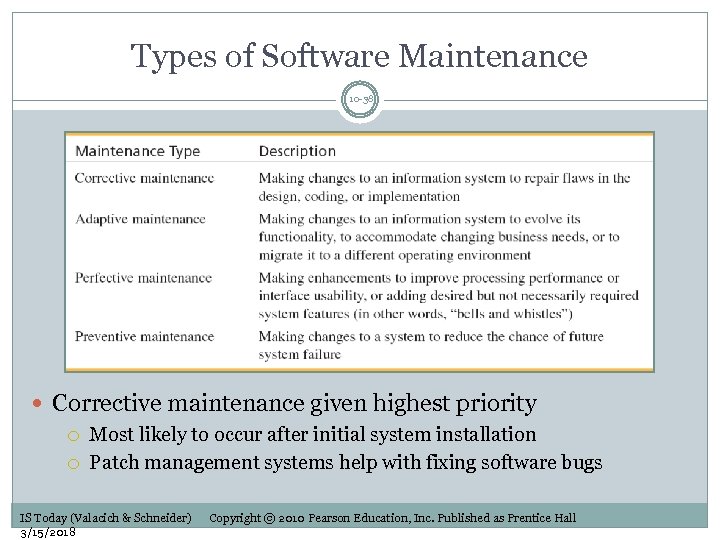 Types of Software Maintenance 10 -38 Corrective maintenance given highest priority Most likely to occur after initial system installation Patch management systems help with fixing software bugs IS Today (Valacich & Schneider) 3/15/2018 Copyright © 2010 Pearson Education, Inc. Published as Prentice Hall
 Learning Objectives 10 -39 1. Understand the process used by organizations to manage the development of information systems. 2. Describe each major phase of the systems development life cycle: systems planning and selection; systems analysis; systems design; systems implementation and operation. 3. Describe prototyping, rapid application development, and object-oriented analysis and design, along with each approach’s strengths and weaknesses. 4. Understand the factors involved in building a system in-house, along with situations in which it is not feasible. 5. Explain three alternative systems development options: external acquisition, outsourcing, and end-user development. IS Today (Valacich & Schneider) 3/15/2018 Copyright © 2010 Pearson Education, Inc. Published as Prentice Hall
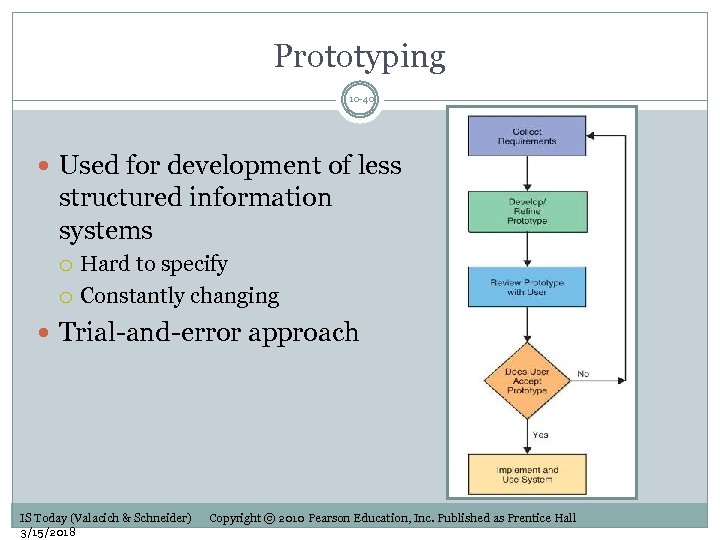 Prototyping 10 -40 Used for development of less structured information systems Hard to specify Constantly changing Trial-and-error approach IS Today (Valacich & Schneider) 3/15/2018 Copyright © 2010 Pearson Education, Inc. Published as Prentice Hall
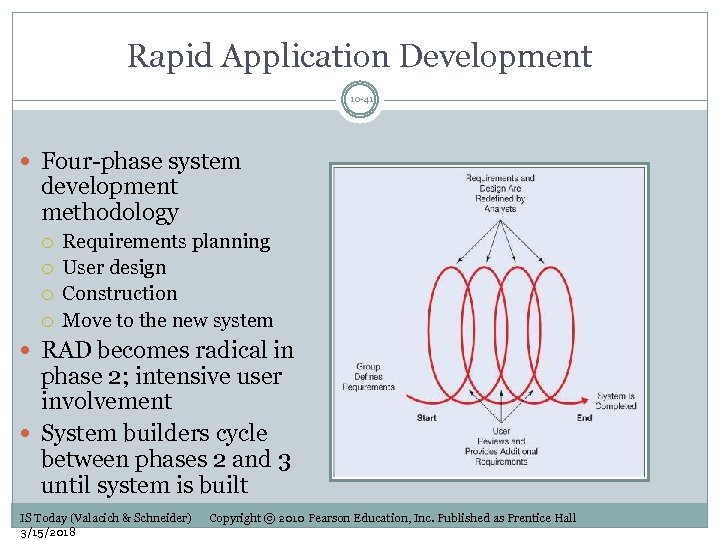 Rapid Application Development 10 -41 Four-phase system development methodology Requirements planning User design Construction Move to the new system RAD becomes radical in phase 2; intensive user involvement System builders cycle between phases 2 and 3 until system is built IS Today (Valacich & Schneider) 3/15/2018 Copyright © 2010 Pearson Education, Inc. Published as Prentice Hall
 Object-Oriented Analysis and Design (OOA&D) 10 -42 Development done in terms of common modules (objects) Combines: the “what” (data) with the “how” (operations to be performed) OOA&D diagrams help in integrating various aspects of the system Preexisting objects can be used or adapted Quick and simultaneous design and implementation of objects IS Today (Valacich & Schneider) 3/15/2018 Copyright © 2010 Pearson Education, Inc. Published as Prentice Hall
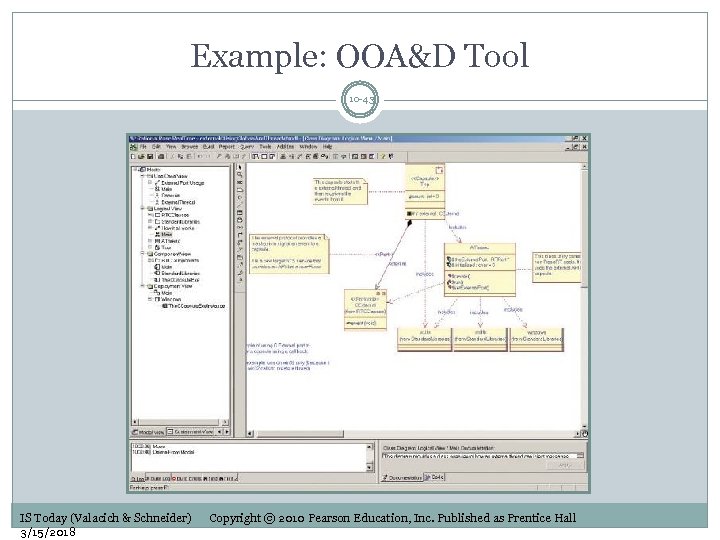 Example: OOA&D Tool 10 -43 IS Today (Valacich & Schneider) 3/15/2018 Copyright © 2010 Pearson Education, Inc. Published as Prentice Hall
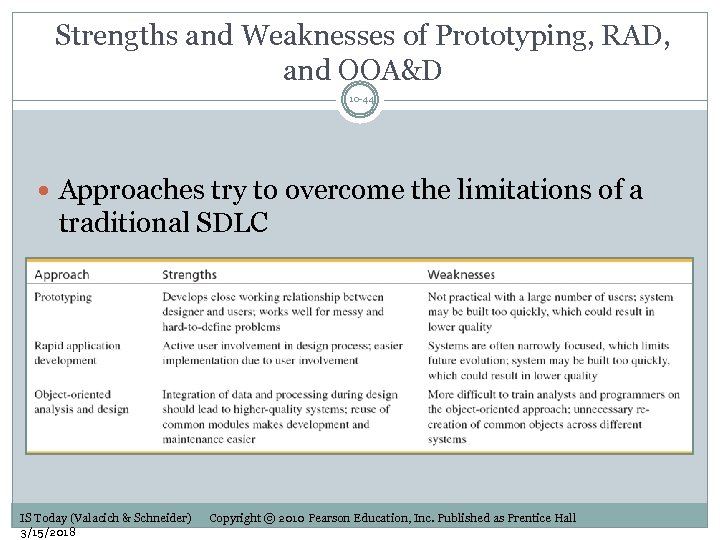 Strengths and Weaknesses of Prototyping, RAD, and OOA&D 10 -44 Approaches try to overcome the limitations of a traditional SDLC IS Today (Valacich & Schneider) 3/15/2018 Copyright © 2010 Pearson Education, Inc. Published as Prentice Hall
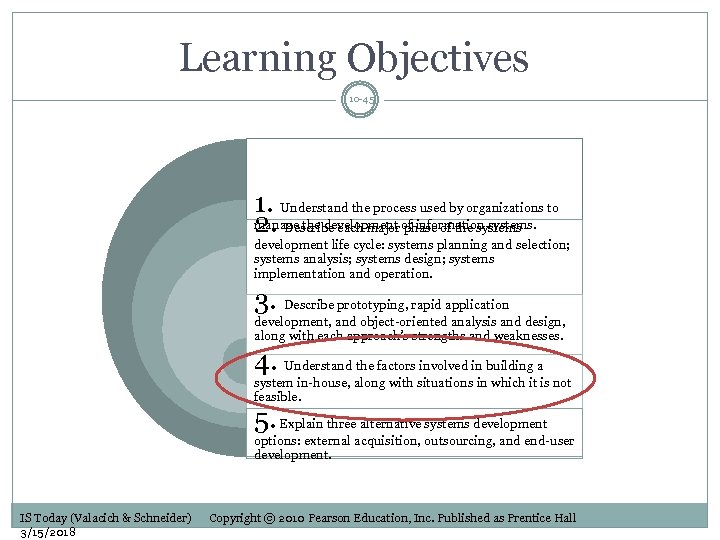 Learning Objectives 10 -45 1. Understand the process used by organizations to manage the development of information systems. 2. Describe each major phase of the systems development life cycle: systems planning and selection; systems analysis; systems design; systems implementation and operation. 3. Describe prototyping, rapid application development, and object-oriented analysis and design, along with each approach’s strengths and weaknesses. 4. Understand the factors involved in building a system in-house, along with situations in which it is not feasible. 5. Explain three alternative systems development options: external acquisition, outsourcing, and end-user development. IS Today (Valacich & Schneider) 3/15/2018 Copyright © 2010 Pearson Education, Inc. Published as Prentice Hall
 Need for Alternatives to Building Systems Yourself 10 -46 Building systems in-house is always an option, unless you are faced with: Situation 1: Limited IS staff Staff may be too small Staff may be occupied in other ways Staff not capable of developing the system without additional hiring Situation 2: IS staff has limited skill set Many organizations have outside groups manage their Web sites Take advantage of specialized skills IS Today (Valacich & Schneider) 3/15/2018 Copyright © 2010 Pearson Education, Inc. Published as Prentice Hall
 Situations When In-House Systems Development Does Not Work 10 -47 Situation 3: IS staff is overworked Staff does not have time to work on all required systems Situation 4: Problems with performance of IS staff Derailed IS departments Staff turnover Changing requirements Shifts in technology Budget constraints IS Today (Valacich & Schneider) 3/15/2018 Copyright © 2010 Pearson Education, Inc. Published as Prentice Hall
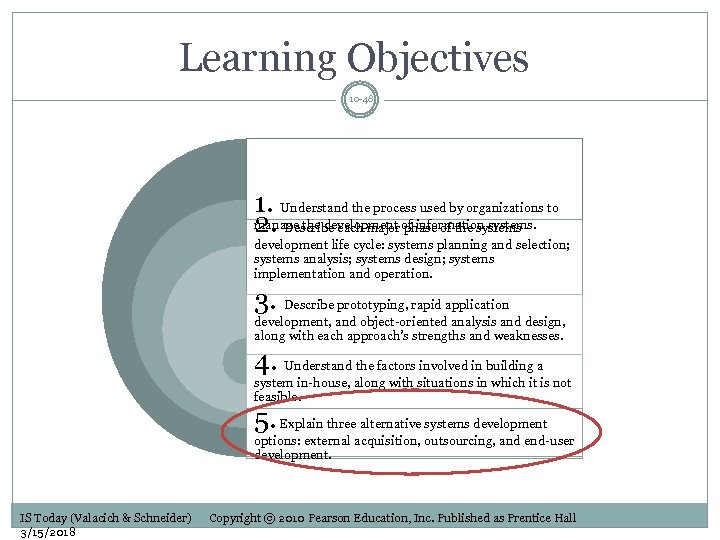 Learning Objectives 10 -48 1. Understand the process used by organizations to manage the development of information systems. 2. Describe each major phase of the systems development life cycle: systems planning and selection; systems analysis; systems design; systems implementation and operation. 3. Describe prototyping, rapid application development, and object-oriented analysis and design, along with each approach’s strengths and weaknesses. 4. Understand the factors involved in building a system in-house, along with situations in which it is not feasible. 5. Explain three alternative systems development options: external acquisition, outsourcing, and end-user development. IS Today (Valacich & Schneider) 3/15/2018 Copyright © 2010 Pearson Education, Inc. Published as Prentice Hall
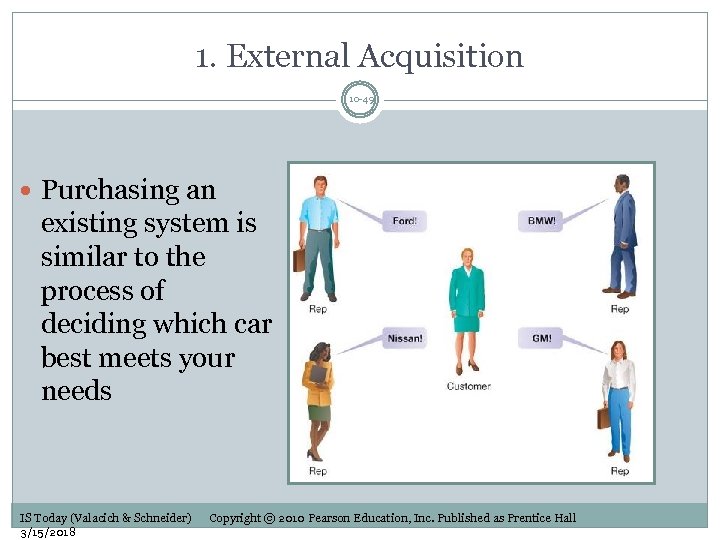 1. External Acquisition 10 -49 Purchasing an existing system is similar to the process of deciding which car best meets your needs IS Today (Valacich & Schneider) 3/15/2018 Copyright © 2010 Pearson Education, Inc. Published as Prentice Hall
 Steps in External Acquisition 10 -50 Competitive bid process (find the best system for lowest possible price) 1. 2. 3. 4. 5. Systems planning and selection Systems analysis Development of a request for proposal Proposal evaluation Vendor selection First two steps similar to SDLC IS Today (Valacich & Schneider) 3/15/2018 Copyright © 2010 Pearson Education, Inc. Published as Prentice Hall
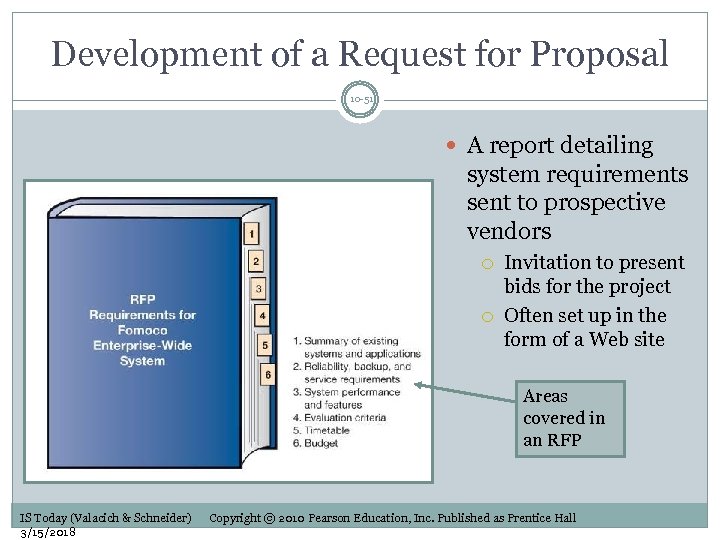 Development of a Request for Proposal 10 -51 A report detailing system requirements sent to prospective vendors Invitation to present bids for the project Often set up in the form of a Web site Areas covered in an RFP IS Today (Valacich & Schneider) 3/15/2018 Copyright © 2010 Pearson Education, Inc. Published as Prentice Hall
 Proposal Evaluation 10 -52 An assessment of proposals received from vendors May include system demonstrations System benchmarking Standardized tests to compare different proposed systems Common system benchmarks Response time given a specified number of users Time to sort records Time to retrieve a set of records Time to produce a given record Time to read in a set of data IS Today (Valacich & Schneider) 3/15/2018 Copyright © 2010 Pearson Education, Inc. Published as Prentice Hall
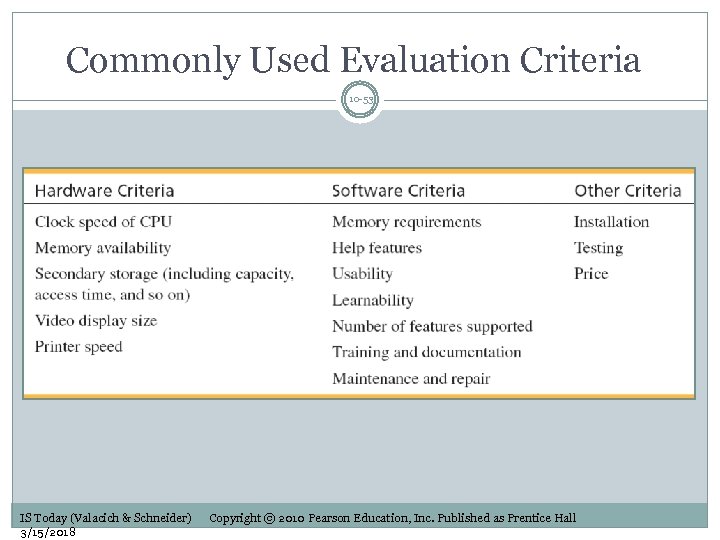 Commonly Used Evaluation Criteria 10 -53 IS Today (Valacich & Schneider) 3/15/2018 Copyright © 2010 Pearson Education, Inc. Published as Prentice Hall
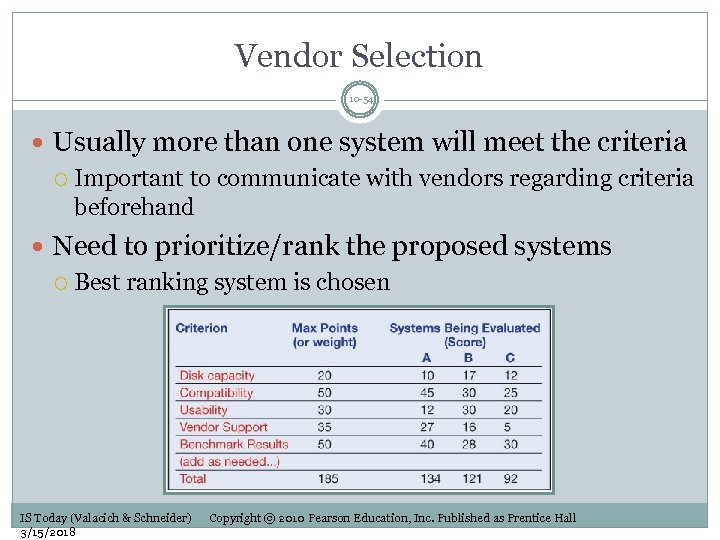 Vendor Selection 10 -54 Usually more than one system will meet the criteria Important to communicate with vendors regarding criteria beforehand Need to prioritize/rank the proposed systems Best ranking system is chosen IS Today (Valacich & Schneider) 3/15/2018 Copyright © 2010 Pearson Education, Inc. Published as Prentice Hall
 Managing Software Licenses 10 -55 Permissions and rights that are imposed on applications Legal and ethical implications of using unlicensed software Shrink-wrap licenses For generic off-the-shelf applications Click-wrap licenses for downloaded software Enterprise licenses Volume licenses Software asset management Helps organizations to better manage the software infrastructure and avoid legal problems IS Today (Valacich & Schneider) 3/15/2018 Copyright © 2010 Pearson Education, Inc. Published as Prentice Hall
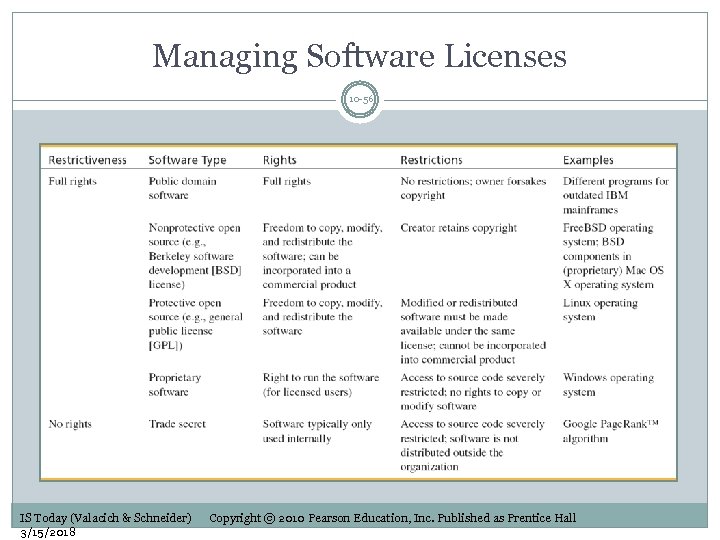 Managing Software Licenses 10 -56 IS Today (Valacich & Schneider) 3/15/2018 Copyright © 2010 Pearson Education, Inc. Published as Prentice Hall
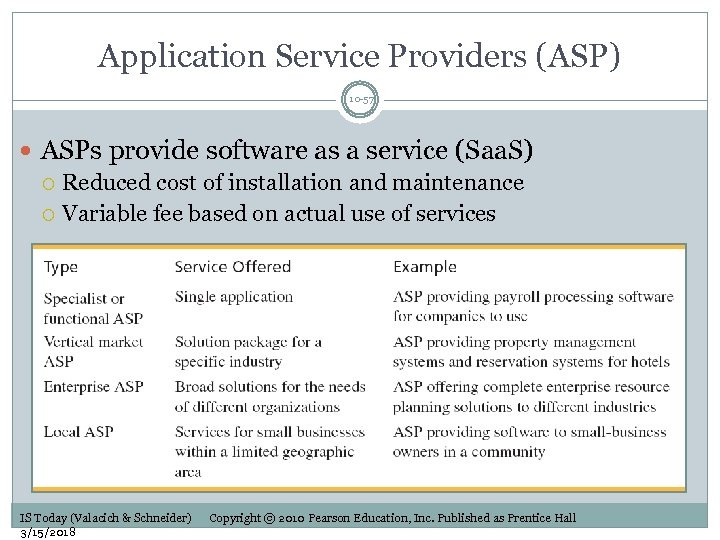 Application Service Providers (ASP) 10 -57 ASPs provide software as a service (Saa. S) Reduced cost of installation and maintenance Variable fee based on actual use of services IS Today (Valacich & Schneider) 3/15/2018 Copyright © 2010 Pearson Education, Inc. Published as Prentice Hall
 2. Outsourcing Systems Development 10 -58 Turning over responsibility for some or all of an organization’s IS development and operations to an outside firm Your IS solutions may be housed in their organization Your applications may be run on their computers They may develop systems to run on your existing computers (within your organization) IS Today (Valacich & Schneider) 3/15/2018 Copyright © 2010 Pearson Education, Inc. Published as Prentice Hall
 Why Outsourcing? 10 -59 Cost and quality concerns—higher quality or lower cost systems may be available through outsourcing Problems in IS performance—IS departments might have problems meeting acceptable standards Supplier pressure—aggressive sales force convinces senior management to outsource IS functions Simplifying, downsizing, and reengineering— focusing on core competencies IS Today (Valacich & Schneider) 3/15/2018 Copyright © 2010 Pearson Education, Inc. Published as Prentice Hall
 Why Outsourcing? (cont’d) 10 -60 Financial factors—liquidation of IT assets Organizational culture—external IS groups devoid of political ties Internal irritants—external IS group may be better accepted by other organizational users IS Today (Valacich & Schneider) 3/15/2018 Copyright © 2010 Pearson Education, Inc. Published as Prentice Hall
 Managing the IS Outsourcing Relationship 10 -61 Ongoing management of an outsourcing alliance needed 1. 2. 3. Strong, active CIO and staff Clear, realistic performance measurements of the system Multiple levels of interface between customer and outsourcer Full-time relationship managers should be assigned IS Today (Valacich & Schneider) 3/15/2018 Copyright © 2010 Pearson Education, Inc. Published as Prentice Hall
 Not All Outsourcing Relationships Are the Same 10 -62 Outsourcing relationships No longer just a legal contract Different types of outsourcing relationships Basic relationship—“Cash & Carry” Preferred relationship—Set preferential pricing Strategic relationship—Share risks/rewards IS Today (Valacich & Schneider) 3/15/2018 Copyright © 2010 Pearson Education, Inc. Published as Prentice Hall
 3. End-User Development 10 -63 Growing sophistication of users Actual future users of the system are the system’s developers Application development may be faster No need to rely on external entities IS Today (Valacich & Schneider) 3/15/2018 Copyright © 2010 Pearson Education, Inc. Published as Prentice Hall
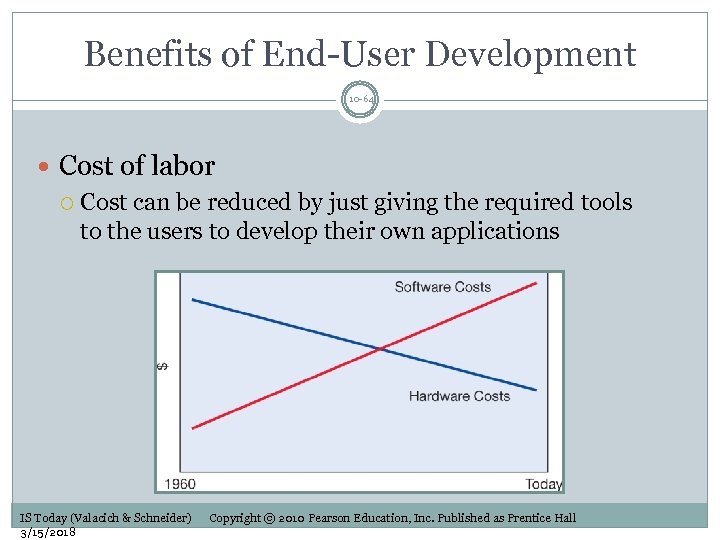 Benefits of End-User Development 10 -64 Cost of labor Cost can be reduced by just giving the required tools to the users to develop their own applications IS Today (Valacich & Schneider) 3/15/2018 Copyright © 2010 Pearson Education, Inc. Published as Prentice Hall
 Benefits of End-User Development (cont’d) 10 -65 Long development time User needs may change between the request for proposals and implementation of system System becomes obsolete before implementation End-user development may “skip” the queue Provide more timely systems IS Today (Valacich & Schneider) 3/15/2018 Copyright © 2010 Pearson Education, Inc. Published as Prentice Hall
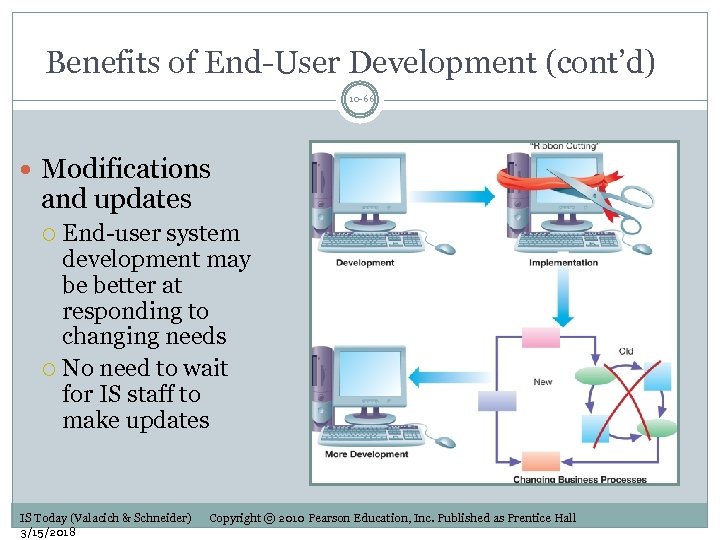 Benefits of End-User Development (cont’d) 10 -66 Modifications and updates End-user system development may be better at responding to changing needs No need to wait for IS staff to make updates IS Today (Valacich & Schneider) 3/15/2018 Copyright © 2010 Pearson Education, Inc. Published as Prentice Hall
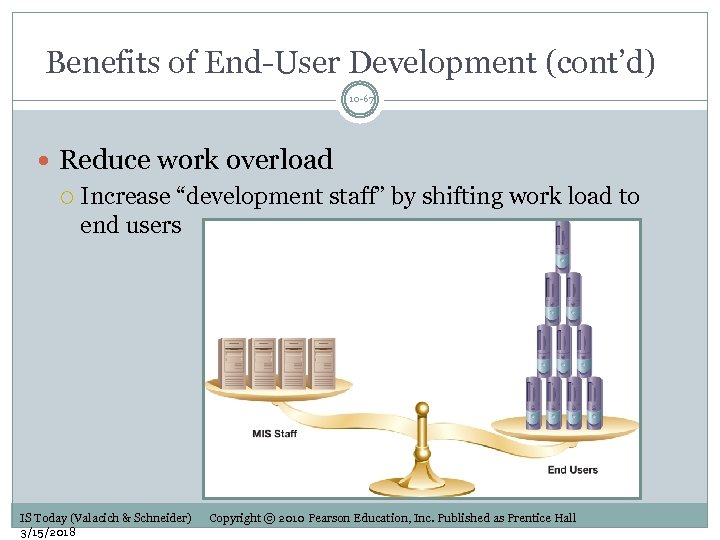 Benefits of End-User Development (cont’d) 10 -67 Reduce work overload Increase “development staff” by shifting work load to end users IS Today (Valacich & Schneider) 3/15/2018 Copyright © 2010 Pearson Education, Inc. Published as Prentice Hall
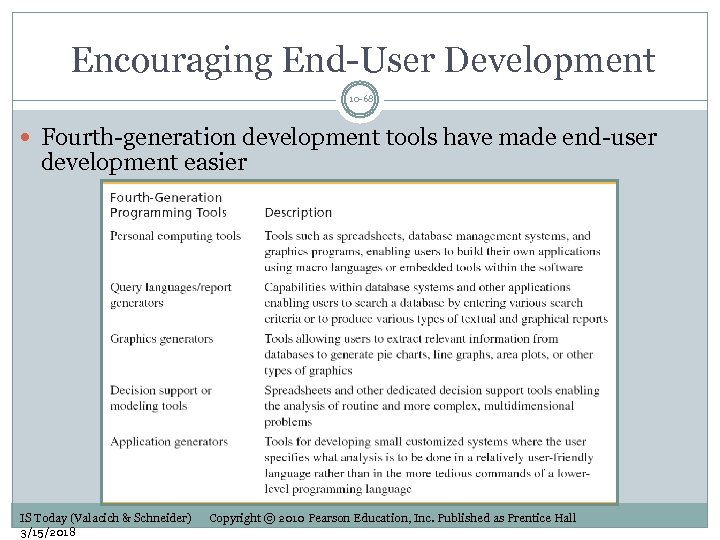 Encouraging End-User Development 10 -68 Fourth-generation development tools have made end-user development easier IS Today (Valacich & Schneider) 3/15/2018 Copyright © 2010 Pearson Education, Inc. Published as Prentice Hall
 End-User Development Pitfalls 10 -69 Users may not be aware of software development standards Need for adequate documentation Error checking Testing procedures Lack of continuity End user “developer” may leave the organization Development efforts duplicated across organizations Loss of employees’ productivity for other tasks Should salespeople develop applications? Information center (IC) Can provide oversight over end-user development projects Provide training in standards Prevent redundancy IS Today (Valacich & Schneider) 3/15/2018 Copyright © 2010 Pearson Education, Inc. Published as Prentice Hall
 End of Chapter Content 10 -70 IS Today (Valacich & Schneider) 3/15/2018 Copyright © 2010 Pearson Education, Inc. Published as Prentice Hall
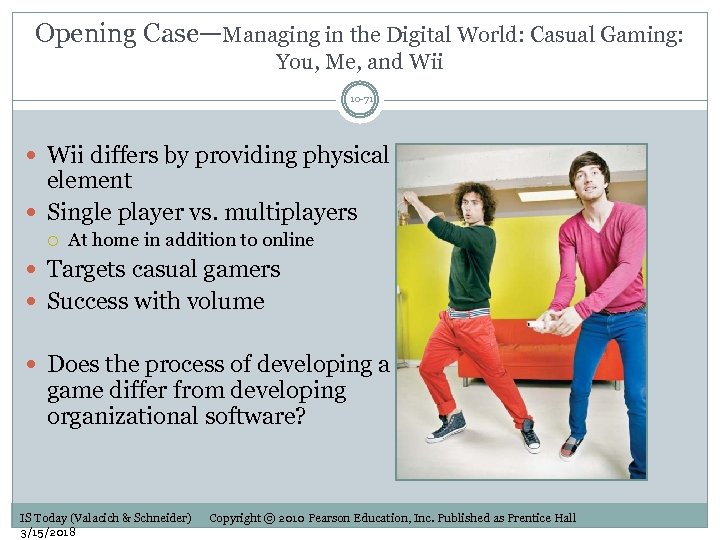 Opening Case—Managing in the Digital World: Casual Gaming: You, Me, and Wii 10 -71 Wii differs by providing physical element Single player vs. multiplayers At home in addition to online Targets casual gamers Success with volume Does the process of developing a game differ from developing organizational software? IS Today (Valacich & Schneider) 3/15/2018 Copyright © 2010 Pearson Education, Inc. Published as Prentice Hall
 Microsoft’s Surface 10 -72 Technology shown on CSI Miami Users grab data with fingers Natural gestures Touch Place objects on screen to get information about them Cell phones MP 3 players IS Today (Valacich & Schneider) 3/15/2018 Copyright © 2010 Pearson Education, Inc. Published as Prentice Hall
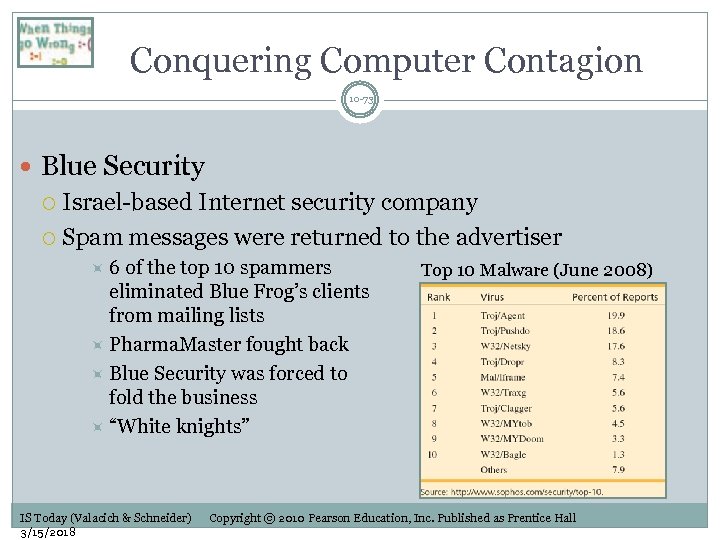 Conquering Computer Contagion 10 -73 Blue Security Israel-based Internet security company Spam messages were returned to the advertiser 6 of the top 10 spammers eliminated Blue Frog’s clients from mailing lists Pharma. Master fought back Blue Security was forced to fold the business “White knights” IS Today (Valacich & Schneider) 3/15/2018 Top 10 Malware (June 2008) Copyright © 2010 Pearson Education, Inc. Published as Prentice Hall
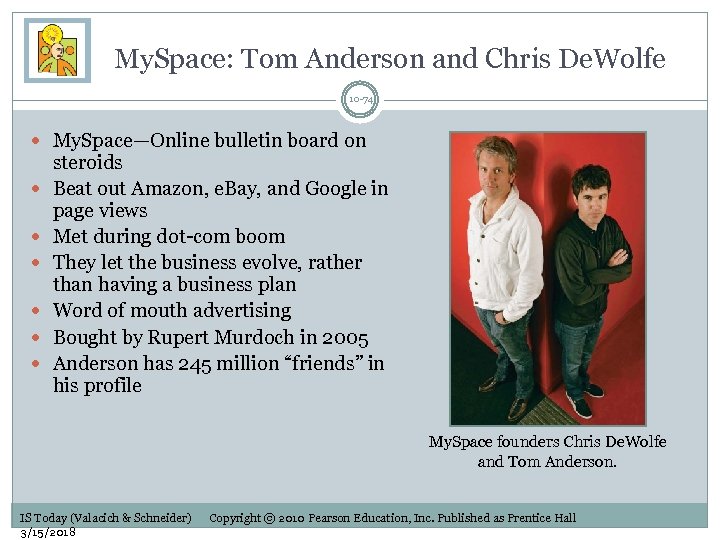 My. Space: Tom Anderson and Chris De. Wolfe 10 -74 My. Space—Online bulletin board on steroids Beat out Amazon, e. Bay, and Google in page views Met during dot-com boom They let the business evolve, rather than having a business plan Word of mouth advertising Bought by Rupert Murdoch in 2005 Anderson has 245 million “friends” in his profile My. Space founders Chris De. Wolfe and Tom Anderson. IS Today (Valacich & Schneider) 3/15/2018 Copyright © 2010 Pearson Education, Inc. Published as Prentice Hall
 Hackers, Patches, and Reverse Engineering 10 -75 Hackers Break into computer systems to steal or manipulate data Look for security holes Study applications until they discover a hole Follow other hackers’ guidelines Reverse engineer patches Patches Released by software producers Plug security holes How can you deter hackers from reverse engineering patches? IS Today (Valacich & Schneider) 3/15/2018 Copyright © 2010 Pearson Education, Inc. Published as Prentice Hall
 Adopting New Technology 10 -76 Tech industry needs consumers to adopt new technology Users like to stick with what they know 9 million AOL dial-up users By 2008, Vista only had 3 percent of OS market IT directors need to follow organization’s tolerance for risk High risk—Adopt new technology Low risk—Stick with what organization is using IS Today (Valacich & Schneider) 3/15/2018 Copyright © 2010 Pearson Education, Inc. Published as Prentice Hall
 Genetic Testing 10 -77 Discrimination based on genetic make-up? 1990—Study showed that roughly 50 percent of people had experienced genetic discrimination Health insurance companies Blood banks Adoption agencies 2008—Genetic Information Nondiscrimination Act IS Today (Valacich & Schneider) 3/15/2018 Copyright © 2010 Pearson Education, Inc. Published as Prentice Hall
 Broadcasting 10 -78 TV news and Radio have benefited from Internet News features can be quickly transmitted over the Internet Closer connection between newsroom and “action” on the field However Many viewers prefer to obtain news via Internet Viewers’ shortening attention spans Requires change of revenue models Advertisers are less willing to pay high fees for TV advertising Internet offers more targeted advertising TV stations can tie advertising to online shows How can TV and radio stations survive the next decade? IS Today (Valacich & Schneider) 3/15/2018 Copyright © 2010 Pearson Education, Inc. Published as Prentice Hall