 Скачать презентацию Chapter 1 The Database Environment Prentice Hall
021e30ffdd3fd52c378eb8758cef63f4.ppt
- Количество слайдов: 53



Chapter 1: The Database Environment © Prentice Hall 1
Objectives n n n n Definition of terms Explain growth and importance of databases Name limitations of conventional file processing Identify five categories of databases Explain advantages of databases Identify costs and risks of databases List components of database environment Describe evolution of database systems Chapter 1 & 2 © Prentice Hall 2
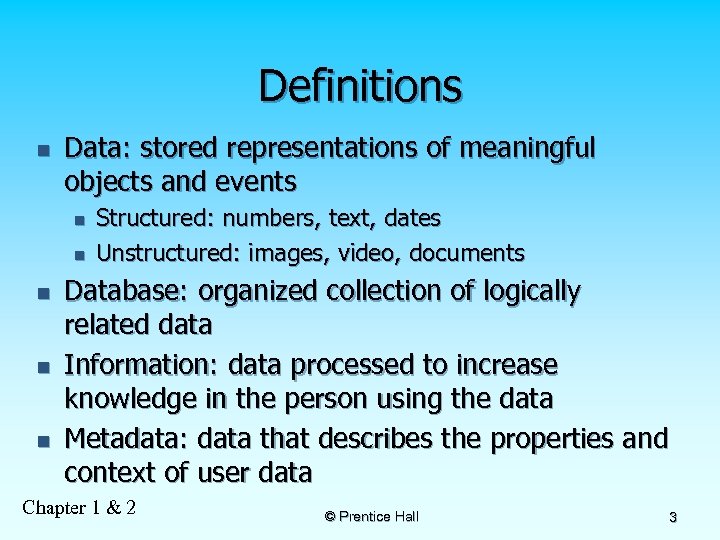
Definitions n Data: stored representations of meaningful objects and events n n n Structured: numbers, text, dates Unstructured: images, video, documents Database: organized collection of logically related data Information: data processed to increase knowledge in the person using the data Metadata: data that describes the properties and context of user data Chapter 1 & 2 © Prentice Hall 3
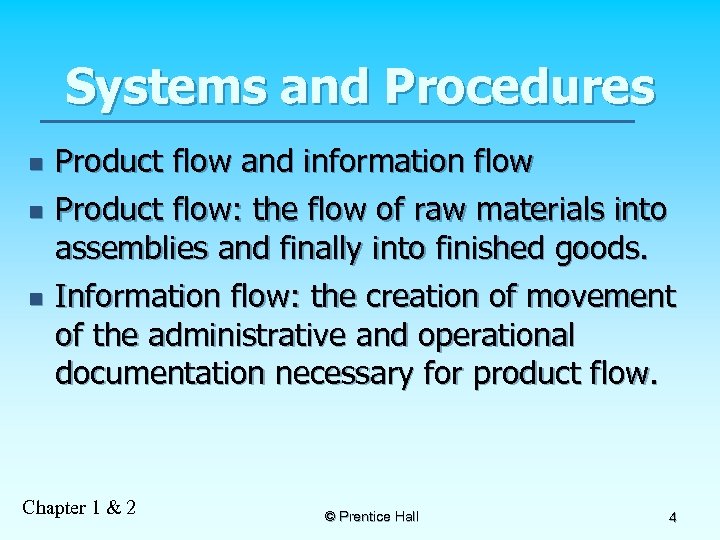
Systems and Procedures n n n Product flow and information flow Product flow: the flow of raw materials into assemblies and finally into finished goods. Information flow: the creation of movement of the administrative and operational documentation necessary for product flow. Chapter 1 & 2 © Prentice Hall 4
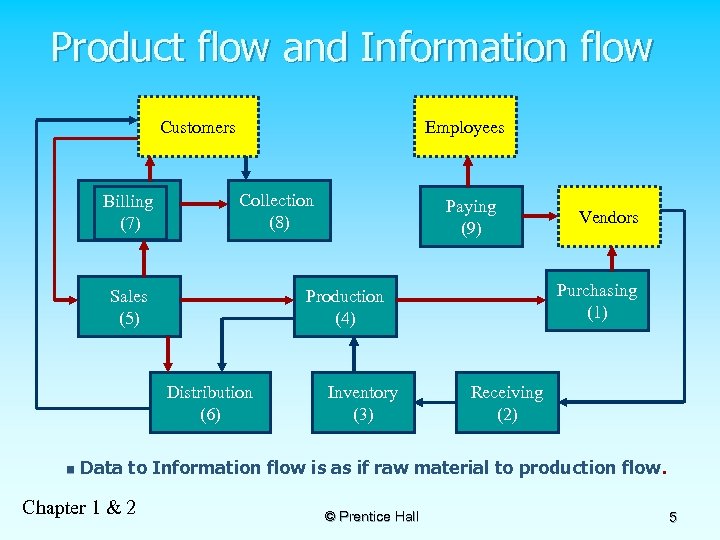
Product flow and Information flow Customers Billing (7) Employees Collection (8) Sales (5) Inventory (3) Vendors Purchasing (1) Production (4) Distribution (6) n Paying (9) Receiving (2) Data to Information flow is as if raw material to production flow. Chapter 1 & 2 © Prentice Hall 5
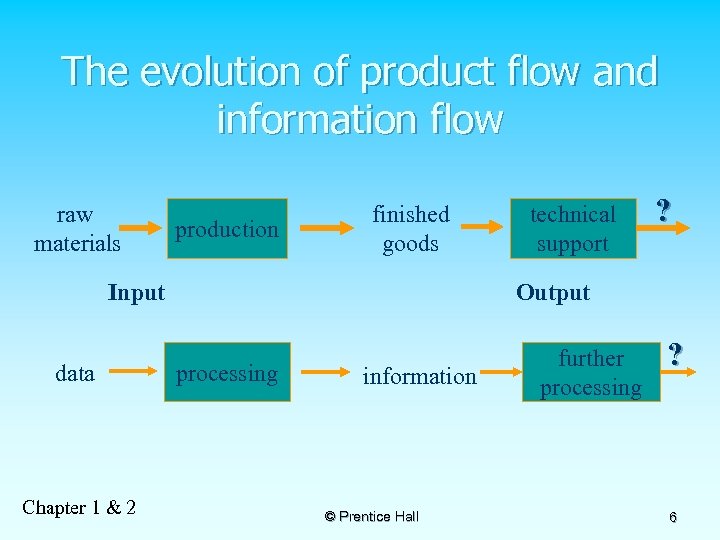
The evolution of product flow and information flow raw materials production finished goods Input data Chapter 1 & 2 technical support ? Output processing information © Prentice Hall further processing ? 6
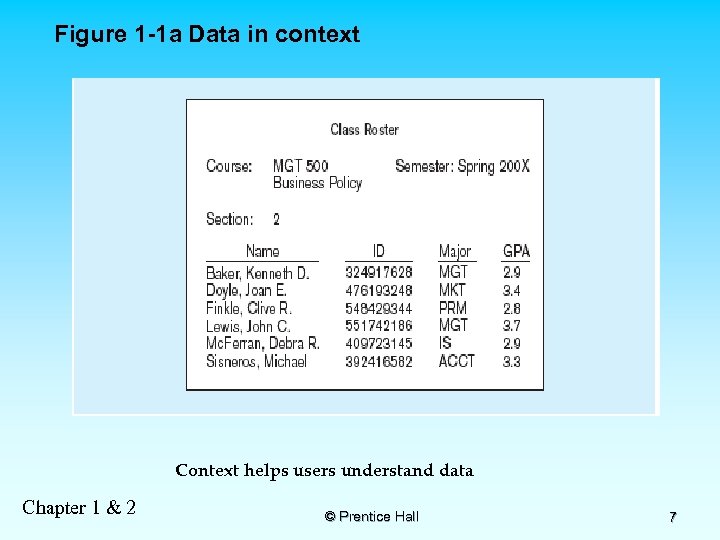
Figure 1 -1 a Data in context Context helps users understand data Chapter 1 & 2 © Prentice Hall 7
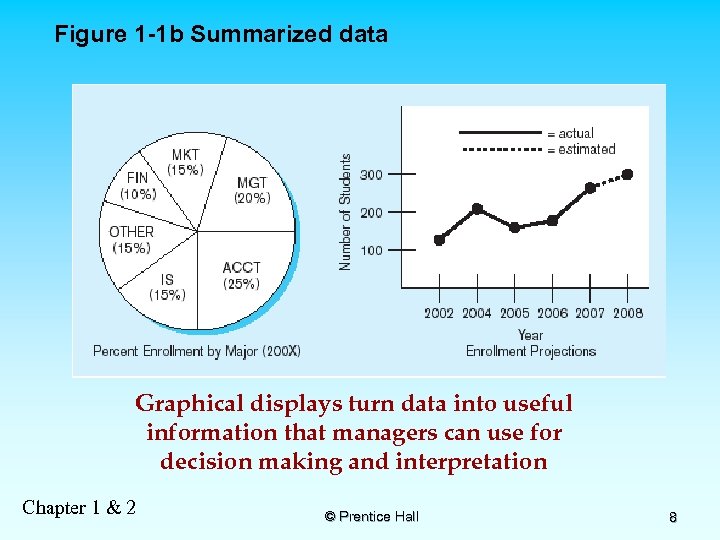
Figure 1 -1 b Summarized data Graphical displays turn data into useful information that managers can use for decision making and interpretation Chapter 1 & 2 © Prentice Hall 8
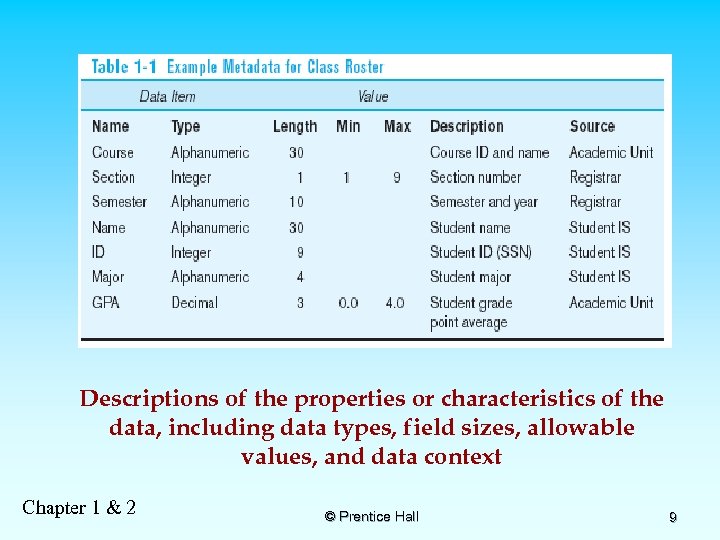
Descriptions of the properties or characteristics of the data, including data types, field sizes, allowable values, and data context Chapter 1 & 2 © Prentice Hall 9
Disadvantages of File Processing n Program-Data Dependence n n Duplication of Data n n No centralized control of data Lengthy Development Times n n Different systems/programs have separate copies of the same data Limited Data Sharing n n All programs maintain metadata for each file they use Programmers must design their own file formats Excessive Program Maintenance n 80% of information systems budget Chapter 1 & 2 © Prentice Hall 10
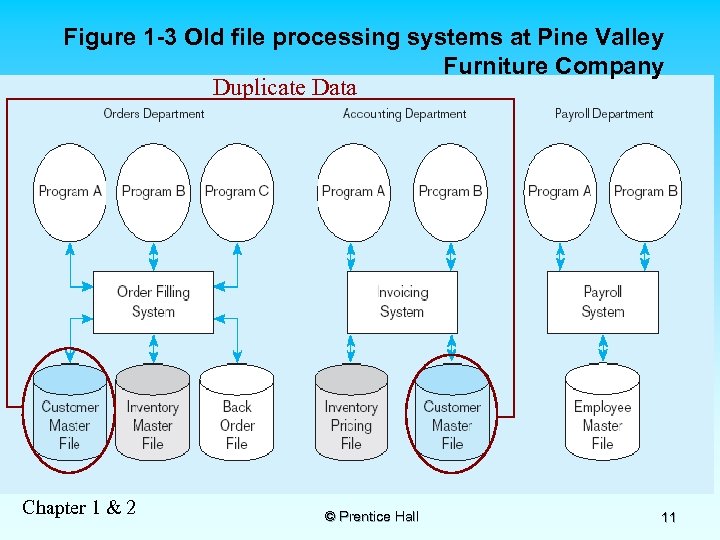
Figure 1 -3 Old file processing systems at Pine Valley Furniture Company Duplicate Data Chapter 1 & 2 © Prentice Hall 11
Problems with Program Data Dependency n n n Each application programmer must maintain his/her own data Each application program needs to include code for the metadata of each file Each application program must have its own processing routines for database operations: reading, inserting, updating, and deleting data Lack of coordination and central control Non-standard file formats Chapter 1 & 2 © Prentice Hall 12
Problems with Data Redundancy Waste of space to have duplicate data n Causes more maintenance headaches n The biggest problem: n n Data changes in one file could cause inconsistencies n Compromises in data integrity Chapter 1 & 2 © Prentice Hall 13
SOLUTION: The DATABASE Approach Central repository of shared data n Data is managed by a controlling agent n Stored in a standardized, convenient form n Requires a Database Management System (DBMS) Chapter 1 & 2 © Prentice Hall 14
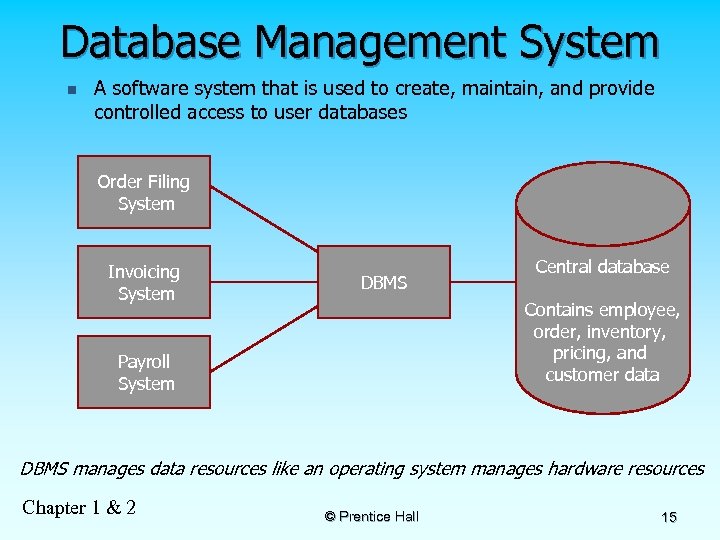
Database Management System n A software system that is used to create, maintain, and provide controlled access to user databases Order Filing System Invoicing System DBMS Central database Contains employee, order, inventory, pricing, and customer data Payroll System DBMS manages data resources like an operating system manages hardware resources Chapter 1 & 2 © Prentice Hall 15
Advantages of the Database Approach n n n n n Program-data independence (PI) Planned (minimal) data redundancy (DR) Improved data consistency Improved data sharing Increased application development productivity Enforcement of standards Improved data quality Improved data accessibility and responsiveness Reduced program maintenance Improved decision support Chapter 1 & 2 © Prentice Hall 16
Costs and Risks of the Database Approach n n n New, specialized personnel Installation and management cost and complexity Conversion costs Need for explicit backup and recovery Organizational conflict Chapter 1 & 2 © Prentice Hall 17
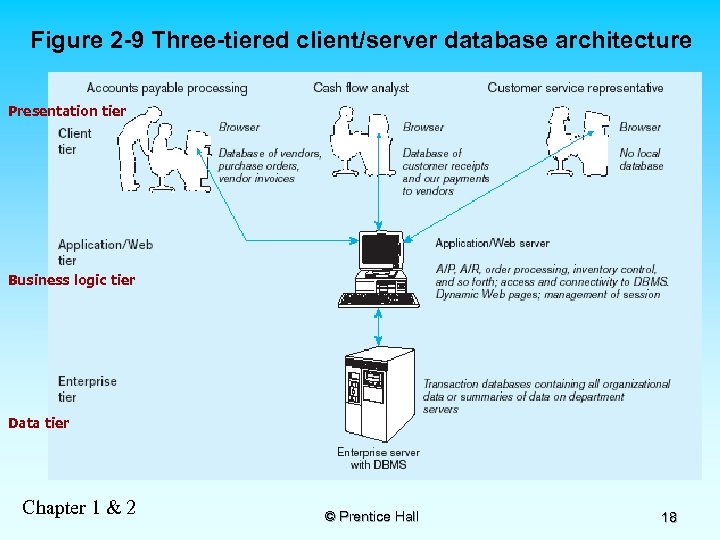
Figure 2 -9 Three-tiered client/server database architecture Presentation tier Business logic tier Data tier Chapter 1 & 2 © Prentice Hall 18
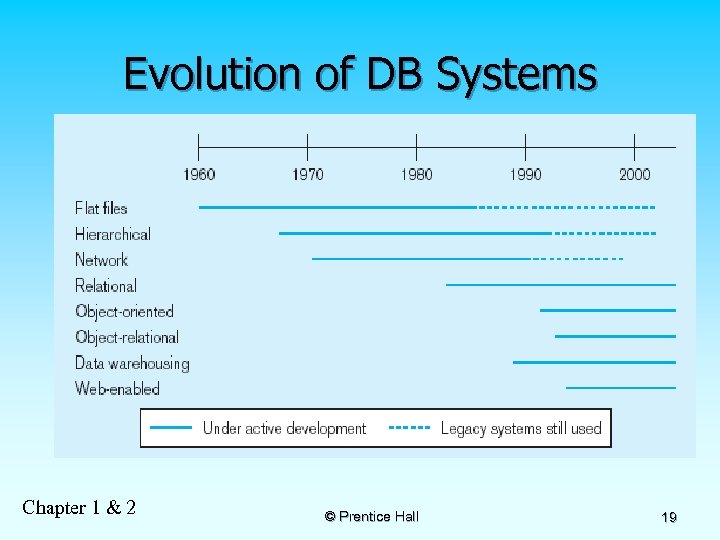
Evolution of DB Systems Chapter 1 & 2 © Prentice Hall 19
Chapter 2: The Database Development Process © Prentice Hall 20
Objectives n n n n n Definition of terms Describe system development life cycle Explain prototyping approach Explain roles of individuals Explain three-schema approach Explain role of packaged data models Explain three-tiered architectures Explain scope of database design projects Draw simple data models Chapter 1 & 2 © Prentice Hall 21
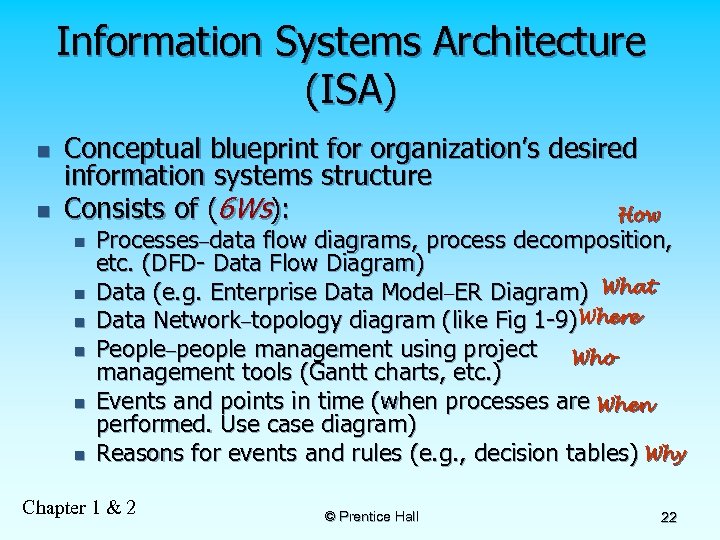
Information Systems Architecture (ISA) n n Conceptual blueprint for organization’s desired information systems structure Consists of (6 Ws): How n n n Processes–data flow diagrams, process decomposition, etc. (DFD- Data Flow Diagram) Data (e. g. Enterprise Data Model–ER Diagram) What Data Network–topology diagram (like Fig 1 -9)Where People–people management using project Who management tools (Gantt charts, etc. ) Events and points in time (when processes are When performed. Use case diagram) Reasons for events and rules (e. g. , decision tables) Why Chapter 1 & 2 © Prentice Hall 22
Data Flow Diagrams n n Data flow diagrams (DFDs) are graphical aids that describe an information system Advantages: freedom from committing to the technical implementation of the system too early. n Further understanding the interrelatedness of systems and subsystems. n communicating current system knowledge to users. n Chapter 1 & 2 © Prentice Hall 23
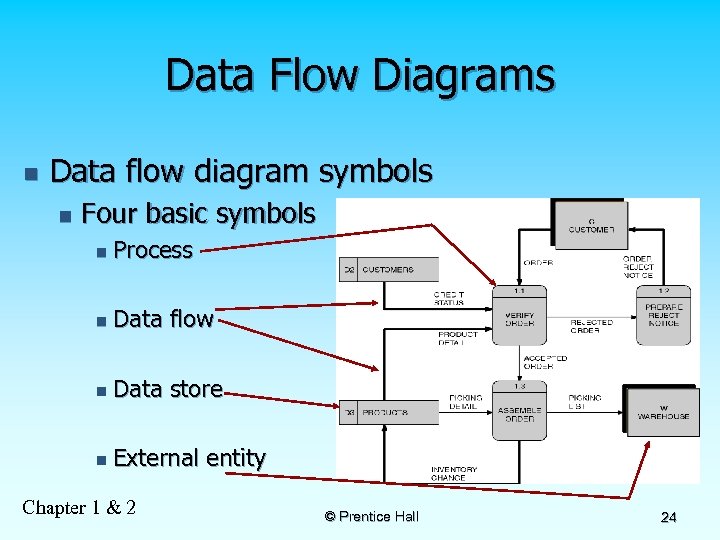
Data Flow Diagrams n Data flow diagram symbols n Four basic symbols n Process n Data flow n Data store n External entity Chapter 1 & 2 © Prentice Hall 24
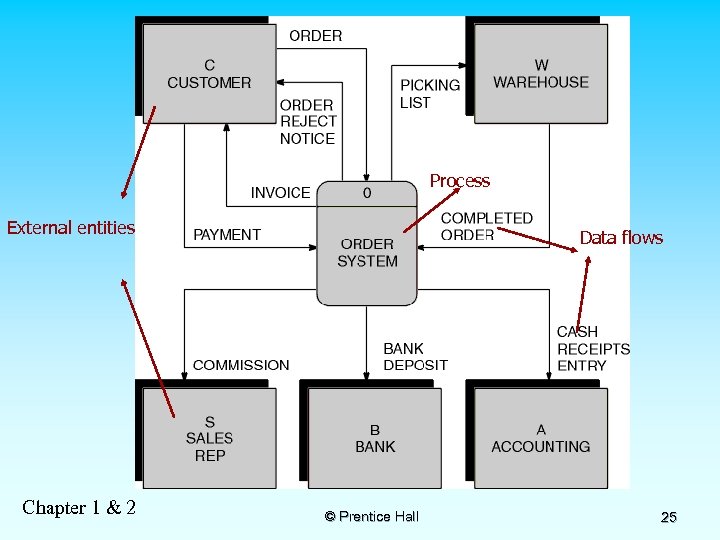
Process External entities Chapter 1 & 2 Data flows © Prentice Hall 25
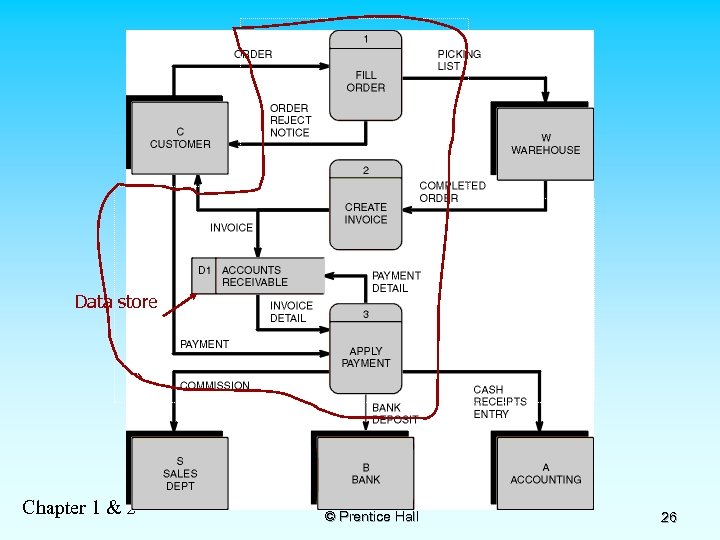
Data store Chapter 1 & 2 © Prentice Hall 26
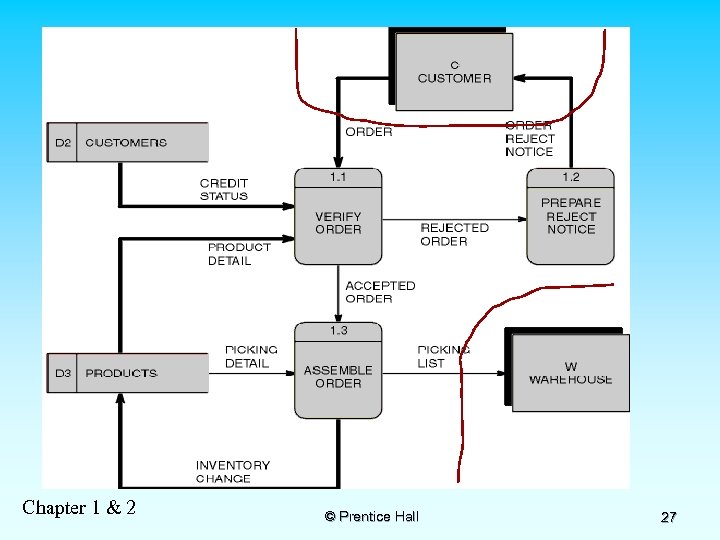
Chapter 1 & 2 © Prentice Hall 27
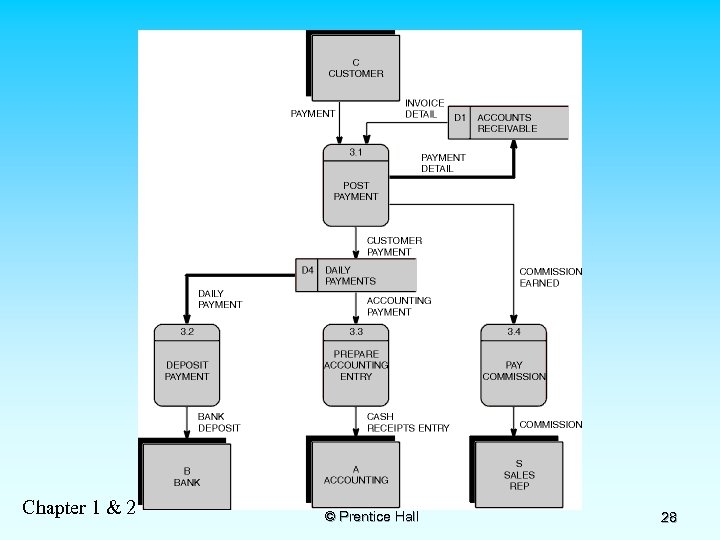
Chapter 1 & 2 © Prentice Hall 28
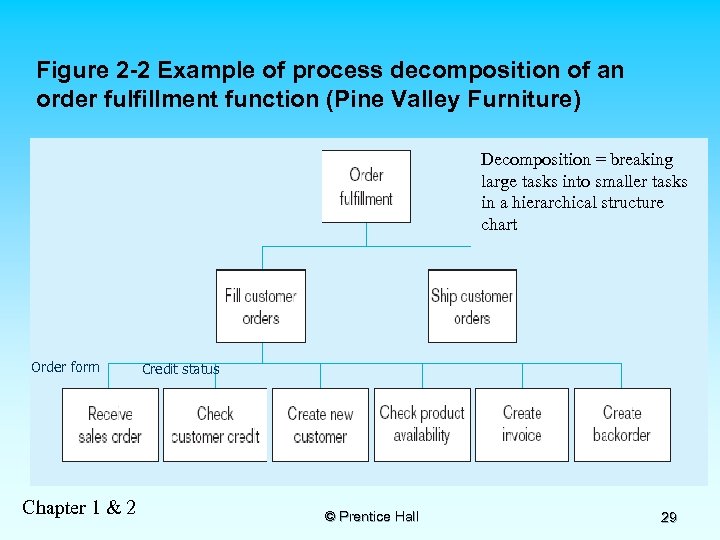
Figure 2 -2 Example of process decomposition of an order fulfillment function (Pine Valley Furniture) Decomposition = breaking large tasks into smaller tasks in a hierarchical structure chart Order form Chapter 1 & 2 Credit status © Prentice Hall 29
Information Systems Architecture (ISA) n n Conceptual blueprint for organization’s desired information systems structure Consists of (6 Ws): How n n n Processes–data flow diagrams, process decomposition, etc. (DFD- Data Flow Diagram) Data (e. g. Enterprise Data Model–ER Diagram) What Data Network–topology diagram (like Fig 1 -9)Where People–people management using project Who management tools (Gantt charts, etc. ) Events and points in time (when processes are When performed. Use case diagram) Reasons for events and rules (e. g. , decision tables) Why Chapter 1 & 2 © Prentice Hall 30
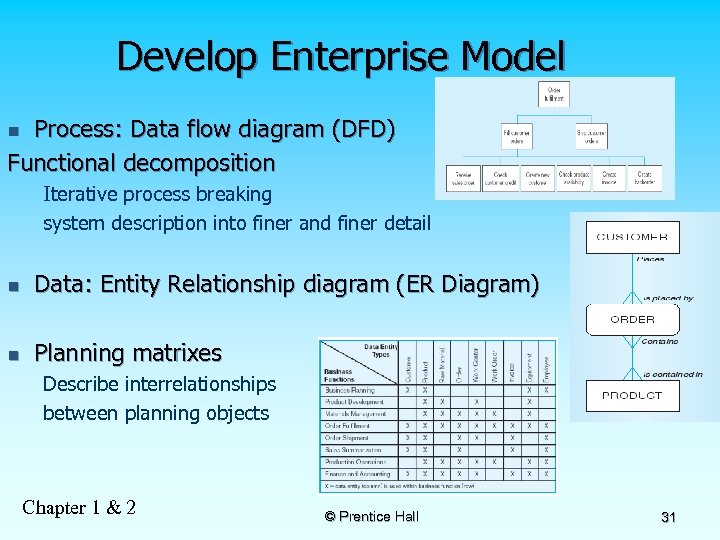
Develop Enterprise Model Process: Data flow diagram (DFD) Functional decomposition n Iterative process breaking system description into finer and finer detail n Data: Entity Relationship diagram (ER Diagram) n Planning matrixes Describe interrelationships between planning objects Chapter 1 & 2 © Prentice Hall 31
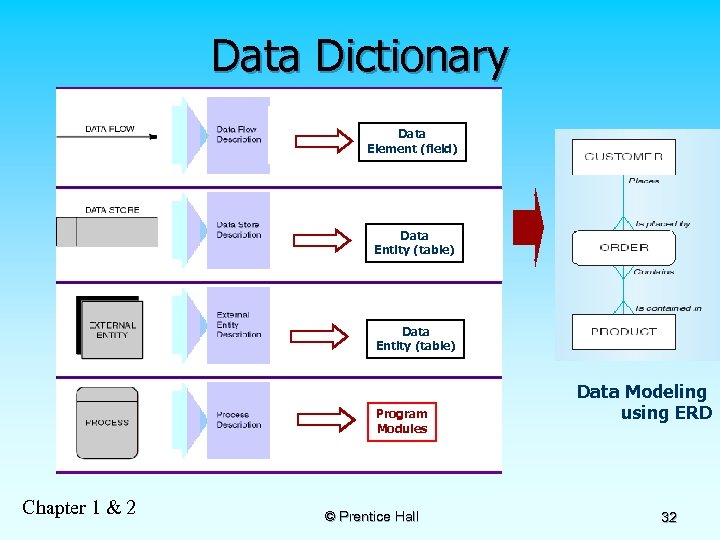
Data Dictionary Data Element (field) Data Entity (table) Program Modules Chapter 1 & 2 © Prentice Hall Data Modeling using ERD 32
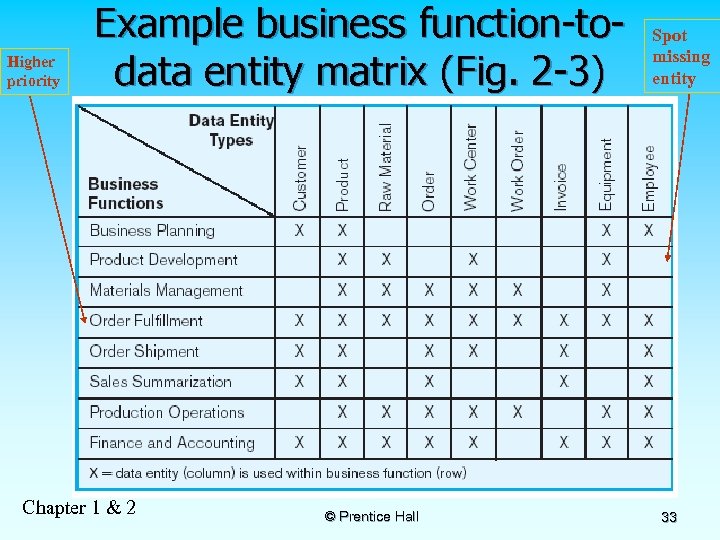
Higher priority Example business function-todata entity matrix (Fig. 2 -3) Chapter 1 & 2 © Prentice Hall Spot missing entity 33
Planning Matrixes n n Describe relationships between planning objects in the organization Types of matrixes: Function-to-data entity n Location-to-function n Unit-to-function n IS-to-data entity n Supporting function-to-data entity n IS-to-business objective n Chapter 1 & 2 © Prentice Hall 34
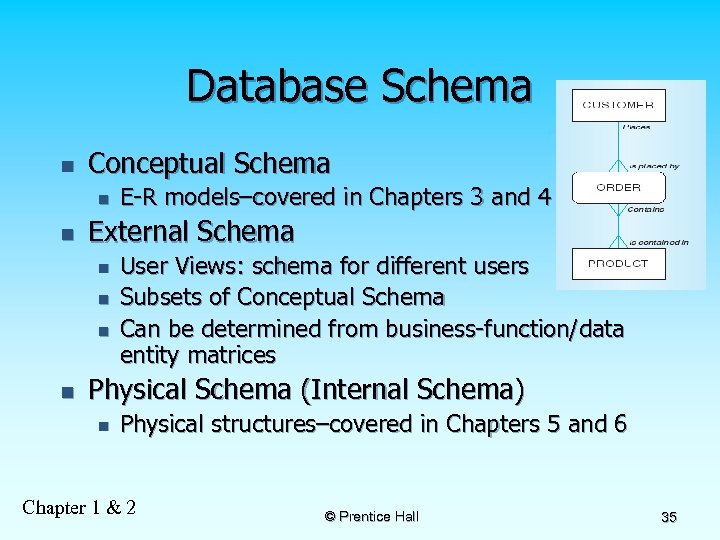
Database Schema n Conceptual Schema n n External Schema n n E-R models–covered in Chapters 3 and 4 User Views: schema for different users Subsets of Conceptual Schema Can be determined from business-function/data entity matrices Physical Schema (Internal Schema) n Physical structures–covered in Chapters 5 and 6 Chapter 1 & 2 © Prentice Hall 35
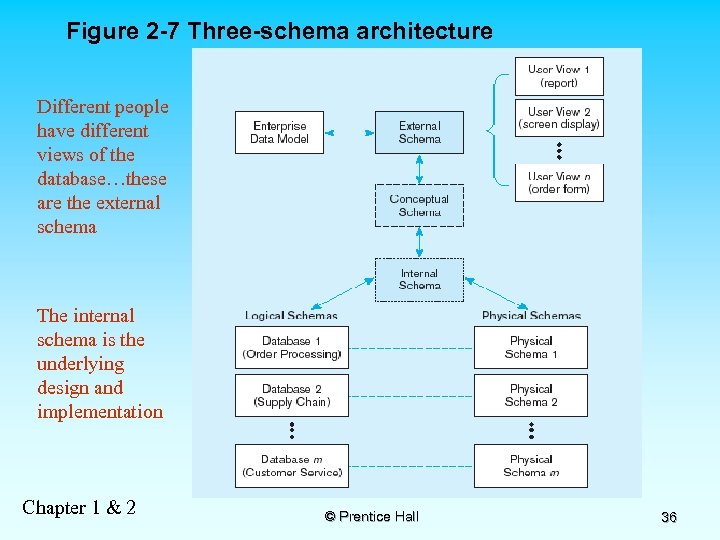
Figure 2 -7 Three-schema architecture Different people have different views of the database…these are the external schema The internal schema is the underlying design and implementation Chapter 1 & 2 © Prentice Hall 36
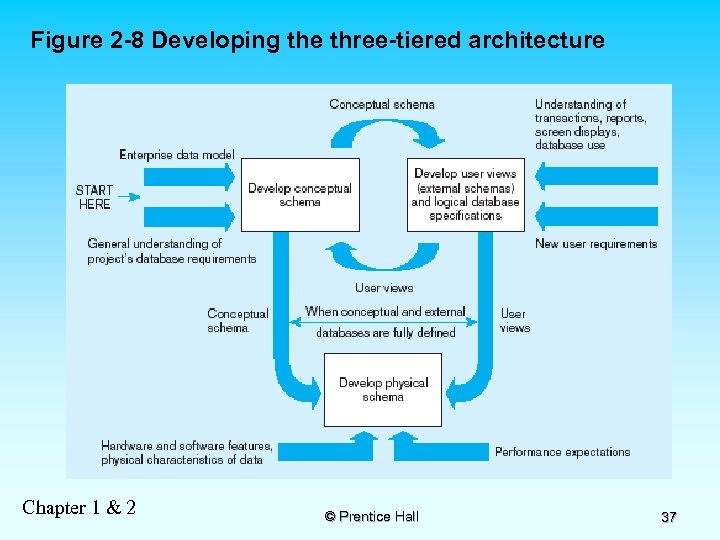
Figure 2 -8 Developing the three-tiered architecture Chapter 1 & 2 © Prentice Hall 37
Information Engineering n n Top-down planning–a generic IS planning methodology for obtaining a broad understanding of the IS needed by the entire organization Four steps to Top-Down planning: n n Planning Analysis Design Implementation Chapter 1 & 2 © Prentice Hall 38
Two Approaches to Database and IS Development n SDLC n n n System Development Life Cycle Detailed, well-planned development process Time-consuming, but comprehensive Long development cycle Prototyping n n Rapid application development (RAD) Cursory attempt at conceptual data modeling Define database during development of initial prototype Repeat implementation and maintenance activities with new prototype versions Chapter 1 & 2 © Prentice Hall 39
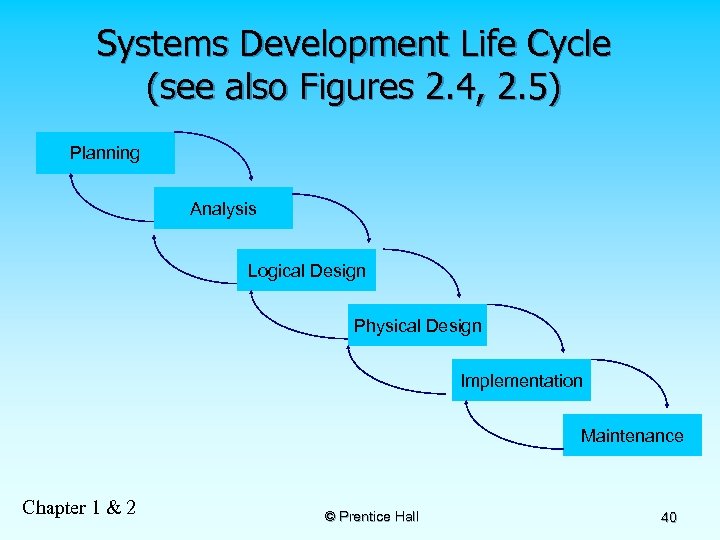
Systems Development Life Cycle (see also Figures 2. 4, 2. 5) Planning Analysis Logical Design Physical Design Implementation Maintenance Chapter 1 & 2 © Prentice Hall 40
Systems Development Life Cycle à Systems planning à Purpose – identify problem’s nature/scope à Systems request – begins the process & describes desired changes/improvements à Systems planning – includes preliminary investigation or feasibility study à End product – preliminary investigation report Chapter 1 & 2 © Prentice Hall 41
Systems Development Life Cycle à Systems analysis à Purpose is to learn exactly how the current system operates or determine what systems should do. à Fact-finding or requirements determination is used to define all functions of the current system Chapter 1 & 2 © Prentice Hall 42
Systems Development Life Cycle à Options à Develop a system in-house à Purchase a commercial package à Modify an existing system à Stop development à The end product for this phase is the systems requirements document Chapter 1 & 2 © Prentice Hall 43
Systems Development Life Cycle à Systems design à Purpose is to satisfy all documented requirements à identify what and how the system must do. à Identify all outputs, inputs, files, manual procedures, & application programs à user interface design, files organization and database design à Avoid misunderstanding through manager and user involvement à End product is system design specification Chapter 1 & 2 © Prentice Hall 44
Systems Development Life Cycle à Systems implementation àConstruct/deliver information system àPrepares functioning, documented system àWrite, test, document application programs àUser and manager approval obtained àFile conversion occurs àUsers, managers, IS staff trained to operate and support the system àPost-implementation evaluation performed Chapter 1 & 2 © Prentice Hall 45
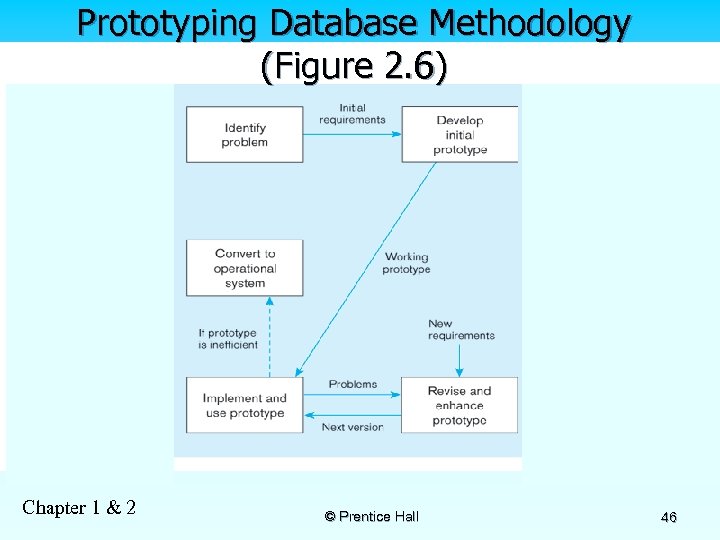
Prototyping Database Methodology (Figure 2. 6) Chapter 1 & 2 © Prentice Hall 46
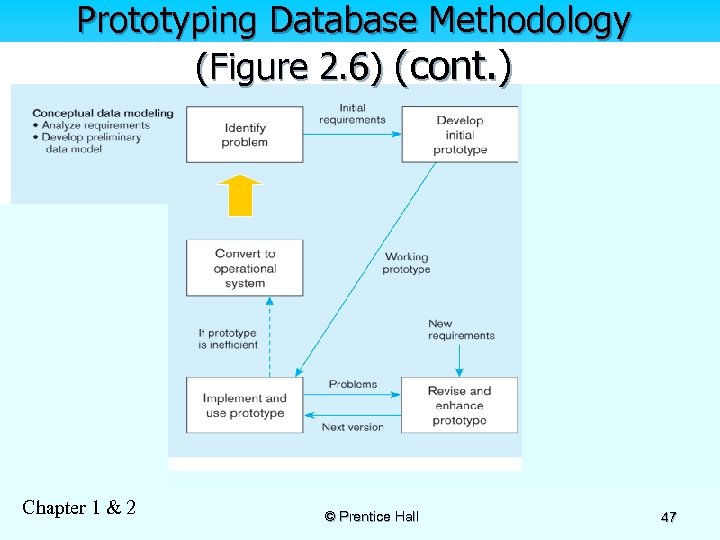
Prototyping Database Methodology (Figure 2. 6) (cont. ) Chapter 1 & 2 © Prentice Hall 47
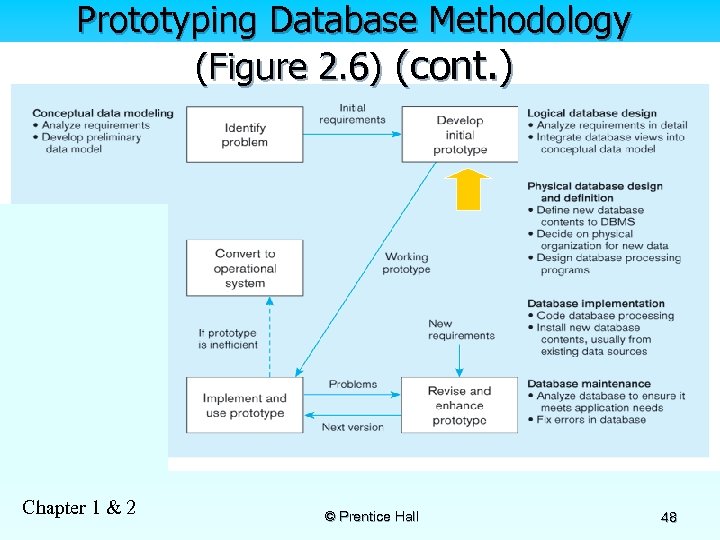
Prototyping Database Methodology (Figure 2. 6) (cont. ) Chapter 1 & 2 © Prentice Hall 48
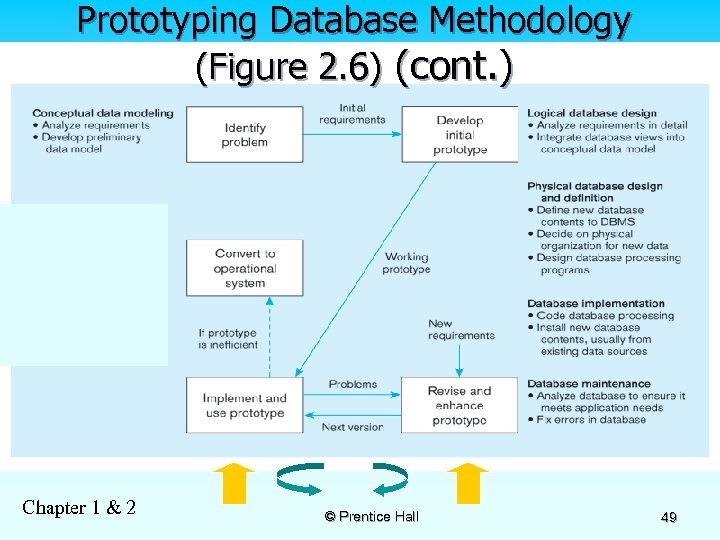
Prototyping Database Methodology (Figure 2. 6) (cont. ) Chapter 1 & 2 © Prentice Hall 49
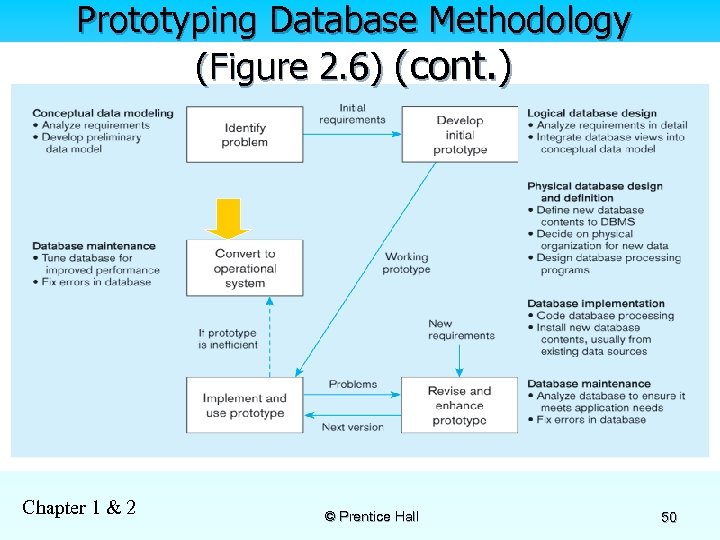
Prototyping Database Methodology (Figure 2. 6) (cont. ) Chapter 1 & 2 © Prentice Hall 50
CASE n n Computer-Aided Software Engineering (CASE) –software tools providing automated support for systems development Three database features: Data modeling–drawing entity-relationship diagrams n Code generation–SQL code for table creation n Repositories–knowledge base of enterprise information n Chapter 1 & 2 © Prentice Hall 51
Managing Projects: People Involved n n n n n Business analysts Systems analysts Database analysts and data modelers Users Programmers Database architects Data administrators Project managers Other technical experts Chapter 1 & 2 © Prentice Hall 52
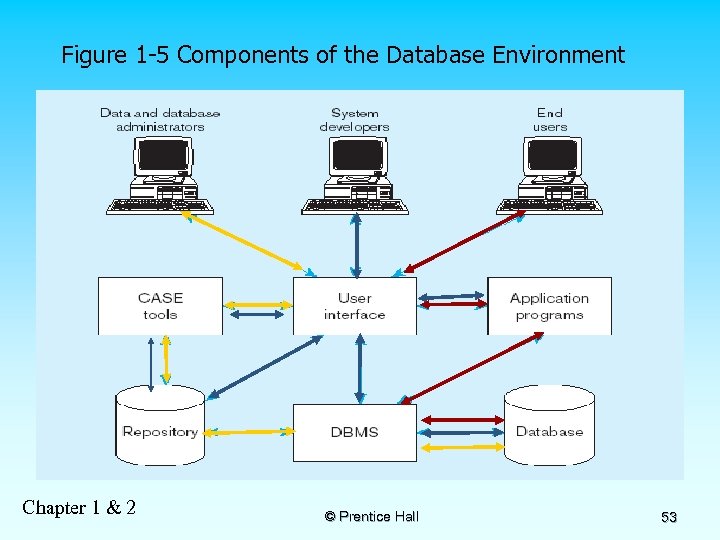
Figure 1 -5 Components of the Database Environment Chapter 1 & 2 © Prentice Hall 53
Скачать презентацию Chapter 1 The Database Environment Prentice Hall
021e30ffdd3fd52c378eb8758cef63f4.ppt