


 Скачать презентацию Chapter 1 Introduction to Computers and the Internet
d6661baf83cd41c2efb187e01d954d20.ppt
- Количество слайдов: 119
 Chapter 1 Introduction to Computers and the Internet & World Wide Web How to Program, 5/e Copyright © Pearson, Inc. 2013. All Rights Reserved.
 Copyright © Pearson, Inc. 2013. All Rights Reserved.
 Copyright © Pearson, Inc. 2013. All Rights Reserved.
 Copyright © Pearson, Inc. 2013. All Rights Reserved.
 1. 1 Introduction The Internet and web programming technologies you’ll learn in this book are designed to be portable, allowing you to design web pages and applications that run across an enormous range of Internet-enabled devices. Client-side programming technologies are used to build web pages and applications that are run on the client (i. e. , in the browser on the user’s device). Server-side programming—the applications that respond to requests from client-side web browsers, such as searching the Internet, checking your bank-account balance, ordering a book from Amazon, bidding on an e. Bay auction and ordering concert tickets. Copyright © Pearson, Inc. 2013. All Rights Reserved.
 1. 1 Introduction (cont. ) Read the Preface and the Before You Begin section to learn about the book’s coverage and how to set up your computer to run the hundreds of code examples. The code is available at www. deitel. com/books/iw 3 htp 5 and www. pearsonhighered. com/deitel. Use the source code to run every program and script as you study it. Try each example in multiple browsers. Copyright © Pearson, Inc. 2013. All Rights Reserved.
 1. 1 Introduction (cont. ) If you’re interested in smartphones and tablet computers, run the examples in your browsers on i. Phones, i. Pads, Android smartphones and tablets, and others. The technologies covered in this book and browser support for them are evolving rapidly. Not every feature of every page we build will render properly in every browser. Copyright © Pearson, Inc. 2013. All Rights Reserved.
 1. 1 Introduction (cont. ) Moore’s Law Every year or two, the capacities of computers have approximately doubled inexpensively. This remarkable trend often is called Moore’s Law and related observations apply especially to the amount of memory that computers have for programs, the amount of secondary storage (such as disk storage) they have to hold programs and data over longer periods of time, and their processor speeds—the speeds at which computers execute their programs (i. e. , do their work). Similar growth has occurred in the communications field, in which costs have plummeted as enormous demand for communications bandwidth (i. e. , information-carrying capacity) has attracted intense competition. Copyright © Pearson, Inc. 2013. All Rights Reserved.
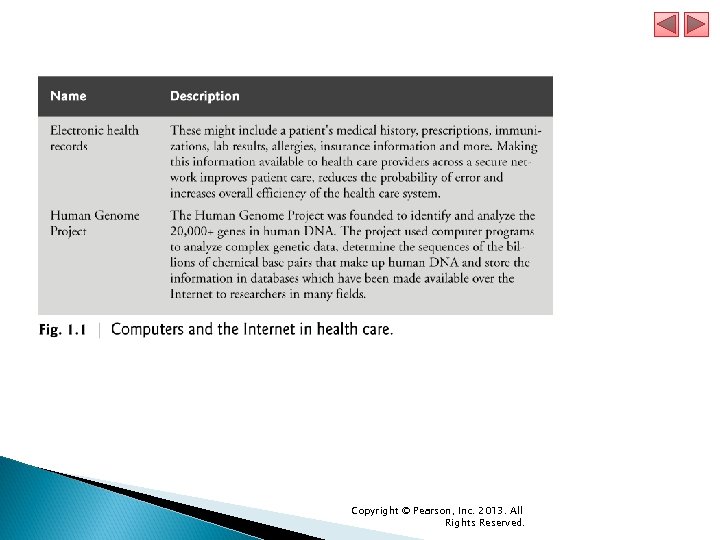
 1. 2 The Internet in Industry and Research Figures 1. 1– 1. 4 provide a few examples of how computers and the Internet are being used in industry and research. Figure 1. 1 lists two examples of how computers and the Internet are being used to improve health care. Copyright © Pearson, Inc. 2013. All Rights Reserved.
 Copyright © Pearson, Inc. 2013. All Rights Reserved.
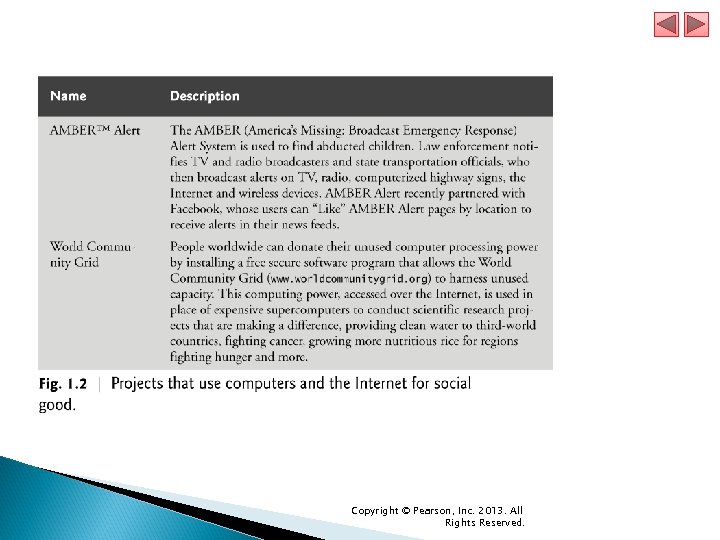
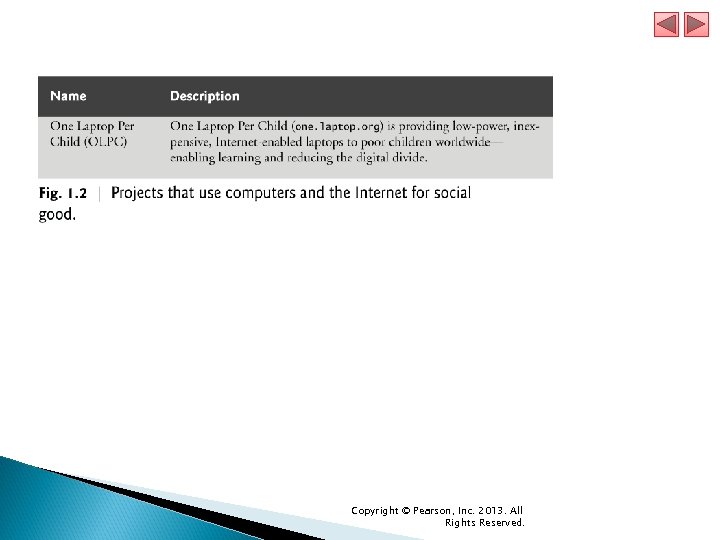
 1. 2 The Internet in Industry and Research (cont. ) Figure 1. 2 provides a sample of some of the exciting ways in which computers and the Internet are being used for social good. Copyright © Pearson, Inc. 2013. All Rights Reserved.
 Copyright © Pearson, Inc. 2013. All Rights Reserved.
 Copyright © Pearson, Inc. 2013. All Rights Reserved.
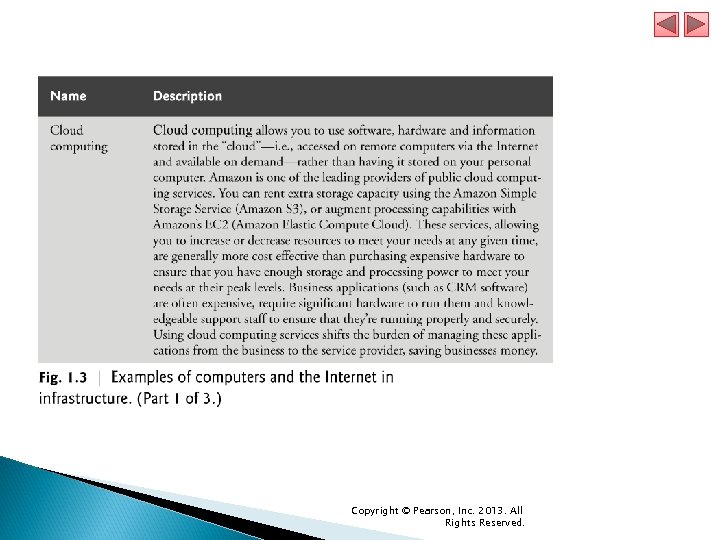
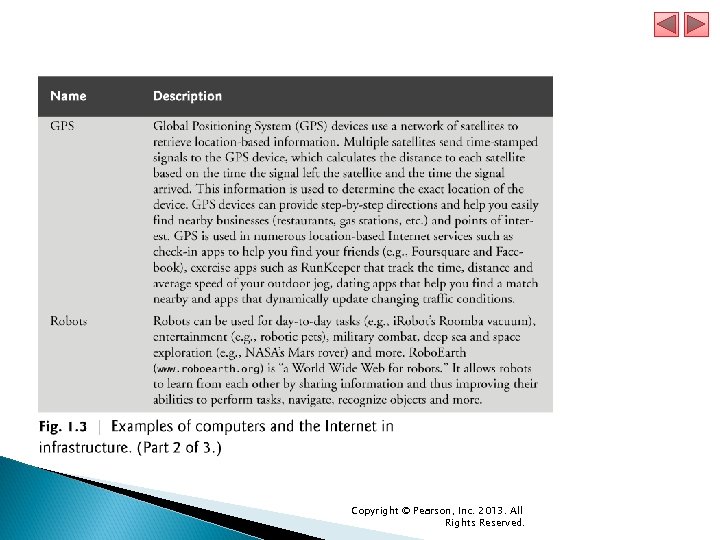
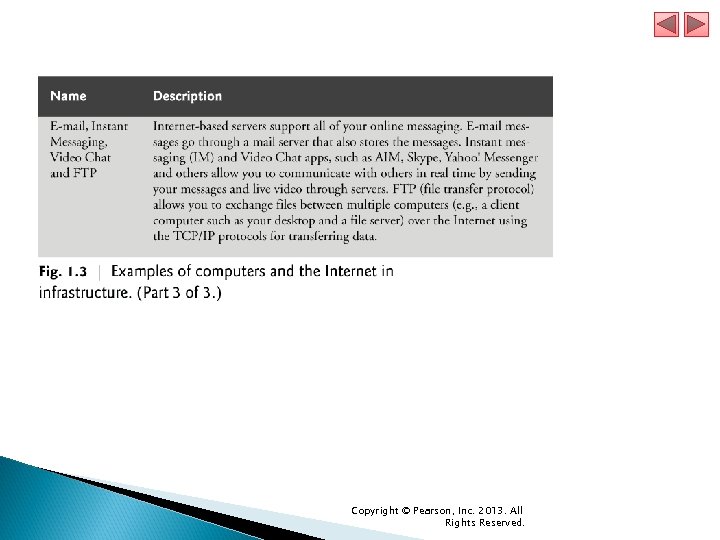
 1. 2 The Internet in Industry and Research (cont. ) Figure 1. 3 gives some examples of how computers and the Internet provide the infrastructure to communicate, navigate, collaborate and more. Copyright © Pearson, Inc. 2013. All Rights Reserved.
 Copyright © Pearson, Inc. 2013. All Rights Reserved.
 Copyright © Pearson, Inc. 2013. All Rights Reserved.
 Copyright © Pearson, Inc. 2013. All Rights Reserved.
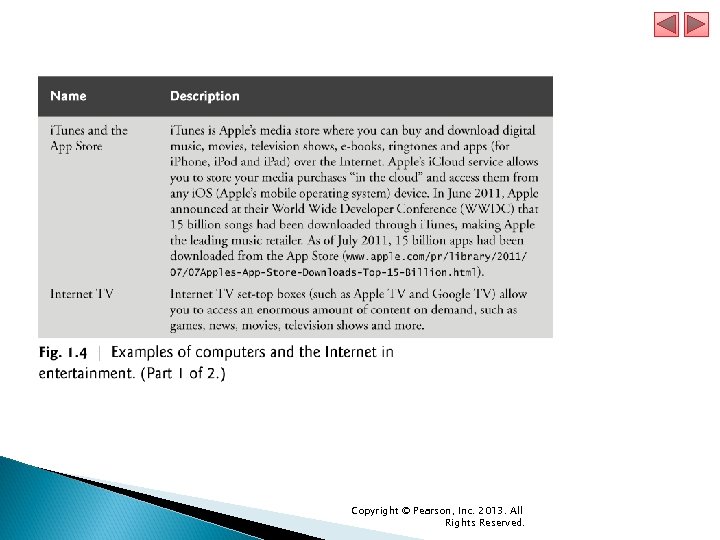
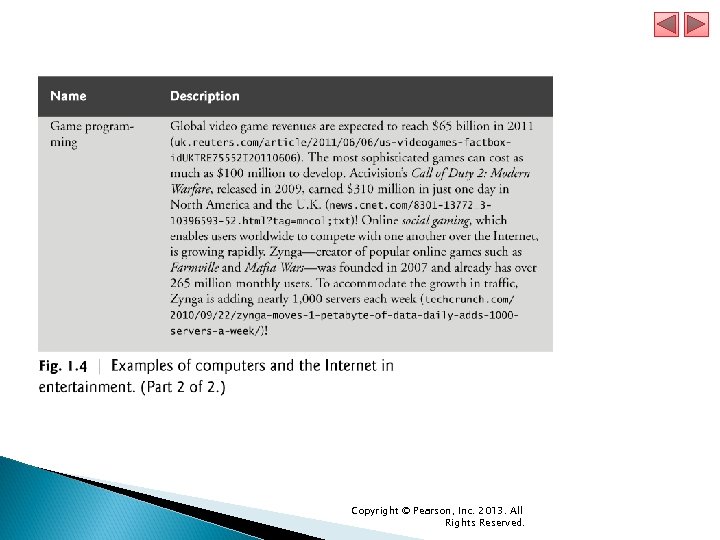
 1. 2 The Internet in Industry and Research (cont. ) Figure 1. 4 lists a few of the exciting ways in which computers and the Internet are used in entertainment. Copyright © Pearson, Inc. 2013. All Rights Reserved.
 Copyright © Pearson, Inc. 2013. All Rights Reserved.
 Copyright © Pearson, Inc. 2013. All Rights Reserved.
 1. 3 HTML 5, CSS 3, Java. Script, Canvas and j. Query HTML 5 HTML (Hyper. Text Markup Language) is a special type of computer language called a markup language designed to specify the content and structure of web pages (also called documents) in a portable manner. HTML 5, now under development, is the emerging version of HTML enables you to create content that will render appropriately across the extraordinary range of devices connected to the Internet—including smartphones, tablet computers, notebook computers, desktop computers, special-purpose devices such as large-screen displays at concert arenas and sports stadiums, and more. Copyright © Pearson, Inc. 2013. All Rights Reserved.
 1. 3 HTML 5, CSS 3, Java. Script, Canvas and (cont. ) A “stricter” version of HTML called XHTML (Extensible Hyper. Text Markup Language), which is based on XML (e. Xtensible Markup Language), is still used frequently today. Many of the server-side technologies we cover later in the book produce web pages as XHTML documents, by default, but the trend is clearly to HTML 5. Copyright © Pearson, Inc. 2013. All Rights Reserved.
 1. 3 HTML 5, CSS 3, Java. Script, Canvas and (cont. ) Cascading Style Sheets (CSS) Although HTML 5 provides some capabilities for controlling a document’s presentation, it’s better not to mix presentation with content. Cascading Style Sheets (CSS) are used to specify the presentation, or styling, of elements on a web page (e. g. , fonts, spacing, sizes, colors, positioning). CSS was designed to style portable web pages independently of their content and structure. By separating page styling from page content and structure, you can easily change the look and feel of the pages on an entire website, or a portion of a website, simply by swapping out one style sheet for another. CSS 3 is the current version of CSS under development. Copyright © Pearson, Inc. 2013. All Rights Reserved.
 1. 3 HTML 5, CSS 3, Java. Script, Canvas and (cont. ) Java. Script Java. Script helps you build dynamic web pages (i. e. , pages that can be modified “on the fly” in response to events, such as user input, time changes and more) and computer applications. It enables you to do the client-side programming of web applications. Java. Script was created by Netscape. Both Netscape and Microsoft have been instrumental in the standardization of Java. Script by ECMA International (formerly the European Computer Manufacturers Association) as ECMAScript 5, the latest version of the standard, corresponds to the version of Java. Script we use in this book. Java. Script is a portable scripting language. Programs written in Java. Script can run in web browsers across a wide range of devices. Copyright © Pearson, Inc. 2013. All Rights Reserved.
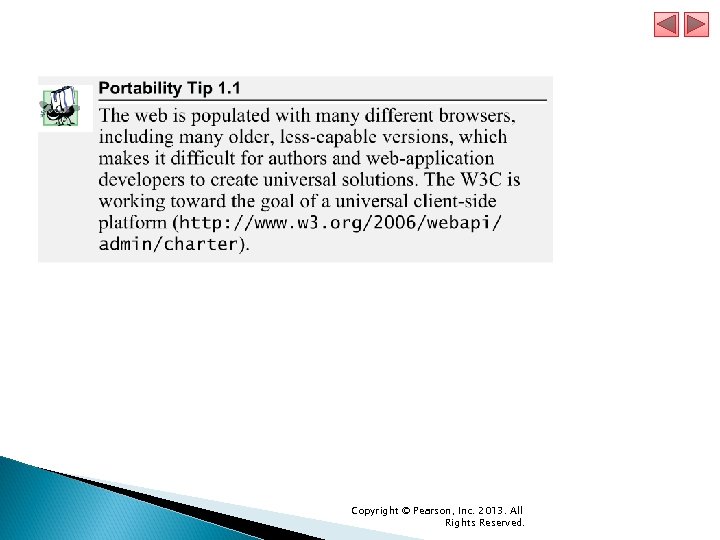
 1. 3 HTML 5, CSS 3, Java. Script, Canvas and (cont. ) Web Browsers and Web-Browser Portability Ensuring a consistent look and feel on clientside browsers is one of the great challenges of developing web-based applications. Currently, a standard does not exist to which software vendors must adhere when creating web browsers. Although browsers share a common set of features, each browser might render pages differently. Copyright © Pearson, Inc. 2013. All Rights Reserved.
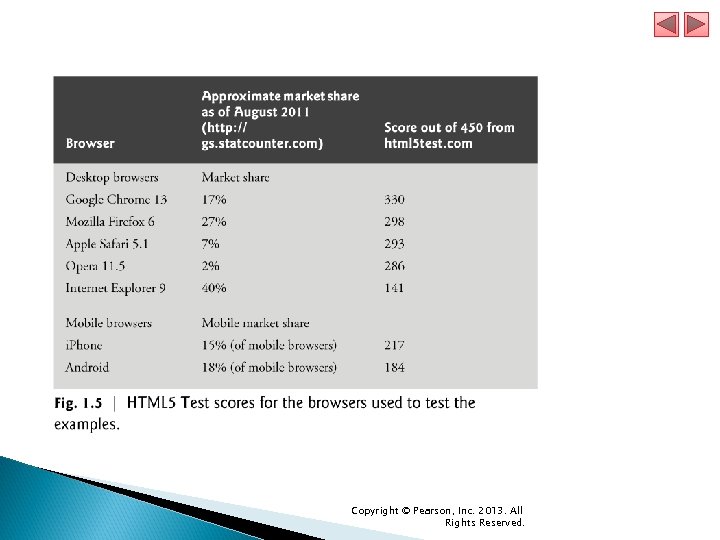
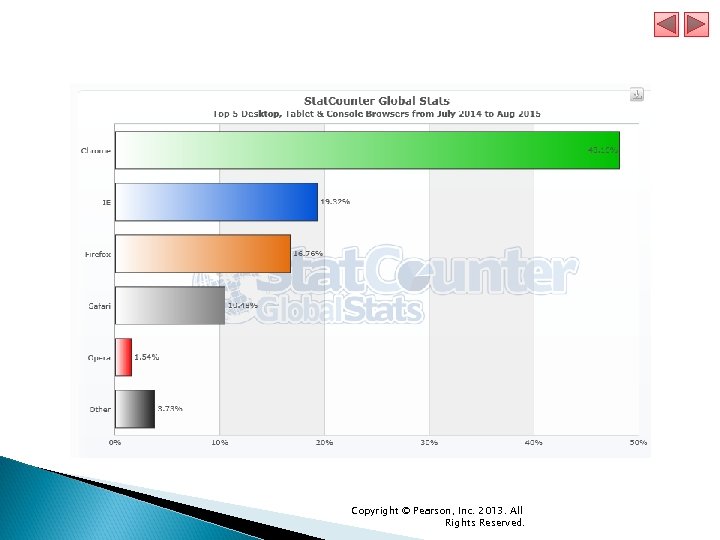
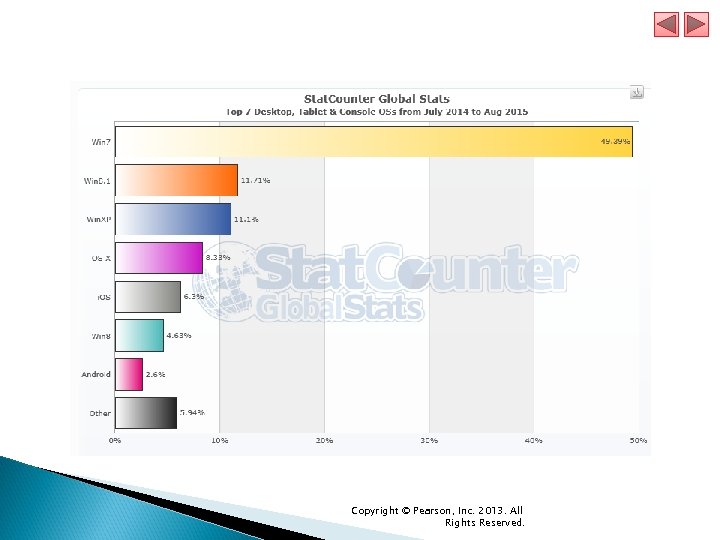
 1. 3 HTML 5, CSS 3, Java. Script, Canvas and (cont. ) Browsers are available in many versions and on many different platforms (Microsoft Windows, Apple Macintosh, Linux, UNIX, etc. ). Vendors add features to each new version that sometimes result in cross-platform incompatibility issues. It’s difficult to develop web pages that render correctly on all versions of each browser. All of the code examples in the book were tested in the five most popular desktop browsers and the two most popular mobile browsers (Fig. 1. 5). Copyright © Pearson, Inc. 2013. All Rights Reserved.
 Copyright © Pearson, Inc. 2013. All Rights Reserved.
 Copyright © Pearson, Inc. 2013. All Rights Reserved.
 Copyright © Pearson, Inc. 2013. All Rights Reserved.
 Copyright © Pearson, Inc. 2013. All Rights Reserved.
 1. 3 HTML 5, CSS 3, Java. Script, Canvas and (cont. ) Support for HTML 5, CSS 3 and Java. Script features varies by browser. The HTML 5 Test website (http: //html 5 test. com/) scores each browser based on its support for the latest features of these evolving standards. Figure 1. 5 lists the five desktop browsers we use in reverse order of their HTML 5 Test scores from most compliant to least compliant at the time of this writing. You can also check sites such as http: //caniuse. com/ for a list of features covered by each browser. Copyright © Pearson, Inc. 2013. All Rights Reserved.
 1. 3 HTML 5, CSS 3, Java. Script, Canvas and (cont. ) j. Query (j. Query. org) is currently the most popular of hundreds of Java. Script libraries. ◦ www. activoinc. com/blog/2008/11/03/jquery-emergesas-most-popular-javascript-library-for-webdevelopment/. j. Query simplifies Java. Script programming by making it easier to manipulate a web page’s elements and interact with servers in a portable manner across various web browsers. It provides a library of custom graphical user interface (GUI) controls (beyond the basic GUI controls provided by HTML 5) that can be used to enhance the look and feel of your web pages. Copyright © Pearson, Inc. 2013. All Rights Reserved.
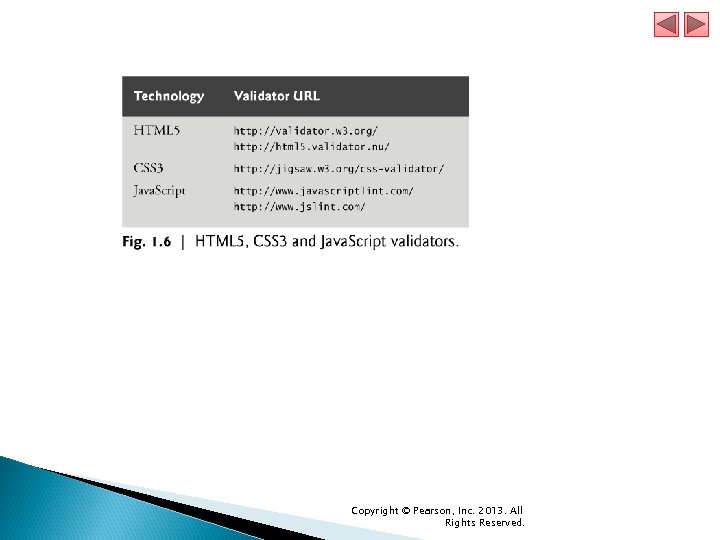
 1. 3 HTML 5, CSS 3, Java. Script, Canvas and (cont. ) Validating Your HTML 5, CSS 3 and Java. Script Code You must use proper HTML 5, CSS 3 and Java. Script syntax to ensure that browsers process your documents properly. Figure 1. 6 lists the validators we used to validate the code in this book. Where possible, we eliminated validation errors. Copyright © Pearson, Inc. 2013. All Rights Reserved.
 Copyright © Pearson, Inc. 2013. All Rights Reserved.
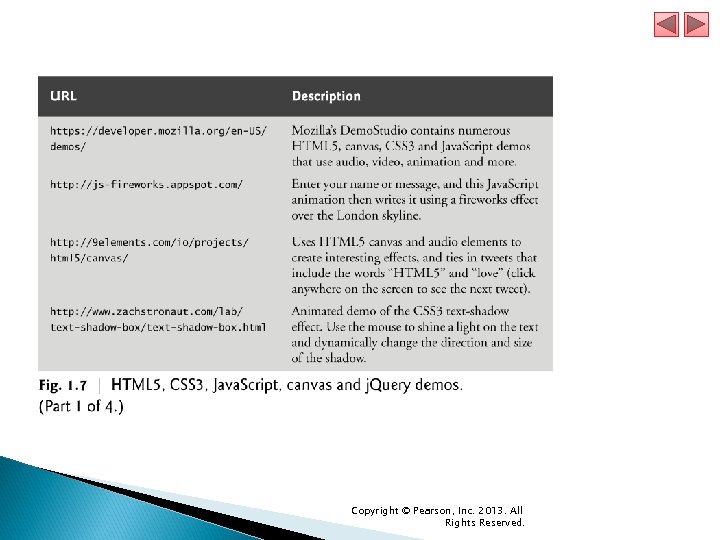
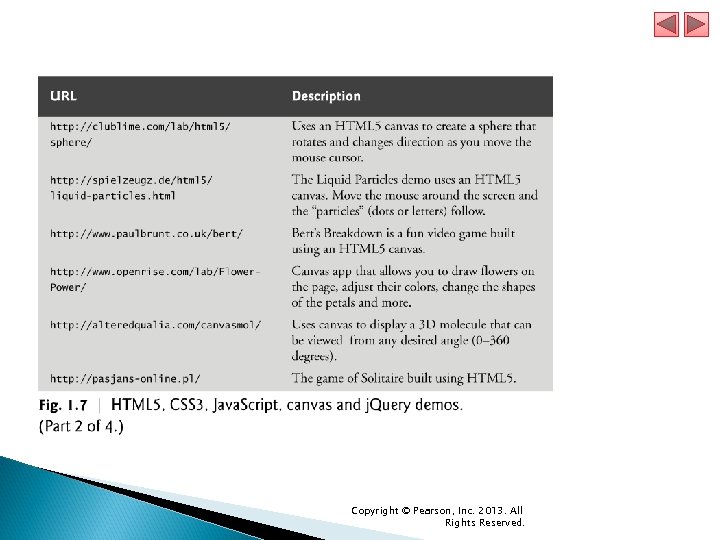
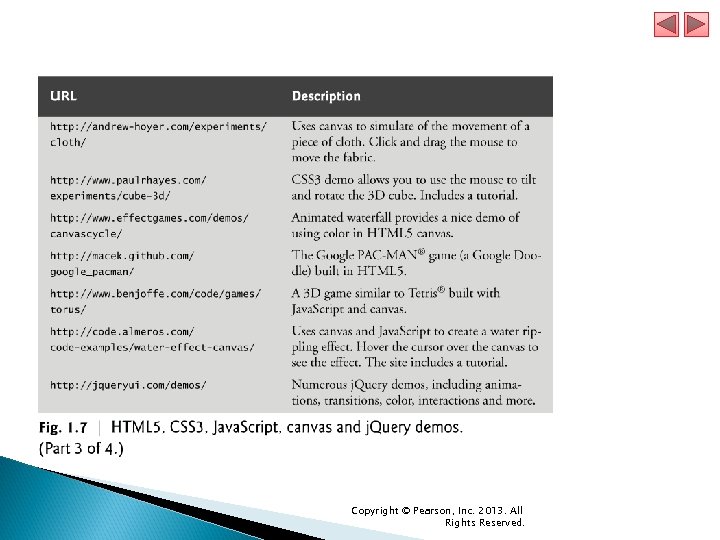
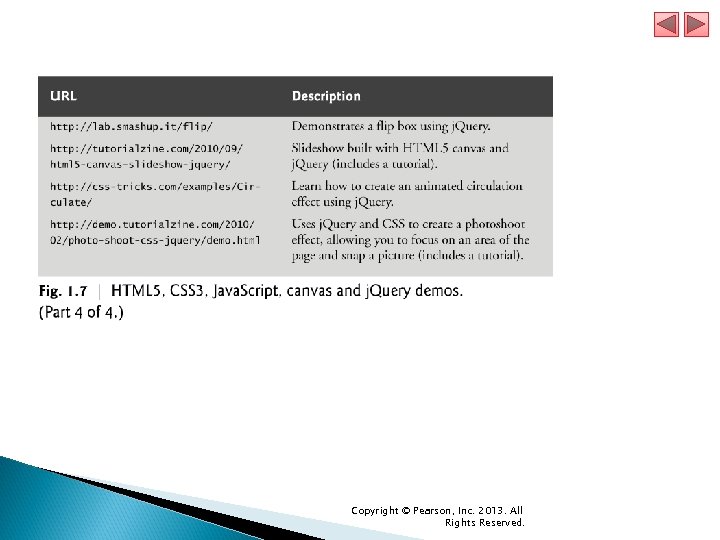
 1. 4 Demos Browse the web pages in Fig. 1. 7 to get a sense of some of the things you’ll be able to create using the technologies you’ll learn in this book, including HTML 5, CSS 3, Java. Script, canvas and j. Query. Copyright © Pearson, Inc. 2013. All Rights Reserved.
 Copyright © Pearson, Inc. 2013. All Rights Reserved.
 Copyright © Pearson, Inc. 2013. All Rights Reserved.
 Copyright © Pearson, Inc. 2013. All Rights Reserved.
 Copyright © Pearson, Inc. 2013. All Rights Reserved.
 1. 5 Evolution of the Internet and World Wide Web The Internet—a global network of computers—was made possible by the convergence of computing and communications technologies. In the late 1960 s, ARPA (the Advanced Research Projects Agency) rolled out blueprints for networking the main computer systems of about a dozen ARPA-funded universities and research institutions. They were to be connected with communications lines operating at a then-stunning 56 Kbps (i. e. , 56, 000 bits per second)—this at a time when most people (of the few who could) were connecting over telephone lines to computers at a rate of 110 bits per second. Copyright © Pearson, Inc. 2013. All Rights Reserved.
 1. 5 Evolution of the Internet and World Wide Web (cont. ) A bit (short for “binary digit”) is the smallest data item in a computer; it can assume the value 0 or 1. ARPA proceeded to implement the ARPANET, which eventually evolved into today’s Internet. Rather than enabling researchers to share each other’s computers, it rapidly became clear that communicating quickly and easily via electronic mail was the key early benefit of the ARPANET. This is true even today on the Internet, which facilitates communications of all kinds among the world’s Internet users. Copyright © Pearson, Inc. 2013. All Rights Reserved.
 1. 5 Evolution of the Internet and World Wide Web (cont. ) Packet Switching One of the primary goals for ARPANET was to allow multiple users to send and receive information simultaneously over the same communications paths (e. g. , phone lines). The network operated with a technique called packet switching, in which digital data was sent in small bundles called packets. The packets contained address, error-control and sequencing information. The address information allowed packets to be routed to their destinations. Copyright © Pearson, Inc. 2013. All Rights Reserved.
 1. 5 Evolution of the Internet and World Wide Web (cont. ) The sequencing information helped in reassembling the packets—which, because of complex routing mechanisms, could actually arrive out of order—into their original order for presentation to the recipient. Packets from different senders were intermixed on the same lines to efficiently use the available bandwidth. The network was designed to operate without centralized control. If a portion of the network failed, the remaining working portions would still route packets from senders to receivers over alternative paths for reliability. Copyright © Pearson, Inc. 2013. All Rights Reserved.
 1. 5 Evolution of the Internet and World Wide Web (cont. ) TCP/IP The protocol (i. e. , set of rules) for communicating over the ARPANET became known as TCP—the Transmission Control Protocol. TCP ensured that messages were properly routed from sender to receiver and that they arrived intact. As the Internet evolved, organizations worldwide were implementing their own networks for both intraorganization (i. e. , within the organization) and interorganization (i. e. , between organizations) communications. One challenge was to get these different networks to communicate. Copyright © Pearson, Inc. 2013. All Rights Reserved.
 1. 5 Evolution of the Internet and World Wide Web (cont. ) ARPA accomplished this with the development of IP—the Internet Protocol, truly creating a network of networks, the current architecture of the Internet. The combined set of protocols is now commonly called TCP/IP. Each computer on the Internet has a unique IP address. The current IP standard, Internet Protocol version 4 (IPv 4), has been in use since 1984 and will soon run out of possible addresses. IPv 6 is just starting to be deployed. It features enhanced security and a new addressing scheme, hugely expanding the number of IP addresses available so that we will not run out of IP addresses in the forseeable future. Copyright © Pearson, Inc. 2013. All Rights Reserved.
 1. 5 Evolution of the Internet and World Wide Web (cont. ) Explosive Growth Initially, Internet use was limited to universities and research institutions; then the military began using it intensively. Eventually, the government decided to allow access to the Internet for commercial purposes. Bandwidth (i. e. , the information-carrying capacity) on the Internet’s is increasing rapidly as costs dramatically decline. Copyright © Pearson, Inc. 2013. All Rights Reserved.
 1. 5 Evolution of the Internet and World Wide Web (cont. ) World Wide Web, HTML, HTTP The World Wide Web allows computer users to execute web-based applications and to locate and view multimedia-based documents on almost any subject over the Internet. In 1989, Tim Berners-Lee of CERN (the European Organization for Nuclear Research) began to develop a technology for sharing information via hyperlinked text documents. Berners-Lee called his invention the Hyper. Text Markup Language (HTML). He also wrote communication protocols to form the backbone of his new information system, which he called the World Wide Web. In particular, he wrote the Hypertext Transfer Protocol (HTTP)—a communications protocol used to send information over the web. The URL (Uniform Resource Locator) specifies the address (i. e. , location) of the web page displayed in the browser window. Each web page on the Internet is associated with a unique URLs usually begin with http: //. Copyright © Pearson, Inc. 2013. All Rights Reserved.
 1. 5 Evolution of the Internet and World Wide Web (cont. ) HTTPS URLs of websites that handle private information, such as credit card numbers, often begin with https: //, the abbreviation for Hypertext Transfer Protocol Secure (HTTPS). HTTPS is the standard for transferring encrypted data on the web. It combines HTTP with the Secure Sockets Layer (SSL) and the more recent Transport Layer Security (TLS) cryptographic schemes for securing communications and identification information over the web. Copyright © Pearson, Inc. 2013. All Rights Reserved.
 1. 5 Evolution of the Internet and World Wide Web (cont. ) Mosaic, Netscape, Emergence of Web 2. 0 Web use exploded with the availability in 1993 of the Mosaic browser, which featured a user-friendly graphical interface. Marc Andreessen, whose team at the National Center for Supercomputing Applications (NCSA) developed Mosaic, went on to found Netscape, the company that many people credit with igniting the explosive Internet economy of the late 1990 s. But the “dot com” economic bust brought hard times in the early 2000 s. The resurgence that began in 2004 or so has been named Web 2. 0. Copyright © Pearson, Inc. 2013. All Rights Reserved.
 1. 6 Web Basics In its simplest form, a web page is nothing more than an HTML (Hyper. Text Markup Language) document (with the extension. html or. htm) that describes to a web browser the document’s content and structure. Hyperlinks HTML documents normally contain hyperlinks, which, when clicked, load a specified web document. Both images and text may be hyperlinked. When the user clicks a hyperlink, a web server locates the requested web page and sends it to the user’s web browser. Similarly, the user can type the address of a web page into the browser’s address field and press Enter to view the specified page. Copyright © Pearson, Inc. 2013. All Rights Reserved.
 1. 6 Web Basics (cont. ) Hyperlinks can reference other web pages, e-mail addresses, files and more. If a hyperlink’s URL is in the form mailto: email. Address, clicking the link loads your default e-mail program and opens a message window addressed to the specified email address. If a hyperlink references a file that the browser is incapable of displaying, the browser prepares to download the file, and generally prompts the user for information about how the file should be stored. Copyright © Pearson, Inc. 2013. All Rights Reserved.
 1. 6 Web Basics (cont. ) URIs and URLs URIs (Uniform Resource Identifiers) identify resources on the Internet. URIs that start with http: // are called URLs (Uniform Resource Locators). Parts of a URL A URL contains information that directs a browser to the resource that the user wishes to access. Web servers make such resources available to web clients. Popular web servers include Apache’s HTTP Server and Microsoft’s Internet Information Services (IIS). Copyright © Pearson, Inc. 2013. All Rights Reserved.
 1. 6 Web Basics (cont. ) Let’s examine the components of the URL http: //www. deitel. com/books/downloads. html The text http: // indicates that the Hyper. Text Transfer Protocol (HTTP) should be used to obtain the resource. Next in the URL is the server’s fully qualified hostname (for example, www. deitel. com)—the name of the web-server computer on which the resource resides. This computer is referred to as the host, because it houses and maintains resources. The hostname www. deitel. com is translated into an IP (Internet Protocol) address—a numerical value that uniquely identifies the server on the Internet. An Internet Domain Name System (DNS) server maintains a database of hostnames and their corresponding IP addresses and performs the translations automatically. Copyright © Pearson, Inc. 2013. All Rights Reserved.
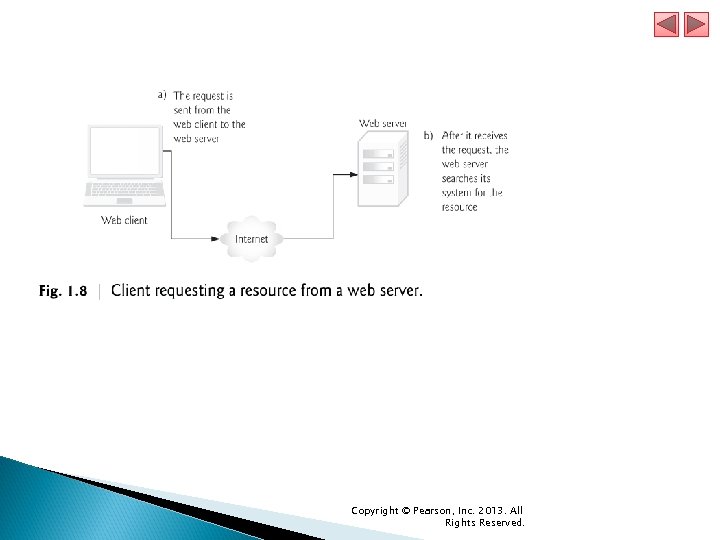
 1. 6 Web Basics (cont. ) The remainder of the URL (/books/downloads. html) specifies the resource’s location (/books) and name (downloads. html) on the web server. The location could represent an actual directory on the web server’s file system. For security reasons, however, the location is typically a virtual directory. The web server translates the virtual directory into a real location on the server, thus hiding the resource’s true location. Making a Request and Receiving a Response Figure 1. 8 shows a web browser sending a request to a web server. Copyright © Pearson, Inc. 2013. All Rights Reserved.
 Copyright © Pearson, Inc. 2013. All Rights Reserved.
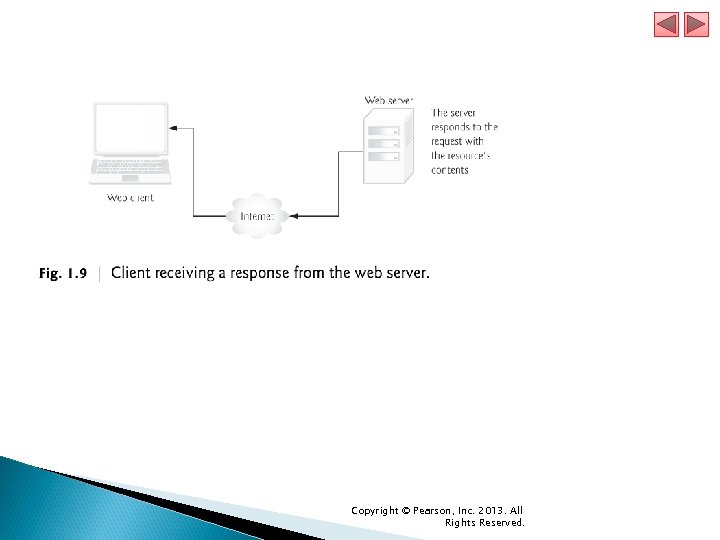
 1. 6 Web Basics (cont. ) In Fig. 1. 8, the web browser sends an HTTP request to the server. The request (in its simplest form) is GET /books/downloads. html HTTP/1. 1 The word GET is an HTTP method indicating that the client wishes to obtain a resource from the server. The remainder of the request provides the path name of the resource (e. g. , an HTML 5 document) and the protocol’s name and version number (HTTP/1. 1). The client’s request also contains some required and optional headers. Figure 1. 9 shows the web server responding to a request. Copyright © Pearson, Inc. 2013. All Rights Reserved.
 Copyright © Pearson, Inc. 2013. All Rights Reserved.
 1. 6 Web Basics (cont. ) The server first sends a line of text that indicates the HTTP version, followed by a numeric code and a phrase describing the status of the transaction. For example, HTTP/1. 1 200 OK indicates success, whereas HTTP/1. 1 404 Not found informs the client that the web server could not locate the requested resource. HTTP Headers Next, the server sends one or more HTTP headers, which provide additional information about the data that will be sent. In this case, the server is sending an HTML 5 text document, so one HTTP header for this example would read: Content-type: text/html Copyright © Pearson, Inc. 2013. All Rights Reserved.
 1. 6 Web Basics (cont. ) The information provided in this header specifies the Multipurpose Internet Mail Extensions (MIME) type of the content that the server is transmitting to the browser. The MIME standard specifies data formats, which programs can use to interpret data correctly. For example, the MIME type text/plain indicates that the sent information is text that can be displayed directly. Similarly, the MIME type image/jpeg indicates that the content is a JPEG image. When the browser receives this MIME type, it attempts to display the image. Copyright © Pearson, Inc. 2013. All Rights Reserved.
 1. 6 Web Basics (cont. ) The header or set of headers is followed by a blank line, which indicates to the client browser that the server is finished sending HTTP headers. Finally, the server sends the contents of the requested document (downloads. html). The client-side browser then renders (or displays) the document, which may involve additional HTTP requests to obtain associated CSS and images. Copyright © Pearson, Inc. 2013. All Rights Reserved.
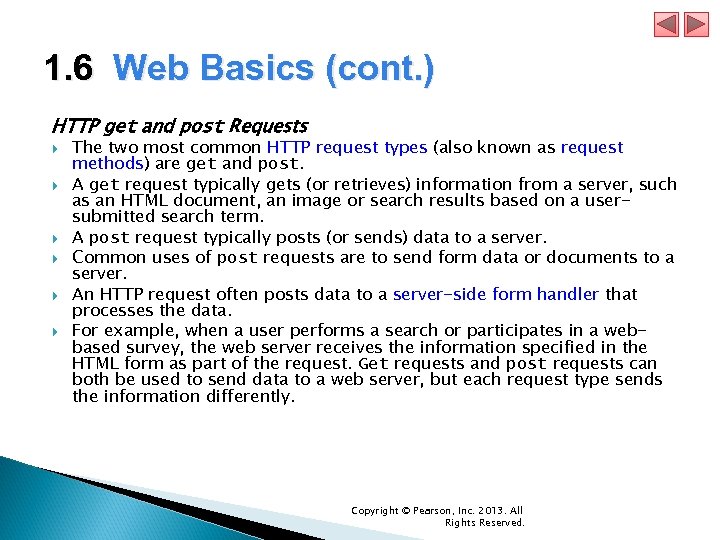 1. 6 Web Basics (cont. ) HTTP get and post Requests The two most common HTTP request types (also known as request methods) are get and post. A get request typically gets (or retrieves) information from a server, such as an HTML document, an image or search results based on a usersubmitted search term. A post request typically posts (or sends) data to a server. Common uses of post requests are to send form data or documents to a server. An HTTP request often posts data to a server-side form handler that processes the data. For example, when a user performs a search or participates in a webbased survey, the web server receives the information specified in the HTML form as part of the request. Get requests and post requests can both be used to send data to a web server, but each request type sends the information differently. Copyright © Pearson, Inc. 2013. All Rights Reserved.
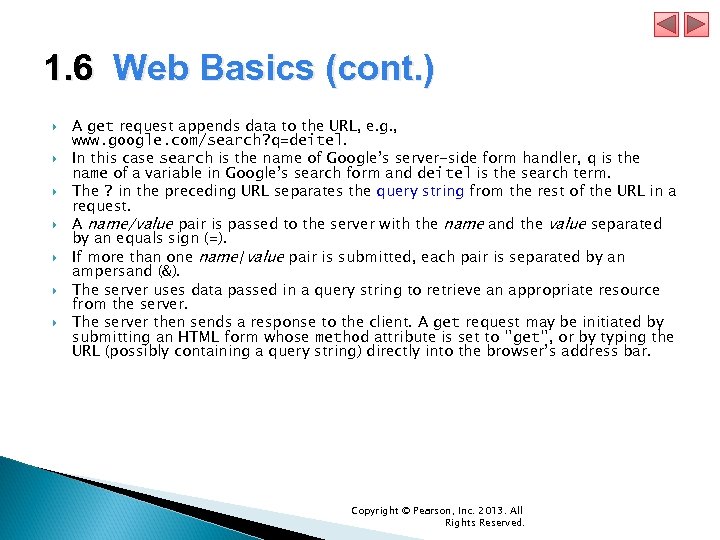 1. 6 Web Basics (cont. ) A get request appends data to the URL, e. g. , www. google. com/search? q=deitel. In this case search is the name of Google’s server-side form handler, q is the name of a variable in Google’s search form and deitel is the search term. The ? in the preceding URL separates the query string from the rest of the URL in a request. A name/value pair is passed to the server with the name and the value separated by an equals sign (=). If more than one name/value pair is submitted, each pair is separated by an ampersand (&). The server uses data passed in a query string to retrieve an appropriate resource from the server. The server then sends a response to the client. A get request may be initiated by submitting an HTML form whose method attribute is set to "get", or by typing the URL (possibly containing a query string) directly into the browser’s address bar. Copyright © Pearson, Inc. 2013. All Rights Reserved.
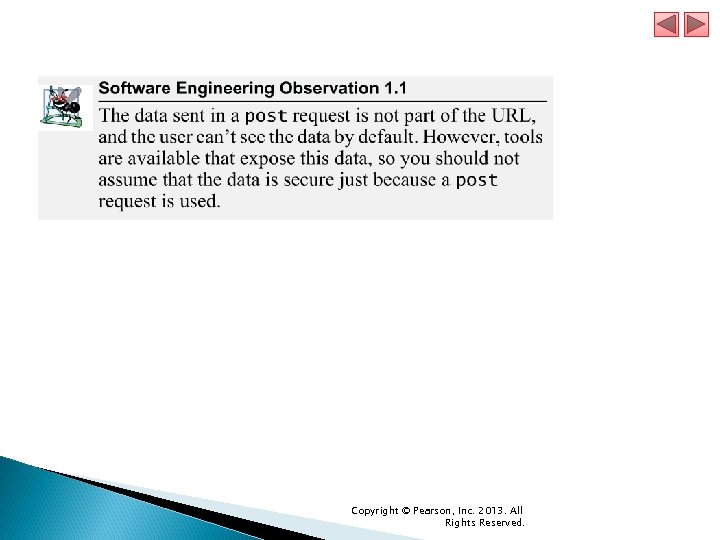
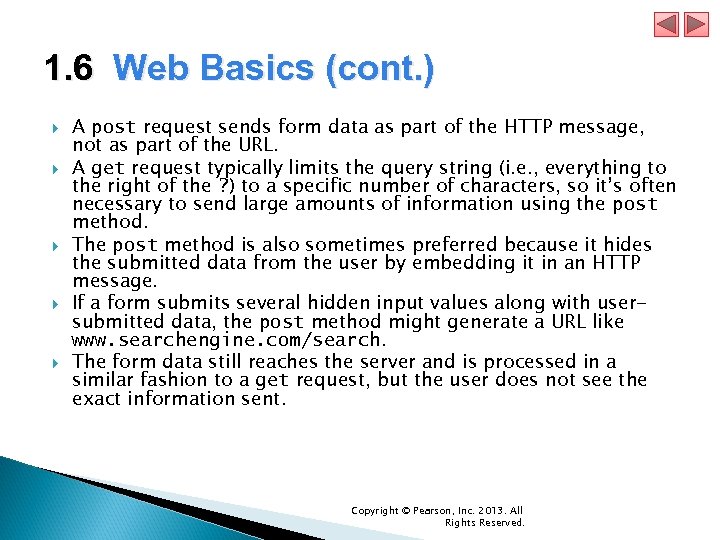 1. 6 Web Basics (cont. ) A post request sends form data as part of the HTTP message, not as part of the URL. A get request typically limits the query string (i. e. , everything to the right of the ? ) to a specific number of characters, so it’s often necessary to send large amounts of information using the post method. The post method is also sometimes preferred because it hides the submitted data from the user by embedding it in an HTTP message. If a form submits several hidden input values along with usersubmitted data, the post method might generate a URL like www. searchengine. com/search. The form data still reaches the server and is processed in a similar fashion to a get request, but the user does not see the exact information sent. Copyright © Pearson, Inc. 2013. All Rights Reserved.
 Copyright © Pearson, Inc. 2013. All Rights Reserved.
 1. 6 Web Basics (cont. ) Client-Side Caching Browsers often cache (save on disk) recently viewed web pages for quick reloading. If there are no changes between the version stored in the cache and the current version on the web, this speeds up your browsing experience. An HTTP response can indicate the length of time for which the content remains “fresh. ” If this amount of time has not been reached, the browser can avoid another request to the server. If not, the browser loads the document from the cache. Similarly, there’s also the “not modified” HTTP response, indicating that the file content has not changed since it was last requested (which is information that’s send in the request). Browsers typically do not cache the server’s response to a post request, because the next post might not return the same result. Copyright © Pearson, Inc. 2013. All Rights Reserved.
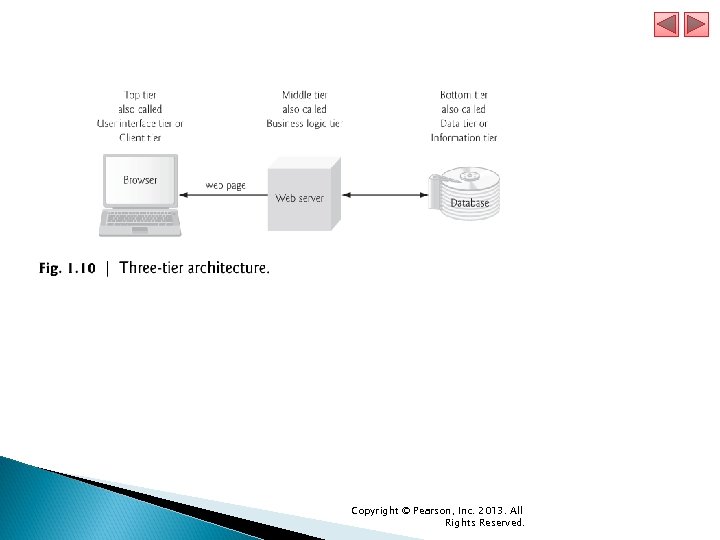
 1. 7 Multitier Application Architecture Web-based applications are often multitier applications (sometimes referred to as n-tier applications) that divide functionality into separate tiers (i. e. , logical groupings of functionality). Figure 1. 10 presents the basic structure of a three-tier web-based application. Copyright © Pearson, Inc. 2013. All Rights Reserved.
 Copyright © Pearson, Inc. 2013. All Rights Reserved.
 1. 7 Multitier Application Architecture (cont. ) The bottom tier (also called the data tier or the information tier) maintains the application’s data. This tier typically stores data in a relational database management system (RDBMS). The middle tier implements business logic, controller logic and presentation logic to control interactions between the application’s clients and its data. The middle tier acts as an intermediary between data in the information tier and the application’s clients. The middle-tier controller logic processes client requests (such as requests to view a product catalog) and retrieves data from the database. The middle-tier presentation logic then processes data from the information tier and presents the content to the client. Web applications typically present data to clients as HTML documents. Copyright © Pearson, Inc. 2013. All Rights Reserved.
 1. 7 Multitier Application Architecture (cont. ) Business logic in the middle tier enforces business rules and ensures that data is reliable before the application updates a database or presents data to users. Business rules dictate how clients access data and how applications process data. The top tier, or client tier, is the application’s user interface, which gathers input and displays output. Users interact directly with the application through the user interface, which is typically a web browser or a mobile device. In response to user actions (e. g. , clicking a hyperlink), the client tier interacts with the middle tier to make requests and to retrieve data from the information tier. The client tier then displays the data retrieved for the user. Copyright © Pearson, Inc. 2013. All Rights Reserved.
 1. 8 Client-Side Scripting versus Server. Side Scripting Client-side scripting with Java. Script can be used to validate user input, to interact with the browser, to enhance web pages, and to add client/server communication between a browser and a web server. Client-side scripting does have limitations, such as browser dependency; the browser or scripting host must support the scripting language and capabilities. Scripts are restricted from arbitrarily accessing the local hardware and file system for security reasons. Another issue is that client-side scripts can be viewed by the client by using the browser’s source-viewing capability. Sensitive information, such as passwords or other personally identifiable data, should not be on the client. All client-side data validation should be mirrored on the server. Also, placing certain operations in Java. Script on the client can open web applications to security issues. Copyright © Pearson, Inc. 2013. All Rights Reserved.
 1. 8 Client-Side Scripting versus Server. Side Scripting (cont. ) Programmers have more flexibility with server-side scripts, which often generate custom responses for clients. For example, a client might connect to an airline’s web server and request a list of flights from Boston to San Francisco between April 19 and May 5. The server queries the database, dynamically generates an HTML document containing the flight list and sends the document to the client. This technology allows clients to obtain the most current flight information from the database by connecting to an airline’s web server. Server-side scripting languages have a wider range of programmatic capabilities than their client-side equivalents. Server-side scripts also have access to server-side software that extends server functionality—Microsoft web servers use ISAPI (Internet Server Application Program Interface) extensions and Apache HTTP Servers use modules. Copyright © Pearson, Inc. 2013. All Rights Reserved.
 1. 9 World Wide Web Consortium (W 3 C) In October 1994, Tim Berners-Lee founded an organization—the World Wide Web Consortium (W 3 C)—devoted to developing nonproprietary, interoperable technologies for the World Wide Web. One of the W 3 C’s primary goals is to make the web universally accessible—regardless of disability, language or culture. The W 3 C is also a standards organization. Web technologies standardized by the W 3 C are called Recommendations. Current and forthcoming W 3 C Recommendations include the Hyper. Text Markup Language 5 (HTML 5), Cascading Style Sheets 3 (CSS 3) and the Extensible Markup Language (XML). Copyright © Pearson, Inc. 2013. All Rights Reserved.
 1. 10 Web 2. 0: Going Social In 2003 there was a noticeable shift in how people and businesses were using the web and developing web-based applications. The term Web 2. 0 was coined by Dale Dougherty of O’Reilly Media in 2003 to describe this trend. ◦ T. OReilly, ôWhat is Web 2. 0: Design Patterns and Business Models for the Next Generation of Software. ö September 2005
 1. 10 Web 2. 0: Going Social (cont. ) Web 1. 0 versus Web 2. 0 Web 1. 0 (the state of the web through the 1990 s and early 2000 s) was focused on a relatively small number of companies and advertisers producing content for users to access (some people called it the “brochure web”). Web 2. 0 involves the users—not only do they often create content, but they help organize it, share it, remix it, critique it, update it, etc. One way to look at Web 1. 0 is as a lecture, a small number of professors informing a large audience of students. In comparison, Web 2. 0 is a conversation, with everyone having the opportunity to speak and share views. Copyright © Pearson, Inc. 2013. All Rights Reserved.
 1. 10 Web 2. 0: Going Social (cont. ) Architecture of Participation Web 2. 0 embraces an architecture of participation—a design that encourages user interaction and community contributions. The architecture of participation has influenced software development as well. Opensource software is available for anyone to use and modify with few or no restrictions (we’ll say more about open source in Section 1. 12). Using collective intelligence—the concept that a large diverse group of people will create smart ideas—communities collaborate to develop software that many people believe is better and more robust than proprietary software. Rich Internet Applications (RIAs) are being developed using technologies (such as Ajax) that have the look and feel of desktop software, enhancing a user’s overall experience. Copyright © Pearson, Inc. 2013. All Rights Reserved.
 1. 10 Web 2. 0: Going Social (cont. ) Search Engines and Social Media The way we find the information on these sites is also changing—people are tagging (i. e. , labeling) web content by subject or keyword in a way that helps anyone locate information more effectively. ◦ Semantic Web In the future, computers will learn to understand the meaning of the data on the web—the beginnings of the Semantic Web are already appearing. Copyright © Pearson, Inc. 2013. All Rights Reserved.
 1. 10 Web 2. 0: Going Social (cont. ) Google In 1996, Stanford computer science Ph. D. candidates Larry Page and Sergey Brin began collaborating on a new search engine. In 1997, they chose the name Google—a play on the mathematical term googol, a quantity represented by the number “one” followed by 100 “zeros” (or 10100)— a staggeringly large number. Google’s ability to return extremely accurate search results quickly helped it become the most widely used search engine and one of the most popular websites in the world. Copyright © Pearson, Inc. 2013. All Rights Reserved.
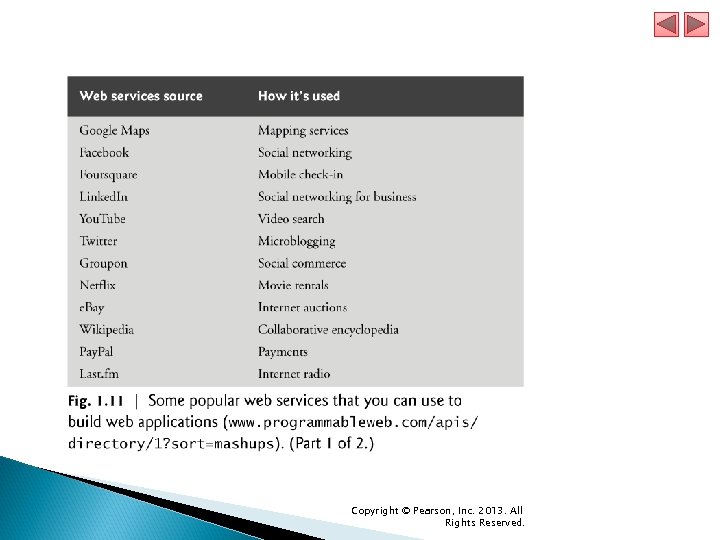
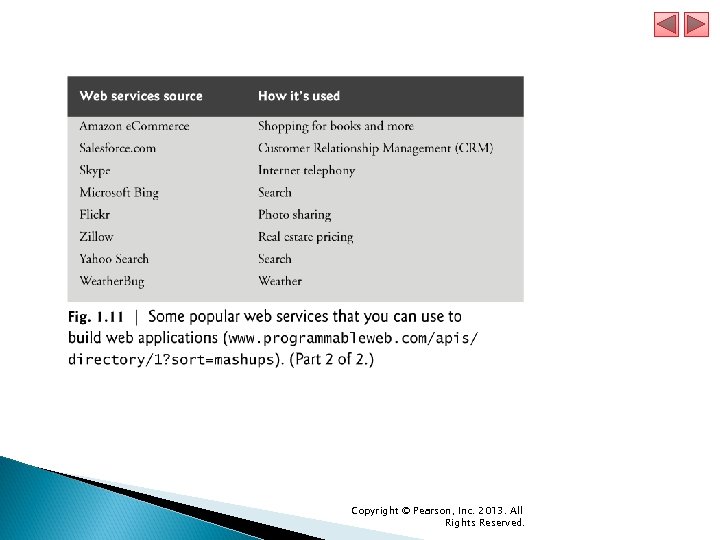
 1. 10 Web 2. 0: Going Social (cont. ) Web Services and Mashups We include in this book a substantial treatment of web services and introduce the applications-development methodology of mashups, in which you can rapidly develop powerful and intriguing applications by combining (often free) complementary web services and other forms of information feeds (Fig. 1. 11). Copyright © Pearson, Inc. 2013. All Rights Reserved.
 Copyright © Pearson, Inc. 2013. All Rights Reserved.
 Copyright © Pearson, Inc. 2013. All Rights Reserved.
 1. 10 Web 2. 0: Going Social (cont. ) Web services, inexpensive computers, abundant high-speed Internet access, open source software and many other elements have inspired new, exciting, lightweight business models that people can launch with only a small investment. Some types of websites with rich and robust functionality that might have required hundreds of thousands or even millions of dollars to build in the 1990 s can now be built for nominal sums. Copyright © Pearson, Inc. 2013. All Rights Reserved.
 1. 10 Web 2. 0: Going Social (cont. ) Ajax is one of the premier Web 2. 0 software technologies (Fig. 1. 12). Ajax helps Internet-based applications perform like desktop applications—a difficult task, given that such applications suffer transmission delays as data is shuttled back and forth between your computer and servers on the Internet. Copyright © Pearson, Inc. 2013. All Rights Reserved.
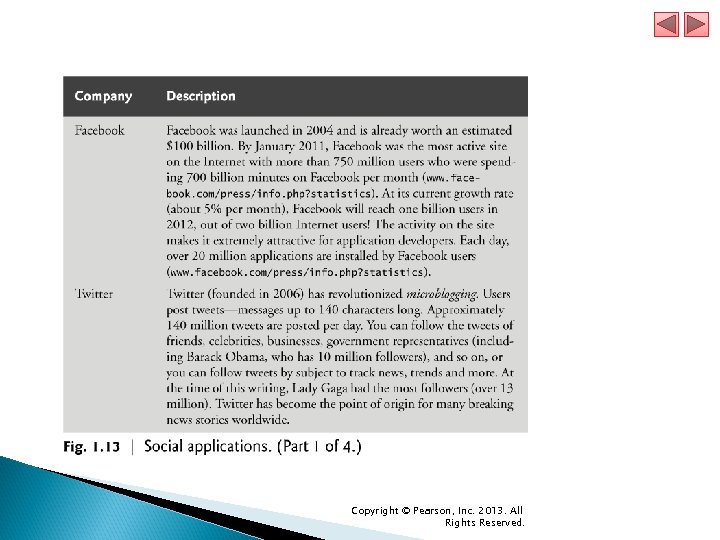
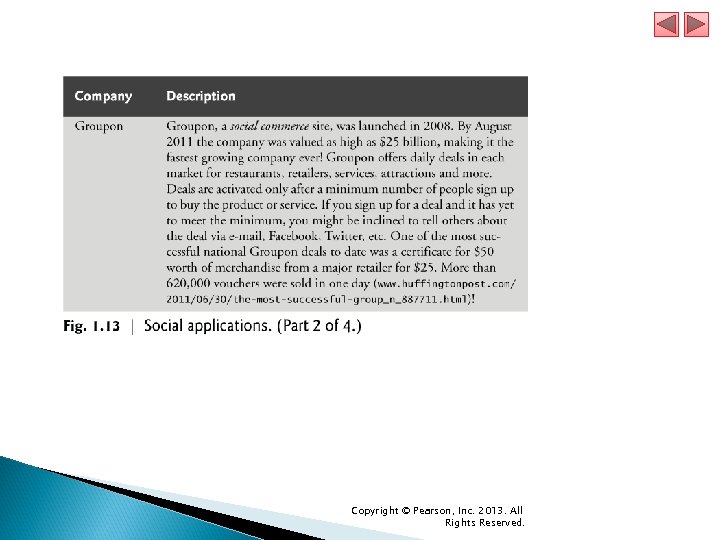
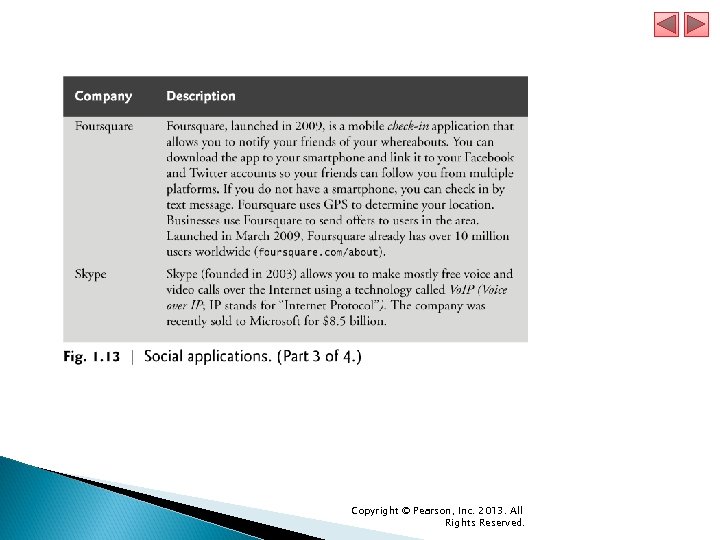
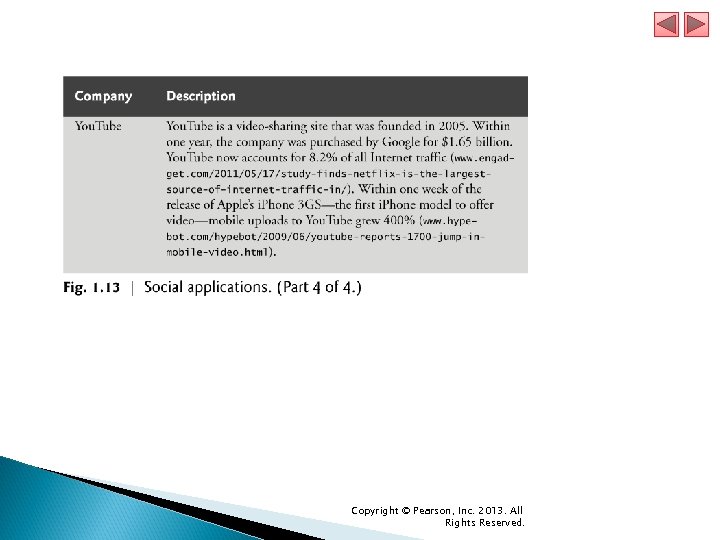
 1. 10 Web 2. 0: Going Social (cont. ) Social Applications Figure 1. 13 discusses a few of the social applications that are making an impact. Copyright © Pearson, Inc. 2013. All Rights Reserved.
 Copyright © Pearson, Inc. 2013. All Rights Reserved.
 Copyright © Pearson, Inc. 2013. All Rights Reserved.
 Copyright © Pearson, Inc. 2013. All Rights Reserved.
 Copyright © Pearson, Inc. 2013. All Rights Reserved.
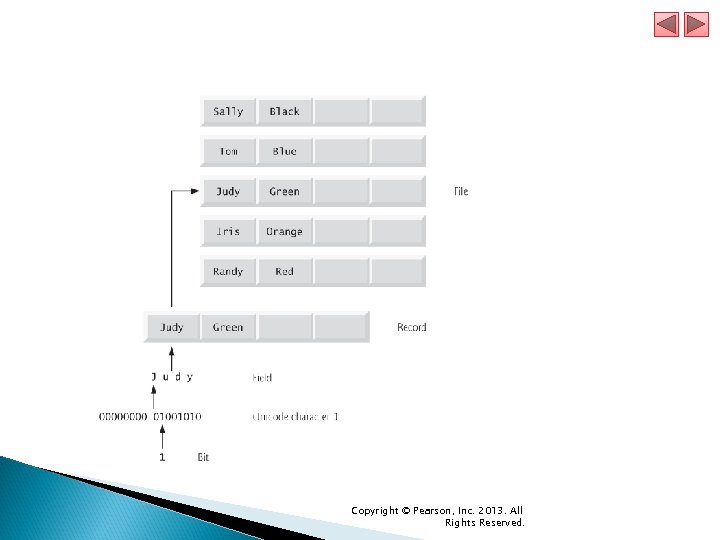
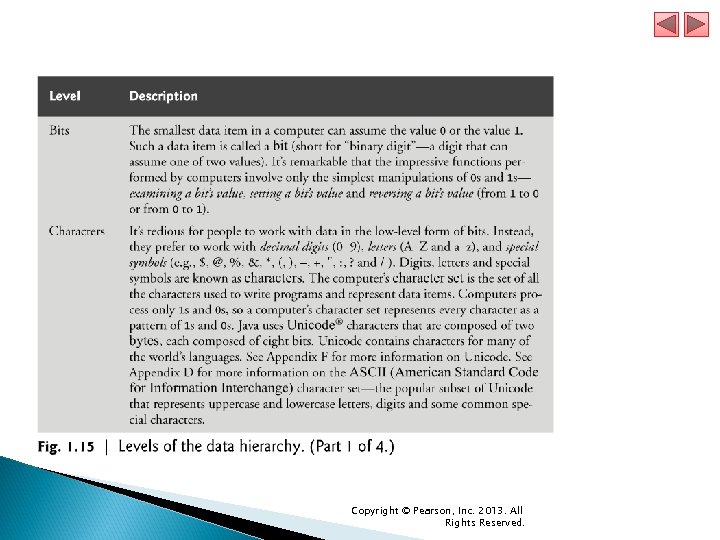
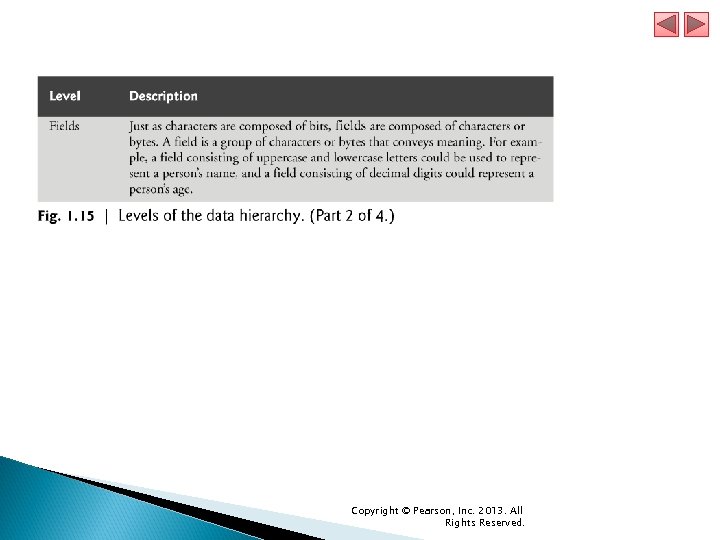
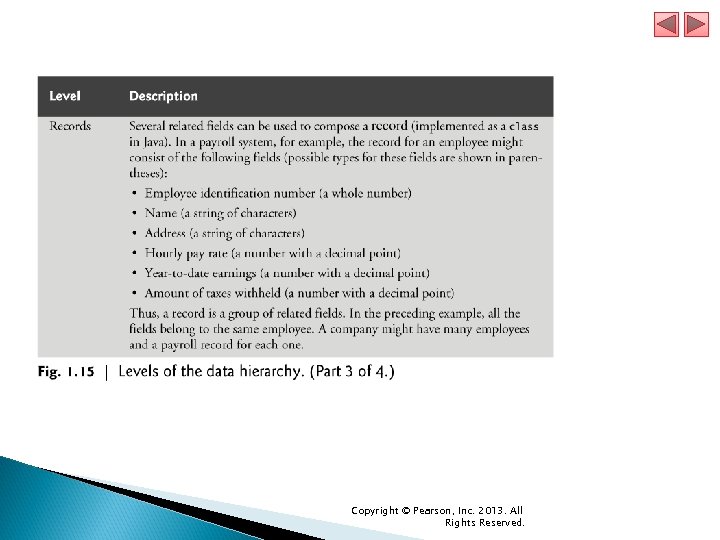
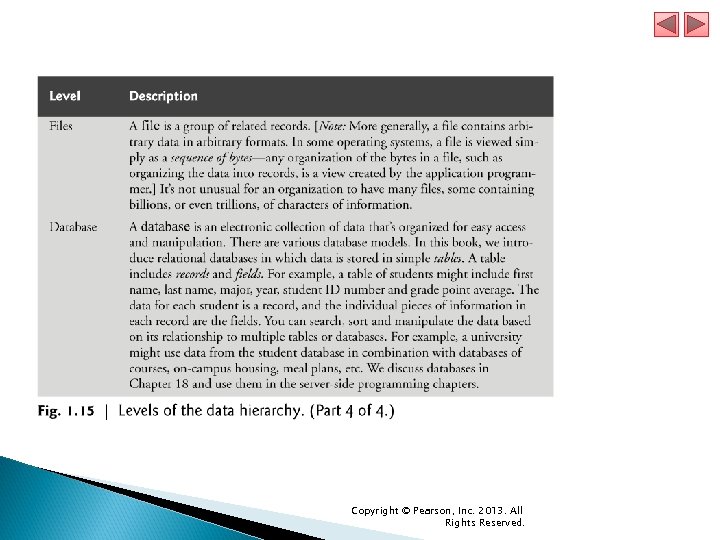
 1. 11 Data Hierarchy Data items processed by computers form a data hierarchy that becomes larger and more complex in structure as we progress from bits to characters to fields, and so on. Figure 1. 14 illustrates a portion of the data hierarchy. Figure 1. 15 summarizes the data hierarchy’s levels. Copyright © Pearson, Inc. 2013. All Rights Reserved.
 Copyright © Pearson, Inc. 2013. All Rights Reserved.
 Copyright © Pearson, Inc. 2013. All Rights Reserved.
 Copyright © Pearson, Inc. 2013. All Rights Reserved.
 Copyright © Pearson, Inc. 2013. All Rights Reserved.
 Copyright © Pearson, Inc. 2013. All Rights Reserved.
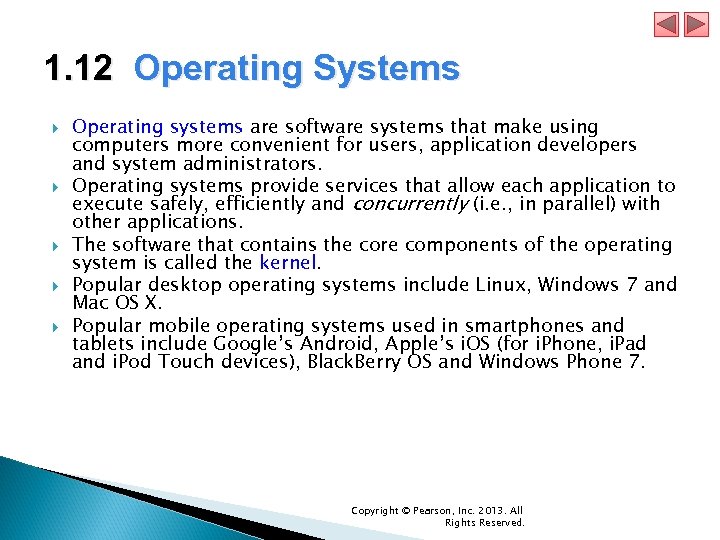 1. 12 Operating Systems Operating systems are software systems that make using computers more convenient for users, application developers and system administrators. Operating systems provide services that allow each application to execute safely, efficiently and concurrently (i. e. , in parallel) with other applications. The software that contains the core components of the operating system is called the kernel. Popular desktop operating systems include Linux, Windows 7 and Mac OS X. Popular mobile operating systems used in smartphones and tablets include Google’s Android, Apple’s i. OS (for i. Phone, i. Pad and i. Pod Touch devices), Black. Berry OS and Windows Phone 7. Copyright © Pearson, Inc. 2013. All Rights Reserved.
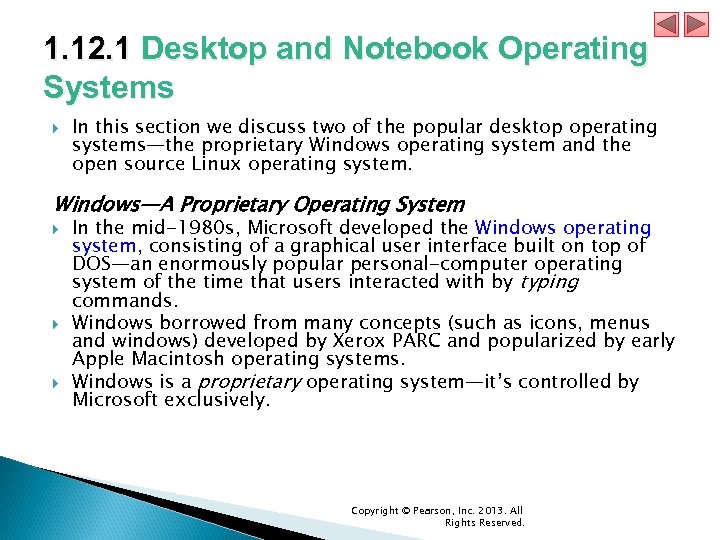 1. 12. 1 Desktop and Notebook Operating Systems In this section we discuss two of the popular desktop operating systems—the proprietary Windows operating system and the open source Linux operating system. Windows—A Proprietary Operating System In the mid-1980 s, Microsoft developed the Windows operating system, consisting of a graphical user interface built on top of DOS—an enormously popular personal-computer operating system of the time that users interacted with by typing commands. Windows borrowed from many concepts (such as icons, menus and windows) developed by Xerox PARC and popularized by early Apple Macintosh operating systems. Windows is a proprietary operating system—it’s controlled by Microsoft exclusively. Copyright © Pearson, Inc. 2013. All Rights Reserved.
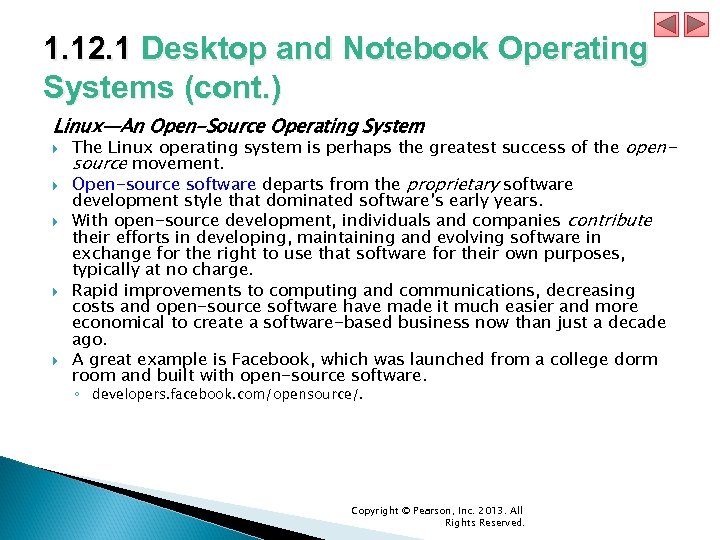 1. 12. 1 Desktop and Notebook Operating Systems (cont. ) Linux—An Open-Source Operating System The Linux operating system is perhaps the greatest success of the opensource movement. Open-source software departs from the proprietary software development style that dominated software’s early years. With open-source development, individuals and companies contribute their efforts in developing, maintaining and evolving software in exchange for the right to use that software for their own purposes, typically at no charge. Rapid improvements to computing and communications, decreasing costs and open-source software have made it much easier and more economical to create a software-based business now than just a decade ago. A great example is Facebook, which was launched from a college dorm room and built with open-source software. ◦ developers. facebook. com/opensource/. Copyright © Pearson, Inc. 2013. All Rights Reserved.
 1. 12. 1 Desktop and Notebook Operating Systems (cont. ) The Linux kernel is the core of the most popular opensource, freely distributed, full-featured operating system. It’s developed by a loosely organized team of volunteers and is popular in servers, personal computers and embedded systems. Unlike that of proprietary operating systems like Microsoft’s Windows and Apple’s Mac OS X, Linux source code (the program code) is available to the public for examination and modification and is free to download and install. Linux has become extremely popular on servers and in embedded systems, such as Google’s Android-based smartphones. Copyright © Pearson, Inc. 2013. All Rights Reserved.
 1. 12. 2 Mobile Operating Systems Two of the most popular mobile operating systems are Apple’s i. OS and Google’s Android. Apple’s proprietary i. Phone operating system, i. OS, is derived from Apple’s Mac OS X and is used in the i. Phone, i. Pad and i. Pod Touch devices. Android—the fastest growing mobile and smartphone operating system—is based on the Linux kernel and Java. One benefit of developing Android apps is the openness of the platform. The operating system is open source and free. Copyright © Pearson, Inc. 2013. All Rights Reserved.
 1. 13 Types of Programming Languages Programmers write instructions in various programming languages, some directly understandable by computers and others requiring intermediate translation steps. Any computer can directly understand only its own machine language, defined by its hardware design. Machine languages generally consist of numbers (ultimately reduced to 1 s and 0 s). Such languages are cumbersome for humans. Programming in machine language—the numbers that computers could directly understand—was simply too slow and tedious for most programmers. Instead, they began using Englishlike abbreviations to represent elementary operations. These abbreviations formed the basis of assembly languages. Translator programs called assemblers were developed to convert assembly-language programs to machine language. Copyright © Pearson, Inc. 2013. All Rights Reserved.
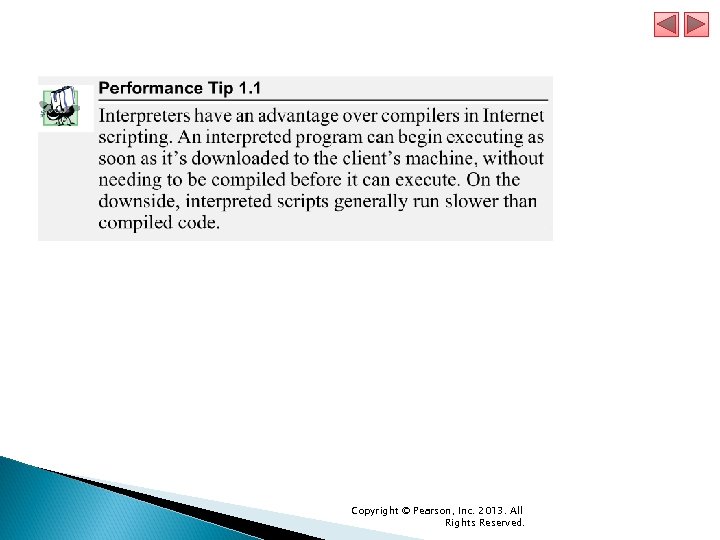
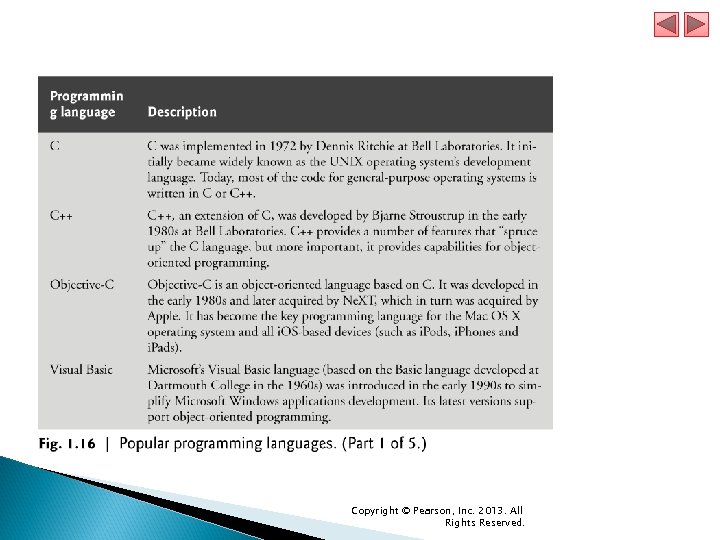
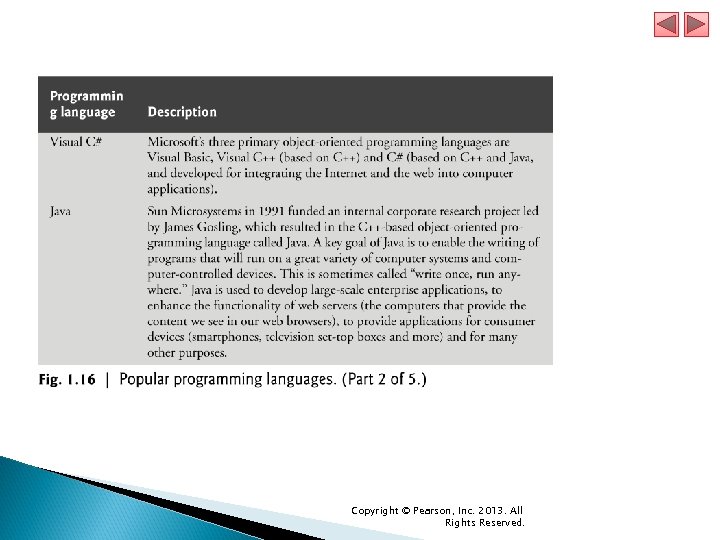
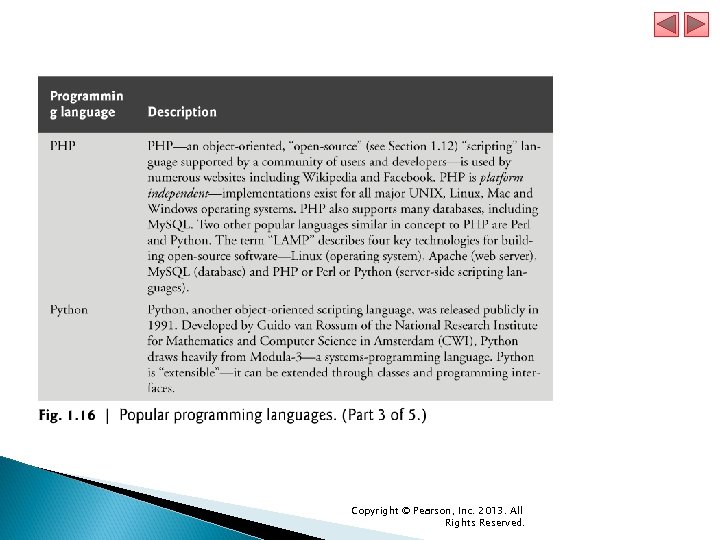
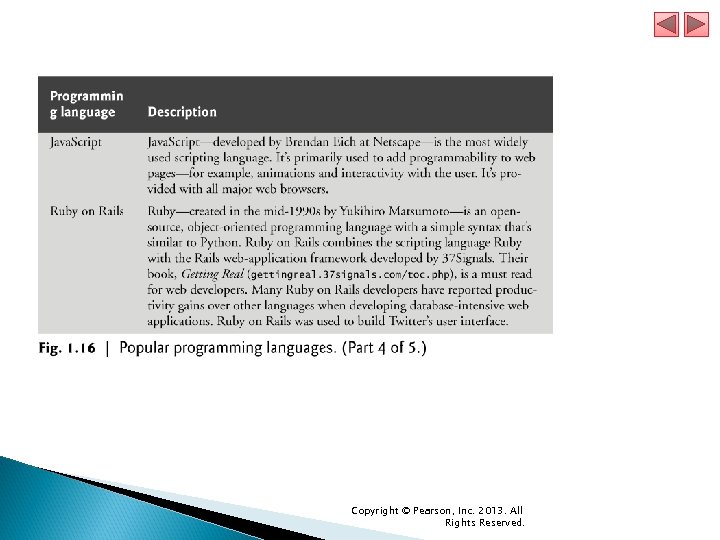
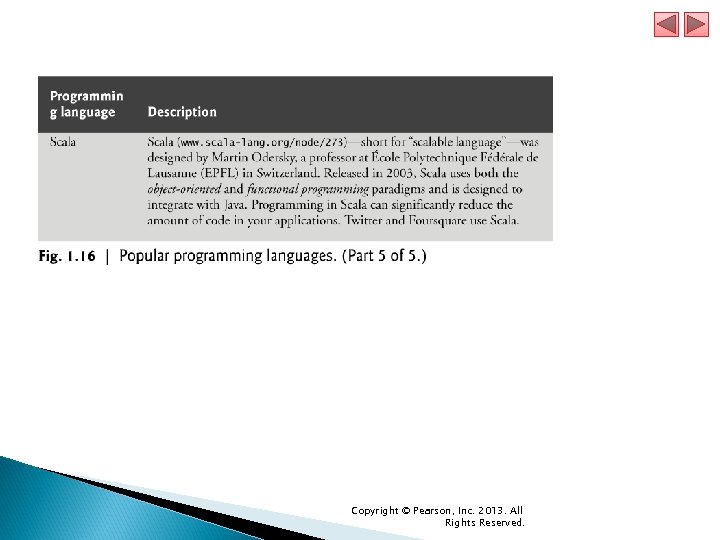
 1. 13 Types of Programming Languages (cont. ) Although assembly-language code is clearer to humans, it’s incomprehensible to computers until translated to machine language. To speed the programming process even further, high-level languages were developed in which single statements could be written to accomplish substantial tasks. High-level languages allow you to write instructions that look almost like everyday English and contain commonly used mathematical expressions. Translator programs called compilers convert high-level language programs into machine language. Interpreter programs were developed to execute high-level language programs directly, although more slowly than compiled programs. Figure 1. 16 introduces a number of popular programming languages. Copyright © Pearson, Inc. 2013. All Rights Reserved.
 Copyright © Pearson, Inc. 2013. All Rights Reserved.
 Copyright © Pearson, Inc. 2013. All Rights Reserved.
 Copyright © Pearson, Inc. 2013. All Rights Reserved.
 Copyright © Pearson, Inc. 2013. All Rights Reserved.
 Copyright © Pearson, Inc. 2013. All Rights Reserved.
 Copyright © Pearson, Inc. 2013. All Rights Reserved.
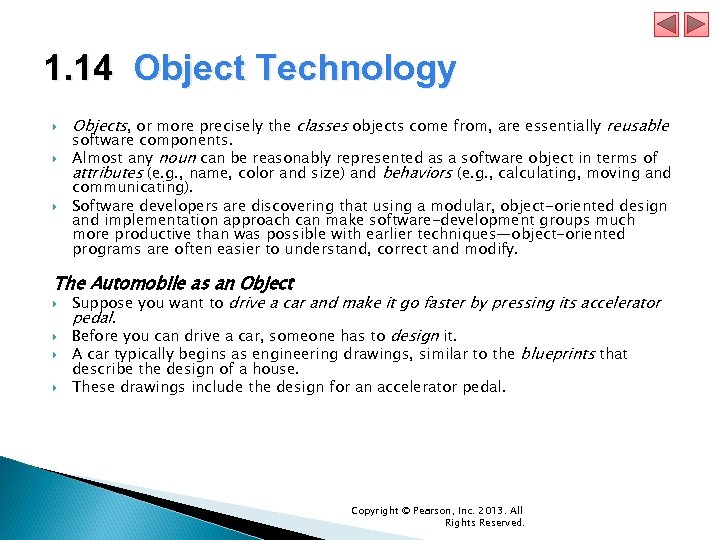 1. 14 Object Technology Objects, or more precisely the classes objects come from, are essentially reusable software components. Almost any noun can be reasonably represented as a software object in terms of attributes (e. g. , name, color and size) and behaviors (e. g. , calculating, moving and communicating). Software developers are discovering that using a modular, object-oriented design and implementation approach can make software-development groups much more productive than was possible with earlier techniques—object-oriented programs are often easier to understand, correct and modify. The Automobile as an Object Suppose you want to drive a car and make it go faster by pressing its accelerator pedal. Before you can drive a car, someone has to design it. A car typically begins as engineering drawings, similar to the blueprints that describe the design of a house. These drawings include the design for an accelerator pedal. Copyright © Pearson, Inc. 2013. All Rights Reserved.
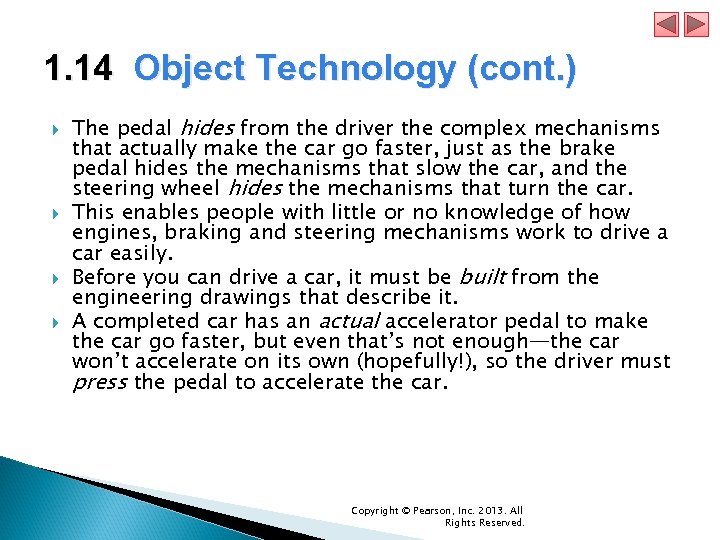 1. 14 Object Technology (cont. ) The pedal hides from the driver the complex mechanisms that actually make the car go faster, just as the brake pedal hides the mechanisms that slow the car, and the steering wheel hides the mechanisms that turn the car. This enables people with little or no knowledge of how engines, braking and steering mechanisms work to drive a car easily. Before you can drive a car, it must be built from the engineering drawings that describe it. A completed car has an actual accelerator pedal to make the car go faster, but even that’s not enough—the car won’t accelerate on its own (hopefully!), so the driver must press the pedal to accelerate the car. Copyright © Pearson, Inc. 2013. All Rights Reserved.
 1. 14 Object Technology (cont. ) Methods and Classes Performing a task in a program requires a method. The method houses the program statements that actually perform its tasks. It hides these statements from its user, just as a car’s accelerator pedal hides from the driver the mechanisms of making the car go faster. In object-oriented programming languages, we create a program unit called a class to house the set of methods that perform the class’s tasks. For example, a class that represents a bank account might contain one method to deposit money to an account, another to withdraw money from an account and a third to inquire what the account’s current balance is. A class is similar in concept to a car’s engineering drawings, which house the design of an accelerator pedal, steering wheel, and so on. Copyright © Pearson, Inc. 2013. All Rights Reserved.
 1. 14 Object Technology (cont. ) Instantiation Just as someone has to build a car from its engineering drawings before you can actually drive a car, you must build an object from a class before a program can perform the tasks that the class’s methods define. The process of doing this is called instantiation. An object is then referred to as an instance of its class. Reuse Just as a car’s engineering drawings can be reused many times to build many cars, you can reuse a class many times to build many objects. Reuse of existing classes when building new classes and programs saves time and effort. Reuse also helps you build more reliable and effective systems, because existing classes and components often have gone through extensive testing, debugging and performance tuning. Copyright © Pearson, Inc. 2013. All Rights Reserved.
 Copyright © Pearson, Inc. 2013. All Rights Reserved.
 1. 14 Object Technology (cont. ) Messages and Method Calls When you drive a car, pressing its gas pedal sends a message to the car to perform a task— that is, to go faster. Similarly, you send messages to an object. Each message is implemented as a method call that tells a method of the object to perform its task. For example, a program might call a particular bank-account object’s deposit method to increase the account’s balance. Copyright © Pearson, Inc. 2013. All Rights Reserved.
 1. 14 Object Technology (cont. ) Attributes and Instance Variables A car, besides having capabilities to accomplish tasks, also has attributes, such as its color, its number of doors, the amount of gas in its tank, its current speed and its record of total miles driven (i. e. , its odometer reading). Like its capabilities, the car’s attributes are represented as part of its design in its engineering diagrams (which, for example, include an odometer and a fuel gauge). As you drive an actual car, these attributes are carried along with the car. Every car maintains its own attributes. For example, each car knows how much gas is in its own gas tank, but not how much is in the tanks of other cars. An object, similarly, has attributes that it carries along as it’s used in a program. Copyright © Pearson, Inc. 2013. All Rights Reserved.
 1. 14 Object Technology (cont. ) These attributes are specified as part of the object’s class. For example, a bank-account object has a balance attribute that represents the amount of money in the account. Each bank-account object knows the balance in the account it represents, but not the balances of the other accounts in the bank. Attributes are specified by the class’s instance variables. Copyright © Pearson, Inc. 2013. All Rights Reserved.
 1. 14 Object Technology (cont. ) Encapsulation Classes encapsulate (i. e. , wrap) attributes and methods into objects—an object’s attributes and methods are intimately related. Objects may communicate with one another, but normally they’re not allowed to know how other objects are implemented—implementation details are hidden within the objects themselves. This information hiding is crucial to good software engineering. Copyright © Pearson, Inc. 2013. All Rights Reserved.
 1. 14 Object Technology (cont. ) Inheritance A new class of objects can be created quickly and conveniently by inheritance—the new class absorbs the characteristics of an existing class, possibly customizing them and adding unique characteristics of its own. In our car analogy, an object of class “convertible” certainly is an object of the more general class “automobile, ” but more specifically, the roof can be raised or lowered. Copyright © Pearson, Inc. 2013. All Rights Reserved.
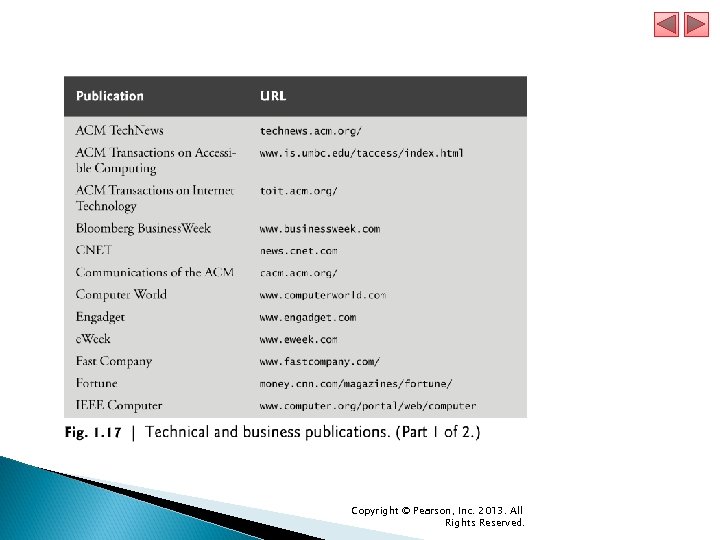
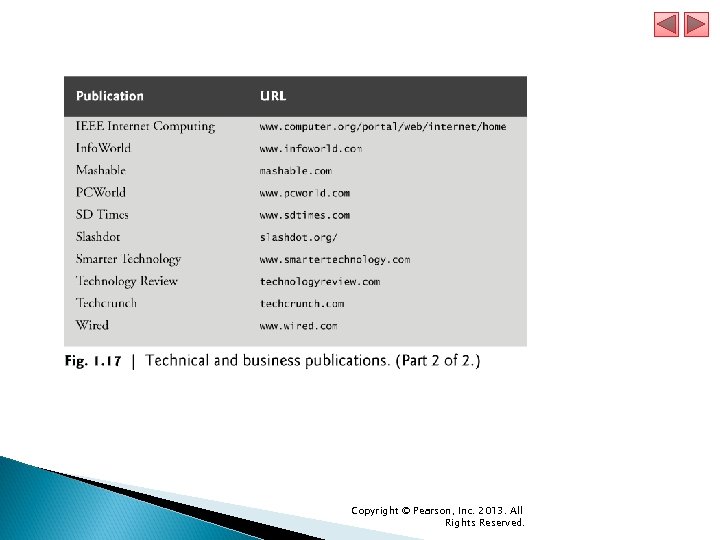
 1. 15 Keeping Up-to-Date with Information Technologies Figure 1. 17 lists key technical and business publications that will help you stay up-todate with the latest news and trends in computer, Internet and web technology. Copyright © Pearson, Inc. 2013. All Rights Reserved.
 Copyright © Pearson, Inc. 2013. All Rights Reserved.
 Copyright © Pearson, Inc. 2013. All Rights Reserved.