


 Скачать презентацию CHAPTER 1 Computer Systems The Architecture of Computer
f030fb56a9dbb80d0c4c687f56c9bf3e.ppt
- Количество слайдов: 19
 CHAPTER 1: Computer Systems The Architecture of Computer Hardware and Systems Software: An Information Technology Approach 3 rd Edition, Irv Englander John Wiley and Sons 2003
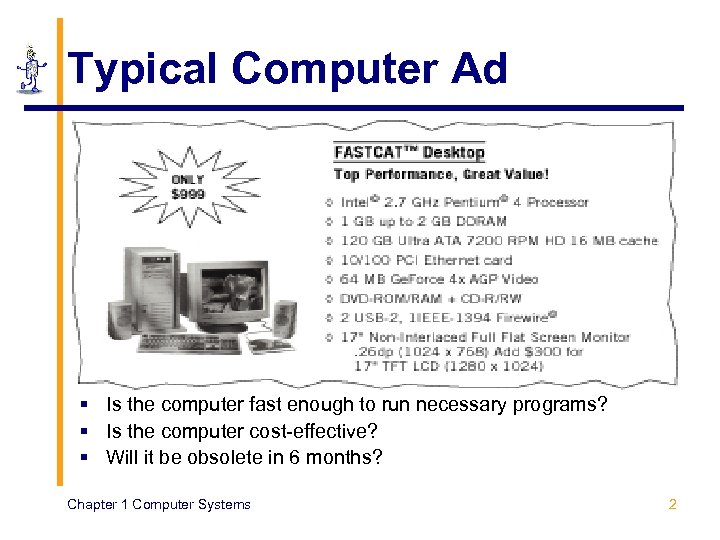 Typical Computer Ad § Is the computer fast enough to run necessary programs? § Is the computer cost-effective? § Will it be obsolete in 6 months? Chapter 1 Computer Systems 2
 Why Study Computer Architecture? § User § Understand system capabilities and limitations § Make informed decisions § Improve communications with information technology professionals § Systems Analyst § Conduct surveys, determine feasibility and define and document user requirements § Specify computer systems to meet application requirements § Programmer § Create efficient application software for specific processing needs Chapter 1 Computer Systems 3
 Why Study Computer Architecture? § System Administrator / Manager § Install, configure, maintain, and upgrade computer systems § Maximize system availability § Optimize system performance § Ensure system security § Web Designer § § Optimize customer accessibility to Web services System administration of Web servers Select appropriate data formats Design efficient Web pages Chapter 1 Computer Systems 4
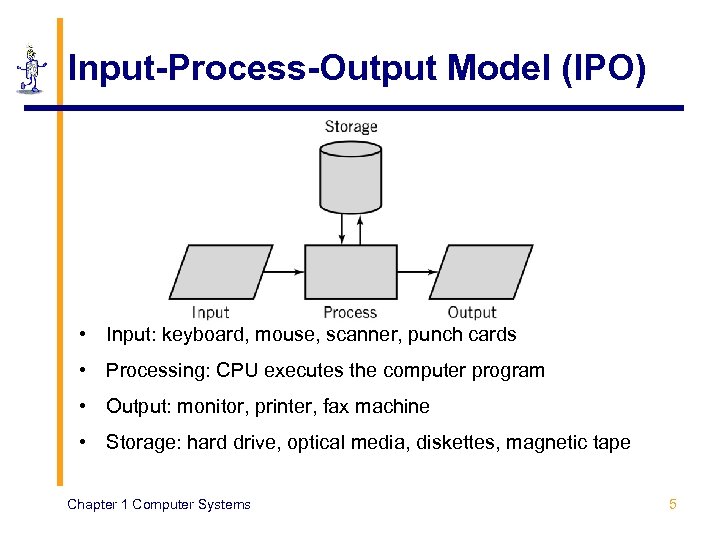 Input-Process-Output Model (IPO) • Input: keyboard, mouse, scanner, punch cards • Processing: CPU executes the computer program • Output: monitor, printer, fax machine • Storage: hard drive, optical media, diskettes, magnetic tape Chapter 1 Computer Systems 5
 Architecture Components § Hardware § Processes data by executing instructions § Provides input and output § Software § Instructions executed by the system § Data § Fundamental representation of facts and observations § Communications § Sharing data and processing among different systems Chapter 1 Computer Systems 6
 Hardware Component § Input/Output devices § Storage Devices § CPU § ALU: arithmetic/logic unit § CU: control unit § Interface unit § Memory § Short-term storage for CPU calculations Chapter 1 Computer Systems 7
 Typical Personal Computer System Chapter 1 Computer Systems 8
 CPU: Central Processing Unit § ALU: arithmetic/logic unit § Performs arithmetic and Boolean logical calculations § CU: control unit § Controls processing of instructions § Controls movement of data within the CPU § Interface unit § Moves instructions and data between the CPU and other hardware components § Bus: bundle of wires that carry signals and power between different components Chapter 1 Computer Systems 9
 Memory § Also known as primary storage, working storage, and RAM (random access memory) § Consists of bits, each of which hold a value of either 0 or 1 (8 bits = 1 byte) § Holds both instructions and data of a computer program (stored program concept) Chapter 1 Computer Systems 10
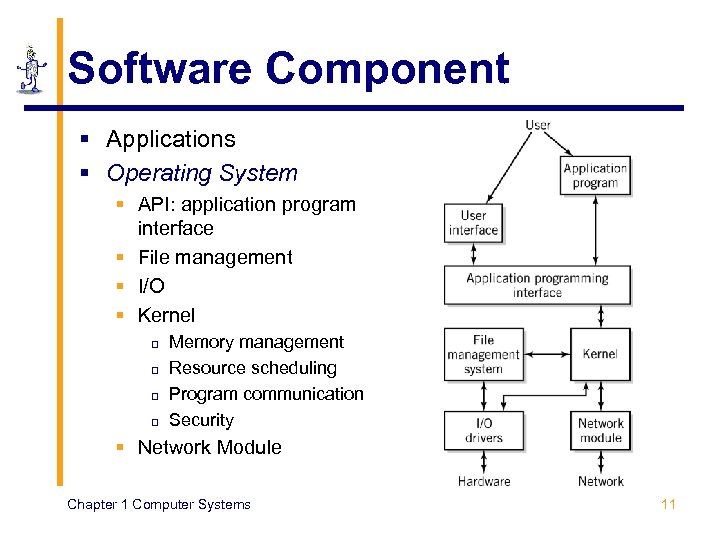 Software Component § Applications § Operating System § API: application program interface § File management § I/O § Kernel p p Memory management Resource scheduling Program communication Security § Network Module Chapter 1 Computer Systems 11
 Communications Component § Hardware § Communication channels p p Physical connections between computer systems Examples: wire cable, phone lines, fiber optic cable, infrared light, radio waves § Interface hardware p p Handles communication between the computer and the communication channel Modem or network interface card (NIC) § Software § Network protocols: HTTP, TCP/IP, ATAPI Chapter 1 Computer Systems 12
 Computer Systems All computer systems, no matter how complex, consists of the following: § At least one CPU § Memory to hold programs and data § I/O devices § Long-term storage Chapter 1 Computer Systems 13
 Protocols § Common ground rules of communication between computers, I/O devices, and many software programs § Examples § HTTP: between Web servers and Web browsers § TCP/IP: between computers on the Internet and local area networks § ATAPI: between a CPU and CD-ROMs Chapter 1 Computer Systems 14
 Standards § Created to ensure universal compatibility of data formats and protocols § May be created by committee or may become a de facto standard through popular use § Examples: § § Computer languages: Java, SQL, C, Java. Script Display standards: Postscript, MPEG-2, JPEG, GIF Character set standards: ASCII, Unicode, EBCDIC Video standards: VGA, XGA, RGB Chapter 1 Computer Systems 15
 Early History § 1642: Blaise Pascal invents a calculating machine § 1801: Joseph Marie Jacquard invents a loom that uses punch cards § 1800’s: § Charles Babbage attempts to build an analytical engine (mechanical computer) § Augusta Ada Byron develops many of the fundamental concepts of programming § George Boole invents Boolean logic. Chapter 1 Computer Systems 16
 Modern Computer Development § 1937: Mark I is built (Aiken, Harvard University, IBM). § First electronic computer using relays. § 1939: ABC is built § First fully electronic digital computer. Used vacuum tubes. § 1943 -46: ENIAC (Mauchly, Eckert, University of Pennsylvania). § First general purpose digital computer. § 1945: Von Neumann architecture proposed. § Still the standard for present day computers. § 1947: Creation of transistor § (Bardeen, Shockley, Brattain, Bell Labs). § 1951: UNIVAC. § First commercially available computer. Chapter 1 Computer Systems 17
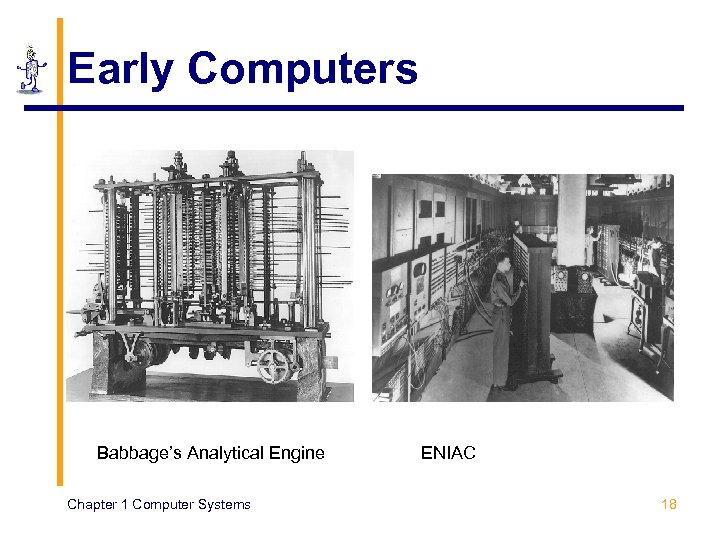 Early Computers Babbage’s Analytical Engine Chapter 1 Computer Systems ENIAC 18
 Textbook Overview § Web site: http: //www. wiley. com/college/englander § Part 1 (Chapter 1) § Computer system overview § Part 2 (Chapters 2 -5) § Number systems and data formats § Part 3 (Chapters 6 -12) § Computer architecture and hardware operation § Part 4 (Chapters 13 -18) § Software – operating systems, applications, development environments § Part 5 (Supplementary Chapters 1 -3) § Digital logic, addressing modes, and communication channel technology Chapter 1 Computer Systems 19