


 Скачать презентацию Chapter 1 Assuming the Role of the Systems
f393b02fbfe584f64c8abca2dcdc2bcb.ppt
- Количество слайдов: 64
 Chapter 1 Assuming the Role of the Systems Analyst Systems Analysis and Design Kendall & Kendall Sixth Edition
 Modern Systems Analysis and Design Fourth Edition Jeffrey A. Hoffer Joey F. George Joseph S. Valacich Chapter 1 The Systems Development Environment
 Major Topics • • • Information systems Phases of analysis and design System maintenance CASE tools Alternate methodologies Kendall & Kendall 2005 Pearson Prentice Hall 1 -3
 Information • Information is an organizational resource, which must be managed as carefully as other resources. • Costs are associated with information processing. • Information processing must be managed to take full advantage of its potential. Kendall & Kendall 2005 Pearson Prentice Hall 1 -4
 • Information Systems Analysis and Design – Complex organizational process whereby computer-based information systems are developed and maintained • Application Software – Computer software designed to support organizational functions or processes • Systems Analyst – Organizational role most responsible for analysis and design of information systems
 A Modern Approach to Systems Analysis and Design • 1950 s: focus on efficient automation of existing processes • 1960 s: advent of 3 GL, faster and more reliable computers • 1970 s: system development becomes more like an engineering discipline • 1980 s: major breakthrough with 4 GL, CASE tools, object oriented methods • 1990 s: focus on system integration, GUI applications, client/server platforms, Internet • The new century: Web application development, wireless PDAs, component-based applications
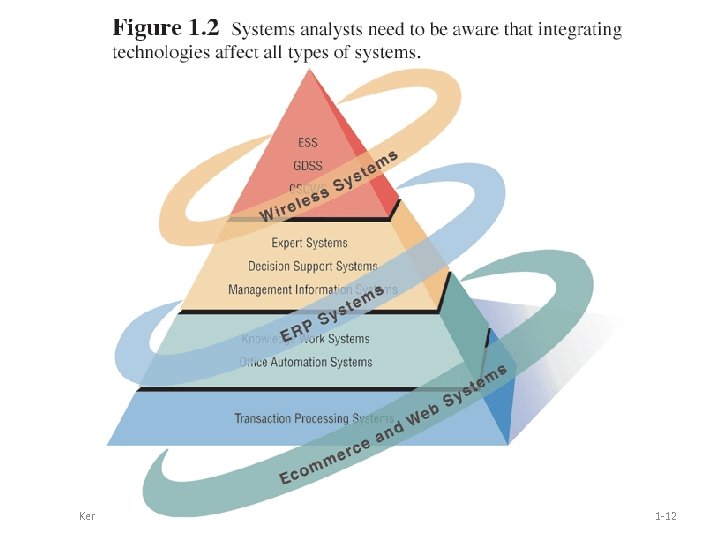
 Categories Information systems fall into one of the following eight categories: Transaction processing systems (TPS). Office automation systems (OAS). Knowledge work systems (KWS). Management information systems (MIS). Decision support systems (DSS). Expert systems (ES) and Artificial Intelligence (AI). Group decision support systems (GDSS) and Computer-Supported Collaborative Work Systems. • Executive support systems (EES). • • Kendall & Kendall 2005 Pearson Prentice Hall 1 -8
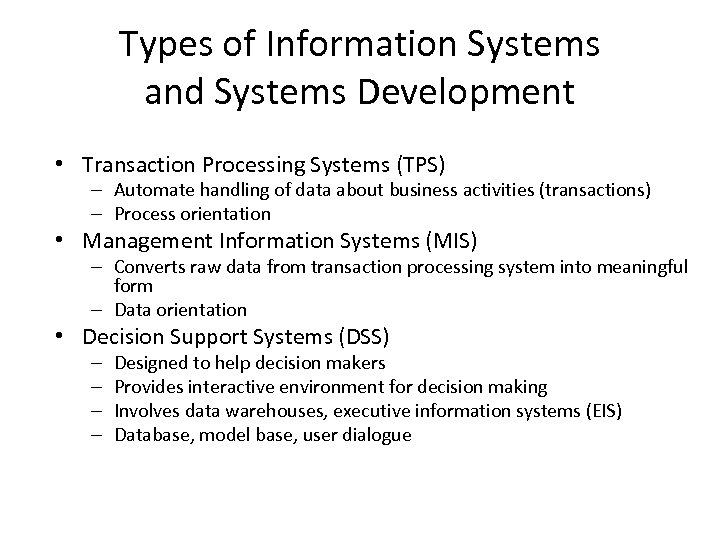 Types of Information Systems and Systems Development • Transaction Processing Systems (TPS) – Automate handling of data about business activities (transactions) – Process orientation • Management Information Systems (MIS) – Converts raw data from transaction processing system into meaningful form – Data orientation • Decision Support Systems (DSS) – – Designed to help decision makers Provides interactive environment for decision making Involves data warehouses, executive information systems (EIS) Database, model base, user dialogue
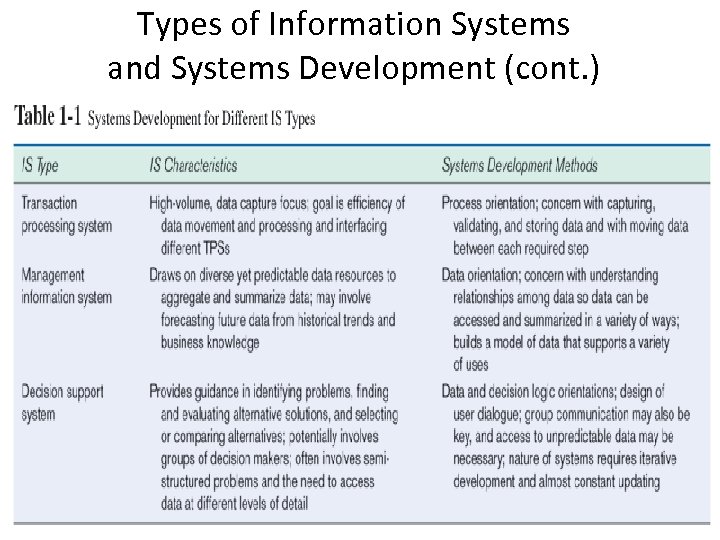 Types of Information Systems and Systems Development (cont. )
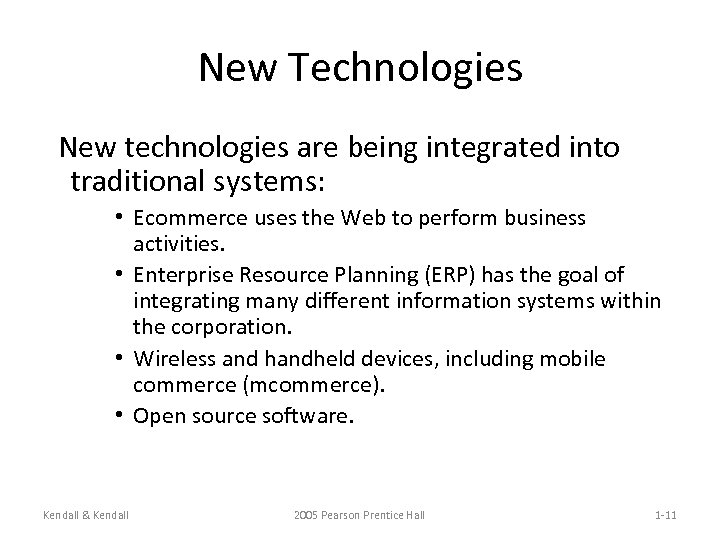 New Technologies New technologies are being integrated into traditional systems: • Ecommerce uses the Web to perform business activities. • Enterprise Resource Planning (ERP) has the goal of integrating many different information systems within the corporation. • Wireless and handheld devices, including mobile commerce (mcommerce). • Open source software. Kendall & Kendall 2005 Pearson Prentice Hall 1 -11
 Kendall & Kendall 2005 Pearson Prentice Hall 1 -12
 Advantages of Using the Web The benefits of using the Web are: • Increasing awareness of the availability of the service, product, industry, person, or group. • 24 -hour access for users. • Standard interface design. • Creating a global system. Kendall & Kendall 2005 Pearson Prentice Hall 1 -13
 Nature of Analysis and Design Systems analysis and design is a systematic approach to: – Identifying problems, opportunities, and objectives. – Analyzing the information flows in organizations. – Designing computerized information systems to solve a problem. Kendall & Kendall 2005 Pearson Prentice Hall 1 -14
 Systems Analyst • Systems analysts act as: – Outside consultants to businesses. – Supporting experts within a business. – As change agents. • Analysts are problem solvers, and require communication skills. • Analysts must be ethical with users and customers. Kendall & Kendall 2005 Pearson Prentice Hall 1 -15
 Developing Information Systems and the SDLC System Development Methodology – Standard process followed in an organization – Consists of: • • Analysis Design Implementation Maintenance
 Systems Development Life Cycle (SDLC) • Traditional methodology for developing, maintaining, and replacing information systems • Phases in SDLC: – – – Planning Analysis Design Implementation Maintenance Hoffer, George & Valacich
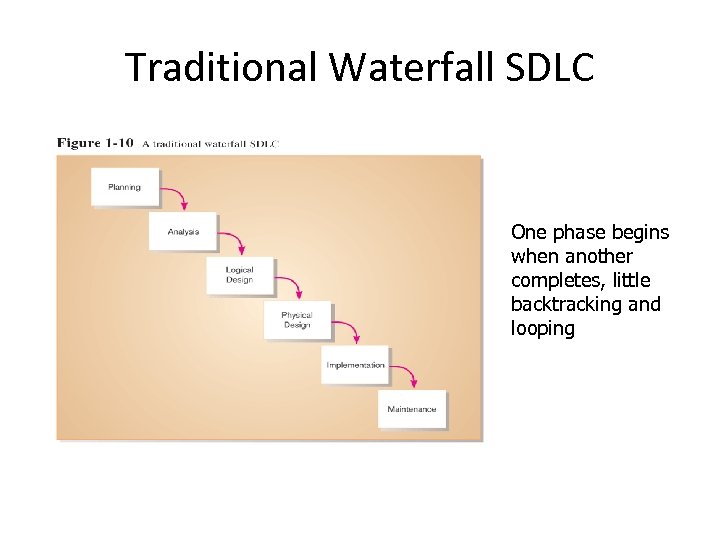 Traditional Waterfall SDLC One phase begins when another completes, little backtracking and looping
 Problems with Waterfall Approach • System requirements “locked in” after being determined (can't change) • Limited user involvement (only in requirements phase) • Too much focus on milestone deadlines of SDLC phases to the detriment of sound development practices
 Alternatives to Traditional Waterfall SDLC • • • Prototyping CASE tools Joint Application Design (JAD) Rapid Application Development (RAD) Agile Methodologies e. Xtreme Programming ETHICS. Project Champions. Soft Systems Methodology. Multi-view.
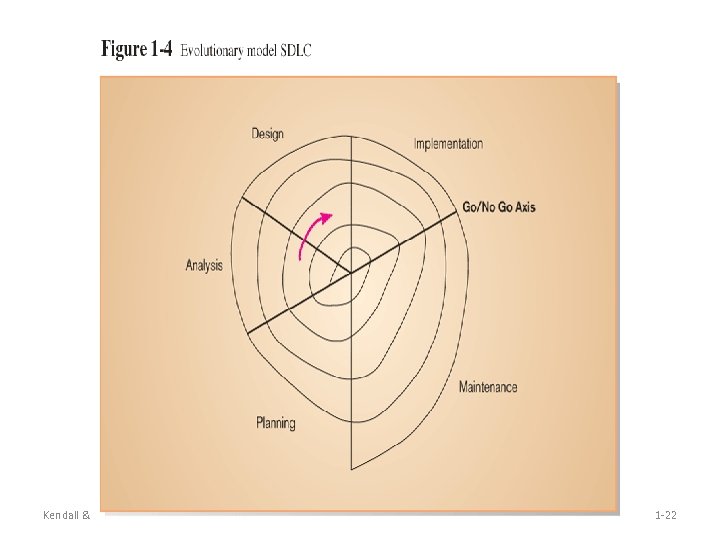
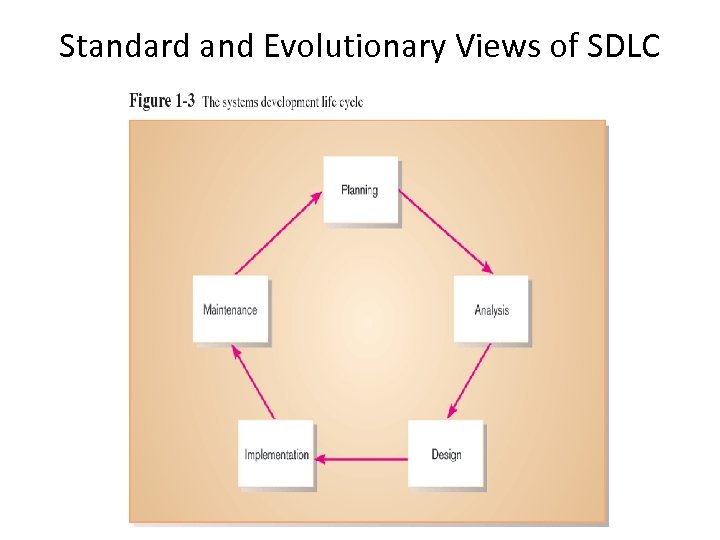 Standard and Evolutionary Views of SDLC
 Kendall & Kendall 2005 Pearson Prentice Hall 1 -22
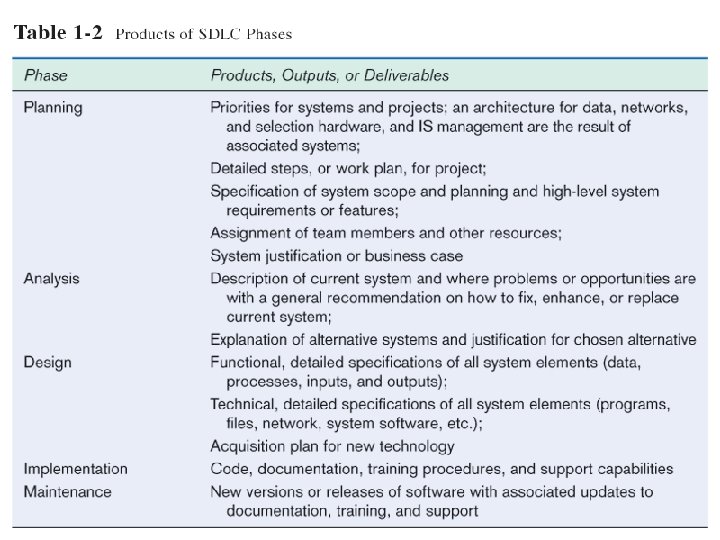
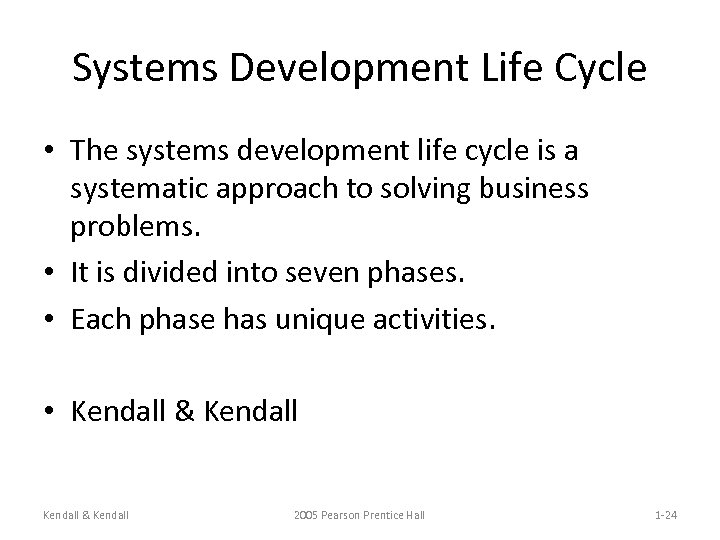 Systems Development Life Cycle • The systems development life cycle is a systematic approach to solving business problems. • It is divided into seven phases. • Each phase has unique activities. • Kendall & Kendall 2005 Pearson Prentice Hall 1 -24
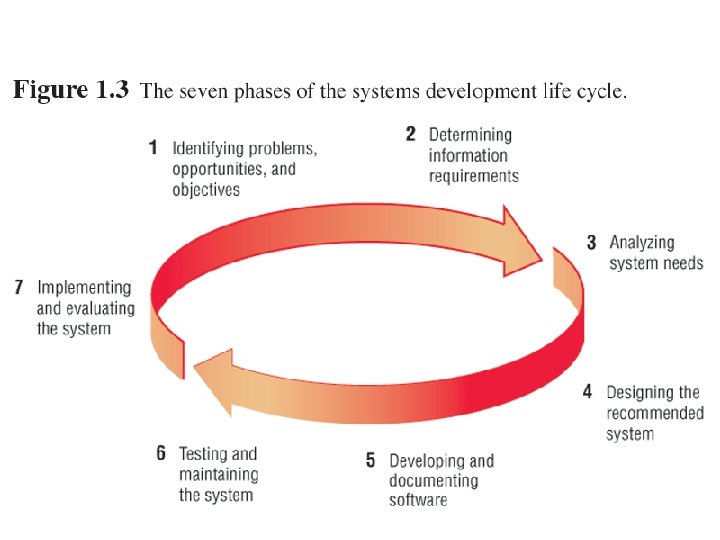 Kendall & Kendall 2005 Pearson Prentice Hall 1 -25
 Phase 1 • Identifying: – Problems. – Opportunities. – Objectives. • Personnel involved: – Analyst. – User management. – Systems management. Kendall & Kendall 2005 Pearson Prentice Hall 1 -26
 Phase 2 • Determining information requirements: – – Interview management, operations personnel. Gather systems/operating documents. Use questionnaires. Observe the system and personnel involved. • Learn the who, what, where, when, and how, and the why for each of these. Kendall & Kendall 2005 Pearson Prentice Hall 1 -27
 Phase 2 (Continued) • Personnel involved: – Analyst. – User management. – User operations workers. – Systems management. Kendall & Kendall 2005 Pearson Prentice Hall 1 -28
 Phase 3 • Analyzing system needs: – Create data flow diagrams. – Document procedural logic for data flow diagram processes. – Complete the data dictionary. – Make semistructured decisions. – Prepare and present the system proposal. – Recommend the optimal solution to management. Kendall & Kendall 2005 Pearson Prentice Hall 1 -29
 Phase 3 (Continued) • Personnel involved: – Analyst. – User management. – Systems management. Kendall & Kendall 2005 Pearson Prentice Hall 1 -30
 Phase 4 • Designing the recommended system: – Design the user interface. • Design output. • Design input. – Design system controls. – Design files and/or database. – Produce program specifications. – Produce decision trees or tables. Kendall & Kendall 2005 Pearson Prentice Hall 1 -31
 Phase 4 (Continued) • Personnel involved: – Analyst. – System designer. – User management. – User operations workers. – Systems management. Kendall & Kendall 2005 Pearson Prentice Hall 1 -32
 Phase 5 • Developing and documenting software: – Design computer programs using structure charts, Nassi-Schneiderman charts, and pseudocode. – Walkthrough program design. – Write computer programs. – Document software with help files, procedure manuals, and Web sites with Frequently Asked Questions. Kendall & Kendall 2005 Pearson Prentice Hall 1 -33
 Phase 5 (Continued) • Personnel involved: – Analyst. – System designer. – Programmers. – Systems management. Kendall & Kendall 2005 Pearson Prentice Hall 1 -34
 Phase 6 • Testing and maintaining the system: – Test and debug computer programs. – Test the computer system. – Enhance system. Kendall & Kendall 2005 Pearson Prentice Hall 1 -35
 Phase 6 (Continued) • Personnel involved: – Analyst. – System designer. – Programmers. – Systems management. Kendall & Kendall 2005 Pearson Prentice Hall 1 -36
 Phase 7 • Implementing and evaluating the system: – Plan conversion. – Train users. – Purchase and install new equipment. – Convert files. – Install system. – Review and evaluate system. Kendall & Kendall 2005 Pearson Prentice Hall 1 -37
 Phase 7 (Continued) • Personnel involved: – Analyst. – System designer. – Programmers. – User management. – User operations workers. – Systems management. Kendall & Kendall 2005 Pearson Prentice Hall 1 -38
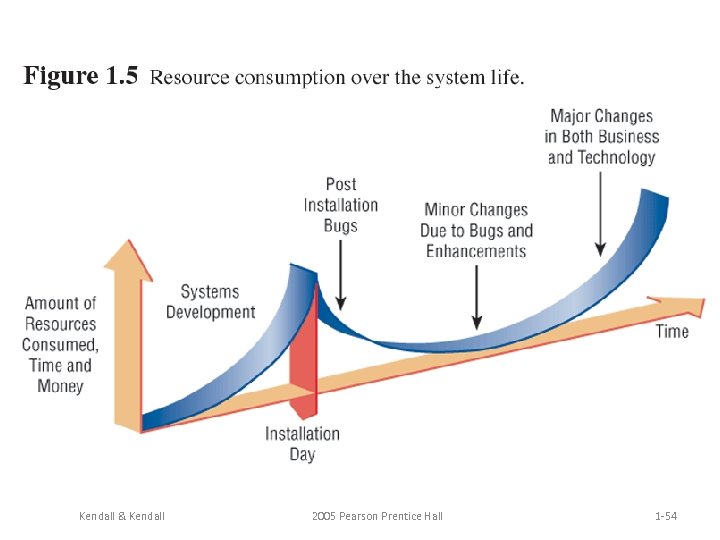
 System Maintenance • System maintenance is: – Removing undetected errors, and – Enhancing existing software. • Time spent on maintenance typically ranges from 48 -60 percent of total time. Kendall & Kendall 2005 Pearson Prentice Hall 1 -39
 System Enhancements Systems are enhanced for the following reasons: – Adding additional features to the system. – Business and governmental requirements change over time. – Technology, hardware, and software rapidly changing. Kendall & Kendall 2005 Pearson Prentice Hall 1 -40
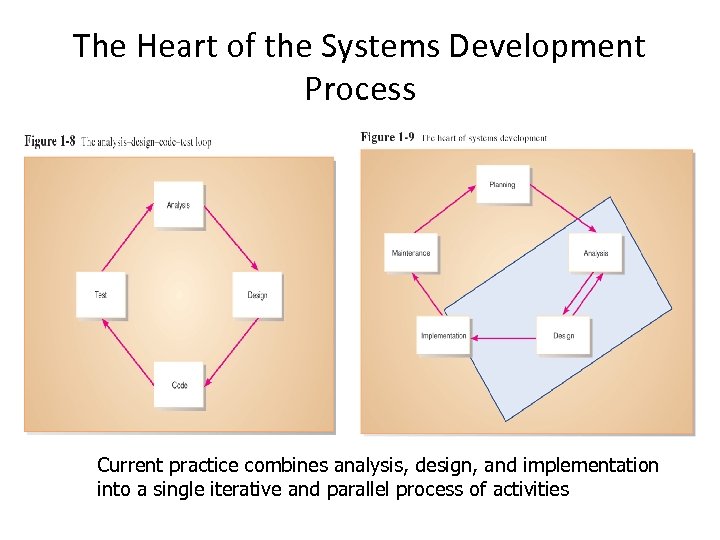 The Heart of the Systems Development Process Current practice combines analysis, design, and implementation into a single iterative and parallel process of activities
 Joint Application Design (JAD) • Structured process involving users, analysts, and managers • Several-day intensive workgroup sessions • Purpose: to specify or review system requirements
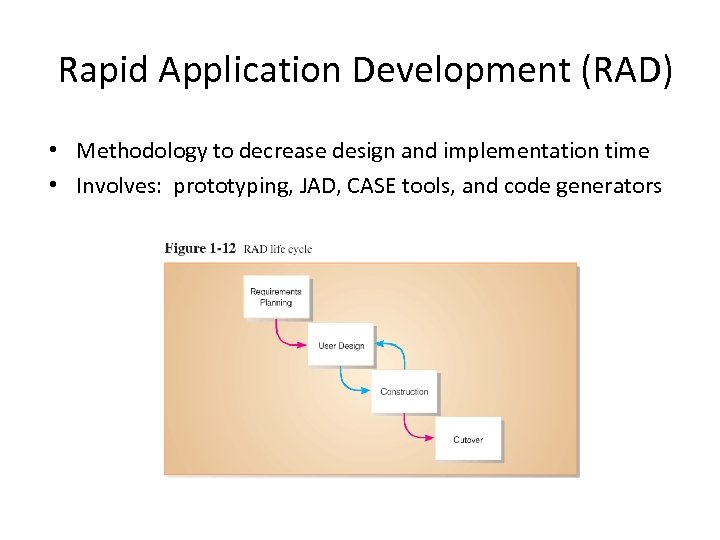 Rapid Application Development (RAD) • Methodology to decrease design and implementation time • Involves: prototyping, JAD, CASE tools, and code generators
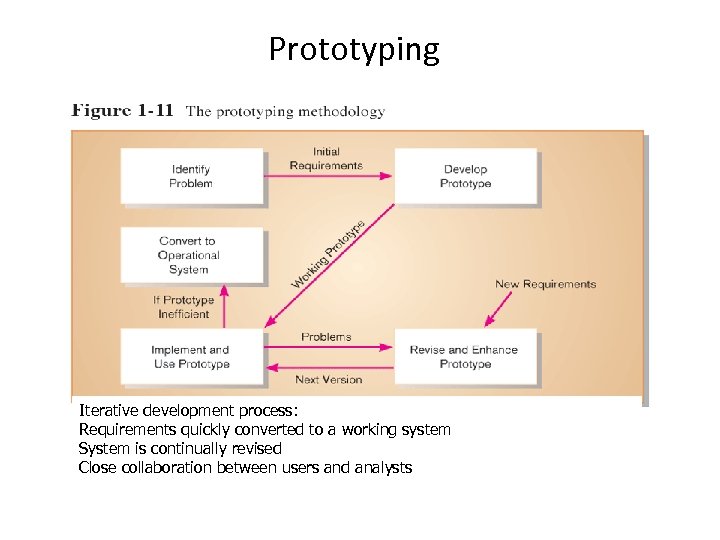 Prototyping Iterative development process: Requirements quickly converted to a working system System is continually revised Close collaboration between users and analysts
 Agile Methodologies • Motivated by recognition of software development as fluid, unpredictable, and dynamic • Three key principles – Adaptive rather than predictive – Emphasize people rather than roles – Self-adaptive processes
 e. Xtreme Programming (XP) • Extreme programming takes good software development practices and pushes them to the limit. • It is based on: – Values. – Principles. – Core practices. Kendall & Kendall 2005 Pearson Prentice Hall 1 -46
 e. Xtreme Programming • • • Short, incremental development cycles Automated tests Two-person programming teams Coding and testing operate together Advantages: – Communication between developers – High level of productivity – High-quality code
 Extreme Programming (XP) (Continued) • Extreme programming values are: – Communication. – Simplicity. – Feedback. – Courage. Kendall & Kendall 2005 Pearson Prentice Hall 1 -48
 Object-Oriented Analysis and Design • Object-oriented (O-O) analysis and design is used to build object-oriented programs. • O-O programming examines the objects of a system. • Objects are grouped into classes for optimal reuse and maintainability. Kendall & Kendall 2005 Pearson Prentice Hall 1 -49
 • Based on objects rather than data or processes • Object: a structure encapsulating attributes and behaviors of a real-world entity • Object class: a logical grouping of objects sharing the same attributes and behaviors • Inheritance: hierarchical arrangement of classes enable subclasses to inherit properties of superclasses
 The Unified Modeling Language • The Unified Modeling Language (UML) is an industry standard for modeling objectoriented systems. • It breaks down a system into a use case model. Kendall & Kendall 2005 Pearson Prentice Hall 1 -51
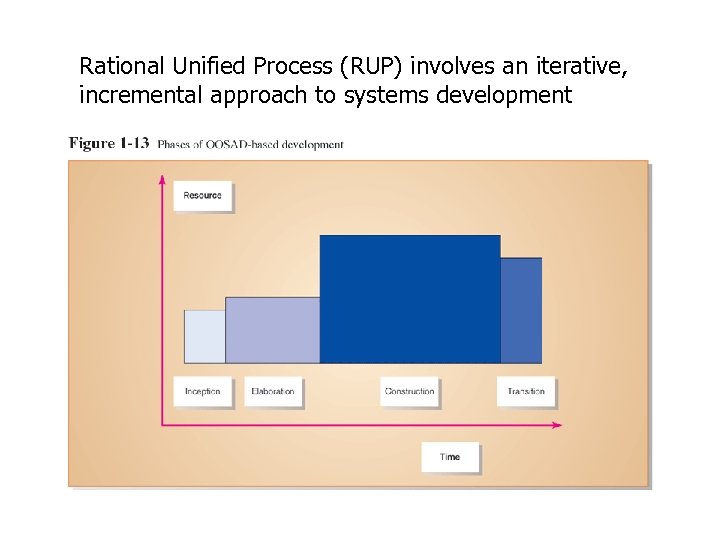 Rational Unified Process (RUP) involves an iterative, incremental approach to systems development
 Rapid Application Development Rapid Application development (RAD) is an object-oriented approach to systems development. Kendall & Kendall 2005 Pearson Prentice Hall 1 -53
 Kendall & Kendall 2005 Pearson Prentice Hall 1 -54
 CASE Tools – CASE tools are automated, microcomputer-based software packages for systems analysis and design. – Four reasons for using CASE tools are: • • Kendall & Kendall To increase analyst productivity. Facilitate communication among analysts and users. Providing continuity between life cycle phases. To assess the impact of maintenance. 2005 Pearson Prentice Hall 1 -55
 CASE Tools Computer-Aided Software Engineering • Software tools providing automated support for systems development • Project dictionary/workbook: system description and specifications • Diagramming tools • Example products: Oracle Designer, Rational Rose, Visible Analyst
 CASE Tool Categories CASE tools may be divided into several categories – Upper CASE (also called front-end CASE) tools, used to perform analysis and design. – Lower CASE (also called back-end CASE). These tools generate computer language source code from CASE design. – Integrated CASE, performing both upper and lower CASE functions. Kendall & Kendall 2005 Pearson Prentice Hall 1 -57
 Upper CASE tools: – Create and modify the system design. – Store data in a project repository. – The repository is a collection of records, elements, diagrams, screens, reports, and other project information. – These CASE tools model organizational requirements and define system boundaries. Kendall & Kendall 2005 Pearson Prentice Hall 1 -58
 Lower CASE • Lower CASE tools generate computer source code from the CASE design. • Source code may usually be generated in several languages. Kendall & Kendall 2005 Pearson Prentice Hall 1 -59
 Advantages of Generating Code – Time to develop new systems decreases. – The time to maintain generated code is less than to maintain traditional systems. – Computer programs may be generated in more than one language. – CASE design may be purchased from third-party vendors and tailored to organizational needs. – Generated code is free from program coding errors. Kendall & Kendall 2005 Pearson Prentice Hall 1 -60
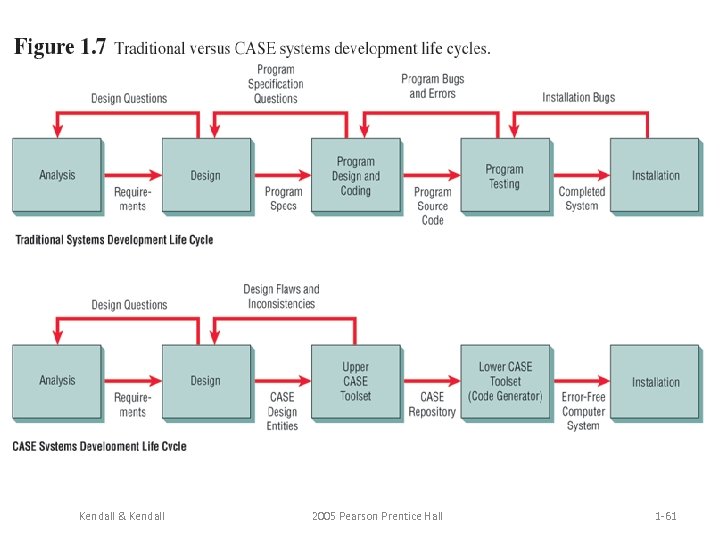 Kendall & Kendall 2005 Pearson Prentice Hall 1 -61
 Reverse Engineering • Reverse engineering is generating the CASE design from computer program code. • Source code is examined, analyzed, and converted into repository entities. Kendall & Kendall 2005 Pearson Prentice Hall 1 -62
 Reverse Engineering (Continued) • Reverse engineering produces (depending on the tool set used): – Data structures and elements, describing the files, records, and field. – Screen designs, if the program is online. – Report layouts for batch programs. – A structure chart showing the hierarchy of the modules in the program. – Database design and relationships. Kendall & Kendall 2005 Pearson Prentice Hall 1 -63
 Advantages of Reverse Engineering has the following advantages: – Reduced system maintenance time. – Program documentation is produced for loosely documented programs. – Structured programs may be generated from unstructured, older programs. – Future system maintenance is easier to implement. – Unused portions of programs may be eliminated. Kendall & Kendall 2005 Pearson Prentice Hall 1 -64