


 Скачать презентацию Chapter 1 An Overview of Computers and Programming
5930d4c22f8a2fa3099fcec2689290d8.ppt
- Количество слайдов: 34
 Chapter 1 An Overview of Computers and Programming Languages
 Chapter Objectives • Learn about different types of computers • Explore the hardware and software components of a computer system • Learn about the language of a computer • Learn about the evolution of programming languages • Examine high-level programming languages
 Chapter Objectives • Discover what a compiler is and what it does • Examine how a Java program is processed • Learn what an algorithm is and explore problem-solving techniques • Become aware of structured and objectoriented programming design methodologies
 Introduction • Computers have greatly effected our daily lives – helping us complete many tasks • Computer programs (software) are designed specifically for each task • Software is created with programming languages • Java is an example of a programming language
 An Overview of the History of Computers • 1950 s: Very large devices available to a select few • 1960 s: Large corporations owned computers • 1970 s: Computers get smaller and cheaper • 1990 s: Computers get cheaper and faster and are found in most homes
 Elements of a Computer System • A computer has 2 components – Hardware – Software
 Hardware Components of a Computer • Central Processing Unit (CPU) • Main Memory
 Central Processing Unit • • • Control Unit (CU) Arithmetic Logic Unit (ALU) Program Counter (PC) Instruction Register (IR) Accumulator (ACC)
 Main Memory • Ordered sequence of cells (memory cells) • Directly connected to CPU • All programs must be brought into main memory before execution • When power is turned off, everything in main memory is lost
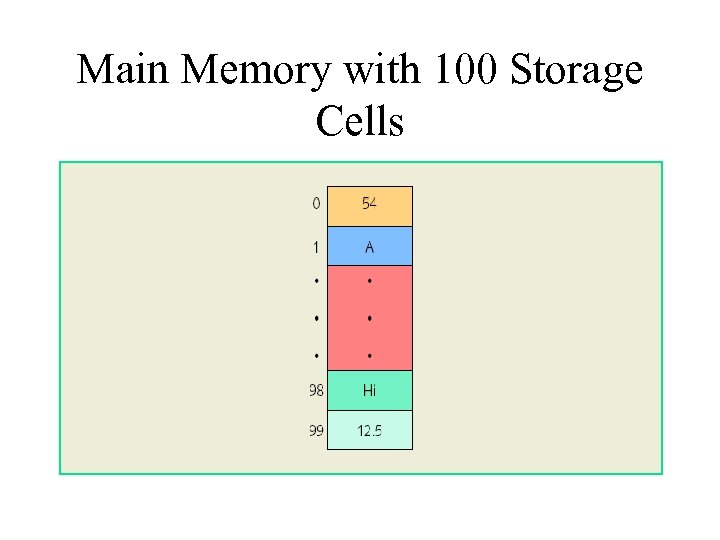 Main Memory with 100 Storage Cells
 Secondary Storage • Provides permanent storage for information • Examples of secondary storage: – Hard Disks – Floppy Disks – ZIP Disks – CD-ROMs – Tapes
 Input Devices • Definition: devices that feed data and computer programs into computers • Examples: – Keyboard – Mouse – Secondary Storage
 Output Devices • Definition: devices that the computer uses to display results • Examples: – Printer – Monitor – Secondary Storage
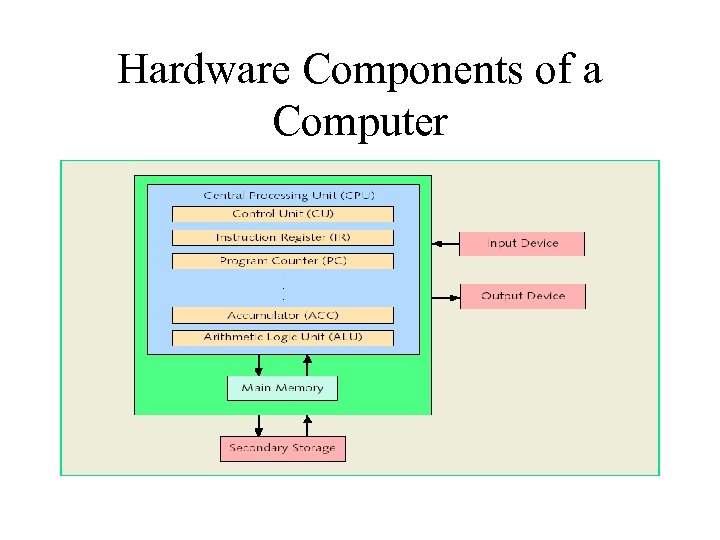 Hardware Components of a Computer
 Software • Software consists of programs written to perform specific tasks • Two types of programs – System Programs – Application Programs
 System Programs • System programs control the computer • The operating system is first to load when you turn on a computer
 Operating System (OS) • OS monitors overall activity of the computer and provides services • Example services: – memory management – input/output – activities – storage management
 Application Programs • • Written using programming languages Perform a specific task Run by the OS Example programs: – Word Processors – Spreadsheets – Games
 Language of a Computer • Machine language: the most basic language of a computer • A sequence of 0 s and 1 s • Every computer directly understands its own machine language • A bit is a binary digit, 0 or 1 • A byte is a sequence of eight bits
 Evolution of Programming Languages • Early computers programmed in machine language • Assembly languages were developed to make programmer’s job easier • In assembly language, an instruction is an easy-to-remember form called a mnemonic • Assembler: translates assembly language instructions into machine language
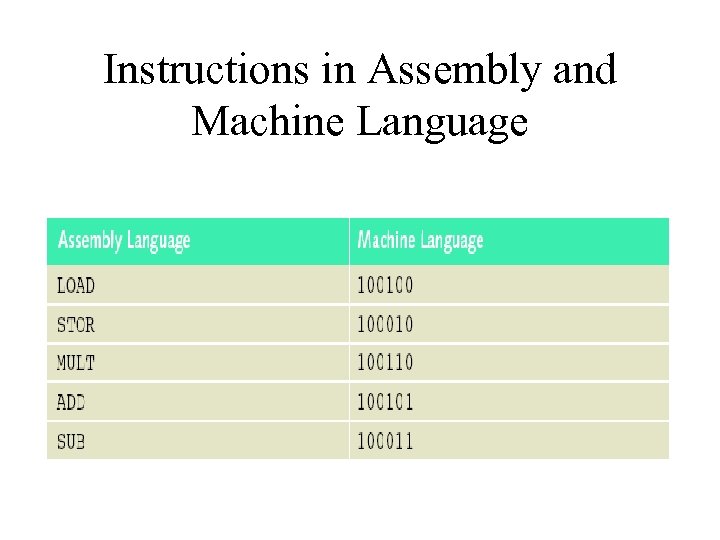 Instructions in Assembly and Machine Language
 Evolution of Programming Languages • High-level languages make programming easier • Closer to spoken languages • Examples: – Basic – FORTRAN – COBOL – C/C++ – Java
 Evolution of Programming Languages • To run a Java program: 1. Java instructions need to be translated into an intermediate language called bytecode 2. Then the bytecode is interpreted into a particular machine language
 Evolution of Programming Languages • • Compiler: A program that translates a program written in a high-level language into the equivalent machine language. (In the case of Java, this machine language is the bytecode. ) Java Virtual Machine (JVM) - hypothetical computer developed to make Java programs machine independent
 Processing a Java Program • Two types of Java programs: applications and applets • Source program: Written in a high-level language • Linker: Combines bytecode with other programs provided by the SDK and creates executable code • Loader: transfers executable code into main memory • Interpreter: reads and translates each bytecode instruction into machine language and then executes it
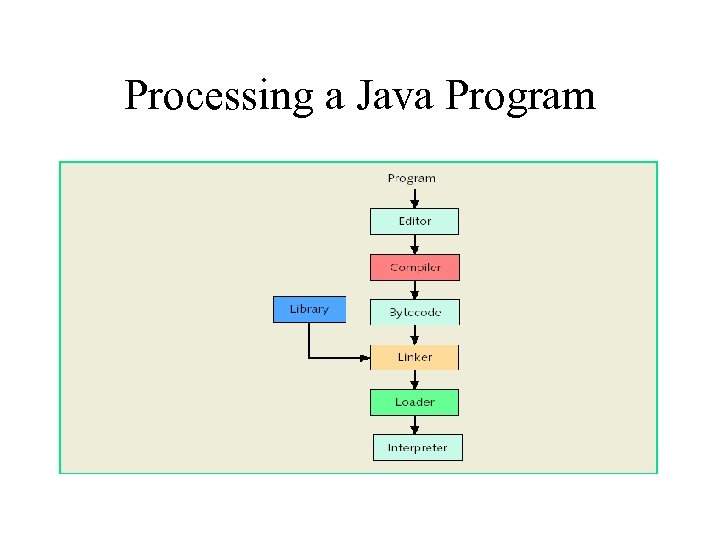 Processing a Java Program
 Problem-Analysis-Coding. Execution Cycle • Algorithm: A step-by-step problem-solving process in which a solution is arrived at in a finite amount of time
 Problem-Solving Process 1. Analyze the problem: outline solution requirements and design an algorithm 2. Implement the algorithm in a programming language (Java) and verify that the algorithm works 3. Maintain the program: use and modify if the problem domain changes
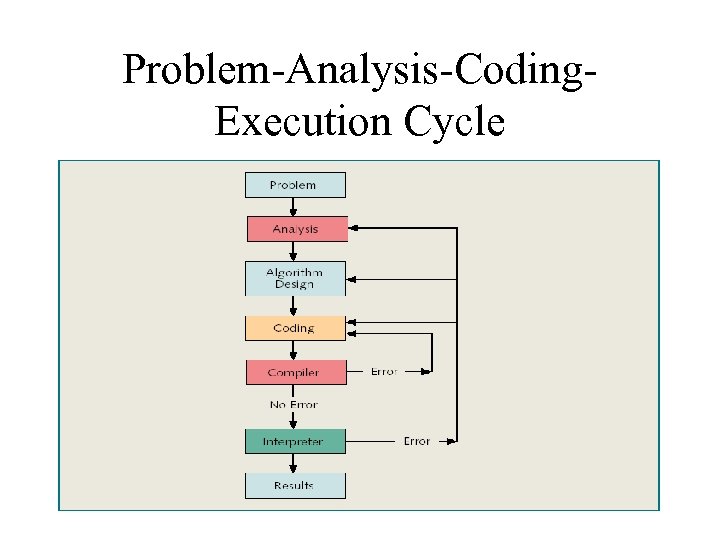 Problem-Analysis-Coding. Execution Cycle
 Programming Methodologies • Two basic approaches to programming design: – Structured design – Object-oriented design
 Structured Design 1. A problem is divided into smaller subproblems 2. Each subproblem is solved 3. The solutions of all subproblems are then combined to solve the problem
 Object-Oriented Design (OOD) • • • In OOD, a program is a collection of interacting objects An object consists of data and operations Steps in OOD: 1. Identify objects 2. Form the basis of the solution 3. Determine how these objects interact
 Chapter Summary • A computer system is made up of hardware and software components • Computers understand machine language; it is easiest for programmers to write in high-level languages • A compiler translates high-level language into machine language • High-level language steps to execute a program: edit, compile, link, load, and execute
 Chapter Summary • Algorithm: step-by-step problem-solving process in which a solution is arrived at in a finite amount of time • Three steps to problem solving: analyze the problem and design an algorithm, implement the algorithm in a programming language, and maintain the program • Two basic approaches to programming design: structured and object-oriented