


 Скачать презентацию Chapter 1 — An Introduction to Computers and
847b9ef09652f60db556aea8ab7fd442.ppt
- Количество слайдов: 59
 Chapter 1 - An Introduction to Computers and Problem Solving • • 1. 1 An Introduction to Computers 1. 2 Windows, Folders, and Files 1. 3 Program Development Cycle 1. 4 Programming Tools 1
 1. 1 An Introduction to Computers • Miscellaneous Questions 2
 Communicating with the Computer • Machine language – low level, hard for humans to understand • Visual Basic – high level, understood by humans, consists of instructions such as Click, If, and Do 3
 Compiler • A compiler translates a high-level language into machine language. • The Visual Basic compiler points out certain types of errors during the translation process. 4
 Programming and Complicated Tasks • Tasks are broken down into instructions that can be expressed by a programming language • A program is a sequence of instructions • Programs can be only a few instructions or millions of lines of instructions 5
 All Programs Have in Common: • Take data and manipulate it to produce a result • Input – Process – Output • Input – from files, the keyboard, or other input device • Output – usually to the monitor, a printer, or a file 6
 Hardware and Software • Hardware – the physical components of the computer • Central processing unit • Disk drive • Monitor • Software – The instructions that tell the computer what to do 7
 Programmer and User • Programmer – the person who solves the problem and writes the instructions for the computer • User – any person who uses the program written by the programmer 8
 Problem Solving • Developing the solution to a problem • Algorithm – a step by step series of instructions to solve a problem 9
 Visual Basic 2010 • BASIC originally developed at Dartmouth in the early 1960 s • Visual Basic created by Microsoft in 1991 • Visual Basic 2010 is similar to original Visual Basic, but more powerful 10
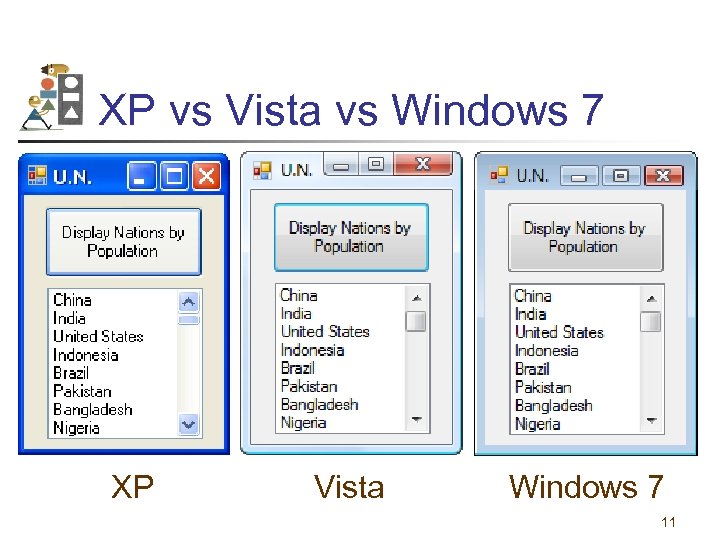 XP vs Vista vs Windows 7 XP Vista Windows 7 11
 1. 2 Windows, Folders, and Files • Windows and Its Little Windows • Mouse Actions • Files and Folders 12
 Windows and Its Little Windows • Difference between Windows and windows. • Title bar indicates if window is active. 13
 Mouse Actions: • • • Hover Drag and drop Click Right-click Double-Click 14
 Files and Folders File: holds programs or data. Its name usually consists of letters, digits, and spaces. Folder: contains files and other folders (called subfolders). 15
 Key Terms in using Folders and Files • • • Term Disk File name Extension Filename Path Filespec Example Hard disk, flash drive, DVD Payroll. txt Text. FilesPayroll. txt C: Text. FilesPayroll. txt 16
 Windows Explorer • Used to view, organize, and manage folders and files. • Manage: copy, move, delete 17
 Invoking Windows Explorer • Right-click on Windows Start button • Click on Explore (or Open Windows Explorer) in context menu 18
 Display File Extensions (Vista & Windows 7) • • • Click on Windows Start button. Type Folder Options into Search box. Press Enter key. Click on View tab in dialog box. Uncheck ″Hide extensions for known file types″. • Click on OK. 19
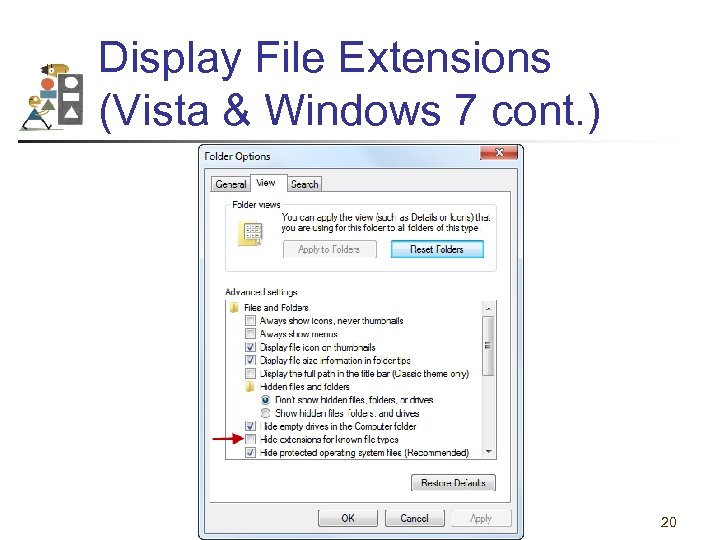 Display File Extensions (Vista & Windows 7 cont. ) 20
 Display File Extensions (XP) • Alt/Tools/Folder Options • Click the View tab. • Uncheck "Hide extensions for known file types“. • Click on OK. 21
 1. 3 Program Development Cycle • Performing a Task on the Computer • Program Planning 22
 Terminology A computer program may also be called: • Project • Application • Solution 23
 Program Development Cycle • Software refers to a collection of instructions for the computer • The computer only knows how to do what the programmer tells it to do • Therefore, the programmer has to know how to solve problems 24
 Performing a Task on the Computer • Determine Output • Identify Input • Determine process necessary to turn given Input into desired Output 25
 Problem-Solving: Approach Like Algebra Problem • How fast is a car traveling if it goes 50 miles in 2 hours? • Output: a number giving the speed in miles per hour • Input: the distance and time the car has traveled • Process: speed = distance / time 26
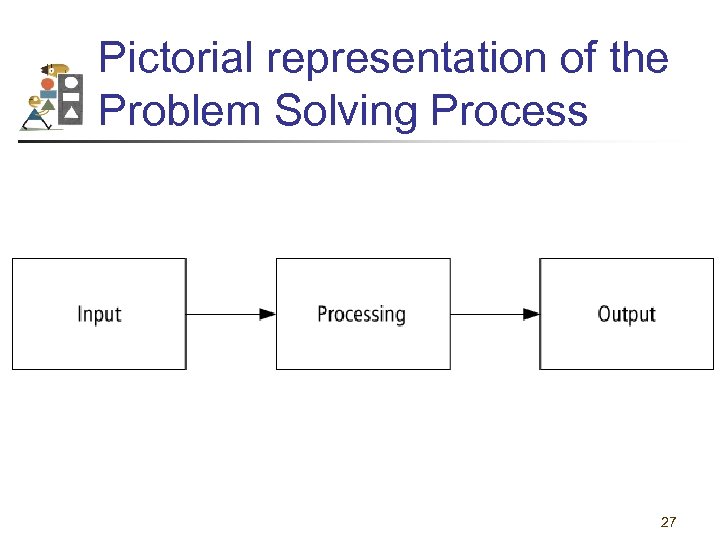 Pictorial representation of the Problem Solving Process 27
 Program Planning • A recipe is a good example of a plan • Ingredients and amounts are determined by what you want to bake • Ingredients are input • The way you combine them is the processing • What is baked is the output 28
 Program Planning (continued) • Always have a plan before trying to write a program • The more complicated the problem, the more complex the plan must be • Planning and testing before coding saves time 29
 Program Development Cycle 1. Analyze: Define the problem. 2. Design: Plan the solution to the problem. 3. Choose the interface: Select the objects (text boxes, buttons, etc. ). 30
 Program Development Cycle (continued) 4. Code: Translate the algorithm into a programming language. 5. Test and debug: Locate and remove any errors in the program. 6. Complete the documentation: Organize all the materials that describe the program. 31
 1. 4 Programming Tools • • Flowcharts Pseudocode Hierarchy Chart Direction of Numbered NYC Streets Algorithm • Class Average Algorithm 32
 Programming Tools Three tools are used to convert algorithms into computer programs: • Flowchart - Graphically depicts the logical steps to carry out a task and shows how the steps relate to each other. • Pseudocode - Uses English-like phrases with some Visual Basic terms to outline the program. • Hierarchy chart - Shows how the different parts of a program relate to each other. 33
 Algorithm A step-by-step series of instructions for solving a problem (a recipe is an example of an algorithm). 34
 Problem Solving Example • How many stamps should you use when mailing a letter? • One rule of thumb is to use one stamp for every five sheets of paper or fraction thereof. 35
 Algorithm 1. Request the number of sheets of paper; call it Sheets. (input) 2. Divide Sheets by 5. (processing) 3. Round the quotient up to the next highest whole number; call it Stamps. (processing) 4. Reply with the number Stamps. (output) 36
 Flowchart Graphically depicst the logical steps to carry out a task and show the steps relate to each other. 37
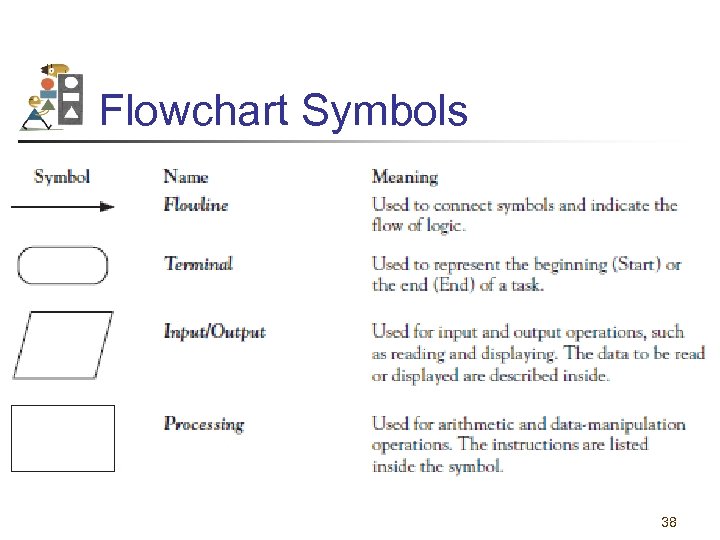 Flowchart Symbols 38
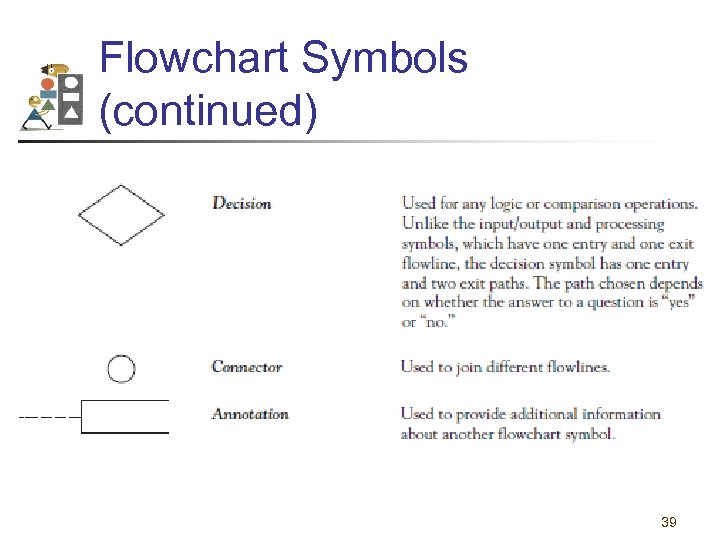 Flowchart Symbols (continued) 39
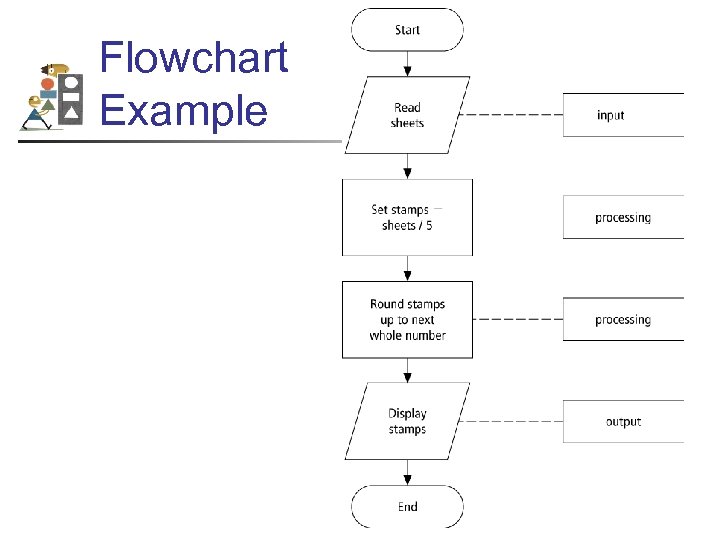 Flowchart Example 40
 Pseudocode Uses English-like phrases with some Visual Basic terms to outline the task. 41
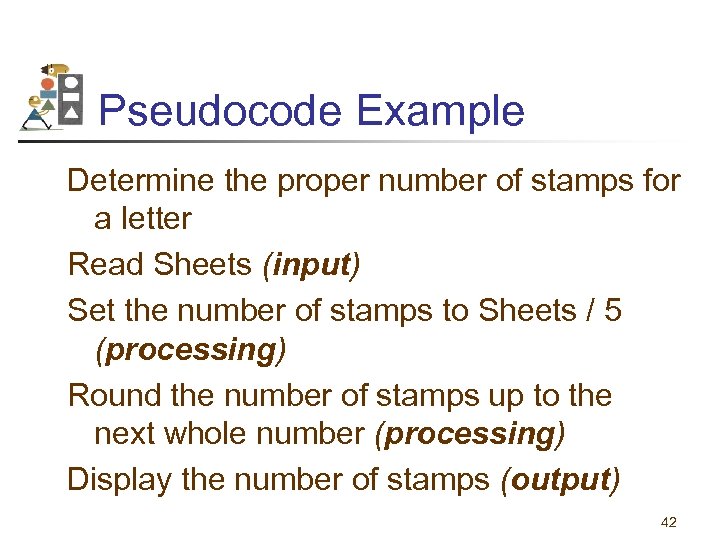 Pseudocode Example Determine the proper number of stamps for a letter Read Sheets (input) Set the number of stamps to Sheets / 5 (processing) Round the number of stamps up to the next whole number (processing) Display the number of stamps (output) 42
 Hierarchy Chart • Shows how the different parts of a program relate to each other Hierarchy charts are also called • structure charts • HIPO (Hierarchy plus Input-Process-Output) charts • top-down charts • VTOC (Visual Table of Contents) charts 43
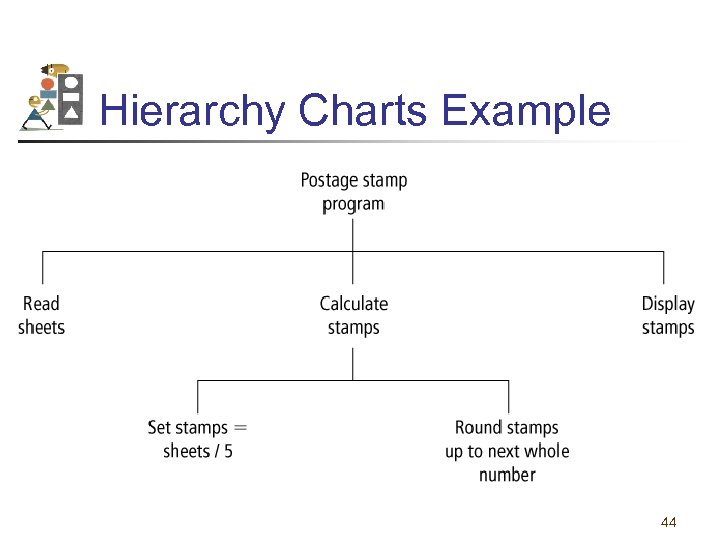 Hierarchy Charts Example 44
 Divide-and-Conquer Method • Used in problem solving – take a large problem and break it into smaller problems • Solve the small problems first 45
 Statement Structures • Sequence – execute instructions from one line to the next without skipping over any lines • Decision - if the answer to a question is “Yes” then one group of instructions is executed. If the answer is “No, ” then another is executed • Looping – a series of instructions are executed repeatedly 46
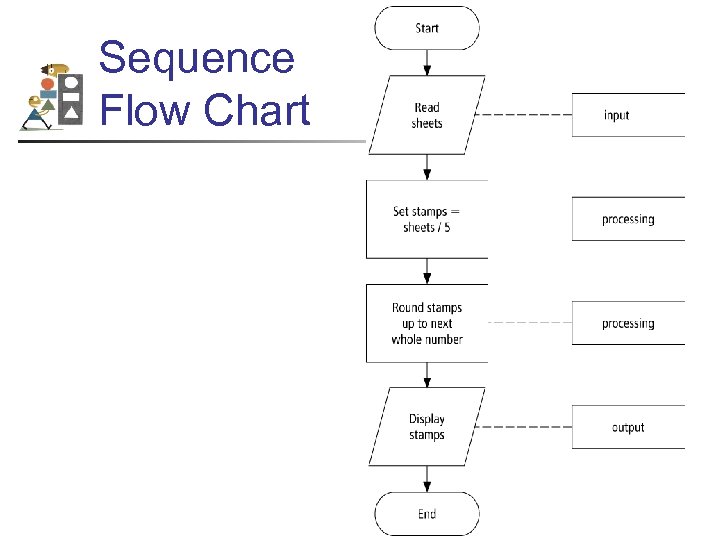 Sequence Flow Chart 47
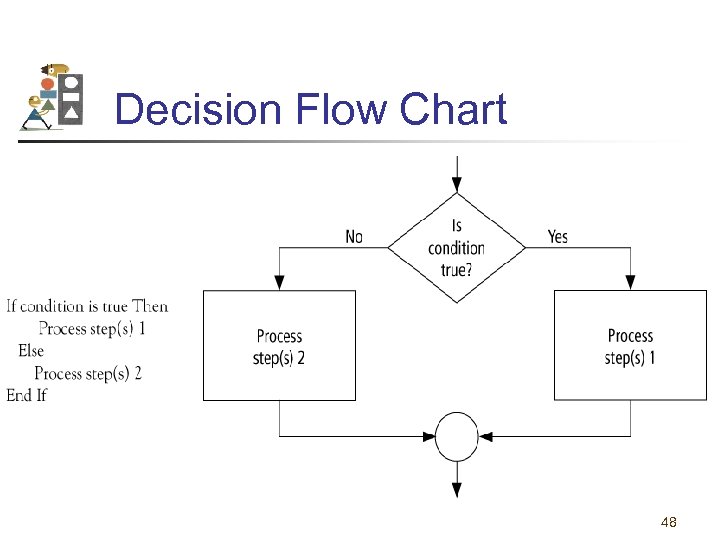 Decision Flow Chart 48
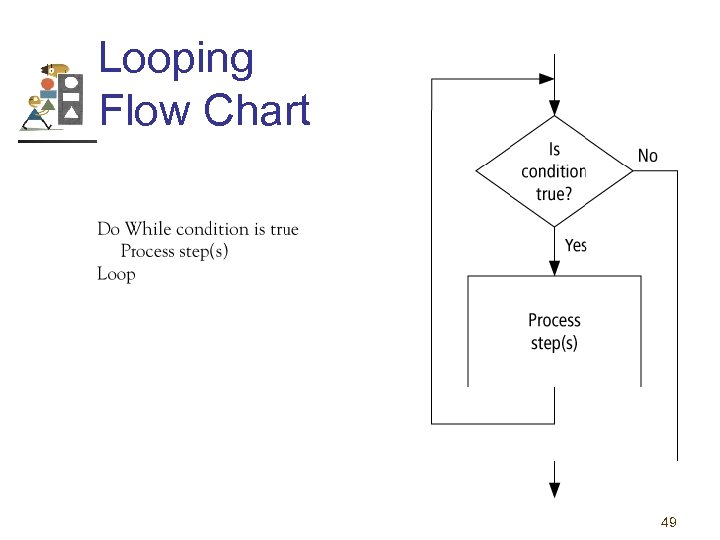 Looping Flow Chart 49
 Direction of Numbered NYC Streets Algorithm • Problem: Given a street number of a one -way street in New York City, decide the direction of the street, either eastbound or westbound • Discussion: in New York City even numbered streets are Eastbound, odd numbered streets are Westbound 50
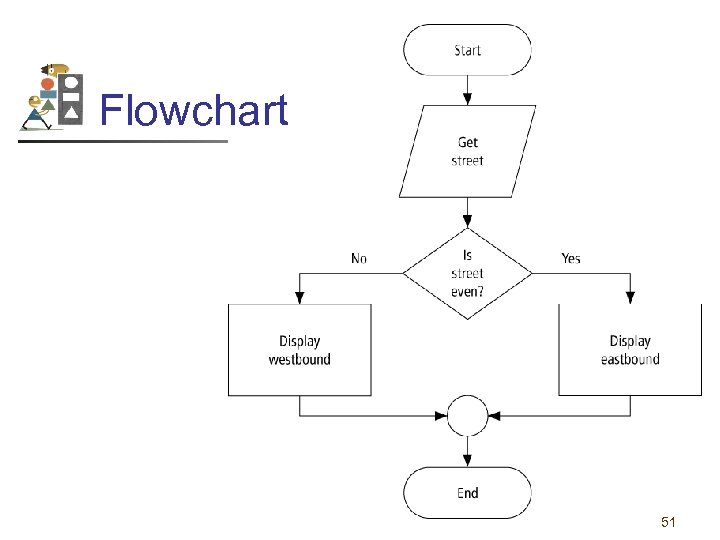 Flowchart 51
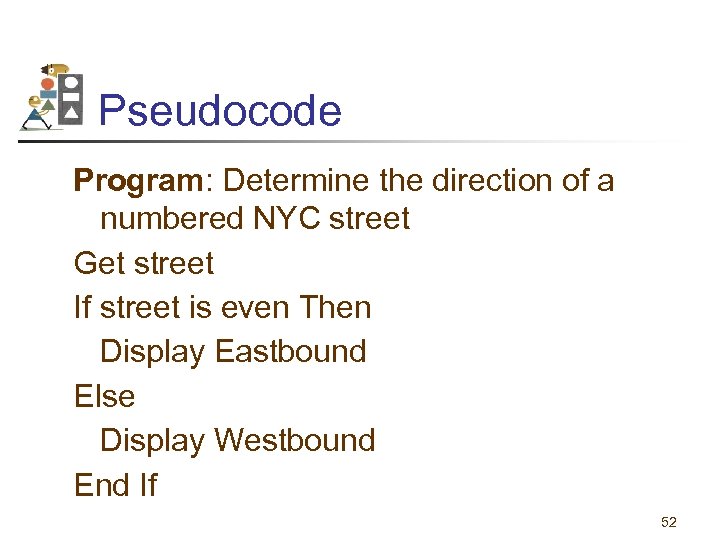 Pseudocode Program: Determine the direction of a numbered NYC street Get street If street is even Then Display Eastbound Else Display Westbound End If 52
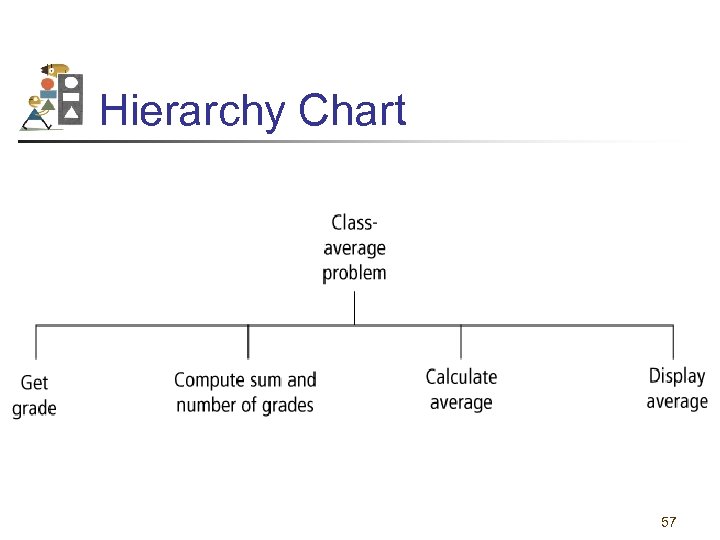
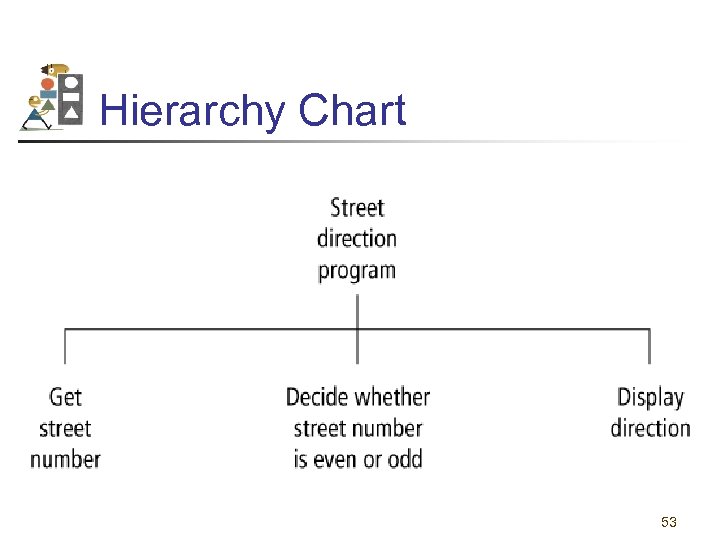 Hierarchy Chart 53
 Class Average Algorithm Problem: Calculate and report the average grade for a class Discussion: The average grade equals the sum of all grades divided by the number of students Input: Student grades Processing: Find sum of the grades; count number of students; calculate average Output: Average grade 54
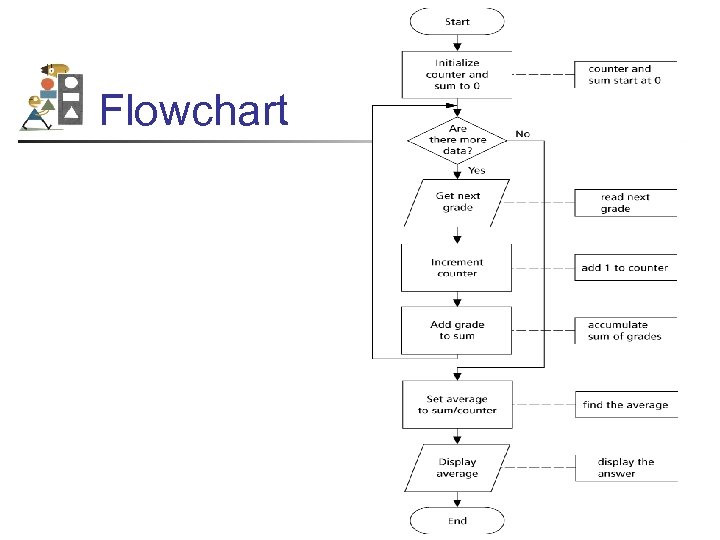 Flowchart 55
 Pseudocode Program: Determine average grade of a class Initialize Counter and Sum to 0 Do While there are more data Get the next Grade Add the Grade to the Sum Increment the Counter Loop Compute Average = Sum / Counter Display Average 56
 Hierarchy Chart 57
 Comments • When tracing a flowchart, begin at the start symbol and follow the flow lines to the end symbol. • Testing an algorithm at the flowchart stage is known as desk checking. • Flowcharts, pseudocode, and hierarchy charts are program planning tools that are in dependent of the language being used. 58
 Tips and Tricks of Flowcharts • Flowcharts are time-consuming to write and difficult to update • For this reason, professional programmers are more likely to favor pseudocode and hierarchy charts • Because flowcharts so clearly illustrate the logical flow of programs, they are a valuable tool in the education of programmers 59