


 Скачать презентацию Challenges of the EHR and Electronic Querying Joy
6263b73c8333c3e2dc0a11e28c8862eb.ppt
- Количество слайдов: 42

 Challenges of the EHR and Electronic Querying Joy A. Coletti, BSN, MBA, RN, CCDS Director, Clinical Documentation Improvement Memorial Hermann Healthcare System Houston, TX
 Survey: How Does Your Hospital Send Physician Queries? A. Sends electronic queries only? B. Sends both electronic and paper queries? C. Sends paper queries only?
 Top Reasons Why MHHS Transitioned to E-Queries • Federal government initiatives were supporting a transition to a completely electronic health record • Hospitals were already a hybrid of electronic and paper records • Coding staff were now coding from home – challenging communication with MDs and CDISs • Current CDI data entry process did not track or report all query information needed and MD response information was not always accurate
 Transitioning to Electronic Physician Queries • February 2010 was initial go-live for nine (9) acute care facilities, with a system upgrade in July 2011 • E-query application chosen was designed to: – Automate the manual query process for both coders and CDISs – Allow coders to see e-queries sent by CDISs and MD responses – Allow working DRGs assigned by CDIS to eflow to case management’s e-system
 Transitioning to Electronic Physician Queries (cont. ) • E-query application chosen was designed to: – Allow physicians to respond to e-queries from their e-clinical record inbox – Allow physicians to attach an e-progress note, which becomes a permanent part of the medical record, or respond in the paper record if medical record is still hybrid • MHHS HIM leadership worked with physician provider network leadership to have physician response rates part of their clinical integration strategy, creating a carrot for physicians
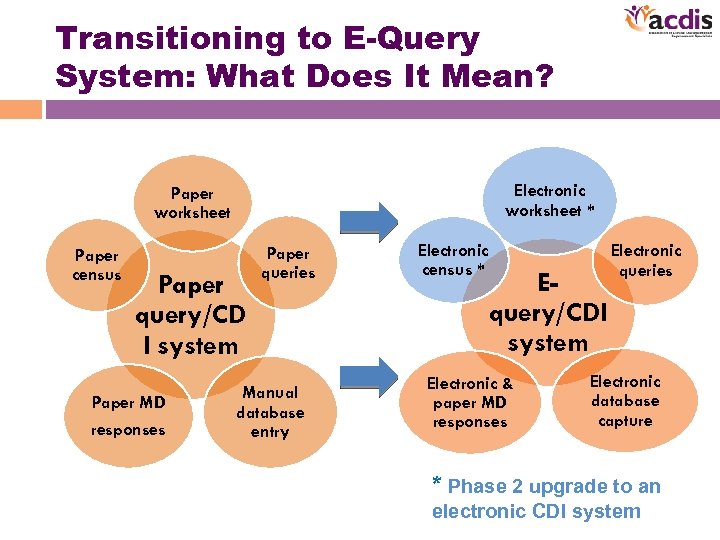 Transitioning to E-Query System: What Does It Mean? Electronic worksheet * Paper worksheet Paper census Paper query/CD I system Paper MD responses Paper queries Manual database entry Electronic census * Equery/CDI system Electronic & paper MD responses Electronic queries Electronic database capture * Phase 2 upgrade to an electronic CDI system
 E-Query Vendor Selection: Questions to Ask • How easily will their software integrate with your ADT, coding, case management, and clinical software systems? • How easy is the software to navigate for all users: CDISs, physicians, and coders? – Sequencing of screens supports process flow? – Size of screens, tabs, icons, typeset? – # of clicks necessary to support functions? • What has been their experience implementing their e-CDI software at other facilities?
 E-Query Vendor Selection: Questions to Ask (cont. ) • Does your vendor understand both the front-end (CDIS) and back-end (coder) query processes? – Process similarities – More importantly, process differences! • Does your vendor understand your programming needs if you keep queries as a permanent part of the medical record vs. if you do not? • Does your vendor understand the CDIS/coder DRG impact analysis and reconciliation process?
 E-Query Vendor Selection: Questions to Ask (cont. ) • Are they willing to provide a thorough software demonstration from sign-in and case selection to DRG impact capture? • How flexible is their software? – Will it allow loading of your current query templates?
 E-Query Vendor Selection: Questions to Ask (cont. ) • How flexible is their software to support DRG impact capture and DRG reconciliation process after final coding? – CDISs do not have benefit of final notes or the discharge summary – CDISs do not have coding education or code finder savvy – CDISs will need to adjust tentative/initial DRG often as part of DRG reconciliation process
 E-Query Vendor Selection: Questions to Ask (cont. ) • Are they willing and able to provide a thorough demonstration from sign-in and case selection to DRG impact capture and DRG reconciliation? • Do they have all training manuals developed for both coding and CDIS software usage? • How much is the vendor willing to make modifications (major or minor) for improvement? – To support process flows – To improve productivity of staff – To improve data capture and report statistics
 E-query Vendor Selection: Questions to Ask (cont. ) • What are their report capabilities? • Does the software provide for more comprehensive reporting that will combine CDIS and coder statistics for upper management? – Physician response rates – Query rates – Types of queries – Types of responses
 Identifying an E-Query Project Team • Internal team members – CDI project sponsor/leader – IT project manager – Lead IT support staff – CDI manager/director – Coding manager/director – Physician leader or someone who has a pulse on your physicians *
 Identifying an E-Query Project Team (cont. ) • External vendor team members – CDI project leader – IT project manager – Main IT support staff (upgrades, reports, etc. ) – Lead software trainer
 Developing an E-Query Project Timeline • Allow sufficient time for system upgrades and interfaces to be built: – ADT system – Coding system – Case management system – Clinical software system
 Developing an E-Query Project Timeline (cont. ) • Decide on best training approach from vendor: – Train all CDISs (classroom/unit based) – Train-the-trainer approach: Train lead trainer and super user(s) first • Allow sufficient time for training of CDISs, coders, and physicians – Determine if coders will go live at same time as CDISs – Allow sufficient lead time for MD communication/training
 Developing an E-Query Project Timeline (cont. ) – Count on CDIS training to take twice as long as coder training: • CDISs are not as computer savvy as coders • CDISs have more functions to learn than coders – Electronic census/work queue – Electronic worksheet – Verbal queries – DRG impact/reconciliation process
 Developing an E-Query Project Timeline (cont. ) – Don’t train too early before go-live date – Count on reinforcing training week of go-live and in follow up meetings – Count on working through some bugs – If beta site, count on several weeks/months of working closely with vendor on software changes/enhancements
 Developing a Physician Communication Plan • Communicate, communicate! • You can never over-communicate when it comes to educating physicians • Begin to communicate to MDs early—at least 3 months ahead of go-live date and up to go-live • Determine if PAs/NPs/residents will be responsible for answering queries, or the attending MDs, and develop a communication plan accordingly
 Developing a Physician Communication Plan (cont. ) • Utilize every venue possible to present new equery system prior to go-live: – Medical informatics committee – MD leadership meetings (CMOs) – Service line meetings—prioritize based on paper query type/volume – Hospital-based IT support staff for physicians – NPs/PAs? – Residents?
 Developing a Physician Communication Plan (cont. ) • Be prepared to revisit why it is important to respond to queries in general • Communicate if any carrots will be offered • Let them know what reports/stats can and will be developed • Let them know what resources will be available to them after go-live to assist in responding or to troubleshoot
 Developing a Physician Communication Plan (cont. ) • Develop & circulate communication/education tools: – Pocket-size index cards to distribute to MDs – Query “prompters” for the paper record – Slide shows of Power. Point® presentation with screen shots to run in physician lounges – Others?
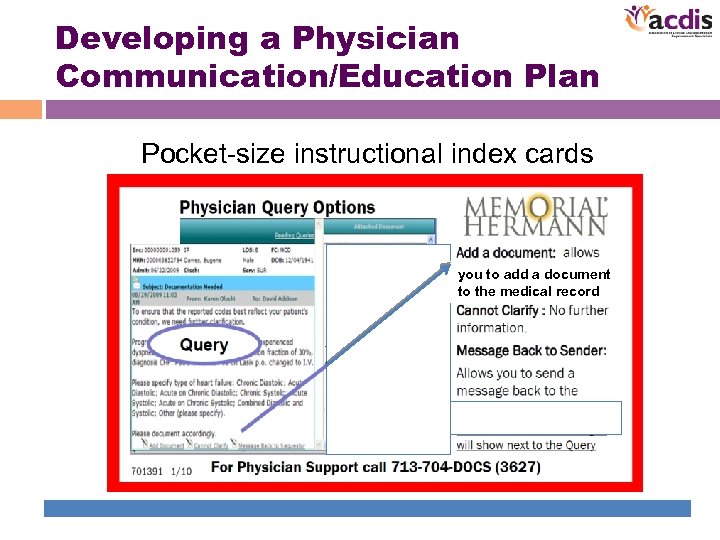 Developing a Physician Communication/Education Plan Pocket-size instructional index cards you to add a document to the medical record
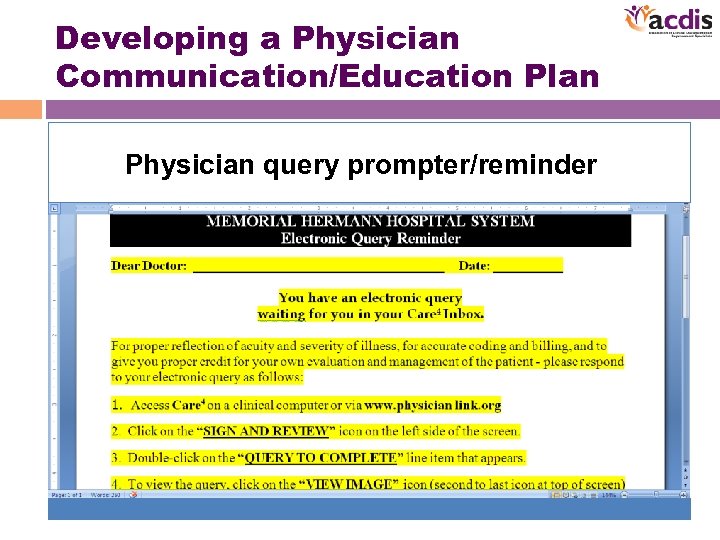 Developing a Physician Communication/Education Plan Physician query prompter/reminder
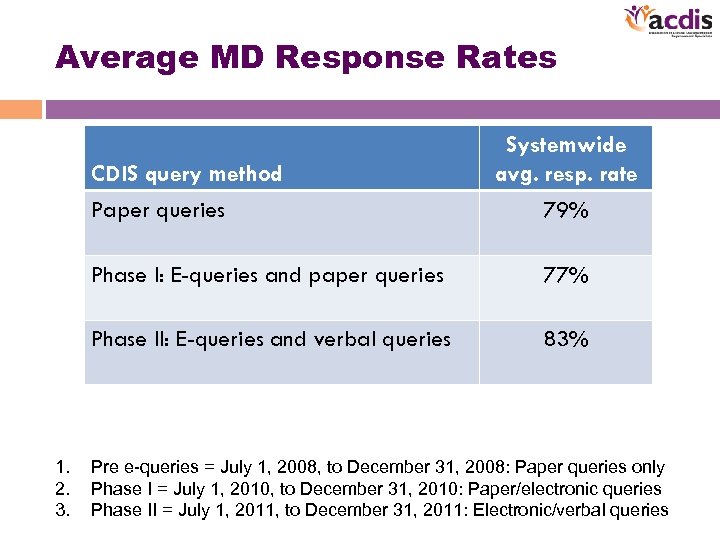 Average MD Response Rates CDIS query method Systemwide avg. resp. rate Paper queries Phase I: E-queries and paper queries 77% Phase II: E-queries and verbal queries 1. 2. 3. 79% 83% Pre e-queries = July 1, 2008, to December 31, 2008: Paper queries only Phase I = July 1, 2010, to December 31, 2010: Paper/electronic queries Phase II = July 1, 2011, to December 31, 2011: Electronic/verbal queries
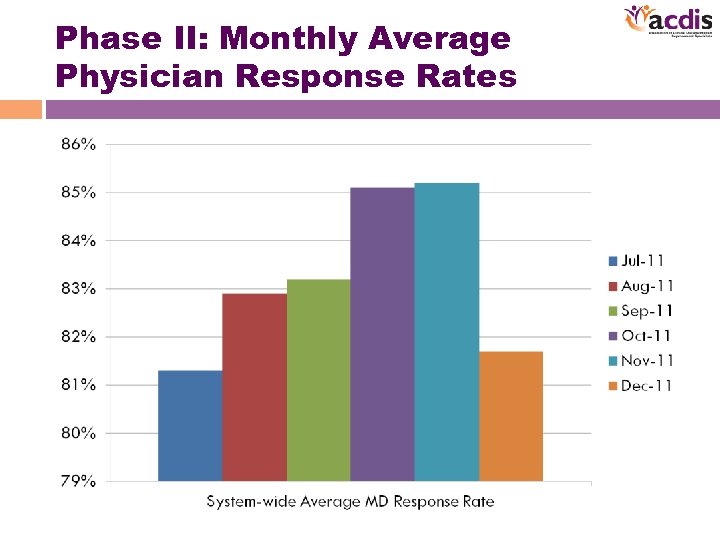 Phase II: Monthly Average Physician Response Rates
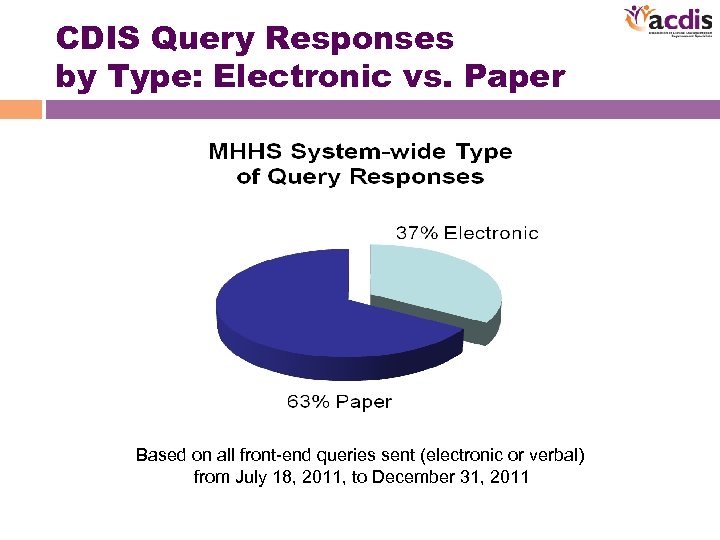 CDIS Query Responses by Type: Electronic vs. Paper Based on all front-end queries sent (electronic or verbal) from July 18, 2011, to December 31, 2011
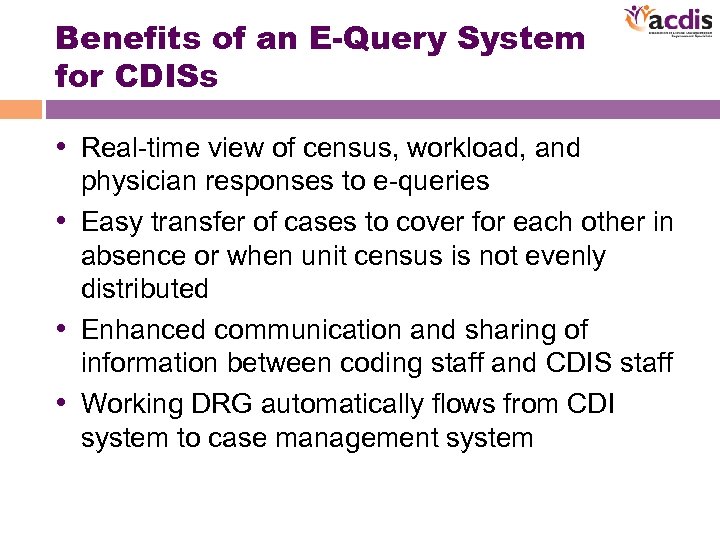 Benefits of an E-Query System for CDISs • Real-time view of census, workload, and physician responses to e-queries • Easy transfer of cases to cover for each other in absence or when unit census is not evenly distributed • Enhanced communication and sharing of information between coding staff and CDIS staff • Working DRG automatically flows from CDI system to case management system
 Benefits of an E-Query System for CDISs • More detailed reports to support CDIS efforts: – Top query reasons by hospital/by physician to target educational efforts – Physician response rates by MD with detailed account information to target compliance conversations/change approach/see trends – CDIS productivity captures total reviews now, both initial reviews and re-reviews – Productivity easily monitored by each CDIS at any point in time—daily/weekly/monthly/etc.
 Benefits of an E-Query System for Management • Enhanced ability by management to monitor productivity of CDIS staff remotely—both real time and with reports • Ability to audit CDIS staff remotely with policy & procedure compliance – Query wording & use of clinical indicators – Verbal query capture – Working DRG assignment – DRG reconciliation process
 Benefits of an E-Query System for Management • Ease of up-front education with new CDIS staff members using test e-accounts • Easily determine CDIS staff’s strengths and weaknesses – Clinical assessment skills via e-worksheets – CDI query skills via e-queries – DRG reconciliation understanding via detailed reports – Increased staff productivity: Record review rates and query rates
 Benefits of an E-Query System for Management • Improved physician documentation legibility for improved coding and diagnosis capture – Improved physician response rates with more accurate MD query response rate capture – Improved CDIS staff productivity • Increased record review rates • Increased query rates
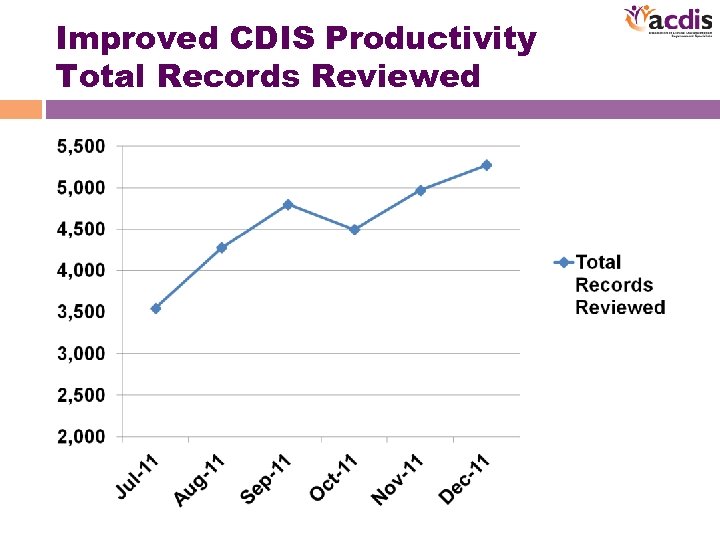 Improved CDIS Productivity Total Records Reviewed
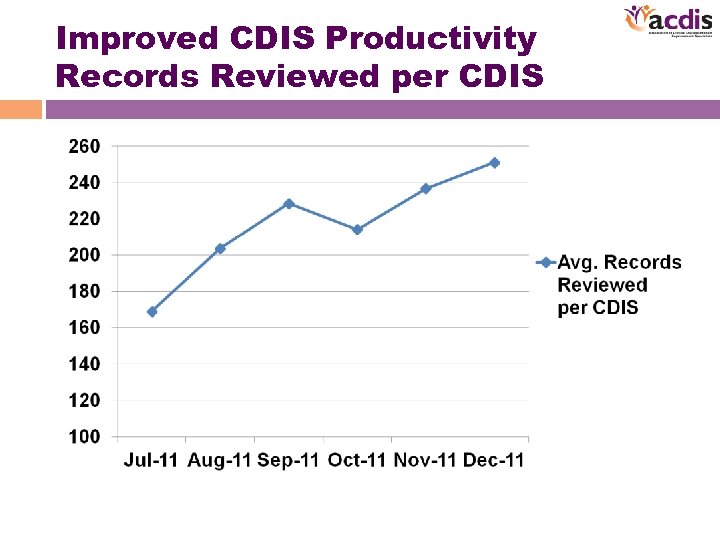 Improved CDIS Productivity Records Reviewed per CDIS
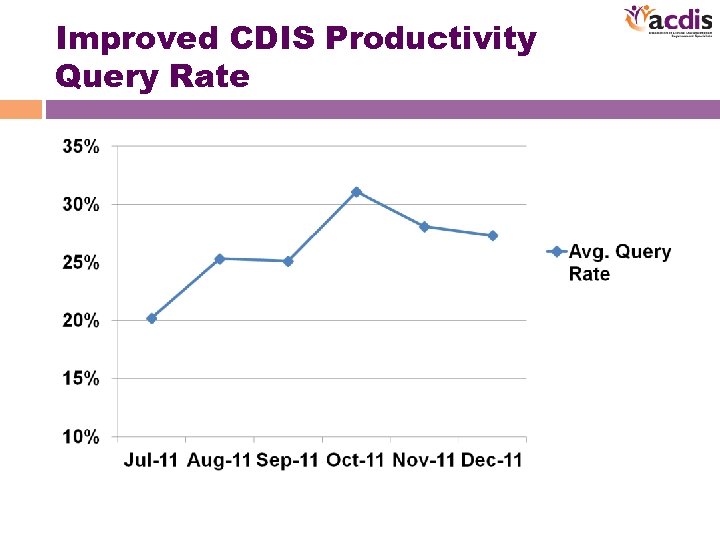 Improved CDIS Productivity Query Rate
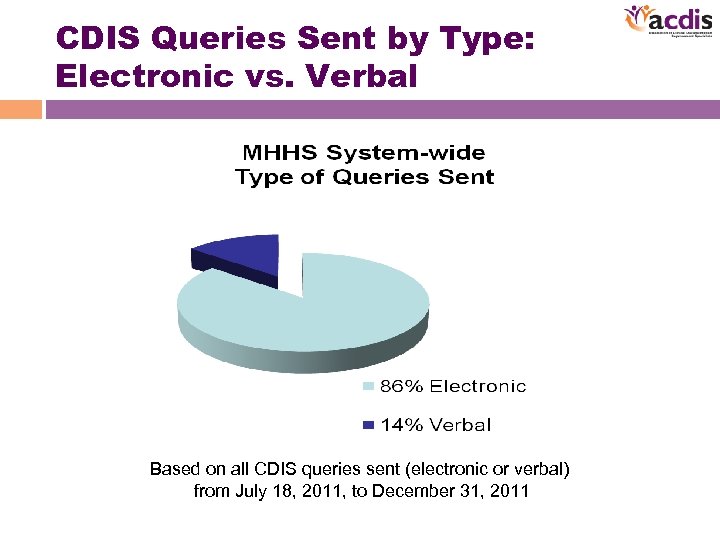 CDIS Queries Sent by Type: Electronic vs. Verbal Based on all CDIS queries sent (electronic or verbal) from July 18, 2011, to December 31, 2011
 What Did We Learn? • Have a good understanding of your vendor’s prior experience implementing its e-query software in support of the CDIS function • Effectively communicate your query processes to your software vendor (e. g. , front-end CDIS process vs. back-end coding query process)
 What Did We Learn? • Make sure your software vendor is willing to do minor reprogramming and even major enhancements if needed to support your CDI program success: – Improve staff productivity – Improve physician response rates – Enhanced report writing for CDIS staff support and for management reporting
 What Did We Learn? • Earlier communication/education of e-query initiative to physicians prior to go-live • Do more physician communication/education of inbox access and management prior to and after go-live – By IT staff – By CDIS staff
 What Did We Learn? • Do more CDIS-specific training vs. coder training: – More classroom training – Preferably some unit-based training for reinforcement
 Questions? In order to receive your continuing education certificate for this program, you must complete the online evaluation which can be found in the continuing education section at the front of the workbook.