


 Скачать презентацию Ch 9 Address Allocation Resolution and Packet
2b142d40374554105626496f7c36362e.ppt
- Количество слайдов: 42
 Ch. 9 – Address Allocation, Resolution, and Packet Forwarding (TCP/IP)
 TCP/IP • Most of the introduction to TCP/IP will be covered in Chapter 11. Rick Graziani graziani@cabrillo. edu 2
 IP Addressing • • Static Dynamic Rick Graziani graziani@cabrillo. edu 3
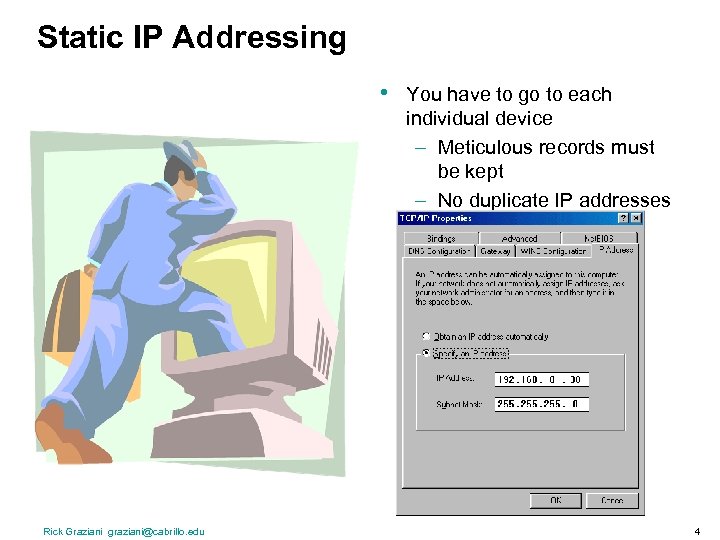 Static IP Addressing • Rick Graziani graziani@cabrillo. edu You have to go to each individual device – Meticulous records must be kept – No duplicate IP addresses 4
 Dynamic Addressing • Dynamic Host Configuration Protocol (DHCP) – Successor to BOOTP – Allows host to obtain an IP address quickly and dynamically – Uses a defined range of IP address Rick Graziani graziani@cabrillo. edu 5
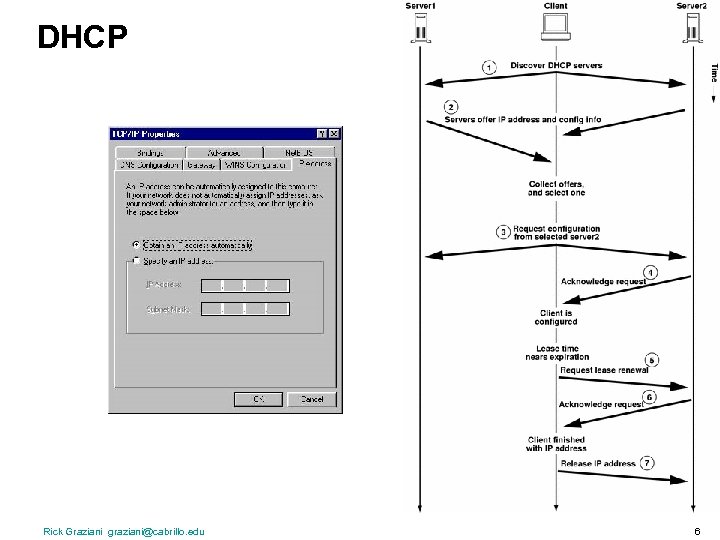 DHCP Rick Graziani graziani@cabrillo. edu 6
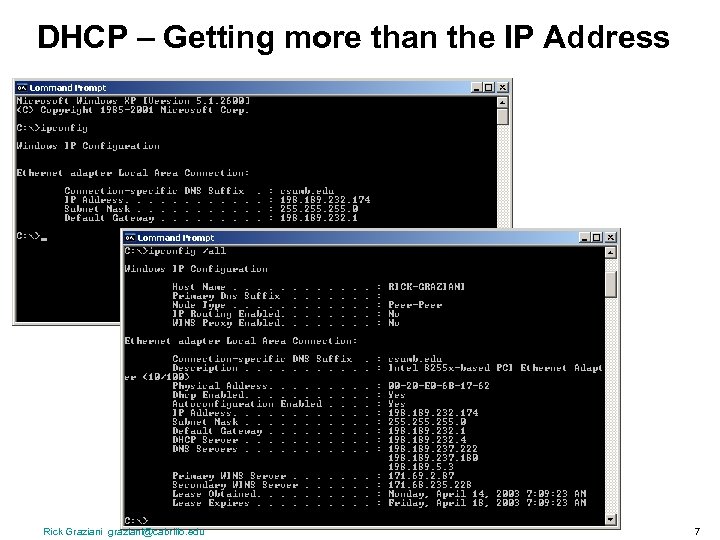 DHCP – Getting more than the IP Address Rick Graziani graziani@cabrillo. edu 7
 BOOTP • • BOOTP (Bootstrap Protocol) Provides IP address, subnet mask, default gateway IP address and DNS IP address. Disadvantage: • BOOTP is not a dynamic configuration protocol (like DHCP). • When a client requests an IP address the BOOTP server looks up its MAC address in a table to find the IP address. • This binding is predetermined. • What if the computer is moved to another subnet/network? • Use DHCP! Rick Graziani graziani@cabrillo. edu 8
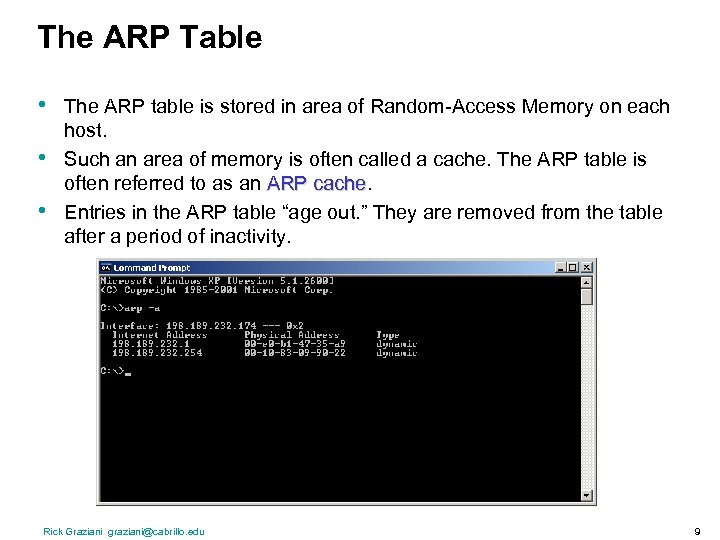 The ARP Table • • • The ARP table is stored in area of Random-Access Memory on each host. Such an area of memory is often called a cache. The ARP table is often referred to as an ARP cache Entries in the ARP table “age out. ” They are removed from the table after a period of inactivity. Rick Graziani graziani@cabrillo. edu 9
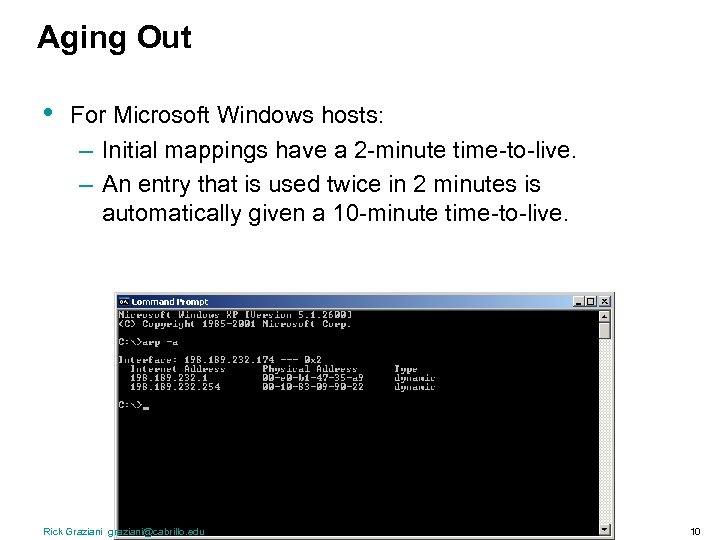 Aging Out • For Microsoft Windows hosts: – Initial mappings have a 2 -minute time-to-live. – An entry that is used twice in 2 minutes is automatically given a 10 -minute time-to-live. Rick Graziani graziani@cabrillo. edu 10
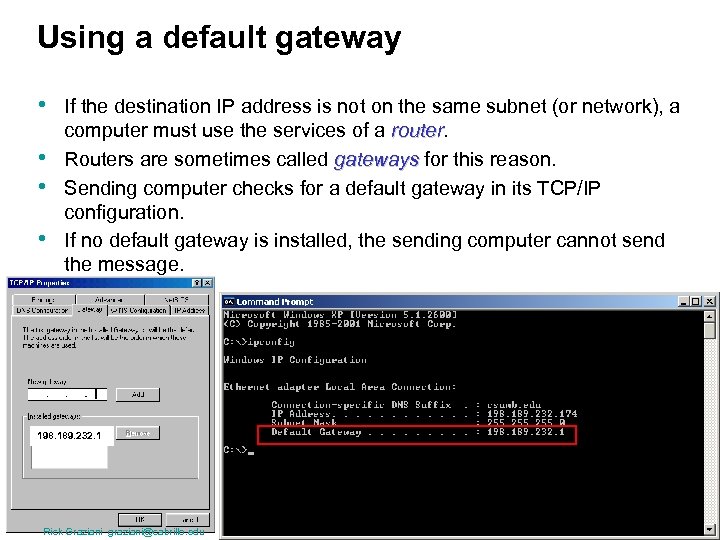 Using a default gateway • • If the destination IP address is not on the same subnet (or network), a computer must use the services of a router Routers are sometimes called gateways for this reason. Sending computer checks for a default gateway in its TCP/IP configuration. If no default gateway is installed, the sending computer cannot send the message. 198. 189. 232. 1 Rick Graziani graziani@cabrillo. edu 11
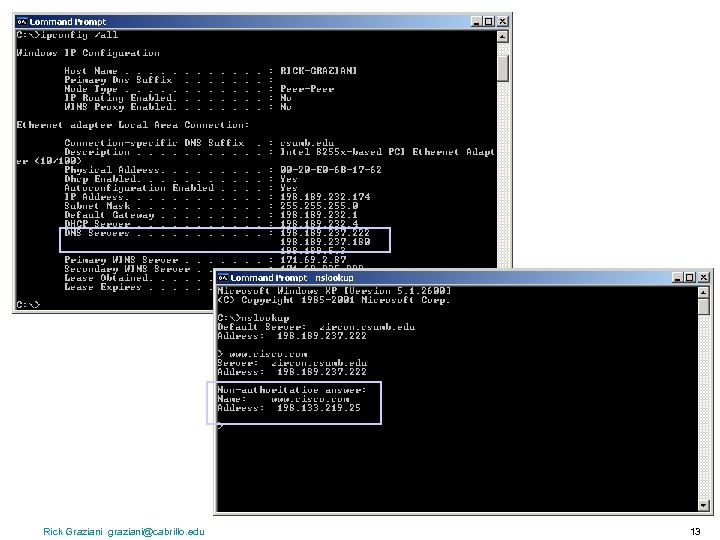
 Domain Names and IP Addresses • • Many times we communicate with other hosts using domain names such as www. cisco. com Hosts and routers route packets using IP addresses, NOT domain names. The host must translate the domain name to an IP address. The host will have the DNS Server do this translation for it. The Domain Name System (abbreviated DNS) is an Internet directory service. DNS is how domain names are translated into IP addresses, and DNS also controls email delivery. If your computer cannot access DNS, your web browser will not be able to find web sites, and you will not be able to receive or send email. Rick Graziani graziani@cabrillo. edu 12
 Rick Graziani graziani@cabrillo. edu 13
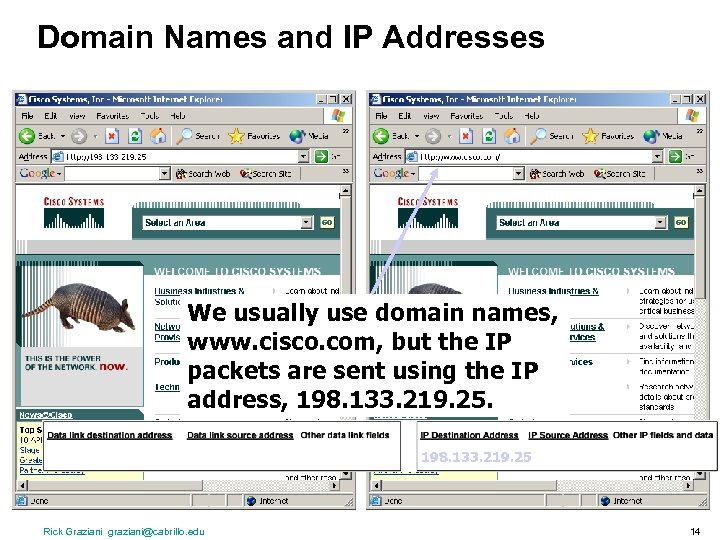 Domain Names and IP Addresses We usually use domain names, www. cisco. com, but the IP packets are sent using the IP address, 198. 133. 219. 25 Rick Graziani graziani@cabrillo. edu 14
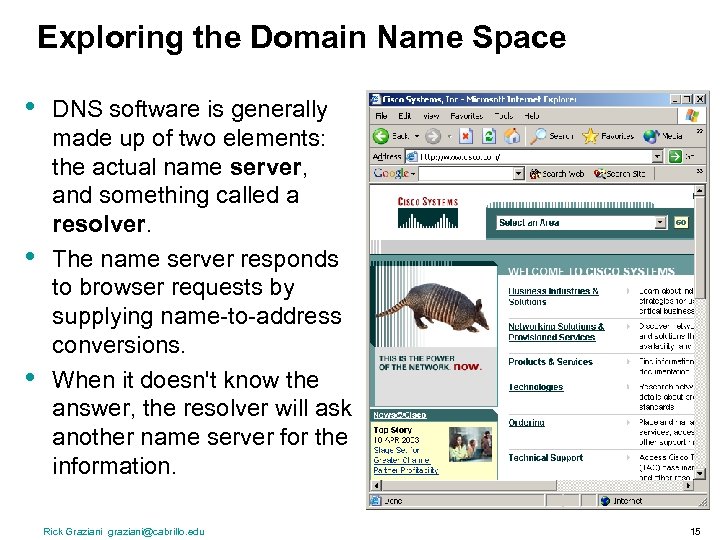 Exploring the Domain Name Space • • • DNS software is generally made up of two elements: the actual name server, and something called a resolver. The name server responds to browser requests by supplying name-to-address conversions. When it doesn't know the answer, the resolver will ask another name server for the information. Rick Graziani graziani@cabrillo. edu 15
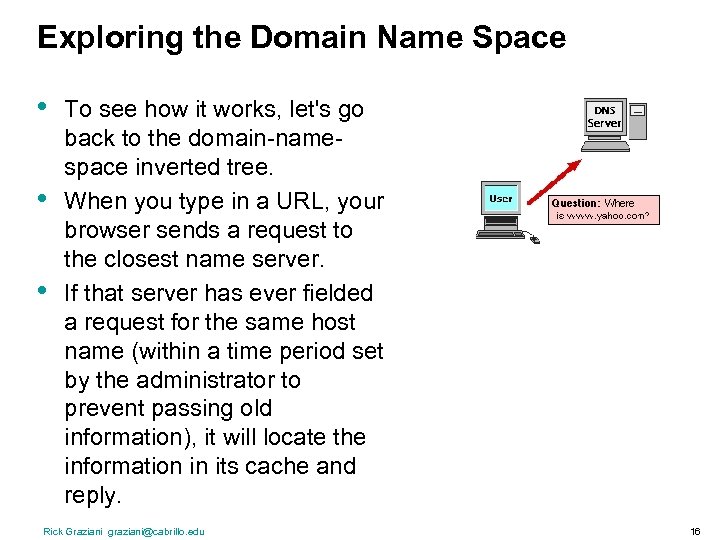 Exploring the Domain Name Space • • • To see how it works, let's go back to the domain-namespace inverted tree. When you type in a URL, your browser sends a request to the closest name server. If that server has ever fielded a request for the same host name (within a time period set by the administrator to prevent passing old information), it will locate the information in its cache and reply. Rick Graziani graziani@cabrillo. edu 16
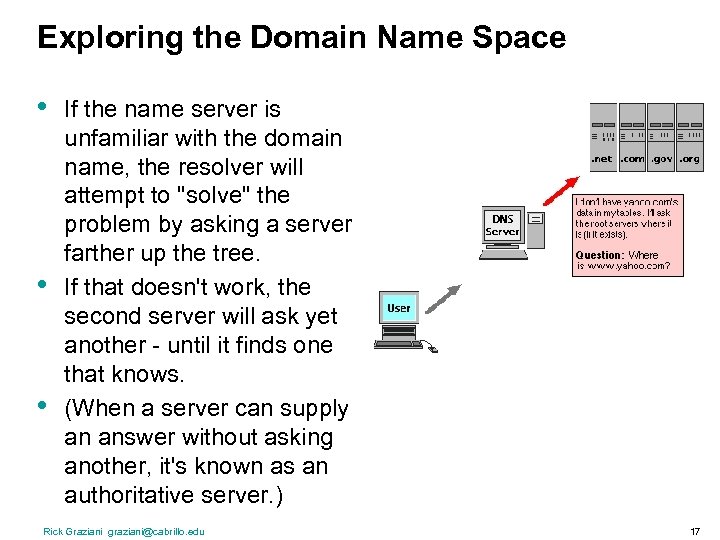 Exploring the Domain Name Space • • • If the name server is unfamiliar with the domain name, the resolver will attempt to "solve" the problem by asking a server farther up the tree. If that doesn't work, the second server will ask yet another - until it finds one that knows. (When a server can supply an answer without asking another, it's known as an authoritative server. ) Rick Graziani graziani@cabrillo. edu 17
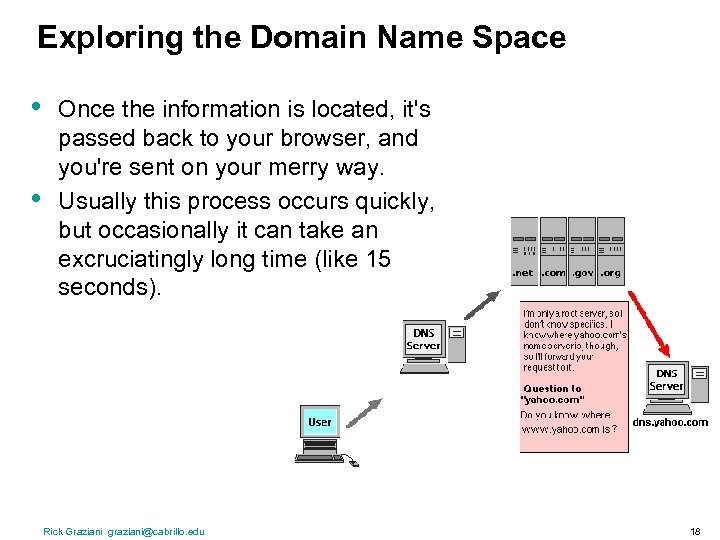 Exploring the Domain Name Space • • Once the information is located, it's passed back to your browser, and you're sent on your merry way. Usually this process occurs quickly, but occasionally it can take an excruciatingly long time (like 15 seconds). Rick Graziani graziani@cabrillo. edu 18
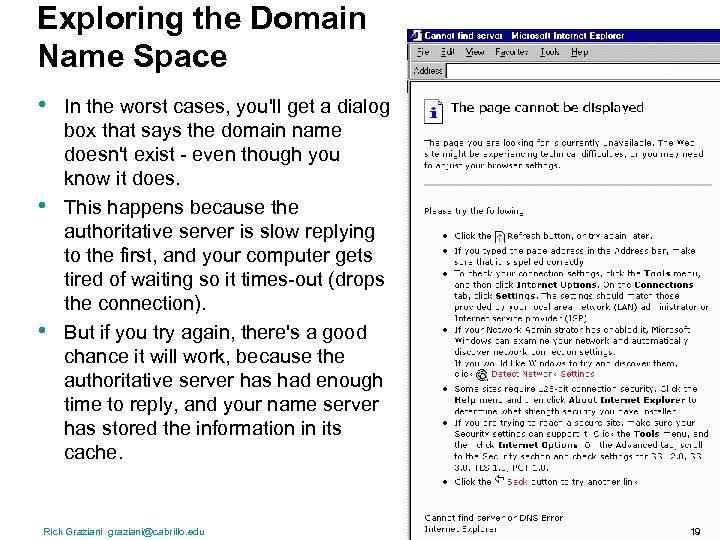 Exploring the Domain Name Space • • • In the worst cases, you'll get a dialog box that says the domain name doesn't exist - even though you know it does. This happens because the authoritative server is slow replying to the first, and your computer gets tired of waiting so it times-out (drops the connection). But if you try again, there's a good chance it will work, because the authoritative server has had enough time to reply, and your name server has stored the information in its cache. Rick Graziani graziani@cabrillo. edu 19
 Proxy ARP – (from cisco. com) • http: //www. cisco. com/en/US/tech/tk 648/tk 361/technologies_tech_note 0 9186 a 0080094 adb. shtml • This link and PDF is on my Semester 1 web page. Introduction • This document explains the concept of proxy Address Resolution Protocol (ARP). • Proxy ARP is the technique in which one host, usually a router, answers ARP requests intended for another machine. • By "faking" its identity, the router accepts responsibility for routing packets to the "real" destination. • Proxy ARP can help machines on a subnet reach remote subnets without configuring routing or a default gateway. Prerequisites • This document requires an understanding of the ARP and Ethernet environment. Rick Graziani graziani@cabrillo. edu 20
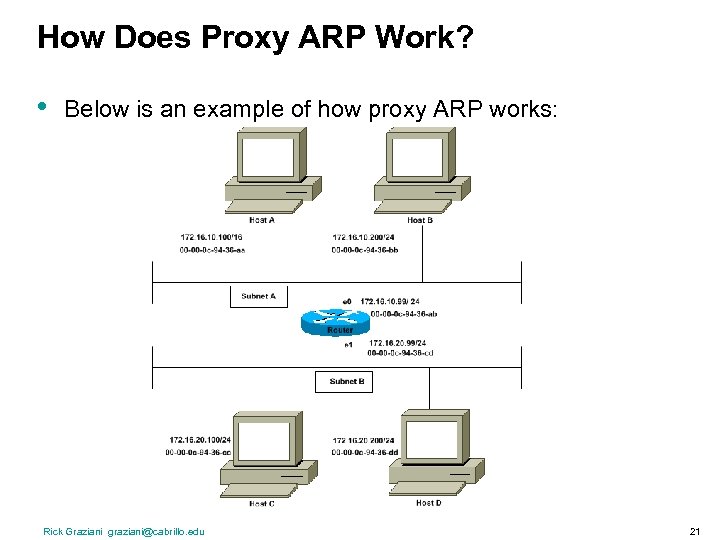 How Does Proxy ARP Work? • Below is an example of how proxy ARP works: Rick Graziani graziani@cabrillo. edu 21
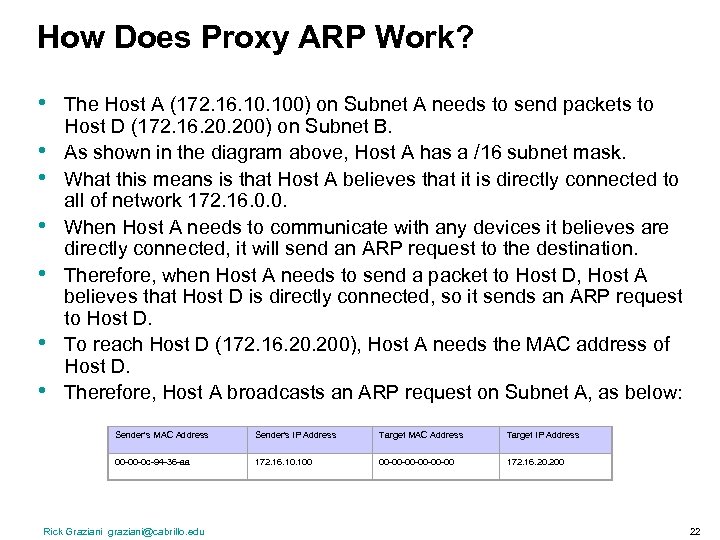 How Does Proxy ARP Work? • • The Host A (172. 16. 100) on Subnet A needs to send packets to Host D (172. 16. 200) on Subnet B. As shown in the diagram above, Host A has a /16 subnet mask. What this means is that Host A believes that it is directly connected to all of network 172. 16. 0. 0. When Host A needs to communicate with any devices it believes are directly connected, it will send an ARP request to the destination. Therefore, when Host A needs to send a packet to Host D, Host A believes that Host D is directly connected, so it sends an ARP request to Host D. To reach Host D (172. 16. 200), Host A needs the MAC address of Host D. Therefore, Host A broadcasts an ARP request on Subnet A, as below: Sender's MAC Address Sender's IP Address Target MAC Address Target IP Address 00 -00 -0 c-94 -36 -aa 172. 16. 100 00 -00 -00 -00 172. 16. 200 Rick Graziani graziani@cabrillo. edu 22
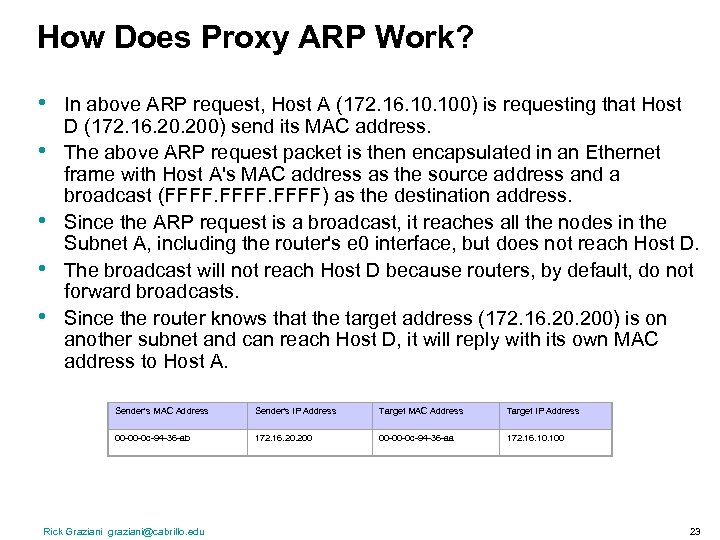 How Does Proxy ARP Work? • • • In above ARP request, Host A (172. 16. 100) is requesting that Host D (172. 16. 200) send its MAC address. The above ARP request packet is then encapsulated in an Ethernet frame with Host A's MAC address as the source address and a broadcast (FFFF) as the destination address. Since the ARP request is a broadcast, it reaches all the nodes in the Subnet A, including the router's e 0 interface, but does not reach Host D. The broadcast will not reach Host D because routers, by default, do not forward broadcasts. Since the router knows that the target address (172. 16. 200) is on another subnet and can reach Host D, it will reply with its own MAC address to Host A. Sender's MAC Address Sender's IP Address Target MAC Address Target IP Address 00 -00 -0 c-94 -36 -ab 172. 16. 200 00 -00 -0 c-94 -36 -aa 172. 16. 100 Rick Graziani graziani@cabrillo. edu 23
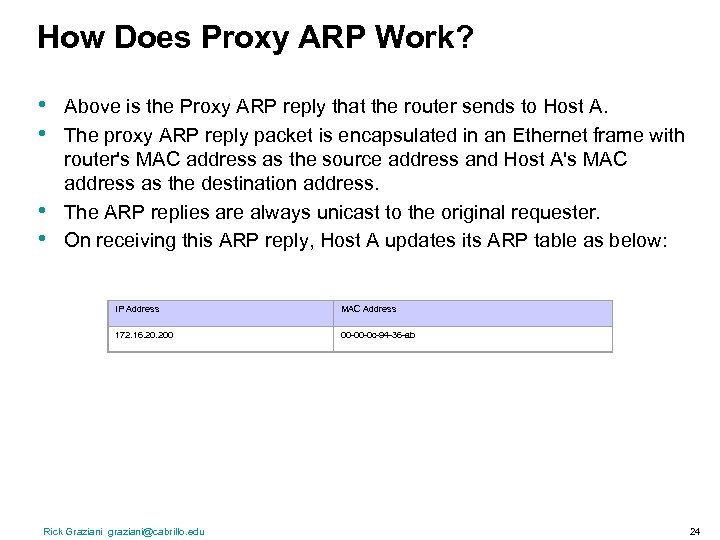 How Does Proxy ARP Work? • • Above is the Proxy ARP reply that the router sends to Host A. The proxy ARP reply packet is encapsulated in an Ethernet frame with router's MAC address as the source address and Host A's MAC address as the destination address. The ARP replies are always unicast to the original requester. On receiving this ARP reply, Host A updates its ARP table as below: IP Address MAC Address 172. 16. 200 00 -00 -0 c-94 -36 -ab Rick Graziani graziani@cabrillo. edu 24
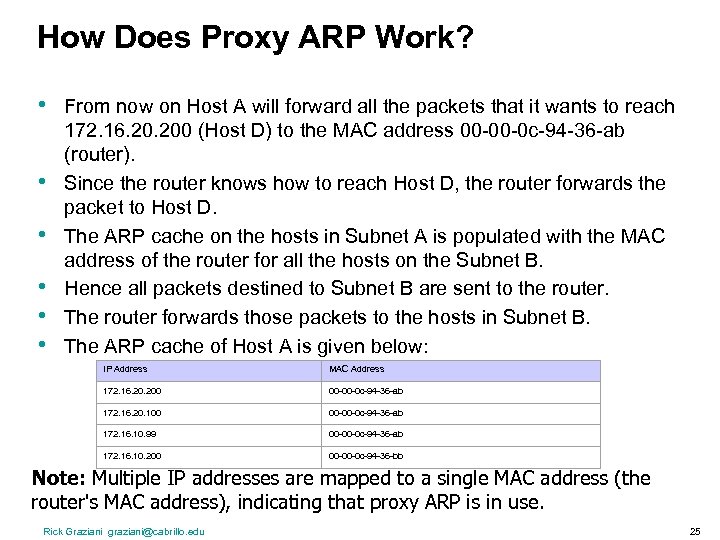 How Does Proxy ARP Work? • • • From now on Host A will forward all the packets that it wants to reach 172. 16. 200 (Host D) to the MAC address 00 -00 -0 c-94 -36 -ab (router). Since the router knows how to reach Host D, the router forwards the packet to Host D. The ARP cache on the hosts in Subnet A is populated with the MAC address of the router for all the hosts on the Subnet B. Hence all packets destined to Subnet B are sent to the router. The router forwards those packets to the hosts in Subnet B. The ARP cache of Host A is given below: IP Address MAC Address 172. 16. 200 00 -00 -0 c-94 -36 -ab 172. 16. 20. 100 00 -00 -0 c-94 -36 -ab 172. 16. 10. 99 00 -00 -0 c-94 -36 -ab 172. 16. 10. 200 00 -00 -0 c-94 -36 -bb Note: Multiple IP addresses are mapped to a single MAC address (the router's MAC address), indicating that proxy ARP is in use. Rick Graziani graziani@cabrillo. edu 25
 Routers and the Network Layer Rick Graziani graziani@cabrillo. edu 26
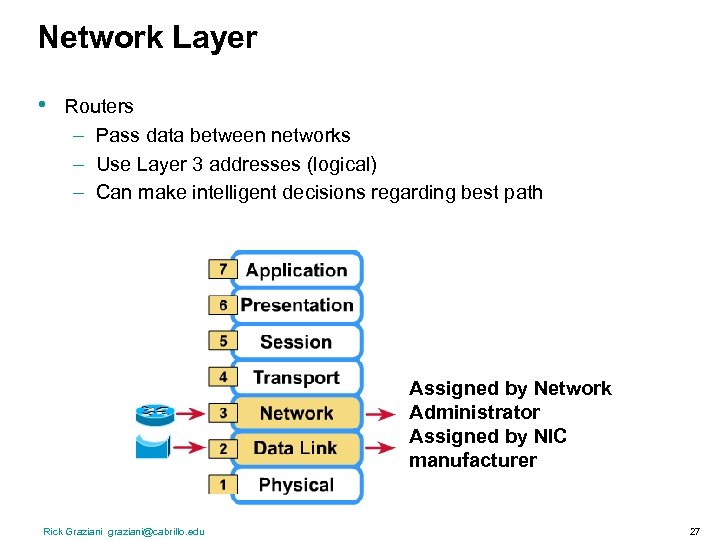 Network Layer • Routers – Pass data between networks – Use Layer 3 addresses (logical) – Can make intelligent decisions regarding best path Assigned by Network Administrator Assigned by NIC manufacturer Rick Graziani graziani@cabrillo. edu 27
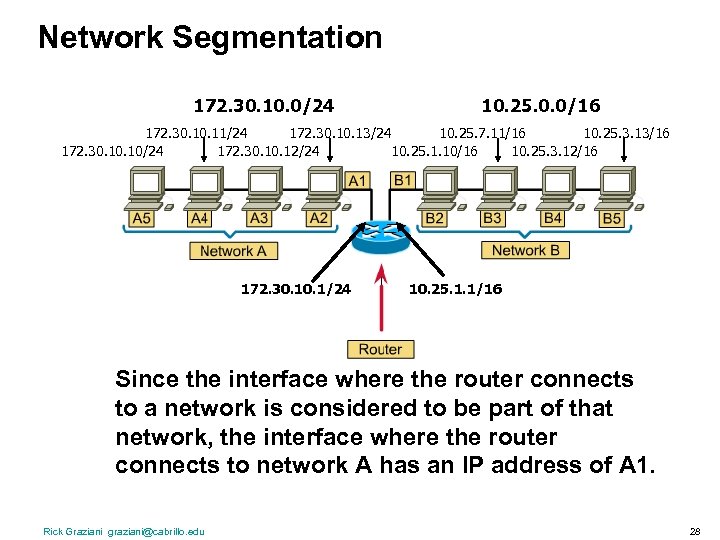 Network Segmentation 172. 30. 10. 0/24 10. 25. 0. 0/16 172. 30. 11/24 172. 30. 13/24 10. 25. 7. 11/16 10. 25. 3. 13/16 172. 30. 10/24 172. 30. 12/24 10. 25. 1. 10/16 10. 25. 3. 12/16 172. 30. 1/24 10. 25. 1. 1/16 Since the interface where the router connects to a network is considered to be part of that network, the interface where the router connects to network A has an IP address of A 1. Rick Graziani graziani@cabrillo. edu 28
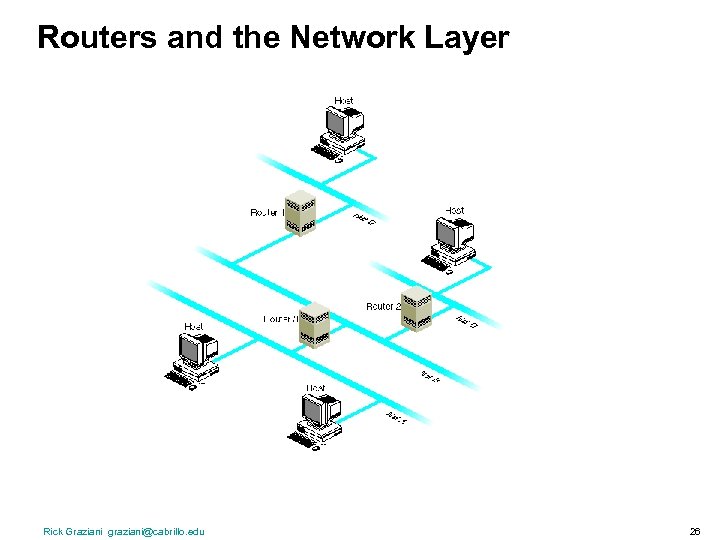
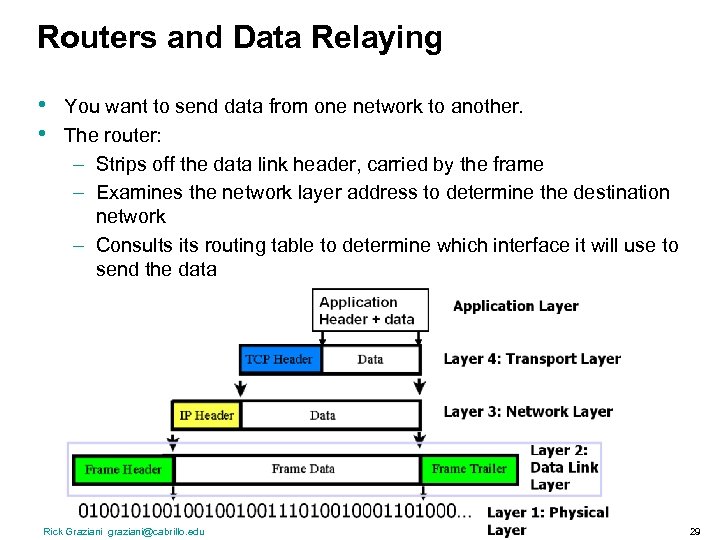 Routers and Data Relaying • • You want to send data from one network to another. The router: – Strips off the data link header, carried by the frame – Examines the network layer address to determine the destination network – Consults its routing table to determine which interface it will use to send the data Rick Graziani graziani@cabrillo. edu 29
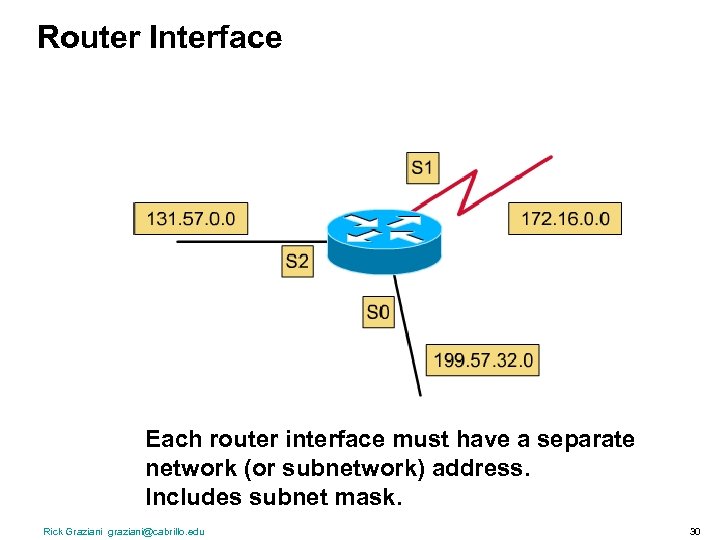 Router Interface Each router interface must have a separate network (or subnetwork) address. Includes subnet mask. Rick Graziani graziani@cabrillo. edu 30
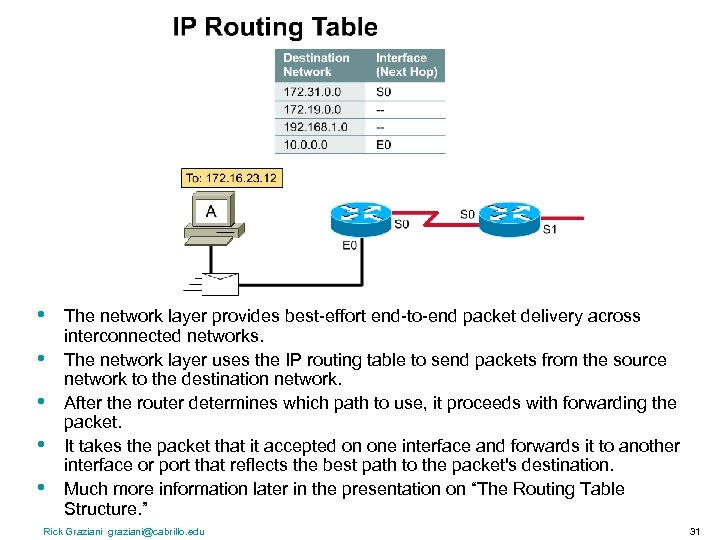 • • • The network layer provides best-effort end-to-end packet delivery across interconnected networks. The network layer uses the IP routing table to send packets from the source network to the destination network. After the router determines which path to use, it proceeds with forwarding the packet. It takes the packet that it accepted on one interface and forwards it to another interface or port that reflects the best path to the packet's destination. Much more information later in the presentation on “The Routing Table Structure. ” Rick Graziani graziani@cabrillo. edu 31
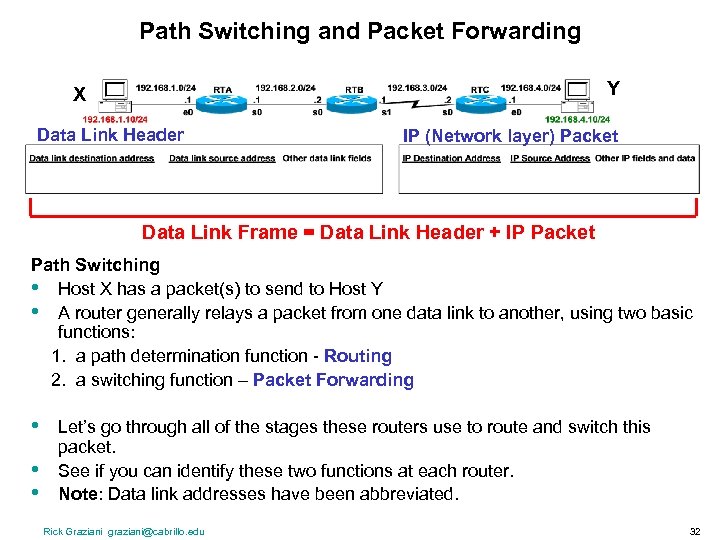 Path Switching and Packet Forwarding Y X Data Link Header IP (Network layer) Packet Data Link Frame = Data Link Header + IP Packet Path Switching • Host X has a packet(s) to send to Host Y • A router generally relays a packet from one data link to another, using two basic functions: 1. a path determination function - Routing 2. a switching function – Packet Forwarding • • • Let’s go through all of the stages these routers use to route and switch this packet. See if you can identify these two functions at each router. Note: Data link addresses have been abbreviated. Rick Graziani graziani@cabrillo. edu 32
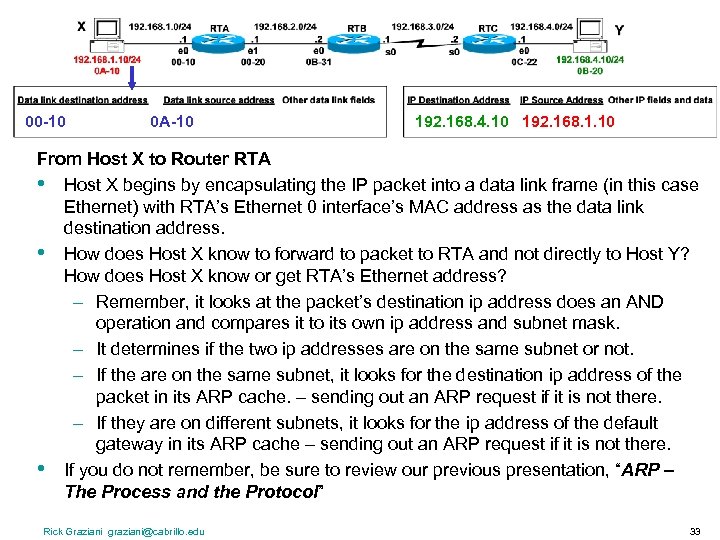 00 -10 0 A-10 192. 168. 4. 10 192. 168. 1. 10 From Host X to Router RTA • Host X begins by encapsulating the IP packet into a data link frame (in this case Ethernet) with RTA’s Ethernet 0 interface’s MAC address as the data link destination address. • How does Host X know to forward to packet to RTA and not directly to Host Y? How does Host X know or get RTA’s Ethernet address? – Remember, it looks at the packet’s destination ip address does an AND operation and compares it to its own ip address and subnet mask. – It determines if the two ip addresses are on the same subnet or not. – If the are on the same subnet, it looks for the destination ip address of the packet in its ARP cache. – sending out an ARP request if it is not there. – If they are on different subnets, it looks for the ip address of the default gateway in its ARP cache – sending out an ARP request if it is not there. • If you do not remember, be sure to review our previous presentation, “ARP – The Process and the Protocol” Rick Graziani graziani@cabrillo. edu 33
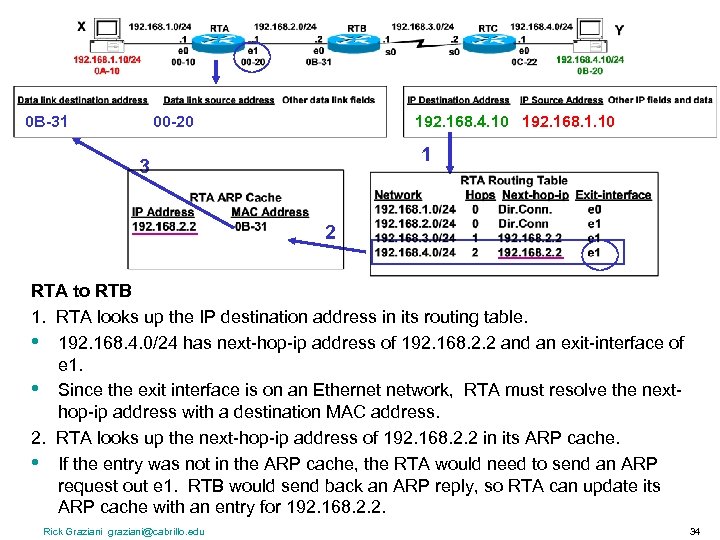 0 B-31 00 -20 192. 168. 4. 10 192. 168. 1. 10 1 3 2 RTA to RTB 1. RTA looks up the IP destination address in its routing table. • 192. 168. 4. 0/24 has next-hop-ip address of 192. 168. 2. 2 and an exit-interface of e 1. • Since the exit interface is on an Ethernet network, RTA must resolve the nexthop-ip address with a destination MAC address. 2. RTA looks up the next-hop-ip address of 192. 168. 2. 2 in its ARP cache. • If the entry was not in the ARP cache, the RTA would need to send an ARP request out e 1. RTB would send back an ARP reply, so RTA can update its ARP cache with an entry for 192. 168. 2. 2. Rick Graziani graziani@cabrillo. edu 34
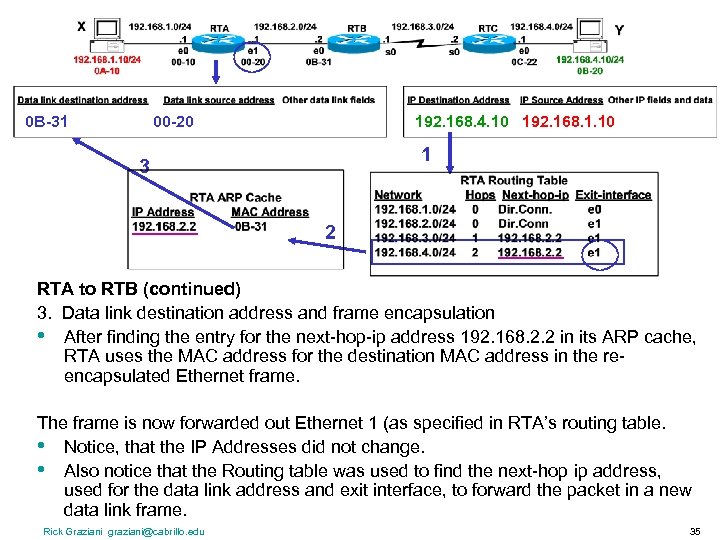 0 B-31 00 -20 192. 168. 4. 10 192. 168. 1. 10 1 3 2 RTA to RTB (continued) 3. Data link destination address and frame encapsulation • After finding the entry for the next-hop-ip address 192. 168. 2. 2 in its ARP cache, RTA uses the MAC address for the destination MAC address in the reencapsulated Ethernet frame. The frame is now forwarded out Ethernet 1 (as specified in RTA’s routing table. • Notice, that the IP Addresses did not change. • Also notice that the Routing table was used to find the next-hop ip address, used for the data link address and exit interface, to forward the packet in a new data link frame. Rick Graziani graziani@cabrillo. edu 35
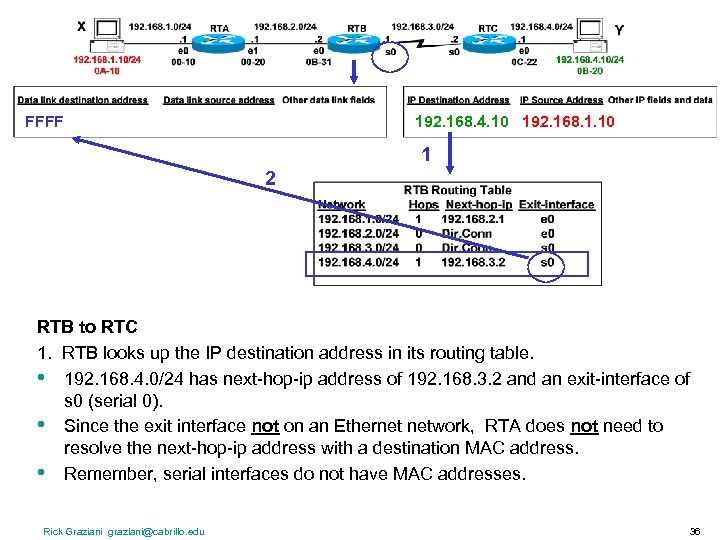 FFFF 192. 168. 4. 10 192. 168. 1. 10 1 2 RTB to RTC 1. RTB looks up the IP destination address in its routing table. • 192. 168. 4. 0/24 has next-hop-ip address of 192. 168. 3. 2 and an exit-interface of s 0 (serial 0). • Since the exit interface not on an Ethernet network, RTA does not need to resolve the next-hop-ip address with a destination MAC address. • Remember, serial interfaces do not have MAC addresses. Rick Graziani graziani@cabrillo. edu 36
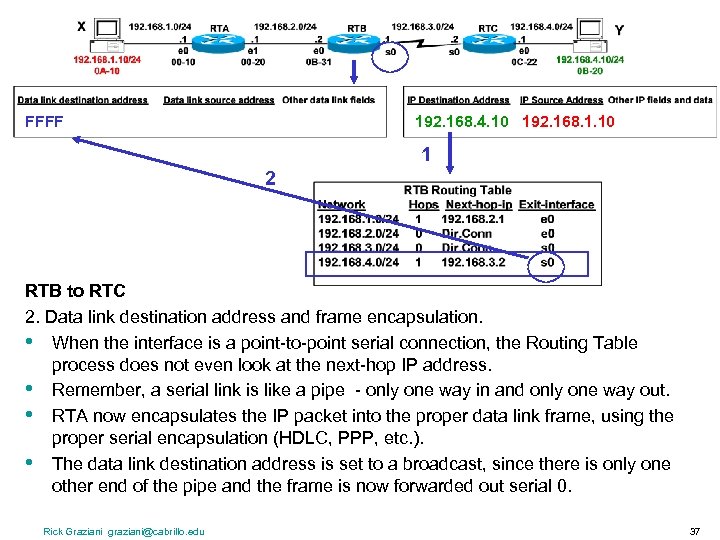 FFFF 192. 168. 4. 10 192. 168. 1. 10 1 2 RTB to RTC 2. Data link destination address and frame encapsulation. • When the interface is a point-to-point serial connection, the Routing Table process does not even look at the next-hop IP address. • Remember, a serial link is like a pipe - only one way in and only one way out. • RTA now encapsulates the IP packet into the proper data link frame, using the proper serial encapsulation (HDLC, PPP, etc. ). • The data link destination address is set to a broadcast, since there is only one other end of the pipe and the frame is now forwarded out serial 0. Rick Graziani graziani@cabrillo. edu 37
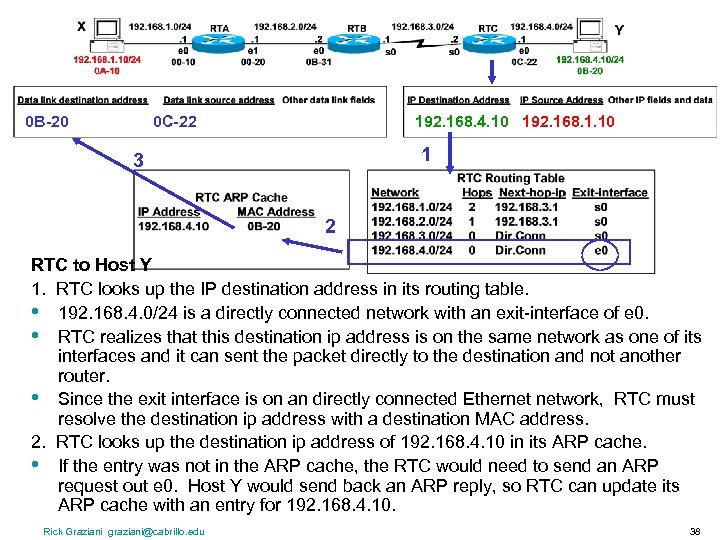 0 B-20 0 C-22 192. 168. 4. 10 192. 168. 1. 10 1 3 2 RTC to Host Y 1. RTC looks up the IP destination address in its routing table. • 192. 168. 4. 0/24 is a directly connected network with an exit-interface of e 0. • RTC realizes that this destination ip address is on the same network as one of its interfaces and it can sent the packet directly to the destination and not another router. • Since the exit interface is on an directly connected Ethernet network, RTC must resolve the destination ip address with a destination MAC address. 2. RTC looks up the destination ip address of 192. 168. 4. 10 in its ARP cache. • If the entry was not in the ARP cache, the RTC would need to send an ARP request out e 0. Host Y would send back an ARP reply, so RTC can update its ARP cache with an entry for 192. 168. 4. 10. Rick Graziani graziani@cabrillo. edu 38
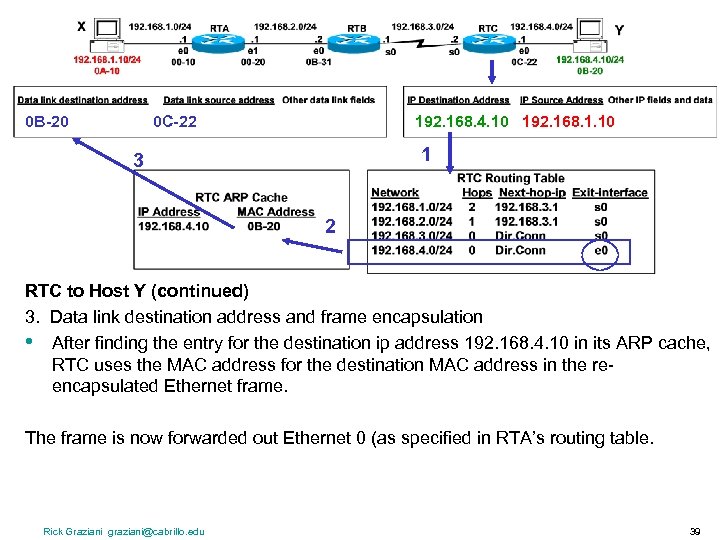 0 B-20 0 C-22 192. 168. 4. 10 192. 168. 1. 10 1 3 2 RTC to Host Y (continued) 3. Data link destination address and frame encapsulation • After finding the entry for the destination ip address 192. 168. 4. 10 in its ARP cache, RTC uses the MAC address for the destination MAC address in the reencapsulated Ethernet frame. The frame is now forwarded out Ethernet 0 (as specified in RTA’s routing table. Rick Graziani graziani@cabrillo. edu 39
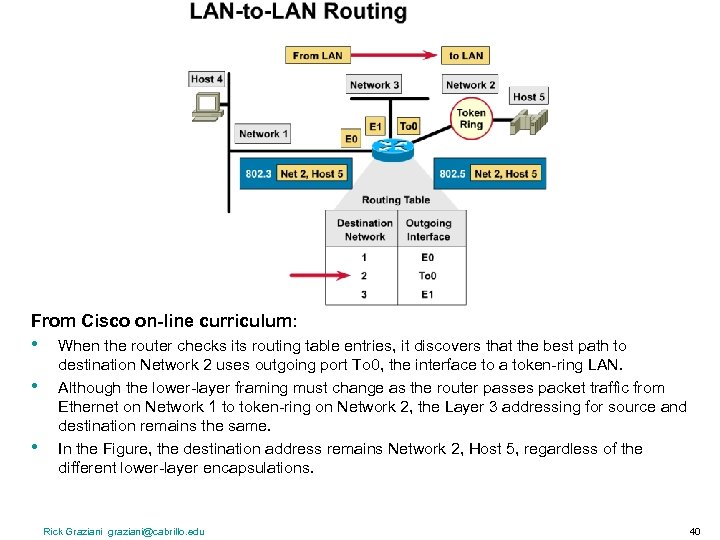 From Cisco on-line curriculum: • • • When the router checks its routing table entries, it discovers that the best path to destination Network 2 uses outgoing port To 0, the interface to a token-ring LAN. Although the lower-layer framing must change as the router passes packet traffic from Ethernet on Network 1 to token-ring on Network 2, the Layer 3 addressing for source and destination remains the same. In the Figure, the destination address remains Network 2, Host 5, regardless of the different lower-layer encapsulations. Rick Graziani graziani@cabrillo. edu 40
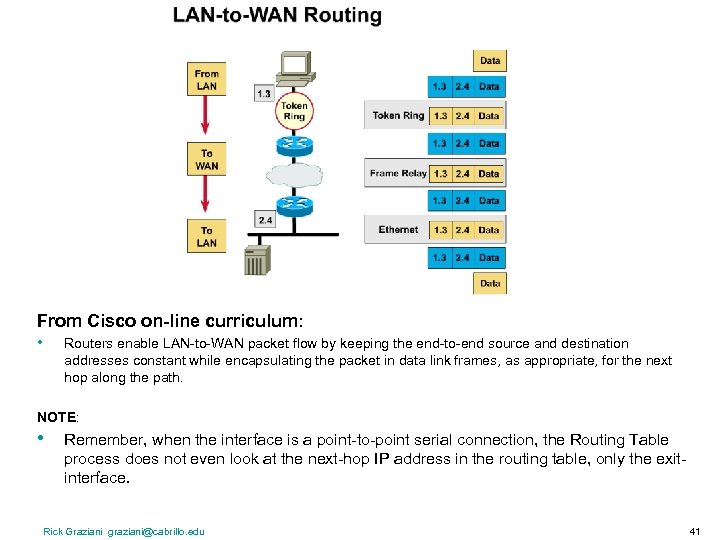 From Cisco on-line curriculum: • Routers enable LAN-to-WAN packet flow by keeping the end-to-end source and destination addresses constant while encapsulating the packet in data link frames, as appropriate, for the next hop along the path. NOTE: • Remember, when the interface is a point-to-point serial connection, the Routing Table process does not even look at the next-hop IP address in the routing table, only the exitinterface. Rick Graziani graziani@cabrillo. edu 41
 Ch. 9 – Address Allocation, Resolution, and Packet Forwarding (TCP/IP) CCNA 1 version 3 Rick Graziani Cabrillo College Spring 2005