 Скачать презентацию Certificates Authentication Network Security Lecture 9 November 18
00ee735527d297656ea338719992fddd.ppt
- Количество слайдов: 72



Certificates, Authentication Network Security Lecture 9 November 18, 2003 Courtesy of Professors Chris Clifton & Matt Bishop INFSCI 2935: Introduction of Computer Security 1
Cryptographic Key Infrastructure Goal: bind identity to key l Classical Crypto: l ¡ l Not possible as all keys are shared Public key Crypto: ¡ ¡ Bind identity to public key Crucial as people will use key to communicate with principal whose identity is bound to key Erroneous binding means no secrecy between principals Assume principal identified by an acceptable name INFSCI 2935: Introduction to Computer Security 2
Certificates l Create token (message) containing ¡ Identity of principal (here, Alice) ¡ Corresponding public key ¡ Timestamp (when issued) ¡ Other information (perhaps identity of signer) signed by trusted authority (here, Cathy) CA = { e. A || Alice || T } d. C CA is A’s certificate INFSCI 2935: Introduction to Computer Security 3

Use l Bob gets Alice’s certificate ¡ If he knows Cathy’s public key, he can decipher the certificate l l ¡ l When was certificate issued? Is the principal Alice? Now Bob has Alice’s public key Problem: Bob needs Cathy’s public key to validate certificate ¡ ¡ Merkle’s tree, Signature chains INFSCI 2935: Introduction to Computer Security 4
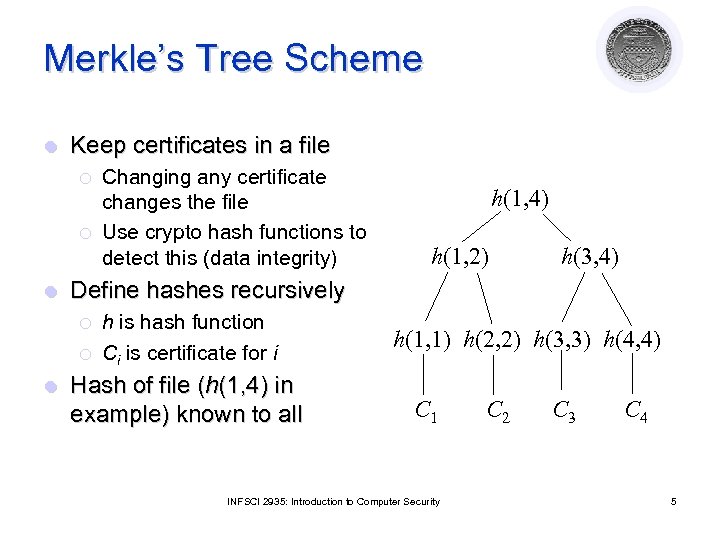
Merkle’s Tree Scheme l Keep certificates in a file ¡ ¡ l h(1, 4) h(1, 2) h(3, 4) Define hashes recursively ¡ ¡ l Changing any certificate changes the file Use crypto hash functions to detect this (data integrity) h is hash function Ci is certificate for i Hash of file (h(1, 4) in example) known to all h(1, 1) h(2, 2) h(3, 3) h(4, 4) C 1 INFSCI 2935: Introduction to Computer Security C 2 C 3 C 4 5
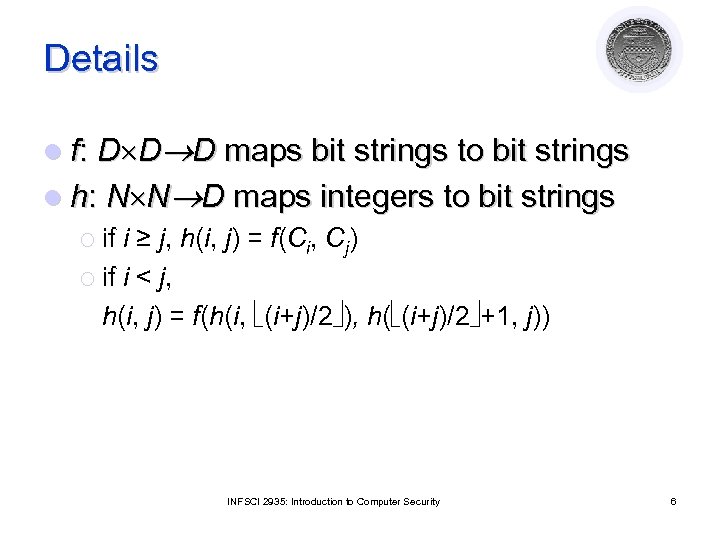
Details l f: D D D maps bit strings to bit strings l h: N N D maps integers to bit strings ¡ if i ≥ j, h(i, j) = f(Ci, Cj) ¡ if i < j, h(i, j) = f(h(i, (i+j)/2 ), h( (i+j)/2 +1, j)) INFSCI 2935: Introduction to Computer Security 6
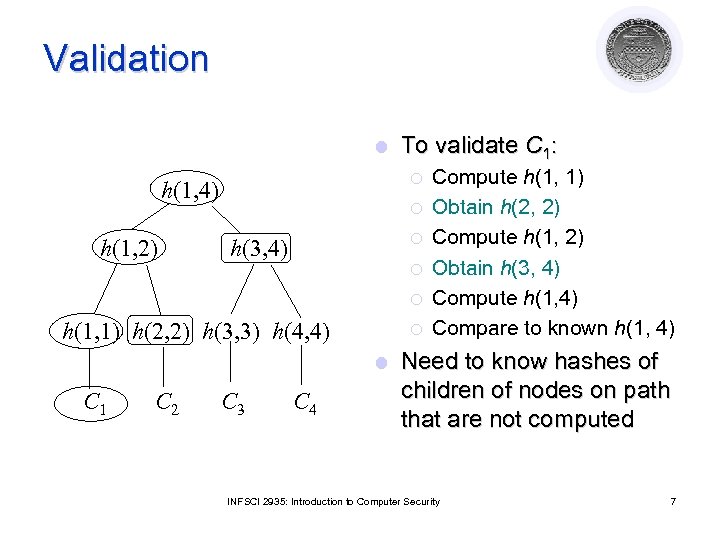
Validation l ¡ h(1, 4) h(1, 2) To validate C 1: ¡ ¡ h(3, 4) ¡ ¡ h(1, 1) h(2, 2) h(3, 3) h(4, 4) ¡ l C 1 C 2 C 3 C 4 Compute h(1, 1) Obtain h(2, 2) Compute h(1, 2) Obtain h(3, 4) Compute h(1, 4) Compare to known h(1, 4) Need to know hashes of children of nodes on path that are not computed INFSCI 2935: Introduction to Computer Security 7
Problem l File must be available for validation ¡ Otherwise, can’t recompute hash at root of tree ¡ Intermediate hashes would do l Not practical in most circumstances ¡ Too many certificates and users ¡ Users and certificates distributed over widely separated systems INFSCI 2935: Introduction to Computer Security 8
Certificate Signature Chains l Create certificate ¡ ¡ l Validate ¡ ¡ ¡ l Generate hash of certificate Encipher hash with issuer’s private key Obtain issuer’s public key Decipher enciphered hash Recompute hash from certificate and compare Problem: ¡ Validating the certificate of the issuer and getting issuer’s public key INFSCI 2935: Introduction to Computer Security 9
X. 509 Chains l Key certificate fields in X. 509 v 3: ¡ ¡ ¡ ¡ Version Serial number (unique) Signature algorithm identifier: hash algorithm Issuer’s name; uniquely identifies issuer Interval of validity Subject’s name; uniquely identifies subject Subject’s public key Signature: l l Identifies algorithm used to sign the certificate Signature (enciphered hash) INFSCI 2935: Introduction to Computer Security 10
X. 509 Certificate Validation l Obtain issuer’s public key ¡ l Decipher signature ¡ l Gives hash of certificate Recompute hash from certificate and compare ¡ l The one for the particular signature algorithm If they differ, there’s a problem Check interval of validity ¡ This confirms that certificate is current INFSCI 2935: Introduction to Computer Security 11
Issuers l Certification Authority (CA): entity that issues certificates ¡ Multiple issuers pose validation problem ¡ Alice’s CA is Cathy; Bob’s CA is Don; how can Alice validate Bob’s certificate? ¡ Have Cathy and Don cross-certify l Each issues certificate for the other INFSCI 2935: Introduction to Computer Security 12
Validation and Cross-Certifying l Certificates: ¡ Cathy<<Alice>> l ¡ ¡ ¡ l represents the certificate that C has generated for A Dan<<Bob>> Cathy<<Dan>> Dan<<Cathy>> Alice validates Bob’s certificate ¡ ¡ ¡ Alice obtains Cathy<<Dan>> Alice uses (known) public key of Cathy to validate Cathy<<Dan>> Alice uses Cathy<<Dan>> to validate Dan<<Bob>> l ¡ Cathy<<Dan>> Dan<<Bob>> is a signature chain How about Bob validating Alice? INFSCI 2935: Introduction to Computer Security 13
PGP Chains l Pretty Good Privacy: ¡ ¡ l Open. PGP certificates structured into packets ¡ ¡ l Widely used to provide privacy for electronic mail Sign files digitally One public key packet Zero or more signature packets Public key packet: ¡ ¡ ¡ Version (3 or 4; 3 compatible with all versions of PGP, 4 not compatible with older versions of PGP) Creation time Validity period (not present in version 3) Public key algorithm, associated parameters Public key INFSCI 2935: Introduction to Computer Security 14
Open. PGP Signature Packet l Version 3 signature packet Version (3) ¡ Signature type (level of trust) ¡ Creation time (when next fields hashed) ¡ Signer’s key identifier (identifies key to encipher hash) ¡ Public key algorithm (used to encipher hash) ¡ Hash algorithm ¡ Part of signed hash (used for quick check) ¡ Signature (enciphered hash using signer’s private key) ¡ INFSCI 2935: Introduction to Computer Security 15
Signing Single certificate may have multiple signatures l Notion of “trust” embedded in each signature l ¡ ¡ l Range from “untrusted” to “ultimate trust” Signer defines meaning of trust level (no standards!) All version 4 keys signed by subject ¡ Called “self-signing” INFSCI 2935: Introduction to Computer Security 16
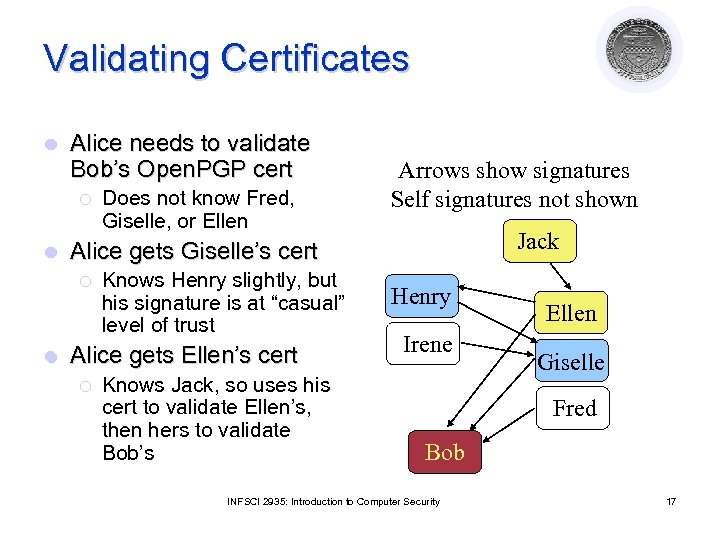
Validating Certificates l Alice needs to validate Bob’s Open. PGP cert ¡ l Jack Alice gets Giselle’s cert ¡ l Does not know Fred, Giselle, or Ellen Arrows show signatures Self signatures not shown Knows Henry slightly, but his signature is at “casual” level of trust Alice gets Ellen’s cert ¡ Knows Jack, so uses his cert to validate Ellen’s, then hers to validate Bob’s Henry Irene Ellen Giselle Fred Bob INFSCI 2935: Introduction to Computer Security 17
Authentication and Identity Courtesy of Professors Chris Clifton & Matt Bishop INFSCI 2935: Introduction of Computer Security 18
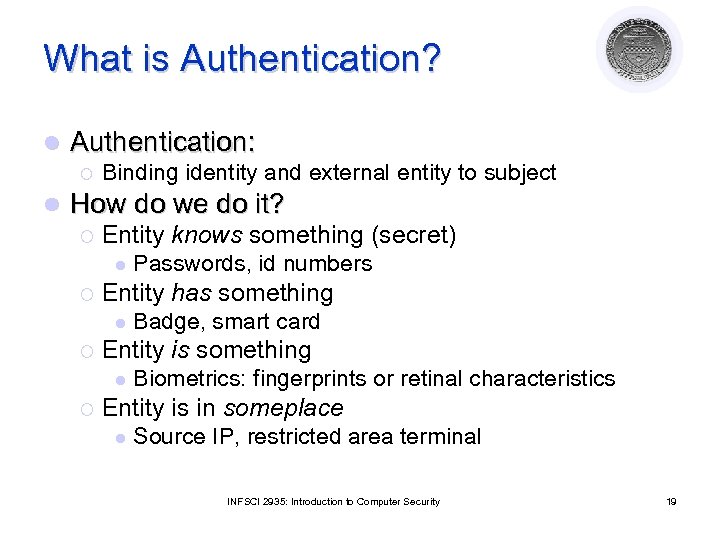
What is Authentication? l Authentication: ¡ l Binding identity and external entity to subject How do we do it? ¡ Entity knows something (secret) l ¡ Entity has something l ¡ Badge, smart card Entity is something l ¡ Passwords, id numbers Biometrics: fingerprints or retinal characteristics Entity is in someplace l Source IP, restricted area terminal INFSCI 2935: Introduction to Computer Security 19
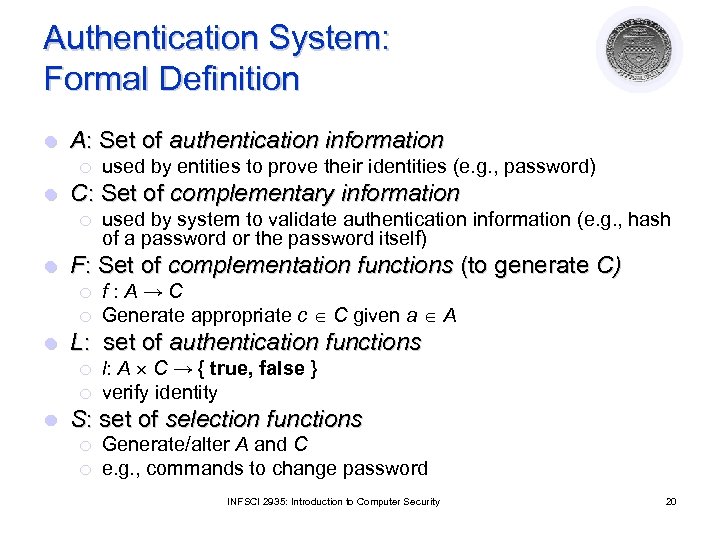
Authentication System: Formal Definition l A: Set of authentication information ¡ l C: Set of complementary information ¡ l ¡ f: A→C Generate appropriate c C given a A L: set of authentication functions ¡ ¡ l used by system to validate authentication information (e. g. , hash of a password or the password itself) F: Set of complementation functions (to generate C) ¡ l used by entities to prove their identities (e. g. , password) l: A C → { true, false } verify identity S: set of selection functions ¡ ¡ Generate/alter A and C e. g. , commands to change password INFSCI 2935: Introduction to Computer Security 20
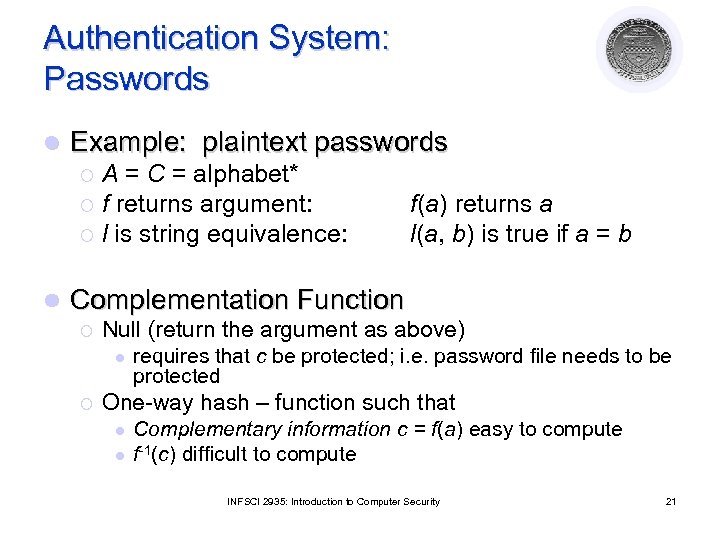
Authentication System: Passwords l Example: plaintext passwords A = C = alphabet* ¡ f returns argument: ¡ l is string equivalence: ¡ l f(a) returns a l(a, b) is true if a = b Complementation Function ¡ Null (return the argument as above) l ¡ requires that c be protected; i. e. password file needs to be protected One-way hash – function such that l l Complementary information c = f(a) easy to compute f-1(c) difficult to compute INFSCI 2935: Introduction to Computer Security 21
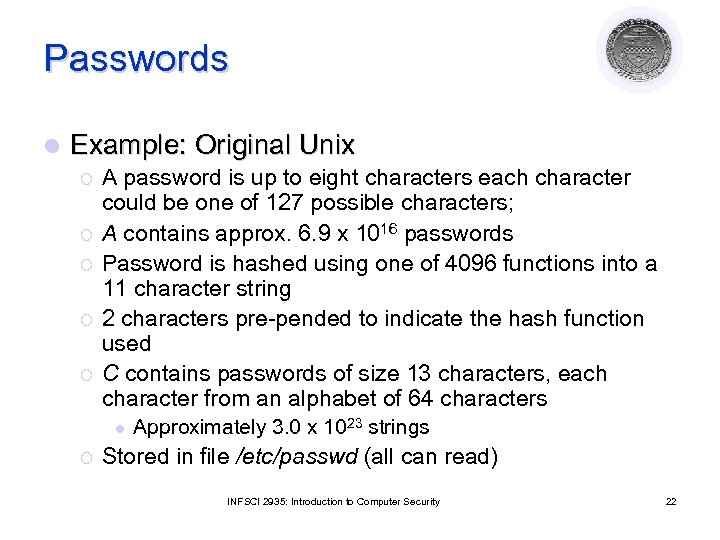
Passwords l Example: Original Unix ¡ ¡ ¡ A password is up to eight characters each character could be one of 127 possible characters; A contains approx. 6. 9 x 10¹⁶ passwords Password is hashed using one of 4096 functions into a 11 character string 2 characters pre-pended to indicate the hash function used C contains passwords of size 13 characters, each character from an alphabet of 64 characters l ¡ Approximately 3. 0 x 1023 strings Stored in file /etc/passwd (all can read) INFSCI 2935: Introduction to Computer Security 22
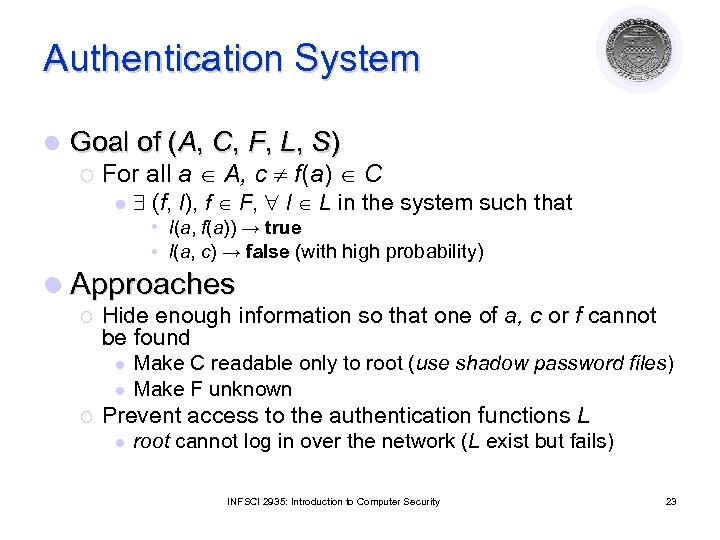
Authentication System l Goal of (A, C, F, L, S) ¡ For all a A, c f(a) C l (f, l), f F, l L in the system such that • l(a, f(a)) → true • l(a, c) → false (with high probability) l Approaches ¡ Hide enough information so that one of a, c or f cannot be found l l ¡ Make C readable only to root (use shadow password files) Make F unknown Prevent access to the authentication functions L l root cannot log in over the network (L exist but fails) INFSCI 2935: Introduction to Computer Security 23
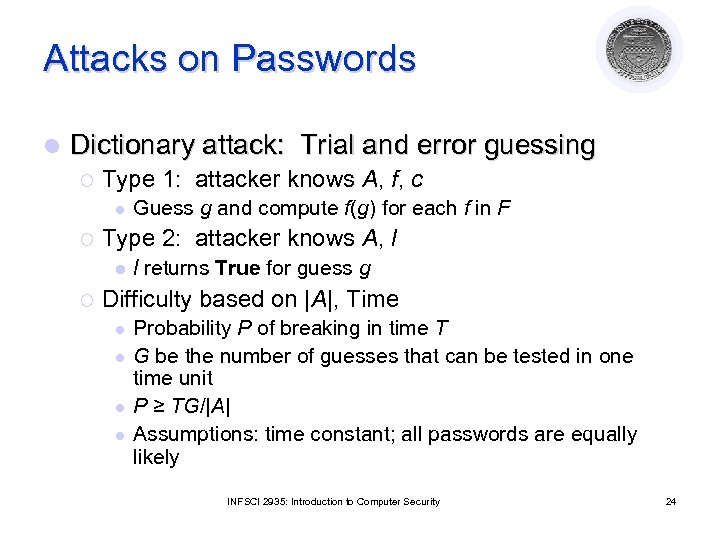
Attacks on Passwords l Dictionary attack: Trial and error guessing ¡ Type 1: attacker knows A, f, c l ¡ Type 2: attacker knows A, l l ¡ Guess g and compute f(g) for each f in F l returns True for guess g Difficulty based on |A|, Time l l Probability P of breaking in time T G be the number of guesses that can be tested in one time unit P ≥ TG/|A| Assumptions: time constant; all passwords are equally likely INFSCI 2935: Introduction to Computer Security 24
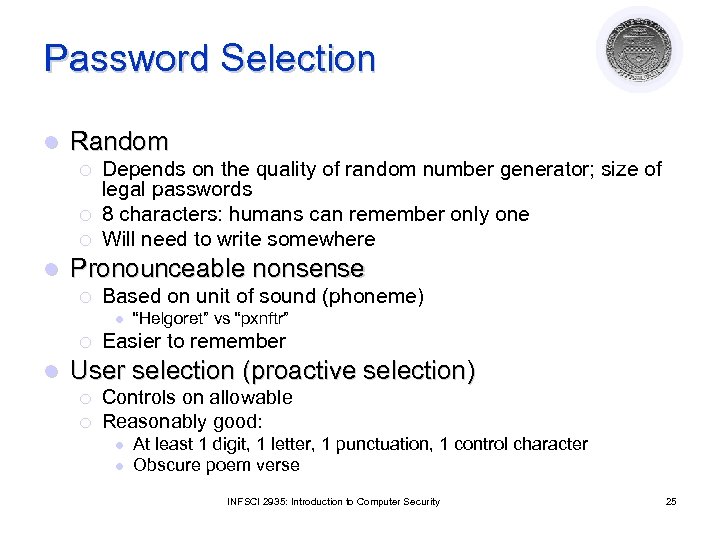
Password Selection l Random ¡ ¡ ¡ l Depends on the quality of random number generator; size of legal passwords 8 characters: humans can remember only one Will need to write somewhere Pronounceable nonsense ¡ Based on unit of sound (phoneme) l ¡ l “Helgoret” vs “pxnftr” Easier to remember User selection (proactive selection) ¡ ¡ Controls on allowable Reasonably good: l l At least 1 digit, 1 letter, 1 punctuation, 1 control character Obscure poem verse INFSCI 2935: Introduction to Computer Security 25
Password Selection l Reusable Passwords susceptible to dictionary attack (type 1) ¡ Salting can be used to increase effort needed makes the choice of complementation function a function of randomly selected data l Random data is different for different user l Authentication function is chosen on the basis of the salt l Many Unix systems: l • A salt is randomly chosen from 0. . 4095 • Complementation function depends on the salt INFSCI 2935: Introduction to Computer Security 26
Password Selection l Password aging ¡ Change password after some time: based on expected time to guess a password ¡ Disallow change to previous n passwords l Fundamental problem is reusability ¡ Replay attack is easy ¡ Solution: l Authenticate in such a way that the transmitted password changes each time INFSCI 2935: Introduction to Computer Security 27
Authentication Systems: Challenge. Response l Pass algorithm ¡ authenticator sends message m ¡ subject responds with f(m) f is a secret encryption function l In practice: key known only to subject l ¡ Example: ask for second input based on some algorithm INFSCI 2935: Introduction to Computer Security 28
Authentication Systems: Challenge. Response l One-time password: invalidated after use ¡ f changes after use l l l Challenge is the number of authentication attempt Response is the one-time password S/Key uses a hash function (MD 4/MD 5) ¡ ¡ User chooses an initial seed k Key generator calculates l ¡ Passwords used in the order l ¡ k 1 = h(k), k 2 = h(k 1) …, kn = h(kn-1) p 1 = kn, p 2 = kn-1, …, pn =k 1 Suppose p 1 = kn is intercepted; l l the next password is p 2 = kn-1 Since h(kn-1) = kn, the attacker needs to know h to determine the next password INFSCI 2935: Introduction to Computer Security 29
Authentication Systems: Biometrics l Used for human subject identification based on physical characteristics that are tough to copy ¡ Fingerprint (optical scanning) l ¡ Voice l ¡ Laser beaming is intrusive Face recognition l ¡ Speaker-verification (identity) or speaker-recognition (info content) Iris/retina patterns (unique for each person) l ¡ Camera’s needed (bulky) Facial features can make this difficult Keystroke interval/timing/pressure INFSCI 2935: Introduction to Computer Security 30
Attacks on Biometrics l Fake biometrics ¡ fingerprint “mask” ¡ copy keystroke pattern l Fake the interaction between device and system ¡ Replay attack ¡ Requires careful design of entire authentication system INFSCI 2935: Introduction to Computer Security 31
Authentication Systems: Location Based on knowing physical location of subject l Example: Secured area l ¡ ¡ l Assumes separate authentication for subject to enter area In practice: early implementation of challenge/response and biometrics What about generalizing this? ¡ Assume subject allowed access from limited geographic area l ¡ ¡ ¡ I can work from (near) home Issue GPS Smart-Card Authentication tests if smart-card generated signature within spatio/temporal constraints Key: authorized locations known/approved in advance INFSCI 2935: Introduction to Computer Security 32
Network Security Courtesy of Professors Chris Clifton & Matt Bishop INFSCI 2935: Introduction of Computer Security 33
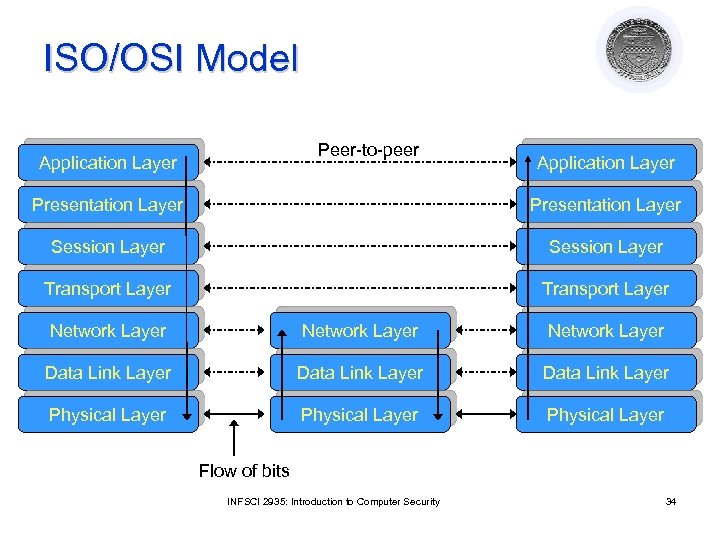
ISO/OSI Model Peer-to-peer Application Layer Presentation Layer Session Layer Transport Layer Network Layer Data Link Layer Physical Layer Flow of bits INFSCI 2935: Introduction to Computer Security 34
Protocols l End-to-end protocol ¡ ¡ Communication protocol that involves end systems with one or more intermediate systems Intermediate host play no part other than forwarding messages l l Link protocol ¡ Protocol between every directly connected systems l l Example: IP – guides messages from a host to one of its immediate host Link encryption ¡ ¡ Encipher messages between intermediate host Each host share a cryptographic key with its neighbor l l Example: telnet Attackers at the intermediate host will be able to read the message End-to-end encryption ¡ ¡ Example: telnet with messages encrypted/decrypted at the client and server Attackers on the intermediate hosts cannot read the message INFSCI 2935: Introduction to Computer Security 35
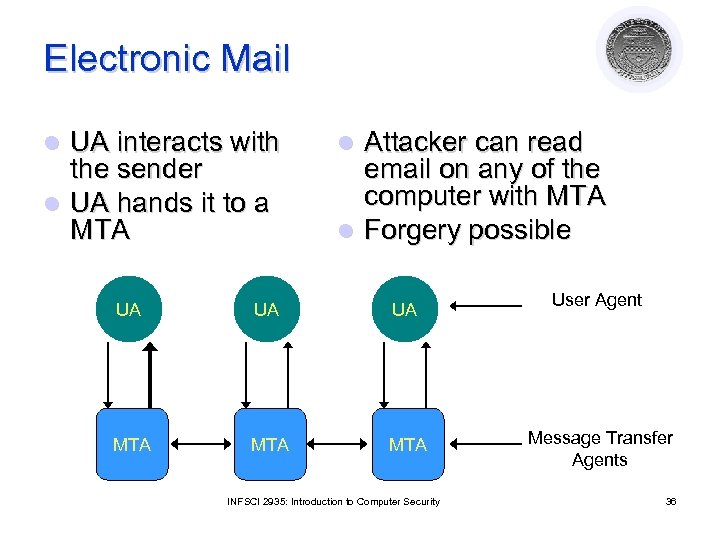
Electronic Mail UA interacts with the sender l UA hands it to a MTA l Attacker can read email on any of the computer with MTA l Forgery possible l UA UA UA MTA MTA INFSCI 2935: Introduction to Computer Security User Agent Message Transfer Agents 36
Security at the Application Layer: Privacy-enhanced Electronic Mail (PEM) l Study by Internet Research Task Force on Privacy or Privacy Research Group to develop protocols with following services ¡ ¡ Confidentiality, by making the message unreadable except to the sender and recipients Origin authentication, by identifying the sender precisely Data integrity, by ensuring that any changes In the message are easy to detect Non-repudiation of the origin (if possible) INFSCI 2935: Introduction to Computer Security 37
Design Considerations/goals for PEM l Not to redesign existing mail system protocols l To be compatible with a range of MTAs, UAs and other computers l To make privacy enhancements available separately so they are not required l To enable parties to use the protocol to communicate without prearrangement INFSCI 2935: Introduction to Computer Security 38
PEM Basic Design l Defines two keys ¡ Data Encipherment Key (DEK) to encipher the message sent Generated randomly l Used only once l Sent to the recipient l ¡ Interchange l key: to encipher DEK Must be obtained some other way than the through the message INFSCI 2935: Introduction to Computer Security 39
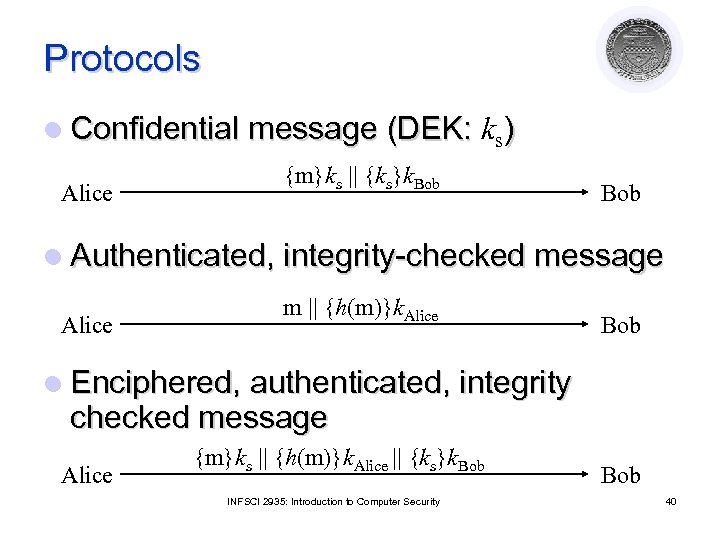
Protocols l Confidential message (DEK: ks) Alice {m}ks || {ks}k. Bob l Authenticated, integrity-checked message Alice m || {h(m)}k. Alice Bob l Enciphered, authenticated, integrity checked message Alice {m}ks || {h(m)}k. Alice || {ks}k. Bob INFSCI 2935: Introduction to Computer Security Bob 40
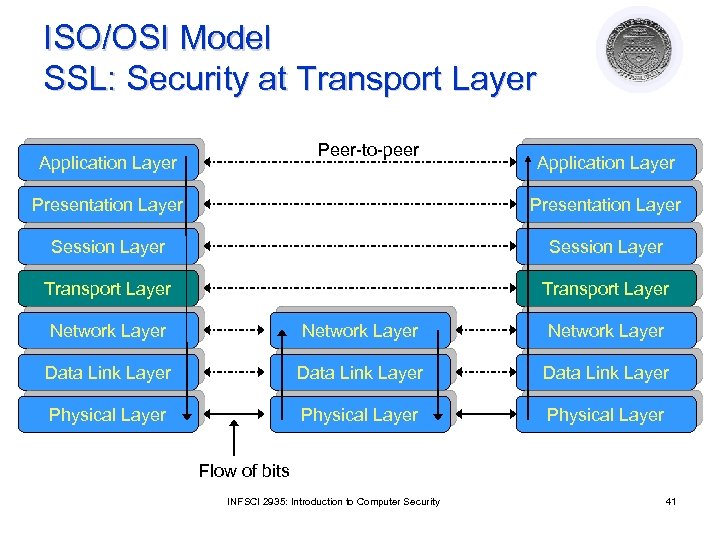
ISO/OSI Model SSL: Security at Transport Layer Peer-to-peer Application Layer Presentation Layer Session Layer Transport Layer Network Layer Data Link Layer Physical Layer Flow of bits INFSCI 2935: Introduction to Computer Security 41
Security at the Transport Layer Secure Socket Layer (SSL) Developed by Netscape to provide security in WWW browsers and servers l SSL is the basis for the Internet standard protocol – Transport Layer Security (TLS) protocol (compatible with SSLv 3) l Key idea: Connections and Sessions l ¡ ¡ A SSL session is an association between two peers An SSL connection is the set of mechanisms used to transport data in an SSL session INFSCI 2935: Introduction to Computer Security 42
Secure Socket Layer (SSL) l Each party keeps session information ¡ ¡ ¡ l Connection information ¡ ¡ ¡ l Session identifier (unique) The peer’s X. 503(v 3) certificate Compression method used to reduce volume of data Cipher specification (parameters for cipher and MAC) Master secret of 48 bits Random data for the server & client Server and client keys (used for encryption) Server and client MAC key Initialization vector for the cipher, if needed Server and client sequence numbers Provides a set of supported cryptographic mechanisms that are setup during negotiation (handshake protocol) INFSCI 2935: Introduction to Computer Security 43
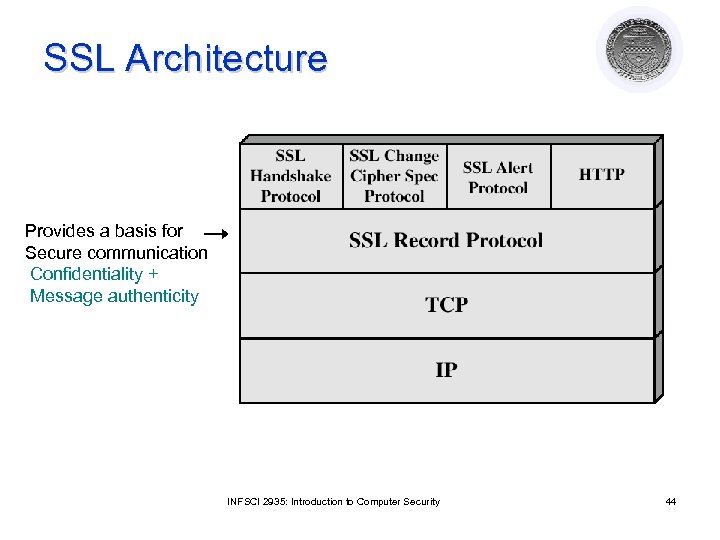
SSL Architecture Provides a basis for Secure communication Confidentiality + Message authenticity INFSCI 2935: Introduction to Computer Security 44
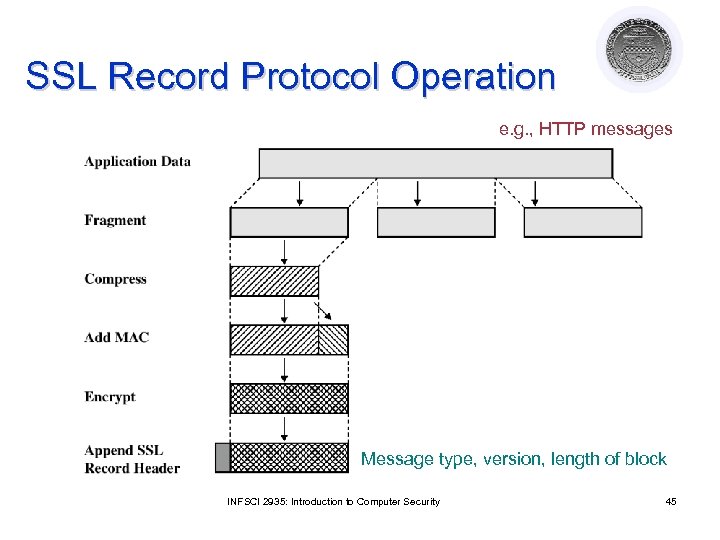
SSL Record Protocol Operation e. g. , HTTP messages Message type, version, length of block INFSCI 2935: Introduction to Computer Security 45
Handshake Protocol l The most complex part of SSL l Allows the server and client to authenticate each other ¡ Based on interchange cryptosystem (e. g. , RSA) l Negotiate encryption, MAC algorithm and cryptographic keys ¡ Four rounds l Used before any application data are transmitted INFSCI 2935: Introduction to Computer Security 46
Other protocols l SSL Change Cipher Spec Protocol ¡ A single byte is exchanged ¡ After new cipher parameters have been negotiated (renegotiated) l SSL Alert Protocol ¡ Signals an unusual condition ¡ Closure alert : sender will not send anymore ¡ Error alert: fatal error results in disconnect INFSCI 2935: Introduction to Computer Security 47
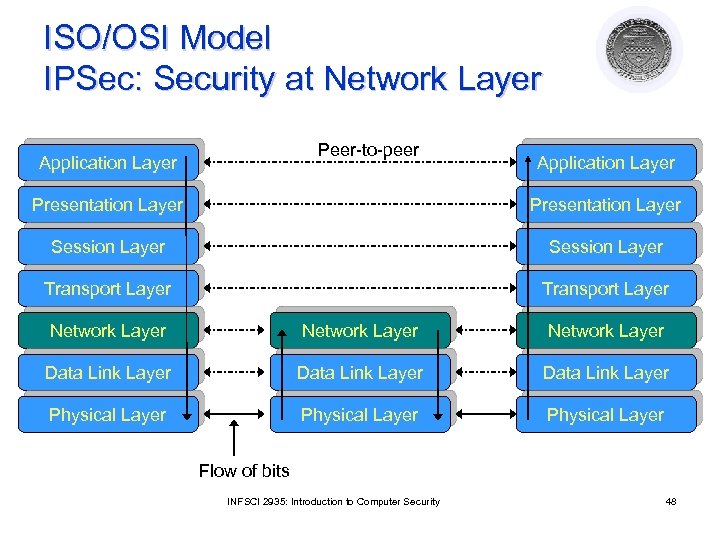
ISO/OSI Model IPSec: Security at Network Layer Peer-to-peer Application Layer Presentation Layer Session Layer Transport Layer Network Layer Data Link Layer Physical Layer Flow of bits INFSCI 2935: Introduction to Computer Security 48
IPSec l Set of protocols/mechanisms ¡ ¡ l Application independent (Transparent to user) ¡ l Encrypts and authenticates all traffic at the IP level l Protects all messages sent along a path l Intermediate host with IPSec mechanism (firewall, gateway) is called a security gateway Use on LANs, WANs, public, and private networks Web browsing, telnet, ftp… Provides at the IP level ¡ ¡ ¡ Access control Connectionless integrity Data origin authentication Rejection of replayed packets Data confidentiality Limited traffic analysis confidentiality INFSCI 2935: Introduction to Computer Security 49
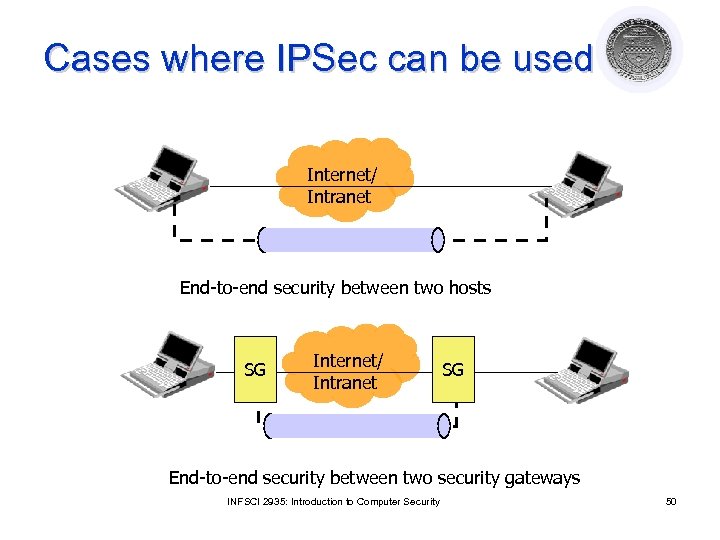
Cases where IPSec can be used Internet/ Intranet End-to-end security between two hosts SG Internet/ Intranet SG End-to-end security between two security gateways INFSCI 2935: Introduction to Computer Security 50
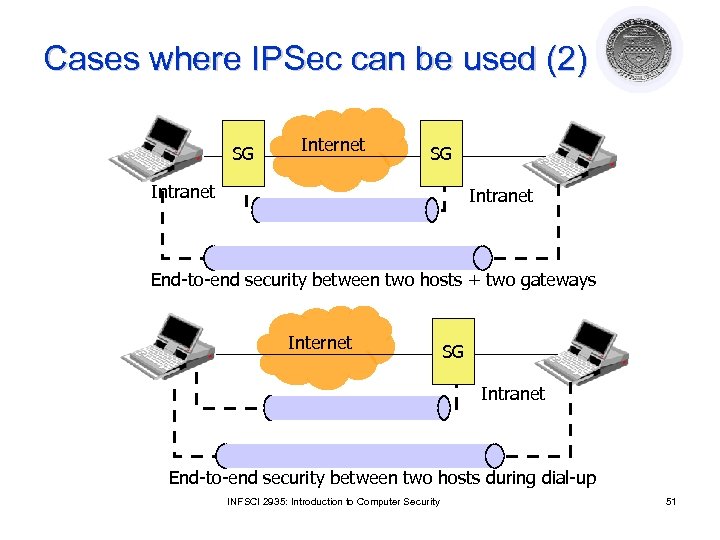
Cases where IPSec can be used (2) SG Internet SG Intranet End-to-end security between two hosts + two gateways Internet SG Intranet End-to-end security between two hosts during dial-up INFSCI 2935: Introduction to Computer Security 51
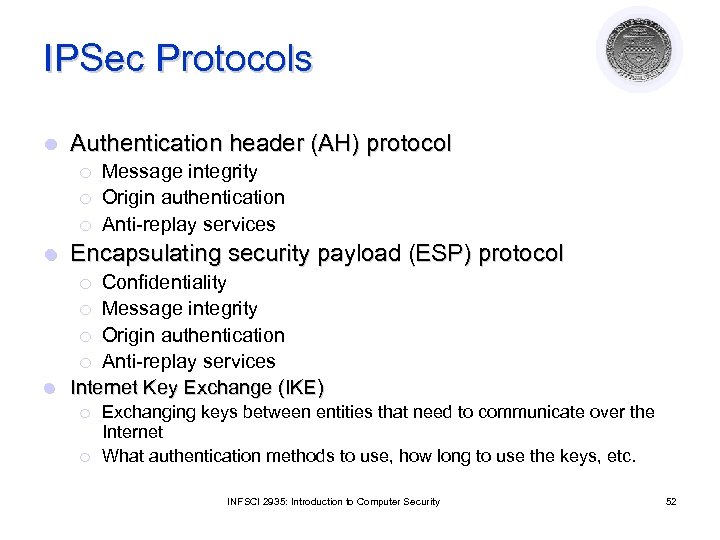
IPSec Protocols l Authentication header (AH) protocol ¡ ¡ ¡ l Message integrity Origin authentication Anti-replay services Encapsulating security payload (ESP) protocol Confidentiality ¡ Message integrity ¡ Origin authentication ¡ Anti-replay services l Internet Key Exchange (IKE) ¡ ¡ ¡ Exchanging keys between entities that need to communicate over the Internet What authentication methods to use, how long to use the keys, etc. INFSCI 2935: Introduction to Computer Security 52
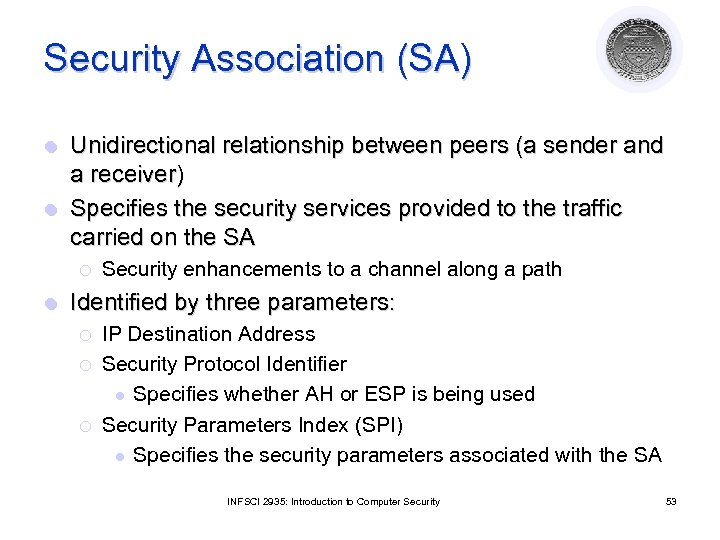
Security Association (SA) Unidirectional relationship between peers (a sender and a receiver) l Specifies the security services provided to the traffic carried on the SA l ¡ l Security enhancements to a channel along a path Identified by three parameters: ¡ ¡ ¡ IP Destination Address Security Protocol Identifier l Specifies whether AH or ESP is being used Security Parameters Index (SPI) l Specifies the security parameters associated with the SA INFSCI 2935: Introduction to Computer Security 53
Security Association (2) l Each SA uses AH or ESP (not both) ¡ If both required two SAs are created l Multiple security associations may be used to provide required security services ¡A sequence of security associations is called SA bundle ¡ Example: We can have an AH protocol followed by ESP or vice versa INFSCI 2935: Introduction to Computer Security 54
Security Association Databases IP needs to know the SAs that exist in order to provide security services l Security Policy Database (SPD) l ¡ ¡ l IPSec uses SPD to handle messages For each IP packet, it decides whether an IPSec service is provided, bypassed, or if the packet is to be discarded Security Association Database (SAD) ¡ ¡ ¡ Keeps track of the sequence number AH information (keys, algorithms, lifetimes) ESP information (keys, algorithms, lifetimes, etc. ) Lifetime of the SA Protocol mode MTU INFSCI 2935: Introduction to Computer Security 55
IPSec Modes l Two modes ¡ Transport mode Encapsulates IP packet data area l IP Header is not protected l • Protection is provided for the upper layers • Usually used in host-to-host communications ¡ Tunnel l mode Encapsulates entire IP packet in an IPSec envelope • Helps against traffic analysis • The original IP packet is untouched in the Internet INFSCI 2935: Introduction to Computer Security 56
Authentication Header (AH) parameters l Next header ¡ l Payload length ¡ l Specifies to the receiver the algorithms, type of keys, and lifetime of the keys used Sequence number ¡ l Indicates the number of 32 -bit words in the authentication header Security Parameters Index ¡ l Identifies what protocol header follows Counter that increases with each IP packet sent from the same host to the same destination and SA Next Header Payload length Security Parameters Index Sequence Number Authentication Data INFSCI 2935: Introduction to Computer Security 57
Preventing replay Using 32 bit sequence numbers helps detect replay of IP packets l The sender initializes a sequence number for every SA l ¡ Each succeeding IP packet within a SA increments the sequence number Receiver implements a window size of W to keep track of authenticated packets l Receiver checks the MAC to see if the packet is authentic l INFSCI 2935: Introduction to Computer Security 58
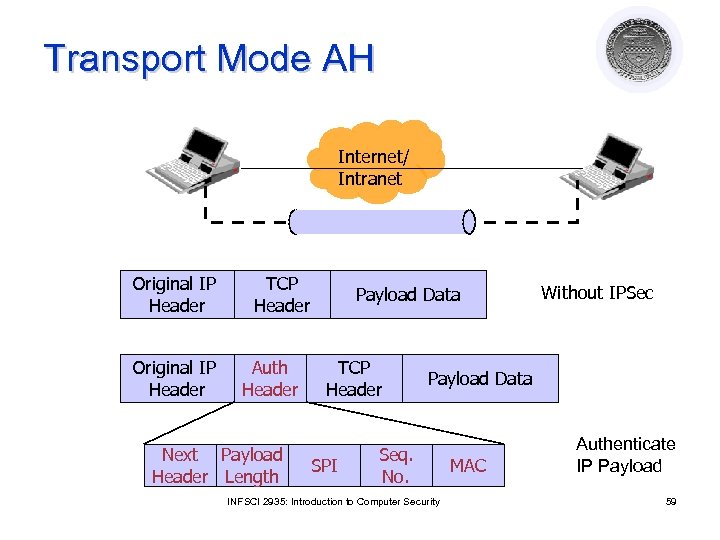
Transport Mode AH Internet/ Intranet Original IP Header TCP Header Auth Header Next Payload Header Length Payload Data TCP Header SPI Without IPSec Payload Data Seq. No. INFSCI 2935: Introduction to Computer Security MAC Authenticate IP Payload 59
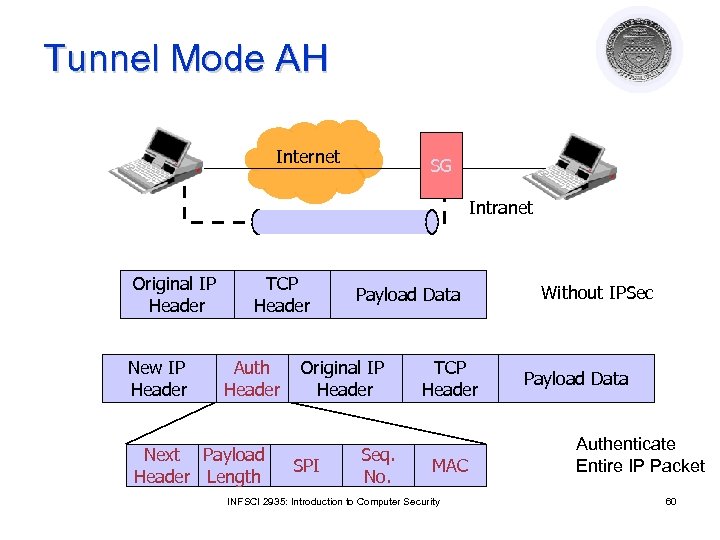
Tunnel Mode AH Internet SG Intranet Original IP Header New IP Header TCP Header Auth Header Next Payload Header Length Payload Data Original IP Header SPI Seq. No. TCP Header MAC INFSCI 2935: Introduction to Computer Security Without IPSec Payload Data Authenticate Entire IP Packet 60
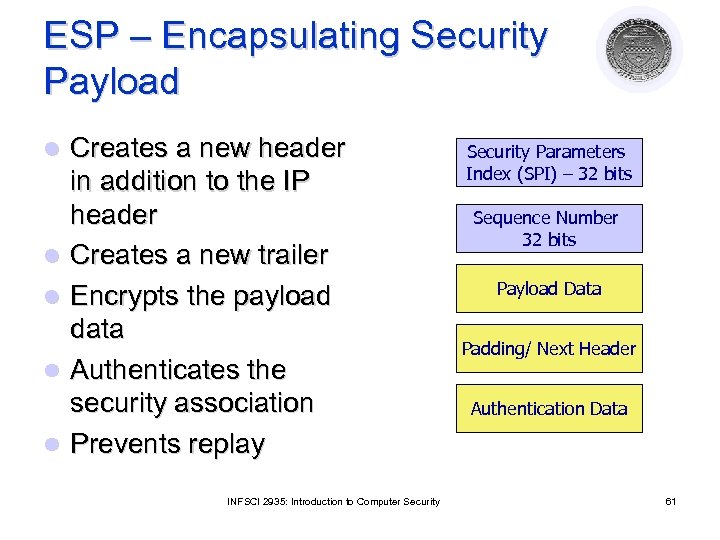
ESP – Encapsulating Security Payload l l l Creates a new header in addition to the IP header Creates a new trailer Encrypts the payload data Authenticates the security association Prevents replay INFSCI 2935: Introduction to Computer Security Parameters Index (SPI) – 32 bits Sequence Number 32 bits Payload Data Padding/ Next Header Authentication Data 61
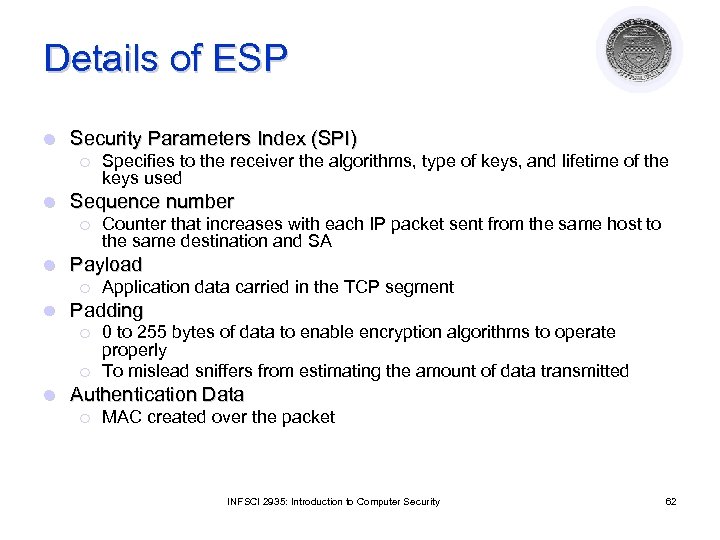
Details of ESP l Security Parameters Index (SPI) ¡ l Sequence number ¡ l Application data carried in the TCP segment Padding ¡ ¡ l Counter that increases with each IP packet sent from the same host to the same destination and SA Payload ¡ l Specifies to the receiver the algorithms, type of keys, and lifetime of the keys used 0 to 255 bytes of data to enable encryption algorithms to operate properly To mislead sniffers from estimating the amount of data transmitted Authentication Data ¡ MAC created over the packet INFSCI 2935: Introduction to Computer Security 62
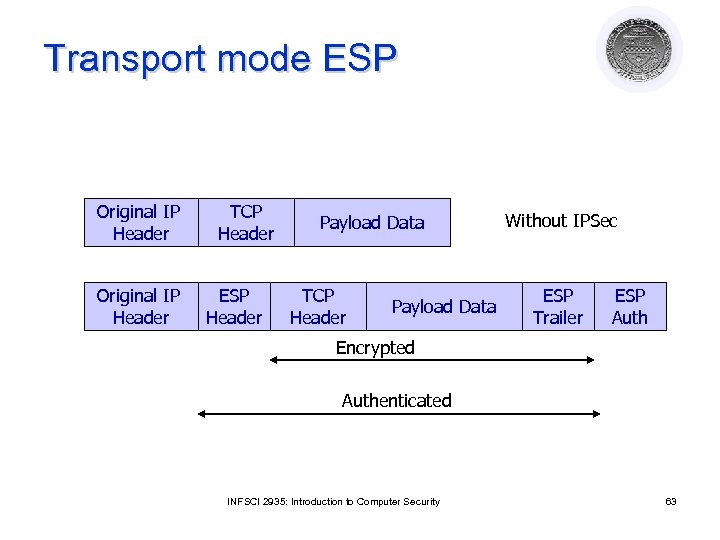
Transport mode ESP Original IP Header TCP Header ESP Header Payload Data TCP Header Payload Data Without IPSec ESP Trailer ESP Auth Encrypted Authenticated INFSCI 2935: Introduction to Computer Security 63
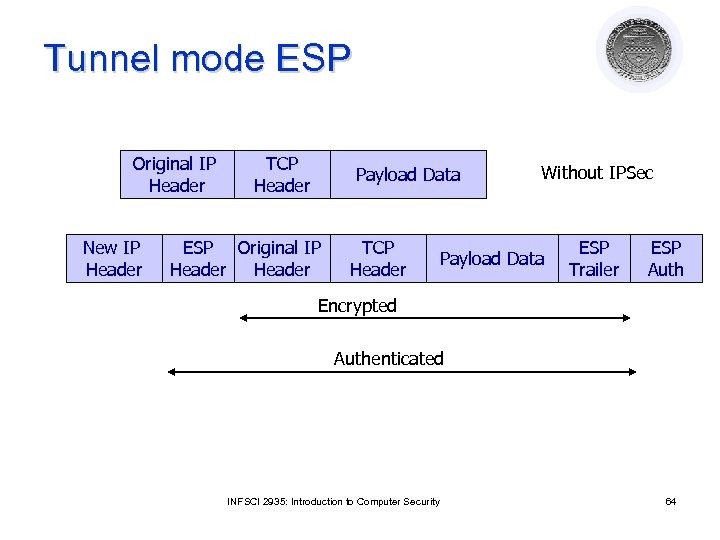
Tunnel mode ESP Original IP Header New IP Header TCP Header Payload Data ESP Original IP Header TCP Header Without IPSec Payload Data ESP Trailer ESP Auth Encrypted Authenticated INFSCI 2935: Introduction to Computer Security 64
Perimeter Defense l Organization system consists of a network of many host machines – ¡ the system is as secure as the weakest link l Use perimeter defense ¡ Define a border and use gatekeeper (firewall) l If host machines are scattered and need to use public network, use encryption ¡ Virtual Private Networks (VPNs) INFSCI 2935: Introduction to Computer Security 65
Perimeter Defense l Is it adequate? ¡ Locating and securing all perimeter points is quite difficult l Less effective for large border ¡ Inspecting/ensuring that remote connections are adequately protected is difficult ¡ Insiders attack is often the most damaging INFSCI 2935: Introduction to Computer Security 66
Firewalls l Total isolation of networked systems is undesirable ¡ l Use firewalls to achieve selective border control Firewall ¡ ¡ Is a configuration of machines and software Limits network access Come “for free” inside many devices: routers, modems, wireless base stations etc. Alternate: a firewall is a host that mediates access to a network, allowing and disallowing certain type of access based on a configured security policy INFSCI 2935: Introduction to Computer Security 67
What Firewalls can’t do l They are not a panacea ¡ Only adds to defense in depth l If not managed properly ¡ Can provide false sense of security l Cannot prevent insider attack l Firewalls act a particular layer (or layers) INFSCI 2935: Introduction to Computer Security 68
Virtual Private Networks What is it? l It is a private network that is configured within a public network l A VPN “appears” to be a private national or international network to a customer l The customer is actually “sharing” trunks and other physical infrastructure with other customers l Security? INFSCI 2935: Introduction to Computer Security 69
What is a VPN? (2) A network that supports a closed community of authorized users l There is traffic isolation l ¡ ¡ Contents are secure Services and resources are secure Use the public Internet as part of the virtual private network l Provide security! l ¡ ¡ ¡ l Confidentiality and integrity of data User authentication Network access control IPSec can be used INFSCI 2935: Introduction to Computer Security 70
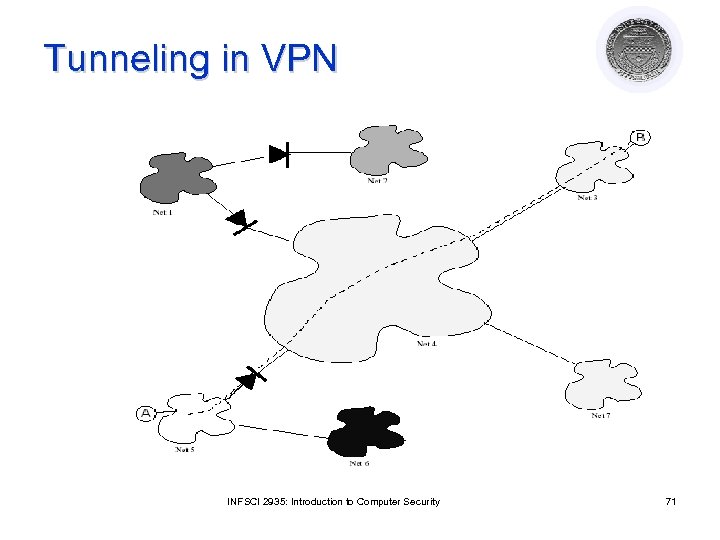
Tunneling in VPN INFSCI 2935: Introduction to Computer Security 71
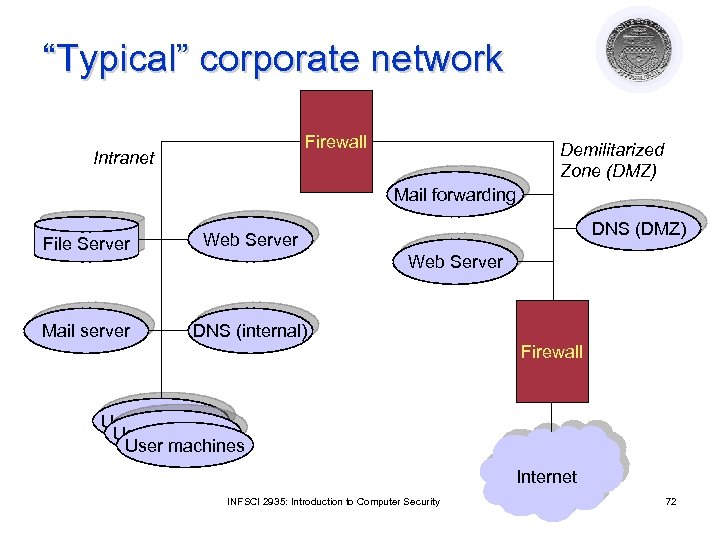
“Typical” corporate network Firewall Intranet Demilitarized Zone (DMZ) Mail forwarding File Server Mail server DNS (DMZ) Web Server DNS (internal) Web Server Firewall User machines Internet INFSCI 2935: Introduction to Computer Security 72
Скачать презентацию Certificates Authentication Network Security Lecture 9 November 18
00ee735527d297656ea338719992fddd.ppt