


 Скачать презентацию CCM 4300 Lecture 6 Computer Networks Operation and
420990f0ac9425206eee690081262e48.ppt
- Количество слайдов: 72
 CCM 4300 Lecture 6 Computer Networks: Operation and Application Dr E. Ever School of Computing Science
 Session Content I ||| Recap of last session ||| introduction to network management - motivation - major components ||| Internet network management framework - MIB: management information base - SMI: data definition language - SNMP: protocol for network management - security and administration
 Session Content II ||| Introduction to Electronic-mail system ||| Simple Mail Transport Protocol (SMTP) - overview - message formats and representation ||| Mail Access protocols - overview of POP 3 and IMAP ||| Domain Name server 3
 Lesson objectives § At the completion of this lesson you should be able to - define and describe what is Network Management - understand the functions and protocols of network management - FCAPS SNMP - understand the Internet-mail system - understand what DNS is - describe different method of finding addresses from the Internet directory server
 What is network management? ||| Network Management as a term has many definitions dependent on whose operational function is in question (i. e. fault management, accounting management, etc) Network management includes the deployment, integration, and coordination of the hardware, software, and human elements to monitor, test, poll, configure, analyse, evaluate and control the network and element resources to meet the real-time, operational performance, and Quality of Service (Qo. S) requirements at a reasonable cost. Computer Networking: A Top-Down Approach Featuring the Internet 2007 5
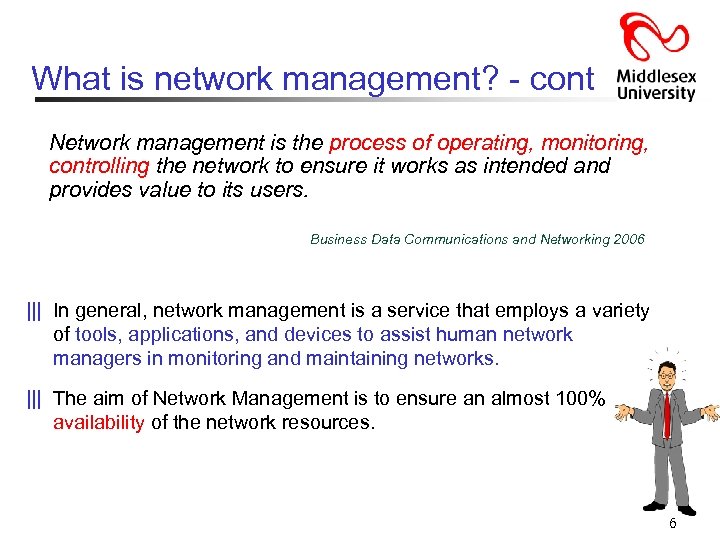 What is network management? - cont Network management is the process of operating, monitoring, controlling the network to ensure it works as intended and provides value to its users. Business Data Communications and Networking 2006 ||| In general, network management is a service that employs a variety of tools, applications, and devices to assist human network managers in monitoring and maintaining networks. ||| The aim of Network Management is to ensure an almost 100% availability of the network resources. 6
 Why is network management important? ||| autonomous systems: 100 s or 1000 s of interacting hardware/software components ||| other complex systems requiring monitoring, control: - jet airplane - nuclear power plant What can network management be used to ensure 100% service? Ø Failure of an interface card Ø Host monitoring Ø Monitoring traffic to aid in resource deployment Ø Monitoring of Service Level Agreements (SLAs) Ø Intrusion Detection 7
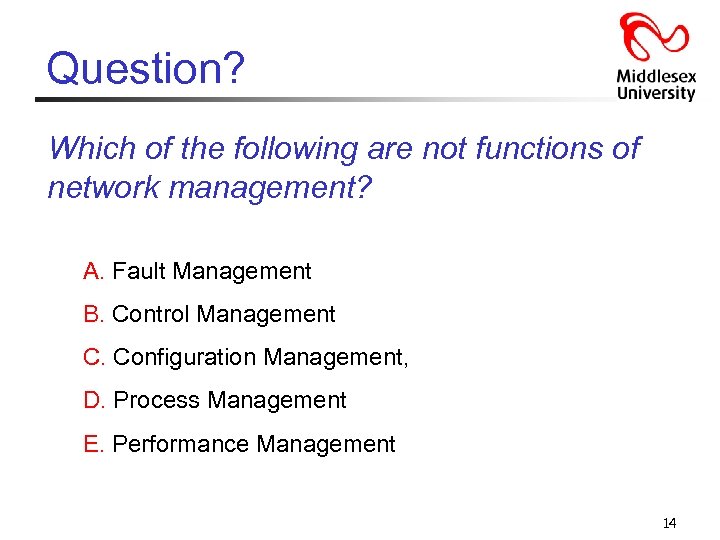
 ISO - FCAPS ||| The International Organization for Standardization (ISO) defined a conceptual model for describing the key functional areas of network management as described in the X. 700: ||| The OSI system management framework provides: - an overall management model - a generic information model - guidelines for the definition of managed objects and - a management protocol for the purpose of exchanging management information between two open system ||| The Management Functions have been classified into Five Management Functional Areas: Fault Management; Configuration Management; Accounting Management; Performance Management; Security Management (FCAPS) 8
 ISO – FCAPS - cont ||| Fault Management: provides facilities that allow network managers to discover faults in managed devices, the network, and network operation, to determine their cause and to take remedial action (i. e. log, detect and respond) To enable this, fault management provides mechanisms to: - report the occurrence of faults - log reports - perform diagnostic tests - correct faults (possibly automatically) ||| Configuration Management: allows a network manager to track which devices are on the managed network and the hardware and software configuration of these devices. 9
 ISO – FCAPS – cont…. . ||| Accounting Management: measures network utilisation of individual users or groups to: - Provide billing information - Regulate users or groups - Help keep network performance at an acceptable level ||| Performance Management: measures various aspects of network performance including the gathering and analysis of statistical data about the system so that it may be maintained at an acceptable level (e. g. throughput). Performance management provides the ability to: - obtain the utilisation and error rates of network devices - provide a consistent level of performance by ensuring that devices have a sufficient capacity. ||| Security Management: controls access to network resources so that information can not be obtained without authorisation [e. g. firewall, intrusion detection system (IDS), etc] 10
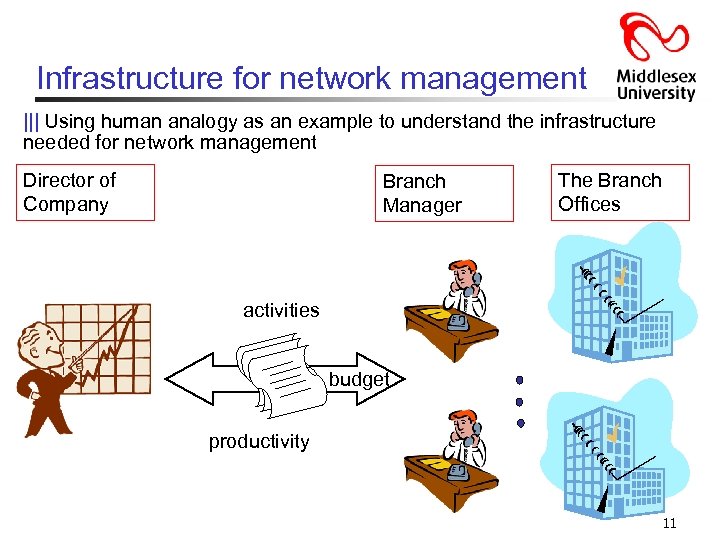 Infrastructure for network management ||| Using human analogy as an example to understand the infrastructure needed for network management Director of Company Branch Manager The Branch Offices activities budget productivity 11
 Infrastructure for network management - cont ||| There are three principle components of a network management architecture: Ø the managing entity (the boss): locus of activity for network management - it controls collection, processing, analysis, and/or display of network management information Ø the managed device (the branch office): piece of network equipment (including software) that resides on a managed network - host, router, printer, etc…. - within managed device, there may be managed objects (e. g. NIC) - managed objects information stored in Management Information Base (MIB) - resident in each managed device is a network management agent (the branch manager) Ø The network management protocol (standard reports and one-on-one dialogues): runs between the managing entity and managed devices 12
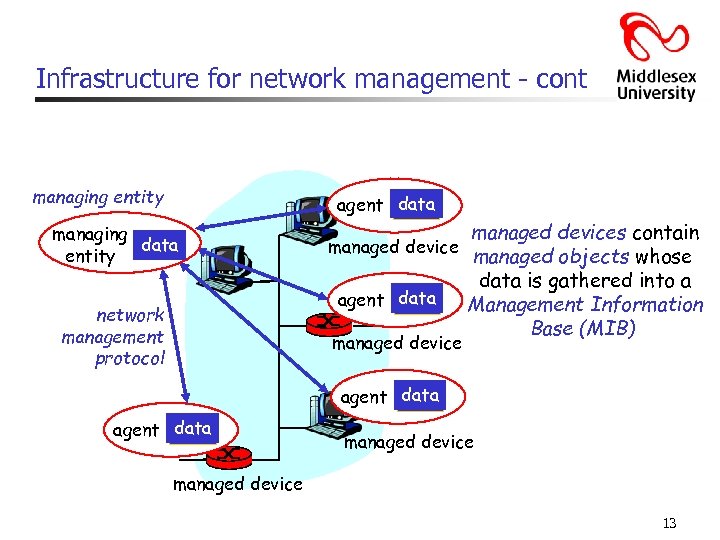 Infrastructure for network management - cont managing entity agent data managing data entity network management protocol managed devices contain managed device managed objects whose data is gathered into a agent data Management Information Base (MIB) managed device agent data managed device 13
 Question? Which of the following are not functions of network management? A. Fault Management B. Control Management C. Configuration Management, D. Process Management E. Performance Management 14
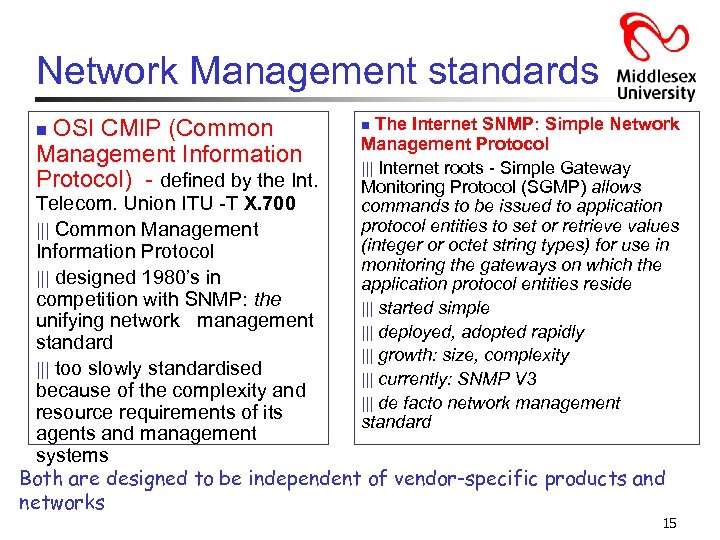 Network Management standards OSI CMIP (Common Management Information Protocol) - defined by the Int. n The Internet SNMP: Simple Network Management Protocol ||| Internet roots - Simple Gateway Monitoring Protocol (SGMP) allows commands to be issued to application protocol entities to set or retrieve values (integer or octet string types) for use in monitoring the gateways on which the application protocol entities reside ||| started simple ||| deployed, adopted rapidly ||| growth: size, complexity ||| currently: SNMP V 3 ||| de facto network management standard n Telecom. Union ITU -T X. 700 ||| Common Management Information Protocol ||| designed 1980’s in competition with SNMP: the unifying network management standard ||| too slowly standardised because of the complexity and resource requirements of its agents and management systems Both are designed to be independent of vendor-specific products and networks 15
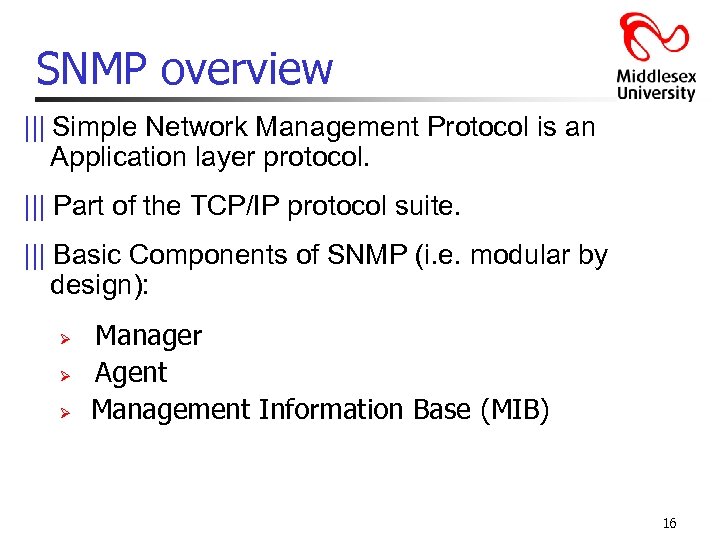 SNMP overview ||| Simple Network Management Protocol is an Application layer protocol. ||| Part of the TCP/IP protocol suite. ||| Basic Components of SNMP (i. e. modular by design): Ø Ø Ø Manager Agent Management Information Base (MIB) 16
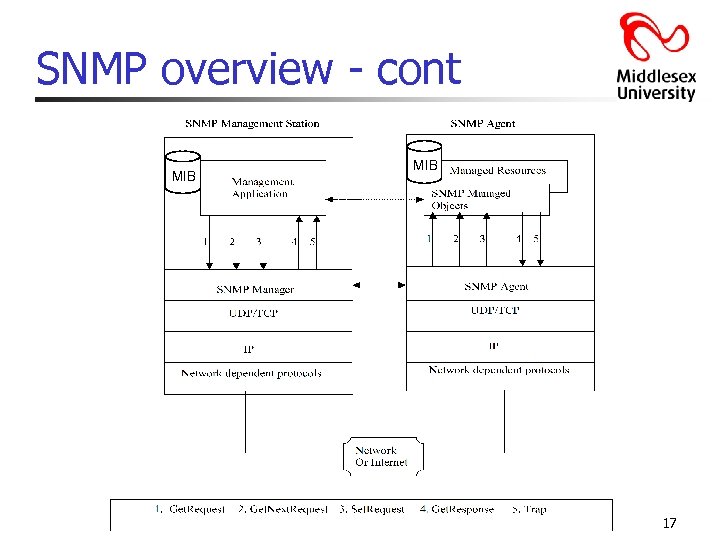 SNMP overview - cont MIB 17
 SNMP overview - cont When describing any framework for network management need to address: ||| What (from a semantic view point) is being monitored? And what form of control can be exercised by the network administrator ||| What is the specific form of the information that will be reported and/or exchanged ||| What is the communication protocol for exchanging this information? 18
 SNMP overview: 4 key parts ||| Management information base (MIB): - distributed information store of network management data (no. of IP datagram discarded, CSMA errors in an NIC, descriptive info. of software version, etc. ) ||| Structure of Management Information (SMI): - data definition language for MIB objects (i. e. data types, rules for writing and revising info, etc) ||| SNMP protocol - convey manager<->managed object info, commands ||| Security, administration capabilities - major addition in SNMPv 3 19
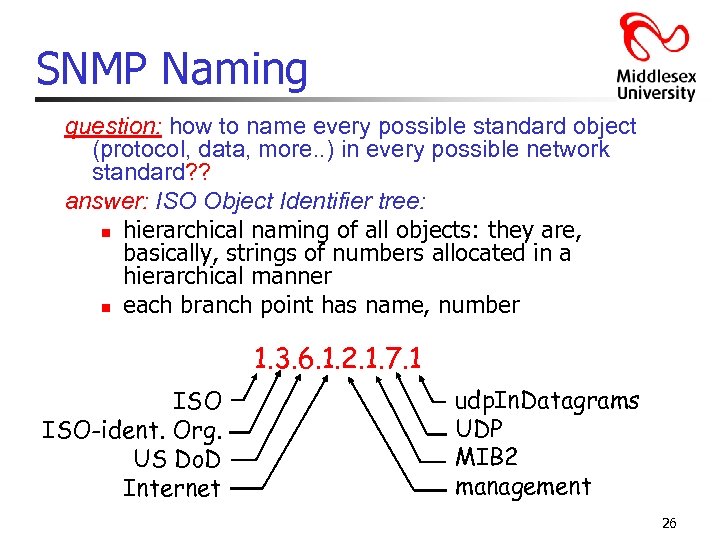
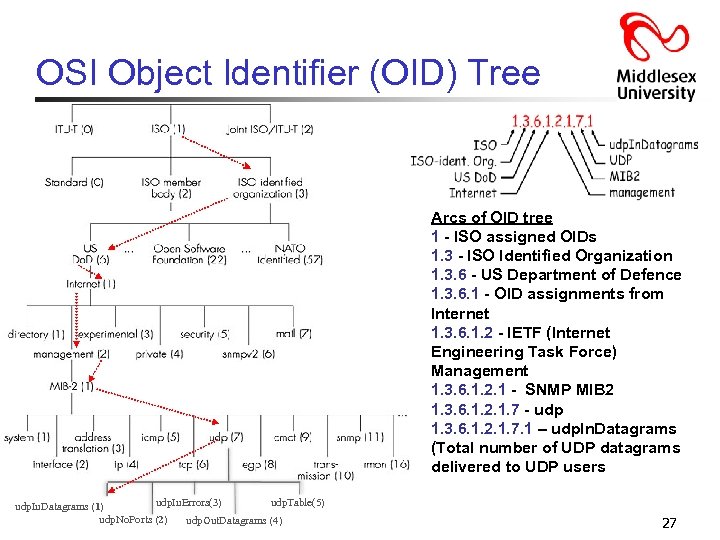
 Management Information Base (MIB) ||| Database containing the information about the elements to be managed. ||| MIBs use the notation defined by ASN. 1(Abstract Syntax Notation One) - A standard and flexible notation that describes data structures for representing, encoding, transmitting, and decoding data [similar to Extensible Markup Language (XML) ] Structure of Management Information Version 2 (SMIv 2)" RFC 2578 ||| Each resource to be managed is referred as an object. ||| Network manager monitors the resource by reading the values of the objects and controls the objects by modifying these values. ||| Associated with each object in the MIB is an identifier called the OBJECT IDENTIFIER. -It is used for naming the object. -It is a unique identifier for a particular object type and its value consists of a sequence of numbers. 20
 Object Identifiers (OIDs) ||| OID is a numeric string that is used to uniquely identify an object: - It is created by self-extending a private enterprise number that an institution has acquired. ||| Typical objects that can be identified using OIDs include attributes in MIBS for network management and encryption algorithms: - Example, as the university defines attributes for local use within directories it will need OID’s to identify these attributes. ||| OIDs are a managed hierarchy starting with ISO and ITU (International Telecommunication Union): - ISO and ITU delegate OID management to organizations by assigning them OID numbers; these organizations can then assign OIDs to objects or further delegate to other organizations. 21
 Object Identifiers (OIDs) - continued ||| OIDs are associated with objects in protocols and data structures defined using ASN. 1: - OIDs that define data structures and protocol elements are generated and processed by client and server software. ||| OIDs are intended to be globally unique: - They are formed by taking a unique numeric string (e. g. 1. 3. 5. 7. 9. 24. 68) and adding additional digits in a unique fashion > e. g. 1. 3. 5. 7. 9. 24. 68. 1, 1. 3. 5. 7. 9. 24. 68. 2, 1. 3. 5. 7. 9. 24. 68. 1. 3, etc. ) ||| An institution will acquire an arc (e. g. 1. 3. 5. 7. 9. 24. 68) and then extend the arc (called subarcs) as indicated above to create additional OID’s and arcs. There is no limit to the length of an OID, and virtually no computational burden to having a long OID 22
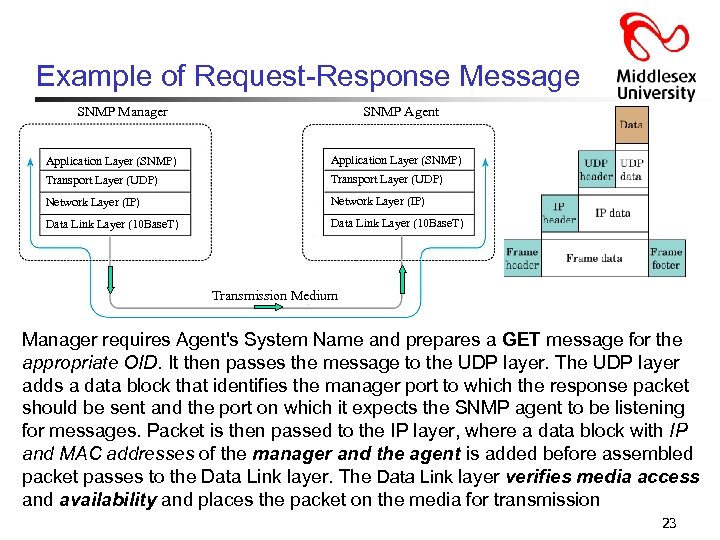 Example of Request-Response Message SNMP Manager SNMP Agent Application Layer (SNMP) Transport Layer (UDP) Network Layer (IP) Data Link Layer (10 Base. T) Transmission Medium Manager requires Agent's System Name and prepares a GET message for the appropriate OID. It then passes the message to the UDP layer. The UDP layer adds a data block that identifies the manager port to which the response packet should be sent and the port on which it expects the SNMP agent to be listening for messages. Packet is then passed to the IP layer, where a data block with IP and MAC addresses of the manager and the agent is added before assembled packet passes to the Data Link layer. The Data Link layer verifies media access and availability and places the packet on the media for transmission 23
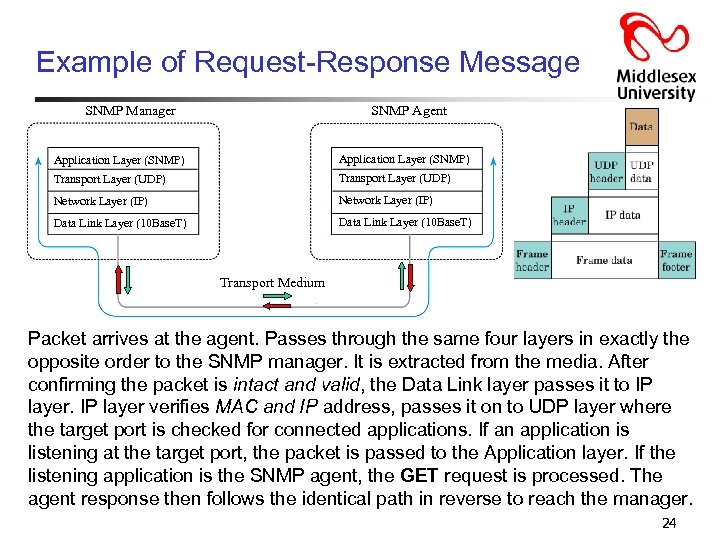 Example of Request-Response Message SNMP Manager SNMP Agent Application Layer (SNMP) Transport Layer (UDP) Network Layer (IP) Data Link Layer (10 Base. T) Transport Medium Packet arrives at the agent. Passes through the same four layers in exactly the opposite order to the SNMP manager. It is extracted from the media. After confirming the packet is intact and valid, the Data Link layer passes it to IP layer verifies MAC and IP address, passes it on to UDP layer where the target port is checked for connected applications. If an application is listening at the target port, the packet is passed to the Application layer. If the listening application is the SNMP agent, the GET request is processed. The agent response then follows the identical path in reverse to reach the manager. 24
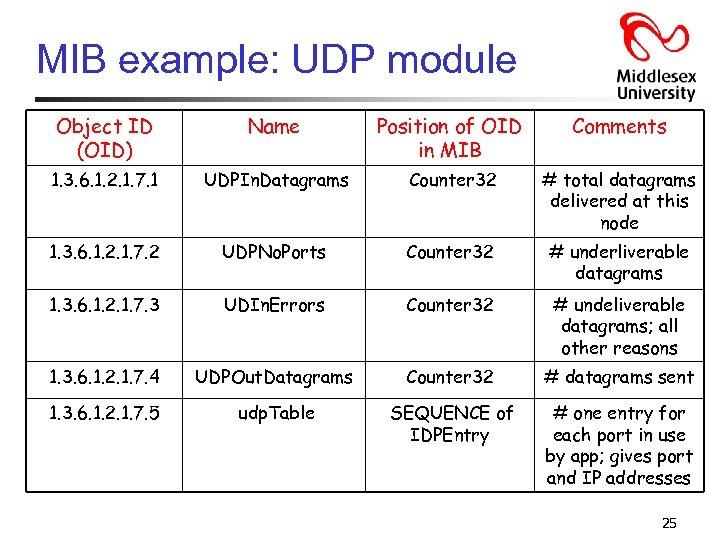 MIB example: UDP module Object ID (OID) Name Position of OID in MIB Comments 1. 3. 6. 1. 2. 1. 7. 1 UDPIn. Datagrams Counter 32 # total datagrams delivered at this node 1. 3. 6. 1. 2. 1. 7. 2 UDPNo. Ports Counter 32 # underliverable datagrams 1. 3. 6. 1. 2. 1. 7. 3 UDIn. Errors Counter 32 # undeliverable datagrams; all other reasons 1. 3. 6. 1. 2. 1. 7. 4 UDPOut. Datagrams Counter 32 # datagrams sent 1. 3. 6. 1. 2. 1. 7. 5 udp. Table SEQUENCE of IDPEntry # one entry for each port in use by app; gives port and IP addresses 25
 SNMP Naming question: how to name every possible standard object (protocol, data, more. . ) in every possible network standard? ? answer: ISO Object Identifier tree: n hierarchical naming of all objects: they are, basically, strings of numbers allocated in a hierarchical manner n each branch point has name, number 1. 3. 6. 1. 2. 1. 7. 1 ISO-ident. Org. US Do. D Internet udp. In. Datagrams UDP MIB 2 management 26
 OSI Object Identifier (OID) Tree Arcs of OID tree 1 - ISO assigned OIDs 1. 3 - ISO Identified Organization 1. 3. 6 - US Department of Defence 1. 3. 6. 1 - OID assignments from Internet 1. 3. 6. 1. 2 - IETF (Internet Engineering Task Force) Management 1. 3. 6. 1. 2. 1 - SNMP MIB 2 1. 3. 6. 1. 2. 1. 7 - udp 1. 3. 6. 1. 2. 1. 7. 1 – udp. In. Datagrams (Total number of UDP datagrams delivered to UDP users udp. In. Errors(3) udp. Table(5) udp. In. Datagrams (1) udp. No. Ports (2) udp. Out. Datagrams (4) 27
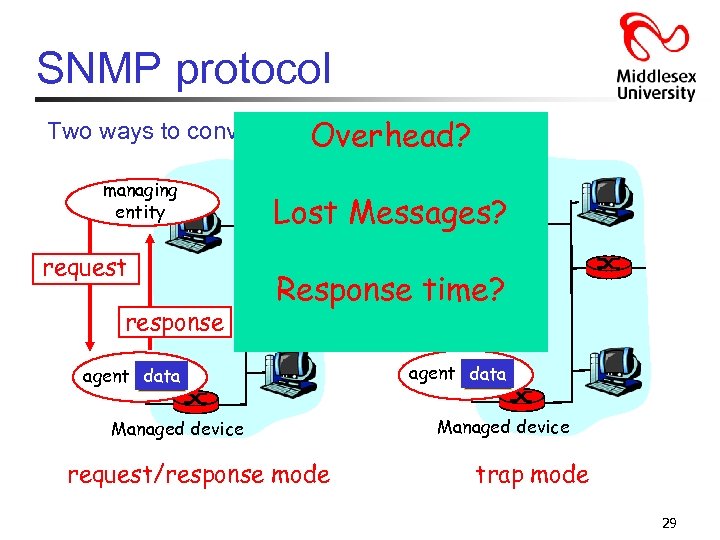
 SNMP protocol Two ways to convey MIB info, commands: • The trap message is sent by the management agent to the managing entity (and requires no response from the managing entity). • A request-response message is sent by the managing entity, with the response coming back from the management. 28
 SNMP protocol Two ways to convey MIBOverhead? info, commands: managing entity request response managing entity Lost Messages? trap msg Response time? agent data Managed device request/response mode agent data Managed device trap mode 29
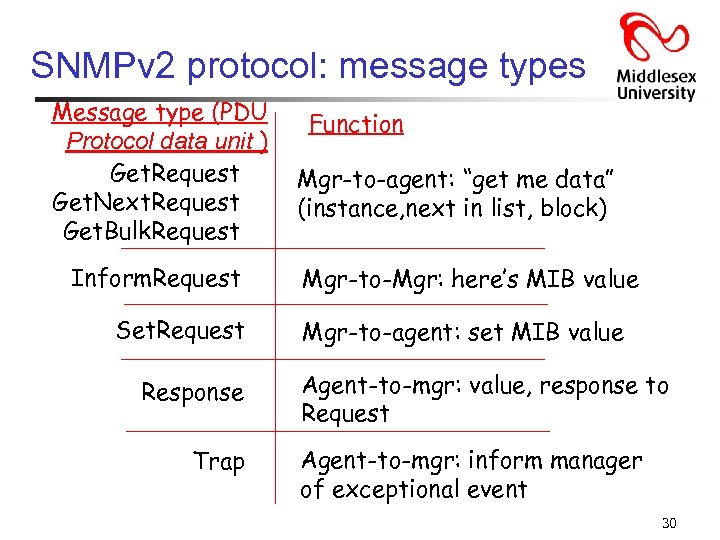 SNMPv 2 protocol: message types Message type (PDU Protocol data unit ) Get. Request Get. Next. Request Get. Bulk. Request Inform. Request Set. Request Response Trap Function Mgr-to-agent: “get me data” (instance, next in list, block) Mgr-to-Mgr: here’s MIB value Mgr-to-agent: set MIB value Agent-to-mgr: value, response to Request Agent-to-mgr: inform manager of exceptional event 30
 SNMP security and administration ||| SNMP v 1 and v 2 implementations employ plaintext passwords, known as “community strings, ” to enable authentication services Ø Use of plaintext is inherently insecure. It allows an eavesdropper to run a sniffer, learn the SNMP community string and “become” an administrator. In turn, the eavesdropper can perform any action permitted by SNMP, including the manipulation of network devices. ||| SNMPv 3 adds security to the protocol -- not as a replacement for earlier versions of SNMP, but as an added feature set. ||| SNMPv 3's security header implements the User Security Model (USM), which provides confidentiality, integrity, authentication and access control for network management communications. 31
 SNMP security and administrationcontinued ||| Confidentiality is provided through the use of Data Encryption Standard (DES) which is quite an advantage over plaintext. ||| Integrity service is provided through the use of the Hashed Message Authentication Code algorithm in conjunction with one of two secure hash functions: Ø MD 5 [a 128 -bit message digest from data input (which may be a message of any length) that is as unique to that specific data as a fingerprint is to the specific individual] or Ø the Secure Hash Algorithm (SHA-1). Hash algorithms compute a fixed-length digital representation (known as a message digest) of an input data sequence (the message) of any length. e. g. , the domain is "flattened" and "chopped" into "words" which are then "mixed" with one another using carefully chosen mathematical functions. Ø Use of the hashes ensures that the SNMP devices know the communication wasn't altered while in transit (either accidentally or maliciously). 32
 SNMP security and administrationcontinued ||| SNMPv 3's User Security Model (USM) also allows for user-based authentication and access control. ||| Administrators can create specific accounts for each SNMP user and grant privileges through those user accounts: Ø For example, you might grant an operator the ability to monitor device status, but reserve modification privileges for network engineers. This has a significant impact on the security of the system by increasing accountability for user actions. It also facilitates the exclusion of a user from the system without requiring the reconfiguration of all SNMP devices 33
 Have a 10 min break 34
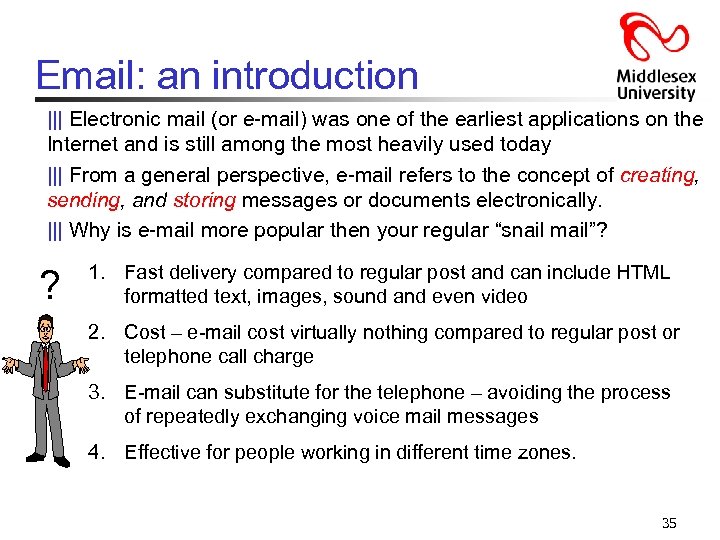 Email: an introduction ||| Electronic mail (or e-mail) was one of the earliest applications on the Internet and is still among the most heavily used today ||| From a general perspective, e-mail refers to the concept of creating, sending, and storing messages or documents electronically. ||| Why is e-mail more popular then your regular “snail mail”? ? 1. Fast delivery compared to regular post and can include HTML formatted text, images, sound and even video 2. Cost – e-mail cost virtually nothing compared to regular post or telephone call charge 3. E-mail can substitute for the telephone – avoiding the process of repeatedly exchanging voice mail messages 4. Effective for people working in different time zones. 35
 Email Introduction - cont ||| Nearly every computer system has a program that servers as an interface for e-mail service called user agents (sometimes referred to as e-mail reader) - compose, read, save, forward, etc ||| In addition, a local system’s e-mail service also supports background process - how incoming and outgoing e-mail messages are stored - how users are presented with incoming e-mail - how often delivery of out going messages is attempted ||| The only activity that is not performed by the local user agent is message delivery across a network, which is defined by a mail application protocol ||| Three commonly used standard for message delivery are SMTP (Simple Mail Transfer Protocol), X. 400 and Common Messaging Calls (CMC) 36
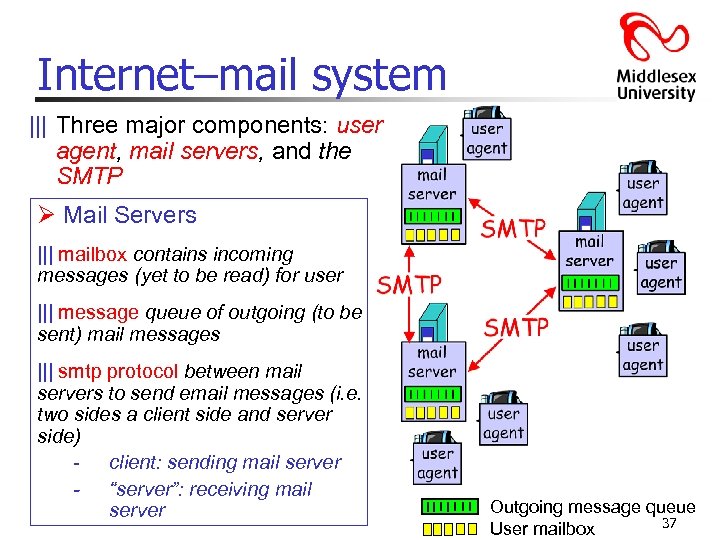 Internet–mail system ||| Three major components: user agent, mail servers, and the SMTP Ø Mail Servers ||| mailbox contains incoming messages (yet to be read) for user ||| message queue of outgoing (to be sent) mail messages ||| smtp protocol between mail servers to send email messages (i. e. two sides a client side and server side) - client: sending mail server - “server”: receiving mail server Outgoing message queue 37 User mailbox
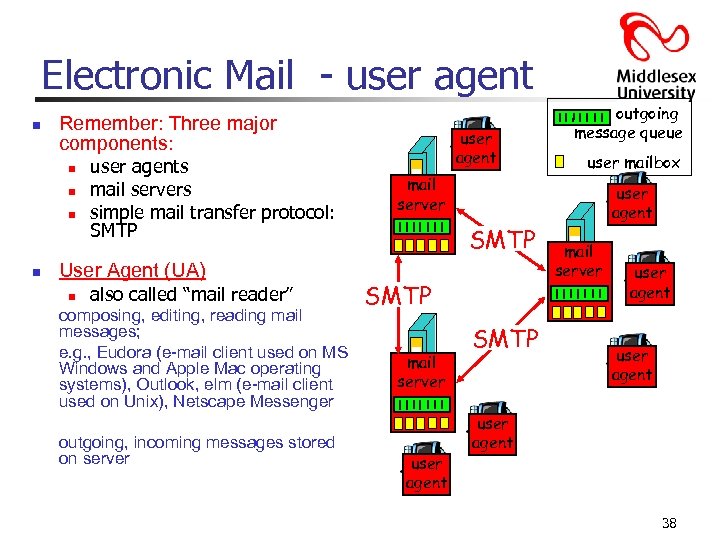 Electronic Mail - user agent n Remember: Three major components: n n user agents mail servers simple mail transfer protocol: SMTP User Agent (UA) n also called “mail reader” composing, editing, reading mail messages; e. g. , Eudora (e-mail client used on MS Windows and Apple Mac operating systems), Outlook, elm (e-mail client used on Unix), Netscape Messenger outgoing, incoming messages stored on server user agent outgoing message queue user mailbox mail server SMTP mail server user agent SMTP user agent mail server user agent 38
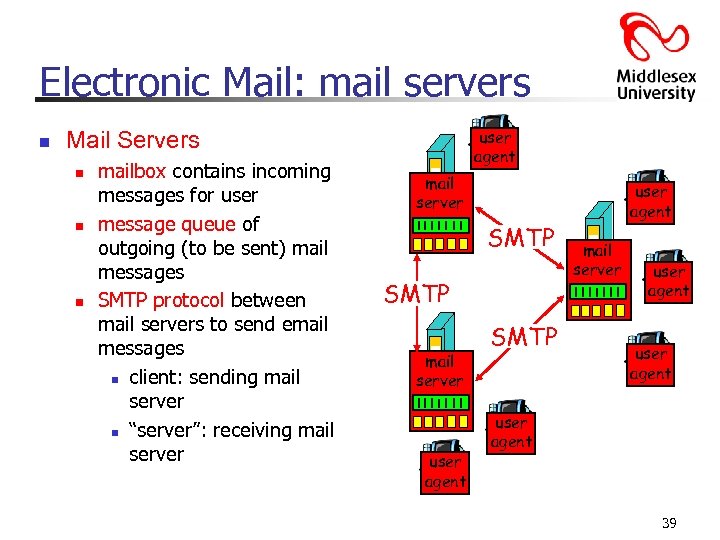 Electronic Mail: mail servers n user agent Mail Servers n n n mailbox contains incoming messages for user message queue of outgoing (to be sent) mail messages SMTP protocol between mail servers to send email messages n client: sending mail server n “server”: receiving mail server SMTP mail server user agent SMTP user agent mail server user agent 39
![Electronic Mail: SMTP [RFC 2821] ||| Uses TCP to reliably transfer e-mail message from](https://present5.com/presentation/420990f0ac9425206eee690081262e48/image-40.jpg "Electronic Mail: SMTP [RFC 2821] ||| Uses TCP to reliably transfer e-mail message from") Electronic Mail: SMTP [RFC 2821] ||| Uses TCP to reliably transfer e-mail message from client to server, port ||| ||| 25 Direct transfer: sending server to receiving server (i. e. does not normally use intermediate mail servers) Three phases of transfer SMTP - handshaking (greeting) - transfer of messages Closure Internet Command/response interaction - commands: ASCII text - response: status code (HTTP response) and phrase (a three-digit number) Messages must be in TEXT, TEXT DOS or 7 -bit ASCII (American Standard Code for Information Interchange) - meaning it uses patterns of seven binary digits (a range of 0 to 127 decimal) to represent each character - 1 extra bit for parity digit or check bit 40
Electronic Mail: SMTP [RFC 2821] ||| Uses TCP to reliably transfer e-mail message from client to server, port ||| ||| 25 Direct transfer: sending server to receiving server (i. e. does not normally use intermediate mail servers) Three phases of transfer SMTP - handshaking (greeting) - transfer of messages Closure Internet Command/response interaction - commands: ASCII text - response: status code (HTTP response) and phrase (a three-digit number) Messages must be in TEXT, TEXT DOS or 7 -bit ASCII (American Standard Code for Information Interchange) - meaning it uses patterns of seven binary digits (a range of 0 to 127 decimal) to represent each character - 1 extra bit for parity digit or check bit 40
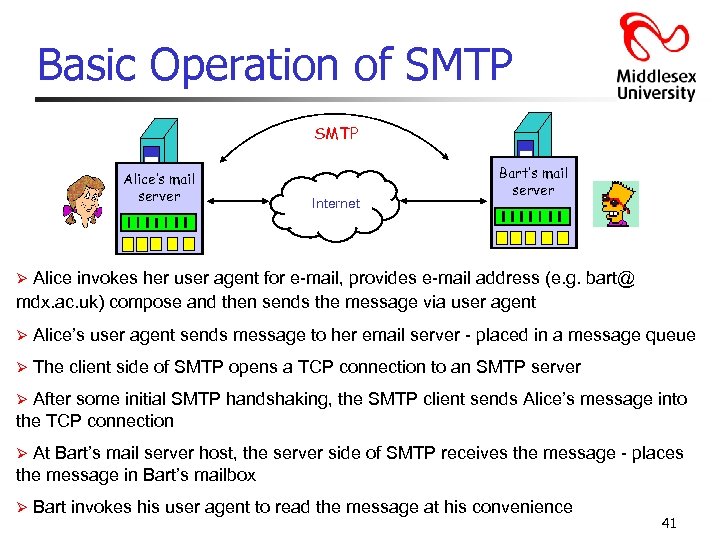 Basic Operation of SMTP mail Alice’s mail server mail Internet Bart’s mail server Alice invokes her user agent for e-mail, provides e-mail address (e. g. bart@ mdx. ac. uk) compose and then sends the message via user agent Ø Ø Alice’s user agent sends message to her email server - placed in a message queue Ø The client side of SMTP opens a TCP connection to an SMTP server After some initial SMTP handshaking, the SMTP client sends Alice’s message into the TCP connection Ø At Bart’s mail server host, the server side of SMTP receives the message - places the message in Bart’s mailbox Ø Ø Bart invokes his user agent to read the message at his convenience 41
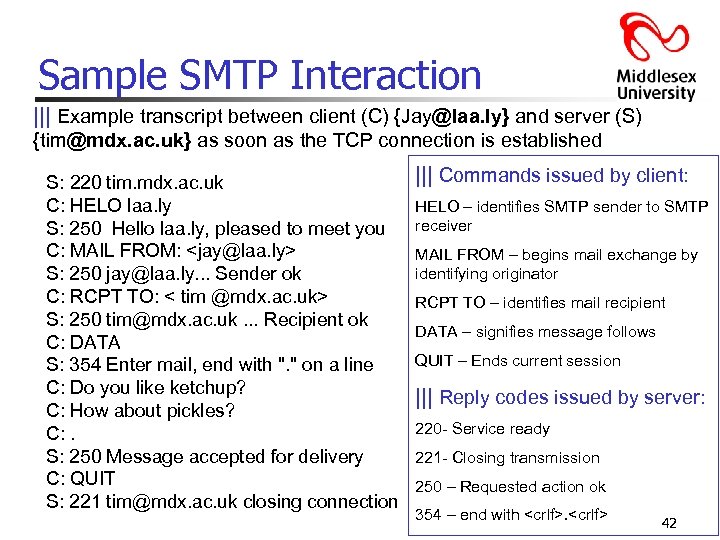 Sample SMTP Interaction ||| Example transcript between client (C) {Jay@laa. ly} and server (S) {tim@mdx. ac. uk} as soon as the TCP connection is established S: 220 tim. mdx. ac. uk C: HELO laa. ly S: 250 Hello laa. ly, pleased to meet you C: MAIL FROM:
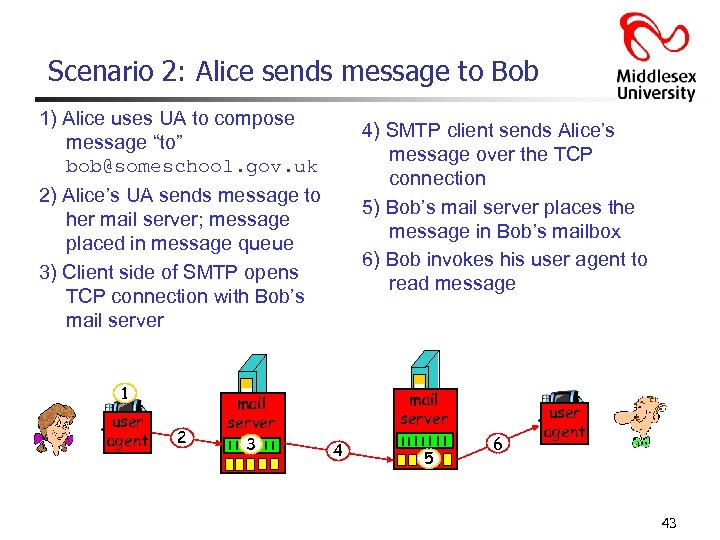 Scenario 2: Alice sends message to Bob 1) Alice uses UA to compose message “to” bob@someschool. gov. uk 4) SMTP client sends Alice’s message over the TCP connection 5) Bob’s mail server places the message in Bob’s mailbox 6) Bob invokes his user agent to read message 2) Alice’s UA sends message to her mail server; message placed in message queue 3) Client side of SMTP opens TCP connection with Bob’s mail server 1 user agent 2 mail server 3 mail server 4 5 6 user agent 43
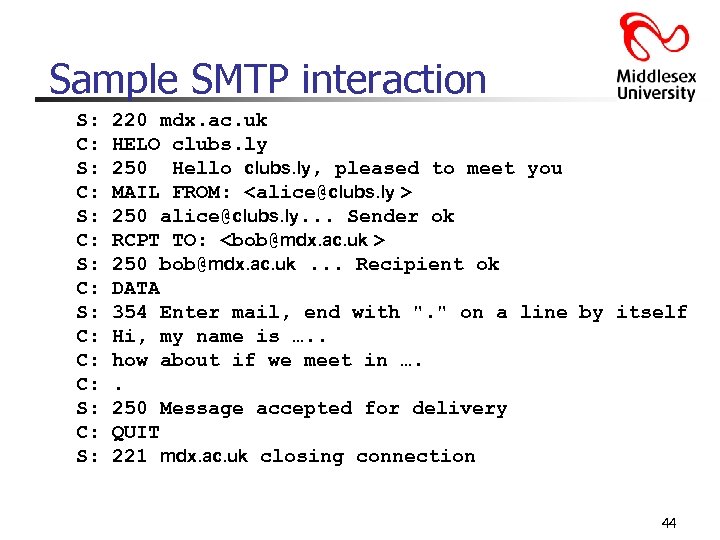 Sample SMTP interaction S: C: S: C: C: C: S: 220 mdx. ac. uk HELO clubs. ly 250 Hello clubs. ly, pleased to meet you MAIL FROM:
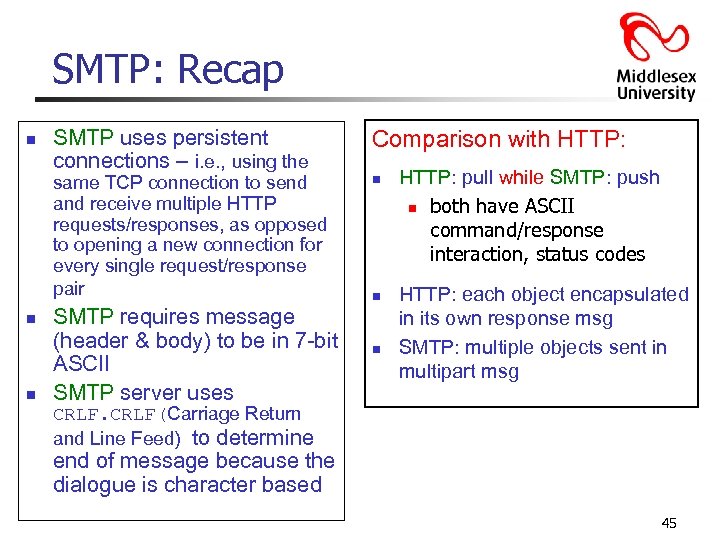 SMTP: Recap n SMTP uses persistent connections – i. e. , using the same TCP connection to send and receive multiple HTTP requests/responses, as opposed to opening a new connection for every single request/response pair n n SMTP requires message (header & body) to be in 7 -bit ASCII SMTP server uses Comparison with HTTP: n n n HTTP: pull while SMTP: push n both have ASCII command/response interaction, status codes HTTP: each object encapsulated in its own response msg SMTP: multiple objects sent in multipart msg CRLF(Carriage Return and Line Feed) to determine end of message because the dialogue is character based 45
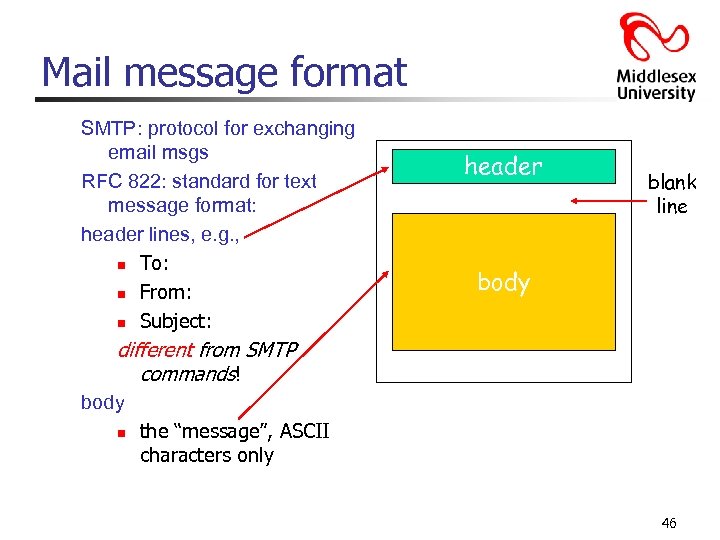 Mail message format SMTP: protocol for exchanging email msgs RFC 822: standard for text message format: header lines, e. g. , n To: n From: n Subject: header blank line body different from SMTP commands! body n the “message”, ASCII characters only 46
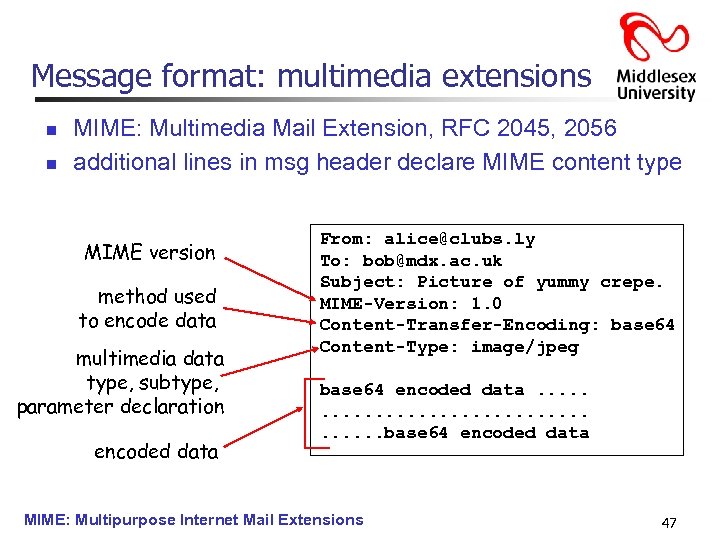 Message format: multimedia extensions n n MIME: Multimedia Mail Extension, RFC 2045, 2056 additional lines in msg header declare MIME content type MIME version method used to encode data multimedia data type, subtype, parameter declaration encoded data From: alice@clubs. ly To: bob@mdx. ac. uk Subject: Picture of yummy crepe. MIME-Version: 1. 0 Content-Transfer-Encoding: base 64 Content-Type: image/jpeg base 64 encoded data. . . . . base 64 encoded data MIME: Multipurpose Internet Mail Extensions 47
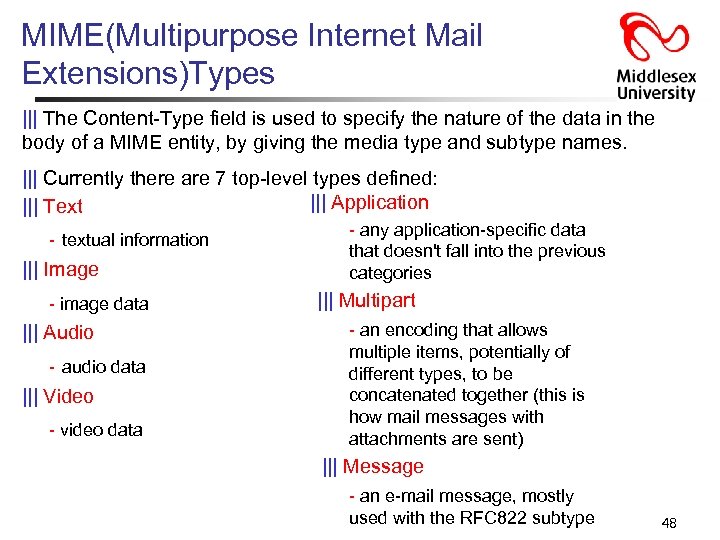 MIME(Multipurpose Internet Mail Extensions)Types ||| The Content-Type field is used to specify the nature of the data in the body of a MIME entity, by giving the media type and subtype names. ||| Currently there are 7 top-level types defined: ||| Application ||| Text - textual information ||| Image - image data ||| Audio - audio data ||| Video - video data - any application-specific data that doesn't fall into the previous categories ||| Multipart - an encoding that allows multiple items, potentially of different types, to be concatenated together (this is how mail messages with attachments are sent) ||| Message - an e-mail message, mostly used with the RFC 822 subtype 48
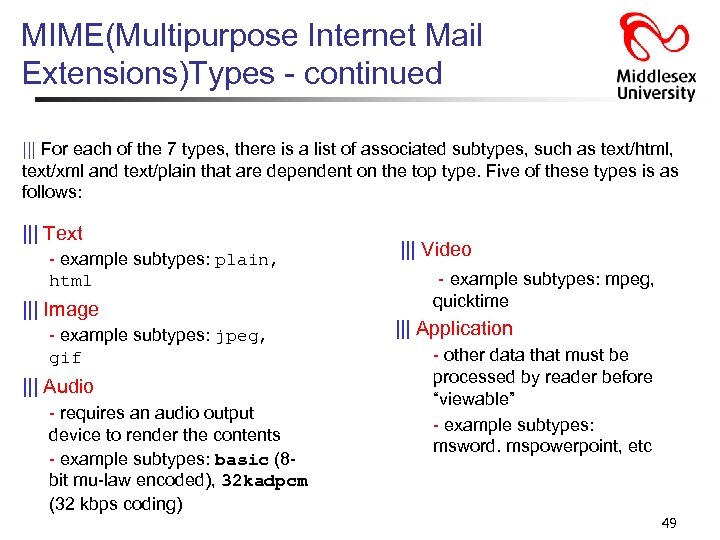 MIME(Multipurpose Internet Mail Extensions)Types - continued ||| For each of the 7 types, there is a list of associated subtypes, such as text/html, text/xml and text/plain that are dependent on the top type. Five of these types is as follows: ||| Text - example subtypes: plain, html ||| Image - example subtypes: jpeg, gif ||| Audio - requires an audio output device to render the contents - example subtypes: basic (8 bit mu-law encoded), 32 kadpcm (32 kbps coding) ||| Video - example subtypes: mpeg, quicktime ||| Application - other data that must be processed by reader before “viewable” - example subtypes: msword. mspowerpoint, etc 49
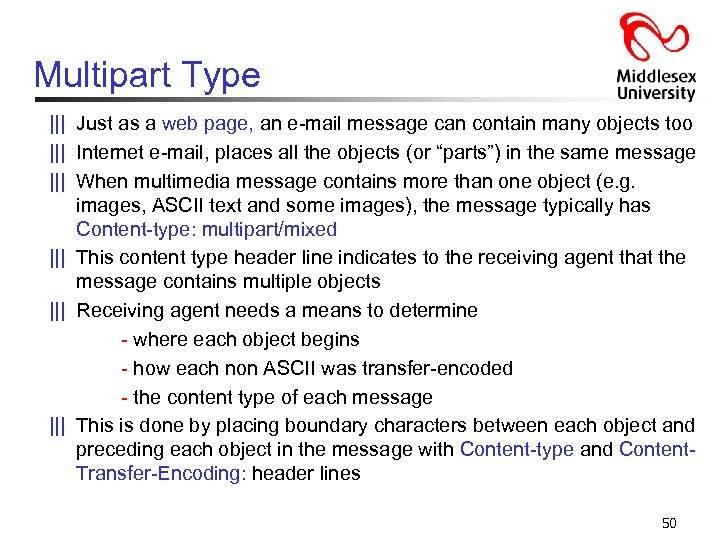 Multipart Type ||| Just as a web page, an e-mail message can contain many objects too ||| Internet e-mail, places all the objects (or “parts”) in the same message ||| When multimedia message contains more than one object (e. g. images, ASCII text and some images), the message typically has Content-type: multipart/mixed ||| This content type header line indicates to the receiving agent that the message contains multiple objects ||| Receiving agent needs a means to determine - where each object begins - how each non ASCII was transfer-encoded - the content type of each message ||| This is done by placing boundary characters between each object and preceding each object in the message with Content-type and Content. Transfer-Encoding: header lines 50
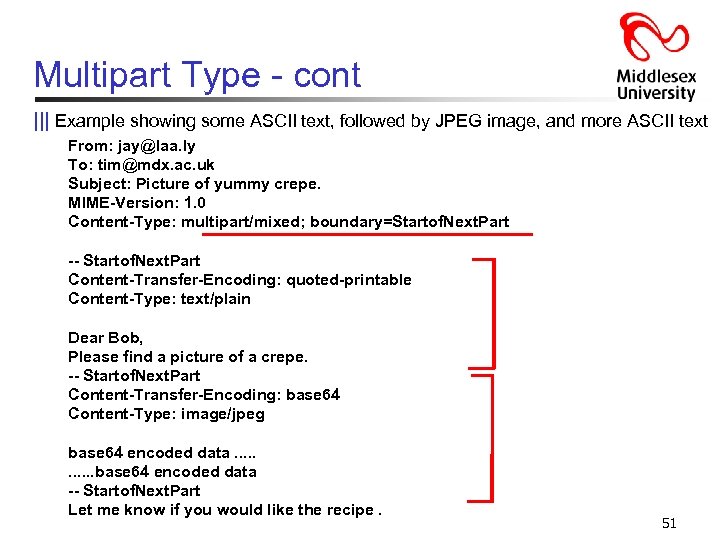 Multipart Type - cont ||| Example showing some ASCII text, followed by JPEG image, and more ASCII text From: jay@laa. ly To: tim@mdx. ac. uk Subject: Picture of yummy crepe. MIME-Version: 1. 0 Content-Type: multipart/mixed; boundary=Startof. Next. Part -- Startof. Next. Part Content-Transfer-Encoding: quoted-printable Content-Type: text/plain Dear Bob, Please find a picture of a crepe. -- Startof. Next. Part Content-Transfer-Encoding: base 64 Content-Type: image/jpeg base 64 encoded data. . . base 64 encoded data -- Startof. Next. Part Let me know if you would like the recipe. 51
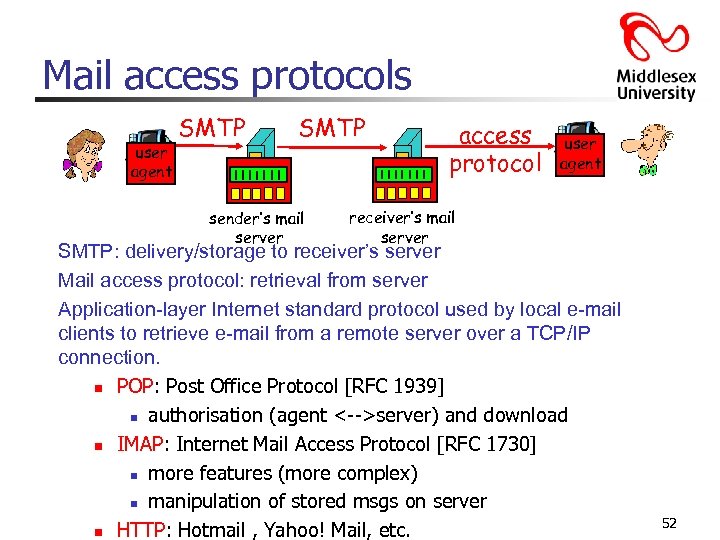 Mail access protocols user agent SMTP sender’s mail server access protocol user agent receiver’s mail server SMTP: delivery/storage to receiver’s server Mail access protocol: retrieval from server Application-layer Internet standard protocol used by local e-mail clients to retrieve e-mail from a remote server over a TCP/IP connection. n POP: Post Office Protocol [RFC 1939] n authorisation (agent <-->server) and download n IMAP: Internet Mail Access Protocol [RFC 1730] n more features (more complex) n manipulation of stored msgs on server n HTTP: Hotmail , Yahoo! Mail, etc. 52
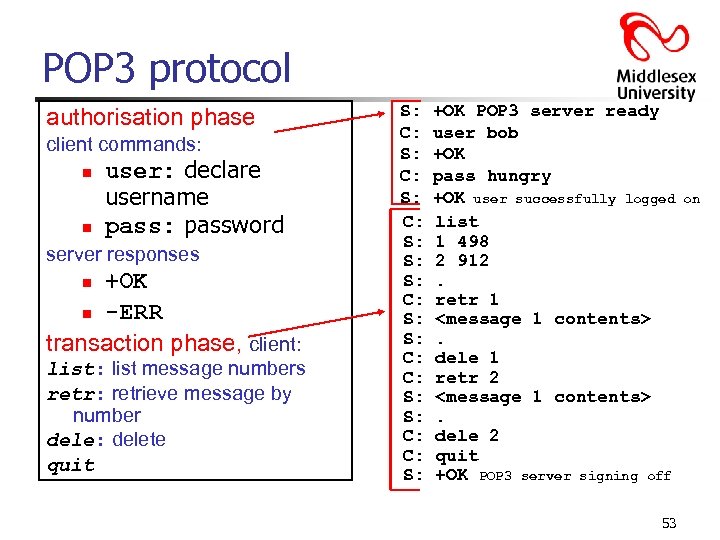 POP 3 protocol authorisation phase client commands: n n user: declare username pass: password server responses +OK n -ERR transaction phase, client: n list: list message numbers retr: retrieve message by number dele: delete quit S: C: S: S: C: C: S: +OK POP 3 server ready user bob +OK pass hungry +OK user successfully logged list 1 498 2 912. retr 1
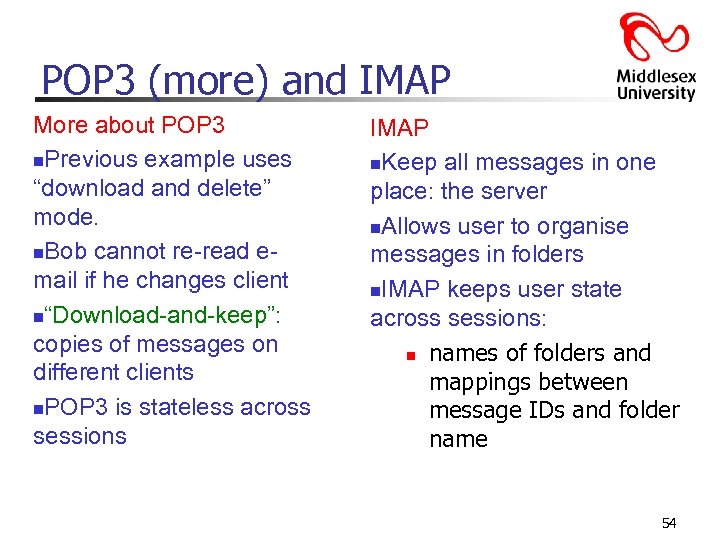 POP 3 (more) and IMAP More about POP 3 n. Previous example uses “download and delete” mode. n. Bob cannot re-read email if he changes client n“Download-and-keep”: copies of messages on different clients n. POP 3 is stateless across sessions IMAP n. Keep all messages in one place: the server n. Allows user to organise messages in folders n. IMAP keeps user state across sessions: n names of folders and mappings between message IDs and folder name 54
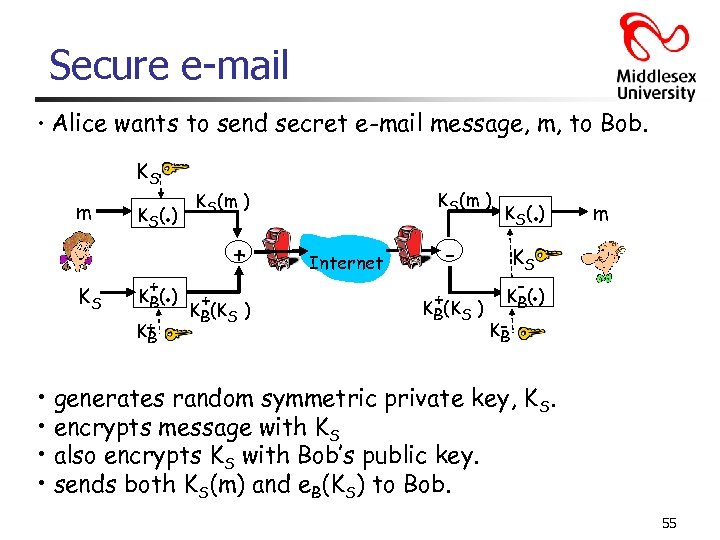 Secure e-mail • Alice wants to send secret e-mail message, m, to Bob. KS m KS . K S( ) . + K B( ) K+ B KS(m ) + + KB(KS ) Internet + KB(KS ) . K S( ) m KS K- ( ) KB B . • generates random symmetric private key, KS. • encrypts message with KS • also encrypts KS with Bob’s public key. • sends both KS(m) and e. B(KS) to Bob. 55
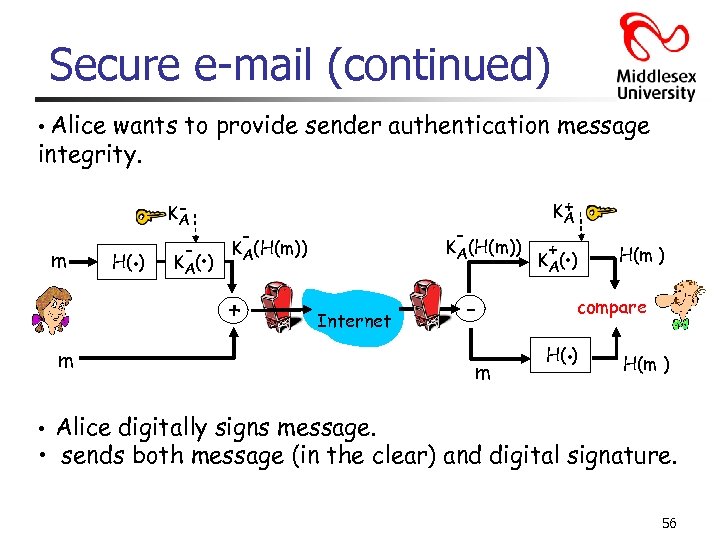 Secure e-mail (continued) • Alice wants to provide sender authentication message integrity. m H(. ) KA - . K A( ) - - KA(H(m)) + + KA Internet m m + . K A( ) H(m ) compare . H( ) H(m ) • Alice digitally signs message. • sends both message (in the clear) and digital signature. 56
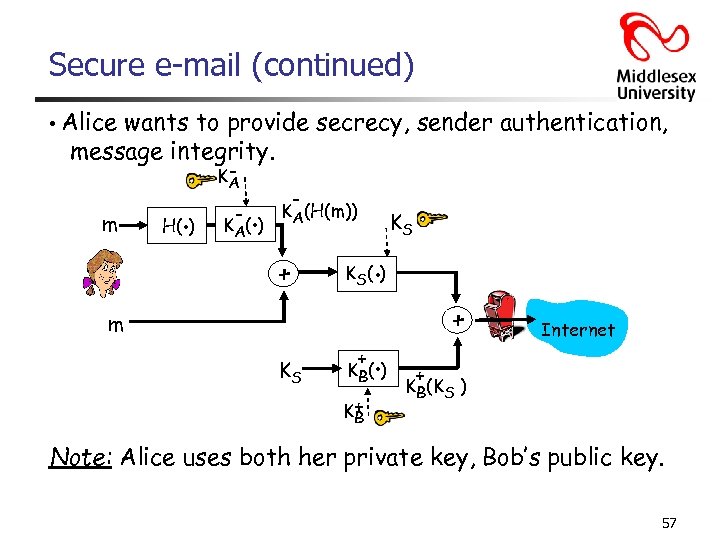 Secure e-mail (continued) • Alice wants to provide secrecy, sender authentication, message integrity. m . H( ) KA - . K A( ) - KA(H(m)) + . K S( ) m KS KS + . K B( ) K+ B + Internet + KB(KS ) Note: Alice uses both her private key, Bob’s public key. 57
 Have a 5 min break 58
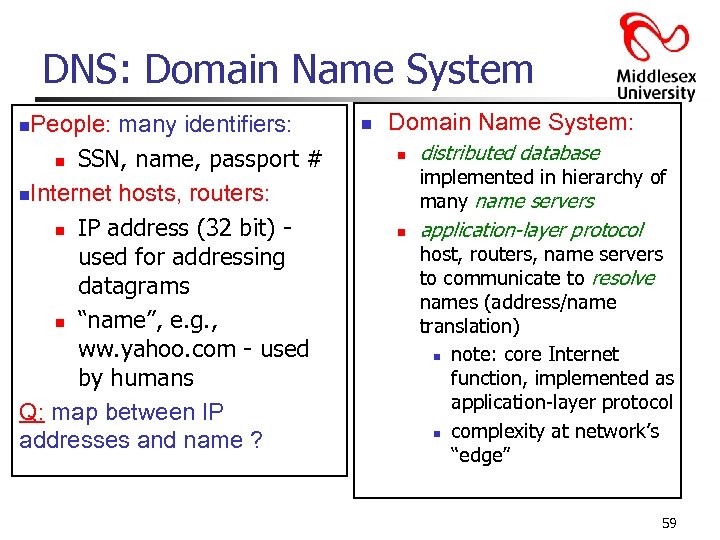 DNS: Domain Name System People: many identifiers: n SSN, name, passport # n. Internet hosts, routers: n IP address (32 bit) used for addressing datagrams n “name”, e. g. , ww. yahoo. com - used by humans Q: map between IP addresses and name ? n n Domain Name System: n distributed database implemented in hierarchy of many name servers n application-layer protocol host, routers, name servers to communicate to resolve names (address/name translation) n note: core Internet function, implemented as application-layer protocol n complexity at network’s “edge” 59
 DNS services n. Hostname to IP address translation n. Host aliasing n Canonical and alias names n. Mail server aliasing n. Load distribution n Replicated Web servers: set of IP addresses for one canonical name Why not centralise DNS? nsingle point of failure ntraffic volume ndistant centralised database nmaintenance n doesn’t scale! 60
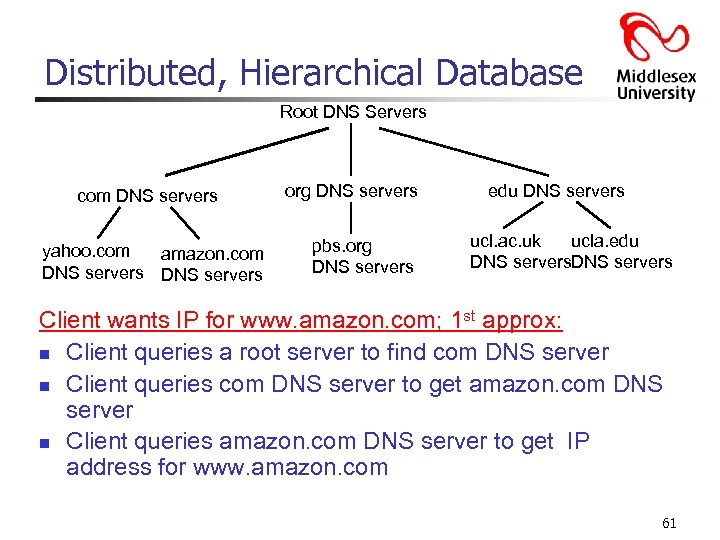 Distributed, Hierarchical Database Root DNS Servers com DNS servers yahoo. com amazon. com DNS servers org DNS servers pbs. org DNS servers edu DNS servers ucl. ac. uk ucla. edu DNS servers Client wants IP for www. amazon. com; 1 st approx: n Client queries a root server to find com DNS server n Client queries com DNS server to get amazon. com DNS server n Client queries amazon. com DNS server to get IP address for www. amazon. com 61
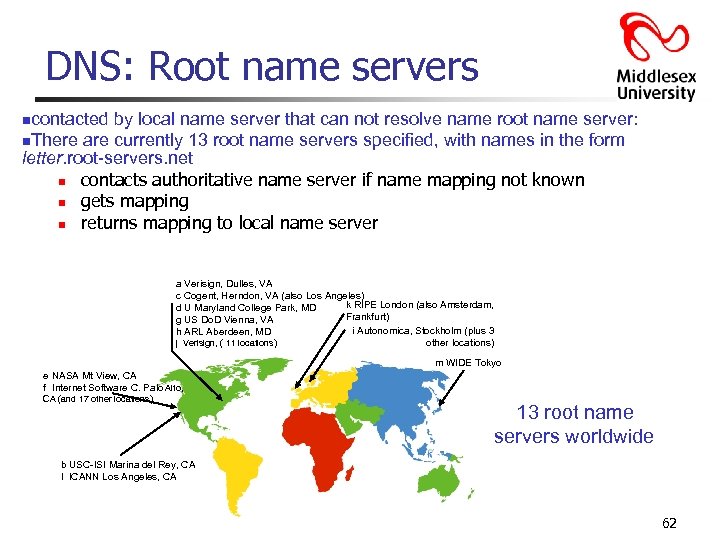 DNS: Root name servers ncontacted by local name server that can not resolve name root name server: n. There are currently 13 root name servers specified, with names in the form letter. root-servers. net n contacts authoritative name server if name mapping not known n gets mapping n returns mapping to local name server a Verisign, Dulles, VA c Cogent, Herndon, VA (also Los Angeles) k RIPE London (also Amsterdam, d U Maryland College Park, MD Frankfurt) g US Do. D Vienna, VA i Autonomica, Stockholm (plus 3 h ARL Aberdeen, MD other locations) j Verisign, ( 11 locations) m WIDE Tokyo e NASA Mt View, CA f Internet Software C. Palo Alto, CA (and 17 other locations) 13 root name servers worldwide b USC-ISI Marina del Rey, CA l ICANN Los Angeles, CA 62
 TLD and Authoritative Servers n n Top-level domain (TLD) servers: responsible for com, org, net, edu, gov, int, etc, and all top-level country domains uk, fr, ca, jp, ly. n Network solutions maintains servers for com TLD n Educause for edu TLD Authoritative DNS servers: organisation’s DNS servers, providing authoritative hostname to IP mappings for organisation’s servers (e. g. , Web and mail). n Can be maintained by organisation or service provider 63
 Local Name Server n n n Does not strictly belong to hierarchy Each ISP (residential ISP, company, university) has one. n Also called “default name server” When a host makes a DNS query, query is sent to its local DNS server n Acts as a proxy, forwards query into hierarchy. 64
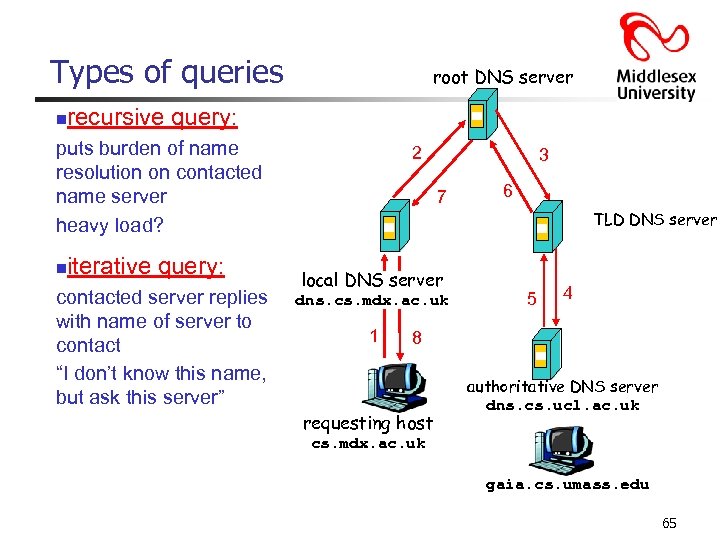 Types of queries n root DNS server recursive query: puts burden of name resolution on contacted name server heavy load? n iterative query: contacted server replies with name of server to contact “I don’t know this name, but ask this server” 2 3 7 6 TLD DNS server local DNS server dns. cs. mdx. ac. uk 1 5 4 8 requesting host authoritative DNS server dns. cs. ucl. ac. uk cs. mdx. ac. uk gaia. cs. umass. edu 65
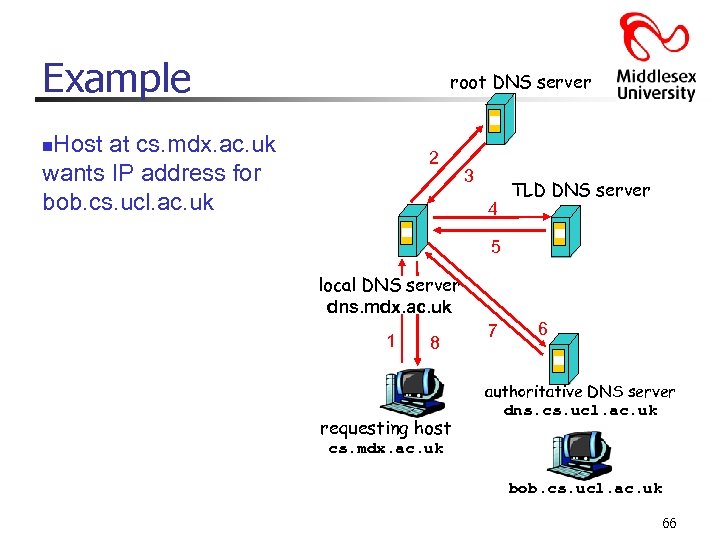 Example root DNS server Host at cs. mdx. ac. uk wants IP address for bob. cs. ucl. ac. uk n 2 3 4 TLD DNS server 5 local DNS server dns. mdx. ac. uk 1 8 requesting host 7 6 authoritative DNS server dns. cs. ucl. ac. uk cs. mdx. ac. uk bob. cs. ucl. ac. uk 66
 DNS: caching and updating records n once (any) name server learns mapping, it caches mapping n n cache entries timeout (disappear) after some time TLD servers typically cached in local name servers Thus root name servers not often visited nupdate/notify mechanisms under design by IETF n RFC 2136 n n http: //www. ietf. org/html. charters/dnsind-charter. html 67
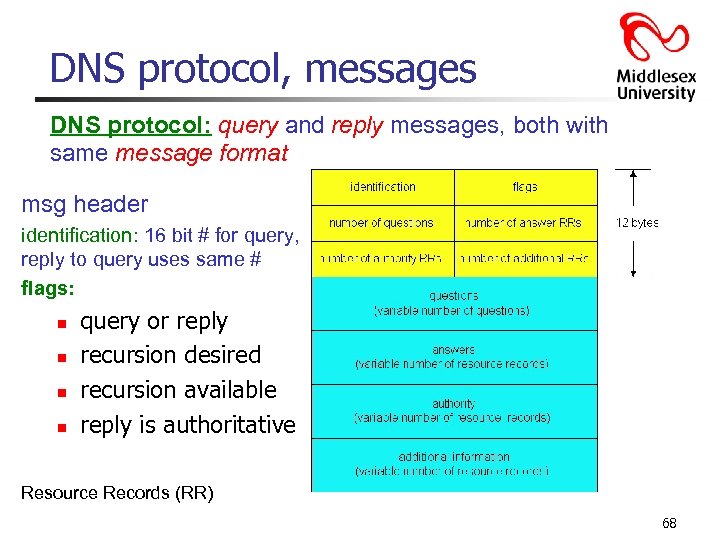 DNS protocol, messages DNS protocol: query and reply messages, both with same message format msg header identification: 16 bit # for query, reply to query uses same # flags: n n query or reply recursion desired recursion available reply is authoritative Resource Records (RR) 68
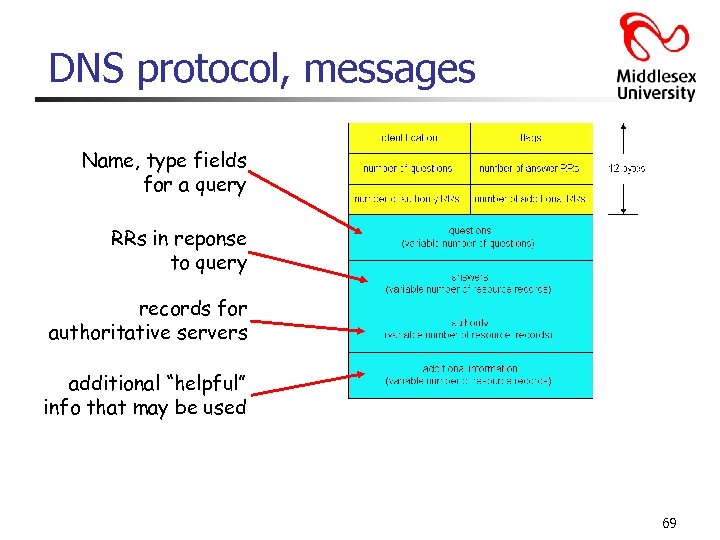 DNS protocol, messages Name, type fields for a query RRs in reponse to query records for authoritative servers additional “helpful” info that may be used 69
 Inserting records into DNS Example: just created startup “Network Consultancy firm” Register name networkconsultancyfirm. co. uk at a registrar (e. g. , Network Solutions) n n Need to provide registrar with names and IP addresses of your authoritative name server (primary and secondary) Registrar inserts two RRs into the co. uk TLD server: (networconsultancyfirm. co. uk, dns 1. networconsultancyfirm. co. uk, NS) (dns 1. networconsultancyfirm. co. uk, 212. 1, A) Put in authoritative server Type A record for www. networkconsultancyfirm. co. uk. com and Type MX record for networkconsultancyfirm. co. uk How do people get the IP address of your Web site? 70
 How do people get the IP address of your Web site? § Finding an IP can be as easy as looking at the full headers of email that they've sent you, or monitoring network connections for certain types of instant messaging and chat applications. Web sites routinely get IP address information for all visitors. The very nature of how the internet works dictates that when two computers talk to each other, they know each other's IP addresses. § But once an IP address is received, what can you tell about it? Ø Some IP's are easy - they're static, and have a DNS name associated with them. For example, in a Windows XP Command Shell, enter the following command: ping -a 17. 254. 3. 183 v The “-a” switch tells ping to do a “reverse DNS lookup”, and print the first domain name it finds associated with the IP address you've specified. 71
 How do people get the IP address of your Web site? - continued § If the ping doesn't return a domain name, we then go to ARIN (American Registry for Internet Numbers) and use their IP “whois” tool: If an IP address, e. g. , 206. 124. 145. 17 is entered, we'll find that it's part of a block of addresses assigned to an ISP. To determine who actually uses that IP address the ISP is contacted, otherwise, the physical location of a machine at a specific IP address is not easy to determine. (CIDR? VLSM? ) § An IP address may, or may not, identify a specific computer. In many cases, such as large corporations, it identifies a gateway that acts as a router or proxy for any number of computers: Ø Behind the gateway, the computers can all see each other, but from the Internet the individual machines are indistinguishable from each other. . . they all look like they come from the same IP address. Ø Same is true when using a router at home. You might have any number of computers behind it, but from the internet, it appears as if you have only one IP address. Your individual computers are not directly accessible by default. 72