


 Скачать презентацию C SI Saa S Partner Program Strategy 1
3acc4859d488713a5d602ca197025e6c.ppt
- Количество слайдов: 29
 C&SI Saa. S Partner Program Strategy 1 © 2013 IBM Corporation
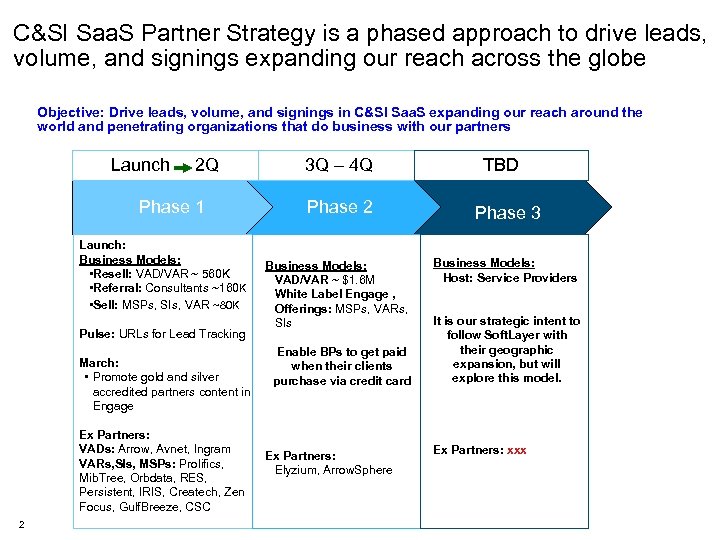 C&SI Saa. S Partner Strategy is a phased approach to drive leads, volume, and signings expanding our reach across the globe Objective: Drive leads, volume, and signings in C&SI Saa. S expanding our reach around the world and penetrating organizations that do business with our partners Launch 2 Q Phase 1 Launch: Business Models: • Resell: VAD/VAR ~ 560 K • Referral: Consultants ~160 K • Sell: MSPs, SIs, VAR ~80 K Pulse: URLs for Lead Tracking March: • Promote gold and silver accredited partners content in Engage Ex Partners: VADs: Arrow, Avnet, Ingram VARs, SIs, MSPs: Prolifics, Mib. Tree, Orbdata, RES, Persistent, IRIS, Createch, Zen Focus, Gulf. Breeze, CSC 2 3 Q – 4 Q Phase 2 Business Models: VAD/VAR ~ $1. 6 M White Label Engage , Offerings: MSPs, VARs, SIs Enable BPs to get paid when their clients purchase via credit card Ex Partners: Elyzium, Arrow. Sphere TBD Phase 3 Business Models: Host: Service Providers It is our strategic intent to follow Soft. Layer with their geographic expansion, but will explore this model. Ex Partners: xxx
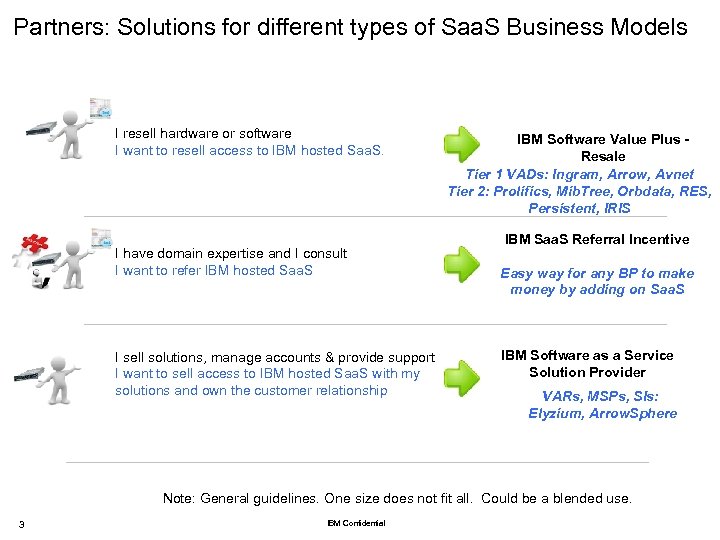 Partners: Solutions for different types of Saa. S Business Models I resell hardware or software I want to resell access to IBM hosted Saa. S. I have domain expertise and I consult I want to refer IBM hosted Saa. S I sell solutions, manage accounts & provide support I want to sell access to IBM hosted Saa. S with my solutions and own the customer relationship IBM Software Value Plus Resale Tier 1 VADs: Ingram, Arrow, Avnet Tier 2: Prolifics, Mib. Tree, Orbdata, RES, Persistent, IRIS IBM Saa. S Referral Incentive Easy way for any BP to make money by adding on Saa. S IBM Software as a Service Solution Provider VARs, MSPs, SIs: Elyzium, Arrow. Sphere Note: General guidelines. One size does not fit all. Could be a blended use. 3 IBM Confidential
 Structure of the model description We use a common structure as we describe each model • Business Relationship: – IBM: – VAD: – Partner: – Customer: • Demand Gen: • Sales Tool: • Financial Incentives: • Operational Flow: 4
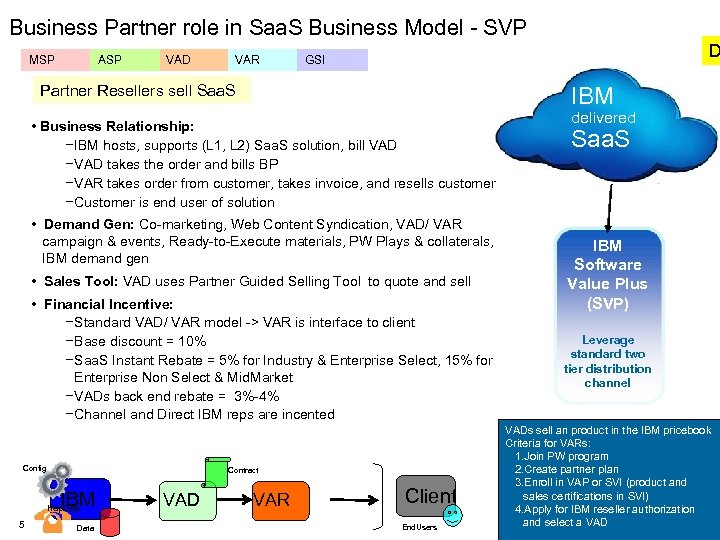 Business Partner role in Saa. S Business Model - SVP MSP ASP VAD VAR D GSI Partner Resellers sell Saa. S IBM • Business Relationship: − IBM hosts, supports (L 1, L 2) Saa. S solution, bill VAD − VAD takes the order and bills BP − VAR takes order from customer, takes invoice, and resells customer − Customer is end user of solution • Demand Gen: Co-marketing, Web Content Syndication, VAD/ VAR campaign & events, Ready-to-Execute materials, PW Plays & collaterals, IBM demand gen • Sales Tool: VAD uses Partner Guided Selling Tool to quote and sell • Financial Incentive: − Standard VAD/ VAR model -> VAR is interface to client − Base discount = 10% − Saa. S Instant Rebate = 5% for Industry & Enterprise Select, 15% for Enterprise Non Select & Mid. Market − VADs back end rebate = 3%-4% − Channel and Direct IBM reps are incented Config Contract IBM Help. Desk 5 Data VAD VAR Client End. Users delivered Saa. S IBM Software Value Plus (SVP) Leverage standard two tier distribution channel VADs sell an product in the IBM pricebook Criteria for VARs: 1. Join PW program 2. Create partner plan 3. Enroll in VAP or SVI (product and sales certifications in SVI) 4. Apply for IBM reseller authorization and select a VAD
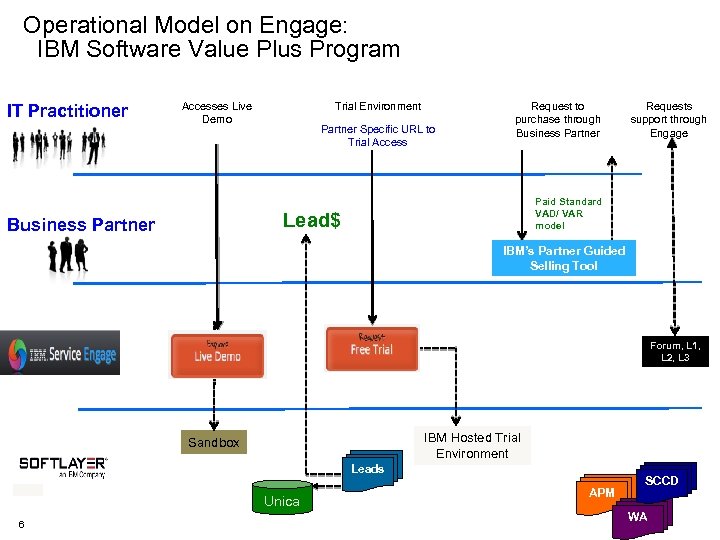 Operational Model on Engage: IBM Software Value Plus Program IT Practitioner Accesses Live Demo Trial Environment Partner Specific URL to Trial Access Request to purchase through Business Partner Paid Standard VAD/ VAR model Lead$ Business Partner Requests support through Engage IBM’s Partner Guided Selling Tool Forum, L 1, L 2, L 3 IBM Hosted Trial Environment Sandbox Leads Unica 6 APM SCCD WA
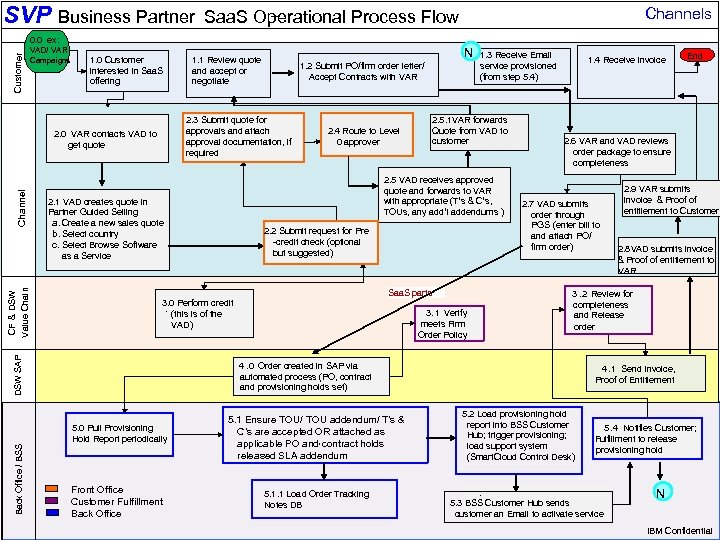 SVP Business Partner Channels – Saa. S Operational Process Flow Customer 0. 0 ex: VAD/ VAR Campaigns 1. 0 Customer interested in Saa. S offering Channel CF & DSW Value Chain 2. 4 Route to Level 0 approver 1. 3 Receive Email service provisioned (from step 5. 4) 2. 5. 1 VAR forwards Quote from VAD to customer 2. 5 VAD receives approved quote and forwards to VAR with appropriate (T’s & C’s, TOUs, any add’l addendums ) 2. 1 VAD creates quote in Partner Guided Selling a. Create a new sales quote b. Select country c. Select Browse Software as a Service 2. 2 Submit request for Pre -credit check (optional but suggested) Saa. S parts 3. 0 Perform credit. (this is of the VAD) DSW SAP g/ Back Office / BSS 1. 2 Submit PO/firm order letter/ Accept Contracts with VAR 2. 3 Submit quote for approvals and attach approval documentation, if required 2. 0 VAR contacts VAD to get quote 7 N 1. 1 Review quote and accept or negotiate 3. 1 Verify meets Firm Order Policy 1. 4 Receive invoice 2. 6 VAR and VAD reviews order package to ensure completeness 2. 7 VAD submits order through PGS (enter bill to and attach PO/ firm order) Front Office (Co. C) Front Office Back Office. Fulfillment Customer Fulfillment Back Office Environment Ops (provisioning) . 5. 1 Ensure TOU/ TOU addendum/ T’s & C’s are accepted OR attached as applicable PO and, contract holds , released SLA addendum 5. 1. 1 Load Order Tracking Notes DB 2. 9 VAR submits invoice & Proof of entitlement to Customer 2. 8 VAD submits invoice & Proof of entitlement to VAR 3. 2 Review for completeness and Release order 4. 0 Order created in SAP via automated process (PO, contract and provisioning holds set) 5. 0 Pull Provisioning Hold Report periodically End 4. 1 Send Invoice, Proof of Entitlement 5. 2 Load provisioning hold report into BSS Customer Hub; trigger provisioning; load support system (Smart. Cloud Control Desk) 5. 4 Notifies Customer; . Fulfillment to release provisioning hold . 5. 3 BSS Customer Hub sends customer an Email to activate service N IBM Confidential
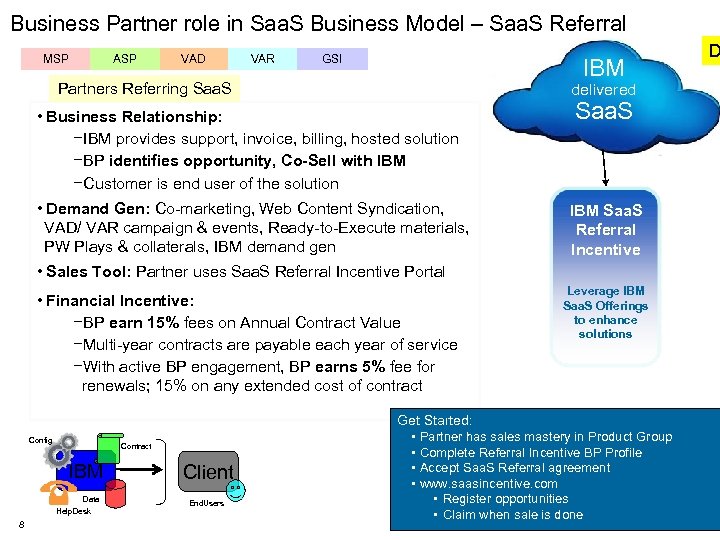 Business Partner role in Saa. S Business Model – Saa. S Referral MSP ASP VAD VAR GSI IBM Partners Referring Saa. S delivered • Business Relationship: −IBM provides support, invoice, billing, hosted solution −BP identifies opportunity, Co-Sell with IBM −Customer is end user of the solution • Demand Gen: Co-marketing, Web Content Syndication, VAD/ VAR campaign & events, Ready-to-Execute materials, PW Plays & collaterals, IBM demand gen Saa. S IBM Saa. S Referral Incentive • Sales Tool: Partner uses Saa. S Referral Incentive Portal • Financial Incentive: −BP earn 15% fees on Annual Contract Value −Multi-year contracts are payable each year of service −With active BP engagement, BP earns 5% fee for renewals; 15% on any extended cost of contract Config Contract IBM Data Help. Desk 8 Client End. Users Leverage IBM Saa. S Offerings to enhance solutions Get Started: • Partner has sales mastery in Product Group • Complete Referral Incentive BP Profile • Accept Saa. S Referral agreement • www. saasincentive. com • Register opportunities • Claim when sale is done D
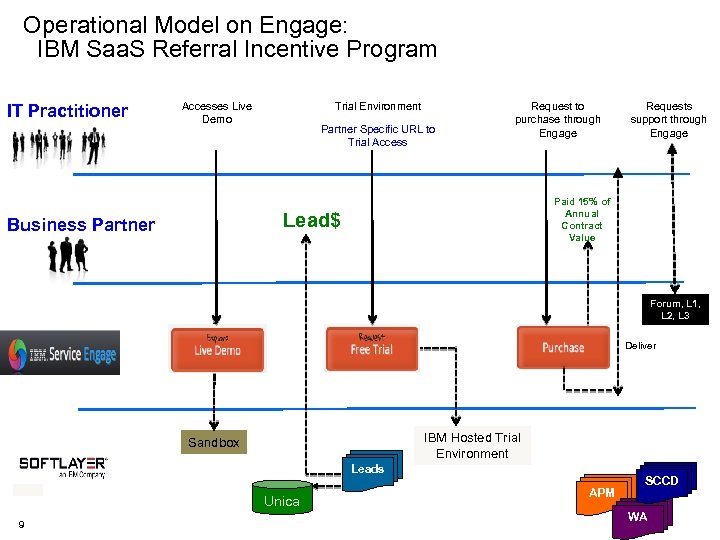 Operational Model on Engage: IBM Saa. S Referral Incentive Program IT Practitioner Accesses Live Demo Trial Environment Partner Specific URL to Trial Access Request to purchase through Engage Paid 15% of Annual Contract Value Lead$ Business Partner Requests support through Engage Forum, L 1, L 2, L 3 Deliver IBM Hosted Trial Environment Sandbox Leads Unica 9 APM SCCD WA
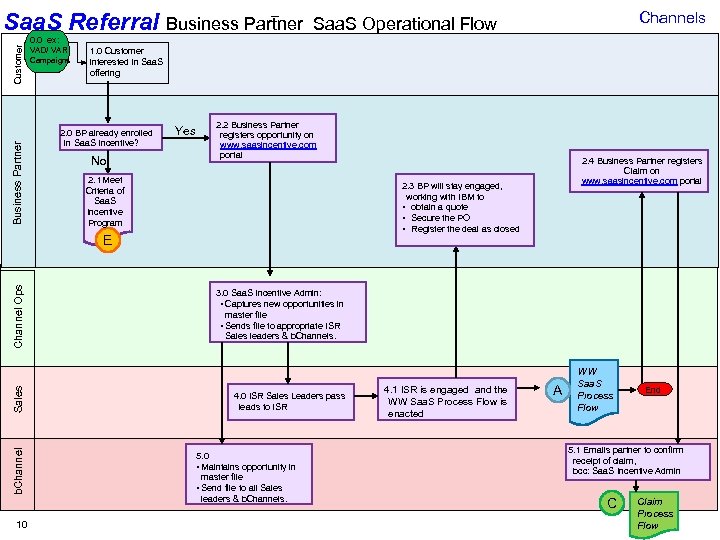 Business Partner Customer – Saa. S Referral Business Partner 0. 0 ex: VAD/ VAR Campaigns 1. 0 Customer interested in Saa. S offering 2. 0 BP already enrolled in Saa. S Incentive? No Yes 2. 2 Business Partner registers opportunity on www. saasincentive. com portal 2. 1 Meet Criteria of Saa. S Incentive Program Channel Ops Sales b. Channel 2. 4 Business Partner registers Claim on www. saasincentive. com portal 2. 3 BP will stay engaged, working with IBM to • obtain a quote • Secure the PO • Register the deal as closed E 10 Channels Saa. S Operational Flow 3. 0 Saa. S Incentive Admin: • Captures new opportunities in master file • Sends file to appropriate ISR Sales leaders & b. Channels. 4. 0 ISR Sales Leaders pass leads to ISR 5. 0 • Maintains opportunity in master file • Send file to all Sales leaders & b. Channels. 4. 1 ISR is engaged and the WW Saa. S Process Flow is enacted A WW Saa. S Process Flow End 5. 1 Emails partner to confirm receipt of claim, bcc: Saa. S Incentive Admin C Claim Process Flow
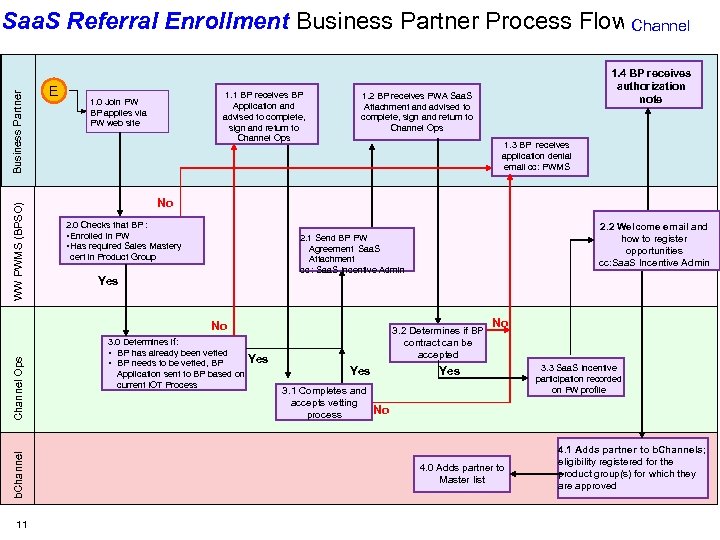 WW PWMS (BPSO) Business Partner Saa. S Referral Enrollment Business Partner Process Flow Channel E 1. 1 BP receives BP Application and advised to complete, sign and return to Channel Ops 1. 0 Join PW BP applies via PW web site 1. 2 BP receives PWA Saa. S Attachment and advised to complete, sign and return to Channel Ops 1. 3 BP receives application denial email cc: PWMS No 2. 0 Checks that BP : • Enrolled in PW • Has required Sales Mastery cert in Product Group Channel Ops b. Channel 2. 2 Welcome email and how to register opportunities cc: Saa. S Incentive Admin 2. 1 Send BP PW Agreement Saa. S Attachment cc : Saa. S Incentive Admin Yes No 11 1. 4 BP receives authorization note 3. 0 Determines if: • BP has already been vetted • BP needs to be vetted, BP Application sent to BP based on current IOT Process Yes 3. 2 Determines if BP contract can be accepted Yes 3. 1 Completes and accepts vetting process No Yes 3. 3 Saa. S Incentive participation recorded on PW profile No 4. 0 Adds partner to Master list 4. 1 Adds partner to b. Channels; eligibility registered for the product group(s) for which they are approved
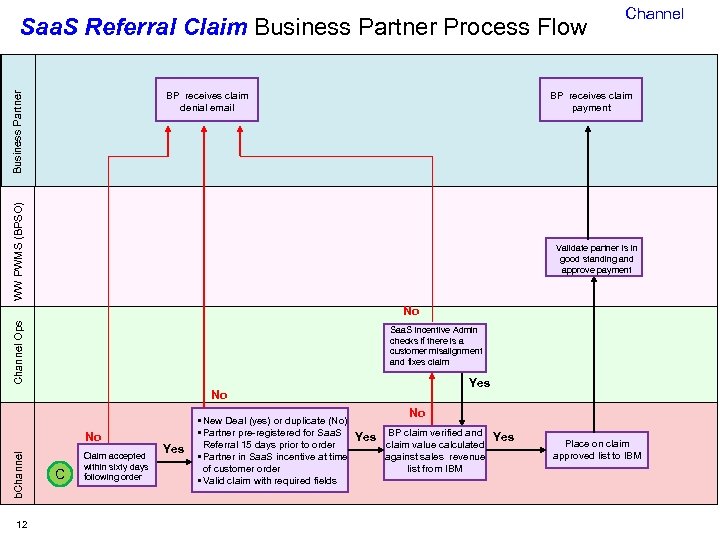 Saa. S Referral Claim Business Partner Process Flow BP receives claim payment WW PWMS (BPSO) Business Partner BP receives claim denial email Channel Validate partner is in good standing and approve payment Channel Ops No Saa. S Incentive Admin checks if there is a customer misalignment and fixes claim Yes No No b. Channel No 12 C Claim accepted within sixty days following order Yes • New Deal (yes) or duplicate (No) • Partner pre-registered for Saa. S Yes BP claim verified and Yes claim value calculated Referral 15 days prior to order • Partner in Saa. S incentive at time against sales revenue of customer order list from IBM • Valid claim with required fields Place on claim approved list to IBM
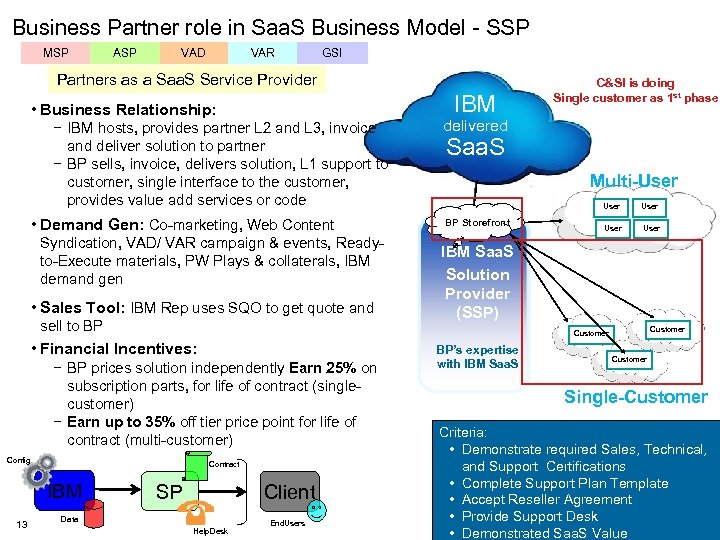 Business Partner role in Saa. S Business Model - SSP MSP ASP VAD VAR GSI Partners as a Saa. S Service Provider IBM • Business Relationship: − IBM hosts, provides partner L 2 and L 3, invoice and deliver solution to partner − BP sells, invoice, delivers solution, L 1 support to customer, single interface to the customer, provides value add services or code • Demand Gen: Co-marketing, Web Content Syndication, VAD/ VAR campaign & events, Readyto-Execute materials, PW Plays & collaterals, IBM demand gen • Sales Tool: IBM Rep uses SQO to get quote and sell to BP − BP prices solution independently Earn 25% on subscription parts, for life of contract (singlecustomer) − Earn up to 35% off tier price point for life of contract (multi-customer) Config 13 delivered Saa. S Multi-User BP Storefront User IBM Saa. S Solution Provider (SSP) Customer • Financial Incentives: Contract IBM C&SI is doing Single customer as 1 st phase Client SP Data Help. Desk End. Users BP’s expertise with IBM Saa. S Customer Single-Customer Criteria: • Demonstrate required Sales, Technical, and Support Certifications • Complete Support Plan Template • Accept Reseller Agreement • Provide Support Desk • Demonstrated Saa. S Value
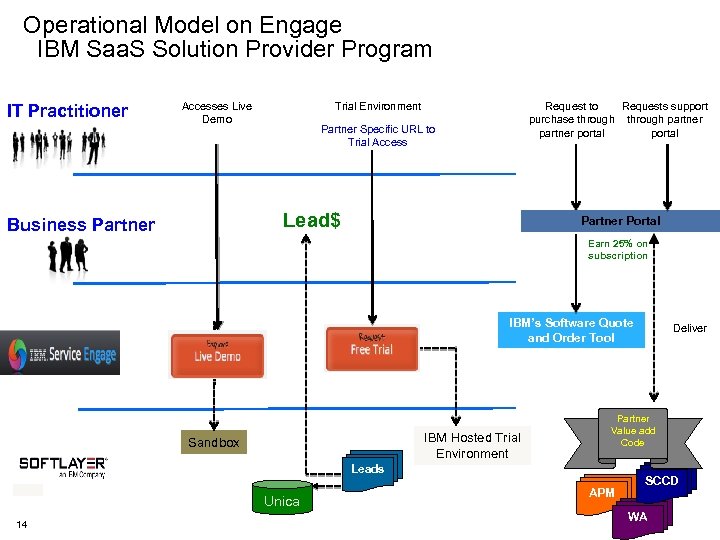 Operational Model on Engage IBM Saa. S Solution Provider Program IT Practitioner Accesses Live Demo Trial Environment Request to Requests support purchase through partner portal Partner Specific URL to Trial Access Lead$ Business Partner Portal Earn 25% on subscription IBM’s Software Quote and Order Tool IBM Hosted Trial Environment Sandbox Partner Value add Code Leads Unica 14 Deliver APM SCCD WA
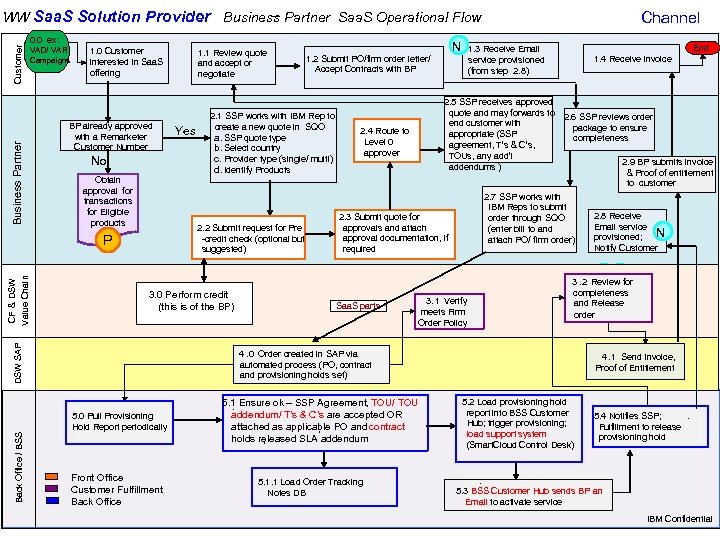 0. 0 ex: VAD/ VAR Campaigns Business Partner Customer – WW Saa. S Solution Provider Business Partner Saa. S Operational Flow 1. 0 Customer interested in Saa. S offering BP already approved with a Remarketer Customer Number Yes Obtain approval for transactions for Eligible products 2. 2 Submit request for Pre -credit check (optional but suggested) g/ Back Office / BSS DSW SAP 3. 0. Perform credit (this is of the BP) 15 N 1. 2 Submit PO/firm order letter/ Accept Contracts with BP 2. 1 SSP works with IBM Rep to create a new quote in SQO a. SSP quote type b. Select country c. Provider type (single/ multi) d. Identify Products No P CF & DSW Value Chain 1. 1 Review quote and accept or negotiate End 1. 3 Receive Email service provisioned (from step 2. 8) 2. 5 SSP receives approved quote and may forwards to end customer with appropriate (SSP agreement, T’s & C’s, TOUs, any add’l addendums ) 2. 4 Route to Level 0 approver 1. 4 Receive invoice 2. 6 SSP reviews order package to ensure completeness 2. 9 BP submits invoice & Proof of entitlement to customer 2. 7 SSP works with IBM Reps to submit order through SQO (enter bill to and attach PO/ firm order) 2. 3 Submit quote for approvals and attach approval documentation, if required Saa. S parts Channel 3. 1 Verify meets Firm Order Policy 3. 2 Review for completeness and Release order 4. 0 Order created in SAP via automated process (PO, contract and provisioning holds set) 5. 0 Pull Provisioning Hold Report periodically Front Office (Co. C) Front Office Back Office. Fulfillment Customer Fulfillment Back Office Environment Ops (provisioning) 5. 1 Ensure ok – SSP Agreement, TOU/ TOU. addendum/ T’s & C’s are accepted OR attached as applicable PO and contract , holds released SLA addendum , 5. 1. 1 Load Order Tracking Notes DB 2. 8 Receive Email service N provisioned; Notify Customer 4. 1 Send Invoice, Proof of Entitlement 5. 2 Load provisioning hold report into BSS Customer Hub; trigger provisioning; load support system (Smart. Cloud Control Desk) 5. 4 Notifies SSP; . Fulfillment to release provisioning hold . 5. 3 BSS Customer Hub sends BP an Email to activate service IBM Confidential
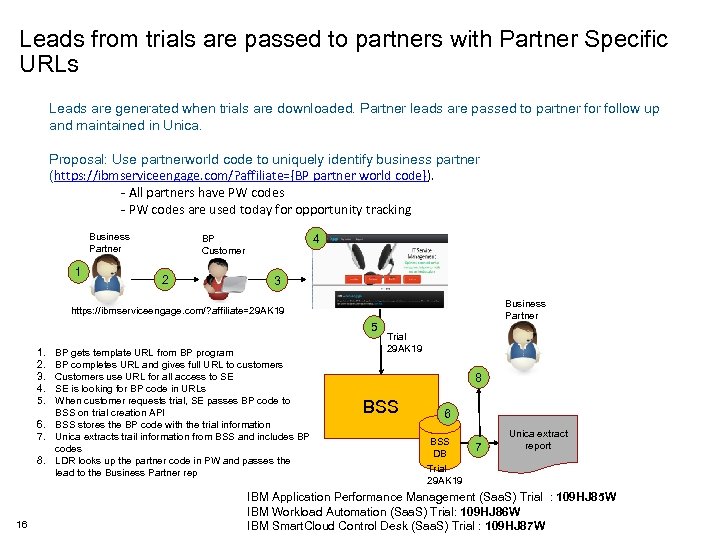 Leads from trials are passed to partners with Partner Specific URLs Leads are generated when trials are downloaded. Partner leads are passed to partner follow up and maintained in Unica. Proposal: Use partnerworld code to uniquely identify business partner (https: //ibmserviceengage. com/? affiliate={BP partner world code}). - All partners have PW codes - PW codes are used today for opportunity tracking Business Partner 1 4 BP Customer 2 3 Business Partner https: //ibmserviceengage. com/? affiliate=29 AK 19 5 1. 2. 3. 4. 5. BP gets template URL from BP program BP completes URL and gives full URL to customers Customers use URL for all access to SE SE is looking for BP code in URLs When customer requests trial, SE passes BP code to BSS on trial creation API 6. BSS stores the BP code with the trial information 7. Unica extracts trail information from BSS and includes BP codes 8. LDR looks up the partner code in PW and passes the lead to the Business Partner rep 16 Trial 29 AK 19 8 BSS 6 BSS DB Trial 29 AK 19 7 Unica extract report IBM Application Performance Management (Saa. S) Trial : 109 HJ 85 W IBM Workload Automation (Saa. S) Trial: 109 HJ 86 W IBM Smart. Cloud Control Desk (Saa. S) Trial : 109 HJ 87 W
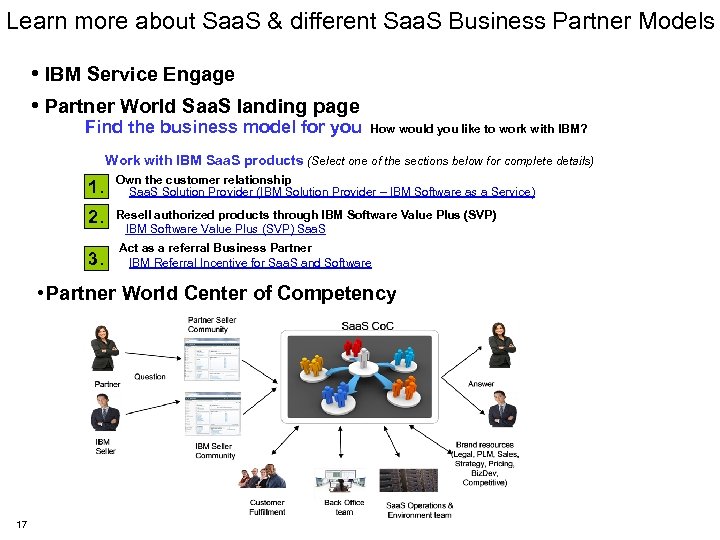 Learn more about Saa. S & different Saa. S Business Partner Models • IBM Service Engage • Partner World Saa. S landing page Find the business model for you How would you like to work with IBM? Work with IBM Saa. S products (Select one of the sections below for complete details) 1. Own the customer relationship Saa. S Solution Provider (IBM Solution Provider – IBM Software as a Service) 2. Resell authorized products through IBM Software Value Plus (SVP) Saa. S 3. Act as a referral Business Partner IBM Referral Incentive for Saa. S and Software • Partner World Center of Competency 17
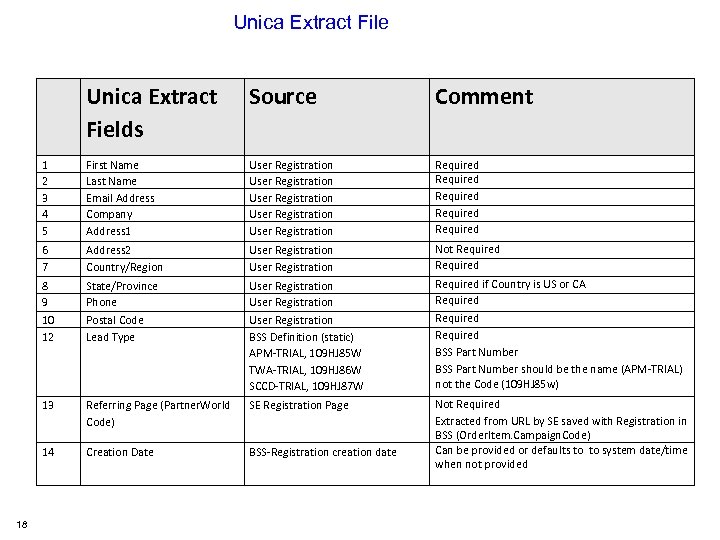 Unica Extract File Source Comment 1 2 3 4 5 First Name Last Name Email Address Company Address 1 User Registration User Registration Required Required 6 7 Address 2 Country/Region User Registration Not Required 8 9 10 12 State/Province Phone Postal Code Lead Type User Registration BSS Definition (static) APM-TRIAL, 109 HJ 85 W TWA-TRIAL, 109 HJ 86 W SCCD-TRIAL, 109 HJ 87 W Required if Country is US or CA Required BSS Part Number should be the name (APM-TRIAL) not the Code (109 HJ 85 w) 13 Referring Page (Partner. World Code) SE Registration Page 14 18 Unica Extract Fields Creation Date BSS-Registration creation date Not Required Extracted from URL by SE saved with Registration in BSS (Order. Item. Campaign. Code) Can be provided or defaults to to system date/time when not provided
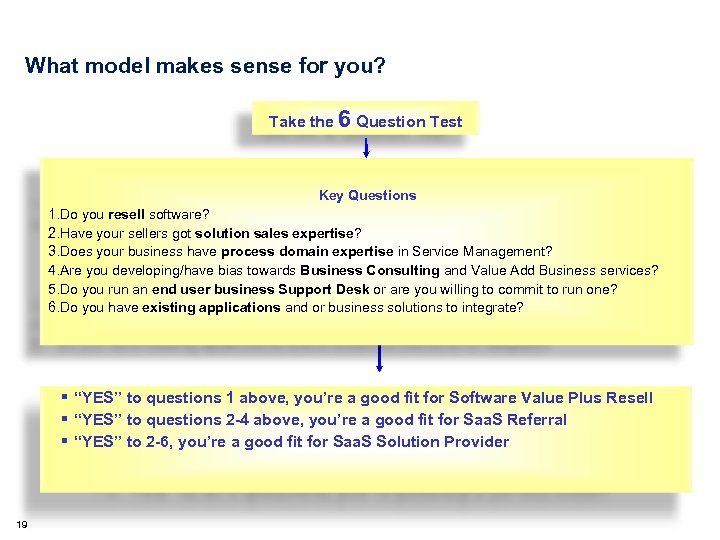 What model makes sense for you? Take the 6 Question Test Key Questions 1. Do you resell software? 2. Have your sellers got solution sales expertise? 3. Does your business have process domain expertise in Service Management? 4. Are you developing/have bias towards Business Consulting and Value Add Business services? 5. Do you run an end user business Support Desk or are you willing to commit to run one? 6. Do you have existing applications and or business solutions to integrate? “YES” to questions 1 above, you’re a good fit for Software Value Plus Resell “YES” to questions 2 -4 above, you’re a good fit for Saa. S Referral “YES” to 2 -6, you’re a good fit for Saa. S Solution Provider 19
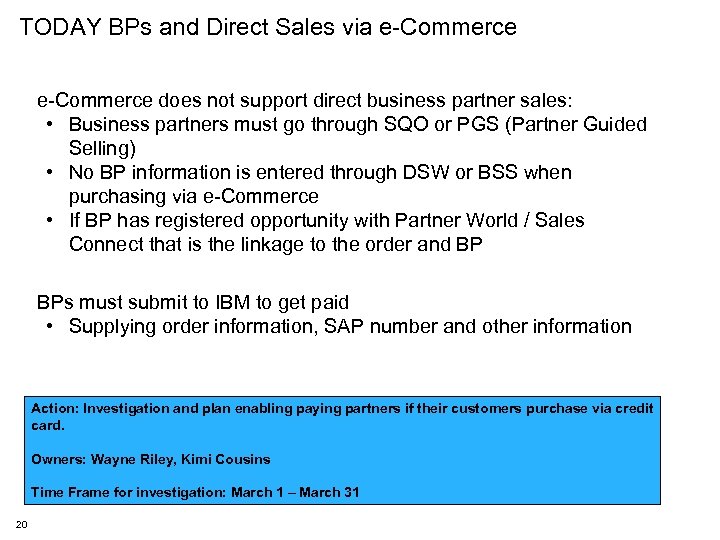 TODAY BPs and Direct Sales via e-Commerce does not support direct business partner sales: • Business partners must go through SQO or PGS (Partner Guided Selling) • No BP information is entered through DSW or BSS when purchasing via e-Commerce • If BP has registered opportunity with Partner World / Sales Connect that is the linkage to the order and BP BPs must submit to IBM to get paid • Supplying order information, SAP number and other information Action: Investigation and plan enabling paying partners if their customers purchase via credit card. Owners: Wayne Riley, Kimi Cousins Time Frame for investigation: March 1 – March 31 20
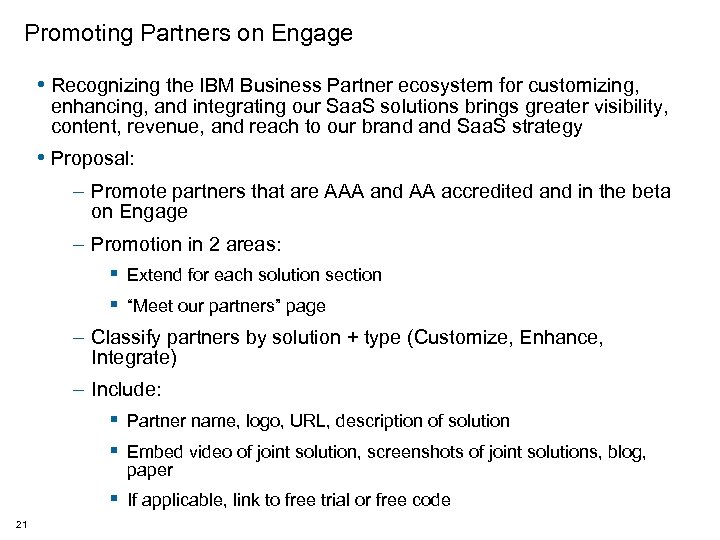 Promoting Partners on Engage • Recognizing the IBM Business Partner ecosystem for customizing, enhancing, and integrating our Saa. S solutions brings greater visibility, content, revenue, and reach to our brand Saa. S strategy • Proposal: – Promote partners that are AAA and AA accredited and in the beta on Engage – Promotion in 2 areas: Extend for each solution section “Meet our partners” page – Classify partners by solution + type (Customize, Enhance, Integrate) – Include: Partner name, logo, URL, description of solution Embed video of joint solution, screenshots of joint solutions, blog, paper If applicable, link to free trial or free code 21
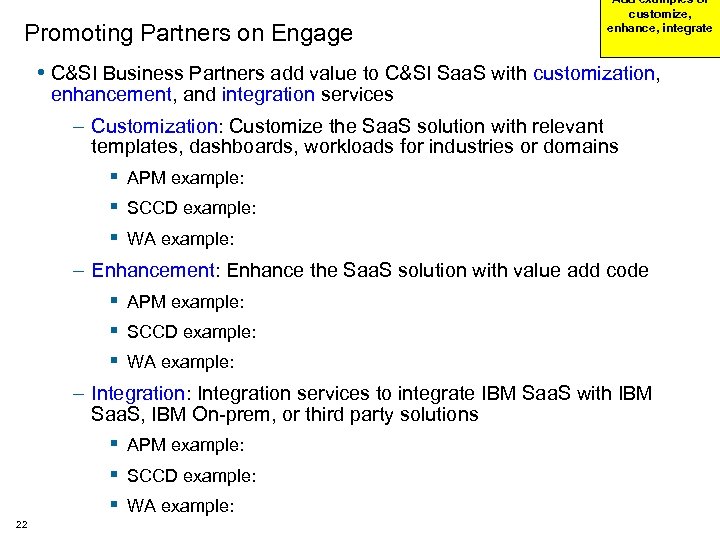 Promoting Partners on Engage Add examples of customize, enhance, integrate • C&SI Business Partners add value to C&SI Saa. S with customization, enhancement, and integration services – Customization: Customize the Saa. S solution with relevant templates, dashboards, workloads for industries or domains APM example: SCCD example: WA example: – Enhancement: Enhance the Saa. S solution with value add code APM example: SCCD example: WA example: – Integration: Integration services to integrate IBM Saa. S with IBM Saa. S, IBM On-prem, or third party solutions APM example: SCCD example: WA example: 22
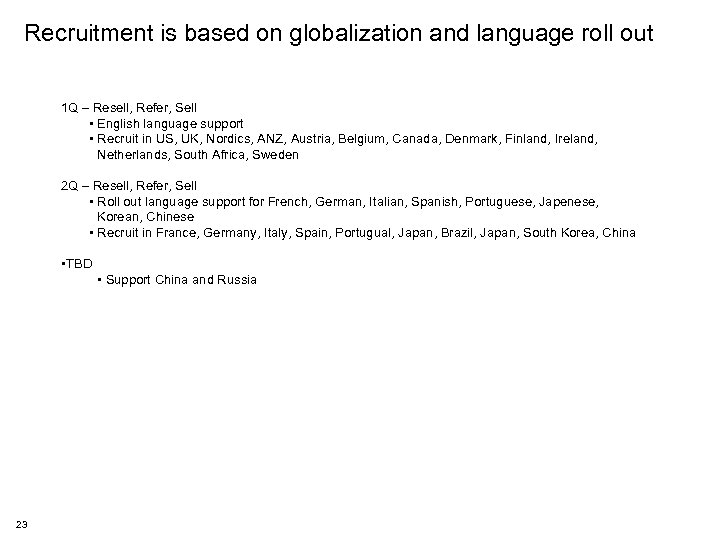 Recruitment is based on globalization and language roll out 1 Q – Resell, Refer, Sell • English language support • Recruit in US, UK, Nordics, ANZ, Austria, Belgium, Canada, Denmark, Finland, Ireland, Netherlands, South Africa, Sweden 2 Q – Resell, Refer, Sell • Roll out language support for French, German, Italian, Spanish, Portuguese, Japenese, Korean, Chinese • Recruit in France, Germany, Italy, Spain, Portugual, Japan, Brazil, Japan, South Korea, China • TBD • Support China and Russia 23
 Example deals • Provide example scenario of how the deals work. – How do partners order – What do they order – Does incentive come off the top, etc – If we can get screenshots of PGS, this may help address this. 24
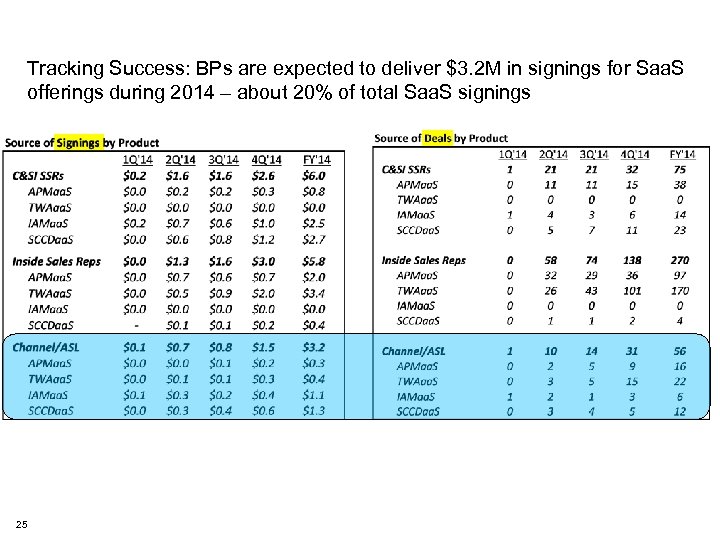 Tracking Success: BPs are expected to deliver $3. 2 M in signings for Saa. S offerings during 2014 – about 20% of total Saa. S signings 25
 Questions
 27
27
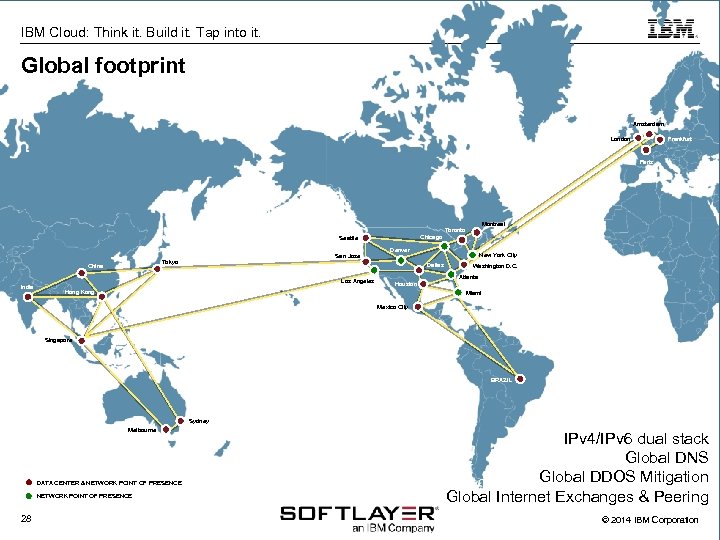 IBM Cloud: Think it. Build it. Tap into it. Global footprint Amsterdam London Frankfurt Paris Montreal Toronto Chicago Seattle China India San Jose Tokyo Denver New York City Dallas Los Angeles Washington D. C. Atlanta Houston Hong Kong Miami Mexico City Singapore BRAZIL Sydney Melbourne DATA CENTER & NETWORK POINT OF PRESENCE 28 IPv 4/IPv 6 dual stack Global DNS Global DDOS Mitigation Global Internet Exchanges & Peering © 2014 IBM Corporation
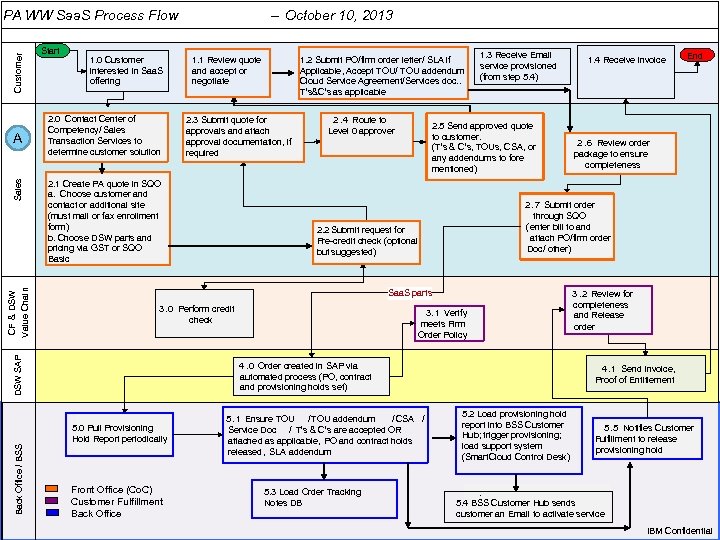 Customer PA WW Saa. S Process Flow – October 10, 2013 IBM Cloud: Think it. Build it. Tap into it. 1. 0 Customer interested in Saa. S offering 2. 0 Contact Center of Competency/ Sales Transaction Services to determine customer solution 1. 1 Review quote and accept or negotiate g/ Back Office / BSS 29 1. 2 Submit PO/firm order letter/ SLA if Applicable, Accept TOU/ TOU addendum Cloud Service Agreement/Services doc. . T’s&C’s as applicable 2. 3 Submit quote for approvals and attach approval documentation, if required 2. 1 Create PA quote in SQO a. Choose customer and contact or additional site (must mail or fax enrollment form) b. Choose DSW parts and pricing via GST or SQO Basic 2. 4 Route to Level 0 approver 1. 3 Receive Email service provisioned (from step 5. 4) 2. 5 Send approved quote to customer. (T’s & C’s, TOUs, CSA, or any addendums to fore mentioned) Saa. S parts 3. 1 Verify meets Firm Order Policy 4. 0 Order created in SAP via automated process (PO, contract and provisioning holds set) 5. 0 Pull Provisioning Hold Report periodically Front Office (Co. C) Back Office. Fulfillment Customer Fulfillment Back Office Environment Ops (provisioning) 5. 1 Ensure TOU /TOU addendum / CSA / Service Doc / T’s & C’s are accepted OR attached as applicable, PO and contract holds released, SLA addendum 5. 3 Load Order Tracking Notes DB 1. 4 Receive invoice End 2. 6 Review order package to ensure completeness 2. 7 Submit order through SQO (enter bill to and attach PO/firm order Doc/ other) 2. 2 Submit request for Pre-credit check (optional but suggested) 3. 0 Perform credit check DSW SAP CF & DSW Value Chain Sales A Start 3. 2 Review for completeness and Release order 4. 1 Send Invoice, Proof of Entitlement 5. 2 Load provisioning hold report into BSS Customer Hub; trigger provisioning; load support system (Smart. Cloud Control Desk) 5. 5 Notifies Customer. Fulfillment to release provisioning hold . 5. 4 BSS Customer Hub sends customer an Email to activate service © 2014 IBM Corporation IBM Confidential