



 C S 6 0 2 7 Ch 3: Underlying Technologies (1 of 3) Lecture #3 Project 1 Posted Dr. Clincy Lecture 3 and 4 1
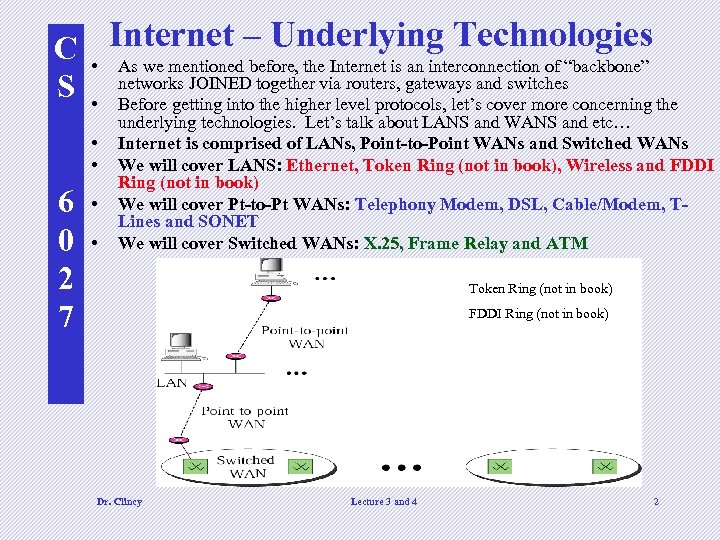 C • Internet – Underlying Technologies As we mentioned before, the Internet is an interconnection of “backbone” routers, gateways S • networks JOINED together vialevel protocols, let’sand switches concerning the Before getting into the higher cover more • • 6 0 2 7 • • underlying technologies. Let’s talk about LANS and WANS and etc… Internet is comprised of LANs, Point-to-Point WANs and Switched WANs We will cover LANS: Ethernet, Token Ring (not in book), Wireless and FDDI Ring (not in book) We will cover Pt-to-Pt WANs: Telephony Modem, DSL, Cable/Modem, TLines and SONET We will cover Switched WANs: X. 25, Frame Relay and ATM Token Ring (not in book) FDDI Ring (not in book) Dr. Clincy Lecture 3 and 4 2
 C S 6 0 2 7 In putting these technologies in perspective Most of the technologies we are about to highlight could be covered as a full blown course – in some cases, multiple courses We will look at each technology from a high level in gathering a general appreciation and understanding of the technology Dr. Clincy Lecture 3 and 4 3
 C S LOCAL AREA NETWORKS (LANS) • LAN – a data communication system connecting multiple INDEPENDENT devices such computers, servers, printers, etc. . • Covers up to a certain geographical area – typically within a building or campus 6 0 2 7 • Some Popular LANs: Ethernet, Token Ring, Wireless type LANs, and ATM LANs Ethernet LAN • Ethernet is the more popular LAN protocol • Designed in 1973 by Xerox • Started out with a 10 Mbps data rate (bus topology) • Today, 100 Mbps and 1 gigabit per second exist (gig=1000 Mbps) • IEEE 802. 3 standard describes the Ethernet protocol Dr. Clincy Lecture 3 and 4 4
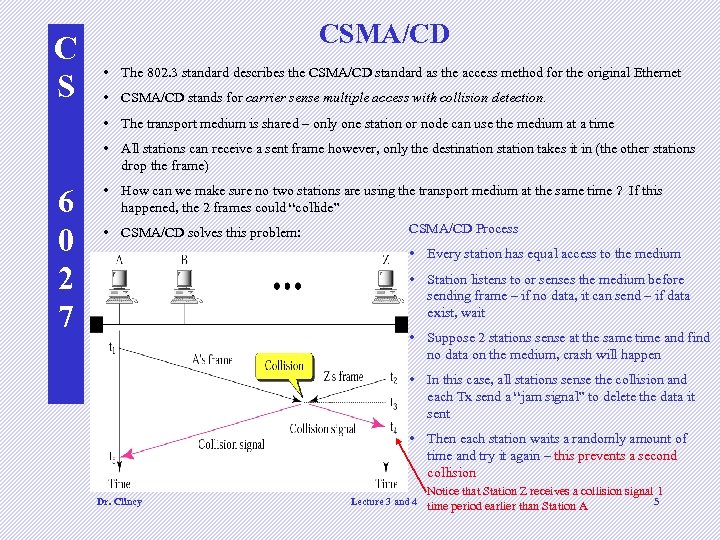 C S CSMA/CD • The 802. 3 standard describes the CSMA/CD standard as the access method for the original Ethernet • CSMA/CD stands for carrier sense multiple access with collision detection. • The transport medium is shared – only one station or node can use the medium at a time • All stations can receive a sent frame however, only the destination station takes it in (the other stations drop the frame) 6 0 2 7 • How can we make sure no two stations are using the transport medium at the same time ? If this happened, the 2 frames could “collide” CSMA/CD Process • CSMA/CD solves this problem: • Every station has equal access to the medium • Station listens to or senses the medium before sending frame – if no data, it can send – if data exist, wait • Suppose 2 stations sense at the same time and find no data on the medium, crash will happen • In this case, all stations sense the collision and each Tx send a “jam signal” to delete the data it sent • Then each station waits a randomly amount of time and try it again – this prevents a second collision Dr. Clincy Lecture 3 and 4 Notice that Station Z receives a collision signal 1 5 time period earlier than Station A
 C S CSMA/CD 3 factors relate to CSMA/CD Minimum frame length 2. Data transmission rate 3. 6 0 2 7 1. Collision domain (maximum network distance) • The amount of time a station needs to wait in making sure no data is on the line) is minimum frame length divided by the data transmission rate. Why ? ? (Speed=Distance/Time) – the larger the frame, the longer the time to wait – however, sensing is shorter) • Amount of time to send the smallest frame (ie. an 8 bit frame at 2 bps will take 8/2 = 4 seconds to send – therefore, need to wait ATLEAST 4 seconds) • This time is proportionate to the time it will take the first bit to travel the maximum network distance (collision domain). • Therefore, (max network distance)/(propagation speed) proportionate to (min frame length)/(transmission-rate) • Data transmission rate – data transfer rate – how fast to send a certain amount of bits from one device to another • For the original Ethernet: min frame size=520 bits, transmission rate=10 Mbps and the max network distance=2500 meters Dr. Clincy Lecture 3 and 4 6
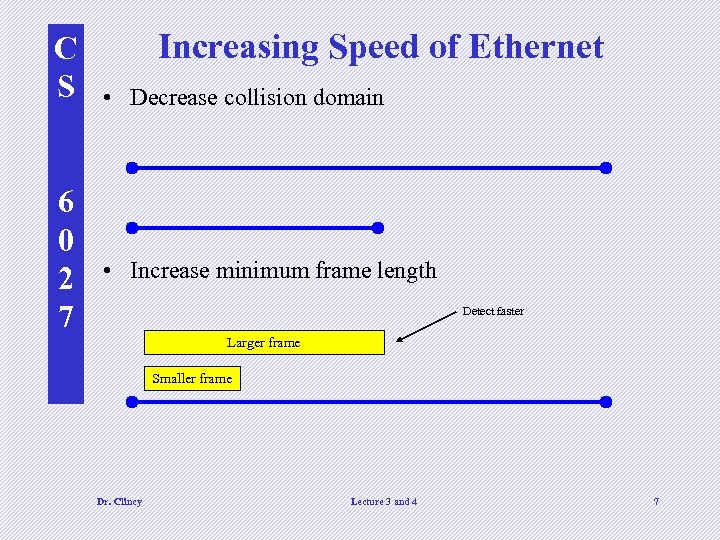 C S 6 0 2 7 Increasing Speed of Ethernet • Decrease collision domain • Increase minimum frame length Detect faster Larger frame Smaller frame Dr. Clincy Lecture 3 and 4 7
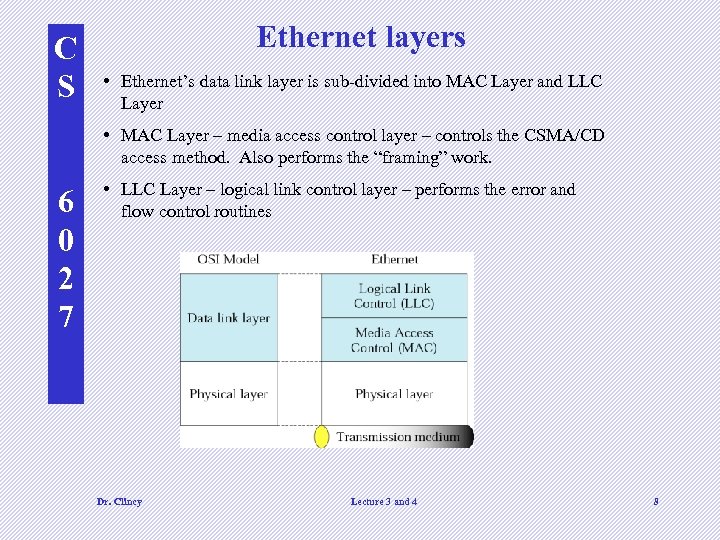 C S Ethernet layers • Ethernet’s data link layer is sub-divided into MAC Layer and LLC Layer • MAC Layer – media access control layer – controls the CSMA/CD access method. Also performs the “framing” work. 6 0 2 7 • LLC Layer – logical link control layer – performs the error and flow control routines Dr. Clincy Lecture 3 and 4 8
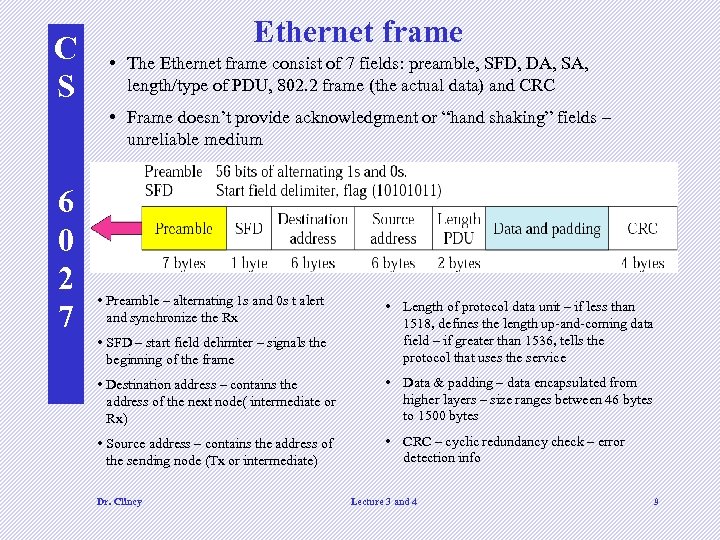 C S Ethernet frame • The Ethernet frame consist of 7 fields: preamble, SFD, DA, SA, length/type of PDU, 802. 2 frame (the actual data) and CRC • Frame doesn’t provide acknowledgment or “hand shaking” fields – unreliable medium 6 0 2 7 • Preamble – alternating 1 s and 0 s t alert and synchronize the Rx • SFD – start field delimiter – signals the beginning of the frame • Length of protocol data unit – if less than 1518, defines the length up-and-coming data field – if greater than 1536, tells the protocol that uses the service • Destination address – contains the address of the next node( intermediate or Rx) • Data & padding – data encapsulated from higher layers – size ranges between 46 bytes to 1500 bytes • Source address – contains the address of the sending node (Tx or intermediate) • CRC – cyclic redundancy check – error detection info Dr. Clincy Lecture 3 and 4 9
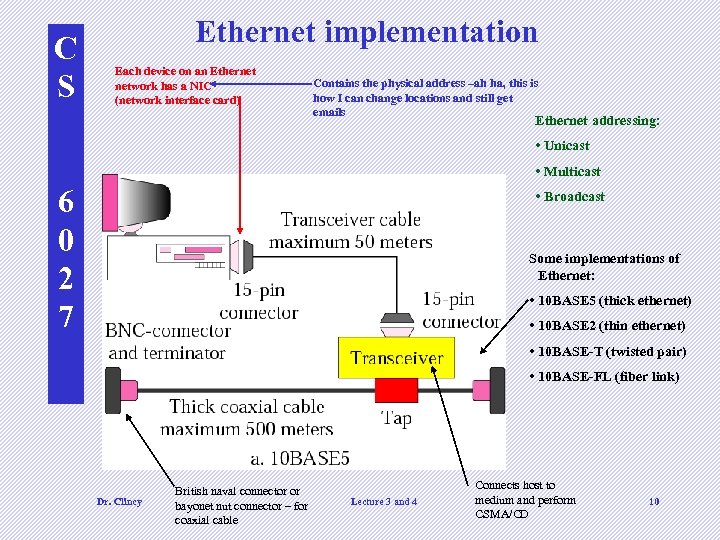 C S Ethernet implementation Each device on an Ethernet network has a NIC (network interface card) Contains the physical address –ah ha, this is how I can change locations and still get emails Ethernet addressing: • Unicast • Multicast 6 0 2 7 • Broadcast Some implementations of Ethernet: • 10 BASE 5 (thick ethernet) • 10 BASE 2 (thin ethernet) • 10 BASE-T (twisted pair) • 10 BASE-FL (fiber link) Dr. Clincy British naval connector or bayonet nut connector – for coaxial cable Lecture 3 and 4 Connects host to medium and perform CSMA/CD 10
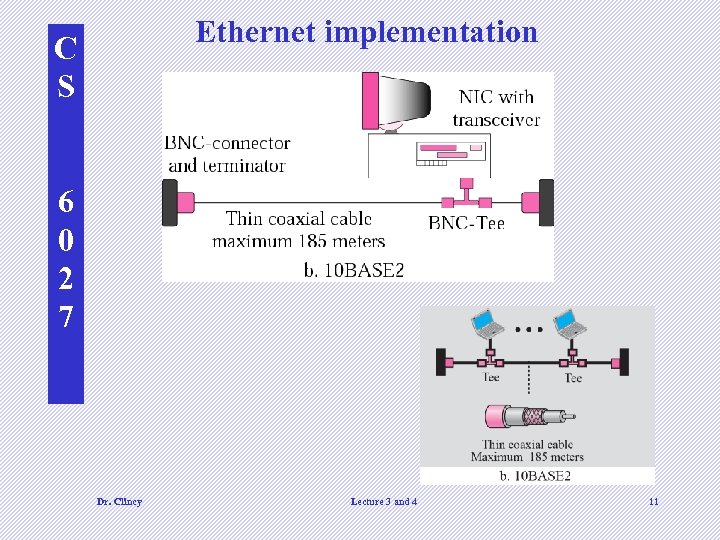 Ethernet implementation C S 6 0 2 7 Dr. Clincy Lecture 3 and 4 11
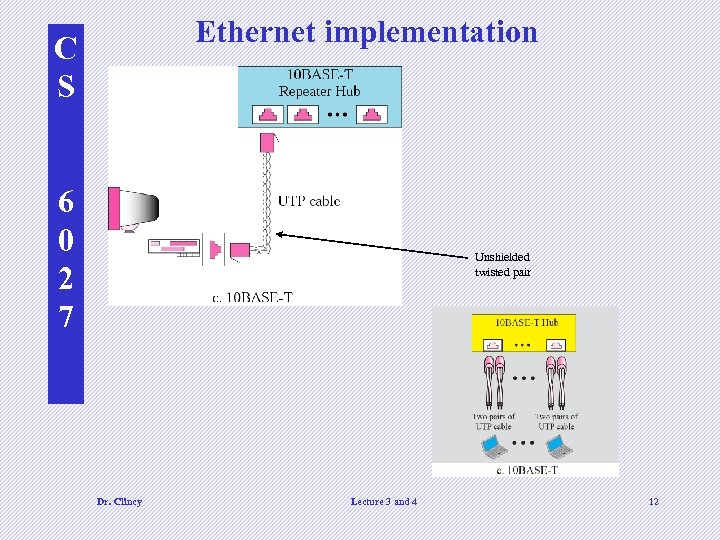 Ethernet implementation C S 6 0 2 7 Unshielded twisted pair Dr. Clincy Lecture 3 and 4 12
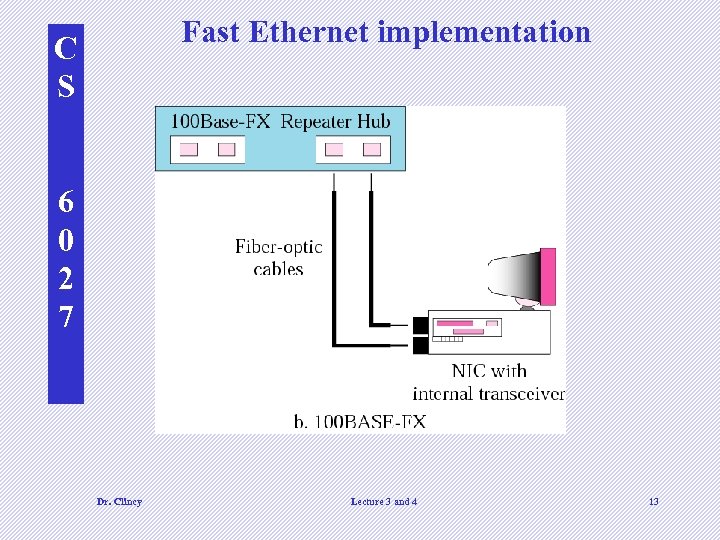 Fast Ethernet implementation C S 6 0 2 7 Dr. Clincy Lecture 3 and 4 13
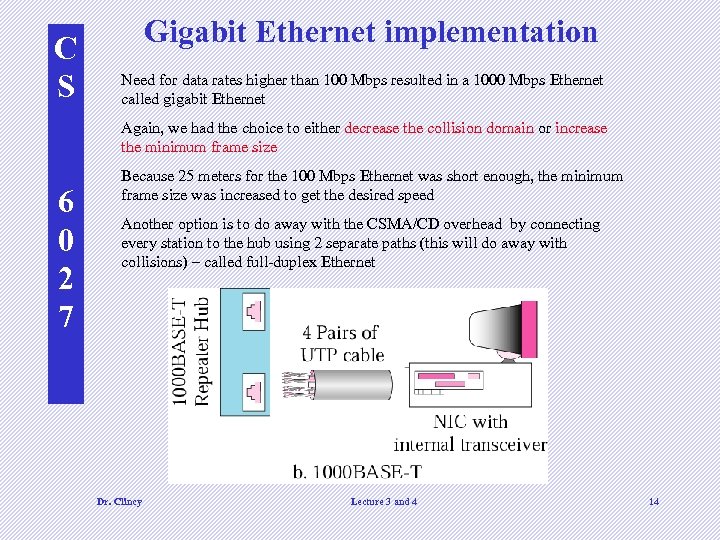 C S Gigabit Ethernet implementation Need for data rates higher than 100 Mbps resulted in a 1000 Mbps Ethernet called gigabit Ethernet Again, we had the choice to either decrease the collision domain or increase the minimum frame size 6 0 2 7 Because 25 meters for the 100 Mbps Ethernet was short enough, the minimum frame size was increased to get the desired speed Another option is to do away with the CSMA/CD overhead by connecting every station to the hub using 2 separate paths (this will do away with collisions) – called full-duplex Ethernet Dr. Clincy Lecture 3 and 4 14
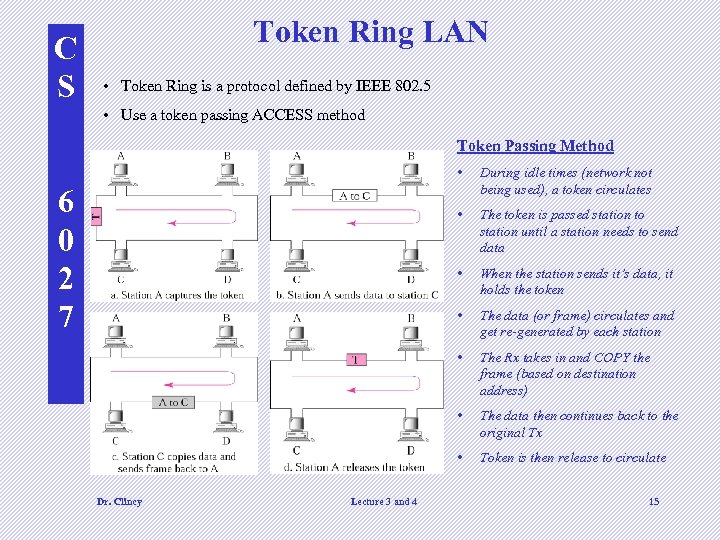 C S Token Ring LAN • Token Ring is a protocol defined by IEEE 802. 5 • Use a token passing ACCESS method Token Passing Method • • The data (or frame) circulates and get re-generated by each station • The Rx takes in and COPY the frame (based on destination address) • The data then continues back to the original Tx • Lecture 3 and 4 When the station sends it’s data, it holds the token • Dr. Clincy The token is passed station to station until a station needs to send data • 6 0 2 7 During idle times (network not being used), a token circulates Token is then release to circulate 15
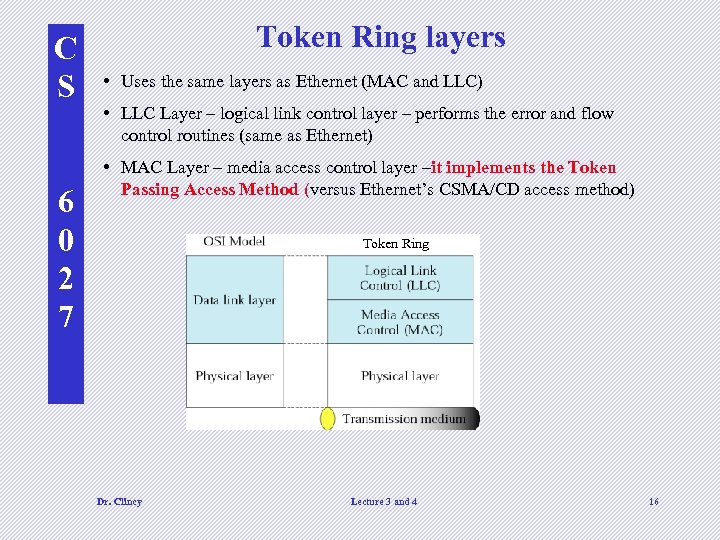 C S 6 0 2 7 Token Ring layers • Uses the same layers as Ethernet (MAC and LLC) • LLC Layer – logical link control layer – performs the error and flow control routines (same as Ethernet) • MAC Layer – media access control layer –it implements the Token Passing Access Method (versus Ethernet’s CSMA/CD access method) Token Ring Dr. Clincy Lecture 3 and 4 16
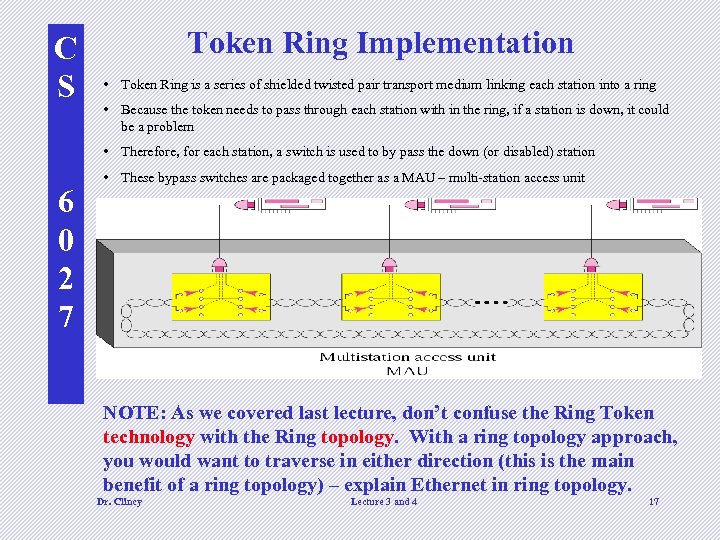 C S Token Ring Implementation • Token Ring is a series of shielded twisted pair transport medium linking each station into a ring • Because the token needs to pass through each station with in the ring, if a station is down, it could be a problem • Therefore, for each station, a switch is used to by pass the down (or disabled) station 6 0 2 7 • These bypass switches are packaged together as a MAU – multi-station access unit NOTE: As we covered last lecture, don’t confuse the Ring Token technology with the Ring topology. With a ring topology approach, you would want to traverse in either direction (this is the main benefit of a ring topology) – explain Ethernet in ring topology. Dr. Clincy Lecture 3 and 4 17
 FDDI Ring C S • FDDI stands for Fiber Distributed Data • • • 6 0 2 7 • Interconnect Data rate is the same as Fast Ethernet (100 Mbps) Light signals versus electrical signals are used Uses a token passing access method with selfhealing What do we mean by “self healing” ? Ability to detect and fix problems. The hardware automatically recognizes and fix problems Dr. Clincy Lecture 3 and 4 18
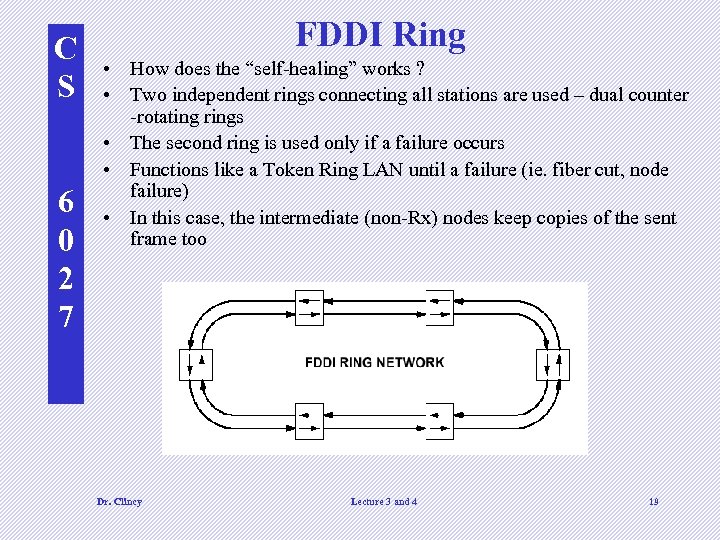 C S 6 0 2 7 FDDI Ring • How does the “self-healing” works ? • Two independent rings connecting all stations are used – dual counter -rotating rings • The second ring is used only if a failure occurs • Functions like a Token Ring LAN until a failure (ie. fiber cut, node failure) • In this case, the intermediate (non-Rx) nodes keep copies of the sent frame too Dr. Clincy Lecture 3 and 4 19
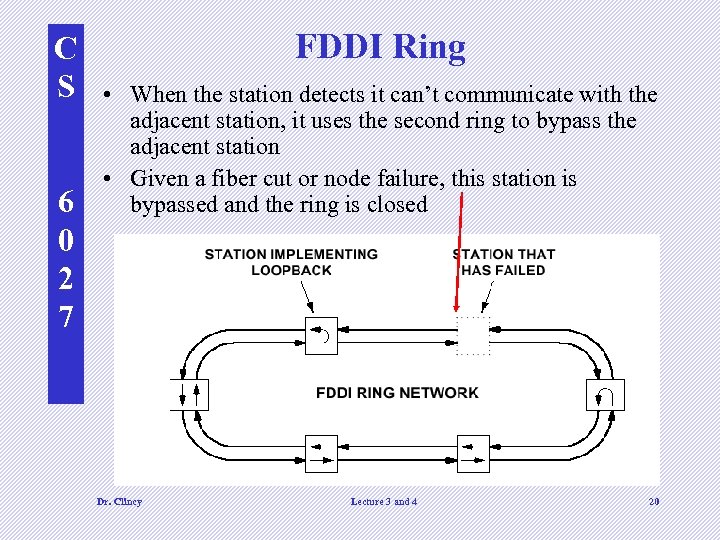 C S 6 0 2 7 FDDI Ring • When the station detects it can’t communicate with the adjacent station, it uses the second ring to bypass the adjacent station • Given a fiber cut or node failure, this station is bypassed and the ring is closed Dr. Clincy Lecture 3 and 4 20
 C WIRELESS LANS S Wireless communication is one of the fastest growing 6 0 2 7 technologies. The demand for connecting devices without the use of cables is increasing everywhere. Wireless LANs can be found on college campuses, in office buildings, and in many public areas. In this section, we concentrate on two wireless technologies for LANs: 1) IEEE 802. 11 wireless LANs, sometimes called wireless Ethernet, 2) and Bluetooth, a technology for small wireless LANs. Dr. Clincy Lecture 3 and 4 21
 C S 6 0 2 7 Wireless Transmission (not in book) • Wireless devices can transmit signals using radio frequency narrow band, infrared waves and radio frequency spread spectrum. • The frequency spread spectrum technique is typically used for internet applications • Two types of frequency spread spectrum techniques: (1) FHSS- Frequency Hopping Spread Spectrum and (2) DSSS – Direct Sequence Spread Spectrum Dr. Clincy Lecture 3 and 4 22
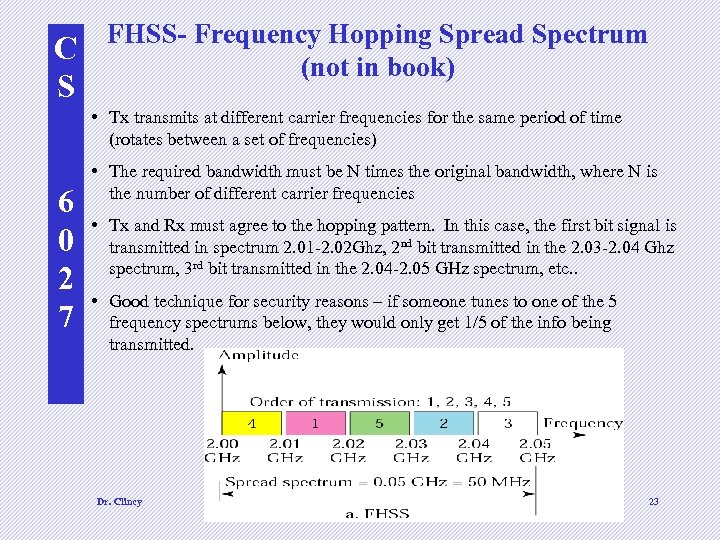 C S FHSS- Frequency Hopping Spread Spectrum (not in book) • Tx transmits at different carrier frequencies for the same period of time (rotates between a set of frequencies) 6 0 2 7 • The required bandwidth must be N times the original bandwidth, where N is the number of different carrier frequencies • Tx and Rx must agree to the hopping pattern. In this case, the first bit signal is transmitted in spectrum 2. 01 -2. 02 Ghz, 2 nd bit transmitted in the 2. 03 -2. 04 Ghz spectrum, 3 rd bit transmitted in the 2. 04 -2. 05 GHz spectrum, etc. . • Good technique for security reasons – if someone tunes to one of the 5 frequency spectrums below, they would only get 1/5 of the info being transmitted. Dr. Clincy Lecture 3 and 4 23
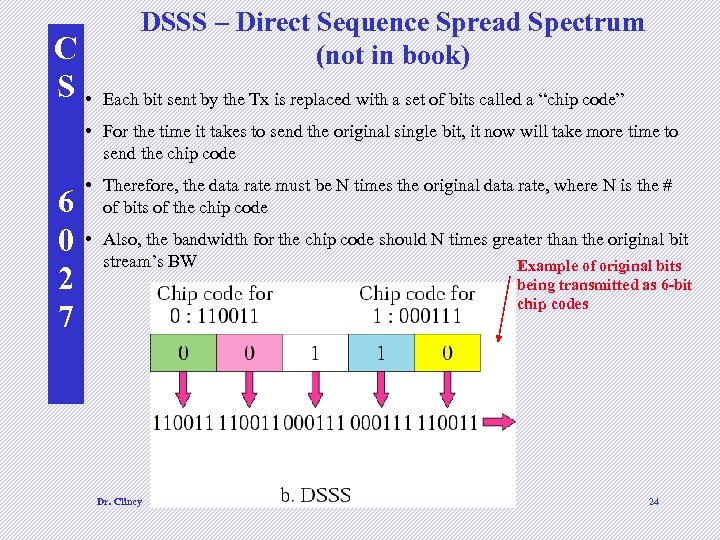 C S • DSSS – Direct Sequence Spread Spectrum (not in book) Each bit sent by the Tx is replaced with a set of bits called a “chip code” • For the time it takes to send the original single bit, it now will take more time to send the chip code 6 0 2 7 • Therefore, the data rate must be N times the original data rate, where N is the # of bits of the chip code • Also, the bandwidth for the chip code should N times greater than the original bit stream’s BW Example of original bits being transmitted as 6 -bit chip codes Dr. Clincy Lecture 3 and 4 24
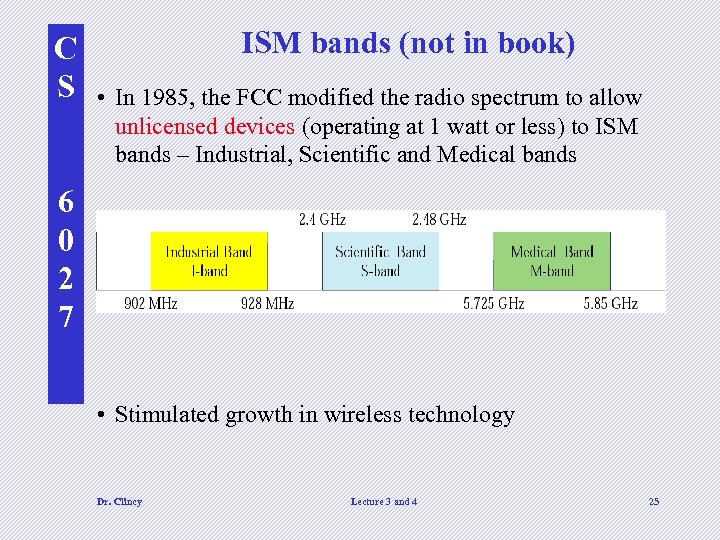 C S ISM bands (not in book) • In 1985, the FCC modified the radio spectrum to allow unlicensed devices (operating at 1 watt or less) to ISM bands – Industrial, Scientific and Medical bands 6 0 2 7 • Stimulated growth in wireless technology Dr. Clincy Lecture 3 and 4 25
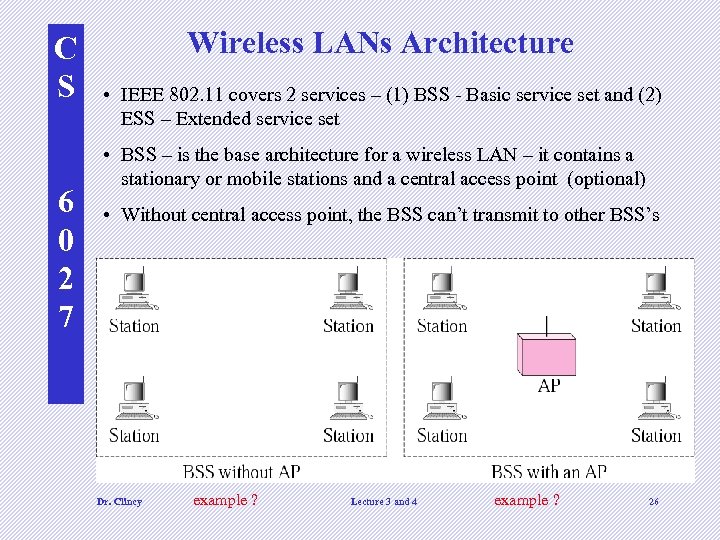 C S 6 0 2 7 Wireless LANs Architecture • IEEE 802. 11 covers 2 services – (1) BSS - Basic service set and (2) ESS – Extended service set • BSS – is the base architecture for a wireless LAN – it contains a stationary or mobile stations and a central access point (optional) • Without central access point, the BSS can’t transmit to other BSS’s Dr. Clincy example ? Lecture 3 and 4 example ? 26
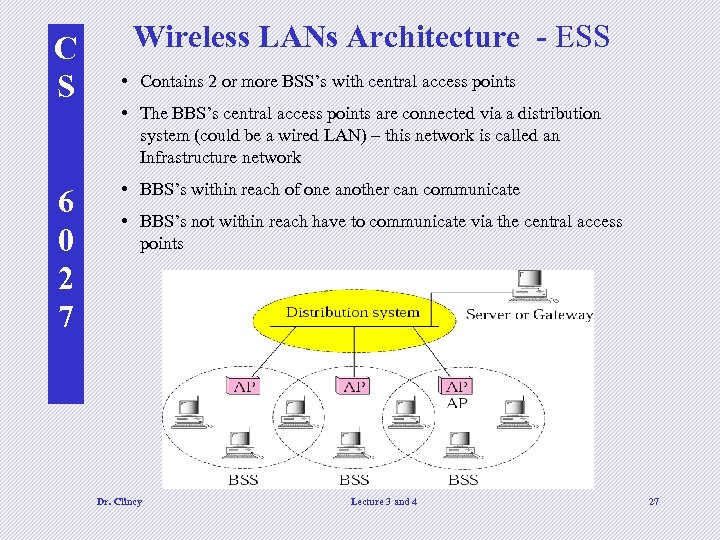 C S 6 0 2 7 Wireless LANs Architecture - ESS • Contains 2 or more BSS’s with central access points • The BBS’s central access points are connected via a distribution system (could be a wired LAN) – this network is called an Infrastructure network • BBS’s within reach of one another can communicate • BBS’s not within reach have to communicate via the central access points Dr. Clincy Lecture 3 and 4 27
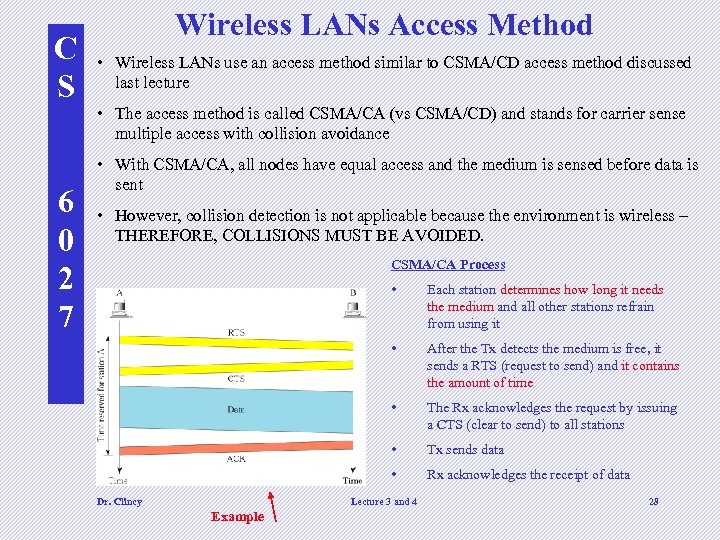 C S 6 0 2 7 Wireless LANs Access Method • Wireless LANs use an access method similar to CSMA/CD access method discussed last lecture • The access method is called CSMA/CA (vs CSMA/CD) and stands for carrier sense multiple access with collision avoidance • With CSMA/CA, all nodes have equal access and the medium is sensed before data is sent • However, collision detection is not applicable because the environment is wireless – THEREFORE, COLLISIONS MUST BE AVOIDED. CSMA/CA Process • • After the Tx detects the medium is free, it sends a RTS (request to send) and it contains the amount of time • The Rx acknowledges the request by issuing a CTS (clear to send) to all stations • Tx sends data • Dr. Clincy Each station determines how long it needs the medium and all other stations refrain from using it Rx acknowledges the receipt of data Lecture 3 and 4 Example 28
 C Bluetooth S • Wireless LAN technology designed to: 6 0 2 7 – – – connect devices of different functions (ie phone, camera, printer, etc) spontaneously form (devices find each other) connect to the Internet be small by nature – large size will cause chaos Handle data rate of 1 Mbps with 2. 4 GHz of bandwidth Can be interference between 802. 11 b wireless LAN and Bluetooth LANS (802. 15) • The networks are called “Piconet” • Defined by standard 802. 15 (PAN) Dr. Clincy Lecture 3 and 4 29
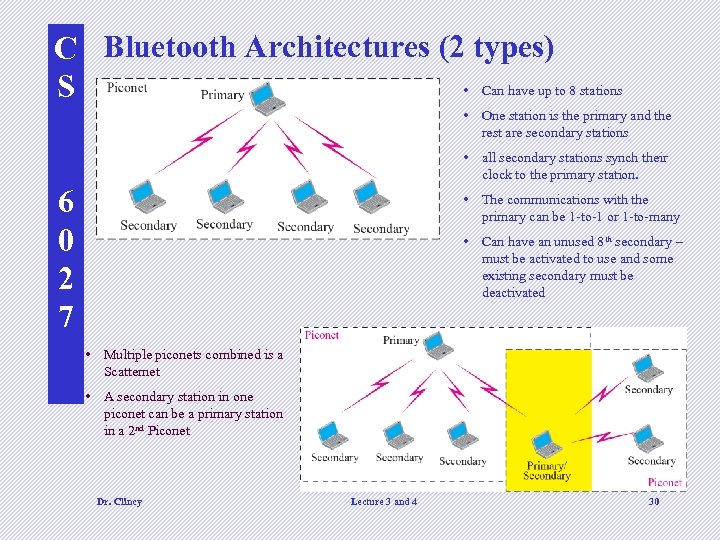 C Bluetooth Architectures (2 types) • Can have up to 8 stations S • One station is the primary and the rest are secondary stations • all secondary stations synch their clock to the primary station. 6 0 2 7 • The communications with the primary can be 1 -to-1 or 1 -to-many • Can have an unused 8 th secondary – must be activated to use and some existing secondary must be deactivated • Multiple piconets combined is a Scatternet • A secondary station in one piconet can be a primary station in a 2 nd Piconet Dr. Clincy Lecture 3 and 4 30
 C S Ch 3: Underlying Technologies 6 0 2 7 Lecture #5 Exam 1 scheduled for Wednesday: Open Book Closed Notes (no laptop), T/F, MC, Matching, Short Problems Dr. Clincy Lecture 4 31
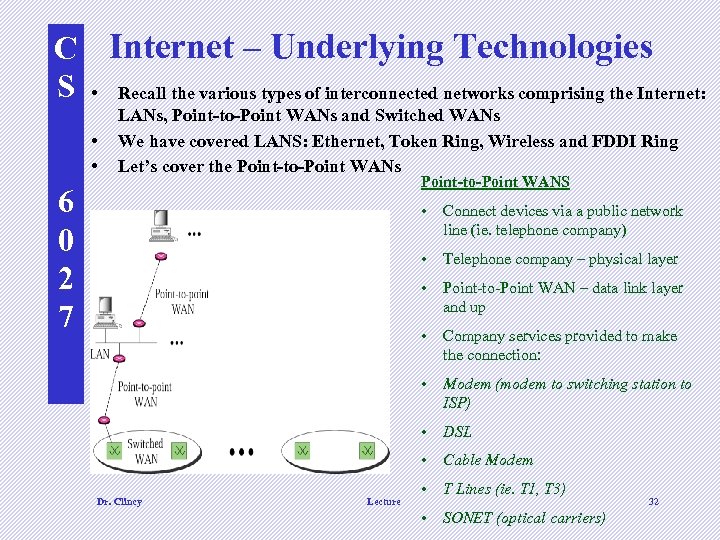 C Internet – Underlying Technologies S • Recall the various types of interconnected networks comprising the Internet: • • LANs, Point-to-Point WANs and Switched WANs We have covered LANS: Ethernet, Token Ring, Wireless and FDDI Ring Let’s cover the Point-to-Point WANs Point-to-Point WANS 6 0 2 7 • Connect devices via a public network line (ie. telephone company) • Telephone company – physical layer • Point-to-Point WAN – data link layer and up • Company services provided to make the connection: • Modem (modem to switching station to ISP) • DSL • Cable Modem Dr. Clincy Lecture • T Lines (ie. T 1, T 3) • SONET (optical carriers) 32
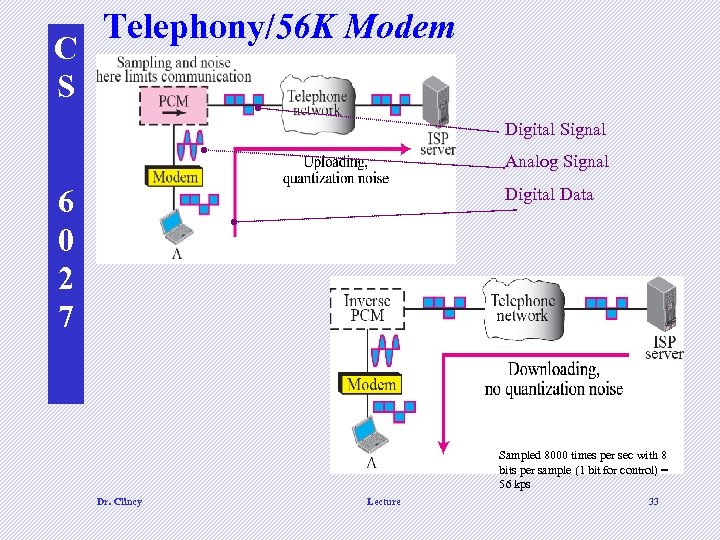 C S Telephony/56 K Modem Digital Signal Analog Signal 6 0 2 7 Digital Data Sampled 8000 times per sec with 8 bits per sample (1 bit for control) = 56 kps Dr. Clincy Lecture 33
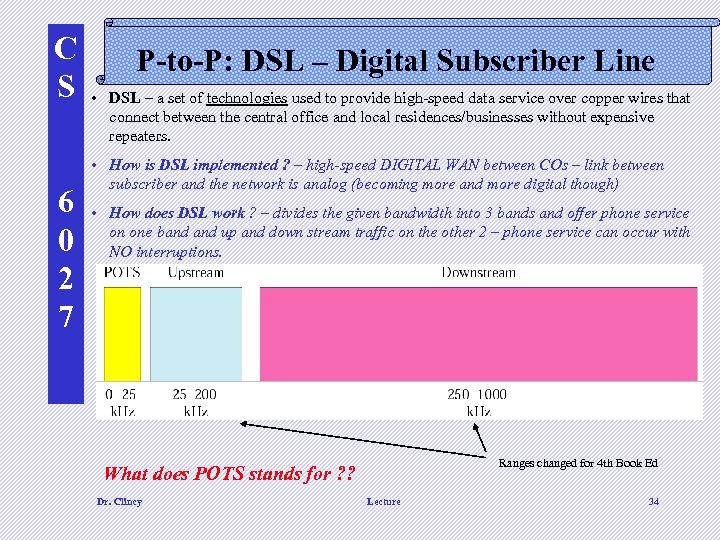 C S 6 0 2 7 P-to-P: DSL – Digital Subscriber Line • DSL – a set of technologies used to provide high-speed data service over copper wires that connect between the central office and local residences/businesses without expensive repeaters. • How is DSL implemented ? – high-speed DIGITAL WAN between COs – link between subscriber and the network is analog (becoming more and more digital though) • How does DSL work ? – divides the given bandwidth into 3 bands and offer phone service on one band up and down stream traffic on the other 2 – phone service can occur with NO interruptions. Ranges changed for 4 th Book Ed What does POTS stands for ? ? Dr. Clincy Lecture 34
 C S 6 0 2 7 P-to-P: Other DSL Services • RADSL – rate adaptive asymmetric DSL – scales back the speed of ADSL based on the quality of the wire and distance between the CO and user. • Side Note: A newer version of ADSL called Universal ADSL (or UADSL) is being deployed in an attempt to standardize ADSL to a set of standard speeds – speeds vary across the Country • HDSL – high bit rate DSL – an digital alternative to T-1 analog service (T-1 contains multiple high-speed analog lines) • SDSL – symmetric DSL – same as HDSL however only 1 line is provided (is full-duplex) • VDSL – very high bit rate DSL – similar to ADSL however, in addition to using twisted-pair, coaxial and fiber -optic can be used in getting a much higher bit rate Dr. Clincy Lecture 35
 C S P-to-P: Cable Modem • • 6 0 2 7 • • • Still talking about point-to-point WANS Uses the cable TV network How does it work ? . some of the bandwidth dedicated to television signals is used for data traffic. How does it work ? . The data signals are modulated into sine waves and placed on analog channels How does it work ? . Typically, the BW in a neighborhood (or certain proximity) is shared (like a LAN in an office). Therefore, you never know if you have access to all of the BW. The more people using cable modems the worst the performance. Some cable companies can dedicate some BW for phone service therefore offering voice, video/TV and data services on one cable Cable modems are faster than computer modems because they are not limited by the 3000 Hz BW of the telephone line The newer cable systems uses digital cable boxes and digital networks can send/receive data on separate digital channels (draw picture of typical cable/video network – briefly explain history) Dr. Clincy Lecture 36
 C S 6 0 2 7 P-to-P: T 1/T 3 Service • Transport carriers originally designed for voice (672 circuits ? ? ? ). • Typical “long haul” or “back bone” network – also used to interconnect WANs we mentioned • T 1 line can send 8000 193 -bit frames in one second • T 3 line can send 224, 000 193 -bit frames in one second or be treated as 28 T 1 lines (we called this a channel T 1) • Fractional T lines – several customers sharing a T 1 line – their data is multiplexed onto a single T 1. Dr. Clincy Lecture 37
 C S 6 0 2 7 P-to-P: SONET • SONET means Synchronous Optical Networks – it’s a standard that defines a high-speed fiber-optic data carrier. • Electrical signals (called STSs – synchronous transport signals) are converted to light or optical signals (called optical carriers) • Comes in different rates, OC-1, OC-3, OC-9 …. . OC 48 …. OC-192 • The lowest data rate for SONET (OC-1) is greater than a T 3’s data rate – Wow ! Dr. Clincy Lecture 38
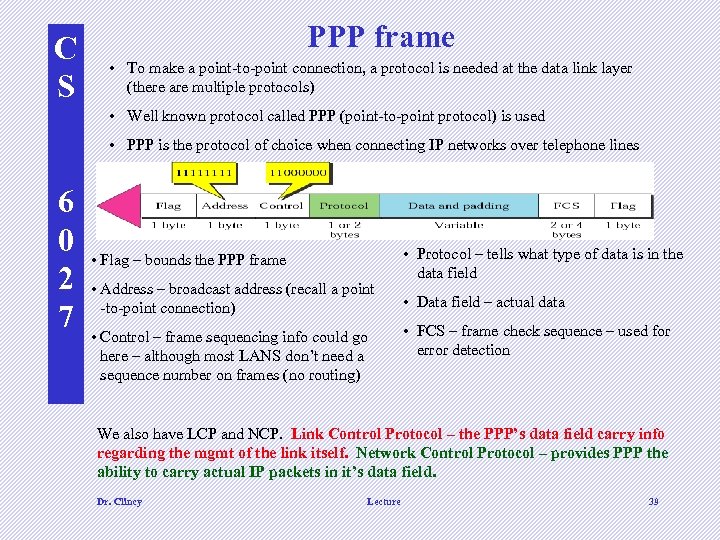 C S PPP frame • To make a point-to-point connection, a protocol is needed at the data link layer (there are multiple protocols) • Well known protocol called PPP (point-to-point protocol) is used • PPP is the protocol of choice when connecting IP networks over telephone lines 6 0 2 7 • Flag – bounds the PPP frame • Address – broadcast address (recall a point -to-point connection) • Control – frame sequencing info could go here – although most LANS don’t need a sequence number on frames (no routing) • Protocol – tells what type of data is in the data field • Data field – actual data • FCS – frame check sequence – used for error detection We also have LCP and NCP. Link Control Protocol – the PPP’s data field carry info regarding the mgmt of the link itself. Network Control Protocol – provides PPP the ability to carry actual IP packets in it’s data field. Dr. Clincy Lecture 39
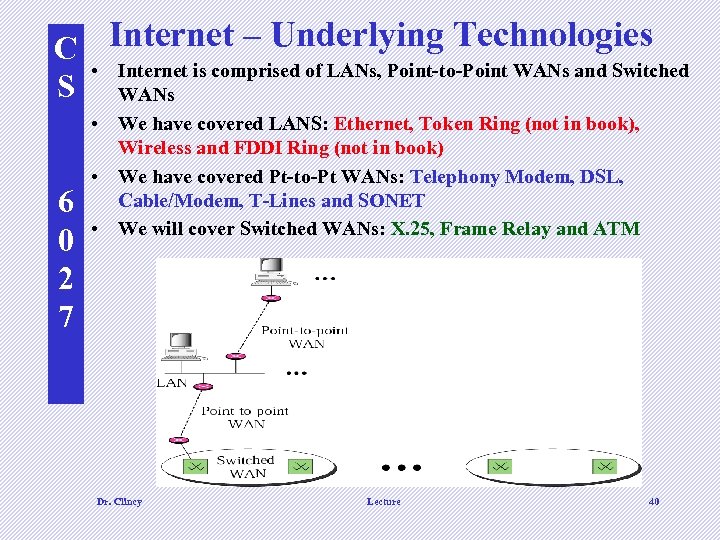 C Internet – Underlying Technologies • Internet is comprised of LANs, Point-to-Point WANs and Switched S WANs 6 0 2 7 • We have covered LANS: Ethernet, Token Ring (not in book), Wireless and FDDI Ring (not in book) • We have covered Pt-to-Pt WANs: Telephony Modem, DSL, Cable/Modem, T-Lines and SONET • We will cover Switched WANs: X. 25, Frame Relay and ATM Dr. Clincy Lecture 40
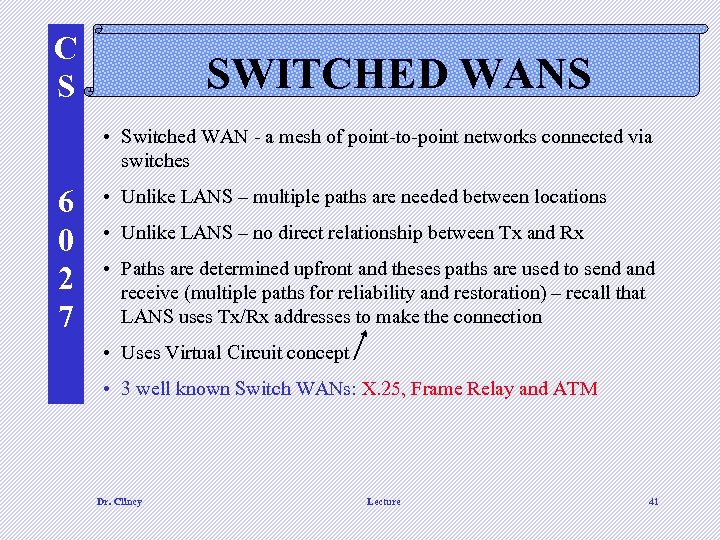 C S SWITCHED WANS • Switched WAN - a mesh of point-to-point networks connected via switches 6 0 2 7 • Unlike LANS – multiple paths are needed between locations • Unlike LANS – no direct relationship between Tx and Rx • Paths are determined upfront and theses paths are used to send and receive (multiple paths for reliability and restoration) – recall that LANS uses Tx/Rx addresses to make the connection • Uses Virtual Circuit concept • 3 well known Switch WANs: X. 25, Frame Relay and ATM Dr. Clincy Lecture 41
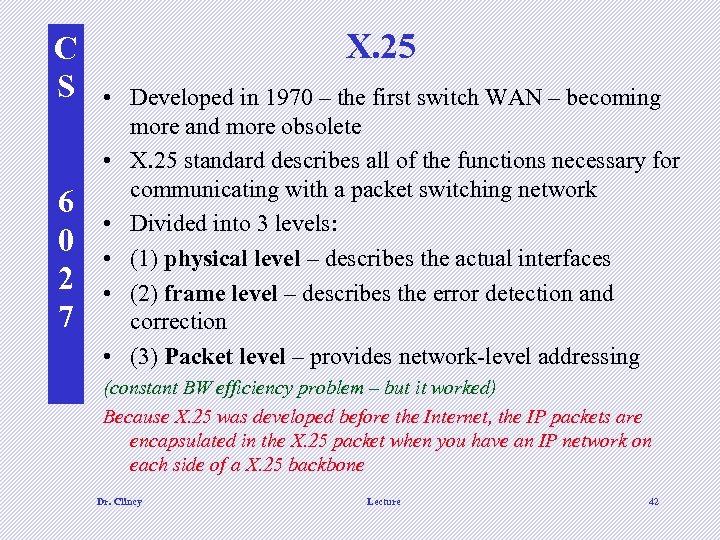 C S 6 0 2 7 X. 25 • Developed in 1970 – the first switch WAN – becoming more and more obsolete • X. 25 standard describes all of the functions necessary for communicating with a packet switching network • Divided into 3 levels: • (1) physical level – describes the actual interfaces • (2) frame level – describes the error detection and correction • (3) Packet level – provides network-level addressing (constant BW efficiency problem – but it worked) Because X. 25 was developed before the Internet, the IP packets are encapsulated in the X. 25 packet when you have an IP network on each side of a X. 25 backbone Dr. Clincy Lecture 42
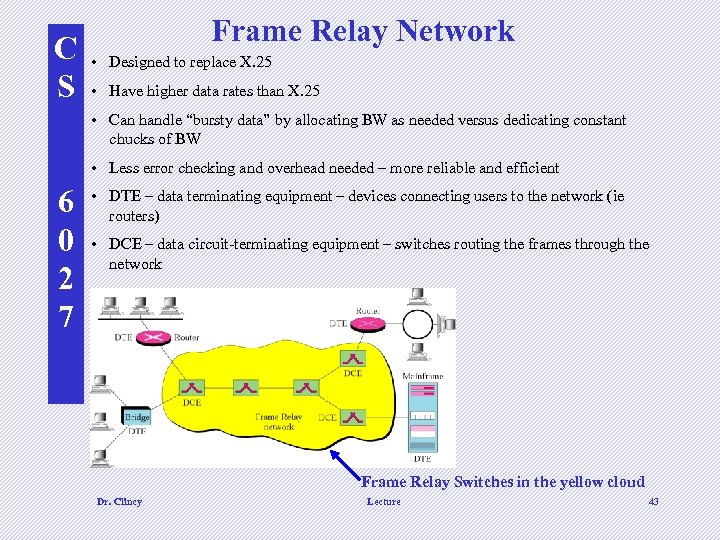 C S Frame Relay Network • Designed to replace X. 25 • Have higher data rates than X. 25 • Can handle “bursty data” by allocating BW as needed versus dedicating constant chucks of BW • Less error checking and overhead needed – more reliable and efficient 6 0 2 7 • DTE – data terminating equipment – devices connecting users to the network (ie routers) • DCE – data circuit-terminating equipment – switches routing the frames through the network Frame Relay Switches in the yellow cloud Dr. Clincy Lecture 43
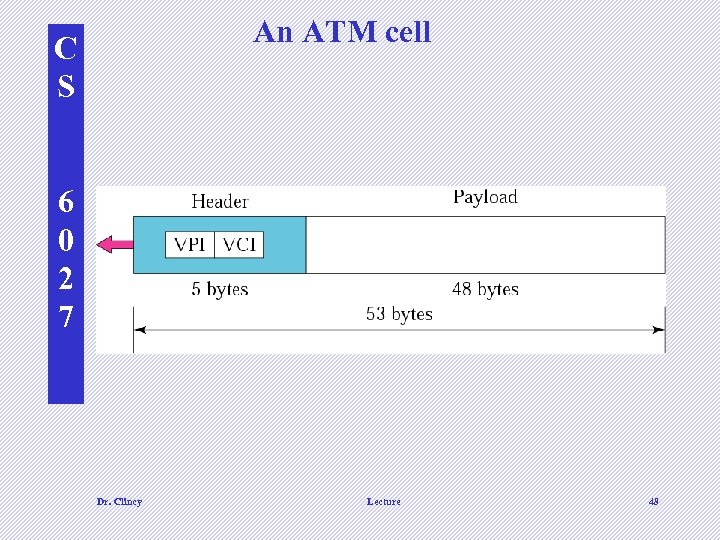
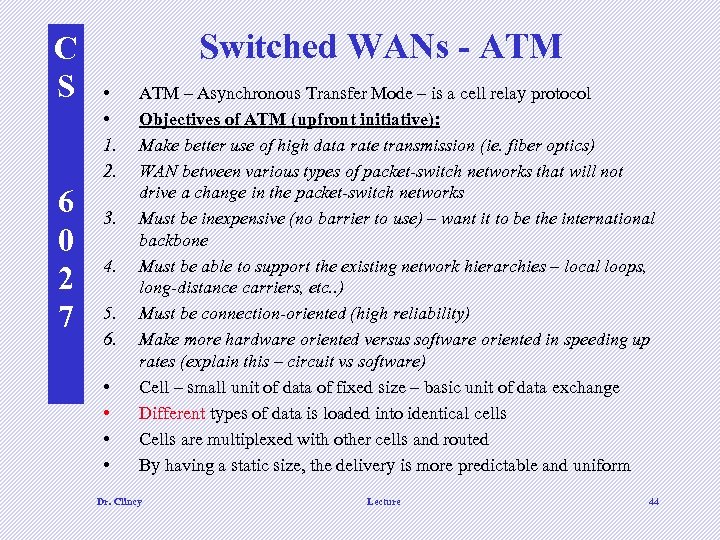 C S 6 0 2 7 Switched WANs - ATM • • 1. 2. 3. 4. 5. 6. • • ATM – Asynchronous Transfer Mode – is a cell relay protocol Objectives of ATM (upfront initiative): Make better use of high data rate transmission (ie. fiber optics) WAN between various types of packet-switch networks that will not drive a change in the packet-switch networks Must be inexpensive (no barrier to use) – want it to be the international backbone Must be able to support the existing network hierarchies – local loops, long-distance carriers, etc. . ) Must be connection-oriented (high reliability) Make more hardware oriented versus software oriented in speeding up rates (explain this – circuit vs software) Cell – small unit of data of fixed size – basic unit of data exchange Different types of data is loaded into identical cells Cells are multiplexed with other cells and routed By having a static size, the delivery is more predictable and uniform Dr. Clincy Lecture 44
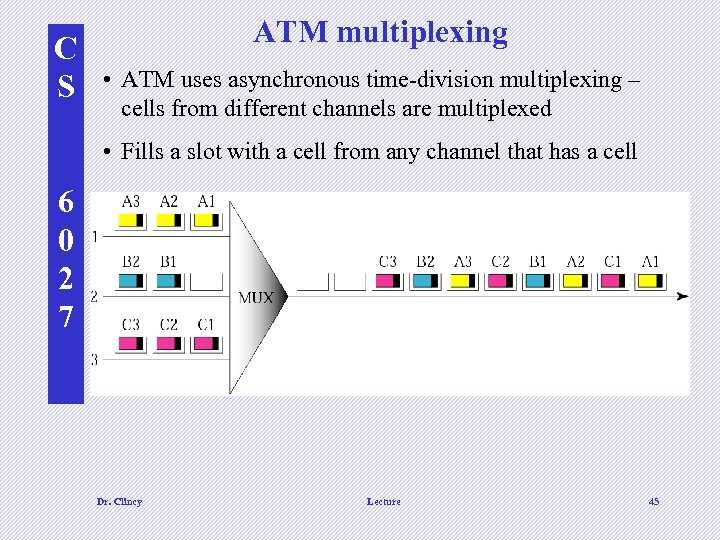 C S ATM multiplexing • ATM uses asynchronous time-division multiplexing – cells from different channels are multiplexed • Fills a slot with a cell from any channel that has a cell 6 0 2 7 Dr. Clincy Lecture 45
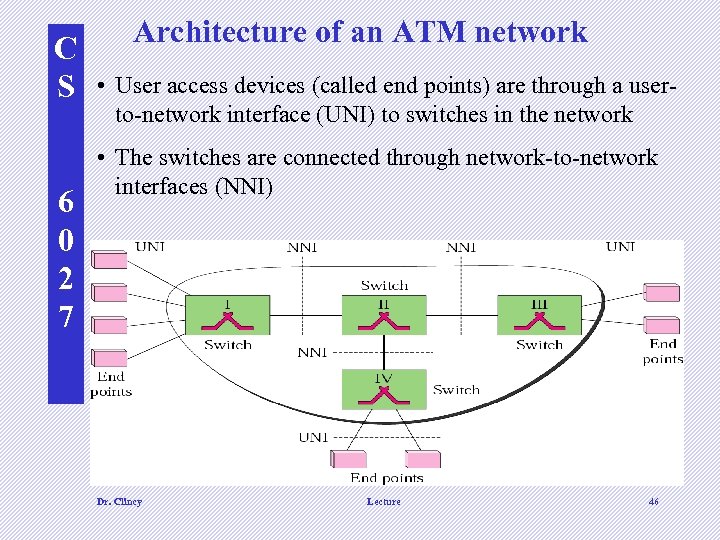 C S 6 0 2 7 Architecture of an ATM network • User access devices (called end points) are through a userto-network interface (UNI) to switches in the network • The switches are connected through network-to-network interfaces (NNI) Dr. Clincy Lecture 46
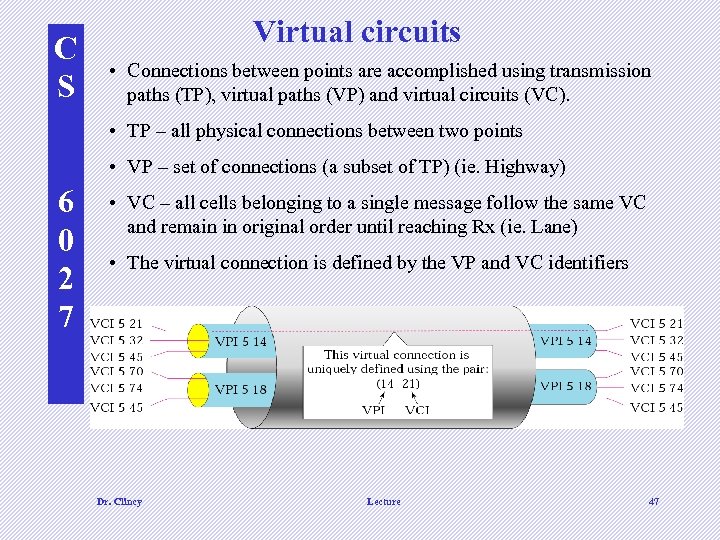 C S Virtual circuits • Connections between points are accomplished using transmission paths (TP), virtual paths (VP) and virtual circuits (VC). • TP – all physical connections between two points • VP – set of connections (a subset of TP) (ie. Highway) 6 0 2 7 • VC – all cells belonging to a single message follow the same VC and remain in original order until reaching Rx (ie. Lane) • The virtual connection is defined by the VP and VC identifiers Dr. Clincy Lecture 47
 An ATM cell C S 6 0 2 7 Dr. Clincy Lecture 48
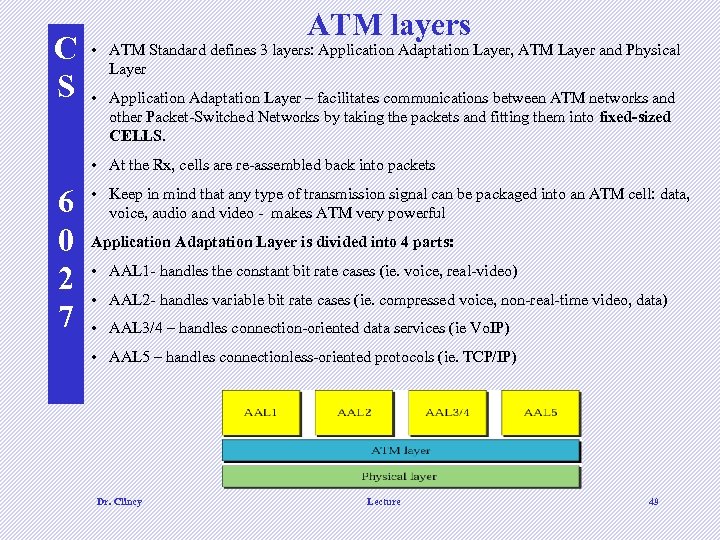 C S ATM layers • ATM Standard defines 3 layers: Application Adaptation Layer, ATM Layer and Physical Layer • Application Adaptation Layer – facilitates communications between ATM networks and other Packet-Switched Networks by taking the packets and fitting them into fixed-sized CELLS. • At the Rx, cells are re-assembled back into packets 6 0 2 7 • Keep in mind that any type of transmission signal can be packaged into an ATM cell: data, voice, audio and video - makes ATM very powerful Application Adaptation Layer is divided into 4 parts: • AAL 1 - handles the constant bit rate cases (ie. voice, real-video) • AAL 2 - handles variable bit rate cases (ie. compressed voice, non-real-time video, data) • AAL 3/4 – handles connection-oriented data services (ie Vo. IP) • AAL 5 – handles connectionless-oriented protocols (ie. TCP/IP) Dr. Clincy Lecture 49
 C S 6 0 2 7 ATM layers • ATM Layer in general – routing, flow control switching & multiplexing • ATM Layer – going down – accepts bytes segments and translate to cells • ATM Layer – going up – translate cells back into byte segments – keep in mind that a node can be acting as both an intermediate and Rx node (and Tx) • ATM Physical Layer – translate cells into a flow of bits (or signals) and vice versa Dr. Clincy Lecture 50
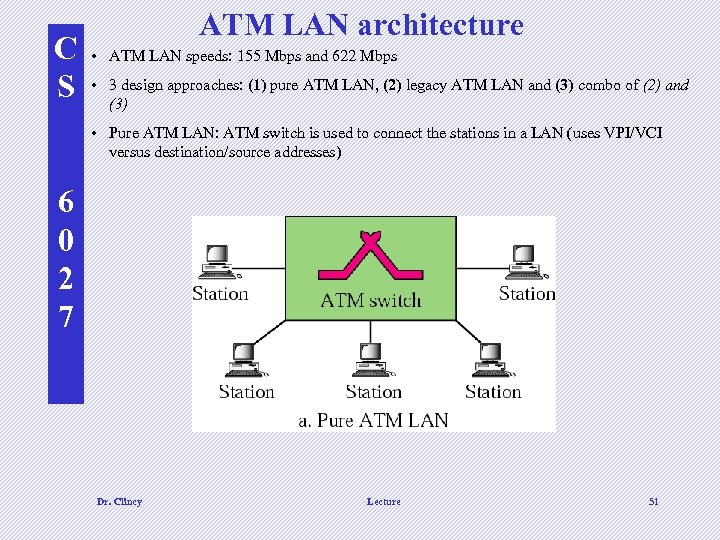 C S ATM LAN architecture • ATM LAN speeds: 155 Mbps and 622 Mbps • 3 design approaches: (1) pure ATM LAN, (2) legacy ATM LAN and (3) combo of (2) and (3) • Pure ATM LAN: ATM switch is used to connect the stations in a LAN (uses VPI/VCI versus destination/source addresses) 6 0 2 7 Dr. Clincy Lecture 51
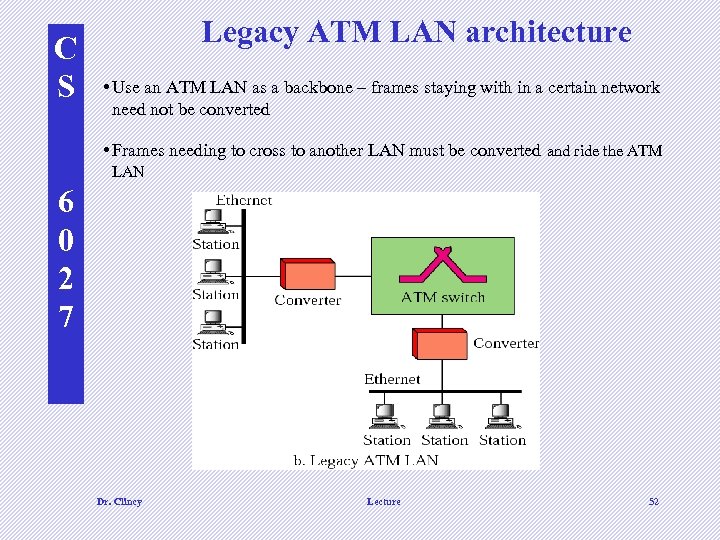 C S Legacy ATM LAN architecture • Use an ATM LAN as a backbone – frames staying with in a certain network need not be converted • Frames needing to cross to another LAN must be converted and ride the ATM LAN 6 0 2 7 Dr. Clincy Lecture 52
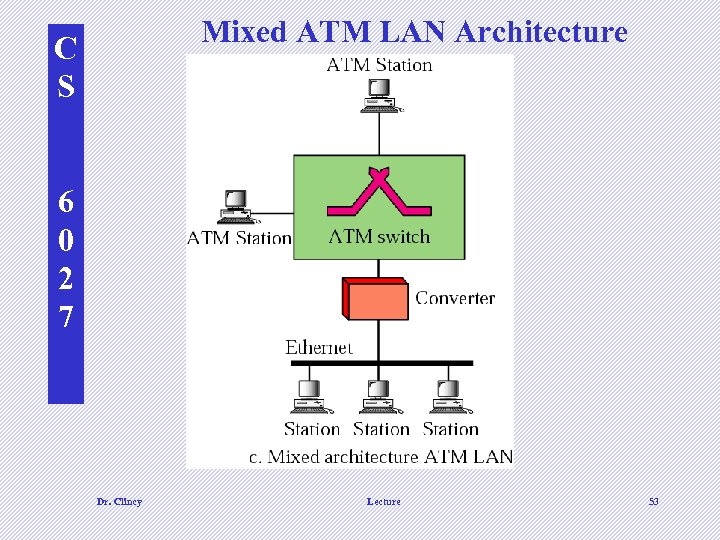 Mixed ATM LAN Architecture C S 6 0 2 7 Dr. Clincy Lecture 53
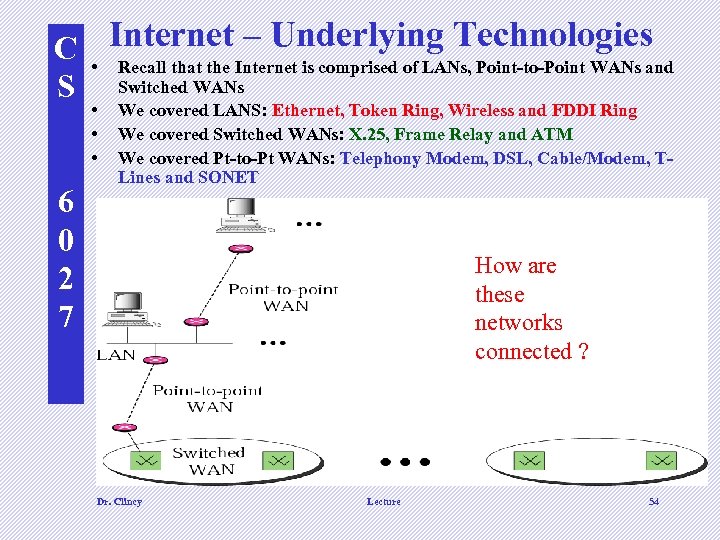 – Underlying Technologies C • Internet is comprised of LANs, Point-to-Point WANs and Recall that the S Switched WANs • • • 6 0 2 7 We covered LANS: Ethernet, Token Ring, Wireless and FDDI Ring We covered Switched WANs: X. 25, Frame Relay and ATM We covered Pt-to-Pt WANs: Telephony Modem, DSL, Cable/Modem, TLines and SONET How are these networks connected ? Dr. Clincy Lecture 54
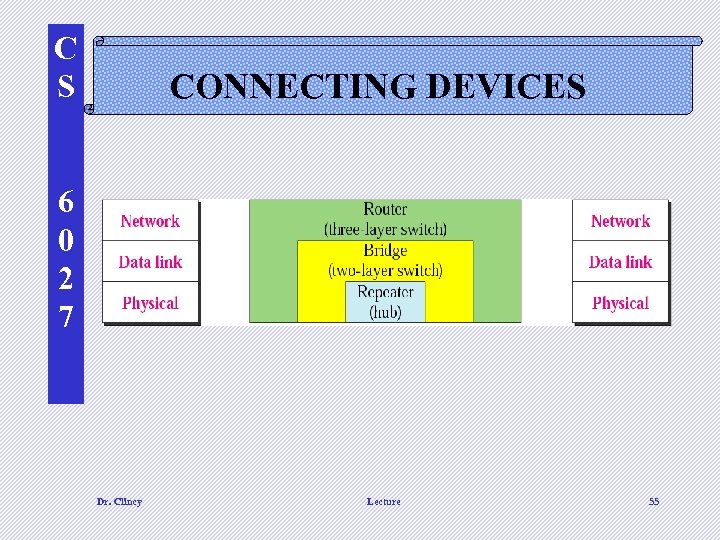 C S CONNECTING DEVICES 6 0 2 7 Dr. Clincy Lecture 55
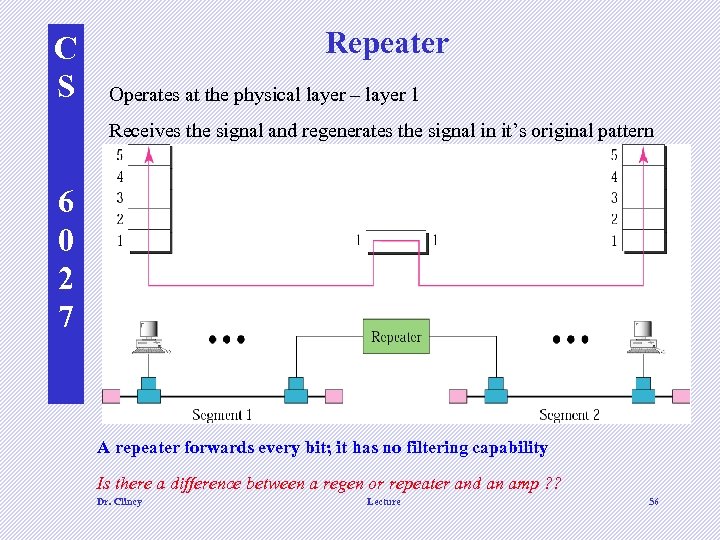 C S Repeater Operates at the physical layer – layer 1 Receives the signal and regenerates the signal in it’s original pattern 6 0 2 7 A repeater forwards every bit; it has no filtering capability Is there a difference between a regen or repeater and an amp ? ? Dr. Clincy Lecture 56
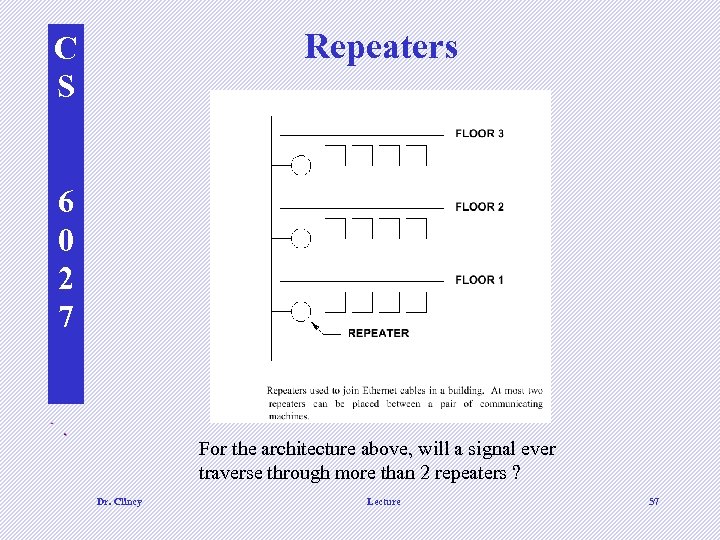 Repeaters C S 6 0 2 7 d For the architecture above, will a signal ever traverse through more than 2 repeaters ? Dr. Clincy Lecture 57
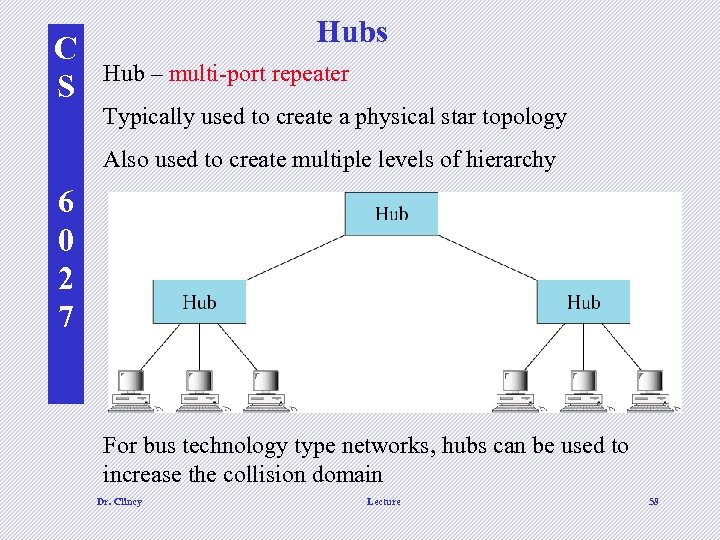 C S Hubs Hub – multi-port repeater Typically used to create a physical star topology Also used to create multiple levels of hierarchy 6 0 2 7 For bus technology type networks, hubs can be used to increase the collision domain Dr. Clincy Lecture 58
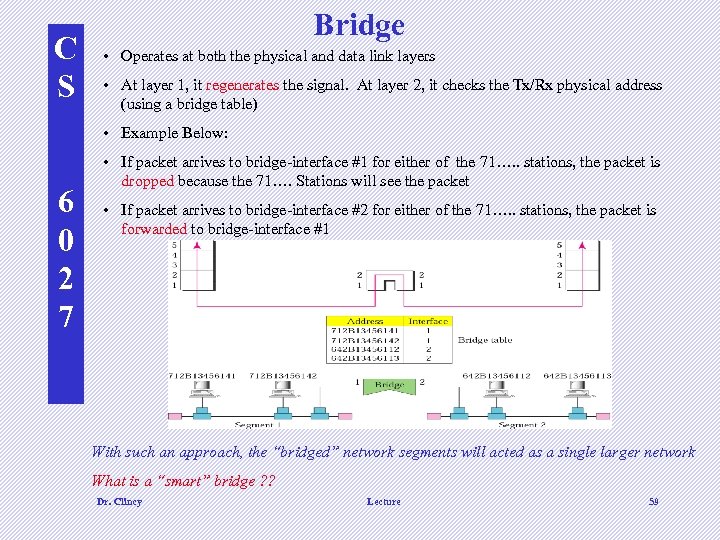 C S Bridge • Operates at both the physical and data link layers • At layer 1, it regenerates the signal. At layer 2, it checks the Tx/Rx physical address (using a bridge table) • Example Below: 6 0 2 7 • If packet arrives to bridge-interface #1 for either of the 71…. . stations, the packet is dropped because the 71…. Stations will see the packet • If packet arrives to bridge-interface #2 for either of the 71…. . stations, the packet is forwarded to bridge-interface #1 With such an approach, the “bridged” network segments will acted as a single larger network What is a “smart” bridge ? ? Dr. Clincy Lecture 59
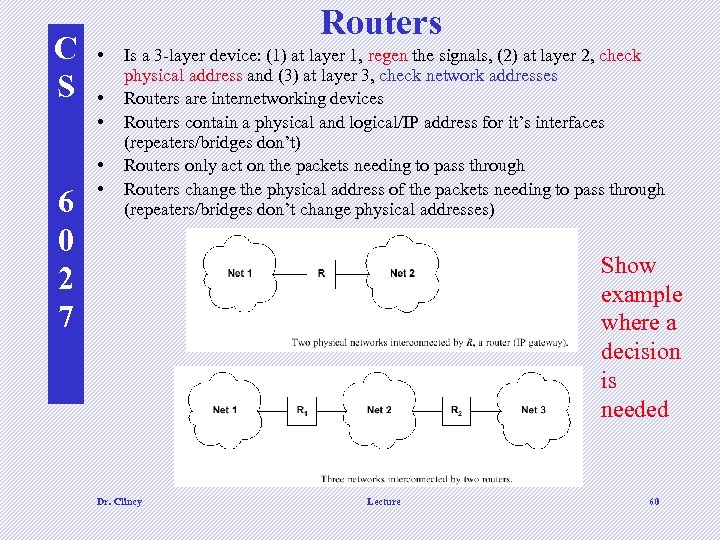 C S 6 0 2 7 Routers • • • Is a 3 -layer device: (1) at layer 1, regen the signals, (2) at layer 2, check physical address and (3) at layer 3, check network addresses Routers are internetworking devices Routers contain a physical and logical/IP address for it’s interfaces (repeaters/bridges don’t) Routers only act on the packets needing to pass through Routers change the physical address of the packets needing to pass through (repeaters/bridges don’t change physical addresses) Show example where a decision is needed d d Dr. Clincy Lecture 60
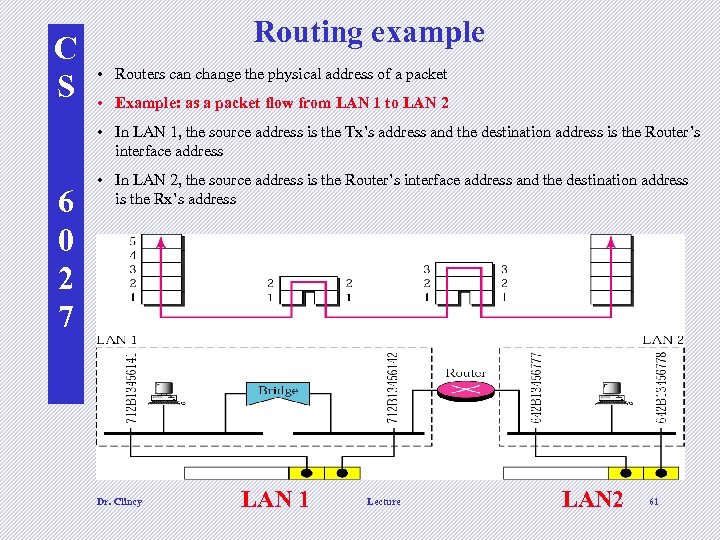 C S Routing example • Routers can change the physical address of a packet • Example: as a packet flow from LAN 1 to LAN 2 • In LAN 1, the source address is the Tx’s address and the destination address is the Router’s interface address 6 0 2 7 • In LAN 2, the source address is the Router’s interface address and the destination address is the Rx’s address Dr. Clincy LAN 1 Lecture LAN 2 61
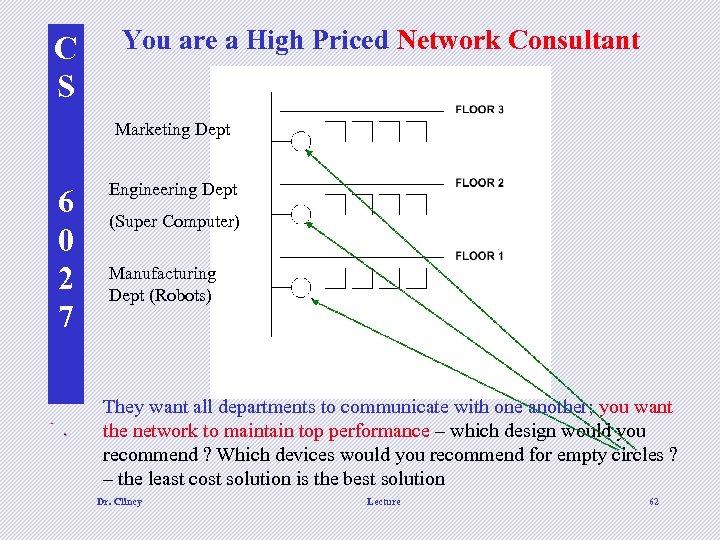 C S You are a High Priced Network Consultant Marketing Dept 6 0 2 7 Engineering Dept (Super Computer) Manufacturing Dept (Robots) d They want all departments to communicate with one another; you want the network to maintain top performance – which design would you recommend ? Which devices would you recommend for empty circles ? – the least cost solution is the best solution Dr. Clincy Lecture 62