 Скачать презентацию Business Process Management Business process l A
bbba5f3f3d60eaa133f4d911df12b1de.ppt
- Количество слайдов: 45



Business Process Management
Business process l ”A structured, measured set of activities designed to produce a specific output for a particular customer or market… A process is thus a specific ordering of work activities across time and space, with a beginning and an end, and clearly defined inputs and outputs: a structure for action. ” l “Taking a process approach implies adopting the customer’s point of view. Processes are the structure by which an organization does what is necessary to produce value for its customers. ” Davenport (1993) 2
Business Processes Defined l l A business process is a collection of interrelated tasks, which are designed to deliver a particular result Types of business processes Management processes - processes that govern the operation of a system Operational processes - processes that constitute the core activities of the business and delivers the primary value of the organization Supporting processes - which support the core processes
Business process l A business process is a collection of interrelated tasks, which are designed to deliver a particular result. l Business processes span potentially multiple departments l Process can be l l l l Large and complex Dynamic Widely distributed Long running Mix of business and technical steps Involve human intelligence and judgement Processes can be defined in workflows or process flows define the sequence of steps and any logic associated l These can be automated but do not have to be 4
What is Business Process Management (BPM)? l BPM is a discipline combining software capabilities and business expertise through people, systems, and information to accelerate time between process improvements, facilitating business innovation l BPM software supports the definition and automation of workflows involving individuals and systems l l l The definition and automation of workflows Monitoring and optimisation of running workflows BPM also enables flexible deployment, monitoring and tracking, process focus and efficiency.
BPM and process re-engineering l The concept of Business Process Management came from l l l Process re-engineering: Analysing and redesigning key processes within an organisation in order to improve performance Workflow automation (typically person-centric processes such as purchase order approval) BPM is complementary to process re-engineering and sixsigma projects but can also be used for any process automation project. l l Process re-engineering/six sigma is a business driven initiative to measure and optimise performance at a business level. Process re-engineering/six sigma does not require IT integration, it may simply add reports to existing systems.
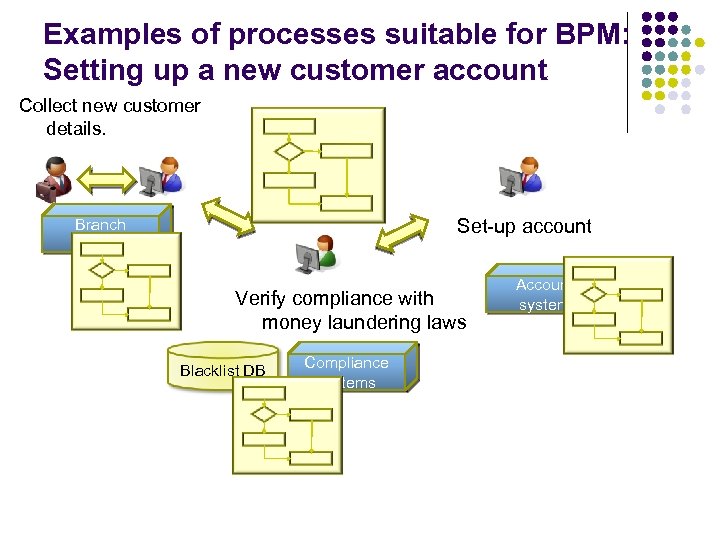
Examples of processes suitable for BPM: Setting up a new customer account Collect new customer details. Pending Set-up account Branch network Verify compliance with money laundering laws Blacklist DB Compliance systems Account system
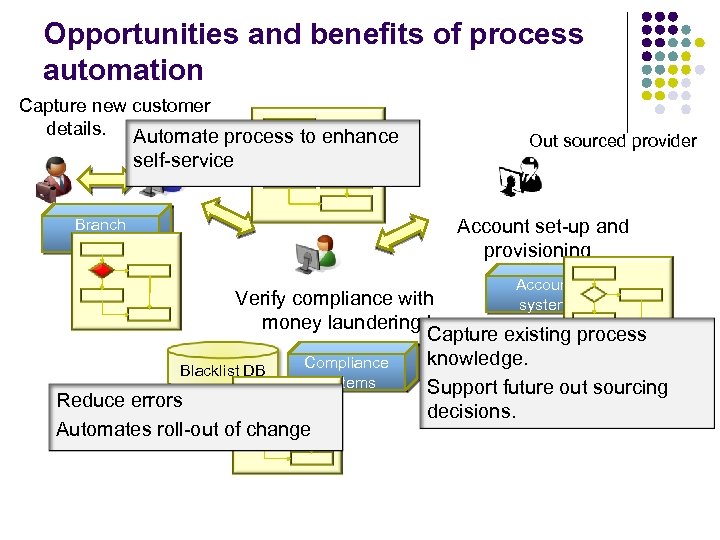
Opportunities and benefits of process automation Capture new customer details. Automate process to enhance self-service Branch network Pending Out sourced provider Account set-up and provisioning Account system Verify compliance with money laundering laws Capture existing process knowledge. Compliance Blacklist DB systems Support future out sourcing Reduce errors decisions. Automates roll-out of change
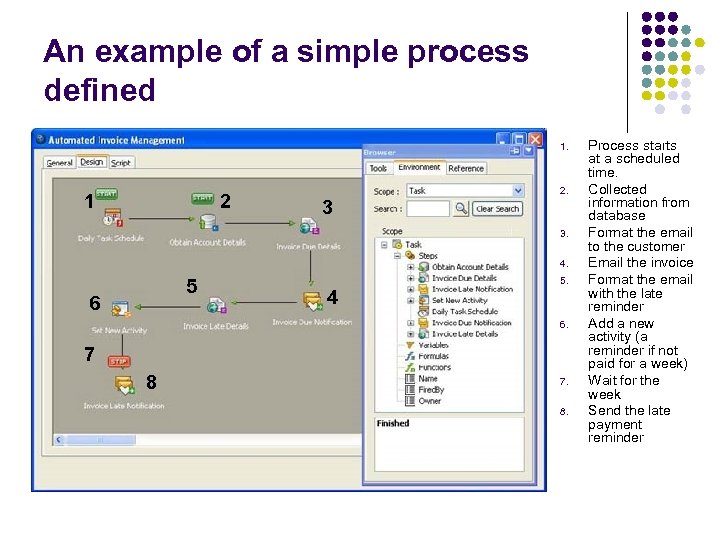
An example of a simple process defined 1. 1 2 3 2. 3. 4. 5 6 4 5. 6. 7 8 7. 8. Process starts at a scheduled time. Collected information from database Format the email to the customer Email the invoice Format the email with the late reminder Add a new activity (a reminder if not paid for a week) Wait for the week Send the late payment reminder
Other examples of processes for automation 1: l Process: New Hire Integration l l l l Background Check Allocation of office space Reservation of phone, pager Creation of access rights in operational systems Problem: Lost productivity due to late provisioning of work infrastructure Automating the process coordination reduced cycle time from 2 week average to 2 days Automation Goal: Performance
Other examples of processes for automation 2: l Process: Employee Termination l l l Removal of computer access rights Collection of company-issued phone, pager, access card Removal from employee directory Problem: Not all equipment is collected, access rights remain after an employee leaves Automating the process coordination ensures that no step is forgotten Automation Goal: Compliance
Business Process Management: Evolution from simple workflow
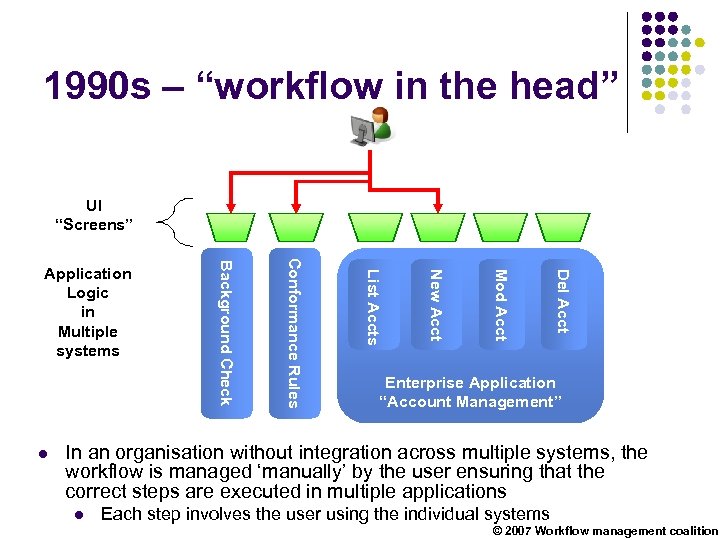
1990 s – “workflow in the head” UI “Screens” Del Acct Mod Acct New Acct List Accts Conformance Rules l Background Check Application Logic in Multiple systems Enterprise Application “Account Management” In an organisation without integration across multiple systems, the workflow is managed ‘manually’ by the user ensuring that the correct steps are executed in multiple applications l Each step involves the user using the individual systems © 2007 Workflow management coalition
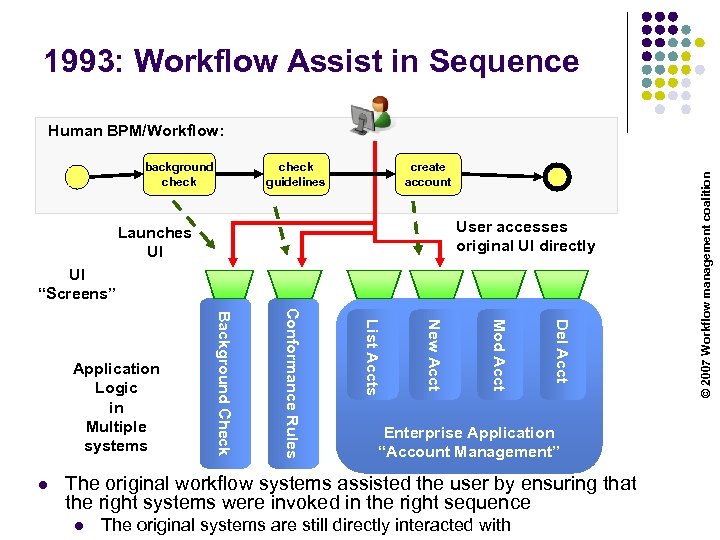
1993: Workflow Assist in Sequence background check guidelines create account User accesses original UI directly Launches UI UI “Screens” Del Acct Mod Acct New Acct List Accts Conformance Rules l Background Check Application Logic in Multiple systems Enterprise Application “Account Management” The original workflow systems assisted the user by ensuring that the right systems were invoked in the right sequence l The original systems are still directly interacted with © 2007 Workflow management coalition Human BPM/Workflow:
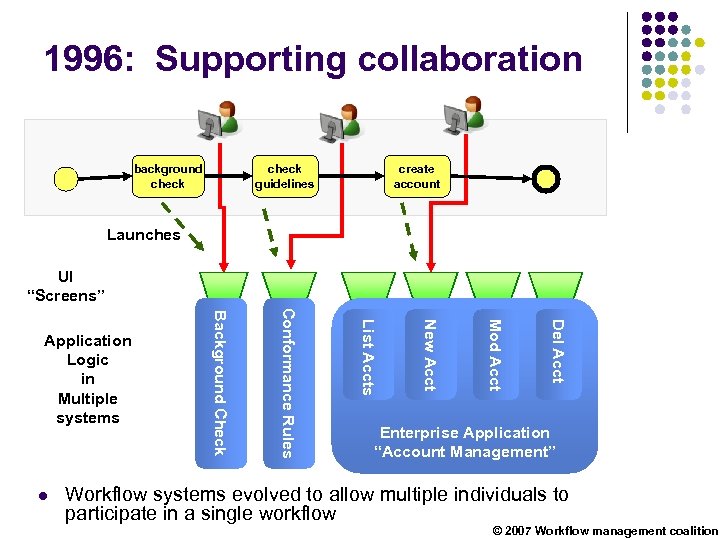
1996: Supporting collaboration background check guidelines create account Launches UI “Screens” Del Acct Mod Acct New Acct List Accts Conformance Rules l Background Check Application Logic in Multiple systems Enterprise Application “Account Management” Workflow systems evolved to allow multiple individuals to participate in a single workflow © 2007 Workflow management coalition
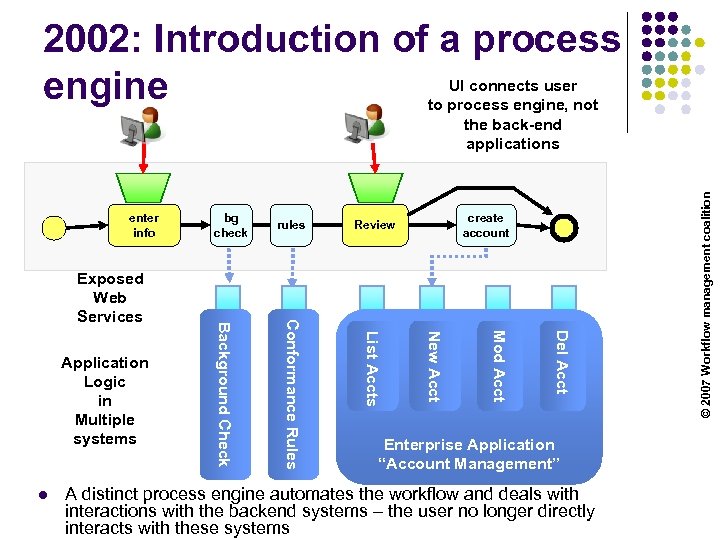
2002: Introduction of a process UI connects user engine to process engine, not enter info create account Review Del Acct Mod Acct New Acct List Accts l rules Conformance Rules Application Logic in Multiple systems Background Check Exposed Web Services bg check Enterprise Application “Account Management” A distinct process engine automates the workflow and deals with interactions with the backend systems – the user no longer directly interacts with these systems © 2007 Workflow management coalition the back-end applications
The process engine l A process is an entity that typically encapsulates an interaction of a user with business entities (applications). l Can includes user-centric interactions (email reminders, task lists etc) and system interactions l l . A process typically updated and changes the state of the business entities indirectly l The business application mediates these changes l A business process may have its own state which may exist only for the duration of the process; at the completion of the process the state ceases to exist. l The duration of the state may be very long l Process state may be transient or persistent. 17
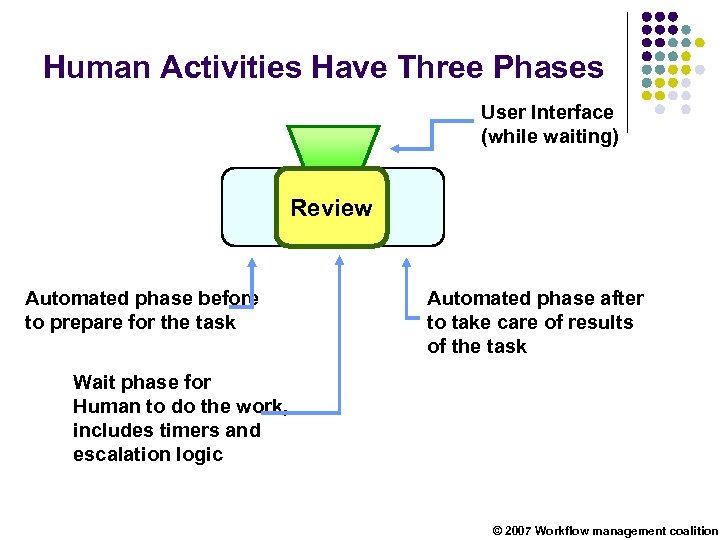
Human Activities Have Three Phases User Interface (while waiting) Review Automated phase before to prepare for the task Automated phase after to take care of results of the task Wait phase for Human to do the work, includes timers and escalation logic © 2007 Workflow management coalition
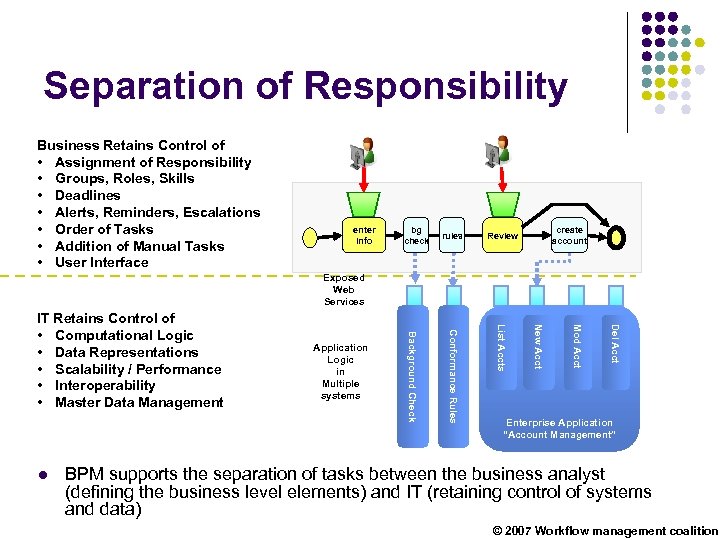
Separation of Responsibility Business Retains Control of • Assignment of Responsibility • Groups, Roles, Skills • Deadlines • Alerts, Reminders, Escalations • Order of Tasks • Addition of Manual Tasks • User Interface enter info bg check rules create account Review Exposed Web Services Del Acct Mod Acct New Acct List Accts Conformance Rules l Application Logic in Multiple systems Background Check IT Retains Control of • Computational Logic • Data Representations • Scalability / Performance • Interoperability • Master Data Management Enterprise Application “Account Management” BPM supports the separation of tasks between the business analyst (defining the business level elements) and IT (retaining control of systems and data) © 2007 Workflow management coalition
Business Process Management
BPM in process automation l BPM can also be tactically to automate or optimise processes l l To formalise and capture knowledge l l The activity of defining the process means that knowledge in people’s heads is captured (and hence supports out-sourcing). To reduce the opportunity for human error l l Removing manual processing steps ensures appropriate processes are followed. The defined process is enforced with the BPM software and opportunity for human error reduced. To ensure compliance with legal or organisational requirements l The process definitions can be audited and the execution of the processes tracked
Key components of a BPM software product l Modelling and simulation l l l Monitoring (Business Activity Monitoring) l l Support the design and simulation of business processes. Uses graphical tools and standardised specification languages to define the process Track performance of processes and operational activity Process orchestration and optimisation l l Execute the process definitions Modify and evolve the definitions to improve performance.
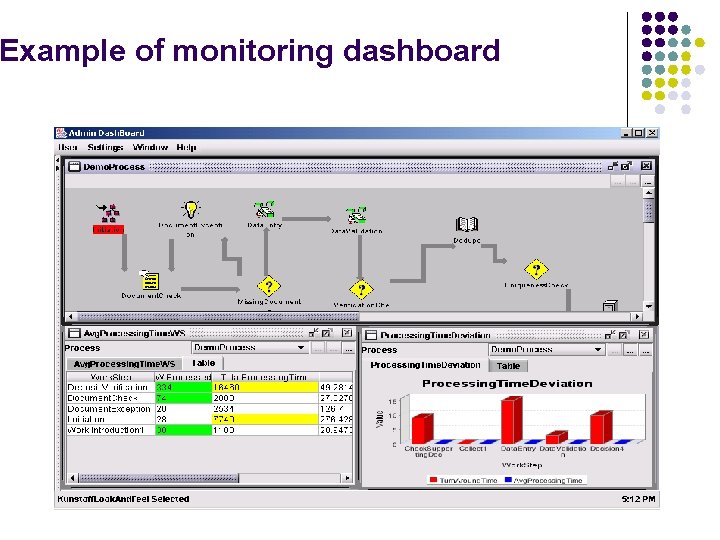
Example of monitoring dashboard
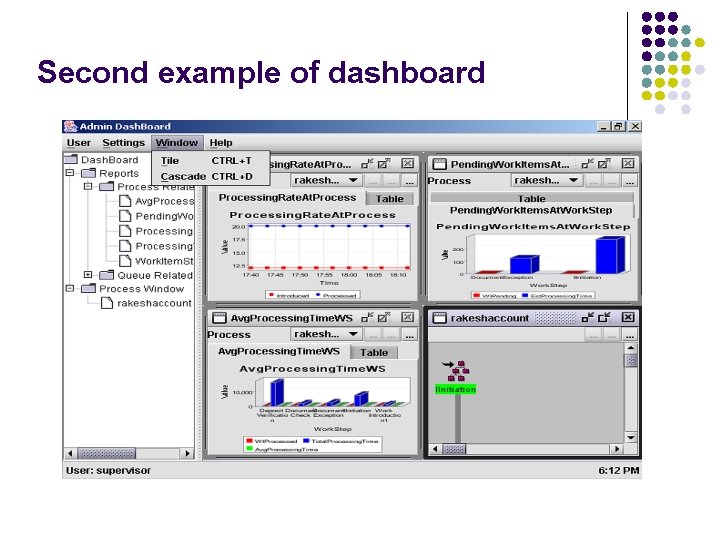
Second example of dashboard
Where BPM is appropriate l Business Process Management is not suitable for all areas of business as it requires processes which can be formalised. l l Clearly needs a well-defined business case to support the potential changes in the operational process, Finding matches for the strengths of BPM l Areas which are already well-defined. l Areas where there is either complexity or rapid change or both l Areas where the cost of error is much greater than the cost of fixing the problem.
COMPARING APPROACHES TO BUSINESS PROCESS AUTOMATION 26
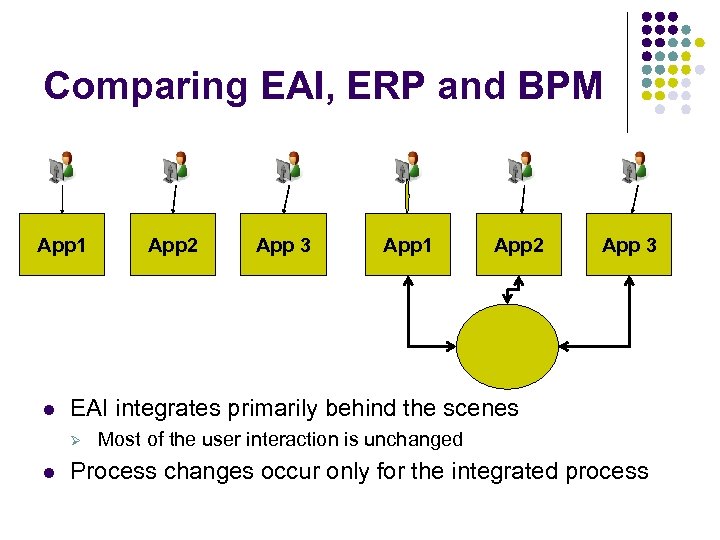
Comparing EAI, ERP and BPM App 1 l App 3 App 1 App 2 App 3 EAI integrates primarily behind the scenes Ø l App 2 Most of the user interaction is unchanged Process changes occur only for the integrated process
Benefits of EAI/SOA based process automaton l l Integrates with existing process and data models – handling incompatibilities when necessary Allows the high value integration problem to be addressed without disrupting the other applications Integrates with existing process and data models – handling incompatibilities when necessary Minor/moderate changes to the user interaction causes minor/moderate changes to the business as a whole
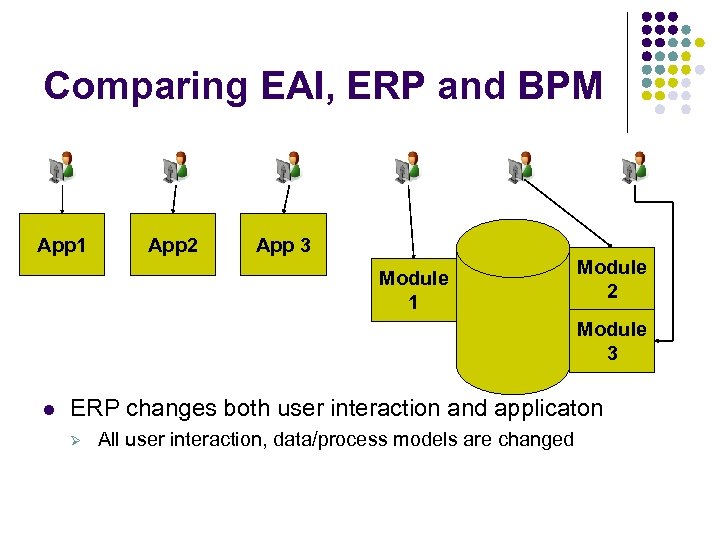
Comparing EAI, ERP and BPM App 1 App 2 App 3 Module 1 Module 2 Module 3 l ERP changes both user interaction and applicaton Ø All user interaction, data/process models are changed
Benefits of ERP based process automation l l l Creates a set of processes and associated data models which are mutually compatible and comprehensive Equally effective at automation within a single department or across multiple departments ERP vendor typically provides ‘standard’/template processes already proven for a particular industry
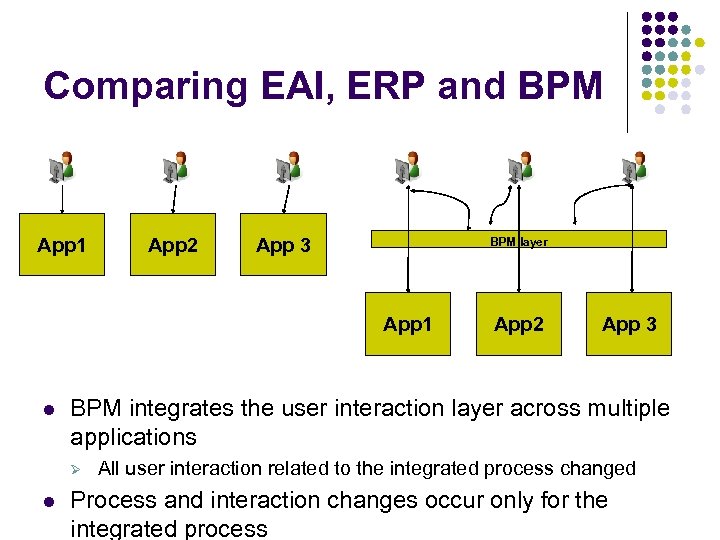
Comparing EAI, ERP and BPM App 1 App 2 App 3 BPM layer App 1 l App 3 BPM integrates the user interaction layer across multiple applications Ø l App 2 All user interaction related to the integrated process changed Process and interaction changes occur only for the integrated process
Benefits of BPM based process automation l l Improvement in the redesigned process, Reduction in risk/error (due to missed or wrongly executed steps) Auditability of completed processes – needed for compliance and other purposes Makes it easier to deploy process changes (for instance caused by outsourcing, regulation changes, business changes etc)
BPM versus EAI and SOA l BPM can use different technologies to implement the process. l l EAI products typically claim to provide BPM capabilities l l Like SOA, it can be implemented using different technologies Typically support processes defined as system to system interactions (i. e. does not include human interactions) SOA and BPM are partially complementary l l BPM can build upon SOA using the services already defined. However, it is not usual to attempt to combine a move to SOA and a move to BPM
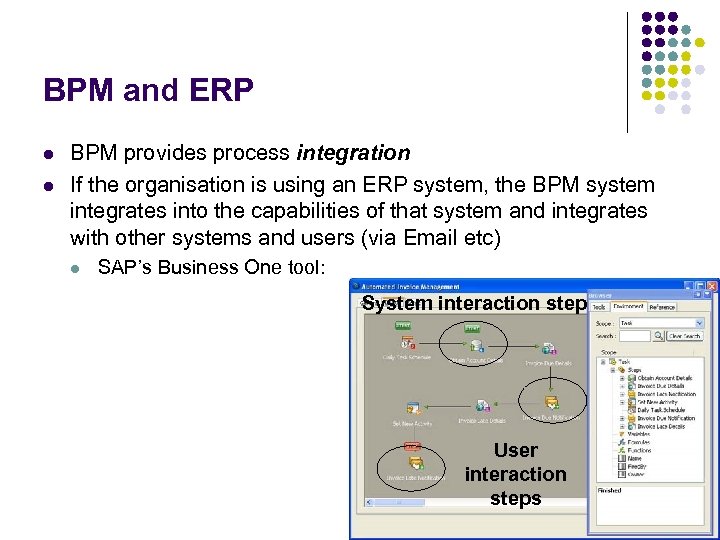
BPM and ERP l l BPM provides process integration If the organisation is using an ERP system, the BPM system integrates into the capabilities of that system and integrates with other systems and users (via Email etc) l SAP’s Business One tool: System interaction step User interaction steps
BPEL – A business process language
Business Process Orchestration with BPEL l An example of a business process orchestration language l l Others remain more popular / native with one BPM platform Business Process Execution Language (BPEL) l Defines the process as an XML document which is executed by a process engine. l A portable business processes built on top of the Web services infrastructure l Industry wide language for business processes l l l Simple constructs and principles Common skill set and language for developers Choice of process engines l l l Standards lead to competitive offerings Allows different engines to be used for different tasks A number of Open Source implementations available
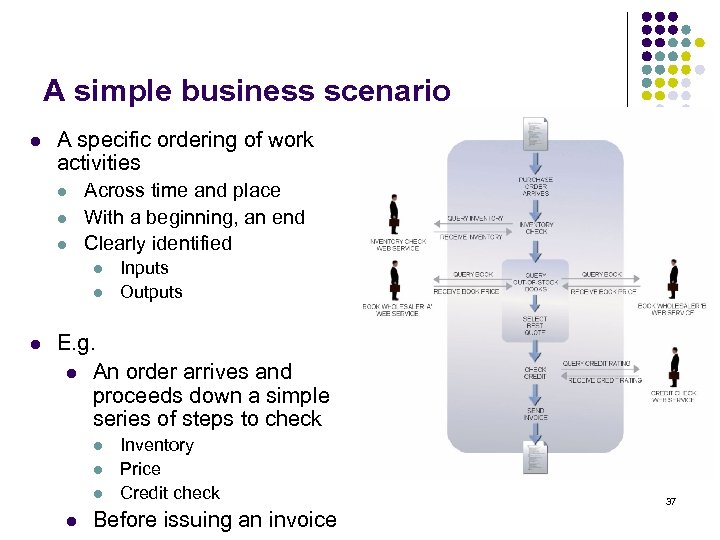
A simple business scenario l A specific ordering of work activities l l l Across time and place With a beginning, an end Clearly identified l l l Inputs Outputs E. g. l An order arrives and proceeds down a simple series of steps to check l l Inventory Price Credit check Before issuing an invoice 37
Exercise: Defining a business process • Working in groups pick a business process • Define the steps involved in the process from a business perspective • Define the steps involved in the process from a technology perspective • • Think about the time the process takes to complete Think about what happens if it goes wrong 38
BPEL Components l Defining the entities involved in the process. l l BPEL defines these as Partner Links (role of the participant in the process). Defining the way the entity is involved with the Port-types (an interface definition) l The basic activities l “Structured” Activities required to define a including process such as l Pick from a list of options l l Invoke the porttype on a participant. Receive a message from a participant Reply to a message Terminate a process l l based on some value While a condition is true repeat the task Flow to the next step
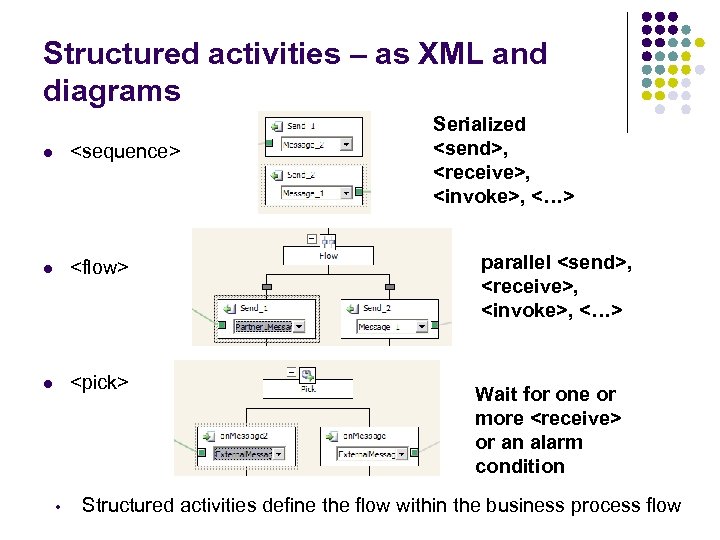
Structured activities – as XML and diagrams l <sequence> l <flow> l <pick> • Serialized <send>, <receive>, <invoke>, <…> parallel <send>, <receive>, <invoke>, <…> Wait for one or more <receive> or an alarm condition Structured activities define the flow within the business process flow
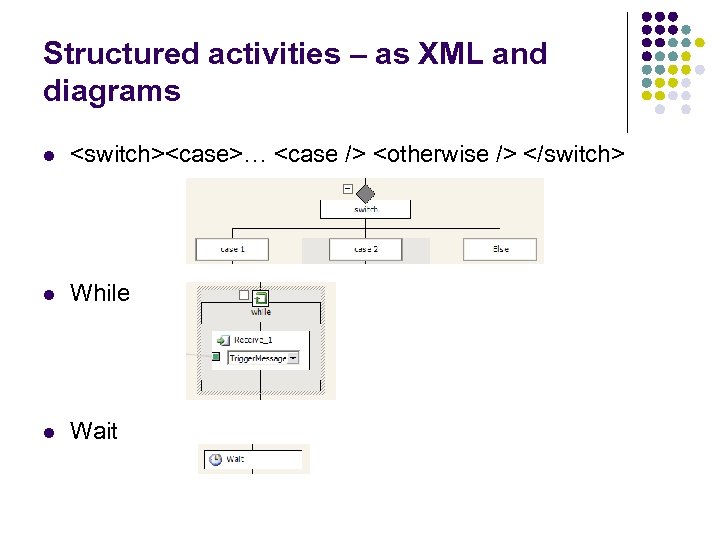
Structured activities – as XML and diagrams l <switch><case>… <case /> <otherwise /> </switch> l While l Wait
Starting and stopping process l Start a process on receiving an external message <receive create. Instance=“yes”> … </receive> l Start a process at a predefined time <pick> <!-- set an alarm in 3 days and 10 hours --> <on. Alarm for="'P 3 DT 10 H'"> <!-- handle timeout for order completion --> … </on. Alarm> </pick>
BPEL Error Handling As well as defining the usual behaviour of the process, it is also necessary to define what to do when things go wrong. This is done with fault. Handlers which are called when the usual behaviour fails and an exception is thrown. <fault. Handlers> <catch. All> … </catch. All> </fault. Handlers> … <switch> <case condition= "bpws: get. Variable. Property(stock. Result, level) > 100"> <throw fault. Name="Out. Of. Stock"/> </case>
BPEL Message Correlation Many instances of a process may be running in the BPEL engine. When a message arrives, the engine has to figure out which process it belongs to. This is done with message correlation The correlation data is something in the message which is unique (e. g. invoice purchase order number) and allows the process engine to associate the message with the right process <property. Alias property. Name="order. Number" message. Type="POMessage" part="PO" query="/PO/Order"/> <correlation. Sets> <correlation. Set name="Purchase. Order" properties="order. Number"/> </correlation. Sets> …
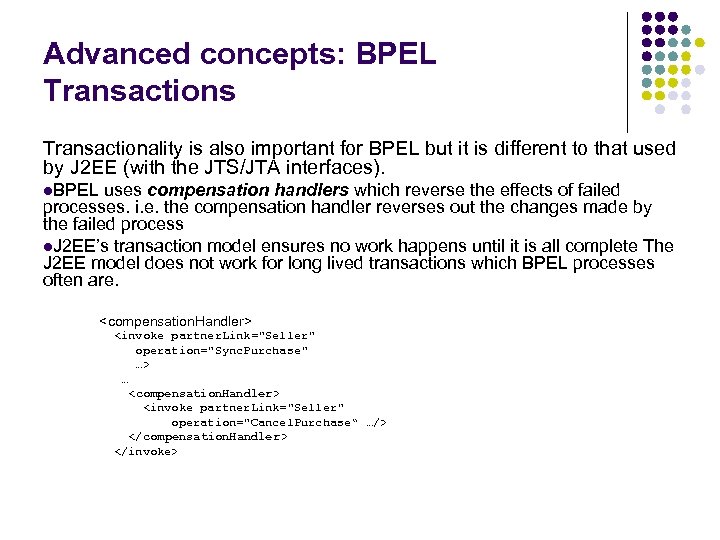
Advanced concepts: BPEL Transactions Transactionality is also important for BPEL but it is different to that used by J 2 EE (with the JTS/JTA interfaces). l. BPEL uses compensation handlers which reverse the effects of failed processes. i. e. the compensation handler reverses out the changes made by the failed process l. J 2 EE’s transaction model ensures no work happens until it is all complete The J 2 EE model does not work for long lived transactions which BPEL processes often are. <compensation. Handler> <invoke partner. Link="Seller" operation="Sync. Purchase" …> … <compensation. Handler> <invoke partner. Link="Seller" operation="Cancel. Purchase“ …/> </compensation. Handler> </invoke>
Скачать презентацию Business Process Management Business process l A
bbba5f3f3d60eaa133f4d911df12b1de.ppt