 Скачать презентацию Business and IT Working Together to Streamline Corporate
375d822b529ba53ba24fe0545252c51e.ppt
- Количество слайдов: 18



Business and IT Working Together to Streamline Corporate Reporting Stephen Hord, Director of Product Development – UBmatrix
About Me - Steve § Director Of Product Development – UBMatrix § 12 + years in the Technology Industry § Adobe – Print Publishing and PDF teams § Online Travel Solutions Travelport -> Orbitz § XML and Rules Engines § 2 + years at UBmatrix § Managed UBMatrix FFIEC Solution § Oversee Development of Corporate Solutions Slide 2

Most Recent e. Bay Purchase 1967 Moto Guzzi V 7 Slide 3
Introduction The Goal of XBRL in Corporate Reporting Slide 4
The Goal Streamline Corporate Reporting § Meet Regulatory Requirements § SEC, SOX, Others § Provide a Single Interface to all Corporate Information Systems § Eliminate Spreadsheet Problems § Self-Service Data Access § Audit and Traceability Slide 5
Introduction To EII What is Enterprise Information Integration (EII) is the integration of data from multiple systems into a unified, consistent and accurate representation geared toward the viewing and manipulation of the data Slide 6
Introduction To EII Benefits to the end user § § Reduce time finding and accessing data Eliminate hack reporting tasks that email spreadsheets or access databases to end users Maintain connections to source data (Traceability) Eliminate Spreadsheet copy/paste errors and reduce regularity risk from spreadsheet macros Slide 7
Introduction to EII Benefits to the IT Administrator § § § Creates a Global Map of all information including Relationships, Validation Rules, Documentation, and Source Enables simplified infrastructure management via a metadata abstraction layer over BI, CRM, DW, ETL, ERP, enterprise portals Control and report on data access patterns, Control access to data based on LDAP. Generate data usage reports Slide 8
Introduction to EII Benefits to the Developer § § § Provides a single interface and extensible metadata that can encompass all data sources, speeding the development of applications such as enterprise portals Developers can simplify the front-end of the application by making it a Web service, and the back-end, by simplifying data access Development is faster programmers code for access to a single virtual data source regardless of data storage Slide 9
How Do I Implement XBRL Enabled EII The Analyst and the Information Professional Slide 10
How Do IT § Enterprise Wide Architecture for Publishing Data § Analyst – Builds a Corporate Wide Taxonomy § Use XBRL Layer to Normalize Data § Data Descriptions Describe where Data is Stored § Use the XBRL Extensibility Model § Remove Duplicates § Create Validation Rules Slide 11
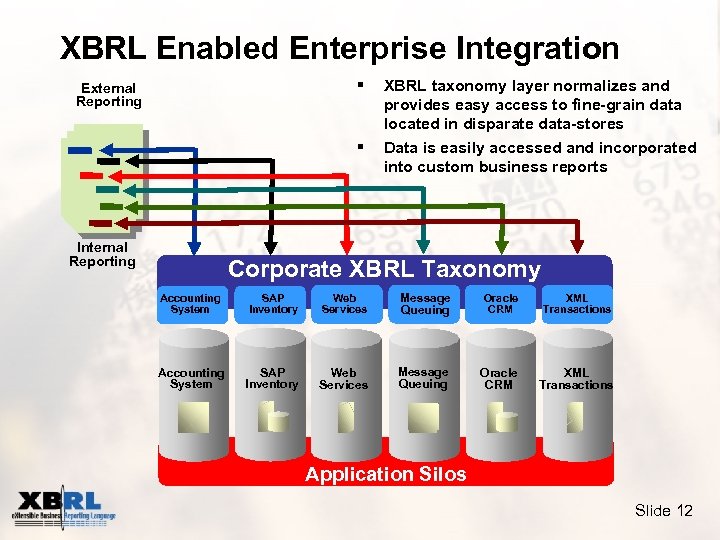
XBRL Enabled Enterprise Integration § External Reporting § Internal Reporting XBRL taxonomy layer normalizes and provides easy access to fine-grain data located in disparate data-stores Data is easily accessed and incorporated into custom business reports Corporate XBRL Taxonomy Accounting System SAP Inventory Web Services Message Queuing Oracle CRM XML Transactions Application Silos Slide 12
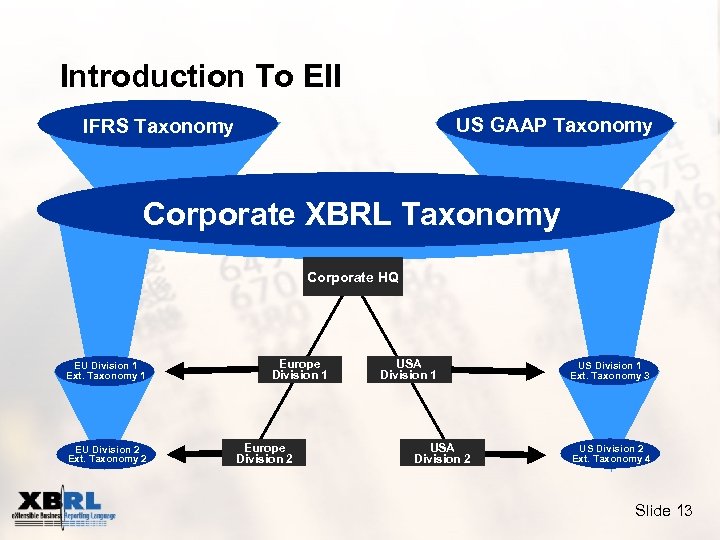
Introduction To EII US GAAP Taxonomy IFRS Taxonomy Corporate XBRL Taxonomy Corporate HQ EU Division 1 Ext. Taxonomy 1 EU Division 2 Ext. Taxonomy 2 Europe Division 1 Europe Division 2 USA Division 1 USA Division 2 US Division 1 Ext. Taxonomy 3 US Division 2 Ext. Taxonomy 4 Slide 13
How Do IT § Enterprise Wide Architecture for Publishing Data § IT Professional – § Corporate Information Messaging System § Metadata driven § Message across silos – XBRL-GL § Publish Taxonomy –Corporate Data Portal § Metadata driven Queries § Track All Requests from one location § Manage Access from one location § Self-Serve Dash boards Slide 14
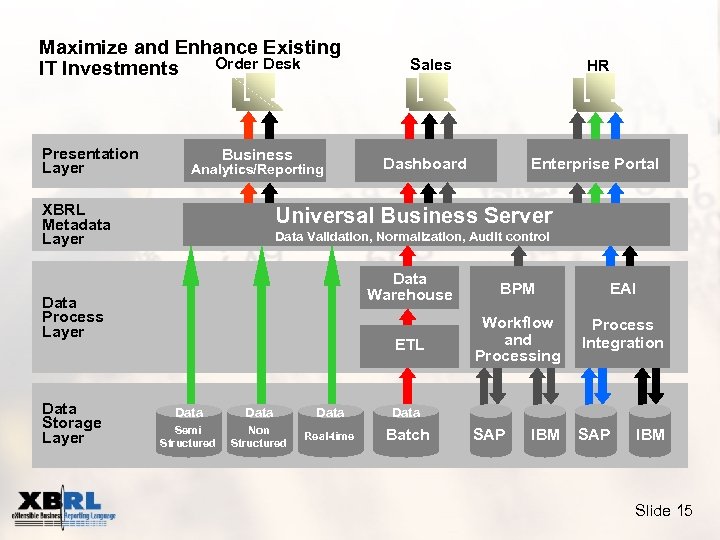
Maximize and Enhance Existing Order Desk IT Investments Presentation Layer Business Analytics/Reporting XBRL Metadata Layer HR Dashboard Enterprise Portal Universal Business Server Data Validation, Normalization, Audit control Data Warehouse BPM EAI ETL Data Process Layer Data Storage Layer Sales Workflow and Processing Process Integration SAP Data Semi Structured Non Structured Real-time Batch IBM Slide 15
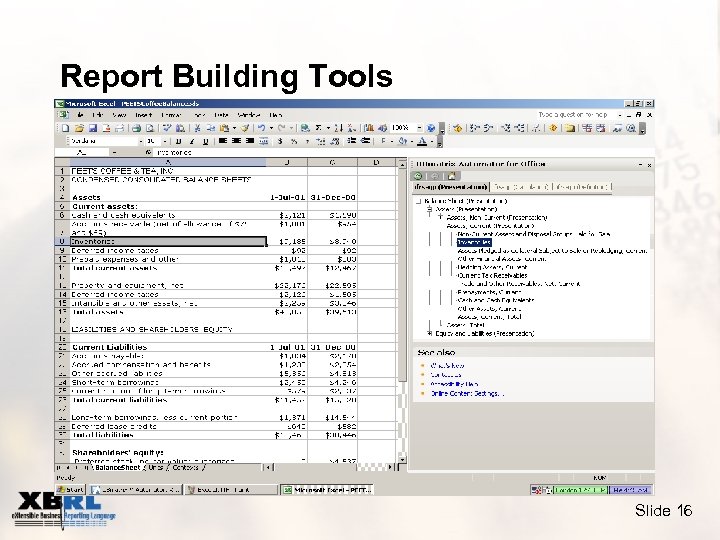
Report Building Tools Slide 16
Conclusions § Focus on Data Publishing § Create a Composite View of all Data § Metadata driven Queries § Abstract storage details § Maintain Connectivity to Source Data Slide 17
Contact Steve Hord Director or Product Development UBmatrix steve. hord@ubmatrix. com Slide 18
Скачать презентацию Business and IT Working Together to Streamline Corporate
375d822b529ba53ba24fe0545252c51e.ppt