 Скачать презентацию Bringing the Richness and Responsiveness of Desktop Applications
da3626b83debd8d7fee7b7c20d0e80be.ppt
- Количество слайдов: 34




Bringing the Richness and Responsiveness of Desktop Applications to the Web Sahil Malik telerik Technical Evangelist Microsoft MVP Real-World AJAX Seminar - March 13, 2006 www. telerik. com/ajax

Who is telerik ● telerik is a leading vendor of reusable UI components for the Microsoft. NET Framework ● Helping developers “deliver more than expected” ● Industry-best products with numerous awards like r. a. d. editor and r. a. d. grid www. telerik. com/ajax
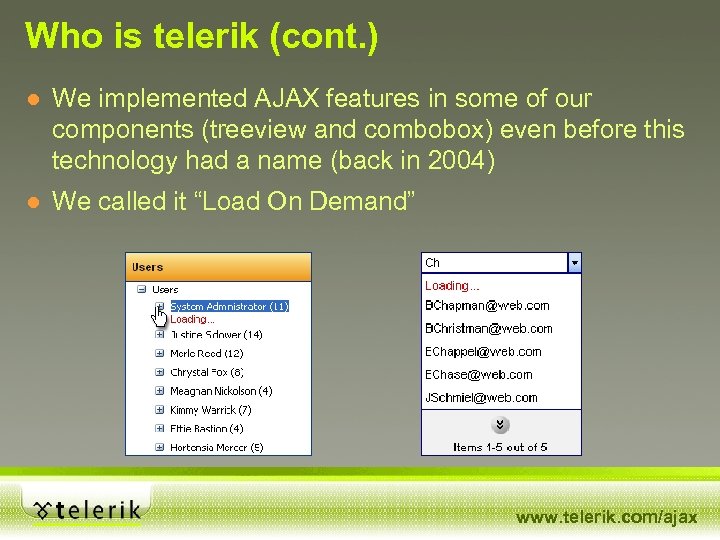
Who is telerik (cont. ) ● We implemented AJAX features in some of our components (treeview and combobox) even before this technology had a name (back in 2004) ● We called it “Load On Demand” www. telerik. com/ajax

The Challenge of Architecture ● 70 s – 95 – Monolithic Applications CIO IT Worker www. telerik. com/ajax

The Challenge of Architecture ● 95 – 00 – The Web Explosion CIO IT Worker www. telerik. com/ajax

The Challenge of Architecture ● 00 – Recently – Bastardizing HTML CIO and IT Worker www. telerik. com/ajax

The HTML Donkey Today’s Applications The HTML Donkey Customer + Management + IT Workers www. telerik. com/ajax

Welcome AJAX ● Rich applications in Modern Browsers ● No issues with installation ● No issues with trust boundaries, Certificates, etc. ● Built upon existing infrastructure – TCP/IP, XML, HTTP, SSL, etc. ● No more dreaded page refreshes. www. telerik. com/ajax

Candid Photo of Mr. HTML www. telerik. com/ajax

CIO and IT Worker BUT. . . www. telerik. com/ajax

AJAX is Hard !!! www. telerik. com/ajax

Why is AJAX hard? ● Requires extensive Java. Script skills – clientside scripting is at the heart of AJAX apps – It’s like debugging multi-threaded Java. Script. ● Breaks the normal page life cycle. ● Every browser wants to do AJAX differently. ● Possible security issues (With IE). www. telerik. com/ajax

Making AJAX Easy !! www. telerik. com/ajax

The telerik AJAX framework www. telerik. com/ajax
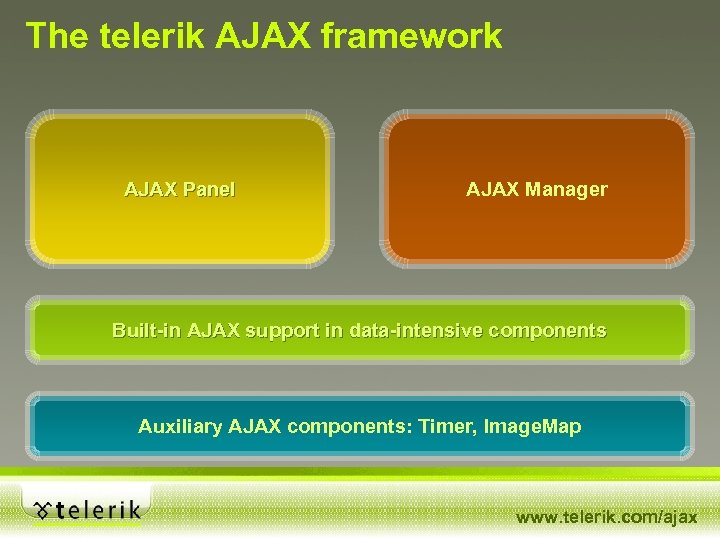
The telerik AJAX framework AJAX Panel AJAX Manager Built-in AJAX support in data-intensive components Auxiliary AJAX components: Timer, Image. Map www. telerik. com/ajax

The telerik AJAX Panel – what it is ● Universal AJAX-enabling container AJAX Panel ● Causes any ASP. NET component(s) placed inside the panel to start making AJAX callbacks instead of traditional postbacks ● The content of the Panel is updated automatically after the server response www. telerik. com/ajax

The telerik AJAX Panel – how it works ● The AJAX Panel “fools” the components inside it and makes them think that a normal postback has taken place. AJAX Panel ● Neither the page nor the individual controls know that this is actually an AJAX request. www. telerik. com/ajax

The telerik AJAX Offering Demo www. telerik. com/ajax

Did you see. . . ? ● Any Java. Script? ● Any code at all? ● Any learning curve? www. telerik. com/ajax

The telerik AJAX Panel – benefits ● As a result you get all the benefits of AJAX: AJAX Panel – Swift performance – No page refreshes – Better user experience ● Without struggling with the traditional drawbacks of AJAX: – Broken page life-cycle – Form data not sent to the server – Corrupt View. State www. telerik. com/ajax

The telerik AJAX Panel – more benefits ● Due to the fact that the controls think they work in their natural mode (postback mode): AJAX Panel – Values are properly reflected on the server – Page life-cycle is preserved – Control View. State is preserved ● Any Java. Script inside the Panel is preserved and properly executed (needed for elements with rich client-side functionality). www. telerik. com/ajax

The telerik AJAX Panel –. . and more benefits ● You can wrap more than one page elements in 1 panel to have them updated at once AJAX Panel ● You can wrap whole web-pages and make them work in AJAX mode ● You can wrap and AJAX-enable components with rich client-side functionality www. telerik. com/ajax
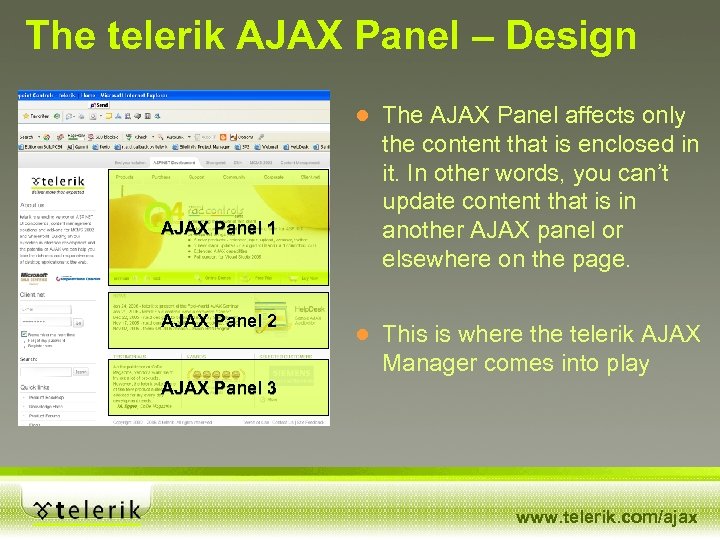
The telerik AJAX Panel – Design AJAX Panel 1 AJAX Panel 2 ● The AJAX Panel affects only the content that is enclosed in it. In other words, you can’t update content that is in another AJAX panel or elsewhere on the page. ● This is where the telerik AJAX Manager comes into play AJAX Panel 3 www. telerik. com/ajax
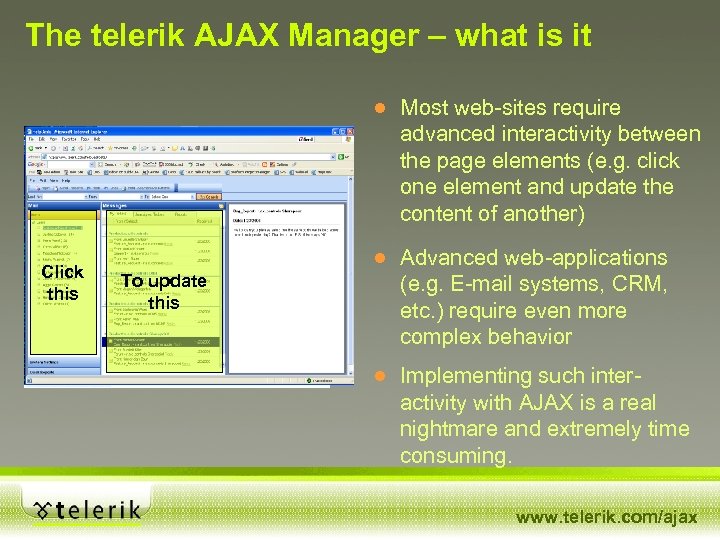
The telerik AJAX Manager – what is it Click this To update. . . and this Click this To update this ● Most web-sites require advanced interactivity between the page elements (e. g. click one element and update the content of another) ● Advanced web-applications (e. g. E-mail systems, CRM, etc. ) require even more complex behavior ● Implementing such interactivity with AJAX is a real nightmare and extremely time consuming. www. telerik. com/ajax
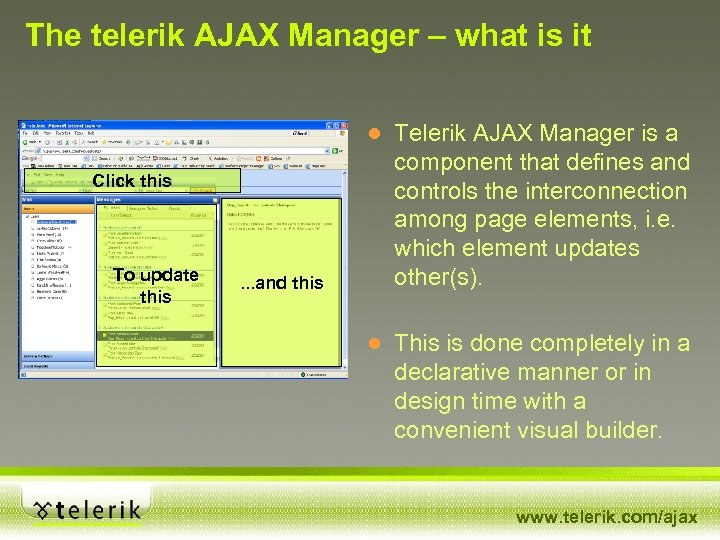
The telerik AJAX Manager – what is it Click this To update this . . . and this ● Telerik AJAX Manager is a component that defines and controls the interconnection among page elements, i. e. which element updates other(s). ● This is done completely in a declarative manner or in design time with a convenient visual builder. www. telerik. com/ajax
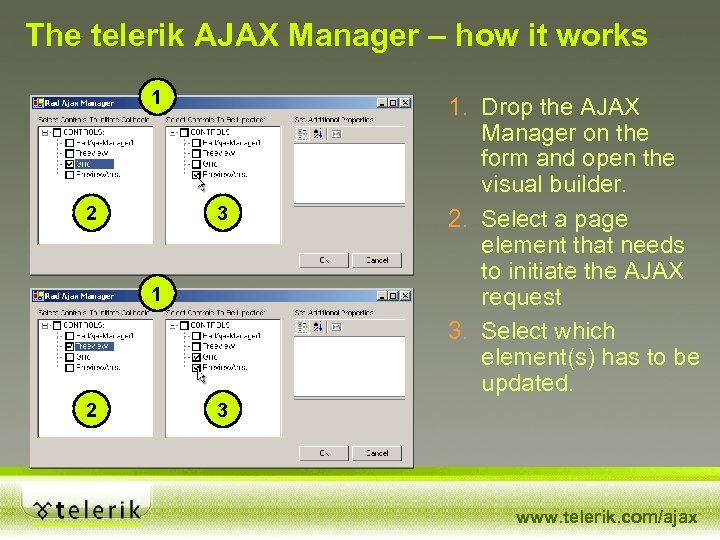
The telerik AJAX Manager – how it works 1 2 3 1 2 1. Drop the AJAX Manager on the form and open the visual builder. 2. Select a page element that needs to initiate the AJAX request 3. Select which element(s) has to be updated. 3 www. telerik. com/ajax

The telerik AJAX Manager Demo www. telerik. com/ajax

The telerik AJAX Manager – benefits ● You do not have to modify the logic of your application: Click To update this – if you have a postback-based app you only have to place the AJAX manager and define the interconnections among the page elements ● All other benefits found in the AJAX Panel: – page life-cycle is preserved – form data (values) are reflected on the server – View. State is preserved – client scripts are preserved (you still have to wrap 3 rd party components into AJAX Panels but that’s easy). www. telerik. com/ajax

The telerik AJAX Manager – when to use ● The telerik AJAX Manager allows developers to build very sophisticated AJAX-enabled web applications, similar to Outlook Web Access ● Don’t believe it? See for yourself. www. telerik. com/ajax

The telerik Help. Desk Sample Application Demo www. telerik. com/ajax

Built-in AJAX support in other telerik components Built-in AJAX support in data-intensive components ● Data-intensive telerik components (grid, combobox, treeview, etc. ) have build-in AJAX support ● Allows you to work with huge data structures without degradation in performance ● Changing behavior from non-AJAX to AJAX is as easy as setting a property. www. telerik. com/ajax

Customer spotlight – Mobilis Technologies AJAX-enabled Web Workflow Application Framework Featuring telerik r. a. d. controls http: //www. Mobilis. Tech. com www. telerik. com/ajax

The telerik clients www. telerik. com/ajax

Thank you Live demos and slides from this presentation available at: www. telerik. com/Ajax. Seminar www. telerik. com/ajax
Скачать презентацию Bringing the Richness and Responsiveness of Desktop Applications
da3626b83debd8d7fee7b7c20d0e80be.ppt