 Скачать презентацию Bluetooth Owen Garmire and Seila Kheang CSE 466
fd62e9b60528537be38ba741afe0ba24.ppt
- Количество слайдов: 65



Bluetooth Owen Garmire and Seila Kheang CSE 466 Fall 2001 http: //www. cs. washington. edu/homes/seila/bluetooth. ppt
Bluetooth Overview n n Wireless technology for short-range voice and data communication Low-cost and low-power Provides a communication platform between a wide range of “smart” devices Not limited to “line of sight” communication
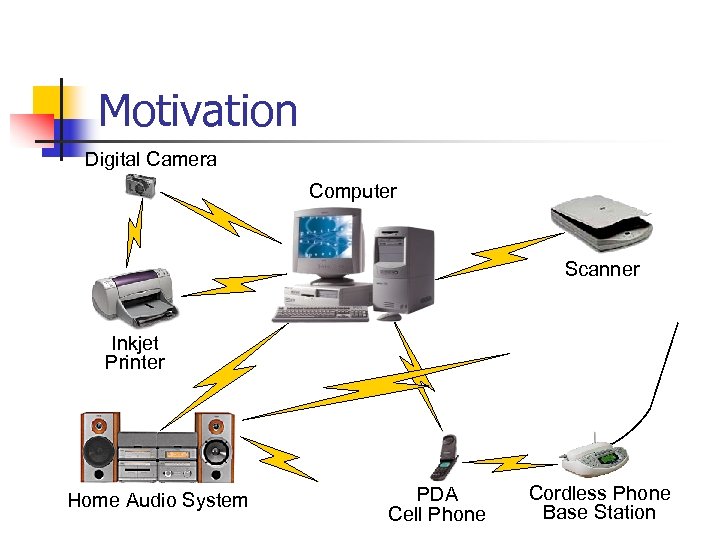
Motivation Digital Camera Computer Scanner Inkjet Printer Home Audio System PDA Cell Phone Cordless Phone Base Station
Bluetooth Applications n n n Automatic synchronization between mobile and stationary devices Connecting mobile users to the internet using bluetooth-enabled wire-bound connection ports Dynamic creation of private networks
Synchronization n n Keep data on different devices synchronized without using a cable Example: n Walk into office and have your PDA synch with your laptop on your desk without even taking your PDA out of your briefcase
Connecting to Internet n Being able to gain access to the Internet by using “Bluetooth access points” n n n Access point is used as a gateway to the internet Both the access point and the device are Bluetooth-enabled An example of Service Discovery Protocol n Access point provides a service to the device

Ad Hoc Networks n n Up to 8 devices can be actively connected in master/slave configuration Piconets can be combined to form scatternets providing unlimited device connectivity
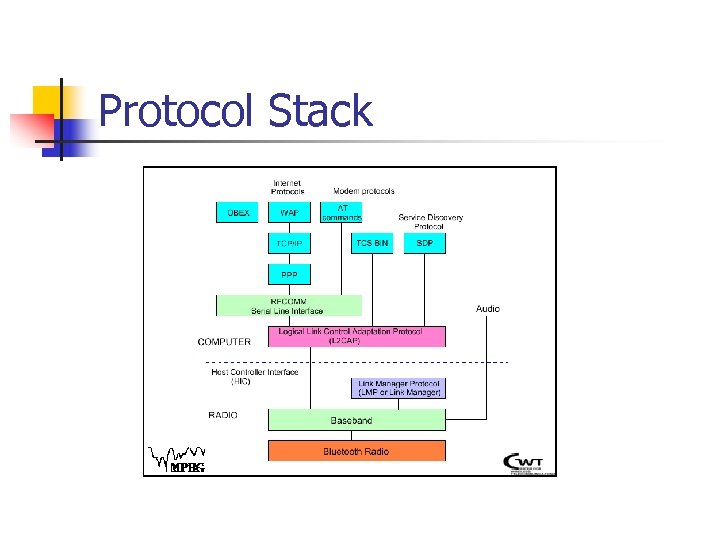
Protocol Stack
Bluetooth Radio n n Uses 2. 4 GHz ISM band spread spectrum radio (2400 – 2483. 5 MHz) Advantages n n n Free Open to everyone worldwide Disadvantages n Can be noisy (microwaves, cordless phones, garage door openers)
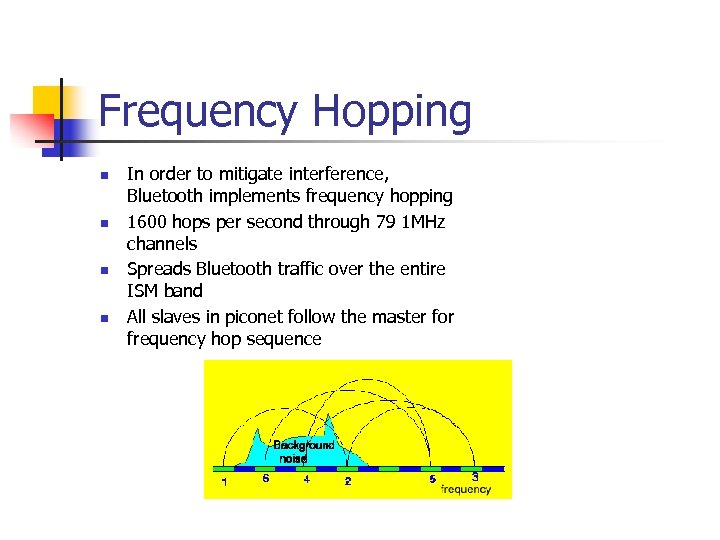
Frequency Hopping n n In order to mitigate interference, Bluetooth implements frequency hopping 1600 hops per second through 79 1 MHz channels Spreads Bluetooth traffic over the entire ISM band All slaves in piconet follow the master for frequency hop sequence
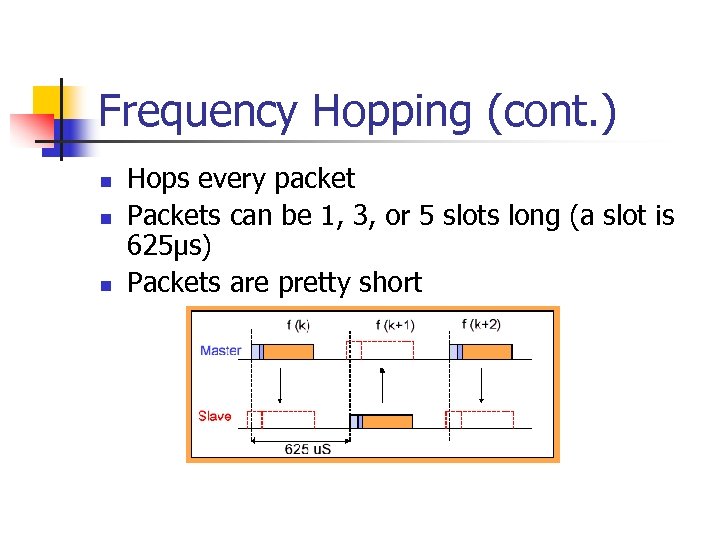
Frequency Hopping (cont. ) n n n Hops every packet Packets can be 1, 3, or 5 slots long (a slot is 625µs) Packets are pretty short
Baseband Layer n n n Provides in-order delivery of byte streams Handles Frequency Hop Sequences for Synchronization and Transmission Establishes Links n n n Synchronous Connection Oriented (SCO) Asynchronous Connection-Less (ACL) Provides functionality to determine nearby Bluetooth devices
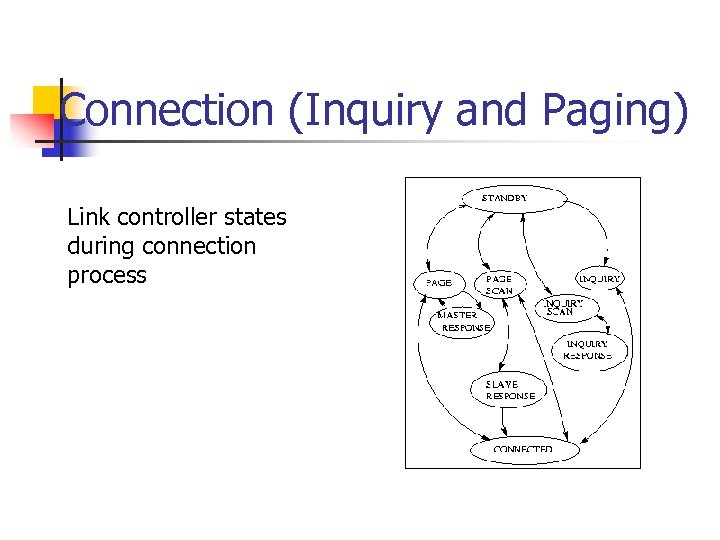
Connection (Inquiry and Paging) Link controller states during connection process
Bluetooth: Hello, Anyone Around? n Inquiry Procedure n n n Sends out an inquire, which is a request for nearby devices (within 10 meters) Devices that allow themselves to be discoverable issue an inquiry response Can take up to 10. 24 seconds, after which the inquiring device should know everyone within 10 meters of itself
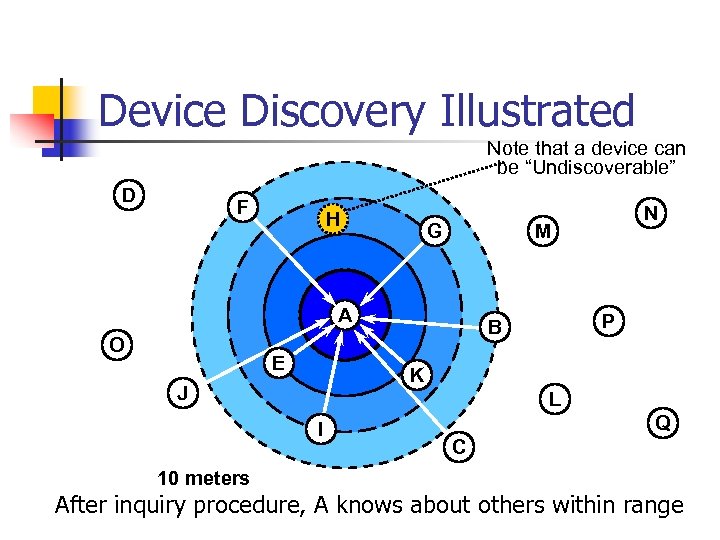
Device Discovery Illustrated Note that a device can be “Undiscoverable” D F H G M A O E N P B K J L I Q C 10 meters After inquiry procedure, A knows about others within range
Issues with Inquire Messages n Are the inquirer transmitting and the receiver listening on the same frequency? n n Since they are not yet connected, they are on totally different hop sequences, and most likely on different channels If they are on the same frequency, what if they are on a noisy channel? n Bluetooth provides the capability for receivers to issue multiple inquiry responses
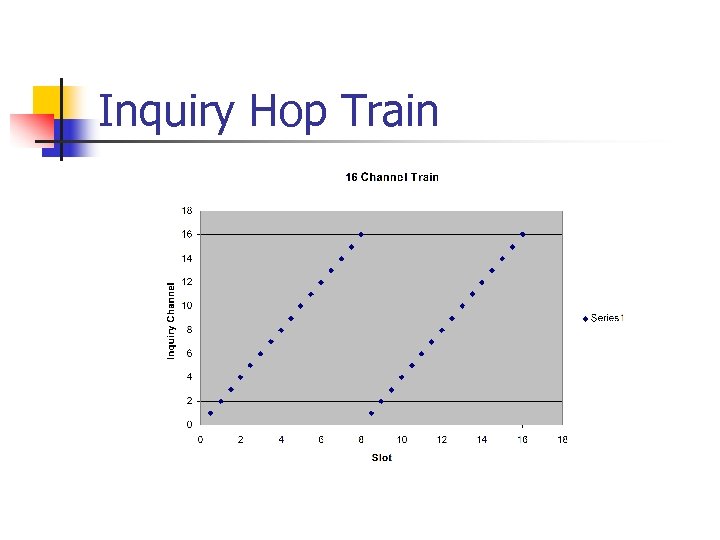
Main Idea Behind Inquire n n n Inquiring device sends out an inquire on 16 different frequencies (16 channel train) Receiver (device in standby mode), performs an inquire scan long enough for an inquiring device to send the inquire on 16 frequencies Receiver does an inquire scan frequent enough so that it is guaranteed to wake up during a 16 channel train
Inquiry Hop Train
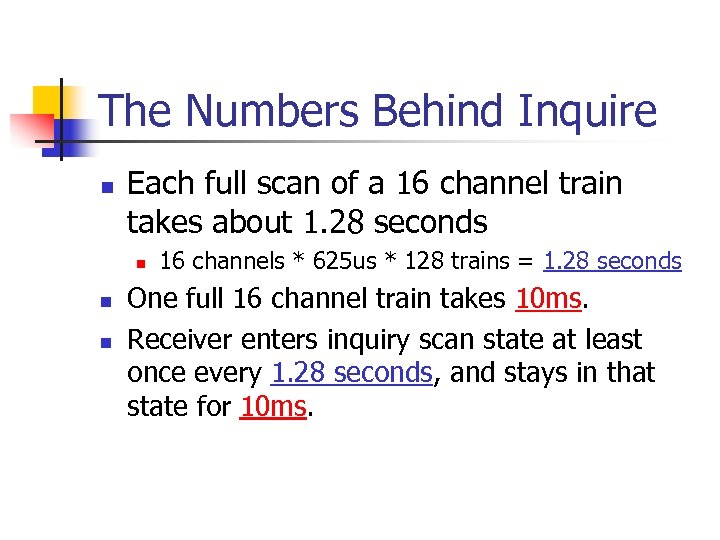
The Numbers Behind Inquire n Each full scan of a 16 channel train takes about 1. 28 seconds n n n 16 channels * 625 us * 128 trains = 1. 28 seconds One full 16 channel train takes 10 ms. Receiver enters inquiry scan state at least once every 1. 28 seconds, and stays in that state for 10 ms.
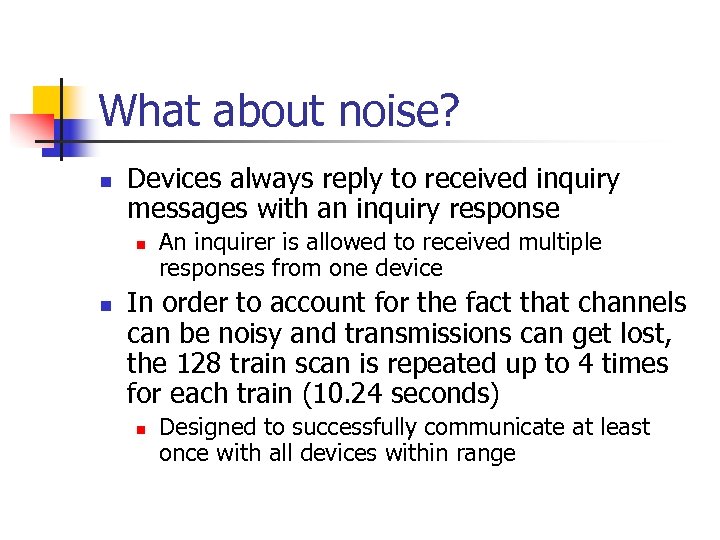
What about noise? n Devices always reply to received inquiry messages with an inquiry response n n An inquirer is allowed to received multiple responses from one device In order to account for the fact that channels can be noisy and transmissions can get lost, the 128 train scan is repeated up to 4 times for each train (10. 24 seconds) n Designed to successfully communicate at least once with all devices within range
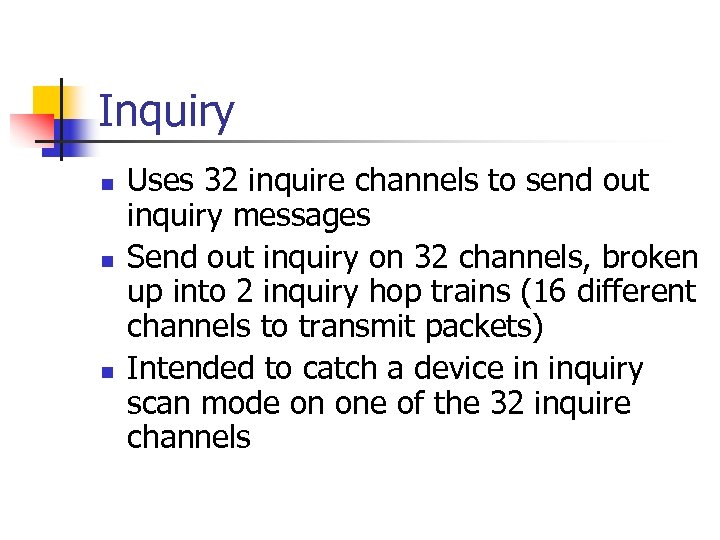
Inquiry n n n Uses 32 inquire channels to send out inquiry messages Send out inquiry on 32 channels, broken up into 2 inquiry hop trains (16 different channels to transmit packets) Intended to catch a device in inquiry scan mode on one of the 32 inquire channels
Inquiry Scan n A device periodically listens for inquiry packets at a single frequency – chosen out of 16 frequencies n n n Inquiry hop sequence depends on device address Stays in the state long enough for a inquiring device to cover 16 frequencies Will re-enter inquiry scan state even after responding to an inquire
Inquiry Response n When radio receives inquire, it will wait between 0 and. 32 seconds before sending an FHS packet as a response n n FHS Packet contains: n n n This is done to avoid collision with another radio that also wants to send an FHS packet Device ID Clock After inquiring radio is done with inquiring procedure, it knows all of the radios (that are discoverable) within range
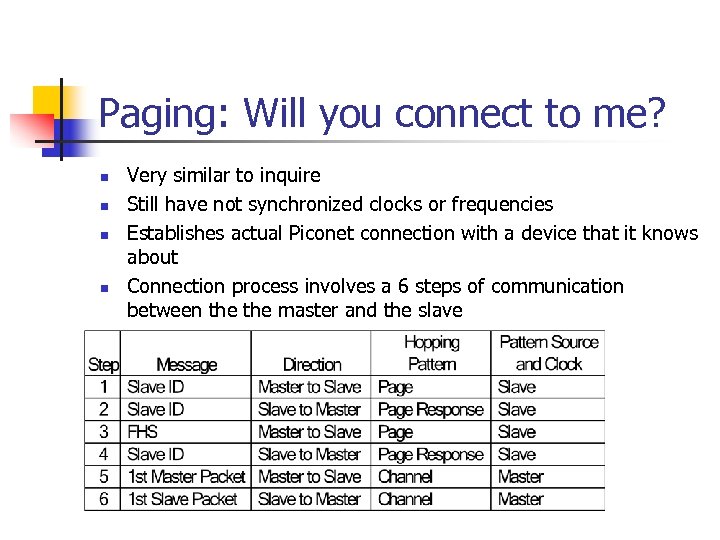
Paging: Will you connect to me? n n Very similar to inquire Still have not synchronized clocks or frequencies Establishes actual Piconet connection with a device that it knows about Connection process involves a 6 steps of communication between the master and the slave
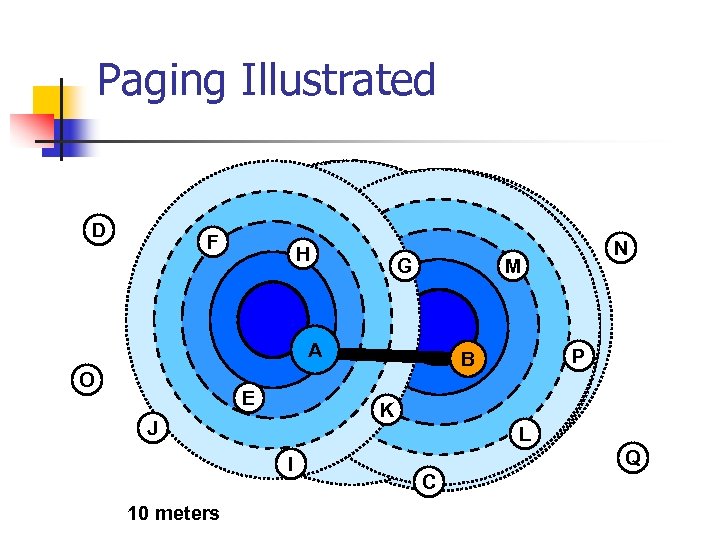
Paging Illustrated D F H G M A O E P B K J L I 10 meters N Q C
Step 1: The Page Command n Device broadcasts a page message out to the device that it wants to set up a connection with n n Does this in a similar manner as inquire messages (on 2 frequency trains of 16 frequencies each) Once the device receives a page response, it will stop paging and move on to step 2
Paging: Steps 2 & 3 n n Step 2: In the page response, an acknowledgement is sent back to the master containing the slave ID Step 3: In the master response, the frequency hopping generator is stopped and the master issues an FHS packet to the slave
Paging: Step 4 n n The slave issues a final slave response transmission that is aligned to the slave’s native clock Using the data from the FHS packet, the slave calculates adopts the master’s frequency hopping pattern and synchronizes to its clock
Paging: Step 5 n n When the master receives the packet, it jumps back to its frequency hopping pattern and assigns the slave an Active Member Address (AMA) for the piconet Master sends out a poll packet to ensure that the slave is on its frequency hopping pattern
Paging: Step 6 n n n Once the slave receives the poll packet, the slave replies with any kind of packet to ensure that it is on the right channel The acknowledgement must be received by the Master within the timeout period At the conclusion of step 6, a new synchronized connection is established between the master and the slave
Link Manager n n Performs all link creation, management, and termination operations Responsible for all the physical link resources in the system n n n Handles the control and negotiation of packet sizes used when transmitting data Controls Operation Modes for devices in a piconet Sets up, terminates, and manages baseband connections between devices n Establishes different types of links dependent on requests from the L 2 CAP layer n n Synchronous Connection-Oriented (SCO) Asynchronous Connection-Less (ACL)
Asynchronous Connection-Less (ACL) n n Designed for data traffic Packet switched connection where data is exchanged sporadically as and when data is available from higher up the stack Data integrity is checked through error checking and retransmission One ACL link between a master and a slave
Synchronous Connection Oriented (SCO) n n Intended for use with time-bounded information such as audio or video Provides a circuit-switched connection where data is regularly exchanged Retransmission is not necessary, since data is real-time Up to 3 SCO links per piconet
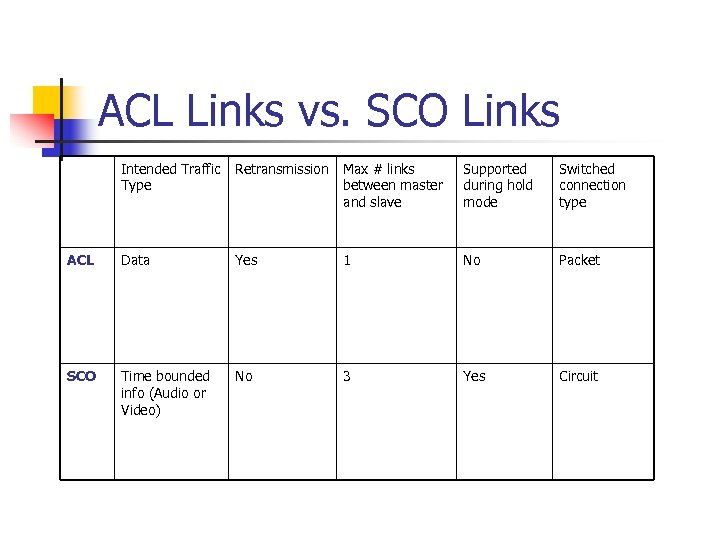
ACL Links vs. SCO Links Intended Traffic Type Retransmission Max # links between master and slave Supported during hold mode Switched connection type ACL Data Yes 1 No Packet SCO Time bounded info (Audio or Video) No 3 Yes Circuit
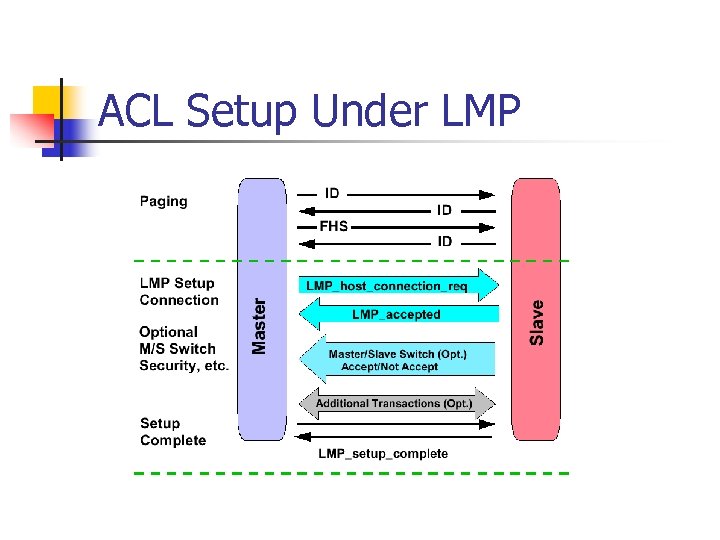
ACL Setup Under LMP
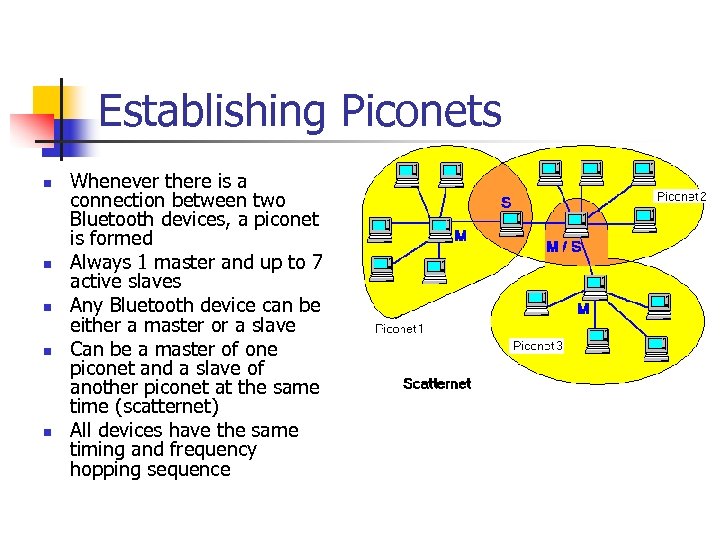
Establishing Piconets n n n Whenever there is a connection between two Bluetooth devices, a piconet is formed Always 1 master and up to 7 active slaves Any Bluetooth device can be either a master or a slave Can be a master of one piconet and a slave of another piconet at the same time (scatternet) All devices have the same timing and frequency hopping sequence
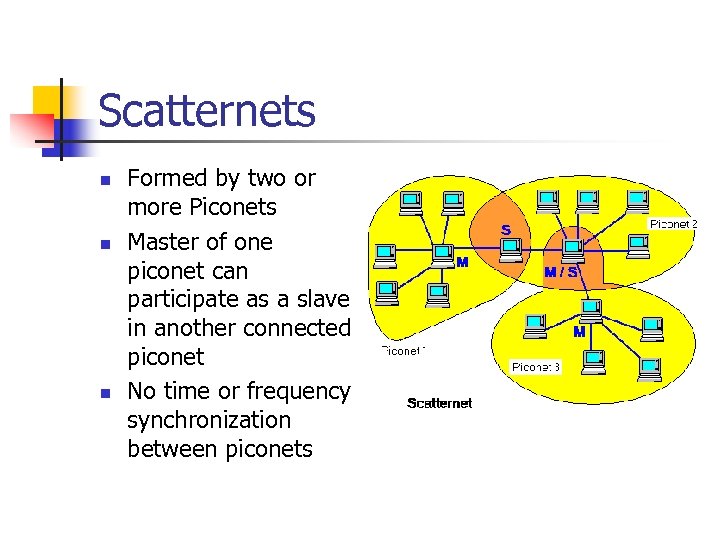
Scatternets n n n Formed by two or more Piconets Master of one piconet can participate as a slave in another connected piconet No time or frequency synchronization between piconets
Link Manager Operation n n Devices operate in standby mode by default until they become connected to a piconet 4 Connection Modes n n n Active Hold Park Sniff Modes allow devices to adjust power consumption, performance, and the number/role of participants in a piconet
Active Mode n n n Limited to 7 Active slaves for each master Three bit address (AM_ADDR) given to each active slave Unit actively participates on channel Can receive communications in any given frame Active slaves are polled by master for transmissions Unit operates on high-power
Hold Mode n Frees slave to n n n n Attend another Piconet Perform scanning, paging, or inquiry operations Move into low-power sleep Unit keeps active member address Unit does not support ACL packets on the channel but may support SCO packets Master and slave agree on a one time hold duration after which the slave revives and synchronizes with channel traffic Unit operates on low-power
Sniff Mode n n n Very similar to hold mode Slave is freed for reoccurring fixed time intervals Master can only communicate during arranged “sniff” time slots
Park Mode n Parked unit gives up active member address and is assigned n n 8 bit Parked member address (PM_ADDR) – allows master to unpark slave 8 bit Access request address (AR_ADDR) – allows slave to ask master to unpark it Unit stays synchronized to channel Operates in very low-power sleep
Park Mode (cont. ) n n Provides the ability to connect more than 7 devices to a master (8 bit PM_ADDR allows 255 parked devices) Active and Parked slaves can be switched in and out to allow many connections to a single piconet
Park Mode (cont. ) n n Master establishes a beacon channel and beacon interval when a slave is parked Parked slave wakes up at regular beacon interval to n n n Maintain synchronization Listen for “broadcast” messages (packets with all zero AM_ADDR) Potentially make access request to master through (AR_ADDR)
Park Mode (cont. ) n n Beacon slots must have at least “null” master-to-slave traffic Master-to-slave transmissions may extend over multiple beacon slots
Security n Link manager provides mechanism used by devices at either end of a link for n n n Negotiating encryption mode Coordinating encryption keys Baseband handles encryption and key generation
Host Controller Interface (HCI) n Most Bluetooth systems consist of two processors: n n n The higher layers of the protocol stack (L 2 CAP, SDP, RFCOMM) are run on the host device’s processor The lower layers of the protocol stack (Baseband radio) are run on specific Bluetooth hardware HCI provides an interface between the higher and the lower layers of the protocol stack
HCI Flow Control n n Main function of the Host Controller Interface Many times higher layer protocols have data rates much larger than data rate across Bluetooth radio and air interfaces n Also need to handle the reverse situation when the host cannot accept data as fast as the Bluetooth module can send it
Two Pieces of HCI n n Host controller resides on Bluetooth hardware accepting communications over the physical bus (radio and air) HCI Driver resides on the host accepting communications from higher layer protocols
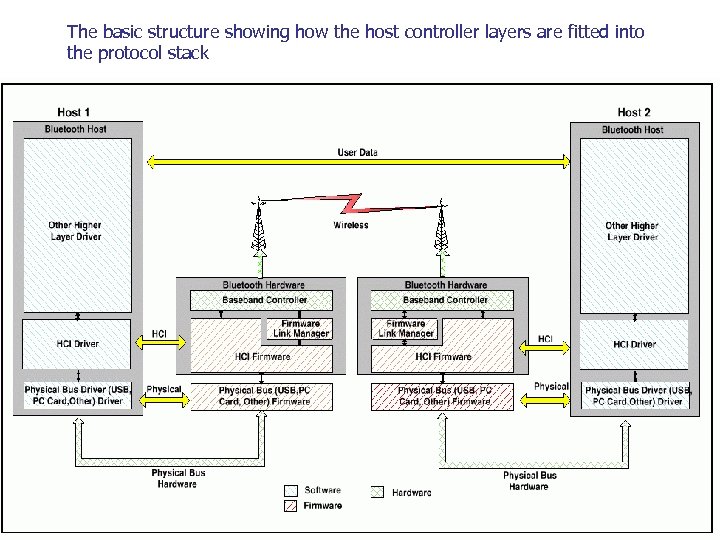
The basic structure showing how the host controller layers are fitted into the protocol stack
RFCOMM n n Cable replacement protocol allowing applications built to interface with serial port to function seamlessly with bluetooth Emulates serial port over the L 2 CAP protocol by specifying how a data stream can be emulated n RFCOMM actually handles parallel data
Emulating the Serial Port n Typically, the receive and transmit lines are connected to a UART (Universal Asynchronous Receiver Transmitter) n n Job of the UART is to convert between serial data sent down cables and the parallel data processing which devices use Since software that deals with serial ports view the data after it has been through UART, it only sees the parallel data n RFCOMM protocol only works with parallel data by connecting to the lower layers via L 2 CAP
Service Discovery Protocol (SDP) Idea: n Traditional LANs: Find a connection to a printer (or other resource) and keep that connection for a long time n Bluetooth: Walk into an area, find a printer (or other resource), use it, then walk away forgetting any details of the connection
SDP Client/Server Model n SDP Server is any Bluetooth device that offers services to other Bluetooth device (ex. Bluetooth-enabled printer, etc. ) n n Each SDP Server maintains its own database that contains information about the services that it offers SDP Client is any Bluetooth device that uses the services offered by an SDP Server
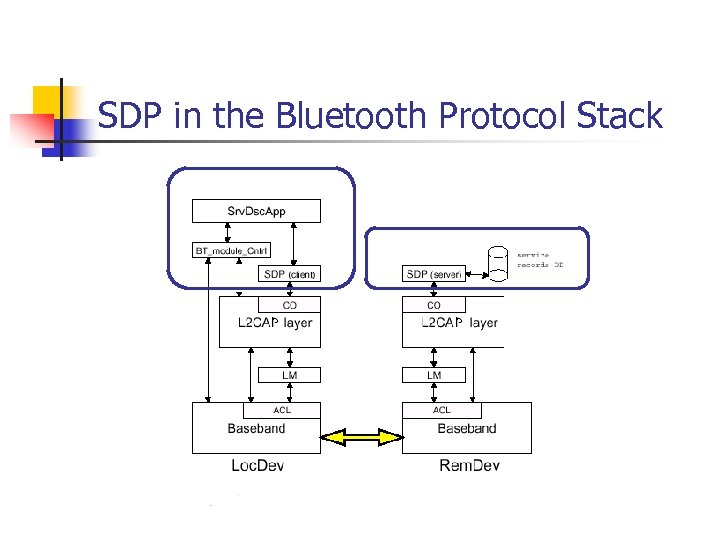
SDP in the Bluetooth Protocol Stack
SDP Query n The SDP client queries an SDP server to find out what services are available n n n Uses the L 2 CAP link that is set up between the client and the server L 2 CAP link provides information on services but doesn’t handle any connection to services Need to specify a class of services that the client wants to use (e. g. printing services)
SDP Database n n SDP Database is a set of records that describes the different services that the server can provide to another Bluetooth device When the SDP server gets a query, it looks up the service that the client is requesting and returns information to the client on how to connect to the service
Using the Services n The SDP client establishes a separate (non-SDP) connection to use the service n n SDP connection is only used to determine service availability The L 2 CAP connection uses to get information for the service can be dropped (if no more services are needed) or retained (if the client still needs more services from the server)
Logical Link Control and Application Protocol (L 2 CAP) n Performs 4 major functions n n Managing the creation and termination of logical links for each connection through “channel” structures Enforcing and defining Qo. S requirements Adapting Data, for each connection, between application (APIs) and Bluetooth Baseband formats through Segmentation and Reassembly (SAR) Performing Multiplexing to support multiple concurrent connections over a single common radio interface (multiple apps. using link between two devices simultaneously)
Segmentation/Reassembly n Baseband packet size is limited n n Can handle payload of 2745 bits L 2 CAP accepts packet size up to 64 kb L 2 CAP segments large packets into smaller baseband manageable packets Smaller received baseband packets are reassembled coming back up the protocol stack
Quality of Service n Applications may demand Qo. S on specific parameters n n n Peak bandwidth Latency Delay variation Token rate Token bucket size L 2 CAP provides requested Qo. S if possible and notifies application if link can not support demands
Protocol Multiplexing n Applications may access L 2 CAP through different support protocols n n Service Discovery Protocol (SDP) RFCOMM Telephony Control Protocol Specification (TCS) Baseband is not concerned with operation protocols meaning L 2 CAP must distinguish between them
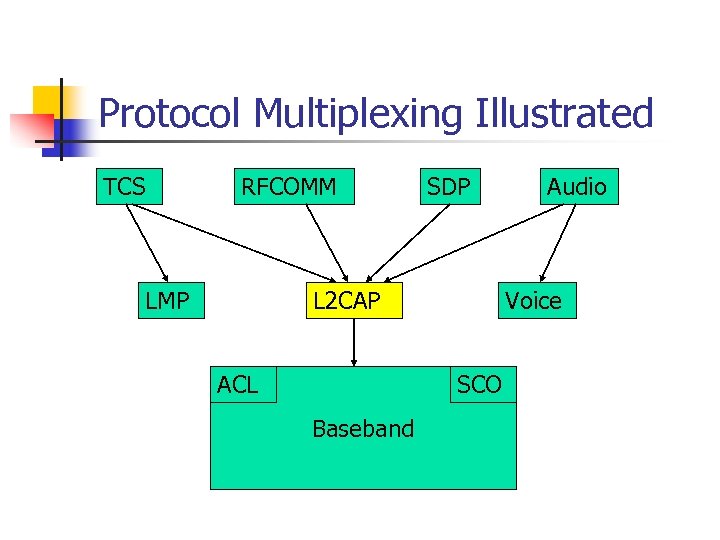
Protocol Multiplexing Illustrated TCS RFCOMM LMP SDP L 2 CAP ACL Voice SCO Baseband Audio
Summary n Advantages of Bluetooth n n Low power consumption Low price on Bluetooth components Non line-of-sight Disadvantages of Bluetooth n n Wireless LANs offer faster data rates and larger communication ranges Possibility of interference on 2. 4 GHz frequency band
Sources n n n n http: //www. ericsson. com/bluetoothf/ http: //www. ee. iitb. ernet. in/uma/~aman/bluetooth/ http: //www. mprg. ee. vt. edu/tech_xfer/ppt/bt_tut. pdf http: //www. xilinx. com/esp/bluetooth/tutorials/index. htm http: //www. palowireless. com/infotooth/download. asp http: //www. motorola. com/bluetooth/index. html Bluetooth: Connect without Cables by Jennifer Gray Discovering Bluetooth by Brent A. Miller
Скачать презентацию Bluetooth Owen Garmire and Seila Kheang CSE 466
fd62e9b60528537be38ba741afe0ba24.ppt