 Скачать презентацию Best Software Development Practices by Jeff Zhuk Struts
2aed4bec4c86cb40687664b440d61725.ppt
- Количество слайдов: 54



Best Software Development Practices by Jeff Zhuk Struts – Spring - Hibernate Data. Service & Semantic Frameworks(Java. School. com) © ITS, Inc. | dean@Java. School. com
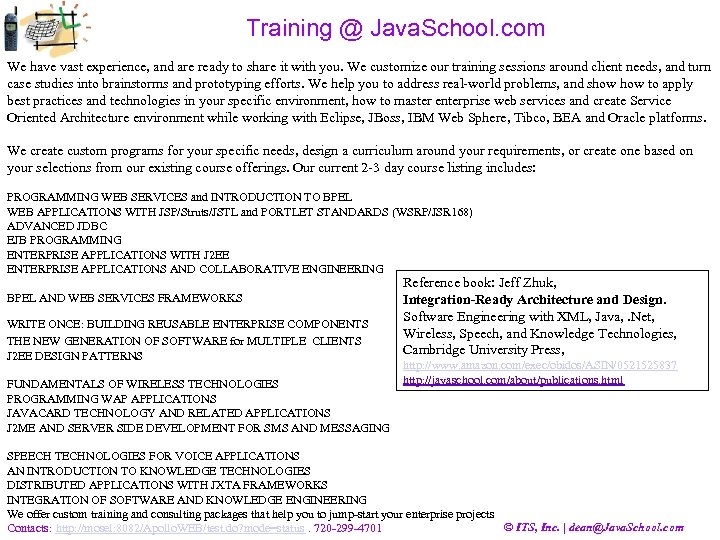
Training @ Java. School. com We have vast experience, and are ready to share it with you. We customize our training sessions around client needs, and turn case studies into brainstorms and prototyping efforts. We help you to address real-world problems, and show to apply best practices and technologies in your specific environment, how to master enterprise web services and create Service Oriented Architecture environment while working with Eclipse, JBoss, IBM Web Sphere, Tibco, BEA and Oracle platforms. We create custom programs for your specific needs, design a curriculum around your requirements, or create one based on your selections from our existing course offerings. Our current 2 -3 day course listing includes: PROGRAMMING WEB SERVICES and INTRODUCTION TO BPEL WEB APPLICATIONS WITH JSP/Struts/JSTL and PORTLET STANDARDS (WSRP/JSR 168) ADVANCED JDBC EJB PROGRAMMING ENTERPRISE APPLICATIONS WITH J 2 EE ENTERPRISE APPLICATIONS AND COLLABORATIVE ENGINEERING BPEL AND WEB SERVICES FRAMEWORKS WRITE ONCE: BUILDING REUSABLE ENTERPRISE COMPONENTS THE NEW GENERATION OF SOFTWARE for MULTIPLE CLIENTS J 2 EE DESIGN PATTERNS FUNDAMENTALS OF WIRELESS TECHNOLOGIES PROGRAMMING WAP APPLICATIONS JAVACARD TECHNOLOGY AND RELATED APPLICATIONS J 2 ME AND SERVER SIDE DEVELOPMENT FOR SMS AND MESSAGING Reference book: Jeff Zhuk, Integration-Ready Architecture and Design. Software Engineering with XML, Java, . Net, Wireless, Speech, and Knowledge Technologies, Cambridge University Press, http: //www. amazon. com/exec/obidos/ASIN/0521525837 http: //javaschool. com/about/publications. html SPEECH TECHNOLOGIES FOR VOICE APPLICATIONS AN INTRODUCTION TO KNOWLEDGE TECHNOLOGIES DISTRIBUTED APPLICATIONS WITH JXTA FRAMEWORKS INTEGRATION OF SOFTWARE AND KNOWLEDGE ENGINEERING We offer custom training and consulting packages that help you to jump-start your enterprise projects © ITS, Inc. | dean@Java. School. com Contacts: http: //mosel: 8082/Apollo. WEB/test. do? mode=status. 720 -299 -4701
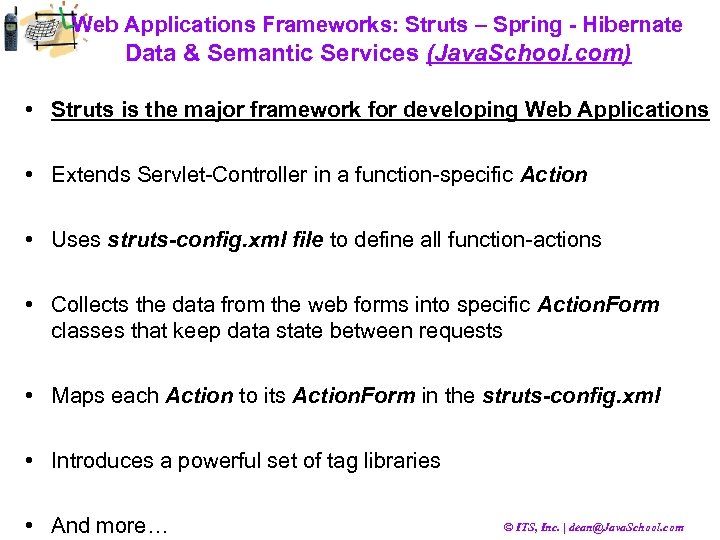
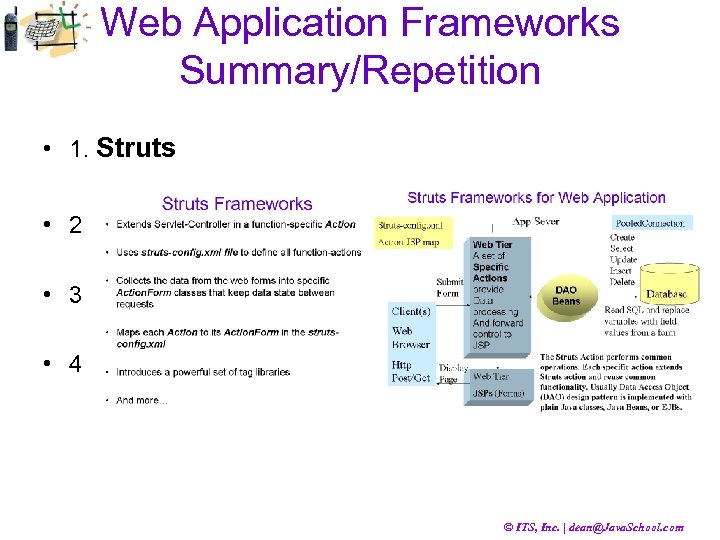
Web Applications Frameworks: Struts – Spring - Hibernate Data & Semantic Services (Java. School. com) • Struts is the major framework for developing Web Applications • Extends Servlet-Controller in a function-specific Action • Uses struts-config. xml file to define all function-actions • Collects the data from the web forms into specific Action. Form classes that keep data state between requests • Maps each Action to its Action. Form in the struts-config. xml • Introduces a powerful set of tag libraries • And more… © ITS, Inc. | dean@Java. School. com
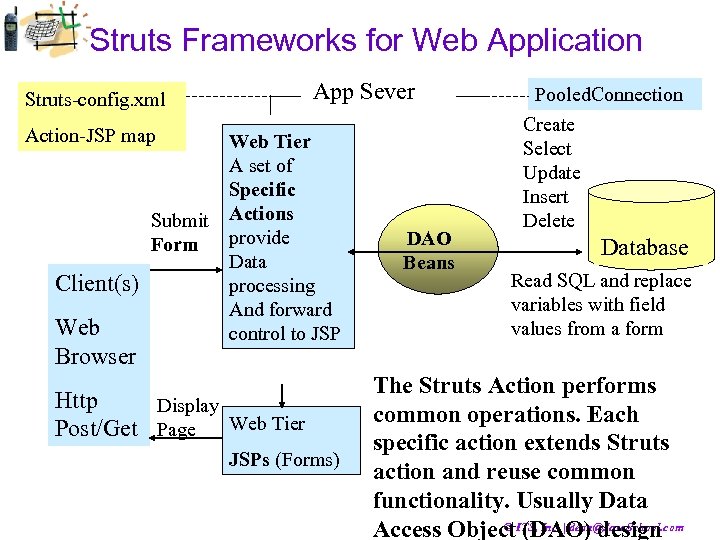
Struts Frameworks for Web Application Struts-config. xml App Sever Action-JSP map Client(s) Web Browser Web Tier A set of Specific Submit Actions provide Form Data processing And forward control to JSP Http Display Post/Get Page Web Tier JSPs (Forms) DAO Beans Pooled. Connection Create Select Update Insert Delete Database Read SQL and replace variables with field values from a form The Struts Action performs common operations. Each specific action extends Struts action and reuse common functionality. Usually Data © (DAO) design Access Object. ITS, Inc. | dean@Java. School. com
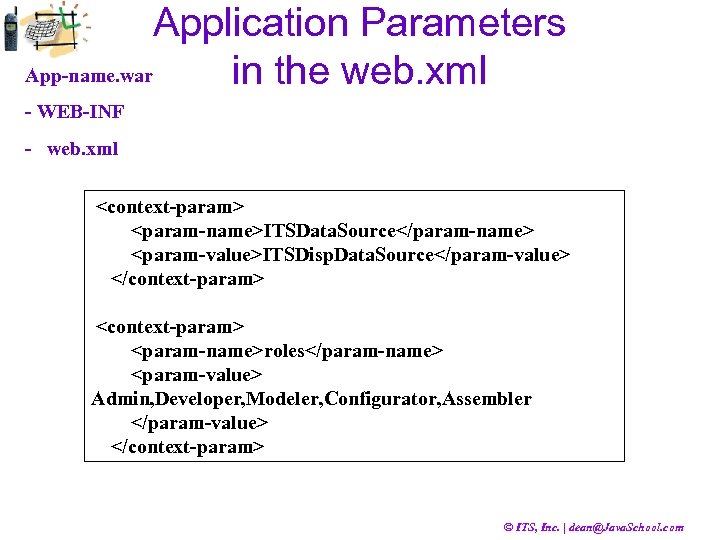
Application Parameters App-name. war in the web. xml - WEB-INF - web. xml <context-param> <param-name>ITSData. Source</param-name> <param-value>ITSDisp. Data. Source</param-value> </context-param> <param-name>roles</param-name> <param-value> Admin, Developer, Modeler, Configurator, Assembler </param-value> </context-param> © ITS, Inc. | dean@Java. School. com
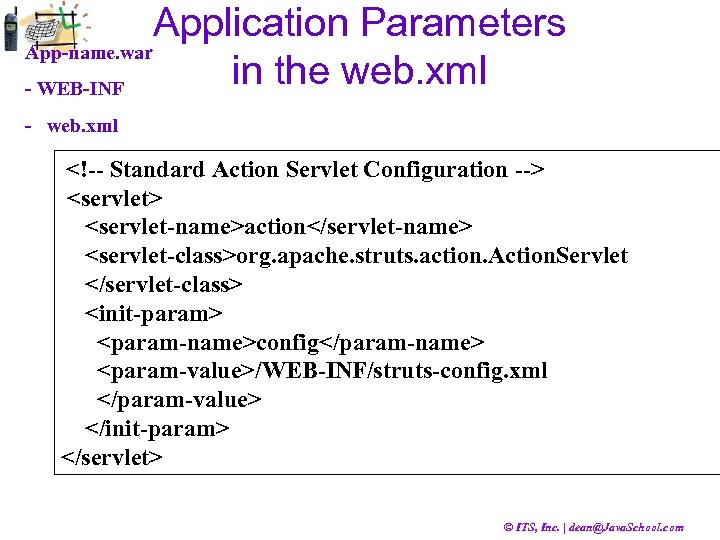
Application Parameters App-name. war in the web. xml - WEB-INF - web. xml <!-- Standard Action Servlet Configuration --> <servlet-name>action</servlet-name> <servlet-class>org. apache. struts. action. Action. Servlet </servlet-class> <init-param> <param-name>config</param-name> <param-value>/WEB-INF/struts-config. xml </param-value> </init-param> </servlet> © ITS, Inc. | dean@Java. School. com
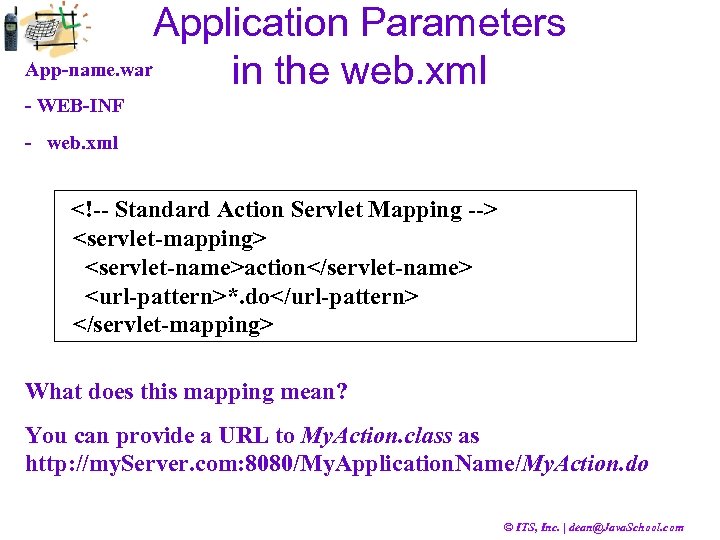
Application Parameters App-name. war in the web. xml - WEB-INF - web. xml <!-- Standard Action Servlet Mapping --> <servlet-mapping> <servlet-name>action</servlet-name> <url-pattern>*. do</url-pattern> </servlet-mapping> What does this mapping mean? You can provide a URL to My. Action. class as http: //my. Server. com: 8080/My. Application. Name/My. Action. do © ITS, Inc. | dean@Java. School. com
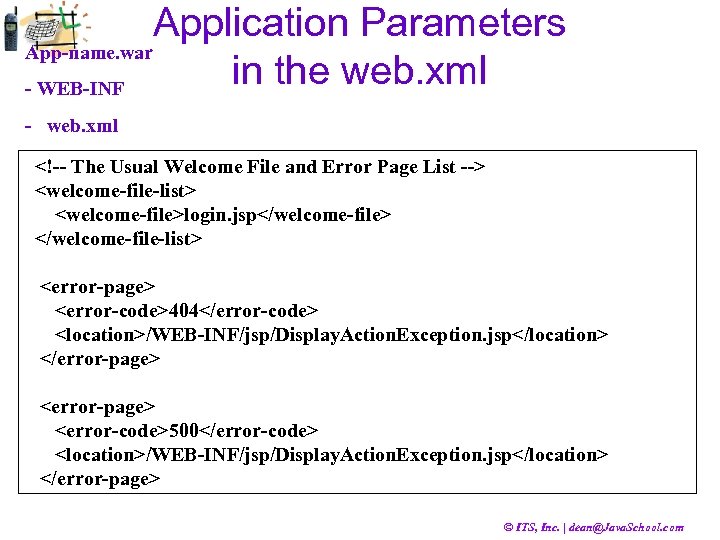
Application Parameters App-name. war in the web. xml - WEB-INF - web. xml <!-- The Usual Welcome File and Error Page List --> <welcome-file-list> <welcome-file>login. jsp</welcome-file> </welcome-file-list> <error-page> <error-code>404</error-code> <location>/WEB-INF/jsp/Display. Action. Exception. jsp</location> </error-page> <error-code>500</error-code> <location>/WEB-INF/jsp/Display. Action. Exception. jsp</location> </error-page> © ITS, Inc. | dean@Java. School. com
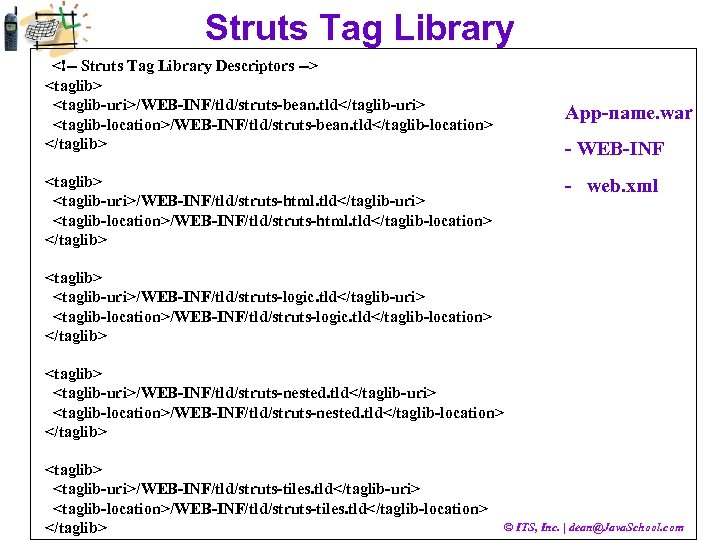
Struts Tag Library <!-- Struts Tag Library Descriptors --> <taglib-uri>/WEB-INF/tld/struts-bean. tld</taglib-uri> <taglib-location>/WEB-INF/tld/struts-bean. tld</taglib-location> </taglib> <taglib-uri>/WEB-INF/tld/struts-html. tld</taglib-uri> <taglib-location>/WEB-INF/tld/struts-html. tld</taglib-location> </taglib> App-name. war - WEB-INF - web. xml <taglib> <taglib-uri>/WEB-INF/tld/struts-logic. tld</taglib-uri> <taglib-location>/WEB-INF/tld/struts-logic. tld</taglib-location> </taglib> <taglib-uri>/WEB-INF/tld/struts-nested. tld</taglib-uri> <taglib-location>/WEB-INF/tld/struts-nested. tld</taglib-location> </taglib> <taglib-uri>/WEB-INF/tld/struts-tiles. tld</taglib-uri> <taglib-location>/WEB-INF/tld/struts-tiles. tld</taglib-location> </taglib> © ITS, Inc. | dean@Java. School. com
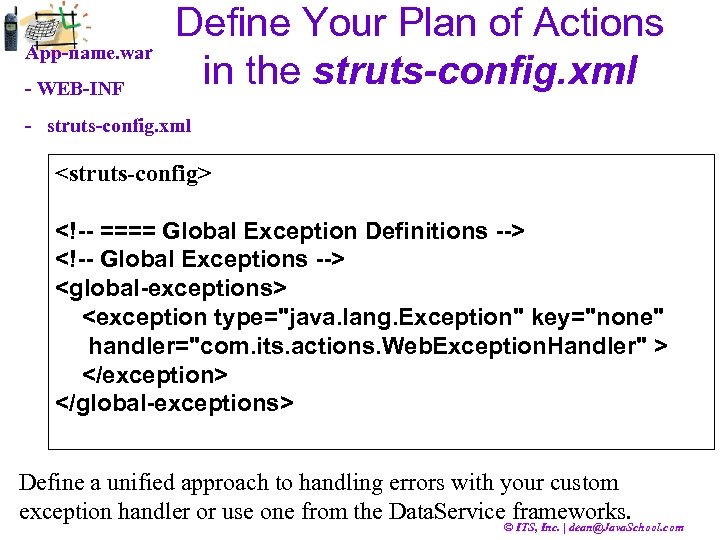
App-name. war - WEB-INF Define Your Plan of Actions in the struts-config. xml - struts-config. xml <struts-config> <!-- ==== Global Exception Definitions --> <!-- Global Exceptions --> <global-exceptions> <exception type="java. lang. Exception" key="none" handler="com. its. actions. Web. Exception. Handler" > </exception> </global-exceptions> Define a unified approach to handling errors with your custom exception handler or use one from the Data. Service frameworks. © ITS, Inc. | dean@Java. School. com
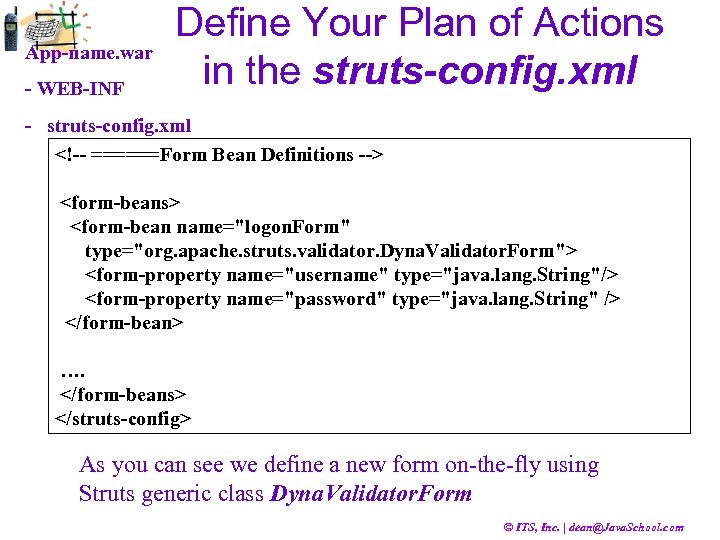
App-name. war - WEB-INF Define Your Plan of Actions in the struts-config. xml - struts-config. xml <!-- ======Form Bean Definitions --> <form-beans> <form-bean name="logon. Form" type="org. apache. struts. validator. Dyna. Validator. Form"> <form-property name="username" type="java. lang. String"/> <form-property name="password" type="java. lang. String" /> </form-bean> …. </form-beans> </struts-config> As you can see we define a new form on-the-fly using Struts generic class Dyna. Validator. Form © ITS, Inc. | dean@Java. School. com
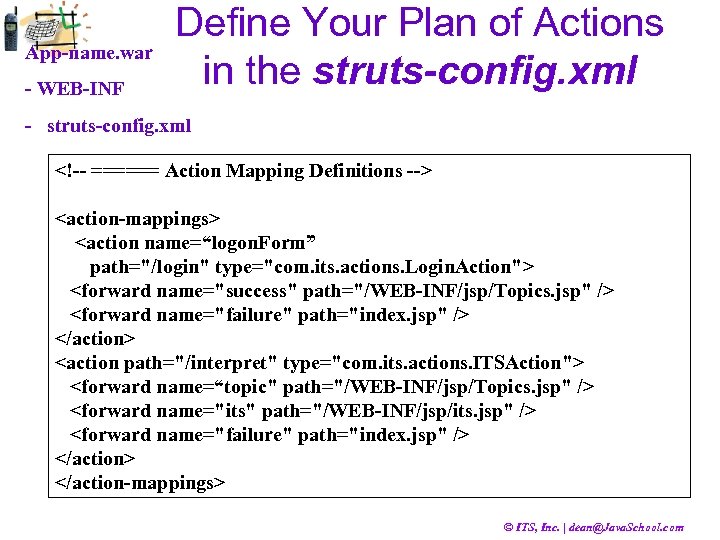
App-name. war - WEB-INF Define Your Plan of Actions in the struts-config. xml - struts-config. xml <!-- ====== Action Mapping Definitions --> <action-mappings> <action name=“logon. Form” path="/login" type="com. its. actions. Login. Action"> <forward name="success" path="/WEB-INF/jsp/Topics. jsp" /> <forward name="failure" path="index. jsp" /> </action> <action path="/interpret" type="com. its. actions. ITSAction"> <forward name=“topic" path="/WEB-INF/jsp/Topics. jsp" /> <forward name="its" path="/WEB-INF/jsp/its. jsp" /> <forward name="failure" path="index. jsp" /> </action-mappings> © ITS, Inc. | dean@Java. School. com
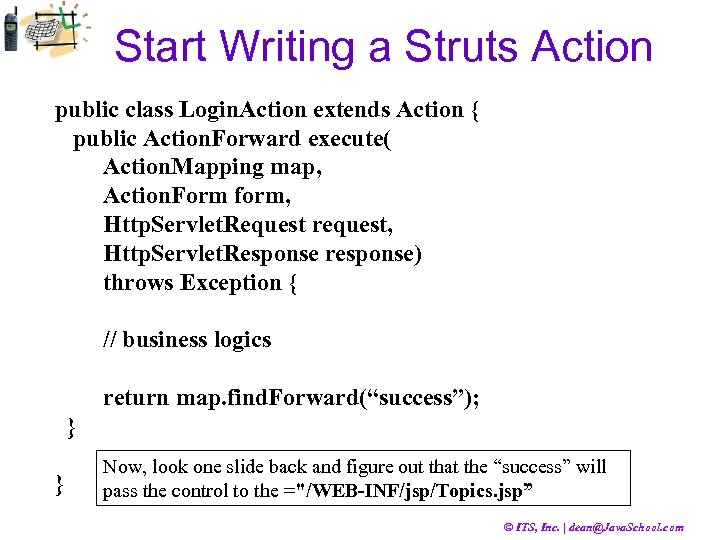
Start Writing a Struts Action public class Login. Action extends Action { public Action. Forward execute( Action. Mapping map, Action. Form form, Http. Servlet. Request request, Http. Servlet. Response response) throws Exception { // business logics return map. find. Forward(“success”); } } Now, look one slide back and figure out that the “success” will pass the control to the ="/WEB-INF/jsp/Topics. jsp” © ITS, Inc. | dean@Java. School. com
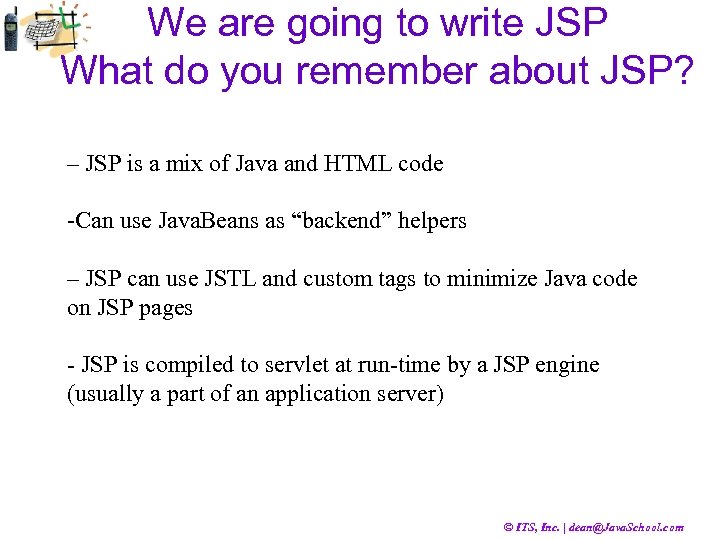
We are going to write JSP What do you remember about JSP? – JSP is a mix of Java and HTML code -Can use Java. Beans as “backend” helpers – JSP can use JSTL and custom tags to minimize Java code on JSP pages - JSP is compiled to servlet at run-time by a JSP engine (usually a part of an application server) © ITS, Inc. | dean@Java. School. com
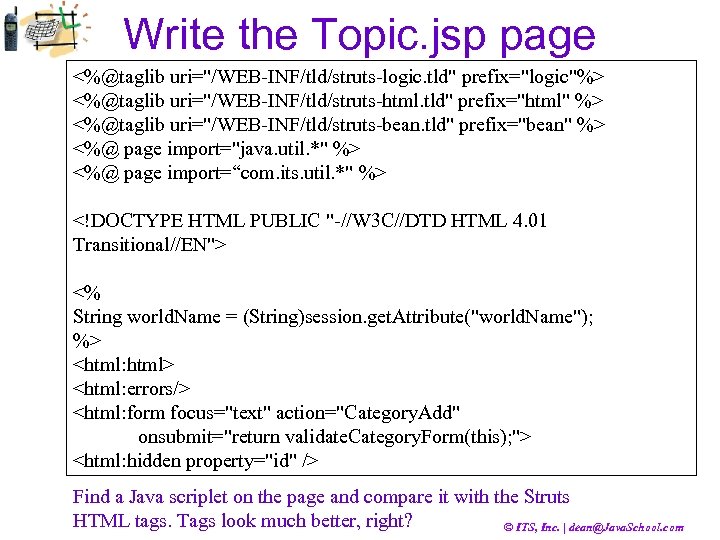
Write the Topic. jsp page <%@taglib uri="/WEB-INF/tld/struts-logic. tld" prefix="logic"%> <%@taglib uri="/WEB-INF/tld/struts-html. tld" prefix="html" %> <%@taglib uri="/WEB-INF/tld/struts-bean. tld" prefix="bean" %> <%@ page import="java. util. *" %> <%@ page import=“com. its. util. *" %> <!DOCTYPE HTML PUBLIC "-//W 3 C//DTD HTML 4. 01 Transitional//EN"> <% String world. Name = (String)session. get. Attribute("world. Name"); %> <html: html> <html: errors/> <html: form focus="text" action="Category. Add" onsubmit="return validate. Category. Form(this); "> <html: hidden property="id" /> Find a Java scriplet on the page and compare it with the Struts HTML tags. Tags look much better, right? © ITS, Inc. | dean@Java. School. com
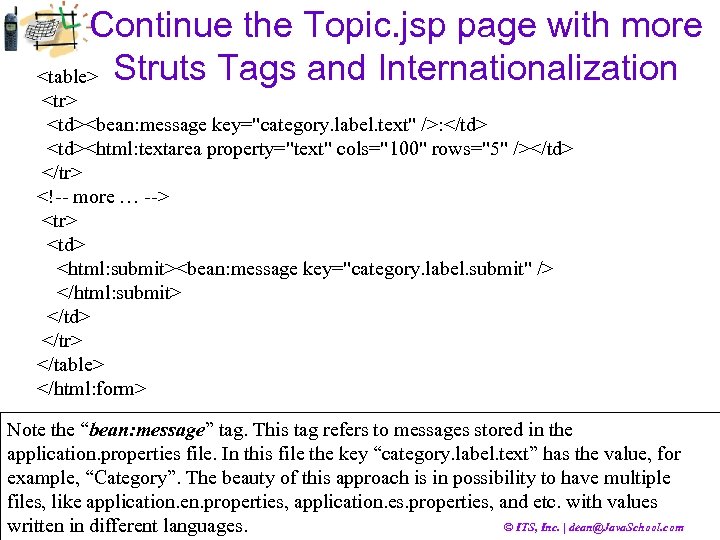
Continue the Topic. jsp page with more <table> Struts Tags and Internationalization <tr> <td><bean: message key="category. label. text" />: </td> <td><html: textarea property="text" cols="100" rows="5" /></td> </tr> <!-- more … --> <tr> <td> <html: submit><bean: message key="category. label. submit" /> </html: submit> </td> </tr> </table> </html: form> Note the “bean: message” tag. This tag refers to messages stored in the application. properties file. In this file the key “category. label. text” has the value, for example, “Category”. The beauty of this approach is in possibility to have multiple files, like application. en. properties, application. es. properties, and etc. with values © ITS, Inc. | dean@Java. School. com written in different languages.
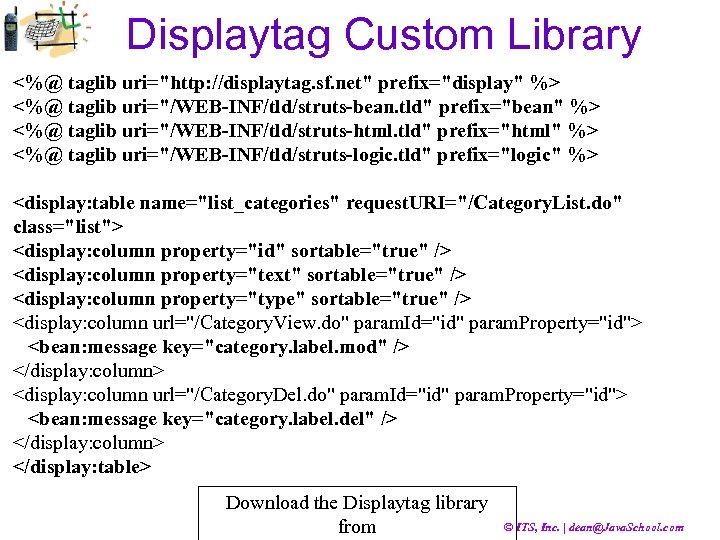
Displaytag Custom Library <%@ taglib uri="http: //displaytag. sf. net" prefix="display" %> <%@ taglib uri="/WEB-INF/tld/struts-bean. tld" prefix="bean" %> <%@ taglib uri="/WEB-INF/tld/struts-html. tld" prefix="html" %> <%@ taglib uri="/WEB-INF/tld/struts-logic. tld" prefix="logic" %> <display: table name="list_categories" request. URI="/Category. List. do" class="list"> <display: column property="id" sortable="true" /> <display: column property="text" sortable="true" /> <display: column property="type" sortable="true" /> <display: column url="/Category. View. do" param. Id="id" param. Property="id"> <bean: message key="category. label. mod" /> </display: column> <display: column url="/Category. Del. do" param. Id="id" param. Property="id"> <bean: message key="category. label. del" /> </display: column> </display: table> Download the Displaytag library from © ITS, Inc. | dean@Java. School. com
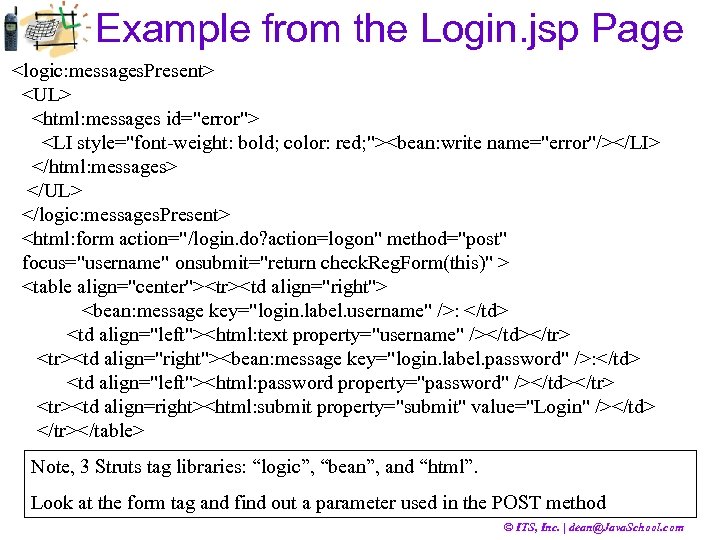
Example from the Login. jsp Page <logic: messages. Present> <UL> <html: messages id="error"> <LI style="font-weight: bold; color: red; "><bean: write name="error"/></LI> </html: messages> </UL> </logic: messages. Present> <html: form action="/login. do? action=logon" method="post" focus="username" onsubmit="return check. Reg. Form(this)" > <table align="center"><tr><td align="right"> <bean: message key="login. label. username" />: </td> <td align="left"><html: text property="username" /></td></tr> <tr><td align="right"><bean: message key="login. label. password" />: </td> <td align="left"><html: password property="password" /></td></tr> <tr><td align=right><html: submit property="submit" value="Login" /></td> </tr></table> Note, 3 Struts tag libraries: “logic”, “bean”, and “html”. Look at the form tag and find out a parameter used in the POST method © ITS, Inc. | dean@Java. School. com
Struts Summary • Extends Servlet-Controller …. • Uses struts-config. xml file to …. • Collects the data from the web forms into … • Maps each Action to its … in the … • Introduces a powerful set of … © ITS, Inc. | dean@Java. School. com
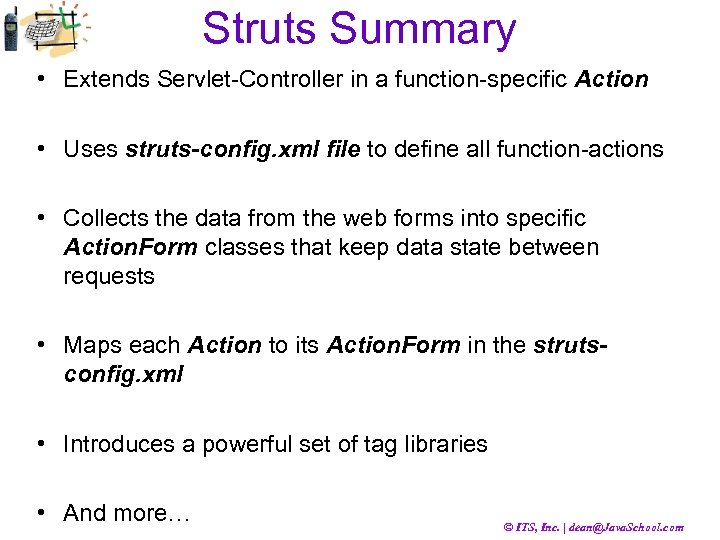
Struts Summary • Extends Servlet-Controller in a function-specific Action • Uses struts-config. xml file to define all function-actions • Collects the data from the web forms into specific Action. Form classes that keep data state between requests • Maps each Action to its Action. Form in the strutsconfig. xml • Introduces a powerful set of tag libraries • And more… © ITS, Inc. | dean@Java. School. com
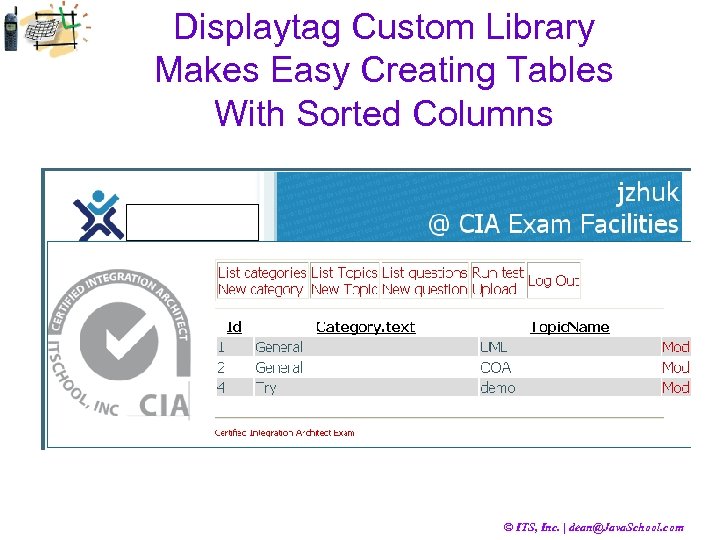
Displaytag Custom Library Makes Easy Creating Tables With Sorted Columns © ITS, Inc. | dean@Java. School. com
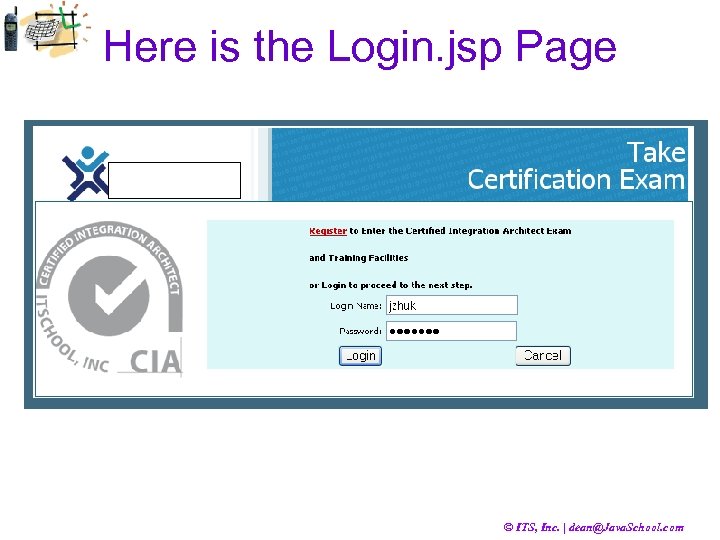
Here is the Login. jsp Page © ITS, Inc. | dean@Java. School. com
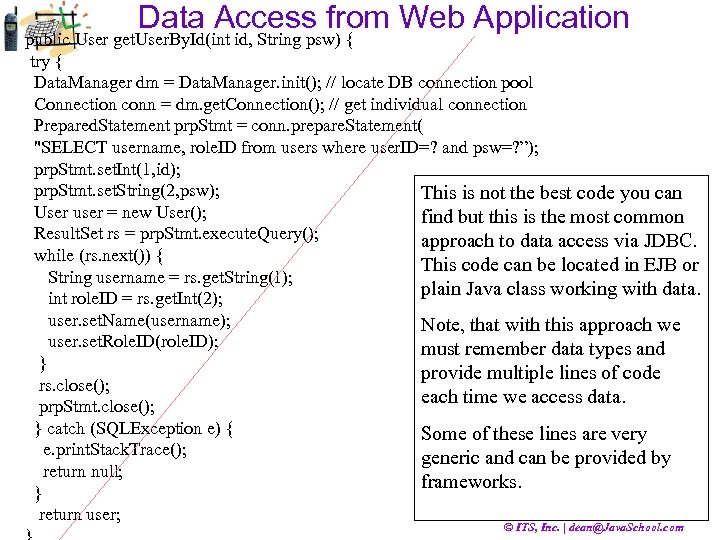
Data Access from Web Application public User get. User. By. Id(int id, String psw) { try { Data. Manager dm = Data. Manager. init(); // locate DB connection pool Connection conn = dm. get. Connection(); // get individual connection Prepared. Statement prp. Stmt = conn. prepare. Statement( "SELECT username, role. ID from users where user. ID=? and psw=? ”); prp. Stmt. set. Int(1, id); prp. Stmt. set. String(2, psw); This is not the best code you can User user = new User(); find but this is the most common Result. Set rs = prp. Stmt. execute. Query(); approach to data access via JDBC. while (rs. next()) { This code can be located in EJB or String username = rs. get. String(1); plain Java class working with data. int role. ID = rs. get. Int(2); user. set. Name(username); Note, that with this approach we user. set. Role. ID(role. ID); must remember data types and } provide multiple lines of code rs. close(); each time we access data. prp. Stmt. close(); } catch (SQLException e) { Some of these lines are very e. print. Stack. Trace(); generic and can be provided by return null; frameworks. } return user; © ITS, Inc. | dean@Java. School. com
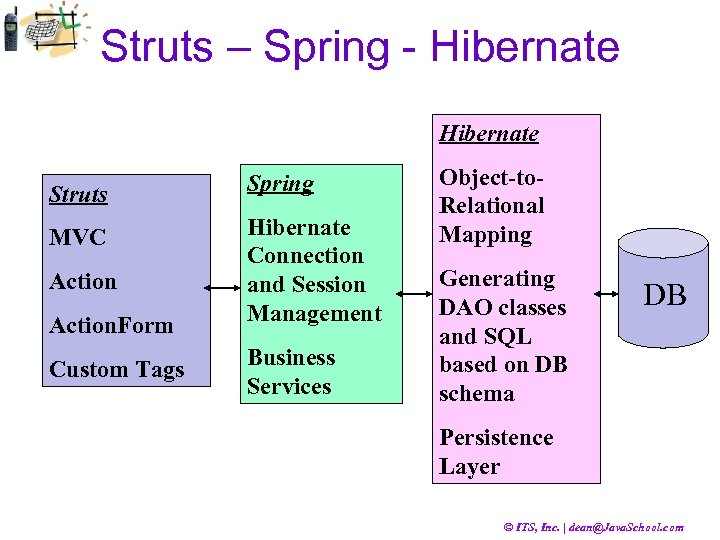
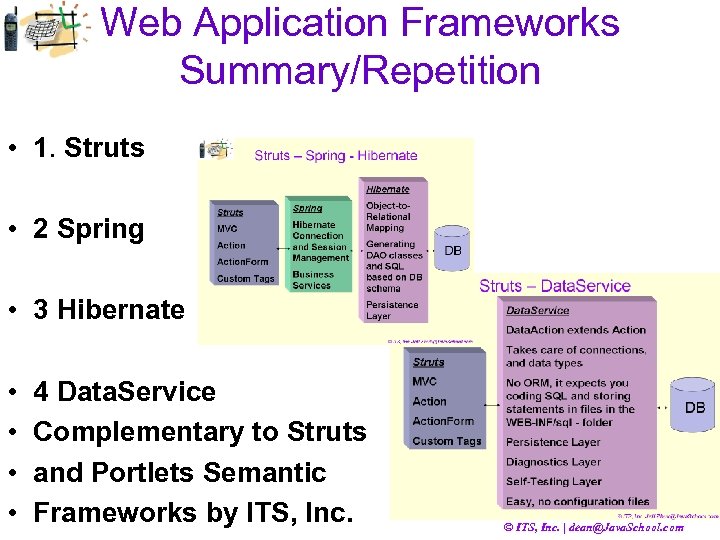
Struts – Spring - Hibernate Struts Spring MVC Hibernate Connection and Session Management Action. Form Custom Tags Business Services Object-to. Relational Mapping Generating DAO classes and SQL based on DB schema DB Persistence Layer © ITS, Inc. | dean@Java. School. com
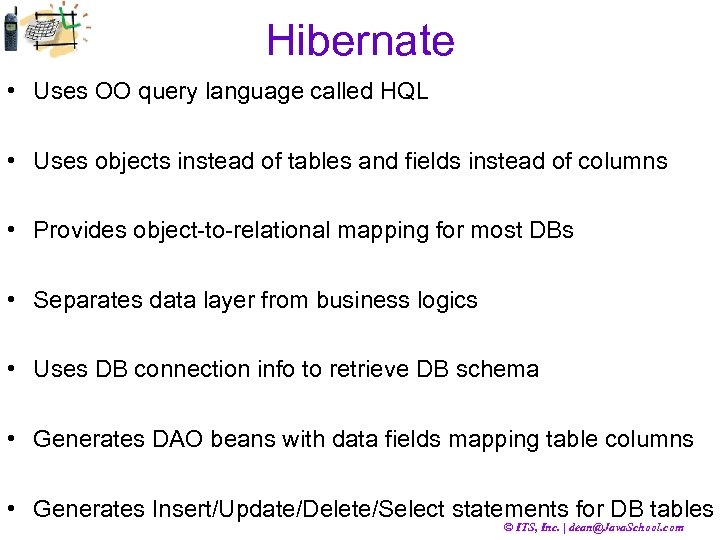
Hibernate • Uses OO query language called HQL • Uses objects instead of tables and fields instead of columns • Provides object-to-relational mapping for most DBs • Separates data layer from business logics • Uses DB connection info to retrieve DB schema • Generates DAO beans with data fields mapping table columns • Generates Insert/Update/Delete/Select statements for DB tables © ITS, Inc. | dean@Java. School. com
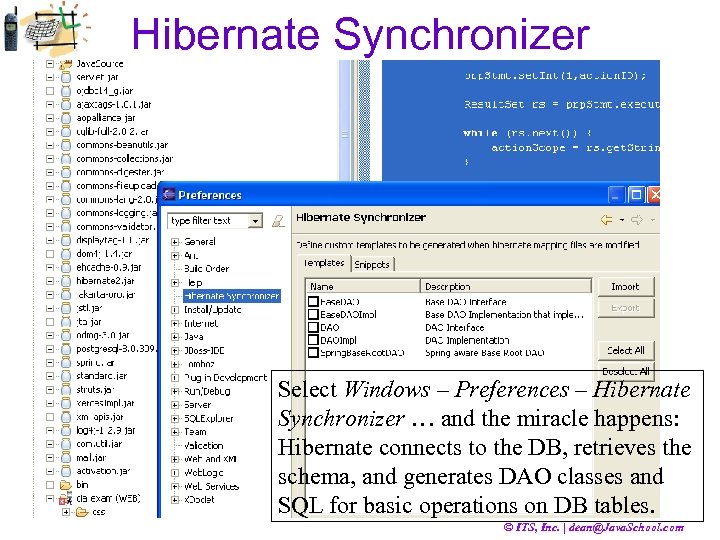
Hibernate Synchronizer Select Windows – Preferences – Hibernate Synchronizer … and the miracle happens: Hibernate connects to the DB, retrieves the schema, and generates DAO classes and SQL for basic operations on DB tables. © ITS, Inc. | dean@Java. School. com
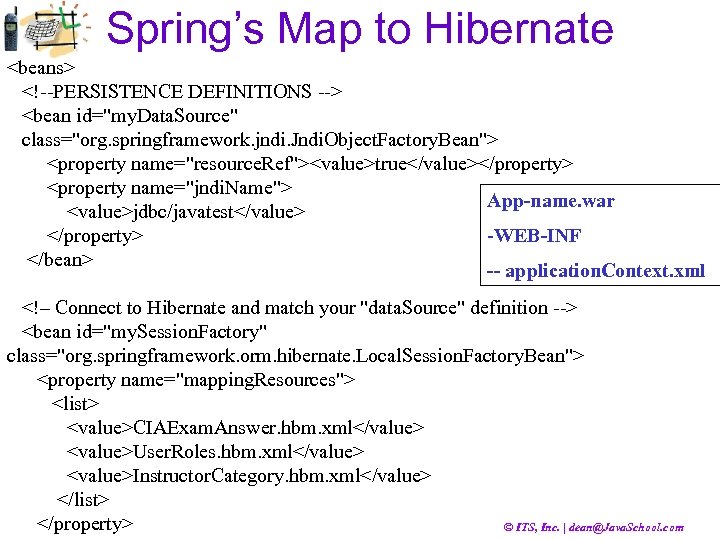
Spring’s Map to Hibernate <beans> <!--PERSISTENCE DEFINITIONS --> <bean id="my. Data. Source" class="org. springframework. jndi. Jndi. Object. Factory. Bean"> <property name="resource. Ref"><value>true</value></property> <property name="jndi. Name"> App-name. war <value>jdbc/javatest</value> </property> -WEB-INF </bean> -- application. Context. xml <!– Connect to Hibernate and match your "data. Source" definition --> <bean id="my. Session. Factory" class="org. springframework. orm. hibernate. Local. Session. Factory. Bean"> <property name="mapping. Resources"> <list> <value>CIAExam. Answer. hbm. xml</value> <value>User. Roles. hbm. xml</value> <value>Instructor. Category. hbm. xml</value> </list> </property> © ITS, Inc. | dean@Java. School. com
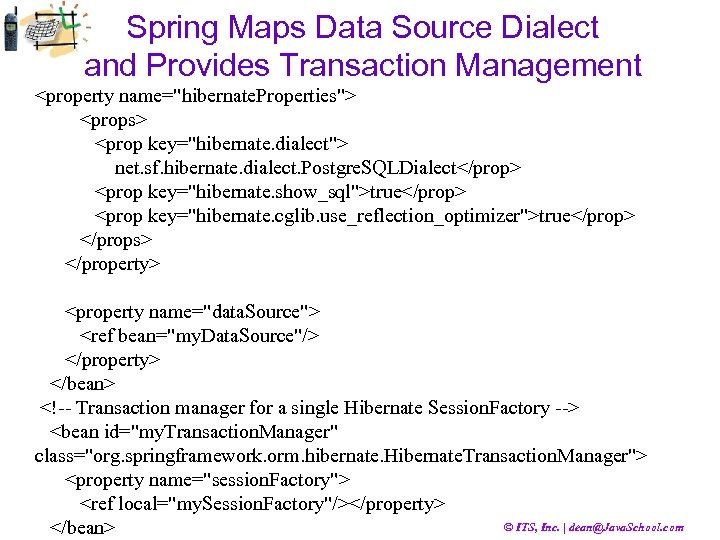
Spring Maps Data Source Dialect and Provides Transaction Management <property name="hibernate. Properties"> <props> <prop key="hibernate. dialect"> net. sf. hibernate. dialect. Postgre. SQLDialect</prop> <prop key="hibernate. show_sql">true</prop> <prop key="hibernate. cglib. use_reflection_optimizer">true</prop> </props> </property> <property name="data. Source"> <ref bean="my. Data. Source"/> </property> </bean> <!-- Transaction manager for a single Hibernate Session. Factory --> <bean id="my. Transaction. Manager" class="org. springframework. orm. hibernate. Hibernate. Transaction. Manager"> <property name="session. Factory"> <ref local="my. Session. Factory"/></property> © ITS, Inc. | dean@Java. School. com </bean>
Spring and Hibernate Reduce Business Code The session. Factory property and the my. Session. Factory bean are related in the Spring configuration file. Spring creates described objects and factories that instantiate Hibernate DAO classes at run-time. Spring simplifies the Hibernate configuration that otherwise would be stored in the hibernate. cfg. xml file. The bottom line: Spring and Hibernate working together reduce your business code, especially when you operate with simple data records that reflect full table structure. © ITS, Inc. | dean@Java. School. com
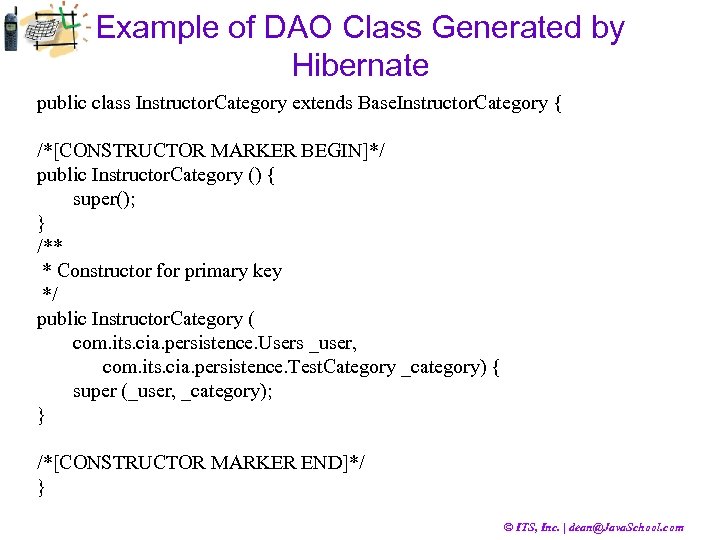
Example of DAO Class Generated by Hibernate public class Instructor. Category extends Base. Instructor. Category { /*[CONSTRUCTOR MARKER BEGIN]*/ public Instructor. Category () { super(); } /** * Constructor for primary key */ public Instructor. Category ( com. its. cia. persistence. Users _user, com. its. cia. persistence. Test. Category _category) { super (_user, _category); } /*[CONSTRUCTOR MARKER END]*/ } © ITS, Inc. | dean@Java. School. com
Data Service & Semantic Frameworks by ITS, Inc. , Java. School. com Spring and Hibernate are perfect solutions when development can transit from SQL to objects and rely on Object-Relational Mapping (ORM) mechanisms and automatic SQL generation. There are cases when developers want to keep full control on complex SQL statements, when creating and debugging SQL is an essential part of the development efforts. The Data Service & Semantic frameworks by ITS, Inc. focus on these cases and alone with data handling provide mechanisms for application monitoring, diagnostics and semantic self-awareness. © ITS, Inc. | dean@Java. School. com
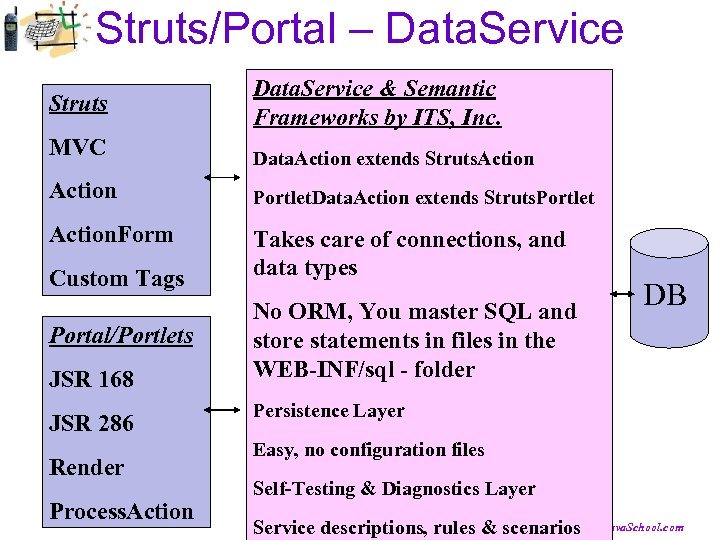
Struts/Portal – Data. Service Struts Data. Service & Semantic Frameworks by ITS, Inc. MVC Data. Action extends Struts. Action Portlet. Data. Action extends Struts. Portlet Action. Form Takes care of connections, and data types Custom Tags Portal/Portlets JSR 168 JSR 286 Render Process. Action No ORM, You master SQL and store statements in files in the WEB-INF/sql - folder DB Persistence Layer Easy, no configuration files Self-Testing & Diagnostics Layer © ITS, Inc. | dean@Java. School. com Service descriptions, rules & scenarios
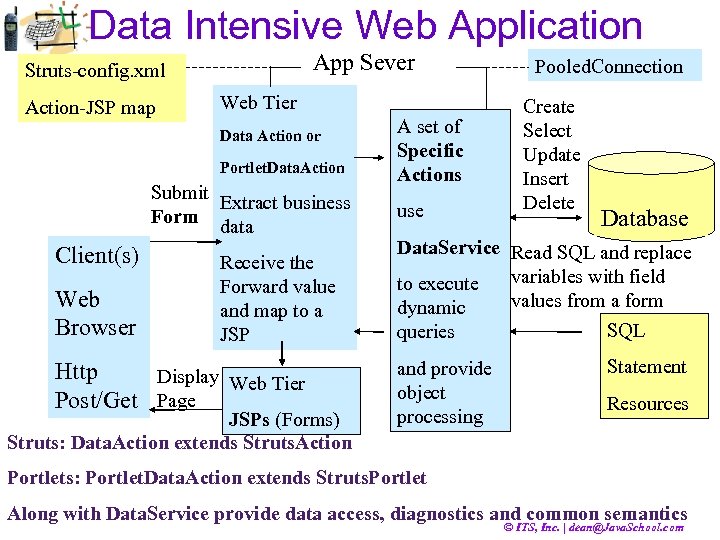
Data Intensive Web Application Struts-config. xml Action-JSP map App Sever Web Tier Data Action or Portlet. Data. Action Submit Extract business Form data Client(s) Web Browser Receive the Forward value and map to a JSP Http Display Web Tier Post/Get Page JSPs (Forms) Struts: Data. Action extends Struts. Action A set of Specific Actions use Pooled. Connection Create Select Update Insert Delete Database Data. Service Read SQL and replace to execute variables with field values from a form dynamic SQL queries and provide object processing Statement Resources Portlets: Portlet. Data. Action extends Struts. Portlet Along with Data. Service provide data access, diagnostics and common semantics © ITS, Inc. | dean@Java. School. com
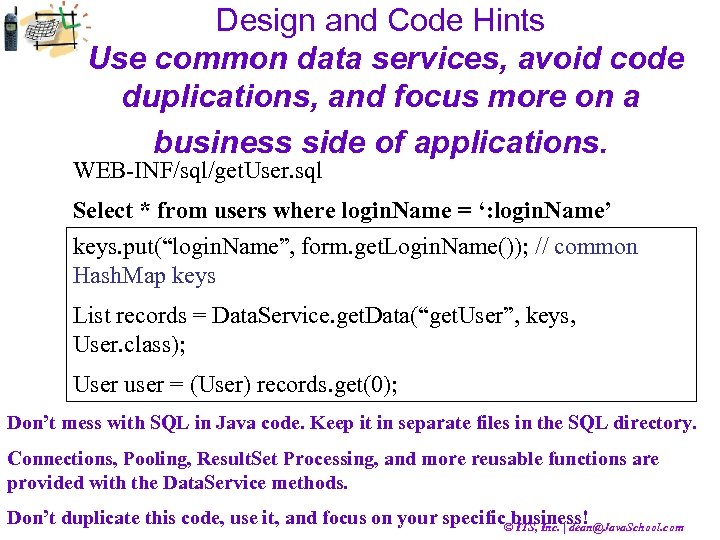
Design and Code Hints Use common data services, avoid code duplications, and focus more on a business side of applications. WEB-INF/sql/get. User. sql Select * from users where login. Name = ‘: login. Name’ keys. put(“login. Name”, form. get. Login. Name()); // common Hash. Map keys List records = Data. Service. get. Data(“get. User”, keys, User. class); User user = (User) records. get(0); Don’t mess with SQL in Java code. Keep it in separate files in the SQL directory. Connections, Pooling, Result. Set Processing, and more reusable functions are provided with the Data. Service methods. Don’t duplicate this code, use it, and focus on your specific©business! ITS, Inc. | dean@Java. School. com
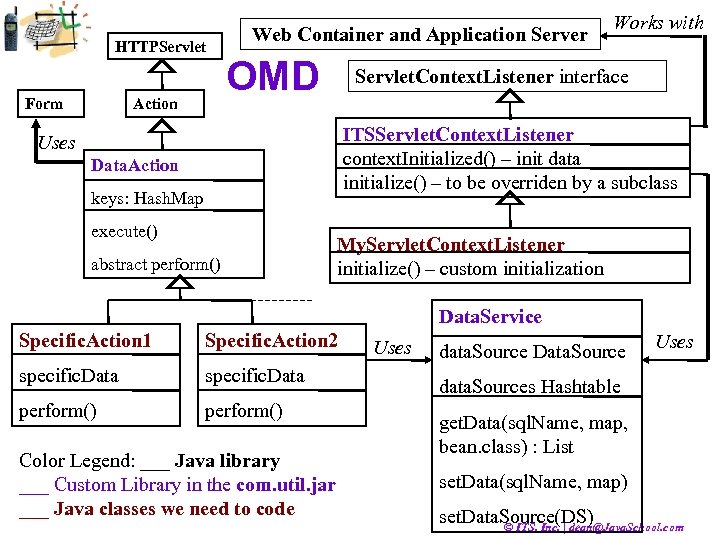
HTTPServlet Form Action Web Container and Application Server OMD Works with Servlet. Context. Listener interface ITSServlet. Context. Listener context. Initialized() – init data initialize() – to be overriden by a subclass Uses Data. Action keys: Hash. Map execute() abstract perform() My. Servlet. Context. Listener initialize() – custom initialization Data. Service Specific. Action 1 Specific. Action 2 specific. Data perform() Color Legend: ___ Java library ___ Custom Library in the com. util. jar ___ Java classes we need to code Uses data. Source Data. Source Uses data. Sources Hashtable get. Data(sql. Name, map, bean. class) : List set. Data(sql. Name, map) set. Data. Source(DS) © ITS, Inc. | dean@Java. School. com
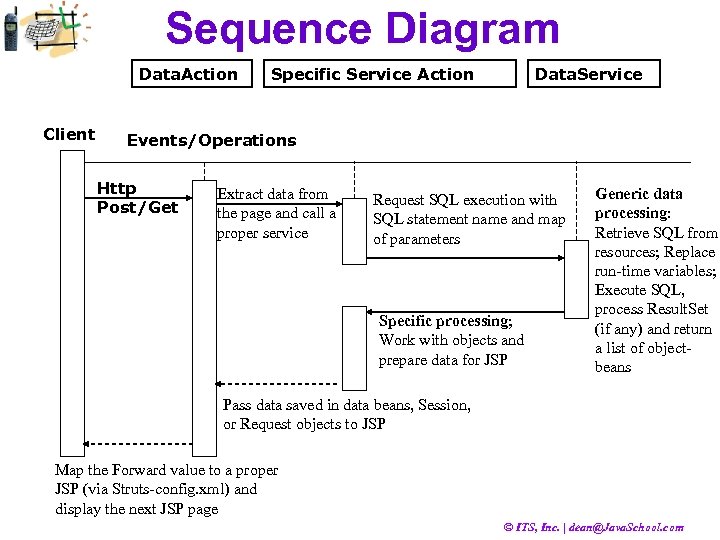
Sequence Diagram Data. Action Client Specific Service Action Data. Service Events/Operations Http Post/Get Extract data from the page and call a proper service Request SQL execution with SQL statement name and map of parameters Specific processing; Work with objects and prepare data for JSP Generic data processing: Retrieve SQL from resources; Replace run-time variables; Execute SQL, process Result. Set (if any) and return a list of objectbeans Pass data saved in data beans, Session, or Request objects to JSP Map the Forward value to a proper JSP (via Struts-config. xml) and display the next JSP page © ITS, Inc. | dean@Java. School. com
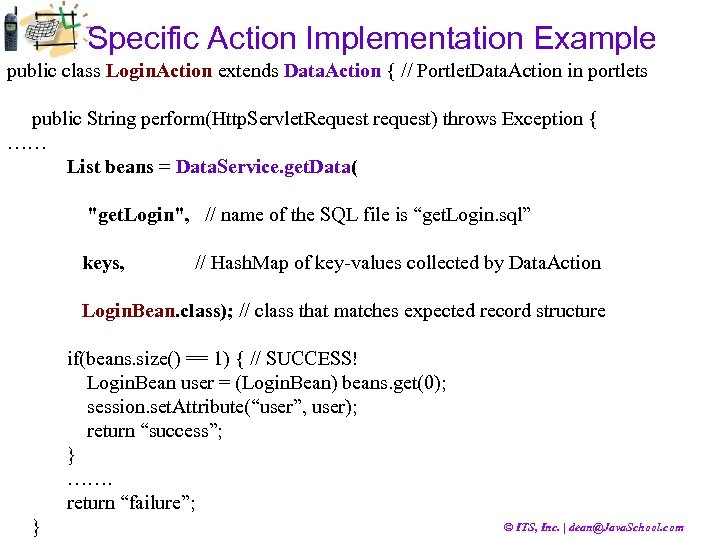
Specific Action Implementation Example public class Login. Action extends Data. Action { // Portlet. Data. Action in portlets public String perform(Http. Servlet. Request request) throws Exception { …… List beans = Data. Service. get. Data( "get. Login", // name of the SQL file is “get. Login. sql” keys, // Hash. Map of key-values collected by Data. Action Login. Bean. class); // class that matches expected record structure if(beans. size() == 1) { // SUCCESS! Login. Bean user = (Login. Bean) beans. get(0); session. set. Attribute(“user”, user); return “success”; } ……. return “failure”; } © ITS, Inc. | dean@Java. School. com
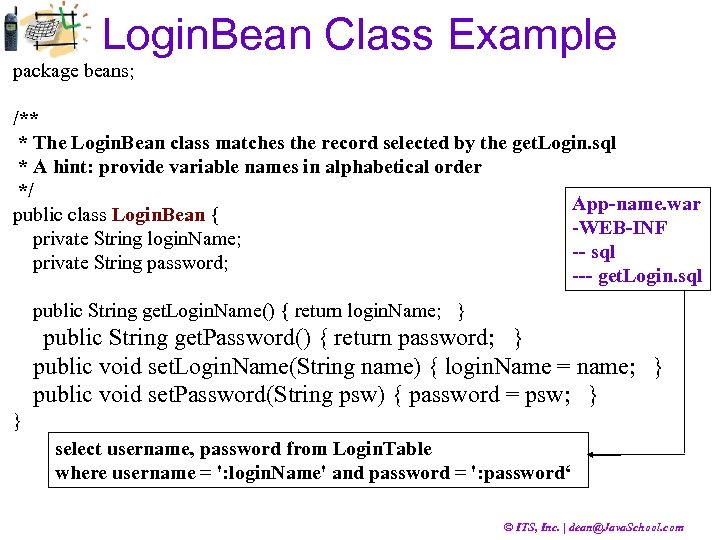
Login. Bean Class Example package beans; /** * The Login. Bean class matches the record selected by the get. Login. sql * A hint: provide variable names in alphabetical order */ App-name. war public class Login. Bean { -WEB-INF private String login. Name; -- sql private String password; --- get. Login. sql public String get. Login. Name() { return login. Name; } public String get. Password() { return password; } public void set. Login. Name(String name) { login. Name = name; } public void set. Password(String psw) { password = psw; } } select username, password from Login. Table where username = ': login. Name' and password = ': password‘ © ITS, Inc. | dean@Java. School. com
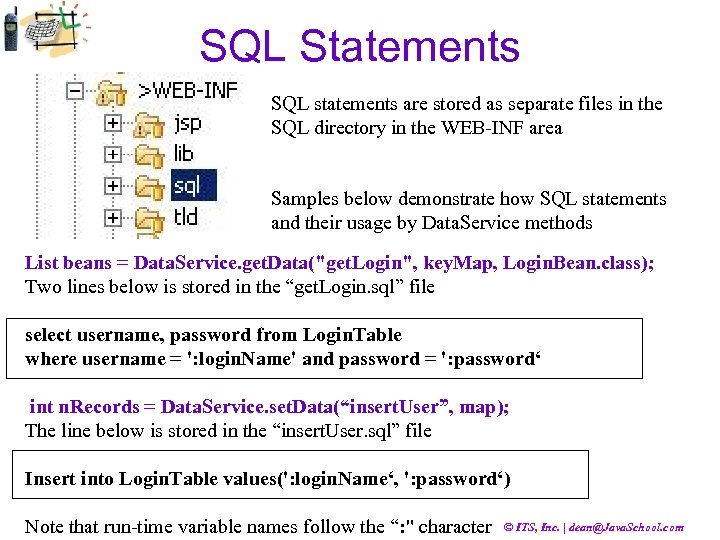
SQL Statements SQL statements are stored as separate files in the SQL directory in the WEB-INF area Samples below demonstrate how SQL statements and their usage by Data. Service methods List beans = Data. Service. get. Data("get. Login", key. Map, Login. Bean. class); Two lines below is stored in the “get. Login. sql” file select username, password from Login. Table where username = ': login. Name' and password = ': password‘ int n. Records = Data. Service. set. Data(“insert. User”, map); The line below is stored in the “insert. User. sql” file Insert into Login. Table values(': login. Name‘, ': password‘) Note that run-time variable names follow the “: " character © ITS, Inc. | dean@Java. School. com
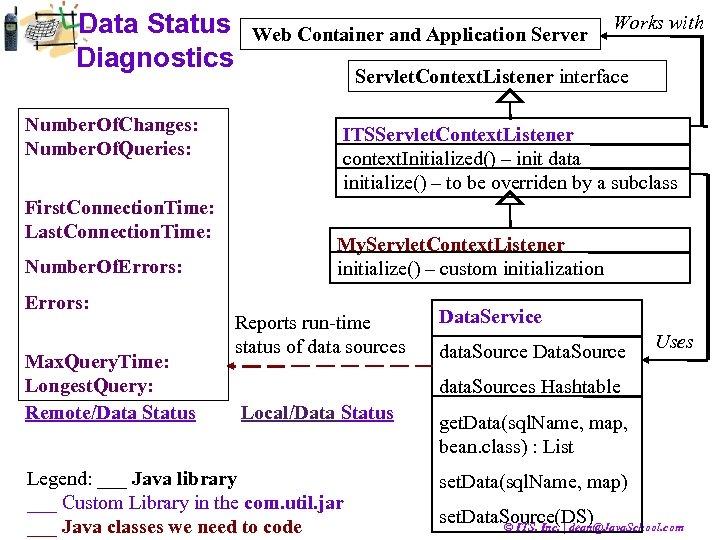
Data Status Diagnostics Number. Of. Changes: Number. Of. Queries: First. Connection. Time: Last. Connection. Time: Number. Of. Errors: Max. Query. Time: Longest. Query: Remote/Data Status Web Container and Application Server Works with Servlet. Context. Listener interface ITSServlet. Context. Listener context. Initialized() – init data initialize() – to be overriden by a subclass My. Servlet. Context. Listener initialize() – custom initialization Reports run-time status of data sources Data. Service data. Source Data. Source Uses data. Sources Hashtable Local/Data Status Legend: ___ Java library ___ Custom Library in the com. util. jar ___ Java classes we need to code get. Data(sql. Name, map, bean. class) : List set. Data(sql. Name, map) set. Data. Source(DS) © ITS, Inc. | dean@Java. School. com
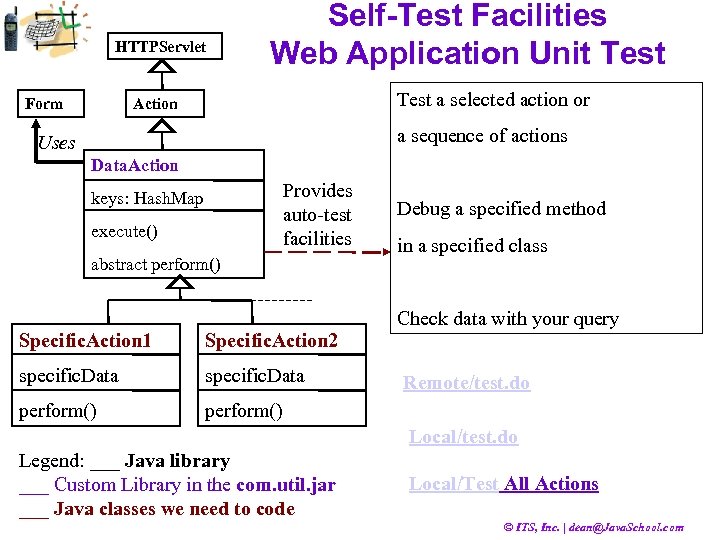
HTTPServlet Form Self-Test Facilities Web Application Unit Test a selected action or Action a sequence of actions Uses Data. Action Provides auto-test facilities keys: Hash. Map execute() abstract perform() Debug a specified method in a specified class Check data with your query Specific. Action 1 Specific. Action 2 specific. Data perform() Remote/test. do Local/test. do Legend: ___ Java library ___ Custom Library in the com. util. jar ___ Java classes we need to code Local/Test All Actions © ITS, Inc. | dean@Java. School. com
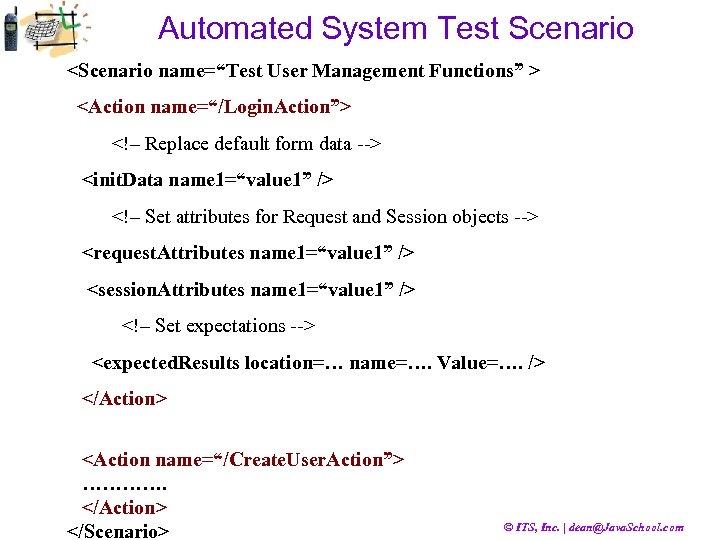
Automated System Test Scenario <Scenario name=“Test User Management Functions” > <Action name=“/Login. Action”> <!– Replace default form data --> <init. Data name 1=“value 1” /> <!– Set attributes for Request and Session objects --> <request. Attributes name 1=“value 1” /> <session. Attributes name 1=“value 1” /> <!– Set expectations --> <expected. Results location=… name=…. Value=…. /> </Action> <Action name=“/Create. User. Action”> …………. </Action> </Scenario> © ITS, Inc. | dean@Java. School. com
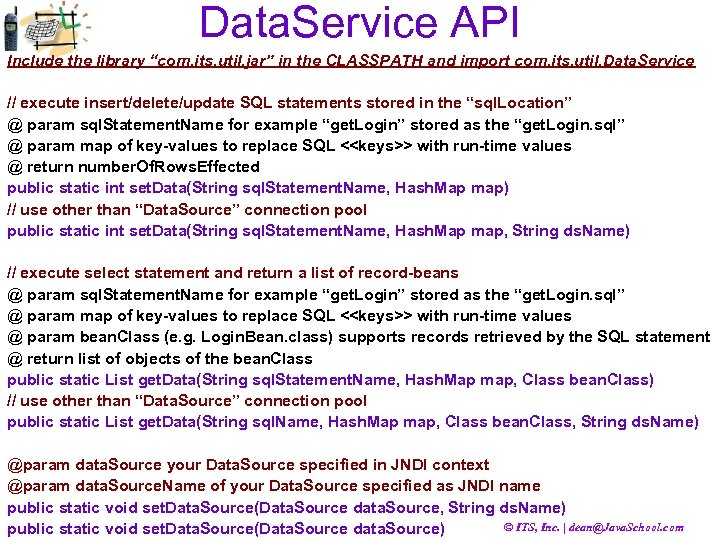
Data. Service API Include the library “com. its. util. jar” in the CLASSPATH and import com. its. util. Data. Service // execute insert/delete/update SQL statements stored in the “sql. Location” @ param sql. Statement. Name for example “get. Login” stored as the “get. Login. sql” @ param map of key-values to replace SQL <<keys>> with run-time values @ return number. Of. Rows. Effected public static int set. Data(String sql. Statement. Name, Hash. Map map) // use other than “Data. Source” connection pool public static int set. Data(String sql. Statement. Name, Hash. Map map, String ds. Name) // execute select statement and return a list of record-beans @ param sql. Statement. Name for example “get. Login” stored as the “get. Login. sql” @ param map of key-values to replace SQL <<keys>> with run-time values @ param bean. Class (e. g. Login. Bean. class) supports records retrieved by the SQL statement @ return list of objects of the bean. Class public static List get. Data(String sql. Statement. Name, Hash. Map map, Class bean. Class) // use other than “Data. Source” connection pool public static List get. Data(String sql. Name, Hash. Map map, Class bean. Class, String ds. Name) @param data. Source your Data. Source specified in JNDI context @param data. Source. Name of your Data. Source specified as JNDI name public static void set. Data. Source(Data. Source data. Source, String ds. Name) © ITS, Inc. | dean@Java. School. com public static void set. Data. Source(Data. Source data. Source)
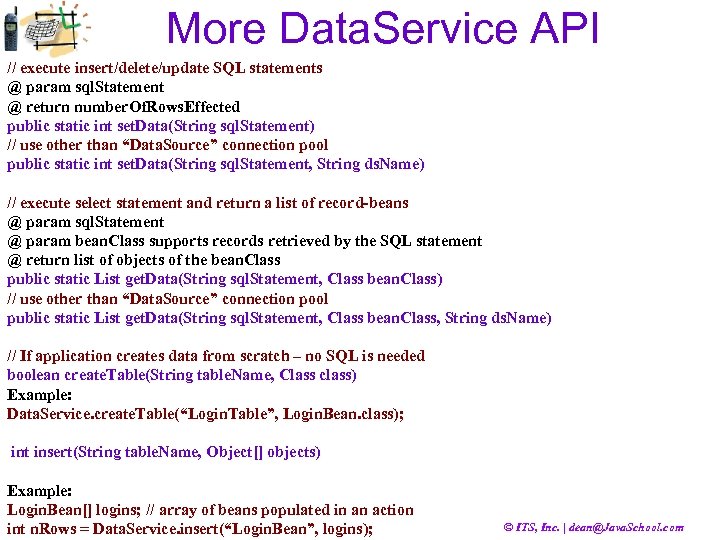
More Data. Service API // execute insert/delete/update SQL statements @ param sql. Statement @ return number. Of. Rows. Effected public static int set. Data(String sql. Statement) // use other than “Data. Source” connection pool public static int set. Data(String sql. Statement, String ds. Name) // execute select statement and return a list of record-beans @ param sql. Statement @ param bean. Class supports records retrieved by the SQL statement @ return list of objects of the bean. Class public static List get. Data(String sql. Statement, Class bean. Class) // use other than “Data. Source” connection pool public static List get. Data(String sql. Statement, Class bean. Class, String ds. Name) // If application creates data from scratch – no SQL is needed boolean create. Table(String table. Name, Class class) Example: Data. Service. create. Table(“Login. Table”, Login. Bean. class); int insert(String table. Name, Object[] objects) Example: Login. Bean[] logins; // array of beans populated in an action int n. Rows = Data. Service. insert(“Login. Bean”, logins); © ITS, Inc. | dean@Java. School. com
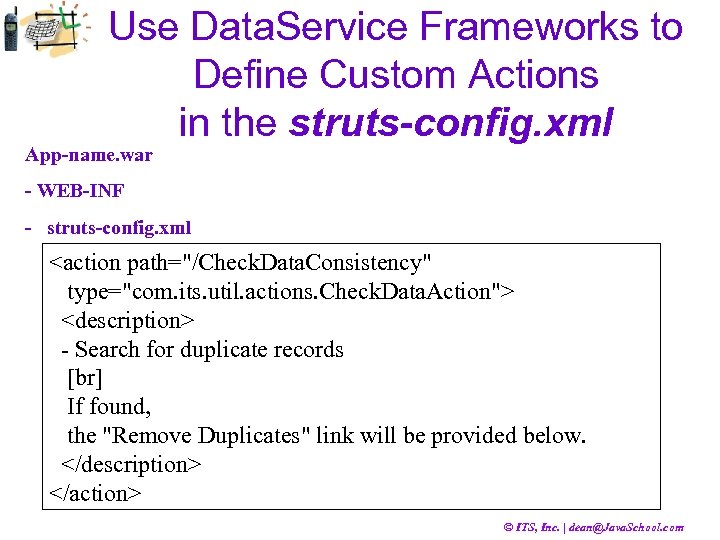
Use Data. Service Frameworks to Define Custom Actions in the struts-config. xml App-name. war - WEB-INF - struts-config. xml <action path="/Check. Data. Consistency" type="com. its. util. actions. Check. Data. Action"> <description> - Search for duplicate records [br] If found, the "Remove Duplicates" link will be provided below. </description> </action> © ITS, Inc. | dean@Java. School. com
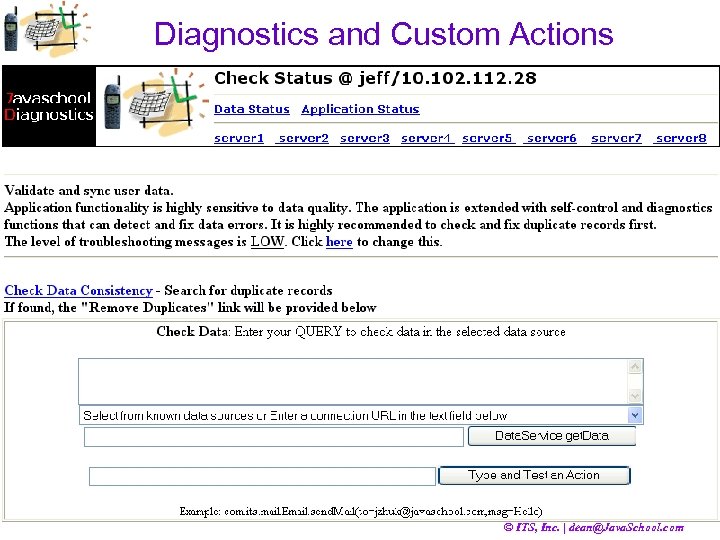
Diagnostics and Custom Actions © ITS, Inc. | dean@Java. School. com
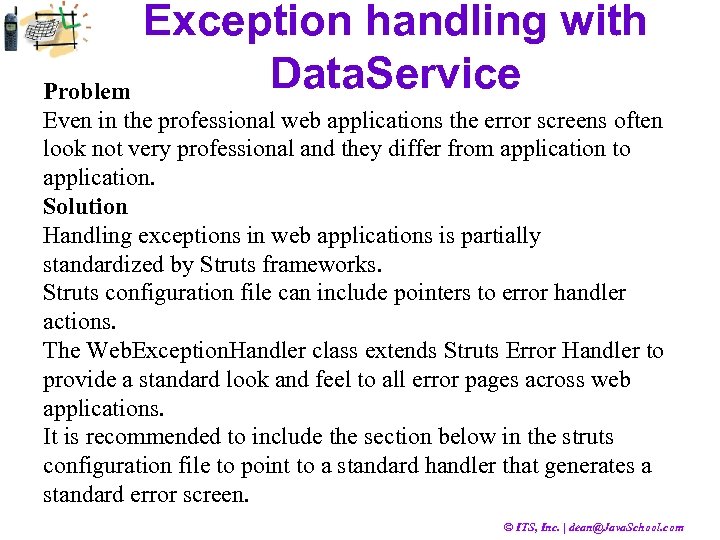
Exception handling with Data. Service Problem Even in the professional web applications the error screens often look not very professional and they differ from application to application. Solution Handling exceptions in web applications is partially standardized by Struts frameworks. Struts configuration file can include pointers to error handler actions. The Web. Exception. Handler class extends Struts Error Handler to provide a standard look and feel to all error pages across web applications. It is recommended to include the section below in the struts configuration file to point to a standard handler that generates a standard error screen. © ITS, Inc. | dean@Java. School. com
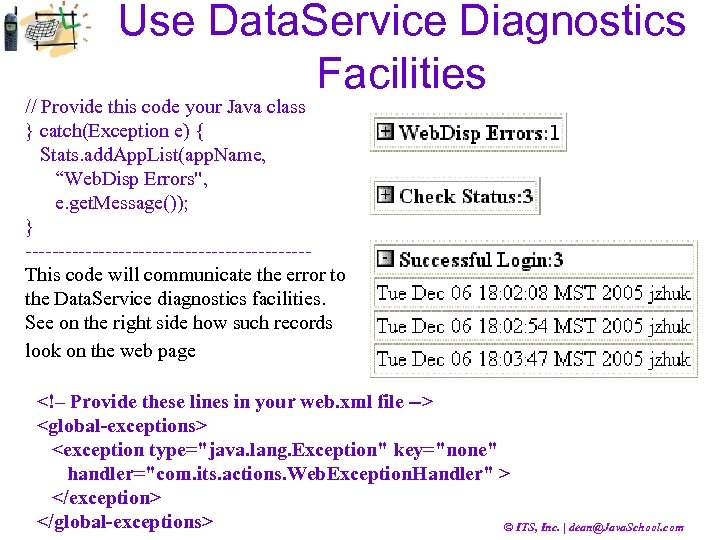
Use Data. Service Diagnostics Facilities // Provide this code your Java class } catch(Exception e) { Stats. add. App. List(app. Name, “Web. Disp Errors", e. get. Message()); } ---------------------This code will communicate the error to the Data. Service diagnostics facilities. See on the right side how such records look on the web page <!– Provide these lines in your web. xml file --> <global-exceptions> <exception type="java. lang. Exception" key="none" handler="com. its. actions. Web. Exception. Handler" > </exception> </global-exceptions> © ITS, Inc. | dean@Java. School. com
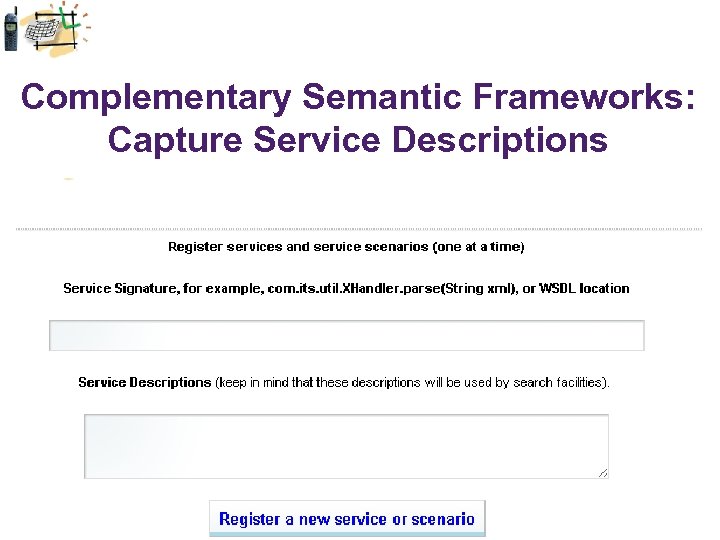
Complementary Semantic Frameworks: Capture Service Descriptions © ITS, Inc. | dean@Java. School. com
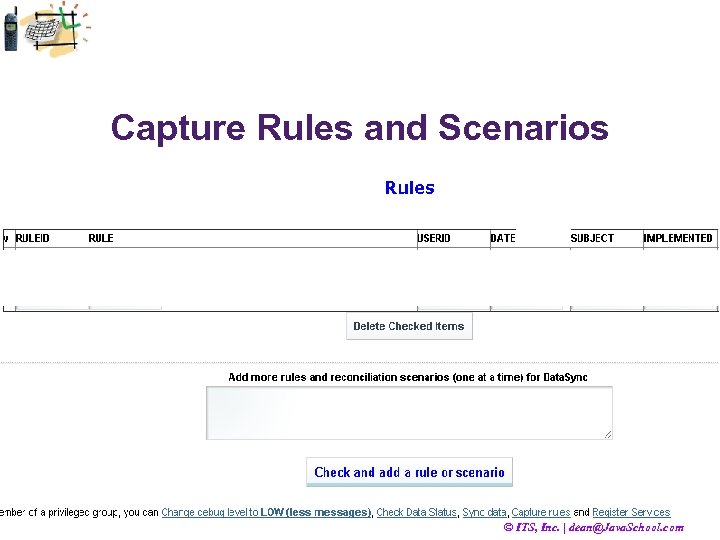
Capture Rules and Scenarios © ITS, Inc. | dean@Java. School. com
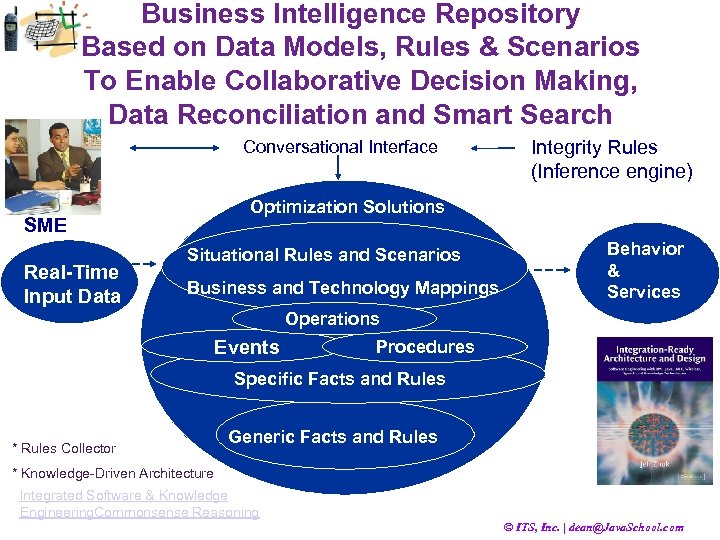
Business Intelligence Repository Based on Data Models, Rules & Scenarios To Enable Collaborative Decision Making, Data Reconciliation and Smart Search Conversational Interface Optimization Solutions SME Real-Time Input Data Integrity Rules (Inference engine) Situational Rules and Scenarios Business and Technology Mappings Behavior & Services Operations Events Procedures Specific Facts and Rules * Rules Collector Generic Facts and Rules * Knowledge-Driven Architecture Integrated Software & Knowledge Engineering. Commonsense Reasoning © ITS, Inc. | dean@Java. School. com
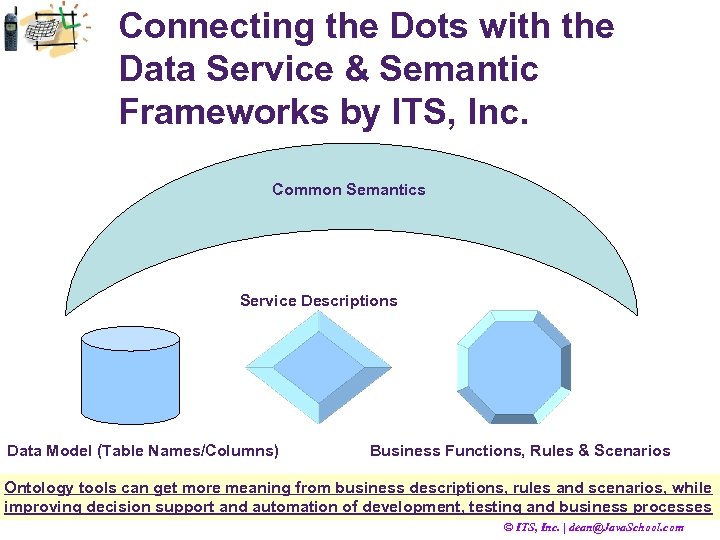
Connecting the Dots with the Data Service & Semantic Frameworks by ITS, Inc. Common Semantics Service Descriptions Data Model (Table Names/Columns) Business Functions, Rules & Scenarios Ontology tools can get more meaning from business descriptions, rules and scenarios, while improving decision support and automation of development, testing and business processes © ITS, Inc. | dean@Java. School. com
Web Application Frameworks Summary/Repetition • 1. Struts • 2 • 3 • 4 © ITS, Inc. | dean@Java. School. com
Web Application Frameworks Summary/Repetition • 1. Struts • 2 Spring • 3 Hibernate • • 4 Data. Service Complementary to Struts and Portlets Semantic Frameworks by ITS, Inc. © ITS, Inc. | dean@Java. School. com
Скачать презентацию Best Software Development Practices by Jeff Zhuk Struts
2aed4bec4c86cb40687664b440d61725.ppt