 Скачать презентацию BEHIND THE BOOTH FEATURING DJ SOFTWARE BY ERIC
7dee9a4597a61255b354b47f47fd1721.ppt
- Количество слайдов: 17



BEHIND THE BOOTH FEATURING DJ SOFTWARE BY: ERIC CARROLL
OVERVIEW • • Equipment needed for basic setup Digital Vinyl vs. Vinyl Defining Key Terms Serato vs. Abelton DJ Software System Requirements Looping/Effects The Good/Bad
DJ SETUP • Mixer • Turntables - Digital Vinyl or Vinyl • Computer - Mac. Book or PC • Headphones • Software (Program) • Microphone - Wireless or Corded • Wiring - XLR Cables - RCA Cables - Type 12 Cables - AC Adapter - USB Terminal Cable
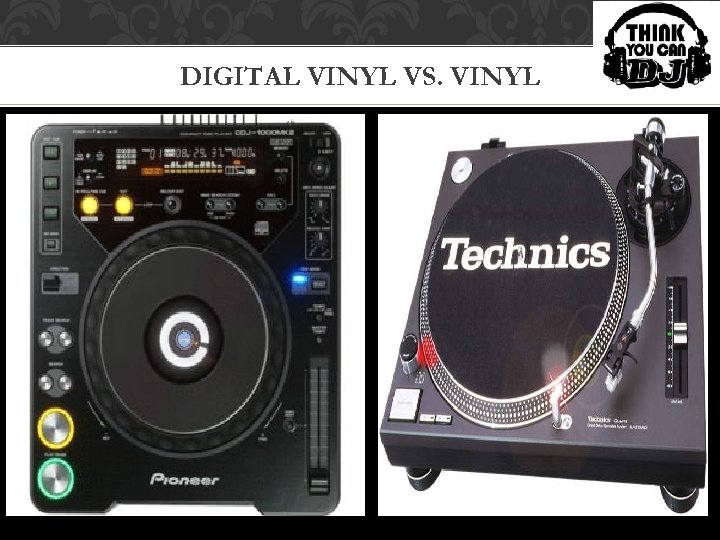
DIGITAL VINYL VS. VINYL
KEY TERMS Controller – all in one system including a mixer along with two digital vinyl turntables Serato – creates world leading software for digital DJing Turntable – a circular revolving plate that allows DJs to orchestrate prerecorded music for parties and events Turntablism/Scratching – quickly moving the vinyl record forward and backward on the turntable. BPM – beats per minute
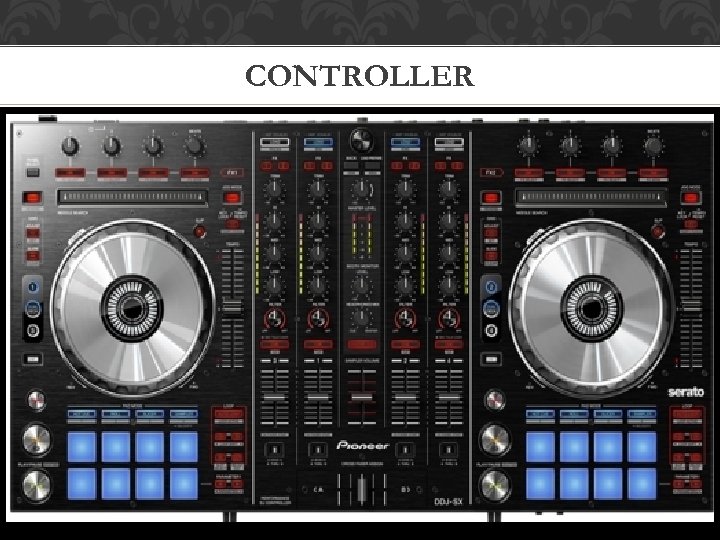
CONTROLLER
SERATO DJ SOFTWARE 1. 0 OFTWARE • Plug and Play functionality • Installation on PC - No Mapping - No Audio Configurations • Free Software - Requires “ASIO” driver • Installation on Mac - Software will only work if you buy Serato licensed hardware that • is compatible with this specific program • Free Upgrades - Company will notify you once a new version becomes available - Arrives ready-tested for your controller - Just download from website Songs/Libraries/Playlists - Automatically synced
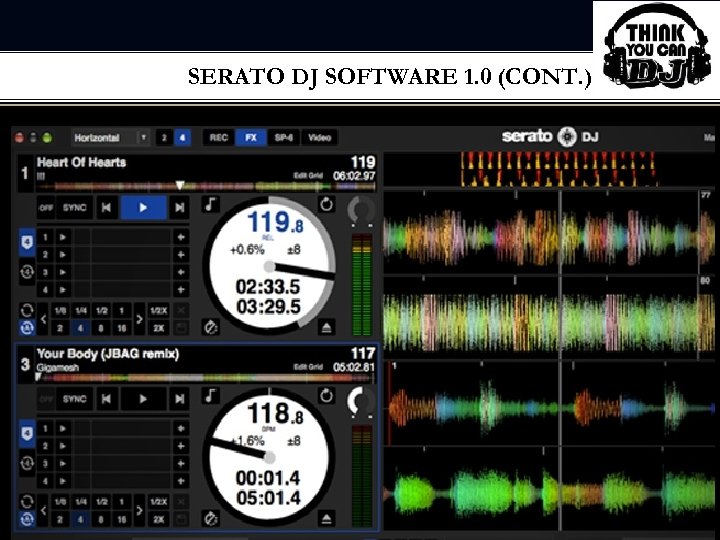
SERATO DJ SOFTWARE 1. 0 (CONT. )
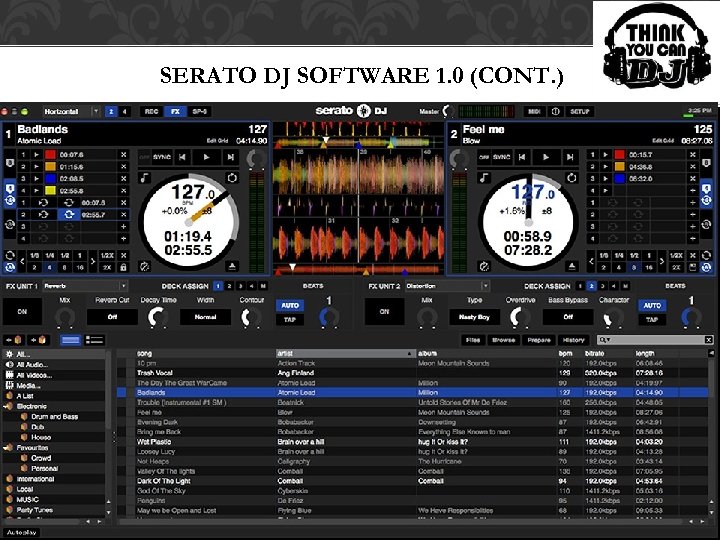
SERATO DJ SOFTWARE 1. 0 (CONT. )
LOOPING/EFFECTS • Looping - 8 loop slots Ex. 1/2, 1/4, 1/8, 1, 2, 4, 8, 16 - Manual or Auto Looping - Color Coded - Custom in/out points - Loops are saved in an audio file for each song • Effects - Plugin called “SP-6 Sampler” - Includes four banks of six sample slots - May use any track or audio clip for each slot - Effects include speed of voice, tone of voice, sirens, air horns, etc.
SYSTEM REQUIREMENTS • Windows (Recommended) - Windows 7 or 8 - Intel 2 GHz Core 2 Duo CPU (32 bit) - Intel 2. 4 GHz Core 2 Duo CPU (64 bit) - 2 GB RAM (32 -bit) - 4 GB RAM (64 -bit) - USB 2. 0 port - 1280 X 720 or higher screen resolution • Mac (Recommended) - OS 10. 6. 8 or higher - Intel 2 GH Core 2 Duo (32 bit) - Intel 2. 4 GHz Core 2 Duo (64 bit) - 2 GB RAM (32 -bit) - 4 GB RAM (64 -bit) - USB 2. 0 port - 1280 X 720 or higher screen resolution
THE GOOD/BAD • The Good - Four decks of mixing in addition to the “SP-6 Sampler” - Secondary controllers are supported - New Interface with variety of layout options - 8 cue points and 8 loops per track -The Bad - Still tied only to approved hardware - No keyboard shortcuts for certain layout options
ABELTON LIVE 9 SOFTWARE • What is Abelton Live 9? -Is a loop-based software music sequencer and digital audio workstation for OS X and Windows. -Designed to be an instrument for live performances as well as: -Composing, Recording, Arranging, Mixing and Mastering, Beat mixing -Used for DJs, Musicians, Bands and Producers -Very Pricey! • Looping/Effects -4000 loops -Ranging from 60 s soul and Hip Hop to electronica -Includes one bank of three sample slots
ABELTON LIVE 9 (CONT. )
CONCLUSION • Equipment needed for basic setup • Digital Vinyl vs. Vinyl • Defining Key Terms • Serato vs. Abelton DJ Software • System Requirements • Looping/Effects • The Good/Bad
RESOURCES • http: //www. djtechtools. com/2012/11/16/review-serato-dj-1 -0 -software/ • http: //www. digitaldjtips. com/2012/11/review-serato-dj-1 -0 -0 -software/ • http: //www. pcmag. com/encyclopedia_term/0, 1237, t=DJ+turntable&i=56474, 00. a sp • http: //serato. com/dj/features • http: //www. synthtopia. com/content/2013/03/06/ableton-live-9 -review-abletonpush-in-depth-ableton-still-owns-the-future/ • https: //www. ableton. com/en/live/
 Скачать презентацию BEHIND THE BOOTH FEATURING DJ SOFTWARE BY ERIC
7dee9a4597a61255b354b47f47fd1721.ppt