 Скачать презентацию Baltzan Business Driven Information Systems 3 rd Canadian
f0d91e02d272a76f83a32230c4f4396e.ppt
- Количество слайдов: 27



Baltzan, Business Driven Information Systems, 3 rd Canadian Edition Appendix A Hardware & Software Basics
1 -2 Learning Outcomes 1. Describe the six major categories of hardware and provide an example of each 2. Identify the different computer categories and explain their potential business uses 3. Explain the difference between primary and secondary storage copyright © 2012 Mc. Graw-Hill Ryerson Limited S 2
1 -3 Learning Outcomes 4. List the common input, output, storage, and communication devices 5. Describe the eight categories of computers by size 6. Define the relationship between operating system software and utility software copyright © 2012 Mc. Graw-Hill Ryerson Limited S 3
1 -4 Introduction • Information technology (IT) – any computer-based tool that people use to work with information and support the information and information-processing needs of an organization • Hardware – the physical devices associated with a computer system • Software – the set of instructions that the hardware executes to carry out specific tasks copyright © 2012 Mc. Graw-Hill Ryerson Limited S 4
1 -5 Hardware Basics • Computer – an electronic device operating under the control of instructions stored in its own memory that can accept, manipulate, and store data copyright © 2012 Mc. Graw-Hill Ryerson Limited S 5
1 -6 Hardware Components • • • Central processing unit (CPU) Primary storage Secondary storage Input device Output device Communication device copyright © 2012 Mc. Graw-Hill Ryerson Limited S 6
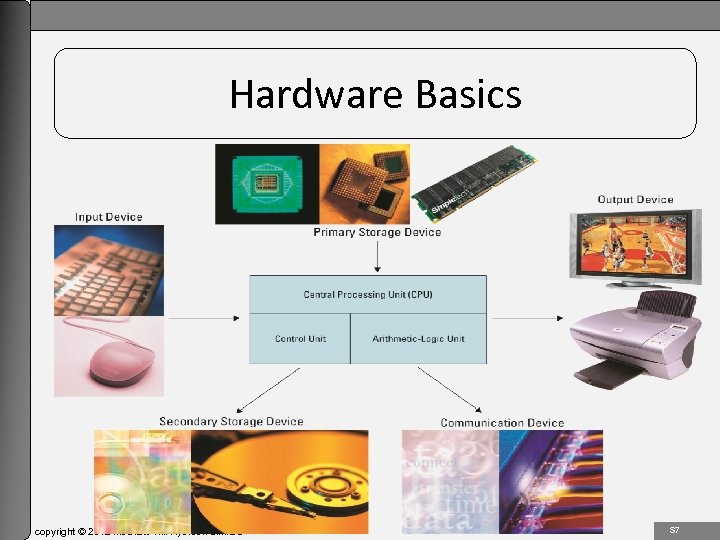
1 -7 Hardware Basics copyright © 2012 Mc. Graw-Hill Ryerson Limited S 7
1 -8 Central Processing Unit • Central processing unit (CPU) (or microprocessor) – the actual hardware that interprets and executes the program (software) instructions and coordinates how all the other hardware devices work together • Control unit – interprets software instructions and literally tells the other hardware devices what to do, based on the software instructions • Arithmetic-logic unit (ALU) – performs all arithmetic operations (for example, addition and subtraction) and all logic operations (such as sorting and comparing numbers) copyright © 2012 Mc. Graw-Hill Ryerson Limited S 8
1 -9 Central Processing Unit • The number of CPU cycles per second determines the speed of a CPU – Megahertz (MHz) • the number of millions of CPU cycles per second – Gigahertz (GHz) • the number of billions of CPU cycles per second copyright © 2012 Mc. Graw-Hill Ryerson Limited S 9
1 -10 Central Processing Unit • CPU speed factors – – Clock speed Word length Bus width Chip line width • Binary digit (bit) – the smallest unit of information that a computer can process • Byte – a group of eight bits representing one natural language character copyright © 2012 Mc. Graw-Hill Ryerson Limited S 10
1 -11 Advances in CPU Design • Complex instruction set computer (CISC) chip – type of CPU that can recognize as many as 100 or more instructions, enough to carry out most computations directly • Reduced instruction set computer (RISC) chip – limit the number of instructions the CPU can execute to increase processing speed • Virtualization – a protected memory space created by the CPU allowing the computer to create virtual machines copyright © 2012 Mc. Graw-Hill Ryerson Limited S 11
1 -12 Primary Storage • Primary storage – the computer’s main memory, which consists of the random access memory (RAM), cache memory, and the read-only memory (ROM) that is directly accessible to the CPU copyright © 2012 Mc. Graw-Hill Ryerson Limited S 12
1 -13 Random Access Memory (RAM) • Random access memory (RAM) – the computer’s primary working memory, in which program instructions and data are stored so that they can be accessed directly by the CPU via the processor’s high-speed external data bus • RAM is volatile meaning information is lost if power is interrupted • Cache memory used for frequently accessed data copyright © 2012 Mc. Graw-Hill Ryerson Limited S 13
1 -14 Read-Only Memory (ROM) • Read-only memory (ROM) – the portion of a computer’s primary storage that does not lose its contents when one switches off the power • Flash memory • Memory card • Memory stick copyright © 2012 Mc. Graw-Hill Ryerson Limited S 14
1 -15 Secondary Storage • Secondary storage – consists of equipment designed to store large volumes of data for long-term storage • Megabyte (MB or Meg) – roughly 1 million bytes • Gigabyte (GB) – roughly 1 billion bytes • Terabyte (TB) – roughly 1 trillion bytes copyright © 2012 Mc. Graw-Hill Ryerson Limited S 15
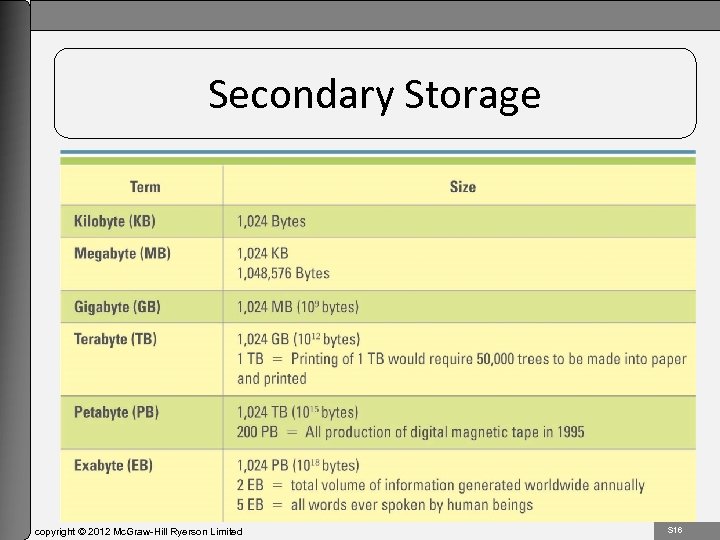
1 -16 Secondary Storage copyright © 2012 Mc. Graw-Hill Ryerson Limited S 16
1 -17 Magnetic Medium • Magnetic medium – a secondary storage medium that uses magnetic techniques to store and retrieve data on disks or tapes coated with magnetically sensitive materials • Magnetic tape – an older secondary storage medium that uses a strip of thin plastic coated with a magnetically sensitive recording medium • Hard drive – a secondary storage medium that uses several rigid disks coated with a magnetically sensitive material and housed together with the recording heads in a hermetically sealed mechanism copyright © 2012 Mc. Graw-Hill Ryerson Limited S 17
1 -18 Optical Medium • Optical medium types include: – Compact disk-read-only memory (CD-ROM) – Compact disk-read-write (CD-RW) drive – Digital video disk (DVD) – DVD-ROM drive – Digital video disk-read/write (DVD-RW) copyright © 2012 Mc. Graw-Hill Ryerson Limited S 18
1 -19 Input Devices • Input device - equipment used to capture information and commands – Manual input devices • Joystick • Keyboard • Microphone – Automated input devices • Bar code scanner • Digital camera • Magnetic ink character reader copyright © 2012 Mc. Graw-Hill Ryerson Limited S 19
1 -20 Output Devices • Output device – equipment used to see, hear, or otherwise accept the results of information processing requests • Cathode-ray tube (CRT) • Liquid crystal display (LCD) • Laser printer • Ink-jet printer • Plotter copyright © 2012 Mc. Graw-Hill Ryerson Limited S 20
1 -21 Communication Devices • Communication device – equipment used to send information and receive it from one location to another • Dial-up access • Cable • Digital subscriber line • Wireless • Satellite copyright © 2012 Mc. Graw-Hill Ryerson Limited S 21
1 -22 Computer Categories • For the past 20 years, federally funded supercomputing research has given birth to some of the computer industry’s most significant technology breakthroughs including: – Clustering – Parallel processing – Mosaic browser copyright © 2012 Mc. Graw-Hill Ryerson Limited S 22
1 -23 Computer Categories • Computer categories include: – Smartphone – Laptop – Tablet – Desktop – Workstation – Minicomputer – Mainframe computer – Supercomputer copyright © 2012 Mc. Graw-Hill Ryerson Limited S 23
1 -24 Software Basics • System software – controls how the various technology tools work together along with the application software • Operating system software • Utility software • Application software copyright © 2012 Mc. Graw-Hill Ryerson Limited S 24
1 -25 Software Basics • • Operating System Software Linux Macintosh OS X Microsoft Windows MS-DOS UNIX Mac i. OS copyright © 2012 Mc. Graw-Hill Ryerson Limited S 25
1 -26 Utility Software • Types of utility software – – – – – Crash-proof Disk image Disk optimization Encrypt data File and data recovery Text protect Preventative security Spyware Uninstaller copyright © 2012 Mc. Graw-Hill Ryerson Limited S 26
1 -27 Application Software • Types of application software – – – – – Browser Communication Data management Desktop publishing E-mail Groupware Presentation graphics Programming Spreadsheet Word processing copyright © 2012 Mc. Graw-Hill Ryerson Limited S 27
Скачать презентацию Baltzan Business Driven Information Systems 3 rd Canadian
f0d91e02d272a76f83a32230c4f4396e.ppt