


 Скачать презентацию Automating the Deployment of a Secure Multi-user HIPAA
fb28c83c5e1abaed9c8b847d51a7575d.ppt
- Количество слайдов: 31
 Automating the Deployment of a Secure, Multi-user HIPAA Enabled Spark Cluster using Sahara Michael Le Jayaram Radhakrishnan Daniel Dean Shu Tao Open. Stack Summit, Austin, 2016
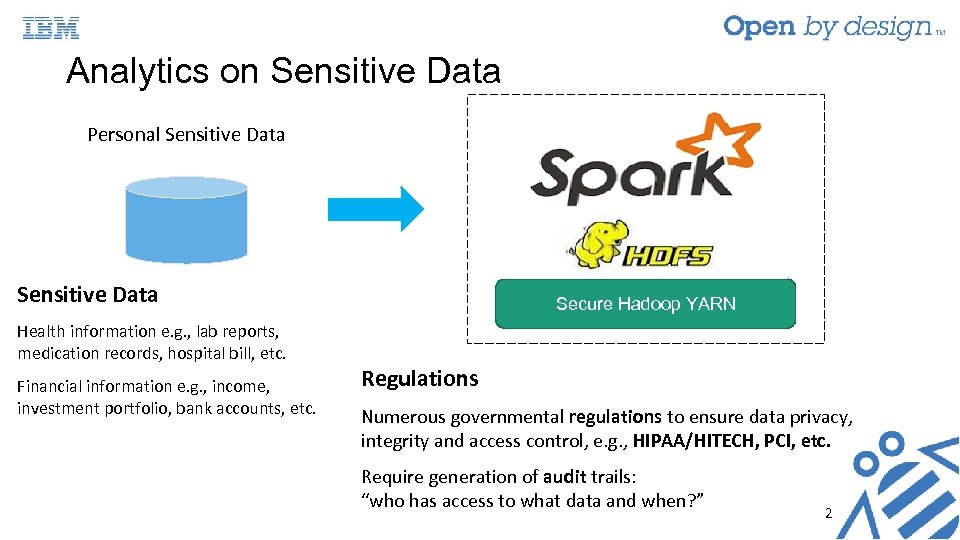 Analytics on Sensitive Data Personal Sensitive Data Health information e. g. , lab reports, medication records, hospital bill, etc. Financial information e. g. , income, investment portfolio, bank accounts, etc. Secure Hadoop YARN Regulations Numerous governmental regulations to ensure data privacy, integrity and access control, e. g. , HIPAA/HITECH, PCI, etc. Require generation of audit trails: “who has access to what data and when? ” 2
 Challenging to Deploy Secure Analytics Platform • Mapping regulations to security mechanism not always straightforward • Security mechanisms have lots of “things” to configure: • User accounts, access control lists, keys, certificates, key/certificate databases, security zones, etc. • Fast, repeatable deployment Approach: Use Sahara to expose security building blocks and automate deployment Prototype with Spark on YARN Focus on HIPAA 3
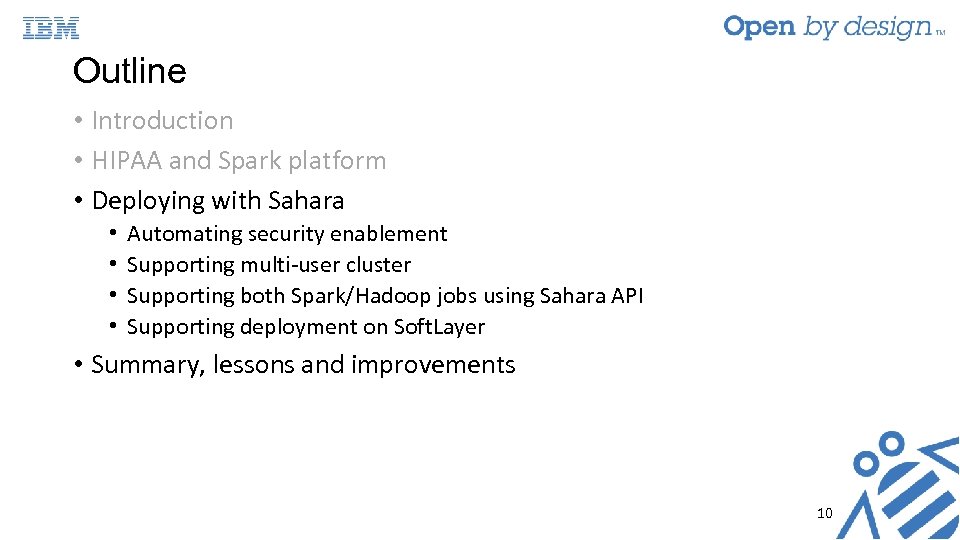
 Outline • Introduction • HIPAA and Spark platform • Deploying with Sahara • • Automating security enablement Supporting multi-user cluster Supporting both Spark/Hadoop jobs using Sahara API Supporting deployment on Soft. Layer • Summary, lessons and improvements 4
 Health Insurance Portability and Accountability Act (HIPAA) • What data is protected? • Any Protected Health Information (PHI): e. g. , medication, diseases, health related measurements, etc. • Who does this apply to? • Entity that access/store data, e. g. , health care clearinghouses, health care providers, and business associates • HIPAA has two rules: Privacy and Security Rules • Privacy rules protect privacy of PHI, access rights, and use of PHI • Security rules operationalizes Privacy rules for electronic PHI (e-PHI) • In general (must maintain w. r. t to PHI): – – Confidentiality, integrity, availability Must protect against anticipated threats to security and integrity Must protect against anticipated impermissible uses or disclosures Ensure compliance by workforce • Continuous risk analysis and management (extension with HITECH) – Mechanisms to log and audit access to PHI (Breach Notification Rule) – Continuous evaluation and maintain appropriate security protections (Enforcement Rule) 5
 HIPAA Safeguards for Security Rules • Administrative Safeguards • Physical Safeguards • Technical Safeguards • Access controls - ensure only authorized persons can access PHI • Audit controls - record and examine access and other activities in information systems containing PHI • Integrity controls - ensure and confirm PHI not improperly altered or destroyed • Transmission security - prevent unauthorized access to PHI being transmitted over network 6
 Secure Spark Service • Goal: Allow Spark to be pluggable into HIPAA-enabled platform • Assumptions • • • Two types of users: trusted admin and user of Spark Multi-user (multiple doctors in Hospital A running analytics on multiple patients) One YARN cluster per customer (e. g. Hospital A, Institution B) YARN clusters created by different customers are not necessarily separated by VLANs External data sources should provide drivers to encrypt data ingestion and outputs 7
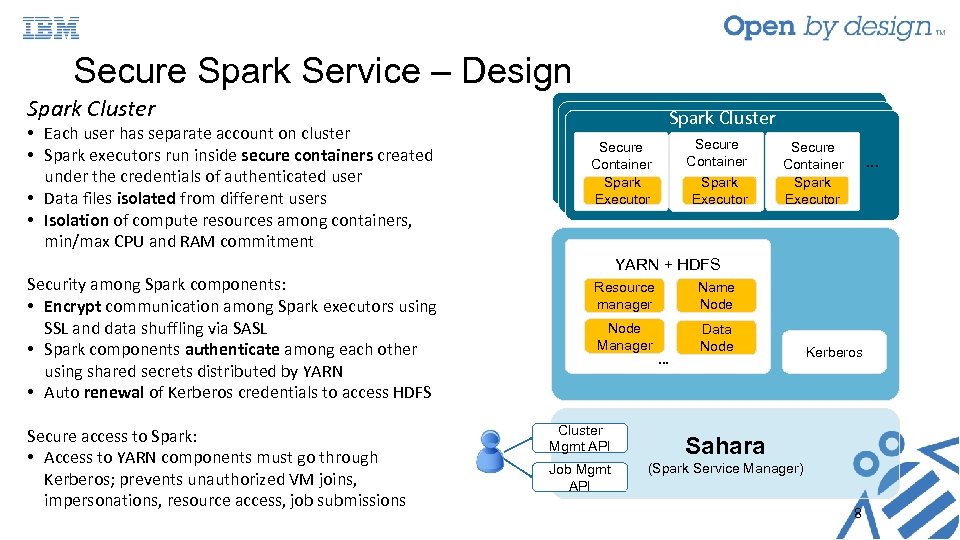 Secure Spark Service – Design Spark Cluster • Each user has separate account on cluster • Spark executors run inside secure containers created under the credentials of authenticated user • Data files isolated from different users • Isolation of compute resources among containers, min/max CPU and RAM commitment Security among Spark components: • Encrypt communication among Spark executors using SSL and data shuffling via SASL • Spark components authenticate among each other using shared secrets distributed by YARN • Auto renewal of Kerberos credentials to access HDFS Secure access to Spark: • Access to YARN components must go through Kerberos; prevents unauthorized VM joins, impersonations, resource access, job submissions Spark Cluster Secure Container Spark Executor … YARN + HDFS Resource manager Name Node Manager Data Node Cluster Mgmt API Job Mgmt API … Kerberos Realm Sahara (Spark Service Manager) 8
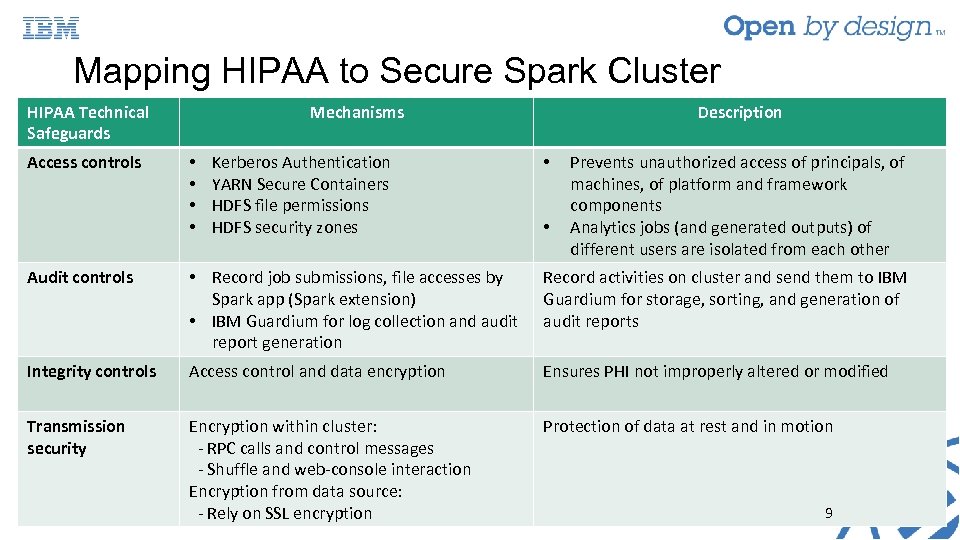 Mapping HIPAA to Secure Spark Cluster HIPAA Technical Safeguards Access controls Mechanisms • • Kerberos Authentication YARN Secure Containers HDFS file permissions HDFS security zones Description • • Prevents unauthorized access of principals, of machines, of platform and framework components Analytics jobs (and generated outputs) of different users are isolated from each other Audit controls • Record job submissions, file accesses by Spark app (Spark extension) • IBM Guardium for log collection and audit report generation Record activities on cluster and send them to IBM Guardium for storage, sorting, and generation of audit reports Integrity controls Access control and data encryption Ensures PHI not improperly altered or modified Transmission security Encryption within cluster: - RPC calls and control messages - Shuffle and web-console interaction Encryption from data source: - Rely on SSL encryption Protection of data at rest and in motion 9
 Outline • Introduction • HIPAA and Spark platform • Deploying with Sahara • • Automating security enablement Supporting multi-user cluster Supporting both Spark/Hadoop jobs using Sahara API Supporting deployment on Soft. Layer • Summary, lessons and improvements 10
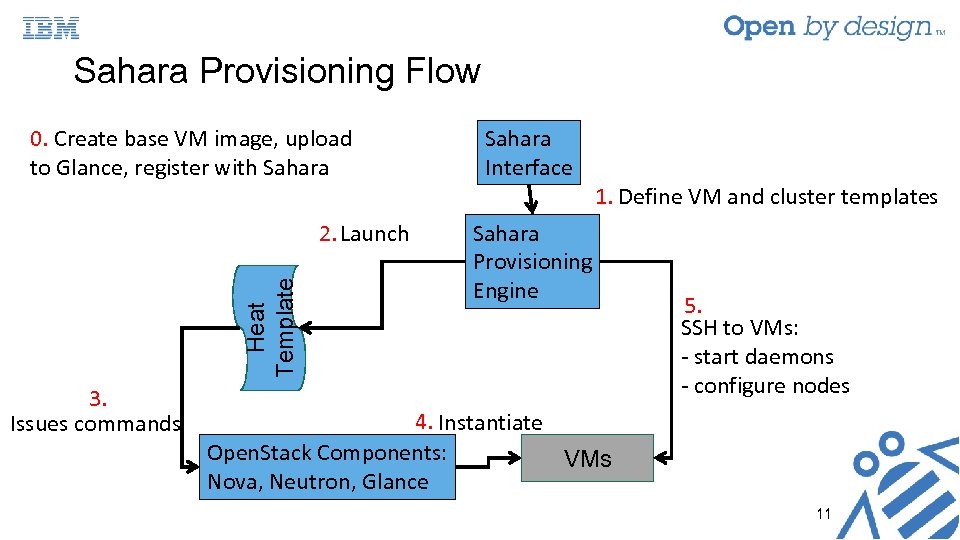 Sahara Provisioning Flow 0. Create base VM image, upload to Glance, register with Sahara Heat Template 2. Launch 3. Issues commands Sahara Interface 1. Define VM and cluster templates Sahara Provisioning Engine 5. SSH to VMs: - start daemons - configure nodes 4. Instantiate Open. Stack Components: VMs Nova, Neutron, Glance 11
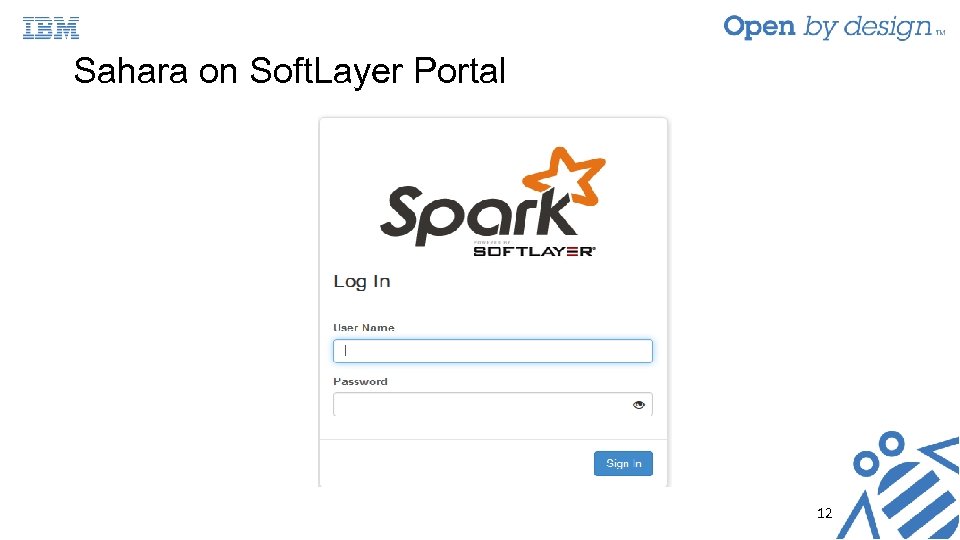 Sahara on Soft. Layer Portal 12
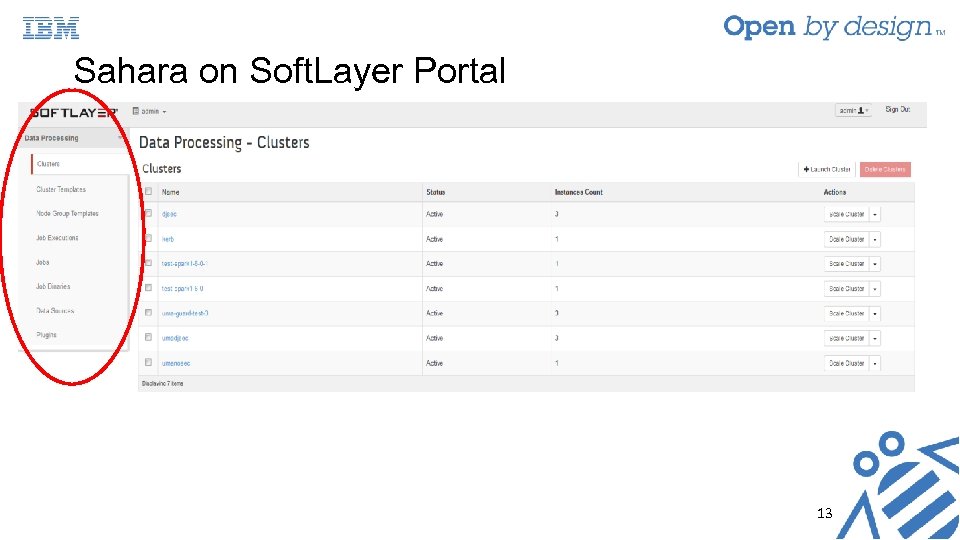 Sahara on Soft. Layer Portal 13
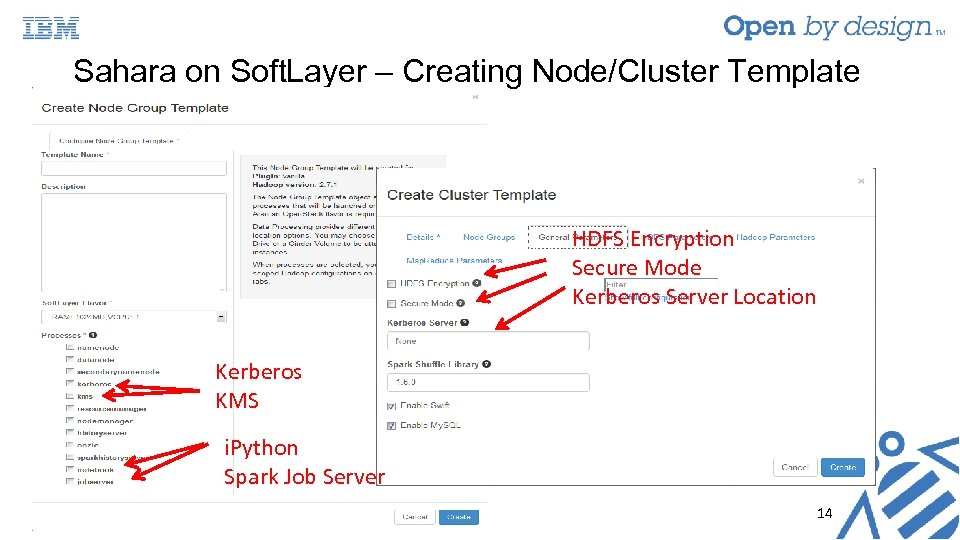 Sahara on Soft. Layer – Creating Node/Cluster Template HDFS Encryption Secure Mode Kerberos Server Location Kerberos KMS i. Python Spark Job Server 14
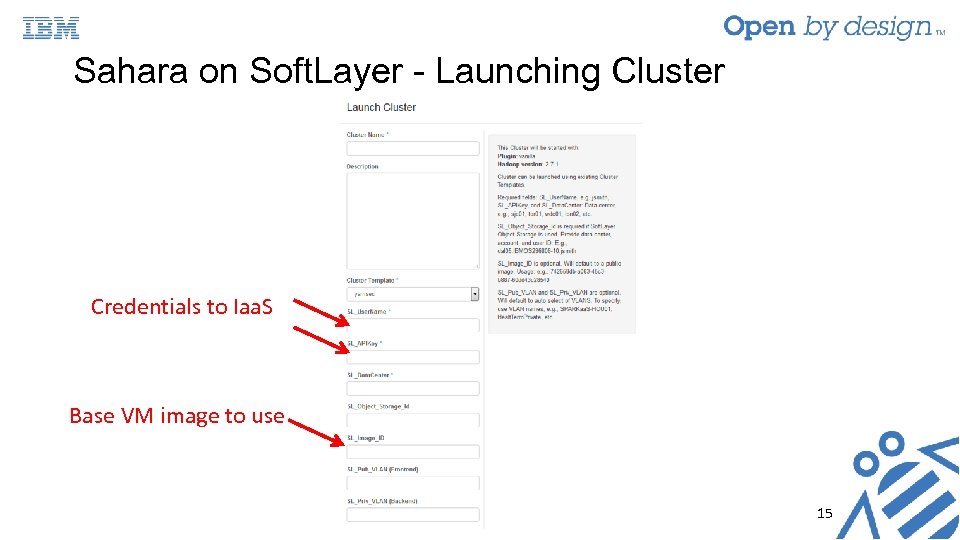 Sahara on Soft. Layer - Launching Cluster Credentials to Iaa. S Base VM image to use 15
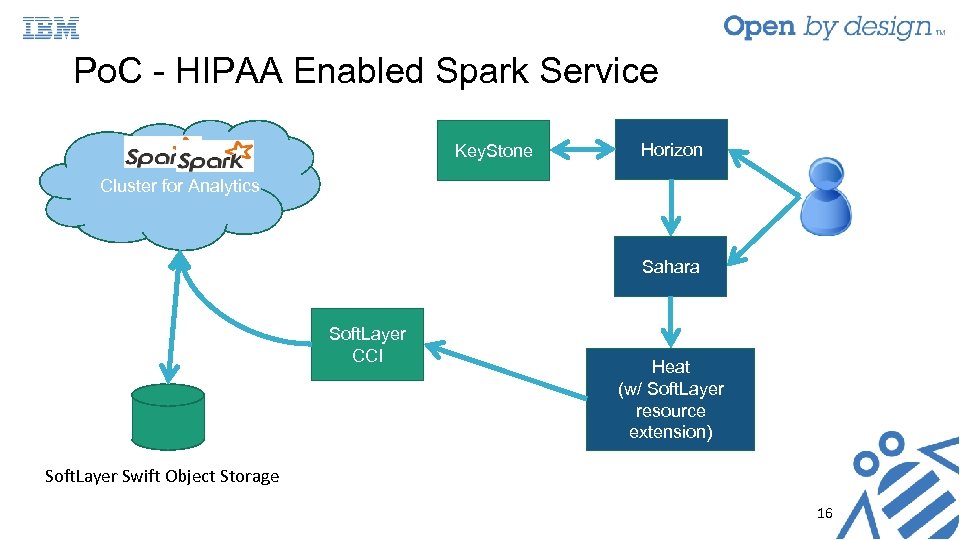 Po. C - HIPAA Enabled Spark Service Key. Stone Horizon Cluster for Analytics Sahara Soft. Layer CCI Heat (w/ Soft. Layer resource extension) Soft. Layer Swift Object Storage 16
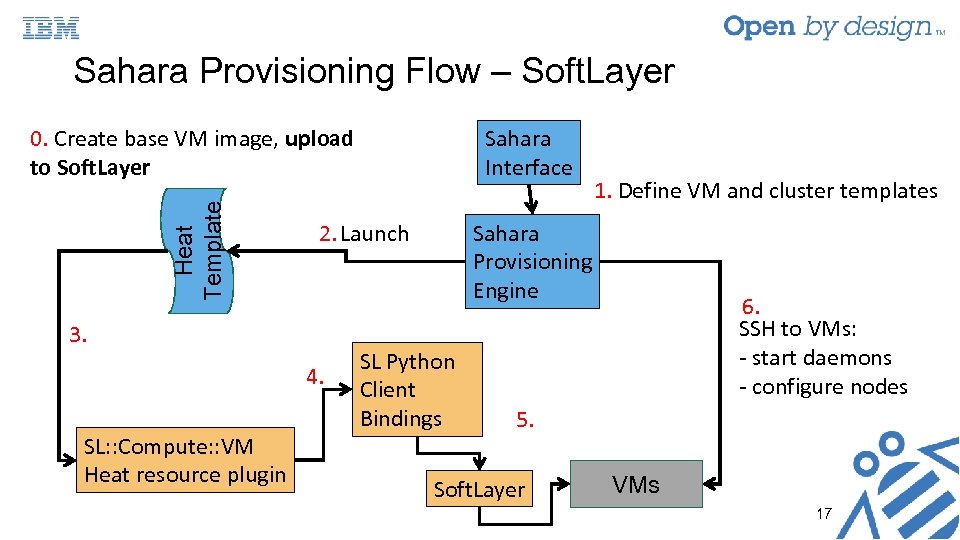 0. Create base VM image, upload to Soft. Layer Sahara Interface Heat Template Sahara Provisioning Flow – Soft. Layer Sahara Provisioning Engine 2. Launch 3. 4. SL: : Compute: : VM Heat resource plugin SL Python Client Bindings 1. Define VM and cluster templates 6. SSH to VMs: - start daemons - configure nodes 5. Soft. Layer VMs 17
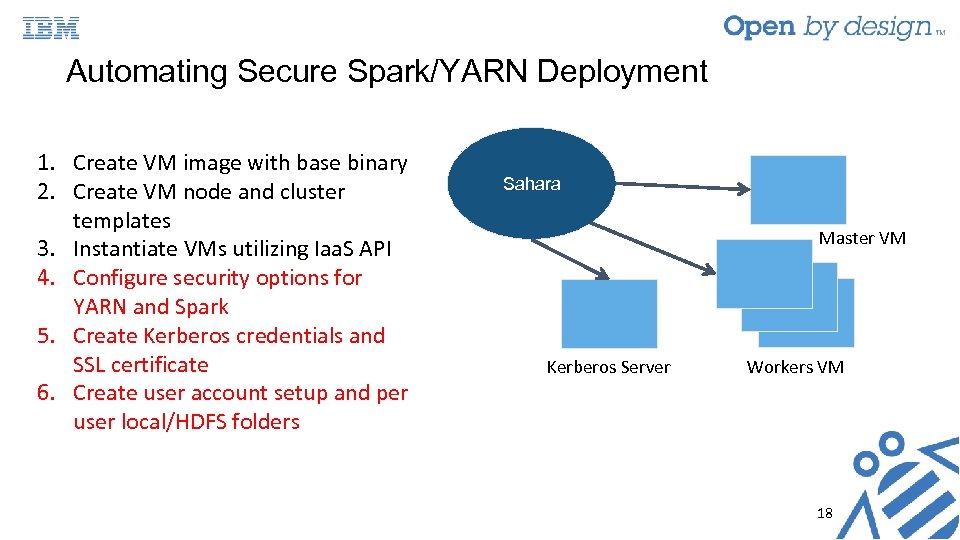 Automating Secure Spark/YARN Deployment 1. Create VM image with base binary 2. Create VM node and cluster templates 3. Instantiate VMs utilizing Iaa. S API 4. Configure security options for YARN and Spark 5. Create Kerberos credentials and SSL certificate 6. Create user account setup and per user local/HDFS folders Sahara Master VM Kerberos Server Workers VM 18
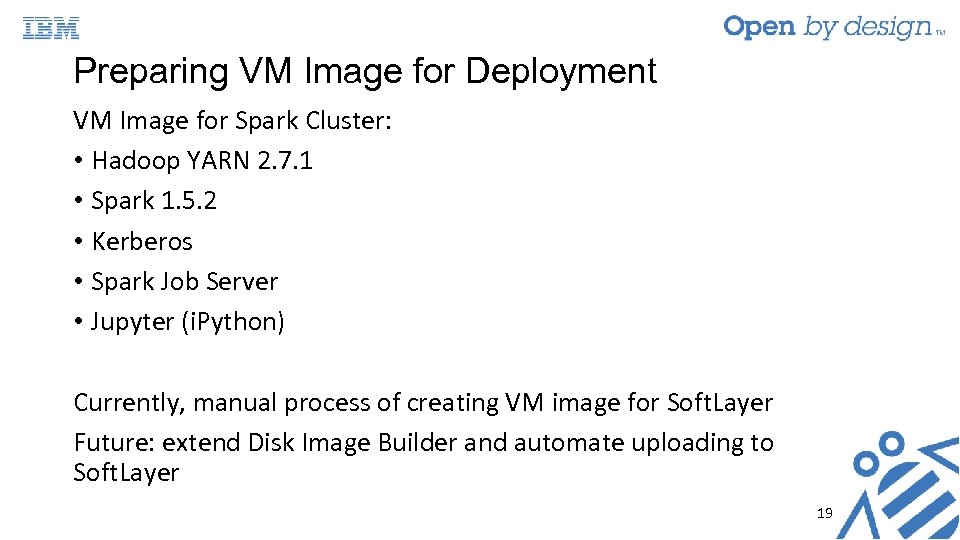 Preparing VM Image for Deployment VM Image for Spark Cluster: • Hadoop YARN 2. 7. 1 • Spark 1. 5. 2 • Kerberos • Spark Job Server • Jupyter (i. Python) Currently, manual process of creating VM image for Soft. Layer Future: extend Disk Image Builder and automate uploading to Soft. Layer 19
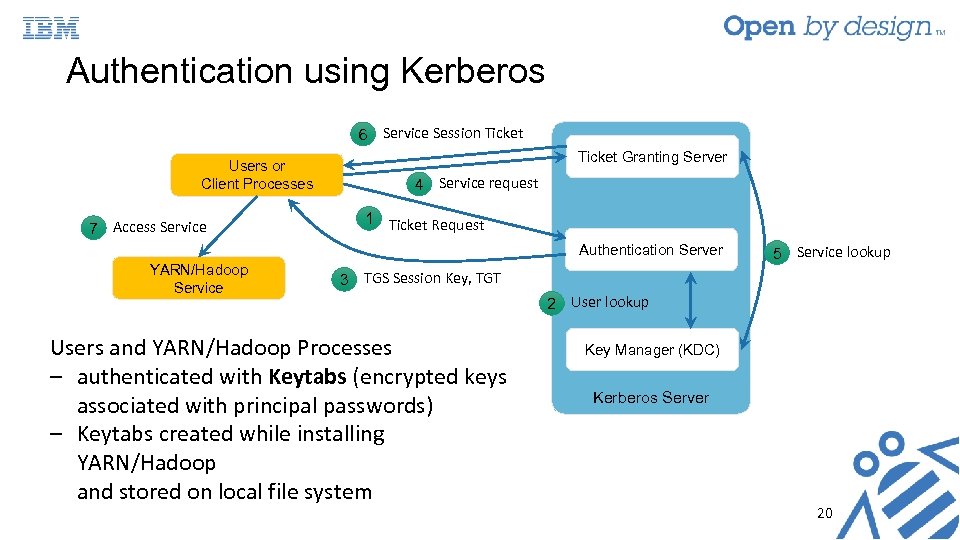 Authentication using Kerberos 6 Service Session Ticket Users or Client Processes 7 Access Service Ticket Granting Server 4 Service request 1 Ticket Request Authentication Server YARN/Hadoop Service 5 Service lookup 3 TGS Session Key, TGT Users and YARN/Hadoop Processes ‒ authenticated with Keytabs (encrypted keys associated with principal passwords) ‒ Keytabs created while installing YARN/Hadoop and stored on local file system 2 User lookup Key Manager (KDC) Kerberos Server 20
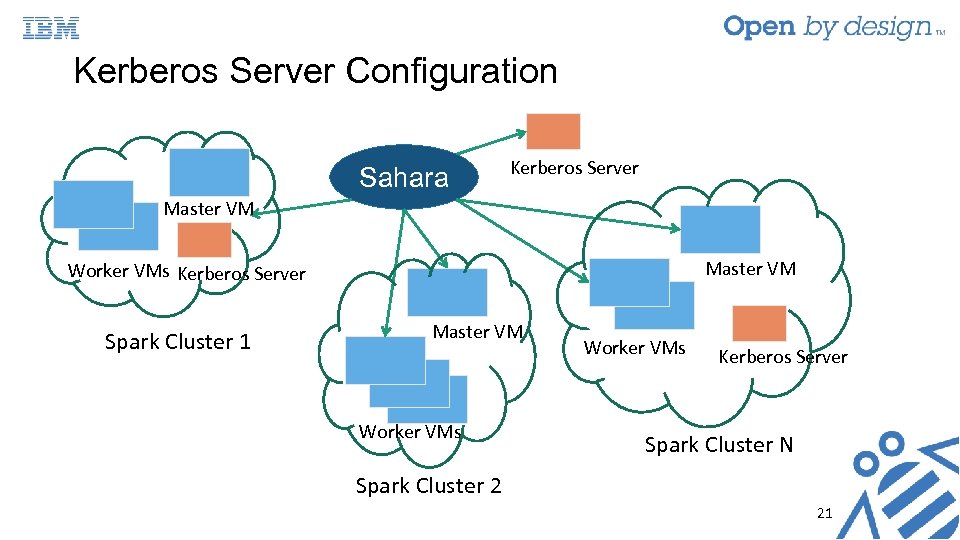 Kerberos Server Configuration Sahara Kerberos Server Master VM Worker VMs Kerberos Server Spark Cluster 1 Master VM Worker VMs Kerberos Server Spark Cluster N Spark Cluster 2 21
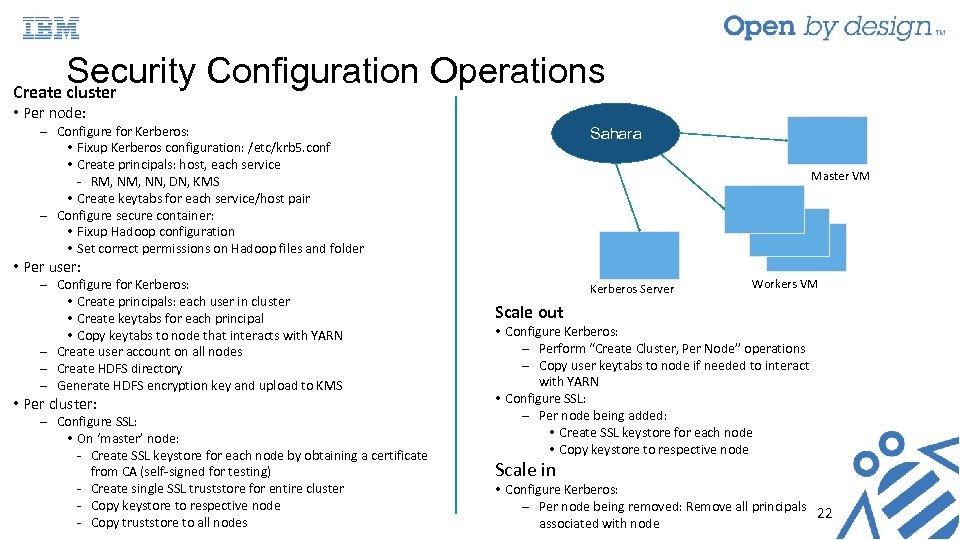 Security Configuration Operations Create cluster • Per node: ‒ Configure for Kerberos: • Fixup Kerberos configuration: /etc/krb 5. conf • Create principals: host, each service - RM, NN, DN, KMS • Create keytabs for each service/host pair ‒ Configure secure container: • Fixup Hadoop configuration • Set correct permissions on Hadoop files and folder Sahara ‒ Configure for Kerberos: • Create principals: each user in cluster • Create keytabs for each principal • Copy keytabs to node that interacts with YARN ‒ Create user account on all nodes ‒ Create HDFS directory ‒ Generate HDFS encryption key and upload to KMS Kerberos Server Master VM • Per user: • Per cluster: ‒ Configure SSL: • On ‘master’ node: - Create SSL keystore for each node by obtaining a certificate from CA (self-signed for testing) - Create single SSL truststore for entire cluster - Copy keystore to respective node - Copy truststore to all nodes Workers VM Scale out • Configure Kerberos: ‒ Perform “Create Cluster, Per Node” operations ‒ Copy user keytabs to node if needed to interact with YARN • Configure SSL: ‒ Per node being added: • Create SSL keystore for each node • Copy keystore to respective node Scale in • Configure Kerberos: ‒ Per node being removed: Remove all principals 22 associated with node
 Multi-user Cluster Requirements Single ‘Spark’ user not sufficient for privacy as analytics job potentially can access other users’ data Expose new API to make on-boarding of new users easier • Create user account on each node of cluster • Create per user local directories and HDFS secure directories 23
 Multi-user Cluster Support • Extend REST API v 10. py: /clusters/add_user/
 Submit Spark Jobs on YARN Through Sahara • Extend Sahara to allow Spark and Hadoop jobs to submitted to vanilla Hadoop cluster • No changes to REST API in Sahara Implementation: Detect Spark job type and construct spark-submit string accordingly based on plugin “engine” name • On cluster creation: configure spark_env. sh to point to Hadoop’s configuration files • Modify: plugins/vanilla/vx_x_x/versionhandler. py • return Spark EDP engine when job type is Spark • Modify: run_job() in Spark EDP engine. py: • Check cluster type (plugin name, e. g. , vanilla or stand-alone Spark or even Mesos!) • Craft the spark-submit string to match platform 25
 Supporting Deployment on Soft. Layer • Modification to Sahara at Heat template creation • Create new heat plugin: SL_compute • Create new resource type – SL: : Compute: : VM • Communicates using Soft. Layer’s (SL) REST API to create Cloud. Layer Computing Instances(CCIs) • Translates Open. Stack VM properties to SL’s equivalent • Generate SL heat template • Add new fields in Sahara to accept and use Soft. Layer credentials, data centers, object stores, etc. • Add new heat template resource files 26
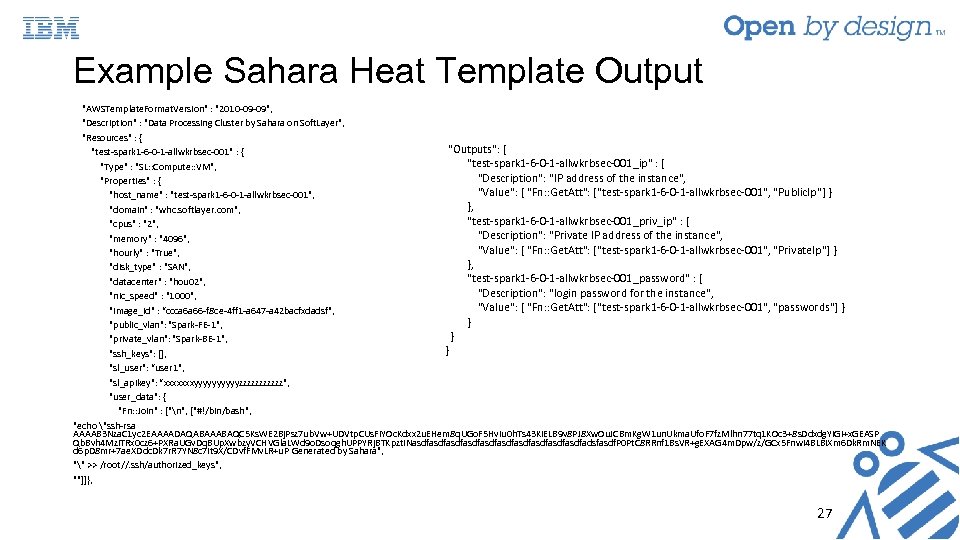 Example Sahara Heat Template Output "AWSTemplate. Format. Version" : "2010 -09 -09", "Description" : "Data Processing Cluster by Sahara on Soft. Layer", "Resources" : { "Outputs": { "test-spark 1 -6 -0 -1 -allwkrbsec-001" : { "test-spark 1 -6 -0 -1 -allwkrbsec-001_ip" : { "Type" : "SL: : Compute: : VM", "Description": "IP address of the instance", "Properties" : { "Value": { "Fn: : Get. Att": ["test-spark 1 -6 -0 -1 -allwkrbsec-001", "Public. Ip"] } "host_name" : "test-spark 1 -6 -0 -1 -allwkrbsec-001", }, "domain" : "whc. softlayer. com", "test-spark 1 -6 -0 -1 -allwkrbsec-001_priv_ip" : { "cpus" : "2", "Description": "Private IP address of the instance", "memory" : "4096", "Value": { "Fn: : Get. Att": ["test-spark 1 -6 -0 -1 -allwkrbsec-001", "Private. Ip"] } "hourly" : "True", }, "disk_type" : "SAN", "test-spark 1 -6 -0 -1 -allwkrbsec-001_password" : { "datacenter" : "hou 02", "Description": "login password for the instance", "nic_speed" : "1000", "Value": { "Fn: : Get. Att": ["test-spark 1 -6 -0 -1 -allwkrbsec-001", "passwords"] } "image_id" : “ccca 6 a 66 -f 8 ce-4 ff 1 -a 647 -a 42 bacfxdadsf", } "public_vlan": "Spark-FE-1", } "private_vlan": "Spark-BE-1", } "ssh_keys": [], "sl_user": “user 1", "sl_apikey": “xxxxxxxyyyyyzzzzzz", "user_data": { "Fn: : Join" : ["n", ["#!/bin/bash", "echo "ssh-rsa AAAAB 3 Nza. C 1 yc 2 EAAAADAQABAAABAQC 5 Ks. WE 2 Bj. Psz 7 ub. Vw+UDVtp. CUs. Fi. YOc. Kdxx 2 u. EHem 8 q. UGo. F 5 Hv. Iu 0 h. Ts 43 Ki. ELB 9 v 8 PJ 8 Xw. Ou. JCBm. Kg. W 1 un. Ukma. Ufo. F 7 fz. Mlhn 77 tq 1 KOc 3+8 s. Ddxdg. YIGi+x. GEASP Qb. Bvh 4 Mzi. TRx 0 cz 6+PXRa. UGv. Dq. BUp. Xwbzy. VCHVGla. LWd 9 o. Dsoqgh. UPPYRj. BTKpzt. INasdfasdfasdfasdfasdfadsfasdf. P 0 Pt. C 8 RRnf 1 Bs. VR+g. EXAG 4 m. Dpw/z/GCx 5 Fnwi 4 BLBi. Xm 6 Dk. Rm. NEK d 6 p. D 8 mr+7 ae. XDdc. Dk 7 r. R 7 YN 8 c 7 it 9 X/CDvf. FMv. LR+u. P Generated by Sahara", "" >> /root//. ssh/authorized_keys", ""]]}, 27
 Summary • Show HIPAA requirements are mapped to security mechanisms needed in analytics cluster • Extended Sahara to provide easy way to deploy a HIPAA enabled Spark cluster on the cloud • Automated security configuration (authentication, encryption, access control) • Provide ability to add new users to running system • Extended Sahara to submit both Spark and Hadoop jobs to single vanilla YARN cluster • Extended Sahara to make use of Soft. Layer Heat extension 28
 Lessons Learned • Not necessary to enable “all” security mechanisms to satisfy regulations • Enabling all security features drastically reduces performance • Not always clear what is minimum “security” needed to be compliant • Componentization of security mechanisms a useful thing! • Can we break down security features even more to allow fine-grained security mechanism selection and comparison? • Benefit: Allow easy/fast testing of different combinations of security components and assess tradeoffs (performance vs. additional security) • Provide a few “desirable” cluster templates very useful • Users are daunted by myriads of options (even with GUI) 29
 Further Improvements • Sahara: • Further componentize security features and expose those features as part of cluster creation options, e. g. , no authentication needed but encrypt all data on disk, specify amount of logs collected, etc. • Add new user account management mechanisms: • Delete users, change permissions, etc. • Remove assumption about hardcoded ‘hadoop’ user • API to retrieve data from analytics run • Better support for other clouds like Soft. Layer • Security mechanisms: • Confirm integrity of data, e. g. automated checksum and verification • Manage keytab files better 30
 Thank you! Questions? 31